SQL Server Mirroring
The purpose of this document is to describe in detail the process of configuring Secret Server and SQL
Server 2008 for a high-availability environment using Mirroring. The contents of this paper include:
 Configuring SQL Server 2008 for database mirroring with a Failover Partner and a Witness
 The encryption used between the Primary Database and the Mirror Database
 Configuring Secret Server to use Mirroring to achieve high availability
Introduction
Three different SQL Server instances are required to implement this scenario: the Primary database, the
Mirror database, and the Witness. The Primary database is the main application database. The Mirror
database replicates all of the data on the Primary database in a transactional manner. The Witness
server is responsible for monitoring the health of the Primary and Mirror database and initiating failover
if necessary.
In the setup described here, Mirroring operates in synchronous mode, which means that a transaction
does not commit on the Primary database until it has committed on the Mirror. This article provides a
detailed overview of synchronous mirroring:
http://msdn.microsoft.com/en-us/library/ms179344.aspx
Setting up the databases for Mirroring
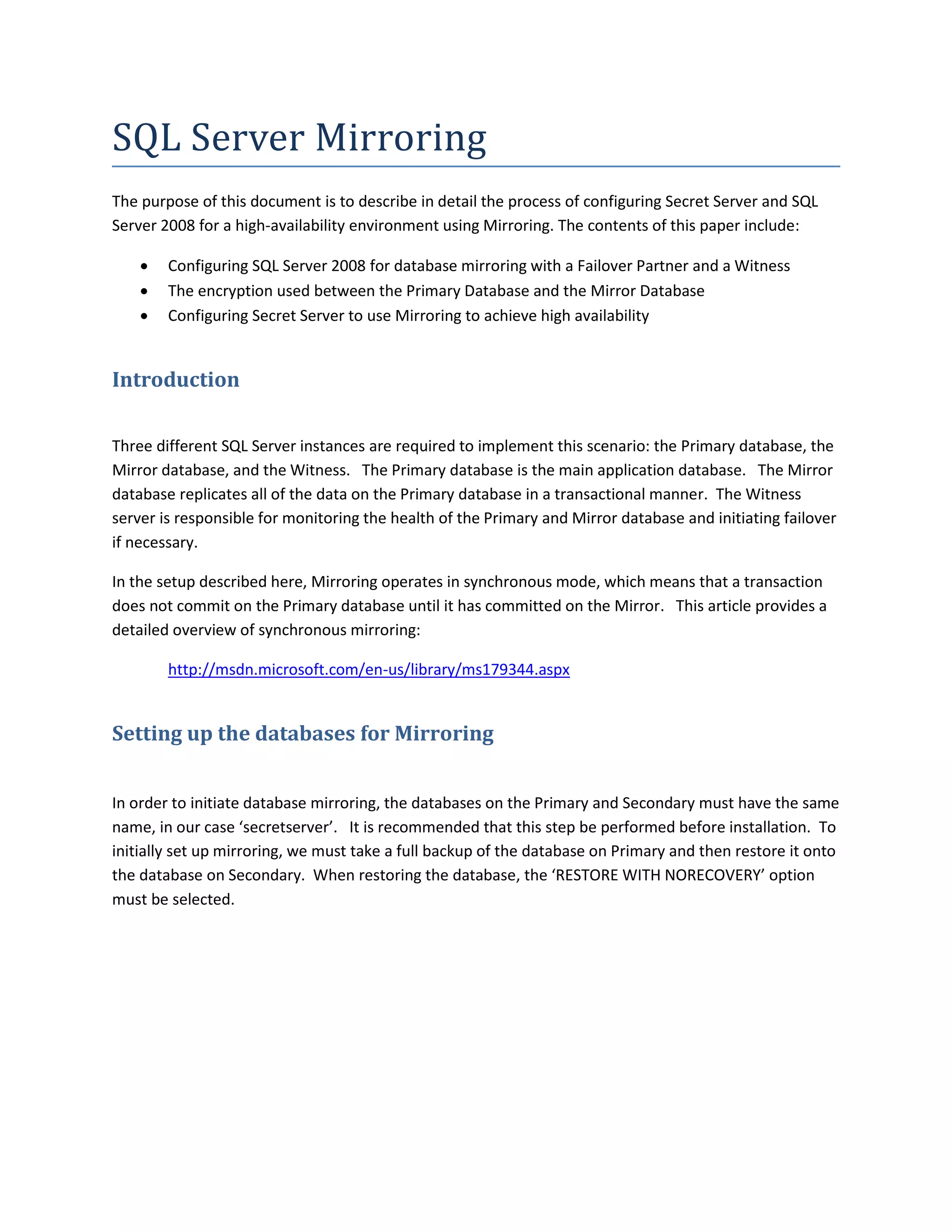
In order to initiate database mirroring, the databases on the Primary and Secondary must have the same
name, in our case ‘secretserver’. It is recommended that this step be performed before installation. To
initially set up mirroring, we must take a full backup of the database on Primary and then restore it onto
the database on Secondary. When restoring the database, the ‘RESTORE WITH NORECOVERY’ option
must be selected.
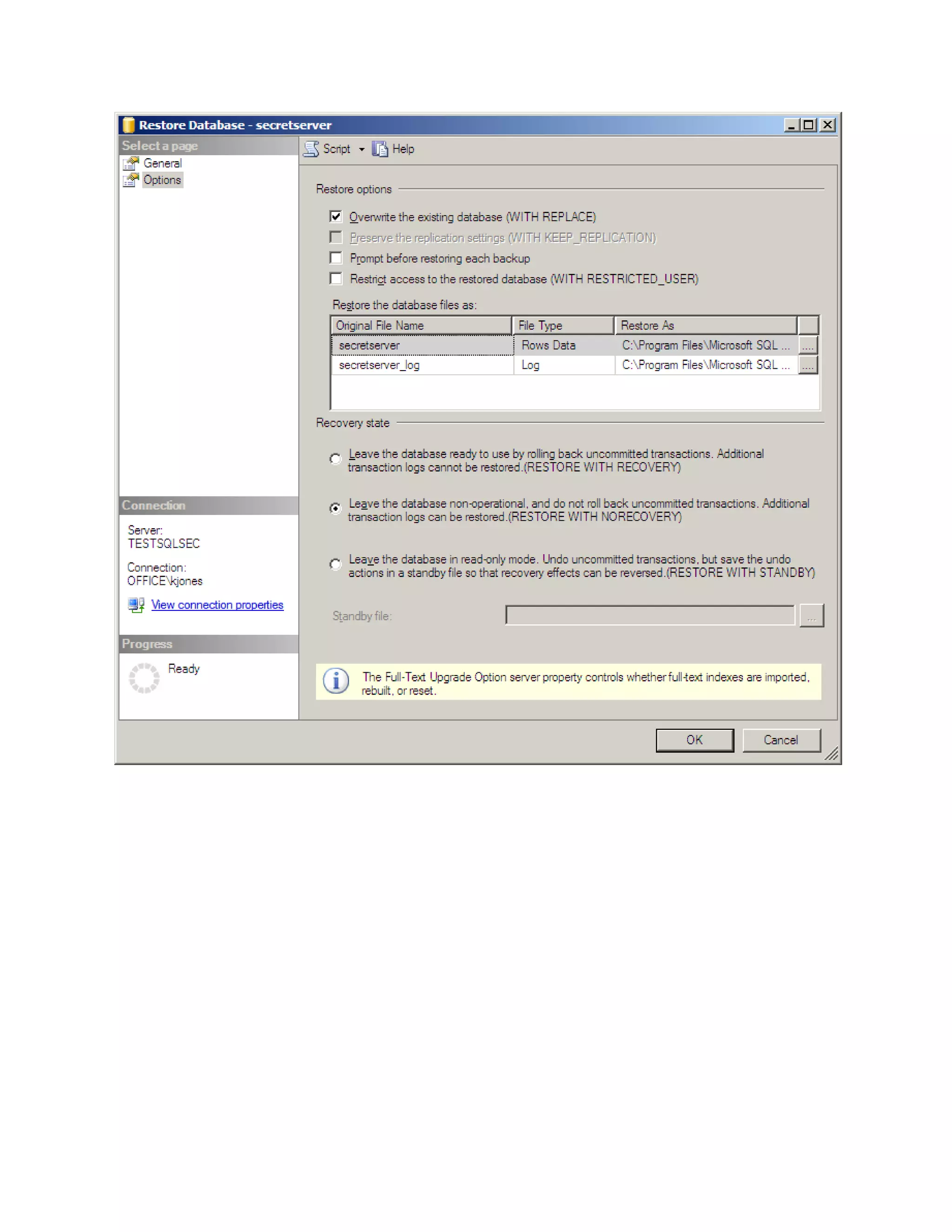
The ‘Restoring…' message is expected.
SQL Server Configuration
The SQL Server instances should all be running under the same domain account. It is possible to run
under different accounts but the configuration is more complex and not supported by Thycotic technical
support.
Each SQL Server instance should be configured to listen on TCP.
Configuring Mirroring
To configure mirroring, right click on the database on Primary and select Properties and then Mirror.
Click on the ‘Configure Security’ button. A wizard will appear.
1. In our configuration we will need a witness server. Select the ‘Yes’ radio button
2. On step 2 select all of the Mirroring roles (Primary, Mirror, and Witness)
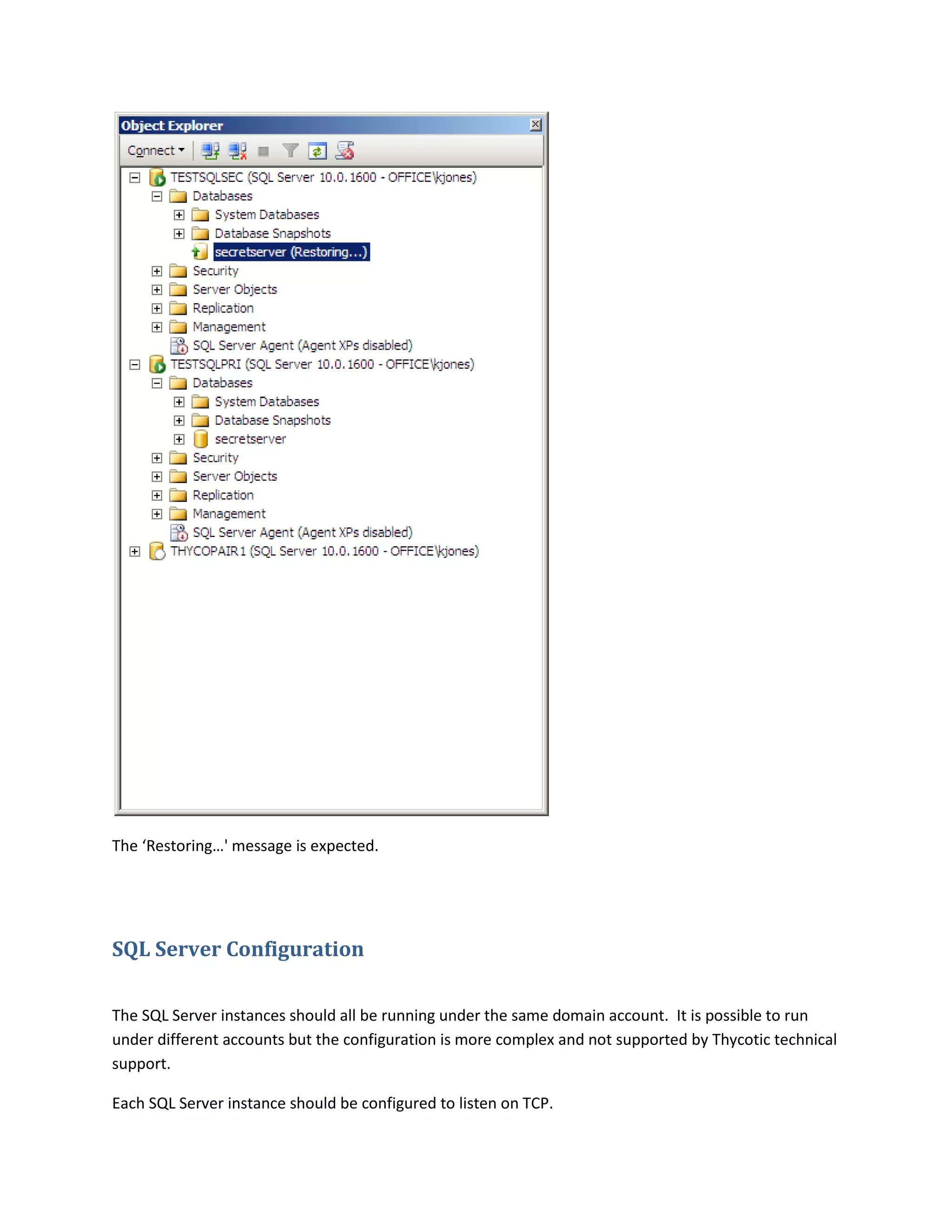
3. On this screen we need to select the current (Primary) server from the dropdown and enter a
port that the Primary SQL server will use to communicate with the other servers. Selecting the
‘Encrypt data sent through this endpoint’ checkbox will cause RC4 encryption to be used to
encrypt data sent through this endpoint. The endpoint name is there only so that one may
reference the endpoint later. The port selected here must be open for TCP communication on
the machine’s Firewall and on any network devices that restrict access to this machine.
4. Next, we enter similar information for the Mirror server instance, providing credentials to access
the Mirror server.
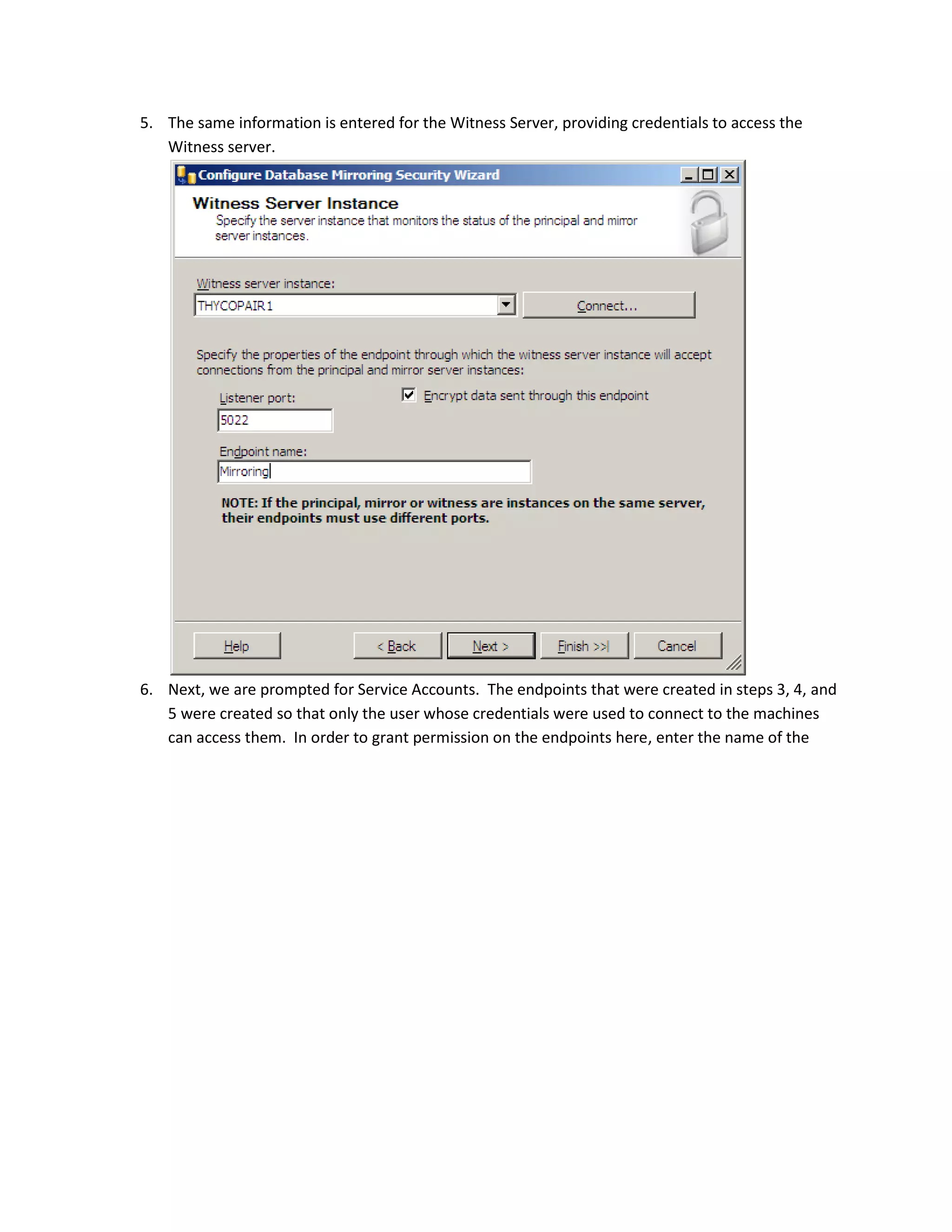
5. The same information is entered for the Witness Server, providing credentials to access the
Witness server.
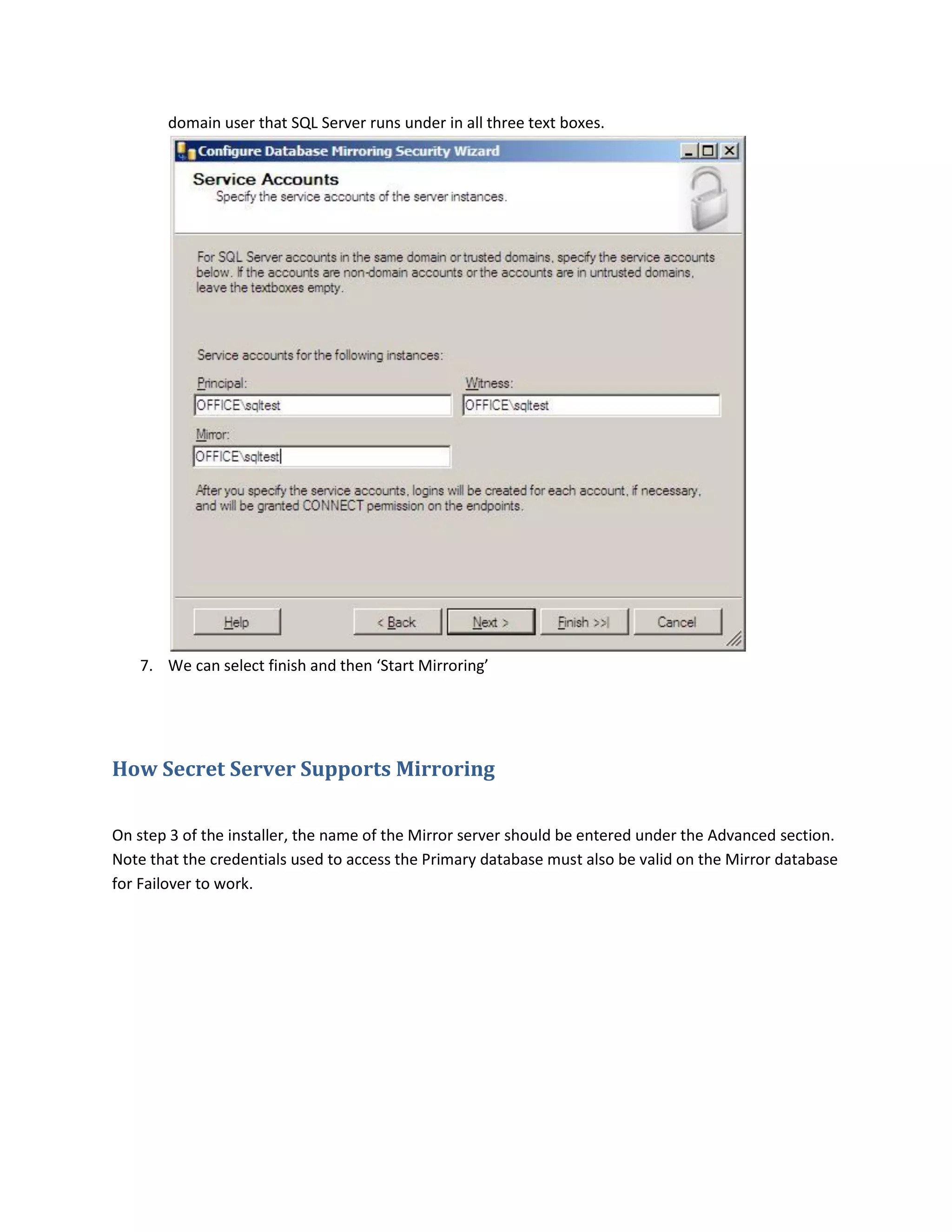
6. Next, we are prompted for Service Accounts. The endpoints that were created in steps 3, 4, and
5 were created so that only the user whose credentials were used to connect to the machines
can access them. In order to grant permission on the endpoints here, enter the name of the
domain user that SQL Server runs under in all three text boxes.
7. We can select finish and then ‘Start Mirroring’
How Secret Server Supports Mirroring
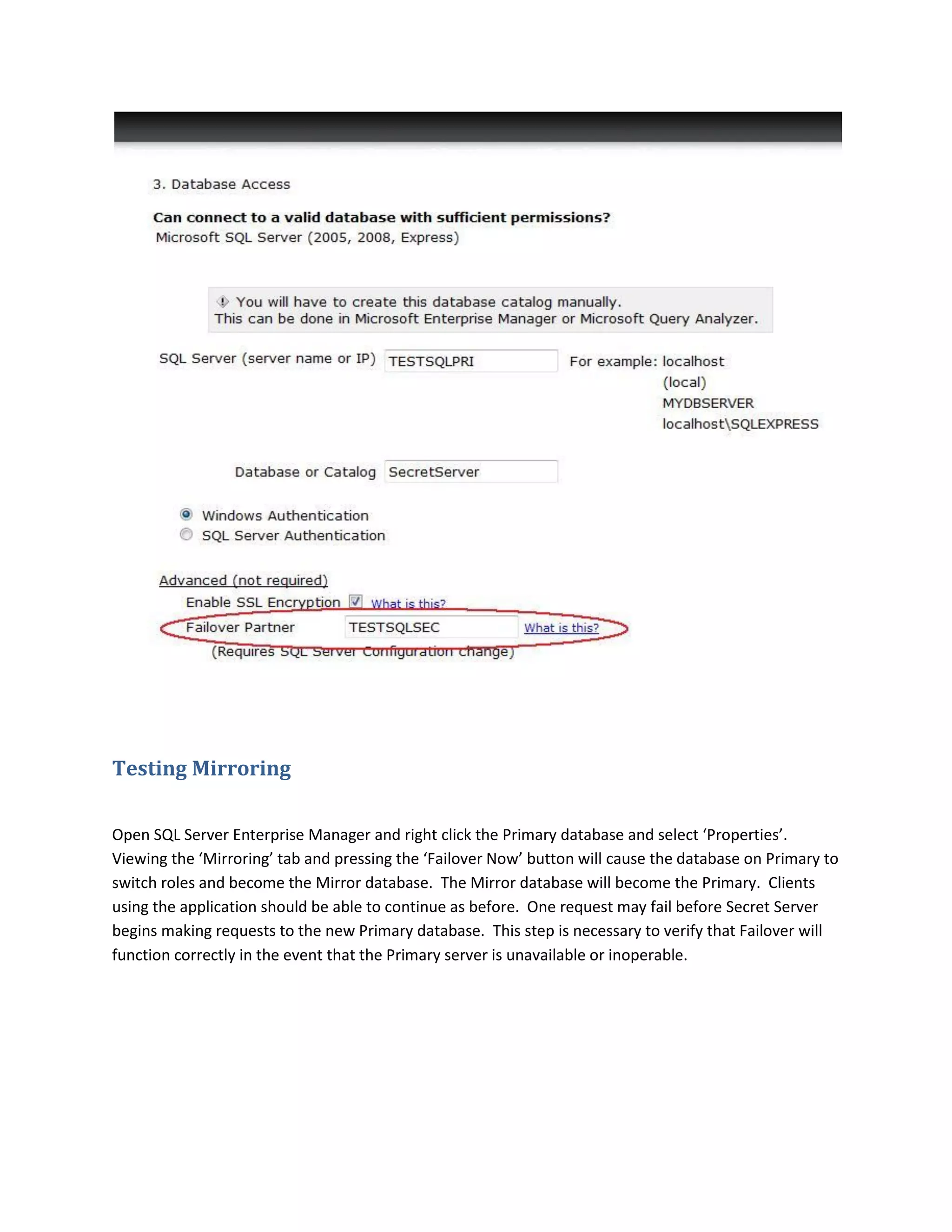
On step 3 of the installer, the name of the Mirror server should be entered under the Advanced section.
Note that the credentials used to access the Primary database must also be valid on the Mirror database
for Failover to work.
Testing Mirroring
Open SQL Server Enterprise Manager and right click the Primary database and select ‘Properties’.
Viewing the ‘Mirroring’ tab and pressing the ‘Failover Now’ button will cause the database on Primary to
switch roles and become the Mirror database. The Mirror database will become the Primary. Clients
using the application should be able to continue as before. One request may fail before Secret Server
begins making requests to the new Primary database. This step is necessary to verify that Failover will
function correctly in the event that the Primary server is unavailable or inoperable.

Sql server mirroring

  • 1.
    SQL Server Mirroring Thepurpose of this document is to describe in detail the process of configuring Secret Server and SQL Server 2008 for a high-availability environment using Mirroring. The contents of this paper include:  Configuring SQL Server 2008 for database mirroring with a Failover Partner and a Witness  The encryption used between the Primary Database and the Mirror Database  Configuring Secret Server to use Mirroring to achieve high availability Introduction Three different SQL Server instances are required to implement this scenario: the Primary database, the Mirror database, and the Witness. The Primary database is the main application database. The Mirror database replicates all of the data on the Primary database in a transactional manner. The Witness server is responsible for monitoring the health of the Primary and Mirror database and initiating failover if necessary. In the setup described here, Mirroring operates in synchronous mode, which means that a transaction does not commit on the Primary database until it has committed on the Mirror. This article provides a detailed overview of synchronous mirroring: http://msdn.microsoft.com/en-us/library/ms179344.aspx Setting up the databases for Mirroring In order to initiate database mirroring, the databases on the Primary and Secondary must have the same name, in our case ‘secretserver’. It is recommended that this step be performed before installation. To initially set up mirroring, we must take a full backup of the database on Primary and then restore it onto the database on Secondary. When restoring the database, the ‘RESTORE WITH NORECOVERY’ option must be selected.
  • 3.
    The ‘Restoring…' messageis expected. SQL Server Configuration The SQL Server instances should all be running under the same domain account. It is possible to run under different accounts but the configuration is more complex and not supported by Thycotic technical support. Each SQL Server instance should be configured to listen on TCP.
  • 4.
    Configuring Mirroring To configuremirroring, right click on the database on Primary and select Properties and then Mirror. Click on the ‘Configure Security’ button. A wizard will appear. 1. In our configuration we will need a witness server. Select the ‘Yes’ radio button 2. On step 2 select all of the Mirroring roles (Primary, Mirror, and Witness) 3. On this screen we need to select the current (Primary) server from the dropdown and enter a port that the Primary SQL server will use to communicate with the other servers. Selecting the ‘Encrypt data sent through this endpoint’ checkbox will cause RC4 encryption to be used to encrypt data sent through this endpoint. The endpoint name is there only so that one may reference the endpoint later. The port selected here must be open for TCP communication on the machine’s Firewall and on any network devices that restrict access to this machine.
  • 5.
    4. Next, weenter similar information for the Mirror server instance, providing credentials to access the Mirror server.
  • 6.
    5. The sameinformation is entered for the Witness Server, providing credentials to access the Witness server. 6. Next, we are prompted for Service Accounts. The endpoints that were created in steps 3, 4, and 5 were created so that only the user whose credentials were used to connect to the machines can access them. In order to grant permission on the endpoints here, enter the name of the
  • 7.
    domain user thatSQL Server runs under in all three text boxes. 7. We can select finish and then ‘Start Mirroring’ How Secret Server Supports Mirroring On step 3 of the installer, the name of the Mirror server should be entered under the Advanced section. Note that the credentials used to access the Primary database must also be valid on the Mirror database for Failover to work.
  • 8.
    Testing Mirroring Open SQLServer Enterprise Manager and right click the Primary database and select ‘Properties’. Viewing the ‘Mirroring’ tab and pressing the ‘Failover Now’ button will cause the database on Primary to switch roles and become the Mirror database. The Mirror database will become the Primary. Clients using the application should be able to continue as before. One request may fail before Secret Server begins making requests to the new Primary database. This step is necessary to verify that Failover will function correctly in the event that the Primary server is unavailable or inoperable.