Training on
SQL Server 2019
By Niyanta Desai
Contents
• Module 3 SQL Commands and Basic Queries
• DDL Commands: CREATE, ALTER, DROP, TRUNCATE
• DML Commands: INSERT, UPDATE, DELETE
• DQL Command: SELECT
• Data Cloning: SELECT INTO, INSERT SELECT
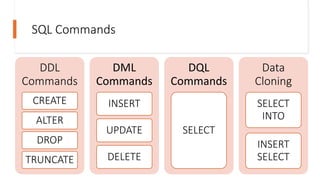
SQL Commands
DDL
Commands
CREATE
ALTER
DROP
TRUNCATE
DML
Commands
INSERT
UPDATE
DELETE
DQL
Commands
SELECT
Data
Cloning
SELECT
INTO
INSERT
SELECT
DDL (Data Definition Language) Commands
• Consists of SQL commands that can be used to define the database schema
• Deals with descriptions of the database schema and is used to create and modify the structure of database
objects
• Set of SQL commands used to create, modify, and delete database structures but not data
• These commands are normally not used by a general user, who should be accessing the database via an
application.
• List of DDL commands:
o CREATE: This command is used to create the database or its objects (like table, index, function, views,
store procedure, and triggers).
o DROP: This command is used to delete objects from the database.
o ALTER: This is used to alter the structure of the database.
o TRUNCATE: This is used to remove all records from a table, including all spaces allocated for the records
are removed.
o RENAME: This is used to rename an object existing in the database.
DATABASE Commands
For creating a new database
SYNTAX: CREATE DATABASE DBNAME;
EXAMPLE: CREATE DATABASE DEMO_DB;
Displaying name of available database
SELECT name FROM sys.databases;
To get details of available database using stored
procedure
EXEC sp_databases;
To rename the database
EXEC sp_renamedb old_name,new_name;
To delete database
Syntax: DROP DATABASE [
IF EXISTS ] database_name [,database_name2,...];
Example: DROP DATABASE DEMO_DB;
SCHEMA Commands
For creating a new schema
SYNTAX: CREATE SCHEMA schema_name [AUTHORIZATION owner_name]
EXAMPLE: CREATE DATABASE DEMO_S;
Displaying name of available schemas
SELECT name FROM sys.schemas;
To delete schema
Syntax: DROP SCHEMA [IF EXISTS] schema_name;
Example: DROP Schema DEMO_S;
Table Commands
For creating a new schema
SYNTAX: CREATE TABLE
[database_name.][schema_name.]table_name
( pk_column data_type PRIMARY KEY,
column_1 data_type NOT NULL,
column_2 data_type, ..., table_constraints );
EXAMPLE: CREATE TABLE DEMO_T;
To rename table
EXEC sp_rename 'old_table_name', 'new_table
_name'
EXEC sp_rename 'DEMO_T', 'DEMO_NT'
Displaying name of available table
SELECT * FROM SYS.TABLES;
To delete table
Syntax: DROP TABLE [IF
EXISTS] table_name;
Example: DROP Table DEMO_T;
Syntax: TRUNCATE TABLE
[database_name.][schema_name.]table
_name;
Example: TRUNCATE Table DEMO_T;
LAB SESSION
• Database Name: DB_Test
• Schema Name: School
• Table Name as follows:
• Students (RegNo, Name,DOB,Contact,Email)
• Teachers (T_id,T_Name,DOJ,Phone,Mail,Exp,Designation)
• Subjects (Sub_id,SubName,Credits)
• Teaches (Tid,RegNo,Sub_id)
DQL Commands
• SELECT
• Syntax: SELECT select_list FROM schema_name.table_name;
• Example:
o For all records
 Select * from tablename;
 Select * from School.Students;
o For specific columns
§ Select Column(s) from tablename;
§ Select RegNo , Name from School.Students;
o For specific rows
§ Select Column(s) from tablename where condition;
§ Select * from School.Students where RegNo = 1;
Assignments
• Display records of all teachers
• Display name of all teachers having experience more than 2
years
• Display name of all subject having credits 4
Data cloning
• SELECT Into
• Syntax: SELECT select_list INTO destination FROM source [WHERE
condition]
• Example:
• INSERT INTO SELECT
• Syntax: INSERT [ TOP ( expression ) [ PERCENT ] ] INTO target_table
(column_list) query
• Example:
Lab Session on
Constraints
• Add Primary key and foreign key in the tables.
• Add not null constraints in all the name values in all
tables.
• Add unique constraint in email columns.
• Check whether the entered phone is having length of 10
and size of it is bigint
• check whether the entered designation is in upper case.
• Set default value of experience as 0.
• Change the size of email as 100
Lab Session on DQL
• Display all subject details
• Display teacher id of subject 11
• Display student studying under teacher 4 and 7
• Display students studying subject 11 and 14
• Display teacher's name having experince between 5 to 8
• Display name of students not having contact 99
• Display name of all subjects in upper case
• Display the teacher name, id and designation whoose name
starts with 's' and have 4 characters in the name
• Display name of teacher with his experince in current
company
Lab Session on Data
Cloning
• Create copy of teachers name with designation in T_data
table.
• Create new table LogSubject and add subject name with
credits having credits more than 3
Thank You

SQL: Introduction and its Basic Commands

  • 1.
    Training on SQL Server2019 By Niyanta Desai
  • 2.
    Contents • Module 3SQL Commands and Basic Queries • DDL Commands: CREATE, ALTER, DROP, TRUNCATE • DML Commands: INSERT, UPDATE, DELETE • DQL Command: SELECT • Data Cloning: SELECT INTO, INSERT SELECT
  • 3.
  • 4.
    DDL (Data DefinitionLanguage) Commands • Consists of SQL commands that can be used to define the database schema • Deals with descriptions of the database schema and is used to create and modify the structure of database objects • Set of SQL commands used to create, modify, and delete database structures but not data • These commands are normally not used by a general user, who should be accessing the database via an application. • List of DDL commands: o CREATE: This command is used to create the database or its objects (like table, index, function, views, store procedure, and triggers). o DROP: This command is used to delete objects from the database. o ALTER: This is used to alter the structure of the database. o TRUNCATE: This is used to remove all records from a table, including all spaces allocated for the records are removed. o RENAME: This is used to rename an object existing in the database.
  • 5.
    DATABASE Commands For creatinga new database SYNTAX: CREATE DATABASE DBNAME; EXAMPLE: CREATE DATABASE DEMO_DB; Displaying name of available database SELECT name FROM sys.databases; To get details of available database using stored procedure EXEC sp_databases; To rename the database EXEC sp_renamedb old_name,new_name; To delete database Syntax: DROP DATABASE [ IF EXISTS ] database_name [,database_name2,...]; Example: DROP DATABASE DEMO_DB;
  • 6.
    SCHEMA Commands For creatinga new schema SYNTAX: CREATE SCHEMA schema_name [AUTHORIZATION owner_name] EXAMPLE: CREATE DATABASE DEMO_S; Displaying name of available schemas SELECT name FROM sys.schemas; To delete schema Syntax: DROP SCHEMA [IF EXISTS] schema_name; Example: DROP Schema DEMO_S;
  • 7.
    Table Commands For creatinga new schema SYNTAX: CREATE TABLE [database_name.][schema_name.]table_name ( pk_column data_type PRIMARY KEY, column_1 data_type NOT NULL, column_2 data_type, ..., table_constraints ); EXAMPLE: CREATE TABLE DEMO_T; To rename table EXEC sp_rename 'old_table_name', 'new_table _name' EXEC sp_rename 'DEMO_T', 'DEMO_NT' Displaying name of available table SELECT * FROM SYS.TABLES; To delete table Syntax: DROP TABLE [IF EXISTS] table_name; Example: DROP Table DEMO_T; Syntax: TRUNCATE TABLE [database_name.][schema_name.]table _name; Example: TRUNCATE Table DEMO_T;
  • 8.
    LAB SESSION • DatabaseName: DB_Test • Schema Name: School • Table Name as follows: • Students (RegNo, Name,DOB,Contact,Email) • Teachers (T_id,T_Name,DOJ,Phone,Mail,Exp,Designation) • Subjects (Sub_id,SubName,Credits) • Teaches (Tid,RegNo,Sub_id)
  • 9.
    DQL Commands • SELECT •Syntax: SELECT select_list FROM schema_name.table_name; • Example: o For all records  Select * from tablename;  Select * from School.Students; o For specific columns § Select Column(s) from tablename; § Select RegNo , Name from School.Students; o For specific rows § Select Column(s) from tablename where condition; § Select * from School.Students where RegNo = 1;
  • 10.
    Assignments • Display recordsof all teachers • Display name of all teachers having experience more than 2 years • Display name of all subject having credits 4
  • 11.
    Data cloning • SELECTInto • Syntax: SELECT select_list INTO destination FROM source [WHERE condition] • Example: • INSERT INTO SELECT • Syntax: INSERT [ TOP ( expression ) [ PERCENT ] ] INTO target_table (column_list) query • Example:
  • 12.
    Lab Session on Constraints •Add Primary key and foreign key in the tables. • Add not null constraints in all the name values in all tables. • Add unique constraint in email columns. • Check whether the entered phone is having length of 10 and size of it is bigint • check whether the entered designation is in upper case. • Set default value of experience as 0. • Change the size of email as 100
  • 13.
    Lab Session onDQL • Display all subject details • Display teacher id of subject 11 • Display student studying under teacher 4 and 7 • Display students studying subject 11 and 14 • Display teacher's name having experince between 5 to 8 • Display name of students not having contact 99 • Display name of all subjects in upper case • Display the teacher name, id and designation whoose name starts with 's' and have 4 characters in the name • Display name of teacher with his experince in current company
  • 14.
    Lab Session onData Cloning • Create copy of teachers name with designation in T_data table. • Create new table LogSubject and add subject name with credits having credits more than 3
  • 15.