Buzz Bonneau
April 5th, 2010
Spreadsheet Errors: Everyone
Makes Them
Designing Financial Models That Work
1
Spreadsheet Error Side by Side Comparison
Mechanical
Error
Logic Error
Omission
Error
Setup and
Structural
Errors
Frequency
Impact
Prevention
Detection
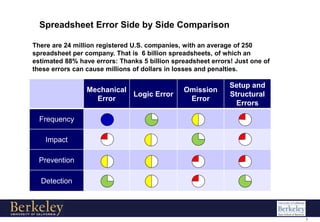
There are 24 million registered U.S. companies, with an average of 250
spreadsheet per company. That is 6 billion spreadsheets, of which an
estimated 88% have errors: Thanks 5 billion spreadsheet errors! Just one of
these errors can cause millions of dollars in losses and penalties.
2
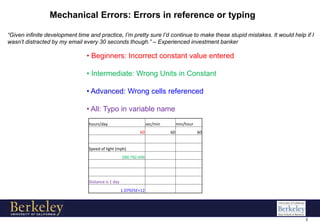
Mechanical Errors: Errors in reference or typing
• Beginners: Incorrect constant value entered
• Intermediate: Wrong Units in Constant
• Advanced: Wrong cells referenced
• All: Typo in variable name
“Given infinite development time and practice, I’m pretty sure I’d continue to make these stupid mistakes. It would help if I
wasn’t distracted by my email every 30 seconds though.” – Experienced investment banker
hours/day sec/min min/hour
60 60 60
Speed of light (mph)
299,792,456
Distance is 1 day
1.07925E+12
3
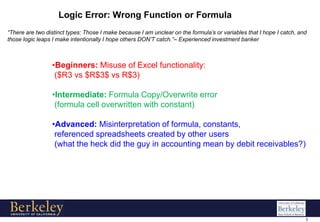
Logic Error: Wrong Function or Formula
•Beginners: Misuse of Excel functionality:
($R3 vs $R$3$ vs R$3)
•Intermediate: Formula Copy/Overwrite error
(formula cell overwritten with constant)
•Advanced: Misinterpretation of formula, constants,
referenced spreadsheets created by other users
(what the heck did the guy in accounting mean by debit receivables?)
“There are two distinct types: Those I make because I am unclear on the formula’s or variables that I hope I catch, and
those logic leaps I make intentionally I hope others DON’T catch.”– Experienced investment banker
4
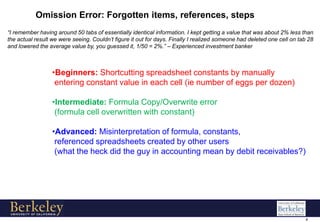
Omission Error: Forgotten items, references, steps
•Beginners: Shortcutting spreadsheet constants by manually
entering constant value in each cell (ie number of eggs per dozen)
•Intermediate: Formula Copy/Overwrite error
(formula cell overwritten with constant)
•Advanced: Misinterpretation of formula, constants,
referenced spreadsheets created by other users
(what the heck did the guy in accounting mean by debit receivables?)
“I remember having around 50 tabs of essentially identical information. I kept getting a value that was about 2% less than
the actual result we were seeing. Couldn’t figure it out for days. Finally I realized someone had deleted one cell on tab 28
and lowered the average value by, you guessed it, 1/50 = 2%.” – Experienced investment banker
5
Setup and Structural Errors: The beginning of those errors
•Beginners: Constants misaligned across columns and/or
rows (proven to cause additional errors) – reference effors
•Intermediate: Too many tabs and/or unnecessary tabs – reference and
interpretation errors.
•Advanced: End-goal not clear, support and/or extraneous calculations
included on primary spreadsheet – interpretation and sharing errors
“Its always obvious when someone is new to spreadsheets when the person is adding constants as needed for their
formulas.” – Experienced investment banker

Spreadsheet Errors

  • 1.
    Buzz Bonneau April 5th,2010 Spreadsheet Errors: Everyone Makes Them Designing Financial Models That Work
  • 2.
    1 Spreadsheet Error Sideby Side Comparison Mechanical Error Logic Error Omission Error Setup and Structural Errors Frequency Impact Prevention Detection There are 24 million registered U.S. companies, with an average of 250 spreadsheet per company. That is 6 billion spreadsheets, of which an estimated 88% have errors: Thanks 5 billion spreadsheet errors! Just one of these errors can cause millions of dollars in losses and penalties.
  • 3.
    2 Mechanical Errors: Errorsin reference or typing • Beginners: Incorrect constant value entered • Intermediate: Wrong Units in Constant • Advanced: Wrong cells referenced • All: Typo in variable name “Given infinite development time and practice, I’m pretty sure I’d continue to make these stupid mistakes. It would help if I wasn’t distracted by my email every 30 seconds though.” – Experienced investment banker hours/day sec/min min/hour 60 60 60 Speed of light (mph) 299,792,456 Distance is 1 day 1.07925E+12
  • 4.
    3 Logic Error: WrongFunction or Formula •Beginners: Misuse of Excel functionality: ($R3 vs $R$3$ vs R$3) •Intermediate: Formula Copy/Overwrite error (formula cell overwritten with constant) •Advanced: Misinterpretation of formula, constants, referenced spreadsheets created by other users (what the heck did the guy in accounting mean by debit receivables?) “There are two distinct types: Those I make because I am unclear on the formula’s or variables that I hope I catch, and those logic leaps I make intentionally I hope others DON’T catch.”– Experienced investment banker
  • 5.
    4 Omission Error: Forgottenitems, references, steps •Beginners: Shortcutting spreadsheet constants by manually entering constant value in each cell (ie number of eggs per dozen) •Intermediate: Formula Copy/Overwrite error (formula cell overwritten with constant) •Advanced: Misinterpretation of formula, constants, referenced spreadsheets created by other users (what the heck did the guy in accounting mean by debit receivables?) “I remember having around 50 tabs of essentially identical information. I kept getting a value that was about 2% less than the actual result we were seeing. Couldn’t figure it out for days. Finally I realized someone had deleted one cell on tab 28 and lowered the average value by, you guessed it, 1/50 = 2%.” – Experienced investment banker
  • 6.
    5 Setup and StructuralErrors: The beginning of those errors •Beginners: Constants misaligned across columns and/or rows (proven to cause additional errors) – reference effors •Intermediate: Too many tabs and/or unnecessary tabs – reference and interpretation errors. •Advanced: End-goal not clear, support and/or extraneous calculations included on primary spreadsheet – interpretation and sharing errors “Its always obvious when someone is new to spreadsheets when the person is adding constants as needed for their formulas.” – Experienced investment banker