

Copyright © 2015 Splunk Inc.
Search Optimization
Splunk Live! – New York
Agenda
● Splunk Architecture Overview
● How Are Events Stored?
● How Search Works
● Types of Searches
● Search Tips
2
● If we have time…
● Command Abuse
● If we have even more time…
● Bloom Filters
Am I in the right place?
Some familiarity with…
● Splunk roles
– Search Head, Indexer, Forwarder
● Splunk Search Interface
● Search Processing Language
(SPL)
3
Who’s This Dude?
4
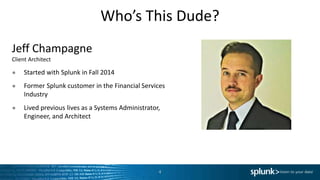
Jeff Champagne
Client Architect
● Started with Splunk in Fall 2014
● Former Splunk customer in the Financial Services
Industry
● Lived previous lives as a Systems Administrator,
Engineer, and Architect
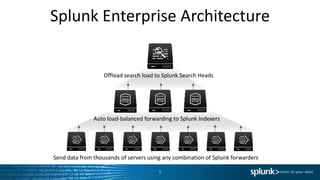
Splunk Enterprise Architecture
5
Send data from thousands of servers using any combination of Splunk forwarders
Auto load-balanced forwarding to Splunk Indexers
Offload search load to Splunk Search Heads
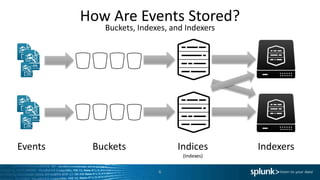
How Are Events Stored?
Buckets, Indexes, and Indexers
6
IndexersIndices
(Indexes)
BucketsEvents
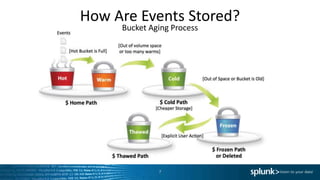
How Are Events Stored?
Bucket Aging Process
7
How Are Events Stored?
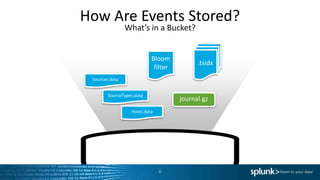
What’s in a Bucket?
8
.tsidx
Sources.data
SourceTypes.data
Hosts.data
journal.gz
Bloom
filter
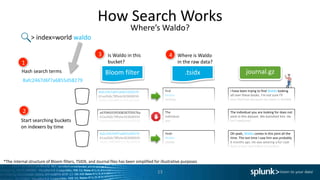
How Search Works
Where’s Waldo?
9
> index=world waldo
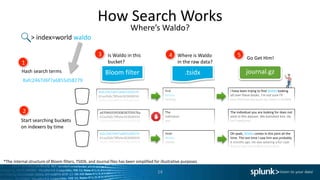
How Search Works
Where’s Waldo?
10
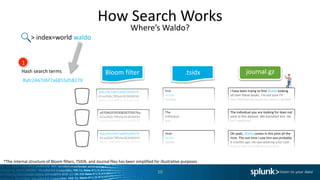
journal.gzBloom filter .tsidx
> index=world waldo
I have been trying to find Waldo looking
all over these books. I’m not sure I’ll
ever find him because my vision is terrible.
The individual you are looking for does not
exist in this dataset. We banished him. He
isn’t welcome.
Oh yeah, Waldo comes in this joint all the
time. The last time I saw him was probably
6 months ago. He was wearing a fur coat
from a bear that killed his brother.
find
Waldo
looking
The
individual
you
are
Yeah
Waldo
comes
in
Bafc2467d6f7a6855d58279
61aa5b6c78fa4e363606934
2b80a20039f52112ba97370
a4704fd35f0308287f2937ba
61aa5b6c78fa4e363606934
2b80a20039f52112ba97370
Bafc2467d6f7a6855d58279
61aa5b6c78fa4e363606934
2b80a20039f52112ba97370
Bafc2467d6f7a6855d58279
1
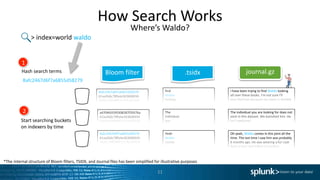
Hash search terms
*The internal structure of Bloom filters, TSIDX, and Journal files has been simplified for illustrative purposes
How Search Works
Where’s Waldo?
11
journal.gzBloom filter .tsidx
> index=world waldo
I have been trying to find Waldo looking
all over these books. I’m not sure I’ll
ever find him because my vision is terrible.
The individual you are looking for does not
exist in this dataset. We banished him. He
isn’t welcome.
Oh yeah, Waldo comes in this joint all the
time. The last time I saw him was probably
6 months ago. He was wearing a fur coat
from a bear that killed his brother.
find
Waldo
looking
The
individual
you
are
Yeah
Waldo
comes
in
Bafc2467d6f7a6855d58279
61aa5b6c78fa4e363606934
2b80a20039f52112ba97370
a4704fd35f0308287f2937ba
61aa5b6c78fa4e363606934
2b80a20039f52112ba97370
Bafc2467d6f7a6855d58279
61aa5b6c78fa4e363606934
2b80a20039f52112ba97370
Bafc2467d6f7a6855d58279
1
Hash search terms
2
Start searching buckets
on indexers by time
*The internal structure of Bloom filters, TSIDX, and Journal files has been simplified for illustrative purposes
How Search Works
Where’s Waldo?
12
journal.gzBloom filter .tsidx
> index=world waldo
I have been trying to find Waldo looking
all over these books. I’m not sure I’ll
ever find him because my vision is terrible.
The individual you are looking for does not
exist in this dataset. We banished him. He
isn’t welcome.
Oh yeah, Waldo comes in this joint all the
time. The last time I saw him was probably
6 months ago. He was wearing a fur coat
from a bear that killed his brother.
find
Waldo
looking
The
individual
you
are
Yeah
Waldo
comes
in
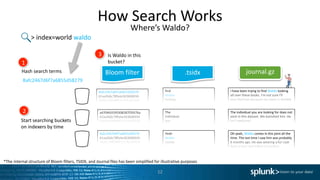
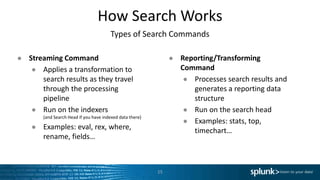
Is Waldo in this
bucket?
Bafc2467d6f7a6855d58279
61aa5b6c78fa4e363606934
2b80a20039f52112ba97370
a4704fd35f0308287f2937ba
61aa5b6c78fa4e363606934
2b80a20039f52112ba97370
Bafc2467d6f7a6855d58279
61aa5b6c78fa4e363606934
2b80a20039f52112ba97370
Bafc2467d6f7a6855d58279
1
Hash search terms
2
Start searching buckets
on indexers by time
3
*The internal structure of Bloom filters, TSIDX, and Journal files has been simplified for illustrative purposes
How Search Works
Where’s Waldo?
13
journal.gzBloom filter .tsidx
> index=world waldo
I have been trying to find Waldo looking
all over these books. I’m not sure I’ll
ever find him because my vision is terrible.
The individual you are looking for does not
exist in this dataset. We banished him. He
isn’t welcome.
Oh yeah, Waldo comes in this joint all the
time. The last time I saw him was probably
6 months ago. He was wearing a fur coat
from a bear that killed his brother.
find
Waldo
looking
The
individual
you
are
Yeah
Waldo
comes
in
Is Waldo in this
bucket?
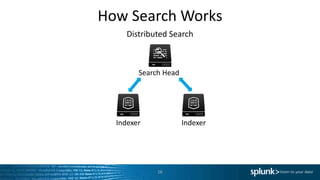
Where is Waldo
in the raw data?
Bafc2467d6f7a6855d58279
61aa5b6c78fa4e363606934
2b80a20039f52112ba97370
a4704fd35f0308287f2937ba
61aa5b6c78fa4e363606934
2b80a20039f52112ba97370
Bafc2467d6f7a6855d58279
61aa5b6c78fa4e363606934
2b80a20039f52112ba97370
Bafc2467d6f7a6855d58279
1
Hash search terms
2
Start searching buckets
on indexers by time
3 4
*The internal structure of Bloom filters, TSIDX, and Journal files has been simplified for illustrative purposes
How Search Works
Where’s Waldo?
14
journal.gzBloom filter .tsidx
> index=world waldo
I have been trying to find Waldo looking
all over these books. I’m not sure I’ll
ever find him because my vision is terrible.
The individual you are looking for does not
exist in this dataset. We banished him. He
isn’t welcome.
Oh yeah, Waldo comes in this joint all the
time. The last time I saw him was probably
6 months ago. He was wearing a fur coat
from a bear that killed his brother.
find
Waldo
looking
The
individual
you
are
Yeah
Waldo
comes
in
Is Waldo in this
bucket?
Where is Waldo
in the raw data?
Bafc2467d6f7a6855d58279
61aa5b6c78fa4e363606934
2b80a20039f52112ba97370
a4704fd35f0308287f2937ba
61aa5b6c78fa4e363606934
2b80a20039f52112ba97370
Bafc2467d6f7a6855d58279
61aa5b6c78fa4e363606934
2b80a20039f52112ba97370
Go Get Him!
Bafc2467d6f7a6855d58279
1
Hash search terms
2
Start searching buckets
on indexers by time
3 4 5
*The internal structure of Bloom filters, TSIDX, and Journal files has been simplified for illustrative purposes
How Search Works
Types of Search Commands
15
● Streaming Command
● Applies a transformation to
search results as they travel
through the processing
pipeline
● Run on the indexers
(and Search Head if you have indexed data there)
● Examples: eval, rex, where,
rename, fields…
● Reporting/Transforming
Command
● Processes search results and
generates a reporting data
structure
● Run on the search head
● Examples: stats, top,
timechart…
How Search Works
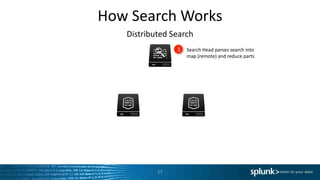
Distributed Search
16
Search Head
Indexer Indexer
How Search Works
Distributed Search
17
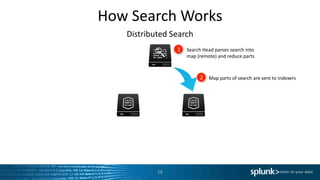
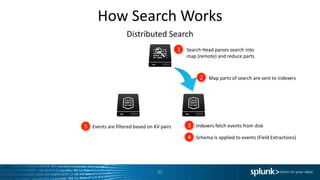
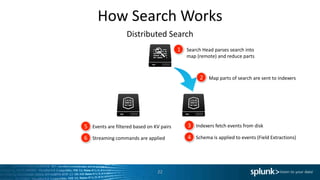
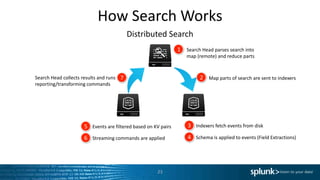
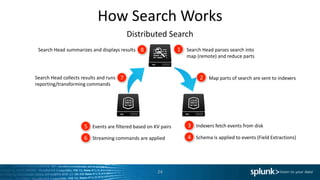
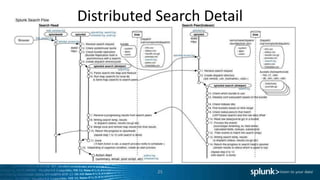
1 Search Head parses search into
map (remote) and reduce parts
How Search Works
Distributed Search
18
1 Search Head parses search into
map (remote) and reduce parts
2 Map parts of search are sent to indexers
How Search Works
Distributed Search
19
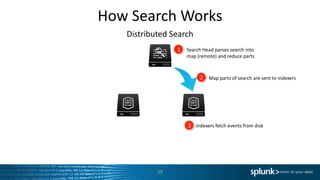
1 Search Head parses search into
map (remote) and reduce parts
2 Map parts of search are sent to indexers
3 Indexers fetch events from disk
How Search Works
Distributed Search
20
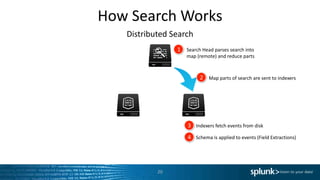
1 Search Head parses search into
map (remote) and reduce parts
2 Map parts of search are sent to indexers
3 Indexers fetch events from disk
4 Schema is applied to events (Field Extractions)
How Search Works
Distributed Search
21
1 Search Head parses search into
map (remote) and reduce parts
2 Map parts of search are sent to indexers
3 Indexers fetch events from disk
4 Schema is applied to events (Field Extractions)
5 Events are filtered based on KV pairs
How Search Works
Distributed Search
22
1 Search Head parses search into
map (remote) and reduce parts
2 Map parts of search are sent to indexers
3 Indexers fetch events from disk
4 Schema is applied to events (Field Extractions)
5 Events are filtered based on KV pairs
6 Streaming commands are applied
How Search Works
Distributed Search
23
1 Search Head parses search into
map (remote) and reduce parts
2 Map parts of search are sent to indexers
3 Indexers fetch events from disk
4 Schema is applied to events (Field Extractions)
5 Events are filtered based on KV pairs
6 Streaming commands are applied
7Search Head collects results and runs
reporting/transforming commands
How Search Works
Distributed Search
24
1 Search Head parses search into
map (remote) and reduce parts
2 Map parts of search are sent to indexers
3 Indexers fetch events from disk
4 Schema is applied to events (Field Extractions)
5 Events are filtered based on KV pairs
6 Streaming commands are applied
7Search Head collects results and runs
reporting/transforming commands
8Search Head summarizes and displays results
Distributed Search Detail
25
Types of Searches
26
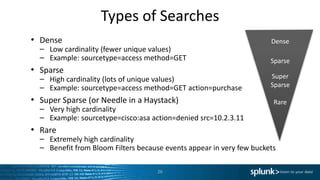
• Dense
– Low cardinality (fewer unique values)
– Example: sourcetype=access method=GET
• Sparse
– High cardinality (lots of unique values)
– Example: sourcetype=access method=GET action=purchase
• Super Sparse (or Needle in a Haystack)
– Very high cardinality
– Example: sourcetype=cisco:asa action=denied src=10.2.3.11
• Rare
– Extremely high cardinality
– Benefit from Bloom Filters because events appear in very few buckets
Dense
Super
Sparse
Sparse
Rare
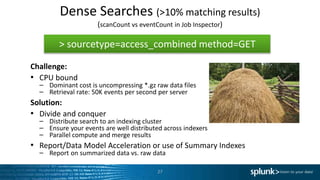
Dense Searches (>10% matching results)
(scanCount vs eventCount in Job Inspector)
27
Challenge:
• CPU bound
– Dominant cost is uncompressing *.gz raw data files
– Retrieval rate: 50K events per second per server
Solution:
• Divide and conquer
– Distribute search to an indexing cluster
– Ensure your events are well distributed across indexers
– Parallel compute and merge results
• Report/Data Model Acceleration or use of Summary Indexes
– Report on summarized data vs. raw data
> sourcetype=access_combined method=GET
Sparse Searches
28
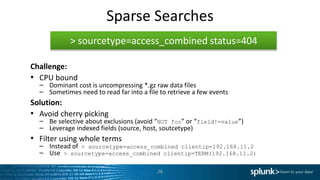
Challenge:
• CPU bound
– Dominant cost is uncompressing *.gz raw data files
– Sometimes need to read far into a file to retrieve a few events
Solution:
• Avoid cherry picking
– Be selective about exclusions (avoid “NOT foo” or “field!=value”)
– Leverage indexed fields (source, host, soutcetype)
• Filter using whole terms
– Instead of > sourcetype=access_combined clientip=192.168.11.2
– Use > sourcetype=access_combined clientip=TERM(192.168.11.2)
> sourcetype=access_combined status=404
Super Sparse Searches
29
• “Needle in Haystack”
• Disk I/O Bound
– Must look through a lot of tsidx files to
find a small amount of data
• May take up to 2 Seconds to
search each bucket
> sourcetype=access_combined status 404 ip=10.2.1.3
Rare Term Searches
30
• Disk I/O Bound
• Bloom Filters Improve Performance
– Process up to 50 buckets per second
– I/Os reduced as buckets are excluded
– 20-100x faster than Super Sparse searches on conventional storage,
>1000x faster on SSD (Due to random reads)
> sourcetype=access_combined sessionID=1234
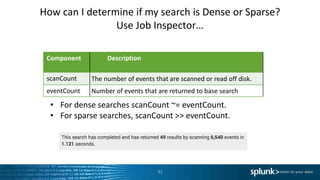
How can I determine if my search is Dense or Sparse?
Use Job Inspector…
31
Component Description
scanCount The number of events that are scanned or read off disk.
eventCount Number of events that are returned to base search
• For dense searches scanCount ~= eventCount.
• For sparse searches, scanCount >> eventCount.
Search Tips
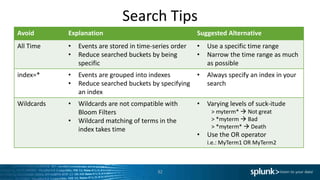
32
Avoid Explanation Suggested Alternative
All Time • Events are stored in time-series order
• Reduce searched buckets by being
specific
• Use a specific time range
• Narrow the time range as much
as possible
index=* • Events are grouped into indexes
• Reduce searched buckets by specifying
an index
• Always specify an index in your
search
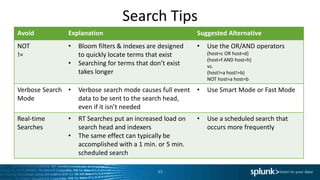
Wildcards • Wildcards are not compatible with
Bloom Filters
• Wildcard matching of terms in the
index takes time
• Varying levels of suck-itude
> myterm*  Not great
> *myterm  Bad
> *myterm*  Death
• Use the OR operator
i.e.: MyTerm1 OR MyTerm2
Search Tips
33
Avoid Explanation Suggested Alternative
NOT
!=
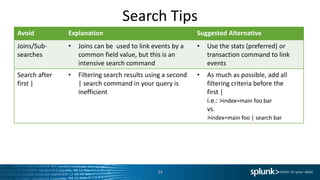
• Bloom filters & indexes are designed
to quickly locate terms that exist
• Searching for terms that don’t exist
takes longer
• Use the OR/AND operators
(host=c OR host=d)
(host=f AND host=h)
vs.
(host!=a host!=b)
NOT host=a host=b
Verbose Search
Mode
• Verbose search mode causes full event
data to be sent to the search head,
even if it isn’t needed
• Use Smart Mode or Fast Mode
Real-time
Searches
• RT Searches put an increased load on
search head and indexers
• The same effect can typically be
accomplished with a 1 min. or 5 min.
scheduled search
• Use a scheduled search that
occurs more frequently
Search Tips
34
Avoid Explanation Suggested Alternative
Joins/Sub-
searches
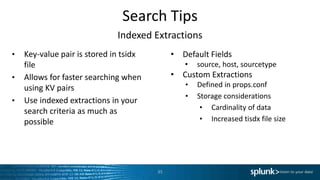
• Joins can be used to link events by a
common field value, but this is an
intensive search command
• Use the stats (preferred) or
transaction command to link
events
Search after
first |
• Filtering search results using a second
| search command in your query is
inefficient
• As much as possible, add all
filtering criteria before the
first |
i.e.: >index=main foo bar
vs.
>index=main foo | search bar
Search Tips
Indexed Extractions
• Key-value pair is stored in tsidx
file
• Allows for faster searching when
using KV pairs
• Use indexed extractions in your
search criteria as much as
possible
35
• Default Fields
• source, host, sourcetype
• Custom Extractions
• Defined in props.conf
• Storage considerations
• Cardinality of data
• Increased tisdx file size
Search Tips
Using TERM
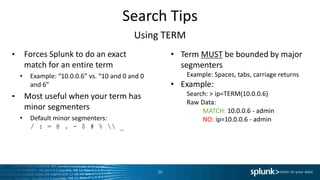
• Forces Splunk to do an exact
match for an entire term
• Example: “10.0.0.6” vs. “10 and 0 and 0
and 6”
• Most useful when your term has
minor segmenters
• Default minor segmenters:
/ : = @ . - $ # %  _
36
• Term MUST be bounded by major
segmenters
Example: Spaces, tabs, carriage returns
• Example:
Search: > ip=TERM(10.0.0.6)
Raw Data:
MATCH: 10.0.0.6 - admin
NO: ip=10.0.0.6 - admin
If we have time…
Command Abuse
Fields vs. Table
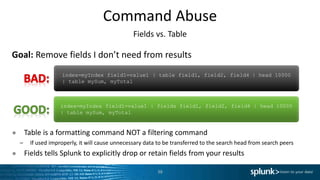
Goal: Remove fields I don’t need from results
● Table is a formatting command NOT a filtering command
– If used improperly, it will cause unnecessary data to be transferred to the search head from search peers
● Fields tells Splunk to explicitly drop or retain fields from your results
38
index=myIndex field1=value1 | fields field1, field2, field4 | head 10000
| table mySum, myTotal
index=myIndex field1=value1 | table field1, field2, field4 | head 10000
| table mySum, myTotal
Command Abuse
Fields vs. Table Example
39
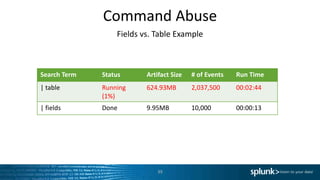
Search Term Status Artifact Size # of Events Run Time
| table Running
(1%)
624.93MB 2,037,500 00:02:44
| fields Done 9.95MB 10,000 00:00:13
Command Abuse
Stats vs. Transaction
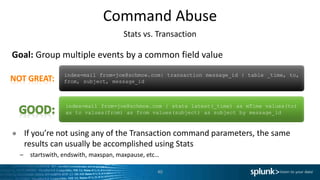
Goal: Group multiple events by a common field value
● If you’re not using any of the Transaction command parameters, the same
results can usually be accomplished using Stats
– startswith, endswith, maxspan, maxpause, etc…
40
index=mail from=joe@schmoe.com | stats latest(_time) as mTime values(to)
as to values(from) as from values(subject) as subject by message_id
index=mail from=joe@schmoe.com| transaction message_id | table _time, to,
from, subject, message_id
Command Abuse
Latest vs. Dedup
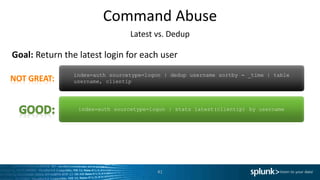
Goal: Return the latest login for each user
41
index=auth sourcetype=logon | stats latest(clientip) by username
index=auth sourcetype=logon | dedup username sortby - _time | table
username, clientip
Command Abuse
Joins & Sub-searches
Goal: Return the latest JSESSIONID across two sourcetypes
42
sourcetype=access_combined OR sourcetype=applogs | stats latest(*) as *
by JSESSIONID
sourcetype=access_combined | join type=inner JSESSIONID [search
sourcetype=applogs | dedup JSESSIONID | table JSESSIONID,
clienip, othervalue]
If we have even
more time…
Bloom Filters
How do they work again?
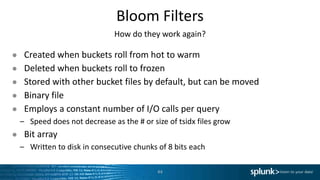
● Created when buckets roll from hot to warm
● Deleted when buckets roll to frozen
● Stored with other bucket files by default, but can be moved
● Binary file
● Employs a constant number of I/O calls per query
– Speed does not decrease as the # or size of tsidx files grow
● Bit array
– Written to disk in consecutive chunks of 8 bits each
44
Bloom Filters
How do they work again?
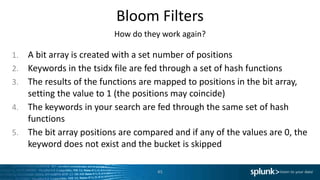
1. A bit array is created with a set number of positions
2. Keywords in the tsidx file are fed through a set of hash functions
3. The results of the functions are mapped to positions in the bit array,
setting the value to 1 (the positions may coincide)
4. The keywords in your search are fed through the same set of hash
functions
5. The bit array positions are compared and if any of the values are 0, the
keyword does not exist and the bucket is skipped
45
Bloom Filters
How do they work again?
Interactive Demo
https://www.jasondavies.com/bloomfilter/
46
Resources
● Splunk Docs
– Write Better Searches
http://docs.splunk.com/Documentation/Splunk/latest/Search/Writebettersearches
– Wiki: How Distributed Search Works
http://wiki.splunk.com/Community:HowDistSearchWorks
– Splunk Search Types
http://docs.splunk.com/Documentation/Splunk/6.2.3/Capacity/HowsearchtypesaffectSplunkEnterpriseperformance
– Blog: When to use Transaction and when to use Stats
http://blogs.splunk.com/2012/11/29/book-excerpt-when-to-use-transaction-and-when-to-use-stats/
– Segmenters.conf Spec
http://docs.splunk.com/Documentation/Splunk/latest/Admin/Segmentersconf
– Splunk Book: Exploring Splunk
http://www.splunk.com/goto/book
47
Resources
Training
● eLearning
– What is Splunk (Intro to Splunk)
‣ http://www.splunk.com/view/SP-CAAAH9U
48
● Instructor Led Courses with Labs
– Using Splunk
‣ http://www.splunk.com/view/SP-CAAAH9A
– Searching & Reporting with Splunk
‣ http://www.splunk.com/view/SP-CAAAH9C
– Advanced Searching & Reporting
‣ http://www.splunk.com/view/SP-CAAAH9D
Questions?

Splunk Search Optimization

  • 1.
    Copyright © 2015Splunk Inc. Search Optimization Splunk Live! – New York
  • 2.
    Agenda ● Splunk ArchitectureOverview ● How Are Events Stored? ● How Search Works ● Types of Searches ● Search Tips 2 ● If we have time… ● Command Abuse ● If we have even more time… ● Bloom Filters
  • 3.
    Am I inthe right place? Some familiarity with… ● Splunk roles – Search Head, Indexer, Forwarder ● Splunk Search Interface ● Search Processing Language (SPL) 3
  • 4.
    Who’s This Dude? 4 JeffChampagne Client Architect ● Started with Splunk in Fall 2014 ● Former Splunk customer in the Financial Services Industry ● Lived previous lives as a Systems Administrator, Engineer, and Architect
  • 5.
    Splunk Enterprise Architecture 5 Senddata from thousands of servers using any combination of Splunk forwarders Auto load-balanced forwarding to Splunk Indexers Offload search load to Splunk Search Heads
  • 6.
    How Are EventsStored? Buckets, Indexes, and Indexers 6 IndexersIndices (Indexes) BucketsEvents
  • 7.
    How Are EventsStored? Bucket Aging Process 7
  • 8.
    How Are EventsStored? What’s in a Bucket? 8 .tsidx Sources.data SourceTypes.data Hosts.data journal.gz Bloom filter
  • 9.
    How Search Works Where’sWaldo? 9 > index=world waldo
  • 10.
    How Search Works Where’sWaldo? 10 journal.gzBloom filter .tsidx > index=world waldo I have been trying to find Waldo looking all over these books. I’m not sure I’ll ever find him because my vision is terrible. The individual you are looking for does not exist in this dataset. We banished him. He isn’t welcome. Oh yeah, Waldo comes in this joint all the time. The last time I saw him was probably 6 months ago. He was wearing a fur coat from a bear that killed his brother. find Waldo looking The individual you are Yeah Waldo comes in Bafc2467d6f7a6855d58279 61aa5b6c78fa4e363606934 2b80a20039f52112ba97370 a4704fd35f0308287f2937ba 61aa5b6c78fa4e363606934 2b80a20039f52112ba97370 Bafc2467d6f7a6855d58279 61aa5b6c78fa4e363606934 2b80a20039f52112ba97370 Bafc2467d6f7a6855d58279 1 Hash search terms *The internal structure of Bloom filters, TSIDX, and Journal files has been simplified for illustrative purposes
  • 11.
    How Search Works Where’sWaldo? 11 journal.gzBloom filter .tsidx > index=world waldo I have been trying to find Waldo looking all over these books. I’m not sure I’ll ever find him because my vision is terrible. The individual you are looking for does not exist in this dataset. We banished him. He isn’t welcome. Oh yeah, Waldo comes in this joint all the time. The last time I saw him was probably 6 months ago. He was wearing a fur coat from a bear that killed his brother. find Waldo looking The individual you are Yeah Waldo comes in Bafc2467d6f7a6855d58279 61aa5b6c78fa4e363606934 2b80a20039f52112ba97370 a4704fd35f0308287f2937ba 61aa5b6c78fa4e363606934 2b80a20039f52112ba97370 Bafc2467d6f7a6855d58279 61aa5b6c78fa4e363606934 2b80a20039f52112ba97370 Bafc2467d6f7a6855d58279 1 Hash search terms 2 Start searching buckets on indexers by time *The internal structure of Bloom filters, TSIDX, and Journal files has been simplified for illustrative purposes
  • 12.
    How Search Works Where’sWaldo? 12 journal.gzBloom filter .tsidx > index=world waldo I have been trying to find Waldo looking all over these books. I’m not sure I’ll ever find him because my vision is terrible. The individual you are looking for does not exist in this dataset. We banished him. He isn’t welcome. Oh yeah, Waldo comes in this joint all the time. The last time I saw him was probably 6 months ago. He was wearing a fur coat from a bear that killed his brother. find Waldo looking The individual you are Yeah Waldo comes in Is Waldo in this bucket? Bafc2467d6f7a6855d58279 61aa5b6c78fa4e363606934 2b80a20039f52112ba97370 a4704fd35f0308287f2937ba 61aa5b6c78fa4e363606934 2b80a20039f52112ba97370 Bafc2467d6f7a6855d58279 61aa5b6c78fa4e363606934 2b80a20039f52112ba97370 Bafc2467d6f7a6855d58279 1 Hash search terms 2 Start searching buckets on indexers by time 3 *The internal structure of Bloom filters, TSIDX, and Journal files has been simplified for illustrative purposes
  • 13.
    How Search Works Where’sWaldo? 13 journal.gzBloom filter .tsidx > index=world waldo I have been trying to find Waldo looking all over these books. I’m not sure I’ll ever find him because my vision is terrible. The individual you are looking for does not exist in this dataset. We banished him. He isn’t welcome. Oh yeah, Waldo comes in this joint all the time. The last time I saw him was probably 6 months ago. He was wearing a fur coat from a bear that killed his brother. find Waldo looking The individual you are Yeah Waldo comes in Is Waldo in this bucket? Where is Waldo in the raw data? Bafc2467d6f7a6855d58279 61aa5b6c78fa4e363606934 2b80a20039f52112ba97370 a4704fd35f0308287f2937ba 61aa5b6c78fa4e363606934 2b80a20039f52112ba97370 Bafc2467d6f7a6855d58279 61aa5b6c78fa4e363606934 2b80a20039f52112ba97370 Bafc2467d6f7a6855d58279 1 Hash search terms 2 Start searching buckets on indexers by time 3 4 *The internal structure of Bloom filters, TSIDX, and Journal files has been simplified for illustrative purposes
  • 14.
    How Search Works Where’sWaldo? 14 journal.gzBloom filter .tsidx > index=world waldo I have been trying to find Waldo looking all over these books. I’m not sure I’ll ever find him because my vision is terrible. The individual you are looking for does not exist in this dataset. We banished him. He isn’t welcome. Oh yeah, Waldo comes in this joint all the time. The last time I saw him was probably 6 months ago. He was wearing a fur coat from a bear that killed his brother. find Waldo looking The individual you are Yeah Waldo comes in Is Waldo in this bucket? Where is Waldo in the raw data? Bafc2467d6f7a6855d58279 61aa5b6c78fa4e363606934 2b80a20039f52112ba97370 a4704fd35f0308287f2937ba 61aa5b6c78fa4e363606934 2b80a20039f52112ba97370 Bafc2467d6f7a6855d58279 61aa5b6c78fa4e363606934 2b80a20039f52112ba97370 Go Get Him! Bafc2467d6f7a6855d58279 1 Hash search terms 2 Start searching buckets on indexers by time 3 4 5 *The internal structure of Bloom filters, TSIDX, and Journal files has been simplified for illustrative purposes
  • 15.
    How Search Works Typesof Search Commands 15 ● Streaming Command ● Applies a transformation to search results as they travel through the processing pipeline ● Run on the indexers (and Search Head if you have indexed data there) ● Examples: eval, rex, where, rename, fields… ● Reporting/Transforming Command ● Processes search results and generates a reporting data structure ● Run on the search head ● Examples: stats, top, timechart…
  • 16.
    How Search Works DistributedSearch 16 Search Head Indexer Indexer
  • 17.
    How Search Works DistributedSearch 17 1 Search Head parses search into map (remote) and reduce parts
  • 18.
    How Search Works DistributedSearch 18 1 Search Head parses search into map (remote) and reduce parts 2 Map parts of search are sent to indexers
  • 19.
    How Search Works DistributedSearch 19 1 Search Head parses search into map (remote) and reduce parts 2 Map parts of search are sent to indexers 3 Indexers fetch events from disk
  • 20.
    How Search Works DistributedSearch 20 1 Search Head parses search into map (remote) and reduce parts 2 Map parts of search are sent to indexers 3 Indexers fetch events from disk 4 Schema is applied to events (Field Extractions)
  • 21.
    How Search Works DistributedSearch 21 1 Search Head parses search into map (remote) and reduce parts 2 Map parts of search are sent to indexers 3 Indexers fetch events from disk 4 Schema is applied to events (Field Extractions) 5 Events are filtered based on KV pairs
  • 22.
    How Search Works DistributedSearch 22 1 Search Head parses search into map (remote) and reduce parts 2 Map parts of search are sent to indexers 3 Indexers fetch events from disk 4 Schema is applied to events (Field Extractions) 5 Events are filtered based on KV pairs 6 Streaming commands are applied
  • 23.
    How Search Works DistributedSearch 23 1 Search Head parses search into map (remote) and reduce parts 2 Map parts of search are sent to indexers 3 Indexers fetch events from disk 4 Schema is applied to events (Field Extractions) 5 Events are filtered based on KV pairs 6 Streaming commands are applied 7Search Head collects results and runs reporting/transforming commands
  • 24.
    How Search Works DistributedSearch 24 1 Search Head parses search into map (remote) and reduce parts 2 Map parts of search are sent to indexers 3 Indexers fetch events from disk 4 Schema is applied to events (Field Extractions) 5 Events are filtered based on KV pairs 6 Streaming commands are applied 7Search Head collects results and runs reporting/transforming commands 8Search Head summarizes and displays results
  • 25.
  • 26.
    Types of Searches 26 •Dense – Low cardinality (fewer unique values) – Example: sourcetype=access method=GET • Sparse – High cardinality (lots of unique values) – Example: sourcetype=access method=GET action=purchase • Super Sparse (or Needle in a Haystack) – Very high cardinality – Example: sourcetype=cisco:asa action=denied src=10.2.3.11 • Rare – Extremely high cardinality – Benefit from Bloom Filters because events appear in very few buckets Dense Super Sparse Sparse Rare
  • 27.
    Dense Searches (>10%matching results) (scanCount vs eventCount in Job Inspector) 27 Challenge: • CPU bound – Dominant cost is uncompressing *.gz raw data files – Retrieval rate: 50K events per second per server Solution: • Divide and conquer – Distribute search to an indexing cluster – Ensure your events are well distributed across indexers – Parallel compute and merge results • Report/Data Model Acceleration or use of Summary Indexes – Report on summarized data vs. raw data > sourcetype=access_combined method=GET
  • 28.
    Sparse Searches 28 Challenge: • CPUbound – Dominant cost is uncompressing *.gz raw data files – Sometimes need to read far into a file to retrieve a few events Solution: • Avoid cherry picking – Be selective about exclusions (avoid “NOT foo” or “field!=value”) – Leverage indexed fields (source, host, soutcetype) • Filter using whole terms – Instead of > sourcetype=access_combined clientip=192.168.11.2 – Use > sourcetype=access_combined clientip=TERM(192.168.11.2) > sourcetype=access_combined status=404
  • 29.
    Super Sparse Searches 29 •“Needle in Haystack” • Disk I/O Bound – Must look through a lot of tsidx files to find a small amount of data • May take up to 2 Seconds to search each bucket > sourcetype=access_combined status 404 ip=10.2.1.3
  • 30.
    Rare Term Searches 30 •Disk I/O Bound • Bloom Filters Improve Performance – Process up to 50 buckets per second – I/Os reduced as buckets are excluded – 20-100x faster than Super Sparse searches on conventional storage, >1000x faster on SSD (Due to random reads) > sourcetype=access_combined sessionID=1234
  • 31.
    How can Idetermine if my search is Dense or Sparse? Use Job Inspector… 31 Component Description scanCount The number of events that are scanned or read off disk. eventCount Number of events that are returned to base search • For dense searches scanCount ~= eventCount. • For sparse searches, scanCount >> eventCount.
  • 32.
    Search Tips 32 Avoid ExplanationSuggested Alternative All Time • Events are stored in time-series order • Reduce searched buckets by being specific • Use a specific time range • Narrow the time range as much as possible index=* • Events are grouped into indexes • Reduce searched buckets by specifying an index • Always specify an index in your search Wildcards • Wildcards are not compatible with Bloom Filters • Wildcard matching of terms in the index takes time • Varying levels of suck-itude > myterm*  Not great > *myterm  Bad > *myterm*  Death • Use the OR operator i.e.: MyTerm1 OR MyTerm2
  • 33.
    Search Tips 33 Avoid ExplanationSuggested Alternative NOT != • Bloom filters & indexes are designed to quickly locate terms that exist • Searching for terms that don’t exist takes longer • Use the OR/AND operators (host=c OR host=d) (host=f AND host=h) vs. (host!=a host!=b) NOT host=a host=b Verbose Search Mode • Verbose search mode causes full event data to be sent to the search head, even if it isn’t needed • Use Smart Mode or Fast Mode Real-time Searches • RT Searches put an increased load on search head and indexers • The same effect can typically be accomplished with a 1 min. or 5 min. scheduled search • Use a scheduled search that occurs more frequently
  • 34.
    Search Tips 34 Avoid ExplanationSuggested Alternative Joins/Sub- searches • Joins can be used to link events by a common field value, but this is an intensive search command • Use the stats (preferred) or transaction command to link events Search after first | • Filtering search results using a second | search command in your query is inefficient • As much as possible, add all filtering criteria before the first | i.e.: >index=main foo bar vs. >index=main foo | search bar
  • 35.
    Search Tips Indexed Extractions •Key-value pair is stored in tsidx file • Allows for faster searching when using KV pairs • Use indexed extractions in your search criteria as much as possible 35 • Default Fields • source, host, sourcetype • Custom Extractions • Defined in props.conf • Storage considerations • Cardinality of data • Increased tisdx file size
  • 36.
    Search Tips Using TERM •Forces Splunk to do an exact match for an entire term • Example: “10.0.0.6” vs. “10 and 0 and 0 and 6” • Most useful when your term has minor segmenters • Default minor segmenters: / : = @ . - $ # % _ 36 • Term MUST be bounded by major segmenters Example: Spaces, tabs, carriage returns • Example: Search: > ip=TERM(10.0.0.6) Raw Data: MATCH: 10.0.0.6 - admin NO: ip=10.0.0.6 - admin
  • 37.
    If we havetime…
  • 38.
    Command Abuse Fields vs.Table Goal: Remove fields I don’t need from results ● Table is a formatting command NOT a filtering command – If used improperly, it will cause unnecessary data to be transferred to the search head from search peers ● Fields tells Splunk to explicitly drop or retain fields from your results 38 index=myIndex field1=value1 | fields field1, field2, field4 | head 10000 | table mySum, myTotal index=myIndex field1=value1 | table field1, field2, field4 | head 10000 | table mySum, myTotal
  • 39.
    Command Abuse Fields vs.Table Example 39 Search Term Status Artifact Size # of Events Run Time | table Running (1%) 624.93MB 2,037,500 00:02:44 | fields Done 9.95MB 10,000 00:00:13
  • 40.
    Command Abuse Stats vs.Transaction Goal: Group multiple events by a common field value ● If you’re not using any of the Transaction command parameters, the same results can usually be accomplished using Stats – startswith, endswith, maxspan, maxpause, etc… 40 index=mail from=joe@schmoe.com | stats latest(_time) as mTime values(to) as to values(from) as from values(subject) as subject by message_id index=mail from=joe@schmoe.com| transaction message_id | table _time, to, from, subject, message_id
  • 41.
    Command Abuse Latest vs.Dedup Goal: Return the latest login for each user 41 index=auth sourcetype=logon | stats latest(clientip) by username index=auth sourcetype=logon | dedup username sortby - _time | table username, clientip
  • 42.
    Command Abuse Joins &Sub-searches Goal: Return the latest JSESSIONID across two sourcetypes 42 sourcetype=access_combined OR sourcetype=applogs | stats latest(*) as * by JSESSIONID sourcetype=access_combined | join type=inner JSESSIONID [search sourcetype=applogs | dedup JSESSIONID | table JSESSIONID, clienip, othervalue]
  • 43.
    If we haveeven more time…
  • 44.
    Bloom Filters How dothey work again? ● Created when buckets roll from hot to warm ● Deleted when buckets roll to frozen ● Stored with other bucket files by default, but can be moved ● Binary file ● Employs a constant number of I/O calls per query – Speed does not decrease as the # or size of tsidx files grow ● Bit array – Written to disk in consecutive chunks of 8 bits each 44
  • 45.
    Bloom Filters How dothey work again? 1. A bit array is created with a set number of positions 2. Keywords in the tsidx file are fed through a set of hash functions 3. The results of the functions are mapped to positions in the bit array, setting the value to 1 (the positions may coincide) 4. The keywords in your search are fed through the same set of hash functions 5. The bit array positions are compared and if any of the values are 0, the keyword does not exist and the bucket is skipped 45
  • 46.
    Bloom Filters How dothey work again? Interactive Demo https://www.jasondavies.com/bloomfilter/ 46
  • 47.
    Resources ● Splunk Docs –Write Better Searches http://docs.splunk.com/Documentation/Splunk/latest/Search/Writebettersearches – Wiki: How Distributed Search Works http://wiki.splunk.com/Community:HowDistSearchWorks – Splunk Search Types http://docs.splunk.com/Documentation/Splunk/6.2.3/Capacity/HowsearchtypesaffectSplunkEnterpriseperformance – Blog: When to use Transaction and when to use Stats http://blogs.splunk.com/2012/11/29/book-excerpt-when-to-use-transaction-and-when-to-use-stats/ – Segmenters.conf Spec http://docs.splunk.com/Documentation/Splunk/latest/Admin/Segmentersconf – Splunk Book: Exploring Splunk http://www.splunk.com/goto/book 47
  • 48.
    Resources Training ● eLearning – Whatis Splunk (Intro to Splunk) ‣ http://www.splunk.com/view/SP-CAAAH9U 48 ● Instructor Led Courses with Labs – Using Splunk ‣ http://www.splunk.com/view/SP-CAAAH9A – Searching & Reporting with Splunk ‣ http://www.splunk.com/view/SP-CAAAH9C – Advanced Searching & Reporting ‣ http://www.splunk.com/view/SP-CAAAH9D
  • 49.

Editor's Notes

  • #6 Forwarders collect data and load balance it across your indexers Indexers store the data, build tsidx files, and search for events Search Heads are where you interact with Splunk and the coordinate your search jobs
  • #7 Events are written to buckets in time series order Indexes are comprised of buckets Indexes live on one or more indexers
  • #8 Events are written to hot buckets in time-series order Hot buckets are rolled to a warm state when they reach a pre-defined size Hot & Warm buckets share the same storage location. Fast storage. Warm buckets are rolled to cold when the number of warm buckets reaches a pre-defined threshold Cold buckets are typically stored on cheaper/bulk storage Cold buckets are rolled to a frozen path or deleted after a pre-defined amount of time or total index size threshold is met Frozen buckets are no longer searchable in Splunk Frozen buckets can be thawed if you want to make them searchable again
  • #9 journal.gz is a set of compressed data slices. These slices contain your raw data Tsidx files are time-series index files. Contain a list of all keywords that exist in your raw data with their respective offsets Bloom filter is essentially a hash table of the unique keywords that exist in the tsidx file. This file helps Splunk determine if the keywords you are searching for exist in this bucket Set of metadata files that are used by the | metadata SPL command
  • #10 - Searching the world index for the keyword Waldo
  • #11 Step 1 – Run the keyword(s) through our hashing functions
  • #12 Step 2 – Begin searching the buckets on your indexers
  • #13 Step 3 – Compare the output of our hashing functions to the values in the bloom filter
  • #14 Step 4 – If the Bloom Filter indicates that our keyword exists in the bucket, begin searching the tsidx file(s) for our keyword
  • #15 Step 5 – Locate the keyword in the raw data based on the offsets in the tsidx files
  • #16 Streaming: Run in parallel on indexers, don’t need to take other events into account Reporting/Transforming: Run in sequence on the Search Head, need to take other events into account
  • #17 Parse search into map (remote) and reduce parts
  • #18 Parse search into map (remote) and reduce parts
  • #19 Send map parts to indexers
  • #20 Indexers fetch/retrieve events from disk
  • #21 Indexers apply schema (extract fields)
  • #22 Indexers filter results based on KV pairs
  • #23 Indexers run streaming commands
  • #24 Search results are streamed to Search Heads Search Head runs Reporting/Transforming commands
  • #25 SH summarizes and displays results
  • #26 This is included for the nerds out there 
  • #27 The search type is determined by the frequency of data in a set
  • #28 CPU Bound Caused by having to unzip many files to retrieve events Add indexers Ensure events are well distributed
  • #29 CPU bound Unzip a lot of files to retrieve few events We will talk more about these later… Avoid exclusions Leverage indexed fields Filter using whole terms
  • #30 I/O bound Spend less time unzipping files and more time reading indexes
  • #31 I/O bound Bloom filters drastically improve performance Helps eliminate indexes that need to be searched
  • #32 Open the job inspector Compare Scan Count (events read off disk) to Event Count (events returned after filtering)
  • #33 Don't freak out - These are suggestions, not rules All Time - Narrow your time range Index=* - Reduce buckets searched by specifying index(es) Wildcards - Not compatible with bloom filters - Requires more time to match keywords in the index
  • #34 NOT/!= - Bloom Filters/Indexes are tuned to look for things that exist not things that don’t exist - Use OR/AND instead of NOT Verbose Search Mode - Only use this when testing - Returns unnecessary event data to search head Realtime Searches - Spawns additional processes on the indexers - Scheduled searches can typically accomplish the same thing
  • #35 Joins/Subsearches - Intensive command - Stats (preferred) or transaction can typically do the same thing Search after first | - Filter as much as possible before the first pipe - Less data is retrieved from indexers
  • #36 KV pairs are stored in tsidx file, search time extraction unnecessary Default fields: source, host, sourcetype Before defining custom indexed extractions, consult docs Storage considerations Lose flexibility of schema on the fly
  • #37 Whole term searching Must be bounded by major segmenters Works best when your data has minor segmenters
  • #38 Time Check
  • #39 - You can speed searches up by telling Splunk which fields you want Don’t use table to do this Formatting command, not a filtering command Causes unnecessary data to be transferred to search head
  • #40 Table command forces all events to be transferred to the search head before HEAD command is run Far more data is transferred to search head
  • #41 - If you find yourself using TRANSACTION without any of the special parameters, consider giving STATS values() a try
  • #42 Dedup must look through all of the events in a set Stats latest() can just pull the most recent
  • #43 As mentioned in Search Tips section You can search across multiple sourcetypes in the same base search Stats can then join the events based on a common field
  • #49 - Splunk offers more courses than this, these just specifically apply to this material