SPIKE PRIME &
FIRSTLEGO LEAGUE
Sanjay Seshan and Arvind Seshan
Primelessons.org, EV3Lessons.com, FLLTutorials.com
2.
Objectives
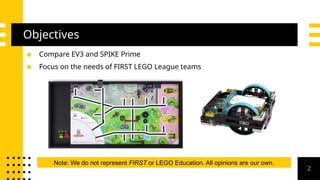
▪ Compare EV3and SPIKE Prime
▪ Focus on the needs of FIRST LEGO League teams
Note: We do not represent FIRST or LEGO Education. All opinions are our own.
2
Hub/Ports
▪ 5 secondboot time
(convenient for teams if the
hub/brick were to crash
before or during a run)
▪ 6 universal ports (can be
used for sensors or motors)
with a built-in gyro
▪ 30 second boot time,
even longer for
MicroPython
▪ 4 sensor + 4 motor
specialized ports
Conclusion: You do not lose much in terms of ports by switching to the SPIKE
Prime 4
5.
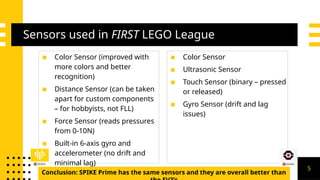
Sensors used inFIRST LEGO League
▪ Color Sensor (improved with
more colors and better
recognition)
▪ Distance Sensor (can be taken
apart for custom components
– for hobbyists, not FLL)
▪ Force Sensor (reads pressures
from 0-10N)
▪ Built-in 6-axis gyro and
accelerometer (no drift and
minimal lag)
▪ Color Sensor
▪ Ultrasonic Sensor
▪ Touch Sensor (binary – pressed
or released)
▪ Gyro Sensor (drift and lag
issues)
Conclusion: SPIKE Prime has the same sensors and they are overall better than
5
6.
Programming Languages Available
▪Primary: Word Blocks: Scratch-based
programming
▪ Secondary: [Micro-]Python (text-
based): built into same App, has basic
tutorials and examples available. Has
some extra commands and
functionality (similar to EV3)
▪ Can only use Scratch or MicroPython
▪ Block based: EV3-G/EV3 Lab (LabView-like)
or Scratch-based EV3 Classroom (Mac only
right now)
▪ Text based (official): MicroPython. Requires
microSD Card, Visual Studio Code IDE
(requires additional work/not built-in)
▪ Can use non-LEGO supported languages
(e.g. Java, C++, etc.), but usually require an
SD card
▪ The text based languages generally
provide more functionality
Conclusion: SPIKE Prime’s software is easier to switch between block-based and Python,
but has fewer languages available 6
Advanced Programming
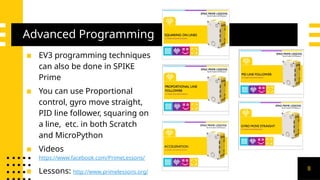
▪ EV3programming techniques
can also be done in SPIKE
Prime
▪ You can use Proportional
control, gyro move straight,
PID line follower, squaring on
a line, etc. in both Scratch
and MicroPython
▪ Videos
https://www.facebook.com/PrimeLessons/
▪ Lessons: http://www.primelessons.org/
8
9.
Improvements with SPIKEPrime (Software)
▪ Finding and Ordering Programs: Built in menu with slots for projects
(can organize list by run number unlike with the EV3)
▪ Monitoring Variables Easily: Variables monitor allows users to easily
view data to debug code – you can easily debug without an LCD screen –
write debug data to a variable and it will show up on the PC screen when
connected
▪ Different Platforms – Same Blocks: Same software across all platforms
(for EV3, Chromebooks, Android, and iPads had a limited version of the
software) – allows for mixed-platform programming amongst team
members
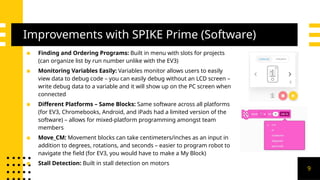
▪ Move_CM: Movement blocks can take centimeters/inches as an input in
addition to degrees, rotations, and seconds – easier to program robot to
navigate the field (for EV3, you would have to make a My Block)
▪ Stall Detection: Built in stall detection on motors
9
10.
Improvements with SPIKEPrime (Hardware)
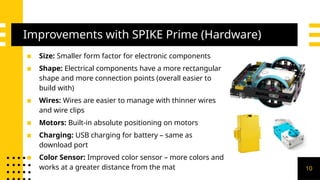
▪ Size: Smaller form factor for electronic components
▪ Shape: Electrical components have a more rectangular
shape and more connection points (overall easier to
build with)
▪ Wires: Wires are easier to manage with thinner wires
and wire clips
▪ Motors: Built-in absolute positioning on motors
▪ Charging: USB charging for battery – same as
download port
▪ Color Sensor: Improved color sensor – more colors and
works at a greater distance from the mat 10
11.
Tradeoffs: My Blocks
▪My Blocks are only available for use in the project that they
are created in.
▫ However, they can be copied and pasted from one
project to another
▪ No outputs from My Blocks
▫ There is a work around that uses variables
▪ In MicroPython, functions can be imported and have
outputs
▪ These are all problems specific to Scratch (also problems
with EV3 Classroom)
11
12.
Tradeoffs: Calibration, Files,Wires
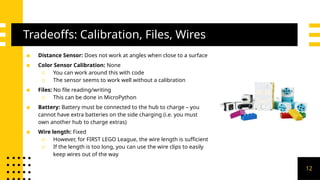
▪ Distance Sensor: Does not work at angles when close to a surface
▪ Color Sensor Calibration: None
▫ You can work around this with code
▫ The sensor seems to work well without a calibration
▪ Files: No file reading/writing
▫ This can be done in MicroPython
▪ Battery: Battery must be connected to the hub to charge – you
cannot have extra batteries on the side charging (i.e. you must
own another hub to charge extras)
▪ Wire length: Fixed
▫ However, for FIRST LEGO League, the wire length is sufficient
▫ If the length is too long, you can use the wire clips to easily
keep wires out of the way
12
13.
Tradeoffs: Steering Blocks
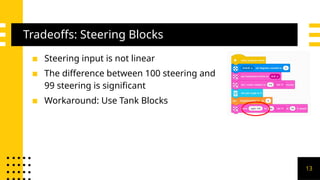
▪Steering input is not linear
▪ The difference between 100 steering and
99 steering is significant
▪ Workaround: Use Tank Blocks
13
14.
Tradeoffs: File Size
▪Code fails to download with very large programs
▪ The latest version of the software provides a warning when
the limit is reached and does not allow you to download the
code to your robot.
14
15.
Tradeoffs: Gyro
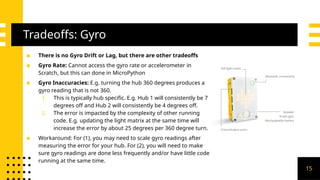
▪ Thereis no Gyro Drift or Lag, but there are other tradeoffs
▪ Gyro Rate: Cannot access the gyro rate or accelerometer in
Scratch, but this can done in MicroPython
▪ Gyro Inaccuracies: E.g. turning the hub 360 degrees produces a
gyro reading that is not 360.
1. This is typically hub specific. E.g. Hub 1 will consistently be 7
degrees off and Hub 2 will consistently be 4 degrees off.
2. The error is impacted by the complexity of other running
code. E.g. updating the light matrix at the same time will
increase the error by about 25 degrees per 360 degree turn.
▪ Workaround: For (1), you may need to scale gyro readings after
measuring the error for your hub. For (2), you will need to make
sure gyro readings are done less frequently and/or have little code
running at the same time.
15
Age Level
▪ SPIKEPrime is only for a
beginners and primary
school students
▪ Even though the default software is
Scratch and the colors target
younger ages, the capabilities of
SPIKE Prime match those of the EV3
▪ There is also MicroPython for older
students
▪ SPIKE Prime has lowered the entry
point, but the ceiling is as high as
EV3
17
18.
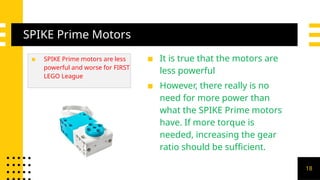
SPIKE Prime Motors
▪SPIKE Prime motors are less
powerful and worse for FIRST
LEGO League
▪ It is true that the motors are
less powerful
▪ However, there really is no
need for more power than
what the SPIKE Prime motors
have. If more torque is
needed, increasing the gear
ratio should be sufficient.
18
19.
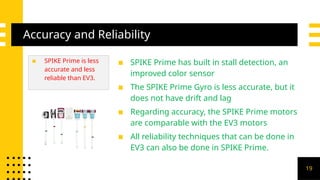
Accuracy and Reliability
▪SPIKE Prime is less
accurate and less
reliable than EV3.
▪ SPIKE Prime has built in stall detection, an
improved color sensor
▪ The SPIKE Prime Gyro is less accurate, but it
does not have drift and lag
▪ Regarding accuracy, the SPIKE Prime motors
are comparable with the EV3 motors
▪ All reliability techniques that can be done in
EV3 can also be done in SPIKE Prime.
19
20.
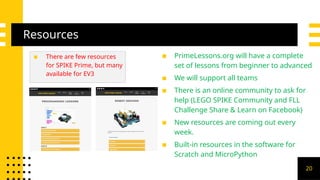
Resources
▪ There arefew resources
for SPIKE Prime, but many
available for EV3
▪ PrimeLessons.org will have a complete
set of lessons from beginner to advanced
▪ We will support all teams
▪ There is an online community to ask for
help (LEGO SPIKE Community and FLL
Challenge Share & Learn on Facebook)
▪ New resources are coming out every
week.
▪ Built-in resources in the software for
Scratch and MicroPython
20
21.
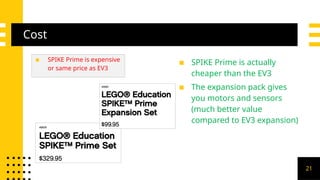
Cost
▪ SPIKE Primeis expensive
or same price as EV3
▪ SPIKE Prime is actually
cheaper than the EV3
▪ The expansion pack gives
you motors and sensors
(much better value
compared to EV3 expansion)
21
22.
Bugs
▪ SPIKE Primewill
have bugs
▪ SPIKE Prime is new.
▪ There are updates coming all the time to fix
bugs. Install the updates.
▪ EV3 also had bugs. LEGO has historically
addressed these quickly in updates but
some bugs were only uncovered/addressed
after several years.
▪ The community usually develops
workarounds
22
23.
Overall Conclusions
▪ Ifyou have EV3s or just bought them, no problem
▫ EV3 is a great product
▫ FIRST always allows multiple platforms
▫ Competitions are not geared to a platform (no extra
points for one platform over another)
▪ If you have the budget/just starting out (regardless of age of
the students), want a new challenge, you can give SPIKE
Prime a try
▫ There are limitations in SPIKE Prime. It is not the same as
EV3 23
24.
Thank You!
Do youhave any questions?
www.primelessons.org
www.flltutorials.com
www.ev3lessons.com
https://www.facebook.com/groups/FLLShareandLearn
/
Photo Printer made
with SPIKE Prime in
Python
24

![Programming Languages Available
▪ Primary: Word Blocks: Scratch-based
programming
▪ Secondary: [Micro-]Python (text-
based): built into same App, has basic
tutorials and examples available. Has
some extra commands and
functionality (similar to EV3)
▪ Can only use Scratch or MicroPython
▪ Block based: EV3-G/EV3 Lab (LabView-like)
or Scratch-based EV3 Classroom (Mac only
right now)
▪ Text based (official): MicroPython. Requires
microSD Card, Visual Studio Code IDE
(requires additional work/not built-in)
▪ Can use non-LEGO supported languages
(e.g. Java, C++, etc.), but usually require an
SD card
▪ The text based languages generally
provide more functionality
Conclusion: SPIKE Prime’s software is easier to switch between block-based and Python,
but has fewer languages available 6](https://image.slidesharecdn.com/spikeprimevsev3-250301163849-bbeeebf2/85/SPIKEPrimevsEV3-pptx-Spike-Lego-Robotics-6-320.jpg)