Operat ions Manual
My SoundGear is an Instant Fit In-The-Canal device. 
Go to page 4. 
My SoundGear is a Custom device. 
Go to page 18. 
My SoundGear is a Behind-The-Ear device. 
Go to page 32.
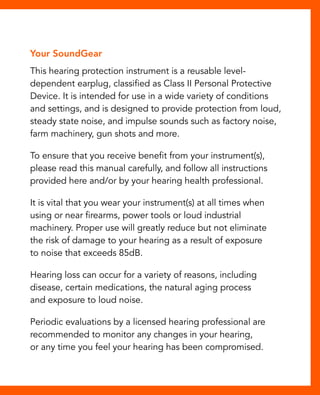
Your SoundGear 
This hearing protection instrument is a reusable level-dependent 
earplug, classified as Class II Personal Protective 
Device. It is intended for use in a wide variety of conditions 
and settings, and is designed to provide protection from loud, 
steady state noise, and impulse sounds such as factory noise, 
farm machinery, gun shots and more. 
To ensure that you receive benefit from your instrument(s), 
please read this manual carefully, and follow all instructions 
provided here and/or by your hearing health professional. 
It is vital that you wear your instrument(s) at all times when 
using or near firearms, power tools or loud industrial 
machinery. Proper use will greatly reduce but not eliminate 
the risk of damage to your hearing as a result of exposure 
to noise that exceeds 85dB. 
Hearing loss can occur for a variety of reasons, including 
disease, certain medications, the natural aging process 
and exposure to loud noise. 
Periodic evaluations by a licensed hearing professional are 
recommended to monitor any changes in your hearing, 
or any time you feel your hearing has been compromised.
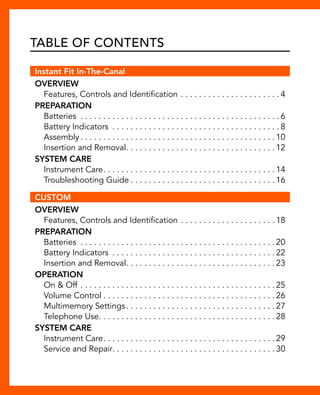
Table of Contents 
Instant Fit In-The-Canal 
Overview 
Features, Controls and Identification. . 4 
Preparation 
Batteries . 6 
Battery Indicators . 8 
Assembly. . 10 
Insertion and Removal. . 12 
System Care 
Instrument Care. . 14 
Troubleshooting Guide. . 16 
CUSTOM 
Overview 
Features, Controls and Identification. . 18 
Preparation 
Batteries . 20 
Battery Indicators . 22 
Insertion and Removal. . 23 
Operation 
On & Off. . 25 
Volume Control. . 26 
Multimemory Settings. . 27 
Telephone Use. . . . . . . . . . . . . . . . . . . . . . . . . . . . . . . . . . . . . . . 28 
System Care 
Instrument Care. . 29 
Service and Repair. . . . . . . . . . . . . . . . . . . . . . . . . . . . . . . . . . . . 30
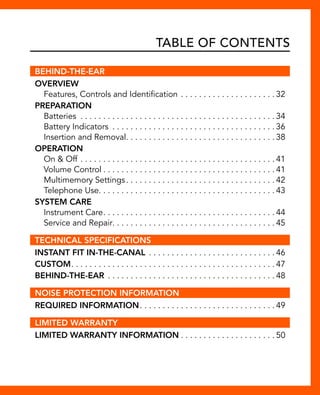
Table of Contents 
BEHIND-THE-EAR 
Overview 
Features, Controls and Identification. . 32 
Preparation 
Batteries . 34 
Battery Indicators . 36 
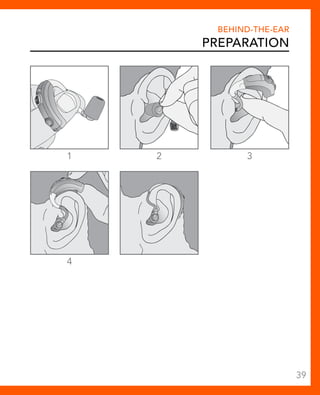
Insertion and Removal. . 38 
Operation 
On & Off. . 41 
Volume Control. . 41 
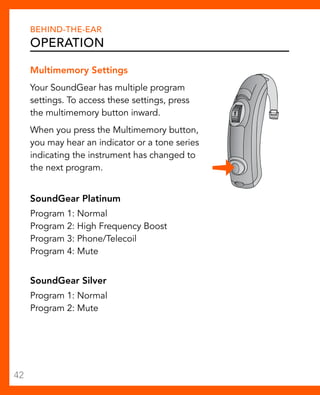
Multimemory Settings. . 42 
Telephone Use. . . . . . . . . . . . . . . . . . . . . . . . . . . . . . . . . . . . . . . 43 
System Care 
Instrument Care. . 44 
Service and Repair. . . . . . . . . . . . . . . . . . . . . . . . . . . . . . . . . . . . 45 
TECHNICAL SPECIFICATIONS 
Instant Fit In-The-Canal . 46 
Custom. . 47 
Behind-the-ear. . 48 
NOISE PROTECTION INFORMATION 
Required Information. . 49 
LIMITED WARRANTY 
Limited Warranty Information. . 50
Instant Fit In-The-Canal 
Overview 
Worn in the ear canal, these instant fit devices are designed 
to overcome the sensation of wearing an earplug. Hassle free 
operation allows you to plug and play - simply insert the 
devices into your ear and proceed with your activities. 
Features, Controls and Identification 
Your device controls include: 
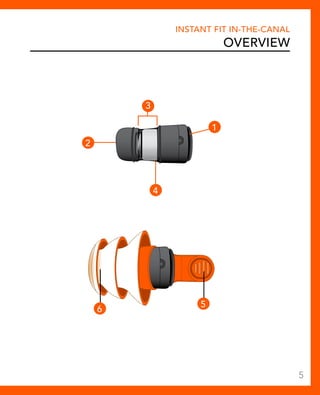
1. Microphone opening 
2. Sound outlet (receiver) 
3. Battery compartment 
4. Location of serial number 
5. Removal handle 
6. Large orange sleeves (shown). Six additional sleeves 
(two small black, two large black and two small orange) 
also included in package 
4
Instant Fit In-The-Canal 
Overview 
1 
2 
3 
4 
6 5 
5
Instant Fit In-The-Canal 
Preparation 
Batteries 
Your device uses a battery as its power source. This battery 
size can be identified by the yellow (10) color code on the 
packaging. Your device powers on upon inserting the battery 
and powers off upon removing the battery. 
To insert or replace the battery: 
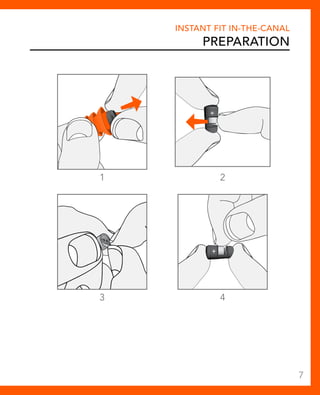
1. To remove the device from the sleeve, gently push the 
device out from the end opposite the removal handle. 
2. Remove old battery by pushing it out from the side of 
the device with your fingers. 
3. Remove the tab from the new battery. 
4. Place battery in device by lining up the battery’s “+” sign 
(flat side of the battery) with the “+” on the case. The “+” 
sign is on the wider end of the device, which is engraved 
with SoundGear. 
6
Instant Fit In-The-Canal 
Preparation 
1 2 
3 4 
7
Instant Fit In-The-Canal 
Preparation 
Battery Indicator Tones 
An indicator will sound when the battery voltage is low. 
You have approximately five minutes* to replace the battery. 
An indicator will sound just before the battery stops working. 
* Actual time between low battery indicator and shut down 
will vary depending on environmental noise levels and 
brand of battery used. 
Helpful Hints 
• Because of their size, it’s a good idea to change and 
replace batteries above a table or desk to reduce the risk of 
dropping the device or battery. 
• Dispose of used batteries immediately in the proper waste or 
recycling container. 
• Because batteries can vary in size and performance, a 
hearing care professional is your best source for lifespan 
estimates and verification that you are using the proper size 
and type. 
8
Warnings 
Instant Fit In-The-Canal 
Preparation 
Batteries are dangerous if swallowed. To help prevent the 
accidental ingestion of batteries: 
Keep out of reach of children and pets 
Check your medications before taking them – batteries 
have been mistaken for pills 
Never put batteries in your mouth, as they can easily be 
swallowed 
National Button Battery Ingestion Hotline: 
202-625-3333 
9
Instant Fit In-The-Canal 
Preparation 
Assembly 
To assemble device: 
1. Remove the sleeve. 
2. Remove the tab from the new battery. 
3. Place battery in device by lining up the battery’s “+” sign 
(flat side of the battery) with the “+” on the case. The “+” 
sign is on the wider end of the device, which is engraved 
with SoundGear. 
4. Insert device back into sleeve making sure the SoundGear 
label is visible. The narrow end of the device should rest 
against the tip of the sleeve. 
10
Instant Fit In-The-Canal 
Preparation 
1 
2 
4 
3 
11
Instant Fit In-The-Canal 
Preparation 
Insertion and Removal 
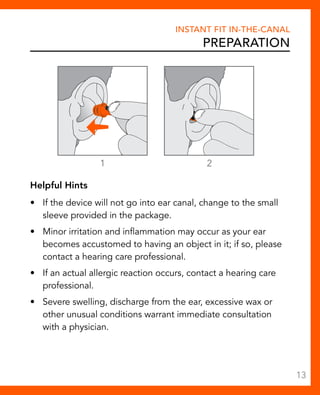
To insert the device: 
1. SoundGear should sit in the outermost part of the ear canal. 
Select the largest sleeve first and only use the smaller sleeve 
if the large sleeve is too large to seal the outer ear canal or 
causes discomfort in the outer ear canal. 
2. Gently insert the canal tip of the device into your ear canal. 
Softly press the device into place with your finger until the 
ear canal is completely sealed. 
• Do not push device into your ear where the removal handle 
cannot be reached. 
• Fit should be snug to ensure product is properly sealing the 
ear canal and achieving listed NRR. 
To remove the device: 
Grasp the removal handle and gently remove from ear. 
12
Instant Fit In-The-Canal 
Preparation 
1 2 
Helpful Hints 
• If the device will not go into ear canal, change to the small 
sleeve provided in the package. 
• Minor irritation and inflammation may occur as your ear 
becomes accustomed to having an object in it; if so, please 
contact a hearing care professional. 
• If an actual allergic reaction occurs, contact a hearing care 
professional. 
• Severe swelling, discharge from the ear, excessive wax or 
other unusual conditions warrant immediate consultation 
with a physician. 
13
Instant Fit In-The-Canal 
System Care 
Instrument Care 
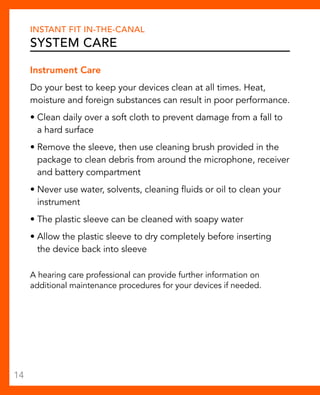
Do your best to keep your devices clean at all times. Heat, 
moisture and foreign substances can result in poor performance. 
• Clean daily over a soft cloth to prevent damage from a fall to 
a hard surface 
• Remove the sleeve, then use cleaning brush provided in the 
package to clean debris from around the microphone, receiver 
and battery compartment 
• Never use water, solvents, cleaning fluids or oil to clean your 
instrument 
• The plastic sleeve can be cleaned with soapy water 
• Allow the plastic sleeve to dry completely before inserting 
the device back into sleeve 
A hearing care professional can provide further information on 
additional maintenance procedures for your devices if needed. 
14
Instant Fit In-The-Canal 
System Care 
Helpful Hints 
• When not in use, remove the batteries completely; place your 
devices in the storage container and store: 
– In a dry, safe place 
– Away from direct sunlight or heat to avoid extreme 
temperatures 
– Where you can easily find them 
– Safely out of reach of pets and children 
• Do not take apart your devices or insert the cleaning tool 
inside them. 
15
Instant Fit In-The-Canal 
System Care 
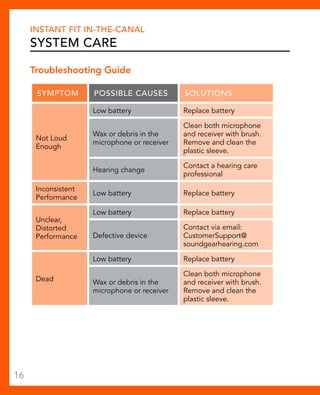
Troubleshooting Guide 
Symptom Possible Causes Solutions 
Not Loud 
Enough 
Low battery Replace battery 
Wax or debris in the 
microphone or receiver 
Clean both microphone 
and receiver with brush. 
Remove and clean the 
plastic sleeve. 
Hearing change Contact a hearing care 
professional 
Inconsistent 
Performance Low battery Replace battery 
Unclear, 
Distorted 
Performance 
Low battery Replace battery 
Defective device 
Contact via email: 
CustomerSupport@ 
soundgearhearing.com 
Dead 
Low battery Replace battery 
Wax or debris in the 
microphone or receiver 
Clean both microphone 
and receiver with brush. 
Remove and clean the 
plastic sleeve. 
16
CUSTOM 
OVERVIEW 
Personally customized to the exact shape of your ear, these 
devices are designed to overcome the sensation of wearing 
an earplug. The user controls allow for personalization of 
environmental volume and/or sound quality. 
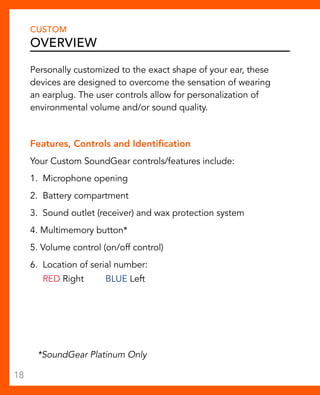
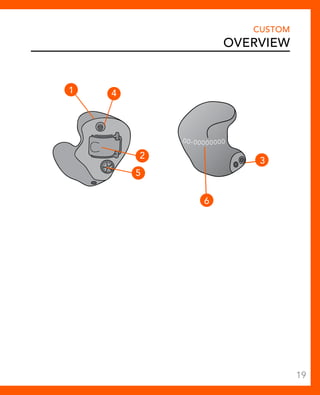
Features, Controls and Identification 
Your Custom SoundGear controls/features include: 
1. Microphone opening 
2. Battery compartment 
3. Sound outlet (receiver) and wax protection system 
4. Multimemory button* 
5. Volume control (on/off control) 
6. Location of serial number: 
RED Right BLUE Left 
*SoundGear Platinum Only 
18
CUSTOM 
OVERVIEW 
00-00 000000 
1 4 
2 
5 
6 
3 
19
CUSTOM 
Preparation 
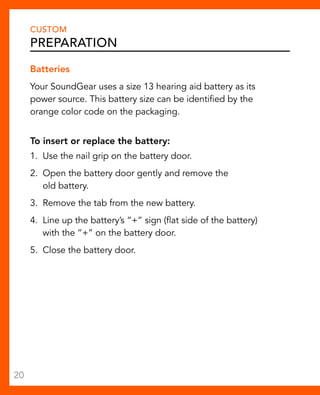
Batteries 
Your SoundGear uses a size 13 hearing aid battery as its 
power source. This battery size can be identified by the 
orange color code on the packaging. 
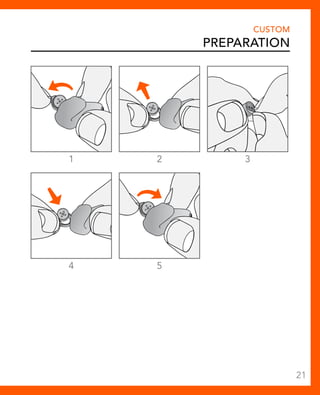
To insert or replace the battery: 
1. Use the nail grip on the battery door. 
2. Open the battery door gently and remove the 
old battery. 
3. Remove the tab from the new battery. 
4. Line up the battery’s “+” sign (flat side of the battery) 
with the “+” on the battery door. 
5. Close the battery door. 
20
1 2 3 
4 5 
CUSTOM 
Preparation 
21
CUSTOM 
Preparation 
Battery Indicators 
An indicator will sound when the battery voltage is low. You have 
approximately 20 minutes* to replace the battery. A different 
indicator will sound just before the battery stops working. 
* Actual time between low battery indicator and shut down 
will vary depending on environmental noise levels and brand 
of battery used. 
Helpful Hints 
• NEVER FORCE THE DOOR SHUT; this could result in serious 
damage; if the door will not close securely, check that the battery 
is inserted correctly. 
• Do not open the battery door too far or damage is likely 
to occur. 
• Because of their size, it’s a good idea to change and replace 
batteries above a table or desk to reduce the risk of dropping 
the instrument or battery. 
• Dispose of used batteries immediately in the proper waste or 
recycling container. 
• Because batteries can vary in size and performance, your hearing 
care professional is your best source for lifespan estimates and 
verification that you are using the proper size and type. 
22
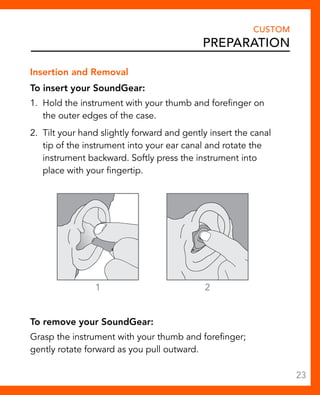
Insertion and Removal 
To insert your SoundGear: 
1. Hold the instrument with your thumb and forefinger on 
the outer edges of the case. 
2. Tilt your hand slightly forward and gently insert the canal 
tip of the instrument into your ear canal and rotate the 
instrument backward. Softly press the instrument into 
place with your fingertip. 
1 2 
To remove your SoundGear: 
Grasp the instrument with your thumb and forefinger; 
gently rotate forward as you pull outward. 
CUSTOM 
Preparation 
23
CUSTOM 
Preparation 
Helpful Hints 
• Minor irritation and inflammation may occur as your ear 
becomes accustomed to having an object in it; if so, please 
contact your hearing care professional. 
• If an actual allergic reaction occurs, alternative materials are 
available; contact your hearing care professional. 
• Severe swelling, discharge from the ear, excessive wax or 
other unusual conditions warrant immediate consultation with 
a physician. 
• It is extremely important that your instrument is inserted 
properly to ensure that you receive maximum noise protection. 
Warnings 
Batteries are dangerous if swallowed. To help prevent 
the accidental ingestion of batteries: 
Keep out of reach of children and pets 
Check your medications before taking them – batteries 
have been mistaken for pills 
Never put batteries in your mouth, as they can easily be 
swallowed 
National Button Battery Ingestion Hotline: 
202-625-3333 
24
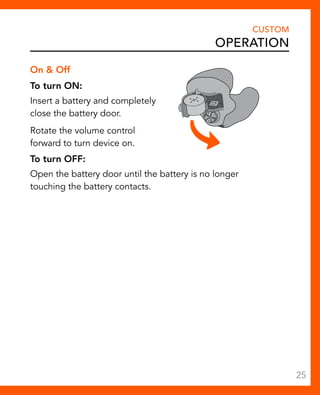
On & Off 
To turn ON: 
Insert a battery and completely 
close the battery door. 
Rotate the volume control 
forward to turn device on. 
To turn OFF: 
Open the battery door until the battery is no longer 
touching the battery contacts. 
CUSTOM 
Operation 
25
CUSTOM 
Operation 
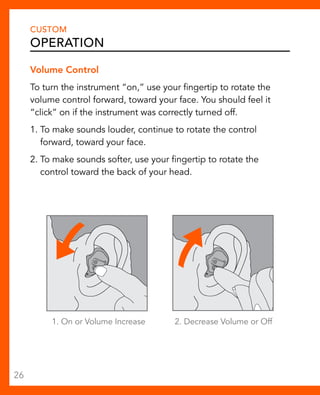
Volume Control 
To turn the instrument “on,” use your fingertip to rotate the 
volume control forward, toward your face. You should feel it 
“click” on if the instrument was correctly turned off. 
1. To make sounds louder, continue to rotate the control 
forward, toward your face. 
2. To make sounds softer, use your fingertip to rotate the 
control toward the back of your head. 
1. On or Volume Increase 2. Decrease Volume or Off 
26
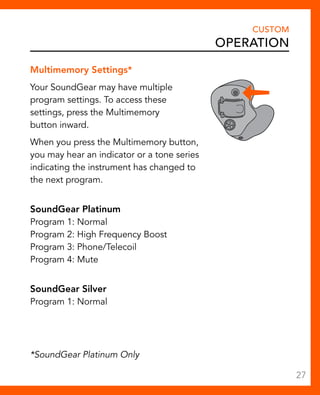
Multimemory Settings* 
Your SoundGear may have multiple 
program settings. To access these 
settings, press the Multimemory 
button inward. 
When you press the Multimemory button, 
you may hear an indicator or a tone series 
indicating the instrument has changed to 
the next program. 
SoundGear Platinum 
Program 1: Normal 
Program 2: High Frequency Boost 
Program 3: Phone/Telecoil 
Program 4: Mute 
SoundGear Silver 
Program 1: Normal 
CUSTOM 
Operation 
*SoundGear Platinum Only 
27
CUSTOM 
Operation 
Telephone Use 
Your SoundGear may be equipped with a telecoil 
to help you effectively communicate on the telephone. 
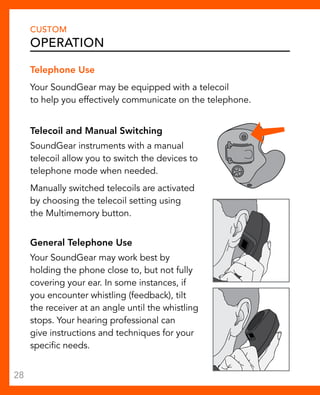
Telecoil and Manual Switching 
SoundGear instruments with a manual 
telecoil allow you to switch the devices to 
telephone mode when needed. 
Manually switched telecoils are activated 
by choosing the telecoil setting using 
the Multimemory button. 
General Telephone Use 
Your SoundGear may work best by 
holding the phone close to, but not fully 
covering your ear. In some instances, if 
you encounter whistling (feedback), tilt 
the receiver at an angle until the whistling 
stops. Your hearing professional can 
give instructions and techniques for your 
specific needs. 
28
Instrument Care 
Do your best to keep your SoundGear clean at all times. Heat, 
moisture and foreign substances can result in poor performance. 
• Use a cleaning brush to clean debris from around the 
microphone, receiver and the battery compartment 
• Never use water, solvents, cleaning fluids or oil to clean your 
instrument 
Your hearing care professional can provide further information 
on additional maintenance procedures for your hearing system 
if needed. 
Helpful Hints 
• When not in use, remove the batteries completely; place 
your SoundGear in the storage container and store: 
– In a dry, safe place 
– Away from direct sunlight or heat to avoid extreme 
temperatures 
– Where you can easily find them 
– Safely out of reach of pets and children 
• Do not take apart your SoundGear or insert the cleaning 
tools inside them. 
CUSTOM 
System Care 
29
CUSTOM 
System Care 
Service and Repair 
If, for any reason, your SoundGear does not operate properly, 
do not attempt to fix it yourself. Not only are you likely to 
violate any applicable warranties or insurance, you could 
easily cause further damage. Should your SoundGear fail 
or perform poorly, contact your hearing care professional 
for advice and assistance or contact SoundGear at 
customersupport@soundgearhearing.com, or call at 
800-769-8605. 
30
Behind-The-Ear 
Overview 
Worn over the ear, these devices are designed to overcome 
the sensation of wearing an earplug. The user controls allow for 
personalization of environmental volume and/or sound quality. 
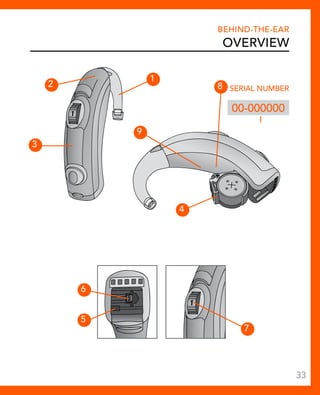
Features, Controls and Identification 
Your SoundGear controls include: 
1. Earhook 
2. Microphone 
3. Multimemory button 
4. Battery compartment 
5. Side indicator Red is for right ear, 
blue is for left ear. 
6. Tamper resistant battery compartment lock 
7. Volume control 
Your SoundGear can be identified by: 
8. Location of serial number 
9. Location of manufacturer’s name and model name 
32
2 
3 
4 
Behind-The-Ear 
Overview 
8 Serial Number 
00-000000 
9 
6 
5 
1 
7 
33
Behind-The-Ear 
Preparation 
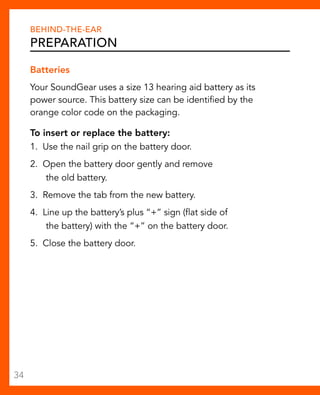
Batteries 
Your SoundGear uses a size 13 hearing aid battery as its 
power source. This battery size can be identified by the 
orange color code on the packaging. 
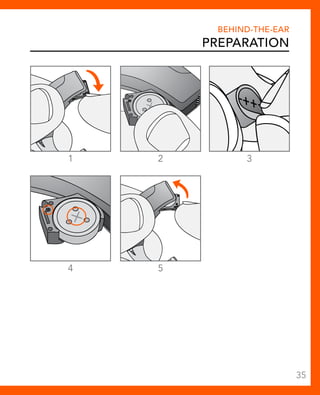
To insert or replace the battery: 
1. Use the nail grip on the battery door. 
2. Open the battery door gently and remove 
the old battery. 
3. Remove the tab from the new battery. 
4. Line up the battery’s plus “+” sign (flat side of 
the battery) with the “+” on the battery door. 
5. Close the battery door. 
34
1 2 3 
4 5 
Behind-The-Ear 
Preparation 
35
Behind-The-Ear 
Preparation 
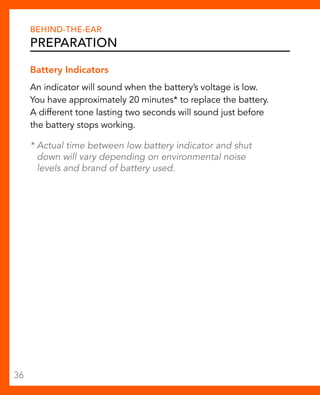
Battery Indicators 
An indicator will sound when the battery’s voltage is low. 
You have approximately 20 minutes* to replace the battery. 
A different tone lasting two seconds will sound just before 
the battery stops working. 
* Actual time between low battery indicator and shut 
down will vary depending on environmental noise 
levels and brand of battery used. 
36
Warnings 
Behind-The-Ear 
Preparation 
Batteries are dangerous if swallowed. To help prevent the 
accidental ingestion of batteries: 
Keep out of reach of children and pets 
Check your medications before taking them – batteries 
have been mistaken for pills 
Never put batteries in your mouth, as they can easily be 
swallowed 
National Button Battery Ingestion Hotline: 
202-625-3333 
37
Behind-The-Ear 
Preparation 
Insertion and Removal 
Your BTE comes standard with Foam Earmold Tips, however, you 
may have purchased a Custom Earmold. 
To insert the Earmold and SoundGear: 
1. For Standard Foam Earmold Tip: Gently roll the foam tip 
between your thumb and forefinger to compress. 
Skip to Step 3. 
For Optional Custom Earmold: Hold the Earmold with your 
thumb and forefinger on the outer side near the tubing. 
2. Tilt your hand slightly forward and gently insert 
the canal tip of the Earmold into your ear canal. 
3. Softly press the Earmold into place with your fingertip. 
4. Carefully place the BTE behind your ear wrapping the 
earhook over the top of your ear. 
5. Foam Earmold Tip ONLY: Foam Earmold Tip will expand 
after a few seconds to create a seal. 
To remove the SoundGear and Earmold: 
Take the instrument from behind your ear and gently pull the 
Earmold outward. Pulling lightly down on the ear lobe may help 
loosen the Earmold as it is removed. 
38
1 2 3 
4 
Behind-The-Ear 
Preparation 
39
Behind-The-Ear 
Preparation 
Helpful Hints 
• Minor irritation and inflammation may occur as your ear 
becomes accustomed to having an object in it; if so, 
please contact your hearing care professional. 
• If an actual allergic reaction occurs, alternative earmold 
materials are available; contact your hearing care 
professional. 
• Severe swelling, discharge from the ear, excessive 
wax or other unusual conditions warrant immediate 
consultation with a physician. 
40
Behind-The-Ear 
Operation 
On & Off 
To turn ON: 
Insert a battery and completely close the battery door. 
To turn OFF: 
Open the battery door until the battery is no longer 
touching the battery contacts. 
Volume Control 
To make sounds louder, continue to rotate the control upward. 
Your hearing instruments may be programmed to beep when 
you reach the correct setting. 
To make sounds softer, use your fingertip to rotate the control 
toward the back of your head. 
41
Behind-The-Ear 
Operation 
Multimemory Settings 
Your SoundGear has multiple program 
settings. To access these settings, press 
the multimemory button inward. 
When you press the Multimemory button, 
you may hear an indicator or a tone series 
indicating the instrument has changed to 
the next program. 
SoundGear Platinum 
Program 1: Normal 
Program 2: High Frequency Boost 
Program 3: Phone/Telecoil 
Program 4: Mute 
SoundGear Silver 
Program 1: Normal 
Program 2: Mute 
42
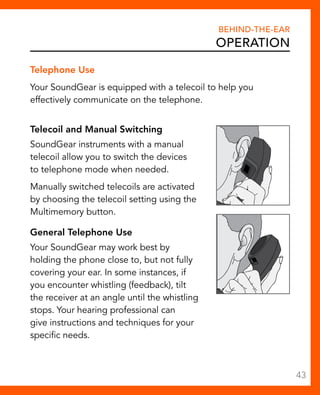
Telephone Use 
Your SoundGear is equipped with a telecoil to help you 
effectively communicate on the telephone. 
Telecoil and Manual Switching 
SoundGear instruments with a manual 
telecoil allow you to switch the devices 
to telephone mode when needed. 
Manually switched telecoils are activated 
by choosing the telecoil setting using the 
Multimemory button. 
General Telephone Use 
Your SoundGear may work best by 
holding the phone close to, but not fully 
covering your ear. In some instances, if 
you encounter whistling (feedback), tilt 
the receiver at an angle until the whistling 
stops. Your hearing professional can 
give instructions and techniques for your 
specific needs. 
Behind-The-Ear 
Operation 
43
Behind-The-Ear 
System Care 
Instrument Care 
Do your best to keep your SoundGear clean at all times. Heat, 
moisture and foreign substances can result in poor performance. 
• Use a cleaning brush or soft cloth to clean debris from 
around the switches, microphone and battery compartment 
• Never use water, solvents, cleaning fluids or oil to clean your 
instrument 
Helpful Hints 
• When not in use, remove the batteries completely; place 
your SoundGear in the storage container and store: 
– In a dry, safe place 
– Away from direct sunlight or heat to avoid extreme 
temperatures 
– Where you can easily find them 
– Safely out of reach of pets and children 
• Do not take apart your SoundGear or insert 
the cleaning tools inside them. 
44
Behind-The-Ear 
System Care 
Service and Repair 
If, for any reason, your SoundGear does not operate properly, 
do NOT attempt to fix it yourself. Not only are you likely to 
violate any applicable warranties or insurance, you could easily 
cause further damage. 
Should your SoundGear fail or perform poorly, contact your 
hearing care professional for advice and assistance or contact 
SoundGear customer support at 
customersupport@soundgearhearing.com, 
or call us at 800-764-8605. 
45
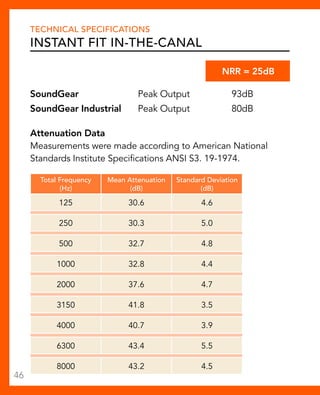
Technical Specifications 
Instant Fit In-The-Canal 
NR = 25dB 
SoundGear Peak Output 93dB 
SoundGear Industrial Peak Output 80dB 
Attenuation Data 
Measurements were made according to American National 
Standards Institute Specifications ANSI S3. 19-1974. 
Total Frequency 
(Hz) 
Mean Attenuation 
(dB) 
Standard Deviation 
(dB) 
125 30.6 4.6 
250 30.3 5.0 
500 32.7 4.8 
1000 32.8 4.4 
2000 37.6 4.7 
3150 41.8 3.5 
4000 40.7 3.9 
6300 43.4 5.5 
8000 43.2 4.5 
46
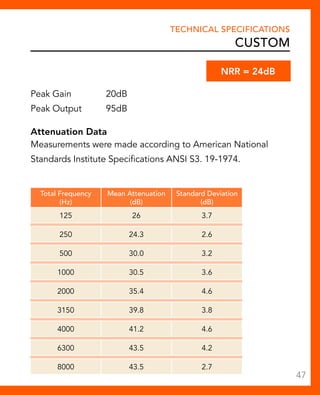
Technical Specifications 
custom 
Peak Gain 20dB 
Peak Output 95dB 
Attenuation Data 
Measurements were made according to American National 
Standards Institute Specifications ANSI S3. 19-1974. 
Total Frequency 
(Hz) 
Mean Attenuation 
(dB) 
Standard Deviation 
(dB) 
125 26 3.7 
250 24.3 2.6 
500 30.0 3.2 
1000 30.5 3.6 
2000 35.4 4.6 
3150 39.8 3.8 
4000 41.2 4.6 
6300 43.5 4.2 
8000 43.5 2.7 
NR = 24dB 
47
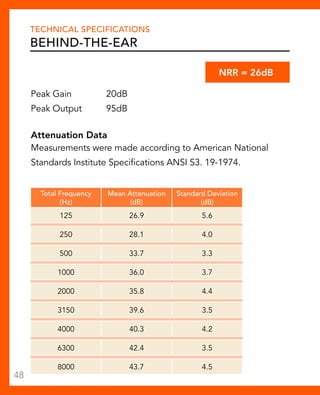
Technical Specifications 
Behind-the-Ear 
Peak Gain 20dB 
Peak Output 95dB 
NR = 26dB 
Attenuation Data 
Measurements were made according to American National 
Standards Institute Specifications ANSI S3. 19-1974. 
Total Frequency 
(Hz) 
Mean Attenuation 
(dB) 
Standard Deviation 
(dB) 
125 26.9 5.6 
250 28.1 4.0 
500 33.7 3.3 
1000 36.0 3.7 
2000 35.8 4.4 
3150 39.6 3.5 
4000 40.3 4.2 
6300 42.4 3.5 
8000 43.7 4.5 
48
Noise Protection Information 
Required Information 
The level of noise entering a person’s ear, when hearing 
protector is worn as directed, is closely approximated by 
the difference between the A-weighted environmental noise 
level and the NRR. 
Example 
1. The environmental noise level as measured at the ear is 
92dB(A). 
2. The NRR is 25 decibels (dB). 
3. The level of noise entering the ear is approximately equal 
to [92dB(A) – 25dB] dB(A). 
Caution: For noise environments dominated by frequencies 
below 500 Hertz (Hz), the C-weighted environmental noise 
levels should be used. 
Improper fit of this device will reduce its effectiveness in 
attenuating noise. Consult the enclosed instructions for 
proper fit. 
Although hearing protectors can be recommended for 
protection against the harmful effects of impulsive noise, the 
Noise Reduction Rating (NRR) is based on the attenuation of 
continuous noise and may not be an accurate indicator of the 
protection attainable against impulsive noise such as gunfire. 
49
Limited Warranty 
Limited Warranty Information 
This Limited Warranty provided by Starkey Hearing Technologies, to you, the 
original purchaser of a SoundGear device, covers your new electronic hearing 
protection device when sold by an authorized Starkey Hearing Technologies 
dealer or via the website, www.soundgearhearing.com. The duration of this 
Limited Warranty begins when you first take delivery of your hearing protection 
device from an authorized dealer or via the above website and ends twelve (12) 
months later (“warranty period”). 
In order to be eligible for service under this Limited Warranty you MUST 
register your device by emailing SoundGear at CustomerSupport@ 
soundgearhearing.com. Serial number(s) on the device(s) and a copy of 
your receipt are required to verify the date of purchase. 
LIMITATION ON DURATION OF IMPLIED WARRANTIES: 
IMPLIED WARRANTIES, IF ANY, ARISING BY WAY OF STATE LAW, INCLUDING 
ANY IMPLIED WARRANTY OF MERCHANTABILITY AND/OR ANY IMPLIED 
WARRANTY OF FITNESS FOR A PARTICULAR PURPOSE, ARE LIMITED IN 
DURATION TO THE WARRANTY PERIOD. There is no warranty of any nature 
made by Starkey Hearing Technologies beyond this Limited Warranty. No 
person has authority to enlarge, amend or modify this Limited Warranty. Starkey 
Hearing Technologies is not responsible for any undertaking, representation, 
or warranty (written, express or implied) made by any Starkey Hearing 
Technologies dealer or other person beyond those expressly set forth in 
this Limited Warranty. 
Some States do not allow limitations on how long an implied warranty lasts, so 
the above limitation may not apply to you. 
WHAT THIS LIMITED WARRANTY COVERS: 
This Limited Warranty covers only a “defect” in the workmanship performed 
and/or materials used to manufacture your hearing protection device. “Defect” 
means the failure of the workmanship performed and/or materials used to 
conform the device to Starkey Hearing Technologies design and manufacturing 
specifications and tolerances. 
50
Limited Warranty 
Limited Warranty Information 
Your authorized Starkey Hearing Technologies dealer may have issued a 
warranty or service plan that goes beyond the provisions of this Limited 
Warranty. Please contact him or her for further information. 
Starkey Hearing Technologies will either replace the hearing protection device 
or repair any covered defect in your device, provided that you deliver your 
device to one of Starkey Hearing Technologies authorized dealers or directly 
to Starkey Hearing Technologies in the manner described below. In addition, 
you must notify the authorized dealer or Starkey Hearing Technologies of the 
defect during the warranty period and within thirty (30) days of discovering 
the defect. There will be no cost to you for Starkey Hearing Technologies 
repair or replacement of the device itself, but the dealer may charge a fee for 
services he or she provides. Performance of warranty repairs on your hearing 
protection device shall not extend the duration of the warranty period. Any 
repairs performed on your device after the warranty period has expired shall be 
considered “good will” repairs, which shall not alter the terms of this Limited 
Warranty. 
HOW TO OBTAIN WARRANTY SERVICE: 
Deliver your hearing protection device (at your expense) to the Starkey Hearing 
Technologies authorized dealer from whom you purchased it, or to Starkey 
Hearing Technologies, Repair Dept., 6700 Washington Ave. S., Eden Prairie, MN 
55344. For additionalinformation you may visit www.soundgearhearing.com or 
email SoundGear at CustomerSupport@soundgearhearing.com. 
WHAT THIS LIMITED WARRANTY DOES NOT COVER: 
Batteries; accessories; or damage to your hearing protection device caused 
by misuse or neglect, accident, unauthorized alteration or failure to provide 
reasonable and necessary maintenance and cleaning. 
51
Limited Warranty 
Limited Warranty Information 
DISCLAIMER OF CONSEQUENTIAL AND INCIDENTAL DAMAGES: 
THE PURCHASER SHALL NOT BE ENTITLED TO RECOVER FROM Starkey 
Hearing Technologies ANY CONSEQUENTIAL OR INCIDENTAL 
DAMAGES RESULTING FROM ANY DEFECT IN THE HEARING PROTECTION 
DEVICE, INCLUDING BY WAY OF EXAMPLE ONLY, EXPENSES TO DELIVER 
THE DEVICE TO AN AUTHORIZED Starkey Hearing Technologies 
DEALER OR TO Starkey Hearing Technologies, HOTEL ROOMS OR 
LOST WAGES. THIS EXCLUSION AND DISCLAIMER OF CONSEQUENTIAL 
AND INCIDENTAL DAMAGES SHALL BE DEEMED INDEPENDENT OF, 
AND SHALL SURVIVE, ANY FAILURE OF THE ESSENTIAL PURPOSE OF ANY 
REMEDY OF THIS LIMITED WARRANTY. 
Some States do not allow the exclusion or limitation of consequential or 
incidental damages, so the above exclusions may not apply to you. 
YOUR LEGAL REMEDIES: 
THIS LIMITED WARRANTY DOES NOT “EXTEND TO FUTURE 
PERFORMANCE.” ANY ACTION TO ENFORCE THIS LIMITED WARRANTY 
OR ANY IMPLIED WARRANTIES MAY AND SHALL NOT BE COMMENCED 
MORE THAN 90 DAYS AFTER THE EXPIRATION OF THE WARRANTY PERIOD. 
THE PERFORMANCE OF REPAIRS SHALL NOT SUSPEND THIS LIMITATIONS 
PERIOD FROM EXPIRING. UNDER NO CIRCUMSTANCES SHALL Starkey 
Hearing Technologies BE OBLIGATED TO REFUND ALL OR ANY 
PART OF THE PURCHASE PRICE OF THE HEARING PROTECTION DEVICE. 
Some States do not allow the reduction in the limitation period, so the above 
reduction in the limitation period may not apply to you. 
This warranty gives you specific legal rights. You may also have other rights, 
which vary from State to State. 
This warranty is valid only in the United States. 
52
SoundGear Hearing • Eden Prairie, MN 
www.soundgearhearing.com 
800.769.8605 
© 2013 SoundGear Hearing. All Rights Reserved. 81311-007 10/13 BKLT2671-00-EE-XX Rev. A

SoundGear hearing protection operations manual

  • 1.
  • 2.
    My SoundGear isan Instant Fit In-The-Canal device. Go to page 4. My SoundGear is a Custom device. Go to page 18. My SoundGear is a Behind-The-Ear device. Go to page 32.
  • 3.
    Your SoundGear Thishearing protection instrument is a reusable level-dependent earplug, classified as Class II Personal Protective Device. It is intended for use in a wide variety of conditions and settings, and is designed to provide protection from loud, steady state noise, and impulse sounds such as factory noise, farm machinery, gun shots and more. To ensure that you receive benefit from your instrument(s), please read this manual carefully, and follow all instructions provided here and/or by your hearing health professional. It is vital that you wear your instrument(s) at all times when using or near firearms, power tools or loud industrial machinery. Proper use will greatly reduce but not eliminate the risk of damage to your hearing as a result of exposure to noise that exceeds 85dB. Hearing loss can occur for a variety of reasons, including disease, certain medications, the natural aging process and exposure to loud noise. Periodic evaluations by a licensed hearing professional are recommended to monitor any changes in your hearing, or any time you feel your hearing has been compromised.
  • 4.
    Table of Contents Instant Fit In-The-Canal Overview Features, Controls and Identification. . 4 Preparation Batteries . 6 Battery Indicators . 8 Assembly. . 10 Insertion and Removal. . 12 System Care Instrument Care. . 14 Troubleshooting Guide. . 16 CUSTOM Overview Features, Controls and Identification. . 18 Preparation Batteries . 20 Battery Indicators . 22 Insertion and Removal. . 23 Operation On & Off. . 25 Volume Control. . 26 Multimemory Settings. . 27 Telephone Use. . . . . . . . . . . . . . . . . . . . . . . . . . . . . . . . . . . . . . . 28 System Care Instrument Care. . 29 Service and Repair. . . . . . . . . . . . . . . . . . . . . . . . . . . . . . . . . . . . 30
  • 5.
    Table of Contents BEHIND-THE-EAR Overview Features, Controls and Identification. . 32 Preparation Batteries . 34 Battery Indicators . 36 Insertion and Removal. . 38 Operation On & Off. . 41 Volume Control. . 41 Multimemory Settings. . 42 Telephone Use. . . . . . . . . . . . . . . . . . . . . . . . . . . . . . . . . . . . . . . 43 System Care Instrument Care. . 44 Service and Repair. . . . . . . . . . . . . . . . . . . . . . . . . . . . . . . . . . . . 45 TECHNICAL SPECIFICATIONS Instant Fit In-The-Canal . 46 Custom. . 47 Behind-the-ear. . 48 NOISE PROTECTION INFORMATION Required Information. . 49 LIMITED WARRANTY Limited Warranty Information. . 50
  • 6.
    Instant Fit In-The-Canal Overview Worn in the ear canal, these instant fit devices are designed to overcome the sensation of wearing an earplug. Hassle free operation allows you to plug and play - simply insert the devices into your ear and proceed with your activities. Features, Controls and Identification Your device controls include: 1. Microphone opening 2. Sound outlet (receiver) 3. Battery compartment 4. Location of serial number 5. Removal handle 6. Large orange sleeves (shown). Six additional sleeves (two small black, two large black and two small orange) also included in package 4
  • 7.
    Instant Fit In-The-Canal Overview 1 2 3 4 6 5 5
  • 8.
    Instant Fit In-The-Canal Preparation Batteries Your device uses a battery as its power source. This battery size can be identified by the yellow (10) color code on the packaging. Your device powers on upon inserting the battery and powers off upon removing the battery. To insert or replace the battery: 1. To remove the device from the sleeve, gently push the device out from the end opposite the removal handle. 2. Remove old battery by pushing it out from the side of the device with your fingers. 3. Remove the tab from the new battery. 4. Place battery in device by lining up the battery’s “+” sign (flat side of the battery) with the “+” on the case. The “+” sign is on the wider end of the device, which is engraved with SoundGear. 6
  • 9.
    Instant Fit In-The-Canal Preparation 1 2 3 4 7
  • 10.
    Instant Fit In-The-Canal Preparation Battery Indicator Tones An indicator will sound when the battery voltage is low. You have approximately five minutes* to replace the battery. An indicator will sound just before the battery stops working. * Actual time between low battery indicator and shut down will vary depending on environmental noise levels and brand of battery used. Helpful Hints • Because of their size, it’s a good idea to change and replace batteries above a table or desk to reduce the risk of dropping the device or battery. • Dispose of used batteries immediately in the proper waste or recycling container. • Because batteries can vary in size and performance, a hearing care professional is your best source for lifespan estimates and verification that you are using the proper size and type. 8
  • 11.
    Warnings Instant FitIn-The-Canal Preparation Batteries are dangerous if swallowed. To help prevent the accidental ingestion of batteries: Keep out of reach of children and pets Check your medications before taking them – batteries have been mistaken for pills Never put batteries in your mouth, as they can easily be swallowed National Button Battery Ingestion Hotline: 202-625-3333 9
  • 12.
    Instant Fit In-The-Canal Preparation Assembly To assemble device: 1. Remove the sleeve. 2. Remove the tab from the new battery. 3. Place battery in device by lining up the battery’s “+” sign (flat side of the battery) with the “+” on the case. The “+” sign is on the wider end of the device, which is engraved with SoundGear. 4. Insert device back into sleeve making sure the SoundGear label is visible. The narrow end of the device should rest against the tip of the sleeve. 10
  • 13.
    Instant Fit In-The-Canal Preparation 1 2 4 3 11
  • 14.
    Instant Fit In-The-Canal Preparation Insertion and Removal To insert the device: 1. SoundGear should sit in the outermost part of the ear canal. Select the largest sleeve first and only use the smaller sleeve if the large sleeve is too large to seal the outer ear canal or causes discomfort in the outer ear canal. 2. Gently insert the canal tip of the device into your ear canal. Softly press the device into place with your finger until the ear canal is completely sealed. • Do not push device into your ear where the removal handle cannot be reached. • Fit should be snug to ensure product is properly sealing the ear canal and achieving listed NRR. To remove the device: Grasp the removal handle and gently remove from ear. 12
  • 15.
    Instant Fit In-The-Canal Preparation 1 2 Helpful Hints • If the device will not go into ear canal, change to the small sleeve provided in the package. • Minor irritation and inflammation may occur as your ear becomes accustomed to having an object in it; if so, please contact a hearing care professional. • If an actual allergic reaction occurs, contact a hearing care professional. • Severe swelling, discharge from the ear, excessive wax or other unusual conditions warrant immediate consultation with a physician. 13
  • 16.
    Instant Fit In-The-Canal System Care Instrument Care Do your best to keep your devices clean at all times. Heat, moisture and foreign substances can result in poor performance. • Clean daily over a soft cloth to prevent damage from a fall to a hard surface • Remove the sleeve, then use cleaning brush provided in the package to clean debris from around the microphone, receiver and battery compartment • Never use water, solvents, cleaning fluids or oil to clean your instrument • The plastic sleeve can be cleaned with soapy water • Allow the plastic sleeve to dry completely before inserting the device back into sleeve A hearing care professional can provide further information on additional maintenance procedures for your devices if needed. 14
  • 17.
    Instant Fit In-The-Canal System Care Helpful Hints • When not in use, remove the batteries completely; place your devices in the storage container and store: – In a dry, safe place – Away from direct sunlight or heat to avoid extreme temperatures – Where you can easily find them – Safely out of reach of pets and children • Do not take apart your devices or insert the cleaning tool inside them. 15
  • 18.
    Instant Fit In-The-Canal System Care Troubleshooting Guide Symptom Possible Causes Solutions Not Loud Enough Low battery Replace battery Wax or debris in the microphone or receiver Clean both microphone and receiver with brush. Remove and clean the plastic sleeve. Hearing change Contact a hearing care professional Inconsistent Performance Low battery Replace battery Unclear, Distorted Performance Low battery Replace battery Defective device Contact via email: CustomerSupport@ soundgearhearing.com Dead Low battery Replace battery Wax or debris in the microphone or receiver Clean both microphone and receiver with brush. Remove and clean the plastic sleeve. 16
  • 20.
    CUSTOM OVERVIEW Personallycustomized to the exact shape of your ear, these devices are designed to overcome the sensation of wearing an earplug. The user controls allow for personalization of environmental volume and/or sound quality. Features, Controls and Identification Your Custom SoundGear controls/features include: 1. Microphone opening 2. Battery compartment 3. Sound outlet (receiver) and wax protection system 4. Multimemory button* 5. Volume control (on/off control) 6. Location of serial number: RED Right BLUE Left *SoundGear Platinum Only 18
  • 21.
    CUSTOM OVERVIEW 00-00000000 1 4 2 5 6 3 19
  • 22.
    CUSTOM Preparation Batteries Your SoundGear uses a size 13 hearing aid battery as its power source. This battery size can be identified by the orange color code on the packaging. To insert or replace the battery: 1. Use the nail grip on the battery door. 2. Open the battery door gently and remove the old battery. 3. Remove the tab from the new battery. 4. Line up the battery’s “+” sign (flat side of the battery) with the “+” on the battery door. 5. Close the battery door. 20
  • 23.
    1 2 3 4 5 CUSTOM Preparation 21
  • 24.
    CUSTOM Preparation BatteryIndicators An indicator will sound when the battery voltage is low. You have approximately 20 minutes* to replace the battery. A different indicator will sound just before the battery stops working. * Actual time between low battery indicator and shut down will vary depending on environmental noise levels and brand of battery used. Helpful Hints • NEVER FORCE THE DOOR SHUT; this could result in serious damage; if the door will not close securely, check that the battery is inserted correctly. • Do not open the battery door too far or damage is likely to occur. • Because of their size, it’s a good idea to change and replace batteries above a table or desk to reduce the risk of dropping the instrument or battery. • Dispose of used batteries immediately in the proper waste or recycling container. • Because batteries can vary in size and performance, your hearing care professional is your best source for lifespan estimates and verification that you are using the proper size and type. 22
  • 25.
    Insertion and Removal To insert your SoundGear: 1. Hold the instrument with your thumb and forefinger on the outer edges of the case. 2. Tilt your hand slightly forward and gently insert the canal tip of the instrument into your ear canal and rotate the instrument backward. Softly press the instrument into place with your fingertip. 1 2 To remove your SoundGear: Grasp the instrument with your thumb and forefinger; gently rotate forward as you pull outward. CUSTOM Preparation 23
  • 26.
    CUSTOM Preparation HelpfulHints • Minor irritation and inflammation may occur as your ear becomes accustomed to having an object in it; if so, please contact your hearing care professional. • If an actual allergic reaction occurs, alternative materials are available; contact your hearing care professional. • Severe swelling, discharge from the ear, excessive wax or other unusual conditions warrant immediate consultation with a physician. • It is extremely important that your instrument is inserted properly to ensure that you receive maximum noise protection. Warnings Batteries are dangerous if swallowed. To help prevent the accidental ingestion of batteries: Keep out of reach of children and pets Check your medications before taking them – batteries have been mistaken for pills Never put batteries in your mouth, as they can easily be swallowed National Button Battery Ingestion Hotline: 202-625-3333 24
  • 27.
    On & Off To turn ON: Insert a battery and completely close the battery door. Rotate the volume control forward to turn device on. To turn OFF: Open the battery door until the battery is no longer touching the battery contacts. CUSTOM Operation 25
  • 28.
    CUSTOM Operation VolumeControl To turn the instrument “on,” use your fingertip to rotate the volume control forward, toward your face. You should feel it “click” on if the instrument was correctly turned off. 1. To make sounds louder, continue to rotate the control forward, toward your face. 2. To make sounds softer, use your fingertip to rotate the control toward the back of your head. 1. On or Volume Increase 2. Decrease Volume or Off 26
  • 29.
    Multimemory Settings* YourSoundGear may have multiple program settings. To access these settings, press the Multimemory button inward. When you press the Multimemory button, you may hear an indicator or a tone series indicating the instrument has changed to the next program. SoundGear Platinum Program 1: Normal Program 2: High Frequency Boost Program 3: Phone/Telecoil Program 4: Mute SoundGear Silver Program 1: Normal CUSTOM Operation *SoundGear Platinum Only 27
  • 30.
    CUSTOM Operation TelephoneUse Your SoundGear may be equipped with a telecoil to help you effectively communicate on the telephone. Telecoil and Manual Switching SoundGear instruments with a manual telecoil allow you to switch the devices to telephone mode when needed. Manually switched telecoils are activated by choosing the telecoil setting using the Multimemory button. General Telephone Use Your SoundGear may work best by holding the phone close to, but not fully covering your ear. In some instances, if you encounter whistling (feedback), tilt the receiver at an angle until the whistling stops. Your hearing professional can give instructions and techniques for your specific needs. 28
  • 31.
    Instrument Care Doyour best to keep your SoundGear clean at all times. Heat, moisture and foreign substances can result in poor performance. • Use a cleaning brush to clean debris from around the microphone, receiver and the battery compartment • Never use water, solvents, cleaning fluids or oil to clean your instrument Your hearing care professional can provide further information on additional maintenance procedures for your hearing system if needed. Helpful Hints • When not in use, remove the batteries completely; place your SoundGear in the storage container and store: – In a dry, safe place – Away from direct sunlight or heat to avoid extreme temperatures – Where you can easily find them – Safely out of reach of pets and children • Do not take apart your SoundGear or insert the cleaning tools inside them. CUSTOM System Care 29
  • 32.
    CUSTOM System Care Service and Repair If, for any reason, your SoundGear does not operate properly, do not attempt to fix it yourself. Not only are you likely to violate any applicable warranties or insurance, you could easily cause further damage. Should your SoundGear fail or perform poorly, contact your hearing care professional for advice and assistance or contact SoundGear at customersupport@soundgearhearing.com, or call at 800-769-8605. 30
  • 34.
    Behind-The-Ear Overview Wornover the ear, these devices are designed to overcome the sensation of wearing an earplug. The user controls allow for personalization of environmental volume and/or sound quality. Features, Controls and Identification Your SoundGear controls include: 1. Earhook 2. Microphone 3. Multimemory button 4. Battery compartment 5. Side indicator Red is for right ear, blue is for left ear. 6. Tamper resistant battery compartment lock 7. Volume control Your SoundGear can be identified by: 8. Location of serial number 9. Location of manufacturer’s name and model name 32
  • 35.
    2 3 4 Behind-The-Ear Overview 8 Serial Number 00-000000 9 6 5 1 7 33
  • 36.
    Behind-The-Ear Preparation Batteries Your SoundGear uses a size 13 hearing aid battery as its power source. This battery size can be identified by the orange color code on the packaging. To insert or replace the battery: 1. Use the nail grip on the battery door. 2. Open the battery door gently and remove the old battery. 3. Remove the tab from the new battery. 4. Line up the battery’s plus “+” sign (flat side of the battery) with the “+” on the battery door. 5. Close the battery door. 34
  • 37.
    1 2 3 4 5 Behind-The-Ear Preparation 35
  • 38.
    Behind-The-Ear Preparation BatteryIndicators An indicator will sound when the battery’s voltage is low. You have approximately 20 minutes* to replace the battery. A different tone lasting two seconds will sound just before the battery stops working. * Actual time between low battery indicator and shut down will vary depending on environmental noise levels and brand of battery used. 36
  • 39.
    Warnings Behind-The-Ear Preparation Batteries are dangerous if swallowed. To help prevent the accidental ingestion of batteries: Keep out of reach of children and pets Check your medications before taking them – batteries have been mistaken for pills Never put batteries in your mouth, as they can easily be swallowed National Button Battery Ingestion Hotline: 202-625-3333 37
  • 40.
    Behind-The-Ear Preparation Insertionand Removal Your BTE comes standard with Foam Earmold Tips, however, you may have purchased a Custom Earmold. To insert the Earmold and SoundGear: 1. For Standard Foam Earmold Tip: Gently roll the foam tip between your thumb and forefinger to compress. Skip to Step 3. For Optional Custom Earmold: Hold the Earmold with your thumb and forefinger on the outer side near the tubing. 2. Tilt your hand slightly forward and gently insert the canal tip of the Earmold into your ear canal. 3. Softly press the Earmold into place with your fingertip. 4. Carefully place the BTE behind your ear wrapping the earhook over the top of your ear. 5. Foam Earmold Tip ONLY: Foam Earmold Tip will expand after a few seconds to create a seal. To remove the SoundGear and Earmold: Take the instrument from behind your ear and gently pull the Earmold outward. Pulling lightly down on the ear lobe may help loosen the Earmold as it is removed. 38
  • 41.
    1 2 3 4 Behind-The-Ear Preparation 39
  • 42.
    Behind-The-Ear Preparation HelpfulHints • Minor irritation and inflammation may occur as your ear becomes accustomed to having an object in it; if so, please contact your hearing care professional. • If an actual allergic reaction occurs, alternative earmold materials are available; contact your hearing care professional. • Severe swelling, discharge from the ear, excessive wax or other unusual conditions warrant immediate consultation with a physician. 40
  • 43.
    Behind-The-Ear Operation On& Off To turn ON: Insert a battery and completely close the battery door. To turn OFF: Open the battery door until the battery is no longer touching the battery contacts. Volume Control To make sounds louder, continue to rotate the control upward. Your hearing instruments may be programmed to beep when you reach the correct setting. To make sounds softer, use your fingertip to rotate the control toward the back of your head. 41
  • 44.
    Behind-The-Ear Operation MultimemorySettings Your SoundGear has multiple program settings. To access these settings, press the multimemory button inward. When you press the Multimemory button, you may hear an indicator or a tone series indicating the instrument has changed to the next program. SoundGear Platinum Program 1: Normal Program 2: High Frequency Boost Program 3: Phone/Telecoil Program 4: Mute SoundGear Silver Program 1: Normal Program 2: Mute 42
  • 45.
    Telephone Use YourSoundGear is equipped with a telecoil to help you effectively communicate on the telephone. Telecoil and Manual Switching SoundGear instruments with a manual telecoil allow you to switch the devices to telephone mode when needed. Manually switched telecoils are activated by choosing the telecoil setting using the Multimemory button. General Telephone Use Your SoundGear may work best by holding the phone close to, but not fully covering your ear. In some instances, if you encounter whistling (feedback), tilt the receiver at an angle until the whistling stops. Your hearing professional can give instructions and techniques for your specific needs. Behind-The-Ear Operation 43
  • 46.
    Behind-The-Ear System Care Instrument Care Do your best to keep your SoundGear clean at all times. Heat, moisture and foreign substances can result in poor performance. • Use a cleaning brush or soft cloth to clean debris from around the switches, microphone and battery compartment • Never use water, solvents, cleaning fluids or oil to clean your instrument Helpful Hints • When not in use, remove the batteries completely; place your SoundGear in the storage container and store: – In a dry, safe place – Away from direct sunlight or heat to avoid extreme temperatures – Where you can easily find them – Safely out of reach of pets and children • Do not take apart your SoundGear or insert the cleaning tools inside them. 44
  • 47.
    Behind-The-Ear System Care Service and Repair If, for any reason, your SoundGear does not operate properly, do NOT attempt to fix it yourself. Not only are you likely to violate any applicable warranties or insurance, you could easily cause further damage. Should your SoundGear fail or perform poorly, contact your hearing care professional for advice and assistance or contact SoundGear customer support at customersupport@soundgearhearing.com, or call us at 800-764-8605. 45
  • 48.
    Technical Specifications InstantFit In-The-Canal NR = 25dB SoundGear Peak Output 93dB SoundGear Industrial Peak Output 80dB Attenuation Data Measurements were made according to American National Standards Institute Specifications ANSI S3. 19-1974. Total Frequency (Hz) Mean Attenuation (dB) Standard Deviation (dB) 125 30.6 4.6 250 30.3 5.0 500 32.7 4.8 1000 32.8 4.4 2000 37.6 4.7 3150 41.8 3.5 4000 40.7 3.9 6300 43.4 5.5 8000 43.2 4.5 46
  • 49.
    Technical Specifications custom Peak Gain 20dB Peak Output 95dB Attenuation Data Measurements were made according to American National Standards Institute Specifications ANSI S3. 19-1974. Total Frequency (Hz) Mean Attenuation (dB) Standard Deviation (dB) 125 26 3.7 250 24.3 2.6 500 30.0 3.2 1000 30.5 3.6 2000 35.4 4.6 3150 39.8 3.8 4000 41.2 4.6 6300 43.5 4.2 8000 43.5 2.7 NR = 24dB 47
  • 50.
    Technical Specifications Behind-the-Ear Peak Gain 20dB Peak Output 95dB NR = 26dB Attenuation Data Measurements were made according to American National Standards Institute Specifications ANSI S3. 19-1974. Total Frequency (Hz) Mean Attenuation (dB) Standard Deviation (dB) 125 26.9 5.6 250 28.1 4.0 500 33.7 3.3 1000 36.0 3.7 2000 35.8 4.4 3150 39.6 3.5 4000 40.3 4.2 6300 42.4 3.5 8000 43.7 4.5 48
  • 51.
    Noise Protection Information Required Information The level of noise entering a person’s ear, when hearing protector is worn as directed, is closely approximated by the difference between the A-weighted environmental noise level and the NRR. Example 1. The environmental noise level as measured at the ear is 92dB(A). 2. The NRR is 25 decibels (dB). 3. The level of noise entering the ear is approximately equal to [92dB(A) – 25dB] dB(A). Caution: For noise environments dominated by frequencies below 500 Hertz (Hz), the C-weighted environmental noise levels should be used. Improper fit of this device will reduce its effectiveness in attenuating noise. Consult the enclosed instructions for proper fit. Although hearing protectors can be recommended for protection against the harmful effects of impulsive noise, the Noise Reduction Rating (NRR) is based on the attenuation of continuous noise and may not be an accurate indicator of the protection attainable against impulsive noise such as gunfire. 49
  • 52.
    Limited Warranty LimitedWarranty Information This Limited Warranty provided by Starkey Hearing Technologies, to you, the original purchaser of a SoundGear device, covers your new electronic hearing protection device when sold by an authorized Starkey Hearing Technologies dealer or via the website, www.soundgearhearing.com. The duration of this Limited Warranty begins when you first take delivery of your hearing protection device from an authorized dealer or via the above website and ends twelve (12) months later (“warranty period”). In order to be eligible for service under this Limited Warranty you MUST register your device by emailing SoundGear at CustomerSupport@ soundgearhearing.com. Serial number(s) on the device(s) and a copy of your receipt are required to verify the date of purchase. LIMITATION ON DURATION OF IMPLIED WARRANTIES: IMPLIED WARRANTIES, IF ANY, ARISING BY WAY OF STATE LAW, INCLUDING ANY IMPLIED WARRANTY OF MERCHANTABILITY AND/OR ANY IMPLIED WARRANTY OF FITNESS FOR A PARTICULAR PURPOSE, ARE LIMITED IN DURATION TO THE WARRANTY PERIOD. There is no warranty of any nature made by Starkey Hearing Technologies beyond this Limited Warranty. No person has authority to enlarge, amend or modify this Limited Warranty. Starkey Hearing Technologies is not responsible for any undertaking, representation, or warranty (written, express or implied) made by any Starkey Hearing Technologies dealer or other person beyond those expressly set forth in this Limited Warranty. Some States do not allow limitations on how long an implied warranty lasts, so the above limitation may not apply to you. WHAT THIS LIMITED WARRANTY COVERS: This Limited Warranty covers only a “defect” in the workmanship performed and/or materials used to manufacture your hearing protection device. “Defect” means the failure of the workmanship performed and/or materials used to conform the device to Starkey Hearing Technologies design and manufacturing specifications and tolerances. 50
  • 53.
    Limited Warranty LimitedWarranty Information Your authorized Starkey Hearing Technologies dealer may have issued a warranty or service plan that goes beyond the provisions of this Limited Warranty. Please contact him or her for further information. Starkey Hearing Technologies will either replace the hearing protection device or repair any covered defect in your device, provided that you deliver your device to one of Starkey Hearing Technologies authorized dealers or directly to Starkey Hearing Technologies in the manner described below. In addition, you must notify the authorized dealer or Starkey Hearing Technologies of the defect during the warranty period and within thirty (30) days of discovering the defect. There will be no cost to you for Starkey Hearing Technologies repair or replacement of the device itself, but the dealer may charge a fee for services he or she provides. Performance of warranty repairs on your hearing protection device shall not extend the duration of the warranty period. Any repairs performed on your device after the warranty period has expired shall be considered “good will” repairs, which shall not alter the terms of this Limited Warranty. HOW TO OBTAIN WARRANTY SERVICE: Deliver your hearing protection device (at your expense) to the Starkey Hearing Technologies authorized dealer from whom you purchased it, or to Starkey Hearing Technologies, Repair Dept., 6700 Washington Ave. S., Eden Prairie, MN 55344. For additionalinformation you may visit www.soundgearhearing.com or email SoundGear at CustomerSupport@soundgearhearing.com. WHAT THIS LIMITED WARRANTY DOES NOT COVER: Batteries; accessories; or damage to your hearing protection device caused by misuse or neglect, accident, unauthorized alteration or failure to provide reasonable and necessary maintenance and cleaning. 51
  • 54.
    Limited Warranty LimitedWarranty Information DISCLAIMER OF CONSEQUENTIAL AND INCIDENTAL DAMAGES: THE PURCHASER SHALL NOT BE ENTITLED TO RECOVER FROM Starkey Hearing Technologies ANY CONSEQUENTIAL OR INCIDENTAL DAMAGES RESULTING FROM ANY DEFECT IN THE HEARING PROTECTION DEVICE, INCLUDING BY WAY OF EXAMPLE ONLY, EXPENSES TO DELIVER THE DEVICE TO AN AUTHORIZED Starkey Hearing Technologies DEALER OR TO Starkey Hearing Technologies, HOTEL ROOMS OR LOST WAGES. THIS EXCLUSION AND DISCLAIMER OF CONSEQUENTIAL AND INCIDENTAL DAMAGES SHALL BE DEEMED INDEPENDENT OF, AND SHALL SURVIVE, ANY FAILURE OF THE ESSENTIAL PURPOSE OF ANY REMEDY OF THIS LIMITED WARRANTY. Some States do not allow the exclusion or limitation of consequential or incidental damages, so the above exclusions may not apply to you. YOUR LEGAL REMEDIES: THIS LIMITED WARRANTY DOES NOT “EXTEND TO FUTURE PERFORMANCE.” ANY ACTION TO ENFORCE THIS LIMITED WARRANTY OR ANY IMPLIED WARRANTIES MAY AND SHALL NOT BE COMMENCED MORE THAN 90 DAYS AFTER THE EXPIRATION OF THE WARRANTY PERIOD. THE PERFORMANCE OF REPAIRS SHALL NOT SUSPEND THIS LIMITATIONS PERIOD FROM EXPIRING. UNDER NO CIRCUMSTANCES SHALL Starkey Hearing Technologies BE OBLIGATED TO REFUND ALL OR ANY PART OF THE PURCHASE PRICE OF THE HEARING PROTECTION DEVICE. Some States do not allow the reduction in the limitation period, so the above reduction in the limitation period may not apply to you. This warranty gives you specific legal rights. You may also have other rights, which vary from State to State. This warranty is valid only in the United States. 52
  • 56.
    SoundGear Hearing •Eden Prairie, MN www.soundgearhearing.com 800.769.8605 © 2013 SoundGear Hearing. All Rights Reserved. 81311-007 10/13 BKLT2671-00-EE-XX Rev. A