http://www.elsolucionario.blogspot.com
LIBROS UNIVERISTARIOS
Y SOLUCIONARIOS DE
MUCHOS DE ESTOS LIBROS
LOS SOLUCIONARIOS
CONTIENEN TODOS LOS
EJERCICIOS DEL LIBRO
RESUELTOS Y EXPLICADOS
DE FORMA CLARA
VISITANOS PARA
DESARGALOS GRATIS.
CHAPTER 2
2.1
IF x < 10 THEN
IF x < 5 THEN
x = 5
ELSE
PRINT x
END IF
ELSE
DO
IF x < 50 EXIT
x = x - 5
END DO
END IF
2.2
Step 1: Start
Step 2: Initialize sum and count to zero
Step 3: Examine top card.
Step 4: If it says “end of data” proceed to step 9; otherwise, proceed to next step.
Step 5: Add value from top card to sum.
Step 6: Increase count by 1.
Step 7: Discard top card
Step 8: Return to Step 3.
Step 9: Is the count greater than zero?
If yes, proceed to step 10.
If no, proceed to step 11.
Step 10: Calculate average = sum/count
Step 11: End
2.3
start
sum = 0
count = 0
INPUT
value
value =
“end of data”
value =
“end of data”
sum = sum + value
count = count + 1
T
F
count > 0
average = sum/count
end
T
F
2.4
Students could implement the subprogram in any number of languages. The following
Fortran 90 program is one example. It should be noted that the availability of complex
variables in Fortran 90, would allow this subroutine to be made even more concise.
However, we did not exploit this feature, in order to make the code more compatible with
Visual BASIC, MATLAB, etc.
PROGRAM Rootfind
IMPLICIT NONE
INTEGER::ier
REAL::a, b, c, r1, i1, r2, i2
DATA a,b,c/1.,5.,2./
CALL Roots(a, b, c, ier, r1, i1, r2, i2)
IF (ier .EQ. 0) THEN
PRINT *, r1,i1," i"
PRINT *, r2,i2," i"
ELSE
PRINT *, "No roots"
END IF
END
SUBROUTINE Roots(a, b, c, ier, r1, i1, r2, i2)
IMPLICIT NONE
INTEGER::ier
REAL::a, b, c, d, r1, i1, r2, i2
r1=0.
r2=0.
i1=0.
i2=0.
IF (a .EQ. 0.) THEN
IF (b <> 0) THEN
r1 = -c/b
ELSE
ier = 1
END IF
ELSE
d = b**2 - 4.*a*c
IF (d >= 0) THEN
r1 = (-b + SQRT(d))/(2*a)
r2 = (-b - SQRT(d))/(2*a)
ELSE
r1 = -b/(2*a)
r2 = r1
i1 = SQRT(ABS(d))/(2*a)
i2 = -i1
END IF
END IF
END
The answers for the 3 test cases are: (a) −0.438, -4.56; (b) 0.5; (c) −1.25 + 2.33i; −1.25 −
2.33i.
Several features of this subroutine bear mention:
• The subroutine does not involve input or output. Rather, information is passed in and out
via the arguments. This is often the preferred style, because the I/O is left to the
discretion of the programmer within the calling program.
• Note that an error code is passed (IER = 1) for the case where no roots are possible.
2.5 The development of the algorithm hinges on recognizing that the series approximation of the
sine can be represented concisely by the summation,
x
i
i
i
n 2 1
1 2 1
−
= −
∑ ( )!
where i = the order of the approximation. The following algorithm implements this
summation:
Step 1: Start
Step 2: Input value to be evaluated x and maximum order n
Step 3: Set order (i) equal to one
Step 4: Set accumulator for approximation (approx) to zero
Step 5: Set accumulator for factorial product (fact) equal to one
Step 6: Calculate true value of sin(x)
Step 7: If order is greater than n then proceed to step 13
Otherwise, proceed to next step
Step 8: Calculate the approximation with the formula
approx approx ( 1)
x
factor
i-1
2i-1
= + −
Step 9: Determine the error
100%
true
approx
true
%error
−
=
Step 10: Increment the order by one
Step 11: Determine the factorial for the next iteration
factor factor (2 i 2) (2 i 1)
= • • − • • −
Step 12: Return to step 7
Step 13: End
2.6
start
INPUT
x, n
i > n
end
i = 1
true = sin(x)
approx = 0
factor = 1
approx approx
x
factor
i
i -
= + -
( 1) - 1
2 1
error
true approx
true
100
=
−
%
OUTPUT
i,approx,error
i = i + 1
F
T
factor=factor(2i-2)(2i-1)
Pseudocode:
SUBROUTINE Sincomp(n,x)
i = 1
true = SIN(x)
approx = 0
factor = 1
DO
IF i > n EXIT
approx = approx + (-1)i-1
•x2•i-1
/ factor
error = Abs(true - approx) / true) * 100
PRINT i, true, approx, error
i = i + 1
factor = factor•(2•i-2)•(2•i-1)
END DO
END
2.7 The following Fortran 90 code was developed based on the pseudocode from Prob. 2.6:
PROGRAM Series
IMPLICIT NONE
INTEGER::n
REAL::x
n = 15
x = 1.5
CALL Sincomp(n,x)
END
SUBROUTINE Sincomp(n,x)
IMPLICIT NONE
INTEGER::n,i,fac
REAL::x,tru,approx,er
i = 1
tru = SIN(x)
approx = 0.
fac = 1
PRINT *, " order true approx error"
DO
IF (i > n) EXIT
approx = approx + (-1) ** (i-1) * x ** (2*i - 1) / fac
er = ABS(tru - approx) / tru) * 100
PRINT *, i, tru, approx, er
i = i + 1
fac = fac * (2*i-2) * (2*i-1)
END DO
END
OUTPUT:
order true approx error
1 0.9974950 1.500000 -50.37669
2 0.9974950 0.9375000 6.014566
3 0.9974950 1.000781 -0.3294555
4 0.9974950 0.9973912 1.0403229E-02
5 0.9974950 0.9974971 -2.1511559E-04
6 0.9974950 0.9974950 0.0000000E+00
7 0.9974950 0.9974951 -1.1950866E-05
8 0.9974950 0.9974949 1.1950866E-05
9 0.9974950 0.9974915 3.5255053E-04
10 0.9974950 0.9974713 2.3782223E-03
11 0.9974950 0.9974671 2.7965026E-03
12 0.9974950 0.9974541 4.0991469E-03
13 0.9974950 0.9974663 2.8801586E-03
14 0.9974950 0.9974280 6.7163869E-03
15 0.9974950 0.9973251 1.7035959E-02
Press any key to continue
The errors can be plotted versus the number of terms:
1.E-05
1.E-04
1.E-03
1.E-02
1.E-01
1.E+00
1.E+01
1.E+02
0 5 10 15
error
Interpretation: The absolute percent relative error drops until at n = 6, it actually yields a
perfect result (pure luck!). Beyond, n = 8, the errors starts to grow. This occurs because of
round-off error, which will be discussed in Chap. 3.
2.8 AQ = 442/5 = 88.4
AH = 548/6 = 91.33
without final
AG =
30(88.4) + 30(91.33)
30 + 30
= 89 8667
.
with final
AG =
30(88.4) + 30(91.33) + 40(91)
30 + 30
= 90 32
.
The following pseudocode provides an algorithm to program this problem. Notice that the
input of the quizzes and homeworks is done with logical loops that terminate when the user
enters a negative grade:
INPUT number, name
INPUT WQ, WH, WF
nq = 0
sumq = 0
DO
INPUT quiz (enter negative to signal end of quizzes)
IF quiz < 0 EXIT
nq = nq + 1
sumq = sumq + quiz
END DO
AQ = sumq / nq
PRINT AQ
nh = 0
sumh = 0
PRINT "homeworks"
DO
INPUT homework (enter negative to signal end of homeworks)
IF homework < 0 EXIT
nh = nh + 1
sumh = sumh + homework
END DO
AH = sumh / nh
PRINT "Is there a final grade (y or n)"
INPUT answer
IF answer = "y" THEN
INPUT FE
AG = (WQ * AQ + WH * AH + WF * FE) / (WQ + WH + WF)
ELSE
AG = (WQ * AQ + WH * AH) / (WQ + WH)
END IF
PRINT number, name$, AG
END
2.9
n F
0 $100,000.00
1 $108,000.00
2 $116,640.00
3 $125,971.20
4 $136,048.90
5 $146,932.81
24 $634,118.07
25 $684,847.52
2.10 Programs vary, but results are
Bismarck = −10.842 t = 0 to 59
Yuma = 33.040 t = 180 to 242
2.11
n A
1 40,250.00
2 21,529.07
3 15,329.19
4 12,259.29
5 10,441.04
2.12
Step v(12) εt (%)
2 49.96 -5.2
1 48.70 -2.6
0.5 48.09 -1.3
Error is halved when step is halved
2.13
Fortran 90 VBA
Subroutine BubbleFor(n, b)
Implicit None
!sorts an array in ascending
!order using the bubble sort
Integer(4)::m, i, n
Logical::switch
Real::a(n),b(n),dum
m = n - 1
Do
switch = .False.
Do i = 1, m
If (b(i) > b(i + 1)) Then
dum = b(i)
b(i) = b(i + 1)
b(i + 1) = dum
switch = .True.
End If
End Do
If (switch == .False.) Exit
m = m - 1
End Do
End
Option Explicit
Sub Bubble(n, b)
'sorts an array in ascending
'order using the bubble sort
Dim m As Integer, i As Integer
Dim switch As Boolean
Dim dum As Single
m = n - 1
Do
switch = False
For i = 1 To m
If b(i) > b(i + 1) Then
dum = b(i)
b(i) = b(i + 1)
b(i + 1) = dum
switch = True
End If
Next i
If switch = False Then Exit Do
m = m - 1
Loop
End Sub
2.14 Here is a flowchart for the algorithm:
Function Vol(R, d)
pi = 3.141593
d < R
d < 3 * R
V1 = pi * R^3 / 3
V2 = pi * R^2 (d – R)
Vol = V1 + V2
Vol =
“Overtop”
End Function
Vol = pi * d^3 / 3
Here is a program in VBA:
Option Explicit
Function Vol(R, d)
Dim V1 As Single, v2 As Single, pi As Single
pi = 4 * Atn(1)
If d < R Then
Vol = pi * d ^ 3 / 3
ElseIf d <= 3 * R Then
V1 = pi * R ^ 3 / 3
v2 = pi * R ^ 2 * (d - R)
Vol = V1 + v2
Else
Vol = "overtop"
End If
End Function
The results are
R d Volume
1 0.3 0.028274
1 0.8 0.536165
1 1 1.047198
1 2.2 4.817109
1 3 7.330383
1 3.1 overtop
2.15 Here is a flowchart for the algorithm:
Function Polar(x, y)
2
2
y
x
r +
=
x < 0
y > 0
y > 0
π
θ +






= −
x
y
1
tan
π
θ −






= −
x
y
1
tan π
θ −






= −
x
y
1
tan
θ = 0
2
π
θ −
=
y < 0
2
π
θ =
θ = π
y < 0
π
θ
180
=
Polar
π
θ
180
=
Polar
End Polar
π = 3.141593
T
T
T
T
T
F
F
F
F
And here is a VBA function procedure to implement it:
Option Explicit
Function Polar(x, y)
Dim th As Single, r As Single
Const pi As Single = 3.141593
r = Sqr(x ^ 2 + y ^ 2)
If x < 0 Then
If y > 0 Then
th = Atn(y / x) + pi
ElseIf y < 0 Then
th = Atn(y / x) - pi
Else
th = pi
End If
Else
If y > 0 Then
th = pi / 2
ElseIf y < 0 Then
th = -pi / 2
Else
th = 0
End If
End If
Polar = th * 180 / pi
End Function
The results are:
x y θ
1 1 90
1 -1 -90
1 0 0
-1 1 135
-1 -1 -135
-1 0 180
0 1 90
0 -1 -90
0 0 0
4.18 f(x) = x-1-1/2*sin(x)
f '(x) = 1-1/2*cos(x)
f ''(x) = 1/2*sin(x)
f '''(x) = 1/2*cos(x)
f IV
(x) = -1/2*sin(x)
Using the Taylor Series Expansion (Equation 4.5 in the book), we obtain the following
1st
, 2nd
, 3rd
, and 4th
Order Taylor Series functions shown below in the Matlab program-
f1, f2, f4. Note the 2nd
and 3rd
Order Taylor Series functions are the same.
From the plots below, we see that the answer is the 4th
Order Taylor Series expansion.
x=0:0.001:3.2;
f=x-1-0.5*sin(x);
subplot(2,2,1);
plot(x,f);grid;title('f(x)=x-1-0.5*sin(x)');hold on
f1=x-1.5;
e1=abs(f-f1); %Calculates the absolute value of the
difference/error
subplot(2,2,2);
plot(x,e1);grid;title('1st Order Taylor Series Error');
f2=x-1.5+0.25.*((x-0.5*pi).^2);
e2=abs(f-f2);
subplot(2,2,3);
plot(x,e2);grid;title('2nd/3rd Order Taylor Series Error');
f4=x-1.5+0.25.*((x-0.5*pi).^2)-(1/48)*((x-0.5*pi).^4);
e4=abs(f4-f);
subplot(2,2,4);
plot(x,e4);grid;title('4th Order Taylor Series Error');hold off
0 1 2 3 4
-1
0
1
2
3
f(x)=x-1-0.5*sin(x)
0 1 2 3 4
0
0.2
0.4
0.6
0.8
1st Order Taylor Series Error
0 1 2 3 4
0
0.05
0.1
0.15
0.2
2nd/3rd Order Taylor Series E rror
0 1 2 3 4
0
0.005
0.01
0.015
4th Order Taylor Series Error
4.19 EXCEL WORKSHEET AND PLOTS
First Derivative Approximations Compared to Theoretical
-4.0
-2.0
0.0
2.0
4.0
6.0
8.0
10.0
12.0
14.0
-2.5 -2.0 -1.5 -1.0 -0.5 0.0 0.5 1.0 1.5 2.0 2.5
x-values
f'(x)
Theoretical
Backward
Centered
Forward
Approximations of the 2nd Derivative
-15.0
-10.0
-5.0
0.0
5.0
10.0
15.0
-2.5 -2.0 -1.5 -1.0 -0.5 0.0 0.5 1.0 1.5 2.0 2.5
x-values
f''(x)
f''(x)-Theory
f''(x)-Backward
f''(x)-Centered
f''(x)-Forward
x f(x) f(x-1) f(x+1) f(x-2) f(x+2) f''(x)-
Theory
f''(x)-
Back
f''(x)-Cent f''(x)-
Forw
-2.000 0.000 -2.891 2.141 3.625 3.625 -12.000 150.500 -12.000 -10.500
-1.750 2.141 0.000 3.625 -2.891 4.547 -10.500 -12.000 -10.500 -9.000
-1.500 3.625 2.141 4.547 0.000 5.000 -9.000 -10.500 -9.000 -7.500
-1.250 4.547 3.625 5.000 2.141 5.078 -7.500 -9.000 -7.500 -6.000
-1.000 5.000 4.547 5.078 3.625 4.875 -6.000 -7.500 -6.000 -4.500
-0.750 5.078 5.000 4.875 4.547 4.484 -4.500 -6.000 -4.500 -3.000
-0.500 4.875 5.078 4.484 5.000 4.000 -3.000 -4.500 -3.000 -1.500
-0.250 4.484 4.875 4.000 5.078 3.516 -1.500 -3.000 -1.500 0.000
0.000 4.000 4.484 3.516 4.875 3.125 0.000 -1.500 0.000 1.500
0.250 3.516 4.000 3.125 4.484 2.922 1.500 0.000 1.500 3.000
0.500 3.125 3.516 2.922 4.000 3.000 3.000 1.500 3.000 4.500
0.750 2.922 3.125 3.000 3.516 3.453 4.500 3.000 4.500 6.000
1.000 3.000 2.922 3.453 3.125 4.375 6.000 4.500 6.000 7.500
1.250 3.453 3.000 4.375 2.922 5.859 7.500 6.000 7.500 9.000
1.500 4.375 3.453 5.859 3.000 8.000 9.000 7.500 9.000 10.500
1.750 5.859 4.375 8.000 3.453 10.891 10.500 9.000 10.500 12.000
2.000 8.000 5.859 10.891 4.375 14.625 12.000 10.500 12.000 13.500
x f(x) f(x-1) f(x+1) f'(x)-Theory f'(x)-Back f'(x)-Cent f'(x)-Forw
-2.000 0.000 -2.891 2.141 10.000 11.563 10.063 8.563
-1.750 2.141 0.000 3.625 7.188 8.563 7.250 5.938
-1.500 3.625 2.141 4.547 4.750 5.938 4.813 3.688
-1.250 4.547 3.625 5.000 2.688 3.688 2.750 1.813
-1.000 5.000 4.547 5.078 1.000 1.813 1.063 0.313
-0.750 5.078 5.000 4.875 -0.313 0.313 -0.250 -0.813
-0.500 4.875 5.078 4.484 -1.250 -0.813 -1.188 -1.563
-0.250 4.484 4.875 4.000 -1.813 -1.563 -1.750 -1.938
0.000 4.000 4.484 3.516 -2.000 -1.938 -1.938 -1.938
0.250 3.516 4.000 3.125 -1.813 -1.938 -1.750 -1.563
0.500 3.125 3.516 2.922 -1.250 -1.563 -1.188 -0.813
0.750 2.922 3.125 3.000 -0.313 -0.813 -0.250 0.313
1.000 3.000 2.922 3.453 1.000 0.313 1.063 1.813
1.250 3.453 3.000 4.375 2.688 1.813 2.750 3.688
1.500 4.375 3.453 5.859 4.750 3.688 4.813 5.938
1.750 5.859 4.375 8.000 7.188 5.938 7.250 8.563
2.000 8.000 5.859 10.891 10.000 8.563 10.063 11.563
8.11 Substituting the parameter values yields
75
.
1
1000
1
150
1
10
3
+
−
=
−
ε
ε
ε
This can be rearranged and expressed as a roots problem
0
1
10
75
.
1
)
1
(
15
.
0
)
(
3
=
−
−
+
−
=
ε
ε
ε
ε
f
A plot of the function suggests a root at about 0.45.
-3
-2
-1
0
1
2
3
0 0.2 0.4 0.6
But suppose that we do not have a plot. How do we come up with a good initial guess. The void
fraction (the fraction of the volume that is not solid; i.e. consists of voids) varies between 0 and 1. As
can be seen, a value of 1 (which is physically unrealistic) causes a division by zero. Therefore, two
physically-based initial guesses can be chosen as 0 and 0.99. Note that the zero is not physically
realistic either, but since it does not cause any mathematical difficulties, it is OK. Applying bisection
yields a result of ε = 0.461857 in 15 iterations with an absolute approximate relative error of 6.5×10⁻³
%
8.12
The total pressure is equal to the partial pressures of the components:
t
b P
P
P +
=
According to Antoine’s equation
b
b
b
C
T
B
A
b e
P +
−
= t
t
t
C
T
B
A
t e
P +
−
=
Combining the equations yields
0
)
( =
−
+
= +
−
+
−
P
e
e
T
f t
t
t
b
b
b
C
T
B
A
C
T
B
A
The root of this equation can be evaluated to yield T = 350.5.
8.13 There are a variety of ways to solve this system of 5 equations
]
[CO
]
][HCO
[H
2
3
1
−
+
=
K (1)
]
[HCO
]
][CO
[H
3
2
3
2 −
−
+
=
K (2)
]
][OH
[H
= + −
w
K (3)
]
[CO
]
[HCO
]
[CO
= 2
3
3
2
−
−
+
+
T
c (4)
]
[H
]
[OH
+
]
[CO
2
]
[HCO
=
Alk +
2
3
3 −
+ −
−
−
(5)
One way is to combine the equations to produce a single polynomial. Equations 1 and 2 can be solved
for
1
3
3
2
]
][HCO
[H
]
CO
[H *
K
−
+
=
]
[HCO
]
[H
]
[CO
3
2
2
3 −
+
−
=
K
These results can be substituted into Eq. 4, which can be solved for
T
c
F0
3
2 ]
CO
[H *
= T
c
F1
3 ]
[HCO =
−
T
c
F2
2
3 ]
[CO =
−
where F0, F1, and F2 are the fractions of the total inorganic carbon in carbon dioxide, bicarbonate and
carbonate, respectively, where
2
1
1
2
2
0
]
[H
]
[H
]
[H
=
K
K
K
F
+
+ +
+
+
2
1
1
2
1
1
]
[H
]
[H
]
[H
=
K
K
K
K
F
+
+ +
+
+
2
1
1
2
2
1
2
]
[H
]
[H
=
K
K
K
K
K
F
+
+ +
+
Now these equations, along with the Eq. 3 can be substituted into Eq. 5 to give
Alk
]
[H
]
[H
+
2
=
0 +
+
2
1 −
−
+ w
T
T K
c
F
c
F
Although it might not be apparent, this result is a fourth-order polynomial in [H+].
( ) ( ) 2
+
1
1
2
1
3
+
1
4
+
]
H
[
Alk
]
H
[
Alk
]
H
[ T
w c
K
K
K
K
K
K −
−
+
+
+
+
( ) 0
]
H
[
2
Alk 2
1
+
2
1
1
2
1 =
−
−
−
+ w
T
w K
K
K
c
K
K
K
K
K
K
Substituting parameter values gives
0
10
512
.
2
]
H
[
10
055
.
1
]
H
[
10
012
.
5
]
H
[
10
001
.
2
]
H
[ 31
+
19
2
+
10
3
+
3
4
+
=
×
−
×
−
×
−
×
+ −
−
−
−
This equation can be solved for [H+] = 2.51x10⁻⁷ (pH = 6.6). This value can then be used to compute
8
7
14
10
98
.
3
10
51
.
2
10
]
[OH −
−
−
−
×
=
×
=
( )
( ) ( )
( ) 001
.
0
10
3
33304
.
0
10
3
10
10
10
2.51
10
10
2.51
10
2.51
=
]
CO
H
[ 3
3
3
.
10
3
.
6
7
-
3
.
6
2
7
-
2
7
-
3
2
*
=
×
=
×
+
×
+
×
× −
−
−
−
−
( )
( ) ( )
( ) 002
.
0
10
3
666562
.
0
10
3
10
10
10
2.51
10
10
2.51
10
2.51
10
=
]
HCO
[ 3
3
3
.
10
3
.
6
7
-
3
.
6
2
7
-
-7
3
.
6
3 =
×
=
×
+
×
+
×
× −
−
−
−
−
−
−
( ) ( )
( ) M
4
3
3
3
.
10
3
.
6
7
-
3
.
6
2
7
-
3
.
10
3
.
6
2
3 10
33
.
1
10
3
000133
.
0
10
3
10
10
10
2.51
10
10
2.51
10
10
=
]
CO
[ −
−
−
−
−
−
−
−
−
×
=
×
=
×
+
×
+
×
8.14 The integral can be evaluated as








−
+








−
=
+
− ∫ in
out
in
out
max
max
max
ln
1
1
out
in
C
C
C
C
K
k
dc
k
C
k
K
C
C
Therefore, the problem amounts to finding the root of








−
+








+
= in
out
in
out
max
out ln
1
)
( C
C
C
C
K
k
F
V
C
f
Excel solver can be used to find the root:
8.24
%Region from x=8 to x=10
x1=[8:.1:10];
y1=20*(x1-(x1-5))-15-57;
figure (1)
plot(x1,y1)
grid
%Region from x=7 to x=8
x2=[7:.1:8];
y2=20*(x2-(x2-5))-57;
figure (2)
plot(x2,y2)
grid
%Region from x=5 to x=7
x3=[5:.1:7];
y3=20*(x3-(x3-5))-57;
figure (3)
plot(x3,y3)
grid
%Region from x=0 to x=5
x4=[0:.1:5];
y4=20*x4-57;
figure (4)
plot(x4,y4)
grid
%Region from x=0 to x=10
figure (5)
plot(x1,y1,x2,y2,x3,y3,x4,y4)
grid
title('shear diagram')
a=[20 -57]
roots(a)
a =
20 -57
ans =
2.8500
0 1 2 3 4 5 6 7 8 9 10
-60
-40
-20
0
20
40
60
s hear diagram
8.25
%Region from x=7 to x=8
x2=[7:.1:8];
y2=-10*(x2.^2-(x2-5).^2)+150+57*x2;
figure (2)
plot(x2,y2)
grid
%Region from x=5 to x=7
x3=[5:.1:7];
y3=-10*(x3.^2-(x3-5).^2)+57*x3;
figure (3)
plot(x3,y3)
grid
%Region from x=0 to x=5
x4=[0:.1:5];
y4=-10*(x4.^2)+57*x4;
figure (4)
plot(x4,y4)
grid
%Region from x=0 to x=10
figure (5)
plot(x1,y1,x2,y2,x3,y3,x4,y4)
grid
title('moment diagram')
a=[-43 250]
roots(a)
a =
-43 250
ans =
5.8140
0 1 2 3 4 5 6 7 8 9 10
-60
-40
-20
0
20
40
60
80
100
m om ent diagram
8.26 A Matlab script can be used to determine that the slope equals zero at x = 3.94 m.
%Region from x=8 to x=10
x1=[8:.1:10];
y1=((-10/3)*(x1.^3-(x1-5).^3))+7.5*(x1-8).^2+150*(x1-7)+(57/2)*x1.^2-
238.25;
figure (1)
plot(x1,y1)
grid
%Region from x=7 to x=8
x2=[7:.1:8];
y2=((-10/3)*(x2.^3-(x2-5).^3))+150*(x2-7)+(57/2)*x2.^2-238.25;
figure (2)
plot(x2,y2)
grid
%Region from x=5 to x=7
x3=[5:.1:7];
y3=((-10/3)*(x3.^3-(x3-5).^3))+(57/2)*x3.^2-238.25;
figure (3)
plot(x3,y3)
grid
%Region from x=0 to x=5
x4=[0:.1:5];
y4=((-10/3)*(x4.^3))+(57/2)*x4.^2-238.25;
figure (4)
plot(x4,y4)
grid
%Region from x=0 to x=10
figure (5)
plot(x1,y1,x2,y2,x3,y3,x4,y4)
grid
title('slope diagram')
a=[-10/3 57/2 0 -238.25]
roots(a)
a =
-3.3333 28.5000 0 -238.2500
ans =
7.1531
3.9357
-2.5388
0 1 2 3 4 5 6 7 8 9 10
-250
-200
-150
-100
-50
0
50
100
150
200
slope diagram
8.27
%Region from x=8 to x=10
x1=[8:.1:10];
y1=(-5/6)*(x1.^4-(x1-5).^4)+(15/6)*(x1-8).^3+75*(x1-7).^2+(57/6)*x1.^3-
238.25*x1;
figure (1)
plot(x1,y1)
grid
%Region from x=7 to x=8
x2=[7:.1:8];
y2=(-5/6)*(x2.^4-(x2-5).^4)+75*(x2-7).^2+(57/6)*x2.^3-238.25*x2;
figure (2)
plot(x2,y2)
grid
%Region from x=5 to x=7
x3=[5:.1:7];
y3=(-5/6)*(x3.^4-(x3-5).^4)+(57/6)*x3.^3-238.25*x3;
figure (3)
plot(x3,y3)
grid
%Region from x=0 to x=5
x4=[0:.1:5];
y4=(-5/6)*(x4.^4)+(57/6)*x4.^3-238.25*x4;
figure (4)
plot(x4,y4)
grid
%Region from x=0 to x=10
figure (5)
plot(x1,y1,x2,y2,x3,y3,x4,y4)
grid
title('displacement curve')
a =
-3.3333 28.5000 0 -238.2500
ans =
7.1531
3.9357
-2.5388
Therefore, other than the end supports, there are no points of zero displacement along the beam.
0 1 2 3 4 5 6 7 8 9 10
-600
-500
-400
-300
-200
-100
0
dis plac em ent c urve
8.39 Excel Solver solution:
8.40 The problem reduces to finding the value of n that drives the second part of the equation to
1. In other words, finding the root of
( ) 0
1
1
1
)
(
/
)
1
(
=
−
−
−
=
− n
n
c
R
n
n
n
f
Inspection of the equation indicates that singularities occur at x = 0 and 1. A plot indicates that
otherwise, the function is smooth.
-1
-0.5
0
0.5
0 0.5 1 1.5
A tool such as the Excel Solver can be used to locate the root at n = 0.8518.
8.41 The sequence of calculation need to compute the pressure drop in each pipe is
2
)
2
/
(D
A π
=
A
Q
v =
µ
ρv
D
=
Re
( )








−
−
=
f
f
f
1
4
.
0
Re
log
0
.
4
root
D
v
f
P
2
2
ρ
=
∆
The six balance equations can then be solved for the 6 unknowns.
The root location can be solved with a technique like the modified false position method. A bracketing
method is advisable since initial guesses that bound the normal range of friction factors can be readily
determined. The following VBA function procedure is designed to do this
Option Explicit
Function FalsePos(Re)
Dim iter As Integer, imax As Integer
Dim il As Integer, iu As Integer
Dim xrold As Single, fl As Single, fu As Single, fr As Single
Dim xl As Single, xu As Single, es As Single
Dim xr As Single, ea As Single
xl = 0.00001
xu = 1
es = 0.01
imax = 40
iter = 0
fl = f(xl, Re)
fu = f(xu, Re)
Do
xrold = xr
xr = xu - fu * (xl - xu) / (fl - fu)
fr = f(xr, Re)
iter = iter + 1
If xr <> 0 Then
ea = Abs((xr - xrold) / xr) * 100
End If
If fl * fr < 0 Then
xu = xr
fu = f(xu, Re)
iu = 0
il = il + 1
If il >= 2 Then fl = fl / 2
ElseIf fl * fr > 0 Then
xl = xr
fl = f(xl, Re)
il = 0
iu = iu + 1
If iu >= 2 Then fu = fu / 2
Else
ea = 0#
End If
If ea < es Or iter >= imax Then Exit Do
Loop
FalsePos = xr
End Function
Function f(x, Re)
f = 4 * Log(Re * Sqr(x)) / Log(10) - 0.4 - 1 / Sqr(x)
End Function
The following Excel spreadsheet can be set up to solve the problem. Note that the function call,
=falsepos(F8), is entered into cell G8 and then copied down to G9:G14. This invokes the
function procedure so that the friction factor is determined at each iteration.
The resulting final solution is
8.42 The following application of Excel Solver can be set up:
The solution is:
8.43 The results are
0
20
40
60
80
100
120
1 2 3
8.44
% Shuttle Liftoff Engine Angle
% Newton-Raphson Method of iteratively finding a single root
format long
% Constants
LGB = 4.0; LGS = 24.0; LTS = 38.0;
WS = 0.230E6; WB = 1.663E6;
TB = 5.3E6; TS = 1.125E6;
es = 0.5E-7; nmax = 200;
% Initial estimate in radians
x = 0.25
%Calculation loop
for i=1:nmax
fx = LGB*WB-LGB*TB-LGS*WS+LGS*TS*cos(x)-LTS*TS*sin(x);
dfx = -LGS*TS*sin(x)-LTS*TS*cos(x);
xn=x-fx/dfx;
%convergence check
ea=abs((xn-x)/xn);
if (ea<=es)
fprintf('convergence: Root = %f radians n',xn)
theta = (180/pi)*x;
fprintf('Engine Angle = %f degrees n',theta)
break
end
x=xn;
x
end
% Shuttle Liftoff Engine Angle
% Newton-Raphson Method of iteratively finding a single root
% Plot of Resultant Moment vs Engine Anale
format long
% Constants
LGB = 4.0; LGS = 24.0; LTS = 38.0;
WS = 0.195E6; WB = 1.663E6;
TB = 5.3E6; TS = 1.125E6;
x=-5:0.1:5;
fx = LGB*WB-LGB*TB-LGS*WS+LGS*TS*cos(x)-LTS*TS*sin(x);
plot(x,fx)
grid
axis([-6 6 -8e7 4e7])
title('Space Shuttle Resultant Moment vs Engine Angle')
xlabel('Engine angle ~ radians')
ylabel('Resultant Moment ~ lb-ft')
x =
0.25000000000000
x =
0.15678173034564
x =
0.15518504730788
x =
0.15518449747125
convergence: Root = 0.155184 radians
Engine Angle = 8.891417 degrees
-6 -4 -2 0 2 4 6
-8
-6
-4
-2
0
2
4
x 10
7
S pace Shuttle Resultant M om ent vs Engine Angle
Engine angle ~ radians
Res
ultant
M
om
ent
~
lb-ft
8.45 This problem was solved using the roots command in Matlab.
c =
1 -33 -704 -1859
roots(c)
ans =
48.3543
-12.2041
-3.1502
Therefore,
1
σ = 48.4 Mpa 2
σ = -3.15 MPa 3
σ = -12.20 MPa
T t
1 100 20
2 88.31493 30.1157
3 80.9082 36.53126
CHAPTER 3
3.1 Here is a VBA implementation of the algorithm:
Option Explicit
Sub GetEps()
Dim epsilon As Single
epsilon = 1
Do
If epsilon + 1 <= 1 Then Exit Do
epsilon = epsilon / 2
Loop
epsilon = 2 * epsilon
MsgBox epsilon
End Sub
It yields a result of 1.19209×10⁻⁷
on my desktop PC.
3.2 Here is a VBA implementation of the algorithm:
Option Explicit
Sub GetMin()
Dim x As Single, xmin As Single
x = 1
Do
If x <= 0 Then Exit Do
xmin = x
x = x / 2
Loop
MsgBox xmin
End Sub
It yields a result of 1.4013×10−45
on my desktop PC.
3.3 The maximum negative value of the exponent for a computer that uses e bits to store the
exponent is
)
1
2
( 1
min −
−
= −
e
e
Because of normalization, the minimum mantissa is 1/b = 2−1
= 0.5. Therefore, the minimum
number is
1
1
2
)
1
2
(
1
min 2
2
2
−
−
−
−
−
−
=
=
e
e
x
For example, for an 8-bit exponent
39
128
2
min 10
939
.
2
2
2
1
8
−
−
−
×
=
=
=
−
x
This result contradicts the value from Prob. 3.2 (1.4013×10−45
). This amounts to an additional
21 divisions (i.e., 21 orders of magnitude lower in base 2). I do not know the reason for the
discrepancy. However, the problem illustrates the value of determining such quantities via a
program rather than relying on theoretical values.
3.4 VBA Program to compute in ascending order
Option Explicit
Sub Series()
Dim i As Integer, n As Integer
Dim sum As Single, pi As Single
pi = 4 * Atn(1)
sum = 0
n = 10000
For i = 1 To n
sum = sum + 1 / i ^ 2
Next i
MsgBox sum
'Display true percent relatve error
MsgBox Abs(sum - pi ^ 2 / 6) / (pi ^ 2 / 6)
End Sub
This yields a result of 1.644725 with a true relative error of 6.086×10⁻⁵
.
VBA Program to compute in descending order:
Option Explicit
Sub Series()
Dim i As Integer, n As Integer
Dim sum As Single, pi As Single
pi = 4 * Atn(1)
sum = 0
n = 10000
For i = n To 1 Step -1
sum = sum + 1 / i ^ 2
Next i
MsgBox sum
'Display true percent relatve error
MsgBox Abs(sum - pi ^ 2 / 6) / (pi ^ 2 / 6)
End Sub
This yields a result of 1.644725 with a true relative error of 1.270×10⁻⁴
The latter version yields a superior result because summing in descending order mitigates the
roundoff error that occurs when adding a large and small number.
3.5 Remember that the machine epsilon is related to the number of significant digits by Eq. 3.11
t
b −
= 1
ξ
which can be solved for base 10 and for a machine epsilon of 1.19209×10⁻⁷
for
92
.
7
)
10
(1.19209
log
1
)
(
log
1 -7
10
10 =
×
−
=
−
= ξ
t
To be conservative, assume that 7 significant figures is good enough. Recall that Eq. 3.7 can
then be used to estimate a stopping criterion,
)%
10
5
.
0
( 2 n
s
−
×
=
ε
Thus, for 7 significant digits, the result would be
%
10
5
)%
10
5
.
0
( 6
7
2 −
−
×
=
×
=
s
ε
The total calculation can be expressed in one formula as
)%
10
5
.
0
( ))
(
log
1
(
Int
2 10 ξ
ε −
−
×
=
s
It should be noted that iterating to the machine precision is often overkill. Consequently,
many applications use the old engineering rule of thumb that you should iterate to 3
significant digits or better.
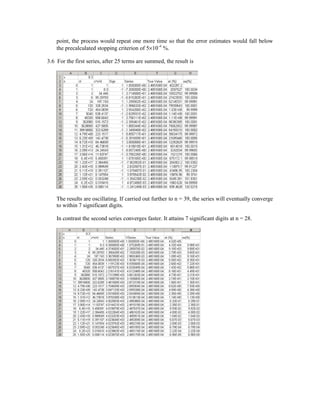
As an application, I used Excel to evaluate the second series from Prob. 3.6. The results are:
Notice how after summing 27 terms, the result is correct to 7 significant figures. At this
point, both the true and the approximate percent relative errors are at 6.16×10⁻⁶
%. At this
point, the process would repeat one more time so that the error estimates would fall below
the precalculated stopping criterion of 5×10⁻⁶
%.
3.6 For the first series, after 25 terms are summed, the result is
The results are oscillating. If carried out further to n = 39, the series will eventually converge
to within 7 significant digits.
In contrast the second series converges faster. It attains 7 significant digits at n = 28.
3.9 Solution:
21 x 21 x 120 = 52920 words @ 64 bits/word = 8 bytes/word
52920 words @ 8 bytes/word = 423360 bytes
423360 bytes / 1024 bytes/kilobyte = 413.4 kilobytes = 0.41 M bytes
3.10 Solution:
% Given: Taylor Series Approximation for cos(x) = 1 - x^2/2! + x^4/4! - ...
% Find: number of terms needed to represent cos(x) to 8 significant
% figures at the point where: x=0.2 pi
x=0.2*pi;
es=0.5e-08;
%approximation
cos=1;
j=1;
% j=terms counter
fprintf('j= %2.0f cos(x)= %0.10fn', j,cos)
fact=1;
for i=2:2:100
j=j+1;
fact=fact*i*(i-1);
cosn=cos+((-1)^(j+1))*((x)^i)/fact;
ea=abs((cosn-cos)/cosn);
if ea<es
fprintf('j= %2.0f cos(x)= %0.10f ea = %0.1e CONVERGENCE
es= %0.1e',j,cosn,ea,es)
break
end
fprintf( 'j= %2.0f cos(x)= %0.10f ea = %0.1en',j,cosn,ea )
cos=cosn;
end
j= 1 cos(x)= 1.0000000000
j= 2 cos(x)= 0.8026079120 ea = 2.5e-001
j= 3 cos(x)= 0.8091018514 ea = 8.0e-003
j= 4 cos(x)= 0.8090163946 ea = 1.1e-004
j= 5 cos(x)= 0.8090169970 ea = 7.4e-007
j= 6 cos(x)= 0.8090169944 ea = 3.3e-009 CONVERGENCE es = 5.0e-009»
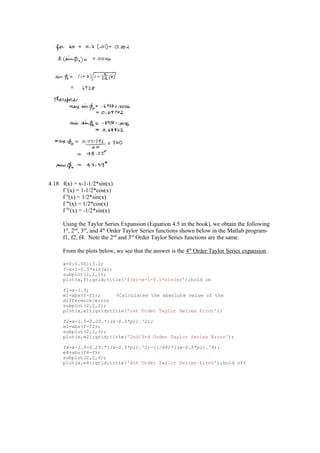
4.18 f(x) = x-1-1/2*sin(x)
f '(x) = 1-1/2*cos(x)
f ''(x) = 1/2*sin(x)
f '''(x) = 1/2*cos(x)
f IV
(x) = -1/2*sin(x)
Using the Taylor Series Expansion (Equation 4.5 in the book), we obtain the following 1st
,
2nd
, 3rd
, and 4th
Order Taylor Series functions shown below in the Matlab program-f1, f2,
f4. Note the 2nd
and 3rd
Order Taylor Series functions are the same.
From the plots below, we see that the answer is the 4th
Order Taylor Series expansion.
x=0:0.001:3.2;
f=x-1-0.5*sin(x);
subplot(2,2,1);
plot(x,f);grid;title('f(x)=x-1-0.5*sin(x)');hold on
f1=x-1.5;
e1=abs(f-f1); %Calculates the absolute value of the difference/error
subplot(2,2,2);
plot(x,e1);grid;title('1st Order Taylor Series Error');
f2=x-1.5+0.25.*((x-0.5*pi).^2);
e2=abs(f-f2);
subplot(2,2,3);
plot(x,e2);grid;title('2nd/3rd Order Taylor Series Error');
f4=x-1.5+0.25.*((x-0.5*pi).^2)-(1/48)*((x-0.5*pi).^4);
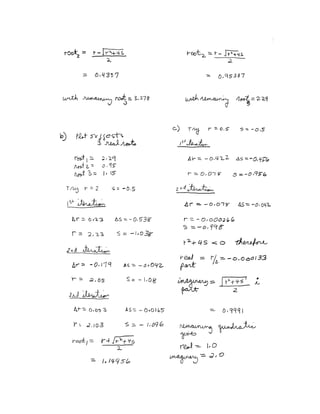
e4=abs(f4-f);
subplot(2,2,4);
plot(x,e4);grid;title('4th Order Taylor Series Error');hold off
0 1 2 3 4
-1
0
1
2
3
f(x)=x-1-0.5*sin(x)
0 1 2 3 4
0
0.2
0.4
0.6
0.8
1st Order Taylor Series Error
0 1 2 3 4
0
0.05
0.1
0.15
0.2
2nd/3rd Order Taylor Series E rror
0 1 2 3 4
0
0.005
0.01
0.015
4th Order Taylor Series Error
4.19 EXCEL WORKSHEET AND PLOTS
x f(x) f(x-1) f(x+1) f'(x)-Theory f'(x)-Back f'(x)-Cent f'(x)-Forw
-2.000 0.000 -2.891 2.141 10.000 11.563 10.063 8.563
-1.750 2.141 0.000 3.625 7.188 8.563 7.250 5.938
-1.500 3.625 2.141 4.547 4.750 5.938 4.813 3.688
-1.250 4.547 3.625 5.000 2.688 3.688 2.750 1.813
-1.000 5.000 4.547 5.078 1.000 1.813 1.063 0.313
-0.750 5.078 5.000 4.875 -0.313 0.313 -0.250 -0.813
-0.500 4.875 5.078 4.484 -1.250 -0.813 -1.188 -1.563
-0.250 4.484 4.875 4.000 -1.813 -1.563 -1.750 -1.938
0.000 4.000 4.484 3.516 -2.000 -1.938 -1.938 -1.938
0.250 3.516 4.000 3.125 -1.813 -1.938 -1.750 -1.563
0.500 3.125 3.516 2.922 -1.250 -1.563 -1.188 -0.813
0.750 2.922 3.125 3.000 -0.313 -0.813 -0.250 0.313
1.000 3.000 2.922 3.453 1.000 0.313 1.063 1.813
1.250 3.453 3.000 4.375 2.688 1.813 2.750 3.688
1.500 4.375 3.453 5.859 4.750 3.688 4.813 5.938
1.750 5.859 4.375 8.000 7.188 5.938 7.250 8.563
2.000 8.000 5.859 10.891 10.000 8.563 10.063 11.563
First Derivative Approximations Compared to Theoretical
-4.0
-2.0
0.0
2.0
4.0
6.0
8.0
10.0
12.0
14.0
-2.5 -2.0 -1.5 -1.0 -0.5 0.0 0.5 1.0 1.5 2.0 2.5
x-values
f'(x)
Theoretical
Backward
Centered
Forward
x f(x) f(x-1) f(x+1) f(x-2) f(x+2) f''(x)-
Theory
f''(x)-
Back
f''(x)-Cent f''(x)-
Forw
-2.000 0.000 -2.891 2.141 3.625 3.625 -12.000 150.500 -12.000 -10.500
-1.750 2.141 0.000 3.625 -2.891 4.547 -10.500 -12.000 -10.500 -9.000
-1.500 3.625 2.141 4.547 0.000 5.000 -9.000 -10.500 -9.000 -7.500
-1.250 4.547 3.625 5.000 2.141 5.078 -7.500 -9.000 -7.500 -6.000
-1.000 5.000 4.547 5.078 3.625 4.875 -6.000 -7.500 -6.000 -4.500
-0.750 5.078 5.000 4.875 4.547 4.484 -4.500 -6.000 -4.500 -3.000
-0.500 4.875 5.078 4.484 5.000 4.000 -3.000 -4.500 -3.000 -1.500
-0.250 4.484 4.875 4.000 5.078 3.516 -1.500 -3.000 -1.500 0.000
0.000 4.000 4.484 3.516 4.875 3.125 0.000 -1.500 0.000 1.500
0.250 3.516 4.000 3.125 4.484 2.922 1.500 0.000 1.500 3.000
0.500 3.125 3.516 2.922 4.000 3.000 3.000 1.500 3.000 4.500
0.750 2.922 3.125 3.000 3.516 3.453 4.500 3.000 4.500 6.000
1.000 3.000 2.922 3.453 3.125 4.375 6.000 4.500 6.000 7.500
1.250 3.453 3.000 4.375 2.922 5.859 7.500 6.000 7.500 9.000
1.500 4.375 3.453 5.859 3.000 8.000 9.000 7.500 9.000 10.500
1.750 5.859 4.375 8.000 3.453 10.891 10.500 9.000 10.500 12.000
2.000 8.000 5.859 10.891 4.375 14.625 12.000 10.500 12.000 13.500
Approximations of the 2nd Derivative
-15.0
-10.0
-5.0
0.0
5.0
10.0
15.0
-2.5 -2.0 -1.5 -1.0 -0.5 0.0 0.5 1.0 1.5 2.0 2.5
x-values
f''(x)
f''(x)-Theory
f''(x)-Backward
f''(x)-Centered
f''(x)-Forward
5.13 (a)
iterations
10
or
45
.
9
)
2
log(
)
05
.
/
35
log(
=
=
n
(b)
iteration xr
1 17.5
2 26.25
3 30.625
4 28.4375
5 27.34375
6 26.79688
7 26.52344
8 26.66016
9 26.72852
10 26.76270
for os = 8 mg/L, T = 26.7627 o
C
for os = 10 mg/L, T = 15.41504 o
C
for os = 14mg/L, T = 1.538086 o
C
5.14
Here is a VBA program to implement the Bisection function (Fig. 5.10) in a user-friendly
program:
Option Explicit
Sub TestBisect()
Dim imax As Integer, iter As Integer
Dim x As Single, xl As Single, xu As Single
Dim es As Single, ea As Single, xr As Single
Dim root As Single
Sheets("Sheet1").Select
Range("b4").Select
xl = ActiveCell.Value
ActiveCell.Offset(1, 0).Select
xu = ActiveCell.Value
ActiveCell.Offset(1, 0).Select
es = ActiveCell.Value
ActiveCell.Offset(1, 0).Select
imax = ActiveCell.Value
Range("b4").Select
If f(xl) * f(xu) < 0 Then
root = Bisect(xl, xu, es, imax, xr, iter, ea)
MsgBox "The root is: " & root
MsgBox "Iterations:" & iter
MsgBox "Estimated error: " & ea
MsgBox "f(xr) = " & f(xr)
Else
MsgBox "No sign change between initial guesses"
End If
End Sub
Function Bisect(xl, xu, es, imax, xr, iter, ea)
Dim xrold As Single, test As Single
iter = 0
Do
xrold = xr
xr = (xl + xu) / 2
iter = iter + 1
If xr <> 0 Then
ea = Abs((xr - xrold) / xr) * 100
End If
test = f(xl) * f(xr)
If test < 0 Then
xu = xr
ElseIf test > 0 Then
xl = xr
Else
ea = 0
End If
If ea < es Or iter >= imax Then Exit Do
Loop
Bisect = xr
End Function
Function f(c)
f = 9.8 * 68.1 / c * (1 - Exp(-(c / 68.1) * 10)) - 40
End Function
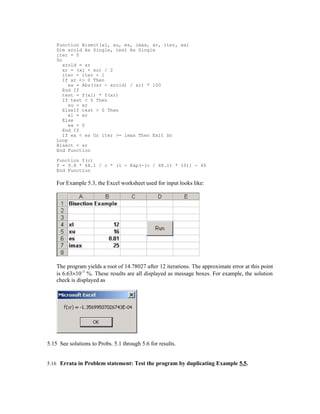
For Example 5.3, the Excel worksheet used for input looks like:
The program yields a root of 14.78027 after 12 iterations. The approximate error at this point
is 6.63×10⁻³
%. These results are all displayed as message boxes. For example, the solution
check is displayed as
5.15 See solutions to Probs. 5.1 through 5.6 for results.
5.16 Errata in Problem statement: Test the program by duplicating Example 5.5.
Here is a VBA Sub procedure to implement the modified false position method. It is set up to
evaluate Example 5.5.
Option Explicit
Sub TestFP()
Dim imax As Integer, iter As Integer
Dim f As Single, FalseP As Single, x As Single, xl As Single
Dim xu As Single, es As Single, ea As Single, xr As Single
xl = 0
xu = 1.3
es = 0.01
imax = 20
MsgBox "The root is: " & FalsePos(xl, xu, es, imax, xr, iter, ea)
MsgBox "Iterations: " & iter
MsgBox "Estimated error: " & ea
End Sub
Function FalsePos(xl, xu, es, imax, xr, iter, ea)
Dim il As Integer, iu As Integer
Dim xrold As Single, fl As Single, fu As Single, fr As Single
iter = 0
fl = f(xl)
fu = f(xu)
Do
xrold = xr
xr = xu - fu * (xl - xu) / (fl - fu)
fr = f(xr)
iter = iter + 1
If xr <> 0 Then
ea = Abs((xr - xrold) / xr) * 100
End If
If fl * fr < 0 Then
xu = xr
fu = f(xu)
iu = 0
il = il + 1
If il >= 2 Then fl = fl / 2
ElseIf fl * fr > 0 Then
xl = xr
fl = f(xl)
il = 0
iu = iu + 1
If iu >= 2 Then fu = fu / 2
Else
ea = 0#
End If
If ea < es Or iter >= imax Then Exit Do
Loop
FalsePos = xr
End Function
Function f(x)
f = x ^ 10 - 1
End Function
When the program is run for Example 5.5, it yields:
root = 14.7802
iterations = 5
error = 3.9×10⁻⁵
%
5.17 Errata in Problem statement: Use the subprogram you developed in Prob. 5.16 to
duplicate the computation from Example 5.6.
The results are plotted as
0.001
0.01
0.1
1
10
100
1000
0 4 8 12
ea%
et,%
es,%
Interpretation: At first, the method manifests slow convergence. However, as it approaches
the root, it approaches quadratic convergence. Note also that after the first few iterations, the
approximate error estimate has the nice property that εa > εt.
5.18 Here is a VBA Sub procedure to implement the false position method with minimal
function evaluations set up to evaluate Example 5.6.
Option Explicit
Sub TestFP()
Dim imax As Integer, iter As Integer, i As Integer
Dim xl As Single, xu As Single, es As Single, ea As Single, xr As
Single, fct As Single
MsgBox "The root is: " & FPMinFctEval(xl, xu, es, imax, xr, iter, ea)
MsgBox "Iterations: " & iter
MsgBox "Estimated error: " & ea
End Sub
Function FPMinFctEval(xl, xu, es, imax, xr, iter, ea)
Dim xrold, test, fl, fu, fr
iter = 0
xl = 0#
xu = 1.3
es = 0.01
imax = 50
fl = f(xl)
fu = f(xu)
xr = (xl + xu) / 2
Do
xrold = xr
xr = xu - fu * (xl - xu) / (fl - fu)
fr = f(xr)
iter = iter + 1
If (xr <> 0) Then
ea = Abs((xr - xrold) / xr) * 100#
End If
test = fl * fr
If (test < 0) Then
xu = xr
fu = fr
ElseIf (test > 0) Then
xl = xr
fl = fr
Else
ea = 0#
End If
If ea < es Or iter >= imax Then Exit Do
Loop
FPMinFctEval = xr
End Function
Function f(x)
f = x ^ 10 - 1
End Function
The program yields a root of 0.9996887 after 39 iterations. The approximate error at this
point is 9.5×10⁻³
%. These results are all displayed as message boxes. For example, the
solution check is displayed as
The number of function evaluations for this version is 2n+2. This is much smaller than the
number of function evaluations in the standard false position method (5n).
5.19 Solve for the reactions:
R1=265 lbs. R2= 285 lbs.
Write beam equations:
0<x<3
3
2
55
.
5
265
)
1
(
0
265
3
)
667
.
16
(
x
M
x
x
x
M
−
=
=
−
+
3<x<6
150
415
50
)
2
(
0
265
))
3
(
3
2
(
150
)
2
3
)(
3
(
100
2
−
+
−
=
=
−
−
+
−
−
+
x
x
M
x
x
x
x
M
6<x<10
1650
185
)
3
(
265
)
5
.
4
(
300
))
3
(
3
2
(
150
+
−
=
−
−
+
−
=
x
M
x
x
x
M
10<x<12
1200
100
)
4
(
0
)
12
(
100
−
=
=
−
+
x
M
x
M
Combining Equations:
Because the curve crosses the axis between 6 and 10, use (3).
(3) 1650
185 +
−
= x
M
Set 10
;
6 =
= U
L x
x
200
)
(
540
)
( L
−
=
=
U
x
M
x
M
8
2
=
+
= U
L
r
x
x
x
L
R x
replaces
x
M →
= 170
)
(
200
)
(
170
)
( L
−
=
=
U
x
M
x
M
9
2
10
8
=
+
=
r
x
U
R x
replaces
x
M →
−
= 15
)
(
15
)
(
170
)
( L
−
=
=
U
x
M
x
M
5
.
8
2
9
8
=
+
=
r
x
L
R x
replaces
x
M →
= 5
.
77
)
(
15
)
(
5
.
77
)
( L
−
=
=
U
x
M
x
M
75
.
8
2
9
5
.
8
=
+
=
r
x
L
R x
replaces
x
M →
= 25
.
31
)
(
15
)
(
25
.
31
)
( L
−
=
=
U
x
M
x
M
875
.
8
2
9
75
.
8
=
+
=
r
x
L
R x
replaces
x
M →
= 125
.
8
)
(
15
)
(
125
.
8
)
( L
−
=
=
U
x
M
x
M
9375
.
8
2
9
875
.
8
=
+
=
r
x
U
R x
replaces
x
M →
−
= 4375
.
3
)
(
4375
.
3
)
(
125
.
8
)
( L
−
=
=
U
x
M
x
M
90625
.
8
2
9375
.
8
875
.
8
=
+
=
r
x
L
R x
replaces
x
M →
= 34375
.
2
)
(
4375
.
3
)
(
34375
.
2
)
( L
−
=
=
U
x
M
x
M
921875
.
8
2
9375
.
8
90625
.
8
=
+
=
r
x
U
R x
replaces
x
M →
−
= 546875
.
0
)
(
546875
.
0
)
(
34375
.
2
)
( L
−
=
=
U
x
M
x
M
9140625
.
8
2
921875
.
8
90625
.
8
=
+
=
r
x
8984
.
0
)
( R =
x
M Therefore, feet
x 91
.
8
=
5.20 1650
185 +
−
= x
M
Set 10
;
6 =
= U
L x
x
200
)
(
540
)
( L
−
=
=
U
x
M
x
M
0
10
2
)
(
9189
.
8
)
200
(
540
)
10
6
(
200
10
)
(
)
(
)
)(
(
7
≅
×
−
=
=
−
−
−
−
−
=
−
−
−
=
−
R
R
U
L
U
L
U
o
R
x
M
x
x
M
x
M
x
x
x
M
x
x
Only one iteration was necessary.
Therefore, .
9189
.
8 feet
x =
6.16
Here is a VBA program to implement the Newton-Raphson algorithm and solve Example
6.3.
Option Explicit
Sub NewtRaph()
Dim imax As Integer, iter As Integer
Dim x0 As Single, es As Single, ea As Single
x0 = 0#
es = 0.01
imax = 20
MsgBox "Root: " & NewtR(x0, es, imax, iter, ea)
MsgBox "Iterations: " & iter
MsgBox "Estimated error: " & ea
End Sub
Function df(x)
df = -Exp(-x) - 1#
End Function
Function f(x)
f = Exp(-x) - x
End Function
Function NewtR(x0, es, imax, iter, ea)
Dim xr As Single, xrold As Single
xr = x0
iter = 0
Do
xrold = xr
xr = xr - f(xr) / df(xr)
iter = iter + 1
If (xr <> 0) Then
ea = Abs((xr - xrold) / xr) * 100
End If
If ea < es Or iter >= imax Then Exit Do
Loop
NewtR = xr
End Function
It’s application yields a root of 0.5671433 after 4 iterations. The approximate error at this
point is 2.1×10⁻⁵
%.
6.17
Here is a VBA program to implement the secant algorithm and solve Example 6.6.
Option Explicit
Sub SecMain()
Dim imax As Integer, iter As Integer
Dim x0 As Single, x1 As Single, xr As Single
Dim es As Single, ea As Single
x0 = 0
x1 = 1
es = 0.01
imax = 20
MsgBox "Root: " & Secant(x0, x1, xr, es, imax, iter, ea)
MsgBox "Iterations: " & iter
MsgBox "Estimated error: " & ea
End Sub
Function f(x)
f = Exp(-x) - x
End Function
Function Secant(x0, x1, xr, es, imax, iter, ea)
xr = x1
iter = 0
Do
xr = x1 - f(x1) * (x0 - x1) / (f(x0) - f(x1))
iter = iter + 1
If (xr <> 0) Then
ea = Abs((xr - x1) / xr) * 100
End If
If ea < es Or iter >= imax Then Exit Do
x0 = x1
x1 = xr
Loop
Secant = xr
End Function
It’s application yields a root of 0.5671433 after 4 iterations. The approximate error at this
point is 4.77×10⁻³
%.
6.18
Here is a VBA program to implement the modified secant algorithm and solve Example 6.8.
Option Explicit
Sub SecMod()
Dim imax As Integer, iter As Integer
Dim x As Single, es As Single, ea As Single
x = 1
es = 0.01
imax = 20
MsgBox "Root: " & ModSecant(x, es, imax, iter, ea)
MsgBox "Iterations: " & iter
MsgBox "Estimated error: " & ea
End Sub
Function f(x)
f = Exp(-x) - x
End Function
Function ModSecant(x, es, imax, iter, ea)
Dim xr As Single, xrold As Single, fr As Single
Const del As Single = 0.01
xr = x
iter = 0
Do
xrold = xr
fr = f(xr)
xr = xr - fr * del * xr / (f(xr + del * xr) - fr)
iter = iter + 1
If (xr <> 0) Then
ea = Abs((xr - xrold) / xr) * 100
End If
If ea < es Or iter >= imax Then Exit Do
Loop
ModSecant = xr
End Function
It’s application yields a root of 0.5671433 after 4 iterations. The approximate error at this
point is 3.15×10⁻⁵
%.
6.19
Here is a VBA program to implement the 2 equation Newton-Raphson method and solve
Example 6.10.
Option Explicit
Sub NewtRaphSyst()
Dim imax As Integer, iter As Integer
Dim x0 As Single, y0 As Single
Dim xr As Single, yr As Single
Dim es As Single, ea As Single
x0 = 1.5
y0 = 3.5
es = 0.01
imax = 20
Call NR2Eqs(x0, y0, xr, yr, es, imax, iter, ea)
MsgBox "x, y = " & xr & ", " & yr
MsgBox "Iterations: " & iter
MsgBox "Estimated error: " & ea
End Sub
Sub NR2Eqs(x0, y0, xr, yr, es, imax, iter, ea)
Dim J As Single, eay As Single
iter = 0
Do
J = dudx(x0, y0) * dvdy(x0, y0) - dudy(x0, y0) * dvdx(x0, y0)
xr = x0 - (u(x0, y0) * dvdy(x0, y0) - v(x0, y0) * dudy(x0, y0)) / J
yr = y0 - (v(x0, y0) * dudx(x0, y0) - u(x0, y0) * dvdx(x0, y0)) / J
iter = iter + 1
If (xr <> 0) Then
ea = Abs((xr - x0) / xr) * 100
End If
If (xr <> 0) Then
eay = Abs((yr - y0) / yr) * 100
End If
If eay > ea Then ea = eay
If ea < es Or iter >= imax Then Exit Do
x0 = xr
y0 = yr
Loop
End Sub
Function u(x, y)
u = x ^ 2 + x * y - 10
End Function
Function v(x, y)
v = y + 3 * x * y ^ 2 - 57
End Function
Function dudx(x, y)
dudx = 2 * x + y
End Function
Function dudy(x, y)
dudy = x
End Function
Function dvdx(x, y)
dvdx = 3 * y ^ 2
End Function
Function dvdy(x, y)
dvdy = 1 + 6 * x * y
End Function
It’s application yields roots of x = 2 and y = 3 after 4 iterations. The approximate error at this
point is 1.59×10⁻⁵
%.
6.20
The program from Prob. 6.19 can be set up to solve Prob. 6.11, by changing the functions to
Function u(x, y)
u = y + x ^ 2 - 0.5 - x
End Function
Function v(x, y)
v = x ^ 2 - 5 * x * y - y
End Function
Function dudx(x, y)
dudx = 2 * x - 1
End Function
Function dudy(x, y)
dudy = 1
End Function
Function dvdx(x, y)
dvdx = 2 * x ^ 2 - 5 * y
End Function
Function dvdy(x, y)
dvdy = -5 * x
End Function
Using a stopping criterion of 0.01%, the program yields x = 1.233318 and y = 0.212245 after
7 iterations with an approximate error of 2.2×10⁻⁴
.
The program from Prob. 6.19 can be set up to solve Prob. 6.12, by changing the functions to
Function u(x, y)
u = (x - 4) ^ 2 + (y - 4) ^ 2 - 4
End Function
Function v(x, y)
v = x ^ 2 + y ^ 2 - 16
End Function
Function dudx(x, y)
dudx = 2 * (x - 4)
End Function
Function dudy(x, y)
dudy = 2 * (y - 4)
End Function
Function dvdx(x, y)
dvdx = 2 * x
End Function
Function dvdy(x, y)
dvdy = 2 * y
End Function
Using a stopping criterion of 0.01% and initial guesses of 2 and 3.5, the program yields x =
2.0888542 and y = 3.411438 after 3 iterations with an approximate error of 9.8×10⁻⁴
.
Using a stopping criterion of 0.01% and initial guesses of 3.5 and 2, the program yields x =
3.411438 and y = 2.0888542 after 3 iterations with an approximate error of 9.8×10⁻⁴
.
6.21
a
x =
a
x =
2
0
)
( 2
=
−
= a
x
x
f
x
x
f 2
)
(
' =
Substitute into Newton Raphson formula (Eq. 6.6),
x
a
x
x
x
2
2
−
−
=
Combining terms gives
2
/
2
)
(
2 2
2
x
a
x
a
x
x
x
x
+
=
+
−
=
6.22
SOLUTION:
( ) ( )
( ) ( )
[ ]( )
1
.
3
2
9
sech
'
9
tanh
2
2
2
=
−
=
−
=
o
x
x
x
x
f
x
x
f
( )
( )
x
f
x
f
x
x i
i '
1 −
=
+
iteration xi+1
1 2.9753
2 3.2267
3 2.5774
4 7.9865
The solution diverges from its real root of x = 3. Due to the concavity of the slope, the next iteration
will always diverge. The sketch should resemble figure 6.6(a).
6.23
SOLUTION:
183
.
12
71
.
6
852
.
0
0296
.
0
)
(
5
183
.
12
355
.
3
284
.
0
0074
.
0
)
(
2
3
'
2
3
4
−
+
−
=
+
−
+
−
=
x
x
x
x
f
x
x
x
x
x
f
)
(
)
(
'
1
i
i
i
i
x
f
x
f
x
x −
=
+
i xi+1
1 9.0767
2 -4.01014
3 -3.2726
The solution converged on another root. The partial solutions for each iteration intersected the x-axis
along its tangent path beyond a different root, resulting in convergence elsewhere.
6.24
SOLUTION:
f(x) = 2
)
1
(
16 2
+
+
−
± x
)
(
)
(
)
)(
(
1
1
1
i
i
i
i
i
i
i
x
f
x
f
x
x
x
f
x
x
−
−
−
=
−
−
+
1st
iteration
708
.
1
)
(
5
.
0 1
1 −
=
⇒
= −
− i
i x
f
x
2
)
(
3 =
⇒
= i
i x
f
x
6516
.
1
)
2
708
.
1
(
)
3
5
.
0
(
2
3
1 =
−
−
−
−
=
+
i
x
2nd
iteration
9948
.
0
)
(
6516
.
1 −
=
⇒
= i
i x
f
x
46
.
1
)
(
5
.
0 1
1
−
=
⇒
= −
− i
i
x
f
x
1142
.
4
)
9948
.
0
46
.
1
(
)
6516
.
1
5
.
0
(
9948
.
0
6516
.
1
1 =
−
−
−
−
−
−
=
+
i
x
The solution diverges because the secant created by the two x-values yields a solution outside the
functions domain.
7.6 Errata in Fig. 7.4; 6th line from the bottom of the algorithm: the > should be changed to >=
IF (dxr < eps*xr OR iter >= maxit) EXIT
Here is a VBA program to implement the Müller algorithm and solve Example 7.2.
Option Explicit
Sub TestMull()
Dim maxit As Integer, iter As Integer
Dim h As Single, xr As Single, eps As Single
h = 0.1
xr = 5
eps = 0.001
maxit = 20
Call Muller(xr, h, eps, maxit, iter)
MsgBox "root = " & xr
MsgBox "Iterations: " & iter
End Sub
Sub Muller(xr, h, eps, maxit, iter)
Dim x0 As Single, x1 As Single, x2 As Single
Dim h0 As Single, h1 As Single, d0 As Single, d1 As Single
Dim a As Single, b As Single, c As Single
Dim den As Single, rad As Single, dxr As Single
x2 = xr
x1 = xr + h * xr
x0 = xr - h * xr
Do
iter = iter + 1
h0 = x1 - x0
h1 = x2 - x1
d0 = (f(x1) - f(x0)) / h0
d1 = (f(x2) - f(x1)) / h1
a = (d1 - d0) / (h1 + h0)
b = a * h1 + d1
c = f(x2)
rad = Sqr(b * b - 4 * a * c)
If Abs(b + rad) > Abs(b - rad) Then
den = b + rad
Else
den = b - rad
End If
dxr = -2 * c / den
xr = x2 + dxr
If Abs(dxr) < eps * xr Or iter >= maxit Then Exit Do
x0 = x1
x1 = x2
x2 = xr
Loop
End Sub
Function f(x)
f = x ^ 3 - 13 * x - 12
End Function
7.7 The plot suggests a root at 1
-6
-4
-2
0
2
4
6
-1 0 1 2
Using an initial guess of 1.5 with h = 0.1 and eps = 0.001 yields the correct result of 1 in 4
iterations.
7.8 Here is a VBA program to implement the Bairstow algorithm and solve Example 7.3.
Option Explicit
Sub PolyRoot()
Dim n As Integer, maxit As Integer, ier As Integer, i As Integer
Dim a(10) As Single, re(10) As Single, im(10) As Single
Dim r As Single, s As Single, es As Single
n = 5
a(0) = 1.25: a(1) = -3.875: a(2) = 2.125: a(3) = 2.75: a(4) = -3.5: a(5) = 1
maxit = 20
es = 0.01
r = -1
s = -1
Call Bairstow(a(), n, es, r, s, maxit, re(), im(), ier)
For i = 1 To n
If im(i) >= 0 Then
MsgBox re(i) & " + " & im(i) & "i"
Else
MsgBox re(i) & " - " & Abs(im(i)) & "i"
End If
Next i
End Sub
Sub Bairstow(a, nn, es, rr, ss, maxit, re, im, ier)
Dim iter As Integer, n As Integer, i As Integer
Dim r As Single, s As Single, ea1 As Single, ea2 As Single
Dim det As Single, dr As Single, ds As Single
Dim r1 As Single, i1 As Single, r2 As Single, i2 As Single
Dim b(10) As Single, c(10) As Single
r = rr
s = ss
n = nn
ier = 0
ea1 = 1
ea2 = 1
Do
If n < 3 Or iter >= maxit Then Exit Do
iter = 0
Do
iter = iter + 1
b(n) = a(n)
b(n - 1) = a(n - 1) + r * b(n)
c(n) = b(n)
c(n - 1) = b(n - 1) + r * c(n)
For i = n - 2 To 0 Step -1
b(i) = a(i) + r * b(i + 1) + s * b(i + 2)
c(i) = b(i) + r * c(i + 1) + s * c(i + 2)
Next i
det = c(2) * c(2) - c(3) * c(1)
If det <> 0 Then
dr = (-b(1) * c(2) + b(0) * c(3)) / det
ds = (-b(0) * c(2) + b(1) * c(1)) / det
r = r + dr
s = s + ds
If r <> 0 Then ea1 = Abs(dr / r) * 100
If s <> 0 Then ea2 = Abs(ds / s) * 100
Else
r = r + 1
s = s + 1
iter = 0
End If
If ea1 <= es And ea2 <= es Or iter >= maxit Then Exit Do
Loop
Call Quadroot(r, s, r1, i1, r2, i2)
re(n) = r1
im(n) = i1
re(n - 1) = r2
im(n - 1) = i2
n = n - 2
For i = 0 To n
a(i) = b(i + 2)
Next i
Loop
If iter < maxit Then
If n = 2 Then
r = -a(1) / a(2)
s = -a(0) / a(2)
Call Quadroot(r, s, r1, i1, r2, i2)
re(n) = r1
im(n) = i1
re(n - 1) = r2
im(n - 1) = i2
Else
re(n) = -a(0) / a(1)
im(n) = 0
End If
Else
ier = 1
End If
End Sub
Sub Quadroot(r, s, r1, i1, r2, i2)
Dim disc
disc = r ^ 2 + 4 * s
If disc > 0 Then
r1 = (r + Sqr(disc)) / 2
r2 = (r - Sqr(disc)) / 2
i1 = 0
i2 = 0
Else
r1 = r / 2
r2 = r1
i1 = Sqr(Abs(disc)) / 2
i2 = -i1
End If
End Sub
7.9 See solutions to Prob. 7.5
7.10 The goal seek set up is
The result is
7.11 The goal seek set up is shown below. Notice that we have named the cells containing the
parameter values with the labels in column A.
The result is 63.649 kg as shown here:
7.12 The Solver set up is shown below using initial guesses of x = y = 1. Notice that we have
rearranged the two functions so that the correct values will drive them both to zero. We then
drive the sum of their squared values to zero by varying x and y. This is done because a
straight sum would be zero if f1(x,y) = -f2(x,y).
The result is
7.13 A plot of the functions indicates two real roots at about (−1.5, 1.5) and (−1.5, 1.5).
-3
-2
-1
0
1
2
3
4
-3 -2 -1 0 1 2 3
The Solver set up is shown below using initial guesses of (−1.5, 1.5). Notice that we have
rearranged the two functions so that the correct values will drive them both to zero. We then
drive the sum of their squared values to zero by varying x and y. This is done because a
straight sum would be zero if f1(x,y) = -f2(x,y).
The result is
For guesses of (1.5, 1.5) the result is (1.6004829, 1.561556).
>> roots (d)
with the expected result that the remaining roots of the original polynomial are found
ans =
8.0000
-4.0000
1.0000
We can now multiply d by b to come up with the original polynomial,
>> conv(d,b)
ans =
1 -9 -20 204 208 -384
Finally, we can determine all the roots of the original polynomial by
>> r=roots(a)
r =
8.0000
6.0000
-4.0000
-2.0000
1.0000
7.15
p=[0.7 -4 6.2 -2];
roots(p)
ans =
3.2786
2.0000
0.4357
p=[-3.704 16.3 -21.97 9.34];
roots(p)
ans =
2.2947
1.1525
0.9535
p=[1 -2 6 -2 5];
roots(p)
ans =
1.0000 + 2.0000i
1.0000 - 2.0000i
-0.0000 + 1.0000i
-0.0000 - 1.0000i
7.16 Here is a program written in Compaq Visual Fortran 90,
PROGRAM Root
Use IMSL !This establishes the link to the IMSL libraries
Implicit None !forces declaration of all variables
Integer::nroot
Parameter(nroot=1)
Integer::itmax=50
Real::errabs=0.,errrel=1.E-5,eps=0.,eta=0.
Real::f,x0(nroot) ,x(nroot)
External f
Integer::info(nroot)
Print *, "Enter initial guess"
Read *, x0
Call ZReal(f,errabs,errrel,eps,eta,nroot,itmax,x0,x,info)
Print *, "root = ", x
Print *, "iterations = ", info
End
Function f(x)
Implicit None
Real::f,x
f = x**3-x**2+2*x-2
End
The output for Prob. 7.4a would look like
Enter initial guess
.5
root = 1.000000
iterations = 7
Press any key to continue
7.17
ho = 0.55 – 0.53 = 0.02
h1 = 0.54 – 0.55 = -0.01
δo = 58 – 19 = 1950
0.55 – 0.53
δ1 = 44 – 58 = 1400
0.54 – 0.55
a = δ1– δo = -55000
h1 + ho
b = a h1 + δ1 = 1950
c = 44
ac
b 4
2
−
= 3671.85
s
524
.
0
85
.
3671
1950
)
44
(
2
54
.
0
to =
+
−
+
=
Therefore, the pressure was zero at 0.524 seconds.
7.18
I) Graphically:
EDU»C=[1 3.6 0 -36.4];roots(C)
ans = -3.0262+ 2.3843i
-3.0262- 2.3843i
2.4524
The answer is 2.4524 considering it is the only real root.
II) Using the Roots Function:
EDU» x=-1:0.001:2.5;f=x.^3+3.6.*x.^2-36.4;plot(x,f);grid;zoom
By zooming in the plot at the desired location, we get the same answer of 2.4524.
2.4523 2.45232.4524 2.4524 2.4524 2.4524 2.45242.4524 2.4524 2.4524 2.4524
-6
-4
-2
0
2
4
x 10
-4
7.19
Excel Solver Solution: The 3 functions can be set up as roots problems:
0
2
)
,
,
(
0
2
)
,
,
(
0
3
)
,
,
(
2
3
2
2
2
2
1
=
−
−
=
=
−
+
=
=
+
−
=
u
a
a
v
u
a
f
v
u
v
u
a
f
v
u
a
v
u
a
f
Symbolic Manipulator Solution:
>>syms a u v
>>S=solve(u^2-3*v^2-a^2,u+v-2,a^2-2*a-u)
>>double (S.a)
ans = 2.9270 + 0.3050i
2.9270 – 0.3050i
-0.5190
-1.3350
>>double (S.u)
ans = 2.6203 + 1.1753i
2.6203 – 1.1753i
1.3073
4.4522
>>double (S.v)
ans = -0.6203 + 1.1753i
-0.6203 – 1.1753i
0.6297
-2.4522
Therefore, we see that the two real-valued solutions for a, u, and v are
(-0.5190,1.3073,0.6927) and (-1.3350,4.4522,-2.4522).
7.20 The roots of the numerator are: s = -2, s = -3, and s = -4.
The roots of the denominator are: s = -1, s = -3, s = -5, and s = -6.
)
6
)(
5
)(
3
)(
1
(
)
4
)(
3
)(
2
(
)
(
+
+
+
+
+
+
+
=
s
s
s
s
s
s
s
s
G
9.14
Here is a VBA program to implement matrix multiplication and solve Prob. 9.3 for the case
of [X]×[Y].
Option Explicit
Sub Mult()
Dim i As Integer, j As Integer
Dim l As Integer, m As Integer, n As Integer
Dim x(10, 10) As Single, y(10, 10) As Single
Dim w(10, 10) As Single
l = 2
m = 2
n = 3
x(1, 1) = 1: x(1, 2) = 6
x(2, 1) = 3: x(2, 2) = 10
x(3, 1) = 7: x(3, 2) = 4
y(1, 1) = 6: y(2, 1) = 0
y(2, 1) = 1: y(2, 2) = 4
Call Mmult(x(), y(), w(), m, n, l)
For i = 1 To n
For j = 1 To l
MsgBox w(i, j)
Next j
Next i
End Sub
Sub Mmult(y, z, x, n, m, p)
Dim i As Integer, j As Integer, k As Integer
Dim sum As Single
For i = 1 To m
For j = 1 To p
sum = 0
For k = 1 To n
sum = sum + y(i, k) * z(k, j)
Next k
x(i, j) = sum
Next j
Next i
End Sub
9.15
Here is a VBA program to implement the matrix transpose and solve Prob. 9.3 for the case of
[X]T
.
Option Explicit
Sub Mult()
Dim i As Integer, j As Integer
Dim m As Integer, n As Integer
Dim x(10, 10) As Single, y(10, 10) As Single
n = 3
m = 2
x(1, 1) = 1: x(1, 2) = 6
x(2, 1) = 3: x(2, 2) = 10
x(3, 1) = 7: x(3, 2) = 4
Call MTrans(x(), y(), n, m)
For i = 1 To m
For j = 1 To n
MsgBox y(i, j)
Next j
Next i
End Sub
Sub MTrans(a, b, n, m)
Dim i As Integer, j As Integer
For i = 1 To m
For j = 1 To n
b(i, j) = a(j, i)
Next j
Next i
End Sub
9.16
Here is a VBA program to implement the Gauss elimination algorithm and solve the test case
in Prob. 9.16.
Option Explicit
Sub GaussElim()
Dim n As Integer, er As Integer, i As Integer
Dim a(10, 10) As Single, b(10) As Single, x(10) As Single
Range("a1").Select
n = 3
a(1, 1) = 1: a(1, 2) = 1: a(1, 3) = -1
a(2, 1) = 6: a(2, 2) = 2: a(2, 3) = 2
a(3, 1) = -3: a(3, 2) = 4: a(3, 3) = 1
b(1) = 1: b(2) = 10: b(3) = 2
Call Gauss(a(), b(), n, x(), er)
If er = 0 Then
For i = 1 To n
MsgBox "x(" & i & ") = " & x(i)
Next i
Else
MsgBox "ill-conditioned system"
End If
End Sub
Sub Gauss(a, b, n, x, er)
Dim i As Integer, j As Integer
Dim s(10) As Single
Const tol As Single = 0.000001
er = 0
For i = 1 To n
s(i) = Abs(a(i, 1))
For j = 2 To n
If Abs(a(i, j)) > s(i) Then s(i) = Abs(a(i, j))
Next j
Next i
Call Eliminate(a, s(), n, b, tol, er)
If er <> -1 Then
Call Substitute(a, n, b, x)
End If
End Sub
Sub Pivot(a, b, s, n, k)
Dim p As Integer, ii As Integer, jj As Integer
Dim factor As Single, big As Single, dummy As Single
p = k
big = Abs(a(k, k) / s(k))
For ii = k + 1 To n
dummy = Abs(a(ii, k) / s(ii))
If dummy > big Then
big = dummy
p = ii
End If
Next ii
If p <> k Then
For jj = k To n
dummy = a(p, jj)
a(p, jj) = a(k, jj)
a(k, jj) = dummy
Next jj
dummy = b(p)
b(p) = b(k)
b(k) = dummy
dummy = s(p)
s(p) = s(k)
s(k) = dummy
End If
End Sub
Sub Substitute(a, n, b, x)
Dim i As Integer, j As Integer
Dim sum As Single
x(n) = b(n) / a(n, n)
For i = n - 1 To 1 Step -1
sum = 0
For j = i + 1 To n
sum = sum + a(i, j) * x(j)
Next j
x(i) = (b(i) - sum) / a(i, i)
Next i
End Sub
Sub Eliminate(a, s, n, b, tol, er)
Dim i As Integer, j As Integer, k As Integer
Dim factor As Single
For k = 1 To n - 1
Call Pivot(a, b, s, n, k)
If Abs(a(k, k) / s(k)) < tol Then
er = -1
Exit For
End If
For i = k + 1 To n
factor = a(i, k) / a(k, k)
For j = k + 1 To n
a(i, j) = a(i, j) - factor * a(k, j)
Next j
b(i) = b(i) - factor * b(k)
Next i
Next k
If Abs(a(k, k) / s(k)) < tol Then er = -1
End Sub
It’s application yields a solution of (1, 1, 1).
10.14
Option Explicit
Sub LUDTest()
Dim n As Integer, er As Integer, i As Integer, j As Integer
Dim a(3, 3) As Single, b(3) As Single, x(3) As Single
Dim tol As Single
n = 3
a(1, 1) = 3: a(1, 2) = -0.1: a(1, 3) = -0.2
a(2, 1) = 0.1: a(2, 2) = 7: a(2, 3) = -0.3
a(3, 1) = 0.3: a(3, 2) = -0.2: a(3, 3) = 10
b(1) = 7.85: b(2) = -19.3: b(3) = 71.4
tol = 0.000001
Call LUD(a(), b(), n, x(), tol, er)
'output results to worksheet
Sheets("Sheet1").Select
Range("a3").Select
For i = 1 To n
ActiveCell.Value = x(i)
ActiveCell.Offset(1, 0).Select
Next i
Range("a3").Select
End Sub
Sub LUD(a, b, n, x, tol, er)
Dim i As Integer, j As Integer
Dim o(3) As Single, s(3) As Single
Call Decompose(a, n, tol, o(), s(), er)
If er = 0 Then
Call Substitute(a, o(), n, b, x)
Else
MsgBox "ill-conditioned system"
End
End If
End Sub
Sub Decompose(a, n, tol, o, s, er)
Dim i As Integer, j As Integer, k As Integer
Dim factor As Single
For i = 1 To n
o(i) = i
s(i) = Abs(a(i, 1))
For j = 2 To n
If Abs(a(i, j)) > s(i) Then s(i) = Abs(a(i, j))
Next j
Next i
For k = 1 To n - 1
Call Pivot(a, o, s, n, k)
If Abs(a(o(k), k) / s(o(k))) < tol Then
er = -1
Exit For
End If
For i = k + 1 To n
factor = a(o(i), k) / a(o(k), k)
a(o(i), k) = factor
For j = k + 1 To n
a(o(i), j) = a(o(i), j) - factor * a(o(k), j)
Next j
Next i
Next k
If (Abs(a(o(k), k) / s(o(k))) < tol) Then er = -1
End Sub
Sub Pivot(a, o, s, n, k)
Dim ii As Integer, p As Integer
Dim big As Single, dummy As Single
p = k
big = Abs(a(o(k), k) / s(o(k)))
For ii = k + 1 To n
dummy = Abs(a(o(ii), k) / s(o(ii)))
If dummy > big Then
big = dummy
p = ii
End If
Next ii
dummy = o(p)
o(p) = o(k)
o(k) = dummy
End Sub
Sub Substitute(a, o, n, b, x)
Dim k As Integer, i As Integer, j As Integer
Dim sum As Single, factor As Single
For k = 1 To n - 1
For i = k + 1 To n
factor = a(o(i), k)
b(o(i)) = b(o(i)) - factor * b(o(k))
Next i
Next k
x(n) = b(o(n)) / a(o(n), n)
For i = n - 1 To 1 Step -1
sum = 0
For j = i + 1 To n
sum = sum + a(o(i), j) * x(j)
Next j
x(i) = (b(o(i)) - sum) / a(o(i), i)
Next i
End Sub
10.15
Option Explicit
Sub LUGaussTest()
Dim n As Integer, er As Integer, i As Integer, j As Integer
Dim a(3, 3) As Single, b(3) As Single, x(3) As Single
Dim tol As Single, ai(3, 3) As Single
n = 3
a(1, 1) = 3: a(1, 2) = -0.1: a(1, 3) = -0.2
a(2, 1) = 0.1: a(2, 2) = 7: a(2, 3) = -0.3
a(3, 1) = 0.3: a(3, 2) = -0.2: a(3, 3) = 10
tol = 0.000001
Call LUDminv(a(), b(), n, x(), tol, er, ai())
If er = 0 Then
Range("a1").Select
For i = 1 To n
For j = 1 To n
ActiveCell.Value = ai(i, j)
ActiveCell.Offset(0, 1).Select
Next j
ActiveCell.Offset(1, -n).Select
Next i
Range("a1").Select
Else
MsgBox "ill-conditioned system"
End If
End Sub
Sub LUDminv(a, b, n, x, tol, er, ai)
Dim i As Integer, j As Integer
Dim o(3) As Single, s(3) As Single
Call Decompose(a, n, tol, o(), s(), er)
If er = 0 Then
For i = 1 To n
For j = 1 To n
If i = j Then
b(j) = 1
Else
b(j) = 0
End If
Next j
Call Substitute(a, o, n, b, x)
For j = 1 To n
ai(j, i) = x(j)
Next j
Next i
End If
End Sub
Sub Decompose(a, n, tol, o, s, er)
Dim i As Integer, j As Integer, k As Integer
Dim factor As Single
For i = 1 To n
o(i) = i
s(i) = Abs(a(i, 1))
For j = 2 To n
If Abs(a(i, j)) > s(i) Then s(i) = Abs(a(i, j))
Next j
Next i
For k = 1 To n - 1
Call Pivot(a, o, s, n, k)
If Abs(a(o(k), k) / s(o(k))) < tol Then
er = -1
Exit For
End If
For i = k + 1 To n
factor = a(o(i), k) / a(o(k), k)
a(o(i), k) = factor
For j = k + 1 To n
a(o(i), j) = a(o(i), j) - factor * a(o(k), j)
Next j
Next i
Next k
If (Abs(a(o(k), k) / s(o(k))) < tol) Then er = -1
End Sub
Sub Pivot(a, o, s, n, k)
Dim ii As Integer, p As Integer
Dim big As Single, dummy As Single
p = k
big = Abs(a(o(k), k) / s(o(k)))
For ii = k + 1 To n
dummy = Abs(a(o(ii), k) / s(o(ii)))
If dummy > big Then
big = dummy
p = ii
End If
Next ii
dummy = o(p)
o(p) = o(k)
o(k) = dummy
End Sub
Sub Substitute(a, o, n, b, x)
Dim k As Integer, i As Integer, j As Integer
Dim sum As Single, factor As Single
For k = 1 To n - 1
For i = k + 1 To n
factor = a(o(i), k)
b(o(i)) = b(o(i)) - factor * b(o(k))
Next i
Next k
x(n) = b(o(n)) / a(o(n), n)
For i = n - 1 To 1 Step -1
sum = 0
For j = i + 1 To n
sum = sum + a(o(i), j) * x(j)
Next j
x(i) = (b(o(i)) - sum) / a(o(i), i)
Next i
End Sub
10.17
( )
3
10
3
2
)
2
(
6
3
2
0
)
1
(
3
2
4
0
=
+
⇒
=
⋅
−
=
−
⇒
=
⋅
=
+
−
⇒
=
⋅
c
b
C
B
c
a
C
A
b
a
B
A






Solve the three equations using Matlab:
>> A=[-4 2 0; 2 0 –3; 0 3 1]
b=[3; -6; 10]
x=inv(A)*b
x = 0.525
2.550
2.350
Therefore, a = 0.525, b = 2.550, and c = 2.350.
10.18
k
b
a
j
c
a
i
c
b
c
k
b
a
j
i
B
A








)
2
(
)
2
4
(
)
4
(
4
1
2
)
( +
+
+
−
−
−
−
=
−
−
=
×
k
b
a
j
c
a
i
c
b
c
k
b
a
j
i
C
A








)
3
(
)
2
(
)
3
2
(
2
3
1
)
( +
+
−
−
−
=
=
×
k
b
a
j
c
a
i
c
b
C
A
B
A







)
4
(
)
2
(
)
4
2
(
)
(
)
( +
+
+
−
−
−
−
=
×
+
×
Therefore,
k
c
j
b
i
a
r
b
a
j
c
a
i
c
b






)
1
4
(
)
2
3
(
)
6
5
(
)
4
(
)
2
(
)
4
2
( +
−
+
−
+
+
=
+
+
−
−
+
−
−
We get the following set of equations ⇒
6
4
2
5
6
5
4
2 =
−
−
−
⇒
+
=
−
− c
b
a
a
c
b (1)
2
3
2
2
3
2 −
=
−
−
⇒
−
=
− c
b
a
b
c
a (2)
1
4
4
1
4
4 =
−
+
⇒
+
−
=
+ c
b
a
c
b
a (3)
In Matlab:
A=[-5 -5 -4 ; 2 -3 -1 ; 4 1 -4]
B=[ 6 ; -2 ; 1] ; x = inv (A) * b
Answer ⇒ x = -3.6522
-3.3478
4.7391
a = -3.6522, b = -3.3478, c = 4.7391
10.19
(I) 1
1
)
0
(
1
)
0
( =
⇒
=
+
⇒
= b
b
a
f
1
2
1
)
2
(
1
)
2
( =
+
⇒
=
+
⇒
= d
c
d
c
f
(II) If f is continuous, then at x = 1
0
)
1
(
)
1
( =
−
−
+
⇒
+
=
+
⇒
+
=
+ d
c
b
a
d
c
b
a
d
cx
b
ax
(III) 4
=
+ b
a












=
























−
−
4
0
1
1
0
0
1
1
1
1
1
1
2
2
0
0
0
0
1
0
d
c
b
a
Solve using Matlab ⇒
10.20 MATLAB provides a handy way to solve this problem.
a = 3
b = 1
c = -3
d = 7
(a)
>> a=hilb(3)
a =
1.0000 0.5000 0.3333
0.5000 0.3333 0.2500
0.3333 0.2500 0.2000
>> b=[1 1 1]'
b =
1
1
1
>> c=a*b
c =
1.8333
1.0833
0.7833
>> format long e
>> x=ab
>> x =
9.999999999999991e-001
1.000000000000007e+000
9.999999999999926e-001
(b)
>> a=hilb(7);
>> b=[1 1 1 1 1 1 1]';
>> c=a*b;
>> x=ab
x =
9.999999999914417e-001
1.000000000344746e+000
9.999999966568566e-001
1.000000013060454e+000
9.999999759661609e-001
1.000000020830062e+000
9.999999931438059e-001
(c)
>> a=hilb(10);
>> b=[1 1 1 1 1 1 1 1 1 1]';
>> c=a*b;
>> x=ab
x =
9.999999987546324e-001
1.000000107466305e+000
9.999977129981819e-001
1.000020777695979e+000
9.999009454847158e-001
1.000272183037448e+000
9.995535966572223e-001
1.000431255894815e+000
9.997736605804316e-001
1.000049762292970e+000
Matlab solution to Prob. 11.11 (ii):
a=[1 4 9 16;4 9 16 25;9 16 25 36;16 25 36 49]
a =
1 4 9 16
4 9 16 25
9 16 25 36
16 25 36 49
b=[30 54 86 126]
b =
30 54 86 126
b=b'
b =
30
54
86
126
x=ab
Warning: Matrix is close to singular or badly scaled.
Results may be inaccurate. RCOND = 2.092682e-018.
x =
1.1053
0.6842
1.3158
0.8947
x=inv(a)*b
Warning: Matrix is close to singular or badly scaled.
Results may be inaccurate. RCOND = 2.092682e-018.
x =
0
0
0
0
cond(a)
ans =
4.0221e+017
11.12
Program Linsimp
Use IMSL
Implicit None
Integer::ipath,lda,n,ldfac
Parameter(ipath=1,lda=3,ldfac=3,n=3)
Integer::ipvt(n),i,j
Real::A(lda,lda),Rcond,Res(n)
Real::Rj(n),B(n),X(n)
Data A/1.0,0.5,0.3333333,0.5,0.3333333,0.25,0.3333333,0.25,0.2/
Data B/1.833333,1.083333,0.783333/
Call linsol(n,A,B,X,Rcond)
Print *, 'Condition number = ', 1.0E0/Rcond
Print *
Print *, 'Solution:'
Do I = 1,n
Print *, X(i)
End Do
End Program
Subroutine linsol(n,A,B,X,Rcond)
Implicit none
Integer::n, ipvt(3)
Real::A(n,n), fac(n,n), Rcond, res(n)
Real::B(n), X(n)
Call lfcrg(n,A,3,fac,3,ipvt,Rcond)
Call lfirg(n,A,3,fac,3,ipvt,B,1,X,res)
End
11.13
Option Explicit
Sub TestChol()
Dim i As Integer, j As Integer
Dim n As Integer
Dim a(10, 10) As Single
n = 3
a(1, 1) = 6: a(1, 2) = 15: a(1, 3) = 55
a(2, 1) = 15: a(2, 2) = 55: a(2, 3) = 225
a(3, 1) = 55: a(3, 2) = 225: a(3, 3) = 979
Call Cholesky(a(), n)
'output results to worksheet
Sheets("Sheet1").Select
Range("a3").Select
For i = 1 To n
For j = 1 To n
ActiveCell.Value = a(i, j)
ActiveCell.Offset(0, 1).Select
Next j
ActiveCell.Offset(1, -n).Select
Next i
Range("a3").Select
End Sub
Sub Cholesky(a, n)
Dim i As Integer, j As Integer, k As Integer
Dim sum As Single
For k = 1 To n
For i = 1 To k - 1
sum = 0
For j = 1 To i - 1
sum = sum + a(i, j) * a(k, j)
Next j
a(k, i) = (a(k, i) - sum) / a(i, i)
Next i
sum = 0
For j = 1 To k - 1
sum = sum + a(k, j) ^ 2
Next j
a(k, k) = Sqr(a(k, k) - sum)
Next k
End Sub
11.14
Option Explicit
Sub Gausseid()
Dim n As Integer, imax As Integer, i As Integer
Dim a(3, 3) As Single, b(3) As Single, x(3) As Single
Dim es As Single, lambda As Single
n = 3
a(1, 1) = 3: a(1, 2) = -0.1: a(1, 3) = -0.2
a(2, 1) = 0.1: a(2, 2) = 7: a(2, 3) = -0.3
a(3, 1) = 0.3: a(3, 2) = -0.2: a(3, 3) = 10
b(1) = 7.85: b(2) = -19.3: b(3) = 71.4
es = 0.1
imax = 20
lambda = 1#
Call Gseid(a(), b(), n, x(), imax, es, lambda)
For i = 1 To n
MsgBox x(i)
Next i
End Sub
Sub Gseid(a, b, n, x, imax, es, lambda)
Dim i As Integer, j As Integer, iter As Integer, sentinel As Integer
Dim dummy As Single, sum As Single, ea As Single, old As Single
For i = 1 To n
dummy = a(i, i)
For j = 1 To n
a(i, j) = a(i, j) / dummy
Next j
b(i) = b(i) / dummy
Next i
For i = 1 To n
sum = b(i)
For j = 1 To n
If i <> j Then sum = sum - a(i, j) * x(j)
Next j
x(i) = sum
Next i
iter = 1
Do
sentinel = 1
For i = 1 To n
old = x(i)
sum = b(i)
For j = 1 To n
If i <> j Then sum = sum - a(i, j) * x(j)
Next j
x(i) = lambda * sum + (1# - lambda) * old
If sentinel = 1 And x(i) <> 0 Then
ea = Abs((x(i) - old) / x(i)) * 100
If ea > es Then sentinel = 0
End If
Next i
iter = iter + 1
If sentinel = 1 Or iter >= imax Then Exit Do
Loop
End Sub
11.15 As shown, there are 4 roots, one in each quadrant.
-8
-4
0
4
8
-4 -2 0 2
f
g
(−2, −4)
(−0.618,3.236)
(1, 2)
(1.618, −1.236)
It might be expected that if an initial guess was within a quadrant, the result wouls be the
root in the quadrant. However a sample of initial guesses spanning the range yield the
following roots:
6 (-2, -4) (-0.618,3.236) (-0.618,3.236) (1,2) (-0.618,3.236)
3 (-0.618,3.236) (-0.618,3.236) (-0.618,3.236) (1,2) (-0.618,3.236)
0 (1,2) (1.618, -1.236) (1.618, -1.236) (1.618, -1.236) (1.618, -1.236)
-3 (-2, -4) (-2, -4) (1.618, -1.236) (1.618, -1.236) (1.618, -1.236)
-6 (-2, -4) (-2, -4) (-2, -4) (1.618, -1.236) (-2, -4)
-6 -3 0 3 6
We have highlighted the guesses that converge to the roots in their quadrants. Although
some follow the pattern, others jump to roots that are far away. For example, the guess of
(-6, 0) jumps to the root in the first quadrant.
This underscores the notion that root location techniques are highly sensitive to initial
guesses and that open methods like the Solver can locate roots that are not in the vicinity of
the initial guesses.
11.16
x = transistors
y = resistors
z = computer chips
System equations: 810
2
3
3 =
+
+ z
y
x
410
2 =
+
+ z
y
x
490
2
2 =
+
+ z
y
x
Let A =










2
1
2
1
2
1
2
3
3
and B =










490
410
810
Plug into Excel and use two functions- minverse mmult
Apply Ax = B
x = A-1
* B
Answer: x = 100, y = 110, z = 90
11.17 As ordered, none of the sets will converge. However, if Set 1 and 3 are reordered so that
they are diagonally dominant, they will converge on the solution of (1, 1, 1).
Set 1: 8x + 3y + z = 12
2x + 4y – z = 5
−6x +7z = 1
Set 3: 3x + y − z = 3
x + 4y – z = 4
x + y +5z =7
At face value, because it is not diagonally dominant, Set 2 would seem to be divergent.
However, since it is close to being diagonally dominant, a solution can be obtained by the
following ordering:
Set 3: −2x + 2y − 3z = −3
2y – z = 1
−x + 4y + 5z = 8
11.18
Option Explicit
Sub TriDiag()
Dim i As Integer, n As Integer
Dim e(10) As Single, f(10) As Single, g(10) As Single
Dim r(10) As Single, x(10) As Single
n = 4
e(2) = -1.2: e(3) = -1.2: e(4) = -1.2
f(1) = 2.04: f(2) = 2.04: f(3) = 2.04: f(4) = 2.04
g(1) = -1: g(2) = -1: g(3) = -1
r(1) = 40.8: r(2) = 0.8: r(3) = 0.8: r(4) = 200.8
Call Thomas(e(), f(), g(), r(), n, x())
For i = 1 To n
MsgBox x(i)
Next i
End Sub
Sub Thomas(e, f, g, r, n, x)
Call Decomp(e, f, g, n)
Call Substitute(e, f, g, r, n, x)
End Sub
Sub Decomp(e, f, g, n)
Dim k As Integer
For k = 2 To n
e(k) = e(k) / f(k - 1)
f(k) = f(k) - e(k) * g(k - 1)
Next k
End Sub
Sub Substitute(e, f, g, r, n, x)
Dim k As Integer
For k = 2 To n
r(k) = r(k) - e(k) * r(k - 1)
Next k
x(n) = r(n) / f(n)
For k = n - 1 To 1 Step -1
x(k) = (r(k) - g(k) * x(k + 1)) / f(k)
Next k
End Sub
11.19 The multiplies and divides are noted below
Sub Decomp(e, f, g, n)
Dim k As Integer
For k = 2 To n
e(k) = e(k) / f(k - 1) '(n – 1)
f(k) = f(k) - e(k) * g(k - 1) '(n – 1)
Next k
End Sub
Sub Substitute(e, f, g, r, n, x)
Dim k As Integer
For k = 2 To n
r(k) = r(k) - e(k) * r(k - 1) '(n – 1)
Next k
x(n) = r(n) / f(n) ' 1
For k = n - 1 To 1 Step -1
x(k) = (r(k) - g(k) * x(k + 1)) / f(k) '2(n – 1)
Next k
End Sub
Sum = 5(n-1) + 1
They can be summed to yield 5(n – 1) + 1 as opposed to n3
/3 for naive Gauss elimination.
Therefore, a tridiagonal solver is well worth using.
1
10
100
1000
10000
100000
1000000
1 10 100
Tridiagonal
Naive Gauss
12.9
)
2
(
0
383
.
0
3665
.
0
0
80
sin
37
sin
5
.
21
sin
:
0
)
1
(
0
9723
.
0
93042
.
0
0
80
cos
37
cos
5
.
21
cos
:
0
=
−
=
−
+
=
+
↑
=
−
=
−
−
=
+
→
∑
∑
M
P
M
M
P
F
M
P
M
M
P
F
y
x






Use any method to solve equations (1) and (2):






=








−
+
−
=
0
0
)
80
sin
37
(sin
5
.
21
sin
)
80
cos
37
(cos
5
.
21
cos
B
A 





Apply Ax = B where x = 





M
P
Use Matlab or calculator for results
P = 314 lb
M = 300 lb
12.10 Mass balances can be written for each reactor as
1
,
1
1
1
,
in
in
,
in
0 A
A
A c
V
k
c
Q
c
Q −
−
=
1
,
1
1
1
,
in
0 A
B c
V
k
c
Q +
=
2
,
2
2
2
,
32
in
3
,
32
1
,
in )
(
0 A
A
A
A c
V
k
c
Q
Q
c
Q
c
Q −
+
−
+
=
2
,
2
2
2
,
32
in
3
,
32
1
,
in )
(
0 A
B
B
B c
V
k
c
Q
Q
c
Q
c
Q +
+
−
+
=
3
,
3
3
3
,
43
in
4
,
43
2
,
32
in )
(
)
(
0 A
A
A
A c
V
k
c
Q
Q
c
Q
c
Q
Q −
+
−
+
+
=
3
,
3
3
3
,
43
in
4
,
43
2
,
32
in )
(
)
(
0 A
B
B
B c
V
k
c
Q
Q
c
Q
c
Q
Q +
+
−
+
+
=
4
,
4
4
4
,
43
in
3
,
43
in )
(
)
(
0 A
A
A c
V
k
c
Q
Q
c
Q
Q −
+
−
+
=
4
,
4
4
4
,
43
in
3
,
43
in )
(
)
(
0 A
B
B c
V
k
c
Q
Q
c
Q
Q +
+
−
+
=
Collecting terms, the system can be expresses in matrix form as
[A]{C} = {B}
where
[A] =


















−
−
−
−
−
−
−
−
−
−
−
−
−
−
13
5
.
2
13
0
0
0
0
0
0
5
.
15
0
13
0
0
0
0
3
0
18
50
15
0
0
0
0
3
0
68
0
15
0
0
0
0
5
0
15
5
.
7
10
0
0
0
0
5
0
5
.
22
0
10
0
0
0
0
0
0
10
25
.
1
0
0
0
0
0
0
0
25
.
11
[B]T
= [10 0 0 0 0 0 0 0 0 0] [C]T
= [cA,1 cB,1 cA,2 cB,2 cA,3 cB,3 cA,4 cB,4]
The system can be solved for [C]T
= [0.889 0.111 0.416 0.584 0.095 0.905 0.080
0.920].
A
B
0
0.2
0.4
0.6
0.8
1
0 1 2 3 4
12.11 Assuming a unit flow for Q1, the simultaneous equations can be written in matrix form
as














=
































−
−
−
−
−
−
−
0
0
1
0
0
0
1
1
1
0
0
0
0
0
1
1
1
0
0
0
0
0
1
1
3
1
0
0
0
0
0
1
2
1
0
0
0
0
0
1
2
1
7
6
5
4
3
2
Q
Q
Q
Q
Q
Q
These equations can be solved to give [Q]T
= [0.7321 0.2679 0.1964 0.0714 0.0536
0.0178].
12.20 Find the unit vectors:
k
j
i
k
j
i
B
k
j
i
k
j
i
A
ˆ
873
.
0
ˆ
218
.
0
ˆ
436
.
0
4
2
1
ˆ
4
ˆ
1
ˆ
2
ˆ
873
.
0
ˆ
436
.
0
ˆ
218
.
0
4
2
1
ˆ
4
ˆ
2
ˆ
1
2
2
2
2
2
2
−
+
=








+
+
−
+
−
−
=








+
+
−
−
Sum moments about the origin:
0
)
4
(
218
.
0
)
4
(
436
.
0
0
)
4
(
218
.
0
)
4
(
436
.
0
)
2
(
50
=
−
=
=
−
−
=
∑
∑
B
A
M
A
B
M
oy
ox
Solve for A & B using equations 9.10 and 9.11:
In the form
2
2
22
2
21
1
2
12
1
11
b
x
a
x
a
b
x
a
x
a
=
+
=
+
0
872
.
0
744
.
1
100
744
.
1
872
.
0
=
−
+
−
=
−
+
−
B
A
B
A
Plug into equations 9.10 and 9.11:
N
a
a
a
a
b
a
b
a
x
N
a
a
a
a
b
a
b
a
x
87
.
45
80192
.
3
4
.
174
94
.
22
80192
.
3
2
.
87
21
12
22
11
1
21
2
11
2
21
12
22
11
2
12
1
22
1
=
=
−
−
=
=
=
−
−
=
12.21
k
j
i
k
j
i
T ˆ
549
.
0
ˆ
824
.
0
ˆ
1374
.
0
4
6
1
ˆ
4
ˆ
6
ˆ
1
2
2
2
−
+
=








+
+
−
+
0
)
1
(
549
.
0
)
1
(
5 =
−
+
−
=
∑ T
M y
kN
T 107
.
9
=
kN
T
kN
T
kN
T z
y
x 5
,
50
.
7
,
251
.
1 −
=
=
=
∴
0
)
3
(
)
3
(
5
)
4
(
5
.
7
)
3
(
5 =
+
−
+
−
+
−
=
∑ z
x B
M kN
Bz 20
=
0
)
3
(
)
3
(
251
.
1
)
3
(
5
.
7 =
+
+
=
∑ x
z B
M
kN
Bx 751
.
3
−
=
0
20
5
5 =
+
+
−
+
−
=
∑ z
z A
F
kN
Az 10
−
=
0
251
.
1
751
.
3 =
+
−
+
=
∑ x
x A
F kN
Ax 5
.
2
=
0
50
.
7 =
+
=
∑ y
y A
F kN
Ay 5
.
7
−
=
12.22 This problem was solved using Matlab.
A = [1 0 0 0 0 0 0 0 1 0
0 0 1 0 0 0 0 1 0 0
0 1 0 3/5 0 0 0 0 0 0
-1 0 0 -4/5 0 0 0 0 0 0
0 -1 0 0 0 0 3/5 0 0 0
0 0 0 0 -1 0 -4/5 0 0 0
0 0 -1 -3/5 0 1 0 0 0 0
0 0 0 4/5 1 0 0 0 0 0
0 0 0 0 0 -1 -3/5 0 0 0
0 0 0 0 0 0 4/5 0 0 1];
b = [0 0 –54 0 0 24 0 0 0 0];
x=inv(A)*b
x =
24.0000
-36.0000
54.0000
-30.0000
24.0000
36.0000
-60.0000
-54.0000
-24.0000
48.0000
Therefore, in kN
AB = 24 BC = −36 AD = 54 BD = −30 CD = 24
DE = 36 CE = −60 Ax = −54 Ay = −24 Ey = 48
12.27 This problem can be solved directly on a calculator capable of doing matrix operations
or on Matlab.
a=[60 -40 0
-40 150 -100
0 -100 130];
b=[200
0
230];
x=inv(a)*b
x =
7.7901
6.6851
6.9116
Therefore,
I1 = 7.79 A
I2 = 6.69 A
I3 = 6.91 A
12.28 This problem can be solved directly on a calculator capable of doing matrix operations
or on Matlab.
a=[17 -8 -3
-2 6 -3
-1 -4 13];
b=[480
0
0];
x=inv(a)*b
x =
37.3585
16.4151
7.9245
Therefore,
V1 = 37.4 V
V2 = 16.42 V
V3 = 7.92 V
12.29 This problem can be solved directly on a calculator capable of doing matrix operations
or on Matlab.
a=[6 0 -4 1
0 8 -8 -1
-4 -8 18 0
-1 1 0 0];
b=[0
-20
0
10];
x=inv(a)*b
x =
-7.7778
2.2222
-0.7407
43.7037
Therefore,
I1 = -7.77 A
I2 = 2.22 A
I3 = -.741 A
Vs = 43.7 V
12.30 This problem can be solved directly on a calculator capable of doing matrix operations
or on Matlab.
a=[55 0 -25
0 37 -4
-25 -4 29];
b=[-200
-250
100];
x=inv(a)*b
x =
-4.1103
-6.8695
-1.0426
Therefore,
I1 = -4.11 A
I3 = -6.87 A
I4 = -1.043 A
12.37
%massspring34.m
k1=10;
k2=40;
k3=40;
k4=10;
m1=1;
m2=1;
m3=1;
km=[(1/m1)*(k2+k1), -(k2/m1),0; -(k2/m2), (1/m2)*(k2+k3), -(k3/m2);
0, -(k3/m3),(1/m3)*(k3+k4)];
X=[0.05;0.04;0.03];
kmx=km*X
kmx =
0.9000
0.0000
-0.1000
Therefore, 1
x

 = -0.9, 2
x

 = 0 , and 3
x

 = 0.1 m/s2
.
CHAPTER 16
16.4 (a) The total LP formulation is given by
Maximize C X Y Z
= + +
015 0 025 0 05
. . . {Maximize profit}
subject to
X Y Z
+ + ≥ 6 {Material constraint}
X Y
+ < 3 {Time constraint}
X Y
− ≥ 0 {Storage constraint}
Z Y
− ≥
0 5 0
. {Positivity constraints}
(b) The simplex tableau for the problem can be set up and solved as
(c) An Excel spreadsheet can be set up to solve the problem as
The Solver can be called and set up as
The resulting solution is
In addition, a sensitivity report can be generated as
(d) The high shadow price for storage from the sensitivity analysis from (c) suggests that
increasing storage will result in the best increase in profit.
16.5 An LP formulation for this problem can be set up as
Maximize C X Y Z
= + +
015 0 025 0 05
. . . {Maximize profit}
subject to
X Y Z
+ + ≥ 6 {X material constraint}
X Y
+ < 3 {Y material constraint}
X Y
− ≥ 0 {Waste constraint}
Z Y
− ≥
0 5 0
. {Positivity constraints}
(b) An Excel spreadsheet can be set up to solve the problem as
The Solver can be called and set up as
The resulting solution is
This is an interesting result which might seem counterintuitive at first. Notice that we
create some of the unprofitable z2 while producing none of the profitable z3. This occurred
because we used up all of Y in producing the highly profitable z1. Thus, there was none left
to produce z3.
16.6 Substitute xB = 1 – xT into the pressure equation,
P
P
x
P
x T
B sat
T
sat
T =
+
− )
1
(
and solve for xT,
B
T
B
sat
sat
sat
T
P
P
P
P
x
−
−
= (1)
where the partial pressures are computed as






+
−
= 221
1211
905
.
6
10 T
satB
P






+
−
= 219
1344
953
.
6
10 T
satB
P
The solution then consists of maximizing Eq. 1 by varying T subject to the constraint that 0
≤ xT ≤ 1. The Excel solver can be used to obtain the solution of T = 111.04.
16.7 This is a straightforward problem of varying xA in order to minimize
6
.
0
6
.
0
2
1
5
)
1
(
1
)
( 







+








−
=
A
A
A
x
x
x
f
(a) The function can be plotted versus xA
0
5
10
15
20
25
0 0.2 0.4 0.6 0.8 1
(b) The result indicates a minimum between 0.5 and 0.6. Using Golden Section search or a
package like Excel or MATLAB yields a minimum of 0.564807.
16.8 This is a case of constrained nonlinear optimization. The conversion factors range between 0 and 1. In
addition, the cost function can not be evaluated for certain combinations of XA1 and XA2. The
problem is the second term,
( )
6
.
0
2
2
2
1
1
1












−
−
A
A
A
x
x
x
If xA1 > xA2, the numerator will be negative and the term cannot be evaluated.
Excel Solver can be used to solve the problem:
The result is
16.9 Errata: Change B0 to 100.
This problem can be set up on Excel and the answer generated with Solver:
The solution is
16.10 The problem can be set up in Excel Solver.
The solution is
16.11
w
d
θ
e
s
A
The following formulas can be developed:
2
w
e = (1)
e
d
1
tan−
=
θ (2)
2
2
e
d
s +
=
(3)
s
P 2
= (4)
2
wd
A =
(5)
Then the following Excel worksheet and Solver application can be set up:
Note that we have named the cells with the labels in the adjacent left columns. Our goal is
to minimize the wetted perimeter by varying the depth and width. We apply positivity
constraints along with the constraint that the computed area must equal the desired area.
The result is
Thus, this specific application indicates that a 45o
angle yields the minimum wetted
perimeter.
The verification of whether this result is universal can be attained inductively or
deductively. The inductive approach involves trying several different desired areas in
conjunction with our solver solution. As long as the desired area is greater than 0, the
result for the optimal design will be 45o
.
The deductive verification involves calculus. The minimum wetted perimeter should occur
when the derivative of the perimeter with respect to one of the primary dimensions (i.e., w
or d) flattens out. That is, the slope is zero. In the case of the width, this would be
expressed by:
0
=
dw
dP
If the second derivative at this point is positive, the value of w is at a minimum. To
formulate P in terms of w, substitute Eqs. 1 and 5 into 3 to yield
2
2
)
2
/
(
)
/
2
( w
w
A
s +
=
(6)
Substitute this into Eq. 4 to give
2
2
)
2
/
(
)
/
2
(
2 w
w
A
P +
=
(7)
Differentiating Eq. 7 yields
0
)
2
/
(
)
/
2
(
2
/
/
8
2
2
3
2
=
+
+
−
=
w
w
A
w
w
A
dw
dP
(8)
Therefore, at the minimum
0
2
/
/
8 3
2
=
+
− w
w
A
(9)
which can be solved for
A
w 2
=
(10)
This can be substituted back into Eq. 5 to give
A
d =
(11)
Thus, we arrive at the general conclusion that the optimal channel occurs when w = 2d.
Inspection of Eq. 2 indicates that this corresponds to θ = 45o
.
The development of the second derivative is tedious, but results in
2
2
4
2
2
2
)
2
/
(
)
/
2
(
32 w
w
A
w
A
dw
P
d
+
=
(12)
Since A and w are by definition positive, the second derivative will always be positive.
16.12
w
d
θ
b e
s
A
The following formulas can be developed:
θ
tan
d
e =
(1)
e
w
b 2
−
= (2)
2
2
e
d
s +
=
(3)
b
s
P +
= 2 (4)
d
b
w
A
2
+
= (5)
Then the following Excel worksheet and Solver application can be set up:
Note that we have named the cells with the labels in the adjacent left columns. Our goal is
to minimize the wetted perimeter by varying the depth, width and theta (the angle). We
apply positivity constraints along with the constraint that the computed area must equal the
desired area. We also constrain e that it cannot be greater than w/2. The result is
Thus, this specific application indicates that a 60o
angle yields the minimum wetted
perimeter.
16.13
2
2 r
Aends π
=
rh
Aside π
2
=
side
ends
total A
A
A +
=
h
r
Vcomputed
2
2π
=
operate
operate
side
side
ends
ends A
F
A
F
A
F
Cost +
+
=
Then the following Excel worksheet and Solver application can be set up:
which results in the following solution:
16.14 Excel Solver gives: x = 0.5, y = 0.8 and fmin = -0.85.
16.19
2
4
3
4
)
29
(
100
L
r
π
= L
r2
35 π
=
4
3
2
)
29
(.
4 r
L π
= 2
35
r
L
π
=
2
499
.
1 r
L =
m
L
m
r
08
.
4
65
.
1
=
=
16.20 I1 = 4 I2 = 2 I3 = 2 I4 = 0 I5 = 2 P = 80
16.22
Total cost is
2
10
2 2
1 +
+
= p
p
C
Total power delivered is
2
1 4
.
0
6
.
0 p
p
P +
=
Using the Excel Solver:
which yields the solution
16.23 This is a trick question. Because of the presence of (1 – s) in the denominator, the function will
experience a division by zero at the maximum. This can be rectified by merely canceling the (1 – s)
terms in the numerator and denominator to give
4
3
4
15
2
+
−
=
s
s
s
T
Any of the optimizers described in this section can then be used to determine that the maximum of T
= 3 occurs at s = 1.
16.27 An LP formulation for this problem can be set up as
Maximize C X Y Z
= + +
015 0 025 0 05
. . . {Minimize cost}
subject to
X Y Z
+ + ≥ 6 {Performance constraint}
X Y
+ < 3 {Safety constraint}
X Y
− ≥ 0 {X-Y Relationship constraint}
Z Y
− ≥
0 5 0
. {Y-Z Relationship constraint}
(b) An Excel spreadsheet can be set up to solve the problem as
The Solver can be called and set up as
The resulting solution is
16.28
)
(
2
500
20000000 4
4
i
o
o
r
r
r
J
Tc
−
=
⇒
=
π
τ
4 5
4
10
x
5915
.
1 o
o
i r
r
r −
−
=
( )
4
4
9
2
10
x
77
)
5
(
500
180
5
.
2
i
o r
r
JG
TL
−






=






⇒
=
π
π
φ
4 7
4
10
x
8422
.
2 −
−
= o
i r
r
mm
76
.
29
=
o
r
mm
61
.
23
=
i
r but mm
8
≥
− i
o r
r
mm
76
.
21
,
mm
76
.
29 =
=
∴ i
o r
r
16.29
567
.
0
Re
=
=
V
L
ρ
µ
0779
.
2
2
=
=
b
V
C
F
h
Dρ
567
.
0
=
= L
h cm
A B C D E F
1 X Y Z Total Constraint
2 Amount 1.5 1.5 3
3 Performance 1 1 1 6 6
4 Safety 1 1 0 3 3
5 X-Y 1 -1 0 0 0
6 Z-Y 0 -0.5 1 2.25 0
7 Cost 0.15 0.025 0.05 0.4125
Set target cell: E7
Equal to ❍ max ● min ❍ value of 0
By changing cells
B2:D2
Subject to constraints:
E3≥F3
E4≤F4
E5≥F5
E6≥F6
A B C D E F
1 X Y Z Total Constraint
2 Amount 0 0 0
3 Performance 1 1 1 0 6
4 Safety 1 1 0 0 3
5 X-Y 1 -1 0 0 0
6 Z-Y 0 -0.5 1 0 0
7 Cost 0.15 0.025 0.05 0
A B C D E F G
1 Z1 Z2 Z3 W total constraint
2 amount 4000 3500 0 500
3 amount X 1 1 0 0 7500 7500
4 amount Y 2.5 0 1 0 10000 10000
5 amount W 1 -1 -1 -1 0 0
6 profit 2500 -50 200 -300 9675000
Set target cell: F6
Equal to ● max ❍ min ❍ value of 0
By changing cells
B2:E2
Subject to constraints:
B2≥0
C2≥0
F3≤G3
F4≤G4
F5=G5
A B C D E F G
1 Z1 Z2 Z3 W total constraint
2 amount 0 0 0 0
3 amount X 1 1 0 0 0 7500
4 amount Y 2.5 0 1 0 0 10000
5 amount W 1 -1 -1 -1 0 0
6 profit 2500 -50 200 -300 0
Microsoft Excel 5.0c Sensitivity Report
Worksheet: [PROB1605.XLS]Sheet3
Report Created: 12/12/97 9:47
Changing Cells
Final Reduced Objective Allowable Allowable
Cell Name Value Cost Coefficient Increase Decrease
$B$2 amount Product 1 150 0 30 0.833333333 2.5
$C$2 amount Product 2 125 0 30 1.666666667 1
$D$2 amount Product 3 175 0 35 35 5
Constraints
Final Shadow Constraint Allowable Allowable
Cell Name Value Price R.H. Side Increase Decrease
$E$3 material total 3000 0.625 3000 1E+30 1E+30
$E$4 time total 55 12.5 55 1E+30 1E+30
$E$5 storage total 450 26.25 450 1E+30 1E+30
A B C D E F
1 Product 1 Product 2 Product 3 total constraint
2 amount 150 125 175
3 material 5 4 10 3000 3000
4 time 0.05 0.1 0.2 55 55
5 storage 1 1 1 450 450
6 profit 30 30 35 14375
Set target cell: E6
Equal to ● max ❍ min ❍ value of 0
By changing cells
B2:D2
Subject to constraints:
E3≤F3
E4≤F4
E5≤F5
A B C D E F
1 Product 1 Product 2 Product 3 total constraint
2 amount 0 0 0
3 material 5 4 10 0 3000
4 time 0.05 0.1 0.2 0 55
5 storage 1 1 1 0 450
6 profit 30 30 35 0
Basis P x1 x2 x3 S1 S2 S3 Solution Intercept
P 1 -30 -30 -35 0 0 0 0
S1 0 5 4 10 1 0 0 3000 300
S2 0 0.05 0.1 0.2 0 1 0 55 275
S3 0 1 1 1 0 0 1 450 450
Basis P x1 x2 x3 S1 S2 S3 Solution Intercept
P 1 -21.25 -12.5 0 0 175 0 9625
S1 0 2.5 -1 0 1 -50 0 250 100
x3 0 0.25 0.5 1 0 5 0 275 1100
S3 0 0.75 0.5 0 0 -5 1 175 233.3333
Basis P x1 x2 x3 S1 S2 S3 Solution Intercept
P 1 0 -21 0 8.5 -250 0 11750
x1 0 1 -0.4 0 0.4 -20 0 100 -250
x3 0 0 0.6 1 -0.1 10 0 250 416.6667
S3 0 0 0.8 0 -0.3 10 1 100 125
Basis P x1 x2 x3 S1 S2 S3 Solution
P 1 0 0 0 0.625 12.5 26.25 14375
x1 0 1 0 0 0.25 -15 0.5 150
x3 0 0 0 1 0.125 2.5 -0.75 175
x2 0 0 1 0 -0.375 12.5 1.25 125
A VBA code to do this with the computer is
Sub Splines()
Dim i As Integer, n As Integer
Dim x(100) As Single, y(100) As Single, xu As Single, yu As Single
Dim xint(100) As Single
Dim dy As Single, d2y As Single
Sheets("Sheet1").Select
Range("a5").Select
n = ActiveCell.Row
Selection.End(xlDown).Select
n = ActiveCell.Row - n
Range("a5").Select
For i = 0 To n
x(i) = ActiveCell.Value
ActiveCell.Offset(0, 1).Select
y(i) = ActiveCell.Value
ActiveCell.Offset(1, -1).Select
Next i
Range("d5").Select
nint = ActiveCell.Row
Selection.End(xlDown).Select
nint = ActiveCell.Row - nint
Range("d5").Select
For i = 0 To nint
xint(i) = ActiveCell.Value
ActiveCell.Offset(1, 0).Select
Next i
Range("e5").Select
For i = 0 To nint
Call Spline(x(), y(), n, xint(i), yu, dy, d2y)
ActiveCell.Value = yu
ActiveCell.Offset(0, 1).Select
ActiveCell.Value = dy
ActiveCell.Offset(0, 1).Select
ActiveCell.Value = d2y
ActiveCell.Offset(1, -2).Select
Next i
Range("a5").Select
End Sub
Sub Spline(x, y, n, xu, yu, dy, d2y)
Dim e(10) As Single, f(10) As Single, g(10) As Single, r(10) As Single, d2x(10) As Single
Call Tridiag(x, y, n, e, f, g, r)
Call Decomp(e(), f(), g(), n - 1)
Call Substit(e(), f(), g(), r(), n - 1, d2x())
Call Interpol(x, y, n, d2x(), xu, yu, dy, d2y)
End Sub
Sub Tridiag(x, y, n, e, f, g, r)
Dim i As Integer
f(1) = 2 * (x(2) - x(0))
g(1) = x(2) - x(1)
r(1) = 6 / (x(2) - x(1)) * (y(2) - y(1))
r(1) = r(1) + 6 / (x(1) - x(0)) * (y(0) - y(1))
For i = 2 To n - 2
e(i) = x(i) - x(i - 1)
f(i) = 2 * (x(i + 1) - x(i - 1))
g(i) = x(i + 1) - x(i)
r(i) = 6 / (x(i + 1) - x(i)) * (y(i + 1) - y(i))
r(i) = r(i) + 6 / (x(i) - x(i - 1)) * (y(i - 1) - y(i))
Next i
e(n - 1) = x(n - 1) - x(n - 2)
f(n - 1) = 2 * (x(n) - x(n - 2))
r(n - 1) = 6 / (x(n) - x(n - 1)) * (y(n) - y(n - 1))
r(n - 1) = r(n - 1) + 6 / (x(n - 1) - x(n - 2)) * (y(n - 2) - y(n - 1))
End Sub
Sub Interpol(x, y, n, d2x, xu, yu, dy, d2y)
Dim i As Integer, flag As Integer
Dim c1 As Single, c2 As Single, c3 As Single, c4 As Single
Dim t1 As Single, t2 As Single, t3 As Single, t4 As Single
flag = 0
i = 1
Do
If xu >= x(i - 1) And xu <= x(i) Then
c1 = d2x(i - 1) / 6 / (x(i) - x(i - 1))
c2 = d2x(i) / 6 / (x(i) - x(i - 1))
c3 = y(i - 1) / (x(i) - x(i - 1)) - d2x(i - 1) * (x(i) - x(i - 1)) / 6
c4 = y(i) / (x(i) - x(i - 1)) - d2x(i) * (x(i) - x(i - 1)) / 6
t1 = c1 * (x(i) - xu) ^ 3
t2 = c2 * (xu - x(i - 1)) ^ 3
t3 = c3 * (x(i) - xu)
t4 = c4 * (xu - x(i - 1))
yu = t1 + t2 + t3 + t4
t1 = -3 * c1 * (x(i) - xu) ^ 2
t2 = 3 * c2 * (xu - x(i - 1)) ^ 2
t3 = -c3
t4 = c4
dy = t1 + t2 + t3 + t4
t1 = 6 * c1 * (x(i) - xu)
t2 = 6 * c2 * (xu - x(i - 1))
d2y = t1 + t2
flag = 1
Else
i = i + 1
End If
If i = n + 1 Or flag = 1 Then Exit Do
Loop
If flag = 0 Then
MsgBox "outside range"
End
End If
End Sub
Sub Decomp(e, f, g, n)
Dim k As Integer
For k = 2 To n
e(k) = e(k) / f(k - 1)
f(k) = f(k) - e(k) * g(k - 1)
Next k
End Sub
Sub Substit(e, f, g, r, n, x)
Dim k As Integer
For k = 2 To n
r(k) = r(k) - e(k) * r(k - 1)
Next k
x(n) = r(n) / f(n)
For k = n - 1 To 1 Step -1
x(k) = (r(k) - g(k) * x(k + 1)) / f(k)
Next k
End Sub
20.11 The best fit equation can be determined by nonlinear regression as
]
[
8766
.
0
]
[
84
.
98
]
[
F
F
B
+
=
0
20
40
60
80
100
120
0 10 20 30 40 50 60
Disregarding the point (0, 0), The r2
can be computed as
St = 9902.274
Sr = 23.36405
9976
.
0
274
.
9902
364
.
23
274
.
9902
2
=
−
=
r
20.12 The Excel Solver can be used to develop a nonlinear regression to fit the parameters. The
result (along with a plot of –dA/dt calculated with the model versus the data estimates) are
shown below. Note that the 1:1 line is also displayed on the plot.
20.13 The Excel Solver can be used to develop a nonlinear regression to fit the parameters. The
result (along with a plot of the model versus the data estimates) are shown below. Note that
the 1:1 line is also displayed on the plot.
20.14 The standard errors can be computed via Eq. 17.9
2
/
−
=
n
S
s r
x
y
Thus, Model C seems best because its standard error is lower.
20.15 A plot of the natural log of cells versus time indicates two straight lines with a sharp break
at 2. Trendline can be used to fit each range separately with the exponential model as
shown in the second plot.
-3
-2
-1
0
1
2
0 2 4 6
y = 0.1000e1.2000x
R2
= 1.0000
y = 0.4953e0.4000x
R2
= 1.0000
0
1
2
3
4
5
6
7
8
0 1 2 3 4 5 6 7
20.16 (This problem was designed by Theresa Good of Texas A&M.) The problem can be solved
with Microsoft Excel:
20.17
Plot the data using Excel:
+
Surface Area vs Weight
y = 0.4149x
0.3799
R2
= 0.9711
2.05
2.1
2.15
2.2
2.25
2.3
2.35
60 70 80 90 100
Weight, kg
Surface
Area,
squared
meters
A = 0.4149W0.3799
with R-squared = 0.9711. Therefore, a = 0.4149 and b = 0.3799. The
predicted surface area for a 95 kg human is approximately: A = 0.4149 (95) 0.3799
= 2.34 m2
20.18 The Excel Trend Line tool can be used to fit a power law to the data:
y = 65.768x0.7497
R2
= 0.9935
0
1000
2000
3000
4000
5000
6000
0 100 200 300
The logarithmic slope relating the mass and metabolism is 0.75.
20.19
20.20
20.21 The problem is set up as the following Excel Solver application. Notice that we have
assumed that the model consists of a constant plus two bell-shaped curves:
π
π
)
(
2
)
(
1
2
2
2
1
2
1
)
(
a
x
k
a
x
k
e
k
e
k
c
x
f
−
−
−
−
+
+
=
The resulting solution is
Thus, the retina thickness is estimated as 0.31 – 0.25 = 0.06.
20.29 Clearly the linear model is not adequate. The second model can be fit with the Excel
Solver:
Notice that we have reexpressed the initial rates by multiplying them by 1×10⁵
. We did this
so that the sum of the squares of the residuals would not be miniscule. Sometimes this will
lead the Solver to conclude that it is at the minimum, even though the fit is poor. The
solution is:
Although the fit might appear to be OK, it is biased in that it underestimates the low values
and overestimates the high ones. The poorness of the fit is really obvious if we display the
results as a log-log plot:
Notice that this view illustrates that the model actually overpredicts the very lowest values.
The third and fourth models provide a means to rectify this problem. Because they raise [S]
to powers, they have more degrees of freedom to follow the underlying pattern of the data.
For example, the third model gives:
Finally, the cubic model results in a perfect fit:
Thus, the best fit is
]
[
4
.
0
]
[
10
4311
.
2 5
0
S
S
v
+
×
=
−
20.49 This problem was solved using an Excel spreadsheet.
y = 4E-06x
2.6363
R
2
= 0.9997
0.0001
0.001
0.01
1 10 100
stress
creep
rate
Series1
Power (Series1)
20.50 This problem was solved using an Excel spreadsheet.
y=0.685x+2.779
R2 =0.9771
0
1
2
3
4
5
6
7
0 1 2 3 4 5 6
s he a r s t ra i n ra t e
µ = 0.685
τy = 2.779 N/m2
r2
= 0.9771
20.51 This problem was solved using an Excel spreadsheet.
y = 0.7276x
0.543
R2
= 0.9891
0
2
4
6
8
1
0
1
2
0 20 40 60 80 100 120 140
s hear s train rate
µ = 0.7276
n = 0.543
n 15
Model A Model B Model C
Sr 135 90 72
Number of model
parameters fit 2 3 4
sy/x 3.222517 2.738613 2.558409
CHAPTER 13
13.13 Because of multiple local minima and maxima, there is no really simple means to test
whether a single maximum occurs within an interval without actually performing a search.
However, if we assume that the function has one maximum and no minima within the
interval, a check can be included. Here is a VBA program to implement the Golden
section search algorithm for maximization and solve Example 13.1.
Option Explicit
Sub GoldMax()
Dim ier As Integer
Dim xlow As Double, xhigh As Double
Dim xopt As Double, fopt As Double
xlow = 0
xhigh = 4
Call GoldMx(xlow, xhigh, xopt, fopt, ier)
If ier = 0 Then
MsgBox "xopt = " & xopt
MsgBox "f(xopt) = " & fopt
Else
MsgBox "Does not appear to be maximum in [xl, xu]"
End If
End Sub
Sub GoldMx(xlow, xhigh, xopt, fopt, ier)
Dim iter As Integer, maxit As Integer, ea As Double, es As Double
Dim xL As Double, xU As Double, d As Double, x1 As Double
Dim x2 As Double, f1 As Double, f2 As Double
Const R As Double = (5 ^ 0.5 - 1) / 2
ier = 0
maxit = 50
es = 0.001
xL = xlow
xU = xhigh
iter = 1
d = R * (xU - xL)
x1 = xL + d
x2 = xU - d
f1 = f(x1)
f2 = f(x2)
If f1 > f2 Then
xopt = x1
fopt = f1
Else
xopt = x2
fopt = f2
End If
If fopt > f(xL) And fopt > f(xU) Then
Do
d = R * d
If f1 > f2 Then
xL = x2
x2 = x1
x1 = xL + d
f2 = f1
f1 = f(x1)
Else
xU = x1
x1 = x2
x2 = xU - d
f1 = f2
f2 = f(x2)
End If
iter = iter + 1
If f1 > f2 Then
xopt = x1
fopt = f1
Else
xopt = x2
fopt = f2
End If
If xopt <> 0 Then ea = (1 - R) * Abs((xU - xL) / xopt) * 100
If ea <= es Or iter >= maxit Then Exit Do
Loop
Else
ier = 1
End If
End Sub
Function f(x)
f = -(2 * Sin(x) - x ^ 2 / 10)
End Function
13.14 The easiest way to set up a maximization algorithm so that it can do minimization is the
realize that minimizing a function is the same as maximizing its negative. Therefore, the
following algorithm minimizes or maximizes depending on the value of a user input
variable, ind, where ind = -1 and 1 correspond to minimization and maximization,
respectively.
Option Explicit
Sub GoldMinMax()
Dim ind As Integer 'Minimization (ind = -1); Maximization (ind = 1)
Dim xlow As Double, xhigh As Double
Dim xopt As Double, fopt As Double
xlow = 0
xhigh = 4
Call GoldMnMx(xlow, xhigh, -1, xopt, fopt)
MsgBox "xopt = " & xopt
MsgBox "f(xopt) = " & fopt
End Sub
Sub GoldMnMx(xlow, xhigh, ind, xopt, fopt)
Dim iter As Integer, maxit As Integer, ea As Double, es As Double
Dim xL As Double, xU As Double, d As Double, x1 As Double
Dim x2 As Double, f1 As Double, f2 As Double
Const R As Double = (5 ^ 0.5 - 1) / 2
maxit = 50
es = 0.001
xL = xlow
xU = xhigh
iter = 1
d = R * (xU - xL)
x1 = xL + d
x2 = xU - d
f1 = f(ind, x1)
f2 = f(ind, x2)
If f1 > f2 Then
xopt = x1
fopt = f1
Else
xopt = x2
fopt = f2
End If
Do
d = R * d
If f1 > f2 Then
xL = x2
x2 = x1
x1 = xL + d
f2 = f1
f1 = f(ind, x1)
Else
xU = x1
x1 = x2
x2 = xU - d
f1 = f2
f2 = f(ind, x2)
End If
iter = iter + 1
If f1 > f2 Then
xopt = x1
fopt = f1
Else
xopt = x2
fopt = f2
End If
If xopt <> 0 Then ea = (1 - R) * Abs((xU - xL) / xopt) * 100
If ea <= es Or iter >= maxit Then Exit Do
Loop
fopt = ind * fopt
End Sub
Function f(ind, x)
f = ind * (1.1333 * x ^ 2 - 6.2667 * x + 1)
End Function
13.15 Because of multiple local minima and maxima, there is no really simple means to test
whether a single maximum occurs within an interval without actually performing a search.
However, if we assume that the function has one maximum and no minima within the
interval, a check can be included. Here is a VBA program to implement the Quadratic
Interpolation algorithm for maximization and solve Example 13.2.
Option Explicit
Sub QuadMax()
Dim ier As Integer
Dim xlow As Double, xhigh As Double
Dim xopt As Double, fopt As Double
xlow = 0
xhigh = 4
Call QuadMx(xlow, xhigh, xopt, fopt, ier)
If ier = 0 Then
MsgBox "xopt = " & xopt
MsgBox "f(xopt) = " & fopt
Else
MsgBox "Does not appear to be maximum in [xl, xu]"
End If
End Sub
Sub QuadMx(xlow, xhigh, xopt, fopt, ier)
Dim iter As Integer, maxit As Integer, ea As Double, es As Double
Dim x0 As Double, x1 As Double, x2 As Double
Dim f0 As Double, f1 As Double, f2 As Double
Dim xoptOld As Double
ier = 0
maxit = 50
es = 0.01
x0 = xlow
x2 = xhigh
x1 = (x0 + x2) / 2
f0 = f(x0)
f1 = f(x1)
f2 = f(x2)
If f1 > f0 Or f1 > f2 Then
xoptOld = x1
Do
xopt = f0 * (x1^2 - x2^2) + f1 * (x2^2 - x0^2) + f2 * (x0^2 - x1^2)
xopt = xopt / (2*f0 * (x1 - x2) + 2*f1 * (x2 - x0) + 2*f2 * (x0 - x1))
fopt = f(xopt)
iter = iter + 1
If xopt > x1 Then
x0 = x1
f0 = f1
x1 = xopt
f1 = fopt
Else
x2 = x1
f2 = f1
x1 = xopt
f1 = fopt
End If
If xopt <> 0 Then ea = Abs((xopt - xoptOld) / xopt) * 100
xoptOld = xopt
If ea <= es Or iter >= maxit Then Exit Do
Loop
Else
ier = 1
End If
End Sub
Function f(x)
f = -(2 * Sin(x) - x ^ 2 / 10)
End Function
13.16 Here is a VBA program to implement the Newton-Raphson method for maximization.
Option Explicit
Sub NRMax()
Dim xguess As Double
Dim xopt As Double, fopt As Double
xguess = 2.5
Call NRMx(xguess, xopt, fopt)
MsgBox "xopt = " & xopt
MsgBox "f(xopt) = " & fopt
End Sub
Sub NRMx(xguess, xopt, fopt)
Dim iter As Integer, maxit As Integer, ea As Double, es As Double
Dim x0 As Double, x1 As Double, x2 As Double
Dim f0 As Double, f1 As Double, f2 As Double
Dim xoptOld As Double
maxit = 50
es = 0.01
Do
xopt = xguess - df(xguess) / d2f(xguess)
fopt = f(xopt)
If xopt <> 0 Then ea = Abs((xopt - xguess) / xopt) * 100
xguess = xopt
If ea <= es Or iter >= maxit Then Exit Do
Loop
End Sub
Function f(x)
f = -(2 * Sin(x) - x ^ 2 / 10)
End Function
Function df(x)
df = 2 * Cos(x) - x / 5
End Function
Function d2f(x)
d2f = -2 * Sin(x) - 1 / 5
End Function
13.17 Here is a VBA program to implement the Newton-Raphson method for maximization.
( ) 23606
.
1
2
4
2
1
5
1 =
−







 −
=
d
23606
.
3
2 1
1 =
+
= d
x
76394
.
2
4 1
2 =
−
= d
x
69808
.
4
)
( 1 −
=
x
f
55333
.
5
)
( 2 −
=
x
f
U
x
new
is
x
x
f
x
f 1
1
2 )
(
)
( ⇒
<
( ) 763927
.
0
2
23606
.
3
2
1
5
2 =
−







 −
=
d
7639
.
2
2 2
1 =
+
= d
x
472133
.
2
23606
.
3 2
2 =
−
= d
x
55331
.
5
)
( 1 −
=
x
f
82656
.
4
)
( 2 −
=
x
f
2
2
1 )
(
)
( x
x
f
x
f ⇒
< is new L
x
( ) 4721
.
0
472133
.
2
23606
.
3
2
1
5
3 =
−







 −
=
d
9442
.
2
472133
.
2 3
1 =
+
= d
x
7639
.
2
23606
.
3 3
2 =
−
= d
x
9353
.
4
)
( 1 −
=
x
f
55331
.
5
)
( 2 −
=
x
f
1
1
2 )
(
)
( x
x
f
x
f ⇒
< is new U
x
( ) 29175
.
0
472133
.
2
9442
.
2
2
1
5
4 =
−







 −
=
d
7638
.
2
472133
.
2 4
1 =
+
= d
x
6524
.
2
9442
.
2 4
2 =
−
= d
x
55331
.
5
)
( 1 −
=
x
f
4082
.
5
)
( 2 −
=
x
f
∴ at time 76
.
2
=
t , minimum pressure is –5.55331
CHAPTER 14
14.8 Errata: p. 357; The initial value of the variable maxf must be set to some ridiculously
small value before the iterations are begun. Add the following line to the beginning of
the VBA code:
maxf = -999E9
The following code implements the random search algorithm in VBA:
Option Explicit
Sub RandSearch()
Dim n As Long
Dim xmin As Single, xmax As Single, ymin As Single, ymax As Single
Dim maxf As Single, maxx As Single, maxy As Single
xmin = -2
xmax = 2
ymin = -2
ymax = 2
n = InputBox("n=")
Call RndSrch(n, xmin, xmax, ymin, ymax, maxy, maxx, maxf)
MsgBox maxf
MsgBox maxx
MsgBox maxy
End Sub
Sub RndSrch(n, xmin, xmax, ymin, ymax, maxy, maxx, maxf)
Dim j As Long
Dim x As Single, y As Single, fn As Single
maxf = -999E9
For j = 1 To n
x = xmin + (xmax - xmin) * Rnd
y = ymin + (ymax - ymin) * Rnd
fn = f(x, y)
If fn > maxf Then
maxf = fn
maxx = x
maxy = y
End If
Next j
End Sub
Function f(x, y)
f = 3.5 * x + 2 * y + x ^ 2 - x ^ 4 - 2 * x * y - y ^ 2
End Function
14.9 The following code implements the grid search algorithm in VBA:
Option Explicit
Sub GridSearch()
Dim nx As Long, ny As Long
Dim xmin As Single, xmax As Single, ymin As Single, ymax As Single
Dim maxf As Single, maxx As Single, maxy As Single
xmin = -2
xmax = 2
ymin = -2
ymax = 2
nx = 1000
ny = 1000
Call GridSrch(nx, ny, xmin, xmax, ymin, ymax, maxy, maxx, maxf)
MsgBox maxf
MsgBox maxx
MsgBox maxy
End Sub
Sub GridSrch(nx, ny, xmin, xmax, ymin, ymax, maxy, maxx, maxf)
Dim i As Long, j As Long
Dim x As Single, y As Single, fn As Single
Dim xinc As Single, yinc As Single
xinc = (xmax - xmin) / nx
yinc = (ymax - ymin) / ny
maxf = -999000000000#
x = xmin
For i = 0 To nx
y = ymin
For j = 0 To ny
fn = f(x, y)
If fn > maxf Then
maxf = fn
maxx = x
maxy = y
End If
y = y + yinc
Next j
x = x + xinc
Next i
End Sub
Function f(x, y)
f = y - x - 2 * x ^ 2 - 2 * x * y - y ^ 2
End Function
14.10
2
2
2
7
8
5
)
,
( x
y
y
x
y
x
f −
−
=
24
)
4
(
14
)
4
)(
2
(
10
14
10 =
−
⇒
−
=
∂
∂
x
xy
x
f
48
)
2
(
16
)
4
(
5
16
5 2
2
=
−
⇒
−
=
∂
∂
y
x
y
f
j
i
f ˆ
48
ˆ
24 +
=
∇
)
48
2
,
24
4
(
, h
h
f
h
y
f
y
h
x
f
x
f o
o +
+
=








∂
∂
+
∂
∂
+
= 2
2
2
)
24
4
(
7
)
48
2
(
8
)
48
2
(
)
24
4
(
5 h
h
h
h +
−
+
−
+
+
16
2880
29376
138240
)
( 2
3
+
+
+
= h
h
h
x
g
14.11
y
x
yx
y
x
y
x
f 4
6
2
)
,
( 2
2
3
+
+
−
=
2
)
1
(
2
)
1
(
6
)
1
)(
1
(
6
2
6
6 2
2
=
+
−
⇒
+
−
=
∂
∂
x
y
y
x
x
f
2
4
)
1
(
6
)
1
)(
1
(
4
4
6
4 3
=
+
−
⇒
+
−
=
∂
∂
y
y
x
x
f
j
i
f ˆ
2
ˆ
2 +
=
∇
)
2
1
,
2
1
(
)
2
2
,
2
2
( h
h
f
h
y
f
y
h
x
f
x
f o
o +
+
=
+
+
)
2
1
(
4
)
2
1
(
)
2
1
)(
2
1
(
6
)
2
1
(
)
2
1
(
2 2
2
3
h
h
h
h
h
h +
+
+
+
+
+
−
+
+
=
1
8
60
160
160
64
)
( 2
3
4
5
+
+
+
+
+
= h
h
h
h
h
x
g
CHAPTER 15
15.1 (Note: Although it is not really clear from the problem statement, it should be assumed that each
unit of product is equivalent to a kg.)
(a) Define xa = amount of product A produced, and xb = amount of product B produced.
The objective function is to maximize profit,
P x x
a b
= +
45 30
Subject to the following constraints
20 5 10000
x x
a b
+ ≤ {raw materials}
0 05 015 40
. .
x x
a b
+ ≤ {
production time}
x x
a b
+ ≤ 550 {storage}
x x
a b
, ≥ 0 {positivity}
(b) To solve graphically, the constraints can be reformulated as the following straight lines
x x
b a
= −
2000 4 {raw materials}
x x
b a
= −
266 667 0 3333
. . {production time}
x x
b a
= −
550 {storage}
The objective function can be reformulated as
x P x
b a
= −
( / ) .
1 30 15
The constraint lines can be plotted on the xb-xa plane to define the feasible space. Then the
objective function line can be superimposed for various values of P until it reaches the
boundary. The result is P ≅ 23700 with xa ≅ 483 and xb ≅ 67. Notice also that material and
storage are the binding constraints and that there is some slack in the time constraint.
0
100
200
300
0 200 400 600
P
=
1
5
0
0
0
P
=
5
0
0
0
P
=
2
3
7
0
0
xb
xa
time
s
t
o
r
a
g
e
m
a
t
e
r
i
a
l
optimum
(c) The simplex tableau for the problem can be set up and solved as
Basis P xa xb S1 S2 S3 Solution Intercept
P 1 -45 -30 0 0 0 0
material S1 0 20 5 1 0 0 10000 500
time S2 0 0.05 0.15 0 1 0 40 800
storage S3 0 1 1 0 0 1 550 550
Basis P xa xb S1 S2 S3 Solution Intercept
P 1 0 -18.75 2.25 0 0 22500
xa xa 0 1 0.25 0.05 0 0 500 2000
time S2 0 0 0.1375 -0 1 0 15 109.0909
storage S3 0 0 0.75 -0.05 0 1 50 66.66667
Basis P xa xb S1 S2 S3 Solution Intercept
P 1 0 0 1 0 25 23750
xa xa 0 1 0 0.067 0 -0.333 483.33333
time S2 0 0 0 0.007 1 -0.183 5.8333333
xb xb 0 0 1 -0.07 0 1.333 66.666667
(d) An Excel spreadsheet can be set up to solve the problem as
A B C D E
1 xA xB total constraint
2 amount 0 0
3 time 0.05 0.15 0 40
4 storage 1 1 0 550
5 raw material 20 5 0 10000
6 profit 45 30 0
The Solver can be called and set up as
Set target cell: D6
Equal to ● max ❍ min ❍ value of 0
By changing cells
B2:C2
Subject to constraints:
D3≤E3
D4≤E4
D5≤E5
The resulting solution is
A B C D E
1 xA xB total constraint
2 amount 483.3333 66.66667
3 time 0.05 0.15 34.16667 40
4 storage 1 1 550 550
5 raw material 20 5 10000 10000
6 profit 45 30 23750
In addition, a sensitivity report can be generated as
Microsoft Excel 5.0c Sensitivity Report
Worksheet: [PROB1501.XLS]Sheet2
Report Created: 12/8/97 17:06
Changing Cells
Final Reduced Objective Allowable Allowable
Cell Name Value Cost Coefficient Increase Decrease
$B$2 amount xA 483.3333333 0 45 75 15
$C$2 amount xB 66.66666667 0 30 15 18.75
Constraints
Final Shadow Constraint Allowable Allowable
Cell Name Value Price R.H. Side Increase Decrease
$D$3 time 34.16666667 0 40 1E+30 5.833333333
$D$4 storage 550 25 550 31.81818182 1E+30
$D$5 raw material 10000 1 10000 1E+30 875
(e) The high shadow price for storage from the sensitivity analysis from (d) suggests that
increasing storage will result in the best increase in profit.
15.2 (a) The total LP formulation is given by
Maximize Z x x x
= + +
150 175 250
1 2 3 {Maximize profit}
subject to
7 11 15 154
1 2 3
x x x
+ + ≤ {Material constraint}
10 8 12 80
1 2 3
x x x
+ + ≤ {Time constraint}
x1 9
≤ {“Regular” storage constraint}
x2 6
≤ {“Premium” storage constraint}
x2 5
≤ {“Supreme” storage constraint}
x x x
1 2 3 0
, , ≥ {Positivity constraints}
(b) The simplex tableau for the problem can be set up and solved as
Basis P x1 x2 x3 S1 S2 S3 S4 S5 Solution Intercept
P 1 -150 -175 -250 0 0 0 0 0 0
S1 0 7 11 15 1 0 0 0 0 154 10.2667
S2 0 10 8 12 0 1 0 0 0 80 6.66667
S3 0 1 0 0 0 0 1 0 0 9 ∞
S4 0 0 1 0 0 0 0 1 0 6 ∞
S5 0 0 0 1 0 0 0 0 1 5 5
Basis P x1 x2 x3 S1 S2 S3 S4 S5 Solution Intercept
P 1 -150 -175 0 0 0 0 0 250 1250
S1 0 7 11 0 1 0 0 0 -15 79 7.18182
S2 0 10 8 0 0 1 0 0 -12 20 2.5
S3 0 1 0 0 0 0 1 0 0 9 ∞
S4 0 0 1 0 0 0 0 1 0 6 6
x3 0 0 0 1 0 0 0 0 1 5 ∞
Basis P x1 x2 x3 S1 S2 S3 S4 S5 Solution Intercept
P 1 68.75 0 0 0 21.88 0 0 -12.5 1687.5
S1 0 -6.75 0 0 1 -1.375 0 0 1.5 51.5 34.3333
x2 0 1.25 1 0 0 0.125 0 0 -1.5 2.5 -1.66667
S3 0 1 0 0 0 0 1 0 0 9 ∞
S4 0 -1.25 0 0 0 -0.125 0 1 1.5 3.5 2.33333
x3 0 0 0 1 0 0 0 0 1 5 5
Basis P x1 x2 x3 S1 S2 S3 S4 S5 Solution
P 1 58.3333 0 0 0 20.83 0 8.33 0 1716.7
S1 0 -5.5 0 0 1 -1.25 0 -1 0 48
x2 0 0 1 0 0 0 0 1 0 6
S3 0 1 0 0 0 0 1 0 0 9
S5 0 -0.8333 0 0 0 -0.083 0 0.67 1 2.3333
x3 0 0.83333 0 1 0 0.083 0 -0.67 0 2.6667
(c) An Excel spreadsheet can be set up to solve the problem as
A B C D E F
1 regular premium supreme total constraint
2 amount 0 0 0
3 material 7 11 15 0 154
4 time 10 8 12 0 80
5 reg stor 1 0 0 0 9
6 prem stor 0 1 0 0 6
7 sup stor 0 0 1 0 5
8 profit 150 175 250 0
The Solver can be called and set up as
Set target cell: E8
Equal to ● max ❍ min ❍ value of 0
By changing cells
B2:D2
Subject to constraints:
E3≤F3
E4≤F4
E5≤F5
E6≤F6
E7≤F7
B2≥0
C2≥0
D2≥0
The resulting solution is
A B C D E F
1 regular premium supreme total constraint
2 amount 0 6 2.666667
3 material 7 11 15 106 154
4 time 10 8 12 80 80
5 reg stor 1 0 0 0 9
6 prem stor 0 1 0 6 6
7 sup stor 0 0 1 2.666667 5
8 profit 150 175 250 1716.667
In addition, a sensitivity report can be generated as
Microsoft Excel 5.0c Sensitivity Report
Worksheet: [PROB1502.XLS]Sheet4
Report Created: 12/12/97 9:53
Changing Cells
Final Reduced Objective Allowable Allowable
Cell Name Value Cost Coefficient Increase Decrease
$B$2 amount regular 0 -58.33333333 150 58.33333333 1E+30
$C$2 amount premium 6 0 175 1E+30 8.333333333
$D$2 amount supreme 2.666666667 0 250 12.5 70
Constraints
Final Shadow Constraint Allowable Allowable
Cell Name Value Price R.H. Side Increase Decrease
$E$3 material total 106 0 154 1E+30 48
$E$4 time total 80 20.83333333 80 28 32
$E$5 reg stor total 0 0 9 1E+30 9
$E$6 prem stor total 6 8.333333333 6 4 3.5
$E$7 sup stor total 2.666666667 0 5 1E+30 2.333333333
(d) The high shadow price for time from the sensitivity analysis from (c) suggests that
increasing time will result in the best increase in profit.
(c) Using the Excel Solver
15.11
Total surface area = 







+
4
2
2
D
DH
π
π
Minimize
2
)
,
(
2
D
DH
H
D
f
π
π +
=
Constraints:
10
2
10
3
320
4
2
≤
≤
≤
≤
≥
H
D
H
D
π
2
43
.
407
2
D
H
D
D
A
H
=
−
=
π
6.96cm
D
8.41cm
H
cm
260
when 2
=
=
≈
A
15.12
Profit: 2
1 000
,
15
000
,
13 x
x
z +
=
Constraints: 1. 8000
21
5
.
17 2
1 ≤
+ x
x
2. 240000
500
680 2
1 ≤
+ x
x
3. 400
1 ≤
x
4. 350
2 ≤
x
5,6. 0
, 2
1 ≤
x
x
$5,810,000
z
cars
1
.
188
x
cars
2
.
224
1
2
=
=
=
x
17.19 Here’s VBA code to implement linear regression:
Option Explicit
Sub Regres()
Dim n As Integer
Dim x(20) As Single, y(20) As Single, a1 As Single, a0 As Single
Dim syx As Single, r2 As Single
n = 7
x(1) = 1: x(2) = 2: x(3) = 3: x(4) = 4: x(5) = 5
x(6) = 6: x(7) = 7
y(1) = 0.5: y(2) = 2.5: y(3) = 2: y(4) = 4: y(5) = 3.5
y(6) = 6: y(7) = 5.5
Call Linreg(x(), y(), n, a1, a0, syx, r2)
MsgBox "slope= " & a1
MsgBox "intercept= " & a0
MsgBox "standard error= " & syx
MsgBox "coefficient of determination= " & r2
MsgBox "correlation coefficient= " & Sqr(r2)
End Sub
Sub Linreg(x, y, n, a1, a0, syx, r2)
Dim i As Integer
Dim sumx As Single, sumy As Single, sumxy As Single
Dim sumx2 As Single, st As Single, sr As Single
Dim xm As Single, ym As Single
sumx = 0
sumy = 0
sumxy = 0
sumx2 = 0
st = 0
sr = 0
For i = 1 To n
sumx = sumx + x(i)
sumy = sumy + y(i)
sumxy = sumxy + x(i) * y(i)
sumx2 = sumx2 + x(i) ^ 2
Next i
xm = sumx / n
ym = sumy / n
a1 = (n * sumxy - sumx * sumy) / (n * sumx2 - sumx * sumx)
a0 = ym - a1 * xm
For i = 1 To n
st = st + (y(i) - ym) ^ 2
sr = sr + (y(i) - a1 * x(i) - a0) ^ 2
Next i
syx = (sr / (n - 2)) ^ 0.5
r2 = (st - sr) / st
End Sub
17.20
log N log Stress
0 3.053463
1 3.024486
2 2.996949
3 2.903633
4 2.813581
5 2.749736
6 2.630428
n =7
∑ = 514
.
58
i
i y
x
∑ = 91
2
i
x
∑ = 21
i
x
∑ = 17228
.
20
i
y
8817
.
2
3
=
=
y
x
07153
.
0
)
21
(
)
91
(
7
)
17228
.
20
)(
21
(
)
514
.
58
(
7
)
( 2
2
2
1 −
=
−
−
=
−
−
=
∑ ∑
∑
∑
i
i
i
i
i
i
x
x
n
y
x
y
x
n
a
09629
.
3
)
3
)(
07153
.
0
(
8817
.
2
1 =
−
−
=
−
= x
a
y
ao
Therefore, 0963
.
3
07153
.
0 +
−
= x
y . Excel spreadsheet solution:
least squares fit
y = -0.0715x + 3.0963
R2
= 0.9617
2.6
2.7
2.8
2.9
3
3.1
3.2
0 1 2 3 4 5 6 7
log cycles
log
stress
Series1
Linear (Series1)
17.21 This problem was solved using an Excel spreadsheet and TrendLine. Linear regression
gives
y = 0.0454x + 0.1077
R
2
= 0.999
0
0.2
0.4
0.6
0 2 4 6 8 10
Forcing a zero intercept yields
y = 0.061x
R2
= 0.8387
0
0.2
0.4
0.6
0 2 4 6 8 10
One alternative that would force a zero intercept is a power fit
y = 0.1827x0.4069
R2
= 0.9024
0
0.2
0.4
0.6
0 2 4 6 8 10
However, this seems to represent a poor compromise since it misses the linear trend in the data.
An alternative approach would to assume that the physically-unrealistic non-zero intercept is an
artifact of the measurement method. Therefore, if the linear slope is valid, we might try y =
0.0454x.
17.22 This problem was solved using an Excel spreadsheet.
y = -3.7409x + 7.3503
R2
= 0.9908
-3.5
-3
-2.5
-2
-1
.5
-1
-0.5
0
0.5
0 0.5 1 1
.5 2 2.5 3
lo g t emp
17.23 Using Excel, plot a linear fit which results in R2
= 0.9949. Using an exponential fit results
in R2
= 1, which implies a perfect fit. Therefore, use the exponential solution.
The amount of bacteria after 30 days:
6
0257
.
0
10
67
.
145
)
30
(
382
.
67
×
=
=
y
e
y x
Amount of Bacteria Present over a Specified Number of Days
y = 2.2529x + 65.721
R
2
= 0.9949
0
20
40
60
80
100
120
0 5 10 15 20 25
Days
Amount
Amount of Bacteria Present over a Specified Number of Days
y = 67.382e0.0257x
R2
= 1
0
20
40
60
80
100
120
0 5 10 15 20 25
Days
Amount
18.14 Here is a VBA program to implement Newton interpolation. It is set up to solve Example
18.5:
Option Explicit
Sub Newt()
Dim n As Integer, i As Integer
Dim yint(10) As Single, x(10) As Single, y(10) As Single
Dim ea(10) As Single, xi As Single
Range("a5").Select
n = ActiveCell.Row
Selection.End(xlDown).Select
n = ActiveCell.Row - n
Range("a5").Select
For i = 0 To n
x(i) = ActiveCell.Value
ActiveCell.Offset(0, 1).Select
y(i) = ActiveCell.Value
ActiveCell.Offset(1, -1).Select
Next i
Range("e3").Select
xi = ActiveCell.Value
Call Newtint(x(), y(), n, xi, yint, ea)
Sheets("Sheet1").Select
Range("d5:f25").ClearContents
Range("d5").Select
For i = 0 To n
ActiveCell.Value = i
ActiveCell.Offset(0, 1).Select
ActiveCell.Value = yint(i)
ActiveCell.Offset(0, 1).Select
ActiveCell.Value = ea(i)
ActiveCell.Offset(1, -2).Select
Next i
Range("a5").Select
End Sub
Sub Newtint(x, y, n, xi, yint, ea)
Dim i As Integer, j As Integer, order As Integer
Dim fdd(10, 10) As Single, xterm As Single
Dim yint2 As Single
For i = 0 To n
fdd(i, 0) = y(i)
Next i
For j = 1 To n
For i = 0 To n - j
fdd(i, j) = (fdd(i + 1, j - 1) - fdd(i, j - 1)) / (x(i + j) - x(i))
Next i
Next j
xterm = 1#
yint(0) = fdd(0, 0)
For order = 1 To n
xterm = xterm * (xi - x(order - 1))
yint2 = yint(order - 1) + fdd(0, order) * xterm
ea(order - 1) = yint2 - yint(order - 1)
yint(order) = yint2
Next order
End Sub
18.15 Here is the solution when the program from Prob. 18.14 is run.
18.16 See solutions for Probs. 18.1 through 18.3.
18.17 A plot of the error can easily be added to the Excel application. The following shows the
solution for Prob. 18.4:
The following shows the solution for Prob. 18.5:
18.18
Option Explicit
Sub LagrInt()
Dim n As Integer, i As Integer, order As Integer
Dim x(10) As Single, y(10) As Single, xi As Single
Range("a5").Select
n = ActiveCell.Row
Selection.End(xlDown).Select
n = ActiveCell.Row - n
Range("a5").Select
For i = 0 To n
x(i) = ActiveCell.Value
ActiveCell.Offset(0, 1).Select
y(i) = ActiveCell.Value
ActiveCell.Offset(1, -1).Select
Next i
Range("e3").Select
order = ActiveCell.Value
ActiveCell.Offset(1, 0).Select
xi = ActiveCell.Value
ActiveCell.Offset(2, 0).Select
ActiveCell.Value = Lagrange(x(), y(), order, xi)
End Sub
Function Lagrange(x, y, order, xi)
Dim i As Integer, j As Integer
Dim sum As Single, prod As Single
sum = 0#
For i = 0 To order
prod = y(i)
For j = 0 To order
If i <> j Then
prod = prod * (xi - x(j)) / (x(i) - x(j))
End If
Next j
sum = sum + prod
Next i
Lagrange = sum
End Function
Application to Example 18.7:
18.19 The following VBA program uses cubic interpolation for all intervals:
Option Explicit
Sub Newt()
Dim n As Integer, i As Integer
Dim yint(10) As Single, x(10) As Single, y(10) As Single
Dim ea(10) As Single, xi As Single
Range("a5").Select
n = ActiveCell.Row
Selection.End(xlDown).Select
n = ActiveCell.Row - n
Range("a5").Select
For i = 0 To n
x(i) = ActiveCell.Value
ActiveCell.Offset(0, 1).Select
y(i) = ActiveCell.Value
ActiveCell.Offset(1, -1).Select
Next i
Range("e4").Select
xi = ActiveCell.Value
ActiveCell.Offset(2, 0).Select
ActiveCell.Value = Interp(x(), y(), n, xi)
Range("a5").Select
End Sub
Function Interp(x, y, n, xx)
Dim ii As Integer
If xx < x(0) Or xx > x(n) Then
Interp = "out of range"
Else
If xx <= x(ii + 1) Then
Interp = Lagrange(x, y, 0, 3, xx)
ElseIf xx <= x(n - 1) Then
For ii = 0 To n - 2
If xx >= x(ii) And xx <= x(ii + 1) Then
Interp = Lagrange(x, y, ii - 1, 3, xx)
Exit For
End If
Next ii
Else
Interp = Lagrange(x, y, n - 3, 3, xx)
End If
End If
End Function
Function Lagrange(x, y, i0, order, xi)
Dim i As Integer, j As Integer
Dim sum As Single, prod As Single
sum = 0#
For i = i0 To i0 + order
prod = y(i)
For j = i0 To i0 + order
If i <> j Then
prod = prod * (xi - x(j)) / (x(i) - x(j))
End If
Next j
sum = sum + prod
Next i
Lagrange = sum
End Function
Application to evaluate ln(2.5):
18.20
Sub Splines()
Dim i As Integer, n As Integer
Dim x(7) As Single, y(7) As Single, xu As Single, yu As Single
Dim dy As Single, d2y As Single
Range("a5").Select
n = ActiveCell.Row
Selection.End(xlDown).Select
n = ActiveCell.Row - n
Range("a5").Select
For i = 0 To n
x(i) = ActiveCell.Value
ActiveCell.Offset(0, 1).Select
y(i) = ActiveCell.Value
ActiveCell.Offset(1, -1).Select
Next i
Range("e4").Select
xu = ActiveCell.Value
Call Spline(x(), y(), n, xu, yu, dy, d2y)
ActiveCell.Offset(2, 0).Select
ActiveCell.Value = yu
End Sub
Sub Spline(x, y, n, xu, yu, dy, d2y)
Dim e(10) As Single, f(10) As Single, g(10) As Single, r(10) As Single,
d2x(10) As Single
Call Tridiag(x, y, n, e, f, g, r)
Call Decomp(e(), f(), g(), n - 1)
Call Substit(e(), f(), g(), r(), n - 1, d2x())
Call Interpol(x, y, n, d2x(), xu, yu, dy, d2y)
End Sub
Sub Tridiag(x, y, n, e, f, g, r)
Dim i As Integer
f(1) = 2 * (x(2) - x(0))
g(1) = x(2) - x(1)
r(1) = 6 / (x(2) - x(1)) * (y(2) - y(1))
r(1) = r(1) + 6 / (x(1) - x(0)) * (y(0) - y(1))
For i = 2 To n - 2
e(i) = x(i) - x(i - 1)
f(i) = 2 * (x(i + 1) - x(i - 1))
g(i) = x(i + 1) - x(i)
r(i) = 6 / (x(i + 1) - x(i)) * (y(i + 1) - y(i))
r(i) = r(i) + 6 / (x(i) - x(i - 1)) * (y(i - 1) - y(i))
Next i
e(n - 1) = x(n - 1) - x(n - 2)
f(n - 1) = 2 * (x(n) - x(n - 2))
r(n - 1) = 6 / (x(n) - x(n - 1)) * (y(n) - y(n - 1))
r(n - 1) = r(n - 1) + 6 / (x(n - 1) - x(n - 2)) * (y(n - 2) - y(n - 1))
End Sub
Sub Interpol(x, y, n, d2x, xu, yu, dy, d2y)
Dim i As Integer, flag As Integer
Dim c1 As Single, c2 As Single, c3 As Single, c4 As Single
Dim t1 As Single, t2 As Single, t3 As Single, t4 As Single
flag = 0
i = 1
Do
If xu >= x(i - 1) And xu <= x(i) Then
c1 = d2x(i - 1) / 6 / (x(i) - x(i - 1))
c2 = d2x(i) / 6 / (x(i) - x(i - 1))
c3 = y(i - 1) / (x(i) - x(i - 1)) - d2x(i - 1) * (x(i) - x(i - 1)) / 6
c4 = y(i) / (x(i) - x(i - 1)) - d2x(i) * (x(i) - x(i - 1)) / 6
t1 = c1 * (x(i) - xu) ^ 3
t2 = c2 * (xu - x(i - 1)) ^ 3
t3 = c3 * (x(i) - xu)
t4 = c4 * (xu - x(i - 1))
yu = t1 + t2 + t3 + t4
t1 = -3 * c1 * (x(i) - xu) ^ 2
t2 = 3 * c2 * (xu - x(i - 1)) ^ 2
t3 = -c3
t4 = c4
dy = t1 + t2 + t3 + t4
t1 = 6 * c1 * (x(i) - xu)
t2 = 6 * c2 * (xu - x(i - 1))
d2y = t1 + t2
flag = 1
Else
i = i + 1
End If
If i = n + 1 Or flag = 1 Then Exit Do
Loop
If flag = 0 Then
MsgBox "outside range"
End
End If
End Sub
Sub Decomp(e, f, g, n)
Dim k As Integer
For k = 2 To n
e(k) = e(k) / f(k - 1)
f(k) = f(k) - e(k) * g(k - 1)
Next k
End Sub
Sub Substit(e, f, g, r, n, x)
Dim k As Integer
For k = 2 To n
r(k) = r(k) - e(k) * r(k - 1)
Next k
x(n) = r(n) / f(n)
For k = n - 1 To 1 Step -1
x(k) = (r(k) - g(k) * x(k + 1)) / f(k)
Next k
End Sub
18.21 The following shows the solution for Prob. 18.4:
The following shows the solution for Prob. 18.5:
18.22
K
kg
kJ
s
x
f
x
x
x
f
x
x
f
x
x
x
x
x
f
x
f
x
f
x
f o
o
o
o

6487
.
6
6487
.
6
)
(
,
118
.
0
579
.
15
789107
.
4
)
(
)
11144
.
0
(
11144
.
0
12547
.
0
5453
.
6
7664
.
6
5453
.
6
)
(
)
(
)
(
)
(
)
(
)
(
1
1
1
1
1
1
=
=
=
+
=
−






−
−
+
=
−
−
−
+
=
CHAPTER 19
19.1 The normal equations can be derived as
11 2 416183 2 018098
2 416183 6 004565 0 017037
2 018098 0 017037 4 995435
83 9
1543934
1081054
0
1
1
. .
. . .
. . .
.
.
.


















=










A
A
B
which can be solved for
A0 = 7.957538
A1 = -0.6278
B1 = -1.04853
The mean is 7.958 and the amplitude and the phase shift can be computed as
C1
2 2
1
0 6278 104853 1222
104853
0 6278
2 11 8 06
= − + − =
=
−
−





 + = × =
−
( . ) ( . ) .
tan
.
.
. .
θ π
π
radians
12 hrs
hr
Thus, the final model is
f t t
( ) . . cos ( . )
= + +






7 958 1222
2
24
8 06
π
The data and the fit are displayed below:
6
8
10
0 12 24
Note that the peak occurs at 24 − 8.06 = 15.96 hrs.
19.2 The normal equations can be derived as
1890 127 279 568187
0 5 1
0 1 5
350 265
381864
156 281
0
1
1
. . ,
.
.
−
−
−


















= −










A
A
B
which can be solved for
A0 = 195.2491
A1 = -73.0433
B1 = 16.64745
The mean is 195.25 and the amplitude and the phase shift can be computed as
C1
2 2
1
73 0433 16 6475 74 916
16 6475
730433
3366 192 8
= − + =
=
− −





 + = × =
−
( . ) ( . ) .
tan
.
.
. .
θ π
π
radians
180 d
d
Thus, the final model is
f t t
( ) . . cos ( . )
= + +






195 25 74 916
2
360
192 8
π
The data and the fit are displayed below:
0
100
200
300
0 90 180 270 360
19.3 In the following equations, ω0 = 2π/T
( ) ( )
[ ] ( )
sin cos
cos cos
ω ω ω ω
π
0
0 0 0 0 0
2 0 0
t dt
T
t
T T
T T
∫ =
−
=
−
− =
( ) ( )
[ ] ( )
cos sin
sin sin
ω ω ω ω
π
0
0 0 0 0 0
2 0 0
t dt
T
t
T T
T T
∫ = = − =
( )
( )
sin
sin sin
2
0
0
0
0 0 0
2
2
4 2
4
4
0 0
1
2
ω
ω
ω
π
ω
t dt
T
t t
T
T
T
T
T
∫ =
−








=
− − +
=
( )
( )
cos
sin sin
2
0
0
0
0 0 0
2
2
4 2
4
4
0 0
1
2
ω
ω
ω
π
ω
t dt
T
t t
T
T
T
T
T
∫ =
+








=
+ − −
=
( ) ( ) ( )
cos sin sin sin
ω ω ω
ω
π
ω
0 0
0
2
0
0
0
2
0
2
2
2
0 0
t t dt
T
t
T T
T T
∫ =








= − =
19.4 a0 = 0
( )
( )
( ) ( )
a
T
t k t dt
T k
k t
t
k
k t
k
T
T
T
T
= −
= − +








−
∫
2
2 1
0
2
2
0
2 0
0
0
2
2
cos
cos sin
/
/
/
/
ω
ω
ω
ω
ω
( )
( )
( ) ( )
b
T
t k t dt
T k
k t
t
k
k t
k
T
T
T
T
= −
= − −








−
∫
2
2 1
0
2
2
0
2 0
0
0
2
2
sin
sin cos
/
/
/
/
ω
ω
ω
ω
ω
On the basis of these, all a’s = 0. For k = odd,
b
k
k =
2
π
For k = even,
b
k
k = −
2
π
Therefore, the series is
( ) ( ) ( ) ( )
f t t t t t
( ) sin sin sin sin
= − + − + + ⋅⋅⋅
2 1
2
2
3
3
1
2
4
0 0 0 0
π
ω
π
ω
π
ω
π
ω
The first 4 terms are plotted below along with the summation:
-1
0
1
-2 0 2
19.5 a0 = 0.5
( ) ( )
( )
( )
( ) ( )
( )
( )
a t k t dt t k t dt
k t
k
t k t
k
k t
k
t k t
k
k = − +






= − −








+ +


















−
−
∫ ∫
2
2
1
1
0
0
1
2
1
0
2
0
1
cos cos
cos sin cos sin
π π
π
π
π
π
π
π
π
π
( )
( )
=
2
k
k
π
π
2
1
cos −
bk = 0
Substituting these coefficients into Eq. (19.17) gives
( ) ( ) ( )
f t t t t
( ) cos cos cos
= − − − + ⋅⋅⋅
1
2
12 12
9
3
12
25
5
2 2 2
π
π
π
π
π
π
This function for the first 4 terms is displayed below:
-0.5
0
0.5
1
-2 -1 0 1 2
19.6
2 4
-0.7
0
0.7
2 4
π
19.7
-1.4
-0.7
0
0.7
2 4
2 4
π
19.8
-0.6
0
0.6
1.2
0 5 10
19.9
-0.4
0
0.4
4
4
π
19.10 Here’s a Fortran 90 code that implements the DFT. It is set up to solve Prob. 19.11.
PROGRAM DFourier
IMPLICIT NONE
INTEGER i,N
REAL f(0:127),re(0:127),im(0:127),omega,pi,t,Tp,dt
pi=4.*atan(1.)
N=32
omega=2.*pi/N
t=0.
Tp=2.*pi
dt=4.*Tp/N
DO i=0,N-1
f(i)=sin(t)
if (f(i).LT.0.) f(i)=0.
t=t+dt
END DO
CALL DFT(f,N,re,im,omega)
OPEN (UNIT=1,FILE='Prob1911.dat',STATUS='unknown')
DO i=0,N-1
WRITE(1,*) i,f(i),re(i),im(i)
END DO
CLOSE(1)
END
SUBROUTINE DFT(f,N,re,im,omega)
IMPLICIT NONE
INTEGER k,nn,N
REAL f(0:127),re(0:127),im(0:127),angle,omega
DO k=0,N-1
DO nn=0,N-1
angle=k*omega*nn
re(k)=re(k)+f(nn)*cos(angle)/N
im(k)=im(k)-f(nn)*sin(angle)/N
END DO
END DO
END
19.11 The results for the n = 32 case are displayed below:
index f(t) real imaginary
0 0 0.3018 0
1 0.7071 0 0
2 1 0 0
3 0.7071 0 0
4 0 0 -0.25
5 0 0 0
6 0 0 0
7 0 0 0
8 0 -0.125 0
9 0.7071 0 0
10 1 0 0
11 0.7071 0 0
12 0 0 0
13 0 0 0
14 0 0 0
15 0 0 0
16 0 -0.0518 0
17 0.7071 0 0
18 1 0 0
19 0.7071 0 0
20 0 0 0
21 0 0 0
22 0 0 0
23 0 0 0
24 0 -0.125 0
25 0.7071 0 0
26 1 0 0
27 0.7071 0 0
28 0 0 0.25
29 0 0 0
30 0 0 0
31 0 0 0
The runs for N = 32, 64 and 128 were performed with the following results obtained. (Note
that even though we used a slow PC, we had to call the function numerous times to obtain
measurable times. These times were then divided by the number of function calls to
determine the time per call shown below)
N time (s)
32 0.09
64 0.37
128 1.48
A power (log-log) model was fit (see plot below) to this data to yield log(time) = −4.08 +
2.02 log(N). Thus, the result verifies that the execution time ∝ N2
.
0.01
0.1
1
10
10 100 1000
time
N
19.12 Here’s a Fortran 90 code that implements the FFT. It is set up to solve Prob. 19.13.
PROGRAM FFourier
IMPLICIT NONE
INTEGER i,N
REAL f(0:127),re(0:127),im(0:127),omega,pi,t,Tp,dt
pi=4.*ATAN(1.)
N=32
t=0.
Tp=2.*pi
dt=4.*Tp/N
DO i=0,N-1
re(i)=sin(t)
if (re(i).LT.0.) re(i)=0.
f(i)=re(i)
t=t+dt
END DO
CALL FFT(N,re,im)
DO i=0,N-1
PRINT *, i,f(i),re(i),im(i)
END DO
CLOSE(1)
END
SUBROUTINE FFT (N, x, y)
IMPLICIT NONE
INTEGER :: i,j,N,m,N2,N1,k,l
REAL :: f(0:127),re(0:127),im(0:127),omega,pi,t,Tp,dt,xN,angle
REAL :: arg,c,s,xt,x(0:n),y(0:n),yt
xN=N
m = INT(LOG(xN) / LOG(2.))
pi = 4. * ATAN(1.)
N2 = N
DO k = 1, m
N1 = N2
N2 = N2 / 2
angle = 0.
arg = 2 * pi / N1
DO j = 0, N2 - 1
c = COS(angle)
s = -SIN(angle)
DO i = j, N - 1, N1
l = i + N2
xt = x(i) - x(l)
x(i) = x(i) + x(l)
yt = y(i) - y(l)
y(i) = y(i) + y(l)
x(l) = xt * c - yt * s
y(l) = yt * c + xt * s
END DO
angle = (j + 1) * arg
END DO
END DO
j = 0
DO i = 0, N - 2
IF (i.LT.j) THEN
xt = x(j)
x(j) = x(i)
x(i) = xt
yt = y(j)
y(j) = y(i)
y(i) = yt
END IF
k = N / 2
DO
IF (k.GE.j+1) EXIT
j = j - k
k = k / 2
END DO
j = j + k
END DO
DO i = 0, N - 1
x(i) = x(i) / N
y(i) = y(i) / N
END DO
END
19.13 Note that the results for the n = 32 case should be the same as for the DFT as in the first
part of the solution of Prob. 19.11 as shown above. The runs for N = 32, 64 and 128 were
performed with the following results obtained. (Note that even though we used a slow PC,
we had to call the function numerous times to obtain measurable times. These times were
then divided by the number of function calls to determine the time per call shown below)
N time (s)
32 0.0135
64 0.031
128 0.068
A plot of time versus N log2N yielded a straight line (see plot below). Thus, the result
verifies that the execution time ∝ N log2N.
time
0
0.05
0 500 1000
N log2N
19.14 Using a similar approach to that described in Example 19.3, the Excel Chart Wizard and
the Trendline tool can be used to create the following fit:
y = 10.051x-0.5304
R2
= 0.9515
0
4
8
0 10 20
19.15 Using a similar approach to Example 19.4, the following spreadsheet can be set up:
T T^2 T^3 T^4 o
0 0 0 0 14.621
8 64 512 4096 11.843
16 256 4096 65536 9.87
24 576 13824 331776 8.418
32 1024 32768 1048576 7.305
40 1600 64000 2560000 6.413
The Data Analysis Toolpack can then be used to generate
SUMMARY OUTPUT
Regression Statistics
Multiple R 0.99999994
R Square 0.99999988
Adjusted R Square 0.99999939
Standard Error 0.00239377
Observations 6
ANOVA
df SS MS F Significance F
Regression 4 47.0093523 11.75234 2050962 0.0005237
Residual 1 5.7302E-06 5.73E-06
Total 5 47.009358
Coefficients Std Error t Stat P-value Lower 95% Upper 95%
Intercept 14.6208492 0.00238902 6120.018 0.000104 14.59049395 14.6512
X Variable 1 -0.4113267 0.0011012 -373.527 0.001704 -0.425318685 -0.39733
X Variable 2 0.0090115 0.00013149 68.53234 0.009289 0.007340736 0.010682
X Variable 3 -0.0001302 5.1867E-06 -25.1078 0.025342 -0.000196129 -6.4E-05
X Variable 4 8.4432E-07 6.4426E-08 13.10526 0.048483 2.57132E-08 1.66E-06
The polynomial along with the data can be plotted as
5
10
15
0 10 20 30 40
19.16 Linear regression can be implemented with the Data Analysis Toolpack in a fashion
similar to Example 19.4. After setting the data ranges, the confidence interval box should
be checked an set to 90% in order to generate 90% confidence intervals for the
coefficients. The result is
SUMMARY OUTPUT
Regression Statistics
Multiple R 0.98465
R Square 0.969535
Adjusted R
Square
0.963442
Standard
Error
1.625489
Observations 7
ANOVA
df SS MS F Significance F
Regression 1 420.4375 420.4375 159.1232 5.56E-05
Residual 5 13.21107 2.642214
Total 6 433.6486
Coefficients Standard
Error
t Stat P-value Lower 95% Upper 95% Lower
90.0%
Upper
90.0%
Intercept 0.714286 1.373789 0.519938 0.625298 -2.81715 4.245717 -2.05397 3.482538
X Variable 1 1.9375 0.153594 12.6144 5.56E-05 1.542674 2.332326 1.628 2.247
The 90% confidence interval for the intercept is from -2.05 to 3.48, which encompasses
zero. The regression can be performed again, but with the “Constant is Zero” box checked
on the regression dialogue box. The result is
SUMMARY OUTPUT
Regression Statistics
Multiple R 0.983813
R Square 0.967888
Adjusted R
Square
0.801221
Standard
Error
1.523448
Observations 7
ANOVA
df SS MS F Significance F
Regression 1 419.7232 419.7232 180.8456 4.07E-05
Residual 6 13.92536 2.320893
Total 7 433.6486
Coefficients Standard
Error
t Stat P-value Lower 95% Upper 95% Lower
90.0%
Upper
90.0%
Intercept 0 #N/A #N/A #N/A #N/A #N/A #N/A #N/A
X Variable 1 2.008929 0.064377 31.20549 7.19E-08 1.851403 2.166455 1.883832 2.134026
The data along with both fits is shown below:
0
10
20
30
0 8 16
19.17 Using MATLAB:
>> x=[0 2 4 7 10 12];
>> y=[20 20 12 7 6 5.6];
>> xi=0:.25:12;
>> yi=spline(x,y,xi);
>> plot(x,y,'o',xi,yi)
>> spline(x,y,3)
ans =
16.0669
19.18 Using Mathcad
i 0 63
..
x
i
cos
3
2
. π
. i
63
. sin
10
2
. π
. i
63
. rnd
1
() .5
x
i
2 π
. i
63
.
0 5
0
c fft x
( )
j 0 20
..
c
j
j
0 10 20
0
2
4
19.19 As in Example 19.5, the data can be entered as
>> x=[0 2 4 7 10 12];
>> y=[20 20 12 7 6 5.6];
Then, a set of x values can be generated and the interp1 function used to generate the
linear interpolation
>> xi=0:.25:12;
>> yi=interp1(x,y,xi);
These points can then be plotted with
>> plot(x,y,'o',xi,yi)
0 2 4 6 8 10 12
5
10
15
20
The 5th-order interpolating polynomial and plot can be generated with
>> p=polyfit(x,y,5)
p =
0.0021 -0.0712 0.8909 -4.5982 6.1695 20.0000
>> yi=polyval(p,xi);
>> plot(x,y,'o',xi,yi)
0 2 4 6 8 10 12
4
6
8
10
12
14
16
18
20
22
24
The cubic spline and plot can be generated with
>> yi=spline(x,y,xi);
>> plot(x,y,'o',xi,yi)
0 2 4 6 8 10 12
4
6
8
10
12
14
16
18
20
22
19.20 The following MATLAB session develops the fft along with a plot of the power spectral
density versus frequency.
>> t=0:63;
>> y=cos(3*2*pi*t/63)+sin(10*2*pi*t/63)+randn(size(t));
>> Y=fft(y,64);
>> Pyy=Y.*conj(Y)/64;
>> f=1000*(0:31)/64;
>> plot(f,Pyy(1:32))
0 100 200 300 400 500
0
5
10
15
20
25
19.21
PROGRAM Fitpoly
Use IMSL
Implicit NONE
Integer::ndeg,nobs,i,j
Parameter (ndeg=4, nobs=6)
Real:: b (ndeg + 1), sspoly(ndeg + 1), stat(10), X(nobs), y(nobs), ycalc
(nobs)
Data x/0,8,16,24,32,40/
Data y/14.621,11.843,9.870,8.418,7.305,6.413/
Call Rcurv(nobs, X, y, ndeg, b, sspoly, stat)
Print *, 'Fitted polynomial is'
Do i = 1,ndeg+1
Print 10, i - 1, b(i)
End Do
Print *
Print 20, stat(5)
Print *
Print *, ' No. X Y YCALC'
Do i = 1,nobs
ycalc = 0
Do j = 1,ndeg+1
ycalc(i) = ycalc(i) + b(j)*x(i)**(j-1)
End Do
Print 30, i, X(i), y(i), ycalc(i)
End Do
10 Format(1X, 'X^',I1,' TERM: ',F8.4)
20 Format(1X,'R^2: ',F8.3,'%')
30 Format(1X,I8,3(5X,F8.4))
End
Output:
Fitted polynomial is
X^0 TERM: 14.6208
X^1 TERM: -0.4113
X^2 TERM: 0.0090
X^3 TERM: -0.0001
X^4 TERM: 0.0000
R^2: 100.000%
No. X Y YCALC
1 0.0000 14.6210 14.6208
2 8.0000 11.8430 11.8438
3 16.0000 9.8700 9.8685
4 24.0000 8.4180 8.4195
5 32.0000 7.3050 7.3042
6 40.0000 6.4130 6.4132
19.22 Using Excel, plot the data and use the trend line function to fit a polynomial of specific
order. Obtain the R – squared value to determine the goodness of fit.
Dye Concentraion vs. Time
y = 0.0008x3
- 0.0642x2
+ 1.1609x - 2.6606
R2
= 0.8947
-1
0
1
2
3
4
5
0 5 10 15 20 25 30
Seconds after injection
Dye
Concentration
Dye Concentraion vs. Time
y = 0.0003x4
- 0.0151x3
+ 0.2092x2
- 0.5741x + 0.3917
R2
= 0.9838
-0.5
0
0.5
1
1.5
2
2.5
3
3.5
4
4.5
0 5 10 15 20 25 30
Seconds after injection
Dye
Concentration
Use the 4th
order polynomial:
3917
.
0
5741
.
0
2092
.
0
0151
.
0
0003
.
0 2
3
4
+
−
+
−
= t
t
t
t
C
Integrate to find the area under the curve:
Area under curve:
33.225 mg sec/L
Cardiac output = min
/
9
sec
/
15049
.
0
sec/
225
.
33
5
L
L
L
mg
mg
=
=
Cardiac output ≅ 9 L/min
19.23 Plug in 1
=
o
A and ⇒
=
4
1
T
( )
( )





 −








−
= ∑
∞
=
T
t
n
n
A
t
f
n
o 1
2
2
sin
1
2
4
)
(
1
π
π
Make table and plot in Excel ⇒
Shown on the following pages
225
.
33
3917
.
0
5741
.
0
2092
.
0
0151
.
0
0003
.
0
24
2
2
3
4
=
+
−
+
−
∫ dt
t
t
t
t
time-> 0 0.01 0.02 0.03 0.04 0.05 0.06 0.07 0.08 0.09 0.1 0.11 0.12 0.13 0.14 0.15 0.16 0.17 0.18 0.19 0.2
n
1 0 0.317 0.613 0.872 1.075 1.211 1.271 1.251 1.152 0.981 0.748 0.469 0.160 -0.160 -0.469 -0.748 -0.981 -1.152 -1.251 -1.271 -1.211
2 0 0.291 0.424 0.327 0.053 -0.249 -0.417 -0.358 -0.106 0.204 0.404 0.384 0.156 -0.156 -0.384 -0.404 -0.204 0.106 0.358 0.417 0.249
3 0 0.242 0.150 -0.150 -0.242 0.000 0.242 0.150 -0.150 -0.242 0.000 0.242 0.150 -0.150 -0.242 0.000 0.242 0.150 -0.150 -0.242 0.000
4 0 0.179 -0.067 -0.154 0.125 0.107 -0.165 -0.045 0.182 -0.023 -0.173 0.088 0.140 -0.140 -0.088 0.173 0.023 -0.182 0.045 0.165 -0.107
5 0 0.109 -0.139 0.068 0.052 -0.135 0.119 -0.018 -0.097 0.141 -0.083 -0.035 0.128 -0.128 0.035 0.083 -0.141 0.097 0.018 -0.119 0.135
6 0 0.043 -0.079 0.105 -0.116 0.110 -0.089 0.056 -0.015 -0.029 0.068 -0.098 0.114 -0.114 0.098 -0.068 0.029 0.015 -0.056 0.089 -0.110
Sum 0 1.180 0.901 1.068 0.947 1.044 0.962 1.035 0.967 1.033 0.964 1.050 0.847 -0.847 -1.050 -0.964 -1.033 -0.967 -1.035 -0.962 -1.044
Sum of the First Six Terms of the Fourier Series
-1.5
-1
-0.5
0
0.5
1
1.5
0 0.1 0.2 0.3 0.4 0.5 0.6 0.7 0.8 0.9 1
Time, t
f(t)
21.22 Here is a VBA code to implement the multi-segment trapezoidal rule for equally-spaced
segments:
Option Explicit
Sub TestTrapm()
Dim n As Integer, i As Integer, ind As Integer
Dim label As String
Dim a As Single, b As Single, h As Single
Dim x(100) As Single, f(100) As Single
'Enter data and integration parameters
ind = InputBox("Functional (1) or Tabulated (2) data?")
a = InputBox("Lower bound = ")
b = InputBox("Upper bound = ")
n = InputBox("Number of segments = ")
h = (b - a) / n
If ind = 1 Then
'generate data from function
x(0) = a
f(0) = fx(a)
For i = 1 To n
x(i) = x(i - 1) + h
f(i) = fx(x(i))
Next i
Else
'user input table of data
x(0) = a
label = "f(" & x(0) & ") = "
f(i) = Val(InputBox(label))
For i = 1 To n
x(i) = x(i - 1) + h
label = "f(" & x(i) & ") = "
f(i) = InputBox(label)
Next i
End If
'invoke function to determine and display integral
MsgBox "The integral is " & Trapm(h, n, f())
End Sub
Function Trapm(h, n, f)
Dim i As Integer
Dim sum As Single
sum = f(0)
For i = 1 To n - 1
sum = sum + 2 * f(i)
Next i
sum = sum + f(n)
Trapm = h * sum / 2
End Function
Function fx(x)
fx = 0.2 + 25 * x - 200 * x ^ 2 + 675 * x ^ 3 - 900 * x ^ 4 + 400 * x ^ 5
End Function
21.23 Here is a VBA code to implement the multi-segment Simpson’s 1/3 rule algorithm from
Fig. 21.13c:
Option Explicit
Sub TestSimpm()
Dim n As Integer, i As Integer
Dim label As String
Dim a As Single, b As Single, h As Single
Dim x(100) As Single, f(100) As Single
'Enter data and integration parameters
a = InputBox("Lower bound = ")
b = InputBox("Upper bound = ")
n = InputBox("Number of segments = ")
h = (b - a) / n
'generate data from function fx
x(0) = a
f(0) = fx(a)
For i = 1 To n
x(i) = x(i - 1) + h
f(i) = fx(x(i))
Next i
'invoke function Simp13m to determine and display integral
MsgBox "The integral is " & Simp13m(h, n, f())
End Sub
Function Simp13m(h, n, f)
Dim i As Integer
Dim sum As Single
sum = f(0)
For i = 1 To n - 2 Step 2
sum = sum + 4 * f(i) + 2 * f(i + 1)
Next i
sum = sum + 4 * f(n - 1) + f(n)
Simp13m = h * sum / 3
End Function
Function fx(x)
fx = 0.2 + 25 * x - 200 * x ^ 2 + 675 * x ^ 3 - 900 * x ^ 4 + 400 * x ^ 5
End Function
21.24
Option Explicit
Sub TestUneven()
Dim n As Integer, i As Integer
Dim label As String
Dim a As Single, b As Single, h As Single
Dim x(100) As Single, f(100) As Single
'Enter data
Range("a6").Select
n = ActiveCell.Row
Selection.End(xlDown).Select
n = ActiveCell.Row - n
'Input data from sheet
Range("a6").Select
For i = 0 To n
x(i) = ActiveCell.Value
ActiveCell.Offset(0, 1).Select
f(i) = ActiveCell.Value
ActiveCell.Offset(1, -1).Select
Next i
'invoke function to determine and display integral
MsgBox "The integral is " & Uneven(n, x(), f())
End Sub
Function Uneven(n, x, f)
Dim k As Integer, j As Integer
Dim h As Single, sum As Single, hf As Single
h = x(1) - x(0)
k = 1
sum = 0#
For j = 1 To n
hf = x(j + 1) - x(j)
If Abs(h - hf) < 0.000001 Then
If k = 3 Then
sum = sum + Simp13(h, f(j - 3), f(j - 2), f(j - 1))
k = k - 1
Else
k = k + 1
End If
Else
If k = 1 Then
sum = sum + Trap(h, f(j - 1), f(j))
Else
If k = 2 Then
sum = sum + Simp13(h, f(j - 2), f(j - 1), f(j))
Else
sum = sum + Simp38(h, f(j - 3), f(j - 2), f(j - 1), f(j))
End If
k = 1
End If
End If
h = hf
Next j
Uneven = sum
End Function
Function Trap(h, f0, f1)
Trap = h * (f0 + f1) / 2
End Function
Function Simp13(h, f0, f1, f2)
Simp13 = 2 * h * (f0 + 4 * f1 + f2) / 6
End Function
Function Simp38(h, f0, f1, f2, f3)
Simp38 = 3 * h * (f0 + 3 * (f1 + f2) + f3) / 8
End Function
Function fx(x)
fx = 0.2 + 25 * x - 200 * x ^ 2 + 675 * x ^ 3 - 900 * x ^ 4 + 400 * x ^ 5
End Function
21.25 (a)
]
2
)
(
)
(
2
)
(
)[
(
1
1
n
x
f
x
f
x
f
a
b
M
n
i n
i
o ∑
−
=
+
+
−
=
ft
-
lb
110.825
)
11
(
2
15
.
22
)
19
15
.
16
6
.
13
35
.
11
4
.
9
75
.
7
4
.
6
35
.
5
6
.
4
15
.
4
(
2
4
)
0
11
(
=





 +
+
+
+
+
+
+
+
+
+
+
−
=
M
(b) The 1/3 rule can only be applied to the first 10 panels. The trapezoidal rule can be
applied to the 11th
ft
-
lb
825
.
110
2
15
.
22
19
)
11
12
(
]
)
10
(
3
19
)
6
.
13
4
.
9
4
.
6
6
.
4
(
2
)
15
.
16
35
.
11
75
.
7
35
.
5
15
.
4
(
4
4
)[
0
10
(
=
+
−
+
+
+
+
+
+
+
+
+
+
+
−
=
M
(c) The 3/8 rule can only be applied to the first 9 panels and the 1/3 rule applied to the last
2:
ft
-
lb
55
.
110
]
6
15
.
22
)
19
(
4
15
.
16
)[
9
11
(
]
8
15
.
16
)
6
.
13
35
.
11
(
3
4
.
9
)[
6
9
(
]
8
4
.
9
)
75
.
7
4
.
6
(
3
35
.
5
)[
3
6
(
]
8
35
.
5
)
6
.
4
15
.
4
(
3
4
)[
0
3
(
=
+
+
−
+
+
+
+
−
+
+
+
+
−
+
+
+
+
−
=
M
This result is exact because we’re integrating a quadratic. The results of (a) and (b) are not
exact because they include trapezoidal rule evaluations.
21.26
Divide the curve into sections according to dV changes and use appropriate rules.
583
.
2421
5
.
224
)
2
207
242
(
1
75
.
930
)
242
)
312
(
3
)
326
(
3
326
(
8
3
33
.
675
)
326
)
333
(
4
368
(
3
1
591
)
2
368
420
(
5
.
1
4
3
2
1
4
3
2
1
=
+
+
+
=
=
+
=
=
+
+
+
=
=
+
+
=
=
+
=
I
I
I
I
W
I
I
I
I
Therefore, the work done is 2420 kJ.
21.27 (a) The trapezoidal rule yields 60.425.
(b) A parabola can be fit to the data to give
y = -0.11829x2
+ 1.40701x + 3.36800
R2
= 0.60901
4
5
6
7
8
9
10
0 2 4 6 8 10 12
The parabola can be integrated and evaluated from 1 to 10 to give 60.565.
(c) A cubic can be fit to the data to give
y = -0.01672x3
+ 0.16015x2
+ 0.10764x + 4.81478
R2
= 0.67487
4
5
6
7
8
9
10
0 2 4 6 8 10 12
The cubic can be integrated and evaluated from 1 to 10 to give 60.195.
Although it’s not asked in the problem statement, the algorithm from Fig. 21.15b can also
be applied (see Solution to Prob. 20.24 for code) to yield 60.258.
21.28 (a) The following 2 equations must hold:
ra
Qe
a
f =
)
( (1)
rb
Qe
b
f =
)
( (2)
Take the natural log of Eq. 1 and solve for
ra
a
f
Q −
= )
(
ln
ln (3)
or
ra
e
a
f
Q −
= )
( (4)
Substituting (3) into the natural log of Eq. 2 gives
rb
ra
a
f
b
f +
−
= )
(
ln
)
(
ln (5)
and solve for
( )
b
a
b
f
a
f
r
−
=
)
(
/
)
(
ln (6)
These results can be verified for the case where Q = 3 and r = −0.5. If a = 2 and b = 4, f(a)
= 1.1036 and f(b) = 0.406. Substituting these values into Eqs. 6 and 4 gives
5
.
0
4
2
)
406
.
0
/
0136
.
1
ln(
−
=
−
=
r
3
1036
.
1 2
)
5
.
0
(
)
2
)(
5
.
0
(
)
1036
.
1
ln(
=
=
= −
−
−
−
e
e
Q
(b)
( )
ra
rb
b
a
rx
e
e
r
Q
dx
Qe
I −
=
= ∫
Substituting Eq. 4
( ) ( )
1
)
(
)
( )
(
−
=
−
= −
−
a
b
r
ra
rb
ra
e
r
a
f
e
e
r
e
a
f
I
Substituting Eq. 6
( )
( )








−
−
=
−
− 1
)
(
/
)
(
ln
)
( )
(
)
(
/
)
(
ln
a
b
b
a
b
f
a
f
e
b
a
b
f
a
f
a
f
I
Simplifying
( )
( )
)
(
/
)
(
ln
)
(
)
(
)
(
a
f
b
f
a
f
b
f
a
b
I
−
−
=
This result can be verified for the case where Q = 3 and r = −0.5. If a = 2 and b = 4, f(a) =
1.1036 and f(b) = 0.406. Substituting these values into the integral equation gives
( )
( )
9353
.
1
1036
.
1
/
406
.
0
ln
1036
.
1
406
.
0
)
2
4
(
=
−
−
=
I
which matches the analytical integral
( ) 9353
.
1
5
.
0
3 )
2
(
5
.
0
)
4
(
5
.
0
=
−
−
== −
−
e
e
I
22.11
Option Explicit
Sub RhombTest()
Dim maxit As Integer
Dim a As Single, b As Single, es As Single
a = 0
b = 0.8
maxit = 3
es = 0.001
MsgBox Rhomberg(a, b, maxit, es)
End Sub
Function Rhomberg(a, b, maxit, es)
Dim n As Integer, j As Integer, k As Integer, iter As Integer
Dim i(10, 10) As Single, ea As Single
n = 1
i(1, 1) = TrapEq(n, a, b)
iter = 0
Do
iter = iter + 1
n = 2 ^ iter
i(iter + 1, 1) = TrapEq(n, a, b)
For k = 2 To iter + 1
j = 2 + iter - k
i(j, k) = (4 ^ (k - 1) * i(j + 1, k - 1) - i(j, k - 1)) / (4 ^ (k - 1)
- 1)
Next k
ea = Abs((i(1, iter + 1) - i(1, iter)) / i(1, iter + 1)) * 100
If (iter >= maxit Or ea <= es) Then Exit Do
Loop
Rhomberg = i(1, iter + 1)
End Function
Function TrapEq(n, a, b)
Dim i As Integer
Dim h As Single, x As Single, sum As Single
h = (b - a) / n
x = a
sum = f(x)
For i = 1 To n - 1
x = x + h
sum = sum + 2 * f(x)
Next i
sum = sum + f(b)
TrapEq = (b - a) * sum / (2 * n)
End Function
Function f(x)
f = 0.2 + 25 * x - 200 * x ^ 2 + 675 * x ^ 3 - 900 * x ^ 4 + 400 * x ^ 5
End Function
22.12
Option Explicit
Sub GaussQuadTest()
Dim i As Integer, j As Integer, k As Integer
Dim a As Single, b As Single, a0 As Single, a1 As Single, sum As Single
Dim c(11) As Single, x(11) As Single, j0(5) As Single, j1(5) As Single
'set constants
c(1) = 1#: c(2) = 0.888888889: c(3) = 0.555555556: c(4) = 0.652145155
c(5) = 0.347854845: c(6) = 0.568888889: c(7) = 0.478628671: c(8) =
0.236926885
c(9) = 0.467913935: c(10) = 0.360761573: c(11) = 0.171324492
x(1) = 0.577350269: x(2) = 0: x(3) = 0.774596669: x(4) = 0.339981044
x(5) = 0.861136312: x(6) = 0: x(7) = 0.53846931: x(8) = 0.906179846
x(9) = 0.238619186: x(10) = 0.661209386: x(11) = 0.932469514
j0(1) = 1: j0(2) = 3: j0(3) = 4: j0(4) = 7: j0(5) = 9
j1(1) = 1: j1(2) = 3: j1(3) = 5: j1(4) = 8: j1(5) = 11
a = 0
b = 0.8
Sheets("Sheet1").Select
Range("a1").Select
For i = 1 To 5
ActiveCell.Value = GaussQuad(i, a, b, c(), x(), j0(), j1())
ActiveCell.Offset(1, 0).Select
Next i
End Sub
Function GaussQuad(n, a, b, c, x, j0, j1)
Dim k As Integer, j As Integer
Dim a0 As Single, a1 As Single
Dim sum As Single
a0 = (b + a) / 2
a1 = (b - a) / 2
sum = 0
If Int(n / 2) - n / 2# = 0 Then
k = (n - 1) * 2
sum = sum + c(k) * a1 * f(fc(x(k), a0, a1))
End If
For j = j0(n) To j1(n)
sum = sum + c(j) * a1 * f(fc(-x(j), a0, a1))
sum = sum + c(j) * a1 * f(fc(x(j), a0, a1))
Next j
GaussQuad = sum
End Function
Function fc(xd, a0, a1)
fc = a0 + a1 * xd
End Function
Function f(x)
f = 0.2 + 25 * x - 200 * x ^ 2 + 675 * x ^ 3 - 900 * x ^ 4 + 400 * x ^ 5
End Function
22.13
See solutions for Probs. 22.1, 22.2 and 22.3 for answers
22.14
See solutions for Probs. 22.4, 22.5 and 22.6 for answers
22.15
Option Explicit
Sub TestMidPoint()
Dim i As Integer, j As Integer, d As Integer
Dim a As Single, b As Single, h As Single, x As Single
Dim sum As Single, ea As Single, es As Single
Dim integral As Single, integralold As Single
a = -0.5
b = 0
es = 0.01
Range("a5").Select
Sheets("Sheet1").Range("a5:d25").ClearContents
Do
integralold = integral
d = 3 ^ i
h = (b - a) / d
x = a - h / 2
sum = 0
ActiveCell.Value = d
ActiveCell.Offset(0, 1).Select
ActiveCell.Value = h
ActiveCell.Offset(0, 1).Select
For j = 1 To d
x = x + h
sum = sum + f(x)
Next j
integral = sum * h
i = i + 1
ActiveCell.Value = integral
ActiveCell.Offset(0, 1).Select
ea = Abs((integral - integralold) / integral) * 100
ActiveCell.Value = ea
ActiveCell.Offset(1, -3).Select
If ea < es Then Exit Do
Loop
End Sub
Function f(x)
f = 1 / x ^ 2 * Exp(-1 / (2 * x ^ 2))
End Function
23.10
Option Explicit
Sub RhombTest()
Dim maxit As Integer
Dim a As Single, b As Single, es As Single
Dim x As Single
x = 0.5
maxit = 3
es = 0.001
MsgBox RhomDiff(x, maxit, es)
End Sub
Function RhomDiff(x, maxit, es)
Dim n As Integer, j As Integer, k As Integer, iter As Integer
Dim i(10, 10) As Single, ea As Single, del As Single, a As Single, b As Single
n = 1
i(1, 1) = DyDx(x, n)
iter = 0
Do
iter = iter + 1
n = 2 ^ iter
i(iter + 1, 1) = DyDx(x, n)
For k = 2 To iter + 1
j = 2 + iter - k
i(j, k) = (4 ^ (k - 1) * i(j + 1, k - 1) - i(j, k - 1)) / (4 ^ (k - 1) - 1)
Next k
ea = Abs((i(1, iter + 1) - i(1, iter)) / i(1, iter + 1)) * 100
If (iter >= maxit Or ea <= es) Then Exit Do
Loop
RhomDiff = i(1, iter + 1)
End Function
Function DyDx(x, n)
Dim a As Single, b As Single
a = x - x / n
b = x + x / n
DyDx = (f(b) - f(a)) / (b - a)
End Function
Function f(x)
f = -0.1 * x ^ 4 - 0.15 * x ^ 3 - 0.5 * x ^ 2 - 0.25 * x + 1.2
End Function
23.11 The following program implements Eq. 23.9.
Option Explicit
Sub TestDerivUnequal()
Dim n As Integer, i As Integer
Dim x(100) As Single, y(100) As Single, dy(100) As Single
Range("a5").Select
n = ActiveCell.Row
Selection.End(xlDown).Select
n = ActiveCell.Row - n
Range("a5").Select
For i = 0 To n
x(i) = ActiveCell.Value
ActiveCell.Offset(0, 1).Select
y(i) = ActiveCell.Value
ActiveCell.Offset(1, -1).Select
Next i
For i = 0 To n
dy(i) = DerivUnequal(x(), y(), n, x(i))
Next i
Range("c5").Select
For i = 0 To n
ActiveCell.Value = dy(i)
ActiveCell.Offset(1, 0).Select
Next i
End Sub
Function DerivUnequal(x, y, n, xx)
Dim ii As Integer
If xx < x(0) Or xx > x(n) Then
DerivUnequal = "out of range"
Else
If xx < x(1) Then
DerivUnequal = DyDx(xx, x(0), x(1), x(2), y(0), y(1), y(2))
ElseIf xx > x(n - 1) Then
DerivUnequal = DyDx(xx, x(n - 2), x(n - 1), x(n), y(n - 2), y(n - 1),
y(n))
Else
For ii = 1 To n - 2
If xx >= x(ii) And xx <= x(ii + 1) Then
If xx - x(ii - 1) < x(ii) - xx Then
'If the unknown is closer to the lower end of the range,
'x(ii) will be chosen as the middle point
DerivUnequal = DyDx(xx, x(ii - 1), x(ii), x(ii + 1), y(ii - 1),
y(ii), y(ii + 1))
Else
'Otherwise, if the unknown is closer to the upper end,
'x(ii+1) will be chosen as the middle point
DerivUnequal = DyDx(xx, x(ii), x(ii + 1), x(ii + 2), y(ii), y(ii
+ 1), y(ii + 2))
End If
Exit For
End If
Next ii
End If
End If
End Function
Function DyDx(x, x0, x1, x2, y0, y1, y2)
DyDx = y0 * (2 * x - x1 - x2) / (x0 - x1) / (x0 - x2) _
+ y1 * (2 * x - x0 - x2) / (x1 - x0) / (x1 - x2) _
+ y2 * (2 * x - x0 - x1) / (x2 - x0) / (x2 - x1)
End Function
The result is
An even more elegant approach is to put cubic splines through the data (recall Sec. 20.2
and the solution for Prob. 20.10) to evaluate the derivatives.
23.12
(a) Create the following M function:
function y=f(x)
y=9.8*68.1/12.5*(1-exp(-12.5/68.1*x));
Then implement the following MATLAB session:
>> Q=quad('f',0,10)
Q =
289.4351
(b)
( )
∫
−
−
=
t t
m
c
dt
e
c
gm
t
d
0
)
/
(
1
)
(
t
t
m
c
e
c
m
t
c
gm
t
d
0
)
/
(
)
( 





+
= −
4351
.
289
5
.
12
1
.
68
0
5
.
12
1
.
68
10
5
.
12
)
1
.
68
(
8
.
9
)
(
10
0
10
)
1
.
68
/
5
.
12
(
=






−
−
+
= −
e
t
d
(c) Create the following M function:
>> function y=f(x)
>> y=9.8*68.1/12.5*(1-exp(-12.5/68.1*x));
Then implement the following MATLAB session:
>> x=[9.99 10.01]
>> y=f(x)
>> d=diff(y)./diff(x)
d =
1.5634
(d)
( )
t
m
c
e
dt
d
c
gm
t
a )
/
(
1
)
( −
−
=
t
m
c
ge
t
a )
/
(
)
( −
=
56337
.
1
8
.
9
)
( 10
)
1
.
68
/
5
.
12
(
−
=
= −
e
t
a
23.13 (a) Create the following M function:
function y=fn(x)
y=1/sqrt(2*pi)*exp(-(x.^2)/2);
Then implement the following MATLAB session:
>> x=-2:.1:2;
>> y=fn(x);
>> Q=quad('fn',-1,1)
Q =
0.6827
>> Q=quad('fn',-2,2)
Q =
0.9545
Thus, about 68.3% of the area under the curve falls between –1 and 1 and about 95.45%
falls between –2 and 2.
(b)
>> x=-2:.1:2
>> y=fn(x)
>> d=diff(y)./diff(x)
>> x=-1.95:.1:1.95
>> d2=diff(d)./diff(x)
>> x=-1.9:.1:1.9
>> plot(x,d2,'o')
Thus, inflection points (d2
y/dx2
= 0) occur at –1 and 1.
23.14 (a) Create the following M function:
function y=fn(x)
y=1/sqrt(2*pi)*exp(-(x.^2)/2);
Then implement the following MATLAB session:
>> x=-2:.5:2;
>> y=fn(x);
>> Q=quad('fn',-1,1)
Q =
0.6827
>> Q=quad('fn',-2,2)
Q =
0.9545
Thus, about 68.3% of the area under the curve falls between –1 and 1 and about 95.45%
falls between –2 and 2.
(b)
>> d=diff(y)./diff(x);
>> x=-1.75:.5:1.75;
>> d2=diff(d)./diff(x);
>> x=-1.5:.5:1.5;
>> plot(x,d2,'o')
Thus, inflection points (d2
y/dx2
= 0) occur at –1 and 1.
23.15
Program Integrate
Use imsl
Implicit None
Integer::irule=1
Real::a=-1.,b=1,errabs=0.0,errrel=0.001
Real::errest,res,f
External f
Call QDAG(f,a,b,errabs,errrel,irule,res,errest)
Print '('' Computed = '',F8.4)',res
Print '('' Error estimate ='',1PE10.3)',errest
End Program
Function f(x)
Implicit None
Real:: x , f
Real::pi
Parameter(pi=3.1415927)
f=1/sqrt(2*pi)*exp(-x**2/2)
End Function
Answers:
x = -1 to 1: Computed = 0.6827 Error estimate = 4.069E-06
x = -2 to 2: Computed = 0.9545 Error estimate = 7.975E-06
x = -3 to 3: Computed = 0.9973 Error estimate = 5.944E-06
23.16 MATLAB Script:
% Prob2316 Integration program
a=0;
b=pi/2;
integral=quad('ff',a,b)
end
function y=ff(x);
y=sin(sin(x));
>> prob2316
integral =
0.8932
23.17 MATLAB Script:
%Numerical Integration of sin(t)/t = function sint(t)
%Limits: a=0, b=2pi
%Using the "quad" and "quadl" function for numerical integration
%Plot of function
t=0.01:0.01:2*pi;
y=ff2(t);
plot(t,y); grid
%Integration
format long
a=0.01;
b=2*pi;
Iquad=quad('ff2',a,b)
Iquadl=quadl('ff2',a,b)
function y=ff2(t);
y=sin(t)./t;
MATLAB execution:
>> prob2317
Iquad =
1.40815164305082
Iquadl =
1.40815163168846
23.18
%Centered Finite Difference First & Second Derivatives of Order O(dx^2)
%Using diff(y)
dx=0.5;
y=[1.4 2.1 3.3 4.7 7.1 6.4 8.8 7.2 8.9 10.7 9.8];
dyf=diff(y);
% First Derivative Centered FD using diff
n=length(y);
for i=1:n-2
dydxc(i)=(dyf(i+1)+dyf(i))/(2*dx);
end
%Second Derivative Centered FD using diff
dy2dx2c=diff(dyf)/(dx*dx);
fprintf('first derivative n'); fprintf('%fn', dydxc)
fprintf('second derivative n'); fprintf('%fn', dy2dx2c)
first derivative
1.900000
2.600000
3.800000
1.700000
1.700000
0.800000
0.100000
3.500000
0.900000
second derivative
2.000000
0.800000
4.000000
-12.400000
12.400000
-16.000000
13.200000
0.400000
-10.800000
23.19
% Finite Difference Approximation of slope
% For f(x)=exp(-x)-x
% f'(x)=-exp(-x)-1
% Centered diff. df/dx=(f(i+1)-f(i-1))/2dx + O(dx^2)
% Fwd. diff. df/dx=(-f(i+2)+4f(i+1)-3f(i))/2dx + O(dx^2)
% Bkwd. diff. df/dx=(3f(i)-4f(i-1)+f(i-2))/2dx + O(dx^2)
x=2;
fx=exp(-x)-x;
dfdx2=-exp(-x)-1;
%approximation
dx=0.5:-0.01:.01;
for i=1:length(dx)
%x-values at i+-dx and +-2dx
xp(i)=x+dx(i);
x2p(i)=x+2*dx(i);
xn(i)=x-dx(i);
x2n(i)=x-2*dx(i);
%f(x)-values at i+-dx and +-2dx
fp(i)=exp(-xp(i))-xp(i);
f2p(i)=exp(-x2p(i))-x2p(i);
fn(i)=exp(-xn(i))-xn(i);
f2n(i)=exp(-x2n(i))-x2n(i);
%Finite Diff. Approximations
Cdfdx(i)=(fp(i)-fn(i))/(2*dx(i));
Fdfdx(i)=(-f2p(i)+4*fp(i)-3*fx)/(2*dx(i));
Bdfdx(i)=(3*fx-4*fn(i)+f2n(i))/(2*dx(i));
end
dx0=0;
plot(dx,Fdfdx,'--',dx,Bdfdx,'-.',dx,Cdfdx,'-',dx0,dfdx2,'*')
grid
title('Forward, Backward, and Centered Finite Difference approximation - 2nd
Order Correct')
xlabel('Delta x')
ylabel('df/dx')
gtext('Centered'); gtext('Forward'); gtext('Backward')
0 0.05 0.1 0.15 0.2 0.25 0.3 0.35 0.4 0.45 0.5
-1.145
-1.14
-1.135
-1.13
-1.125
-1.12
-1.115
-1.11
Forward, B ackward, and Centered Finite Difference approxim ation - 2nd Order Correct
Delta x
df/dx
Centered
Forward
B ackward
23.20
23.21
a)
2
2
2
1
1
2
2
1
1
/
6
.
0
1
1
.
5
)
5
.
6
(
2
3
.
7
)
(
)
(
2
)
(
)
(
/
1
.
1
2
1
.
5
3
.
7
2
)
(
)
(
)
(
s
m
h
t
x
t
x
t
x
t
x
dt
x
d
a
s
m
h
t
x
t
x
t
x
dt
dx
v
i
i
i
i
i
i
i
−
=
+
−
=
+
−
=
′
′
=
=
=
−
=
−
=
′
=
=
−
+
−
+
b)
2
2
2
1
2
3
1
2
/
3
.
0
1
)
3
.
6
(
2
)
3
.
7
(
5
)
8
(
4
4
.
8
)
(
2
)
(
5
)
(
4
)
(
/
85
.
0
2
)
5
.
6
(
3
)
3
.
7
(
4
8
2
)
(
3
)
(
4
)
(
s
m
h
t
x
t
x
t
x
t
x
a
s
m
h
t
x
t
x
t
x
v
i
i
i
i
i
i
i
−
=
+
−
+
−
=
+
−
+
−
=
=
−
+
−
=
−
+
−
=
+
+
+
+
+
c)
2
2
2
3
2
1
2
1
/
7
.
0
1
8
.
1
)
4
.
3
(
4
)
1
.
5
(
5
)
5
.
6
(
2
)
(
)
(
4
)
(
5
)
(
2
/
25
.
1
2
4
.
3
)
1
.
5
(
4
)
5
.
6
(
3
2
)
(
)
(
4
)
(
3
s
m
h
t
x
t
x
t
x
t
x
a
s
m
h
t
x
t
x
t
x
v
i
i
i
i
i
i
i
−
=
−
+
−
=
−
+
−
=
=
+
−
=
+
−
=
−
−
−
−
−
23.22
015
.
0
2
70
.
0
67
.
0
2
)
(
)
( 1
1
−
=
−
=
−
=
= −
+
h
t
t
dt
d i
i θ
θ
θ
θ rad/s
235
2
5560
6030
2
)
(
)
( 1
1
=
−
=
−
=
= −
+
h
t
r
t
r
dt
dr
r i
i
 ft/s
01
.
0
)
1
(
70
.
0
)
68
.
0
(
2
67
.
0
)
(
)
(
2
)
(
2
2
1
1
2
2
=
+
−
=
+
−
=
= −
+
h
t
t
t
dt
d i
i
i θ
θ
θ
θ
θ
 rad/s2
10
)
1
(
5560
)
5800
(
2
6030
)
(
)
(
2
)
(
2
2
1
1
2
2
−
=
+
−
=
+
−
=
= −
+
h
t
r
t
r
t
r
dt
r
d
r i
i
i

 ft/s2
θ
e
e
v r



87
235 −
=
θ
e
e
a r



95
.
50
695
.
8 +
−
=
23.23 Use the same program as was developed in the solution of Prob. 23.11
23.24
24.9
24.10
Time After Injection (sec) Semilog Dye Concentration Constant Product
9 0.11 1 0.11
9.5 0.14 2 0.28
10 0.18 2 0.36
10.5 0.25 2 0.5
11 0.4 2 0.8
11.5 0.7 2 1.4
12 1.4 2 2.8
12.5 2.4 2 4.8
13 4 2 8
13.5 5.5 2 11
14 6.85 2 13.7
14.5 8 2 16
15 9 2 18
15.5 9.35 2 18.7
16 9.2 2 18.4
16.5 8.7 2 17.4
17 7.95 2 15.9
17.5 7 2 14
18 5.95 2 11.9
18.5 4.85 2 9.7
19 4.1 2 8.2
19.5 3.5 2 7
20 3 2 6
20.5 2.55 2 5.1
21 2.2 2 4.4
21.5 1.8 2 3.6
22 1.5 2 3
22.5 1.3 2 2.6
23 1.1 2 2.2
23.5 0.9 2 1.8
24 0.8 2 1.6
24.5 0.64 2 1.28
25 0.55 2 1.1
25.5 0.47 2 0.94
26 0.4 2 0.8
26.5 0.34 2 0.68
27 0.29 2 0.58
27.5 0.24 2 0.48
28 0.2 2 0.4
28.5 0.16 2 0.32
29 0.14 2 0.28
29.5 0.125 2 0.25
30 0.1 1 0.1
Sum of Products = 236.46
Trapezoidal Approximation = 59.115
Cardiac Output = [56 mg/59.115 mg*sec/L]*60 = 5.68 L/min
24.11 The following Excel Solver application can be used to estimate: k = 0.09915 and A
=6.98301.
24.12 The following Excel spreadsheet is set up to use (left) a combination of the trapezoidal and
Simpsons rules and (right) just the trapezoidal rule:
24.13
The extremes for both cases are at 16 and 92
24.43
y = -0.0005x
2
- 0.3154x + 472.24
R2
= 0.9957
y = 7E-05x
2
- 0.3918x + 372.41
R
2
= 0.9921
y = -0.0004x2
- 0.0947x + 286.21
R2
= 0.9645
y = -0.0003x2
- 0.0404x + 256.9
R2
= 0.9463
y = -0.0003x
2
- 0.0491x + 238.62
R
2
= 0.99
0
50
100
150
200
250
300
350
400
450
500
0 50 100 150 200 250 300 350 400 450
mean stress
stress
amplitude
10^4 cycles
10^5 cycles
10^6 cycles
10^7 cycles
10^8 cycles
Poly. (10^4 cycles)
Poly. (10^5 cycles)
Poly. (10^6 cycles)
Poly. (10^7 cycles)
Poly. (10^8 cycles)
Finding roots in Matlab:
a=[-0.0005 -0.3154 472.24];
roots(a)
b=[7E-05 -0.3918 372.41];
roots(b)
c=[-0.0004 -0.0947 286.21];
roots(c)
d=[-0.0003 -0.0404 256.9];
roots(d)
e=[ -0.0003 -0.0491 238.62];
roots(e)
Roots: 706.3, 1213.7, 735.75, 860.5, 813.77
Using the AVERAGE command in Excel, the ultimate strength, u
σ , was 866 MPa.
Plot with σµ included:
y = -0.0005x2
- 0.3307x + 472.76
R2
= 0.9992
10^4 cycles
y = 7E-05x
2
- 0.3894x + 372.32
R2
= 0.9988
10^5 cycles
y = -0.0004x2
- 0.0746x + 285.51
R
2
= 0.996
10^6 cycles
y = -0.0003x
2
- 0.0389x + 256.84
R2
= 0.9969
10^7 cycles
y = -0.0003x2
- 0.0474x + 238.56
R
2
= 0.9993
10^8 cycles
-100
0
100
200
300
400
500
600
0 200 400 600 800 1000 1200
mean stress
stress
amplitude
10^4 cycles
10^5 cycles
10^6 cycles
10^7 cycles
10^8 cycles
Poly. (10^4 cycles)
Poly. (10^5 cycles)
Poly. (10^6 cycles)
Poly. (10^7 cycles)
Poly. (10^8 cycles)
It can be seen from the higher R2
values that the polynomial fit including the ultimate
stress, u
σ , is more accurate than the fit without including u
σ .
24.44
This problem was solved using Excel.
0
0.01
0.02
0.03
0.04
0.05
0.06
0.07
0 2 4 6 8 10 12
t i me , mi n
The
following values were calculated beginning with the ninth data point of the series.
Mean = 0.045305
Standard Deviation = 0.003716
24.45 This problem was solved using Excel.
a) Find the equation for velocity using Excel.
y= -0.0499x
2
+ 0.0271x + 2.9699
R2
= 0.9976
-0.5
0
0.5
1
1.5
2
2.5
3
3.5
0 1 2 3 4 5 6 7 8 9
radius, r
∫
=
R
dr
u
r
Q
0
2π
Integrate according to the equation above, using R = 8 in.
Q = 2.12 ft3
/s
b)
8
*
3
0
*
8
)
4
.
1
*
6
36
.
2
*
4
78
.
2
*
2
(
2
)
67
.
0
*
7
78
.
1
*
5
61
.
2
*
3
92
.
2
*
1
(
4
3
*
0
)
8
(
*
2
3
)
(
)
(
2
)
(
4
)
(
)
(
2
6
,
4
,
2
1
5
,
3
,
1
0
+
+
+
+
+
+
+
+
≅
+
+
+
−
≅
∑
∑
−
=
−
=
π
I
n
x
f
x
f
x
f
x
f
a
b
I
n
n
j
j
n
i
i
I ≅ 2.097 ft3
/s
c) % error = %
10
.
1
100
*
12
.
2
12
.
2
097
.
2
=
−
24.46 a) Find the equation for velocity using Excel.
y = -0.1914x
2 + 0.3666x + 4.754
R2
= 0.9835
0
1
2
3
4
5
6
0 1 2 3 4 5 6
rad ius , r
∫
=
2
1
2
r
r
dr
u
r
Q π
To find the volume flow rate in the region around the plug, integrate according to the
equation above, using r1=1 in. and r2 = 6 in.
Q1 = 2.073 ft3
/s
To find the volume flow rate of the plug, use c
c A
u
Q =
2
Q2 = 0.1091 ft3
/s
Q = Q1 + Q2 = 2.182 ft3
/s
Q = 2.182 ft3
/s
b) Integral for the outer region:
5
*
3
6
*
0
)
69
.
1
*
5
01
.
4
*
3
(
2
)
42
.
3
*
4
62
.
4
*
2
(
4
5
*
1
)
5
(
*
2
3
)
(
)
(
2
)
(
4
)
(
)
(
2
6
,
4
,
2
1
5
,
3
,
1
0
+
+
+
+
+
≅
+
+
+
−
≅
∑
∑
−
=
−
=
π
I
n
x
f
x
f
x
f
x
f
a
b
I
n
n
j
j
n
i
i
I ≅ 2.002 ft3
/s
Inner region Q2 = 0.1091 ft3
/s remains the same.
Therefore, the volume flow rate Q = 2.111 ft3
/s.
c) % error = %
36
.
3
111
.
2
182
.
2
111
.
2
=
−
24.47 The following Excel worksheet solves the problem. Note that the derivative is calculated
with a centered difference,
K
V
V
dT
dV K
K
100
350
450 −
=
24.48 A single application of the trapezoidal rule yields:
1
.
133
2
11
.
1
2
.
12
)
2
22
( =
+
−
=
I
A 2-segment trapezoidal rule gives
95
.
86
4
11
.
1
)
04
.
2
(
2
2
.
12
)
2
22
( =
+
+
−
=
I
A 4-segment trapezoidal rule gives
125
.
68
8
11
.
1
)
44
.
1
04
.
2
49
.
3
(
2
2
.
12
)
2
22
( =
+
+
+
+
−
=
I
Because we do not know the true value, it it would seem impossible to estimate the error.
However, we can try to fit different order polynomials to see if we can get a decent fit to
the data. This yields the surprising result that a 4th
-order polynomial results in almost a
perfect fit. For example, using the Excel trend line gives:
y = 3.88667E-04x
4
- 2.33160E-02x
3
+
5.10851E-01x
2
- 4.96288E+00x +
2.02627E+01
R
2
= 1.00000E+00
0
4
8
12
0 6 12 18 24
This can be integrated analytically to give 61.20365. Note that the same result would result
from using Boole’s rule, Rhomberg integration or Gauss quadrature.1
Therefore, we can estimate the errors as
%
47
.
117
%
100
61.20365
1
.
133
61.20365
=
×
−
=
I
%
07
.
42
%
100
61.20365
95
.
86
61.20365
=
×
−
=
I
%
31
.
11
%
100
61.20365
125
.
68
61.20365
=
×
−
=
I
The ratio of these is 117.47:42.07:11.31 = 10.4:3.7:1. Thus it approximates the quartering
of the error that we would expect according to Eq. 21.13.
24.49 (b) This problem can be solved in a number of ways. One approach is to set up Excel with
a series of equally-spaced x values from 0 to 100. Then one of the formulas described in
this Part of the book can be used to numerically compute the derivative. For example, I
used x values with an interval of 1 and Eq. 23.9. The resulting plot of the function and its
derivative is
1 There might be a slight discrepancy due to roundoff.
0
0.2
0.4
0.6
0.8
1
0 20 40 60 80 100
0
0.01
0.02
0.03
(b) Inspection of this plot indicates that the maximum derivative occurs at about a diameter
of 13.3.
(c) The function to be integrated looks like
f(x)/x
0
0.004
0.008
0.012
0 20 40 60 80 100
This can be integrated from 1 to a high number using any of the methods provided in this
book. For example, the Trapezoidal rule can be used to integrate from 1 to 100, 1 to 200
and 1 to 300 using h = 1. The results are:
h I
100 0.073599883
200 0.073632607
300 0.073632609
Thus, the integral seems to be converging to a value of 0.073633. Sm can be computed as
6×0.073633 = 0.4418.
CHAPTER 28
28.1 The solution with the 2nd
-order RK (Heun without corrector) can be laid out as
For the 4th
-order RK, the solution is
A plot of both solutions along with the analytical result is displayed below:
0
25
50
0 20 40
Analytical
RK-4
RK-2
28.2 The mass-balance equations can be written as
dc
dt
c c
1
1 3
014 0 04
= − +
. .
dc
dt
c c
2
1 2
0 2 0 2
= −
. .
dc
dt
c c
3
2 3
0 025 0 275
= −
. .
dc
dt
c c c
4
3 4 5
01125 0175 0 025
= − +
. . .
dc
dt
c c c
5
1 2 5
0 03 0 03 0 06
= + −
. . .
Selected solution results (Euler’s method) are displayed below, along with a plot of the results.
0
10
20
0 20 40 60 80
c1 c2 c3 c4 c5
Finally, MATLAB can be used to determine the eigenvalues and eigenvectors:
>> a=[.14 -.04 0 0 0;-.2 .2 0 0 0;0 -.025 .275 0 0;0 0 -.1125 .175 -.025;-.03
-.03 0 0 .06]
a =
0.1400 -0.0400 0 0 0
-0.2000 0.2000 0 0 0
0 -0.0250 0.2750 0 0
0 0 -0.1125 0.1750 -0.0250
-0.0300 -0.0300 0 0 0.0600
>> [v,d]=eig(a)
v =
0 0 0 -0.1836 0.0826
0 0 0 -0.2954 -0.2567
0 0.6644 0 -0.0370 -0.6021
1.0000 -0.7474 0.2124 0.1890 0.7510
0 0 0.9772 0.9176 0.0256
d =
0.1750 0 0 0 0
0 0.2750 0 0 0
0 0 0.0600 0 0
0 0 0 0.0757 0
0 0 0 0 0.2643
28.3 Substituting the parameters into the differential equation gives
2
1
.
0
1
.
0
20 c
c
dt
dc
−
−
=
The mid-point method can be applied with the result:
The results are approaching a value of 13.6351
Challenge question:
The steady state form (i.e., dc/dt = 0) of the equation is 2
200
0 c
c −
−
= , which can be solved
for 13.65097141 and -14.65097141. Thus, there is a negative root.
If we put in the initial y value as −14.650971 (or higher precision, the solution will stay at the
negative root. However, if we pick a value that is slightly higher (a per machine precision), it
will gravitate towards the positive root. For example if we use −14.65097
-20
-15
-10
-5
0
5
10
15
0 5 10
Conversely, if we use a slightly lower value, it will go unstable
-40
-30
-20
-10
0
0 5 10
28.4 The first steps of the solution are shown below along with a plot. Notice that the a value of the
inflow concentration at the end of the interval (cin-end) is required to calculate the k2’s correctly.
0
50
0 50 100
28.5 The system is as depicted below:
qin = 10 kg/min qout = 10 kg/min
sin = 8 g/kg
s0 = 8 g/kg
M0 = 1000 kg
qevap = 0.5 kg/min
(a) The mass of water in the tank can be modeled with a simple mass balance
dM
dt
q q q
= − − = − − = −
in out evap 10 10 05 0 5
. .
With the initial condition that M = 1000 at t = 0, this equation can be integrated to yield,
M t
= −
1000 0 5
.
Thus, the time to empty the tank (M = 0) can be calculated as t = 1000/0.5 = 2000 minutes.
(b) The concentration in the tank over this period can be computed in several ways. The simplest
is to compute the mass of salt in the tank over time by solving the following differential
equation:
dm
dt
q s q s
= −
in in out
where m = the mass of salt in the tank. The salt concentration in the tank, s, is the ratio of the
mass of salt to the mass of water
s
m
M
m
t
= =
−
1000 05
.
The first few steps of the solution of this ODE with Euler’s method is tabulated below. In
addition, a graph of the entire solution is also displayed.
8
8.2
8.4
8.6
0 500 1000 1500 2000
Recognize that a singularity occurs at t = 2000, because the tank would be totally empty at this
point.
28.6 A heat balance for the sphere can be written as
dH
dt
hA T T
a
= −
( )
The heat gain can be transformed into a volume loss by considering the latent heat of fusion.
Thus,
dV
dt
hA
L
T T
f
a
= − −
ρ
( ) (1)
where ρ = density ≅ 1 kg/m3
and Lf = latent heat of fusion ≅ 333 kJ/kg. The volume and area of a
sphere are computed by
V r A r
=
4
3
4
3 2
π π
=
(2)
These can be combined with (1) to yield,
dV
dt
h
V
L
T T
f
a
=






−
4
3
4
2 3
π
π
ρ
/
( )
This equation can be integrated along with the initial condition,
V0
3
4
3
0 05
= π ( . ) = 0.000524 m3
to yield the resulting volume as a function of time.
V
t (s)
0
0.0003
0.0006
0 100000 200000 300000
This result can be converted into diameter using (2)
d
t (s)
0
0.05
0.1
0 100000 200000 300000
28.7 The system for this problem is stiff. Thus, the use of a simple explicit Runge-Kutta scheme
would involve using a very small time step in order to maintain a stable solution. A solver
designed for stiff systems was used to generate the solution shown below. Two views of the
solution are given. The first is for the entire solution domain.
0
200
400
0 10 20 30
cb
ca
cc
In addition, we can enlarge the initial part of the solution to illustrate the fast transients that
occur as the solution moves from its initial conditions to its dominant trajectories.
0
200
400
0 0.005 0.01 0.015 0.02
cb
cc
ca
28.8 Several methods could be used to obtain a solution for this problem (e.g., finite-difference,
shooting method, finite-element). The finite-difference approach is straightforward:
D
A A A
x
kA
i i i
i
− +
− +
− =
1 1
2
2
0
∆
Substituting parameter values and collecting terms gives
− × + × + × − × =
−
−
− − −
+
1 10 2 10 4 10 1 10 0
6
1
6 6 2 6
1
A x A
i i
( )
∆
Using a ∆x = 0.2 cm this equation can be written for all the interior nodes. The resulting linear
system can be solved with an approach like the Gauss-Seidel method. The following table and
graph summarize the results.
0
0.05
0.1
0 1 2 3 4
28.9 The ODE to be solved is
a
t
A
P
a
b
dt
dP ω
sin
+
−
=
Substituting the parameters, it becomes
P
t
dt
dP
−
= sin
The following Matlab script uses Euler’s method to solve the problem.
dt=0.05;
max=5;
n=max/dt+1;
t=zeros(1,n);
p=zeros(1,n);
t(1)=0;
p(1)=90;
for i=1:n
p(i+1)=p(i)+dydt(t(i),p(i))*dt;
t(i+1)=t(i)+dt;
end
plot(t,p)
grid
xlabel('Time-sec')
ylabel('Pressure-mmHg')
title('Pressure vs Time')
zoom
function s=dydt(t,p);
A=1;
w=1;
s=A*sin(w*t)-p;
0 1 2 3 4 5 6
-10
0
10
20
30
40
50
60
70
80
90
Tim e-sec
P
res
s
ure-m
m
Hg
Pressure vs Tim e
28.10 Excel can be used to compute the basic results. As can be seen, the person died 1.13 hrs prior to
being discovered. The non-self-starting Heun yielded the following time series of temperature:
60
80
100
120
0 1 2 3 4
28.11 The classical 4th
order RK method yields
28.12 The classical 4th
order RK method yields
28.13 (a) The first few steps of Euler’s method are shown in the following table
A plot of the entire simulation is shown below:
0
4
8
0 5 10 15 20
Notice that because the Euler method is lower order, the peaks are increasing, rather than
repeating in a stable manner as time progresses. This result is reinforced when a state-space plot
of the calculation is displayed.
0
3
6
0 5 10
(b) The first few steps of the Heun method is shown in the following table
A plot of the entire simulation is shown below:
0
4
8
0 5 10 15 20
Notice that in contrast to the Euler method, the peaks are stable manner as time progresses. This
result is also reinforced when a state-space plot of the calculation is displayed.
0
2
4
0 5
(c) The first few steps of the 4th
-order RK method is shown in the following table
The results are quite close to those obtained with the Heun method in part (b). In fact, both the
time series and state-space plots are indistinguishable from each other.
28.14 Using the step size of 0.1, (a) and (b) both give unstable results. The 4th
-order RK method
yields a stable solution. The first few values are shown in the following table. A plot of the
result for x is also shown below. Notice how after about t = 6, this solution diverges from the
double precision version in Fig. 28.9.
-30
-20
-10
0
10
20
30
0 5 10 15 20
28.15 The second-order equation can be reexpressed as a pair of first-order equations,
dy
dz
w
dw
dz
f
EI
L z
=
= −
2
2
( )
We used Euler’s method with h = 1 to obtain the solution:
10
20
30
-0.5 0 0.5 1
z
y
28.16 The second-order equation can be reexpressed as a pair of first-order equations,
2
30
/
2
)
(
2
)
5
(
200
z
L
EI
z
ze
dz
dw
w
dz
dy z
−
+
=
=
−
We used Euler’s method with h = 1 to obtain the solution:
z
y
10
20
30
-0.5 0 0.5 1
28.17 This problem was solved using the Excel spreadsheet in a fashion similar to the last example in
Sec. 28.1. We set up Euler’s method to solve the 3 ODEs using guesses for the diffusion
coefficients. Then we formed a column containing the squared residuals between our
predictions and the measured values. Adjusting the diffusion coefficients with the Solver tool
minimized the sum of the squares. At first, we assumed that the diffusion coefficients were
zero. For this case the Solver did not converge on a credible answer. We then made guesses of
1×10⁷
for both. This magnitude was based on the fact that the volumes were of this order of
magnitude. The resulting simulation did not fit the data very well, but was much better than
when we had guessed zero. When we used Solver, it converged on E12 = 9.22×10⁵
and E13 =
2.19×10⁶
which corresponded to a sum of the squares of residuals of 2.007. Some of the Euler
calculations are displayed below along with a plot of the fit.
0
50
100
0 5 10 15 20
It should be noted that we made up the “measurements” for this problem using the 4th
-order RK
method with values for diffusive mixing of E12 = 1×10⁶
and E13 = 2×10⁶
. We then used a random
number generator to add some error to this “data.”
28.18 The Heun method can be used to compute
The results can be plotted. In addition, linear regression can be used to fit a straight line to lnp
versus t to give lnp = 8.52 + 0.07t. Thus, as would be expected from a first-order model, the
slope is equal to the growth rate of the population.
8.4
8.8
9.2
9.6
10
0 10 20
0
5000
10000
15000
20000
0 10 20
p ln p
28.19 The Heun method can be used to compute
The results can be plotted.
0
5000
10000
15000
20000
0 10 20
The curve is s-shaped. This shape occurs because initially the population is increasing
exponentially since p is much less than pmax. However, as p approaches pmax, the growth rate
decreases and the population levels off.
28.20 (a) Nonlinear regression (e.g., using the Excel solver option) can be used to minimize the sum
of the squares of the residuals between the data and the simulation. The resulting estimates are: a
= 0.32823, b = 0.01231, c = 0.22445, and d = 0.00029. The fit is:
0
400
800
1200
1960 1990 2020
moose
wolves
(b) The results in state space are,
Wolves
0
100
200
300
0 500 1000 1500
Moose
(c)
0
400
800
1200
1960 1990 2020
Wolves
Moose
0
100
200
300
0 500 1000 1500
(d)
0
400
800
1200
1960 1990 2020
Wolves
Moose
0
100
200
300
0 500 1000 1500
28.21 Main Program:
% Hanging static cable - w=w(x)
% Parabolic solution w=w(x)
% CUS Units (lb,ft,s)
% w = wo(1+sin(pi/2*x/l)
es=0.5e-7
% Independent Variable x, xs=start x, xf=end x xs=0; xf=200;
%initial conditions [y(1)=cable y-coordinate, y(2)=cable slope];
ic=[0 0];
global wToP
wToP=0.0025;
[x,y]=ode45('slp',xs,xf,ic,.5e-7);
yf(1)=y(length(x));
wTo(1)=wToP;
ea(1)=1;
wToP=0.002;
[x,y]=ode45('slp',xs,xf,ic,.5e-7);
yf(2)=y(length(x));
wTo(2)=wToP;
ea(2)=abs( (yf(2)-yf(1))/yf(2) );
for k=3:10
wTo(k)=wTo(k-1)+(wTo(k-1)-wTo(k-2))/(yf(k-1)-yf(k-2))*(50-yf(k-1));
wToP=wTo(k);
[x,y]=ode45('slp',xs,xf,ic,.5e-7);
yf(k)=y(length(x));
ea(k)=abs( (yf(k)-yf(k-1))/yf(k) );
if (ea(k)<=es)
%Analytic Solution with constant w (for Comparison)
xa=xs:.01:xf;
ya=(0.00125)*(xa.*xa);
plot(x,y(:,1),xa,ya,'--'); grid;
xlabel('x-coordinate - ft'); ylabel('y-coordinate - ft');
title('Cable - w=wo(1+sin(pi/2*x/l))');
fprintf('wTo %fn', wTo)
fprintf('yf %fn', yf)
fprintf('ea %fn', ea)
break
end
end
Function ‘slp’:
function dxy=slp(x,y)
global wToP
dxy=[y(2);(wToP)*(1+sin(pi/2*x/200))]
0 20 40 60 80 100 120 140 160 180 200
0
5
10
15
20
25
30
35
40
45
50
x-coordinate - ft
y
-c
oordinate
-
ft
Cable - w=wo(1+sin(pi/2*x/l))
28.22
28.23 The second-order equation can be reexpressed as a pair of first-order equations,
dq
dt
i
di
dz
i q t
=
= − − +
0 05 4 18708
. sin .
The parameters can be substituted and the system solved with the 4th
-order RK method in
double-precision with h = 0.1. A table showing the first few steps and a graph of the entire
solution are shown below.
-4
-2
0
2
4
0 20 40 60 80 100
28.24 The second-order equation can be reexpressed as a pair of first-order equations,
dq
dt
i
di
dt
R
L
i
q
CL
=
= − −
The parameters can be substituted and the system solved with the 4th
-order RK method with h =
0.005. A table showing the first few steps and a graph of the entire solution are shown below.
i
-6
-4
-2
0
2
4
0 0.1 0.2 0.3 0.4 0.5
q
-0.08
-0.04
0
0.04
0.08
0 0.1 0.2 0.3 0.4 0.5
28.25 The equation can be solved analytically as
di
dt
R
L
i
di
i
R
L
dt
i R L t C
C
i e t
= −
= −
= − +
=
= −
ln ( / )
.
.
0 001
0 001 2
The numerical solution can be obtained by expressing the equation as
di
dt
i
= −2
and using Euler’s method with h = 0.05 to solve for the current. Some selected values are
shown, along with a plot of both the analytical and numerical result. A better match would be
obtained by using a smaller step or a higher-order method.
0.0
0.2
0.4
0.6
0 0.5 1
analytical
Euler
28.26 The numerical solution can be obtained by expressing the equation as
di
dt
i i
= − − +
( )
3
2
and using Euler’s method with h = 0.05 to solve for the current. Some selected values are
shown, along with a plot of the numerical result. Note that the table and plot also show the
analytical solution for the linear case computed in Prob. 28.19.
0.0
0.2
0.4
0.6
0 0.5 1
analytical
Euler
28.27 Using an approach similar to Sec. 28.3, the system can be expressed in matrix form as
1 1
1 2
0
1
2
− −
− −












=
λ
λ
i
i
{ }
A package like MATLAB can be used to evaluate the eigenvalues and eigenvectors as in
>> a=[1 -1;-1 2];
>> [v,d]=eig(a)
v =
0.8507 -0.5257
0.5257 0.8507
d =
0.3820 0
0 2.6180
Thus, we can see that the eigenvalues are λ = 0.382 and 2.618 or natural frequencies of ω =
0.618/ LC and 1.618/ LC . The eigenvectors tell us that these correspond to oscillations that
coincide (0.8507 0.5257) and which run counter to each other (−0.5257 0.8507).
28.28 The differential equations to be solved are
linear: nonlinear:
d
dt
v
d
dt
v
dv
dt
dv
dt
θ θ
θ θ
= =
= − = −
32 2
4
32 2
4
. .
sin
A few steps for the 4th
-order RK solution of the nonlinear system are contained in the following
table and a plot of both solutions is shown below.
-3
0
3
6
0 2 4 6
lin-theta
lin-v
nonlin-theta
nonlin-v
28.29 The differential equations to be solved are
dx
dt
v
dv
dt
c
m
v
k
m
v
=
= − −
A few steps for the 2nd
-order RK solution (Heun without iteration) are shown in the following
table and a plot of displacement is shown below.
-0.2
0
0.2
0 0.1 0.2 0.3 0.4
28.30 The differential equation to be solved is
dT
dt
T
= −
0 2 40
. ( )
A few steps for the 2nd
-order RK solution (Heun without iteration) are shown in the following
table and a plot of temperature versus time is shown below. The temperature will drop 95% of
the way to the new temperature in 3/0.2 = 15 minutes.
0
50
100
0 5 10 15 20 25
28.31 The differential equation to be solved is
dQ
dt
t
t
=
− −
−
0 4 10
100 20 2 5 20
100 2 5
. ( )
( . )( )
.
A few steps for the 2nd
-order RK solution (Heun without iteration) are shown in the following
table and a plot of heat flow versus time is shown below.
0
10000
20000
0 5 10 15 20 25
28.32 The differential equations to be solved are
nonlinear:
dv
dt
v
= −
9 8
0 235
68 1
2
.
.
.
linear:
dv
dt
v
= −
9 8
12 5
68 1
.
.
.
A few steps for the solution (Euler) are shown in the following table, which also includes the
analytical solution from Example 1.1. A plot of the result is also shown below. Note, the
nonlinear solution is the bolder line.
0
20
40
60
0 10 20 30
28.33 The differential equations to be solved are
t < 15 s:
dv
dt
v
= −
9 8
12 5
68 1
.
.
.
t ≥ 15 s:
dv
dt
v
= −
9 8
50
681
.
.
The first few steps for the solution (Euler) are shown in the following table, along with the
steps when the parachute opens. A plot of the result is also shown below.
0
20
40
60
0 10 20 30
28.34
%Damped spring mass system
%mass: m=1 kg
%damping, nonlinear: a sgn(dx/dt) (dx/dt)^2, a=2 N/(m/s)^2
%spring, nonlinear: bx^3, b=5 N/m^3
% MATLAB 5 version
%Independent Variable t, tspan=[tstart tstop]
%initial conditions [x(1)=velocity, x(2)=displacement];
t0=0;
tf=8;
tspan=[0 8]; ic=[1 0.5];
% a) linear solution
[t,x]=ode45('kc',tspan,ic);
subplot(221)
plot(t,x); grid; xlabel('time - sec.');
ylabel('displacement - m; velocity - m/s');
title('d2x/dt2+2(dx/dt)+5x=0')
subplot(222)
%Phase-plane portrait
plot(x(:,2),x(:,1)); grid;
xlabel('displacement - m'); ylabel('velocity - m/s');
title('d2x/dt2+2(dx/dt)+5x=0');
% b) nonlinear spring
[t,x]=ode45('nlk',tspan,ic);
subplot(223)
plot(t,x); grid;
xlabel('time - sec.'); ylabel('displacement - m; velocity - m/s');
title('d2x/dt2+2(dx/dt)+5x^3=0')
%Phase-plane portrait
subplot(224)
plot(x(:,2),x(:,1)); grid;
xlabel('displacement - m'); ylabel('velocity - m/s');
title('d2x/dt2+2(dx/dt)+5x=0');
pause
% c) nonlinear damping
[t,x]=ode45('nlc',tspan,ic);
subplot(221)
plot(t,x); grid;
xlabel('time - sec.'); ylabel('displacement - m; velocity - m/s');
title('d2x/dt2+2sign(dx/dt)(dx/dt)^2+5x=0')
%Phase-plane portrait
subplot(222)
plot(x(:,2),x(:,1)); grid;
xlabel('displacement - m'); ylabel('velocity - m/s');
title('d2x/dt2+2sign(dx/dt)(dx/dt)^2+5x=0');
% d) nonlinear damping and spring
[t,x]=ode45('nlck',tspan,ic);
subplot(223)
plot(t,x); grid;
xlabel('time - sec.'); ylabel('displacement - m; velocity - m/s');
title('d2x/dt2+2sign(dx/dt)(dx/dt)^2+5x^3=0')
%Phase-plane portrait
subplot(224)
plot(x(:,2),x(:,1)); grid;
xlabel('displacement - m'); ylabel('velocity - m/s');
title('d2x/dt2+2sign(dx/dt)(dx/dt)^2+5x^3=0');
Functions:
%Damped spring mass system - m d2x/dt2 + c dx/dt + k x =0
%mass: m=1 kg
% linear- c=2 N/(m/s)
% linear- k=5 N/m
%x(1)=velocity, x(2)=displacement
function dx=kc(t,x);
dx=[-2*x(1)-5*x(2); x(1)]
%Damped spring mass system - m d2x/dt2 + c dx/dt + k x =0
%mass: m=1 kg
%damping: linear- c=2 N/(m/s)
%spring: nonlinear- kx=bx^3, b=5 N/m^3
function dx=nlk(t,x);
dx=[-2*x(1)-5*x(2).*x(2).*x(2); x(1)]
%Damped spring mass system - m d2x/dt2 + c dx/dt + k x =0
%mass: m=1 kg
%damping: nonlinear- c dx/dt = a sgn(dx/dt) (dx/dt)^2, a=2 N/(m/s)^2
%spring: linear- kx=5x
%x(1)=velocity, x(2)=dispacement
function dx=nlc(t,x);
dx(1)=-2*sign(x(1))*x(1)*x(1)-5*x(2);
dx(2)= x(1);
%Damped spring mass system - m d2x/dt2 + c dx/dt + k x =0
%mass: m=1 kg
%damping: nonlinear- c dx/dt = a sgn(dx/dt) (dx/dt)^2, a=2 N/(m/s)^2
%spring: nonlinear- k x = bx^3, b=5 N/m^3
%x(1)=velocity, x(2)=dispacement
function dx=nlck(t,x);
dx=[-2*sign(x(1)).*x(1).*x(1)-5*x(2).*x(2).*x(2); x(1)]
0 2 4 6 8
-1
-0.5
0
0.5
1
tim e - sec.
dis
plac
em
ent
-
m
;
veloc
ity
-
m
/s d2x/dt2+2(dx/dt)+5x=0
-0.5 0 0.5 1
-1
-0.5
0
0.5
1
displacem ent - m
veloc
ity
-
m
/s
d2x/dt2+2(dx/dt)+5x=0
0 2 4 6 8
-0.5
0
0.5
1
tim e - sec.
dis
plac
em
ent
-
m
;
veloc
ity
-
m
/s
d2x/dt2+2(dx/dt)+5x3
=0
0 0.2 0.4 0.6 0.8
-0.5
0
0.5
1
displacem ent - m
veloc
ity
-
m
/s
d2x/dt2+2(dx/dt)+5x=0
0 2 4 6 8
-1
-0.5
0
0.5
1
tim e - sec.
dis
plac
em
ent
-
m
;
veloc
ity
-
m
/s
d2x/dt2+2sign(dx/dt)(dx/dt)2
+5x=0
-0.5 0 0.5 1
-1
-0.5
0
0.5
1
displacem ent - m
veloc
ity
-
m
/s
d2x/dt2+2sign(dx/dt)(dx/dt)2
+5x=0
0 2 4 6 8
-1
-0.5
0
0.5
1
tim e - sec.
dis
plac
em
ent
-
m
;
veloc
ity
-
m
/s
d2x/dt2+2sign(dx/dt)(dx/dt)2
+5x3
=0
-0.5 0 0.5 1
-1
-0.5
0
0.5
1
displacem ent - m
veloc
ity
-
m
/s
d2x/dt2+2sign(dx/dt)(dx/dt)2
+5x3
=0
28.35
%Forced damped spring-mass system w/ material damping
%mass: m=2 kg
%damping, nonlinear material: b sgn(dx/dt) abs(x), b=1 N/m
%spring, linear: kx = 6x
%forcing function: F=Fo(sin(wt)), Fo=2 N, w=0.5 rad/s
% MATLAB 5 version
%Independent Variable t, tspan=[tstart tstop]
%initial conditions [x(1)=velocity, x(2)=displacement];
tspan=[0 15]; ic=[0 1];
[t,x]=ode45('nlF',tspan,ic);
ts=0:.01:15;
Sin=2*sin(0.5*ts);
plot(t,x,ts,Sin,'--'); grid; xlabel('time - sec.');
ylabel('displacement - m; velocity - m/s; force - N');
title('non-linear, forced,damped spring-mass system, time response')
Function ‘n1F’:
%Forced damped spring-mass system w/ material damping
%mass: m=2 kg
%damping, nonlinear air: b sgn(dx/dt) (dx/dt)^2, b=1 N/m
%spring, linear: kx = 6x
%forcing function: F=Fo(sin(wt), Fo=2 N, w=0.5 rad/s
% x(1)= velocity, x(2)= displacement
function dx=nlF(t,x);
dx=[-0.5*sign(x(1)).*x(1).*x(1)-3*x(2)+sin(0.5*t); x(1)]
0 5 10 15
-2
-1.5
-1
-0.5
0
0.5
1
1.5
2
tim e - sec.
dis
plac
em
ent
-
m
;
veloc
ity
-
m
/s
;
forc
e
-
N
non-linear, forced,dam ped spring-m ass system , tim e response
28.36
% ODE Boundary Value Problem
% Tapered conical cooling fin
% u[xx]+(2/x)(u[x]-pu)=0
% BC. u(x=0)=0 u(x=1)=1
% i=spatial index, from 1 to R
% numbering for points is i=1 to i=R for (R-1) dx spaces
% u(i=1)=0 and u(i=R)=1
R=21;
%Constants
dx=1/(R-1);
dx2=dx*dx;
%Parameters
p(1)=10; p(2)=20; p(3)=50; p(4)=100;
%sizing matrices
u=zeros(1,R); x=zeros(1,R);
a=zeros(1,R); b=zeros(1,R); c=zeros(1,R); d=zeros(1,R);
ba=zeros(1,R); ga=zeros(1,R);
%Independent Variable
x=0:dx:1;
%Boundary Conditions
u(1)=0; u(R)=1;
for k=1:4;
%/Coefficients
b(2)=-2-2*p(k)*dx2/dx;
c(2)=2;
for i=3:R-2,
a(i)=1-dx/(dx*(i-1));
b(i)=-2-2*p(k)*dx2/(dx*(i-1));
c(i)=1+1/(i-1);
end
a(R-1)=1-dx/(dx*(R-2));
b(R-1)=-2-2*p(k)*dx2/(dx*(R-2));
d(R-1)=-(1+1/(R-2));
%Solution by Thomas Algorithm
ba(2)=b(2);
ga(2)=d(2)/b(2);
for i=3:R-1,
ba(i)=b(i)-a(i)*c(i-1)/ba(i-1);
ga(i)=(d(i)-a(i)*ga(i-1))/ba(i);
end
%back substitution step
u(R-1)=ga(R-1);
for i=R-2:-1:2,
u(i)=ga(i)-c(i)*u(i+1)/ba(i);
end
%Plot
plot(x,u)
title('u[xx]+(2/x)(u[x]-pu)=0; u(x=0)=0, u(x=1)=1')
xlabel('x -ND Length')
ylabel('u - ND Temperature')
hold on
end
grid
hold off
gtext('p=10');gtext('p=20');gtext('p=50');gtext('p=100');
0 0.1 0.2 0.3 0.4 0.5 0.6 0.7 0.8 0.9 1
0
0.1
0.2
0.3
0.4
0.5
0.6
0.7
0.8
0.9
1
u[xx]+(2/x)(u[x]-pu)=0; u(x=0)=0, u(x=1)=1
x -ND Length
u
-
ND
Tem
perature
p=10
p=20
p=50
p=100
t v dvdt
0 0 9.8
0.1 0.98 9.620117
0.2 1.942012 9.443537
0.3 2.886365 9.270197
0.4 3.813385 9.100039
0.5 4.723389 8.933005
•
•
•
14.9 50.01245 0.620036
15 50.07445 -26.9654
15.1 47.37791 -24.9855
15.2 44.87936 -23.1511
15.3 42.56425 -21.4513
15.4 40.41912 -19.8763
15.5 38.43149 -18.417
linear nonlinear analytical
t v dvdt v dvdt
0 0 9.8 0 9.8 0
0.1 0.98 9.620117 0.98 9.796686 0.971061
0.2 1.942012 9.443537 1.959669 9.786748 1.92446
0.3 2.886365 9.270197 2.938343 9.770206 2.860518
0.4 3.813385 9.100039 3.915364 9.747099 3.779552
0.5 4.723389 8.933005 4.890074 9.717481 4.681871
t T k11 T-end k21 phi1
0 0 1598 159.8 1602.005 1600.003
0.1 160.0003 1593.995 319.3997 1598 1595.997
0.2 319.6 1589.97 478.597 1593.975 1591.972
0.3 478.7972 1585.924 637.3897 1589.929 1587.927
0.4 637.5899 1581.859 795.7758 1585.863 1583.861
0.5 795.976 1577.772 953.7532 1581.777 1579.774
t T k11 T-end k21 phi1
0 90 -10 89 -9.8 -9.9
0.1 89.01 -9.802 88.0298 -9.60596 -9.70398
0.2 88.0396 -9.60792 87.07881 -9.41576 -9.51184
0.3 87.08842 -9.41768 86.14665 -9.22933 -9.32351
0.4 86.15607 -9.23121 85.23295 -9.04659 -9.1389
0.5 85.24218 -9.04844 84.33733 -8.86747 -8.95795
x v k11 k12 x v k21 k22 phi1 phi2
0.3 0 0 -312.5 0.3 -0.3125 -0.3125 -308.854 -0.15625 -310.677
0.299844 -0.31068 -0.31068 -308.713 0.299533 -0.61939 -0.61939 -304.787 -0.46503 -306.75
0.299379 -0.61743 -0.61743 -304.65 0.298761 -0.92208 -0.92208 -300.452 -0.76975 -302.551
0.298609 -0.91998 -0.91998 -300.318 0.297689 -1.2203 -1.2203 -295.856 -1.07014 -298.087
0.297539 -1.21806 -1.21806 -295.726 0.296321 -1.51379 -1.51379 -291.007 -1.36593 -293.366
t thet v k11 k12 thet v k21 k22 thet v k31 k32 thet v k41 k42 phi1 phi2
0 0.785 0.000 0.000 -5.692 0.785 -0.028 -0.028 -5.692 0.785 -0.028 -0.028 -5.691 0.785 -0.057 -0.057 -5.691 -0.028 -5.692
0.01 0.785 -0.057 -0.057 -5.691 0.785 -0.085 -0.085 -5.689 0.785 -0.085 -0.085 -5.688 0.784 -0.114 -0.114 -5.686 -0.085 -5.688
0.02 0.784 -0.114 -0.114 -5.686 0.784 -0.142 -0.142 -5.682 0.784 -0.142 -0.142 -5.682 0.783 -0.171 -0.171 -5.678 -0.142 -5.682
0.03 0.783 -0.171 -0.171 -5.678 0.782 -0.199 -0.199 -5.673 0.782 -0.199 -0.199 -5.672 0.781 -0.227 -0.227 -5.666 -0.199 -5.672
0.04 0.781 -0.227 -0.227 -5.666 0.780 -0.256 -0.256 -5.660 0.780 -0.256 -0.256 -5.659 0.778 -0.284 -0.284 -5.652 -0.256 -5.659
t (analytical) (Euler) didt
0 0.600000 0.600000 -0.768000
0.05 0.542902 0.561600 -0.768949
0.1 0.491238 0.523153 -0.759943
0.15 0.444491 0.485155 -0.741923
0.2 0.402192 0.448059 -0.716216
0.25 0.363918 0.412248 -0.684375
t (analytical) (Euler) didt
0 0.600000 0.600000 -1.200000
0.05 0.542902 0.540000 -1.080000
0.1 0.491238 0.486000 -0.972000
0.15 0.444491 0.437400 -0.874800
0.2 0.402192 0.393660 -0.787320
0.25 0.363918 0.354294 -0.708588
t i q k11 k12 imid qmid k21 k22 imid qmid k31 k32 iend qend k41 k42 phi1 phi2
0 -3.282 0.100 -134.37 -3.282 -3.617 0.092 -111.24 -3.617 -3.560 0.091 -110.7 -3.560 -3.835 0.082 -87.70 -3.835 -111.0 -3.578
0.005 -3.837 0.082 -87.485 -3.837 -4.055 0.073 -63.93 -4.055 -3.996 0.072 -64.01 -3.996 -4.157 0.062 -41.12 -4.157 -64.08 -4.016
0.01 -4.157 0.062 -40.917 -4.157 -4.259 0.052 -18.09 -4.259 -4.202 0.051 -18.72 -4.202 -4.251 0.041 2.976 -4.251 -18.59 -4.222
0.015 -4.250 0.041 3.159 -4.250 -4.242 0.030 24.25 -4.242 -4.189 0.030 23.16 -4.189 -4.134 0.020 42.736 -4.134 23.45
2
-4.208
0.02 -4.133 0.020 42.892 -4.133 -4.025 0.010 61.41 -4.025 -3.979 0.010 59.95 -3.979 -3.833 0.000 76.688 -3.833 60.38
3
-3.996
t i q k11 k12 imid qmid k21 k22 imid qmid k31 k32 iend qend k41 k42 phi1 phi2
0 0.000
0
0.000
0
0.000
0
0.000
0
0.000
0
0.000
0
0.093
4
0.000
0
0.004
7
0.000
0
0.093
2
0.004
7
0.009
3
0.000
5
0.183
7
0.009
3
0.092
8
0.0031
0.1 0.009
3
0.000
3
0.184
3
0.009
3
0.018
5
0.000
8
0.272
9
0.018
5
0.022
9
0.001
2
0.270
9
0.022
9
0.036
4
0.002
6
0.353
3
0.036
4
0.270
9
0.0214
0.2 0.036
4
0.002
5
0.353
9
0.036
4
0.054
1
0.004
3
0.431
1
0.054
1
0.057
9
0.005
2
0.427
3
0.057
9
0.079
1
0.008
2
0.495
3
0.079
1
0.427
7
0.0566
0.3 0.079
1
0.008
1
0.495
8
0.079
1
0.103
9
0.012
1
0.555
5
0.103
9
0.106
9
0.013
3
0.550
4
0.106
9
0.134
2
0.018
8
0.598
5
0.134
2
0.551
0
0.1058
0.4 0.134
2
0.018
7
0.598
9
0.134
2
0.164
2
0.025
4
0.636
1
0.164
2
0.166
0
0.026
9
0.630
0
0.166
0
0.197
2
0.035
3
0.653
8
0.197
2
0.630
8
0.1653
t p k1 pend k2 phi
0 5000 750 5375 786.0938 768.0469
0.5 5384.023 786.9276 5777.487 821.7039 804.3157
1 5786.181 822.4373 6197.4 855.4023 838.9198
1.5 6205.641 856.0284 6633.655 886.6772 871.3528
•
•
•
18 18480.96 280.733 18621.33 256.7271 268.7301
18.5 18615.33 257.7616 18744.21 235.3885 246.575
19 18738.61 236.3663 18856.8 215.5715 225.9689
19.5 18851.6 216.4921 18959.84 197.2119 206.852
20 18955.02 198.0754 19054.06 180.2397 189.1575
t p k1 pend k2 phi
0 5000 350 5175 362.25 356.125
0.5 5178.063 362.4644 5359.295 375.1506 368.8075
1 5362.466 375.3726 5550.153 388.5107 381.9417
1.5 5553.437 388.7406 5747.807 402.3465 395.5436
2 5751.209 402.5846 5952.501 416.6751 409.6299
•
•
•
18 17622.69 1233.588 18239.48 1276.764 1255.176
18.5 18250.28 1277.52 18889.04 1322.233 1299.876
19 18900.22 1323.015 19561.72 1369.321 1346.168
19.5 19573.3 1370.131 20258.37 1418.086 1394.108
20 20270.36 1418.925 20979.82 1468.587 1443.756
t c1 c2 c3 dc1/dt dc2/dt dc3/dt
0 0 0 100 21.93515 0 -43.8703
0.1 2.193515 0 95.61297 19.41211 0.252723 -40.9834
0.2 4.134726 0.025272 91.51463 17.13425 0.473465 -38.3338
0.3 5.848151 0.072619 87.68125 15.07861 0.66542 -35.9004
0.4 7.356012 0.139161 84.09121 13.22439 0.83148 -33.664
0.5 8.678451 0.222309 80.72481 11.55268 0.974263 -31.607
z y w dydz dwdz
0 0 0 0 0.0036
1 0 0.0036 0.0036 0.003364
2 0.0036 0.006964 0.006964 0.003136
3 0.010564 0.0101 0.0101 0.002916
4 0.020664 0.013016 0.013016 0.002704
5 0.03368 0.01572 0.01572 0.0025
•
•
•
26 0.676 0.0377 0.0377 0.000064
27 0.7137 0.037764 0.037764 0.000036
28 0.751464 0.0378 0.0378 0.000016
29 0.789264 0.037816 0.037816 0.000004
30 0.82708 0.03782 0.03782 0
z f(z) y w dydz dwdz
0 0 0 0 0 0
1 31.18357 0 0 0 0.002098
2 50.0099 0 0.002098 0.002098 0.003137
3 61.40481 0.002098 0.005235 0.005235 0.003581
4 68.08252 0.007333 0.008816 0.008816 0.003682
5 71.65313 0.016148 0.012498 0.012498 0.003583
•
•
•
26 29.63907 0.700979 0.040713 0.040713 3.79E-05
27 27.89419 0.741693 0.040751 0.040751 2.01E-05
28 26.24164 0.782444 0.040771 0.040771 8.4E-06
29 24.67818 0.823216 0.04078 0.04078 1.97E-06
30 23.20033 0.863995 0.040782 0.040782 0
z y w dydz dwdz
0 0 0 0 0.0036
1 0 0.0036 0.0036 0.003364
2 0.0036 0.006964 0.006964 0.003136
3 0.010564 0.0101 0.0101 0.002916
4 0.020664 0.013016 0.013016 0.002704
5 0.03368 0.01572 0.01572 0.0025
•
•
•
26 0.676 0.0377 0.0377 0.000064
27 0.7137 0.037764 0.037764 0.000036
28 0.751464 0.0378 0.0378 0.000016
29 0.789264 0.037816 0.037816 0.000004
30 0.82708 0.03782 0.03782 0
t x y Z
0 5 5 5
0.1 9.78147 17.07946 10.43947
0.2 17.70297 20.8741 35.89688
0.3 10.81088 -2.52924 39.30744
0.4 0.549577 -5.54419 28.07461
0.5 -3.16461 -5.84129 22.36888
0.6 -5.57588 -8.42037 19.92312
0.7 -8.88719 -12.6789 22.14149
0.8 -11.9142 -13.43 29.80001
0.9 -10.6668 -7.21784 33.39903
1 -6.84678 -3.43018 29.30716
0 2 3
0.1 1.887095 2.935517
0.2 1.787897 2.863301
0.3 1.701588 2.785107
0.4 1.627287 2.702536
0.5 1.564109 2.617016
0 2 3
0.1 1.886984 2.935308
0.2 1.787729 2.862899
0.3 1.701406 2.784535
0.4 1.627125 2.701821
0.5 1.56399 2.616185
t x y
0 2 3
0.1 1.88 2.94
0.2 1.773968 2.870616
0.3 1.681301 2.793738
0.4 1.601231 2.711153
0.5 1.532907 2.624496
t C Te
0 1 25
0.0625 0.941218 66.18648
0.125 0.885749 85.80247
0.1875 0.833497 93.93385
0.25 0.784309 96.02265
0.3125 0.738024 94.99472
0.375 0.694475 92.41801
0.4375 0.653506 89.12894
0.5 0.614963 85.57041
0.5625 0.578703 81.97385
0.625 0.54459 78.45733
0.6875 0.512497 75.07829
0.75 0.482304 71.86194
0.8125 0.453896 68.81648
0.875 0.427168 65.9413
0.9375 0.40202 63.23134
1 0.378358 60.67946
•
•
•
x A x A x A x A
0 0.1
0.2 0.067208 1.2 0.009215 2.2 0.001263 3.2 0.000166
0.4 0.045169 1.4 0.006193 2.4 0.000848 3.4 0.000106
0.6 0.030357 1.6 0.004162 2.6 0.000569 3.6 6.23E-05
0.8 0.020402 1.8 0.002797 2.8 0.00038 3.8 2.88E-05
1 0.013712 2 0.00188 3 0.000253 4 0
t M m s dmdt
0 1000 8000 8 0
5 997.5 8000 8.02005 -0.2005
10 995 7998.997 8.039193 -0.39193
15 992.5 7997.038 8.057469 -0.57469
20 990 7994.164 8.074914 -0.74914
25 987.5 7990.419 8.091563 -0.91563
t cin c k1 cend cin-end k2 phi
0 0 10 -0.5 9 9.063462 0.003173 -0.24841
2 9.063462 9.503173 -0.02199 9.459202 16.484 0.35124 0.164627
4 16.484 9.832427 0.332579 10.49758 22.55942 0.603092 0.467835
6 22.55942 10.7681 0.589566 11.94723 27.53355 0.779316 0.684441
8 27.53355 12.13698 0.769829 13.67664 31.60603 0.89647 0.833149
10 31.60603 13.80328 0.890138 15.58355 34.94029 0.967837 0.928987
t c1 c2 c3 c4 c5 dc1dt dc2dt dc3dt dc4dt dc5dt
0 0.0000 0.0000 0.0000 0.0000 0.0000 1.0000 0.0000 5.0000 0.0000 0.0000
1 1.0000 0.0000 5.0000 0.0000 0.0000 0.8600 0.2000 3.6250 0.5625 0.0300
2 1.8600 0.2000 8.6250 0.5625 0.0300 0.7396 0.3320 2.6331 0.8726 0.0600
3 2.5996 0.5320 11.2581 1.4351 0.0900 0.6361 0.4135 1.9173 1.0176 0.0885
4 3.2357 0.9455 13.1754 2.4528 0.1785 0.5470 0.4580 1.4004 1.0575 0.1147
5 3.7827 1.4035 14.5758 3.5102 0.2933 0.4704 0.4758 1.0267 1.0328 0.1380
•
•
•
76 7.1428 7.1426 18.8311 13.0962 7.0053 0.0000 0.0000 0.0000 0.0018 0.0082
77 7.1428 7.1426 18.8311 13.0980 7.0135 0.0000 0.0000 0.0000 0.0017 0.0078
78 7.1428 7.1427 18.8311 13.0997 7.0213 0.0000 0.0000 0.0000 0.0016 0.0073
79 7.1428 7.1427 18.8311 13.1013 7.0286 0.0000 0.0000 0.0000 0.0015 0.0069
80 7.1428 7.1427 18.8311 13.1028 7.0354 0.0000 0.0000 0.0000 0.0014 0.0064
t c k1 cmid k2 cmid k3 cend k4 phi
0 10 2 20 1.5 17.5 1.625 26.25 1.1875 1.572917
10 25.72917 1.213542 31.79688 0.910156 30.27995 0.986003 35.58919 0.72054 0.9544
20 35.27317 0.736342 38.95487 0.552256 38.03445 0.598278 41.25594 0.437203 0.579102
30 41.06419 0.446791 43.29814 0.335093 42.73965 0.363017 44.69436 0.265282 0.351382
40 44.57801 0.2711 45.93351 0.203325 45.59463 0.220268 46.78069 0.160965 0.213208
50 46.71009 0.164495 47.53257 0.123371 47.32695 0.133652 48.04662 0.097669 0.129369
t c k1 c k2 phi
0 10 2 30 1 1.5
10 25 1.25 37.5 0.625 0.9375
20 34.375 0.78125 42.1875 0.390625 0.585938
30 40.23438 0.488281 45.11719 0.244141 0.366211
40 43.89648 0.305176 46.94824 0.152588 0.228882
50 46.1853 0.190735 48.09265 0.095367 0.143051
CHAPTER 32
32.1 First equation
6 075 3 2 262 5
0 1
. . .
c c
− =
Middle equations (i = 1 to 8)
− + − =
− +
2 1 3 45 11 0
1 1
. . .
c c c
i i i
Last equation
− + =
3 2 3 45 0
8 9
. .
c c
The solution is
32.2 Element equation: (See solution for Prob. 31.4 for derivation of element equation.)
a a
a a
c
c
b
b
11 12
21 22
1
2
1
2












=






a11
2
2 5
1
2
0 2
2
2 5 055
= − + =
.
.
( . ) . a12
2
2 5
1
2
0 3
=
−
+ = −
.
.
a21
2
2 5
1
2
1 3
=
−
− = −
.
. a22
2
2 5
1
2
0 2
2
2 5 155
= + + =
.
.
( . ) .
b
dc
dx
x
1 1
2
= − ( ) b
dc
dx
x
2 2
2
= ( )
Assembly:
0 55 0 3
13 2 1 0 3
1 3 2 1 0 3
1 3 2 1 0 3
1 3 155
0
0
0
0
1
2
3
4
1
2
. .
. . .
. . .
. . .
. .
( )
( )
−
− −
− −
− −
−


































=
−


















c
c
c
c
c
dc
dx
x
dc
dx
x
Boundary conditions:
Inlet:
Uc Uc D
dc
dx
dc
dx
Uc Uc
D
in
in
= −
=
−
0
0
0
0
( )
( )
Substitute into first equation
0 55 0 3 100
155 0 3 100
0 1 0
0 1
. .
. .
c c c
c c
− = −
− =
Outlet:
dc
dx
( )
10 0
=
Solution:
c0 = 74.4 c1 = 51.08 c2 = 35.15 c3 = 24.72 c2 = 20.74
32.3 According to Fick’s first law, the diffusive flux is
J x D
dc
dx
x
( ) ( )
= −
where J(x) = flux at position x. If c has units of g/m3
, D has units of m2
/d and x is measured
in m, flux has units of g/m2
/d. In addition, there will be an advective flux which can be
calculated as
J x Uc x
( ) ( )
=
Finite divided differences can be used to approximate the derivatives. For example, for the
point at the beginning of the tank, a forward difference can be used to calculate
dc
dx
( )
. .
.
.
0
52 47 76 44
2 5
0 9588
≅
−
= −
g / m
m
3
Thus, the flux at the head of the tank is
J x
( ) ( . ) ( . ) . . .
= − − + = + =
2 0 9588 1 76 44 19 176 76 44 95 616
g / m
m
3
The remasinder of the values can be calculated in a similar fashion using centered (middle
nodes) and backward differences (the end node):
32.4 Segmentation scheme:
4 0
4 0
4 0
1 0 0 1 0 0 1 0 0
1 ,0 2 ,0 3 ,0
1 ,2 2 ,2 3 ,2 4 ,2 5 ,2 6 ,2
1 ,1 2 ,1 3 ,1 4 ,1 5 ,1 6 ,1
d c/d y = 0
d c/d y = 0
d
c
/
d
x
=
0
Nodes 1,1 through 5,1
0 4
2
5
0 4
2
5
0 2
1 1
2
1 1
2
. . .
, , , , , ,
,
c c c c c c
c
i j i j i j i j i j i j
i j
+ − + +
− +
+
− +
−
Collecting terms gives
0 264 0 016 0 016 0 016 0 016 0
1 1 1 1
. . . . .
, , , , ,
c c c c c
i j i j i j i j i j
− − − − =
+ − + +
Node 6,1 would be modified to reflect the no flow condition in x and the Dirichlet condition
at 6,0:
0 264 0 032 0 016 0 016 100 0
6 1 5 1 6 2
. . . . ( )
, , ,
c c c
− − − =
The nodes along the upper edge (1,2 through 5,2) would be generally written to reflect the
no-flow condition in y as
0 264 0 016 0 016 0 032 0
1 1 1
. . . .
, , , ,
c c c c
i j i j i j i j
− − − =
+ − +
The node at the upper right edge (6,2) would be generally written to reflect the no-flow
condition in x and y as
0 264 0 032 0 032 0
6 2 5 2 6 1
. . .
, , ,
c c c
− − =
Finally, the nodes along the lower edge (1,0 through 3,0) would be generally written to
reflect the no-flow condition in y as
0 264 0 016 0 016 0 032 0
1 1 1
. . . .
, , , ,
c c c c
i j i j i j i j
− − − =
+ − +
These equations can be solved for
32.5 For simplicity, we will use a very coarse grid to solve this problem. Thus, we place nodes as
in the following diagram.
oil
water
v10o
v8o
v6o v6w
v4w
v2w
v0w
x
0
A simple explicit solution can be developed by substituting finite-differences for the second
derivative terms in the motion equations. This is done for the three non-boundary nodes,
dv
dt
v v v
x
w
w
w w w
2 0 2 4
2
2
=
− +
µ
∆
dv
dt
v v v
x
w
w
w w w
4 2 4 6
2
2
=
− +
µ
∆
dv
dt
v v v
x
o
o
o o o
8 6 8 10
2
2
=
− +
µ
∆
These three equations have 7 unknowns (v0w, v2w, v4w, v6w, v6o, v8o, v10o). The boundary
conditions at the plates effectively specify v0w = 0 and v10o = 7. The former is called a “no
slip” condition because it specifies that the velocity at the lower plate is zero.
The relationships at the oil-water interface can be used to used to eliminate two of the
remaining unknowns. The first condition states that
v6o = v6w (i)
The second can be rearrange to yield
v
v v
w
o o w w
o w
6
8 4
=
+
+
µ µ
µ µ
(ii)
These, along with the wall boundary conditions can be substituted into the differential
equations
dv
dt
v v
x
w
w
w w
2 2 4
2
2
=
− +
µ
∆
dv
dt
v v
x
w
w
w w
o o w w
o w
4
2 4
8 4
2
2
=
− +
+
+
µ
µ ν µ ν
µ µ
∆
dv
dt
v
x
o
o
o o w w
o w
o
8
8 4
8
2
2 7
=
+
+
− +
µ
µ ν µ ν
µ µ
∆
These equations can now be integrated to determine the velocities as a function of time.
Equations (i) and (ii) can be used to determine v6o and v6w. The results are plotted below:
0
4
8
0 2 4 6 8 10
t = 1.5 s
t = 0.5 s
t = 1.0 s
32.6 Using a similar approach to Sec. 32.2, the following nodal equation can be developed for
node 11:
4 121954 121954 0 78049 0 78049 0 357866
11 12 10 12 01
u u u u u
− − − − =
. . . . .
Similar equations can be written for the other nodes and the resulting equations solved for
A graphical comparison of the results from Sec. 32.2 can be made with these results by
developing a plot along the y dimension in the middle of the plate:
-0.6
-0.3
0
0 0.5 1 1.5 2
These results can then be used as input to the right-hand side of Eq. 32.14 and the resulting
simultaneous equations solved for
Again the comparison is good
0
0.04
0.08
0.12
0 0.5 1 1.5 2
32.7 Grid scheme
0, 2 1, 2 2, 2 3, 2
0, 1 1, 1 2, 1 3, 1
0, 0 1, 0 2, 0
All nodes in the above scheme can be modeled with the following general difference
equation
h h h
x
h h h
y
i j i j i j i j i j i j
+ − + −
− +
+
− +
=
1 1
2
1 1
2
2 2
0
, , , , , ,
∆ ∆
Node 0,0:
h h h
x
h h h
y
1 0 0 0 1 0
2
0 1 0 0 0 1
2
2 2
0
, , , , , ,
− +
+
− +
=
− −
∆ ∆
The external nodes can be approximated with finite differences
dh
dy
h h
y
h h y
dh
dy
h
=
−
= − =
−
−
01 0 1
0 1 0 1 0 1
2
2
, ,
, , ,
∆
∆
dh
dx
h h
x
h h x
dh
dx
h h
=
−
= − = − = −
−
−
1 0 1 0
1 0 1 0 1 0 1 0
2
2 2 1 1 2
, ,
, , , ,
( )( )
∆
∆
which can be substituted into the difference equation to give
2 2 2 2 2
0
4 2 2 2
1 0 0 0
2
0 1 0 0
2
0 0 1 0 0 1
h h
x
h h
y
h h h
, , , ,
, , ,
− −
+
−
=
− − = −
∆ ∆
Node 1,0:
4 2 0
1 0 1 1 0 0 2 0
h h h h
, , , ,
− − − =
Node 2,0:
4 2 2 0
2 0 1 0 2 1
h h h
, , ,
− − =
Node 0,1:
4 2 2
0 1 1 1 0 0 0 2
h h h h
, , , ,
− − − = −
Node 1,1:
4 0
1 1 1 0 0 1 1 2 2 1
h h h h h
, , , , ,
− − − − =
Node 2,1:
4 0
2 1 1 1 2 2 3 1 2 0
h h h h h
, , , , ,
− − − − =
Node 0,2:
4 2 2 2
0 2 0 1 1 2
h h h
, , ,
− − = −
Node 1,2:
4 2 0
12 0 2 2 2 11
h h h h
, , , ,
− − − =
Node 2,2:
4 2 20
2 2 1 2 2 1
h h h
, , ,
− − =
The equations can be solved simultaneously for
More refined results can be obtained by using a finer grid spacing.
32.8 The fluxes can be determined using finite divided differences as
32.9 Because of the equi-spaced grid, the domain can be modeled with simple Laplacians. The
resulting solution is
32.10 A convenient segmentation scheme can be developed as
Simple Laplacians reflecting the boundary conditions can be developed and solved for
32.11 The system to be solved is
2 7 2
2 2 75 0 75
0 75 2 25 15
15 15
0
0
0
2
1
2
3
4
.
. .
. . .
. .
−
− −
− −
−


























=














x
x
x
x
which can be solved for x1 = 2.857, x2 = 3.857, x3 = 6.5238, and x4 = 7.857.
32.12 The system to be solved is
0 6 0 4
0 4 18 14
14 2 1 0 7
0 7 16 0 9
0 9 0 9
0
0
0
0
1
1
2
3
4
5
. .
. . .
. . .
. . .
. .
−
− −
− −
− −
−


































=


















x
x
x
x
x
which can be solved for x1 = 5, x2 = 7.5, x3 = 8.214286, x4 = 9.64286, and x5 = 10.75397.
32.13 Substituting the Crank-Nicolson finite difference analogues to the derivatives
t
u
u
t
u
x
u
u
u
x
u
u
u
x
u
n
i
n
i
n
i
n
i
n
i
n
i
n
i
n
i
∆
−
=
∂
∂






∆
+
−
+
∆
+
−
=
∂
∂
+
−
+
+
−
+
+
+
,
1
,
2
,
1
,
,
1
2
1
,
1
1
,
1
,
1
2
2
2
1
into the governing equations gives the following finite difference equations:
[ ] [ ]
[ ] [ ] 1
2
1
2
2
2
2
2
1
0
2
2
1
2
2
1
,
1
,
2
,
1
1
,
1
1
,
2
1
,
1
,
1
,
2
,
1
1
,
1
1
,
2
1
,
1
≤
≤
−








∆
∆
−
+
−
=
+








∆
∆
−
−
+
≤
≤
−








∆
∆
−
+
−
=
+








∆
∆
−
−
+
+
−
+
+
+
+
−
+
−
+
+
+
+
−
x
ru
u
t
x
r
ru
u
r
u
t
x
r
u
r
x
u
u
t
x
u
u
u
t
x
u
n
i
n
i
n
i
n
i
n
i
n
i
n
i
n
i
n
i
n
i
n
i
n
i
Substitute for the end point boundary conditions to get the end point finite difference equations.
Substitute the first order Crank Nicolson analogues to the derivatives






∆
−
+
∆
−
=
∂
∂ −
+
+
−
+
+
r
u
u
r
u
u
r
u n
i
n
i
n
i
n
i
2
2
2
1 ,
1
,
1
1
,
1
1
,
1 into the midpoint boundary condition and get
)
(
)
( ,
1
1
,
1
,
1
1
,
1
,
1
1
,
1
,
1
1
,
1 n
L
n
L
n
L
n
L
n
L
b
n
L
b
n
L
a
n
L
a
u
u
r
u
u
u
u
r
u
u +
+
+
=
+
−
+
+
+
+
+
+ +
+
+
=
+
+
+
where a
u and b
u are fictitious points located in the opposite side of the midpoint from their
half. Write out the two finite difference equations from above for the point i = L (the midpoint)
then combine these two equations with the midpoint boundary condition to obtain the midpoint
finite difference equation:
[ ] [ ] n
L
n
L
n
L
n
L
n
L
n
L u
r
u
t
x
r
u
u
u
t
x
r
u ,
1
,
2
,
1
1
,
1
1
,
2
1
,
1 )
1
(
4
)
1
(
2
2
2
4
)
1
(
2
2 +
−
+
+
+
+
− +
−








∆
∆
−
+
+
−
=
+








∆
∆
−
+
−
+
%PDE Parabolic Problem - Transient Heat conduction in a composite rod
% u[xx]=u[t] 0<x<0.5
% r(u[xx])=u[t] 0.5<x<1
% BC u(0,t)=1 u(1,t)=1
% u[x]=r(u[x]) x=0.5
% IC u(x,0)=0 0<x<1
% i=spatial index, from 1 to imax
% R = no. of x points (R=21 for 20 dx spaces)
% n=time index from 1 to N
% N = no. of time steps,
% Crank-Nicolson Formulation
R=41; %(imax must be odd for point L to be correct)
N=69; % last time step = nmax+1
L=(R-1)/2+1; % L = midpoint of point no. (for R=41, L=21)
% Constants
r=0.01;
dx=1/(R-1);
dx2=dx*dx;
dt=dx2; % Setting dt to dx2 for good stabilility and results
% Independent space variable
x=0:dx:1;
% Sizing matrices
u=zeros(R,N+1); t=zeros(1,N+1);
a=zeros(1,R); b=zeros(1,R);
c=zeros(1,R); d=zeros(1,R);
ba=zeros(1,R); ga=zeros(1,R);
up=zeros(1,R);
% Boundary Conditions at t=0
u(1,1)=1;
u(R,1)=1;
% Time step loop
% n=1 represents 0 time, next time = n+1
t(1)=0;
for n=1:N
t(n+1)=t(n)+dt;
% Boundary conditions & Constants
u(1,n+1)=1;
u(R,n+1)=1;
dx2dt=dx2/dt;
% coefficients
b(2)=-2-2*dx2dt;
c(2)=1;
d(2)=(2-2*dx2dt)*u(2,n)-u(3,n)-2;
for i=3:L-1
a(i)=1;
b(i)=-2-2*dx2dt;
c(i)=1;
d(i)=-u(i-1,n)+(2-2*dx2dt)*u(i,n)-u(i+1,n);
end
a(L)=2;
b(L)=-2*(1+r)-4*dx2dt;
c(L)=2*r;
d(L)=-2*u(L-1,n)+(2*(1+r)-4*dx2dt)*u(L,n)-2*r*u(L+1,n);
for i=L+1:R-2
a(i)=r;
b(i)=-2*r-2*dx2dt;
c(i)=r;
d(i)=-r*u(i-1,n)+(2*r-2*dx2dt)*u(i,n)-r*u(i+1,n);
end
a(R-1)=r;
b(R-1)=-2*r-2*dx2dt;
d(R-1)=-r*u(R-2,n)+(2*r-2*dx2dt)*u(R-1,n)-2*r;
% Solution by Thomas Algorithm
ba(2)=b(2);
ga(2)=d(2)/b(2);
for i=3:R-1
ba(i)=b(i)-a(i)*c(i-1)/ba(i-1);
ga(i)=(d(i)-a(i)*ga(i-1))/ba(i);
end
% Back substitution step
u(R-1,n+1)=ga(R-1);
for i=R-2:-1:2
u(i,n+1)=ga(i)-c(i)*u(i+1,n+1)/ba(i);
end
dt=1.1*dt;
end
% end of time step loop
% Plot
% Storing plot value of u as up, at every 5 time steps
% j=time index
% i=space index
for j=5:5:N+1
for i=1:R
up(i)=u(i,j);
end
plot(x,up)
hold on
end
grid
title('u[xx]=u[t] 0<x<0.5; r(u[xx])=u[t] 0.5<x<1; u(0,t)=1, u(1,t)=1,
u(x,0)=0; u[x]=r(u[x]) x=0.5')
xlabel('x - ND Space')
ylabel('u - ND Temperature')
hold off
gtext('r=0.01')
% Storing times for temp. profiles
% These can be saved in a data file or examined in the command file
tp=zeros(1,(N-1)/5);
i=1;
tp(1)=0;
for k=5:5:N+1
i=i+1;
tp(i)=t(k);
end
tp
tp =
Columns 1 through 7
0 0.0029 0.0085 0.0175 0.0320 0.0553 0.0929
Columns 8 through 14
0.1534 0.2509 0.4079 0.6607 1.0679 1.7238 2.7799
Column 15
4.4809
0 0.1 0.2 0.3 0.4 0.5 0.6 0.7 0.8 0.9 1
0
0.2
0.4
0.6
0.8
1
1.2
1.4
u[xx]=u[t] 0<x<0.5; r(u[xx])=u[t] 0.5<x<1; u(0,t)=1, u(1,t)=1, u(x,0)=0; u[x]=r(u[x]) x=0.5
x - ND Space
u
-
ND
Tem
perature
r=1
0 0.1 0.2 0.3 0.4 0.5 0.6 0.7 0.8 0.9 1
0
0.2
0.4
0.6
0.8
1
1.2
1.4
u[xx]= u[t] 0<x<0.5; r(u[xx])=u[t] 0.5<x< 1; u(0,t)=1, u(1,t)=1, u(x,0)=0; u[x]=r(u[x]) x=0.5
x - ND S pace
u
-
ND
Tem
perature
r=0.1
0 0.1 0.2 0.3 0.4 0.5 0.6 0.7 0.8 0.9 1
0
0.1
0.2
0.3
0.4
0.5
0.6
0.7
0.8
0.9
1
u[xx]= u[t] 0<x<0.5; r(u[xx])=u[t] 0.5<x< 1; u(0,t)=1, u(1,t)=1, u(x,0)=0; u[x]=r(u[x]) x=0.5
x - ND S pace
u
-
ND
Tem
perature
r=0.01
0 0.1 0.2 0.3 0.4 0.5 0.6 0.7 0.8 0.9 1
0
0.1
0.2
0.3
0.4
0.5
0.6
0.7
0.8
0.9
1
u[xx]= u[t] 0<x<0.5; r(u[xx])=u[t] 0.5<x< 1; u(0,t)=1, u(1,t)=1, u(x,0)=0; u[x]=r(u[x]) x=0.5
x - ND S pace
u
-
ND
Tem
perature
r= 0.001
0 0.1 0.2 0.3 0.4 0.5 0.6 0.7 0.8 0.9 1
0
0.2
0.4
0.6
0.8
1
1.2
1.4
u[xx]= u[t] 0<x<0.5; r(u[xx])=u[t] 0.5<x< 1; u(0,t)=1, u(1,t)=1, u(x,0)=0; u[x]=r(u[x]) x=0.5
x - ND S pace
u
-
ND
Tem
perature
r=0
32.14
99.27296 99.15714 98.55306 96.07795 85.75874 69.00866 50
99.38879 99.40126 99.48858 100 88.97417 70.13795 50
99.47967 99.57055 100 100 100 72.56898 50
99.38879 99.40126 99.48858 100 88.97417 70.13795 50
99.27296 99.15714 98.55306 96.07795 85.75874 69.00866 50
25 40 40 30
10 21.87149 24.04033 20 15
10 13.44564 14.28983 12.63401 10 7.5
10 7.62124 7.039322 6.246222 5.311556 5
5 0 0 0 0 2.5
dh/dx
1.040287 1.106512 1.311258 1.449779
1.014349 1.057395 1.344371 1.5883
0.931015 0.778698 0.62638
dh/dy
0.040287 0.066225 0.138521 0
0.054636 0.109272 0.38245 0
0.068985 0.152318 0.62638
dh/dn
1.041067 1.108492 1.318555 1.449779
1.015819 1.063026 1.397713 1.5883
0.933568 0.793455 0.885835
θ (radians)
0.038707 0.059779 0.105249 0
0.053811 0.102975 0.277161 0
0.073961 0.193167 0.785398
θ (degrees)
2.217773 3.425088 6.030345 0
3.083137 5.90002 15.88014 0
4.237646 11.06765 45
16.3372 17.37748 18.55022 20
16.29691 17.31126 18.4117 20
16.22792 17.15894 17.78532
0 0 0 0 0
0 0.052697 0.072156 0.052697 0
0 0.082316 0.113101 0.082316 0
0 0.082316 0.113101 0.082316 0
0 0.052697 0.072156 0.052697 0
0 0 0 0 0
0 0 0 0 0
0 -0.27719 -0.35074 -0.27719 0
0 -0.39124 -0.50218 -0.39124 0
0 -0.39124 -0.50218 -0.39124 0
0 -0.27719 -0.35074 -0.27719 0
0 0 0 0 0
20 1.387741 0.113952 0.155496 0.864874 0.951623 0.958962
20 1.391891 0.168488 0.793428 6.581653 6.938975 6.959813
20 1.409973 0.48078 6.185917 100 100 100
c dcdx J-diff J-adv J
76.44 -9.588 19.176 76.44 95.616
52.47 -8.076 16.152 52.47 68.622
36.06 -5.484 10.968 36.06 47.028
25.05 -3.394 6.788 25.05 31.838
19.09 -2.384 4.768 19.09 23.858
c0 76.53 c5 29.61
c1 63.25 c6 24.62
c2 52.28 c7 20.69
c3 43.22 c8 17.88
c4 35.75 c9 16.58
CHAPTER 25
25.1 The analytical solution can be derived by separation of variables
dy
y
x dx
∫ ∫
= −
2
12
.
ln .
y
x
x C
= − +
3
3
12
Substituting the initial conditions yields C = 0. Taking the exponential give the final result
y e
x
x
=
−
3
3
1.2
The result can be plotted as
0
1
2
0 1 2
25.2 Euler’s method with h = 0.5
x y dy/dx
0 1 -1.2
0.5 0.4 -0.38
1 0.21 -0.042
1.5 0.189 0.19845
2 0.288225 0.80703
Euler’s method with h = 0.25 gives
x y dy/dx
0 1 -1.2
0.25 0.7 -0.79625
0.5 0.500938 -0.47589
0.75 0.381965 -0.2435
1 0.321089 -0.06422
1.25 0.305035 0.110575
1.5 0.332679 0.349312
1.75 0.420007 0.782262
2 0.615572 1.723602
The results can be plotted along with the analytical solution as
0
1
2
0 1 2
25.3 For Heun’s method, the value of the slope at x = 0 can be computed as −0.6 which can be used to
compute the value of y at the end of the interval as
y( . ) ( . ( )) . .
0 5 1 0 12 1 0 5 0 4
= + − =
The slope at the end of the interval can be computed as
y' ( . ) . ( . ) . ( . ) .
0 5 0 4 0 5 12 0 4 0 38
2
= − = −
which can be averaged with the initial slope to predict
y( . )
. .
. .
0 5 1
0 6 0 38
2
0 5 0 605
= +
− −
=
This formula can then be iterated to yield
j yi
j
εa
0 0.4
1 0.605 33.9
2 0.5563124 8.75
3 0.5678757 2.036
4 0.5651295 0.4859
The remaining steps can be implemented with the result
xi yi
0.5 0.5651295
1.0 0.4104059
1.5 0.5279021
2.0 2.181574
The results along with the analytical solution are displayed below:
0
1
2
0 1 2
25.4 The midpoint method with h = 0.5
x y dy/dx ym dy/dx-mid
0 1 -1.2 0.7 -0.79625
0.5 0.601875 -0.57178 0.45893 -0.29257
1 0.455591 -0.09112 0.432812 0.156894
1.5 0.534038 0.56074 0.674223 1.255741
2 1.161909 3.253344 1.975245 7.629383
with h = 0.25 gives
x y dy/dx ym dy/dx-mid
0 1 -1.2 0.85 -1.00672
0.25 0.74832 -0.85121 0.641919 -0.68003
0.5 0.578312 -0.5494 0.509638 -0.41249
0.75 0.47519 -0.30293 0.437323 -0.18996
1 0.4277 -0.08554 0.417007 0.027366
1.25 0.434541 0.157521 0.454231 0.313703
1.5 0.512967 0.538615 0.580294 0.835986
1.75 0.721963 1.344657 0.890046 2.061012
2 1.237216 3.464206 1.670242 5.537897
The results can be plotted along with the analytical solution as
0
1
2
0 1 2
25.5 The 4th
-order RK method with h = 0.5 gives
x y k1 ym k2 ym k3 ye k4 phi
0 1 -1.2 0.7 -0.79625 0.800938 -0.91107 0.544467 -0.51724 -0.85531
0.5 0.572344 -0.54373 0.436412 -0.27821 0.50279 -0.32053 0.412079 -0.08242 -0.30394
1 0.420375 -0.08407 0.399356 0.144767 0.456567 0.165505 0.503128 0.528284 0.177459
1.5 0.509104 0.534559 0.642744 1.197111 0.808382 1.505611 1.26191 3.533348 1.578892
2 1.29855 3.635941 2.207535 8.526606 3.430202 13.24915 7.923127 40.01179 14.53321
0
1
2
0 1 2
25.6 (a) The analytical solution can be derived by separation of variables
dy
y
x dx
∫ ∫
= +
1
2
2
2
y x
x
C
= + +
Substituting the initial conditions yields C = 2. Substituting this value and solving for y gives the
final result
y
x x
=
+ +
( )
2 2
2 4
16
The result can be plotted as
0
2
4
0 0.5 1
(b) Euler’s method with h = 0.5
x y dy/dx
0 1 1
0.5 1.5 1.837117
1 2.418559 3.110343
Euler’s method with h = 0.25 gives
x y dy/dx
0 1 1
0.25 1.25 1.397542
0.5 1.599386 1.897002
0.75 2.073636 2.520022
1 2.703642 3.288551
The results can be plotted along with the analytical solution as
0
2
4
0 0.5 1
(c) For Heun’s method, the first step along with the associated iterations is
j yi
j
εa
0 1.500000
1 1.709279 12.243720
2 1.740273 1.780954
3 1.744698 2.536284E-01
The remaining steps can be implemented with the result
xi yi
0.00E+00 1
5.00E-01 1.744698
1 3.122586
The results along with the analytical solution are displayed below:
0
2
4
0.0 0.5 1.0
(d) The midpoint method with h = 0.5
x y dy/dx ym dy/dx-mid
0 1 1 1.25 1.397542
0.5 1.698771 1.955054 2.187535 2.588305
1 2.992924 3.460014 3.857927 4.419362
with h = 0.25 gives
x y dy/dx ym dy/dx-mid
0 1 1 1.125 1.193243
0.25 1.298311 1.424293 1.476347 1.670694
0.5 1.715984 1.964934 1.961601 2.275929
0.75 2.284966 2.645318 2.615631 3.032421
1 3.043072 3.48888 3.479182 3.96367
The results can be plotted along with the analytical solution as
0
2
4
0 0.5 1
(e) The 4th
-order RK method with h = 0.5 gives
x y k1 ym k2 ym k3 ye k4 phi
0 1 1 1.25 1.397542 1.349386 1.452038 1.726019 1.970671 1.444972
0.5 1.722486 1.968653 2.214649 2.604297 2.37356 2.696114 3.070543 3.504593 2.679011
1 3.061992 3.499709 3.936919 4.464376 4.178086 4.599082 5.361533 5.788746 4.569229
0
2
4
0 0.5 1
25.7 The second-order ODE is transformed into a pair of first-order ODEs as in
dy
dx
z y =
dz
dx
x y z =
=
= −
( )
( )
0 2
0 0
(a) The first few steps of Euler’s method are
x y z dy/dx dz/dx
0 2 0 0 -2
0.1 2 -0.2 -0.2 -1.9
0.2 1.98 -0.39 -0.39 -1.78
0.3 1.941 -0.568 -0.568 -1.641
0.4 1.8842 -0.7321 -0.7321 -1.4842
0.5 1.81099 -0.88052 -0.88052 -1.31099
(b) For Heun (without iterating the corrector) the first few steps are
x y z dy/dx dz/dx yend zend dy/dx dz/dx ave slope
0 2 0 0 -2 2 -0.2 -0.2 -1.9 -0.1
0.1 1.99 -0.195 -0.195 -1.89 1.9705 -0.384 -0.384 -1.7705 -0.2895
0.2 1.96105 -0.37803 -0.37803 -1.76105 1.923248 -0.55413 -0.55413 -1.62325 -0.46608
0.3 1.914442 -0.54724 -0.54724 -1.61444 1.859718 -0.70868 -0.70868 -1.45972 -0.62796
0.4 1.851646 -0.70095 -0.70095 -1.45165 1.781551 -0.84611 -0.84611 -1.28155 -0.77353
0.5 1.774293 -0.83761 -0.83761 -1.27429 1.690532 -0.96504 -0.96504 -1.09053 -0.90132
Both results are plotted below:
-2
0
2
4
0 2 4
y
z
Heun
Euler
x
25.8 The second-order ODE is transformed into a pair of first-order ODEs as in
dy
dt
z y =
dz
dt
z y z =
=
= − −
( )
( )
0 4
05 5 0 0
.
The results for the 4th
-order RK method are tabulated and plotted below:
t y z k11 k12 ymid zmid k21 k22 ymid zmid k31 k32 yend zend k41 k42 phi1 phi2
0 4.0000 0.0000 0.00 -20.00 4.00 -5.00 -5.00 -17.50 2.75 -4.38 -4.38 -11.56 1.81 -1.78 -1.78 -8.17 -3.42 -14.38
0.5 2.2891 -7.1914 -7.19 -7.85 0.49 -9.15 -9.15 2.12 0.00 -6.66 -6.66 3.33 -1.04 3.95 3.95 3.23 -5.81 1.05
1 -0.6167 -6.6682 -6.67 6.42 -2.28 -5.06 -5.06 13.95 -1.88 -3.18 -3.18 11.00 -2.21 4.89 4.89 8.59 -3.05 10.82
1.5 -2.1393 -1.2584 -1.26 11.33 -2.45 1.57 1.57 11.48 -1.75 1.61 1.61 7.92 -1.33 1.82 1.82 5.75 1.16 9.32
2 -1.5614 3.3995 3.40 6.11 -0.71 4.93 4.93 1.09 -0.33 3.67 3.67 -0.19 0.28 -1.66 -1.66 -0.55 3.16 1.23
2.5 0.0172 4.0139 4.01 -2.09 1.02 3.49 3.49 -6.85 0.89 2.30 2.30 -5.60 1.17 -2.78 -2.78 -4.45 2.14 -5.24
3 1.0852 1.3939 1.39 -6.12 1.43 -0.14 -0.14 -7.10 1.05 -0.38 -0.38 -5.06 0.89 -1.45 -1.45 -3.75 -0.18 -5.70
3.5 0.9945 -1.4562 -1.46 -4.24 0.63 -2.52 -2.52 -1.89 0.37 -1.93 -1.93 -0.86 0.03 0.56 0.56 -0.43 -1.63 -1.70
4 0.1790 -2.3048 -2.30 0.26 -0.40 -2.24 -2.24 3.11 -0.38 -1.53 -1.53 2.67 -0.59 1.51 1.51 2.17 -1.39 2.33
4.5 -0.5150 -1.1399 -1.14 3.15 -0.80 -0.35 -0.35 4.18 -0.60 -0.10 -0.10 3.07 -0.56 1.02 1.02 2.31 -0.17 3.32
5 -0.6001 0.5213 0.52 2.74 -0.47 1.21 1.21 1.75 -0.30 0.96 0.96 1.01 -0.12 -0.09 -0.09 0.65 0.79 1.49
-8
-4
0
4
8
0 2 4
y
z
t
25.9 (a) The Heun method without iteration can be implemented as in the following table:
t y k1 yend k2 phi
0 1 0 1 0.009967 0.004983
0.1 1.000498 0.009972 1.001496 0.039489 0.02473
0.2 1.002971 0.039587 1.00693 0.087592 0.063589
0.3 1.00933 0.088147 1.018145 0.153062 0.120604
0.4 1.021391 0.15489 1.03688 0.234765 0.194828
0.5 1.040874 0.239244 1.064798 0.331852 0.285548
• •
• •
• •
2.9 4.527257 0.259141 4.553171 0.09016 0.17465
3 4.544722 0.090507 4.553773 0.007858 0.049183
(b) The Ralston 2nd
order RK method can be implemented as in the following table:
t y k1 yint k2 phi
0 1 0 1 0.005614 0.003743
0.1 1.000374 0.00997 1.001122 0.030348 0.023555
0.2 1.00273 0.039577 1.005698 0.074158 0.062631
0.3 1.008993 0.088118 1.015602 0.136249 0.120205
0.4 1.021013 0.154833 1.032626 0.215982 0.195599
0.5 1.040573 0.239175 1.058511 0.313061 0.288432
• •
• •
• •
2.9 4.779856 0.2736 4.800376 0.131997 0.179198
3 4.797775 0.095547 4.804941 0.021276 0.046033
Both methods are displayed on the following plot along with the exact solution. The Ralston
method performs much better for this case.
0
2
4
0 1 2 3
Ralston
Heun
25.10 The solution results are as in the following table and plot:
t y k1 k2 k3 phi
0 1 -1 -0.6875 -0.5625 -0.71875
0.5 0.640625 -0.39063 0.019531 0.144531 -0.02799
1 0.626628 0.373372 0.842529 0.967529 0.78517
1.5 1.019213 1.230787 1.735591 1.860591 1.67229
2 1.855358 2.144642 2.670982 2.795982 2.604092
2.5 3.157404 3.092596 3.631947 3.756947 3.562889
3 4.938848 4.061152 4.608364 4.733364 4.537995
0
2
4
0 1 2 3
25.11 (a) Euler
x y z dy/dx dz/dx
0 2.0000 4.0000 1.00 -16.00
0.2 2.2000 0.8000 -0.31 -0.70
0.4 2.1387 0.6592 -0.93 -0.46
0.6 1.9536 0.5663 -1.16 -0.31
0.8 1.7209 0.5036 -1.20 -0.22
1 1.4819 0.4600 -1.12 -0.16
(b) 4th-order RK
x y z k11 k12 k21 k22 k31 k32 k41 k42 phi1 phi2
0 2.000 4.000 1.000 -16.000 0.324 -6.048 0.459 -11.714 -0.090 -0.123 0.413 -8.608
0.2 2.083 2.278 -0.071 -5.406 -0.447 -3.134 -0.372 -3.934 -0.665 -1.686 -0.396 -3.538
0.4 2.003 1.571 -0.655 -2.472 -0.843 -1.698 -0.806 -1.884 -0.941 -2.438 -0.816 -2.012
0.6 1.840 1.168 -0.937 -1.256 -1.010 -0.950 -0.996 -1.002 -1.036 -2.207 -0.997 -1.228
0.8 1.641 0.923 -1.035 -0.699 -1.042 -0.559 -1.040 -0.577 -1.026 -1.667 -1.038 -0.773
1 1.433 0.768 -1.027 -0.423 -0.997 -0.351 -1.003 -0.358 -0.960 -1.143 -0.998 -0.497
Both methods are plotted on the same graph below. Notice how Euler’s method (particularly for
z) is very inaccurate for this step size. The 4th
-order RK is much closer to the exact solution.
0
2
4
0 0.5 1
y
z
4th-order RK Euler
25.12 dy
dx
e y
x
= −
−
−
10 0 6
2
2 0.075)
2
2
( )
(
.
4th
-order RK method:
One step (h = 0.5): y1 = 0.3704188
Two steps (h = 0.25): y2 = 0.3704096
∆present = −9.119×10⁻⁶
correction =
∆
15
6 08 10 7
= − × −
.
y2 = 0.370409
dy
dx
= −0 3
.
yscale = + − =
05 05 0 3 0 65
. . ( . ) .
∆new = 0.001(0.65) = 0.00065
Since ∆present < ∆new, therefore, increase step.
hnew =
×
=
−
0 5
0 00065
9 119 10
11737
6
0.2
.
.
.
.
25.13 We will look at the first step only
∆present = y2 − y1 = −0.24335
dy
dx
e
= − =
4 0 5 2 3
0
. ( )
yscale = 2 + (2(3)) = 8
∆new = 0.001(8) = 0.008
Because ∆present > ∆new, decrease step.
25.14 The calculation of the k’s can be summarized in the following table:
x y f(x,y) k
k1 0 2 3 3
k2 0.25 2.75 3.510611 3.510611
k3 0.375 3.268609 3.765131 3.765131
k4 0.923077 5.636774 5.552467 5.552467
k5 1 5.878223 5.963052 5.963052
k6 0.5 3.805418 4.06459 4.06459
These can then be used to compute the 4th
-order prediction
y1 2
25
216
3
1408
2565
3 765131
2197
4104
5552467
1
5
5963052 1 6193807
= + + + −





 =
. . . .
along with a fifth-order formula:
y1 2
16
135
3
6656
12 825
3 765131
28 561
56 430
5552467
9
50
5963052
2
55
4 06459 1 6194339
= + + + − +





 =
,
.
,
,
. . . .
The error estimate is obtained by subtracting these two equations to give
Ea = − =
6194339 6193807 0 000532
. . .
25.15
Option Explicit
Sub EulerTest()
Dim i As Integer, m As Integer
Dim xi As Single, yi As Single, xf As Single, dx As Single, xout As Single
Dim xp(200) As Single, yp(200) As Single
'Assign values
yi = 1
xi = 0
xf = 4
dx = 0.5
xout = 0.5
'Perform numerical Integration of ODE
Call ODESolver(xi, yi, xf, dx, xout, xp(), yp(), m)
'Display results
Sheets("Sheet1").Select
Range("a5:b205").ClearContents
Range("a5").Select
For i = 0 To m
ActiveCell.Value = xp(i)
ActiveCell.Offset(0, 1).Select
ActiveCell.Value = yp(i)
ActiveCell.Offset(1, -1).Select
Next i
Range("a5").Select
End Sub
Sub ODESolver(xi, yi, xf, dx, xout, xp, yp, m)
'Generate an array that holds the solution
Dim x As Single, y As Single, xend As Single
Dim h As Single
m = 0
xp(m) = xi
yp(m) = yi
x = xi
y = yi
Do 'Print loop
xend = x + xout
If (xend > xf) Then xend = xf 'Trim step if increment exceeds end
h = dx
Call Integrator(x, y, h, xend)
m = m + 1
xp(m) = x
yp(m) = y
If (x >= xf) Then Exit Do
Loop
End Sub
Sub Integrator(x, y, h, xend)
Dim ynew As Single
Do 'Calculation loop
If (xend - x < h) Then h = xend - x 'Trim step if increment exceeds end
Call Euler(x, y, h, ynew)
y = ynew
If (x >= xend) Then Exit Do
Loop
End Sub
Sub Euler(x, y, h, ynew)
Dim dydx As Single
'Implement Euler's method
Call Derivs(x, y, dydx)
ynew = y + dydx * h
x = x + h
End Sub
Sub Derivs(x, y, dydx)
'Define ODE
dydx = -2 * x ^ 3 + 12 * x ^ 2 - 20 * x + 8.5
End Sub
25.16 Example 25.1:
Example 25.4 (nonlinear model). Change time steps and initial conditions to
'Assign values
yi = 0
xi = 0
xf = 15
dx = 0.5
xout = 1
Change Derivs Sub to
Sub Derivs(t, v, dvdt)
'Define ODE
dvdt = 9.8 - 12.5 / 68.1 * (v + 8.3 * (v / 46) ^ 2.2)
End Sub
25.17
Option Explicit
Sub RK4Test()
Dim i As Integer, m As Integer
Dim xi As Single, yi As Single, xf As Single, dx As Single, xout As Single
Dim xp(200) As Single, yp(200) As Single
'Assign values
yi = 1
xi = 0
xf = 4
dx = 0.5
xout = 0.5
'Perform numerical Integration of ODE
Call ODESolver(xi, yi, xf, dx, xout, xp(), yp(), m)
'Display results
Sheets("Sheet1").Select
Range("a5:b205").ClearContents
Range("a5").Select
For i = 0 To m
ActiveCell.Value = xp(i)
ActiveCell.Offset(0, 1).Select
ActiveCell.Value = yp(i)
ActiveCell.Offset(1, -1).Select
Next i
Range("a5").Select
End Sub
Sub ODESolver(xi, yi, xf, dx, xout, xp, yp, m)
'Generate an array that holds the solution
Dim x As Single, y As Single, xend As Single
Dim h As Single
m = 0
xp(m) = xi
yp(m) = yi
x = xi
y = yi
Do 'Print loop
xend = x + xout
If (xend > xf) Then xend = xf 'Trim step if increment exceeds end
h = dx
Call Integrator(x, y, h, xend)
m = m + 1
xp(m) = x
yp(m) = y
If (x >= xf) Then Exit Do
Loop
End Sub
Sub Integrator(x, y, h, xend)
Dim ynew As Single
Do 'Calculation loop
If (xend - x < h) Then h = xend - x 'Trim step if increment exceeds end
Call RK4(x, y, h, ynew)
y = ynew
If (x >= xend) Then Exit Do
Loop
End Sub
Sub RK4(x, y, h, ynew)
'Implement RK4 method
Dim k1 As Single, k2 As Single, k3 As Single, k4 As Single
Dim ym As Single, ye As Single, slope As Single
Call Derivs(x, y, k1)
ym = y + k1 * h / 2
Call Derivs(x + h / 2, ym, k2)
ym = y + k2 * h / 2
Call Derivs(x + h / 2, ym, k3)
ye = y + k3 * h
Call Derivs(x + h, ye, k4)
slope = (k1 + 2 * (k2 + k3) + k4) / 6
ynew = y + slope * h
x = x + h
End Sub
Sub Derivs(x, y, dydx)
'Define ODE
dydx = -2 * x ^ 3 + 12 * x ^ 2 - 20 * x + 8.5
End Sub
25.18 Example 25.1:
Example 25.5 Change time steps and initial conditions to
'Assign values
yi = 2
xi = 0
xf = 4
dx = 1
xout = 1
Change Derivs Sub to
Sub Derivs(x, y, dydx)
'Define ODE
dydx = 4 * Exp(0.8 * x) - 0.5 * y
End Sub
25.19
Option Explicit
Sub RK4SysTest()
Dim i As Integer, m As Integer, n As Integer, j As Integer
Dim xi As Single, yi(10) As Single, xf As Single, dx As Single, xout As Single
Dim xp(200) As Single, yp(200, 10) As Single
'Assign values
n = 2
xi = 0
xf = 2
yi(1) = 4
yi(2) = 6
dx = 0.5
xout = 0.5
'Perform numerical Integration of ODE
Call ODESolver(xi, yi(), xf, dx, xout, xp(), yp(), m, n)
'Display results
Sheets("Sheet1").Select
Range("a5:n205").ClearContents
Range("a5").Select
For i = 0 To m
ActiveCell.Value = xp(i)
For j = 1 To n
ActiveCell.Offset(0, 1).Select
ActiveCell.Value = yp(i, j)
Next j
ActiveCell.Offset(1, -n).Select
Next i
Range("a5").Select
End Sub
Sub ODESolver(xi, yi, xf, dx, xout, xp, yp, m, n)
'Generate an array that holds the solution
Dim i As Integer
Dim x As Single, y(10) As Single, xend As Single
Dim h As Single
m = 0
x = xi
'set initial conditions
For i = 1 To n
y(i) = yi(i)
Next i
'save output values
xp(m) = x
For i = 1 To n
yp(m, i) = y(i)
Next i
Do 'Print loop
xend = x + xout
If (xend > xf) Then xend = xf 'Trim step if increment exceeds end
h = dx
Call Integrator(x, y(), h, n, xend)
m = m + 1
'save output values
xp(m) = x
For i = 1 To n
yp(m, i) = y(i)
Next i
If (x >= xf) Then Exit Do
Loop
End Sub
Sub Integrator(x, y, h, n, xend)
Dim j As Integer
Dim ynew(10) As Single
Do 'Calculation loop
If (xend - x < h) Then h = xend - x 'Trim step if increment exceeds end
Call RK4Sys(x, y, h, n, ynew())
For j = 1 To n
y(j) = ynew(j)
Next j
If (x >= xend) Then Exit Do
Loop
End Sub
Sub RK4Sys(x, y, h, n, ynew)
Dim j As Integer
Dim dydx(10) As Single
Dim ym(10), ye(10)
Dim k1(10), k2(10), k3(10), k4(10)
Dim slope(10)
'Implement RK4 method for systems of ODEs
Call Derivs(x, y, k1())
For j = 1 To n
ym(j) = y(j) + k1(j) * h / 2
Next j
Call Derivs(x + h / 2, ym, k2())
For j = 1 To n
ym(j) = y(j) + k2(j) * h / 2
Next j
Call Derivs(x + h / 2, ym, k3())
For j = 1 To n
ye(j) = y(j) + k3(j) * h
Next j
Call Derivs(x + h, ye, k4())
For j = 1 To n
slope(j) = (k1(j) + 2 * (k2(j) + k3(j)) + k4(j)) / 6
Next j
For j = 1 To n
ynew(j) = y(j) + slope(j) * h
Next j
x = x + h
End Sub
Sub Derivs(x, y, dydx)
'Define ODE
dydx(1) = -0.5 * y(1)
dydx(2) = 4 - 0.3 * y(2) - 0.1 * y(1)
End Sub
Application to Example 25.10:
25.20 Main Program:
%Damped spring mass system
%mass: m=10 kg
%damping: c=5,40,200 N/(m/s)
%spring: k=40 N/m
% MATLAB 5 version
%Independent Variable t, tspan=[tstart tstop]
%initial conditions [x(1)=velocity, x(2)=displacement];
tspan=[0 15]; ic=[0 1];
global cm km
m=10; c(1)=5; c(2)=40; c(3)=200; k=40;
km=k/m;
for n=1:3
cm=c(n)/m
[t,x]=ode45('kc',tspan,ic);
plot(t,x(:,2)); grid;
xlabel('time - sec.'); ylabel('displacement - m');
title('m(d2x/dt2)+c(dx/dt)+kx=0; m=10 kg, k= 40 N/m')
hold on
end
gtext('c=5');gtext('cc=40');gtext('c=200 N/(m/s)')
Function ‘kc’:
%Damped spring mass system - m d2x/dt2 + c dx/dt + k x =0
%mass: m=10 kg
%damping: c=5,40,200 N/(m/s)
%spring: k=40 N/m
%x(1)=velocity, x(2)=dispacement
function dx=kc(t,x);
global cm km
dx=[-cm*x(1)-km*x(2); x(1)];
0 5 10 15
-0.8
-0.6
-0.4
-0.2
0
0.2
0.4
0.6
0.8
1
tim e - sec.
dis
plac
em
ent
-
m
m (d2x/dt2)+c(dx/dt)+kx=0; m =10 kg, k= 40 N/m
c=5
cc=40
c=200 N/(m /s)
25.21 The Matlab program on the following pages performs the Euler Method and the plots
shows the depth of the water vs. time. From the plot, we approximate that it takes about
58 minutes to drain the cylindrical tank.
%euler.m
dt=0.5;
max=60;
n=max/dt+1;
t=zeros(1,n);
y=zeros(1,n);
t(1)=0;
y(1)=9;
for i=1:n
y(i+1)=y(i)+dydt(t(i),y(i))*dt;
t(i+1)=t(i)+dt;
end
plot(t,y)
grid
xlabel('Time-minutes')
ylabel('Depth of the Water-ft')
title('How Long Does it Take to Drain a 9-ft high Cylindrical
Tank?')
zoom
function dy=dydt(t,y);
dy=-0.1*sqrt(y);
25.22
5
.
1
)
0
)(
2
(
6
)
0
)(
1
(
)
sin(
)
7
)
1
(
(
)
2
(
)
1
(
5
)
2
(
)
2
(
)
1
(
)
2
(
)
1
(
2
2
=
=
=
=
+
−
−
=
=
=






=
=
=
=
t
x
t
x
t
x
x
x
dt
dx
x
dt
dx
dt
x
d
dt
dx
dt
d
dt
dv
x
dt
dx
v
x
x
tspan=[0,15]';
x0=[6,1.5]';
[t,x]=ode45('dxdt',tspan,x0);
plot(t,x(:,1),t,x(:,2),'--')
grid
title('Displacement and Velocity Versus Time')
xlabel('Time, t')
ylabel('Displacement and Velocity')
gtext('displacement')
gtext('velocity')
function dx=dxdt(t,x)
dx=[x(2);-5*x(1)*x(2)+(x(1)+7)*sin(1*t)];
0 5 10 15
-1
0
1
2
3
4
5
6
7
Displacem ent and V elocity V ersus Tim e
Tim e, t
Dis
plac
em
ent
and
V
eloc
ity displacem ent
velocity
CHAPTER 26
26.1 (a) h < 2/100,000 = 2×10⁻⁵
.
(b) The implicit Euler can be written for this problem as
( )
y y y e e h
i i i
x x
i i
+ +
− −
= + − + −
+ +
1 1
100 000 100 000 1 1
, ,
which can be solved for
y
y e h e h
h
i
i
x x
i i
+
− −
=
+ −
+
+ +
1
100 000
1 100 000
1 1
,
,
The results of applying this formula for the first few steps are shown below. A plot of the entire
solution is also displayed
x y
0 0
0.1 1.904638
0.2 1.818731
0.3 1.740819
0.4 1.67032
0.5 1.606531
0
1
2
0 1 2
26.2 The implicit Euler can be written for this problem as
( )
y y t y t h
i i i i i
+ + + +
= + − +
1 1 1 1
30 3
(sin ) cos
which can be solved for
y
y t h t h
h
i
i i i
+
+ +
=
+ +
+
1
1 1
30 3
1 30
sin cos
The results of applying this formula are tabulated and graphed below.
x y x y x y x y
0 0 1.2 0.952306 2.4 0.622925 3.6 -0.50089
0.4 0.444484 1.6 0.993242 2.8 0.270163 4 -0.79745
0.8 0.760677 2 0.877341 3.2 -0.12525
-1
-0.5
0
0.5
1
0 1 2 3 4
26.3 (a) The explicit Euler can be written for this problem as
( )
x x x x h
i i i i
1 1 1 1 2
999 1999
, , , ,
+ = + +
( )
x x x x h
i i i i
2 1 2 1 2
1000 2000
, , , ,
+ = + − −
Because the step-size is much too large for the stability requirements, the solution is unstable,
t x1 x2 dx1 dx2
0 1 1 2998 -3000
0.05 150.9 -149 -147102 147100
0.1 -7204.2 7206 7207803 -7207805
0.15 353186 -353184 -3.5E+08 3.53E+08
0.2 -1.7E+07 17305943 1.73E+10 -1.7E+10
(b) The implicit Euler can be written for this problem as
( )
x x x x h
i i i i
1 1 1 1 1 2 1
999 1999
, , , ,
+ + +
= + +
( )
x x x x h
i i i i
2 1 2 1 1 2 1
1000 2000
, , , ,
+ + +
= + − −
or collecting terms
( )
( )
, , ,
, , ,
1 999 1999
1000 1 2000
1 1 2 1 1
1 1 2 1 2
− − =
+ + =
+ +
+ +
h x hx x
hx h x x
i i i
i i i
or substituting h = 0.05 and expressing in matrix format
− −












=






+
+
48 95 99 95
50 101
1 1
2 1
1
2
. . ,
,
,
,
x
x
x
x
i
i
i
i
Thus, to solve for the first time step, we substitute the initial conditions for the right-hand side
and solve the 2x2 system of equations. The best way to do this is with LU decomposition since
we will have to solve the system repeatedly. For the present case, because its easier to display,
we will use the matrix inverse to obtain the solution. Thus, if the matrix is inverted, the solution
for the first step amounts to the matrix multiplication,
{ } { }
x
x
i
i
1 1
2 1
1886088 186648
0 93371 0 9141
1
1
3752568
184781
,
,
. .
. .
.
.
+
+






= − −






= −
For the second step (from x = 0.05 to 0.1),
{ } { }
x
x
i
i
1 1
2 1
1886088 186648
0 93371 0 9141
3752568
184781
362878
181472
,
,
. .
. .
.
.
.
.
+
+






= − −





 − = −
The remaining steps can be implemented in a similar fashion to give
t x1 x2
0 1 1
0.05 3.752568 -1.84781
0.1 3.62878 -1.81472
0.15 3.457057 -1.72938
0.2 3.292457 -1.64705
The results are plotted below, along with a solution with the explicit Euler using a step of 0.0005.
-2
0
2
4
0 0.1 0.2
x1
x2
26.4 First step:
Predictor:
y1
0
=5.222138+[−0.5(4.143883)+e−2
]1 = 3.285532
Corrector:
y
e e
1
1
2 2 5
4143883
05 4143883 0 5 3285532
2
0 5 3269562
= +
− + − +
=
− −
.
. ( . ) . ( . )
. .
.
The corrector can be iterated to yield
j yi+1
j
εa ,%
1 3.269562
2 3.271558 0.061
Second step:
Predictor:
y2
0
=4.143883+[−0.5(3.271558)+e−2.5
]1 = 2.590189
Predictor Modifier:
y2
0
= 2.590189+4/5(3.271558-3.285532) = 2.579010
Corrector:
y
e e
2
1
2 5 3
3 271558
0 5 3271558 05 2 579010
2
0 5 2 573205
= +
− + − +
=
− −
.
. ( . ) . ( . )
. .
.
The corrector can be iterated to yield
j yi+1
j
εa ,%
1 2.573205
2 2.573931 0.0282
26.5
predictor = 3.270674927
Corrector Iteration
x y ea
2.5 3.274330476 1.12E-01
2.5 3.273987768 1.05E-02
2.5 3.274019897 9.81E-04
predictor = 2.576436209
Corrector Iteration
x y ea
3 2.57830404 7.24E-02
3 2.578128931 6.79E-03
3 2.377128276 3.32E-02
3 2.377202366 3.12E-03
(b)
predictor = 0.669232229
Corrector Iteration
x y ea et
4.5 0.666462335 4.16E-01 0.030654791
4.5 0.666577747 1.73E-02 0.013342954
4.5 0.666572938 7.21E-04 0.014064281
predictor = 0.601036948
Corrector Iteration
x y ea et
5 0.599829531 2.01E-01 0.028411529
5 0.599874809 7.55E-03 0.020865171
26.8
predictor = 0.737731653
Corrector Iteration
x y ea
2 0.660789924 1.16E+01
2 0.665598782 7.22E-01
2 0.665298229 4.52E-02
2 0.665317013 0.002823406
predictor = 0.585786168
Corrector Iteration
x y ea
2.5 0.569067395 2.94E+00
2.5 0.569963043 1.57E-01
2.5 0.569915062 8.42E-03
26.9
Option Explicit
Sub SimpImplTest()
Dim i As Integer, m As Integer
Dim xi As Single, yi As Single, xf As Single, dx As Single, xout As Single
Dim xp(200) As Single, yp(200) As Single
'Assign values
yi = 0
xi = 0
xf = 0.4
dx = 0.05
xout = 0.05
'Perform numerical Integration of ODE
Call ODESolver(xi, yi, xf, dx, xout, xp(), yp(), m)
'Display results
Sheets("Sheet1").Select
Range("a5:b205").ClearContents
Range("a5").Select
For i = 0 To m
ActiveCell.Value = xp(i)
ActiveCell.Offset(0, 1).Select
ActiveCell.Value = yp(i)
ActiveCell.Offset(1, -1).Select
Next i
Range("a5").Select
End Sub
Sub ODESolver(xi, yi, xf, dx, xout, xp, yp, m)
'Generate an array that holds the solution
Dim x As Single, y As Single, xend As Single
Dim h As Single
m = 0
xp(m) = xi
yp(m) = yi
x = xi
y = yi
Do 'Print loop
xend = x + xout
If (xend > xf) Then xend = xf 'Trim step if increment exceeds end
h = dx
Call Integrator(x, y, h, xend)
m = m + 1
xp(m) = x
yp(m) = y
If (x >= xf) Then Exit Do
Loop
End Sub
Sub Integrator(x, y, h, xend)
Dim ynew As Single
Do 'Calculation loop
If (xend - x < h) Then h = xend - x 'Trim step if increment exceeds end
Call SimpImpl(x, y, h, ynew)
y = ynew
If (x >= xend) Then Exit Do
Loop
End Sub
Sub SimpImpl(x, y, h, ynew)
'Implement Simple Implicit method
ynew = (y + h * FF(x)) / (1 + 1000 * h)
x = x + h
End Sub
Function FF(t)
'Define Forcing Function
FF = 3000 - 2000 * Exp(-t)
End Function
26.10 All linear systems are of the form
1
2
12
1
11
1
F
y
a
y
a
dt
dy
+
+
=
2
2
22
1
21
2
F
y
a
y
a
dt
dy
+
+
=
As shown in the book (p. 730), the implicit approach amounts to solving






+
+
=












−
−
−
−
+
+
h
F
y
h
F
y
y
y
h
a
a
a
h
a
i
i
i
i
2
,
2
1
,
1
1
,
2
1
,
1
22
21
12
11
1
1
Therefore, for Eq. 26.6: a11 = −5, a12 = 3, a21 = 100, a22 = −301, F1 =, and F2 = 0,






=












+
−
−
+
+
+
i
i
i
i
y
y
y
y
h
h
,
2
,
1
1
,
2
1
,
1
301
1
100
3
5
1
A VBA program written in these terms is
Option Explicit
Sub StiffSysTest()
Dim i As Integer, m As Integer, n As Integer, j As Integer
Dim xi As Single, yi(10) As Single, xf As Single, dx As Single, xout As Single
Dim xp(200) As Single, yp(200, 10) As Single
'Assign values
n = 2
xi = 0
xf = 0.4
yi(1) = 52.29
yi(2) = 83.82
dx = 0.05
xout = 0.05
'Perform numerical Integration of ODE
Call ODESolver(xi, yi(), xf, dx, xout, xp(), yp(), m, n)
'Display results
Sheets("Sheet1").Select
Range("a5:n205").ClearContents
Range("a5").Select
For i = 0 To m
ActiveCell.Value = xp(i)
For j = 1 To n
ActiveCell.Offset(0, 1).Select
ActiveCell.Value = yp(i, j)
Next j
ActiveCell.Offset(1, -n).Select
Next i
Range("a5").Select
End Sub
Sub ODESolver(xi, yi, xf, dx, xout, xp, yp, m, n)
'Generate an array that holds the solution
Dim i As Integer
Dim x As Single, y(10) As Single, xend As Single
Dim h As Single
m = 0
x = xi
'set initial conditions
For i = 1 To n
y(i) = yi(i)
Next i
'save output values
xp(m) = x
For i = 1 To n
yp(m, i) = y(i)
Next i
Do 'Print loop
xend = x + xout
If (xend > xf) Then xend = xf 'Trim step if increment exceeds end
h = dx
Call Integrator(x, y(), h, n, xend)
m = m + 1
'save output values
xp(m) = x
For i = 1 To n
yp(m, i) = y(i)
Next i
If (x >= xf) Then Exit Do
Loop
End Sub
Sub Integrator(x, y, h, n, xend)
Dim j As Integer
Dim ynew(10) As Single
Do 'Calculation loop
If (xend - x < h) Then h = xend - x 'Trim step if increment exceeds end
Call StiffSys(x, y, h, n, ynew())
For j = 1 To n
y(j) = ynew(j)
Next j
If (x >= xend) Then Exit Do
Loop
End Sub
Sub StiffSys(x, y, h, n, ynew)
Dim j As Integer
Dim FF(2) As Single, b(2, 2) As Single, c(2) As Single, den As Single
Call Force(x, FF())
'MsgBox "pause"
b(1, 1) = 1 + 5 * h
b(1, 2) = -3 * h
b(2, 1) = -100 * h
b(2, 2) = 1 + 301 * h
For j = 1 To n
c(j) = y(j) + FF(j) * h
Next j
den = b(1, 1) * b(2, 2) - b(1, 2) * b(2, 1)
ynew(1) = (c(1) * b(2, 2) - c(2) * b(1, 2)) / den
ynew(2) = (c(2) * b(1, 1) - c(1) * b(2, 1)) / den
x = x + h
End Sub
Sub Force(t, FF)
'Define Forcing Function
FF(0) = 0
FF(1) = 0
End Sub
The result compares well with the analytical solution. If a smaller step size were used, the
solution would improve
26.11 (Errata for first printing) Last sentence of problem statement should read: Test the program
by duplicating Example 26.4. Later printings should have this correction.
Option Explicit
Sub NonSelfStartHeun()
Dim n As Integer, m As Integer, i As Integer, iter As Integer
Dim iterp(1000) As Integer
Dim xi As Single, xf As Single, yi As Single, h As Single
Dim x As Single, y As Single
Dim xp(1000) As Single, yp(1000) As Single
xi = -1
xf = 4
yi = -0.3929953
n = 5
h = (xf - xi) / n
x = xi
y = yi
m = 0
xp(m) = x
yp(m) = y
Call RK4(x, y, h)
m = m + 1
xp(m) = x
yp(m) = y
For i = 2 To n
Call NSSHeun(xp(i - 2), yp(i - 2), xp(i - 1), yp(i - 1), x, y, h, iter)
m = m + 1
xp(m) = x
yp(m) = y
iterp(m) = iter
Next i
Sheets("NSS Heun").Select
Range("a5").Select
For i = 0 To m
ActiveCell.Value = xp(i)
ActiveCell.Offset(0, 1).Select
ActiveCell.Value = yp(i)
ActiveCell.Offset(0, 1).Select
ActiveCell.Value = iterp(i)
ActiveCell.Offset(1, -2).Select
Next i
Range("a5").Select
End Sub
Sub RK4(x, y, h)
'Implement RK4 method
Dim k1 As Single, k2 As Single, k3 As Single, k4 As Single
Dim ym As Single, ye As Single, slope As Single
Call Derivs(x, y, k1)
ym = y + k1 * h / 2
Call Derivs(x + h / 2, ym, k2)
ym = y + k2 * h / 2
Call Derivs(x + h / 2, ym, k3)
ye = y + k3 * h
Call Derivs(x + h, ye, k4)
slope = (k1 + 2 * (k2 + k3) + k4) / 6
y = y + slope * h
x = x + h
End Sub
Sub NSSHeun(x0, y0, x1, y1, x, y, h, iter)
'Implement Non Self-Starting Heun
Dim i As Integer
Dim y2 As Single
Dim slope As Single, k1 As Single, k2 As Single
Dim ea As Single
Dim y2p As Single
Static y2old As Single, y2pold As Single
Call Derivs(x1, y1, k1)
y2 = y0 + k1 * 2 * h
y2p = y2
If iter > 0 Then
y2 = y2 + 4 * (y2old - y2pold) / 5
End If
x = x + h
iter = 0
Do
y2old = y2
Call Derivs(x, y2, k2)
slope = (k1 + k2) / 2
y2 = y1 + slope * h
iter = iter + 1
ea = Abs((y2 - y2old) / y2) * 100
If ea < 0.01 Then Exit Do
Loop
y = y2 - (y2 - y2p) / 5
y2old = y2
y2pold = y2p
End Sub
Sub Derivs(x, y, dydx)
'Define ODE
dydx = 4 * Exp(0.8 * x) - 0.5 * y
End Sub
26.12
26.13 Use Matlab to solve
tspan=[0,5]';
x0=[0,0.5]';
[t,x]=ode45('dxdt',tspan,x0);
plot(t,x(:,1),t,x(:,2),'--')
grid
title('Angle Theta and Angular Velocity Versus Time')
xlabel('Time, t')
ylabel('Theta (Solid) and Angular Velocity (Dashed)')
axis([0 2 0 10])
zoom
function dx=dxdt(t,x)
dx=[x(2);(9.8/0.5)*x(1)];
0 0.2 0.4 0.6 0.8 1 1.2 1.4 1.6 1.8 2
0
1
2
3
4
5
6
7
8
9
10
Angle Theta and Angular Velocity V ersus Tim e
Tim e, t
Theta
(S
olid)
and
A
ngular
V
eloc
ity
(D
as
hed)
0.6 0.7 0.8 0.9 1 1.1 1.2 1.3 1.4 1.5
0.5
1
1.5
2
2.5
3
3.5
4
4.5
5
Angle Theta and A ngular V elocity V ersus Tim e
Tim e, t
Theta
(S
olid)
and
A
ngular
V
elo
c
ity
(Das
hed)
26.14 Analytic solution: t
t
e
e
x −
−
−
= 004
.
2
004
.
6 500
t=[0:.01:.02];
x=6.004*exp(-500*t)-2.004*exp(-t);
plot(t,x)
grid
xlabel('t')
ylabel('x')
title('Analytic Solution:Fast Transient')
gtext('6.004e^-500t-2.004 e^-t')
t=[0.02:.01:5];
x=6.004*exp(-500*t)-2.004*exp(-t);
plot(t,x)
grid
xlabel('t')
ylabel('x')
title('Analytic Solution: Slow Transition')
gtext('6.004e^-500t-2.004 e^-t')
0 0.002 0.004 0.006 0.008 0.01 0.012 0.014 0.016 0.018 0.02
-2
-1
0
1
2
3
4
t
x
Analytic S olution: Fast Trans ient
6.004e-
500t-2.004 e-
t
0 0.5 1 1.5 2 2.5 3 3.5 4 4.5 5
-2
-1.8
-1.6
-1.4
-1.2
-1
-0.8
-0.6
-0.4
-0.2
0
t
x
Analytic Solution: Slow Transition
6.004e-
500t-2.004 e-
t
Numerical solution:
tspan=[0 5];
xo=[4];
[t,x]=ode23s('eqn',tspan,xo);
plot(t,x)
grid
xlabel('t')
ylabel('x')
title('Numerical Solution: Fast Transient')
axis([0 .02 -2 4])
tspan=[0 5];
xo=[4];
[t,x]=ode23s('eqn',tspan,xo);
plot(t,x)
grid
xlabel('t')
ylabel('x')
title('Numerical Solution: Slow Transition')
axis([0.02 5 -2 0])
0 0.002 0.004 0.006 0.008 0.01 0.012 0.014 0.016 0.018 0.02
-2
-1
0
1
2
3
4
t
x
Num erical S olution: Fast Transient
0.5 1 1.5 2 2.5 3 3.5 4 4.5 5
-2
-1.8
-1.6
-1.4
-1.2
-1
-0.8
-0.6
-0.4
-0.2
0
t
x
Num erical S olution: S low Transition
CHAPTER 27
27.1 The solution can be assumed to be T = eλx
. This, along with the second derivative T” = λ2
eλx
, can
be substituted into the differential equation to give
λ λ λ
2
01 0
e e
x x
− =
.
which can be used to solve for
λ
λ
2
01 0
01
− =
= ±
.
.
Therefore, the general solution is
T Ae Be
x x
= + −
0.1 0.1
The constants can be evaluated by substituting each of the boundary conditions to generate two
equations with two unknowns,
200
100 23 62434 0 042329
= +
= +
A B
A B
. .
which can be solved for A = 3.881524 and B = 196.1185. The final solution is, therefore,
T e e
x x
= + −
3881524 1961185
0.1 0.1
. .
which can be used to generate the values below:
x T
0 200
1 148.2747
2 111.5008
3 85.97028
4 69.10864
5 59.21565
6 55.29373
7 56.94741
8 64.34346
9 78.22764
10 100
0
100
200
0 2 4 6 8 10
27.2 Reexpress the second-order equation as a pair of ODEs:
dT
dx
z
dz
dx
T
=
= 01
.
The solution was then generated on the Excel spreadsheet using the Heun method (without
iteration) with a step-size of 0.01. An initial condition of z = −55 was chosen for the first shot.
The first few calculation results are shown below.
x T z k11 k12 Tend zend k21 k22 phi1 phi2
0 200.000 -55.000 -55.000 20.000 194.500 -53.000 -53.000 19.450 -54.000 19.725
0.1 194.600 -53.028 -53.028 19.460 189.297 -51.082 -51.082 18.930 -52.055 19.195
0.2 189.395 -51.108 -51.108 18.939 184.284 -49.214 -49.214 18.428 -50.161 18.684
0.3 184.378 -49.240 -49.240 18.438 179.454 -47.396 -47.396 17.945 -48.318 18.192
0.4 179.547 -47.420 -47.420 17.955 174.805 -45.625 -45.625 17.480 -46.523 17.718
0.5 174.894 -45.649 -45.649 17.489 170.330 -43.900 -43.900 17.033 -44.774 17.261
The resulting value at x = 10 was T(10) = 315.759. A second shot using an initial condition of z
(0) = −70 was attempted with the result at x = 10 of T(10) = −243.249. These values can then be
used to derive the correct initial condition,
z( )
. .
( . ) .
0 55
70 55
243 249 315 759
100 315 759 60 79
= − +
− +
− −
− = −
The resulting fit, along with the two “shots” are displayed below:
-300
-200
-100
0
100
200
300
400
0 2 4 6 8 10
27.3 A centered finite difference can be substituted for the second derivative to give,
T T T
h
T
i i i
i
− +
− +
− =
1 1
2
2
01 0
.
or for h = 1,
− + − =
− +
T T T
i i i
1 1
21 0
.
The first node would be
21 200
1 2
. T T
− =
and the last node would be
− + =
T T
9 10
21 100
.
The tridiagonal system can be solved with the Thomas algorithm or Gauss-Seidel for (the
analytical solution is also included)
x T Analytical
0 200 200
1 148.4838 148.2747
2 111.816 111.5008
3 86.32978 85.97028
4 69.47655 69.10864
5 59.57097 59.21565
6 55.62249 55.29373
7 57.23625 56.94741
8 64.57365 64.34346
9 78.3684 78.22764
10 100 100
27.4 The second-order ODE can be expressed as the following pair of first-order ODEs,
dy
dx
z
dz
dx
z y x
=
=
+ −
2
8
These can be solved for two guesses for the initial condition of z. For our cases we used
z(0) −1 −0.5
y(20) −6523.000507 7935.937904
Clearly, the solution is quite sensitive to the initial conditions. These values can then be used to
derive the correct initial condition,
z( )
.
. .
( . ) .
0 1
05 1
7935 937904 6523 000507
8 6523 000507 0 774154
= − +
− +
+
+ = −
The resulting fit is displayed below:
0
4
8
12
0 5 10 15 20
27.5 Centered finite differences can be substituted for the second and first derivatives to give,
8
2
2 0
1 1
2
1 1
y y y
x
y y
x
y x
i i i i i
i i
+ − + −
− +
−
−
− + =
∆ ∆
or substituting ∆x = 2 and collecting terms yields
2 5 5 15 0
1 1
. .
y y y x
i i i i
+ −
− + + =
This equation can be written for each node and solved with either the Gauss-Seidel method or a
tridiagonal solver to give
x T
0 5
2 4.287065
4 4.623551
6 5.600062
8 6.960955
10 8.536414
12 10.18645
14 11.72749
16 12.78088
18 12.39044
20 8
0
4
8
12
0 5 10 15 20
27.6 The second-order ODE can be expressed as the following pair of first-order ODEs,
dT
dx
z
dz
dx
T T
=
= × + − −
12 10 273 5 150
7 4
. ( ) ( )
The solution was then generated on the Excel spreadsheet using the Heun method (without
iteration) with a step-size of 0.01. The Excel Solver was used to adjust the initial condition of z
until the value of T(0.5) = 100. Part of the resulting spreadsheet is shown below along with a
graph of the final solution.
x T z k11 k12 Tend zend k21 k22 φ1 φ2
0 200.000 -927.673 -927.673 6256.560 190.723 -865.107 -865.107 5752.643 -896.390 6004.601
0.01 191.036 -867.627 -867.627 5769.196 182.360 -809.935 -809.935 5321.210 -838.781 5545.203
0.02 182.648 -812.175 -812.175 5335.738 174.527 -758.817 -758.817 4936.083 -785.496 5135.910
0.03 174.793 -760.816 -760.816 4948.905 167.185 -711.327 -711.327 4591.217 -736.071 4770.061
0.04 167.433 -713.115 -713.115 4602.594 160.301 -667.089 -667.089 4281.522 -690.102 4442.058
0.05 160.532 -668.694 -668.694 4291.667 153.845 -625.778 -625.778 4002.685 -647.236 4147.176
0
100
200
0 0.1 0.2 0.3 0.4 0.5
27.7 The second-order ODE can be linearized as in
d T
dx
T T T T T
b b b
2
2
7 4 7 3
12 10 273 4 8 10 273 5 150 0
− × + − × + − + − =
. ( ) . ( ) ( ) ( )
Substituting Tb = 150 and collecting terms gives
d T
dx
T
2
2
4132974 2357 591 0
− + =
. .
Substituting a centered-difference approximation of the second derivative gives
− + + − =
− +
T x T T x
i i i
1
2
1
2
2 4132974 2357 591
( . ) .
∆ ∆
We used the Gauss-Seidel method to solve these equations. The results for a few selected points
are:
x 0 0.1 0.2 0.3 0.4 0.5
T 200 134.2765 101.5758 87.91595 87.45616 100
A graph of the entire solution along with the nonlinear result from Prob. 27.7 is shown below:
0
100
200
0 0.1 0.2 0.3 0.4 0.5
Linear
Nonlinear
27.8 For three springs
2
0
2
0
2
0
1
1
2
1
1
1
2
1
1
1
1
1
2
2
1
1
3
1
1
2
1
1
2
3
k
m
A
k
m
A
k
m
A
k
m
A
k
m
A
k
m
A
k
m
A
−





 − =
− + −





 − =
− + −





 =
ω
ω
ω
Substituting m = 40 kg and k = 240 gives
( )
( )
( )
12 6 0
6 12 6 0
6 12 0
2
1 2
1
2
2 3
2
2
3
− − =
− + − − =
− + − =
ω
ω
ω
A A
A A A
A A
The determinant is
− + − + =
ω ω ω
6 4 2
36 360 864 0
which can be solved for ω2
= 20.4853, 12, and 3.5147 s−2
. Therefore the frequencies are ω =
4.526, 3.464, and 1.875 s−1
. Substituting these values into the original equations yields for ω2
=
20.4853,
A1 = −0.707A2 = A3
for ω2
= 12
A1 = −A3, and = A2 = 0
for ω2
= 3.5147
A1 = 0.707A2 = A3
Plots:
0
4
0
4
0
4
27.9 For 5 interior points (h = 3/6 = 0.5), the result is Eq. (27.19) with 2 − 0.25p2
on the diagonal.
Dividing by 0.25 gives,
8 4
4 8 4
4 8 4
4 8 4
4 8
0
2
2
2
2
2
− −
− − −
− − −
− − −
− −














=
p
p
p
p
p
The determinant can be expanded (e.g., with Fadeev-Leverrier or the MATLAB poly function) to
give
0 40 576 3 584 8960 6 144
10 8 6 4 2
= − + − + − +
p p p p p
, ,
The roots of this polynomial can be determined as (e.g., with Bairstow’s methods or the
MATLAB roots function) p2
= 1.072, 4, 8, 12, 14.94. The square root of these roots yields p =
1.035, 2, 2.828, 3.464, and 3.864.
27.10 Minors:
( )
2 3 4
4 7 2 8 4
10 7 10 8 3
10 4 10 101 18
3 2
− −
− − − + − = − + + +
λ λ
λ λ
λ λ λ λ
27.11 Although the following computation can be implemented on a pocket calculator, a spreadsheet
or with a program, we’ve used MATLAB.
>> a=[2 2 10;8 3 4;10 4 5]
a =
2 2 10
8 3 4
10 4 5
>> x=[1 1 1]'
x =
1
1
1
First iteration:
>> x=a*x
x =
14
15
19
>> e=max(x)
e =
19
>> x=x/e
x =
0.7368
0.7895
1.0000
Second iteration:
>> x=a*x
x =
13.0526
12.2632
15.5263
>> e=max(x)
e =
15.5263
>> x=x/e
x =
0.8407
0.7898
1.0000
Third iteration:
>> x=a*x
x =
13.2610
13.0949
16.5661
>> e=max(x)
e =
16.5661
>> x=x/e
x =
0.8005
0.7905
1.0000
Fourth iteration:
>> x=a*x
x =
13.1819
12.7753
16.1668
>> e=max(x)
e =
16.1668
>> x=x/e
x =
0.8154
0.7902
1.0000
Thus, after four iterations, the result is converging on a highest eigenvalue of 16.2741 with a
corresponding eigenvector of [0.811 0.790 1].
27.12 As in Example 27.10, the computation can be laid out as
2 2 10
[A] = 8 3 4
10 4 5
First iteration: eigenvalue eigenvector
-0.05556 1.666667 -1.22222 1 0.388889 -0.3888889
0 -5 4 1 = -1 -1 1
0.111111 0.666667 -0.55556 1 0.222222 -0.2222222
Second iteration:
-0.05556 1.666667 -1.22222 -0.38889 1.959877 -0.3328092
0 -5 4 1 = -5.88889 -5.88889 1
0.111111 0.666667 -0.55556 -0.22222 0.746914 -0.1268344
Third iteration:
-0.05556 1.666667 -1.22222 -0.33281 1.840176 -0.3341317
0 -5 4 1 = -5.50734 -5.50734 1
0.111111 0.666667 -0.55556 -0.12683 0.700151 -0.1271307
Fourth iteration:
-0.05556 1.666667 -1.22222 -0.33413 1.840611 -0.3341389
0 -5 4 1 = -5.50852 -5.50852 1
0.111111 0.666667 -0.55556 -0.12713 0.700169 -0.1271065
Thus, after four iterations, the estimate of the lowest eigenvalue is 1/(−5.5085) = −0.1815 with
an eigenvector of [−0.3341 1 -0.1271].
27.13 Here is VBA Code to implement the shooting method:
Public hp As Single, Ta As Single
Option Explicit
Sub Shoot()
Dim n As Integer, m As Integer, i As Integer, j As Integer
Dim x0 As Single, xf As Single
Dim x As Single, y(2) As Single, h As Single, dx As Single, xend As Single
Dim xp(200) As Single, yp(2, 200) As Single, xout As Single
Dim z01 As Single, z02 As Single, T01 As Single, T02 As Single
Dim T0 As Single, Tf As Single
Dim Tf1 As Single, Tf2 As Single
'set parameters
n = 2
hp = 0.01
Ta = 20
x0 = 0
T0 = 40
xf = 10
Tf = 200
dx = 2
xend = xf
xout = 2
'first shot
x = x0
y(1) = T0
y(2) = 10
Call RKsystems(x, y, n, dx, xf, xout, xp(), yp(), m)
z01 = yp(2, 0)
Tf1 = yp(1, m)
'second shot
x = x0
y(1) = T0
y(2) = 20
Call RKsystems(x, y, n, dx, xf, xout, xp(), yp(), m)
z02 = yp(2, 0)
Tf2 = yp(1, m)
'last shot
x = x0
y(1) = T0
'linear interpolation
y(2) = z01 + (z02 - z01) / (Tf2 - Tf1) * (Tf - Tf1)
Call RKsystems(x, y, n, dx, xf, xout, xp(), yp(), m)
'output results
Range("a4:C1004").ClearContents
Range("A4").Select
For j = 0 To m
ActiveCell.Value = xp(j)
For i = 1 To n
ActiveCell.Offset(0, 1).Select
ActiveCell.Value = yp(i, j)
Next i
ActiveCell.Offset(1, -n).Select
Next j
Range("A4").Select
End Sub
Sub RKsystems(x, y, n, dx, xf, xout, xp, yp, m)
Dim i As Integer
Dim xend As Single, h As Single
m = 0
For i = 1 To n
yp(i, m) = y(i)
Next i
Do
xend = x + xout
If xend > xf Then xend = xf
h = dx
Do
If xend - x < h Then h = xend - x
Call RK4(x, y, n, h)
If x >= xend Then Exit Do
Loop
m = m + 1
xp(m) = x
For i = 1 To n
yp(i, m) = y(i)
Next i
If x >= xf Then Exit Do
Loop
End Sub
Sub RK4(x, y, n, h)
Dim i
Dim ynew, dydx(10), ym(10), ye(10)
Dim k1(10), k2(10), k3(10), k4(10)
Dim slope(10)
Call Derivs(x, y, k1)
For i = 1 To n
ym(i) = y(i) + k1(i) * h / 2
Next i
Call Derivs(x + h / 2, ym, k2)
For i = 1 To n
ym(i) = y(i) + k2(i) * h / 2
Next i
Call Derivs(x + h / 2, ym, k3)
For i = 1 To n
ye(i) = y(i) + k3(i) * h
Next i
Call Derivs(x + h, ye, k4)
For i = 1 To n
slope(i) = (k1(i) + 2 * (k2(i) + k3(i)) + k4(i)) / 6
Next i
For i = 1 To n
y(i) = y(i) + slope(i) * h
Next i
x = x + h
End Sub
Sub Derivs(x, y, dydx)
dydx(1) = y(2)
dydx(2) = hp * (y(1) - Ta)
End Sub
27.14
27.15 A general formulation that describes Example 27.3 as well as Probs. 27.3 and 27.5 is
0
)
(
2
2
=
+
+
+ x
f
cy
dx
dy
b
dx
y
d
a
Finite difference approximations can be substituted for the derivatives:
0
)
(
2
2 1
1
2
1
1
=
+
+
∆
−
+
∆
+
− −
+
−
+
i
i
i
i
i
i
i
x
f
cy
x
y
y
b
x
y
y
y
a
Collecting terms
( ) ( ) ( ) 2
1
2
1 )
(
5
.
0
2
5
.
0 x
x
f
y
x
b
a
y
x
c
a
y
x
b
a i
i
i
i ∆
=
∆
+
−
∆
+
+
∆
−
− +
−
The following VBA code implants this equation as applied to Example 27.3.
Public hp As Single, dx As Single
Option Explicit
Sub FDBoundaryValue()
Dim ns As Integer, i As Integer
Dim a As Single, b As Single, c As Single
Dim e(100) As Single, f(100) As Single, g(100) As Single
Dim r(100) As Single, y(100) As Single
Dim Lx As Single, xx As Single, x(100) As Single
Lx = 10
dx = 2
ns = Lx / dx
xx = 0
hp = 0.01
a = 1
b = 0
c = hp
y(0) = 40
y(ns) = 200
For i = 0 To ns
x(i) = xx
xx = xx + dx
Next i
f(1) = 2 * a / dx ^ 2 + c
g(1) = -(a / dx ^ 2 - b / (2 * dx))
r(1) = ff(x(1)) + (a / dx ^ 2 + b / (2 * dx)) * y(0)
For i = 2 To ns - 2
e(i) = -(a / dx ^ 2 + b / (2 * dx))
f(i) = 2 * a / dx ^ 2 + c
g(i) = -(a / dx ^ 2 - b / (2 * dx))
r(i) = ff(x(i))
Next i
e(ns - 1) = -(a / dx ^ 2 + b / (2 * dx))
f(ns - 1) = 2 * a / dx ^ 2 + c
r(ns - 1) = ff(x(ns - 1)) + (a / dx ^ 2 - b / (2 * dx)) * y(ns)
Sheets("Sheet2").Select
Range("a5:d105").ClearContents
Range("a5").Select
For i = 1 To ns - 1
ActiveCell.Value = e(i)
ActiveCell.Offset(0, 1).Select
ActiveCell.Value = f(i)
ActiveCell.Offset(0, 1).Select
ActiveCell.Value = g(i)
ActiveCell.Offset(0, 1).Select
ActiveCell.Value = r(i)
ActiveCell.Offset(1, -3).Select
Next i
Range("a5").Select
Call Tridiag(e, f, g, r, ns - 1, y)
Sheets("Sheet1").Select
Range("a5:b105").ClearContents
Range("a5").Select
For i = 0 To ns
ActiveCell.Value = x(i)
ActiveCell.Offset(0, 1).Select
ActiveCell.Value = y(i)
ActiveCell.Offset(1, -1).Select
Next i
Range("a5").Select
End Sub
Sub Tridiag(e, f, g, r, n, x)
Dim k As Integer
For k = 2 To n
e(k) = e(k) / f(k - 1)
f(k) = f(k) - e(k) * g(k - 1)
Next k
For k = 2 To n
r(k) = r(k) - e(k) * r(k - 1)
Next k
x(n) = r(n) / f(n)
For k = n - 1 To 1 Step -1
x(k) = (r(k) - g(k) * x(k + 1)) / f(k)
Next k
End Sub
Function ff(x)
ff = hp * 20
End Function
27.16
27.17
Option Explicit
Sub Power()
Dim n As Integer, i As Integer, iter As Integer
Dim aa As Single, bb As Single
Dim a(10, 10) As Single, c(10) As Single
Dim lam As Single, lamold As Single, v(10) As Single
Dim es As Single, ea As Single
es = 0.001
n = 3
aa = 2 / 0.5625
bb = -1 / 0.5625
a(1, 1) = aa
a(1, 2) = bb
For i = 2 To n - 1
a(i, i - 1) = bb
a(i, i) = aa
a(i, i + 1) = bb
Next i
a(i, i - 1) = bb
a(i, i) = aa
lam = 1
For i = 1 To n
v(i) = lam
Next i
Sheets("sheet1").Select
Range("a3:b1000").ClearContents
Range("a3").Select
Do
iter = iter + 1
Call Mmult(a(), (v()), v(), n, n, 1)
lam = Abs(v(1))
For i = 2 To n
If Abs(v(i)) > lam Then lam = Abs(v(i))
Next i
ActiveCell.Value = "iteration: "
ActiveCell.Offset(0, 1).Select
ActiveCell.Value = iter
ActiveCell.Offset(1, -1).Select
ActiveCell.Value = "eigenvalue: "
ActiveCell.Offset(0, 1).Select
ActiveCell.Value = lam
ActiveCell.Offset(1, -1).Select
For i = 1 To n
v(i) = v(i) / lam
Next i
ActiveCell.Value = "eigenvector:"
ActiveCell.Offset(0, 1).Select
For i = 1 To n
ActiveCell.Value = v(i)
ActiveCell.Offset(1, 0).Select
Next i
ActiveCell.Offset(1, -1).Select
ea = Abs((lam - lamold) / lam) * 100
lamold = lam
If ea <= es Then Exit Do
Loop
End Sub
Sub Mmult(a, b, c, m, n, l)
Dim i As Integer, j As Integer, k As Integer
Dim sum As Single
For i = 1 To n
sum = 0
For k = 1 To m
sum = sum + a(i, k) * b(k)
Next k
c(i) = sum
Next i
End Sub
•
•
•
27.18
Option Explicit
Sub Power()
Dim n As Integer, i As Integer, iter As Integer, j As Integer
Dim aa As Single, bb As Single
Dim a(10, 10) As Single, c(10) As Single
Dim lam As Single, lamold As Single, v(10) As Single
Dim es As Single, ea As Single
Dim x(10) As Single, ai(10, 10) As Single
es = 0.0000011
n = 3
aa = 2 / 0.5625
bb = -1 / 0.5625
a(1, 1) = aa
a(1, 2) = bb
For i = 2 To n - 1
a(i, i - 1) = bb
a(i, i) = aa
a(i, i + 1) = bb
Next i
a(i, i - 1) = bb
a(i, i) = aa
Call LUDminv(a(), n, x())
lam = 1
For i = 1 To n
v(i) = lam
Next i
Sheets("sheet1").Select
Range("a3:j1000").ClearContents
Range("a3").Select
ActiveCell.Value = "Matrix inverse:"
ActiveCell.Offset(1, 0).Select
For i = 1 To n
For j = 1 To n
ActiveCell.Value = a(i, j)
ActiveCell.Offset(0, 1).Select
Next j
ActiveCell.Offset(1, -n).Select
Next i
ActiveCell.Offset(1, 0).Select
Do
iter = iter + 1
Call Mmult(a(), (v()), v(), n, n, 1)
lam = Abs(v(1))
For i = 2 To n
If Abs(v(i)) > lam Then lam = Abs(v(i))
Next i
ActiveCell.Value = "iteration: "
ActiveCell.Offset(0, 1).Select
ActiveCell.Value = iter
ActiveCell.Offset(1, -1).Select
ActiveCell.Value = "eigenvalue: "
ActiveCell.Offset(0, 1).Select
ActiveCell.Value = lam
ActiveCell.Offset(1, -1).Select
For i = 1 To n
v(i) = v(i) / lam
Next i
ActiveCell.Value = "eigenvector:"
ActiveCell.Offset(0, 1).Select
For i = 1 To n
ActiveCell.Value = v(i)
ActiveCell.Offset(1, 0).Select
Next i
ActiveCell.Offset(1, -1).Select
ea = Abs((lam - lamold) / lam) * 100
lamold = lam
If ea <= es Then Exit Do
Loop
End Sub
Sub Mmult(a, b, c, m, n, l)
Dim i As Integer, j As Integer, k As Integer
Dim sum As Single
For i = 1 To n
sum = 0
For k = 1 To m
sum = sum + a(i, k) * b(k)
Next k
c(i) = sum
Next i
End Sub
Sub LUDminv(a, n, x)
Dim i As Integer, j As Integer, er As Integer
Dim o(3) As Single, s(3) As Single, b(3) As Single
Dim ai(10, 10) As Single, tol As Single
tol = 0.00001
Call Decompose(a, n, tol, o(), s(), er)
If er = 0 Then
For i = 1 To n
For j = 1 To n
If i = j Then
b(j) = 1
Else
b(j) = 0
End If
Next j
Call Substitute(a, o, n, b, x)
For j = 1 To n
ai(j, i) = x(j)
Next j
Next i
End If
For i = 1 To n
For j = 1 To n
a(i, j) = ai(i, j)
Next j
Next i
End Sub
Sub Decompose(a, n, tol, o, s, er)
Dim i As Integer, j As Integer, k As Integer
Dim factor As Single
For i = 1 To n
o(i) = i
s(i) = Abs(a(i, 1))
For j = 2 To n
If Abs(a(i, j)) > s(i) Then s(i) = Abs(a(i, j))
Next j
Next i
For k = 1 To n - 1
Call Pivot(a, o, s, n, k)
If Abs(a(o(k), k) / s(o(k))) < tol Then
er = -1
Exit For
End If
For i = k + 1 To n
factor = a(o(i), k) / a(o(k), k)
a(o(i), k) = factor
For j = k + 1 To n
a(o(i), j) = a(o(i), j) - factor * a(o(k), j)
Next j
Next i
Next k
If (Abs(a(o(k), k) / s(o(k))) < tol) Then er = -1
End Sub
Sub Pivot(a, o, s, n, k)
Dim ii As Integer, p As Integer
Dim big As Single, dummy As Single
p = k
big = Abs(a(o(k), k) / s(o(k)))
For ii = k + 1 To n
dummy = Abs(a(o(ii), k) / s(o(ii)))
If dummy > big Then
big = dummy
p = ii
End If
Next ii
dummy = o(p)
o(p) = o(k)
o(k) = dummy
End Sub
Sub Substitute(a, o, n, b, x)
Dim k As Integer, i As Integer, j As Integer
Dim sum As Single, factor As Single
For k = 1 To n - 1
For i = k + 1 To n
factor = a(o(i), k)
b(o(i)) = b(o(i)) - factor * b(o(k))
Next i
Next k
x(n) = b(o(n)) / a(o(n), n)
For i = n - 1 To 1 Step -1
sum = 0
For j = i + 1 To n
sum = sum + a(o(i), j) * x(j)
Next j
x(i) = (b(o(i)) - sum) / a(o(i), i)
Next i
End Sub
•
•
•
27.19 This problem can be solved by recognizing that the solution corresponds to driving the
differential equation to zero. To do this, a finite difference approximation can be substituted for
the second derivative to give
R
T T T
x
T T
i i i
i i
=
− +
− × + + −
− + −
1 1
2
7 4
2
12 10 273 5 150
( )
. ( ) ( )
∆
where R = the residual, which is equal to zero when the equation is satisfied. Next, a
spreadsheet can be set up as below. Guesses for T can be entered in cells B11:B14. Then, the
residual equation can be written in cells C11:C14 and referenced to the temperatures in column
B. The square of the R’s can then be entered in column D and summed (D17). The Solver can
then be invoked to drive cell D17 to zero by varying B11:B14. The result is as shown in the
spreadsheet. A plot is also displayed below.
A B C D
1 E 1
2 sigma 1.20E-07
3 k 5
4 Ta 150
5 T0 200
6 Tn 100
7 dx 0.1
8
9 x T R R^2
10 0 200
11 0.1 133.015 4.32E-05 1.87E-09
12 0.2 97.79076 0.000185 3.42E-08
13 0.3 82.63883 -0.00076 5.8E-07
14 0.4 83.31515 0.001114 1.24E-06
15 0.5 100
16
17 SSR 1.86E-06
=(B10-2*B11+B12)/$B$7^2-$B$2*(B11+273)^4+$B$3*($B$4-B11)
=sum(D11:D14)
0
50
100
150
200
0 0.1 0.2 0.3 0.4 0.5
27.20 First, an m-file containing the system of ODEs can be created and saved (in this case as
odesys.m),
function dy = predprey(t,y)
dy=[0.3*y(1)-1.5*y(1)*y(2);-0.1*y(2)+0.036*y(1)*y(2)];
Then, the following MATLAB session is used to generate the solution:
>> [t,y]=ode45('odesys',[0 100],[1;.05]);
A plot of the solution along with the state-space plot are generated with
>> plot(t,y)
>> plot(y(:,1),y(:,2))
These plots are displayed below
0 20 40 60 80 100
0
2
4
6
8
10
12
14
10
0.5
0
0
27.21 First, the 2nd-order ODE can be reexpressed as the following system of 1st-order ODE’s
dx
dt
z
dz
dt
z x
=
= − −
8 333333 1166 667
. .
Next, we create an m-file to hold the ODEs:
function dx=spring(t,y)
dx=[y(2);-8.333333*y(2)-1166.667*y(1)]
Then we enter the following commands into MATLAB
[t,y]=ode45('spring',[0 .4],[0.3;0])
plot(t,y(:,1));
The following plot results:
0 0.1 0.2 0.3 0.4
-0.4
-0.2
0
0.2
(b) The eigenvalues and eigenvectors can be determined with the following commands:
>> a=[0 -1;8.333333 1166.667];
>> format short e
>> [v,d]=eig(a)
v =
-9.9997e-001 8.5715e-004
7.1427e-003 -1.0000e+000
d =
7.1429e-003 0
0 1.1667e+003
27.22 This problem is solved in an identical fashion to that employed in Example 27.12. For part (a),
the solution is as displayed in the following plot:
0
3
6
0 10 20 30
(b) The solution for this set of equations is laid out in Sec. 28.2 (Fig. 28.9).
27.23
27.24
27.25
27.26
k=1;
kmw2=[2*k,-k,-k;-k,2*k,-k;-k,-k,2*k];
[v,d]=eig(kmw2)
v =
0.8034 0.1456 0.5774
-0.2757 -0.7686 0.5774
-0.5278 0.6230 0.5774
d =
3.0000 0 0
0 3.0000 0
0 0 0.0000
Therefore, the eigenvalues are 0, 3, and 3. Setting these eigenvalues equal to 2
ω
m , the
three frequencies can be obtained.
0
0 1
2
1 =
⇒
= ω
ω
m (Hz) 1st
mode of oscillation
3
0 2
2
2 =
⇒
= ω
ω
m (Hz) 2nd
mode
3
0 3
2
3 =
⇒
= ω
ω
m (Hz) 3rd
mode
27.7 (a) The exact solution is
08
.
0
4
.
0
2
5
+
+
+
= t
t
Ae
y t
If the initial condition at t = 0 is 0.8, A = 0,
08
.
0
4
.
0
2
+
+
= t
t
y
Note that even though the choice of the initial condition removes the positive exponential terms,
it still lurks in the background. Very tiny round off errors in the numerical solutions bring it to
the fore. Hence all of the following solutions eventually diverge from the analytical solution.
(b) 4th
order RK. The plot shows the numerical solution (bold line) along with the exact solution
(fine line).
-10
-5
0
5
10
15
0 1 2 3 4
(c)
function yp=dy(t,y)
yp=5*(y-t^2);
>> tspan=[0,5];
>> y0=0.08;
>> [t,y]=ode45('dy1',tspan,y0);
(d)
>> [t,y]=ode23S('dy1',tspan,y0);
(e)
>> [t,y]=ode23TB('dy1',tspan,y0);
-30
-20
-10
0
10
20
30
0 1 2 3 4 5
RK4 Analytical ODE45
ODE23S ODE23TP
CHAPTER 29
29.1
First iteration:
7.500000 2.250000 15.675000
9.750000 3.600000 20.782500
55.425000 62.707500 85.047000
Error:
100.000000 100.000000 100.000000
100.000000 100.000000 100.000000
100.000000 100.000000 100.000000
Second iteration:
9.600000 8.212501 20.563500
26.137500 34.632000 52.916250
68.068500 88.782750 85.500310
Error:
21.875000 72.602740 23.772710
62.697270 89.604990 60.725670
18.574660 29.369720 5.301830E-01
•
•
•
Seventh iteration:
25.013610 28.806340 33.932440
46.216590 56.257030 56.921290
78.575310 93.082440 87.501180
Error:
2.954020E-01 2.531316E-02 1.679560E-02
2.267362E-02 2.082395E-02 1.041445E-02
2.165254E-03 3.590016E-03 1.743838E-03
29.2 The fluxes for Prob. 29.1 can be calculated as
qx=
-9.325527E-02 -2.185114E-01 -5.192447E-01
-7.657973E-01 -2.622653E-01 1.532972E-01
-1.668020 -2.186839E-01 1.055520
qy=
-1.132306 -1.378297 -1.394572
-1.312262 -1.574765 -1.312434
-2.542694 -2.296703 -2.280428
qn=
1.136140 1.395511 1.488101
1.519367 1.596454 1.321357
3.040984 2.307091 2.512862
theta=
-94.708180 -99.008540 -110.421900
-120.266600 -99.455400 -83.337820
-123.265100 -95.439100 -65.162450
29.3 The plate is redrawn below
100 o
C
0 o
C
75 o
C 50 o
C
100 o
C
0 o
C
75 o
C 50 o
C
After 15 iterations of the Liebmann method, the result is
0 100 100 100 100 100 100 100 0
50 73.6954 82.3973 86.06219 87.7991 88.54443 88.19118 85.32617 75
50 62.3814 69.8296 74.0507 76.58772 78.18341 78.8869 78.10995 75
50 55.9987 60.4898 63.72554 66.32058 68.71677 71.06672 73.23512 75
50 51.1222 52.4078 54.04625 56.25934 59.3027 63.42793 68.75568 75
50 46.0804 43.9764 43.79945 45.37425 48.80563 54.57569 63.33804 75
50 39.2206 33.6217 31.80514 32.62971 35.95756 42.71618 54.995 75
50 27.1773 19.4897 17.16646 17.3681 19.66293 25.31308 38.86852 75
0 0 0 0 0 0 0 0 0
with percent approximate errors of
0 0 0 0 0 0 0 0 0
0 0.0030 0.0040 0.0043 0.0049 0.0070 0.0114 0.0120 0
0 0.0050 0.0062 0.0057 0.0055 0.0079 0.0120 0.0109 0
0 0.0062 0.0067 0.0036 0.0007 0.0007 0.0097 0.0241 0
0 0.0076 0.0066 0.0020 0.0106 0.0067 0.0164 0.0542 0
0 0.0106 0.0079 0.0033 0.0074 0.0077 0.0400 0.1005 0
0 0.0149 0.0099 0.0119 0.0327 0.0630 0.1192 0.2343 0
0 0.0136 0.0013 0.0302 0.1259 0.2194 0.2925 0.7119 0
0 0 0 0 0 0 0 0 0
29.4 The solution is identical to Prob. 29.3, except that now the top edge must be modeled.
This means that the nodes along the top edge are simulated with equations of the form
4 2 0
1 1 1
T T T T
i j i j i j i j
, , , ,
− − − =
− + −
The resulting simulation (after 14 iterations) yields
50 50.38683 51.16385 52.6796 55.17802 58.7692 63.41846 68.9398 75
50 50.17211 50.76425 52.15054 54.58934 58.20129 62.96008 68.67918 75
50 49.51849 49.56564 50.58556 52.86931 56.56024 61.64839 67.93951 75
50 48.31607 47.39348 47.78093 49.79691 53.61405 59.2695 66.58047 75
50 46.33449 43.91569 43.37764 44.99165 48.94264 55.38806 64.29121 75
50 43.09381 38.56608 36.8614 37.93565 41.91332 49.21507 60.37012 75
50 37.46764 30.4051 27.61994 28.08718 31.71478 39.39338 53.1291 75
50 26.36368 17.98153 15.18654 15.20479 17.63115 23.73251 38.00928 75
0 0 0 0 0 0 0 0 0
with percent approximate errors of
0 0.0584 0.1318 0.2034 0.2606 0.2828 0.2493 0.1529 0
0 0.0722 0.1603 0.2473 0.3173 0.3424 0.2983 0.1862 0
0 0.0854 0.1883 0.2937 0.3788 0.4077 0.3438 0.2096 0
0 0.0933 0.2121 0.3441 0.4464 0.4754 0.3972 0.2247 0
0 0.0930 0.2300 0.3913 0.5097 0.5328 0.4468 0.2605 0
0 0.0873 0.2469 0.4299 0.5474 0.5611 0.4237 0.2747 0
0 0.0913 0.2827 0.4995 0.5852 0.5525 0.3157 0.0477 0
0 0.1131 0.3612 0.7054 0.9164 0.7958 0.5085 0.6345 0
0 0 0 0 0 0 0 0 0
29.5 The solution is identical to Examples 29.1 and 29.3, except that now heat balances
must be developed for the three interior nodes on the bottom edge. For example, using
the control-volume approach, node 1,0 can be modeled as
−
−
+
−
+
−
− =
− − − = −
0 49 5
10
0 49 5
10
0 49 10
10
2 10 0
4 2 8163265
10 00 20 10 11 10
10 00 20 11
. ( ) . ( ) . ( ) ( )
.
T T T T T T
T T T T
The resulting simulation yields (with a stopping criterion of 1% and a relaxation
coefficient of 1.5)
87.5 100 100 100 75
75 79.91669 77.76103 70.67812 50
75 66.88654 60.34068 55.39378 50
75 52.26597 40.84576 40.26148 50
75 27.12079 10.54741 14.83802 50
The fluxes for the computed nodes can be computed as
qx
-0.06765 0.226345 0.680145
0.359153 0.281573 0.253347
0.836779 0.29411 -0.22428
1.579088 0.300928 -0.96659
qy
-0.81128 -0.97165 -1.09285
-0.67744 -0.90442 -0.74521
-0.97426 -1.21994 -0.99362
-1.23211 -1.48462 -1.24575
qn
0.814095 0.997668 1.287216
0.766759 0.947241 0.787095
1.284283 1.254887 1.018614
2.002904 1.514811 1.576764
θ (radians)
-1.65398 -1.34193 -1.0141
-1.08331 -1.26898 -1.24309
-0.86117 -1.33422 -1.7928
-0.66259 -1.37081 -2.23067
θ (degrees)
-94.7663 -76.8869 -58.1036
-62.0692 -72.7072 -71.2236
-49.3412 -76.4454 -102.72
-37.9638 -78.5416 -127.808
29.6 The solution is identical to Example 29.5 and 29.3, except that now heat balances must
be developed for the interior nodes at the lower left and the upper right edges. The
balances for nodes 1,1 and 3,3 can be written as
− + + = − +
− + + = − +
4 08453 0 8453 1154701
4 0 8453 0 8453 1154701
11 21 12 01 10
33 32 23 34 43
T T T T T
T T T T T
. . . ( )
. . . ( )
Using the appropriate boundary conditions, simple Laplacians can be used for the
remaining interior nodes. The resulting simulation yields
75 50 50 50
100 75 63.97683 55.90731 50
100 86.02317 75 63.97683 50
100 94.09269 86.02317 75 50
100 100 100 75
29.7 The nodes to be simulated are
0,0 1,0 2,0 3,0
0,1 1,1 2,1 3,1
0,2 1,2 2,2 3,2
0,3 1,3 2,3 3,3
0,0 1,0 2,0 3,0
0,1 1,1 2,1 3,1
0,2 1,2 2,2 3,2
0,3 1,3 2,3 3,3
Simple Laplacians are used for all interior nodes. Balances for the edges must take
insulation into account. Fo example, node 1,0 is modeled as
4 2 0
1 0 0 0 2 0 1 1
T T T T
, , , ,
− − − =
The corner node, 0,0 would be modeled as
4 2 2 0
0 0 1 0 0 1
T T T
, , ,
− − =
The resulting set of equations can be solved for
0 12.5 25 37.5 50
11.94853 16.08456 22.79412 30.14706 37.5
15.625 17.09559 19.94485 22.79412 25
16.36029 16.72794 17.09559 16.08456 12.5
16.36029 16.36029 15.625 11.94853 0
The fluxes can be computed as
Jx
-0.6125 -0.6125 -0.6125 -0.6125 -0.6125
-0.20267 -0.26572 -0.34453 -0.36029 -0.36029
-0.07206 -0.10584 -0.13961 -0.12385 -0.10809
-0.01801 -0.01801 0.015763 0.112592 0.175643
-5.6E-13 0.018015 0.108088 0.382812 0.585478
Jy
0.585478 0.175643 -0.10809 -0.36029 -0.6125
0.382812 0.112592 -0.12385 -0.36029 -0.6125
0.108088 0.015763 -0.13961 -0.34453 -0.6125
0.018015 -0.01801 -0.10584 -0.26572 -0.6125
0 -0.01801 -0.07206 -0.20267 -0.6125
Jn
0.847314 0.637187 0.621964 0.710611 0.866206
0.43315 0.288587 0.366116 0.509533 0.710611
0.129906 0.107004 0.197444 0.366116 0.621964
0.025477 0.025477 0.107004 0.288587 0.637187
5.63E-13 0.025477 0.129906 0.43315 0.847314
θ (radians)
2.378747 2.862322 -2.96692 -2.60987 -2.35619
2.057696 2.740799 -2.7965 -2.35619 -2.10252
2.158799 2.993743 -2.35619 -1.91589 -1.74547
2.356194 -2.35619 -1.42295 -1.17 -1.29153
3.141593 -0.7854 -0.588 -0.4869 -0.80795
θ (degrees)
136.2922 163.999 -169.992 -149.534 -135
117.8973 157.0362 -160.228 -135 -120.466
123.6901 171.5289 -135 -109.772 -100.008
135 -135 -81.5289 -67.0362 -73.999
180 -45 -33.6901 -27.8973 -46.2922
29.8 Node 0,3:
There are two approaches for modeling this node. One would be to consider it a Dirichlet node
and not model it at all (i.e., set it’s temperature at 50o
C). The second alternative is to use a heat
balance to model it as shown here
(0,3) (1,3)
(0,2)
(0,3) (1,3)
(0,2)
0 05 15 1
40
0 5 20 1
30
0 01 20 1 10
1 3 0 3 0 3 0 2
0 3
=
−
−
−
+ −
. ( )( ) . ( )( ) . ( )( )( )
, , , ,
,
T T T T
T
− + − =
0 29752 4 0 52893 317355
1 3 0 3 0 2
. . .
, , ,
T T T
Node 2,3:
0 0 5 15 1
40
0 5 15 1
20
0 5 30 1
30
0 01 30 1 10
2 3 1 3 3,3 2 3 2 3 2 2
2 3
= −
−
+
−
−
−
+ −
. ( )( ) . ( )( ) . ( )( ) . ( )( )( )
, , , , ,
,
T T T T T T
T
4 0 70588 141176 188235
2 3 1 3 3,3 2 2
T T T T
, , ,
. . .
− − −
Node 2,2:
(1,2)
(2,3)
(2,2)
(3,2)
(2,1)
(1,2)
(2,3)
(2,2)
(3,2)
(2,1)
0 0 5 22 5 1
40
05 22 5 1
20
05 30 1
15
05 30 1
30
10 7 5
2 2 1 2 3,2 2 2 2 2 2 1
2 3 2 2 2
= −
−
+
−
−
−
+
−
+
. ( . )( ) . ( . )( ) . ( )( )
. ( )( ) ( . )
, , , , ,
, ,
T T T T T T
T T
π
4 0 48 0 96 170667 085333 3015 93
2 2 1 2 3,2 2 1 2 3
T T T T T
, , , ,
. . . . .
− − − − =
Node 5,3:
(4,3) (5,3)
(5,2)
0 0 5 15 1
20
05 10 1
30
0 01 10 1 10
5,3 4 3 5,3 5,2
5,3
= −
−
−
−
+ −
. ( )( ) . ( )( ) . ( )( )( )
,
T T T T
T
4 2 33766 103896 6 23377
5,3 4 3 5,2
T T T
− − =
. . .
,
29.9 Node 0,0:
(
0
,
1
)
(
1
,
0
)
(
0
,
0
)
0 0 01 7 5 2 20 0 7 7 5 2
40
0 7 20 2
15
0 0
1 0 0 0 0 1 0 0
= − −
−
+
−
. ( . )( )( ) . ( . )( ) . ( )( )
,
, , , ,
T
T T T T
4 0 46069 3 27605 5 26508
0 0 1 0 0 1
T T T
, , ,
. . .
− − =
Node 1,1:
(0,1)
(1,2)
(1,1)
(2,1)
(1,0)
0 0 7 22 5 2
40
05 22 5 2
20
0 7 20 2
15
0 5 10 2
15
0 7 20 2
30
05 10 2
30
1 1 0 1 2 1 1 1 1 1 1 0
1 1 1 0 1 2 1 1 1 2 1 1
= −
−
+
−
−
−
−
− − −
. ( . )( ) . ( . )( ) . ( )( )
. ( )( ) . ( )( ) . ( )( )
, , , , , ,
, , , , , ,
T T T T T T
T T T T T T
+ +
4 0 78755 177389 0 88694 055142 0
1 1 2 1 1 0 1 2 0 1
T T T T T
, , , , ,
. . . .
− − − − =
Node 2,1:
(1,1)
(2,2)
(2,1)
(3,1)
(2,0)
0 0 5 22 5 2
20
0 5 22 5 2
20
0 5 20 2
15
05 20 2
30
10 22 5 20
2 1 1 1 3,1 2 1 2 1 2 0
2 2 2 1
= −
−
+
−
−
−
−
−
+
. ( . )( ) . ( . )( ) . ( )( )
. ( )( ) ( . )( )
, , , , ,
, ,
T T T T T T
T T
4 105882 105882 12549 0 62745 4235 29
2 1 1 1 3,1 2 0 2 2
T T T T T
, , , ,
. . . . .
− − − − =
29.10 The control volume is drawn as in
0, j+1
0, j-1
1, j
A flux balance around the node can be written as (note ∆x = ∆y = h)
−
−
+
−
−
−
=
−
kh z
T T
h
k h z
T T
h
k h z
T T
h
j j j j j j
∆ ∆ ∆
1 0 0 0 1 1 0
2 2 0
, , , , , ,
( / ) ( / )
Collecting and cancelling terms gices
T T T T
j j j j
0 0 1 0 1 1
2 0
, , , ,
− − − =
− +
29.11 A setup similar to Fig. 29.11, but with θ > 45o
can be drawn as in
θ
1
2
3
4
5
6
7
∆y
∆x
8
θ
1
2
3
4
5
6
7
∆y
∆x
8
The normal derivative at node 3 can be approximated by the gradient between nodes 1
and 7,
∂
∂η
T T T
L
3
1 7
17
=
−
When θ is greater than 45o
as shown, the distance from node 5 to 7 is ∆y cotθ, and
linear interpolation can be used to estimate
T T T T
y
x
7 5 6 5
= + −
( )
cot
∆
∆
θ
The length L17 is equal to ∆y/sinθ. This length, along with the approximation for T7 can
be substituted into the gradient equation to give
T
y T
T
y
x
T
y
x
1
3
6 5 1
=





 − − −






∆ ∆
∆
∆
∆
sin
cot cot
θ
∂
∂ η
θ θ
29.12 The following Fortran-90 program implements Liebmann’s method with relaxation.
PROGRAM liebmann
IMPLICIT NONE
INTEGER :: nx,ny,l,i,j
REAL :: T(0:5,0:5),ea(0:5,0:5),Told(0:5,0:5)
REAL :: qy(0:5,0:5),qx(0:5,0:5),qn(0:5,0:5),th(0:5,0:5)
REAL :: Trit,Tlef,Ttop,Tbot,lam,emax,es,pi
REAL :: k,x,y,dx,dy
nx=4
ny=4
pi=4.*atan(1.)
x=40.
y=40.
k=0.49
lam=1.2
es=1.
dx=x/nx
dy=y/ny
Tbot=0.
Tlef=25.
Trit=50.
Ttop=150.
DO i=1,nx-1
T(i,0)=Tbot
END DO
DO i=1,nx-1
T(i,ny)=Ttop
END DO
DO j=1,ny-1
T(0,j)=Tlef
END DO
DO j=1,ny-1
T(nx,j)=Trit
END DO
l=0
DO
l=l+1
emax=0.
DO j = 1,ny-1
DO i = 1,nx-1
Told(i,j)=T(i,j)
T(i,j)=(T(i+1,j)+T(i-1,j)+T(i,j+1)+T(i,j-1))/4
T(i,j)=lam*T(i,j)+(1-lam)*Told(i,j)
ea(i,j)=abs((T(i,j)-Told(i,j))/T(i,j))*100.
if(ea(i,j).GT.emax) emax=ea(i,j)
END DO
END DO
PRINT *, 'iteration = ',l
DO j = 1,ny-1
PRINT *, (T(i,j),i=1,nx-1)
END DO
PRINT *
DO j = 1,ny-1
PRINT *, (ea(i,j),i=1,nx-1)
END DO
IF (emax.LE.es) EXIT
END DO
DO j = 1,ny-1
DO i = 1,nx-1
qy(i,j)=-k*(T(i,j+1)-T(i,j-1))/2/dy
qx(i,j)=-k*(T(i+1,j)-T(i-1,j))/2/dx
qn(i,j)=sqrt(qy(i,j)**2+qx(i,j)**2)
th(i,j)=atan2(qy(i,j),qx(i,j))*180./pi
END DO
END DO
PRINT *,'qx='
DO j = 1,ny-1
PRINT *, (qx(i,j),i=1,nx-1)
END DO
PRINT *,'qy='
DO j = 1,ny-1
PRINT *, (qy(i,j),i=1,nx-1)
END DO
PRINT *,'qn='
DO j = 1,ny-1
PRINT *, (qn(i,j),i=1,nx-1)
END DO
PRINT *,'theta='
DO j = 1,ny-1
PRINT *, (th(i,j),i=1,nx-1)
END DO
END
When the program is run, the result of the last iteration is:
iteration = 6
42.81303 33.26489 33.93646
63.17175 56.26600 52.46138
78.57594 76.12081 69.64268
0.5462000 0.1074174 2.4864437E-02
1.1274090E-02 2.0983342E-02 4.8064217E-02
3.1769749E-02 3.6572997E-02 2.4659829E-02
qx=
1.022510 0.2174759 -0.4100102
0.4589829 0.2624041 0.1535171
-2.7459882E-02 0.2188648 0.6399599
qy=
-1.547708 -1.378517 -1.285304
-0.8761914 -1.049970 -0.8748025
-0.9022922 -1.071483 -1.164696
qn=
1.854974 1.395566 1.349116
0.9891292 1.082263 0.8881705
0.9027100 1.093608 1.328934
theta=
-56.54881 -81.03486 -107.6926
-62.35271 -75.96829 -80.04664
-91.74317 -78.45538 -61.21275
Press any key to continue
29.13 When the program is run, the result of the last iteration is:
iteration = 7
25.01361 28.80634 33.93244
46.21659 56.25703 56.92129
78.57531 93.08244 87.50118
0.2954020 2.5313158E-02 1.6795604E-02
2.2673620E-02 2.0823948E-02 1.0414450E-02
2.1652540E-03 3.5900162E-03 1.7438381E-03
qx=
-9.3255267E-02 -0.2185114 -0.5192447
-0.7657973 -0.2622653 0.1532972
-1.668020 -0.2186839 1.055520
qy=
-1.132306 -1.378297 -1.394572
-1.312262 -1.574765 -1.312434
-2.542694 -2.296703 -2.280428
qn=
1.136140 1.395511 1.488101
1.519367 1.596454 1.321357
3.040984 2.307091 2.512862
theta=
-94.70818 -99.00854 -110.4219
-120.2666 -99.45540 -83.33782
-123.2651 -95.43910 -65.16245
Press any key to continue
29.14 When the program is run, the result of the last iteration is:
iteration = 19
38.490 24.764 19.044 16.783 16.696 19.176 27.028
54.430 41.832 34.955 31.682 31.041 33.110 38.976
62.710 53.570 47.660 44.291 42.924 43.388 45.799
68.165 62.478 58.219 55.234 53.215 51.848 50.854
72.761 70.301 67.841 65.489 63.051 60.034 55.780
77.795 78.373 77.594 76.027 73.595 69.522 62.233
85.175 87.944 88.261 87.530 85.843 82.249 73.624
This data can be imported into Excel and the following contour plot created:
0 5 10 15 20 25 30 35 40
0
5
10
15
20
25
30
35
40
80-100
60-80
40-60
20-40
0-20
29.15
29.16
CHAPTER 30
30.1 The key to approaching this problem is to recast the PDE as a system of ODEs. Thus, by
substituting the finite-difference approximation for the spatial derivative, we arrive at
the following general equation for each node
dT
dt
k
T T T
x
i i i i
=
− +
− +
1 1
2
2
∆
By writing this equation for each node, the solution reduces to solving 4 simultaneous
ODEs with Heun’s method. The results for the first two steps along with some later
selected values are tabulated below. In addition, a plot similar to Fig. 30.4, is also shown
t x = 0 x = 2 x = 4 x = 6 x = 8 x = 10
0 100 0 0 0 0 50
0.1 100 2.04392 0.02179 0.01089 1.02196 50
0.2 100 4.00518 0.08402 0.04267 2.00259 50
•
•
•
3 100 37.54054 10.2745 6.442321 18.95732 50
6 100 53.24295 24.66054 17.46032 27.92252 50
9 100 62.39033 36.64937 27.84901 34.34692 50
12 100 68.71329 46.03496 36.5421 39.53549 50
0
20
40
60
80
100
0 5 10
t = 0
t = 3
t = 6
t = 9
t = 12
30.2 Because we now have derivative boundary conditions, the boundary nodes must be
simulated. For node 0,
T T T T T
l l l l l
0
1
0 1 0 1
2
+
−
= + − +
λ( ) (i)
This introduces an exterior node into the solution at i = −1. The derivative boundary
condition can be used to eliminate this node,
dT
dx
T T
x
0
1 1
2
=
− −
∆
which can be solved for
dx
dT
x
T
T 0
1
1 2∆
−
=
−
which can be substituted into Eq. (i) to give








∆
−
−
+
=
+
dx
dT
x
T
T
T
T
l
l
l
l
l 0
0
1
0
1
0 2
2
2
λ
For our case, dT0/dx = 1 and ∆x = 2, and therefore T−1 = T1 + 4. This can be substituted
into Eq. (i) to give,
)
4
2
2
( 0
1
0
1
0 +
−
+
=
+ l
l
l
l
T
T
T
T λ
A similar analysis can be used to embed the zero derivative in the equation for the fifth
node. The result is
T T T T
l l l l
5
1
5 4 5
2 2
+
= + −
λ( )
Together with the equations for the interior nodes, the entire system can be iterated with
a step of 0.1 s. The results for some of the early steps along with some later selected
values are tabulated below. In addition, a plot of the later results is also shown
t x = 0 x = 2 x = 4 x = 6 x = 8 x = 10
0 50.0000 50.0000 50.0000 50.0000 50.0000 50.0000
0.1 49.9165 50.0000 50.0000 50.0000 50.0000 49.9165
0.2 49.8365 49.9983 50.0000 50.0000 49.9983 49.8365
0.3 49.7597 49.9949 50.0000 50.0000 49.9949 49.7597
0.4 49.6861 49.9901 49.9999 49.9999 49.9901 49.6861
0.5 49.6153 49.9840 49.9997 49.9997 49.9840 49.6153
•
•
•
200 30.00022 31.80019 33.20009 34.19992 34.79981 34.99978
400 13.30043 15.10041 16.50035 17.50028 18.10024 18.30023
600 -3.40115 -1.60115 -0.20115 0.798846 1.398847 1.598847
800 -20.1055 -18.3055 -16.9055 -15.9055 -15.3055 -15.1055
1000 -36.8103 -35.0103 -33.6103 -32.6103 -32.0103 -31.8103
-40
-20
0
20
40
0 2 4 6 8 10
0
200
400
600
800
1000
Notice what’s happening. The rod never reaches a steady state, because of the heat loss
at the left end (unit gradient) and the insulated condition (zero gradient) at the right.
30.3 The solution for ∆t = 0.1 is (as computed in Example 30.1),
t x = 0 x = 2 x = 4 x = 6 x = 8 x = 10
0 100 0 0 0 0 50
0.1 100 2.0875 0 0 1.04375 50
0.2 100 4.087847 0.043577 0.021788 2.043923 50
For ∆t = 0.05, it is
t x = 0 x = 2 x = 4 x = 6 x = 8 x = 10
0 100 0 0 0 0 50
0.05 100 1.04375 0 0 0.521875 50
0.1 100 2.065712 1.09E-02 5.45E-03 1.032856 50
0.15 100 3.066454 3.23E-02 0.016228 1.533227 50
0.2 100 4.046528 6.38E-02 3.22E-02 2.023265 50
To assess the differences between the results, we performed the simulation a third time
using a more accurate approach (the Heun method) with a much smaller step size (∆t =
0.001). It was assumed that this more refined approach would yield a prediction close to
true solution. These values could then be used to assess the relative errors of the two
Euler solutions. The results are summarized as
x = 0 x = 2 x = 4 x = 6 x = 8 x = 10
Heun (h = 0.001) 100 4.006588 0.083044 0.042377 2.003302 50
Euler (h = 0.1) 100 4.087847 0.043577 0.021788 2.043923 50
Error relative to Heun 2.0% 47.5% 48.6% 2.0%
Euler (h = 0.05) 100 4.046528 0.063786 0.032229 2.023265 50
Error relative to Heun 1.0% 23.2% 23.9% 1.0%
Notice, that as would be expected for Euler’s method, halving the step size
approximately halves the global relative error.
30.4 The approach described in Example 30.2 must be modified to account for the zero
derivative at the right hand node (i = 5). To do this, Eq. (30.8) is first written for that
node as
− + + − =
+ + +
λ λ λ
T T T T
l l l l
4
1
5
1
6
1
5
1 2
( ) (i)
The value outside the system (i = 6) can be eliminated by writing the finite difference
relationship for the derivative at node 5 as
dT
dx
T T
x
5
6 4
2
=
−
∆
which can be solved for
T T x
dT
dx
6 4
5
2
= − ∆
For our case, dT/dx = 0, so T6 = T4 and Eq. (i) becomes
− + + =
+ +
2 1 2
4
1
5
1
5
λ λ
T T T
l l l
( )
Thus, the simultaneous equations to be solved at the first step are
1 04175 0 020875
0 020875 1 04175 0 020875
0 020875 1 04175 0 020875
0 020875 1 04175 0 020875
0 04175 1 04175
2 0875
0
0
0
0
1
1
2
1
3
1
4
1
5
1
. .
. . .
. . .
. . .
. .
.
−
− −
− −
− −
−


































=


















T
T
T
T
T
which can be solved for
2 004645
0 040186
0 000806
162 10
6 47 10
5
7
.
.
.
.
.
×
×


















−
−
For the second step, the right-hand side is modified to reflect these computed values of
T at t = 0.1,
1 04175 0 020875
0 020875 1 04175 0 020875
0 020875 1 04175 0 020875
0 020875 1 04175 0 020875
0 04175 1 04175
4 092145
0 040186
0 000806
162 10
6 47 10
1
1
2
1
3
1
4
1
5
1
5
7
. .
. . .
. . .
. . .
. .
.
.
.
.
.
−
− −
− −
− −
−


































=
×
×


















−
−
T
T
T
T
T
which can be solved for
3930497
0117399
0 003127
7 83 10
3 76 10
5
6
.
.
.
.
.
×
×


















−
−
30.5 The solution is identical to Example 30.3, but with 6 segments. Thus, the simultaneous
equations to be solved at the first step are
2 06012 0 03006
0 020875 2 06012 0 03006
0 03006 2 06012 0 03006
0 03006 2 06012 0 03006
0 03006 2 06012
6 012
0
0
0
3 006
1
1
2
1
3
1
4
1
5
1
. .
. . .
. . .
. . .
. .
.
.
−
− −
− −
− −
−


































=


















T
T
T
T
T
which can be solved for
2 91890
0 04260
0 00093
0 02131
145945
.
.
.
.
.


















For the second step, the right-hand side is modified to reflect these computed values of
T at t = 0.1,
2 06012 0 03006
0 020875 2 06012 0 03006
0 03006 2 06012 0 03006
0 03006 2 06012 0 03006
0 03006 2 06012
1167559
017042
0 00373
0 08524
583780
1
1
2
1
3
1
4
1
5
1
. .
. . .
. . .
. . .
. .
.
.
.
.
.
−
− −
− −
− −
−


































=


















T
T
T
T
T
which can be solved for
5 66986
016553
0 00543
0 08282
2 83493
.
.
.
.
.


















The solution at t = 10 for this problem (n = 6) along with the results determined for n =
5, as in Example 30.3, are displayed in the following plot:
0
50
100
0 5 10
30.6 Using the approach followed in Example 30.5, Eq. (30.20) is applied to nodes (1,1),
(1,2), and (1,3) to yield the following tridiagonal equations
2 167 0 0835
0 0835 2 167 0 0835
0 0835 2167
6 2625
6 2625
18 7875
1 1
1 2
1 3
. .
. . .
. .
.
.
.
,
,
,
−
− −
−




















=










T
T
T
which can be solved for
T T T
1 1 1 2 1 3
3 018843 3 345301 8 798722
, , ,
. . .
= = =
In a similar fashion, tridiagonal equations can be developed and solved for
T T T
2 1 2 2 2 3
0130591 0 370262 6133184
, , ,
. . .
= = =
and
T T T
3,1 3,2 3,3
11017962 1287655 7 029137
= = =
. . .
For the second step to t = 10, Eq. (30.22) is applied to nodes (1,1), (2,1), and (3,1) to
yield
2 167 0 0835
0 0835 2 167 0 0835
0 0835 2167
12 07537
0 27029
4 060943
1 1
1 2
1 3
. .
. . .
. .
.
.
.
,
,
,
−
− −
−




















=










T
T
T
which can be solved for
T T T
1 1 1 2 1 3
55883 0 412884 1889903
, , ,
. . .
= = =
Tridiagonal equations for the other rows can be developed and solved for
T T T
2 1 2 2 2 3
6 308761 0 902193 2 430939
, , ,
. . .
= = =
and
T T T
3,1 3,2 3,3
16 8241 12 1614 1325121
= = =
. . .
Thus, the result at the end of the first step can be summarized as
i = 0 i = 1 i = 2 i = 3 i = 4
j = 4 150 150 150
j = 3 75 16.824 12.161 13.251 25
j = 2 75 6.309 0.902 2.431 25
j = 1 75 5.588 0.413 1.89 25
j = 0 0 0 0
The computation can be repeated, and the results for t = 2000 s are below:
i = 0 i = 1 i = 2 i = 3 i = 4
j = 4 150 150 150
j = 3 75 98.214 97.768 80.357 25
j = 2 75 70.089 62.5 48.661 25
j = 1 75 44.643 33.482 26.786 25
j = 0 0 0 0
30.7 Although this problem can be modeled with the finite-difference approach (see Sec.
32.1), the control-volume method provides a more straightforward way to handle the
boundary conditions.
The boundary fluxes and the reaction term can be used to develop the discrete form of
the advection-diffusion equation for the interior volumes as
∆
∆ ∆
∆
x
dc
dt
D
c c
x
D
c c
x
U
c c
U
c c
k xc
i
l
i
l
i
l
i
l
i
l
i
l
i
l
i
l
i
l
i
l
= −
−
+
−
+
+
−
+
−
− + − +
1 1 1 1
2 2
or dividing both sides by ∆x,
dc
dt
D
c c c
x
U
c c
x
kc
i
l
i
l
i
l
i
l
i
l
i
l
i
l
=
− +
−
+
−
+ − + −
1 1
2
1 1
2
2
∆ ∆
which is precisely the form that would have resulted by substituting centered finite
difference approximations into the advection-diffusion equation.
For the first boundary node, no diffusion is allowed up the entrance pipe and advection
is handled with a backward difference,
∆
∆
∆
x
dc
dt
D
c c
x
Uc U
c c
k xc
l l l
l
l l
l
1 2 1
0
2 1
1
2
=
−
+ −
+
−
or dividing both sides by ∆x,
dc
dt
D
c c
x
c c c
x
kc
l l l l l l
l
1 2 1
2
0 2 1
1
2
2
=
−
+
− −
−
∆ ∆
For the last boundary node, no diffusion is allowed through the exit pipe and advection
out of the tank is again handled with a backward difference,
∆
∆
∆
x
dc
dt
D
c c
x
U
c c
Uc k xc
n
l
n
l
n
l
n
l
n
l
n
l
n
l
= −
−
+
+
− −
− −
1 1
2
or dividing both sides by ∆x,
dc
dt
D
c c
x
U
c c
x
kc
n
l
n
l
n
l
n
l
n
l
n
l
= −
−
+
−
−
− −
1
2
1
2
∆ ∆
By writing these equations for each equally-spaced volume, the PDE is transformed into
a system of ODEs. Explicit methods like Euler’s method or other higher-order RK
methods can then be used to solve the system.
The results with and initial condition that the reactor has zero concentration with an
inflow concentration of 100 (using Euler with a step size of 0.005) for t = 100 are
x 0.5 1.5 2.5 3.5 4.5 5.5 6.5 7.5 8.5 9.5
c 14.2042 12.6506 11.2610 10.0385 8.9847 8.1025 7.3928 6.8583 6.5000 6.3201
The results are also plotted below:
0
4
8
12
16
0 2 4 6 8 10
30.8
Option Explicit
Sub EulerPDE()
Dim i As Integer, j As Integer, np As Integer, ns As Integer
Dim Te(20) As Single, dTe(20) As Single, tpr(20) As Single, Tepr(20, 20)
As Single
Dim k As Single, dx As Single, L As Single, tc As Single, tf As Single
Dim tp As Single, t As Single, tend As Single, h As Single
L = 10
ns = 5
dx = 2
k = 0.835
Te(0) = 100
Te(5) = 50
tc = 0.1
tf = 1
tp = 0.1
np = 0
tpr(np) = t
For i = 0 To ns
Tepr(i, np) = Te(i)
Next i
Do
tend = t + tp
If tend > tf Then tend = tf
h = tc
Do
If t + h > tend Then h = tend - t
Call Derivs(Te, dTe, ns, dx, k)
For j = 1 To ns - 1
Te(j) = Te(j) + dTe(j) * h
Next j
t = t + h
If t >= tend Then Exit Do
Loop
np = np + 1
tpr(np) = t
For j = 0 To ns
Tepr(j, np) = Te(j)
Next j
If t >= tf Then Exit Do
Loop
Sheets("sheet1").Select
Range("a4").Select
For i = 0 To np
ActiveCell.Value = tpr(i)
For j = 0 To ns
ActiveCell.Offset(0, 1).Select
ActiveCell.Value = Tepr(j, i)
Next j
ActiveCell.Offset(1, -ns - 1).Select
Next i
End Sub
Sub Derivs(Te, dTe, ns, dx, k)
Dim j As Integer
For j = 1 To ns - 1
dTe(j) = k * (Te(j - 1) - 2 * Te(j) + Te(j + 1)) / dx ^ 2
Next j
End Sub
30.9 This program is set up to either use Dirichlet or gradient boundary conditions depending
on the values of the parameters istrt and iend.
Option Explicit
Sub EulerPDE()
Dim i As Integer, j As Integer, np As Integer, ns As Integer
Dim istrt As Integer, iend As Integer
Dim Te(20) As Single, dTe(20) As Single, tpr(200) As Single, Tepr(20,
200) As Single
Dim k As Single, dx As Single, L As Single, tc As Single, tf As Single
Dim tp As Single, t As Single, tend As Single, h As Single
Dim dTedx(20) As Single
L = 10
ns = 5
dx = 2
k = 0.835
dTedx(0) = 1
istrt = 0
dTedx(ns) = 0
iend = ns
Te(0) = 50
Te(1) = 50
Te(2) = 50
Te(3) = 50
Te(4) = 50
Te(5) = 50
tc = 0.1
tf = 1000
tp = 200
np = 0
tpr(np) = t
For i = 0 To ns
Tepr(i, np) = Te(i)
Next i
Do
tend = t + tp
If tend > tf Then tend = tf
h = tc
Do
If t + h > tend Then h = tend - t
Call Derivs(Te(), dTe(), istrt, iend, ns, dx, k, dTedx())
For j = istrt To iend
Te(j) = Te(j) + dTe(j) * h
Next j
t = t + h
If t >= tend Then Exit Do
Loop
np = np + 1
tpr(np) = t
For j = 0 To ns
Tepr(j, np) = Te(j)
Next j
If t >= tf Then Exit Do
Loop
Sheets("sheet1").Select
Range("a4").Select
For i = 0 To np
ActiveCell.Value = tpr(i)
For j = 0 To ns
ActiveCell.Offset(0, 1).Select
ActiveCell.Value = Tepr(j, i)
Next j
ActiveCell.Offset(1, -ns - 1).Select
Next i
End Sub
Sub Derivs(Te, dTe, istrt, iend, ns, dx, k, dTedx)
Dim j As Integer
If istrt = 0 Then
dTe(0) = k * (2 * Te(1) - 2 * Te(0) - 2 * dx * dTedx(0)) / dx ^ 2
End If
For j = 1 To ns - 1
dTe(j) = k * (Te(j - 1) - 2 * Te(j) + Te(j + 1)) / dx ^ 2
Next j
If iend = ns Then
dTe(ns) = k * (2 * Te(ns - 1) - 2 * Te(ns) + 2 * dx * dTedx(ns)) / dx
^ 2
End If
End Sub
30.10
Option Explicit
Sub SimpImplicit()
Dim np, ns, i, j, n
Dim Te(10), dTe(10), tpr(100), Tepr(10, 100), Tei As Single
Dim k, dx, L, tc, tf, tp, t, tend, h, lambda
Dim e(10), f(10), g(10), r(10), x(10), xrod
L = 10#
ns = 5
dx = L / ns
k = 0.835
Te(0) = 100#
Te(ns) = 50#
Tei = 0
For i = 1 To ns - 1
Te(i) = Tei
Next i
t = 0
np = 0
tpr(np) = t
For i = 0 To ns
Tepr(i, np) = Te(i)
Next i
tc = 0.1
tp = 0.1
tf = 1
Do
tend = t + tp
If tend > tf Then tend = tf
h = tc
Do
If t + h > tend Then h = tend - t
lambda = k * h / dx ^ 2
f(1) = 1 + 2 * lambda
g(1) = -lambda
r(1) = Te(1) + lambda * Te(0)
For j = 2 To ns - 2
e(j) = -lambda
f(j) = 1 + 2 * lambda
g(j) = -lambda
r(j) = Te(j)
Next j
e(ns - 1) = -lambda
f(ns - 1) = 1 + 2 * lambda
r(ns - 1) = Te(ns - 1) + lambda * Te(ns)
Call Tridiag(e(), f(), g(), r(), Te(), ns - 1)
t = t + h
If t >= tend Then Exit Do
Loop
np = np + 1
tpr(np) = t
For j = 0 To ns
Tepr(j, np) = Te(j)
Next j
If t >= tf Then Exit Do
Loop
Range("b5").Select
xrod = 0
For j = 0 To ns
ActiveCell.Value = xrod
ActiveCell.Offset(0, 1).Select
xrod = xrod + dx
Next j
Range("a6").Select
For i = 0 To np
ActiveCell.Value = "t = " & tpr(i)
For j = 0 To ns
ActiveCell.Offset(0, 1).Select
ActiveCell.Value = Tepr(j, i)
Next j
ActiveCell.Offset(1, -ns - 1).Select
Next i
Range("a6").Select
End Sub
Sub Tridiag(e, f, g, r, x, n)
Call Decomp(e, f, g, n)
Call Substit(e, f, g, r, n, x)
End Sub
Sub Decomp(e, f, g, n)
Dim k As Integer
For k = 2 To n
e(k) = e(k) / f(k - 1)
f(k) = f(k) - e(k) * g(k - 1)
Next k
End Sub
Sub Substit(e, f, g, r, n, x)
Dim k As Integer
For k = 2 To n
r(k) = r(k) - e(k) * r(k - 1)
Next k
x(n) = r(n) / f(n)
For k = n - 1 To 1 Step -1
x(k) = (r(k) - g(k) * x(k + 1)) / f(k)
Next k
End Sub
30.11
Option Explicit
Sub CrankNic()
Dim np, ns, i, j, n
Dim Te(10), dTe(10), tpr(100), Tepr(10, 100), Tei As Single
Dim k, dx, L, tc, tf, tp, t, tend, h, lambda
Dim e(10), f(10), g(10), r(10), x(10), xrod
L = 10#
ns = 5
dx = L / ns
k = 0.835
Te(0) = 100#
Te(5) = 50#
Tei = 0
t = 0
np = 0
tpr(np) = t
For i = 0 To ns
Tepr(i, np) = Tei
Next i
tc = 0.1
tf = 10#
tp = 1#
Do
tend = t + tp
If tend > tf Then tend = tf
h = tc
Do
If t + h > tend Then h = tend - t
lambda = k * h / dx ^ 2
f(1) = 2 * (1 + lambda)
g(1) = -lambda
r(1) = lambda * Te(0) + 2 * (1 - lambda) * Te(1) + lambda * Te(2)
r(1) = r(1) + lambda * Te(0)
For j = 2 To ns - 2
e(j) = -lambda
f(j) = 2 * (1 + lambda)
g(j) = -lambda
r(j) = lambda * Te(j - 1) + 2 * (1 - lambda) * Te(j) + lambda * Te
(j + 1)
Next j
e(ns - 1) = -lambda
f(ns - 1) = 2 * (1 + lambda)
r(ns - 1) = lambda * Te(ns - 2) + 2 * (1 - lambda) * Te(ns - 1) +
lambda * Te(ns)
r(ns - 1) = r(ns - 1) + lambda * Te(ns)
Call Tridiag(e(), f(), g(), r(), Te(), ns - 1)
t = t + h
If t >= tend Then Exit Do
Loop
np = np + 1
tpr(np) = t
For j = 0 To ns
Tepr(j, np) = Te(j)
Next j
If t >= tf Then Exit Do
Loop
Range("b5").Select
xrod = 0
For j = 0 To ns
ActiveCell.Value = xrod
ActiveCell.Offset(0, 1).Select
xrod = xrod + dx
Next j
Range("a6").Select
For i = 0 To np
ActiveCell.Value = "t = " & tpr(i)
For j = 0 To ns
ActiveCell.Offset(0, 1).Select
ActiveCell.Value = Tepr(j, i)
Next j
ActiveCell.Offset(1, -ns - 1).Select
Next i
Range("a6").Select
End Sub
Sub Tridiag(e, f, g, r, x, n)
Call Decomp(e, f, g, n)
Call Substit(e, f, g, r, n, x)
End Sub
Sub Decomp(e, f, g, n)
Dim k As Integer
For k = 2 To n
e(k) = e(k) / f(k - 1)
f(k) = f(k) - e(k) * g(k - 1)
Next k
End Sub
Sub Substit(e, f, g, r, n, x)
Dim k As Integer
For k = 2 To n
r(k) = r(k) - e(k) * r(k - 1)
Next k
x(n) = r(n) / f(n)
For k = n - 1 To 1 Step -1
x(k) = (r(k) - g(k) * x(k + 1)) / f(k)
Next k
End Sub
30.12 Here is VBA code to solve this problem. The Excel output is also attached showing
values for the first two steps along with selected snapshots of the solution as it evolves
in time.
Option Explicit
Sub ADI()
Dim np As Integer, i As Integer, j As Integer
Dim nx As Integer, ny As Integer
Dim Lx As Single, dx As Single
Dim Ly As Single, dy As Single
Dim Te(10, 10) As Single, dTe(10, 10) As Single
Dim tpr(100) As Single, Tepr(10, 10, 100) As Single, Tei As Single
Dim k As Single
Dim dt As Single, ti As Single, tf As Single, tp As Single
Dim t As Single, tend As Single, h As Single
Dim lamx As Single, lamy As Single
Dim e(10) As Single, f(10) As Single, g(10) As Single, r(10) As Single, Ted(10) As
Single
'set computation parameters
Lx = 40
nx = 4
dx = Lx / nx
Ly = 40
ny = 4
dy = Ly / ny
k = 0.835
dt = 10
tf = 500
ti = 0
tp = 10
Tei = 0
'set top boundary
For i = 1 To nx - 1
Te(i, ny) = 100
Next i
'set bottom boundary
For i = 1 To nx - 1
Te(i, 0) = 0
Next i
'set left boundary
For j = 1 To ny - 1
Te(0, j) = 75
Next j
'set right boundary
For j = 1 To ny - 1
Te(nx, j) = 50
Next j
'set corners for plot
Te(0, 0) = (dy * Te(1, 0) + dx * Te(0, 1)) / (dy + dx)
Te(nx, 0) = (dy * Te(nx - 1, 0) + dx * Te(nx, 1)) / (dy + dx)
Te(0, ny) = (dy * Te(1, ny) + dx * Te(0, ny - 1)) / (dy + dx)
Te(nx, ny) = (dy * Te(nx - 1, ny) + dx * Te(nx, ny - 1)) / (dy + dx)
'set interior
For i = 1 To nx - 1
For j = 1 To ny - 1
Te(i, j) = Tei
Next j
Next i
'save initial values for output
np = 0
t = ti
tpr(np) = t
For i = 0 To nx
For j = 0 To ny
Tepr(i, j, np) = Te(i, j)
Next j
Next i
Do
tend = t + tp
If tend > tf Then tend = tf
h = dt
Do
If t + h > tend Then h = tend - t
'Sweep y
lamx = k * h / dx ^ 2
lamy = k * h / dy ^ 2
For i = 1 To nx - 1
f(1) = 2 * (1 + lamy)
g(1) = -lamy
r(1) = lamx * Te(i - 1, 1) + 2 * (1 - lamx) * Te(i, 1) + lamx * Te(i + 1, 1) _
+ lamy * Te(i, 0)
For j = 2 To ny - 2
e(j) = -lamy
f(j) = 2 * (1 + lamy)
g(j) = -lamy
r(j) = lamx * Te(i - 1, j) + 2 * (1 - lamx) * Te(i, j) + lamx * Te(i + 1, j)
Next j
e(ny - 1) = -lamy
f(ny - 1) = 2 * (1 + lamy)
r(ny - 1) = lamx * Te(i - 1, ny - 1) + 2 * (1 - lamx) * Te(i, ny - 1) _
+ lamx * Te(i + 1, ny - 1) + lamy * Te(i, nx)
Call Tridiag(e(), f(), g(), r(), Ted(), nx - 1)
For j = 1 To ny - 1
Te(i, j) = Ted(j)
Next j
Next i
t = t + h / 2
'Sweep x
For j = 1 To ny - 1
f(1) = 2 * (1 + lamx)
g(1) = -lamx
r(1) = lamy * Te(1, j - 1) + 2 * (1 - lamy) * Te(1, j) + lamy * Te(1, j + 1) _
+ lamx * Te(0, j)
For i = 2 To nx - 2
e(i) = -lamx
f(i) = 2 * (1 + lamx)
g(i) = -lamx
r(i) = lamy * Te(i, j - 1) + 2 * (1 - lamy) * Te(i, j) + lamy * Te(i, j + 1)
Next i
e(nx - 1) = -lamx
f(nx - 1) = 2 * (1 + lamx)
r(nx - 1) = lamy * Te(nx - 1, j - 1) + 2 * (1 - lamy) * Te(nx - 1, j) _
+ lamy * Te(nx - 1, j + 1) + lamx * Te(ny, j)
Call Tridiag(e(), f(), g(), r(), Ted(), nx - 1)
For i = 1 To nx - 1
Te(i, j) = Ted(i)
Next i
Next j
t = t + h / 2
If t >= tend Then Exit Do
Loop
'save values for output
np = np + 1
tpr(np) = t
For i = 0 To nx
For j = 0 To ny
Tepr(i, j, np) = Te(i, j)
Next j
Next i
If t >= tf Then Exit Do
Loop
'output results back to sheet
Range("a5").Select
Range("a5:e2005").ClearContents
For k = 0 To np
ActiveCell.Value = "t = " & tpr(k)
ActiveCell.Offset(1, 0).Select
For j = ny To 0 Step -1
For i = 0 To nx
ActiveCell.Value = Tepr(i, j, k)
ActiveCell.Offset(0, 1).Select
Next i
ActiveCell.Offset(1, -nx - 1).Select
Next j
ActiveCell.Offset(1, 0).Select
Next k
Range("a5").Select
End Sub
Sub Tridiag(e, f, g, r, x, n)
Call Decomp(e, f, g, n)
Call Substit(e, f, g, r, n, x)
End Sub
Sub Decomp(e, f, g, n)
Dim k As Integer
For k = 2 To n
e(k) = e(k) / f(k - 1)
f(k) = f(k) - e(k) * g(k - 1)
Next k
End Sub
Sub Substit(e, f, g, r, n, x)
Dim k As Integer
For k = 2 To n
r(k) = r(k) - e(k) * r(k - 1)
Next k
x(n) = r(n) / f(n)
For k = n - 1 To 1 Step -1
x(k) = (r(k) - g(k) * x(k + 1)) / f(k)
Next k
End Sub
30.13 MATLAB solution:
%PDE Parabolic Problem - Heat conduction in a rod
% u[xx]=u[t]
% BC u(0,t)=0 u(1,t)=1
% IC u(x,0)=0 x<1
% i=spatial index, from 1 to imax
% imax = no. of x points
% n=time index from 1 to nmax
% nmax = no. of time steps,
% Crank-Nicolson Formulation
imax=61;
nmax=60; % last time step = nmax+1
% Constants
dx=1/(imax-1);
dx2=dx*dx;
dt=dx2; % Setting dt to dx2 for good stability and results
% Independent space variable
x=0:dx:1;
% Sizing matrices
u=zeros(imax,nmax+1); t=zeros(1,nmax+1);
a=zeros(1,imax); b=zeros(1,imax);
c=zeros(1,imax); d=zeros(1,imax);
ba=zeros(1,imax); ga=zeros(1,imax);
up=zeros(1,imax);
% Boundary Conditions
u(1,1)=0;
u(imax,1)=1;
% Time step loop
% n=1 represents 0 time, n+1 = next time step
t(1)=0;
for n=1:nmax
t(n+1)=t(n)+dt;
% Boundary conditions & Constants
u(1,n+1)=0;
u(imax,n+1)=1;
dx2dt=dx2/dt;
% coefficients
b(2)=-2-2*dx2dt;
c(2)=1;
d(2)=(2-2*dx2dt)*u(2,n)-u(3,n);
for i=3:imax-2
a(i)=1;
b(i)=-2-2*dx2dt;
c(i)=1;
d(i)=-u(i-1,n)+(2-2*dx2dt)*u(i,n)-u(i+1,n);
end
a(imax-1)=1;
b(imax-1)=-2-2*dx2dt;
d(imax-1)=-u(imax-2,n)+(2-2*dx2dt)*u(imax-1,n)-2;
% Solution by Thomas Algorithm
ba(2)=b(2);
ga(2)=d(2)/b(2);
for i=3:imax-1
ba(i)=b(i)-a(i)*c(i-1)/ba(i-1);
ga(i)=(d(i)-a(i)*ga(i-1))/ba(i);
end
% Back substitution step
u(imax-1,n+1)=ga(imax-1);
for i=imax-2:-1:2
u(i,n+1)=ga(i)-c(i)*u(i+1,n+1)/ba(i);
end
dt=1.1*dt;
end
% end of time step loop
% Plot
% Storing plot value of u as up, at every 5 time steps, np=5
%j=time index
%i=space index
np=5;
for j=np:np:nmax
for i=1:imax
up(i)=u(i,j);
end
plot(x,up)
hold on
end
grid
title('u[xx]=u[t]; u(0,t)=0, u(1,t)=1, u(x,0)=0; Crank-Nicolson
Formulation')
xlabel('x - ND Space')
ylabel('u - ND Temperature')
hold off
% Storing times for temp. profiles
%These can be saved in a data file or examined in the command file
tp=zeros(1,(nmax-1)/np);
i=1;
tp(1)=0;
for k=np:np:nmax
i=i+1;
tp(i)=t(k);
end
tp
gtext('n=60');gtext('n=50');gtext('n=40');gtext
('n=30'); gtext('n=20');gtext('n=10');gtext('n=1');
gtext('t=.766');
gtext('t=.1115');gtext('t=.0413');gtext('t=.014');
gtext('t=.0038');gtext('t=0')
0 0.1 0.2 0.3 0.4 0.5 0.6 0.7 0.8 0.9 1
0
0.1
0.2
0.3
0.4
0.5
0.6
0.7
0.8
0.9
1
u[xx]=u[t]; u(0,t)=0, u(1,t)=1, u(x,0)=0; Crank-Nicolson Form ulation
x - ND Space
u
-
N
D
Tem
perature
n=60
n=50
n=40
n=30
n=20
n=10
n=1
t=.766
t=.1115
t=.0413
t=.014
t=.0038
t=0
tp =
Columns 1 through 7
0 0.0013 0.0038 0.0078 0.0142 0.0246 0.0413
Columns 8 through 13
0.0682 0.1115 0.1813 0.2937 0.4746 0.7661
30.14
t
u
r
u
r
r
u
∂
∂
=
∂
∂
+
∂
∂ 1
2
2
Substituting of second order correct Crank-Nicolson analogues
t
u
u
t
u
r
i
r
r
u
u
r
u
u
r
u
r
u
u
u
r
u
u
u
r
u
n
i
n
i
n
i
n
i
n
i
n
i
n
i
n
i
n
i
n
i
n
i
n
i
∆
−
=
∂
∂
∆
−
=






∆
−
+
∆
−
=
∂
∂






∆
+
−
+
∆
+
−
=
∂
∂
+
−
+
+
−
+
+
−
+
+
−
+
+
+
,
1
,
,
1
,
1
1
,
1
1
,
1
2
,
1
,
,
1
2
1
,
1
1
,
1
,
1
2
2
)
1
(
2
2
2
1
2
1
into the governing equation give the following finite difference equations:
n
i
n
i
n
i
n
i
n
i
n
i
u
i
u
t
r
u
i
u
i
u
t
r
u
i
,
1
,
2
,
1
1
,
1
1
,
2
1
,
1
)
1
(
2
1
1
2
2
)
1
(
2
1
1
)
1
(
2
1
1
2
2
)
1
(
2
1
1
+
−
+
+
+
+
−






−
+
−
+








∆
∆
−
−






−
+
−
=






−
+
+








∆
∆
−
−
+






−
−
For the end points:
x = 1 (i = R), substitute the value of uR = 1 into the above FD equation
x = 0 (i = 1), set the FD analog to the first derivative = 0
0
2
2
2
1 ,
0
,
2
1
,
0
1
,
2
1
=






∆
−
+
∆
−
=






∂
∂ +
+
= r
u
u
r
u
u
r
u n
n
n
n
i
Also substitute in i = 1 into the finite difference equation and algebraically eliminate
n
n u
u ,
0
1
,
0 +
+ from the two equations and get the FD equation at i = 1:
[ ] [ ] n
n
n
n u
u
t
r
u
u
t
r
,
2
,
1
2
1
,
2
1
,
1
2
2
2
2
2
2
2 −
+








∆
∆
−
−
=
+








∆
∆
−
− +
+
%PDE Parabolic Problem - Heat conduction in the radial direction in a
circular rod
% u[rr]+(1/r)u[r]=u[t] 0<r<1
% BC u(1,t)=1 u[r](0,t)=0
% IC u(r,0)=0 0<r<1
% i=spatial index, from 1 to imax
% imax = no. of r points (imax=21 for 20 dr spaces)
% n=time index from 1 to nmax
% nmax = no. of time steps,
% Crank-Nicolson Formulation
imax=41;
nmax=60; % last time step = nmax+1
% Constants
dr=1/(imax-1);
dr2=dr*dr;
dt=dr2; % Setting dt to dr2 for good stability and results
% Independent space variable
r=0:dr:1;
% Sizing matrices
u=zeros(imax,nmax+1); t=zeros(1,nmax+1);
a=zeros(1,imax); b=zeros(1,imax);
c=zeros(1,imax); d=zeros(1,imax);
ba=zeros(1,imax); ga=zeros(1,imax);
up=zeros(1,imax);
% Boundary Conditions
u(imax,1)=1;
% Time step loop
% n=1 represents 0 time, new time = n+1
t(1)=0;
for n=1:nmax
t(n+1)=t(n)+dt;
% Boundary conditions & Constants
u(imax,n+1)=1;
dr2dt=dr2/dt;
% coefficients
b(1)=-2-2*dr2dt;
c(1)=2;
d(1)=(2-2*dr2dt)*u(1,n)-2*u(2,n);
for i=2:imax-2
a(i)=1-1/(2*(i-1));
b(i)=-2-2*dr2dt;
c(i)=1+1/(2*(i-1));
d(i)=(-1+1/(2*(i-1)))*u(i-1,n)+(2-
2*dr2dt)*u(i,n)+(-1-1/(2*(i-1)))*u(i+1,n);
end
a(imax-1)=1-1/(2*(imax-2));
b(imax-1)=-2-2*dr2dt;
d(imax-1)=(-1+1/(2*(imax-2)))*u(imax-2,n)+
(2-2*dr2dt)*u(imax-1,n)-2*(1+1/(2*(imax-2)))
% Solution by Thomas Algorithm
ba(1)=b(1);
ga(1)=d(1)/b(1);
for i=2:imax-1
ba(i)=b(i)-a(i)*c(i-1)/ba(i-1);
ga(i)=(d(i)-a(i)*ga(i-1))/ba(i);
end
% Back substitution step
u(imax-1,n+1)=ga(imax-1);
for i=imax-2:-1:1
u(i,n+1)=ga(i)-c(i)*u(i+1,n+1)/ba(i);
end
dt=1.1*dt;
end
% end of time step loop
% Plot
% Storing plot value of u as up, at every 5 time steps
%j=time index
%i=space index
istart=4;
for j=istart:istart:nmax+1
for i=1:imax
up(i)=u(i,j);
end
plot(r,up)
hold on
end
grid
title('u[rr]+(1/r)u[r]=u[t]; u(1,t)=1 u[r](0,t)=0; u(r,0)=0')
xlabel('r - ND Space')
ylabel('u - ND Temperature')
hold off
% Storing times for temp. profiles
% These can be saved in a data file or examined in the command file
tp=zeros(1,(nmax-1)/istart);
i=1;
tp(1)=0;
for k=istart:istart:nmax+1
i=i+1;
tp(i)=t(k);
end
tp
0 0.1 0.2 0.3 0.4 0.5 0.6 0.7 0.8 0.9 1
0
0.1
0.2
0.3
0.4
0.5
0.6
0.7
0.8
0.9
1
u[rr]+(1/r)u[r]=u[t]; u(1,t)=1 u[r](0,t)=0; u(r,0)=0
r - ND Space
u
-
ND
Tem
perature
tp =
Columns 1 through 7
0 0.0021 0.0059 0.0116 0.0199 0.0320 0.0497
Columns 8 through 14
0.0757 0.1137 0.1694 0.2509 0.3703 0.5450 0.8008
Columns 15 through 16
1.1754 1.7238
30.15
t
u
x
u
b
dx
u
∂
∂
=
∂
∂
+
∂
2
2
Substituting of second order correct Crank-Nicolson analogues
t
u
u
t
u
x
u
u
x
u
u
x
u
x
u
u
u
x
u
u
u
x
u
n
i
n
i
n
i
n
i
n
i
n
i
n
i
n
i
n
i
n
i
n
i
n
i
∆
−
=
∂
∂






∆
−
+
∆
−
=
∂
∂






∆
+
−
+
∆
+
−
=
∂
∂
+
−
+
+
−
+
+
−
+
+
−
+
+
+
,
1
,
,
1
,
1
1
,
1
1
,
1
2
,
1
,
,
1
2
1
,
1
1
,
1
,
1
2
2
2
2
2
1
2
1
into the governing equation give the following finite difference equations
n
i
n
i
n
i
n
i
n
i
n
i
u
x
b
u
t
x
u
x
b
u
x
b
u
t
x
u
x
b
,
1
,
2
,
1
1
,
1
1
,
2
1
,
1
2
1
1
2
2
2
1
1
2
1
1
2
2
2
1
1
+
−
+
+
+
+
−






∆
−
−
+








∆
∆
−
+






∆
+
−
=






∆
+
+








∆
∆
−
−
+






∆
−
%PDE Parabolic Problem with a dispersion term
% u[xx]+bu[x]=u[t]
% BC u(0,t)=0 u(1,t)=1
% IC u(x,0)=0 x<1
% i=spatial index, from 1 to imax
% imax = no. of spatial points (imax=21 for 20 dx spaces)
% n=time index, from 1 to nmax
% nmax = no. of time steps
% Crank-Nicholson formulation for the spatial derivatives
imax=61;
nmax=60; % last time step = nmax+1
% constants
dx=1/(imax-1);
dx2=dx*dx;
dt=dx2;
% Parameters
B=-4;
% Independent spatial variable
x=0:dx:1;
% Sizing matrices
u=zeros(imax,nmax); t=zeros(1,nmax);
a=zeros(1,imax); b=zeros(1,imax);
c=zeros(1,imax); d=zeros(1,imax);
ba=zeros(1,imax); ga=zeros(1,imax);
up=zeros(1,imax);
% Boundary Conditions
u(1,1)=0;
u(imax,1)=1;
% Time step loop
% n=1 represents 0 time, new time = n+1
t(1)=0;
for n=1:nmax
t(n+1)=t(n)+dt;
% Boundary conditions & constants
u(1,n+1)=0;
u(imax,n+1)=1;
dx2dt=dx2/dt;
% Coefficients
b(2)=-2-2*dx2dt;
c(2)=1+0.5*B*dx;
d(2)=(-1-0.5*B*dx)*u(3,n)+(2-2*dx2dt)*u(2,n);
for i=3:imax-2
a(i)=1-0.5*B*dx;
b(i)=-2-2*dx2dt;
c(i)=1+0.5*B*dx;
d(i)=(-1-0.5*B*dx)*u(i+1,n)+(2-2*dx2dt)*u(i,n)+(-1+0.5*B*dx)*u
(i-1,n);
end
a(imax-1)=1-0.5*B*dx;
b(imax-1)=-2-2*dx2dt;
d(imax-1)=2*(-1-0.5*B*dx)+(2-2*dx2dt)*u(imax-1,n)+(-1+0.5*B*dx)*u(imax-
2,n);
% Solution by Thomas Algorithm
ba(2)=b(2);
ga(2)=d(2)/b(2);
for i=3:imax-1
ba(i)=b(i)-a(i)*c(i-1)/ba(i-1);
ga(i)=(d(i)-a(i)*ga(i-1))/ba(i);
end
% Back substitution step
u(imax-1,n+1)=ga(imax-1);
for i=imax-2:-1:2
u(i,n+1)=ga(i)-c(i)*u(i+1,n+1)/ba(i);
end
dt=1.1*dt;
end
% End of time step loop
%Plot
%Storing plot value of u as up, at ever 5 time steps
% j=time index
% i=speace index
for j=5:5:nmax
for i=1:imax
up(i)=u(i,j);
end
plot(x,up)
hold on
end
grid
title('u[xx]+bu[x]=u[t]; u(0,t)=0 u(1,t)=1; u(x,0)=0 x<1')
xlabel('x - ND Space')
ylabel('u - ND Temperature')
hold off
gtext('b=-4')
% Storing times for temp. profiles
% These can be used in a data file or examined in the command file
tp=zeros(1,(nmax-1)/5);
i=1;
tp(1)=0;
for k=5:5:nmax
i=i+1;
tp(i)=t(k);
end
tp
tp =
Columns 1 through 7
0 0.0013 0.0038 0.0078 0.0142 0.0246 0.0413
Columns 8 through 13
0.0682 0.1115 0.1813 0.2937 0.4746 0.7661
0 0.1 0.2 0.3 0.4 0.5 0.6 0.7 0.8 0.9 1
0
0.1
0.2
0.3
0.4
0.5
0.6
0.7
0.8
0.9
1
u[xx]+bu[x]= u[t]; u(0,t)=0 u(1,t)= 1; u(x,0)=0 x<1
x - ND S pace
u
-
ND
Tem
perature
b=4
0 0.1 0.2 0.3 0.4 0.5 0.6 0.7 0.8 0.9 1
0
0.1
0.2
0.3
0.4
0.5
0.6
0.7
0.8
0.9
1
u[xx]+bu[x]= u[t]; u(0,t)=0 u(1,t)=1; u(x,0)= 0 x<1
x - ND S pace
u
-
ND
Tem
perature
b=2
0 0.1 0.2 0.3 0.4 0.5 0.6 0.7 0.8 0.9 1
0
0.1
0.2
0.3
0.4
0.5
0.6
0.7
0.8
0.9
1
u[xx]+bu[x]=u[t]; u(0,t)=0 u(1,t)=1; u(x,0)=0 x<1
x - ND Space
u
-
ND
Tem
perature b=0
0 0.1 0.2 0.3 0.4 0.5 0.6 0.7 0.8 0.9 1
0
0.1
0.2
0.3
0.4
0.5
0.6
0.7
0.8
0.9
1
u[xx]+bu[x]=u[t]; u(0,t)=0 u(1,t)=1; u(x,0)=0 x<1
x - ND Space
u
-
ND
Tem
perature
b=-2
0 0.1 0.2 0.3 0.4 0.5 0.6 0.7 0.8 0.9 1
0
0.1
0.2
0.3
0.4
0.5
0.6
0.7
0.8
0.9
1
u[xx]+bu[x]=u[t]; u(0,t)=0 u(1,t)=1; u(x,0)=0 x<1
x - ND Space
u
-
ND
Tem
perature b=-4
CHAPTER 31
31.1 The equation to be solved is
d T
dx
2
2
20
= −
Assume a solution of the form T = ax2
+ bx + c which can be differentiated twice to give T” = 2a.
Substituting this result into the differential equation gives a = −10. The boundary conditions can
be used to evaluate the remaining coefficients. For the first condition at x = 0,
50 10 0 0
2
= − + +
( ) ( )
b c
or c = 50. Similarly, for the second condition.
100 10 10 10 50
2
= − + +
( ) ( )
b
which can be solved for b = 105. Therefore, the final solution is
T x x
= − + +
10 105 50
2
The results are plotted in Fig. 31.5.
0
100
200
300
0 5 10
31.2 The heat source term in the first row of Eq. (31.26) can be evaluated by substituting Eq. (31.3)
and integrating to give
20
2 5
2 5
25
0
2 5 .
.
. −
=
∫
x
dx
Similarly, Eq. (31.4) can be substituted into the heat source term of the second row of Eq.
(31.26), which can also be integrated to yield
20
0
2 5
25
0
2 5 x
dx
−
=
∫ .
.
These results along with the other parameter values can be substituted into Eq. (31.26) to give
0 4 0 4 25
1 2 1
. . ( )
T T
dT
dx
x
− = − +
and
− + = +
0 4 0 4 25
1 2 2
. . ( )
T T
dT
dx
x
31.3 In a manner similar to Fig. 31.7, the equations can be assembled for the total system,
0 4 0 4
0 4 0 8 0 4
0 4 0 8 0 4
0 4 08 0 4
0 4 0 4
25
50
50
50
25
1
2
3
4
5
1
1
. .
. . .
. . .
. . .
. .
( ) /
( ) /
−
− −
− −
− −
−


































=
− +
+


















T
T
T
T
T
dT x dx
dT x dx
The unknown end temperatures can be substituted to give
1 0 4
0 8 0 4
0 4 0 8 0 4
0 4 0 8
0 4 1
5
70
50
90
15
1
2
3
4
5
−
−
− −
−
− −















 −


















=
−


















.
. .
. . .
. .
.
( ) /
( ) /
dT x dx
T
T
T
dT x dx
These equations can be solved for
dT x dx
T
T
T
dT x dx
( ) /
( ) /
1
2
3
4
5
105
250
325
275
95
−


















=
−


















The solution, along with the analytical solution (dashed line) is shown below:
0
100
200
300
0 5 10
31.4
0
2
2
= − −
D
d c
dx
U
dc
dx
kc
R D
d c
dx
U
dc
dx
kc
= − −
2
2
~ ~
~
D
d c
dx
U
dc
dx
kc N dx
x
x
i
2
2
1
2
~ ~
~
− −






∫
D
d c
dx
N x dx
i
x
x 2
2
1
2
~
( )
∫ (1)
− ∫
U
dc
dx
N x dx
i
x
x ~
( )
1
2
(2)
− ∫
k c N x dx
i
x
x
~ ( )
1
2
(3)
Term (1):
D
d c
dx
N x dx D
dc
dx
x
c c
x x
dc
dx
x
c c
x x
i
x
x 2
2
1
1 2
2 1
2
2 1
2 1
1
2
~
( )
( )
( )
∫ =
− −
−
−
−
−
−














Term (2):
dc
dx
N x dx
c c
x x
N x dx
i
x
x
i
x
x
~
( ) ( )
1
2
1
2 2 1
2 1
∫ ∫
=
−
−
N x dx
x x
i
x
x
( )
1
2 2 1
2
∫ =
−
∴ =
−
∫
dc
dx
N x dx
c c
i
x
x ~
( )
1
2 2 1
2
− = −
−
−










∫
U
dc
dx
N x dx U
c c
c c
i
x
x ~
( )
1
2
2 1
2 1
2
2
Term (3):
− = −
− 





∫
k c N x dx
k x x c
c
i
x
x
~ ( )
( )
2 1 1
2
2
1
2
Total element equation [(1) + (2) + (3)]
a a
a a
c
c
b
b
11 11
11 11
1
2
1
2












=






where
( )
a
D
x x
U k
x x
11
2 1
2 1
2 2
=
−
− + − a
D
x x
U
12
2 1 2
=
−
−
+ a
D
x x
U
21
2 1 2
=
−
−
−
( )
a
D
x x
U k
x x
22
2 1
2 1
2 2
= −
−
+ + −
b D
dc
dx
x
1 1
= − ( ) b D
dc
dx
x
2 2
= ( )
31.5 First we can develop an analytical function for comparison. Substituting parameters gives
15 10 50
8
2
2
. × =
d u
dx
Assume a solution of the form
u ax bx c
= + +
2
This can be differentiated twice to yield d2
u/dx2
= 2a. This can be substituted into the ODE,
which can then be solved for a = 1.6667×10⁻⁷
. The boundary conditions can then be used to
evaluate the remaining coefficients. At the left side, u(0) = 0 and
0 16667 10 0 0
7 2
= × + +
−
. ( ) ( )
b c
and therefore, c = 0. At the right side of the bar, u(30) = 0 and
0 16667 10 30 30
7 2
= × +
−
. ( ) ( )
b
and therefore, b = −5×10⁻⁶
, and the solution is
u x x
= × − ×
− −
16667 10 5 10
7 2 6
.
which can be displayed as
-4E-05
-2E-05
0E+00
0 6 12 18 24 30
The element equation can be written as
A E
x x
u
u
A E
du
dx
x
du
dx
x
P x N x dx
P x N x dx
c
c
x
x
x
x
2 1
1
2
1
2
1
2
1 1
1 1
1
2
1
2
−
−
−












=
−










+










∫
∫
( )
( )
( ) ( )
( ) ( )
The distributed load can be evaluated as
−
−
= − −
−
= −
∫ ∫
50
6
6
150 50
0
6
150
0
6
0
6
x
dx
x
dx
Thus, the final element equation is
2 5 10 2 5 10
2 5 10 2 5 10
150
150
7 7
7 7
1
2
1
2
. .
. .
( )
( )
× − ×
− × ×












=
−










+
−
−






u
u
A E
du
dx
x
du
dx
x
c
Assembly yields
15 10 2 5 10
5 10 2 5 10
2 5 10 5 10 2 5 10
2 5 10 5 10 2 5 10
2 5 10 5 10
2 5 10 15 10
150
300
300
300
300
150
8 7
7 7
7 7 7
7 7 7
7 7
7 7
1
1
1
1
1
2
. .
.
. .
. .
.
. .
( )
( )
× − ×
× − ×
− × × − ×
− × × − ×
− × ×
− × − ×










































=
−
−
−
−
−
−


















du
dx
x
u
u
u
u
du
dx
x
which can be solved for
du
dx
x
u
u
u
u
du
dx
x
( )
( )
.
.
.
.
1
1
1
1
1
2
6
5
5
5
5
6
5 10
2 4 10
36 10
36 10
2 4 10
5 10






















=
− ×
− ×
− ×
− ×
− ×
×






















−
−
−
−
−
−
These results, along with the analytical solution (dashed line) are displayed below:
-4E-05
-2E-05
0E+00
0 6 12 18 24 30
31.6
Option Explicit
Sub FErod()
Dim ns As Integer, ii As Integer, i As Integer, j As Integer
Dim k As Integer, m As Integer
Dim x(5) As Single, st(2, 2) As Single, c As Single
Dim s(2, 2) As Single, a(5, 5) As Single, b(5) As Single, d(5) As Single
Dim Te(5) As Single, ff As Single
Dim e(5) As Single, f(5) As Single, g(5) As Single, r(5) As Single
Dim dum1 As Single, dum2 As Single
Dim dTeLeft As Single, dTeRight As Single
'set parameters
ns = 4
x(1) = 0
x(2) = 2.5
x(3) = 5
x(4) = 7.5
x(5) = 10
Te(1) = 40
Te(5) = 200
ff = 10
'construct system matrix
st(1, 1) = 1: st(1, 2) = -1: st(2, 1) = -1: st(2, 2) = 1
For ii = 1 To ns
c = 1 / (x(ii + 1) - x(ii))
For i = 1 To 2
For j = 1 To 2
s(i, j) = c * st(i, j)
Next j
Next i
For i = 1 To 2
k = ii - 1 + i
For j = 1 To 2
m = ii - 1 + j
a(k, m) = a(k, m) + s(i, j)
Next j
b(k) = b(k) + ff * ((x(ii + 1) - x(ii)) - (x(ii + 1) - x(ii)) / 2)
Next i
Next ii
'determine impact of uniform source and boundary conditions
Call Mmult(a(), Te(), d(), ns + 1, ns + 1, 1)
For i = 1 To ns + 1
b(i) = b(i) - d(i)
Next i
a(1, 1) = 1
a(2, 1) = 0
a(ns + 1, ns + 1) = -1
a(ns, ns + 1) = 0
'Transform square matrix into tridiagonal form
f(1) = a(1, 1)
g(1) = a(1, 2)
r(1) = b(1)
For i = 2 To ns
e(i) = a(i, i - 1)
f(i) = a(i, i)
g(i) = a(i, i + 1)
r(i) = b(i)
Next i
e(ns + 1) = a(ns + 1, ns)
f(ns + 1) = a(ns + 1, ns + 1)
r(ns + 1) = b(ns + 1)
'Tridiagonal solver
dum1 = Te(1)
dum2 = Te(ns + 1)
Call Tridiag(e, f, g, r, ns + 1, Te())
dTeLeft = Te(1)
dTeRight = Te(ns + 1)
Te(1) = dum1
Te(ns + 1) = dum2
'output results
Range("a3").Select
ActiveCell.Value = "dTe(x = " & x(0) & ")/dx = "
ActiveCell.Offset(0, 1).Select
ActiveCell.Value = dTeLeft
ActiveCell.Offset(1, -1).Select
ActiveCell.Value = "dTe(x = " & x(ns + 1) & ")/dx = "
ActiveCell.Offset(0, 1).Select
ActiveCell.Value = dTeRight
ActiveCell.Offset(3, -1).Select
For i = 1 To ns + 1
ActiveCell.Value = x(i)
ActiveCell.Offset(0, 1).Select
ActiveCell.Value = Te(i)
ActiveCell.Offset(1, -1).Select
Next i
Range("b3").Select
End Sub
Sub Mmult(a, b, c, m, n, l)
Dim i As Integer, j As Integer, k As Integer
Dim sum As Single
For i = 1 To n
sum = 0
For k = 1 To m
sum = sum + a(i, k) * b(k)
Next k
c(i) = sum
Next i
End Sub
Sub Tridiag(e, f, g, r, n, x)
Dim k As Integer
'decompose
For k = 2 To n
e(k) = e(k) / f(k - 1)
f(k) = f(k) - e(k) * g(k - 1)
Next k
'substitute
For k = 2 To n
r(k) = r(k) - e(k) * r(k - 1)
Next k
x(n) = r(n) / f(n)
For k = n - 1 To 1 Step -1
x(k) = (r(k) - g(k) * x(k + 1)) / f(k)
Next k
End Sub
The output is
31.7 After setting up the original spreadsheet, the following modifications would be made to insulate
the right edge and add the sink:
Cell I1: Set to 100
Cell I2: =(I1+2*H2+I3)/4; This formula would then be copied to cells I3:I8.
Cell I9: =(I8+H9)/2
Cell C7: =(C6+D7+C8+B7-110)/4
The resulting spreadsheet is displayed below:
A B C D E F G H I
1 87.5 100 100 100 100 100 100 100 102.8
2 75 89.6 96.9 101.7 104.9 105.7 105.4 105.1 105.6
3 75 86.4 96.2 105.2 112.1 112.4 110.8 109.5 109.2
4 75 85.0 96.3 110.8 126.0 120.9 115.9 113.1 112.2
5 75 82.2 93.2 115.7 160.1 129.4 118.7 114.6 113.5
6 75 75.6 78.4 98.8 119.4 117.9 114.9 113.2 112.6
7 75 66.8 46.1 81.8 100.8 107.7 109.9 110.5 110.6
8 75 70.3 67.5 81.4 94.3 102.3 106.5 108.4 108.9
9 75 72.0 72.2 82.0 92.8 100.7 105.3 107.6 108.2
Corresponding contour plots can be generated as
1 2 3 4 5 6 7 8 9
S1
S2
S3
S4
S5
S6
S7
S8
S9
1 2 3 4 5 6 7 8 9
S1
S3
S5
S7
S9
0
20
40
60
80
100
120
140
160
180
31.8 The results of the preceding problem (31.8) can be saved as a tab-delimited text file (in our case,
we called the file prob3108.txt). The following commands can then be used to load this file into
MATLAB, as well as to generate the contour plot along with heat flow vectors.
>> load prob3108.txt
>> [px,py]=gradient(prob3108);
>> cs=contour(prob3108);clabel(cs);hold on
>> quiver(-px,-py);hold off
1 2 3 4 5 6 7 8 9
1
2
3
4
5
6
7
8
9
60
80
100
120
140
160
31.9 The scheme for implementing this calculation on Excel is shown below:
A B C D E F G H I J K
1 87.5 100 100 100 100 100 100 100 100 100 62.5
2 75 25
3 75 25
4 75 25
5 75 25
6 62.5 50 50 50 50 50 50 50 50 50 37.5
The simple Laplace equation applies directly to the blank white cells (recall Fig. 31.14).
However, for the shaded cells impacted by the heat sink, a heat balance equation must be
written. For example, for cell E3, the control volume approach can be developed as
0
3 3 3 3 3 4 2 3
100
= −
−
+
−
−
−
+
−
−
k
E D
x
y z k
F D
x
y z k
E E
y
x z k
E E
y
x z x y
' ' ' '
∆
∆ ∆
∆
∆ ∆
∆
∆ ∆
∆
∆ ∆ ∆ ∆
Collecting and canceling terms yields
0 4 3 3 3 4 3 100
= − + + + + −
E D F E D
x y
zk
∆ ∆
∆ '
Substituting the length dimensions and the coefficient of thermal conductivity gives,
E
D F E D
3
3 3 4 3 160
4
=
+ + + −
The result is depicted below, along with the corresponding contour plots.
A B C D E F G H I J K
1 87.5 100 100 100 100 100 100 100 100 100 62.5
2 75 74.0 62.0 40.2 10.1 -1.5 7.9 34.7 50.8 51.3 25
3 75 59.0 33.7 -11.2 -98.2 -123.8 -101.8 -19.8 17.3 29.2 25
4 75 53.1 25.3 -20.7 -108.0 -133.7 -111.6 -29.2 8.8 23.4 25
5 75 53.3 34.9 11.2 -19.5 -31.3 -21.8 5.7 23.8 30.5 25
6 62.5 50 50 50 50 50 50 50 50 50 37.5
1 2 3 4 5 6 7 8 9 10 11
S1
S2
S3
S4
S5
S6
1
3
5
7
9
11
S1
S3
S5
-150
-100
-50
0
50
100
31.10 The results of the preceding problem (31.10) can be saved as a tab-delimited text file (in our
case, we called the file prob3110.txt). The following commands can then be used to load this
file into MATLAB, as well as to generate the contour plot along with heat flow vectors.
>> load prob3110.txt
>> [px,py]=gradient(prob3110);
>> cs=contour(prob3110);clabel(cs);hold on
>> quiver(-px,-py);hold off
2 4 6 8 10
1
1.5
2
2.5
3
3.5
4
4.5
5
5.5
6
-100
-50
0
50
31.11
Program Plate
Use IMSL
Implicit None
Integer::ncval, nx, nxtabl, ny, nytabl
Parameter (ncval=11, nx=33, nxtabl=5, ny=33, nytabl=5)
Integer::i, ibcty(4), iorder, j, nout
Real::ax,ay,brhs,bx,by,coefu,prhs,u(nx,ny),utabl,x,xdata(nx),y,ydata(ny)
External brhs, prhs
ax = 0
bx = 40
ay = 0
by = 40
ibcty(1) = 1
ibcty(2) = 2
ibcty(3) = 1
ibcty(4) = 1
coefu = 0
iorder = 4
Call FPS2H(prhs, brhs, coefu, nx, ny, ax, bx, ay, by, ibcty, iorder, u, nx)
Do i=1, nx
xdata(i) = ax + (bx - ax) * Float(i - 1) / Float(nx - 1)
End Do
Do j=1, ny
ydata(j) = ay + (by - ay) * Float(j - 1) / Float(ny - 1)
End Do
Call UMACH(2, nout)
Write (nout,'(8X,A,11X,A,11X,A)') 'X', 'Y', 'U'
Do j=1, nytabl
Do i=1, nxtabl
x = ax + (bx - ax) * Float(i - 1) / Float(nxtabl - 1)
y = ay + (by - ay) * Float(j - 1) / Float(nytabl - 1)
utabl = QD2VL(x,y,nx,xdata,ny,ydata,u,nx,.FALSE.)
Write (nout,'(4F12.4)') x, y, utabl
End Do
End Do
End Program
Function prhs(x, y)
Implicit None
Real::prhs, x, y
prhs = 0
End Function
Real Function brhs(iside, x, y)
Implicit None
Integer::iside
Real::x , y
If (iside == 1) Then
brhs = 50
ElseIf (iside == 2) Then
brhs = 0
ElseIf (iside == 3) Then
brhs = 75
Else
brhs = 100
End If
End Function
Output:
0.0000 0.0000 75.0000
10.0000 0.0000 71.6339
20.0000 0.0000 66.6152
30.0000 0.0000 59.1933
40.0000 0.0000 50.0000
0.0000 10.0000 75.0000
10.0000 10.0000 72.5423
20.0000 10.0000 67.9412
30.0000 10.0000 60.1914
40.0000 10.0000 50.0000
0.0000 20.0000 75.0000
10.0000 20.0000 75.8115
20.0000 20.0000 72.6947
30.0000 20.0000 64.0001
40.0000 20.0000 50.0000
0.0000 30.0000 75.0000
10.0000 30.0000 83.5385
20.0000 30.0000 83.0789
30.0000 30.0000 74.3008
40.0000 30.0000 50.0000
0.0000 40.0000 87.5000
10.0000 40.0000 100.0000
20.0000 40.0000 100.0000
30.0000 40.0000 100.0000
40.0000 40.0000 75.0000
Press any key to continue
31.12
Other node equations are derived similarly
31.13
Other node equations are derived similarly
Solucionario_de_Chapra_y_Canale_Quinta_E.pdf

Solucionario_de_Chapra_y_Canale_Quinta_E.pdf

  • 1.
    http://www.elsolucionario.blogspot.com LIBROS UNIVERISTARIOS Y SOLUCIONARIOSDE MUCHOS DE ESTOS LIBROS LOS SOLUCIONARIOS CONTIENEN TODOS LOS EJERCICIOS DEL LIBRO RESUELTOS Y EXPLICADOS DE FORMA CLARA VISITANOS PARA DESARGALOS GRATIS.
  • 2.
    CHAPTER 2 2.1 IF x< 10 THEN IF x < 5 THEN x = 5 ELSE PRINT x END IF ELSE DO IF x < 50 EXIT x = x - 5 END DO END IF 2.2 Step 1: Start Step 2: Initialize sum and count to zero Step 3: Examine top card. Step 4: If it says “end of data” proceed to step 9; otherwise, proceed to next step. Step 5: Add value from top card to sum. Step 6: Increase count by 1. Step 7: Discard top card Step 8: Return to Step 3. Step 9: Is the count greater than zero? If yes, proceed to step 10. If no, proceed to step 11. Step 10: Calculate average = sum/count Step 11: End 2.3 start sum = 0 count = 0 INPUT value value = “end of data” value = “end of data” sum = sum + value count = count + 1 T F count > 0 average = sum/count end T F
  • 3.
    2.4 Students could implementthe subprogram in any number of languages. The following Fortran 90 program is one example. It should be noted that the availability of complex variables in Fortran 90, would allow this subroutine to be made even more concise. However, we did not exploit this feature, in order to make the code more compatible with Visual BASIC, MATLAB, etc. PROGRAM Rootfind IMPLICIT NONE INTEGER::ier REAL::a, b, c, r1, i1, r2, i2 DATA a,b,c/1.,5.,2./ CALL Roots(a, b, c, ier, r1, i1, r2, i2) IF (ier .EQ. 0) THEN PRINT *, r1,i1," i" PRINT *, r2,i2," i" ELSE PRINT *, "No roots" END IF END SUBROUTINE Roots(a, b, c, ier, r1, i1, r2, i2) IMPLICIT NONE INTEGER::ier REAL::a, b, c, d, r1, i1, r2, i2 r1=0. r2=0. i1=0. i2=0. IF (a .EQ. 0.) THEN IF (b <> 0) THEN r1 = -c/b ELSE ier = 1 END IF ELSE d = b**2 - 4.*a*c IF (d >= 0) THEN r1 = (-b + SQRT(d))/(2*a) r2 = (-b - SQRT(d))/(2*a) ELSE r1 = -b/(2*a) r2 = r1 i1 = SQRT(ABS(d))/(2*a) i2 = -i1 END IF END IF END The answers for the 3 test cases are: (a) −0.438, -4.56; (b) 0.5; (c) −1.25 + 2.33i; −1.25 − 2.33i. Several features of this subroutine bear mention: • The subroutine does not involve input or output. Rather, information is passed in and out via the arguments. This is often the preferred style, because the I/O is left to the discretion of the programmer within the calling program. • Note that an error code is passed (IER = 1) for the case where no roots are possible.
  • 4.
    2.5 The developmentof the algorithm hinges on recognizing that the series approximation of the sine can be represented concisely by the summation, x i i i n 2 1 1 2 1 − = − ∑ ( )! where i = the order of the approximation. The following algorithm implements this summation: Step 1: Start Step 2: Input value to be evaluated x and maximum order n Step 3: Set order (i) equal to one Step 4: Set accumulator for approximation (approx) to zero Step 5: Set accumulator for factorial product (fact) equal to one Step 6: Calculate true value of sin(x) Step 7: If order is greater than n then proceed to step 13 Otherwise, proceed to next step Step 8: Calculate the approximation with the formula approx approx ( 1) x factor i-1 2i-1 = + − Step 9: Determine the error 100% true approx true %error − = Step 10: Increment the order by one Step 11: Determine the factorial for the next iteration factor factor (2 i 2) (2 i 1) = • • − • • − Step 12: Return to step 7 Step 13: End
  • 5.
    2.6 start INPUT x, n i >n end i = 1 true = sin(x) approx = 0 factor = 1 approx approx x factor i i - = + - ( 1) - 1 2 1 error true approx true 100 = − % OUTPUT i,approx,error i = i + 1 F T factor=factor(2i-2)(2i-1) Pseudocode: SUBROUTINE Sincomp(n,x) i = 1 true = SIN(x) approx = 0 factor = 1 DO IF i > n EXIT approx = approx + (-1)i-1 •x2•i-1 / factor error = Abs(true - approx) / true) * 100 PRINT i, true, approx, error i = i + 1 factor = factor•(2•i-2)•(2•i-1) END DO END
  • 6.
    2.7 The followingFortran 90 code was developed based on the pseudocode from Prob. 2.6: PROGRAM Series IMPLICIT NONE INTEGER::n REAL::x n = 15 x = 1.5 CALL Sincomp(n,x) END SUBROUTINE Sincomp(n,x) IMPLICIT NONE INTEGER::n,i,fac REAL::x,tru,approx,er i = 1 tru = SIN(x) approx = 0. fac = 1 PRINT *, " order true approx error" DO IF (i > n) EXIT approx = approx + (-1) ** (i-1) * x ** (2*i - 1) / fac er = ABS(tru - approx) / tru) * 100 PRINT *, i, tru, approx, er i = i + 1 fac = fac * (2*i-2) * (2*i-1) END DO END OUTPUT: order true approx error 1 0.9974950 1.500000 -50.37669 2 0.9974950 0.9375000 6.014566 3 0.9974950 1.000781 -0.3294555 4 0.9974950 0.9973912 1.0403229E-02 5 0.9974950 0.9974971 -2.1511559E-04 6 0.9974950 0.9974950 0.0000000E+00 7 0.9974950 0.9974951 -1.1950866E-05 8 0.9974950 0.9974949 1.1950866E-05 9 0.9974950 0.9974915 3.5255053E-04 10 0.9974950 0.9974713 2.3782223E-03 11 0.9974950 0.9974671 2.7965026E-03 12 0.9974950 0.9974541 4.0991469E-03 13 0.9974950 0.9974663 2.8801586E-03 14 0.9974950 0.9974280 6.7163869E-03 15 0.9974950 0.9973251 1.7035959E-02 Press any key to continue The errors can be plotted versus the number of terms: 1.E-05 1.E-04 1.E-03 1.E-02 1.E-01 1.E+00 1.E+01 1.E+02 0 5 10 15 error
  • 7.
    Interpretation: The absolutepercent relative error drops until at n = 6, it actually yields a perfect result (pure luck!). Beyond, n = 8, the errors starts to grow. This occurs because of round-off error, which will be discussed in Chap. 3. 2.8 AQ = 442/5 = 88.4 AH = 548/6 = 91.33 without final AG = 30(88.4) + 30(91.33) 30 + 30 = 89 8667 . with final AG = 30(88.4) + 30(91.33) + 40(91) 30 + 30 = 90 32 . The following pseudocode provides an algorithm to program this problem. Notice that the input of the quizzes and homeworks is done with logical loops that terminate when the user enters a negative grade: INPUT number, name INPUT WQ, WH, WF nq = 0 sumq = 0 DO INPUT quiz (enter negative to signal end of quizzes) IF quiz < 0 EXIT nq = nq + 1 sumq = sumq + quiz END DO AQ = sumq / nq PRINT AQ nh = 0 sumh = 0 PRINT "homeworks" DO INPUT homework (enter negative to signal end of homeworks) IF homework < 0 EXIT nh = nh + 1 sumh = sumh + homework END DO AH = sumh / nh PRINT "Is there a final grade (y or n)" INPUT answer IF answer = "y" THEN INPUT FE AG = (WQ * AQ + WH * AH + WF * FE) / (WQ + WH + WF) ELSE AG = (WQ * AQ + WH * AH) / (WQ + WH) END IF PRINT number, name$, AG END 2.9
  • 8.
    n F 0 $100,000.00 1$108,000.00 2 $116,640.00 3 $125,971.20 4 $136,048.90 5 $146,932.81 24 $634,118.07 25 $684,847.52 2.10 Programs vary, but results are Bismarck = −10.842 t = 0 to 59 Yuma = 33.040 t = 180 to 242 2.11 n A 1 40,250.00 2 21,529.07 3 15,329.19 4 12,259.29 5 10,441.04 2.12 Step v(12) εt (%) 2 49.96 -5.2 1 48.70 -2.6 0.5 48.09 -1.3 Error is halved when step is halved 2.13 Fortran 90 VBA
  • 9.
    Subroutine BubbleFor(n, b) ImplicitNone !sorts an array in ascending !order using the bubble sort Integer(4)::m, i, n Logical::switch Real::a(n),b(n),dum m = n - 1 Do switch = .False. Do i = 1, m If (b(i) > b(i + 1)) Then dum = b(i) b(i) = b(i + 1) b(i + 1) = dum switch = .True. End If End Do If (switch == .False.) Exit m = m - 1 End Do End Option Explicit Sub Bubble(n, b) 'sorts an array in ascending 'order using the bubble sort Dim m As Integer, i As Integer Dim switch As Boolean Dim dum As Single m = n - 1 Do switch = False For i = 1 To m If b(i) > b(i + 1) Then dum = b(i) b(i) = b(i + 1) b(i + 1) = dum switch = True End If Next i If switch = False Then Exit Do m = m - 1 Loop End Sub 2.14 Here is a flowchart for the algorithm: Function Vol(R, d) pi = 3.141593 d < R d < 3 * R V1 = pi * R^3 / 3 V2 = pi * R^2 (d – R) Vol = V1 + V2 Vol = “Overtop” End Function Vol = pi * d^3 / 3 Here is a program in VBA: Option Explicit Function Vol(R, d)
  • 10.
    Dim V1 AsSingle, v2 As Single, pi As Single pi = 4 * Atn(1) If d < R Then Vol = pi * d ^ 3 / 3 ElseIf d <= 3 * R Then V1 = pi * R ^ 3 / 3 v2 = pi * R ^ 2 * (d - R) Vol = V1 + v2 Else Vol = "overtop" End If End Function The results are R d Volume 1 0.3 0.028274 1 0.8 0.536165 1 1 1.047198 1 2.2 4.817109 1 3 7.330383 1 3.1 overtop 2.15 Here is a flowchart for the algorithm: Function Polar(x, y) 2 2 y x r + = x < 0 y > 0 y > 0 π θ +       = − x y 1 tan π θ −       = − x y 1 tan π θ −       = − x y 1 tan θ = 0 2 π θ − = y < 0 2 π θ = θ = π y < 0 π θ 180 = Polar π θ 180 = Polar End Polar π = 3.141593 T T T T T F F F F And here is a VBA function procedure to implement it: Option Explicit Function Polar(x, y)
  • 11.
    Dim th AsSingle, r As Single Const pi As Single = 3.141593 r = Sqr(x ^ 2 + y ^ 2) If x < 0 Then If y > 0 Then th = Atn(y / x) + pi ElseIf y < 0 Then th = Atn(y / x) - pi Else th = pi End If Else If y > 0 Then th = pi / 2 ElseIf y < 0 Then th = -pi / 2 Else th = 0 End If End If Polar = th * 180 / pi End Function The results are: x y θ 1 1 90 1 -1 -90 1 0 0 -1 1 135 -1 -1 -135 -1 0 180 0 1 90 0 -1 -90 0 0 0
  • 20.
    4.18 f(x) =x-1-1/2*sin(x) f '(x) = 1-1/2*cos(x) f ''(x) = 1/2*sin(x) f '''(x) = 1/2*cos(x) f IV (x) = -1/2*sin(x) Using the Taylor Series Expansion (Equation 4.5 in the book), we obtain the following 1st , 2nd , 3rd , and 4th Order Taylor Series functions shown below in the Matlab program- f1, f2, f4. Note the 2nd and 3rd Order Taylor Series functions are the same. From the plots below, we see that the answer is the 4th Order Taylor Series expansion. x=0:0.001:3.2; f=x-1-0.5*sin(x); subplot(2,2,1); plot(x,f);grid;title('f(x)=x-1-0.5*sin(x)');hold on f1=x-1.5; e1=abs(f-f1); %Calculates the absolute value of the difference/error subplot(2,2,2); plot(x,e1);grid;title('1st Order Taylor Series Error'); f2=x-1.5+0.25.*((x-0.5*pi).^2); e2=abs(f-f2); subplot(2,2,3); plot(x,e2);grid;title('2nd/3rd Order Taylor Series Error'); f4=x-1.5+0.25.*((x-0.5*pi).^2)-(1/48)*((x-0.5*pi).^4); e4=abs(f4-f); subplot(2,2,4); plot(x,e4);grid;title('4th Order Taylor Series Error');hold off
  • 21.
    0 1 23 4 -1 0 1 2 3 f(x)=x-1-0.5*sin(x) 0 1 2 3 4 0 0.2 0.4 0.6 0.8 1st Order Taylor Series Error 0 1 2 3 4 0 0.05 0.1 0.15 0.2 2nd/3rd Order Taylor Series E rror 0 1 2 3 4 0 0.005 0.01 0.015 4th Order Taylor Series Error 4.19 EXCEL WORKSHEET AND PLOTS First Derivative Approximations Compared to Theoretical -4.0 -2.0 0.0 2.0 4.0 6.0 8.0 10.0 12.0 14.0 -2.5 -2.0 -1.5 -1.0 -0.5 0.0 0.5 1.0 1.5 2.0 2.5 x-values f'(x) Theoretical Backward Centered Forward
  • 22.
    Approximations of the2nd Derivative -15.0 -10.0 -5.0 0.0 5.0 10.0 15.0 -2.5 -2.0 -1.5 -1.0 -0.5 0.0 0.5 1.0 1.5 2.0 2.5 x-values f''(x) f''(x)-Theory f''(x)-Backward f''(x)-Centered f''(x)-Forward x f(x) f(x-1) f(x+1) f(x-2) f(x+2) f''(x)- Theory f''(x)- Back f''(x)-Cent f''(x)- Forw -2.000 0.000 -2.891 2.141 3.625 3.625 -12.000 150.500 -12.000 -10.500 -1.750 2.141 0.000 3.625 -2.891 4.547 -10.500 -12.000 -10.500 -9.000 -1.500 3.625 2.141 4.547 0.000 5.000 -9.000 -10.500 -9.000 -7.500 -1.250 4.547 3.625 5.000 2.141 5.078 -7.500 -9.000 -7.500 -6.000 -1.000 5.000 4.547 5.078 3.625 4.875 -6.000 -7.500 -6.000 -4.500 -0.750 5.078 5.000 4.875 4.547 4.484 -4.500 -6.000 -4.500 -3.000 -0.500 4.875 5.078 4.484 5.000 4.000 -3.000 -4.500 -3.000 -1.500 -0.250 4.484 4.875 4.000 5.078 3.516 -1.500 -3.000 -1.500 0.000 0.000 4.000 4.484 3.516 4.875 3.125 0.000 -1.500 0.000 1.500 0.250 3.516 4.000 3.125 4.484 2.922 1.500 0.000 1.500 3.000 0.500 3.125 3.516 2.922 4.000 3.000 3.000 1.500 3.000 4.500 0.750 2.922 3.125 3.000 3.516 3.453 4.500 3.000 4.500 6.000 1.000 3.000 2.922 3.453 3.125 4.375 6.000 4.500 6.000 7.500 1.250 3.453 3.000 4.375 2.922 5.859 7.500 6.000 7.500 9.000 1.500 4.375 3.453 5.859 3.000 8.000 9.000 7.500 9.000 10.500 1.750 5.859 4.375 8.000 3.453 10.891 10.500 9.000 10.500 12.000 2.000 8.000 5.859 10.891 4.375 14.625 12.000 10.500 12.000 13.500 x f(x) f(x-1) f(x+1) f'(x)-Theory f'(x)-Back f'(x)-Cent f'(x)-Forw -2.000 0.000 -2.891 2.141 10.000 11.563 10.063 8.563 -1.750 2.141 0.000 3.625 7.188 8.563 7.250 5.938 -1.500 3.625 2.141 4.547 4.750 5.938 4.813 3.688 -1.250 4.547 3.625 5.000 2.688 3.688 2.750 1.813 -1.000 5.000 4.547 5.078 1.000 1.813 1.063 0.313 -0.750 5.078 5.000 4.875 -0.313 0.313 -0.250 -0.813 -0.500 4.875 5.078 4.484 -1.250 -0.813 -1.188 -1.563 -0.250 4.484 4.875 4.000 -1.813 -1.563 -1.750 -1.938 0.000 4.000 4.484 3.516 -2.000 -1.938 -1.938 -1.938 0.250 3.516 4.000 3.125 -1.813 -1.938 -1.750 -1.563 0.500 3.125 3.516 2.922 -1.250 -1.563 -1.188 -0.813 0.750 2.922 3.125 3.000 -0.313 -0.813 -0.250 0.313 1.000 3.000 2.922 3.453 1.000 0.313 1.063 1.813 1.250 3.453 3.000 4.375 2.688 1.813 2.750 3.688 1.500 4.375 3.453 5.859 4.750 3.688 4.813 5.938 1.750 5.859 4.375 8.000 7.188 5.938 7.250 8.563 2.000 8.000 5.859 10.891 10.000 8.563 10.063 11.563
  • 27.
    8.11 Substituting theparameter values yields 75 . 1 1000 1 150 1 10 3 + − = − ε ε ε This can be rearranged and expressed as a roots problem 0 1 10 75 . 1 ) 1 ( 15 . 0 ) ( 3 = − − + − = ε ε ε ε f A plot of the function suggests a root at about 0.45. -3 -2 -1 0 1 2 3 0 0.2 0.4 0.6 But suppose that we do not have a plot. How do we come up with a good initial guess. The void fraction (the fraction of the volume that is not solid; i.e. consists of voids) varies between 0 and 1. As can be seen, a value of 1 (which is physically unrealistic) causes a division by zero. Therefore, two physically-based initial guesses can be chosen as 0 and 0.99. Note that the zero is not physically realistic either, but since it does not cause any mathematical difficulties, it is OK. Applying bisection yields a result of ε = 0.461857 in 15 iterations with an absolute approximate relative error of 6.5×10⁻³ % 8.12 The total pressure is equal to the partial pressures of the components: t b P P P + = According to Antoine’s equation b b b C T B A b e P + − = t t t C T B A t e P + − = Combining the equations yields 0 ) ( = − + = + − + − P e e T f t t t b b b C T B A C T B A The root of this equation can be evaluated to yield T = 350.5. 8.13 There are a variety of ways to solve this system of 5 equations
  • 28.
    ] [CO ] ][HCO [H 2 3 1 − + = K (1) ] [HCO ] ][CO [H 3 2 3 2 − − + = K(2) ] ][OH [H = + − w K (3) ] [CO ] [HCO ] [CO = 2 3 3 2 − − + + T c (4) ] [H ] [OH + ] [CO 2 ] [HCO = Alk + 2 3 3 − + − − − (5) One way is to combine the equations to produce a single polynomial. Equations 1 and 2 can be solved for 1 3 3 2 ] ][HCO [H ] CO [H * K − + = ] [HCO ] [H ] [CO 3 2 2 3 − + − = K These results can be substituted into Eq. 4, which can be solved for T c F0 3 2 ] CO [H * = T c F1 3 ] [HCO = − T c F2 2 3 ] [CO = − where F0, F1, and F2 are the fractions of the total inorganic carbon in carbon dioxide, bicarbonate and carbonate, respectively, where 2 1 1 2 2 0 ] [H ] [H ] [H = K K K F + + + + + 2 1 1 2 1 1 ] [H ] [H ] [H = K K K K F + + + + + 2 1 1 2 2 1 2 ] [H ] [H = K K K K K F + + + + Now these equations, along with the Eq. 3 can be substituted into Eq. 5 to give Alk ] [H ] [H + 2 = 0 + + 2 1 − − + w T T K c F c F Although it might not be apparent, this result is a fourth-order polynomial in [H+]. ( ) ( ) 2 + 1 1 2 1 3 + 1 4 + ] H [ Alk ] H [ Alk ] H [ T w c K K K K K K − − + + + + ( ) 0 ] H [ 2 Alk 2 1 + 2 1 1 2 1 = − − − + w T w K K K c K K K K K K Substituting parameter values gives 0 10 512 . 2 ] H [ 10 055 . 1 ] H [ 10 012 . 5 ] H [ 10 001 . 2 ] H [ 31 + 19 2 + 10 3 + 3 4 + = × − × − × − × + − − − − This equation can be solved for [H+] = 2.51x10⁻⁷ (pH = 6.6). This value can then be used to compute 8 7 14 10 98 . 3 10 51 . 2 10 ] [OH − − − − × = × =
  • 29.
    ( ) ( )( ) ( ) 001 . 0 10 3 33304 . 0 10 3 10 10 10 2.51 10 10 2.51 10 2.51 = ] CO H [ 3 3 3 . 10 3 . 6 7 - 3 . 6 2 7 - 2 7 - 3 2 * = × = × + × + × × − − − − − ( ) ( ) ( ) ( ) 002 . 0 10 3 666562 . 0 10 3 10 10 10 2.51 10 10 2.51 10 2.51 10 = ] HCO [ 3 3 3 . 10 3 . 6 7 - 3 . 6 2 7 - -7 3 . 6 3 = × = × + × + × × − − − − − − − ( ) ( ) ( ) M 4 3 3 3 . 10 3 . 6 7 - 3 . 6 2 7 - 3 . 10 3 . 6 2 3 10 33 . 1 10 3 000133 . 0 10 3 10 10 10 2.51 10 10 2.51 10 10 = ] CO [ − − − − − − − − − × = × = × + × + × 8.14 The integral can be evaluated as         − +         − = + − ∫ in out in out max max max ln 1 1 out in C C C C K k dc k C k K C C Therefore, the problem amounts to finding the root of         − +         + = in out in out max out ln 1 ) ( C C C C K k F V C f Excel solver can be used to find the root:
  • 33.
    8.24 %Region from x=8to x=10 x1=[8:.1:10]; y1=20*(x1-(x1-5))-15-57; figure (1) plot(x1,y1) grid %Region from x=7 to x=8 x2=[7:.1:8]; y2=20*(x2-(x2-5))-57; figure (2) plot(x2,y2) grid %Region from x=5 to x=7 x3=[5:.1:7]; y3=20*(x3-(x3-5))-57; figure (3) plot(x3,y3) grid %Region from x=0 to x=5 x4=[0:.1:5]; y4=20*x4-57; figure (4) plot(x4,y4) grid %Region from x=0 to x=10 figure (5) plot(x1,y1,x2,y2,x3,y3,x4,y4) grid title('shear diagram') a=[20 -57] roots(a) a = 20 -57 ans = 2.8500 0 1 2 3 4 5 6 7 8 9 10 -60 -40 -20 0 20 40 60 s hear diagram
  • 34.
    8.25 %Region from x=7to x=8 x2=[7:.1:8]; y2=-10*(x2.^2-(x2-5).^2)+150+57*x2; figure (2) plot(x2,y2) grid %Region from x=5 to x=7 x3=[5:.1:7]; y3=-10*(x3.^2-(x3-5).^2)+57*x3; figure (3) plot(x3,y3) grid %Region from x=0 to x=5 x4=[0:.1:5]; y4=-10*(x4.^2)+57*x4; figure (4) plot(x4,y4) grid %Region from x=0 to x=10 figure (5) plot(x1,y1,x2,y2,x3,y3,x4,y4) grid title('moment diagram') a=[-43 250] roots(a) a = -43 250 ans = 5.8140 0 1 2 3 4 5 6 7 8 9 10 -60 -40 -20 0 20 40 60 80 100 m om ent diagram
  • 35.
    8.26 A Matlabscript can be used to determine that the slope equals zero at x = 3.94 m. %Region from x=8 to x=10 x1=[8:.1:10]; y1=((-10/3)*(x1.^3-(x1-5).^3))+7.5*(x1-8).^2+150*(x1-7)+(57/2)*x1.^2- 238.25; figure (1) plot(x1,y1) grid %Region from x=7 to x=8 x2=[7:.1:8]; y2=((-10/3)*(x2.^3-(x2-5).^3))+150*(x2-7)+(57/2)*x2.^2-238.25; figure (2) plot(x2,y2) grid %Region from x=5 to x=7 x3=[5:.1:7]; y3=((-10/3)*(x3.^3-(x3-5).^3))+(57/2)*x3.^2-238.25; figure (3) plot(x3,y3) grid %Region from x=0 to x=5 x4=[0:.1:5]; y4=((-10/3)*(x4.^3))+(57/2)*x4.^2-238.25; figure (4) plot(x4,y4) grid %Region from x=0 to x=10 figure (5) plot(x1,y1,x2,y2,x3,y3,x4,y4) grid title('slope diagram') a=[-10/3 57/2 0 -238.25] roots(a) a = -3.3333 28.5000 0 -238.2500 ans = 7.1531 3.9357 -2.5388 0 1 2 3 4 5 6 7 8 9 10 -250 -200 -150 -100 -50 0 50 100 150 200 slope diagram 8.27
  • 36.
    %Region from x=8to x=10 x1=[8:.1:10]; y1=(-5/6)*(x1.^4-(x1-5).^4)+(15/6)*(x1-8).^3+75*(x1-7).^2+(57/6)*x1.^3- 238.25*x1; figure (1) plot(x1,y1) grid %Region from x=7 to x=8 x2=[7:.1:8]; y2=(-5/6)*(x2.^4-(x2-5).^4)+75*(x2-7).^2+(57/6)*x2.^3-238.25*x2; figure (2) plot(x2,y2) grid %Region from x=5 to x=7 x3=[5:.1:7]; y3=(-5/6)*(x3.^4-(x3-5).^4)+(57/6)*x3.^3-238.25*x3; figure (3) plot(x3,y3) grid %Region from x=0 to x=5 x4=[0:.1:5]; y4=(-5/6)*(x4.^4)+(57/6)*x4.^3-238.25*x4; figure (4) plot(x4,y4) grid %Region from x=0 to x=10 figure (5) plot(x1,y1,x2,y2,x3,y3,x4,y4) grid title('displacement curve') a = -3.3333 28.5000 0 -238.2500 ans = 7.1531 3.9357 -2.5388 Therefore, other than the end supports, there are no points of zero displacement along the beam. 0 1 2 3 4 5 6 7 8 9 10 -600 -500 -400 -300 -200 -100 0 dis plac em ent c urve
  • 40.
  • 41.
    8.40 The problemreduces to finding the value of n that drives the second part of the equation to 1. In other words, finding the root of ( ) 0 1 1 1 ) ( / ) 1 ( = − − − = − n n c R n n n f Inspection of the equation indicates that singularities occur at x = 0 and 1. A plot indicates that otherwise, the function is smooth. -1 -0.5 0 0.5 0 0.5 1 1.5 A tool such as the Excel Solver can be used to locate the root at n = 0.8518. 8.41 The sequence of calculation need to compute the pressure drop in each pipe is 2 ) 2 / (D A π = A Q v = µ ρv D = Re ( )         − − = f f f 1 4 . 0 Re log 0 . 4 root D v f P 2 2 ρ = ∆ The six balance equations can then be solved for the 6 unknowns. The root location can be solved with a technique like the modified false position method. A bracketing method is advisable since initial guesses that bound the normal range of friction factors can be readily determined. The following VBA function procedure is designed to do this Option Explicit Function FalsePos(Re) Dim iter As Integer, imax As Integer Dim il As Integer, iu As Integer Dim xrold As Single, fl As Single, fu As Single, fr As Single Dim xl As Single, xu As Single, es As Single Dim xr As Single, ea As Single xl = 0.00001 xu = 1
  • 42.
    es = 0.01 imax= 40 iter = 0 fl = f(xl, Re) fu = f(xu, Re) Do xrold = xr xr = xu - fu * (xl - xu) / (fl - fu) fr = f(xr, Re) iter = iter + 1 If xr <> 0 Then ea = Abs((xr - xrold) / xr) * 100 End If If fl * fr < 0 Then xu = xr fu = f(xu, Re) iu = 0 il = il + 1 If il >= 2 Then fl = fl / 2 ElseIf fl * fr > 0 Then xl = xr fl = f(xl, Re) il = 0 iu = iu + 1 If iu >= 2 Then fu = fu / 2 Else ea = 0# End If If ea < es Or iter >= imax Then Exit Do Loop FalsePos = xr End Function Function f(x, Re) f = 4 * Log(Re * Sqr(x)) / Log(10) - 0.4 - 1 / Sqr(x) End Function The following Excel spreadsheet can be set up to solve the problem. Note that the function call, =falsepos(F8), is entered into cell G8 and then copied down to G9:G14. This invokes the function procedure so that the friction factor is determined at each iteration. The resulting final solution is
  • 43.
    8.42 The followingapplication of Excel Solver can be set up: The solution is: 8.43 The results are
  • 44.
    0 20 40 60 80 100 120 1 2 3 8.44 %Shuttle Liftoff Engine Angle % Newton-Raphson Method of iteratively finding a single root format long % Constants LGB = 4.0; LGS = 24.0; LTS = 38.0; WS = 0.230E6; WB = 1.663E6; TB = 5.3E6; TS = 1.125E6; es = 0.5E-7; nmax = 200; % Initial estimate in radians x = 0.25 %Calculation loop for i=1:nmax fx = LGB*WB-LGB*TB-LGS*WS+LGS*TS*cos(x)-LTS*TS*sin(x); dfx = -LGS*TS*sin(x)-LTS*TS*cos(x); xn=x-fx/dfx; %convergence check ea=abs((xn-x)/xn); if (ea<=es) fprintf('convergence: Root = %f radians n',xn) theta = (180/pi)*x; fprintf('Engine Angle = %f degrees n',theta) break end x=xn; x end % Shuttle Liftoff Engine Angle % Newton-Raphson Method of iteratively finding a single root % Plot of Resultant Moment vs Engine Anale format long % Constants LGB = 4.0; LGS = 24.0; LTS = 38.0; WS = 0.195E6; WB = 1.663E6; TB = 5.3E6; TS = 1.125E6; x=-5:0.1:5; fx = LGB*WB-LGB*TB-LGS*WS+LGS*TS*cos(x)-LTS*TS*sin(x); plot(x,fx) grid axis([-6 6 -8e7 4e7]) title('Space Shuttle Resultant Moment vs Engine Angle') xlabel('Engine angle ~ radians') ylabel('Resultant Moment ~ lb-ft') x = 0.25000000000000 x = 0.15678173034564 x = 0.15518504730788 x = 0.15518449747125
  • 45.
    convergence: Root =0.155184 radians Engine Angle = 8.891417 degrees -6 -4 -2 0 2 4 6 -8 -6 -4 -2 0 2 4 x 10 7 S pace Shuttle Resultant M om ent vs Engine Angle Engine angle ~ radians Res ultant M om ent ~ lb-ft 8.45 This problem was solved using the roots command in Matlab. c = 1 -33 -704 -1859 roots(c) ans = 48.3543 -12.2041 -3.1502 Therefore, 1 σ = 48.4 Mpa 2 σ = -3.15 MPa 3 σ = -12.20 MPa T t 1 100 20 2 88.31493 30.1157 3 80.9082 36.53126
  • 46.
    CHAPTER 3 3.1 Hereis a VBA implementation of the algorithm: Option Explicit Sub GetEps() Dim epsilon As Single epsilon = 1 Do If epsilon + 1 <= 1 Then Exit Do epsilon = epsilon / 2 Loop epsilon = 2 * epsilon MsgBox epsilon End Sub It yields a result of 1.19209×10⁻⁷ on my desktop PC. 3.2 Here is a VBA implementation of the algorithm: Option Explicit Sub GetMin() Dim x As Single, xmin As Single x = 1 Do If x <= 0 Then Exit Do xmin = x x = x / 2 Loop MsgBox xmin End Sub It yields a result of 1.4013×10−45 on my desktop PC. 3.3 The maximum negative value of the exponent for a computer that uses e bits to store the exponent is ) 1 2 ( 1 min − − = − e e Because of normalization, the minimum mantissa is 1/b = 2−1 = 0.5. Therefore, the minimum number is 1 1 2 ) 1 2 ( 1 min 2 2 2 − − − − − − = = e e x For example, for an 8-bit exponent 39 128 2 min 10 939 . 2 2 2 1 8 − − − × = = = − x This result contradicts the value from Prob. 3.2 (1.4013×10−45 ). This amounts to an additional 21 divisions (i.e., 21 orders of magnitude lower in base 2). I do not know the reason for the discrepancy. However, the problem illustrates the value of determining such quantities via a program rather than relying on theoretical values.
  • 47.
    3.4 VBA Programto compute in ascending order Option Explicit Sub Series() Dim i As Integer, n As Integer Dim sum As Single, pi As Single pi = 4 * Atn(1) sum = 0 n = 10000 For i = 1 To n sum = sum + 1 / i ^ 2 Next i MsgBox sum 'Display true percent relatve error MsgBox Abs(sum - pi ^ 2 / 6) / (pi ^ 2 / 6) End Sub This yields a result of 1.644725 with a true relative error of 6.086×10⁻⁵ . VBA Program to compute in descending order: Option Explicit Sub Series() Dim i As Integer, n As Integer Dim sum As Single, pi As Single pi = 4 * Atn(1) sum = 0 n = 10000 For i = n To 1 Step -1 sum = sum + 1 / i ^ 2 Next i MsgBox sum 'Display true percent relatve error MsgBox Abs(sum - pi ^ 2 / 6) / (pi ^ 2 / 6) End Sub This yields a result of 1.644725 with a true relative error of 1.270×10⁻⁴ The latter version yields a superior result because summing in descending order mitigates the roundoff error that occurs when adding a large and small number. 3.5 Remember that the machine epsilon is related to the number of significant digits by Eq. 3.11 t b − = 1 ξ which can be solved for base 10 and for a machine epsilon of 1.19209×10⁻⁷ for
  • 48.
    92 . 7 ) 10 (1.19209 log 1 ) ( log 1 -7 10 10 = × − = − =ξ t To be conservative, assume that 7 significant figures is good enough. Recall that Eq. 3.7 can then be used to estimate a stopping criterion, )% 10 5 . 0 ( 2 n s − × = ε Thus, for 7 significant digits, the result would be % 10 5 )% 10 5 . 0 ( 6 7 2 − − × = × = s ε The total calculation can be expressed in one formula as )% 10 5 . 0 ( )) ( log 1 ( Int 2 10 ξ ε − − × = s It should be noted that iterating to the machine precision is often overkill. Consequently, many applications use the old engineering rule of thumb that you should iterate to 3 significant digits or better. As an application, I used Excel to evaluate the second series from Prob. 3.6. The results are: Notice how after summing 27 terms, the result is correct to 7 significant figures. At this point, both the true and the approximate percent relative errors are at 6.16×10⁻⁶ %. At this
  • 49.
    point, the processwould repeat one more time so that the error estimates would fall below the precalculated stopping criterion of 5×10⁻⁶ %. 3.6 For the first series, after 25 terms are summed, the result is The results are oscillating. If carried out further to n = 39, the series will eventually converge to within 7 significant digits. In contrast the second series converges faster. It attains 7 significant digits at n = 28.
  • 51.
    3.9 Solution: 21 x21 x 120 = 52920 words @ 64 bits/word = 8 bytes/word 52920 words @ 8 bytes/word = 423360 bytes 423360 bytes / 1024 bytes/kilobyte = 413.4 kilobytes = 0.41 M bytes 3.10 Solution: % Given: Taylor Series Approximation for cos(x) = 1 - x^2/2! + x^4/4! - ... % Find: number of terms needed to represent cos(x) to 8 significant % figures at the point where: x=0.2 pi x=0.2*pi; es=0.5e-08; %approximation cos=1; j=1; % j=terms counter fprintf('j= %2.0f cos(x)= %0.10fn', j,cos) fact=1; for i=2:2:100 j=j+1; fact=fact*i*(i-1); cosn=cos+((-1)^(j+1))*((x)^i)/fact; ea=abs((cosn-cos)/cosn); if ea<es fprintf('j= %2.0f cos(x)= %0.10f ea = %0.1e CONVERGENCE es= %0.1e',j,cosn,ea,es) break end fprintf( 'j= %2.0f cos(x)= %0.10f ea = %0.1en',j,cosn,ea ) cos=cosn; end j= 1 cos(x)= 1.0000000000 j= 2 cos(x)= 0.8026079120 ea = 2.5e-001 j= 3 cos(x)= 0.8091018514 ea = 8.0e-003 j= 4 cos(x)= 0.8090163946 ea = 1.1e-004 j= 5 cos(x)= 0.8090169970 ea = 7.4e-007 j= 6 cos(x)= 0.8090169944 ea = 3.3e-009 CONVERGENCE es = 5.0e-009»
  • 60.
    4.18 f(x) =x-1-1/2*sin(x) f '(x) = 1-1/2*cos(x) f ''(x) = 1/2*sin(x) f '''(x) = 1/2*cos(x) f IV (x) = -1/2*sin(x) Using the Taylor Series Expansion (Equation 4.5 in the book), we obtain the following 1st , 2nd , 3rd , and 4th Order Taylor Series functions shown below in the Matlab program-f1, f2, f4. Note the 2nd and 3rd Order Taylor Series functions are the same. From the plots below, we see that the answer is the 4th Order Taylor Series expansion. x=0:0.001:3.2; f=x-1-0.5*sin(x); subplot(2,2,1); plot(x,f);grid;title('f(x)=x-1-0.5*sin(x)');hold on f1=x-1.5; e1=abs(f-f1); %Calculates the absolute value of the difference/error subplot(2,2,2); plot(x,e1);grid;title('1st Order Taylor Series Error'); f2=x-1.5+0.25.*((x-0.5*pi).^2); e2=abs(f-f2); subplot(2,2,3); plot(x,e2);grid;title('2nd/3rd Order Taylor Series Error'); f4=x-1.5+0.25.*((x-0.5*pi).^2)-(1/48)*((x-0.5*pi).^4); e4=abs(f4-f); subplot(2,2,4); plot(x,e4);grid;title('4th Order Taylor Series Error');hold off
  • 61.
    0 1 23 4 -1 0 1 2 3 f(x)=x-1-0.5*sin(x) 0 1 2 3 4 0 0.2 0.4 0.6 0.8 1st Order Taylor Series Error 0 1 2 3 4 0 0.05 0.1 0.15 0.2 2nd/3rd Order Taylor Series E rror 0 1 2 3 4 0 0.005 0.01 0.015 4th Order Taylor Series Error 4.19 EXCEL WORKSHEET AND PLOTS x f(x) f(x-1) f(x+1) f'(x)-Theory f'(x)-Back f'(x)-Cent f'(x)-Forw -2.000 0.000 -2.891 2.141 10.000 11.563 10.063 8.563 -1.750 2.141 0.000 3.625 7.188 8.563 7.250 5.938 -1.500 3.625 2.141 4.547 4.750 5.938 4.813 3.688 -1.250 4.547 3.625 5.000 2.688 3.688 2.750 1.813 -1.000 5.000 4.547 5.078 1.000 1.813 1.063 0.313 -0.750 5.078 5.000 4.875 -0.313 0.313 -0.250 -0.813 -0.500 4.875 5.078 4.484 -1.250 -0.813 -1.188 -1.563 -0.250 4.484 4.875 4.000 -1.813 -1.563 -1.750 -1.938 0.000 4.000 4.484 3.516 -2.000 -1.938 -1.938 -1.938 0.250 3.516 4.000 3.125 -1.813 -1.938 -1.750 -1.563 0.500 3.125 3.516 2.922 -1.250 -1.563 -1.188 -0.813 0.750 2.922 3.125 3.000 -0.313 -0.813 -0.250 0.313 1.000 3.000 2.922 3.453 1.000 0.313 1.063 1.813 1.250 3.453 3.000 4.375 2.688 1.813 2.750 3.688 1.500 4.375 3.453 5.859 4.750 3.688 4.813 5.938 1.750 5.859 4.375 8.000 7.188 5.938 7.250 8.563 2.000 8.000 5.859 10.891 10.000 8.563 10.063 11.563
  • 62.
    First Derivative ApproximationsCompared to Theoretical -4.0 -2.0 0.0 2.0 4.0 6.0 8.0 10.0 12.0 14.0 -2.5 -2.0 -1.5 -1.0 -0.5 0.0 0.5 1.0 1.5 2.0 2.5 x-values f'(x) Theoretical Backward Centered Forward x f(x) f(x-1) f(x+1) f(x-2) f(x+2) f''(x)- Theory f''(x)- Back f''(x)-Cent f''(x)- Forw -2.000 0.000 -2.891 2.141 3.625 3.625 -12.000 150.500 -12.000 -10.500 -1.750 2.141 0.000 3.625 -2.891 4.547 -10.500 -12.000 -10.500 -9.000 -1.500 3.625 2.141 4.547 0.000 5.000 -9.000 -10.500 -9.000 -7.500 -1.250 4.547 3.625 5.000 2.141 5.078 -7.500 -9.000 -7.500 -6.000 -1.000 5.000 4.547 5.078 3.625 4.875 -6.000 -7.500 -6.000 -4.500 -0.750 5.078 5.000 4.875 4.547 4.484 -4.500 -6.000 -4.500 -3.000 -0.500 4.875 5.078 4.484 5.000 4.000 -3.000 -4.500 -3.000 -1.500 -0.250 4.484 4.875 4.000 5.078 3.516 -1.500 -3.000 -1.500 0.000 0.000 4.000 4.484 3.516 4.875 3.125 0.000 -1.500 0.000 1.500 0.250 3.516 4.000 3.125 4.484 2.922 1.500 0.000 1.500 3.000 0.500 3.125 3.516 2.922 4.000 3.000 3.000 1.500 3.000 4.500 0.750 2.922 3.125 3.000 3.516 3.453 4.500 3.000 4.500 6.000 1.000 3.000 2.922 3.453 3.125 4.375 6.000 4.500 6.000 7.500 1.250 3.453 3.000 4.375 2.922 5.859 7.500 6.000 7.500 9.000 1.500 4.375 3.453 5.859 3.000 8.000 9.000 7.500 9.000 10.500 1.750 5.859 4.375 8.000 3.453 10.891 10.500 9.000 10.500 12.000 2.000 8.000 5.859 10.891 4.375 14.625 12.000 10.500 12.000 13.500 Approximations of the 2nd Derivative -15.0 -10.0 -5.0 0.0 5.0 10.0 15.0 -2.5 -2.0 -1.5 -1.0 -0.5 0.0 0.5 1.0 1.5 2.0 2.5 x-values f''(x) f''(x)-Theory f''(x)-Backward f''(x)-Centered f''(x)-Forward
  • 66.
    5.13 (a) iterations 10 or 45 . 9 ) 2 log( ) 05 . / 35 log( = = n (b) iteration xr 117.5 2 26.25 3 30.625 4 28.4375 5 27.34375 6 26.79688 7 26.52344 8 26.66016 9 26.72852 10 26.76270 for os = 8 mg/L, T = 26.7627 o C for os = 10 mg/L, T = 15.41504 o C for os = 14mg/L, T = 1.538086 o C 5.14 Here is a VBA program to implement the Bisection function (Fig. 5.10) in a user-friendly program: Option Explicit Sub TestBisect() Dim imax As Integer, iter As Integer Dim x As Single, xl As Single, xu As Single Dim es As Single, ea As Single, xr As Single Dim root As Single Sheets("Sheet1").Select Range("b4").Select xl = ActiveCell.Value ActiveCell.Offset(1, 0).Select xu = ActiveCell.Value ActiveCell.Offset(1, 0).Select es = ActiveCell.Value ActiveCell.Offset(1, 0).Select imax = ActiveCell.Value Range("b4").Select If f(xl) * f(xu) < 0 Then root = Bisect(xl, xu, es, imax, xr, iter, ea) MsgBox "The root is: " & root MsgBox "Iterations:" & iter MsgBox "Estimated error: " & ea MsgBox "f(xr) = " & f(xr) Else MsgBox "No sign change between initial guesses" End If End Sub
  • 67.
    Function Bisect(xl, xu,es, imax, xr, iter, ea) Dim xrold As Single, test As Single iter = 0 Do xrold = xr xr = (xl + xu) / 2 iter = iter + 1 If xr <> 0 Then ea = Abs((xr - xrold) / xr) * 100 End If test = f(xl) * f(xr) If test < 0 Then xu = xr ElseIf test > 0 Then xl = xr Else ea = 0 End If If ea < es Or iter >= imax Then Exit Do Loop Bisect = xr End Function Function f(c) f = 9.8 * 68.1 / c * (1 - Exp(-(c / 68.1) * 10)) - 40 End Function For Example 5.3, the Excel worksheet used for input looks like: The program yields a root of 14.78027 after 12 iterations. The approximate error at this point is 6.63×10⁻³ %. These results are all displayed as message boxes. For example, the solution check is displayed as 5.15 See solutions to Probs. 5.1 through 5.6 for results. 5.16 Errata in Problem statement: Test the program by duplicating Example 5.5.
  • 68.
    Here is aVBA Sub procedure to implement the modified false position method. It is set up to evaluate Example 5.5. Option Explicit Sub TestFP() Dim imax As Integer, iter As Integer Dim f As Single, FalseP As Single, x As Single, xl As Single Dim xu As Single, es As Single, ea As Single, xr As Single xl = 0 xu = 1.3 es = 0.01 imax = 20 MsgBox "The root is: " & FalsePos(xl, xu, es, imax, xr, iter, ea) MsgBox "Iterations: " & iter MsgBox "Estimated error: " & ea End Sub Function FalsePos(xl, xu, es, imax, xr, iter, ea) Dim il As Integer, iu As Integer Dim xrold As Single, fl As Single, fu As Single, fr As Single iter = 0 fl = f(xl) fu = f(xu) Do xrold = xr xr = xu - fu * (xl - xu) / (fl - fu) fr = f(xr) iter = iter + 1 If xr <> 0 Then ea = Abs((xr - xrold) / xr) * 100 End If If fl * fr < 0 Then xu = xr fu = f(xu) iu = 0 il = il + 1 If il >= 2 Then fl = fl / 2 ElseIf fl * fr > 0 Then xl = xr fl = f(xl) il = 0 iu = iu + 1 If iu >= 2 Then fu = fu / 2 Else ea = 0# End If If ea < es Or iter >= imax Then Exit Do Loop FalsePos = xr End Function Function f(x) f = x ^ 10 - 1 End Function When the program is run for Example 5.5, it yields:
  • 69.
    root = 14.7802 iterations= 5 error = 3.9×10⁻⁵ % 5.17 Errata in Problem statement: Use the subprogram you developed in Prob. 5.16 to duplicate the computation from Example 5.6. The results are plotted as 0.001 0.01 0.1 1 10 100 1000 0 4 8 12 ea% et,% es,% Interpretation: At first, the method manifests slow convergence. However, as it approaches the root, it approaches quadratic convergence. Note also that after the first few iterations, the approximate error estimate has the nice property that εa > εt. 5.18 Here is a VBA Sub procedure to implement the false position method with minimal function evaluations set up to evaluate Example 5.6. Option Explicit Sub TestFP() Dim imax As Integer, iter As Integer, i As Integer Dim xl As Single, xu As Single, es As Single, ea As Single, xr As Single, fct As Single MsgBox "The root is: " & FPMinFctEval(xl, xu, es, imax, xr, iter, ea) MsgBox "Iterations: " & iter MsgBox "Estimated error: " & ea End Sub Function FPMinFctEval(xl, xu, es, imax, xr, iter, ea) Dim xrold, test, fl, fu, fr iter = 0 xl = 0# xu = 1.3 es = 0.01 imax = 50 fl = f(xl) fu = f(xu) xr = (xl + xu) / 2 Do xrold = xr xr = xu - fu * (xl - xu) / (fl - fu) fr = f(xr)
  • 70.
    iter = iter+ 1 If (xr <> 0) Then ea = Abs((xr - xrold) / xr) * 100# End If test = fl * fr If (test < 0) Then xu = xr fu = fr ElseIf (test > 0) Then xl = xr fl = fr Else ea = 0# End If If ea < es Or iter >= imax Then Exit Do Loop FPMinFctEval = xr End Function Function f(x) f = x ^ 10 - 1 End Function The program yields a root of 0.9996887 after 39 iterations. The approximate error at this point is 9.5×10⁻³ %. These results are all displayed as message boxes. For example, the solution check is displayed as The number of function evaluations for this version is 2n+2. This is much smaller than the number of function evaluations in the standard false position method (5n). 5.19 Solve for the reactions: R1=265 lbs. R2= 285 lbs. Write beam equations: 0<x<3 3 2 55 . 5 265 ) 1 ( 0 265 3 ) 667 . 16 ( x M x x x M − = = − + 3<x<6 150 415 50 ) 2 ( 0 265 )) 3 ( 3 2 ( 150 ) 2 3 )( 3 ( 100 2 − + − = = − − + − − + x x M x x x x M 6<x<10 1650 185 ) 3 ( 265 ) 5 . 4 ( 300 )) 3 ( 3 2 ( 150 + − = − − + − = x M x x x M 10<x<12 1200 100 ) 4 ( 0 ) 12 ( 100 − = = − + x M x M Combining Equations:
  • 71.
    Because the curvecrosses the axis between 6 and 10, use (3). (3) 1650 185 + − = x M Set 10 ; 6 = = U L x x 200 ) ( 540 ) ( L − = = U x M x M 8 2 = + = U L r x x x L R x replaces x M → = 170 ) ( 200 ) ( 170 ) ( L − = = U x M x M 9 2 10 8 = + = r x U R x replaces x M → − = 15 ) ( 15 ) ( 170 ) ( L − = = U x M x M 5 . 8 2 9 8 = + = r x L R x replaces x M → = 5 . 77 ) ( 15 ) ( 5 . 77 ) ( L − = = U x M x M 75 . 8 2 9 5 . 8 = + = r x L R x replaces x M → = 25 . 31 ) ( 15 ) ( 25 . 31 ) ( L − = = U x M x M 875 . 8 2 9 75 . 8 = + = r x L R x replaces x M → = 125 . 8 ) ( 15 ) ( 125 . 8 ) ( L − = = U x M x M 9375 . 8 2 9 875 . 8 = + = r x U R x replaces x M → − = 4375 . 3 ) ( 4375 . 3 ) ( 125 . 8 ) ( L − = = U x M x M 90625 . 8 2 9375 . 8 875 . 8 = + = r x L R x replaces x M → = 34375 . 2 ) ( 4375 . 3 ) ( 34375 . 2 ) ( L − = = U x M x M 921875 . 8 2 9375 . 8 90625 . 8 = + = r x U R x replaces x M → − = 546875 . 0 ) (
  • 72.
    546875 . 0 ) ( 34375 . 2 ) ( L − = = U x M x M 9140625 . 8 2 921875 . 8 90625 . 8 = + = r x 8984 . 0 ) ( R= x M Therefore, feet x 91 . 8 = 5.20 1650 185 + − = x M Set 10 ; 6 = = U L x x 200 ) ( 540 ) ( L − = = U x M x M 0 10 2 ) ( 9189 . 8 ) 200 ( 540 ) 10 6 ( 200 10 ) ( ) ( ) )( ( 7 ≅ × − = = − − − − − = − − − = − R R U L U L U o R x M x x M x M x x x M x x Only one iteration was necessary. Therefore, . 9189 . 8 feet x =
  • 78.
    6.16 Here is aVBA program to implement the Newton-Raphson algorithm and solve Example 6.3. Option Explicit Sub NewtRaph() Dim imax As Integer, iter As Integer Dim x0 As Single, es As Single, ea As Single x0 = 0# es = 0.01 imax = 20 MsgBox "Root: " & NewtR(x0, es, imax, iter, ea) MsgBox "Iterations: " & iter MsgBox "Estimated error: " & ea End Sub Function df(x) df = -Exp(-x) - 1# End Function Function f(x) f = Exp(-x) - x End Function Function NewtR(x0, es, imax, iter, ea) Dim xr As Single, xrold As Single xr = x0 iter = 0 Do
  • 79.
    xrold = xr xr= xr - f(xr) / df(xr) iter = iter + 1 If (xr <> 0) Then ea = Abs((xr - xrold) / xr) * 100 End If If ea < es Or iter >= imax Then Exit Do Loop NewtR = xr End Function It’s application yields a root of 0.5671433 after 4 iterations. The approximate error at this point is 2.1×10⁻⁵ %. 6.17 Here is a VBA program to implement the secant algorithm and solve Example 6.6. Option Explicit Sub SecMain() Dim imax As Integer, iter As Integer Dim x0 As Single, x1 As Single, xr As Single Dim es As Single, ea As Single x0 = 0 x1 = 1 es = 0.01 imax = 20 MsgBox "Root: " & Secant(x0, x1, xr, es, imax, iter, ea) MsgBox "Iterations: " & iter MsgBox "Estimated error: " & ea End Sub Function f(x) f = Exp(-x) - x End Function Function Secant(x0, x1, xr, es, imax, iter, ea) xr = x1 iter = 0 Do xr = x1 - f(x1) * (x0 - x1) / (f(x0) - f(x1)) iter = iter + 1 If (xr <> 0) Then ea = Abs((xr - x1) / xr) * 100 End If If ea < es Or iter >= imax Then Exit Do x0 = x1 x1 = xr Loop Secant = xr End Function It’s application yields a root of 0.5671433 after 4 iterations. The approximate error at this point is 4.77×10⁻³ %. 6.18
  • 80.
    Here is aVBA program to implement the modified secant algorithm and solve Example 6.8. Option Explicit Sub SecMod() Dim imax As Integer, iter As Integer Dim x As Single, es As Single, ea As Single x = 1 es = 0.01 imax = 20 MsgBox "Root: " & ModSecant(x, es, imax, iter, ea) MsgBox "Iterations: " & iter MsgBox "Estimated error: " & ea End Sub Function f(x) f = Exp(-x) - x End Function Function ModSecant(x, es, imax, iter, ea) Dim xr As Single, xrold As Single, fr As Single Const del As Single = 0.01 xr = x iter = 0 Do xrold = xr fr = f(xr) xr = xr - fr * del * xr / (f(xr + del * xr) - fr) iter = iter + 1 If (xr <> 0) Then ea = Abs((xr - xrold) / xr) * 100 End If If ea < es Or iter >= imax Then Exit Do Loop ModSecant = xr End Function It’s application yields a root of 0.5671433 after 4 iterations. The approximate error at this point is 3.15×10⁻⁵ %. 6.19 Here is a VBA program to implement the 2 equation Newton-Raphson method and solve Example 6.10. Option Explicit Sub NewtRaphSyst() Dim imax As Integer, iter As Integer Dim x0 As Single, y0 As Single Dim xr As Single, yr As Single Dim es As Single, ea As Single x0 = 1.5 y0 = 3.5 es = 0.01 imax = 20
  • 81.
    Call NR2Eqs(x0, y0,xr, yr, es, imax, iter, ea) MsgBox "x, y = " & xr & ", " & yr MsgBox "Iterations: " & iter MsgBox "Estimated error: " & ea End Sub Sub NR2Eqs(x0, y0, xr, yr, es, imax, iter, ea) Dim J As Single, eay As Single iter = 0 Do J = dudx(x0, y0) * dvdy(x0, y0) - dudy(x0, y0) * dvdx(x0, y0) xr = x0 - (u(x0, y0) * dvdy(x0, y0) - v(x0, y0) * dudy(x0, y0)) / J yr = y0 - (v(x0, y0) * dudx(x0, y0) - u(x0, y0) * dvdx(x0, y0)) / J iter = iter + 1 If (xr <> 0) Then ea = Abs((xr - x0) / xr) * 100 End If If (xr <> 0) Then eay = Abs((yr - y0) / yr) * 100 End If If eay > ea Then ea = eay If ea < es Or iter >= imax Then Exit Do x0 = xr y0 = yr Loop End Sub Function u(x, y) u = x ^ 2 + x * y - 10 End Function Function v(x, y) v = y + 3 * x * y ^ 2 - 57 End Function Function dudx(x, y) dudx = 2 * x + y End Function Function dudy(x, y) dudy = x End Function Function dvdx(x, y) dvdx = 3 * y ^ 2 End Function Function dvdy(x, y) dvdy = 1 + 6 * x * y End Function It’s application yields roots of x = 2 and y = 3 after 4 iterations. The approximate error at this point is 1.59×10⁻⁵ %. 6.20 The program from Prob. 6.19 can be set up to solve Prob. 6.11, by changing the functions to
  • 82.
    Function u(x, y) u= y + x ^ 2 - 0.5 - x End Function Function v(x, y) v = x ^ 2 - 5 * x * y - y End Function Function dudx(x, y) dudx = 2 * x - 1 End Function Function dudy(x, y) dudy = 1 End Function Function dvdx(x, y) dvdx = 2 * x ^ 2 - 5 * y End Function Function dvdy(x, y) dvdy = -5 * x End Function Using a stopping criterion of 0.01%, the program yields x = 1.233318 and y = 0.212245 after 7 iterations with an approximate error of 2.2×10⁻⁴ . The program from Prob. 6.19 can be set up to solve Prob. 6.12, by changing the functions to Function u(x, y) u = (x - 4) ^ 2 + (y - 4) ^ 2 - 4 End Function Function v(x, y) v = x ^ 2 + y ^ 2 - 16 End Function Function dudx(x, y) dudx = 2 * (x - 4) End Function Function dudy(x, y) dudy = 2 * (y - 4) End Function Function dvdx(x, y) dvdx = 2 * x End Function Function dvdy(x, y) dvdy = 2 * y End Function Using a stopping criterion of 0.01% and initial guesses of 2 and 3.5, the program yields x = 2.0888542 and y = 3.411438 after 3 iterations with an approximate error of 9.8×10⁻⁴ .
  • 83.
    Using a stoppingcriterion of 0.01% and initial guesses of 3.5 and 2, the program yields x = 3.411438 and y = 2.0888542 after 3 iterations with an approximate error of 9.8×10⁻⁴ . 6.21 a x = a x = 2 0 ) ( 2 = − = a x x f x x f 2 ) ( ' = Substitute into Newton Raphson formula (Eq. 6.6), x a x x x 2 2 − − = Combining terms gives 2 / 2 ) ( 2 2 2 x a x a x x x x + = + − = 6.22 SOLUTION: ( ) ( ) ( ) ( ) [ ]( ) 1 . 3 2 9 sech ' 9 tanh 2 2 2 = − = − = o x x x x f x x f ( ) ( ) x f x f x x i i ' 1 − = + iteration xi+1 1 2.9753 2 3.2267 3 2.5774 4 7.9865 The solution diverges from its real root of x = 3. Due to the concavity of the slope, the next iteration will always diverge. The sketch should resemble figure 6.6(a). 6.23 SOLUTION:
  • 84.
    183 . 12 71 . 6 852 . 0 0296 . 0 ) ( 5 183 . 12 355 . 3 284 . 0 0074 . 0 ) ( 2 3 ' 2 3 4 − + − = + − + − = x x x x f x x x x x f ) ( ) ( ' 1 i i i i x f x f x x − = + i xi+1 19.0767 2 -4.01014 3 -3.2726 The solution converged on another root. The partial solutions for each iteration intersected the x-axis along its tangent path beyond a different root, resulting in convergence elsewhere. 6.24 SOLUTION: f(x) = 2 ) 1 ( 16 2 + + − ± x ) ( ) ( ) )( ( 1 1 1 i i i i i i i x f x f x x x f x x − − − = − − + 1st iteration 708 . 1 ) ( 5 . 0 1 1 − = ⇒ = − − i i x f x 2 ) ( 3 = ⇒ = i i x f x 6516 . 1 ) 2 708 . 1 ( ) 3 5 . 0 ( 2 3 1 = − − − − = + i x 2nd iteration 9948 . 0 ) ( 6516 . 1 − = ⇒ = i i x f x 46 . 1 ) ( 5 . 0 1 1 − = ⇒ = − − i i x f x 1142 . 4 ) 9948 . 0 46 . 1 ( ) 6516 . 1 5 . 0 ( 9948 . 0 6516 . 1 1 = − − − − − − = + i x The solution diverges because the secant created by the two x-values yields a solution outside the functions domain.
  • 88.
    7.6 Errata inFig. 7.4; 6th line from the bottom of the algorithm: the > should be changed to >= IF (dxr < eps*xr OR iter >= maxit) EXIT Here is a VBA program to implement the Müller algorithm and solve Example 7.2. Option Explicit Sub TestMull() Dim maxit As Integer, iter As Integer Dim h As Single, xr As Single, eps As Single h = 0.1 xr = 5 eps = 0.001 maxit = 20 Call Muller(xr, h, eps, maxit, iter) MsgBox "root = " & xr MsgBox "Iterations: " & iter End Sub Sub Muller(xr, h, eps, maxit, iter) Dim x0 As Single, x1 As Single, x2 As Single Dim h0 As Single, h1 As Single, d0 As Single, d1 As Single Dim a As Single, b As Single, c As Single Dim den As Single, rad As Single, dxr As Single x2 = xr x1 = xr + h * xr x0 = xr - h * xr Do iter = iter + 1 h0 = x1 - x0 h1 = x2 - x1 d0 = (f(x1) - f(x0)) / h0 d1 = (f(x2) - f(x1)) / h1 a = (d1 - d0) / (h1 + h0) b = a * h1 + d1 c = f(x2) rad = Sqr(b * b - 4 * a * c) If Abs(b + rad) > Abs(b - rad) Then den = b + rad Else den = b - rad End If dxr = -2 * c / den xr = x2 + dxr If Abs(dxr) < eps * xr Or iter >= maxit Then Exit Do x0 = x1 x1 = x2 x2 = xr Loop End Sub Function f(x) f = x ^ 3 - 13 * x - 12 End Function
  • 89.
    7.7 The plotsuggests a root at 1 -6 -4 -2 0 2 4 6 -1 0 1 2 Using an initial guess of 1.5 with h = 0.1 and eps = 0.001 yields the correct result of 1 in 4 iterations. 7.8 Here is a VBA program to implement the Bairstow algorithm and solve Example 7.3. Option Explicit Sub PolyRoot() Dim n As Integer, maxit As Integer, ier As Integer, i As Integer Dim a(10) As Single, re(10) As Single, im(10) As Single Dim r As Single, s As Single, es As Single n = 5 a(0) = 1.25: a(1) = -3.875: a(2) = 2.125: a(3) = 2.75: a(4) = -3.5: a(5) = 1 maxit = 20 es = 0.01 r = -1 s = -1 Call Bairstow(a(), n, es, r, s, maxit, re(), im(), ier) For i = 1 To n If im(i) >= 0 Then MsgBox re(i) & " + " & im(i) & "i" Else MsgBox re(i) & " - " & Abs(im(i)) & "i" End If Next i End Sub Sub Bairstow(a, nn, es, rr, ss, maxit, re, im, ier) Dim iter As Integer, n As Integer, i As Integer Dim r As Single, s As Single, ea1 As Single, ea2 As Single Dim det As Single, dr As Single, ds As Single Dim r1 As Single, i1 As Single, r2 As Single, i2 As Single Dim b(10) As Single, c(10) As Single r = rr s = ss n = nn ier = 0 ea1 = 1 ea2 = 1 Do If n < 3 Or iter >= maxit Then Exit Do iter = 0 Do iter = iter + 1 b(n) = a(n) b(n - 1) = a(n - 1) + r * b(n) c(n) = b(n) c(n - 1) = b(n - 1) + r * c(n) For i = n - 2 To 0 Step -1
  • 90.
    b(i) = a(i)+ r * b(i + 1) + s * b(i + 2) c(i) = b(i) + r * c(i + 1) + s * c(i + 2) Next i det = c(2) * c(2) - c(3) * c(1) If det <> 0 Then dr = (-b(1) * c(2) + b(0) * c(3)) / det ds = (-b(0) * c(2) + b(1) * c(1)) / det r = r + dr s = s + ds If r <> 0 Then ea1 = Abs(dr / r) * 100 If s <> 0 Then ea2 = Abs(ds / s) * 100 Else r = r + 1 s = s + 1 iter = 0 End If If ea1 <= es And ea2 <= es Or iter >= maxit Then Exit Do Loop Call Quadroot(r, s, r1, i1, r2, i2) re(n) = r1 im(n) = i1 re(n - 1) = r2 im(n - 1) = i2 n = n - 2 For i = 0 To n a(i) = b(i + 2) Next i Loop If iter < maxit Then If n = 2 Then r = -a(1) / a(2) s = -a(0) / a(2) Call Quadroot(r, s, r1, i1, r2, i2) re(n) = r1 im(n) = i1 re(n - 1) = r2 im(n - 1) = i2 Else re(n) = -a(0) / a(1) im(n) = 0 End If Else ier = 1 End If End Sub Sub Quadroot(r, s, r1, i1, r2, i2) Dim disc disc = r ^ 2 + 4 * s If disc > 0 Then r1 = (r + Sqr(disc)) / 2 r2 = (r - Sqr(disc)) / 2 i1 = 0 i2 = 0 Else r1 = r / 2 r2 = r1 i1 = Sqr(Abs(disc)) / 2 i2 = -i1 End If End Sub 7.9 See solutions to Prob. 7.5
  • 91.
    7.10 The goalseek set up is The result is 7.11 The goal seek set up is shown below. Notice that we have named the cells containing the parameter values with the labels in column A. The result is 63.649 kg as shown here:
  • 92.
    7.12 The Solverset up is shown below using initial guesses of x = y = 1. Notice that we have rearranged the two functions so that the correct values will drive them both to zero. We then drive the sum of their squared values to zero by varying x and y. This is done because a straight sum would be zero if f1(x,y) = -f2(x,y). The result is 7.13 A plot of the functions indicates two real roots at about (−1.5, 1.5) and (−1.5, 1.5). -3 -2 -1 0 1 2 3 4 -3 -2 -1 0 1 2 3
  • 93.
    The Solver setup is shown below using initial guesses of (−1.5, 1.5). Notice that we have rearranged the two functions so that the correct values will drive them both to zero. We then drive the sum of their squared values to zero by varying x and y. This is done because a straight sum would be zero if f1(x,y) = -f2(x,y). The result is For guesses of (1.5, 1.5) the result is (1.6004829, 1.561556).
  • 95.
    >> roots (d) withthe expected result that the remaining roots of the original polynomial are found ans = 8.0000 -4.0000 1.0000 We can now multiply d by b to come up with the original polynomial, >> conv(d,b) ans = 1 -9 -20 204 208 -384 Finally, we can determine all the roots of the original polynomial by >> r=roots(a) r = 8.0000 6.0000 -4.0000 -2.0000 1.0000 7.15 p=[0.7 -4 6.2 -2]; roots(p) ans = 3.2786 2.0000 0.4357 p=[-3.704 16.3 -21.97 9.34]; roots(p) ans = 2.2947 1.1525 0.9535 p=[1 -2 6 -2 5]; roots(p) ans = 1.0000 + 2.0000i 1.0000 - 2.0000i -0.0000 + 1.0000i -0.0000 - 1.0000i 7.16 Here is a program written in Compaq Visual Fortran 90, PROGRAM Root Use IMSL !This establishes the link to the IMSL libraries
  • 96.
    Implicit None !forcesdeclaration of all variables Integer::nroot Parameter(nroot=1) Integer::itmax=50 Real::errabs=0.,errrel=1.E-5,eps=0.,eta=0. Real::f,x0(nroot) ,x(nroot) External f Integer::info(nroot) Print *, "Enter initial guess" Read *, x0 Call ZReal(f,errabs,errrel,eps,eta,nroot,itmax,x0,x,info) Print *, "root = ", x Print *, "iterations = ", info End Function f(x) Implicit None Real::f,x f = x**3-x**2+2*x-2 End The output for Prob. 7.4a would look like Enter initial guess .5 root = 1.000000 iterations = 7 Press any key to continue 7.17 ho = 0.55 – 0.53 = 0.02 h1 = 0.54 – 0.55 = -0.01 δo = 58 – 19 = 1950 0.55 – 0.53 δ1 = 44 – 58 = 1400 0.54 – 0.55 a = δ1– δo = -55000 h1 + ho b = a h1 + δ1 = 1950 c = 44 ac b 4 2 − = 3671.85 s 524 . 0 85 . 3671 1950 ) 44 ( 2 54 . 0 to = + − + = Therefore, the pressure was zero at 0.524 seconds.
  • 97.
    7.18 I) Graphically: EDU»C=[1 3.60 -36.4];roots(C) ans = -3.0262+ 2.3843i -3.0262- 2.3843i 2.4524 The answer is 2.4524 considering it is the only real root. II) Using the Roots Function: EDU» x=-1:0.001:2.5;f=x.^3+3.6.*x.^2-36.4;plot(x,f);grid;zoom By zooming in the plot at the desired location, we get the same answer of 2.4524. 2.4523 2.45232.4524 2.4524 2.4524 2.4524 2.45242.4524 2.4524 2.4524 2.4524 -6 -4 -2 0 2 4 x 10 -4 7.19 Excel Solver Solution: The 3 functions can be set up as roots problems: 0 2 ) , , ( 0 2 ) , , ( 0 3 ) , , ( 2 3 2 2 2 2 1 = − − = = − + = = + − = u a a v u a f v u v u a f v u a v u a f
  • 98.
    Symbolic Manipulator Solution: >>symsa u v >>S=solve(u^2-3*v^2-a^2,u+v-2,a^2-2*a-u) >>double (S.a) ans = 2.9270 + 0.3050i 2.9270 – 0.3050i -0.5190 -1.3350 >>double (S.u) ans = 2.6203 + 1.1753i 2.6203 – 1.1753i 1.3073 4.4522 >>double (S.v) ans = -0.6203 + 1.1753i -0.6203 – 1.1753i 0.6297 -2.4522 Therefore, we see that the two real-valued solutions for a, u, and v are (-0.5190,1.3073,0.6927) and (-1.3350,4.4522,-2.4522). 7.20 The roots of the numerator are: s = -2, s = -3, and s = -4. The roots of the denominator are: s = -1, s = -3, s = -5, and s = -6. ) 6 )( 5 )( 3 )( 1 ( ) 4 )( 3 )( 2 ( ) ( + + + + + + + = s s s s s s s s G
  • 104.
    9.14 Here is aVBA program to implement matrix multiplication and solve Prob. 9.3 for the case of [X]×[Y]. Option Explicit Sub Mult() Dim i As Integer, j As Integer Dim l As Integer, m As Integer, n As Integer Dim x(10, 10) As Single, y(10, 10) As Single Dim w(10, 10) As Single l = 2 m = 2 n = 3 x(1, 1) = 1: x(1, 2) = 6 x(2, 1) = 3: x(2, 2) = 10 x(3, 1) = 7: x(3, 2) = 4 y(1, 1) = 6: y(2, 1) = 0 y(2, 1) = 1: y(2, 2) = 4 Call Mmult(x(), y(), w(), m, n, l) For i = 1 To n For j = 1 To l MsgBox w(i, j) Next j Next i End Sub Sub Mmult(y, z, x, n, m, p) Dim i As Integer, j As Integer, k As Integer Dim sum As Single For i = 1 To m For j = 1 To p sum = 0 For k = 1 To n sum = sum + y(i, k) * z(k, j) Next k x(i, j) = sum Next j Next i End Sub 9.15 Here is a VBA program to implement the matrix transpose and solve Prob. 9.3 for the case of [X]T . Option Explicit Sub Mult() Dim i As Integer, j As Integer Dim m As Integer, n As Integer Dim x(10, 10) As Single, y(10, 10) As Single n = 3 m = 2 x(1, 1) = 1: x(1, 2) = 6 x(2, 1) = 3: x(2, 2) = 10
  • 105.
    x(3, 1) =7: x(3, 2) = 4 Call MTrans(x(), y(), n, m) For i = 1 To m For j = 1 To n MsgBox y(i, j) Next j Next i End Sub Sub MTrans(a, b, n, m) Dim i As Integer, j As Integer For i = 1 To m For j = 1 To n b(i, j) = a(j, i) Next j Next i End Sub 9.16 Here is a VBA program to implement the Gauss elimination algorithm and solve the test case in Prob. 9.16. Option Explicit Sub GaussElim() Dim n As Integer, er As Integer, i As Integer Dim a(10, 10) As Single, b(10) As Single, x(10) As Single Range("a1").Select n = 3 a(1, 1) = 1: a(1, 2) = 1: a(1, 3) = -1 a(2, 1) = 6: a(2, 2) = 2: a(2, 3) = 2 a(3, 1) = -3: a(3, 2) = 4: a(3, 3) = 1 b(1) = 1: b(2) = 10: b(3) = 2 Call Gauss(a(), b(), n, x(), er) If er = 0 Then For i = 1 To n MsgBox "x(" & i & ") = " & x(i) Next i Else MsgBox "ill-conditioned system" End If End Sub Sub Gauss(a, b, n, x, er) Dim i As Integer, j As Integer Dim s(10) As Single Const tol As Single = 0.000001 er = 0 For i = 1 To n s(i) = Abs(a(i, 1)) For j = 2 To n If Abs(a(i, j)) > s(i) Then s(i) = Abs(a(i, j)) Next j Next i Call Eliminate(a, s(), n, b, tol, er) If er <> -1 Then
  • 106.
    Call Substitute(a, n,b, x) End If End Sub Sub Pivot(a, b, s, n, k) Dim p As Integer, ii As Integer, jj As Integer Dim factor As Single, big As Single, dummy As Single p = k big = Abs(a(k, k) / s(k)) For ii = k + 1 To n dummy = Abs(a(ii, k) / s(ii)) If dummy > big Then big = dummy p = ii End If Next ii If p <> k Then For jj = k To n dummy = a(p, jj) a(p, jj) = a(k, jj) a(k, jj) = dummy Next jj dummy = b(p) b(p) = b(k) b(k) = dummy dummy = s(p) s(p) = s(k) s(k) = dummy End If End Sub Sub Substitute(a, n, b, x) Dim i As Integer, j As Integer Dim sum As Single x(n) = b(n) / a(n, n) For i = n - 1 To 1 Step -1 sum = 0 For j = i + 1 To n sum = sum + a(i, j) * x(j) Next j x(i) = (b(i) - sum) / a(i, i) Next i End Sub Sub Eliminate(a, s, n, b, tol, er) Dim i As Integer, j As Integer, k As Integer Dim factor As Single For k = 1 To n - 1 Call Pivot(a, b, s, n, k) If Abs(a(k, k) / s(k)) < tol Then er = -1 Exit For End If For i = k + 1 To n factor = a(i, k) / a(k, k) For j = k + 1 To n a(i, j) = a(i, j) - factor * a(k, j) Next j b(i) = b(i) - factor * b(k) Next i Next k If Abs(a(k, k) / s(k)) < tol Then er = -1 End Sub It’s application yields a solution of (1, 1, 1).
  • 112.
    10.14 Option Explicit Sub LUDTest() Dimn As Integer, er As Integer, i As Integer, j As Integer Dim a(3, 3) As Single, b(3) As Single, x(3) As Single Dim tol As Single n = 3 a(1, 1) = 3: a(1, 2) = -0.1: a(1, 3) = -0.2 a(2, 1) = 0.1: a(2, 2) = 7: a(2, 3) = -0.3 a(3, 1) = 0.3: a(3, 2) = -0.2: a(3, 3) = 10 b(1) = 7.85: b(2) = -19.3: b(3) = 71.4 tol = 0.000001 Call LUD(a(), b(), n, x(), tol, er) 'output results to worksheet Sheets("Sheet1").Select Range("a3").Select For i = 1 To n ActiveCell.Value = x(i) ActiveCell.Offset(1, 0).Select
  • 113.
    Next i Range("a3").Select End Sub SubLUD(a, b, n, x, tol, er) Dim i As Integer, j As Integer Dim o(3) As Single, s(3) As Single Call Decompose(a, n, tol, o(), s(), er) If er = 0 Then Call Substitute(a, o(), n, b, x) Else MsgBox "ill-conditioned system" End End If End Sub Sub Decompose(a, n, tol, o, s, er) Dim i As Integer, j As Integer, k As Integer Dim factor As Single For i = 1 To n o(i) = i s(i) = Abs(a(i, 1)) For j = 2 To n If Abs(a(i, j)) > s(i) Then s(i) = Abs(a(i, j)) Next j Next i For k = 1 To n - 1 Call Pivot(a, o, s, n, k) If Abs(a(o(k), k) / s(o(k))) < tol Then er = -1 Exit For End If For i = k + 1 To n factor = a(o(i), k) / a(o(k), k) a(o(i), k) = factor For j = k + 1 To n a(o(i), j) = a(o(i), j) - factor * a(o(k), j) Next j Next i Next k If (Abs(a(o(k), k) / s(o(k))) < tol) Then er = -1 End Sub Sub Pivot(a, o, s, n, k) Dim ii As Integer, p As Integer Dim big As Single, dummy As Single p = k big = Abs(a(o(k), k) / s(o(k))) For ii = k + 1 To n dummy = Abs(a(o(ii), k) / s(o(ii))) If dummy > big Then big = dummy p = ii End If Next ii dummy = o(p) o(p) = o(k) o(k) = dummy End Sub Sub Substitute(a, o, n, b, x) Dim k As Integer, i As Integer, j As Integer Dim sum As Single, factor As Single For k = 1 To n - 1 For i = k + 1 To n factor = a(o(i), k)
  • 114.
    b(o(i)) = b(o(i))- factor * b(o(k)) Next i Next k x(n) = b(o(n)) / a(o(n), n) For i = n - 1 To 1 Step -1 sum = 0 For j = i + 1 To n sum = sum + a(o(i), j) * x(j) Next j x(i) = (b(o(i)) - sum) / a(o(i), i) Next i End Sub 10.15 Option Explicit Sub LUGaussTest() Dim n As Integer, er As Integer, i As Integer, j As Integer Dim a(3, 3) As Single, b(3) As Single, x(3) As Single Dim tol As Single, ai(3, 3) As Single n = 3 a(1, 1) = 3: a(1, 2) = -0.1: a(1, 3) = -0.2 a(2, 1) = 0.1: a(2, 2) = 7: a(2, 3) = -0.3 a(3, 1) = 0.3: a(3, 2) = -0.2: a(3, 3) = 10 tol = 0.000001 Call LUDminv(a(), b(), n, x(), tol, er, ai()) If er = 0 Then Range("a1").Select For i = 1 To n For j = 1 To n ActiveCell.Value = ai(i, j) ActiveCell.Offset(0, 1).Select Next j ActiveCell.Offset(1, -n).Select Next i Range("a1").Select Else MsgBox "ill-conditioned system" End If End Sub Sub LUDminv(a, b, n, x, tol, er, ai) Dim i As Integer, j As Integer Dim o(3) As Single, s(3) As Single Call Decompose(a, n, tol, o(), s(), er) If er = 0 Then For i = 1 To n For j = 1 To n If i = j Then b(j) = 1 Else b(j) = 0 End If Next j Call Substitute(a, o, n, b, x) For j = 1 To n ai(j, i) = x(j) Next j Next i End If End Sub Sub Decompose(a, n, tol, o, s, er) Dim i As Integer, j As Integer, k As Integer
  • 115.
    Dim factor AsSingle For i = 1 To n o(i) = i s(i) = Abs(a(i, 1)) For j = 2 To n If Abs(a(i, j)) > s(i) Then s(i) = Abs(a(i, j)) Next j Next i For k = 1 To n - 1 Call Pivot(a, o, s, n, k) If Abs(a(o(k), k) / s(o(k))) < tol Then er = -1 Exit For End If For i = k + 1 To n factor = a(o(i), k) / a(o(k), k) a(o(i), k) = factor For j = k + 1 To n a(o(i), j) = a(o(i), j) - factor * a(o(k), j) Next j Next i Next k If (Abs(a(o(k), k) / s(o(k))) < tol) Then er = -1 End Sub Sub Pivot(a, o, s, n, k) Dim ii As Integer, p As Integer Dim big As Single, dummy As Single p = k big = Abs(a(o(k), k) / s(o(k))) For ii = k + 1 To n dummy = Abs(a(o(ii), k) / s(o(ii))) If dummy > big Then big = dummy p = ii End If Next ii dummy = o(p) o(p) = o(k) o(k) = dummy End Sub Sub Substitute(a, o, n, b, x) Dim k As Integer, i As Integer, j As Integer Dim sum As Single, factor As Single For k = 1 To n - 1 For i = k + 1 To n factor = a(o(i), k) b(o(i)) = b(o(i)) - factor * b(o(k)) Next i Next k x(n) = b(o(n)) / a(o(n), n) For i = n - 1 To 1 Step -1 sum = 0 For j = i + 1 To n sum = sum + a(o(i), j) * x(j) Next j x(i) = (b(o(i)) - sum) / a(o(i), i) Next i End Sub
  • 116.
    10.17 ( ) 3 10 3 2 ) 2 ( 6 3 2 0 ) 1 ( 3 2 4 0 = + ⇒ = ⋅ − = − ⇒ = ⋅ = + − ⇒ = ⋅ c b C B c a C A b a B A       Solve thethree equations using Matlab: >> A=[-4 2 0; 2 0 –3; 0 3 1] b=[3; -6; 10] x=inv(A)*b x = 0.525 2.550 2.350 Therefore, a = 0.525, b = 2.550, and c = 2.350. 10.18 k b a j c a i c b c k b a j i B A         ) 2 ( ) 2 4 ( ) 4 ( 4 1 2 ) ( + + + − − − − = − − = × k b a j c a i c b c k b a j i C A         ) 3 ( ) 2 ( ) 3 2 ( 2 3 1 ) ( + + − − − = = × k b a j c a i c b C A B A        ) 4 ( ) 2 ( ) 4 2 ( ) ( ) ( + + + − − − − = × + ×
  • 117.
    Therefore, k c j b i a r b a j c a i c b       ) 1 4 ( ) 2 3 ( ) 6 5 ( ) 4 ( ) 2 ( ) 4 2 ( + − + − + + = + + − − + − − We getthe following set of equations ⇒ 6 4 2 5 6 5 4 2 = − − − ⇒ + = − − c b a a c b (1) 2 3 2 2 3 2 − = − − ⇒ − = − c b a b c a (2) 1 4 4 1 4 4 = − + ⇒ + − = + c b a c b a (3) In Matlab: A=[-5 -5 -4 ; 2 -3 -1 ; 4 1 -4] B=[ 6 ; -2 ; 1] ; x = inv (A) * b Answer ⇒ x = -3.6522 -3.3478 4.7391 a = -3.6522, b = -3.3478, c = 4.7391 10.19 (I) 1 1 ) 0 ( 1 ) 0 ( = ⇒ = + ⇒ = b b a f 1 2 1 ) 2 ( 1 ) 2 ( = + ⇒ = + ⇒ = d c d c f (II) If f is continuous, then at x = 1 0 ) 1 ( ) 1 ( = − − + ⇒ + = + ⇒ + = + d c b a d c b a d cx b ax (III) 4 = + b a             =                         − − 4 0 1 1 0 0 1 1 1 1 1 1 2 2 0 0 0 0 1 0 d c b a Solve using Matlab ⇒ 10.20 MATLAB provides a handy way to solve this problem. a = 3 b = 1 c = -3 d = 7
  • 118.
    (a) >> a=hilb(3) a = 1.00000.5000 0.3333 0.5000 0.3333 0.2500 0.3333 0.2500 0.2000 >> b=[1 1 1]' b = 1 1 1 >> c=a*b c = 1.8333 1.0833 0.7833 >> format long e >> x=ab >> x = 9.999999999999991e-001 1.000000000000007e+000 9.999999999999926e-001 (b) >> a=hilb(7); >> b=[1 1 1 1 1 1 1]'; >> c=a*b; >> x=ab x = 9.999999999914417e-001 1.000000000344746e+000 9.999999966568566e-001 1.000000013060454e+000 9.999999759661609e-001 1.000000020830062e+000 9.999999931438059e-001 (c) >> a=hilb(10); >> b=[1 1 1 1 1 1 1 1 1 1]'; >> c=a*b; >> x=ab x = 9.999999987546324e-001 1.000000107466305e+000 9.999977129981819e-001 1.000020777695979e+000 9.999009454847158e-001 1.000272183037448e+000 9.995535966572223e-001 1.000431255894815e+000 9.997736605804316e-001 1.000049762292970e+000
  • 123.
    Matlab solution toProb. 11.11 (ii): a=[1 4 9 16;4 9 16 25;9 16 25 36;16 25 36 49] a = 1 4 9 16 4 9 16 25 9 16 25 36 16 25 36 49 b=[30 54 86 126] b = 30 54 86 126 b=b' b = 30 54 86 126 x=ab Warning: Matrix is close to singular or badly scaled. Results may be inaccurate. RCOND = 2.092682e-018. x = 1.1053 0.6842 1.3158 0.8947 x=inv(a)*b Warning: Matrix is close to singular or badly scaled. Results may be inaccurate. RCOND = 2.092682e-018. x = 0 0 0 0 cond(a) ans = 4.0221e+017
  • 124.
    11.12 Program Linsimp Use IMSL ImplicitNone Integer::ipath,lda,n,ldfac Parameter(ipath=1,lda=3,ldfac=3,n=3) Integer::ipvt(n),i,j Real::A(lda,lda),Rcond,Res(n) Real::Rj(n),B(n),X(n) Data A/1.0,0.5,0.3333333,0.5,0.3333333,0.25,0.3333333,0.25,0.2/ Data B/1.833333,1.083333,0.783333/ Call linsol(n,A,B,X,Rcond) Print *, 'Condition number = ', 1.0E0/Rcond Print * Print *, 'Solution:' Do I = 1,n Print *, X(i) End Do End Program Subroutine linsol(n,A,B,X,Rcond) Implicit none Integer::n, ipvt(3) Real::A(n,n), fac(n,n), Rcond, res(n) Real::B(n), X(n) Call lfcrg(n,A,3,fac,3,ipvt,Rcond) Call lfirg(n,A,3,fac,3,ipvt,B,1,X,res) End 11.13 Option Explicit Sub TestChol() Dim i As Integer, j As Integer Dim n As Integer Dim a(10, 10) As Single n = 3 a(1, 1) = 6: a(1, 2) = 15: a(1, 3) = 55 a(2, 1) = 15: a(2, 2) = 55: a(2, 3) = 225 a(3, 1) = 55: a(3, 2) = 225: a(3, 3) = 979 Call Cholesky(a(), n) 'output results to worksheet Sheets("Sheet1").Select Range("a3").Select For i = 1 To n For j = 1 To n ActiveCell.Value = a(i, j) ActiveCell.Offset(0, 1).Select Next j ActiveCell.Offset(1, -n).Select Next i Range("a3").Select End Sub Sub Cholesky(a, n) Dim i As Integer, j As Integer, k As Integer Dim sum As Single
  • 125.
    For k =1 To n For i = 1 To k - 1 sum = 0 For j = 1 To i - 1 sum = sum + a(i, j) * a(k, j) Next j a(k, i) = (a(k, i) - sum) / a(i, i) Next i sum = 0 For j = 1 To k - 1 sum = sum + a(k, j) ^ 2 Next j a(k, k) = Sqr(a(k, k) - sum) Next k End Sub 11.14 Option Explicit Sub Gausseid() Dim n As Integer, imax As Integer, i As Integer Dim a(3, 3) As Single, b(3) As Single, x(3) As Single Dim es As Single, lambda As Single n = 3 a(1, 1) = 3: a(1, 2) = -0.1: a(1, 3) = -0.2 a(2, 1) = 0.1: a(2, 2) = 7: a(2, 3) = -0.3 a(3, 1) = 0.3: a(3, 2) = -0.2: a(3, 3) = 10 b(1) = 7.85: b(2) = -19.3: b(3) = 71.4 es = 0.1 imax = 20 lambda = 1# Call Gseid(a(), b(), n, x(), imax, es, lambda) For i = 1 To n MsgBox x(i) Next i End Sub Sub Gseid(a, b, n, x, imax, es, lambda) Dim i As Integer, j As Integer, iter As Integer, sentinel As Integer Dim dummy As Single, sum As Single, ea As Single, old As Single For i = 1 To n dummy = a(i, i) For j = 1 To n a(i, j) = a(i, j) / dummy Next j b(i) = b(i) / dummy Next i For i = 1 To n sum = b(i) For j = 1 To n If i <> j Then sum = sum - a(i, j) * x(j) Next j x(i) = sum Next i iter = 1 Do sentinel = 1 For i = 1 To n old = x(i) sum = b(i) For j = 1 To n If i <> j Then sum = sum - a(i, j) * x(j) Next j
  • 126.
    x(i) = lambda* sum + (1# - lambda) * old If sentinel = 1 And x(i) <> 0 Then ea = Abs((x(i) - old) / x(i)) * 100 If ea > es Then sentinel = 0 End If Next i iter = iter + 1 If sentinel = 1 Or iter >= imax Then Exit Do Loop End Sub 11.15 As shown, there are 4 roots, one in each quadrant. -8 -4 0 4 8 -4 -2 0 2 f g (−2, −4) (−0.618,3.236) (1, 2) (1.618, −1.236) It might be expected that if an initial guess was within a quadrant, the result wouls be the root in the quadrant. However a sample of initial guesses spanning the range yield the following roots: 6 (-2, -4) (-0.618,3.236) (-0.618,3.236) (1,2) (-0.618,3.236) 3 (-0.618,3.236) (-0.618,3.236) (-0.618,3.236) (1,2) (-0.618,3.236) 0 (1,2) (1.618, -1.236) (1.618, -1.236) (1.618, -1.236) (1.618, -1.236) -3 (-2, -4) (-2, -4) (1.618, -1.236) (1.618, -1.236) (1.618, -1.236) -6 (-2, -4) (-2, -4) (-2, -4) (1.618, -1.236) (-2, -4) -6 -3 0 3 6 We have highlighted the guesses that converge to the roots in their quadrants. Although some follow the pattern, others jump to roots that are far away. For example, the guess of (-6, 0) jumps to the root in the first quadrant. This underscores the notion that root location techniques are highly sensitive to initial guesses and that open methods like the Solver can locate roots that are not in the vicinity of the initial guesses. 11.16 x = transistors y = resistors z = computer chips System equations: 810 2 3 3 = + + z y x 410 2 = + + z y x 490 2 2 = + + z y x
  • 127.
    Let A =           2 1 2 1 2 1 2 3 3 andB =           490 410 810 Plug into Excel and use two functions- minverse mmult Apply Ax = B x = A-1 * B Answer: x = 100, y = 110, z = 90 11.17 As ordered, none of the sets will converge. However, if Set 1 and 3 are reordered so that they are diagonally dominant, they will converge on the solution of (1, 1, 1). Set 1: 8x + 3y + z = 12 2x + 4y – z = 5 −6x +7z = 1 Set 3: 3x + y − z = 3 x + 4y – z = 4 x + y +5z =7 At face value, because it is not diagonally dominant, Set 2 would seem to be divergent. However, since it is close to being diagonally dominant, a solution can be obtained by the following ordering: Set 3: −2x + 2y − 3z = −3 2y – z = 1 −x + 4y + 5z = 8 11.18 Option Explicit Sub TriDiag() Dim i As Integer, n As Integer Dim e(10) As Single, f(10) As Single, g(10) As Single Dim r(10) As Single, x(10) As Single n = 4 e(2) = -1.2: e(3) = -1.2: e(4) = -1.2 f(1) = 2.04: f(2) = 2.04: f(3) = 2.04: f(4) = 2.04 g(1) = -1: g(2) = -1: g(3) = -1 r(1) = 40.8: r(2) = 0.8: r(3) = 0.8: r(4) = 200.8 Call Thomas(e(), f(), g(), r(), n, x()) For i = 1 To n MsgBox x(i) Next i End Sub Sub Thomas(e, f, g, r, n, x) Call Decomp(e, f, g, n) Call Substitute(e, f, g, r, n, x) End Sub
  • 128.
    Sub Decomp(e, f,g, n) Dim k As Integer For k = 2 To n e(k) = e(k) / f(k - 1) f(k) = f(k) - e(k) * g(k - 1) Next k End Sub Sub Substitute(e, f, g, r, n, x) Dim k As Integer For k = 2 To n r(k) = r(k) - e(k) * r(k - 1) Next k x(n) = r(n) / f(n) For k = n - 1 To 1 Step -1 x(k) = (r(k) - g(k) * x(k + 1)) / f(k) Next k End Sub 11.19 The multiplies and divides are noted below Sub Decomp(e, f, g, n) Dim k As Integer For k = 2 To n e(k) = e(k) / f(k - 1) '(n – 1) f(k) = f(k) - e(k) * g(k - 1) '(n – 1) Next k End Sub Sub Substitute(e, f, g, r, n, x) Dim k As Integer For k = 2 To n r(k) = r(k) - e(k) * r(k - 1) '(n – 1) Next k x(n) = r(n) / f(n) ' 1 For k = n - 1 To 1 Step -1 x(k) = (r(k) - g(k) * x(k + 1)) / f(k) '2(n – 1) Next k End Sub Sum = 5(n-1) + 1 They can be summed to yield 5(n – 1) + 1 as opposed to n3 /3 for naive Gauss elimination. Therefore, a tridiagonal solver is well worth using. 1 10 100 1000 10000 100000 1000000 1 10 100 Tridiagonal Naive Gauss
  • 131.
    12.9 ) 2 ( 0 383 . 0 3665 . 0 0 80 sin 37 sin 5 . 21 sin : 0 ) 1 ( 0 9723 . 0 93042 . 0 0 80 cos 37 cos 5 . 21 cos : 0 = − = − + = + ↑ = − = − − = + → ∑ ∑ M P M M P F M P M M P F y x       Use any methodto solve equations (1) and (2):       =         − + − = 0 0 ) 80 sin 37 (sin 5 . 21 sin ) 80 cos 37 (cos 5 . 21 cos B A       Apply Ax = B where x =       M P Use Matlab or calculator for results P = 314 lb M = 300 lb
  • 132.
    12.10 Mass balancescan be written for each reactor as 1 , 1 1 1 , in in , in 0 A A A c V k c Q c Q − − = 1 , 1 1 1 , in 0 A B c V k c Q + = 2 , 2 2 2 , 32 in 3 , 32 1 , in ) ( 0 A A A A c V k c Q Q c Q c Q − + − + = 2 , 2 2 2 , 32 in 3 , 32 1 , in ) ( 0 A B B B c V k c Q Q c Q c Q + + − + = 3 , 3 3 3 , 43 in 4 , 43 2 , 32 in ) ( ) ( 0 A A A A c V k c Q Q c Q c Q Q − + − + + = 3 , 3 3 3 , 43 in 4 , 43 2 , 32 in ) ( ) ( 0 A B B B c V k c Q Q c Q c Q Q + + − + + = 4 , 4 4 4 , 43 in 3 , 43 in ) ( ) ( 0 A A A c V k c Q Q c Q Q − + − + = 4 , 4 4 4 , 43 in 3 , 43 in ) ( ) ( 0 A B B c V k c Q Q c Q Q + + − + = Collecting terms, the system can be expresses in matrix form as [A]{C} = {B} where [A] =                   − − − − − − − − − − − − − − 13 5 . 2 13 0 0 0 0 0 0 5 . 15 0 13 0 0 0 0 3 0 18 50 15 0 0 0 0 3 0 68 0 15 0 0 0 0 5 0 15 5 . 7 10 0 0 0 0 5 0 5 . 22 0 10 0 0 0 0 0 0 10 25 . 1 0 0 0 0 0 0 0 25 . 11 [B]T = [10 0 0 0 0 0 0 0 0 0] [C]T = [cA,1 cB,1 cA,2 cB,2 cA,3 cB,3 cA,4 cB,4] The system can be solved for [C]T = [0.889 0.111 0.416 0.584 0.095 0.905 0.080 0.920]. A B 0 0.2 0.4 0.6 0.8 1 0 1 2 3 4 12.11 Assuming a unit flow for Q1, the simultaneous equations can be written in matrix form as
  • 133.
  • 139.
    12.20 Find theunit vectors: k j i k j i B k j i k j i A ˆ 873 . 0 ˆ 218 . 0 ˆ 436 . 0 4 2 1 ˆ 4 ˆ 1 ˆ 2 ˆ 873 . 0 ˆ 436 . 0 ˆ 218 . 0 4 2 1 ˆ 4 ˆ 2 ˆ 1 2 2 2 2 2 2 − + =         + + − + − − =         + + − − Sum moments about the origin: 0 ) 4 ( 218 . 0 ) 4 ( 436 . 0 0 ) 4 ( 218 . 0 ) 4 ( 436 . 0 ) 2 ( 50 = − = = − − = ∑ ∑ B A M A B M oy ox Solve for A & B using equations 9.10 and 9.11: In the form 2 2 22 2 21 1 2 12 1 11 b x a x a b x a x a = + = +
  • 140.
    0 872 . 0 744 . 1 100 744 . 1 872 . 0 = − + − = − + − B A B A Plug into equations9.10 and 9.11: N a a a a b a b a x N a a a a b a b a x 87 . 45 80192 . 3 4 . 174 94 . 22 80192 . 3 2 . 87 21 12 22 11 1 21 2 11 2 21 12 22 11 2 12 1 22 1 = = − − = = = − − = 12.21 k j i k j i T ˆ 549 . 0 ˆ 824 . 0 ˆ 1374 . 0 4 6 1 ˆ 4 ˆ 6 ˆ 1 2 2 2 − + =         + + − + 0 ) 1 ( 549 . 0 ) 1 ( 5 = − + − = ∑ T M y kN T 107 . 9 = kN T kN T kN T z y x 5 , 50 . 7 , 251 . 1 − = = = ∴ 0 ) 3 ( ) 3 ( 5 ) 4 ( 5 . 7 ) 3 ( 5 = + − + − + − = ∑ z x B M kN Bz 20 = 0 ) 3 ( ) 3 ( 251 . 1 ) 3 ( 5 . 7 = + + = ∑ x z B M kN Bx 751 . 3 − = 0 20 5 5 = + + − + − = ∑ z z A F kN Az 10 − = 0 251 . 1 751 . 3 = + − + = ∑ x x A F kN Ax 5 . 2 = 0 50 . 7 = + = ∑ y y A F kN Ay 5 . 7 − = 12.22 This problem was solved using Matlab. A = [1 0 0 0 0 0 0 0 1 0 0 0 1 0 0 0 0 1 0 0 0 1 0 3/5 0 0 0 0 0 0 -1 0 0 -4/5 0 0 0 0 0 0 0 -1 0 0 0 0 3/5 0 0 0 0 0 0 0 -1 0 -4/5 0 0 0 0 0 -1 -3/5 0 1 0 0 0 0 0 0 0 4/5 1 0 0 0 0 0 0 0 0 0 0 -1 -3/5 0 0 0 0 0 0 0 0 0 4/5 0 0 1]; b = [0 0 –54 0 0 24 0 0 0 0]; x=inv(A)*b x =
  • 141.
    24.0000 -36.0000 54.0000 -30.0000 24.0000 36.0000 -60.0000 -54.0000 -24.0000 48.0000 Therefore, in kN AB= 24 BC = −36 AD = 54 BD = −30 CD = 24 DE = 36 CE = −60 Ax = −54 Ay = −24 Ey = 48
  • 144.
    12.27 This problemcan be solved directly on a calculator capable of doing matrix operations or on Matlab. a=[60 -40 0 -40 150 -100 0 -100 130]; b=[200 0 230]; x=inv(a)*b x = 7.7901 6.6851 6.9116 Therefore, I1 = 7.79 A I2 = 6.69 A I3 = 6.91 A 12.28 This problem can be solved directly on a calculator capable of doing matrix operations or on Matlab. a=[17 -8 -3
  • 145.
    -2 6 -3 -1-4 13]; b=[480 0 0]; x=inv(a)*b x = 37.3585 16.4151 7.9245 Therefore, V1 = 37.4 V V2 = 16.42 V V3 = 7.92 V 12.29 This problem can be solved directly on a calculator capable of doing matrix operations or on Matlab. a=[6 0 -4 1 0 8 -8 -1 -4 -8 18 0 -1 1 0 0]; b=[0 -20 0 10]; x=inv(a)*b x = -7.7778 2.2222 -0.7407 43.7037 Therefore, I1 = -7.77 A I2 = 2.22 A I3 = -.741 A Vs = 43.7 V 12.30 This problem can be solved directly on a calculator capable of doing matrix operations or on Matlab. a=[55 0 -25 0 37 -4 -25 -4 29]; b=[-200 -250 100]; x=inv(a)*b
  • 146.
    x = -4.1103 -6.8695 -1.0426 Therefore, I1 =-4.11 A I3 = -6.87 A I4 = -1.043 A
  • 148.
  • 149.
    k1=10; k2=40; k3=40; k4=10; m1=1; m2=1; m3=1; km=[(1/m1)*(k2+k1), -(k2/m1),0; -(k2/m2),(1/m2)*(k2+k3), -(k3/m2); 0, -(k3/m3),(1/m3)*(k3+k4)]; X=[0.05;0.04;0.03]; kmx=km*X kmx = 0.9000 0.0000 -0.1000 Therefore, 1 x   = -0.9, 2 x   = 0 , and 3 x   = 0.1 m/s2 .
  • 150.
    CHAPTER 16 16.4 (a)The total LP formulation is given by Maximize C X Y Z = + + 015 0 025 0 05 . . . {Maximize profit} subject to X Y Z + + ≥ 6 {Material constraint} X Y + < 3 {Time constraint} X Y − ≥ 0 {Storage constraint} Z Y − ≥ 0 5 0 . {Positivity constraints} (b) The simplex tableau for the problem can be set up and solved as
  • 151.
    (c) An Excelspreadsheet can be set up to solve the problem as The Solver can be called and set up as The resulting solution is In addition, a sensitivity report can be generated as (d) The high shadow price for storage from the sensitivity analysis from (c) suggests that increasing storage will result in the best increase in profit. 16.5 An LP formulation for this problem can be set up as Maximize C X Y Z = + + 015 0 025 0 05 . . . {Maximize profit} subject to X Y Z + + ≥ 6 {X material constraint} X Y + < 3 {Y material constraint} X Y − ≥ 0 {Waste constraint} Z Y − ≥ 0 5 0 . {Positivity constraints} (b) An Excel spreadsheet can be set up to solve the problem as The Solver can be called and set up as The resulting solution is This is an interesting result which might seem counterintuitive at first. Notice that we create some of the unprofitable z2 while producing none of the profitable z3. This occurred because we used up all of Y in producing the highly profitable z1. Thus, there was none left to produce z3. 16.6 Substitute xB = 1 – xT into the pressure equation, P P x P x T B sat T sat T = + − ) 1 ( and solve for xT, B T B sat sat sat T P P P P x − − = (1) where the partial pressures are computed as       + − = 221 1211 905 . 6 10 T satB P
  • 152.
          + − = 219 1344 953 . 6 10 T satB P Thesolution then consists of maximizing Eq. 1 by varying T subject to the constraint that 0 ≤ xT ≤ 1. The Excel solver can be used to obtain the solution of T = 111.04.
  • 153.
    16.7 This isa straightforward problem of varying xA in order to minimize 6 . 0 6 . 0 2 1 5 ) 1 ( 1 ) (         +         − = A A A x x x f (a) The function can be plotted versus xA 0 5 10 15 20 25 0 0.2 0.4 0.6 0.8 1 (b) The result indicates a minimum between 0.5 and 0.6. Using Golden Section search or a package like Excel or MATLAB yields a minimum of 0.564807.
  • 154.
    16.8 This isa case of constrained nonlinear optimization. The conversion factors range between 0 and 1. In addition, the cost function can not be evaluated for certain combinations of XA1 and XA2. The problem is the second term, ( ) 6 . 0 2 2 2 1 1 1             − − A A A x x x If xA1 > xA2, the numerator will be negative and the term cannot be evaluated. Excel Solver can be used to solve the problem: The result is
  • 155.
    16.9 Errata: ChangeB0 to 100. This problem can be set up on Excel and the answer generated with Solver: The solution is 16.10 The problem can be set up in Excel Solver.
  • 156.
    The solution is 16.11 w d θ e s A Thefollowing formulas can be developed: 2 w e = (1) e d 1 tan− = θ (2) 2 2 e d s + = (3) s P 2 = (4) 2 wd A = (5) Then the following Excel worksheet and Solver application can be set up:
  • 157.
    Note that wehave named the cells with the labels in the adjacent left columns. Our goal is to minimize the wetted perimeter by varying the depth and width. We apply positivity constraints along with the constraint that the computed area must equal the desired area. The result is Thus, this specific application indicates that a 45o angle yields the minimum wetted perimeter. The verification of whether this result is universal can be attained inductively or deductively. The inductive approach involves trying several different desired areas in conjunction with our solver solution. As long as the desired area is greater than 0, the result for the optimal design will be 45o . The deductive verification involves calculus. The minimum wetted perimeter should occur when the derivative of the perimeter with respect to one of the primary dimensions (i.e., w or d) flattens out. That is, the slope is zero. In the case of the width, this would be expressed by: 0 = dw dP If the second derivative at this point is positive, the value of w is at a minimum. To formulate P in terms of w, substitute Eqs. 1 and 5 into 3 to yield 2 2 ) 2 / ( ) / 2 ( w w A s + = (6) Substitute this into Eq. 4 to give
  • 158.
    2 2 ) 2 / ( ) / 2 ( 2 w w A P + = (7) DifferentiatingEq. 7 yields 0 ) 2 / ( ) / 2 ( 2 / / 8 2 2 3 2 = + + − = w w A w w A dw dP (8) Therefore, at the minimum 0 2 / / 8 3 2 = + − w w A (9) which can be solved for A w 2 = (10) This can be substituted back into Eq. 5 to give A d = (11) Thus, we arrive at the general conclusion that the optimal channel occurs when w = 2d. Inspection of Eq. 2 indicates that this corresponds to θ = 45o . The development of the second derivative is tedious, but results in 2 2 4 2 2 2 ) 2 / ( ) / 2 ( 32 w w A w A dw P d + = (12) Since A and w are by definition positive, the second derivative will always be positive. 16.12 w d θ b e s A
  • 159.
    The following formulascan be developed: θ tan d e = (1) e w b 2 − = (2) 2 2 e d s + = (3) b s P + = 2 (4) d b w A 2 + = (5) Then the following Excel worksheet and Solver application can be set up: Note that we have named the cells with the labels in the adjacent left columns. Our goal is to minimize the wetted perimeter by varying the depth, width and theta (the angle). We apply positivity constraints along with the constraint that the computed area must equal the desired area. We also constrain e that it cannot be greater than w/2. The result is Thus, this specific application indicates that a 60o angle yields the minimum wetted perimeter.
  • 160.
    16.13 2 2 r Aends π = rh Asideπ 2 = side ends total A A A + = h r Vcomputed 2 2π = operate operate side side ends ends A F A F A F Cost + + = Then the following Excel worksheet and Solver application can be set up: which results in the following solution: 16.14 Excel Solver gives: x = 0.5, y = 0.8 and fmin = -0.85.
  • 162.
    16.19 2 4 3 4 ) 29 ( 100 L r π = L r2 35 π = 4 3 2 ) 29 (. 4r L π = 2 35 r L π = 2 499 . 1 r L = m L m r 08 . 4 65 . 1 = = 16.20 I1 = 4 I2 = 2 I3 = 2 I4 = 0 I5 = 2 P = 80
  • 163.
    16.22 Total cost is 2 10 22 1 + + = p p C Total power delivered is 2 1 4 . 0 6 . 0 p p P + = Using the Excel Solver: which yields the solution 16.23 This is a trick question. Because of the presence of (1 – s) in the denominator, the function will experience a division by zero at the maximum. This can be rectified by merely canceling the (1 – s) terms in the numerator and denominator to give 4 3 4 15 2 + − = s s s T Any of the optimizers described in this section can then be used to determine that the maximum of T = 3 occurs at s = 1.
  • 165.
    16.27 An LPformulation for this problem can be set up as Maximize C X Y Z = + + 015 0 025 0 05 . . . {Minimize cost} subject to X Y Z + + ≥ 6 {Performance constraint} X Y + < 3 {Safety constraint} X Y − ≥ 0 {X-Y Relationship constraint} Z Y − ≥ 0 5 0 . {Y-Z Relationship constraint} (b) An Excel spreadsheet can be set up to solve the problem as The Solver can be called and set up as The resulting solution is
  • 166.
    16.28 ) ( 2 500 20000000 4 4 i o o r r r J Tc − = ⇒ = π τ 4 5 4 10 x 5915 . 1o o i r r r − − = ( ) 4 4 9 2 10 x 77 ) 5 ( 500 180 5 . 2 i o r r JG TL −       =       ⇒ = π π φ 4 7 4 10 x 8422 . 2 − − = o i r r mm 76 . 29 = o r mm 61 . 23 = i r but mm 8 ≥ − i o r r mm 76 . 21 , mm 76 . 29 = = ∴ i o r r 16.29 567 . 0 Re = = V L ρ µ 0779 . 2 2 = = b V C F h Dρ 567 . 0 = = L h cm A B C D E F 1 X Y Z Total Constraint 2 Amount 1.5 1.5 3 3 Performance 1 1 1 6 6 4 Safety 1 1 0 3 3 5 X-Y 1 -1 0 0 0 6 Z-Y 0 -0.5 1 2.25 0 7 Cost 0.15 0.025 0.05 0.4125 Set target cell: E7 Equal to ❍ max ● min ❍ value of 0 By changing cells B2:D2 Subject to constraints: E3≥F3 E4≤F4 E5≥F5 E6≥F6 A B C D E F
  • 167.
    1 X YZ Total Constraint 2 Amount 0 0 0 3 Performance 1 1 1 0 6 4 Safety 1 1 0 0 3 5 X-Y 1 -1 0 0 0 6 Z-Y 0 -0.5 1 0 0 7 Cost 0.15 0.025 0.05 0 A B C D E F G 1 Z1 Z2 Z3 W total constraint 2 amount 4000 3500 0 500 3 amount X 1 1 0 0 7500 7500 4 amount Y 2.5 0 1 0 10000 10000 5 amount W 1 -1 -1 -1 0 0 6 profit 2500 -50 200 -300 9675000 Set target cell: F6 Equal to ● max ❍ min ❍ value of 0 By changing cells B2:E2 Subject to constraints: B2≥0 C2≥0 F3≤G3 F4≤G4 F5=G5 A B C D E F G 1 Z1 Z2 Z3 W total constraint 2 amount 0 0 0 0 3 amount X 1 1 0 0 0 7500 4 amount Y 2.5 0 1 0 0 10000 5 amount W 1 -1 -1 -1 0 0 6 profit 2500 -50 200 -300 0 Microsoft Excel 5.0c Sensitivity Report Worksheet: [PROB1605.XLS]Sheet3 Report Created: 12/12/97 9:47 Changing Cells Final Reduced Objective Allowable Allowable Cell Name Value Cost Coefficient Increase Decrease $B$2 amount Product 1 150 0 30 0.833333333 2.5 $C$2 amount Product 2 125 0 30 1.666666667 1 $D$2 amount Product 3 175 0 35 35 5 Constraints Final Shadow Constraint Allowable Allowable Cell Name Value Price R.H. Side Increase Decrease $E$3 material total 3000 0.625 3000 1E+30 1E+30 $E$4 time total 55 12.5 55 1E+30 1E+30 $E$5 storage total 450 26.25 450 1E+30 1E+30 A B C D E F 1 Product 1 Product 2 Product 3 total constraint 2 amount 150 125 175 3 material 5 4 10 3000 3000
  • 168.
    4 time 0.050.1 0.2 55 55 5 storage 1 1 1 450 450 6 profit 30 30 35 14375 Set target cell: E6 Equal to ● max ❍ min ❍ value of 0 By changing cells B2:D2 Subject to constraints: E3≤F3 E4≤F4 E5≤F5 A B C D E F 1 Product 1 Product 2 Product 3 total constraint 2 amount 0 0 0 3 material 5 4 10 0 3000 4 time 0.05 0.1 0.2 0 55 5 storage 1 1 1 0 450 6 profit 30 30 35 0 Basis P x1 x2 x3 S1 S2 S3 Solution Intercept P 1 -30 -30 -35 0 0 0 0 S1 0 5 4 10 1 0 0 3000 300 S2 0 0.05 0.1 0.2 0 1 0 55 275 S3 0 1 1 1 0 0 1 450 450 Basis P x1 x2 x3 S1 S2 S3 Solution Intercept P 1 -21.25 -12.5 0 0 175 0 9625 S1 0 2.5 -1 0 1 -50 0 250 100 x3 0 0.25 0.5 1 0 5 0 275 1100 S3 0 0.75 0.5 0 0 -5 1 175 233.3333 Basis P x1 x2 x3 S1 S2 S3 Solution Intercept P 1 0 -21 0 8.5 -250 0 11750 x1 0 1 -0.4 0 0.4 -20 0 100 -250 x3 0 0 0.6 1 -0.1 10 0 250 416.6667 S3 0 0 0.8 0 -0.3 10 1 100 125 Basis P x1 x2 x3 S1 S2 S3 Solution P 1 0 0 0 0.625 12.5 26.25 14375 x1 0 1 0 0 0.25 -15 0.5 150 x3 0 0 0 1 0.125 2.5 -0.75 175 x2 0 0 1 0 -0.375 12.5 1.25 125
  • 171.
    A VBA codeto do this with the computer is
  • 172.
    Sub Splines() Dim iAs Integer, n As Integer Dim x(100) As Single, y(100) As Single, xu As Single, yu As Single Dim xint(100) As Single Dim dy As Single, d2y As Single Sheets("Sheet1").Select Range("a5").Select n = ActiveCell.Row Selection.End(xlDown).Select n = ActiveCell.Row - n Range("a5").Select For i = 0 To n x(i) = ActiveCell.Value ActiveCell.Offset(0, 1).Select y(i) = ActiveCell.Value ActiveCell.Offset(1, -1).Select Next i Range("d5").Select nint = ActiveCell.Row Selection.End(xlDown).Select nint = ActiveCell.Row - nint Range("d5").Select For i = 0 To nint xint(i) = ActiveCell.Value ActiveCell.Offset(1, 0).Select Next i Range("e5").Select For i = 0 To nint Call Spline(x(), y(), n, xint(i), yu, dy, d2y) ActiveCell.Value = yu ActiveCell.Offset(0, 1).Select ActiveCell.Value = dy ActiveCell.Offset(0, 1).Select ActiveCell.Value = d2y ActiveCell.Offset(1, -2).Select Next i Range("a5").Select End Sub Sub Spline(x, y, n, xu, yu, dy, d2y) Dim e(10) As Single, f(10) As Single, g(10) As Single, r(10) As Single, d2x(10) As Single Call Tridiag(x, y, n, e, f, g, r) Call Decomp(e(), f(), g(), n - 1) Call Substit(e(), f(), g(), r(), n - 1, d2x()) Call Interpol(x, y, n, d2x(), xu, yu, dy, d2y) End Sub Sub Tridiag(x, y, n, e, f, g, r) Dim i As Integer f(1) = 2 * (x(2) - x(0)) g(1) = x(2) - x(1) r(1) = 6 / (x(2) - x(1)) * (y(2) - y(1)) r(1) = r(1) + 6 / (x(1) - x(0)) * (y(0) - y(1)) For i = 2 To n - 2 e(i) = x(i) - x(i - 1) f(i) = 2 * (x(i + 1) - x(i - 1)) g(i) = x(i + 1) - x(i) r(i) = 6 / (x(i + 1) - x(i)) * (y(i + 1) - y(i)) r(i) = r(i) + 6 / (x(i) - x(i - 1)) * (y(i - 1) - y(i)) Next i e(n - 1) = x(n - 1) - x(n - 2) f(n - 1) = 2 * (x(n) - x(n - 2)) r(n - 1) = 6 / (x(n) - x(n - 1)) * (y(n) - y(n - 1)) r(n - 1) = r(n - 1) + 6 / (x(n - 1) - x(n - 2)) * (y(n - 2) - y(n - 1)) End Sub Sub Interpol(x, y, n, d2x, xu, yu, dy, d2y) Dim i As Integer, flag As Integer Dim c1 As Single, c2 As Single, c3 As Single, c4 As Single Dim t1 As Single, t2 As Single, t3 As Single, t4 As Single flag = 0 i = 1 Do If xu >= x(i - 1) And xu <= x(i) Then
  • 173.
    c1 = d2x(i- 1) / 6 / (x(i) - x(i - 1)) c2 = d2x(i) / 6 / (x(i) - x(i - 1)) c3 = y(i - 1) / (x(i) - x(i - 1)) - d2x(i - 1) * (x(i) - x(i - 1)) / 6 c4 = y(i) / (x(i) - x(i - 1)) - d2x(i) * (x(i) - x(i - 1)) / 6 t1 = c1 * (x(i) - xu) ^ 3 t2 = c2 * (xu - x(i - 1)) ^ 3 t3 = c3 * (x(i) - xu) t4 = c4 * (xu - x(i - 1)) yu = t1 + t2 + t3 + t4 t1 = -3 * c1 * (x(i) - xu) ^ 2 t2 = 3 * c2 * (xu - x(i - 1)) ^ 2 t3 = -c3 t4 = c4 dy = t1 + t2 + t3 + t4 t1 = 6 * c1 * (x(i) - xu) t2 = 6 * c2 * (xu - x(i - 1)) d2y = t1 + t2 flag = 1 Else i = i + 1 End If If i = n + 1 Or flag = 1 Then Exit Do Loop If flag = 0 Then MsgBox "outside range" End End If End Sub Sub Decomp(e, f, g, n) Dim k As Integer For k = 2 To n e(k) = e(k) / f(k - 1) f(k) = f(k) - e(k) * g(k - 1) Next k End Sub Sub Substit(e, f, g, r, n, x) Dim k As Integer For k = 2 To n r(k) = r(k) - e(k) * r(k - 1) Next k x(n) = r(n) / f(n) For k = n - 1 To 1 Step -1 x(k) = (r(k) - g(k) * x(k + 1)) / f(k) Next k End Sub
  • 175.
    20.11 The bestfit equation can be determined by nonlinear regression as ] [ 8766 . 0 ] [ 84 . 98 ] [ F F B + = 0 20 40 60 80 100 120 0 10 20 30 40 50 60 Disregarding the point (0, 0), The r2 can be computed as St = 9902.274 Sr = 23.36405 9976 . 0 274 . 9902 364 . 23 274 . 9902 2 = − = r 20.12 The Excel Solver can be used to develop a nonlinear regression to fit the parameters. The result (along with a plot of –dA/dt calculated with the model versus the data estimates) are shown below. Note that the 1:1 line is also displayed on the plot.
  • 176.
    20.13 The ExcelSolver can be used to develop a nonlinear regression to fit the parameters. The result (along with a plot of the model versus the data estimates) are shown below. Note that the 1:1 line is also displayed on the plot. 20.14 The standard errors can be computed via Eq. 17.9 2 / − = n S s r x y Thus, Model C seems best because its standard error is lower. 20.15 A plot of the natural log of cells versus time indicates two straight lines with a sharp break at 2. Trendline can be used to fit each range separately with the exponential model as shown in the second plot. -3 -2 -1 0 1 2 0 2 4 6 y = 0.1000e1.2000x R2 = 1.0000 y = 0.4953e0.4000x R2 = 1.0000 0 1 2 3 4 5 6 7 8 0 1 2 3 4 5 6 7 20.16 (This problem was designed by Theresa Good of Texas A&M.) The problem can be solved with Microsoft Excel:
  • 177.
    20.17 Plot the datausing Excel: + Surface Area vs Weight y = 0.4149x 0.3799 R2 = 0.9711 2.05 2.1 2.15 2.2 2.25 2.3 2.35 60 70 80 90 100 Weight, kg Surface Area, squared meters A = 0.4149W0.3799 with R-squared = 0.9711. Therefore, a = 0.4149 and b = 0.3799. The predicted surface area for a 95 kg human is approximately: A = 0.4149 (95) 0.3799 = 2.34 m2
  • 178.
    20.18 The ExcelTrend Line tool can be used to fit a power law to the data: y = 65.768x0.7497 R2 = 0.9935 0 1000 2000 3000 4000 5000 6000 0 100 200 300 The logarithmic slope relating the mass and metabolism is 0.75. 20.19
  • 180.
  • 183.
    20.21 The problemis set up as the following Excel Solver application. Notice that we have assumed that the model consists of a constant plus two bell-shaped curves: π π ) ( 2 ) ( 1 2 2 2 1 2 1 ) ( a x k a x k e k e k c x f − − − − + + = The resulting solution is
  • 184.
    Thus, the retinathickness is estimated as 0.31 – 0.25 = 0.06.
  • 186.
    20.29 Clearly thelinear model is not adequate. The second model can be fit with the Excel Solver:
  • 187.
    Notice that wehave reexpressed the initial rates by multiplying them by 1×10⁵ . We did this so that the sum of the squares of the residuals would not be miniscule. Sometimes this will lead the Solver to conclude that it is at the minimum, even though the fit is poor. The solution is: Although the fit might appear to be OK, it is biased in that it underestimates the low values and overestimates the high ones. The poorness of the fit is really obvious if we display the results as a log-log plot: Notice that this view illustrates that the model actually overpredicts the very lowest values. The third and fourth models provide a means to rectify this problem. Because they raise [S] to powers, they have more degrees of freedom to follow the underlying pattern of the data. For example, the third model gives:
  • 188.
    Finally, the cubicmodel results in a perfect fit: Thus, the best fit is ] [ 4 . 0 ] [ 10 4311 . 2 5 0 S S v + × = −
  • 201.
    20.49 This problemwas solved using an Excel spreadsheet. y = 4E-06x 2.6363 R 2 = 0.9997 0.0001 0.001 0.01 1 10 100 stress creep rate Series1 Power (Series1) 20.50 This problem was solved using an Excel spreadsheet. y=0.685x+2.779 R2 =0.9771 0 1 2 3 4 5 6 7 0 1 2 3 4 5 6 s he a r s t ra i n ra t e µ = 0.685 τy = 2.779 N/m2
  • 202.
    r2 = 0.9771 20.51 Thisproblem was solved using an Excel spreadsheet. y = 0.7276x 0.543 R2 = 0.9891 0 2 4 6 8 1 0 1 2 0 20 40 60 80 100 120 140 s hear s train rate µ = 0.7276 n = 0.543 n 15 Model A Model B Model C Sr 135 90 72 Number of model parameters fit 2 3 4 sy/x 3.222517 2.738613 2.558409
  • 204.
  • 207.
    13.13 Because ofmultiple local minima and maxima, there is no really simple means to test whether a single maximum occurs within an interval without actually performing a search. However, if we assume that the function has one maximum and no minima within the interval, a check can be included. Here is a VBA program to implement the Golden section search algorithm for maximization and solve Example 13.1. Option Explicit Sub GoldMax() Dim ier As Integer Dim xlow As Double, xhigh As Double Dim xopt As Double, fopt As Double xlow = 0 xhigh = 4 Call GoldMx(xlow, xhigh, xopt, fopt, ier) If ier = 0 Then MsgBox "xopt = " & xopt MsgBox "f(xopt) = " & fopt Else MsgBox "Does not appear to be maximum in [xl, xu]" End If End Sub Sub GoldMx(xlow, xhigh, xopt, fopt, ier) Dim iter As Integer, maxit As Integer, ea As Double, es As Double Dim xL As Double, xU As Double, d As Double, x1 As Double Dim x2 As Double, f1 As Double, f2 As Double Const R As Double = (5 ^ 0.5 - 1) / 2 ier = 0 maxit = 50 es = 0.001 xL = xlow xU = xhigh iter = 1 d = R * (xU - xL) x1 = xL + d x2 = xU - d f1 = f(x1) f2 = f(x2) If f1 > f2 Then xopt = x1 fopt = f1 Else xopt = x2 fopt = f2 End If If fopt > f(xL) And fopt > f(xU) Then Do d = R * d If f1 > f2 Then xL = x2 x2 = x1 x1 = xL + d f2 = f1 f1 = f(x1) Else xU = x1 x1 = x2 x2 = xU - d f1 = f2 f2 = f(x2) End If iter = iter + 1 If f1 > f2 Then
  • 208.
    xopt = x1 fopt= f1 Else xopt = x2 fopt = f2 End If If xopt <> 0 Then ea = (1 - R) * Abs((xU - xL) / xopt) * 100 If ea <= es Or iter >= maxit Then Exit Do Loop Else ier = 1 End If End Sub Function f(x) f = -(2 * Sin(x) - x ^ 2 / 10) End Function 13.14 The easiest way to set up a maximization algorithm so that it can do minimization is the realize that minimizing a function is the same as maximizing its negative. Therefore, the following algorithm minimizes or maximizes depending on the value of a user input variable, ind, where ind = -1 and 1 correspond to minimization and maximization, respectively. Option Explicit Sub GoldMinMax() Dim ind As Integer 'Minimization (ind = -1); Maximization (ind = 1) Dim xlow As Double, xhigh As Double Dim xopt As Double, fopt As Double xlow = 0 xhigh = 4 Call GoldMnMx(xlow, xhigh, -1, xopt, fopt) MsgBox "xopt = " & xopt MsgBox "f(xopt) = " & fopt End Sub Sub GoldMnMx(xlow, xhigh, ind, xopt, fopt) Dim iter As Integer, maxit As Integer, ea As Double, es As Double Dim xL As Double, xU As Double, d As Double, x1 As Double Dim x2 As Double, f1 As Double, f2 As Double Const R As Double = (5 ^ 0.5 - 1) / 2 maxit = 50 es = 0.001 xL = xlow xU = xhigh iter = 1 d = R * (xU - xL) x1 = xL + d x2 = xU - d f1 = f(ind, x1) f2 = f(ind, x2) If f1 > f2 Then xopt = x1 fopt = f1 Else xopt = x2 fopt = f2 End If Do d = R * d If f1 > f2 Then
  • 209.
    xL = x2 x2= x1 x1 = xL + d f2 = f1 f1 = f(ind, x1) Else xU = x1 x1 = x2 x2 = xU - d f1 = f2 f2 = f(ind, x2) End If iter = iter + 1 If f1 > f2 Then xopt = x1 fopt = f1 Else xopt = x2 fopt = f2 End If If xopt <> 0 Then ea = (1 - R) * Abs((xU - xL) / xopt) * 100 If ea <= es Or iter >= maxit Then Exit Do Loop fopt = ind * fopt End Sub Function f(ind, x) f = ind * (1.1333 * x ^ 2 - 6.2667 * x + 1) End Function 13.15 Because of multiple local minima and maxima, there is no really simple means to test whether a single maximum occurs within an interval without actually performing a search. However, if we assume that the function has one maximum and no minima within the interval, a check can be included. Here is a VBA program to implement the Quadratic Interpolation algorithm for maximization and solve Example 13.2. Option Explicit Sub QuadMax() Dim ier As Integer Dim xlow As Double, xhigh As Double Dim xopt As Double, fopt As Double xlow = 0 xhigh = 4 Call QuadMx(xlow, xhigh, xopt, fopt, ier) If ier = 0 Then MsgBox "xopt = " & xopt MsgBox "f(xopt) = " & fopt Else MsgBox "Does not appear to be maximum in [xl, xu]" End If End Sub Sub QuadMx(xlow, xhigh, xopt, fopt, ier) Dim iter As Integer, maxit As Integer, ea As Double, es As Double Dim x0 As Double, x1 As Double, x2 As Double Dim f0 As Double, f1 As Double, f2 As Double Dim xoptOld As Double ier = 0 maxit = 50 es = 0.01 x0 = xlow x2 = xhigh x1 = (x0 + x2) / 2
  • 210.
    f0 = f(x0) f1= f(x1) f2 = f(x2) If f1 > f0 Or f1 > f2 Then xoptOld = x1 Do xopt = f0 * (x1^2 - x2^2) + f1 * (x2^2 - x0^2) + f2 * (x0^2 - x1^2) xopt = xopt / (2*f0 * (x1 - x2) + 2*f1 * (x2 - x0) + 2*f2 * (x0 - x1)) fopt = f(xopt) iter = iter + 1 If xopt > x1 Then x0 = x1 f0 = f1 x1 = xopt f1 = fopt Else x2 = x1 f2 = f1 x1 = xopt f1 = fopt End If If xopt <> 0 Then ea = Abs((xopt - xoptOld) / xopt) * 100 xoptOld = xopt If ea <= es Or iter >= maxit Then Exit Do Loop Else ier = 1 End If End Sub Function f(x) f = -(2 * Sin(x) - x ^ 2 / 10) End Function 13.16 Here is a VBA program to implement the Newton-Raphson method for maximization. Option Explicit Sub NRMax() Dim xguess As Double Dim xopt As Double, fopt As Double xguess = 2.5 Call NRMx(xguess, xopt, fopt) MsgBox "xopt = " & xopt MsgBox "f(xopt) = " & fopt End Sub Sub NRMx(xguess, xopt, fopt) Dim iter As Integer, maxit As Integer, ea As Double, es As Double Dim x0 As Double, x1 As Double, x2 As Double Dim f0 As Double, f1 As Double, f2 As Double Dim xoptOld As Double maxit = 50 es = 0.01 Do xopt = xguess - df(xguess) / d2f(xguess) fopt = f(xopt) If xopt <> 0 Then ea = Abs((xopt - xguess) / xopt) * 100 xguess = xopt If ea <= es Or iter >= maxit Then Exit Do Loop End Sub Function f(x) f = -(2 * Sin(x) - x ^ 2 / 10)
  • 211.
    End Function Function df(x) df= 2 * Cos(x) - x / 5 End Function Function d2f(x) d2f = -2 * Sin(x) - 1 / 5 End Function 13.17 Here is a VBA program to implement the Newton-Raphson method for maximization. ( ) 23606 . 1 2 4 2 1 5 1 = −         − = d 23606 . 3 2 1 1 = + = d x 76394 . 2 4 1 2 = − = d x 69808 . 4 ) ( 1 − = x f 55333 . 5 ) ( 2 − = x f U x new is x x f x f 1 1 2 ) ( ) ( ⇒ < ( ) 763927 . 0 2 23606 . 3 2 1 5 2 = −         − = d 7639 . 2 2 2 1 = + = d x 472133 . 2 23606 . 3 2 2 = − = d x 55331 . 5 ) ( 1 − = x f 82656 . 4 ) ( 2 − = x f 2 2 1 ) ( ) ( x x f x f ⇒ < is new L x ( ) 4721 . 0 472133 . 2 23606 . 3 2 1 5 3 = −         − = d 9442 . 2 472133 . 2 3 1 = + = d x 7639 . 2 23606 . 3 3 2 = − = d x 9353 . 4 ) ( 1 − = x f 55331 . 5 ) ( 2 − = x f 1 1 2 ) ( ) ( x x f x f ⇒ < is new U x ( ) 29175 . 0 472133 . 2 9442 . 2 2 1 5 4 = −         − = d 7638 . 2 472133 . 2 4 1 = + = d x 6524 . 2 9442 . 2 4 2 = − = d x 55331 . 5 ) ( 1 − = x f 4082 . 5 ) ( 2 − = x f ∴ at time 76 . 2 = t , minimum pressure is –5.55331
  • 212.
  • 215.
    14.8 Errata: p.357; The initial value of the variable maxf must be set to some ridiculously small value before the iterations are begun. Add the following line to the beginning of the VBA code: maxf = -999E9 The following code implements the random search algorithm in VBA: Option Explicit Sub RandSearch() Dim n As Long Dim xmin As Single, xmax As Single, ymin As Single, ymax As Single Dim maxf As Single, maxx As Single, maxy As Single xmin = -2 xmax = 2 ymin = -2 ymax = 2 n = InputBox("n=") Call RndSrch(n, xmin, xmax, ymin, ymax, maxy, maxx, maxf) MsgBox maxf MsgBox maxx MsgBox maxy End Sub Sub RndSrch(n, xmin, xmax, ymin, ymax, maxy, maxx, maxf) Dim j As Long Dim x As Single, y As Single, fn As Single maxf = -999E9 For j = 1 To n x = xmin + (xmax - xmin) * Rnd y = ymin + (ymax - ymin) * Rnd fn = f(x, y) If fn > maxf Then maxf = fn maxx = x maxy = y End If Next j End Sub Function f(x, y) f = 3.5 * x + 2 * y + x ^ 2 - x ^ 4 - 2 * x * y - y ^ 2 End Function 14.9 The following code implements the grid search algorithm in VBA: Option Explicit Sub GridSearch() Dim nx As Long, ny As Long Dim xmin As Single, xmax As Single, ymin As Single, ymax As Single Dim maxf As Single, maxx As Single, maxy As Single xmin = -2 xmax = 2 ymin = -2 ymax = 2 nx = 1000 ny = 1000
  • 216.
    Call GridSrch(nx, ny,xmin, xmax, ymin, ymax, maxy, maxx, maxf) MsgBox maxf MsgBox maxx MsgBox maxy End Sub Sub GridSrch(nx, ny, xmin, xmax, ymin, ymax, maxy, maxx, maxf) Dim i As Long, j As Long Dim x As Single, y As Single, fn As Single Dim xinc As Single, yinc As Single xinc = (xmax - xmin) / nx yinc = (ymax - ymin) / ny maxf = -999000000000# x = xmin For i = 0 To nx y = ymin For j = 0 To ny fn = f(x, y) If fn > maxf Then maxf = fn maxx = x maxy = y End If y = y + yinc Next j x = x + xinc Next i End Sub Function f(x, y) f = y - x - 2 * x ^ 2 - 2 * x * y - y ^ 2 End Function 14.10 2 2 2 7 8 5 ) , ( x y y x y x f − − = 24 ) 4 ( 14 ) 4 )( 2 ( 10 14 10 = − ⇒ − = ∂ ∂ x xy x f 48 ) 2 ( 16 ) 4 ( 5 16 5 2 2 = − ⇒ − = ∂ ∂ y x y f j i f ˆ 48 ˆ 24 + = ∇ ) 48 2 , 24 4 ( , h h f h y f y h x f x f o o + + =         ∂ ∂ + ∂ ∂ + = 2 2 2 ) 24 4 ( 7 ) 48 2 ( 8 ) 48 2 ( ) 24 4 ( 5 h h h h + − + − + + 16 2880 29376 138240 ) ( 2 3 + + + = h h h x g
  • 217.
    14.11 y x yx y x y x f 4 6 2 ) , ( 2 2 3 + + − = 2 ) 1 ( 2 ) 1 ( 6 ) 1 )( 1 ( 6 2 6 62 2 = + − ⇒ + − = ∂ ∂ x y y x x f 2 4 ) 1 ( 6 ) 1 )( 1 ( 4 4 6 4 3 = + − ⇒ + − = ∂ ∂ y y x x f j i f ˆ 2 ˆ 2 + = ∇ ) 2 1 , 2 1 ( ) 2 2 , 2 2 ( h h f h y f y h x f x f o o + + = + + ) 2 1 ( 4 ) 2 1 ( ) 2 1 )( 2 1 ( 6 ) 2 1 ( ) 2 1 ( 2 2 2 3 h h h h h h + + + + + + − + + = 1 8 60 160 160 64 ) ( 2 3 4 5 + + + + + = h h h h h x g
  • 218.
    CHAPTER 15 15.1 (Note:Although it is not really clear from the problem statement, it should be assumed that each unit of product is equivalent to a kg.) (a) Define xa = amount of product A produced, and xb = amount of product B produced. The objective function is to maximize profit, P x x a b = + 45 30 Subject to the following constraints 20 5 10000 x x a b + ≤ {raw materials} 0 05 015 40 . . x x a b + ≤ { production time} x x a b + ≤ 550 {storage} x x a b , ≥ 0 {positivity} (b) To solve graphically, the constraints can be reformulated as the following straight lines x x b a = − 2000 4 {raw materials} x x b a = − 266 667 0 3333 . . {production time} x x b a = − 550 {storage} The objective function can be reformulated as x P x b a = − ( / ) . 1 30 15 The constraint lines can be plotted on the xb-xa plane to define the feasible space. Then the objective function line can be superimposed for various values of P until it reaches the boundary. The result is P ≅ 23700 with xa ≅ 483 and xb ≅ 67. Notice also that material and storage are the binding constraints and that there is some slack in the time constraint.
  • 219.
    0 100 200 300 0 200 400600 P = 1 5 0 0 0 P = 5 0 0 0 P = 2 3 7 0 0 xb xa time s t o r a g e m a t e r i a l optimum (c) The simplex tableau for the problem can be set up and solved as Basis P xa xb S1 S2 S3 Solution Intercept P 1 -45 -30 0 0 0 0 material S1 0 20 5 1 0 0 10000 500 time S2 0 0.05 0.15 0 1 0 40 800 storage S3 0 1 1 0 0 1 550 550 Basis P xa xb S1 S2 S3 Solution Intercept P 1 0 -18.75 2.25 0 0 22500 xa xa 0 1 0.25 0.05 0 0 500 2000 time S2 0 0 0.1375 -0 1 0 15 109.0909 storage S3 0 0 0.75 -0.05 0 1 50 66.66667 Basis P xa xb S1 S2 S3 Solution Intercept P 1 0 0 1 0 25 23750 xa xa 0 1 0 0.067 0 -0.333 483.33333 time S2 0 0 0 0.007 1 -0.183 5.8333333 xb xb 0 0 1 -0.07 0 1.333 66.666667 (d) An Excel spreadsheet can be set up to solve the problem as A B C D E 1 xA xB total constraint 2 amount 0 0 3 time 0.05 0.15 0 40 4 storage 1 1 0 550 5 raw material 20 5 0 10000 6 profit 45 30 0 The Solver can be called and set up as Set target cell: D6 Equal to ● max ❍ min ❍ value of 0
  • 220.
    By changing cells B2:C2 Subjectto constraints: D3≤E3 D4≤E4 D5≤E5 The resulting solution is A B C D E 1 xA xB total constraint 2 amount 483.3333 66.66667 3 time 0.05 0.15 34.16667 40 4 storage 1 1 550 550 5 raw material 20 5 10000 10000 6 profit 45 30 23750 In addition, a sensitivity report can be generated as Microsoft Excel 5.0c Sensitivity Report Worksheet: [PROB1501.XLS]Sheet2 Report Created: 12/8/97 17:06 Changing Cells Final Reduced Objective Allowable Allowable Cell Name Value Cost Coefficient Increase Decrease $B$2 amount xA 483.3333333 0 45 75 15 $C$2 amount xB 66.66666667 0 30 15 18.75 Constraints Final Shadow Constraint Allowable Allowable Cell Name Value Price R.H. Side Increase Decrease $D$3 time 34.16666667 0 40 1E+30 5.833333333 $D$4 storage 550 25 550 31.81818182 1E+30 $D$5 raw material 10000 1 10000 1E+30 875 (e) The high shadow price for storage from the sensitivity analysis from (d) suggests that increasing storage will result in the best increase in profit. 15.2 (a) The total LP formulation is given by Maximize Z x x x = + + 150 175 250 1 2 3 {Maximize profit} subject to 7 11 15 154 1 2 3 x x x + + ≤ {Material constraint} 10 8 12 80 1 2 3 x x x + + ≤ {Time constraint} x1 9 ≤ {“Regular” storage constraint} x2 6 ≤ {“Premium” storage constraint} x2 5 ≤ {“Supreme” storage constraint}
  • 221.
    x x x 12 3 0 , , ≥ {Positivity constraints} (b) The simplex tableau for the problem can be set up and solved as Basis P x1 x2 x3 S1 S2 S3 S4 S5 Solution Intercept P 1 -150 -175 -250 0 0 0 0 0 0 S1 0 7 11 15 1 0 0 0 0 154 10.2667 S2 0 10 8 12 0 1 0 0 0 80 6.66667 S3 0 1 0 0 0 0 1 0 0 9 ∞ S4 0 0 1 0 0 0 0 1 0 6 ∞ S5 0 0 0 1 0 0 0 0 1 5 5 Basis P x1 x2 x3 S1 S2 S3 S4 S5 Solution Intercept P 1 -150 -175 0 0 0 0 0 250 1250 S1 0 7 11 0 1 0 0 0 -15 79 7.18182 S2 0 10 8 0 0 1 0 0 -12 20 2.5 S3 0 1 0 0 0 0 1 0 0 9 ∞ S4 0 0 1 0 0 0 0 1 0 6 6 x3 0 0 0 1 0 0 0 0 1 5 ∞ Basis P x1 x2 x3 S1 S2 S3 S4 S5 Solution Intercept P 1 68.75 0 0 0 21.88 0 0 -12.5 1687.5 S1 0 -6.75 0 0 1 -1.375 0 0 1.5 51.5 34.3333 x2 0 1.25 1 0 0 0.125 0 0 -1.5 2.5 -1.66667 S3 0 1 0 0 0 0 1 0 0 9 ∞ S4 0 -1.25 0 0 0 -0.125 0 1 1.5 3.5 2.33333 x3 0 0 0 1 0 0 0 0 1 5 5 Basis P x1 x2 x3 S1 S2 S3 S4 S5 Solution P 1 58.3333 0 0 0 20.83 0 8.33 0 1716.7 S1 0 -5.5 0 0 1 -1.25 0 -1 0 48 x2 0 0 1 0 0 0 0 1 0 6 S3 0 1 0 0 0 0 1 0 0 9 S5 0 -0.8333 0 0 0 -0.083 0 0.67 1 2.3333 x3 0 0.83333 0 1 0 0.083 0 -0.67 0 2.6667 (c) An Excel spreadsheet can be set up to solve the problem as A B C D E F 1 regular premium supreme total constraint 2 amount 0 0 0 3 material 7 11 15 0 154 4 time 10 8 12 0 80 5 reg stor 1 0 0 0 9 6 prem stor 0 1 0 0 6 7 sup stor 0 0 1 0 5 8 profit 150 175 250 0 The Solver can be called and set up as Set target cell: E8 Equal to ● max ❍ min ❍ value of 0
  • 222.
    By changing cells B2:D2 Subjectto constraints: E3≤F3 E4≤F4 E5≤F5 E6≤F6 E7≤F7 B2≥0 C2≥0 D2≥0 The resulting solution is A B C D E F 1 regular premium supreme total constraint 2 amount 0 6 2.666667 3 material 7 11 15 106 154 4 time 10 8 12 80 80 5 reg stor 1 0 0 0 9 6 prem stor 0 1 0 6 6 7 sup stor 0 0 1 2.666667 5 8 profit 150 175 250 1716.667 In addition, a sensitivity report can be generated as Microsoft Excel 5.0c Sensitivity Report Worksheet: [PROB1502.XLS]Sheet4 Report Created: 12/12/97 9:53 Changing Cells Final Reduced Objective Allowable Allowable Cell Name Value Cost Coefficient Increase Decrease $B$2 amount regular 0 -58.33333333 150 58.33333333 1E+30 $C$2 amount premium 6 0 175 1E+30 8.333333333 $D$2 amount supreme 2.666666667 0 250 12.5 70 Constraints Final Shadow Constraint Allowable Allowable Cell Name Value Price R.H. Side Increase Decrease $E$3 material total 106 0 154 1E+30 48 $E$4 time total 80 20.83333333 80 28 32 $E$5 reg stor total 0 0 9 1E+30 9 $E$6 prem stor total 6 8.333333333 6 4 3.5 $E$7 sup stor total 2.666666667 0 5 1E+30 2.333333333 (d) The high shadow price for time from the sensitivity analysis from (c) suggests that increasing time will result in the best increase in profit.
  • 224.
    (c) Using theExcel Solver
  • 226.
    (c) Using theExcel Solver
  • 228.
    15.11 Total surface area=         + 4 2 2 D DH π π Minimize 2 ) , ( 2 D DH H D f π π + = Constraints: 10 2 10 3 320 4 2 ≤ ≤ ≤ ≤ ≥ H D H D π 2 43 . 407 2 D H D D A H = − = π 6.96cm D 8.41cm H cm 260 when 2 = = ≈ A 15.12 Profit: 2 1 000 , 15 000 , 13 x x z + = Constraints: 1. 8000 21 5 . 17 2 1 ≤ + x x 2. 240000 500 680 2 1 ≤ + x x 3. 400 1 ≤ x 4. 350 2 ≤ x 5,6. 0 , 2 1 ≤ x x $5,810,000 z cars 1 . 188 x cars 2 . 224 1 2 = = = x
  • 237.
    17.19 Here’s VBAcode to implement linear regression: Option Explicit Sub Regres() Dim n As Integer Dim x(20) As Single, y(20) As Single, a1 As Single, a0 As Single Dim syx As Single, r2 As Single n = 7 x(1) = 1: x(2) = 2: x(3) = 3: x(4) = 4: x(5) = 5 x(6) = 6: x(7) = 7 y(1) = 0.5: y(2) = 2.5: y(3) = 2: y(4) = 4: y(5) = 3.5 y(6) = 6: y(7) = 5.5 Call Linreg(x(), y(), n, a1, a0, syx, r2) MsgBox "slope= " & a1 MsgBox "intercept= " & a0 MsgBox "standard error= " & syx MsgBox "coefficient of determination= " & r2 MsgBox "correlation coefficient= " & Sqr(r2) End Sub Sub Linreg(x, y, n, a1, a0, syx, r2) Dim i As Integer Dim sumx As Single, sumy As Single, sumxy As Single Dim sumx2 As Single, st As Single, sr As Single Dim xm As Single, ym As Single sumx = 0 sumy = 0 sumxy = 0 sumx2 = 0 st = 0 sr = 0 For i = 1 To n sumx = sumx + x(i) sumy = sumy + y(i) sumxy = sumxy + x(i) * y(i) sumx2 = sumx2 + x(i) ^ 2 Next i xm = sumx / n ym = sumy / n a1 = (n * sumxy - sumx * sumy) / (n * sumx2 - sumx * sumx) a0 = ym - a1 * xm For i = 1 To n st = st + (y(i) - ym) ^ 2 sr = sr + (y(i) - a1 * x(i) - a0) ^ 2 Next i syx = (sr / (n - 2)) ^ 0.5 r2 = (st - sr) / st End Sub
  • 238.
    17.20 log N logStress 0 3.053463 1 3.024486 2 2.996949 3 2.903633 4 2.813581 5 2.749736 6 2.630428 n =7 ∑ = 514 . 58 i i y x ∑ = 91 2 i x ∑ = 21 i x ∑ = 17228 . 20 i y 8817 . 2 3 = = y x 07153 . 0 ) 21 ( ) 91 ( 7 ) 17228 . 20 )( 21 ( ) 514 . 58 ( 7 ) ( 2 2 2 1 − = − − = − − = ∑ ∑ ∑ ∑ i i i i i i x x n y x y x n a 09629 . 3 ) 3 )( 07153 . 0 ( 8817 . 2 1 = − − = − = x a y ao Therefore, 0963 . 3 07153 . 0 + − = x y . Excel spreadsheet solution: least squares fit y = -0.0715x + 3.0963 R2 = 0.9617 2.6 2.7 2.8 2.9 3 3.1 3.2 0 1 2 3 4 5 6 7 log cycles log stress Series1 Linear (Series1)
  • 239.
    17.21 This problemwas solved using an Excel spreadsheet and TrendLine. Linear regression gives y = 0.0454x + 0.1077 R 2 = 0.999 0 0.2 0.4 0.6 0 2 4 6 8 10 Forcing a zero intercept yields y = 0.061x R2 = 0.8387 0 0.2 0.4 0.6 0 2 4 6 8 10 One alternative that would force a zero intercept is a power fit y = 0.1827x0.4069 R2 = 0.9024 0 0.2 0.4 0.6 0 2 4 6 8 10 However, this seems to represent a poor compromise since it misses the linear trend in the data. An alternative approach would to assume that the physically-unrealistic non-zero intercept is an artifact of the measurement method. Therefore, if the linear slope is valid, we might try y = 0.0454x.
  • 240.
    17.22 This problemwas solved using an Excel spreadsheet. y = -3.7409x + 7.3503 R2 = 0.9908 -3.5 -3 -2.5 -2 -1 .5 -1 -0.5 0 0.5 0 0.5 1 1 .5 2 2.5 3 lo g t emp 17.23 Using Excel, plot a linear fit which results in R2 = 0.9949. Using an exponential fit results in R2 = 1, which implies a perfect fit. Therefore, use the exponential solution. The amount of bacteria after 30 days: 6 0257 . 0 10 67 . 145 ) 30 ( 382 . 67 × = = y e y x
  • 241.
    Amount of BacteriaPresent over a Specified Number of Days y = 2.2529x + 65.721 R 2 = 0.9949 0 20 40 60 80 100 120 0 5 10 15 20 25 Days Amount Amount of Bacteria Present over a Specified Number of Days y = 67.382e0.0257x R2 = 1 0 20 40 60 80 100 120 0 5 10 15 20 25 Days Amount
  • 247.
    18.14 Here isa VBA program to implement Newton interpolation. It is set up to solve Example 18.5: Option Explicit Sub Newt() Dim n As Integer, i As Integer Dim yint(10) As Single, x(10) As Single, y(10) As Single Dim ea(10) As Single, xi As Single Range("a5").Select n = ActiveCell.Row Selection.End(xlDown).Select n = ActiveCell.Row - n Range("a5").Select For i = 0 To n x(i) = ActiveCell.Value ActiveCell.Offset(0, 1).Select y(i) = ActiveCell.Value ActiveCell.Offset(1, -1).Select Next i Range("e3").Select xi = ActiveCell.Value
  • 248.
    Call Newtint(x(), y(),n, xi, yint, ea) Sheets("Sheet1").Select Range("d5:f25").ClearContents Range("d5").Select For i = 0 To n ActiveCell.Value = i ActiveCell.Offset(0, 1).Select ActiveCell.Value = yint(i) ActiveCell.Offset(0, 1).Select ActiveCell.Value = ea(i) ActiveCell.Offset(1, -2).Select Next i Range("a5").Select End Sub Sub Newtint(x, y, n, xi, yint, ea) Dim i As Integer, j As Integer, order As Integer Dim fdd(10, 10) As Single, xterm As Single Dim yint2 As Single For i = 0 To n fdd(i, 0) = y(i) Next i For j = 1 To n For i = 0 To n - j fdd(i, j) = (fdd(i + 1, j - 1) - fdd(i, j - 1)) / (x(i + j) - x(i)) Next i Next j xterm = 1# yint(0) = fdd(0, 0) For order = 1 To n xterm = xterm * (xi - x(order - 1)) yint2 = yint(order - 1) + fdd(0, order) * xterm ea(order - 1) = yint2 - yint(order - 1) yint(order) = yint2 Next order End Sub 18.15 Here is the solution when the program from Prob. 18.14 is run. 18.16 See solutions for Probs. 18.1 through 18.3. 18.17 A plot of the error can easily be added to the Excel application. The following shows the solution for Prob. 18.4:
  • 249.
    The following showsthe solution for Prob. 18.5: 18.18 Option Explicit Sub LagrInt() Dim n As Integer, i As Integer, order As Integer Dim x(10) As Single, y(10) As Single, xi As Single Range("a5").Select n = ActiveCell.Row Selection.End(xlDown).Select n = ActiveCell.Row - n Range("a5").Select For i = 0 To n x(i) = ActiveCell.Value ActiveCell.Offset(0, 1).Select y(i) = ActiveCell.Value ActiveCell.Offset(1, -1).Select Next i Range("e3").Select order = ActiveCell.Value ActiveCell.Offset(1, 0).Select xi = ActiveCell.Value
  • 250.
    ActiveCell.Offset(2, 0).Select ActiveCell.Value =Lagrange(x(), y(), order, xi) End Sub Function Lagrange(x, y, order, xi) Dim i As Integer, j As Integer Dim sum As Single, prod As Single sum = 0# For i = 0 To order prod = y(i) For j = 0 To order If i <> j Then prod = prod * (xi - x(j)) / (x(i) - x(j)) End If Next j sum = sum + prod Next i Lagrange = sum End Function Application to Example 18.7: 18.19 The following VBA program uses cubic interpolation for all intervals: Option Explicit Sub Newt() Dim n As Integer, i As Integer Dim yint(10) As Single, x(10) As Single, y(10) As Single Dim ea(10) As Single, xi As Single Range("a5").Select n = ActiveCell.Row Selection.End(xlDown).Select n = ActiveCell.Row - n Range("a5").Select For i = 0 To n x(i) = ActiveCell.Value ActiveCell.Offset(0, 1).Select y(i) = ActiveCell.Value ActiveCell.Offset(1, -1).Select Next i Range("e4").Select xi = ActiveCell.Value ActiveCell.Offset(2, 0).Select ActiveCell.Value = Interp(x(), y(), n, xi) Range("a5").Select
  • 251.
    End Sub Function Interp(x,y, n, xx) Dim ii As Integer If xx < x(0) Or xx > x(n) Then Interp = "out of range" Else If xx <= x(ii + 1) Then Interp = Lagrange(x, y, 0, 3, xx) ElseIf xx <= x(n - 1) Then For ii = 0 To n - 2 If xx >= x(ii) And xx <= x(ii + 1) Then Interp = Lagrange(x, y, ii - 1, 3, xx) Exit For End If Next ii Else Interp = Lagrange(x, y, n - 3, 3, xx) End If End If End Function Function Lagrange(x, y, i0, order, xi) Dim i As Integer, j As Integer Dim sum As Single, prod As Single sum = 0# For i = i0 To i0 + order prod = y(i) For j = i0 To i0 + order If i <> j Then prod = prod * (xi - x(j)) / (x(i) - x(j)) End If Next j sum = sum + prod Next i Lagrange = sum End Function Application to evaluate ln(2.5): 18.20 Sub Splines() Dim i As Integer, n As Integer
  • 252.
    Dim x(7) AsSingle, y(7) As Single, xu As Single, yu As Single Dim dy As Single, d2y As Single Range("a5").Select n = ActiveCell.Row Selection.End(xlDown).Select n = ActiveCell.Row - n Range("a5").Select For i = 0 To n x(i) = ActiveCell.Value ActiveCell.Offset(0, 1).Select y(i) = ActiveCell.Value ActiveCell.Offset(1, -1).Select Next i Range("e4").Select xu = ActiveCell.Value Call Spline(x(), y(), n, xu, yu, dy, d2y) ActiveCell.Offset(2, 0).Select ActiveCell.Value = yu End Sub Sub Spline(x, y, n, xu, yu, dy, d2y) Dim e(10) As Single, f(10) As Single, g(10) As Single, r(10) As Single, d2x(10) As Single Call Tridiag(x, y, n, e, f, g, r) Call Decomp(e(), f(), g(), n - 1) Call Substit(e(), f(), g(), r(), n - 1, d2x()) Call Interpol(x, y, n, d2x(), xu, yu, dy, d2y) End Sub Sub Tridiag(x, y, n, e, f, g, r) Dim i As Integer f(1) = 2 * (x(2) - x(0)) g(1) = x(2) - x(1) r(1) = 6 / (x(2) - x(1)) * (y(2) - y(1)) r(1) = r(1) + 6 / (x(1) - x(0)) * (y(0) - y(1)) For i = 2 To n - 2 e(i) = x(i) - x(i - 1) f(i) = 2 * (x(i + 1) - x(i - 1)) g(i) = x(i + 1) - x(i) r(i) = 6 / (x(i + 1) - x(i)) * (y(i + 1) - y(i)) r(i) = r(i) + 6 / (x(i) - x(i - 1)) * (y(i - 1) - y(i)) Next i e(n - 1) = x(n - 1) - x(n - 2) f(n - 1) = 2 * (x(n) - x(n - 2)) r(n - 1) = 6 / (x(n) - x(n - 1)) * (y(n) - y(n - 1)) r(n - 1) = r(n - 1) + 6 / (x(n - 1) - x(n - 2)) * (y(n - 2) - y(n - 1)) End Sub Sub Interpol(x, y, n, d2x, xu, yu, dy, d2y) Dim i As Integer, flag As Integer Dim c1 As Single, c2 As Single, c3 As Single, c4 As Single Dim t1 As Single, t2 As Single, t3 As Single, t4 As Single flag = 0 i = 1 Do If xu >= x(i - 1) And xu <= x(i) Then c1 = d2x(i - 1) / 6 / (x(i) - x(i - 1)) c2 = d2x(i) / 6 / (x(i) - x(i - 1))
  • 253.
    c3 = y(i- 1) / (x(i) - x(i - 1)) - d2x(i - 1) * (x(i) - x(i - 1)) / 6 c4 = y(i) / (x(i) - x(i - 1)) - d2x(i) * (x(i) - x(i - 1)) / 6 t1 = c1 * (x(i) - xu) ^ 3 t2 = c2 * (xu - x(i - 1)) ^ 3 t3 = c3 * (x(i) - xu) t4 = c4 * (xu - x(i - 1)) yu = t1 + t2 + t3 + t4 t1 = -3 * c1 * (x(i) - xu) ^ 2 t2 = 3 * c2 * (xu - x(i - 1)) ^ 2 t3 = -c3 t4 = c4 dy = t1 + t2 + t3 + t4 t1 = 6 * c1 * (x(i) - xu) t2 = 6 * c2 * (xu - x(i - 1)) d2y = t1 + t2 flag = 1 Else i = i + 1 End If If i = n + 1 Or flag = 1 Then Exit Do Loop If flag = 0 Then MsgBox "outside range" End End If End Sub Sub Decomp(e, f, g, n) Dim k As Integer For k = 2 To n e(k) = e(k) / f(k - 1) f(k) = f(k) - e(k) * g(k - 1) Next k End Sub Sub Substit(e, f, g, r, n, x) Dim k As Integer For k = 2 To n r(k) = r(k) - e(k) * r(k - 1) Next k x(n) = r(n) / f(n) For k = n - 1 To 1 Step -1 x(k) = (r(k) - g(k) * x(k + 1)) / f(k) Next k End Sub 18.21 The following shows the solution for Prob. 18.4:
  • 254.
    The following showsthe solution for Prob. 18.5: 18.22 K kg kJ s x f x x x f x x f x x x x x f x f x f x f o o o o  6487 . 6 6487 . 6 ) ( , 118 . 0 579 . 15 789107 . 4 ) ( ) 11144 . 0 ( 11144 . 0 12547 . 0 5453 . 6 7664 . 6 5453 . 6 ) ( ) ( ) ( ) ( ) ( ) ( 1 1 1 1 1 1 = = = + = −       − − + = − − − + =
  • 255.
    CHAPTER 19 19.1 Thenormal equations can be derived as 11 2 416183 2 018098 2 416183 6 004565 0 017037 2 018098 0 017037 4 995435 83 9 1543934 1081054 0 1 1 . . . . . . . . . . .                   =           A A B which can be solved for A0 = 7.957538 A1 = -0.6278 B1 = -1.04853 The mean is 7.958 and the amplitude and the phase shift can be computed as C1 2 2 1 0 6278 104853 1222 104853 0 6278 2 11 8 06 = − + − = = − −       + = × = − ( . ) ( . ) . tan . . . . θ π π radians 12 hrs hr Thus, the final model is f t t ( ) . . cos ( . ) = + +       7 958 1222 2 24 8 06 π The data and the fit are displayed below: 6 8 10 0 12 24 Note that the peak occurs at 24 − 8.06 = 15.96 hrs. 19.2 The normal equations can be derived as
  • 256.
    1890 127 279568187 0 5 1 0 1 5 350 265 381864 156 281 0 1 1 . . , . . − − −                   = −           A A B which can be solved for A0 = 195.2491 A1 = -73.0433 B1 = 16.64745 The mean is 195.25 and the amplitude and the phase shift can be computed as C1 2 2 1 73 0433 16 6475 74 916 16 6475 730433 3366 192 8 = − + = = − −       + = × = − ( . ) ( . ) . tan . . . . θ π π radians 180 d d Thus, the final model is f t t ( ) . . cos ( . ) = + +       195 25 74 916 2 360 192 8 π The data and the fit are displayed below: 0 100 200 300 0 90 180 270 360 19.3 In the following equations, ω0 = 2π/T ( ) ( ) [ ] ( ) sin cos cos cos ω ω ω ω π 0 0 0 0 0 0 2 0 0 t dt T t T T T T ∫ = − = − − = ( ) ( ) [ ] ( ) cos sin sin sin ω ω ω ω π 0 0 0 0 0 0 2 0 0 t dt T t T T T T ∫ = = − =
  • 257.
    ( ) ( ) sin sinsin 2 0 0 0 0 0 0 2 2 4 2 4 4 0 0 1 2 ω ω ω π ω t dt T t t T T T T T ∫ = −         = − − + = ( ) ( ) cos sin sin 2 0 0 0 0 0 0 2 2 4 2 4 4 0 0 1 2 ω ω ω π ω t dt T t t T T T T T ∫ = +         = + − − = ( ) ( ) ( ) cos sin sin sin ω ω ω ω π ω 0 0 0 2 0 0 0 2 0 2 2 2 0 0 t t dt T t T T T T ∫ =         = − = 19.4 a0 = 0 ( ) ( ) ( ) ( ) a T t k t dt T k k t t k k t k T T T T = − = − +         − ∫ 2 2 1 0 2 2 0 2 0 0 0 2 2 cos cos sin / / / / ω ω ω ω ω ( ) ( ) ( ) ( ) b T t k t dt T k k t t k k t k T T T T = − = − −         − ∫ 2 2 1 0 2 2 0 2 0 0 0 2 2 sin sin cos / / / / ω ω ω ω ω On the basis of these, all a’s = 0. For k = odd, b k k = 2 π For k = even, b k k = − 2 π Therefore, the series is ( ) ( ) ( ) ( ) f t t t t t ( ) sin sin sin sin = − + − + + ⋅⋅⋅ 2 1 2 2 3 3 1 2 4 0 0 0 0 π ω π ω π ω π ω The first 4 terms are plotted below along with the summation:
  • 258.
    -1 0 1 -2 0 2 19.5a0 = 0.5 ( ) ( ) ( ) ( ) ( ) ( ) ( ) ( ) a t k t dt t k t dt k t k t k t k k t k t k t k k = − +       = − −         + +                   − − ∫ ∫ 2 2 1 1 0 0 1 2 1 0 2 0 1 cos cos cos sin cos sin π π π π π π π π π π ( ) ( ) = 2 k k π π 2 1 cos − bk = 0 Substituting these coefficients into Eq. (19.17) gives ( ) ( ) ( ) f t t t t ( ) cos cos cos = − − − + ⋅⋅⋅ 1 2 12 12 9 3 12 25 5 2 2 2 π π π π π π This function for the first 4 terms is displayed below: -0.5 0 0.5 1 -2 -1 0 1 2
  • 259.
    19.6 2 4 -0.7 0 0.7 2 4 π 19.7 -1.4 -0.7 0 0.7 24 2 4 π 19.8 -0.6 0 0.6 1.2 0 5 10 19.9 -0.4 0 0.4 4 4 π
  • 260.
    19.10 Here’s aFortran 90 code that implements the DFT. It is set up to solve Prob. 19.11. PROGRAM DFourier IMPLICIT NONE INTEGER i,N REAL f(0:127),re(0:127),im(0:127),omega,pi,t,Tp,dt pi=4.*atan(1.) N=32 omega=2.*pi/N t=0. Tp=2.*pi dt=4.*Tp/N DO i=0,N-1 f(i)=sin(t) if (f(i).LT.0.) f(i)=0. t=t+dt END DO CALL DFT(f,N,re,im,omega) OPEN (UNIT=1,FILE='Prob1911.dat',STATUS='unknown') DO i=0,N-1 WRITE(1,*) i,f(i),re(i),im(i) END DO CLOSE(1) END SUBROUTINE DFT(f,N,re,im,omega) IMPLICIT NONE INTEGER k,nn,N REAL f(0:127),re(0:127),im(0:127),angle,omega DO k=0,N-1 DO nn=0,N-1 angle=k*omega*nn re(k)=re(k)+f(nn)*cos(angle)/N im(k)=im(k)-f(nn)*sin(angle)/N END DO END DO END 19.11 The results for the n = 32 case are displayed below: index f(t) real imaginary 0 0 0.3018 0 1 0.7071 0 0 2 1 0 0 3 0.7071 0 0 4 0 0 -0.25 5 0 0 0 6 0 0 0 7 0 0 0 8 0 -0.125 0 9 0.7071 0 0 10 1 0 0 11 0.7071 0 0 12 0 0 0 13 0 0 0 14 0 0 0 15 0 0 0 16 0 -0.0518 0 17 0.7071 0 0 18 1 0 0 19 0.7071 0 0 20 0 0 0
  • 261.
    21 0 00 22 0 0 0 23 0 0 0 24 0 -0.125 0 25 0.7071 0 0 26 1 0 0 27 0.7071 0 0 28 0 0 0.25 29 0 0 0 30 0 0 0 31 0 0 0 The runs for N = 32, 64 and 128 were performed with the following results obtained. (Note that even though we used a slow PC, we had to call the function numerous times to obtain measurable times. These times were then divided by the number of function calls to determine the time per call shown below) N time (s) 32 0.09 64 0.37 128 1.48 A power (log-log) model was fit (see plot below) to this data to yield log(time) = −4.08 + 2.02 log(N). Thus, the result verifies that the execution time ∝ N2 . 0.01 0.1 1 10 10 100 1000 time N 19.12 Here’s a Fortran 90 code that implements the FFT. It is set up to solve Prob. 19.13. PROGRAM FFourier IMPLICIT NONE INTEGER i,N REAL f(0:127),re(0:127),im(0:127),omega,pi,t,Tp,dt pi=4.*ATAN(1.) N=32 t=0. Tp=2.*pi dt=4.*Tp/N DO i=0,N-1 re(i)=sin(t) if (re(i).LT.0.) re(i)=0. f(i)=re(i) t=t+dt END DO CALL FFT(N,re,im) DO i=0,N-1
  • 262.
    PRINT *, i,f(i),re(i),im(i) ENDDO CLOSE(1) END SUBROUTINE FFT (N, x, y) IMPLICIT NONE INTEGER :: i,j,N,m,N2,N1,k,l REAL :: f(0:127),re(0:127),im(0:127),omega,pi,t,Tp,dt,xN,angle REAL :: arg,c,s,xt,x(0:n),y(0:n),yt xN=N m = INT(LOG(xN) / LOG(2.)) pi = 4. * ATAN(1.) N2 = N DO k = 1, m N1 = N2 N2 = N2 / 2 angle = 0. arg = 2 * pi / N1 DO j = 0, N2 - 1 c = COS(angle) s = -SIN(angle) DO i = j, N - 1, N1 l = i + N2 xt = x(i) - x(l) x(i) = x(i) + x(l) yt = y(i) - y(l) y(i) = y(i) + y(l) x(l) = xt * c - yt * s y(l) = yt * c + xt * s END DO angle = (j + 1) * arg END DO END DO j = 0 DO i = 0, N - 2 IF (i.LT.j) THEN xt = x(j) x(j) = x(i) x(i) = xt yt = y(j) y(j) = y(i) y(i) = yt END IF k = N / 2 DO IF (k.GE.j+1) EXIT j = j - k k = k / 2 END DO j = j + k END DO DO i = 0, N - 1 x(i) = x(i) / N y(i) = y(i) / N END DO END 19.13 Note that the results for the n = 32 case should be the same as for the DFT as in the first part of the solution of Prob. 19.11 as shown above. The runs for N = 32, 64 and 128 were performed with the following results obtained. (Note that even though we used a slow PC, we had to call the function numerous times to obtain measurable times. These times were then divided by the number of function calls to determine the time per call shown below) N time (s)
  • 263.
    32 0.0135 64 0.031 1280.068 A plot of time versus N log2N yielded a straight line (see plot below). Thus, the result verifies that the execution time ∝ N log2N. time 0 0.05 0 500 1000 N log2N 19.14 Using a similar approach to that described in Example 19.3, the Excel Chart Wizard and the Trendline tool can be used to create the following fit: y = 10.051x-0.5304 R2 = 0.9515 0 4 8 0 10 20 19.15 Using a similar approach to Example 19.4, the following spreadsheet can be set up: T T^2 T^3 T^4 o 0 0 0 0 14.621 8 64 512 4096 11.843 16 256 4096 65536 9.87 24 576 13824 331776 8.418 32 1024 32768 1048576 7.305 40 1600 64000 2560000 6.413 The Data Analysis Toolpack can then be used to generate SUMMARY OUTPUT Regression Statistics Multiple R 0.99999994
  • 264.
    R Square 0.99999988 AdjustedR Square 0.99999939 Standard Error 0.00239377 Observations 6 ANOVA df SS MS F Significance F Regression 4 47.0093523 11.75234 2050962 0.0005237 Residual 1 5.7302E-06 5.73E-06 Total 5 47.009358 Coefficients Std Error t Stat P-value Lower 95% Upper 95% Intercept 14.6208492 0.00238902 6120.018 0.000104 14.59049395 14.6512 X Variable 1 -0.4113267 0.0011012 -373.527 0.001704 -0.425318685 -0.39733 X Variable 2 0.0090115 0.00013149 68.53234 0.009289 0.007340736 0.010682 X Variable 3 -0.0001302 5.1867E-06 -25.1078 0.025342 -0.000196129 -6.4E-05 X Variable 4 8.4432E-07 6.4426E-08 13.10526 0.048483 2.57132E-08 1.66E-06 The polynomial along with the data can be plotted as 5 10 15 0 10 20 30 40 19.16 Linear regression can be implemented with the Data Analysis Toolpack in a fashion similar to Example 19.4. After setting the data ranges, the confidence interval box should be checked an set to 90% in order to generate 90% confidence intervals for the coefficients. The result is SUMMARY OUTPUT Regression Statistics Multiple R 0.98465 R Square 0.969535 Adjusted R Square 0.963442 Standard Error 1.625489 Observations 7 ANOVA df SS MS F Significance F Regression 1 420.4375 420.4375 159.1232 5.56E-05
  • 265.
    Residual 5 13.211072.642214 Total 6 433.6486 Coefficients Standard Error t Stat P-value Lower 95% Upper 95% Lower 90.0% Upper 90.0% Intercept 0.714286 1.373789 0.519938 0.625298 -2.81715 4.245717 -2.05397 3.482538 X Variable 1 1.9375 0.153594 12.6144 5.56E-05 1.542674 2.332326 1.628 2.247 The 90% confidence interval for the intercept is from -2.05 to 3.48, which encompasses zero. The regression can be performed again, but with the “Constant is Zero” box checked on the regression dialogue box. The result is SUMMARY OUTPUT Regression Statistics Multiple R 0.983813 R Square 0.967888 Adjusted R Square 0.801221 Standard Error 1.523448 Observations 7 ANOVA df SS MS F Significance F Regression 1 419.7232 419.7232 180.8456 4.07E-05 Residual 6 13.92536 2.320893 Total 7 433.6486 Coefficients Standard Error t Stat P-value Lower 95% Upper 95% Lower 90.0% Upper 90.0% Intercept 0 #N/A #N/A #N/A #N/A #N/A #N/A #N/A X Variable 1 2.008929 0.064377 31.20549 7.19E-08 1.851403 2.166455 1.883832 2.134026 The data along with both fits is shown below: 0 10 20 30 0 8 16 19.17 Using MATLAB: >> x=[0 2 4 7 10 12]; >> y=[20 20 12 7 6 5.6];
  • 266.
    >> xi=0:.25:12; >> yi=spline(x,y,xi); >>plot(x,y,'o',xi,yi) >> spline(x,y,3) ans = 16.0669 19.18 Using Mathcad i 0 63 .. x i cos 3 2 . π . i 63 . sin 10 2 . π . i 63 . rnd 1 () .5 x i 2 π . i 63 . 0 5 0 c fft x ( ) j 0 20 ..
  • 267.
    c j j 0 10 20 0 2 4 19.19As in Example 19.5, the data can be entered as >> x=[0 2 4 7 10 12]; >> y=[20 20 12 7 6 5.6]; Then, a set of x values can be generated and the interp1 function used to generate the linear interpolation >> xi=0:.25:12; >> yi=interp1(x,y,xi); These points can then be plotted with >> plot(x,y,'o',xi,yi) 0 2 4 6 8 10 12 5 10 15 20 The 5th-order interpolating polynomial and plot can be generated with >> p=polyfit(x,y,5) p = 0.0021 -0.0712 0.8909 -4.5982 6.1695 20.0000 >> yi=polyval(p,xi); >> plot(x,y,'o',xi,yi)
  • 268.
    0 2 46 8 10 12 4 6 8 10 12 14 16 18 20 22 24 The cubic spline and plot can be generated with >> yi=spline(x,y,xi); >> plot(x,y,'o',xi,yi) 0 2 4 6 8 10 12 4 6 8 10 12 14 16 18 20 22 19.20 The following MATLAB session develops the fft along with a plot of the power spectral density versus frequency. >> t=0:63; >> y=cos(3*2*pi*t/63)+sin(10*2*pi*t/63)+randn(size(t)); >> Y=fft(y,64); >> Pyy=Y.*conj(Y)/64; >> f=1000*(0:31)/64; >> plot(f,Pyy(1:32))
  • 269.
    0 100 200300 400 500 0 5 10 15 20 25 19.21 PROGRAM Fitpoly Use IMSL Implicit NONE Integer::ndeg,nobs,i,j Parameter (ndeg=4, nobs=6) Real:: b (ndeg + 1), sspoly(ndeg + 1), stat(10), X(nobs), y(nobs), ycalc (nobs) Data x/0,8,16,24,32,40/ Data y/14.621,11.843,9.870,8.418,7.305,6.413/ Call Rcurv(nobs, X, y, ndeg, b, sspoly, stat) Print *, 'Fitted polynomial is' Do i = 1,ndeg+1 Print 10, i - 1, b(i) End Do Print * Print 20, stat(5) Print * Print *, ' No. X Y YCALC' Do i = 1,nobs ycalc = 0 Do j = 1,ndeg+1 ycalc(i) = ycalc(i) + b(j)*x(i)**(j-1) End Do Print 30, i, X(i), y(i), ycalc(i) End Do 10 Format(1X, 'X^',I1,' TERM: ',F8.4) 20 Format(1X,'R^2: ',F8.3,'%') 30 Format(1X,I8,3(5X,F8.4)) End Output: Fitted polynomial is X^0 TERM: 14.6208 X^1 TERM: -0.4113 X^2 TERM: 0.0090 X^3 TERM: -0.0001 X^4 TERM: 0.0000 R^2: 100.000% No. X Y YCALC 1 0.0000 14.6210 14.6208 2 8.0000 11.8430 11.8438 3 16.0000 9.8700 9.8685 4 24.0000 8.4180 8.4195 5 32.0000 7.3050 7.3042
  • 270.
    6 40.0000 6.41306.4132 19.22 Using Excel, plot the data and use the trend line function to fit a polynomial of specific order. Obtain the R – squared value to determine the goodness of fit. Dye Concentraion vs. Time y = 0.0008x3 - 0.0642x2 + 1.1609x - 2.6606 R2 = 0.8947 -1 0 1 2 3 4 5 0 5 10 15 20 25 30 Seconds after injection Dye Concentration Dye Concentraion vs. Time y = 0.0003x4 - 0.0151x3 + 0.2092x2 - 0.5741x + 0.3917 R2 = 0.9838 -0.5 0 0.5 1 1.5 2 2.5 3 3.5 4 4.5 0 5 10 15 20 25 30 Seconds after injection Dye Concentration Use the 4th order polynomial: 3917 . 0 5741 . 0 2092 . 0 0151 . 0 0003 . 0 2 3 4 + − + − = t t t t C Integrate to find the area under the curve:
  • 271.
    Area under curve: 33.225mg sec/L Cardiac output = min / 9 sec / 15049 . 0 sec/ 225 . 33 5 L L L mg mg = = Cardiac output ≅ 9 L/min 19.23 Plug in 1 = o A and ⇒ = 4 1 T ( ) ( )       −         − = ∑ ∞ = T t n n A t f n o 1 2 2 sin 1 2 4 ) ( 1 π π Make table and plot in Excel ⇒ Shown on the following pages 225 . 33 3917 . 0 5741 . 0 2092 . 0 0151 . 0 0003 . 0 24 2 2 3 4 = + − + − ∫ dt t t t t
  • 272.
    time-> 0 0.010.02 0.03 0.04 0.05 0.06 0.07 0.08 0.09 0.1 0.11 0.12 0.13 0.14 0.15 0.16 0.17 0.18 0.19 0.2 n 1 0 0.317 0.613 0.872 1.075 1.211 1.271 1.251 1.152 0.981 0.748 0.469 0.160 -0.160 -0.469 -0.748 -0.981 -1.152 -1.251 -1.271 -1.211 2 0 0.291 0.424 0.327 0.053 -0.249 -0.417 -0.358 -0.106 0.204 0.404 0.384 0.156 -0.156 -0.384 -0.404 -0.204 0.106 0.358 0.417 0.249 3 0 0.242 0.150 -0.150 -0.242 0.000 0.242 0.150 -0.150 -0.242 0.000 0.242 0.150 -0.150 -0.242 0.000 0.242 0.150 -0.150 -0.242 0.000 4 0 0.179 -0.067 -0.154 0.125 0.107 -0.165 -0.045 0.182 -0.023 -0.173 0.088 0.140 -0.140 -0.088 0.173 0.023 -0.182 0.045 0.165 -0.107 5 0 0.109 -0.139 0.068 0.052 -0.135 0.119 -0.018 -0.097 0.141 -0.083 -0.035 0.128 -0.128 0.035 0.083 -0.141 0.097 0.018 -0.119 0.135 6 0 0.043 -0.079 0.105 -0.116 0.110 -0.089 0.056 -0.015 -0.029 0.068 -0.098 0.114 -0.114 0.098 -0.068 0.029 0.015 -0.056 0.089 -0.110 Sum 0 1.180 0.901 1.068 0.947 1.044 0.962 1.035 0.967 1.033 0.964 1.050 0.847 -0.847 -1.050 -0.964 -1.033 -0.967 -1.035 -0.962 -1.044 Sum of the First Six Terms of the Fourier Series -1.5 -1 -0.5 0 0.5 1 1.5 0 0.1 0.2 0.3 0.4 0.5 0.6 0.7 0.8 0.9 1 Time, t f(t)
  • 283.
    21.22 Here isa VBA code to implement the multi-segment trapezoidal rule for equally-spaced segments: Option Explicit Sub TestTrapm() Dim n As Integer, i As Integer, ind As Integer Dim label As String Dim a As Single, b As Single, h As Single Dim x(100) As Single, f(100) As Single 'Enter data and integration parameters ind = InputBox("Functional (1) or Tabulated (2) data?") a = InputBox("Lower bound = ") b = InputBox("Upper bound = ") n = InputBox("Number of segments = ") h = (b - a) / n If ind = 1 Then 'generate data from function x(0) = a f(0) = fx(a) For i = 1 To n x(i) = x(i - 1) + h f(i) = fx(x(i)) Next i Else 'user input table of data x(0) = a label = "f(" & x(0) & ") = " f(i) = Val(InputBox(label)) For i = 1 To n x(i) = x(i - 1) + h label = "f(" & x(i) & ") = " f(i) = InputBox(label) Next i End If 'invoke function to determine and display integral MsgBox "The integral is " & Trapm(h, n, f()) End Sub Function Trapm(h, n, f) Dim i As Integer Dim sum As Single sum = f(0) For i = 1 To n - 1 sum = sum + 2 * f(i) Next i sum = sum + f(n) Trapm = h * sum / 2 End Function Function fx(x) fx = 0.2 + 25 * x - 200 * x ^ 2 + 675 * x ^ 3 - 900 * x ^ 4 + 400 * x ^ 5 End Function 21.23 Here is a VBA code to implement the multi-segment Simpson’s 1/3 rule algorithm from Fig. 21.13c: Option Explicit Sub TestSimpm()
  • 284.
    Dim n AsInteger, i As Integer Dim label As String Dim a As Single, b As Single, h As Single Dim x(100) As Single, f(100) As Single 'Enter data and integration parameters a = InputBox("Lower bound = ") b = InputBox("Upper bound = ") n = InputBox("Number of segments = ") h = (b - a) / n 'generate data from function fx x(0) = a f(0) = fx(a) For i = 1 To n x(i) = x(i - 1) + h f(i) = fx(x(i)) Next i 'invoke function Simp13m to determine and display integral MsgBox "The integral is " & Simp13m(h, n, f()) End Sub Function Simp13m(h, n, f) Dim i As Integer Dim sum As Single sum = f(0) For i = 1 To n - 2 Step 2 sum = sum + 4 * f(i) + 2 * f(i + 1) Next i sum = sum + 4 * f(n - 1) + f(n) Simp13m = h * sum / 3 End Function Function fx(x) fx = 0.2 + 25 * x - 200 * x ^ 2 + 675 * x ^ 3 - 900 * x ^ 4 + 400 * x ^ 5 End Function 21.24 Option Explicit Sub TestUneven() Dim n As Integer, i As Integer Dim label As String Dim a As Single, b As Single, h As Single Dim x(100) As Single, f(100) As Single 'Enter data Range("a6").Select n = ActiveCell.Row Selection.End(xlDown).Select n = ActiveCell.Row - n 'Input data from sheet Range("a6").Select For i = 0 To n x(i) = ActiveCell.Value ActiveCell.Offset(0, 1).Select f(i) = ActiveCell.Value ActiveCell.Offset(1, -1).Select Next i 'invoke function to determine and display integral
  • 285.
    MsgBox "The integralis " & Uneven(n, x(), f()) End Sub Function Uneven(n, x, f) Dim k As Integer, j As Integer Dim h As Single, sum As Single, hf As Single h = x(1) - x(0) k = 1 sum = 0# For j = 1 To n hf = x(j + 1) - x(j) If Abs(h - hf) < 0.000001 Then If k = 3 Then sum = sum + Simp13(h, f(j - 3), f(j - 2), f(j - 1)) k = k - 1 Else k = k + 1 End If Else If k = 1 Then sum = sum + Trap(h, f(j - 1), f(j)) Else If k = 2 Then sum = sum + Simp13(h, f(j - 2), f(j - 1), f(j)) Else sum = sum + Simp38(h, f(j - 3), f(j - 2), f(j - 1), f(j)) End If k = 1 End If End If h = hf Next j Uneven = sum End Function Function Trap(h, f0, f1) Trap = h * (f0 + f1) / 2 End Function Function Simp13(h, f0, f1, f2) Simp13 = 2 * h * (f0 + 4 * f1 + f2) / 6 End Function Function Simp38(h, f0, f1, f2, f3) Simp38 = 3 * h * (f0 + 3 * (f1 + f2) + f3) / 8 End Function Function fx(x) fx = 0.2 + 25 * x - 200 * x ^ 2 + 675 * x ^ 3 - 900 * x ^ 4 + 400 * x ^ 5 End Function 21.25 (a) ] 2 ) ( ) ( 2 ) ( )[ ( 1 1 n x f x f x f a b M n i n i o ∑ − = + + − = ft - lb 110.825 ) 11 ( 2 15 . 22 ) 19 15 . 16 6 . 13 35 . 11 4 . 9 75 . 7 4 . 6 35 . 5 6 . 4 15 . 4 ( 2 4 ) 0 11 ( =       + + + + + + + + + + + − = M (b) The 1/3 rule can only be applied to the first 10 panels. The trapezoidal rule can be applied to the 11th
  • 286.
    ft - lb 825 . 110 2 15 . 22 19 ) 11 12 ( ] ) 10 ( 3 19 ) 6 . 13 4 . 9 4 . 6 6 . 4 ( 2 ) 15 . 16 35 . 11 75 . 7 35 . 5 15 . 4 ( 4 4 )[ 0 10 ( = + − + + + + + + + + + + + − = M (c) The 3/8rule can only be applied to the first 9 panels and the 1/3 rule applied to the last 2: ft - lb 55 . 110 ] 6 15 . 22 ) 19 ( 4 15 . 16 )[ 9 11 ( ] 8 15 . 16 ) 6 . 13 35 . 11 ( 3 4 . 9 )[ 6 9 ( ] 8 4 . 9 ) 75 . 7 4 . 6 ( 3 35 . 5 )[ 3 6 ( ] 8 35 . 5 ) 6 . 4 15 . 4 ( 3 4 )[ 0 3 ( = + + − + + + + − + + + + − + + + + − = M This result is exact because we’re integrating a quadratic. The results of (a) and (b) are not exact because they include trapezoidal rule evaluations. 21.26 Divide the curve into sections according to dV changes and use appropriate rules. 583 . 2421 5 . 224 ) 2 207 242 ( 1 75 . 930 ) 242 ) 312 ( 3 ) 326 ( 3 326 ( 8 3 33 . 675 ) 326 ) 333 ( 4 368 ( 3 1 591 ) 2 368 420 ( 5 . 1 4 3 2 1 4 3 2 1 = + + + = = + = = + + + = = + + = = + = I I I I W I I I I Therefore, the work done is 2420 kJ. 21.27 (a) The trapezoidal rule yields 60.425. (b) A parabola can be fit to the data to give y = -0.11829x2 + 1.40701x + 3.36800 R2 = 0.60901 4 5 6 7 8 9 10 0 2 4 6 8 10 12 The parabola can be integrated and evaluated from 1 to 10 to give 60.565.
  • 287.
    (c) A cubiccan be fit to the data to give y = -0.01672x3 + 0.16015x2 + 0.10764x + 4.81478 R2 = 0.67487 4 5 6 7 8 9 10 0 2 4 6 8 10 12 The cubic can be integrated and evaluated from 1 to 10 to give 60.195. Although it’s not asked in the problem statement, the algorithm from Fig. 21.15b can also be applied (see Solution to Prob. 20.24 for code) to yield 60.258. 21.28 (a) The following 2 equations must hold: ra Qe a f = ) ( (1) rb Qe b f = ) ( (2) Take the natural log of Eq. 1 and solve for ra a f Q − = ) ( ln ln (3) or ra e a f Q − = ) ( (4) Substituting (3) into the natural log of Eq. 2 gives rb ra a f b f + − = ) ( ln ) ( ln (5) and solve for ( ) b a b f a f r − = ) ( / ) ( ln (6) These results can be verified for the case where Q = 3 and r = −0.5. If a = 2 and b = 4, f(a) = 1.1036 and f(b) = 0.406. Substituting these values into Eqs. 6 and 4 gives 5 . 0 4 2 ) 406 . 0 / 0136 . 1 ln( − = − = r 3 1036 . 1 2 ) 5 . 0 ( ) 2 )( 5 . 0 ( ) 1036 . 1 ln( = = = − − − − e e Q
  • 288.
    (b) ( ) ra rb b a rx e e r Q dx Qe I − = =∫ Substituting Eq. 4 ( ) ( ) 1 ) ( ) ( ) ( − = − = − − a b r ra rb ra e r a f e e r e a f I Substituting Eq. 6 ( ) ( )         − − = − − 1 ) ( / ) ( ln ) ( ) ( ) ( / ) ( ln a b b a b f a f e b a b f a f a f I Simplifying ( ) ( ) ) ( / ) ( ln ) ( ) ( ) ( a f b f a f b f a b I − − = This result can be verified for the case where Q = 3 and r = −0.5. If a = 2 and b = 4, f(a) = 1.1036 and f(b) = 0.406. Substituting these values into the integral equation gives ( ) ( ) 9353 . 1 1036 . 1 / 406 . 0 ln 1036 . 1 406 . 0 ) 2 4 ( = − − = I which matches the analytical integral ( ) 9353 . 1 5 . 0 3 ) 2 ( 5 . 0 ) 4 ( 5 . 0 = − − == − − e e I
  • 294.
    22.11 Option Explicit Sub RhombTest() Dimmaxit As Integer Dim a As Single, b As Single, es As Single a = 0 b = 0.8 maxit = 3 es = 0.001 MsgBox Rhomberg(a, b, maxit, es) End Sub Function Rhomberg(a, b, maxit, es) Dim n As Integer, j As Integer, k As Integer, iter As Integer Dim i(10, 10) As Single, ea As Single n = 1 i(1, 1) = TrapEq(n, a, b) iter = 0 Do iter = iter + 1 n = 2 ^ iter i(iter + 1, 1) = TrapEq(n, a, b) For k = 2 To iter + 1 j = 2 + iter - k i(j, k) = (4 ^ (k - 1) * i(j + 1, k - 1) - i(j, k - 1)) / (4 ^ (k - 1) - 1) Next k ea = Abs((i(1, iter + 1) - i(1, iter)) / i(1, iter + 1)) * 100 If (iter >= maxit Or ea <= es) Then Exit Do Loop Rhomberg = i(1, iter + 1) End Function Function TrapEq(n, a, b) Dim i As Integer Dim h As Single, x As Single, sum As Single h = (b - a) / n x = a sum = f(x) For i = 1 To n - 1 x = x + h sum = sum + 2 * f(x) Next i sum = sum + f(b)
  • 295.
    TrapEq = (b- a) * sum / (2 * n) End Function Function f(x) f = 0.2 + 25 * x - 200 * x ^ 2 + 675 * x ^ 3 - 900 * x ^ 4 + 400 * x ^ 5 End Function 22.12 Option Explicit Sub GaussQuadTest() Dim i As Integer, j As Integer, k As Integer Dim a As Single, b As Single, a0 As Single, a1 As Single, sum As Single Dim c(11) As Single, x(11) As Single, j0(5) As Single, j1(5) As Single 'set constants c(1) = 1#: c(2) = 0.888888889: c(3) = 0.555555556: c(4) = 0.652145155 c(5) = 0.347854845: c(6) = 0.568888889: c(7) = 0.478628671: c(8) = 0.236926885 c(9) = 0.467913935: c(10) = 0.360761573: c(11) = 0.171324492 x(1) = 0.577350269: x(2) = 0: x(3) = 0.774596669: x(4) = 0.339981044 x(5) = 0.861136312: x(6) = 0: x(7) = 0.53846931: x(8) = 0.906179846 x(9) = 0.238619186: x(10) = 0.661209386: x(11) = 0.932469514 j0(1) = 1: j0(2) = 3: j0(3) = 4: j0(4) = 7: j0(5) = 9 j1(1) = 1: j1(2) = 3: j1(3) = 5: j1(4) = 8: j1(5) = 11 a = 0 b = 0.8 Sheets("Sheet1").Select Range("a1").Select For i = 1 To 5 ActiveCell.Value = GaussQuad(i, a, b, c(), x(), j0(), j1()) ActiveCell.Offset(1, 0).Select Next i End Sub Function GaussQuad(n, a, b, c, x, j0, j1) Dim k As Integer, j As Integer Dim a0 As Single, a1 As Single Dim sum As Single a0 = (b + a) / 2 a1 = (b - a) / 2 sum = 0 If Int(n / 2) - n / 2# = 0 Then k = (n - 1) * 2 sum = sum + c(k) * a1 * f(fc(x(k), a0, a1)) End If For j = j0(n) To j1(n) sum = sum + c(j) * a1 * f(fc(-x(j), a0, a1)) sum = sum + c(j) * a1 * f(fc(x(j), a0, a1)) Next j GaussQuad = sum End Function Function fc(xd, a0, a1) fc = a0 + a1 * xd End Function Function f(x) f = 0.2 + 25 * x - 200 * x ^ 2 + 675 * x ^ 3 - 900 * x ^ 4 + 400 * x ^ 5 End Function
  • 296.
    22.13 See solutions forProbs. 22.1, 22.2 and 22.3 for answers 22.14 See solutions for Probs. 22.4, 22.5 and 22.6 for answers 22.15 Option Explicit Sub TestMidPoint() Dim i As Integer, j As Integer, d As Integer Dim a As Single, b As Single, h As Single, x As Single Dim sum As Single, ea As Single, es As Single Dim integral As Single, integralold As Single a = -0.5 b = 0 es = 0.01 Range("a5").Select Sheets("Sheet1").Range("a5:d25").ClearContents Do integralold = integral d = 3 ^ i h = (b - a) / d x = a - h / 2 sum = 0 ActiveCell.Value = d ActiveCell.Offset(0, 1).Select ActiveCell.Value = h ActiveCell.Offset(0, 1).Select For j = 1 To d x = x + h sum = sum + f(x) Next j integral = sum * h i = i + 1 ActiveCell.Value = integral ActiveCell.Offset(0, 1).Select ea = Abs((integral - integralold) / integral) * 100 ActiveCell.Value = ea ActiveCell.Offset(1, -3).Select If ea < es Then Exit Do Loop End Sub Function f(x) f = 1 / x ^ 2 * Exp(-1 / (2 * x ^ 2)) End Function
  • 302.
    23.10 Option Explicit Sub RhombTest() Dimmaxit As Integer Dim a As Single, b As Single, es As Single Dim x As Single x = 0.5 maxit = 3 es = 0.001 MsgBox RhomDiff(x, maxit, es) End Sub Function RhomDiff(x, maxit, es) Dim n As Integer, j As Integer, k As Integer, iter As Integer Dim i(10, 10) As Single, ea As Single, del As Single, a As Single, b As Single n = 1 i(1, 1) = DyDx(x, n) iter = 0 Do iter = iter + 1 n = 2 ^ iter i(iter + 1, 1) = DyDx(x, n) For k = 2 To iter + 1 j = 2 + iter - k i(j, k) = (4 ^ (k - 1) * i(j + 1, k - 1) - i(j, k - 1)) / (4 ^ (k - 1) - 1) Next k ea = Abs((i(1, iter + 1) - i(1, iter)) / i(1, iter + 1)) * 100 If (iter >= maxit Or ea <= es) Then Exit Do Loop RhomDiff = i(1, iter + 1) End Function Function DyDx(x, n) Dim a As Single, b As Single a = x - x / n b = x + x / n DyDx = (f(b) - f(a)) / (b - a) End Function Function f(x) f = -0.1 * x ^ 4 - 0.15 * x ^ 3 - 0.5 * x ^ 2 - 0.25 * x + 1.2 End Function 23.11 The following program implements Eq. 23.9. Option Explicit Sub TestDerivUnequal() Dim n As Integer, i As Integer Dim x(100) As Single, y(100) As Single, dy(100) As Single Range("a5").Select n = ActiveCell.Row Selection.End(xlDown).Select n = ActiveCell.Row - n Range("a5").Select For i = 0 To n x(i) = ActiveCell.Value ActiveCell.Offset(0, 1).Select y(i) = ActiveCell.Value
  • 303.
    ActiveCell.Offset(1, -1).Select Next i Fori = 0 To n dy(i) = DerivUnequal(x(), y(), n, x(i)) Next i Range("c5").Select For i = 0 To n ActiveCell.Value = dy(i) ActiveCell.Offset(1, 0).Select Next i End Sub Function DerivUnequal(x, y, n, xx) Dim ii As Integer If xx < x(0) Or xx > x(n) Then DerivUnequal = "out of range" Else If xx < x(1) Then DerivUnequal = DyDx(xx, x(0), x(1), x(2), y(0), y(1), y(2)) ElseIf xx > x(n - 1) Then DerivUnequal = DyDx(xx, x(n - 2), x(n - 1), x(n), y(n - 2), y(n - 1), y(n)) Else For ii = 1 To n - 2 If xx >= x(ii) And xx <= x(ii + 1) Then If xx - x(ii - 1) < x(ii) - xx Then 'If the unknown is closer to the lower end of the range, 'x(ii) will be chosen as the middle point DerivUnequal = DyDx(xx, x(ii - 1), x(ii), x(ii + 1), y(ii - 1), y(ii), y(ii + 1)) Else 'Otherwise, if the unknown is closer to the upper end, 'x(ii+1) will be chosen as the middle point DerivUnequal = DyDx(xx, x(ii), x(ii + 1), x(ii + 2), y(ii), y(ii + 1), y(ii + 2)) End If Exit For End If Next ii End If End If End Function Function DyDx(x, x0, x1, x2, y0, y1, y2) DyDx = y0 * (2 * x - x1 - x2) / (x0 - x1) / (x0 - x2) _ + y1 * (2 * x - x0 - x2) / (x1 - x0) / (x1 - x2) _ + y2 * (2 * x - x0 - x1) / (x2 - x0) / (x2 - x1) End Function The result is
  • 304.
    An even moreelegant approach is to put cubic splines through the data (recall Sec. 20.2 and the solution for Prob. 20.10) to evaluate the derivatives. 23.12 (a) Create the following M function: function y=f(x) y=9.8*68.1/12.5*(1-exp(-12.5/68.1*x)); Then implement the following MATLAB session: >> Q=quad('f',0,10) Q = 289.4351 (b) ( ) ∫ − − = t t m c dt e c gm t d 0 ) / ( 1 ) ( t t m c e c m t c gm t d 0 ) / ( ) (       + = − 4351 . 289 5 . 12 1 . 68 0 5 . 12 1 . 68 10 5 . 12 ) 1 . 68 ( 8 . 9 ) ( 10 0 10 ) 1 . 68 / 5 . 12 ( =       − − + = − e t d (c) Create the following M function: >> function y=f(x)
  • 305.
    >> y=9.8*68.1/12.5*(1-exp(-12.5/68.1*x)); Then implementthe following MATLAB session: >> x=[9.99 10.01] >> y=f(x) >> d=diff(y)./diff(x) d = 1.5634 (d) ( ) t m c e dt d c gm t a ) / ( 1 ) ( − − = t m c ge t a ) / ( ) ( − = 56337 . 1 8 . 9 ) ( 10 ) 1 . 68 / 5 . 12 ( − = = − e t a 23.13 (a) Create the following M function: function y=fn(x) y=1/sqrt(2*pi)*exp(-(x.^2)/2); Then implement the following MATLAB session: >> x=-2:.1:2; >> y=fn(x); >> Q=quad('fn',-1,1) Q = 0.6827 >> Q=quad('fn',-2,2) Q = 0.9545 Thus, about 68.3% of the area under the curve falls between –1 and 1 and about 95.45% falls between –2 and 2. (b) >> x=-2:.1:2 >> y=fn(x) >> d=diff(y)./diff(x) >> x=-1.95:.1:1.95 >> d2=diff(d)./diff(x) >> x=-1.9:.1:1.9 >> plot(x,d2,'o')
  • 306.
    Thus, inflection points(d2 y/dx2 = 0) occur at –1 and 1. 23.14 (a) Create the following M function: function y=fn(x) y=1/sqrt(2*pi)*exp(-(x.^2)/2); Then implement the following MATLAB session: >> x=-2:.5:2; >> y=fn(x); >> Q=quad('fn',-1,1) Q = 0.6827 >> Q=quad('fn',-2,2) Q = 0.9545 Thus, about 68.3% of the area under the curve falls between –1 and 1 and about 95.45% falls between –2 and 2. (b) >> d=diff(y)./diff(x); >> x=-1.75:.5:1.75; >> d2=diff(d)./diff(x); >> x=-1.5:.5:1.5; >> plot(x,d2,'o')
  • 307.
    Thus, inflection points(d2 y/dx2 = 0) occur at –1 and 1. 23.15 Program Integrate Use imsl Implicit None Integer::irule=1 Real::a=-1.,b=1,errabs=0.0,errrel=0.001 Real::errest,res,f External f Call QDAG(f,a,b,errabs,errrel,irule,res,errest) Print '('' Computed = '',F8.4)',res Print '('' Error estimate ='',1PE10.3)',errest End Program Function f(x) Implicit None Real:: x , f Real::pi Parameter(pi=3.1415927) f=1/sqrt(2*pi)*exp(-x**2/2) End Function Answers: x = -1 to 1: Computed = 0.6827 Error estimate = 4.069E-06 x = -2 to 2: Computed = 0.9545 Error estimate = 7.975E-06 x = -3 to 3: Computed = 0.9973 Error estimate = 5.944E-06 23.16 MATLAB Script: % Prob2316 Integration program a=0; b=pi/2; integral=quad('ff',a,b) end
  • 308.
    function y=ff(x); y=sin(sin(x)); >> prob2316 integral= 0.8932 23.17 MATLAB Script: %Numerical Integration of sin(t)/t = function sint(t) %Limits: a=0, b=2pi %Using the "quad" and "quadl" function for numerical integration %Plot of function t=0.01:0.01:2*pi; y=ff2(t); plot(t,y); grid %Integration format long a=0.01; b=2*pi; Iquad=quad('ff2',a,b) Iquadl=quadl('ff2',a,b) function y=ff2(t); y=sin(t)./t; MATLAB execution: >> prob2317 Iquad = 1.40815164305082 Iquadl = 1.40815163168846
  • 309.
    23.18 %Centered Finite DifferenceFirst & Second Derivatives of Order O(dx^2) %Using diff(y) dx=0.5; y=[1.4 2.1 3.3 4.7 7.1 6.4 8.8 7.2 8.9 10.7 9.8]; dyf=diff(y); % First Derivative Centered FD using diff n=length(y); for i=1:n-2 dydxc(i)=(dyf(i+1)+dyf(i))/(2*dx); end %Second Derivative Centered FD using diff dy2dx2c=diff(dyf)/(dx*dx); fprintf('first derivative n'); fprintf('%fn', dydxc) fprintf('second derivative n'); fprintf('%fn', dy2dx2c) first derivative 1.900000 2.600000 3.800000 1.700000 1.700000 0.800000 0.100000 3.500000 0.900000 second derivative 2.000000 0.800000 4.000000 -12.400000 12.400000 -16.000000 13.200000 0.400000 -10.800000
  • 310.
    23.19 % Finite DifferenceApproximation of slope % For f(x)=exp(-x)-x % f'(x)=-exp(-x)-1 % Centered diff. df/dx=(f(i+1)-f(i-1))/2dx + O(dx^2) % Fwd. diff. df/dx=(-f(i+2)+4f(i+1)-3f(i))/2dx + O(dx^2) % Bkwd. diff. df/dx=(3f(i)-4f(i-1)+f(i-2))/2dx + O(dx^2) x=2; fx=exp(-x)-x; dfdx2=-exp(-x)-1; %approximation dx=0.5:-0.01:.01; for i=1:length(dx) %x-values at i+-dx and +-2dx xp(i)=x+dx(i); x2p(i)=x+2*dx(i); xn(i)=x-dx(i); x2n(i)=x-2*dx(i); %f(x)-values at i+-dx and +-2dx fp(i)=exp(-xp(i))-xp(i); f2p(i)=exp(-x2p(i))-x2p(i); fn(i)=exp(-xn(i))-xn(i); f2n(i)=exp(-x2n(i))-x2n(i); %Finite Diff. Approximations Cdfdx(i)=(fp(i)-fn(i))/(2*dx(i)); Fdfdx(i)=(-f2p(i)+4*fp(i)-3*fx)/(2*dx(i)); Bdfdx(i)=(3*fx-4*fn(i)+f2n(i))/(2*dx(i)); end dx0=0; plot(dx,Fdfdx,'--',dx,Bdfdx,'-.',dx,Cdfdx,'-',dx0,dfdx2,'*') grid title('Forward, Backward, and Centered Finite Difference approximation - 2nd Order Correct') xlabel('Delta x') ylabel('df/dx') gtext('Centered'); gtext('Forward'); gtext('Backward')
  • 311.
    0 0.05 0.10.15 0.2 0.25 0.3 0.35 0.4 0.45 0.5 -1.145 -1.14 -1.135 -1.13 -1.125 -1.12 -1.115 -1.11 Forward, B ackward, and Centered Finite Difference approxim ation - 2nd Order Correct Delta x df/dx Centered Forward B ackward
  • 312.
  • 313.
    23.21 a) 2 2 2 1 1 2 2 1 1 / 6 . 0 1 1 . 5 ) 5 . 6 ( 2 3 . 7 ) ( ) ( 2 ) ( ) ( / 1 . 1 2 1 . 5 3 . 7 2 ) ( ) ( ) ( s m h t x t x t x t x dt x d a s m h t x t x t x dt dx v i i i i i i i − = + − = + − = ′ ′ = = = − = − = ′ = = − + − + b) 2 2 2 1 2 3 1 2 / 3 . 0 1 ) 3 . 6 ( 2 ) 3 . 7 ( 5 ) 8 ( 4 4 . 8 ) ( 2 ) ( 5 ) ( 4 ) ( / 85 . 0 2 ) 5 . 6 ( 3 ) 3 . 7 ( 4 8 2 ) ( 3 ) ( 4 ) ( s m h t x t x t x t x a s m h t x t x t x v i i i i i i i − = + − + − = + − + − = = − + − = − + − = + + + + + c) 2 2 2 3 2 1 2 1 / 7 . 0 1 8 . 1 ) 4 . 3 ( 4 ) 1 . 5 ( 5 ) 5 . 6 ( 2 ) ( ) ( 4 ) ( 5 ) ( 2 / 25 . 1 2 4 . 3 ) 1 . 5 ( 4 ) 5 . 6 ( 3 2 ) ( ) ( 4 ) ( 3 s m h t x t x t x t x a s m h t x t x t x v i i i i i i i − = − + − = − + − = = + − = + − = − − − − − 23.22 015 . 0 2 70 . 0 67 . 0 2 ) ( ) ( 1 1 − = − = − = = − + h t t dt di i θ θ θ θ rad/s 235 2 5560 6030 2 ) ( ) ( 1 1 = − = − = = − + h t r t r dt dr r i i  ft/s 01 . 0 ) 1 ( 70 . 0 ) 68 . 0 ( 2 67 . 0 ) ( ) ( 2 ) ( 2 2 1 1 2 2 = + − = + − = = − + h t t t dt d i i i θ θ θ θ θ  rad/s2 10 ) 1 ( 5560 ) 5800 ( 2 6030 ) ( ) ( 2 ) ( 2 2 1 1 2 2 − = + − = + − = = − + h t r t r t r dt r d r i i i   ft/s2 θ e e v r    87 235 − = θ e e a r    95 . 50 695 . 8 + − = 23.23 Use the same program as was developed in the solution of Prob. 23.11
  • 314.
  • 318.
  • 321.
    24.10 Time After Injection(sec) Semilog Dye Concentration Constant Product 9 0.11 1 0.11 9.5 0.14 2 0.28 10 0.18 2 0.36 10.5 0.25 2 0.5 11 0.4 2 0.8 11.5 0.7 2 1.4 12 1.4 2 2.8 12.5 2.4 2 4.8 13 4 2 8 13.5 5.5 2 11 14 6.85 2 13.7 14.5 8 2 16
  • 322.
    15 9 218 15.5 9.35 2 18.7 16 9.2 2 18.4 16.5 8.7 2 17.4 17 7.95 2 15.9 17.5 7 2 14 18 5.95 2 11.9 18.5 4.85 2 9.7 19 4.1 2 8.2 19.5 3.5 2 7 20 3 2 6 20.5 2.55 2 5.1 21 2.2 2 4.4 21.5 1.8 2 3.6 22 1.5 2 3 22.5 1.3 2 2.6 23 1.1 2 2.2 23.5 0.9 2 1.8 24 0.8 2 1.6 24.5 0.64 2 1.28 25 0.55 2 1.1 25.5 0.47 2 0.94 26 0.4 2 0.8 26.5 0.34 2 0.68 27 0.29 2 0.58 27.5 0.24 2 0.48 28 0.2 2 0.4 28.5 0.16 2 0.32 29 0.14 2 0.28 29.5 0.125 2 0.25 30 0.1 1 0.1 Sum of Products = 236.46 Trapezoidal Approximation = 59.115 Cardiac Output = [56 mg/59.115 mg*sec/L]*60 = 5.68 L/min
  • 323.
    24.11 The followingExcel Solver application can be used to estimate: k = 0.09915 and A =6.98301. 24.12 The following Excel spreadsheet is set up to use (left) a combination of the trapezoidal and Simpsons rules and (right) just the trapezoidal rule:
  • 324.
    24.13 The extremes forboth cases are at 16 and 92
  • 342.
    24.43 y = -0.0005x 2 -0.3154x + 472.24 R2 = 0.9957 y = 7E-05x 2 - 0.3918x + 372.41 R 2 = 0.9921 y = -0.0004x2 - 0.0947x + 286.21 R2 = 0.9645 y = -0.0003x2 - 0.0404x + 256.9 R2 = 0.9463 y = -0.0003x 2 - 0.0491x + 238.62 R 2 = 0.99 0 50 100 150 200 250 300 350 400 450 500 0 50 100 150 200 250 300 350 400 450 mean stress stress amplitude 10^4 cycles 10^5 cycles 10^6 cycles 10^7 cycles 10^8 cycles Poly. (10^4 cycles) Poly. (10^5 cycles) Poly. (10^6 cycles) Poly. (10^7 cycles) Poly. (10^8 cycles) Finding roots in Matlab: a=[-0.0005 -0.3154 472.24]; roots(a) b=[7E-05 -0.3918 372.41]; roots(b) c=[-0.0004 -0.0947 286.21]; roots(c) d=[-0.0003 -0.0404 256.9]; roots(d) e=[ -0.0003 -0.0491 238.62]; roots(e) Roots: 706.3, 1213.7, 735.75, 860.5, 813.77 Using the AVERAGE command in Excel, the ultimate strength, u σ , was 866 MPa. Plot with σµ included:
  • 343.
    y = -0.0005x2 -0.3307x + 472.76 R2 = 0.9992 10^4 cycles y = 7E-05x 2 - 0.3894x + 372.32 R2 = 0.9988 10^5 cycles y = -0.0004x2 - 0.0746x + 285.51 R 2 = 0.996 10^6 cycles y = -0.0003x 2 - 0.0389x + 256.84 R2 = 0.9969 10^7 cycles y = -0.0003x2 - 0.0474x + 238.56 R 2 = 0.9993 10^8 cycles -100 0 100 200 300 400 500 600 0 200 400 600 800 1000 1200 mean stress stress amplitude 10^4 cycles 10^5 cycles 10^6 cycles 10^7 cycles 10^8 cycles Poly. (10^4 cycles) Poly. (10^5 cycles) Poly. (10^6 cycles) Poly. (10^7 cycles) Poly. (10^8 cycles) It can be seen from the higher R2 values that the polynomial fit including the ultimate stress, u σ , is more accurate than the fit without including u σ . 24.44 This problem was solved using Excel. 0 0.01 0.02 0.03 0.04 0.05 0.06 0.07 0 2 4 6 8 10 12 t i me , mi n The following values were calculated beginning with the ninth data point of the series. Mean = 0.045305 Standard Deviation = 0.003716
  • 344.
    24.45 This problemwas solved using Excel. a) Find the equation for velocity using Excel. y= -0.0499x 2 + 0.0271x + 2.9699 R2 = 0.9976 -0.5 0 0.5 1 1.5 2 2.5 3 3.5 0 1 2 3 4 5 6 7 8 9 radius, r ∫ = R dr u r Q 0 2π Integrate according to the equation above, using R = 8 in. Q = 2.12 ft3 /s b) 8 * 3 0 * 8 ) 4 . 1 * 6 36 . 2 * 4 78 . 2 * 2 ( 2 ) 67 . 0 * 7 78 . 1 * 5 61 . 2 * 3 92 . 2 * 1 ( 4 3 * 0 ) 8 ( * 2 3 ) ( ) ( 2 ) ( 4 ) ( ) ( 2 6 , 4 , 2 1 5 , 3 , 1 0 + + + + + + + + ≅ + + + − ≅ ∑ ∑ − = − = π I n x f x f x f x f a b I n n j j n i i I ≅ 2.097 ft3 /s c) % error = % 10 . 1 100 * 12 . 2 12 . 2 097 . 2 = − 24.46 a) Find the equation for velocity using Excel.
  • 345.
    y = -0.1914x 2+ 0.3666x + 4.754 R2 = 0.9835 0 1 2 3 4 5 6 0 1 2 3 4 5 6 rad ius , r ∫ = 2 1 2 r r dr u r Q π To find the volume flow rate in the region around the plug, integrate according to the equation above, using r1=1 in. and r2 = 6 in. Q1 = 2.073 ft3 /s To find the volume flow rate of the plug, use c c A u Q = 2 Q2 = 0.1091 ft3 /s Q = Q1 + Q2 = 2.182 ft3 /s Q = 2.182 ft3 /s b) Integral for the outer region: 5 * 3 6 * 0 ) 69 . 1 * 5 01 . 4 * 3 ( 2 ) 42 . 3 * 4 62 . 4 * 2 ( 4 5 * 1 ) 5 ( * 2 3 ) ( ) ( 2 ) ( 4 ) ( ) ( 2 6 , 4 , 2 1 5 , 3 , 1 0 + + + + + ≅ + + + − ≅ ∑ ∑ − = − = π I n x f x f x f x f a b I n n j j n i i I ≅ 2.002 ft3 /s
  • 346.
    Inner region Q2= 0.1091 ft3 /s remains the same. Therefore, the volume flow rate Q = 2.111 ft3 /s. c) % error = % 36 . 3 111 . 2 182 . 2 111 . 2 = − 24.47 The following Excel worksheet solves the problem. Note that the derivative is calculated with a centered difference, K V V dT dV K K 100 350 450 − = 24.48 A single application of the trapezoidal rule yields: 1 . 133 2 11 . 1 2 . 12 ) 2 22 ( = + − = I A 2-segment trapezoidal rule gives 95 . 86 4 11 . 1 ) 04 . 2 ( 2 2 . 12 ) 2 22 ( = + + − = I A 4-segment trapezoidal rule gives 125 . 68 8 11 . 1 ) 44 . 1 04 . 2 49 . 3 ( 2 2 . 12 ) 2 22 ( = + + + + − = I Because we do not know the true value, it it would seem impossible to estimate the error. However, we can try to fit different order polynomials to see if we can get a decent fit to the data. This yields the surprising result that a 4th -order polynomial results in almost a perfect fit. For example, using the Excel trend line gives:
  • 347.
    y = 3.88667E-04x 4 -2.33160E-02x 3 + 5.10851E-01x 2 - 4.96288E+00x + 2.02627E+01 R 2 = 1.00000E+00 0 4 8 12 0 6 12 18 24 This can be integrated analytically to give 61.20365. Note that the same result would result from using Boole’s rule, Rhomberg integration or Gauss quadrature.1 Therefore, we can estimate the errors as % 47 . 117 % 100 61.20365 1 . 133 61.20365 = × − = I % 07 . 42 % 100 61.20365 95 . 86 61.20365 = × − = I % 31 . 11 % 100 61.20365 125 . 68 61.20365 = × − = I The ratio of these is 117.47:42.07:11.31 = 10.4:3.7:1. Thus it approximates the quartering of the error that we would expect according to Eq. 21.13. 24.49 (b) This problem can be solved in a number of ways. One approach is to set up Excel with a series of equally-spaced x values from 0 to 100. Then one of the formulas described in this Part of the book can be used to numerically compute the derivative. For example, I used x values with an interval of 1 and Eq. 23.9. The resulting plot of the function and its derivative is 1 There might be a slight discrepancy due to roundoff.
  • 348.
    0 0.2 0.4 0.6 0.8 1 0 20 4060 80 100 0 0.01 0.02 0.03 (b) Inspection of this plot indicates that the maximum derivative occurs at about a diameter of 13.3. (c) The function to be integrated looks like f(x)/x 0 0.004 0.008 0.012 0 20 40 60 80 100 This can be integrated from 1 to a high number using any of the methods provided in this book. For example, the Trapezoidal rule can be used to integrate from 1 to 100, 1 to 200 and 1 to 300 using h = 1. The results are: h I 100 0.073599883 200 0.073632607 300 0.073632609 Thus, the integral seems to be converging to a value of 0.073633. Sm can be computed as 6×0.073633 = 0.4418.
  • 349.
    CHAPTER 28 28.1 Thesolution with the 2nd -order RK (Heun without corrector) can be laid out as For the 4th -order RK, the solution is A plot of both solutions along with the analytical result is displayed below: 0 25 50 0 20 40 Analytical RK-4 RK-2 28.2 The mass-balance equations can be written as dc dt c c 1 1 3 014 0 04 = − + . . dc dt c c 2 1 2 0 2 0 2 = − . . dc dt c c 3 2 3 0 025 0 275 = − . . dc dt c c c 4 3 4 5 01125 0175 0 025 = − + . . . dc dt c c c 5 1 2 5 0 03 0 03 0 06 = + − . . . Selected solution results (Euler’s method) are displayed below, along with a plot of the results. 0 10 20 0 20 40 60 80 c1 c2 c3 c4 c5 Finally, MATLAB can be used to determine the eigenvalues and eigenvectors:
  • 350.
    >> a=[.14 -.040 0 0;-.2 .2 0 0 0;0 -.025 .275 0 0;0 0 -.1125 .175 -.025;-.03 -.03 0 0 .06] a = 0.1400 -0.0400 0 0 0 -0.2000 0.2000 0 0 0 0 -0.0250 0.2750 0 0 0 0 -0.1125 0.1750 -0.0250 -0.0300 -0.0300 0 0 0.0600 >> [v,d]=eig(a) v = 0 0 0 -0.1836 0.0826 0 0 0 -0.2954 -0.2567 0 0.6644 0 -0.0370 -0.6021 1.0000 -0.7474 0.2124 0.1890 0.7510 0 0 0.9772 0.9176 0.0256 d = 0.1750 0 0 0 0 0 0.2750 0 0 0 0 0 0.0600 0 0 0 0 0 0.0757 0 0 0 0 0 0.2643 28.3 Substituting the parameters into the differential equation gives 2 1 . 0 1 . 0 20 c c dt dc − − = The mid-point method can be applied with the result: The results are approaching a value of 13.6351 Challenge question: The steady state form (i.e., dc/dt = 0) of the equation is 2 200 0 c c − − = , which can be solved for 13.65097141 and -14.65097141. Thus, there is a negative root. If we put in the initial y value as −14.650971 (or higher precision, the solution will stay at the negative root. However, if we pick a value that is slightly higher (a per machine precision), it will gravitate towards the positive root. For example if we use −14.65097
  • 351.
    -20 -15 -10 -5 0 5 10 15 0 5 10 Conversely,if we use a slightly lower value, it will go unstable -40 -30 -20 -10 0 0 5 10 28.4 The first steps of the solution are shown below along with a plot. Notice that the a value of the inflow concentration at the end of the interval (cin-end) is required to calculate the k2’s correctly. 0 50 0 50 100 28.5 The system is as depicted below: qin = 10 kg/min qout = 10 kg/min sin = 8 g/kg s0 = 8 g/kg M0 = 1000 kg qevap = 0.5 kg/min (a) The mass of water in the tank can be modeled with a simple mass balance dM dt q q q = − − = − − = − in out evap 10 10 05 0 5 . . With the initial condition that M = 1000 at t = 0, this equation can be integrated to yield,
  • 352.
    M t = − 10000 5 . Thus, the time to empty the tank (M = 0) can be calculated as t = 1000/0.5 = 2000 minutes. (b) The concentration in the tank over this period can be computed in several ways. The simplest is to compute the mass of salt in the tank over time by solving the following differential equation: dm dt q s q s = − in in out where m = the mass of salt in the tank. The salt concentration in the tank, s, is the ratio of the mass of salt to the mass of water s m M m t = = − 1000 05 . The first few steps of the solution of this ODE with Euler’s method is tabulated below. In addition, a graph of the entire solution is also displayed. 8 8.2 8.4 8.6 0 500 1000 1500 2000 Recognize that a singularity occurs at t = 2000, because the tank would be totally empty at this point. 28.6 A heat balance for the sphere can be written as dH dt hA T T a = − ( ) The heat gain can be transformed into a volume loss by considering the latent heat of fusion. Thus, dV dt hA L T T f a = − − ρ ( ) (1) where ρ = density ≅ 1 kg/m3 and Lf = latent heat of fusion ≅ 333 kJ/kg. The volume and area of a sphere are computed by V r A r = 4 3 4 3 2 π π = (2) These can be combined with (1) to yield,
  • 353.
    dV dt h V L T T f a =       − 4 3 4 2 3 π π ρ / () This equation can be integrated along with the initial condition, V0 3 4 3 0 05 = π ( . ) = 0.000524 m3 to yield the resulting volume as a function of time. V t (s) 0 0.0003 0.0006 0 100000 200000 300000 This result can be converted into diameter using (2) d t (s) 0 0.05 0.1 0 100000 200000 300000 28.7 The system for this problem is stiff. Thus, the use of a simple explicit Runge-Kutta scheme would involve using a very small time step in order to maintain a stable solution. A solver designed for stiff systems was used to generate the solution shown below. Two views of the solution are given. The first is for the entire solution domain. 0 200 400 0 10 20 30 cb ca cc In addition, we can enlarge the initial part of the solution to illustrate the fast transients that occur as the solution moves from its initial conditions to its dominant trajectories.
  • 354.
    0 200 400 0 0.005 0.010.015 0.02 cb cc ca 28.8 Several methods could be used to obtain a solution for this problem (e.g., finite-difference, shooting method, finite-element). The finite-difference approach is straightforward: D A A A x kA i i i i − + − + − = 1 1 2 2 0 ∆ Substituting parameter values and collecting terms gives − × + × + × − × = − − − − − + 1 10 2 10 4 10 1 10 0 6 1 6 6 2 6 1 A x A i i ( ) ∆ Using a ∆x = 0.2 cm this equation can be written for all the interior nodes. The resulting linear system can be solved with an approach like the Gauss-Seidel method. The following table and graph summarize the results. 0 0.05 0.1 0 1 2 3 4 28.9 The ODE to be solved is a t A P a b dt dP ω sin + − = Substituting the parameters, it becomes P t dt dP − = sin The following Matlab script uses Euler’s method to solve the problem. dt=0.05; max=5; n=max/dt+1; t=zeros(1,n); p=zeros(1,n); t(1)=0; p(1)=90; for i=1:n p(i+1)=p(i)+dydt(t(i),p(i))*dt; t(i+1)=t(i)+dt; end
  • 355.
    plot(t,p) grid xlabel('Time-sec') ylabel('Pressure-mmHg') title('Pressure vs Time') zoom functions=dydt(t,p); A=1; w=1; s=A*sin(w*t)-p; 0 1 2 3 4 5 6 -10 0 10 20 30 40 50 60 70 80 90 Tim e-sec P res s ure-m m Hg Pressure vs Tim e 28.10 Excel can be used to compute the basic results. As can be seen, the person died 1.13 hrs prior to being discovered. The non-self-starting Heun yielded the following time series of temperature: 60 80 100 120 0 1 2 3 4 28.11 The classical 4th order RK method yields
  • 356.
    28.12 The classical4th order RK method yields 28.13 (a) The first few steps of Euler’s method are shown in the following table A plot of the entire simulation is shown below: 0 4 8 0 5 10 15 20 Notice that because the Euler method is lower order, the peaks are increasing, rather than repeating in a stable manner as time progresses. This result is reinforced when a state-space plot of the calculation is displayed.
  • 357.
    0 3 6 0 5 10 (b)The first few steps of the Heun method is shown in the following table A plot of the entire simulation is shown below: 0 4 8 0 5 10 15 20 Notice that in contrast to the Euler method, the peaks are stable manner as time progresses. This result is also reinforced when a state-space plot of the calculation is displayed. 0 2 4 0 5 (c) The first few steps of the 4th -order RK method is shown in the following table The results are quite close to those obtained with the Heun method in part (b). In fact, both the time series and state-space plots are indistinguishable from each other. 28.14 Using the step size of 0.1, (a) and (b) both give unstable results. The 4th -order RK method yields a stable solution. The first few values are shown in the following table. A plot of the result for x is also shown below. Notice how after about t = 6, this solution diverges from the double precision version in Fig. 28.9.
  • 358.
    -30 -20 -10 0 10 20 30 0 5 1015 20 28.15 The second-order equation can be reexpressed as a pair of first-order equations, dy dz w dw dz f EI L z = = − 2 2 ( ) We used Euler’s method with h = 1 to obtain the solution: 10 20 30 -0.5 0 0.5 1 z y 28.16 The second-order equation can be reexpressed as a pair of first-order equations, 2 30 / 2 ) ( 2 ) 5 ( 200 z L EI z ze dz dw w dz dy z − + = = − We used Euler’s method with h = 1 to obtain the solution:
  • 359.
    z y 10 20 30 -0.5 0 0.51 28.17 This problem was solved using the Excel spreadsheet in a fashion similar to the last example in Sec. 28.1. We set up Euler’s method to solve the 3 ODEs using guesses for the diffusion coefficients. Then we formed a column containing the squared residuals between our predictions and the measured values. Adjusting the diffusion coefficients with the Solver tool minimized the sum of the squares. At first, we assumed that the diffusion coefficients were zero. For this case the Solver did not converge on a credible answer. We then made guesses of 1×10⁷ for both. This magnitude was based on the fact that the volumes were of this order of magnitude. The resulting simulation did not fit the data very well, but was much better than when we had guessed zero. When we used Solver, it converged on E12 = 9.22×10⁵ and E13 = 2.19×10⁶ which corresponded to a sum of the squares of residuals of 2.007. Some of the Euler calculations are displayed below along with a plot of the fit. 0 50 100 0 5 10 15 20 It should be noted that we made up the “measurements” for this problem using the 4th -order RK method with values for diffusive mixing of E12 = 1×10⁶ and E13 = 2×10⁶ . We then used a random number generator to add some error to this “data.” 28.18 The Heun method can be used to compute The results can be plotted. In addition, linear regression can be used to fit a straight line to lnp versus t to give lnp = 8.52 + 0.07t. Thus, as would be expected from a first-order model, the slope is equal to the growth rate of the population.
  • 360.
    8.4 8.8 9.2 9.6 10 0 10 20 0 5000 10000 15000 20000 010 20 p ln p 28.19 The Heun method can be used to compute The results can be plotted. 0 5000 10000 15000 20000 0 10 20 The curve is s-shaped. This shape occurs because initially the population is increasing exponentially since p is much less than pmax. However, as p approaches pmax, the growth rate decreases and the population levels off. 28.20 (a) Nonlinear regression (e.g., using the Excel solver option) can be used to minimize the sum of the squares of the residuals between the data and the simulation. The resulting estimates are: a = 0.32823, b = 0.01231, c = 0.22445, and d = 0.00029. The fit is: 0 400 800 1200 1960 1990 2020 moose wolves (b) The results in state space are,
  • 361.
    Wolves 0 100 200 300 0 500 10001500 Moose (c) 0 400 800 1200 1960 1990 2020 Wolves Moose 0 100 200 300 0 500 1000 1500 (d) 0 400 800 1200 1960 1990 2020
  • 362.
    Wolves Moose 0 100 200 300 0 500 10001500 28.21 Main Program: % Hanging static cable - w=w(x) % Parabolic solution w=w(x) % CUS Units (lb,ft,s) % w = wo(1+sin(pi/2*x/l) es=0.5e-7 % Independent Variable x, xs=start x, xf=end x xs=0; xf=200; %initial conditions [y(1)=cable y-coordinate, y(2)=cable slope]; ic=[0 0]; global wToP wToP=0.0025; [x,y]=ode45('slp',xs,xf,ic,.5e-7); yf(1)=y(length(x)); wTo(1)=wToP; ea(1)=1; wToP=0.002; [x,y]=ode45('slp',xs,xf,ic,.5e-7); yf(2)=y(length(x)); wTo(2)=wToP; ea(2)=abs( (yf(2)-yf(1))/yf(2) ); for k=3:10 wTo(k)=wTo(k-1)+(wTo(k-1)-wTo(k-2))/(yf(k-1)-yf(k-2))*(50-yf(k-1)); wToP=wTo(k); [x,y]=ode45('slp',xs,xf,ic,.5e-7); yf(k)=y(length(x)); ea(k)=abs( (yf(k)-yf(k-1))/yf(k) ); if (ea(k)<=es) %Analytic Solution with constant w (for Comparison) xa=xs:.01:xf; ya=(0.00125)*(xa.*xa); plot(x,y(:,1),xa,ya,'--'); grid; xlabel('x-coordinate - ft'); ylabel('y-coordinate - ft'); title('Cable - w=wo(1+sin(pi/2*x/l))'); fprintf('wTo %fn', wTo) fprintf('yf %fn', yf) fprintf('ea %fn', ea) break end end Function ‘slp’: function dxy=slp(x,y) global wToP dxy=[y(2);(wToP)*(1+sin(pi/2*x/200))]
  • 363.
    0 20 4060 80 100 120 140 160 180 200 0 5 10 15 20 25 30 35 40 45 50 x-coordinate - ft y -c oordinate - ft Cable - w=wo(1+sin(pi/2*x/l)) 28.22
  • 365.
    28.23 The second-orderequation can be reexpressed as a pair of first-order equations, dq dt i di dz i q t = = − − + 0 05 4 18708 . sin .
  • 366.
    The parameters canbe substituted and the system solved with the 4th -order RK method in double-precision with h = 0.1. A table showing the first few steps and a graph of the entire solution are shown below. -4 -2 0 2 4 0 20 40 60 80 100 28.24 The second-order equation can be reexpressed as a pair of first-order equations, dq dt i di dt R L i q CL = = − − The parameters can be substituted and the system solved with the 4th -order RK method with h = 0.005. A table showing the first few steps and a graph of the entire solution are shown below. i -6 -4 -2 0 2 4 0 0.1 0.2 0.3 0.4 0.5 q -0.08 -0.04 0 0.04 0.08 0 0.1 0.2 0.3 0.4 0.5 28.25 The equation can be solved analytically as
  • 367.
    di dt R L i di i R L dt i R Lt C C i e t = − = − = − + = = − ln ( / ) . . 0 001 0 001 2 The numerical solution can be obtained by expressing the equation as di dt i = −2 and using Euler’s method with h = 0.05 to solve for the current. Some selected values are shown, along with a plot of both the analytical and numerical result. A better match would be obtained by using a smaller step or a higher-order method. 0.0 0.2 0.4 0.6 0 0.5 1 analytical Euler 28.26 The numerical solution can be obtained by expressing the equation as di dt i i = − − + ( ) 3 2 and using Euler’s method with h = 0.05 to solve for the current. Some selected values are shown, along with a plot of the numerical result. Note that the table and plot also show the analytical solution for the linear case computed in Prob. 28.19. 0.0 0.2 0.4 0.6 0 0.5 1 analytical Euler
  • 368.
    28.27 Using anapproach similar to Sec. 28.3, the system can be expressed in matrix form as 1 1 1 2 0 1 2 − − − −             = λ λ i i { } A package like MATLAB can be used to evaluate the eigenvalues and eigenvectors as in >> a=[1 -1;-1 2]; >> [v,d]=eig(a) v = 0.8507 -0.5257 0.5257 0.8507 d = 0.3820 0 0 2.6180 Thus, we can see that the eigenvalues are λ = 0.382 and 2.618 or natural frequencies of ω = 0.618/ LC and 1.618/ LC . The eigenvectors tell us that these correspond to oscillations that coincide (0.8507 0.5257) and which run counter to each other (−0.5257 0.8507). 28.28 The differential equations to be solved are linear: nonlinear: d dt v d dt v dv dt dv dt θ θ θ θ = = = − = − 32 2 4 32 2 4 . . sin A few steps for the 4th -order RK solution of the nonlinear system are contained in the following table and a plot of both solutions is shown below.
  • 369.
    -3 0 3 6 0 2 46 lin-theta lin-v nonlin-theta nonlin-v 28.29 The differential equations to be solved are dx dt v dv dt c m v k m v = = − − A few steps for the 2nd -order RK solution (Heun without iteration) are shown in the following table and a plot of displacement is shown below. -0.2 0 0.2 0 0.1 0.2 0.3 0.4 28.30 The differential equation to be solved is dT dt T = − 0 2 40 . ( ) A few steps for the 2nd -order RK solution (Heun without iteration) are shown in the following table and a plot of temperature versus time is shown below. The temperature will drop 95% of the way to the new temperature in 3/0.2 = 15 minutes.
  • 370.
    0 50 100 0 5 1015 20 25 28.31 The differential equation to be solved is dQ dt t t = − − − 0 4 10 100 20 2 5 20 100 2 5 . ( ) ( . )( ) . A few steps for the 2nd -order RK solution (Heun without iteration) are shown in the following table and a plot of heat flow versus time is shown below. 0 10000 20000 0 5 10 15 20 25 28.32 The differential equations to be solved are nonlinear: dv dt v = − 9 8 0 235 68 1 2 . . . linear: dv dt v = − 9 8 12 5 68 1 . . . A few steps for the solution (Euler) are shown in the following table, which also includes the analytical solution from Example 1.1. A plot of the result is also shown below. Note, the nonlinear solution is the bolder line.
  • 371.
    0 20 40 60 0 10 2030 28.33 The differential equations to be solved are t < 15 s: dv dt v = − 9 8 12 5 68 1 . . . t ≥ 15 s: dv dt v = − 9 8 50 681 . . The first few steps for the solution (Euler) are shown in the following table, along with the steps when the parachute opens. A plot of the result is also shown below. 0 20 40 60 0 10 20 30 28.34 %Damped spring mass system %mass: m=1 kg %damping, nonlinear: a sgn(dx/dt) (dx/dt)^2, a=2 N/(m/s)^2 %spring, nonlinear: bx^3, b=5 N/m^3 % MATLAB 5 version %Independent Variable t, tspan=[tstart tstop] %initial conditions [x(1)=velocity, x(2)=displacement]; t0=0; tf=8; tspan=[0 8]; ic=[1 0.5]; % a) linear solution [t,x]=ode45('kc',tspan,ic); subplot(221) plot(t,x); grid; xlabel('time - sec.'); ylabel('displacement - m; velocity - m/s'); title('d2x/dt2+2(dx/dt)+5x=0') subplot(222) %Phase-plane portrait plot(x(:,2),x(:,1)); grid; xlabel('displacement - m'); ylabel('velocity - m/s'); title('d2x/dt2+2(dx/dt)+5x=0');
  • 372.
    % b) nonlinearspring [t,x]=ode45('nlk',tspan,ic); subplot(223) plot(t,x); grid; xlabel('time - sec.'); ylabel('displacement - m; velocity - m/s'); title('d2x/dt2+2(dx/dt)+5x^3=0') %Phase-plane portrait subplot(224) plot(x(:,2),x(:,1)); grid; xlabel('displacement - m'); ylabel('velocity - m/s'); title('d2x/dt2+2(dx/dt)+5x=0'); pause % c) nonlinear damping [t,x]=ode45('nlc',tspan,ic); subplot(221) plot(t,x); grid; xlabel('time - sec.'); ylabel('displacement - m; velocity - m/s'); title('d2x/dt2+2sign(dx/dt)(dx/dt)^2+5x=0') %Phase-plane portrait subplot(222) plot(x(:,2),x(:,1)); grid; xlabel('displacement - m'); ylabel('velocity - m/s'); title('d2x/dt2+2sign(dx/dt)(dx/dt)^2+5x=0'); % d) nonlinear damping and spring [t,x]=ode45('nlck',tspan,ic); subplot(223) plot(t,x); grid; xlabel('time - sec.'); ylabel('displacement - m; velocity - m/s'); title('d2x/dt2+2sign(dx/dt)(dx/dt)^2+5x^3=0') %Phase-plane portrait subplot(224) plot(x(:,2),x(:,1)); grid; xlabel('displacement - m'); ylabel('velocity - m/s'); title('d2x/dt2+2sign(dx/dt)(dx/dt)^2+5x^3=0'); Functions: %Damped spring mass system - m d2x/dt2 + c dx/dt + k x =0 %mass: m=1 kg % linear- c=2 N/(m/s) % linear- k=5 N/m %x(1)=velocity, x(2)=displacement function dx=kc(t,x); dx=[-2*x(1)-5*x(2); x(1)] %Damped spring mass system - m d2x/dt2 + c dx/dt + k x =0 %mass: m=1 kg %damping: linear- c=2 N/(m/s) %spring: nonlinear- kx=bx^3, b=5 N/m^3 function dx=nlk(t,x); dx=[-2*x(1)-5*x(2).*x(2).*x(2); x(1)] %Damped spring mass system - m d2x/dt2 + c dx/dt + k x =0 %mass: m=1 kg %damping: nonlinear- c dx/dt = a sgn(dx/dt) (dx/dt)^2, a=2 N/(m/s)^2 %spring: linear- kx=5x %x(1)=velocity, x(2)=dispacement function dx=nlc(t,x); dx(1)=-2*sign(x(1))*x(1)*x(1)-5*x(2); dx(2)= x(1); %Damped spring mass system - m d2x/dt2 + c dx/dt + k x =0 %mass: m=1 kg %damping: nonlinear- c dx/dt = a sgn(dx/dt) (dx/dt)^2, a=2 N/(m/s)^2 %spring: nonlinear- k x = bx^3, b=5 N/m^3 %x(1)=velocity, x(2)=dispacement function dx=nlck(t,x); dx=[-2*sign(x(1)).*x(1).*x(1)-5*x(2).*x(2).*x(2); x(1)]
  • 373.
    0 2 46 8 -1 -0.5 0 0.5 1 tim e - sec. dis plac em ent - m ; veloc ity - m /s d2x/dt2+2(dx/dt)+5x=0 -0.5 0 0.5 1 -1 -0.5 0 0.5 1 displacem ent - m veloc ity - m /s d2x/dt2+2(dx/dt)+5x=0 0 2 4 6 8 -0.5 0 0.5 1 tim e - sec. dis plac em ent - m ; veloc ity - m /s d2x/dt2+2(dx/dt)+5x3 =0 0 0.2 0.4 0.6 0.8 -0.5 0 0.5 1 displacem ent - m veloc ity - m /s d2x/dt2+2(dx/dt)+5x=0 0 2 4 6 8 -1 -0.5 0 0.5 1 tim e - sec. dis plac em ent - m ; veloc ity - m /s d2x/dt2+2sign(dx/dt)(dx/dt)2 +5x=0 -0.5 0 0.5 1 -1 -0.5 0 0.5 1 displacem ent - m veloc ity - m /s d2x/dt2+2sign(dx/dt)(dx/dt)2 +5x=0 0 2 4 6 8 -1 -0.5 0 0.5 1 tim e - sec. dis plac em ent - m ; veloc ity - m /s d2x/dt2+2sign(dx/dt)(dx/dt)2 +5x3 =0 -0.5 0 0.5 1 -1 -0.5 0 0.5 1 displacem ent - m veloc ity - m /s d2x/dt2+2sign(dx/dt)(dx/dt)2 +5x3 =0 28.35 %Forced damped spring-mass system w/ material damping %mass: m=2 kg %damping, nonlinear material: b sgn(dx/dt) abs(x), b=1 N/m %spring, linear: kx = 6x %forcing function: F=Fo(sin(wt)), Fo=2 N, w=0.5 rad/s
  • 374.
    % MATLAB 5version %Independent Variable t, tspan=[tstart tstop] %initial conditions [x(1)=velocity, x(2)=displacement]; tspan=[0 15]; ic=[0 1]; [t,x]=ode45('nlF',tspan,ic); ts=0:.01:15; Sin=2*sin(0.5*ts); plot(t,x,ts,Sin,'--'); grid; xlabel('time - sec.'); ylabel('displacement - m; velocity - m/s; force - N'); title('non-linear, forced,damped spring-mass system, time response') Function ‘n1F’: %Forced damped spring-mass system w/ material damping %mass: m=2 kg %damping, nonlinear air: b sgn(dx/dt) (dx/dt)^2, b=1 N/m %spring, linear: kx = 6x %forcing function: F=Fo(sin(wt), Fo=2 N, w=0.5 rad/s % x(1)= velocity, x(2)= displacement function dx=nlF(t,x); dx=[-0.5*sign(x(1)).*x(1).*x(1)-3*x(2)+sin(0.5*t); x(1)] 0 5 10 15 -2 -1.5 -1 -0.5 0 0.5 1 1.5 2 tim e - sec. dis plac em ent - m ; veloc ity - m /s ; forc e - N non-linear, forced,dam ped spring-m ass system , tim e response 28.36 % ODE Boundary Value Problem % Tapered conical cooling fin % u[xx]+(2/x)(u[x]-pu)=0 % BC. u(x=0)=0 u(x=1)=1 % i=spatial index, from 1 to R % numbering for points is i=1 to i=R for (R-1) dx spaces % u(i=1)=0 and u(i=R)=1 R=21; %Constants dx=1/(R-1); dx2=dx*dx; %Parameters p(1)=10; p(2)=20; p(3)=50; p(4)=100; %sizing matrices u=zeros(1,R); x=zeros(1,R); a=zeros(1,R); b=zeros(1,R); c=zeros(1,R); d=zeros(1,R); ba=zeros(1,R); ga=zeros(1,R); %Independent Variable x=0:dx:1; %Boundary Conditions u(1)=0; u(R)=1;
  • 375.
    for k=1:4; %/Coefficients b(2)=-2-2*p(k)*dx2/dx; c(2)=2; for i=3:R-2, a(i)=1-dx/(dx*(i-1)); b(i)=-2-2*p(k)*dx2/(dx*(i-1)); c(i)=1+1/(i-1); end a(R-1)=1-dx/(dx*(R-2)); b(R-1)=-2-2*p(k)*dx2/(dx*(R-2)); d(R-1)=-(1+1/(R-2)); %Solutionby Thomas Algorithm ba(2)=b(2); ga(2)=d(2)/b(2); for i=3:R-1, ba(i)=b(i)-a(i)*c(i-1)/ba(i-1); ga(i)=(d(i)-a(i)*ga(i-1))/ba(i); end %back substitution step u(R-1)=ga(R-1); for i=R-2:-1:2, u(i)=ga(i)-c(i)*u(i+1)/ba(i); end %Plot plot(x,u) title('u[xx]+(2/x)(u[x]-pu)=0; u(x=0)=0, u(x=1)=1') xlabel('x -ND Length') ylabel('u - ND Temperature') hold on end grid hold off gtext('p=10');gtext('p=20');gtext('p=50');gtext('p=100'); 0 0.1 0.2 0.3 0.4 0.5 0.6 0.7 0.8 0.9 1 0 0.1 0.2 0.3 0.4 0.5 0.6 0.7 0.8 0.9 1 u[xx]+(2/x)(u[x]-pu)=0; u(x=0)=0, u(x=1)=1 x -ND Length u - ND Tem perature p=10 p=20 p=50 p=100 t v dvdt 0 0 9.8 0.1 0.98 9.620117 0.2 1.942012 9.443537 0.3 2.886365 9.270197 0.4 3.813385 9.100039 0.5 4.723389 8.933005
  • 376.
    • • • 14.9 50.01245 0.620036 1550.07445 -26.9654 15.1 47.37791 -24.9855 15.2 44.87936 -23.1511 15.3 42.56425 -21.4513 15.4 40.41912 -19.8763 15.5 38.43149 -18.417 linear nonlinear analytical t v dvdt v dvdt 0 0 9.8 0 9.8 0 0.1 0.98 9.620117 0.98 9.796686 0.971061 0.2 1.942012 9.443537 1.959669 9.786748 1.92446 0.3 2.886365 9.270197 2.938343 9.770206 2.860518 0.4 3.813385 9.100039 3.915364 9.747099 3.779552 0.5 4.723389 8.933005 4.890074 9.717481 4.681871 t T k11 T-end k21 phi1 0 0 1598 159.8 1602.005 1600.003 0.1 160.0003 1593.995 319.3997 1598 1595.997 0.2 319.6 1589.97 478.597 1593.975 1591.972 0.3 478.7972 1585.924 637.3897 1589.929 1587.927 0.4 637.5899 1581.859 795.7758 1585.863 1583.861 0.5 795.976 1577.772 953.7532 1581.777 1579.774 t T k11 T-end k21 phi1 0 90 -10 89 -9.8 -9.9 0.1 89.01 -9.802 88.0298 -9.60596 -9.70398 0.2 88.0396 -9.60792 87.07881 -9.41576 -9.51184 0.3 87.08842 -9.41768 86.14665 -9.22933 -9.32351 0.4 86.15607 -9.23121 85.23295 -9.04659 -9.1389 0.5 85.24218 -9.04844 84.33733 -8.86747 -8.95795 x v k11 k12 x v k21 k22 phi1 phi2 0.3 0 0 -312.5 0.3 -0.3125 -0.3125 -308.854 -0.15625 -310.677 0.299844 -0.31068 -0.31068 -308.713 0.299533 -0.61939 -0.61939 -304.787 -0.46503 -306.75 0.299379 -0.61743 -0.61743 -304.65 0.298761 -0.92208 -0.92208 -300.452 -0.76975 -302.551 0.298609 -0.91998 -0.91998 -300.318 0.297689 -1.2203 -1.2203 -295.856 -1.07014 -298.087 0.297539 -1.21806 -1.21806 -295.726 0.296321 -1.51379 -1.51379 -291.007 -1.36593 -293.366 t thet v k11 k12 thet v k21 k22 thet v k31 k32 thet v k41 k42 phi1 phi2 0 0.785 0.000 0.000 -5.692 0.785 -0.028 -0.028 -5.692 0.785 -0.028 -0.028 -5.691 0.785 -0.057 -0.057 -5.691 -0.028 -5.692 0.01 0.785 -0.057 -0.057 -5.691 0.785 -0.085 -0.085 -5.689 0.785 -0.085 -0.085 -5.688 0.784 -0.114 -0.114 -5.686 -0.085 -5.688 0.02 0.784 -0.114 -0.114 -5.686 0.784 -0.142 -0.142 -5.682 0.784 -0.142 -0.142 -5.682 0.783 -0.171 -0.171 -5.678 -0.142 -5.682 0.03 0.783 -0.171 -0.171 -5.678 0.782 -0.199 -0.199 -5.673 0.782 -0.199 -0.199 -5.672 0.781 -0.227 -0.227 -5.666 -0.199 -5.672 0.04 0.781 -0.227 -0.227 -5.666 0.780 -0.256 -0.256 -5.660 0.780 -0.256 -0.256 -5.659 0.778 -0.284 -0.284 -5.652 -0.256 -5.659 t (analytical) (Euler) didt 0 0.600000 0.600000 -0.768000 0.05 0.542902 0.561600 -0.768949 0.1 0.491238 0.523153 -0.759943 0.15 0.444491 0.485155 -0.741923 0.2 0.402192 0.448059 -0.716216 0.25 0.363918 0.412248 -0.684375
  • 377.
    t (analytical) (Euler)didt 0 0.600000 0.600000 -1.200000 0.05 0.542902 0.540000 -1.080000 0.1 0.491238 0.486000 -0.972000 0.15 0.444491 0.437400 -0.874800 0.2 0.402192 0.393660 -0.787320 0.25 0.363918 0.354294 -0.708588 t i q k11 k12 imid qmid k21 k22 imid qmid k31 k32 iend qend k41 k42 phi1 phi2 0 -3.282 0.100 -134.37 -3.282 -3.617 0.092 -111.24 -3.617 -3.560 0.091 -110.7 -3.560 -3.835 0.082 -87.70 -3.835 -111.0 -3.578 0.005 -3.837 0.082 -87.485 -3.837 -4.055 0.073 -63.93 -4.055 -3.996 0.072 -64.01 -3.996 -4.157 0.062 -41.12 -4.157 -64.08 -4.016 0.01 -4.157 0.062 -40.917 -4.157 -4.259 0.052 -18.09 -4.259 -4.202 0.051 -18.72 -4.202 -4.251 0.041 2.976 -4.251 -18.59 -4.222 0.015 -4.250 0.041 3.159 -4.250 -4.242 0.030 24.25 -4.242 -4.189 0.030 23.16 -4.189 -4.134 0.020 42.736 -4.134 23.45 2 -4.208 0.02 -4.133 0.020 42.892 -4.133 -4.025 0.010 61.41 -4.025 -3.979 0.010 59.95 -3.979 -3.833 0.000 76.688 -3.833 60.38 3 -3.996 t i q k11 k12 imid qmid k21 k22 imid qmid k31 k32 iend qend k41 k42 phi1 phi2 0 0.000 0 0.000 0 0.000 0 0.000 0 0.000 0 0.000 0 0.093 4 0.000 0 0.004 7 0.000 0 0.093 2 0.004 7 0.009 3 0.000 5 0.183 7 0.009 3 0.092 8 0.0031 0.1 0.009 3 0.000 3 0.184 3 0.009 3 0.018 5 0.000 8 0.272 9 0.018 5 0.022 9 0.001 2 0.270 9 0.022 9 0.036 4 0.002 6 0.353 3 0.036 4 0.270 9 0.0214 0.2 0.036 4 0.002 5 0.353 9 0.036 4 0.054 1 0.004 3 0.431 1 0.054 1 0.057 9 0.005 2 0.427 3 0.057 9 0.079 1 0.008 2 0.495 3 0.079 1 0.427 7 0.0566 0.3 0.079 1 0.008 1 0.495 8 0.079 1 0.103 9 0.012 1 0.555 5 0.103 9 0.106 9 0.013 3 0.550 4 0.106 9 0.134 2 0.018 8 0.598 5 0.134 2 0.551 0 0.1058 0.4 0.134 2 0.018 7 0.598 9 0.134 2 0.164 2 0.025 4 0.636 1 0.164 2 0.166 0 0.026 9 0.630 0 0.166 0 0.197 2 0.035 3 0.653 8 0.197 2 0.630 8 0.1653 t p k1 pend k2 phi 0 5000 750 5375 786.0938 768.0469 0.5 5384.023 786.9276 5777.487 821.7039 804.3157 1 5786.181 822.4373 6197.4 855.4023 838.9198 1.5 6205.641 856.0284 6633.655 886.6772 871.3528 • • • 18 18480.96 280.733 18621.33 256.7271 268.7301 18.5 18615.33 257.7616 18744.21 235.3885 246.575 19 18738.61 236.3663 18856.8 215.5715 225.9689 19.5 18851.6 216.4921 18959.84 197.2119 206.852 20 18955.02 198.0754 19054.06 180.2397 189.1575 t p k1 pend k2 phi 0 5000 350 5175 362.25 356.125 0.5 5178.063 362.4644 5359.295 375.1506 368.8075 1 5362.466 375.3726 5550.153 388.5107 381.9417 1.5 5553.437 388.7406 5747.807 402.3465 395.5436 2 5751.209 402.5846 5952.501 416.6751 409.6299 • • • 18 17622.69 1233.588 18239.48 1276.764 1255.176 18.5 18250.28 1277.52 18889.04 1322.233 1299.876 19 18900.22 1323.015 19561.72 1369.321 1346.168 19.5 19573.3 1370.131 20258.37 1418.086 1394.108 20 20270.36 1418.925 20979.82 1468.587 1443.756 t c1 c2 c3 dc1/dt dc2/dt dc3/dt 0 0 0 100 21.93515 0 -43.8703 0.1 2.193515 0 95.61297 19.41211 0.252723 -40.9834
  • 378.
    0.2 4.134726 0.02527291.51463 17.13425 0.473465 -38.3338 0.3 5.848151 0.072619 87.68125 15.07861 0.66542 -35.9004 0.4 7.356012 0.139161 84.09121 13.22439 0.83148 -33.664 0.5 8.678451 0.222309 80.72481 11.55268 0.974263 -31.607 z y w dydz dwdz 0 0 0 0 0.0036 1 0 0.0036 0.0036 0.003364 2 0.0036 0.006964 0.006964 0.003136 3 0.010564 0.0101 0.0101 0.002916 4 0.020664 0.013016 0.013016 0.002704 5 0.03368 0.01572 0.01572 0.0025 • • • 26 0.676 0.0377 0.0377 0.000064 27 0.7137 0.037764 0.037764 0.000036 28 0.751464 0.0378 0.0378 0.000016 29 0.789264 0.037816 0.037816 0.000004 30 0.82708 0.03782 0.03782 0 z f(z) y w dydz dwdz 0 0 0 0 0 0 1 31.18357 0 0 0 0.002098 2 50.0099 0 0.002098 0.002098 0.003137 3 61.40481 0.002098 0.005235 0.005235 0.003581 4 68.08252 0.007333 0.008816 0.008816 0.003682 5 71.65313 0.016148 0.012498 0.012498 0.003583 • • • 26 29.63907 0.700979 0.040713 0.040713 3.79E-05 27 27.89419 0.741693 0.040751 0.040751 2.01E-05 28 26.24164 0.782444 0.040771 0.040771 8.4E-06 29 24.67818 0.823216 0.04078 0.04078 1.97E-06 30 23.20033 0.863995 0.040782 0.040782 0 z y w dydz dwdz 0 0 0 0 0.0036 1 0 0.0036 0.0036 0.003364 2 0.0036 0.006964 0.006964 0.003136 3 0.010564 0.0101 0.0101 0.002916 4 0.020664 0.013016 0.013016 0.002704 5 0.03368 0.01572 0.01572 0.0025 • • • 26 0.676 0.0377 0.0377 0.000064 27 0.7137 0.037764 0.037764 0.000036 28 0.751464 0.0378 0.0378 0.000016 29 0.789264 0.037816 0.037816 0.000004 30 0.82708 0.03782 0.03782 0 t x y Z 0 5 5 5 0.1 9.78147 17.07946 10.43947 0.2 17.70297 20.8741 35.89688
  • 379.
    0.3 10.81088 -2.5292439.30744 0.4 0.549577 -5.54419 28.07461 0.5 -3.16461 -5.84129 22.36888 0.6 -5.57588 -8.42037 19.92312 0.7 -8.88719 -12.6789 22.14149 0.8 -11.9142 -13.43 29.80001 0.9 -10.6668 -7.21784 33.39903 1 -6.84678 -3.43018 29.30716 0 2 3 0.1 1.887095 2.935517 0.2 1.787897 2.863301 0.3 1.701588 2.785107 0.4 1.627287 2.702536 0.5 1.564109 2.617016 0 2 3 0.1 1.886984 2.935308 0.2 1.787729 2.862899 0.3 1.701406 2.784535 0.4 1.627125 2.701821 0.5 1.56399 2.616185 t x y 0 2 3 0.1 1.88 2.94 0.2 1.773968 2.870616 0.3 1.681301 2.793738 0.4 1.601231 2.711153 0.5 1.532907 2.624496 t C Te 0 1 25 0.0625 0.941218 66.18648 0.125 0.885749 85.80247 0.1875 0.833497 93.93385 0.25 0.784309 96.02265 0.3125 0.738024 94.99472 0.375 0.694475 92.41801 0.4375 0.653506 89.12894 0.5 0.614963 85.57041 0.5625 0.578703 81.97385 0.625 0.54459 78.45733 0.6875 0.512497 75.07829 0.75 0.482304 71.86194 0.8125 0.453896 68.81648 0.875 0.427168 65.9413 0.9375 0.40202 63.23134 1 0.378358 60.67946 • • • x A x A x A x A 0 0.1 0.2 0.067208 1.2 0.009215 2.2 0.001263 3.2 0.000166 0.4 0.045169 1.4 0.006193 2.4 0.000848 3.4 0.000106
  • 380.
    0.6 0.030357 1.60.004162 2.6 0.000569 3.6 6.23E-05 0.8 0.020402 1.8 0.002797 2.8 0.00038 3.8 2.88E-05 1 0.013712 2 0.00188 3 0.000253 4 0 t M m s dmdt 0 1000 8000 8 0 5 997.5 8000 8.02005 -0.2005 10 995 7998.997 8.039193 -0.39193 15 992.5 7997.038 8.057469 -0.57469 20 990 7994.164 8.074914 -0.74914 25 987.5 7990.419 8.091563 -0.91563 t cin c k1 cend cin-end k2 phi 0 0 10 -0.5 9 9.063462 0.003173 -0.24841 2 9.063462 9.503173 -0.02199 9.459202 16.484 0.35124 0.164627 4 16.484 9.832427 0.332579 10.49758 22.55942 0.603092 0.467835 6 22.55942 10.7681 0.589566 11.94723 27.53355 0.779316 0.684441 8 27.53355 12.13698 0.769829 13.67664 31.60603 0.89647 0.833149 10 31.60603 13.80328 0.890138 15.58355 34.94029 0.967837 0.928987 t c1 c2 c3 c4 c5 dc1dt dc2dt dc3dt dc4dt dc5dt 0 0.0000 0.0000 0.0000 0.0000 0.0000 1.0000 0.0000 5.0000 0.0000 0.0000 1 1.0000 0.0000 5.0000 0.0000 0.0000 0.8600 0.2000 3.6250 0.5625 0.0300 2 1.8600 0.2000 8.6250 0.5625 0.0300 0.7396 0.3320 2.6331 0.8726 0.0600 3 2.5996 0.5320 11.2581 1.4351 0.0900 0.6361 0.4135 1.9173 1.0176 0.0885 4 3.2357 0.9455 13.1754 2.4528 0.1785 0.5470 0.4580 1.4004 1.0575 0.1147 5 3.7827 1.4035 14.5758 3.5102 0.2933 0.4704 0.4758 1.0267 1.0328 0.1380 • • • 76 7.1428 7.1426 18.8311 13.0962 7.0053 0.0000 0.0000 0.0000 0.0018 0.0082 77 7.1428 7.1426 18.8311 13.0980 7.0135 0.0000 0.0000 0.0000 0.0017 0.0078 78 7.1428 7.1427 18.8311 13.0997 7.0213 0.0000 0.0000 0.0000 0.0016 0.0073 79 7.1428 7.1427 18.8311 13.1013 7.0286 0.0000 0.0000 0.0000 0.0015 0.0069 80 7.1428 7.1427 18.8311 13.1028 7.0354 0.0000 0.0000 0.0000 0.0014 0.0064 t c k1 cmid k2 cmid k3 cend k4 phi 0 10 2 20 1.5 17.5 1.625 26.25 1.1875 1.572917 10 25.72917 1.213542 31.79688 0.910156 30.27995 0.986003 35.58919 0.72054 0.9544 20 35.27317 0.736342 38.95487 0.552256 38.03445 0.598278 41.25594 0.437203 0.579102 30 41.06419 0.446791 43.29814 0.335093 42.73965 0.363017 44.69436 0.265282 0.351382 40 44.57801 0.2711 45.93351 0.203325 45.59463 0.220268 46.78069 0.160965 0.213208 50 46.71009 0.164495 47.53257 0.123371 47.32695 0.133652 48.04662 0.097669 0.129369 t c k1 c k2 phi 0 10 2 30 1 1.5 10 25 1.25 37.5 0.625 0.9375 20 34.375 0.78125 42.1875 0.390625 0.585938 30 40.23438 0.488281 45.11719 0.244141 0.366211 40 43.89648 0.305176 46.94824 0.152588 0.228882 50 46.1853 0.190735 48.09265 0.095367 0.143051
  • 381.
    CHAPTER 32 32.1 Firstequation 6 075 3 2 262 5 0 1 . . . c c − = Middle equations (i = 1 to 8) − + − = − + 2 1 3 45 11 0 1 1 . . . c c c i i i Last equation − + = 3 2 3 45 0 8 9 . . c c The solution is 32.2 Element equation: (See solution for Prob. 31.4 for derivation of element equation.) a a a a c c b b 11 12 21 22 1 2 1 2             =       a11 2 2 5 1 2 0 2 2 2 5 055 = − + = . . ( . ) . a12 2 2 5 1 2 0 3 = − + = − . . a21 2 2 5 1 2 1 3 = − − = − . . a22 2 2 5 1 2 0 2 2 2 5 155 = + + = . . ( . ) . b dc dx x 1 1 2 = − ( ) b dc dx x 2 2 2 = ( ) Assembly: 0 55 0 3 13 2 1 0 3 1 3 2 1 0 3 1 3 2 1 0 3 1 3 155 0 0 0 0 1 2 3 4 1 2 . . . . . . . . . . . . . ( ) ( ) − − − − − − − −                                   = −                   c c c c c dc dx x dc dx x Boundary conditions: Inlet: Uc Uc D dc dx dc dx Uc Uc D in in = − = − 0 0 0 0 ( ) ( ) Substitute into first equation
  • 382.
    0 55 03 100 155 0 3 100 0 1 0 0 1 . . . . c c c c c − = − − = Outlet: dc dx ( ) 10 0 = Solution: c0 = 74.4 c1 = 51.08 c2 = 35.15 c3 = 24.72 c2 = 20.74 32.3 According to Fick’s first law, the diffusive flux is J x D dc dx x ( ) ( ) = − where J(x) = flux at position x. If c has units of g/m3 , D has units of m2 /d and x is measured in m, flux has units of g/m2 /d. In addition, there will be an advective flux which can be calculated as J x Uc x ( ) ( ) = Finite divided differences can be used to approximate the derivatives. For example, for the point at the beginning of the tank, a forward difference can be used to calculate dc dx ( ) . . . . 0 52 47 76 44 2 5 0 9588 ≅ − = − g / m m 3 Thus, the flux at the head of the tank is J x ( ) ( . ) ( . ) . . . = − − + = + = 2 0 9588 1 76 44 19 176 76 44 95 616 g / m m 3 The remasinder of the values can be calculated in a similar fashion using centered (middle nodes) and backward differences (the end node):
  • 383.
    32.4 Segmentation scheme: 40 4 0 4 0 1 0 0 1 0 0 1 0 0 1 ,0 2 ,0 3 ,0 1 ,2 2 ,2 3 ,2 4 ,2 5 ,2 6 ,2 1 ,1 2 ,1 3 ,1 4 ,1 5 ,1 6 ,1 d c/d y = 0 d c/d y = 0 d c / d x = 0 Nodes 1,1 through 5,1 0 4 2 5 0 4 2 5 0 2 1 1 2 1 1 2 . . . , , , , , , , c c c c c c c i j i j i j i j i j i j i j + − + + − + + − + − Collecting terms gives 0 264 0 016 0 016 0 016 0 016 0 1 1 1 1 . . . . . , , , , , c c c c c i j i j i j i j i j − − − − = + − + + Node 6,1 would be modified to reflect the no flow condition in x and the Dirichlet condition at 6,0: 0 264 0 032 0 016 0 016 100 0 6 1 5 1 6 2 . . . . ( ) , , , c c c − − − = The nodes along the upper edge (1,2 through 5,2) would be generally written to reflect the no-flow condition in y as 0 264 0 016 0 016 0 032 0 1 1 1 . . . . , , , , c c c c i j i j i j i j − − − = + − + The node at the upper right edge (6,2) would be generally written to reflect the no-flow condition in x and y as 0 264 0 032 0 032 0 6 2 5 2 6 1 . . . , , , c c c − − = Finally, the nodes along the lower edge (1,0 through 3,0) would be generally written to reflect the no-flow condition in y as 0 264 0 016 0 016 0 032 0 1 1 1 . . . . , , , , c c c c i j i j i j i j − − − = + − + These equations can be solved for
  • 384.
    32.5 For simplicity,we will use a very coarse grid to solve this problem. Thus, we place nodes as in the following diagram. oil water v10o v8o v6o v6w v4w v2w v0w x 0 A simple explicit solution can be developed by substituting finite-differences for the second derivative terms in the motion equations. This is done for the three non-boundary nodes, dv dt v v v x w w w w w 2 0 2 4 2 2 = − + µ ∆ dv dt v v v x w w w w w 4 2 4 6 2 2 = − + µ ∆ dv dt v v v x o o o o o 8 6 8 10 2 2 = − + µ ∆ These three equations have 7 unknowns (v0w, v2w, v4w, v6w, v6o, v8o, v10o). The boundary conditions at the plates effectively specify v0w = 0 and v10o = 7. The former is called a “no slip” condition because it specifies that the velocity at the lower plate is zero. The relationships at the oil-water interface can be used to used to eliminate two of the remaining unknowns. The first condition states that v6o = v6w (i) The second can be rearrange to yield v v v w o o w w o w 6 8 4 = + + µ µ µ µ (ii) These, along with the wall boundary conditions can be substituted into the differential equations dv dt v v x w w w w 2 2 4 2 2 = − + µ ∆ dv dt v v x w w w w o o w w o w 4 2 4 8 4 2 2 = − + + + µ µ ν µ ν µ µ ∆
  • 385.
    dv dt v x o o o o ww o w o 8 8 4 8 2 2 7 = + + − + µ µ ν µ ν µ µ ∆ These equations can now be integrated to determine the velocities as a function of time. Equations (i) and (ii) can be used to determine v6o and v6w. The results are plotted below: 0 4 8 0 2 4 6 8 10 t = 1.5 s t = 0.5 s t = 1.0 s 32.6 Using a similar approach to Sec. 32.2, the following nodal equation can be developed for node 11: 4 121954 121954 0 78049 0 78049 0 357866 11 12 10 12 01 u u u u u − − − − = . . . . . Similar equations can be written for the other nodes and the resulting equations solved for A graphical comparison of the results from Sec. 32.2 can be made with these results by developing a plot along the y dimension in the middle of the plate: -0.6 -0.3 0 0 0.5 1 1.5 2 These results can then be used as input to the right-hand side of Eq. 32.14 and the resulting simultaneous equations solved for Again the comparison is good
  • 386.
    0 0.04 0.08 0.12 0 0.5 11.5 2 32.7 Grid scheme 0, 2 1, 2 2, 2 3, 2 0, 1 1, 1 2, 1 3, 1 0, 0 1, 0 2, 0 All nodes in the above scheme can be modeled with the following general difference equation h h h x h h h y i j i j i j i j i j i j + − + − − + + − + = 1 1 2 1 1 2 2 2 0 , , , , , , ∆ ∆ Node 0,0: h h h x h h h y 1 0 0 0 1 0 2 0 1 0 0 0 1 2 2 2 0 , , , , , , − + + − + = − − ∆ ∆ The external nodes can be approximated with finite differences dh dy h h y h h y dh dy h = − = − = − − 01 0 1 0 1 0 1 0 1 2 2 , , , , , ∆ ∆ dh dx h h x h h x dh dx h h = − = − = − = − − − 1 0 1 0 1 0 1 0 1 0 1 0 2 2 2 1 1 2 , , , , , , ( )( ) ∆ ∆ which can be substituted into the difference equation to give
  • 387.
    2 2 22 2 0 4 2 2 2 1 0 0 0 2 0 1 0 0 2 0 0 1 0 0 1 h h x h h y h h h , , , , , , , − − + − = − − = − ∆ ∆ Node 1,0: 4 2 0 1 0 1 1 0 0 2 0 h h h h , , , , − − − = Node 2,0: 4 2 2 0 2 0 1 0 2 1 h h h , , , − − = Node 0,1: 4 2 2 0 1 1 1 0 0 0 2 h h h h , , , , − − − = − Node 1,1: 4 0 1 1 1 0 0 1 1 2 2 1 h h h h h , , , , , − − − − = Node 2,1: 4 0 2 1 1 1 2 2 3 1 2 0 h h h h h , , , , , − − − − = Node 0,2: 4 2 2 2 0 2 0 1 1 2 h h h , , , − − = − Node 1,2: 4 2 0 12 0 2 2 2 11 h h h h , , , , − − − = Node 2,2: 4 2 20 2 2 1 2 2 1 h h h , , , − − = The equations can be solved simultaneously for More refined results can be obtained by using a finer grid spacing. 32.8 The fluxes can be determined using finite divided differences as 32.9 Because of the equi-spaced grid, the domain can be modeled with simple Laplacians. The resulting solution is 32.10 A convenient segmentation scheme can be developed as
  • 388.
    Simple Laplacians reflectingthe boundary conditions can be developed and solved for 32.11 The system to be solved is 2 7 2 2 2 75 0 75 0 75 2 25 15 15 15 0 0 0 2 1 2 3 4 . . . . . . . . − − − − − −                           =               x x x x which can be solved for x1 = 2.857, x2 = 3.857, x3 = 6.5238, and x4 = 7.857. 32.12 The system to be solved is 0 6 0 4 0 4 18 14 14 2 1 0 7 0 7 16 0 9 0 9 0 9 0 0 0 0 1 1 2 3 4 5 . . . . . . . . . . . . . − − − − − − − −                                   =                   x x x x x which can be solved for x1 = 5, x2 = 7.5, x3 = 8.214286, x4 = 9.64286, and x5 = 10.75397. 32.13 Substituting the Crank-Nicolson finite difference analogues to the derivatives t u u t u x u u u x u u u x u n i n i n i n i n i n i n i n i ∆ − = ∂ ∂       ∆ + − + ∆ + − = ∂ ∂ + − + + − + + + , 1 , 2 , 1 , , 1 2 1 , 1 1 , 1 , 1 2 2 2 1 into the governing equations gives the following finite difference equations: [ ] [ ] [ ] [ ] 1 2 1 2 2 2 2 2 1 0 2 2 1 2 2 1 , 1 , 2 , 1 1 , 1 1 , 2 1 , 1 , 1 , 2 , 1 1 , 1 1 , 2 1 , 1 ≤ ≤ −         ∆ ∆ − + − = +         ∆ ∆ − − + ≤ ≤ −         ∆ ∆ − + − = +         ∆ ∆ − − + + − + + + + − + − + + + + − x ru u t x r ru u r u t x r u r x u u t x u u u t x u n i n i n i n i n i n i n i n i n i n i n i n i Substitute for the end point boundary conditions to get the end point finite difference equations. Substitute the first order Crank Nicolson analogues to the derivatives
  • 389.
          ∆ − + ∆ − = ∂ ∂ − + + − + + r u u r u u r u n i n i n i n i 2 2 2 1, 1 , 1 1 , 1 1 , 1 into the midpoint boundary condition and get ) ( ) ( , 1 1 , 1 , 1 1 , 1 , 1 1 , 1 , 1 1 , 1 n L n L n L n L n L b n L b n L a n L a u u r u u u u r u u + + + = + − + + + + + + + + + = + + + where a u and b u are fictitious points located in the opposite side of the midpoint from their half. Write out the two finite difference equations from above for the point i = L (the midpoint) then combine these two equations with the midpoint boundary condition to obtain the midpoint finite difference equation: [ ] [ ] n L n L n L n L n L n L u r u t x r u u u t x r u , 1 , 2 , 1 1 , 1 1 , 2 1 , 1 ) 1 ( 4 ) 1 ( 2 2 2 4 ) 1 ( 2 2 + − + + + + − + −         ∆ ∆ − + + − = +         ∆ ∆ − + − + %PDE Parabolic Problem - Transient Heat conduction in a composite rod % u[xx]=u[t] 0<x<0.5 % r(u[xx])=u[t] 0.5<x<1 % BC u(0,t)=1 u(1,t)=1 % u[x]=r(u[x]) x=0.5 % IC u(x,0)=0 0<x<1 % i=spatial index, from 1 to imax % R = no. of x points (R=21 for 20 dx spaces) % n=time index from 1 to N % N = no. of time steps, % Crank-Nicolson Formulation R=41; %(imax must be odd for point L to be correct) N=69; % last time step = nmax+1 L=(R-1)/2+1; % L = midpoint of point no. (for R=41, L=21) % Constants r=0.01; dx=1/(R-1); dx2=dx*dx; dt=dx2; % Setting dt to dx2 for good stabilility and results % Independent space variable x=0:dx:1; % Sizing matrices u=zeros(R,N+1); t=zeros(1,N+1); a=zeros(1,R); b=zeros(1,R); c=zeros(1,R); d=zeros(1,R); ba=zeros(1,R); ga=zeros(1,R); up=zeros(1,R); % Boundary Conditions at t=0 u(1,1)=1; u(R,1)=1; % Time step loop % n=1 represents 0 time, next time = n+1 t(1)=0; for n=1:N t(n+1)=t(n)+dt; % Boundary conditions & Constants u(1,n+1)=1; u(R,n+1)=1; dx2dt=dx2/dt;
  • 390.
    % coefficients b(2)=-2-2*dx2dt; c(2)=1; d(2)=(2-2*dx2dt)*u(2,n)-u(3,n)-2; for i=3:L-1 a(i)=1; b(i)=-2-2*dx2dt; c(i)=1; d(i)=-u(i-1,n)+(2-2*dx2dt)*u(i,n)-u(i+1,n); end a(L)=2; b(L)=-2*(1+r)-4*dx2dt; c(L)=2*r; d(L)=-2*u(L-1,n)+(2*(1+r)-4*dx2dt)*u(L,n)-2*r*u(L+1,n); fori=L+1:R-2 a(i)=r; b(i)=-2*r-2*dx2dt; c(i)=r; d(i)=-r*u(i-1,n)+(2*r-2*dx2dt)*u(i,n)-r*u(i+1,n); end a(R-1)=r; b(R-1)=-2*r-2*dx2dt; d(R-1)=-r*u(R-2,n)+(2*r-2*dx2dt)*u(R-1,n)-2*r; % Solution by Thomas Algorithm ba(2)=b(2); ga(2)=d(2)/b(2); for i=3:R-1 ba(i)=b(i)-a(i)*c(i-1)/ba(i-1); ga(i)=(d(i)-a(i)*ga(i-1))/ba(i); end % Back substitution step u(R-1,n+1)=ga(R-1); for i=R-2:-1:2 u(i,n+1)=ga(i)-c(i)*u(i+1,n+1)/ba(i); end dt=1.1*dt; end % end of time step loop % Plot % Storing plot value of u as up, at every 5 time steps % j=time index % i=space index for j=5:5:N+1 for i=1:R up(i)=u(i,j); end plot(x,up) hold on end grid title('u[xx]=u[t] 0<x<0.5; r(u[xx])=u[t] 0.5<x<1; u(0,t)=1, u(1,t)=1, u(x,0)=0; u[x]=r(u[x]) x=0.5') xlabel('x - ND Space') ylabel('u - ND Temperature') hold off gtext('r=0.01')
  • 391.
    % Storing timesfor temp. profiles % These can be saved in a data file or examined in the command file tp=zeros(1,(N-1)/5); i=1; tp(1)=0; for k=5:5:N+1 i=i+1; tp(i)=t(k); end tp tp = Columns 1 through 7 0 0.0029 0.0085 0.0175 0.0320 0.0553 0.0929 Columns 8 through 14 0.1534 0.2509 0.4079 0.6607 1.0679 1.7238 2.7799 Column 15 4.4809 0 0.1 0.2 0.3 0.4 0.5 0.6 0.7 0.8 0.9 1 0 0.2 0.4 0.6 0.8 1 1.2 1.4 u[xx]=u[t] 0<x<0.5; r(u[xx])=u[t] 0.5<x<1; u(0,t)=1, u(1,t)=1, u(x,0)=0; u[x]=r(u[x]) x=0.5 x - ND Space u - ND Tem perature r=1
  • 392.
    0 0.1 0.20.3 0.4 0.5 0.6 0.7 0.8 0.9 1 0 0.2 0.4 0.6 0.8 1 1.2 1.4 u[xx]= u[t] 0<x<0.5; r(u[xx])=u[t] 0.5<x< 1; u(0,t)=1, u(1,t)=1, u(x,0)=0; u[x]=r(u[x]) x=0.5 x - ND S pace u - ND Tem perature r=0.1 0 0.1 0.2 0.3 0.4 0.5 0.6 0.7 0.8 0.9 1 0 0.1 0.2 0.3 0.4 0.5 0.6 0.7 0.8 0.9 1 u[xx]= u[t] 0<x<0.5; r(u[xx])=u[t] 0.5<x< 1; u(0,t)=1, u(1,t)=1, u(x,0)=0; u[x]=r(u[x]) x=0.5 x - ND S pace u - ND Tem perature r=0.01
  • 393.
    0 0.1 0.20.3 0.4 0.5 0.6 0.7 0.8 0.9 1 0 0.1 0.2 0.3 0.4 0.5 0.6 0.7 0.8 0.9 1 u[xx]= u[t] 0<x<0.5; r(u[xx])=u[t] 0.5<x< 1; u(0,t)=1, u(1,t)=1, u(x,0)=0; u[x]=r(u[x]) x=0.5 x - ND S pace u - ND Tem perature r= 0.001 0 0.1 0.2 0.3 0.4 0.5 0.6 0.7 0.8 0.9 1 0 0.2 0.4 0.6 0.8 1 1.2 1.4 u[xx]= u[t] 0<x<0.5; r(u[xx])=u[t] 0.5<x< 1; u(0,t)=1, u(1,t)=1, u(x,0)=0; u[x]=r(u[x]) x=0.5 x - ND S pace u - ND Tem perature r=0
  • 394.
  • 397.
    99.27296 99.15714 98.5530696.07795 85.75874 69.00866 50 99.38879 99.40126 99.48858 100 88.97417 70.13795 50 99.47967 99.57055 100 100 100 72.56898 50 99.38879 99.40126 99.48858 100 88.97417 70.13795 50 99.27296 99.15714 98.55306 96.07795 85.75874 69.00866 50 25 40 40 30 10 21.87149 24.04033 20 15 10 13.44564 14.28983 12.63401 10 7.5 10 7.62124 7.039322 6.246222 5.311556 5 5 0 0 0 0 2.5 dh/dx 1.040287 1.106512 1.311258 1.449779 1.014349 1.057395 1.344371 1.5883 0.931015 0.778698 0.62638 dh/dy 0.040287 0.066225 0.138521 0 0.054636 0.109272 0.38245 0 0.068985 0.152318 0.62638 dh/dn 1.041067 1.108492 1.318555 1.449779 1.015819 1.063026 1.397713 1.5883 0.933568 0.793455 0.885835 θ (radians) 0.038707 0.059779 0.105249 0 0.053811 0.102975 0.277161 0 0.073961 0.193167 0.785398 θ (degrees) 2.217773 3.425088 6.030345 0 3.083137 5.90002 15.88014 0 4.237646 11.06765 45 16.3372 17.37748 18.55022 20 16.29691 17.31126 18.4117 20 16.22792 17.15894 17.78532 0 0 0 0 0 0 0.052697 0.072156 0.052697 0 0 0.082316 0.113101 0.082316 0 0 0.082316 0.113101 0.082316 0 0 0.052697 0.072156 0.052697 0 0 0 0 0 0 0 0 0 0 0 0 -0.27719 -0.35074 -0.27719 0 0 -0.39124 -0.50218 -0.39124 0 0 -0.39124 -0.50218 -0.39124 0 0 -0.27719 -0.35074 -0.27719 0 0 0 0 0 0 20 1.387741 0.113952 0.155496 0.864874 0.951623 0.958962 20 1.391891 0.168488 0.793428 6.581653 6.938975 6.959813 20 1.409973 0.48078 6.185917 100 100 100 c dcdx J-diff J-adv J 76.44 -9.588 19.176 76.44 95.616 52.47 -8.076 16.152 52.47 68.622 36.06 -5.484 10.968 36.06 47.028 25.05 -3.394 6.788 25.05 31.838 19.09 -2.384 4.768 19.09 23.858
  • 398.
    c0 76.53 c529.61 c1 63.25 c6 24.62 c2 52.28 c7 20.69 c3 43.22 c8 17.88 c4 35.75 c9 16.58
  • 399.
    CHAPTER 25 25.1 Theanalytical solution can be derived by separation of variables dy y x dx ∫ ∫ = − 2 12 . ln . y x x C = − + 3 3 12 Substituting the initial conditions yields C = 0. Taking the exponential give the final result y e x x = − 3 3 1.2 The result can be plotted as 0 1 2 0 1 2 25.2 Euler’s method with h = 0.5 x y dy/dx 0 1 -1.2 0.5 0.4 -0.38 1 0.21 -0.042 1.5 0.189 0.19845 2 0.288225 0.80703 Euler’s method with h = 0.25 gives x y dy/dx 0 1 -1.2 0.25 0.7 -0.79625 0.5 0.500938 -0.47589 0.75 0.381965 -0.2435 1 0.321089 -0.06422 1.25 0.305035 0.110575 1.5 0.332679 0.349312 1.75 0.420007 0.782262 2 0.615572 1.723602 The results can be plotted along with the analytical solution as
  • 400.
    0 1 2 0 1 2 25.3For Heun’s method, the value of the slope at x = 0 can be computed as −0.6 which can be used to compute the value of y at the end of the interval as y( . ) ( . ( )) . . 0 5 1 0 12 1 0 5 0 4 = + − = The slope at the end of the interval can be computed as y' ( . ) . ( . ) . ( . ) . 0 5 0 4 0 5 12 0 4 0 38 2 = − = − which can be averaged with the initial slope to predict y( . ) . . . . 0 5 1 0 6 0 38 2 0 5 0 605 = + − − = This formula can then be iterated to yield j yi j εa 0 0.4 1 0.605 33.9 2 0.5563124 8.75 3 0.5678757 2.036 4 0.5651295 0.4859 The remaining steps can be implemented with the result xi yi 0.5 0.5651295 1.0 0.4104059 1.5 0.5279021 2.0 2.181574 The results along with the analytical solution are displayed below:
  • 401.
    0 1 2 0 1 2 25.4The midpoint method with h = 0.5 x y dy/dx ym dy/dx-mid 0 1 -1.2 0.7 -0.79625 0.5 0.601875 -0.57178 0.45893 -0.29257 1 0.455591 -0.09112 0.432812 0.156894 1.5 0.534038 0.56074 0.674223 1.255741 2 1.161909 3.253344 1.975245 7.629383 with h = 0.25 gives x y dy/dx ym dy/dx-mid 0 1 -1.2 0.85 -1.00672 0.25 0.74832 -0.85121 0.641919 -0.68003 0.5 0.578312 -0.5494 0.509638 -0.41249 0.75 0.47519 -0.30293 0.437323 -0.18996 1 0.4277 -0.08554 0.417007 0.027366 1.25 0.434541 0.157521 0.454231 0.313703 1.5 0.512967 0.538615 0.580294 0.835986 1.75 0.721963 1.344657 0.890046 2.061012 2 1.237216 3.464206 1.670242 5.537897 The results can be plotted along with the analytical solution as 0 1 2 0 1 2
  • 402.
    25.5 The 4th -orderRK method with h = 0.5 gives x y k1 ym k2 ym k3 ye k4 phi 0 1 -1.2 0.7 -0.79625 0.800938 -0.91107 0.544467 -0.51724 -0.85531 0.5 0.572344 -0.54373 0.436412 -0.27821 0.50279 -0.32053 0.412079 -0.08242 -0.30394 1 0.420375 -0.08407 0.399356 0.144767 0.456567 0.165505 0.503128 0.528284 0.177459 1.5 0.509104 0.534559 0.642744 1.197111 0.808382 1.505611 1.26191 3.533348 1.578892 2 1.29855 3.635941 2.207535 8.526606 3.430202 13.24915 7.923127 40.01179 14.53321 0 1 2 0 1 2 25.6 (a) The analytical solution can be derived by separation of variables dy y x dx ∫ ∫ = + 1 2 2 2 y x x C = + + Substituting the initial conditions yields C = 2. Substituting this value and solving for y gives the final result y x x = + + ( ) 2 2 2 4 16 The result can be plotted as 0 2 4 0 0.5 1 (b) Euler’s method with h = 0.5 x y dy/dx
  • 403.
    0 1 1 0.51.5 1.837117 1 2.418559 3.110343 Euler’s method with h = 0.25 gives x y dy/dx 0 1 1 0.25 1.25 1.397542 0.5 1.599386 1.897002 0.75 2.073636 2.520022 1 2.703642 3.288551 The results can be plotted along with the analytical solution as 0 2 4 0 0.5 1 (c) For Heun’s method, the first step along with the associated iterations is j yi j εa 0 1.500000 1 1.709279 12.243720 2 1.740273 1.780954 3 1.744698 2.536284E-01 The remaining steps can be implemented with the result xi yi 0.00E+00 1 5.00E-01 1.744698 1 3.122586 The results along with the analytical solution are displayed below:
  • 404.
    0 2 4 0.0 0.5 1.0 (d)The midpoint method with h = 0.5 x y dy/dx ym dy/dx-mid 0 1 1 1.25 1.397542 0.5 1.698771 1.955054 2.187535 2.588305 1 2.992924 3.460014 3.857927 4.419362 with h = 0.25 gives x y dy/dx ym dy/dx-mid 0 1 1 1.125 1.193243 0.25 1.298311 1.424293 1.476347 1.670694 0.5 1.715984 1.964934 1.961601 2.275929 0.75 2.284966 2.645318 2.615631 3.032421 1 3.043072 3.48888 3.479182 3.96367 The results can be plotted along with the analytical solution as 0 2 4 0 0.5 1 (e) The 4th -order RK method with h = 0.5 gives x y k1 ym k2 ym k3 ye k4 phi 0 1 1 1.25 1.397542 1.349386 1.452038 1.726019 1.970671 1.444972 0.5 1.722486 1.968653 2.214649 2.604297 2.37356 2.696114 3.070543 3.504593 2.679011 1 3.061992 3.499709 3.936919 4.464376 4.178086 4.599082 5.361533 5.788746 4.569229
  • 405.
    0 2 4 0 0.5 1 25.7The second-order ODE is transformed into a pair of first-order ODEs as in dy dx z y = dz dx x y z = = = − ( ) ( ) 0 2 0 0 (a) The first few steps of Euler’s method are x y z dy/dx dz/dx 0 2 0 0 -2 0.1 2 -0.2 -0.2 -1.9 0.2 1.98 -0.39 -0.39 -1.78 0.3 1.941 -0.568 -0.568 -1.641 0.4 1.8842 -0.7321 -0.7321 -1.4842 0.5 1.81099 -0.88052 -0.88052 -1.31099 (b) For Heun (without iterating the corrector) the first few steps are x y z dy/dx dz/dx yend zend dy/dx dz/dx ave slope 0 2 0 0 -2 2 -0.2 -0.2 -1.9 -0.1 0.1 1.99 -0.195 -0.195 -1.89 1.9705 -0.384 -0.384 -1.7705 -0.2895 0.2 1.96105 -0.37803 -0.37803 -1.76105 1.923248 -0.55413 -0.55413 -1.62325 -0.46608 0.3 1.914442 -0.54724 -0.54724 -1.61444 1.859718 -0.70868 -0.70868 -1.45972 -0.62796 0.4 1.851646 -0.70095 -0.70095 -1.45165 1.781551 -0.84611 -0.84611 -1.28155 -0.77353 0.5 1.774293 -0.83761 -0.83761 -1.27429 1.690532 -0.96504 -0.96504 -1.09053 -0.90132 Both results are plotted below: -2 0 2 4 0 2 4 y z Heun Euler x 25.8 The second-order ODE is transformed into a pair of first-order ODEs as in
  • 406.
    dy dt z y = dz dt zy z = = = − − ( ) ( ) 0 4 05 5 0 0 . The results for the 4th -order RK method are tabulated and plotted below: t y z k11 k12 ymid zmid k21 k22 ymid zmid k31 k32 yend zend k41 k42 phi1 phi2 0 4.0000 0.0000 0.00 -20.00 4.00 -5.00 -5.00 -17.50 2.75 -4.38 -4.38 -11.56 1.81 -1.78 -1.78 -8.17 -3.42 -14.38 0.5 2.2891 -7.1914 -7.19 -7.85 0.49 -9.15 -9.15 2.12 0.00 -6.66 -6.66 3.33 -1.04 3.95 3.95 3.23 -5.81 1.05 1 -0.6167 -6.6682 -6.67 6.42 -2.28 -5.06 -5.06 13.95 -1.88 -3.18 -3.18 11.00 -2.21 4.89 4.89 8.59 -3.05 10.82 1.5 -2.1393 -1.2584 -1.26 11.33 -2.45 1.57 1.57 11.48 -1.75 1.61 1.61 7.92 -1.33 1.82 1.82 5.75 1.16 9.32 2 -1.5614 3.3995 3.40 6.11 -0.71 4.93 4.93 1.09 -0.33 3.67 3.67 -0.19 0.28 -1.66 -1.66 -0.55 3.16 1.23 2.5 0.0172 4.0139 4.01 -2.09 1.02 3.49 3.49 -6.85 0.89 2.30 2.30 -5.60 1.17 -2.78 -2.78 -4.45 2.14 -5.24 3 1.0852 1.3939 1.39 -6.12 1.43 -0.14 -0.14 -7.10 1.05 -0.38 -0.38 -5.06 0.89 -1.45 -1.45 -3.75 -0.18 -5.70 3.5 0.9945 -1.4562 -1.46 -4.24 0.63 -2.52 -2.52 -1.89 0.37 -1.93 -1.93 -0.86 0.03 0.56 0.56 -0.43 -1.63 -1.70 4 0.1790 -2.3048 -2.30 0.26 -0.40 -2.24 -2.24 3.11 -0.38 -1.53 -1.53 2.67 -0.59 1.51 1.51 2.17 -1.39 2.33 4.5 -0.5150 -1.1399 -1.14 3.15 -0.80 -0.35 -0.35 4.18 -0.60 -0.10 -0.10 3.07 -0.56 1.02 1.02 2.31 -0.17 3.32 5 -0.6001 0.5213 0.52 2.74 -0.47 1.21 1.21 1.75 -0.30 0.96 0.96 1.01 -0.12 -0.09 -0.09 0.65 0.79 1.49 -8 -4 0 4 8 0 2 4 y z t 25.9 (a) The Heun method without iteration can be implemented as in the following table: t y k1 yend k2 phi 0 1 0 1 0.009967 0.004983 0.1 1.000498 0.009972 1.001496 0.039489 0.02473 0.2 1.002971 0.039587 1.00693 0.087592 0.063589 0.3 1.00933 0.088147 1.018145 0.153062 0.120604 0.4 1.021391 0.15489 1.03688 0.234765 0.194828 0.5 1.040874 0.239244 1.064798 0.331852 0.285548 • • • • • • 2.9 4.527257 0.259141 4.553171 0.09016 0.17465 3 4.544722 0.090507 4.553773 0.007858 0.049183 (b) The Ralston 2nd order RK method can be implemented as in the following table: t y k1 yint k2 phi
  • 407.
    0 1 01 0.005614 0.003743 0.1 1.000374 0.00997 1.001122 0.030348 0.023555 0.2 1.00273 0.039577 1.005698 0.074158 0.062631 0.3 1.008993 0.088118 1.015602 0.136249 0.120205 0.4 1.021013 0.154833 1.032626 0.215982 0.195599 0.5 1.040573 0.239175 1.058511 0.313061 0.288432 • • • • • • 2.9 4.779856 0.2736 4.800376 0.131997 0.179198 3 4.797775 0.095547 4.804941 0.021276 0.046033 Both methods are displayed on the following plot along with the exact solution. The Ralston method performs much better for this case. 0 2 4 0 1 2 3 Ralston Heun 25.10 The solution results are as in the following table and plot: t y k1 k2 k3 phi 0 1 -1 -0.6875 -0.5625 -0.71875 0.5 0.640625 -0.39063 0.019531 0.144531 -0.02799 1 0.626628 0.373372 0.842529 0.967529 0.78517 1.5 1.019213 1.230787 1.735591 1.860591 1.67229 2 1.855358 2.144642 2.670982 2.795982 2.604092 2.5 3.157404 3.092596 3.631947 3.756947 3.562889 3 4.938848 4.061152 4.608364 4.733364 4.537995 0 2 4 0 1 2 3 25.11 (a) Euler x y z dy/dx dz/dx 0 2.0000 4.0000 1.00 -16.00
  • 408.
    0.2 2.2000 0.8000-0.31 -0.70 0.4 2.1387 0.6592 -0.93 -0.46 0.6 1.9536 0.5663 -1.16 -0.31 0.8 1.7209 0.5036 -1.20 -0.22 1 1.4819 0.4600 -1.12 -0.16 (b) 4th-order RK x y z k11 k12 k21 k22 k31 k32 k41 k42 phi1 phi2 0 2.000 4.000 1.000 -16.000 0.324 -6.048 0.459 -11.714 -0.090 -0.123 0.413 -8.608 0.2 2.083 2.278 -0.071 -5.406 -0.447 -3.134 -0.372 -3.934 -0.665 -1.686 -0.396 -3.538 0.4 2.003 1.571 -0.655 -2.472 -0.843 -1.698 -0.806 -1.884 -0.941 -2.438 -0.816 -2.012 0.6 1.840 1.168 -0.937 -1.256 -1.010 -0.950 -0.996 -1.002 -1.036 -2.207 -0.997 -1.228 0.8 1.641 0.923 -1.035 -0.699 -1.042 -0.559 -1.040 -0.577 -1.026 -1.667 -1.038 -0.773 1 1.433 0.768 -1.027 -0.423 -0.997 -0.351 -1.003 -0.358 -0.960 -1.143 -0.998 -0.497 Both methods are plotted on the same graph below. Notice how Euler’s method (particularly for z) is very inaccurate for this step size. The 4th -order RK is much closer to the exact solution. 0 2 4 0 0.5 1 y z 4th-order RK Euler 25.12 dy dx e y x = − − − 10 0 6 2 2 0.075) 2 2 ( ) ( . 4th -order RK method: One step (h = 0.5): y1 = 0.3704188 Two steps (h = 0.25): y2 = 0.3704096 ∆present = −9.119×10⁻⁶ correction = ∆ 15 6 08 10 7 = − × − . y2 = 0.370409 dy dx = −0 3 . yscale = + − = 05 05 0 3 0 65 . . ( . ) .
  • 409.
    ∆new = 0.001(0.65)= 0.00065 Since ∆present < ∆new, therefore, increase step. hnew = × = − 0 5 0 00065 9 119 10 11737 6 0.2 . . . . 25.13 We will look at the first step only ∆present = y2 − y1 = −0.24335 dy dx e = − = 4 0 5 2 3 0 . ( ) yscale = 2 + (2(3)) = 8 ∆new = 0.001(8) = 0.008 Because ∆present > ∆new, decrease step. 25.14 The calculation of the k’s can be summarized in the following table: x y f(x,y) k k1 0 2 3 3 k2 0.25 2.75 3.510611 3.510611 k3 0.375 3.268609 3.765131 3.765131 k4 0.923077 5.636774 5.552467 5.552467 k5 1 5.878223 5.963052 5.963052 k6 0.5 3.805418 4.06459 4.06459 These can then be used to compute the 4th -order prediction y1 2 25 216 3 1408 2565 3 765131 2197 4104 5552467 1 5 5963052 1 6193807 = + + + −       = . . . . along with a fifth-order formula: y1 2 16 135 3 6656 12 825 3 765131 28 561 56 430 5552467 9 50 5963052 2 55 4 06459 1 6194339 = + + + − +       = , . , , . . . . The error estimate is obtained by subtracting these two equations to give Ea = − = 6194339 6193807 0 000532 . . . 25.15 Option Explicit Sub EulerTest() Dim i As Integer, m As Integer Dim xi As Single, yi As Single, xf As Single, dx As Single, xout As Single Dim xp(200) As Single, yp(200) As Single 'Assign values yi = 1 xi = 0
  • 410.
    xf = 4 dx= 0.5 xout = 0.5 'Perform numerical Integration of ODE Call ODESolver(xi, yi, xf, dx, xout, xp(), yp(), m) 'Display results Sheets("Sheet1").Select Range("a5:b205").ClearContents Range("a5").Select For i = 0 To m ActiveCell.Value = xp(i) ActiveCell.Offset(0, 1).Select ActiveCell.Value = yp(i) ActiveCell.Offset(1, -1).Select Next i Range("a5").Select End Sub Sub ODESolver(xi, yi, xf, dx, xout, xp, yp, m) 'Generate an array that holds the solution Dim x As Single, y As Single, xend As Single Dim h As Single m = 0 xp(m) = xi yp(m) = yi x = xi y = yi Do 'Print loop xend = x + xout If (xend > xf) Then xend = xf 'Trim step if increment exceeds end h = dx Call Integrator(x, y, h, xend) m = m + 1 xp(m) = x yp(m) = y If (x >= xf) Then Exit Do Loop End Sub Sub Integrator(x, y, h, xend) Dim ynew As Single Do 'Calculation loop If (xend - x < h) Then h = xend - x 'Trim step if increment exceeds end Call Euler(x, y, h, ynew) y = ynew If (x >= xend) Then Exit Do Loop End Sub Sub Euler(x, y, h, ynew) Dim dydx As Single 'Implement Euler's method Call Derivs(x, y, dydx) ynew = y + dydx * h x = x + h End Sub Sub Derivs(x, y, dydx) 'Define ODE dydx = -2 * x ^ 3 + 12 * x ^ 2 - 20 * x + 8.5 End Sub
  • 411.
    25.16 Example 25.1: Example25.4 (nonlinear model). Change time steps and initial conditions to 'Assign values yi = 0 xi = 0 xf = 15 dx = 0.5 xout = 1 Change Derivs Sub to Sub Derivs(t, v, dvdt) 'Define ODE dvdt = 9.8 - 12.5 / 68.1 * (v + 8.3 * (v / 46) ^ 2.2) End Sub 25.17 Option Explicit Sub RK4Test() Dim i As Integer, m As Integer Dim xi As Single, yi As Single, xf As Single, dx As Single, xout As Single Dim xp(200) As Single, yp(200) As Single 'Assign values yi = 1 xi = 0 xf = 4 dx = 0.5 xout = 0.5 'Perform numerical Integration of ODE Call ODESolver(xi, yi, xf, dx, xout, xp(), yp(), m) 'Display results Sheets("Sheet1").Select Range("a5:b205").ClearContents Range("a5").Select For i = 0 To m ActiveCell.Value = xp(i)
  • 412.
    ActiveCell.Offset(0, 1).Select ActiveCell.Value =yp(i) ActiveCell.Offset(1, -1).Select Next i Range("a5").Select End Sub Sub ODESolver(xi, yi, xf, dx, xout, xp, yp, m) 'Generate an array that holds the solution Dim x As Single, y As Single, xend As Single Dim h As Single m = 0 xp(m) = xi yp(m) = yi x = xi y = yi Do 'Print loop xend = x + xout If (xend > xf) Then xend = xf 'Trim step if increment exceeds end h = dx Call Integrator(x, y, h, xend) m = m + 1 xp(m) = x yp(m) = y If (x >= xf) Then Exit Do Loop End Sub Sub Integrator(x, y, h, xend) Dim ynew As Single Do 'Calculation loop If (xend - x < h) Then h = xend - x 'Trim step if increment exceeds end Call RK4(x, y, h, ynew) y = ynew If (x >= xend) Then Exit Do Loop End Sub Sub RK4(x, y, h, ynew) 'Implement RK4 method Dim k1 As Single, k2 As Single, k3 As Single, k4 As Single Dim ym As Single, ye As Single, slope As Single Call Derivs(x, y, k1) ym = y + k1 * h / 2 Call Derivs(x + h / 2, ym, k2) ym = y + k2 * h / 2 Call Derivs(x + h / 2, ym, k3) ye = y + k3 * h Call Derivs(x + h, ye, k4) slope = (k1 + 2 * (k2 + k3) + k4) / 6 ynew = y + slope * h x = x + h End Sub Sub Derivs(x, y, dydx) 'Define ODE dydx = -2 * x ^ 3 + 12 * x ^ 2 - 20 * x + 8.5 End Sub 25.18 Example 25.1:
  • 413.
    Example 25.5 Changetime steps and initial conditions to 'Assign values yi = 2 xi = 0 xf = 4 dx = 1 xout = 1 Change Derivs Sub to Sub Derivs(x, y, dydx) 'Define ODE dydx = 4 * Exp(0.8 * x) - 0.5 * y End Sub 25.19 Option Explicit Sub RK4SysTest() Dim i As Integer, m As Integer, n As Integer, j As Integer Dim xi As Single, yi(10) As Single, xf As Single, dx As Single, xout As Single Dim xp(200) As Single, yp(200, 10) As Single 'Assign values n = 2 xi = 0 xf = 2 yi(1) = 4 yi(2) = 6 dx = 0.5 xout = 0.5 'Perform numerical Integration of ODE Call ODESolver(xi, yi(), xf, dx, xout, xp(), yp(), m, n) 'Display results Sheets("Sheet1").Select Range("a5:n205").ClearContents Range("a5").Select For i = 0 To m ActiveCell.Value = xp(i) For j = 1 To n ActiveCell.Offset(0, 1).Select ActiveCell.Value = yp(i, j) Next j ActiveCell.Offset(1, -n).Select Next i Range("a5").Select End Sub Sub ODESolver(xi, yi, xf, dx, xout, xp, yp, m, n) 'Generate an array that holds the solution Dim i As Integer
  • 414.
    Dim x AsSingle, y(10) As Single, xend As Single Dim h As Single m = 0 x = xi 'set initial conditions For i = 1 To n y(i) = yi(i) Next i 'save output values xp(m) = x For i = 1 To n yp(m, i) = y(i) Next i Do 'Print loop xend = x + xout If (xend > xf) Then xend = xf 'Trim step if increment exceeds end h = dx Call Integrator(x, y(), h, n, xend) m = m + 1 'save output values xp(m) = x For i = 1 To n yp(m, i) = y(i) Next i If (x >= xf) Then Exit Do Loop End Sub Sub Integrator(x, y, h, n, xend) Dim j As Integer Dim ynew(10) As Single Do 'Calculation loop If (xend - x < h) Then h = xend - x 'Trim step if increment exceeds end Call RK4Sys(x, y, h, n, ynew()) For j = 1 To n y(j) = ynew(j) Next j If (x >= xend) Then Exit Do Loop End Sub Sub RK4Sys(x, y, h, n, ynew) Dim j As Integer Dim dydx(10) As Single Dim ym(10), ye(10) Dim k1(10), k2(10), k3(10), k4(10) Dim slope(10) 'Implement RK4 method for systems of ODEs Call Derivs(x, y, k1()) For j = 1 To n ym(j) = y(j) + k1(j) * h / 2 Next j Call Derivs(x + h / 2, ym, k2()) For j = 1 To n ym(j) = y(j) + k2(j) * h / 2 Next j Call Derivs(x + h / 2, ym, k3()) For j = 1 To n ye(j) = y(j) + k3(j) * h Next j Call Derivs(x + h, ye, k4()) For j = 1 To n slope(j) = (k1(j) + 2 * (k2(j) + k3(j)) + k4(j)) / 6 Next j For j = 1 To n ynew(j) = y(j) + slope(j) * h Next j x = x + h End Sub
  • 415.
    Sub Derivs(x, y,dydx) 'Define ODE dydx(1) = -0.5 * y(1) dydx(2) = 4 - 0.3 * y(2) - 0.1 * y(1) End Sub Application to Example 25.10: 25.20 Main Program: %Damped spring mass system %mass: m=10 kg %damping: c=5,40,200 N/(m/s) %spring: k=40 N/m % MATLAB 5 version %Independent Variable t, tspan=[tstart tstop] %initial conditions [x(1)=velocity, x(2)=displacement]; tspan=[0 15]; ic=[0 1]; global cm km m=10; c(1)=5; c(2)=40; c(3)=200; k=40; km=k/m; for n=1:3 cm=c(n)/m [t,x]=ode45('kc',tspan,ic); plot(t,x(:,2)); grid; xlabel('time - sec.'); ylabel('displacement - m'); title('m(d2x/dt2)+c(dx/dt)+kx=0; m=10 kg, k= 40 N/m') hold on end gtext('c=5');gtext('cc=40');gtext('c=200 N/(m/s)') Function ‘kc’: %Damped spring mass system - m d2x/dt2 + c dx/dt + k x =0 %mass: m=10 kg %damping: c=5,40,200 N/(m/s) %spring: k=40 N/m %x(1)=velocity, x(2)=dispacement function dx=kc(t,x); global cm km dx=[-cm*x(1)-km*x(2); x(1)];
  • 416.
    0 5 1015 -0.8 -0.6 -0.4 -0.2 0 0.2 0.4 0.6 0.8 1 tim e - sec. dis plac em ent - m m (d2x/dt2)+c(dx/dt)+kx=0; m =10 kg, k= 40 N/m c=5 cc=40 c=200 N/(m /s) 25.21 The Matlab program on the following pages performs the Euler Method and the plots shows the depth of the water vs. time. From the plot, we approximate that it takes about 58 minutes to drain the cylindrical tank. %euler.m dt=0.5; max=60; n=max/dt+1; t=zeros(1,n); y=zeros(1,n); t(1)=0; y(1)=9; for i=1:n y(i+1)=y(i)+dydt(t(i),y(i))*dt; t(i+1)=t(i)+dt; end plot(t,y) grid xlabel('Time-minutes') ylabel('Depth of the Water-ft') title('How Long Does it Take to Drain a 9-ft high Cylindrical Tank?') zoom function dy=dydt(t,y); dy=-0.1*sqrt(y);
  • 417.
  • 418.
    0 5 1015 -1 0 1 2 3 4 5 6 7 Displacem ent and V elocity V ersus Tim e Tim e, t Dis plac em ent and V eloc ity displacem ent velocity
  • 419.
    CHAPTER 26 26.1 (a)h < 2/100,000 = 2×10⁻⁵ . (b) The implicit Euler can be written for this problem as ( ) y y y e e h i i i x x i i + + − − = + − + − + + 1 1 100 000 100 000 1 1 , , which can be solved for y y e h e h h i i x x i i + − − = + − + + + 1 100 000 1 100 000 1 1 , , The results of applying this formula for the first few steps are shown below. A plot of the entire solution is also displayed x y 0 0 0.1 1.904638 0.2 1.818731 0.3 1.740819 0.4 1.67032 0.5 1.606531 0 1 2 0 1 2 26.2 The implicit Euler can be written for this problem as ( ) y y t y t h i i i i i + + + + = + − + 1 1 1 1 30 3 (sin ) cos which can be solved for y y t h t h h i i i i + + + = + + + 1 1 1 30 3 1 30 sin cos The results of applying this formula are tabulated and graphed below. x y x y x y x y 0 0 1.2 0.952306 2.4 0.622925 3.6 -0.50089 0.4 0.444484 1.6 0.993242 2.8 0.270163 4 -0.79745 0.8 0.760677 2 0.877341 3.2 -0.12525
  • 420.
    -1 -0.5 0 0.5 1 0 1 23 4 26.3 (a) The explicit Euler can be written for this problem as ( ) x x x x h i i i i 1 1 1 1 2 999 1999 , , , , + = + + ( ) x x x x h i i i i 2 1 2 1 2 1000 2000 , , , , + = + − − Because the step-size is much too large for the stability requirements, the solution is unstable, t x1 x2 dx1 dx2 0 1 1 2998 -3000 0.05 150.9 -149 -147102 147100 0.1 -7204.2 7206 7207803 -7207805 0.15 353186 -353184 -3.5E+08 3.53E+08 0.2 -1.7E+07 17305943 1.73E+10 -1.7E+10 (b) The implicit Euler can be written for this problem as ( ) x x x x h i i i i 1 1 1 1 1 2 1 999 1999 , , , , + + + = + + ( ) x x x x h i i i i 2 1 2 1 1 2 1 1000 2000 , , , , + + + = + − − or collecting terms ( ) ( ) , , , , , , 1 999 1999 1000 1 2000 1 1 2 1 1 1 1 2 1 2 − − = + + = + + + + h x hx x hx h x x i i i i i i or substituting h = 0.05 and expressing in matrix format − −             =       + + 48 95 99 95 50 101 1 1 2 1 1 2 . . , , , , x x x x i i i i Thus, to solve for the first time step, we substitute the initial conditions for the right-hand side and solve the 2x2 system of equations. The best way to do this is with LU decomposition since we will have to solve the system repeatedly. For the present case, because its easier to display, we will use the matrix inverse to obtain the solution. Thus, if the matrix is inverted, the solution for the first step amounts to the matrix multiplication, { } { } x x i i 1 1 2 1 1886088 186648 0 93371 0 9141 1 1 3752568 184781 , , . . . . . . + +       = − −       = − For the second step (from x = 0.05 to 0.1),
  • 421.
    { } {} x x i i 1 1 2 1 1886088 186648 0 93371 0 9141 3752568 184781 362878 181472 , , . . . . . . . . + +       = − −       − = − The remaining steps can be implemented in a similar fashion to give t x1 x2 0 1 1 0.05 3.752568 -1.84781 0.1 3.62878 -1.81472 0.15 3.457057 -1.72938 0.2 3.292457 -1.64705 The results are plotted below, along with a solution with the explicit Euler using a step of 0.0005. -2 0 2 4 0 0.1 0.2 x1 x2 26.4 First step: Predictor: y1 0 =5.222138+[−0.5(4.143883)+e−2 ]1 = 3.285532 Corrector: y e e 1 1 2 2 5 4143883 05 4143883 0 5 3285532 2 0 5 3269562 = + − + − + = − − . . ( . ) . ( . ) . . . The corrector can be iterated to yield j yi+1 j εa ,% 1 3.269562 2 3.271558 0.061 Second step: Predictor: y2 0 =4.143883+[−0.5(3.271558)+e−2.5 ]1 = 2.590189 Predictor Modifier: y2 0 = 2.590189+4/5(3.271558-3.285532) = 2.579010
  • 422.
    Corrector: y e e 2 1 2 53 3 271558 0 5 3271558 05 2 579010 2 0 5 2 573205 = + − + − + = − − . . ( . ) . ( . ) . . . The corrector can be iterated to yield j yi+1 j εa ,% 1 2.573205 2 2.573931 0.0282 26.5 predictor = 3.270674927 Corrector Iteration x y ea 2.5 3.274330476 1.12E-01 2.5 3.273987768 1.05E-02 2.5 3.274019897 9.81E-04 predictor = 2.576436209 Corrector Iteration x y ea 3 2.57830404 7.24E-02 3 2.578128931 6.79E-03 3 2.377128276 3.32E-02 3 2.377202366 3.12E-03 (b) predictor = 0.669232229 Corrector Iteration
  • 423.
    x y eaet 4.5 0.666462335 4.16E-01 0.030654791 4.5 0.666577747 1.73E-02 0.013342954 4.5 0.666572938 7.21E-04 0.014064281 predictor = 0.601036948 Corrector Iteration x y ea et 5 0.599829531 2.01E-01 0.028411529 5 0.599874809 7.55E-03 0.020865171 26.8 predictor = 0.737731653 Corrector Iteration x y ea 2 0.660789924 1.16E+01 2 0.665598782 7.22E-01 2 0.665298229 4.52E-02 2 0.665317013 0.002823406 predictor = 0.585786168 Corrector Iteration x y ea
  • 424.
    2.5 0.569067395 2.94E+00 2.50.569963043 1.57E-01 2.5 0.569915062 8.42E-03 26.9 Option Explicit Sub SimpImplTest() Dim i As Integer, m As Integer Dim xi As Single, yi As Single, xf As Single, dx As Single, xout As Single Dim xp(200) As Single, yp(200) As Single 'Assign values yi = 0 xi = 0 xf = 0.4 dx = 0.05 xout = 0.05 'Perform numerical Integration of ODE Call ODESolver(xi, yi, xf, dx, xout, xp(), yp(), m) 'Display results Sheets("Sheet1").Select Range("a5:b205").ClearContents Range("a5").Select For i = 0 To m ActiveCell.Value = xp(i) ActiveCell.Offset(0, 1).Select ActiveCell.Value = yp(i) ActiveCell.Offset(1, -1).Select Next i Range("a5").Select End Sub Sub ODESolver(xi, yi, xf, dx, xout, xp, yp, m) 'Generate an array that holds the solution Dim x As Single, y As Single, xend As Single Dim h As Single m = 0 xp(m) = xi yp(m) = yi x = xi y = yi Do 'Print loop xend = x + xout If (xend > xf) Then xend = xf 'Trim step if increment exceeds end h = dx Call Integrator(x, y, h, xend) m = m + 1 xp(m) = x yp(m) = y If (x >= xf) Then Exit Do Loop End Sub Sub Integrator(x, y, h, xend) Dim ynew As Single Do 'Calculation loop If (xend - x < h) Then h = xend - x 'Trim step if increment exceeds end Call SimpImpl(x, y, h, ynew) y = ynew If (x >= xend) Then Exit Do Loop End Sub Sub SimpImpl(x, y, h, ynew) 'Implement Simple Implicit method ynew = (y + h * FF(x)) / (1 + 1000 * h) x = x + h End Sub
  • 425.
    Function FF(t) 'Define ForcingFunction FF = 3000 - 2000 * Exp(-t) End Function 26.10 All linear systems are of the form 1 2 12 1 11 1 F y a y a dt dy + + = 2 2 22 1 21 2 F y a y a dt dy + + = As shown in the book (p. 730), the implicit approach amounts to solving       + + =             − − − − + + h F y h F y y y h a a a h a i i i i 2 , 2 1 , 1 1 , 2 1 , 1 22 21 12 11 1 1 Therefore, for Eq. 26.6: a11 = −5, a12 = 3, a21 = 100, a22 = −301, F1 =, and F2 = 0,       =             + − − + + + i i i i y y y y h h , 2 , 1 1 , 2 1 , 1 301 1 100 3 5 1 A VBA program written in these terms is Option Explicit Sub StiffSysTest() Dim i As Integer, m As Integer, n As Integer, j As Integer Dim xi As Single, yi(10) As Single, xf As Single, dx As Single, xout As Single Dim xp(200) As Single, yp(200, 10) As Single 'Assign values n = 2 xi = 0 xf = 0.4 yi(1) = 52.29 yi(2) = 83.82 dx = 0.05 xout = 0.05 'Perform numerical Integration of ODE Call ODESolver(xi, yi(), xf, dx, xout, xp(), yp(), m, n) 'Display results Sheets("Sheet1").Select Range("a5:n205").ClearContents Range("a5").Select For i = 0 To m
  • 426.
    ActiveCell.Value = xp(i) Forj = 1 To n ActiveCell.Offset(0, 1).Select ActiveCell.Value = yp(i, j) Next j ActiveCell.Offset(1, -n).Select Next i Range("a5").Select End Sub Sub ODESolver(xi, yi, xf, dx, xout, xp, yp, m, n) 'Generate an array that holds the solution Dim i As Integer Dim x As Single, y(10) As Single, xend As Single Dim h As Single m = 0 x = xi 'set initial conditions For i = 1 To n y(i) = yi(i) Next i 'save output values xp(m) = x For i = 1 To n yp(m, i) = y(i) Next i Do 'Print loop xend = x + xout If (xend > xf) Then xend = xf 'Trim step if increment exceeds end h = dx Call Integrator(x, y(), h, n, xend) m = m + 1 'save output values xp(m) = x For i = 1 To n yp(m, i) = y(i) Next i If (x >= xf) Then Exit Do Loop End Sub Sub Integrator(x, y, h, n, xend) Dim j As Integer Dim ynew(10) As Single Do 'Calculation loop If (xend - x < h) Then h = xend - x 'Trim step if increment exceeds end Call StiffSys(x, y, h, n, ynew()) For j = 1 To n y(j) = ynew(j) Next j If (x >= xend) Then Exit Do Loop End Sub Sub StiffSys(x, y, h, n, ynew) Dim j As Integer Dim FF(2) As Single, b(2, 2) As Single, c(2) As Single, den As Single Call Force(x, FF()) 'MsgBox "pause" b(1, 1) = 1 + 5 * h b(1, 2) = -3 * h b(2, 1) = -100 * h b(2, 2) = 1 + 301 * h For j = 1 To n c(j) = y(j) + FF(j) * h Next j den = b(1, 1) * b(2, 2) - b(1, 2) * b(2, 1) ynew(1) = (c(1) * b(2, 2) - c(2) * b(1, 2)) / den ynew(2) = (c(2) * b(1, 1) - c(1) * b(2, 1)) / den x = x + h End Sub
  • 427.
    Sub Force(t, FF) 'DefineForcing Function FF(0) = 0 FF(1) = 0 End Sub The result compares well with the analytical solution. If a smaller step size were used, the solution would improve 26.11 (Errata for first printing) Last sentence of problem statement should read: Test the program by duplicating Example 26.4. Later printings should have this correction. Option Explicit Sub NonSelfStartHeun() Dim n As Integer, m As Integer, i As Integer, iter As Integer Dim iterp(1000) As Integer Dim xi As Single, xf As Single, yi As Single, h As Single Dim x As Single, y As Single Dim xp(1000) As Single, yp(1000) As Single xi = -1 xf = 4 yi = -0.3929953 n = 5 h = (xf - xi) / n x = xi y = yi m = 0 xp(m) = x yp(m) = y Call RK4(x, y, h) m = m + 1 xp(m) = x yp(m) = y For i = 2 To n Call NSSHeun(xp(i - 2), yp(i - 2), xp(i - 1), yp(i - 1), x, y, h, iter) m = m + 1 xp(m) = x yp(m) = y iterp(m) = iter Next i Sheets("NSS Heun").Select Range("a5").Select For i = 0 To m ActiveCell.Value = xp(i) ActiveCell.Offset(0, 1).Select ActiveCell.Value = yp(i) ActiveCell.Offset(0, 1).Select ActiveCell.Value = iterp(i) ActiveCell.Offset(1, -2).Select Next i
  • 428.
    Range("a5").Select End Sub Sub RK4(x,y, h) 'Implement RK4 method Dim k1 As Single, k2 As Single, k3 As Single, k4 As Single Dim ym As Single, ye As Single, slope As Single Call Derivs(x, y, k1) ym = y + k1 * h / 2 Call Derivs(x + h / 2, ym, k2) ym = y + k2 * h / 2 Call Derivs(x + h / 2, ym, k3) ye = y + k3 * h Call Derivs(x + h, ye, k4) slope = (k1 + 2 * (k2 + k3) + k4) / 6 y = y + slope * h x = x + h End Sub Sub NSSHeun(x0, y0, x1, y1, x, y, h, iter) 'Implement Non Self-Starting Heun Dim i As Integer Dim y2 As Single Dim slope As Single, k1 As Single, k2 As Single Dim ea As Single Dim y2p As Single Static y2old As Single, y2pold As Single Call Derivs(x1, y1, k1) y2 = y0 + k1 * 2 * h y2p = y2 If iter > 0 Then y2 = y2 + 4 * (y2old - y2pold) / 5 End If x = x + h iter = 0 Do y2old = y2 Call Derivs(x, y2, k2) slope = (k1 + k2) / 2 y2 = y1 + slope * h iter = iter + 1 ea = Abs((y2 - y2old) / y2) * 100 If ea < 0.01 Then Exit Do Loop y = y2 - (y2 - y2p) / 5 y2old = y2 y2pold = y2p End Sub Sub Derivs(x, y, dydx) 'Define ODE dydx = 4 * Exp(0.8 * x) - 0.5 * y End Sub 26.12
  • 429.
    26.13 Use Matlabto solve tspan=[0,5]'; x0=[0,0.5]'; [t,x]=ode45('dxdt',tspan,x0); plot(t,x(:,1),t,x(:,2),'--') grid title('Angle Theta and Angular Velocity Versus Time') xlabel('Time, t') ylabel('Theta (Solid) and Angular Velocity (Dashed)') axis([0 2 0 10]) zoom function dx=dxdt(t,x) dx=[x(2);(9.8/0.5)*x(1)]; 0 0.2 0.4 0.6 0.8 1 1.2 1.4 1.6 1.8 2 0 1 2 3 4 5 6 7 8 9 10 Angle Theta and Angular Velocity V ersus Tim e Tim e, t Theta (S olid) and A ngular V eloc ity (D as hed)
  • 430.
    0.6 0.7 0.80.9 1 1.1 1.2 1.3 1.4 1.5 0.5 1 1.5 2 2.5 3 3.5 4 4.5 5 Angle Theta and A ngular V elocity V ersus Tim e Tim e, t Theta (S olid) and A ngular V elo c ity (Das hed) 26.14 Analytic solution: t t e e x − − − = 004 . 2 004 . 6 500 t=[0:.01:.02]; x=6.004*exp(-500*t)-2.004*exp(-t); plot(t,x) grid xlabel('t') ylabel('x') title('Analytic Solution:Fast Transient') gtext('6.004e^-500t-2.004 e^-t') t=[0.02:.01:5]; x=6.004*exp(-500*t)-2.004*exp(-t); plot(t,x) grid xlabel('t') ylabel('x') title('Analytic Solution: Slow Transition') gtext('6.004e^-500t-2.004 e^-t')
  • 431.
    0 0.002 0.0040.006 0.008 0.01 0.012 0.014 0.016 0.018 0.02 -2 -1 0 1 2 3 4 t x Analytic S olution: Fast Trans ient 6.004e- 500t-2.004 e- t 0 0.5 1 1.5 2 2.5 3 3.5 4 4.5 5 -2 -1.8 -1.6 -1.4 -1.2 -1 -0.8 -0.6 -0.4 -0.2 0 t x Analytic Solution: Slow Transition 6.004e- 500t-2.004 e- t Numerical solution: tspan=[0 5]; xo=[4]; [t,x]=ode23s('eqn',tspan,xo); plot(t,x) grid xlabel('t') ylabel('x') title('Numerical Solution: Fast Transient') axis([0 .02 -2 4]) tspan=[0 5]; xo=[4]; [t,x]=ode23s('eqn',tspan,xo); plot(t,x) grid xlabel('t') ylabel('x') title('Numerical Solution: Slow Transition') axis([0.02 5 -2 0])
  • 432.
    0 0.002 0.0040.006 0.008 0.01 0.012 0.014 0.016 0.018 0.02 -2 -1 0 1 2 3 4 t x Num erical S olution: Fast Transient 0.5 1 1.5 2 2.5 3 3.5 4 4.5 5 -2 -1.8 -1.6 -1.4 -1.2 -1 -0.8 -0.6 -0.4 -0.2 0 t x Num erical S olution: S low Transition
  • 433.
    CHAPTER 27 27.1 Thesolution can be assumed to be T = eλx . This, along with the second derivative T” = λ2 eλx , can be substituted into the differential equation to give λ λ λ 2 01 0 e e x x − = . which can be used to solve for λ λ 2 01 0 01 − = = ± . . Therefore, the general solution is T Ae Be x x = + − 0.1 0.1 The constants can be evaluated by substituting each of the boundary conditions to generate two equations with two unknowns, 200 100 23 62434 0 042329 = + = + A B A B . . which can be solved for A = 3.881524 and B = 196.1185. The final solution is, therefore, T e e x x = + − 3881524 1961185 0.1 0.1 . . which can be used to generate the values below: x T 0 200 1 148.2747 2 111.5008 3 85.97028 4 69.10864 5 59.21565 6 55.29373 7 56.94741 8 64.34346 9 78.22764 10 100 0 100 200 0 2 4 6 8 10 27.2 Reexpress the second-order equation as a pair of ODEs:
  • 434.
    dT dx z dz dx T = = 01 . The solutionwas then generated on the Excel spreadsheet using the Heun method (without iteration) with a step-size of 0.01. An initial condition of z = −55 was chosen for the first shot. The first few calculation results are shown below. x T z k11 k12 Tend zend k21 k22 phi1 phi2 0 200.000 -55.000 -55.000 20.000 194.500 -53.000 -53.000 19.450 -54.000 19.725 0.1 194.600 -53.028 -53.028 19.460 189.297 -51.082 -51.082 18.930 -52.055 19.195 0.2 189.395 -51.108 -51.108 18.939 184.284 -49.214 -49.214 18.428 -50.161 18.684 0.3 184.378 -49.240 -49.240 18.438 179.454 -47.396 -47.396 17.945 -48.318 18.192 0.4 179.547 -47.420 -47.420 17.955 174.805 -45.625 -45.625 17.480 -46.523 17.718 0.5 174.894 -45.649 -45.649 17.489 170.330 -43.900 -43.900 17.033 -44.774 17.261 The resulting value at x = 10 was T(10) = 315.759. A second shot using an initial condition of z (0) = −70 was attempted with the result at x = 10 of T(10) = −243.249. These values can then be used to derive the correct initial condition, z( ) . . ( . ) . 0 55 70 55 243 249 315 759 100 315 759 60 79 = − + − + − − − = − The resulting fit, along with the two “shots” are displayed below: -300 -200 -100 0 100 200 300 400 0 2 4 6 8 10 27.3 A centered finite difference can be substituted for the second derivative to give, T T T h T i i i i − + − + − = 1 1 2 2 01 0 . or for h = 1, − + − = − + T T T i i i 1 1 21 0 . The first node would be 21 200 1 2 . T T − = and the last node would be
  • 435.
    − + = TT 9 10 21 100 . The tridiagonal system can be solved with the Thomas algorithm or Gauss-Seidel for (the analytical solution is also included) x T Analytical 0 200 200 1 148.4838 148.2747 2 111.816 111.5008 3 86.32978 85.97028 4 69.47655 69.10864 5 59.57097 59.21565 6 55.62249 55.29373 7 57.23625 56.94741 8 64.57365 64.34346 9 78.3684 78.22764 10 100 100 27.4 The second-order ODE can be expressed as the following pair of first-order ODEs, dy dx z dz dx z y x = = + − 2 8 These can be solved for two guesses for the initial condition of z. For our cases we used z(0) −1 −0.5 y(20) −6523.000507 7935.937904 Clearly, the solution is quite sensitive to the initial conditions. These values can then be used to derive the correct initial condition, z( ) . . . ( . ) . 0 1 05 1 7935 937904 6523 000507 8 6523 000507 0 774154 = − + − + + + = − The resulting fit is displayed below: 0 4 8 12 0 5 10 15 20 27.5 Centered finite differences can be substituted for the second and first derivatives to give,
  • 436.
    8 2 2 0 1 1 2 11 y y y x y y x y x i i i i i i i + − + − − + − − − + = ∆ ∆ or substituting ∆x = 2 and collecting terms yields 2 5 5 15 0 1 1 . . y y y x i i i i + − − + + = This equation can be written for each node and solved with either the Gauss-Seidel method or a tridiagonal solver to give x T 0 5 2 4.287065 4 4.623551 6 5.600062 8 6.960955 10 8.536414 12 10.18645 14 11.72749 16 12.78088 18 12.39044 20 8 0 4 8 12 0 5 10 15 20 27.6 The second-order ODE can be expressed as the following pair of first-order ODEs, dT dx z dz dx T T = = × + − − 12 10 273 5 150 7 4 . ( ) ( ) The solution was then generated on the Excel spreadsheet using the Heun method (without iteration) with a step-size of 0.01. The Excel Solver was used to adjust the initial condition of z until the value of T(0.5) = 100. Part of the resulting spreadsheet is shown below along with a graph of the final solution. x T z k11 k12 Tend zend k21 k22 φ1 φ2 0 200.000 -927.673 -927.673 6256.560 190.723 -865.107 -865.107 5752.643 -896.390 6004.601 0.01 191.036 -867.627 -867.627 5769.196 182.360 -809.935 -809.935 5321.210 -838.781 5545.203
  • 437.
    0.02 182.648 -812.175-812.175 5335.738 174.527 -758.817 -758.817 4936.083 -785.496 5135.910 0.03 174.793 -760.816 -760.816 4948.905 167.185 -711.327 -711.327 4591.217 -736.071 4770.061 0.04 167.433 -713.115 -713.115 4602.594 160.301 -667.089 -667.089 4281.522 -690.102 4442.058 0.05 160.532 -668.694 -668.694 4291.667 153.845 -625.778 -625.778 4002.685 -647.236 4147.176 0 100 200 0 0.1 0.2 0.3 0.4 0.5 27.7 The second-order ODE can be linearized as in d T dx T T T T T b b b 2 2 7 4 7 3 12 10 273 4 8 10 273 5 150 0 − × + − × + − + − = . ( ) . ( ) ( ) ( ) Substituting Tb = 150 and collecting terms gives d T dx T 2 2 4132974 2357 591 0 − + = . . Substituting a centered-difference approximation of the second derivative gives − + + − = − + T x T T x i i i 1 2 1 2 2 4132974 2357 591 ( . ) . ∆ ∆ We used the Gauss-Seidel method to solve these equations. The results for a few selected points are: x 0 0.1 0.2 0.3 0.4 0.5 T 200 134.2765 101.5758 87.91595 87.45616 100 A graph of the entire solution along with the nonlinear result from Prob. 27.7 is shown below: 0 100 200 0 0.1 0.2 0.3 0.4 0.5 Linear Nonlinear
  • 438.
    27.8 For threesprings 2 0 2 0 2 0 1 1 2 1 1 1 2 1 1 1 1 1 2 2 1 1 3 1 1 2 1 1 2 3 k m A k m A k m A k m A k m A k m A k m A −       − = − + −       − = − + −       = ω ω ω Substituting m = 40 kg and k = 240 gives ( ) ( ) ( ) 12 6 0 6 12 6 0 6 12 0 2 1 2 1 2 2 3 2 2 3 − − = − + − − = − + − = ω ω ω A A A A A A A The determinant is − + − + = ω ω ω 6 4 2 36 360 864 0 which can be solved for ω2 = 20.4853, 12, and 3.5147 s−2 . Therefore the frequencies are ω = 4.526, 3.464, and 1.875 s−1 . Substituting these values into the original equations yields for ω2 = 20.4853, A1 = −0.707A2 = A3 for ω2 = 12 A1 = −A3, and = A2 = 0 for ω2 = 3.5147 A1 = 0.707A2 = A3 Plots: 0 4 0 4 0 4
  • 439.
    27.9 For 5interior points (h = 3/6 = 0.5), the result is Eq. (27.19) with 2 − 0.25p2 on the diagonal. Dividing by 0.25 gives, 8 4 4 8 4 4 8 4 4 8 4 4 8 0 2 2 2 2 2 − − − − − − − − − − − − −               = p p p p p The determinant can be expanded (e.g., with Fadeev-Leverrier or the MATLAB poly function) to give 0 40 576 3 584 8960 6 144 10 8 6 4 2 = − + − + − + p p p p p , , The roots of this polynomial can be determined as (e.g., with Bairstow’s methods or the MATLAB roots function) p2 = 1.072, 4, 8, 12, 14.94. The square root of these roots yields p = 1.035, 2, 2.828, 3.464, and 3.864. 27.10 Minors: ( ) 2 3 4 4 7 2 8 4 10 7 10 8 3 10 4 10 101 18 3 2 − − − − − + − = − + + + λ λ λ λ λ λ λ λ 27.11 Although the following computation can be implemented on a pocket calculator, a spreadsheet or with a program, we’ve used MATLAB. >> a=[2 2 10;8 3 4;10 4 5] a = 2 2 10 8 3 4 10 4 5 >> x=[1 1 1]' x = 1 1 1 First iteration: >> x=a*x x = 14 15 19 >> e=max(x) e = 19 >> x=x/e x = 0.7368 0.7895 1.0000 Second iteration: >> x=a*x x = 13.0526
  • 440.
    12.2632 15.5263 >> e=max(x) e = 15.5263 >>x=x/e x = 0.8407 0.7898 1.0000 Third iteration: >> x=a*x x = 13.2610 13.0949 16.5661 >> e=max(x) e = 16.5661 >> x=x/e x = 0.8005 0.7905 1.0000 Fourth iteration: >> x=a*x x = 13.1819 12.7753 16.1668 >> e=max(x) e = 16.1668 >> x=x/e x = 0.8154 0.7902 1.0000 Thus, after four iterations, the result is converging on a highest eigenvalue of 16.2741 with a corresponding eigenvector of [0.811 0.790 1]. 27.12 As in Example 27.10, the computation can be laid out as 2 2 10 [A] = 8 3 4 10 4 5 First iteration: eigenvalue eigenvector -0.05556 1.666667 -1.22222 1 0.388889 -0.3888889 0 -5 4 1 = -1 -1 1 0.111111 0.666667 -0.55556 1 0.222222 -0.2222222 Second iteration: -0.05556 1.666667 -1.22222 -0.38889 1.959877 -0.3328092 0 -5 4 1 = -5.88889 -5.88889 1
  • 441.
    0.111111 0.666667 -0.55556-0.22222 0.746914 -0.1268344 Third iteration: -0.05556 1.666667 -1.22222 -0.33281 1.840176 -0.3341317 0 -5 4 1 = -5.50734 -5.50734 1 0.111111 0.666667 -0.55556 -0.12683 0.700151 -0.1271307 Fourth iteration: -0.05556 1.666667 -1.22222 -0.33413 1.840611 -0.3341389 0 -5 4 1 = -5.50852 -5.50852 1 0.111111 0.666667 -0.55556 -0.12713 0.700169 -0.1271065 Thus, after four iterations, the estimate of the lowest eigenvalue is 1/(−5.5085) = −0.1815 with an eigenvector of [−0.3341 1 -0.1271]. 27.13 Here is VBA Code to implement the shooting method: Public hp As Single, Ta As Single Option Explicit Sub Shoot() Dim n As Integer, m As Integer, i As Integer, j As Integer Dim x0 As Single, xf As Single Dim x As Single, y(2) As Single, h As Single, dx As Single, xend As Single Dim xp(200) As Single, yp(2, 200) As Single, xout As Single Dim z01 As Single, z02 As Single, T01 As Single, T02 As Single Dim T0 As Single, Tf As Single Dim Tf1 As Single, Tf2 As Single 'set parameters n = 2 hp = 0.01 Ta = 20 x0 = 0 T0 = 40 xf = 10 Tf = 200 dx = 2 xend = xf xout = 2 'first shot x = x0 y(1) = T0 y(2) = 10 Call RKsystems(x, y, n, dx, xf, xout, xp(), yp(), m) z01 = yp(2, 0) Tf1 = yp(1, m) 'second shot x = x0 y(1) = T0 y(2) = 20 Call RKsystems(x, y, n, dx, xf, xout, xp(), yp(), m) z02 = yp(2, 0) Tf2 = yp(1, m) 'last shot x = x0 y(1) = T0 'linear interpolation y(2) = z01 + (z02 - z01) / (Tf2 - Tf1) * (Tf - Tf1) Call RKsystems(x, y, n, dx, xf, xout, xp(), yp(), m) 'output results Range("a4:C1004").ClearContents Range("A4").Select For j = 0 To m ActiveCell.Value = xp(j)
  • 442.
    For i =1 To n ActiveCell.Offset(0, 1).Select ActiveCell.Value = yp(i, j) Next i ActiveCell.Offset(1, -n).Select Next j Range("A4").Select End Sub Sub RKsystems(x, y, n, dx, xf, xout, xp, yp, m) Dim i As Integer Dim xend As Single, h As Single m = 0 For i = 1 To n yp(i, m) = y(i) Next i Do xend = x + xout If xend > xf Then xend = xf h = dx Do If xend - x < h Then h = xend - x Call RK4(x, y, n, h) If x >= xend Then Exit Do Loop m = m + 1 xp(m) = x For i = 1 To n yp(i, m) = y(i) Next i If x >= xf Then Exit Do Loop End Sub Sub RK4(x, y, n, h) Dim i Dim ynew, dydx(10), ym(10), ye(10) Dim k1(10), k2(10), k3(10), k4(10) Dim slope(10) Call Derivs(x, y, k1) For i = 1 To n ym(i) = y(i) + k1(i) * h / 2 Next i Call Derivs(x + h / 2, ym, k2) For i = 1 To n ym(i) = y(i) + k2(i) * h / 2 Next i Call Derivs(x + h / 2, ym, k3) For i = 1 To n ye(i) = y(i) + k3(i) * h Next i Call Derivs(x + h, ye, k4) For i = 1 To n slope(i) = (k1(i) + 2 * (k2(i) + k3(i)) + k4(i)) / 6 Next i For i = 1 To n y(i) = y(i) + slope(i) * h Next i x = x + h End Sub Sub Derivs(x, y, dydx) dydx(1) = y(2) dydx(2) = hp * (y(1) - Ta) End Sub
  • 443.
    27.14 27.15 A generalformulation that describes Example 27.3 as well as Probs. 27.3 and 27.5 is 0 ) ( 2 2 = + + + x f cy dx dy b dx y d a Finite difference approximations can be substituted for the derivatives: 0 ) ( 2 2 1 1 2 1 1 = + + ∆ − + ∆ + − − + − + i i i i i i i x f cy x y y b x y y y a Collecting terms ( ) ( ) ( ) 2 1 2 1 ) ( 5 . 0 2 5 . 0 x x f y x b a y x c a y x b a i i i i ∆ = ∆ + − ∆ + + ∆ − − + − The following VBA code implants this equation as applied to Example 27.3.
  • 444.
    Public hp AsSingle, dx As Single Option Explicit Sub FDBoundaryValue() Dim ns As Integer, i As Integer Dim a As Single, b As Single, c As Single Dim e(100) As Single, f(100) As Single, g(100) As Single Dim r(100) As Single, y(100) As Single Dim Lx As Single, xx As Single, x(100) As Single Lx = 10 dx = 2 ns = Lx / dx xx = 0 hp = 0.01 a = 1 b = 0 c = hp y(0) = 40 y(ns) = 200 For i = 0 To ns x(i) = xx xx = xx + dx Next i f(1) = 2 * a / dx ^ 2 + c g(1) = -(a / dx ^ 2 - b / (2 * dx)) r(1) = ff(x(1)) + (a / dx ^ 2 + b / (2 * dx)) * y(0) For i = 2 To ns - 2 e(i) = -(a / dx ^ 2 + b / (2 * dx)) f(i) = 2 * a / dx ^ 2 + c g(i) = -(a / dx ^ 2 - b / (2 * dx)) r(i) = ff(x(i)) Next i e(ns - 1) = -(a / dx ^ 2 + b / (2 * dx)) f(ns - 1) = 2 * a / dx ^ 2 + c r(ns - 1) = ff(x(ns - 1)) + (a / dx ^ 2 - b / (2 * dx)) * y(ns) Sheets("Sheet2").Select Range("a5:d105").ClearContents Range("a5").Select For i = 1 To ns - 1 ActiveCell.Value = e(i) ActiveCell.Offset(0, 1).Select ActiveCell.Value = f(i) ActiveCell.Offset(0, 1).Select ActiveCell.Value = g(i) ActiveCell.Offset(0, 1).Select ActiveCell.Value = r(i) ActiveCell.Offset(1, -3).Select Next i Range("a5").Select Call Tridiag(e, f, g, r, ns - 1, y) Sheets("Sheet1").Select Range("a5:b105").ClearContents Range("a5").Select For i = 0 To ns ActiveCell.Value = x(i) ActiveCell.Offset(0, 1).Select ActiveCell.Value = y(i) ActiveCell.Offset(1, -1).Select Next i Range("a5").Select End Sub Sub Tridiag(e, f, g, r, n, x) Dim k As Integer For k = 2 To n e(k) = e(k) / f(k - 1) f(k) = f(k) - e(k) * g(k - 1) Next k For k = 2 To n r(k) = r(k) - e(k) * r(k - 1) Next k x(n) = r(n) / f(n)
  • 445.
    For k =n - 1 To 1 Step -1 x(k) = (r(k) - g(k) * x(k + 1)) / f(k) Next k End Sub Function ff(x) ff = hp * 20 End Function 27.16 27.17 Option Explicit Sub Power() Dim n As Integer, i As Integer, iter As Integer Dim aa As Single, bb As Single Dim a(10, 10) As Single, c(10) As Single Dim lam As Single, lamold As Single, v(10) As Single Dim es As Single, ea As Single
  • 446.
    es = 0.001 n= 3 aa = 2 / 0.5625 bb = -1 / 0.5625 a(1, 1) = aa a(1, 2) = bb For i = 2 To n - 1 a(i, i - 1) = bb a(i, i) = aa a(i, i + 1) = bb Next i a(i, i - 1) = bb a(i, i) = aa lam = 1 For i = 1 To n v(i) = lam Next i Sheets("sheet1").Select Range("a3:b1000").ClearContents Range("a3").Select Do iter = iter + 1 Call Mmult(a(), (v()), v(), n, n, 1) lam = Abs(v(1)) For i = 2 To n If Abs(v(i)) > lam Then lam = Abs(v(i)) Next i ActiveCell.Value = "iteration: " ActiveCell.Offset(0, 1).Select ActiveCell.Value = iter ActiveCell.Offset(1, -1).Select ActiveCell.Value = "eigenvalue: " ActiveCell.Offset(0, 1).Select ActiveCell.Value = lam ActiveCell.Offset(1, -1).Select For i = 1 To n v(i) = v(i) / lam Next i ActiveCell.Value = "eigenvector:" ActiveCell.Offset(0, 1).Select For i = 1 To n ActiveCell.Value = v(i) ActiveCell.Offset(1, 0).Select Next i ActiveCell.Offset(1, -1).Select ea = Abs((lam - lamold) / lam) * 100 lamold = lam If ea <= es Then Exit Do Loop End Sub Sub Mmult(a, b, c, m, n, l) Dim i As Integer, j As Integer, k As Integer Dim sum As Single For i = 1 To n sum = 0 For k = 1 To m sum = sum + a(i, k) * b(k) Next k c(i) = sum Next i End Sub
  • 447.
    • • • 27.18 Option Explicit Sub Power() Dimn As Integer, i As Integer, iter As Integer, j As Integer Dim aa As Single, bb As Single Dim a(10, 10) As Single, c(10) As Single Dim lam As Single, lamold As Single, v(10) As Single Dim es As Single, ea As Single Dim x(10) As Single, ai(10, 10) As Single es = 0.0000011 n = 3 aa = 2 / 0.5625 bb = -1 / 0.5625 a(1, 1) = aa a(1, 2) = bb For i = 2 To n - 1 a(i, i - 1) = bb a(i, i) = aa a(i, i + 1) = bb Next i a(i, i - 1) = bb a(i, i) = aa Call LUDminv(a(), n, x()) lam = 1 For i = 1 To n v(i) = lam Next i
  • 448.
    Sheets("sheet1").Select Range("a3:j1000").ClearContents Range("a3").Select ActiveCell.Value = "Matrixinverse:" ActiveCell.Offset(1, 0).Select For i = 1 To n For j = 1 To n ActiveCell.Value = a(i, j) ActiveCell.Offset(0, 1).Select Next j ActiveCell.Offset(1, -n).Select Next i ActiveCell.Offset(1, 0).Select Do iter = iter + 1 Call Mmult(a(), (v()), v(), n, n, 1) lam = Abs(v(1)) For i = 2 To n If Abs(v(i)) > lam Then lam = Abs(v(i)) Next i ActiveCell.Value = "iteration: " ActiveCell.Offset(0, 1).Select ActiveCell.Value = iter ActiveCell.Offset(1, -1).Select ActiveCell.Value = "eigenvalue: " ActiveCell.Offset(0, 1).Select ActiveCell.Value = lam ActiveCell.Offset(1, -1).Select For i = 1 To n v(i) = v(i) / lam Next i ActiveCell.Value = "eigenvector:" ActiveCell.Offset(0, 1).Select For i = 1 To n ActiveCell.Value = v(i) ActiveCell.Offset(1, 0).Select Next i ActiveCell.Offset(1, -1).Select ea = Abs((lam - lamold) / lam) * 100 lamold = lam If ea <= es Then Exit Do Loop End Sub Sub Mmult(a, b, c, m, n, l) Dim i As Integer, j As Integer, k As Integer Dim sum As Single For i = 1 To n sum = 0 For k = 1 To m sum = sum + a(i, k) * b(k) Next k c(i) = sum Next i End Sub Sub LUDminv(a, n, x) Dim i As Integer, j As Integer, er As Integer Dim o(3) As Single, s(3) As Single, b(3) As Single Dim ai(10, 10) As Single, tol As Single tol = 0.00001 Call Decompose(a, n, tol, o(), s(), er) If er = 0 Then For i = 1 To n For j = 1 To n If i = j Then
  • 449.
    b(j) = 1 Else b(j)= 0 End If Next j Call Substitute(a, o, n, b, x) For j = 1 To n ai(j, i) = x(j) Next j Next i End If For i = 1 To n For j = 1 To n a(i, j) = ai(i, j) Next j Next i End Sub Sub Decompose(a, n, tol, o, s, er) Dim i As Integer, j As Integer, k As Integer Dim factor As Single For i = 1 To n o(i) = i s(i) = Abs(a(i, 1)) For j = 2 To n If Abs(a(i, j)) > s(i) Then s(i) = Abs(a(i, j)) Next j Next i For k = 1 To n - 1 Call Pivot(a, o, s, n, k) If Abs(a(o(k), k) / s(o(k))) < tol Then er = -1 Exit For End If For i = k + 1 To n factor = a(o(i), k) / a(o(k), k) a(o(i), k) = factor For j = k + 1 To n a(o(i), j) = a(o(i), j) - factor * a(o(k), j) Next j Next i Next k If (Abs(a(o(k), k) / s(o(k))) < tol) Then er = -1 End Sub Sub Pivot(a, o, s, n, k) Dim ii As Integer, p As Integer Dim big As Single, dummy As Single p = k big = Abs(a(o(k), k) / s(o(k))) For ii = k + 1 To n dummy = Abs(a(o(ii), k) / s(o(ii))) If dummy > big Then big = dummy p = ii End If Next ii dummy = o(p) o(p) = o(k) o(k) = dummy End Sub Sub Substitute(a, o, n, b, x) Dim k As Integer, i As Integer, j As Integer Dim sum As Single, factor As Single For k = 1 To n - 1 For i = k + 1 To n factor = a(o(i), k) b(o(i)) = b(o(i)) - factor * b(o(k)) Next i Next k x(n) = b(o(n)) / a(o(n), n)
  • 450.
    For i =n - 1 To 1 Step -1 sum = 0 For j = i + 1 To n sum = sum + a(o(i), j) * x(j) Next j x(i) = (b(o(i)) - sum) / a(o(i), i) Next i End Sub • • • 27.19 This problem can be solved by recognizing that the solution corresponds to driving the differential equation to zero. To do this, a finite difference approximation can be substituted for the second derivative to give R T T T x T T i i i i i = − + − × + + − − + − 1 1 2 7 4 2 12 10 273 5 150 ( ) . ( ) ( ) ∆ where R = the residual, which is equal to zero when the equation is satisfied. Next, a spreadsheet can be set up as below. Guesses for T can be entered in cells B11:B14. Then, the residual equation can be written in cells C11:C14 and referenced to the temperatures in column B. The square of the R’s can then be entered in column D and summed (D17). The Solver can then be invoked to drive cell D17 to zero by varying B11:B14. The result is as shown in the spreadsheet. A plot is also displayed below.
  • 451.
    A B CD 1 E 1 2 sigma 1.20E-07 3 k 5 4 Ta 150 5 T0 200 6 Tn 100 7 dx 0.1 8 9 x T R R^2 10 0 200 11 0.1 133.015 4.32E-05 1.87E-09 12 0.2 97.79076 0.000185 3.42E-08 13 0.3 82.63883 -0.00076 5.8E-07 14 0.4 83.31515 0.001114 1.24E-06 15 0.5 100 16 17 SSR 1.86E-06 =(B10-2*B11+B12)/$B$7^2-$B$2*(B11+273)^4+$B$3*($B$4-B11) =sum(D11:D14) 0 50 100 150 200 0 0.1 0.2 0.3 0.4 0.5
  • 452.
    27.20 First, anm-file containing the system of ODEs can be created and saved (in this case as odesys.m), function dy = predprey(t,y) dy=[0.3*y(1)-1.5*y(1)*y(2);-0.1*y(2)+0.036*y(1)*y(2)]; Then, the following MATLAB session is used to generate the solution: >> [t,y]=ode45('odesys',[0 100],[1;.05]); A plot of the solution along with the state-space plot are generated with >> plot(t,y) >> plot(y(:,1),y(:,2)) These plots are displayed below 0 20 40 60 80 100 0 2 4 6 8 10 12 14 10 0.5 0 0 27.21 First, the 2nd-order ODE can be reexpressed as the following system of 1st-order ODE’s dx dt z dz dt z x = = − − 8 333333 1166 667 . . Next, we create an m-file to hold the ODEs: function dx=spring(t,y) dx=[y(2);-8.333333*y(2)-1166.667*y(1)] Then we enter the following commands into MATLAB [t,y]=ode45('spring',[0 .4],[0.3;0]) plot(t,y(:,1)); The following plot results:
  • 453.
    0 0.1 0.20.3 0.4 -0.4 -0.2 0 0.2 (b) The eigenvalues and eigenvectors can be determined with the following commands: >> a=[0 -1;8.333333 1166.667]; >> format short e >> [v,d]=eig(a) v = -9.9997e-001 8.5715e-004 7.1427e-003 -1.0000e+000 d = 7.1429e-003 0 0 1.1667e+003 27.22 This problem is solved in an identical fashion to that employed in Example 27.12. For part (a), the solution is as displayed in the following plot: 0 3 6 0 10 20 30 (b) The solution for this set of equations is laid out in Sec. 28.2 (Fig. 28.9).
  • 454.
  • 456.
  • 458.
  • 459.
    27.26 k=1; kmw2=[2*k,-k,-k;-k,2*k,-k;-k,-k,2*k]; [v,d]=eig(kmw2) v = 0.8034 0.14560.5774 -0.2757 -0.7686 0.5774 -0.5278 0.6230 0.5774 d = 3.0000 0 0 0 3.0000 0 0 0 0.0000 Therefore, the eigenvalues are 0, 3, and 3. Setting these eigenvalues equal to 2 ω m , the three frequencies can be obtained. 0 0 1 2 1 = ⇒ = ω ω m (Hz) 1st mode of oscillation 3 0 2 2 2 = ⇒ = ω ω m (Hz) 2nd mode 3 0 3 2 3 = ⇒ = ω ω m (Hz) 3rd mode
  • 460.
    27.7 (a) Theexact solution is 08 . 0 4 . 0 2 5 + + + = t t Ae y t If the initial condition at t = 0 is 0.8, A = 0, 08 . 0 4 . 0 2 + + = t t y Note that even though the choice of the initial condition removes the positive exponential terms, it still lurks in the background. Very tiny round off errors in the numerical solutions bring it to the fore. Hence all of the following solutions eventually diverge from the analytical solution. (b) 4th order RK. The plot shows the numerical solution (bold line) along with the exact solution (fine line). -10 -5 0 5 10 15 0 1 2 3 4 (c) function yp=dy(t,y) yp=5*(y-t^2); >> tspan=[0,5]; >> y0=0.08; >> [t,y]=ode45('dy1',tspan,y0); (d) >> [t,y]=ode23S('dy1',tspan,y0); (e) >> [t,y]=ode23TB('dy1',tspan,y0); -30 -20 -10 0 10 20 30 0 1 2 3 4 5 RK4 Analytical ODE45 ODE23S ODE23TP
  • 461.
    CHAPTER 29 29.1 First iteration: 7.5000002.250000 15.675000 9.750000 3.600000 20.782500 55.425000 62.707500 85.047000 Error: 100.000000 100.000000 100.000000 100.000000 100.000000 100.000000 100.000000 100.000000 100.000000 Second iteration: 9.600000 8.212501 20.563500 26.137500 34.632000 52.916250 68.068500 88.782750 85.500310 Error: 21.875000 72.602740 23.772710 62.697270 89.604990 60.725670 18.574660 29.369720 5.301830E-01 • • • Seventh iteration: 25.013610 28.806340 33.932440 46.216590 56.257030 56.921290 78.575310 93.082440 87.501180 Error: 2.954020E-01 2.531316E-02 1.679560E-02 2.267362E-02 2.082395E-02 1.041445E-02 2.165254E-03 3.590016E-03 1.743838E-03 29.2 The fluxes for Prob. 29.1 can be calculated as qx= -9.325527E-02 -2.185114E-01 -5.192447E-01 -7.657973E-01 -2.622653E-01 1.532972E-01 -1.668020 -2.186839E-01 1.055520 qy= -1.132306 -1.378297 -1.394572 -1.312262 -1.574765 -1.312434 -2.542694 -2.296703 -2.280428 qn= 1.136140 1.395511 1.488101 1.519367 1.596454 1.321357 3.040984 2.307091 2.512862 theta= -94.708180 -99.008540 -110.421900 -120.266600 -99.455400 -83.337820 -123.265100 -95.439100 -65.162450
  • 462.
    29.3 The plateis redrawn below 100 o C 0 o C 75 o C 50 o C 100 o C 0 o C 75 o C 50 o C After 15 iterations of the Liebmann method, the result is 0 100 100 100 100 100 100 100 0 50 73.6954 82.3973 86.06219 87.7991 88.54443 88.19118 85.32617 75 50 62.3814 69.8296 74.0507 76.58772 78.18341 78.8869 78.10995 75 50 55.9987 60.4898 63.72554 66.32058 68.71677 71.06672 73.23512 75 50 51.1222 52.4078 54.04625 56.25934 59.3027 63.42793 68.75568 75 50 46.0804 43.9764 43.79945 45.37425 48.80563 54.57569 63.33804 75 50 39.2206 33.6217 31.80514 32.62971 35.95756 42.71618 54.995 75 50 27.1773 19.4897 17.16646 17.3681 19.66293 25.31308 38.86852 75 0 0 0 0 0 0 0 0 0 with percent approximate errors of 0 0 0 0 0 0 0 0 0 0 0.0030 0.0040 0.0043 0.0049 0.0070 0.0114 0.0120 0 0 0.0050 0.0062 0.0057 0.0055 0.0079 0.0120 0.0109 0 0 0.0062 0.0067 0.0036 0.0007 0.0007 0.0097 0.0241 0 0 0.0076 0.0066 0.0020 0.0106 0.0067 0.0164 0.0542 0 0 0.0106 0.0079 0.0033 0.0074 0.0077 0.0400 0.1005 0 0 0.0149 0.0099 0.0119 0.0327 0.0630 0.1192 0.2343 0 0 0.0136 0.0013 0.0302 0.1259 0.2194 0.2925 0.7119 0 0 0 0 0 0 0 0 0 0 29.4 The solution is identical to Prob. 29.3, except that now the top edge must be modeled. This means that the nodes along the top edge are simulated with equations of the form 4 2 0 1 1 1 T T T T i j i j i j i j , , , , − − − = − + − The resulting simulation (after 14 iterations) yields 50 50.38683 51.16385 52.6796 55.17802 58.7692 63.41846 68.9398 75 50 50.17211 50.76425 52.15054 54.58934 58.20129 62.96008 68.67918 75 50 49.51849 49.56564 50.58556 52.86931 56.56024 61.64839 67.93951 75 50 48.31607 47.39348 47.78093 49.79691 53.61405 59.2695 66.58047 75 50 46.33449 43.91569 43.37764 44.99165 48.94264 55.38806 64.29121 75 50 43.09381 38.56608 36.8614 37.93565 41.91332 49.21507 60.37012 75 50 37.46764 30.4051 27.61994 28.08718 31.71478 39.39338 53.1291 75 50 26.36368 17.98153 15.18654 15.20479 17.63115 23.73251 38.00928 75 0 0 0 0 0 0 0 0 0 with percent approximate errors of
  • 463.
    0 0.0584 0.13180.2034 0.2606 0.2828 0.2493 0.1529 0 0 0.0722 0.1603 0.2473 0.3173 0.3424 0.2983 0.1862 0 0 0.0854 0.1883 0.2937 0.3788 0.4077 0.3438 0.2096 0 0 0.0933 0.2121 0.3441 0.4464 0.4754 0.3972 0.2247 0 0 0.0930 0.2300 0.3913 0.5097 0.5328 0.4468 0.2605 0 0 0.0873 0.2469 0.4299 0.5474 0.5611 0.4237 0.2747 0 0 0.0913 0.2827 0.4995 0.5852 0.5525 0.3157 0.0477 0 0 0.1131 0.3612 0.7054 0.9164 0.7958 0.5085 0.6345 0 0 0 0 0 0 0 0 0 0 29.5 The solution is identical to Examples 29.1 and 29.3, except that now heat balances must be developed for the three interior nodes on the bottom edge. For example, using the control-volume approach, node 1,0 can be modeled as − − + − + − − = − − − = − 0 49 5 10 0 49 5 10 0 49 10 10 2 10 0 4 2 8163265 10 00 20 10 11 10 10 00 20 11 . ( ) . ( ) . ( ) ( ) . T T T T T T T T T T The resulting simulation yields (with a stopping criterion of 1% and a relaxation coefficient of 1.5) 87.5 100 100 100 75 75 79.91669 77.76103 70.67812 50 75 66.88654 60.34068 55.39378 50 75 52.26597 40.84576 40.26148 50 75 27.12079 10.54741 14.83802 50 The fluxes for the computed nodes can be computed as qx -0.06765 0.226345 0.680145 0.359153 0.281573 0.253347 0.836779 0.29411 -0.22428 1.579088 0.300928 -0.96659 qy -0.81128 -0.97165 -1.09285 -0.67744 -0.90442 -0.74521 -0.97426 -1.21994 -0.99362 -1.23211 -1.48462 -1.24575 qn 0.814095 0.997668 1.287216 0.766759 0.947241 0.787095 1.284283 1.254887 1.018614 2.002904 1.514811 1.576764 θ (radians) -1.65398 -1.34193 -1.0141 -1.08331 -1.26898 -1.24309 -0.86117 -1.33422 -1.7928
  • 464.
    -0.66259 -1.37081 -2.23067 θ(degrees) -94.7663 -76.8869 -58.1036 -62.0692 -72.7072 -71.2236 -49.3412 -76.4454 -102.72 -37.9638 -78.5416 -127.808 29.6 The solution is identical to Example 29.5 and 29.3, except that now heat balances must be developed for the interior nodes at the lower left and the upper right edges. The balances for nodes 1,1 and 3,3 can be written as − + + = − + − + + = − + 4 08453 0 8453 1154701 4 0 8453 0 8453 1154701 11 21 12 01 10 33 32 23 34 43 T T T T T T T T T T . . . ( ) . . . ( ) Using the appropriate boundary conditions, simple Laplacians can be used for the remaining interior nodes. The resulting simulation yields 75 50 50 50 100 75 63.97683 55.90731 50 100 86.02317 75 63.97683 50 100 94.09269 86.02317 75 50 100 100 100 75 29.7 The nodes to be simulated are 0,0 1,0 2,0 3,0 0,1 1,1 2,1 3,1 0,2 1,2 2,2 3,2 0,3 1,3 2,3 3,3 0,0 1,0 2,0 3,0 0,1 1,1 2,1 3,1 0,2 1,2 2,2 3,2 0,3 1,3 2,3 3,3 Simple Laplacians are used for all interior nodes. Balances for the edges must take insulation into account. Fo example, node 1,0 is modeled as 4 2 0 1 0 0 0 2 0 1 1 T T T T , , , , − − − = The corner node, 0,0 would be modeled as 4 2 2 0 0 0 1 0 0 1 T T T , , , − − =
  • 465.
    The resulting setof equations can be solved for 0 12.5 25 37.5 50 11.94853 16.08456 22.79412 30.14706 37.5 15.625 17.09559 19.94485 22.79412 25 16.36029 16.72794 17.09559 16.08456 12.5 16.36029 16.36029 15.625 11.94853 0 The fluxes can be computed as Jx -0.6125 -0.6125 -0.6125 -0.6125 -0.6125 -0.20267 -0.26572 -0.34453 -0.36029 -0.36029 -0.07206 -0.10584 -0.13961 -0.12385 -0.10809 -0.01801 -0.01801 0.015763 0.112592 0.175643 -5.6E-13 0.018015 0.108088 0.382812 0.585478 Jy 0.585478 0.175643 -0.10809 -0.36029 -0.6125 0.382812 0.112592 -0.12385 -0.36029 -0.6125 0.108088 0.015763 -0.13961 -0.34453 -0.6125 0.018015 -0.01801 -0.10584 -0.26572 -0.6125 0 -0.01801 -0.07206 -0.20267 -0.6125 Jn 0.847314 0.637187 0.621964 0.710611 0.866206 0.43315 0.288587 0.366116 0.509533 0.710611 0.129906 0.107004 0.197444 0.366116 0.621964 0.025477 0.025477 0.107004 0.288587 0.637187 5.63E-13 0.025477 0.129906 0.43315 0.847314 θ (radians) 2.378747 2.862322 -2.96692 -2.60987 -2.35619 2.057696 2.740799 -2.7965 -2.35619 -2.10252 2.158799 2.993743 -2.35619 -1.91589 -1.74547 2.356194 -2.35619 -1.42295 -1.17 -1.29153 3.141593 -0.7854 -0.588 -0.4869 -0.80795 θ (degrees) 136.2922 163.999 -169.992 -149.534 -135 117.8973 157.0362 -160.228 -135 -120.466 123.6901 171.5289 -135 -109.772 -100.008 135 -135 -81.5289 -67.0362 -73.999 180 -45 -33.6901 -27.8973 -46.2922
  • 466.
    29.8 Node 0,3: Thereare two approaches for modeling this node. One would be to consider it a Dirichlet node and not model it at all (i.e., set it’s temperature at 50o C). The second alternative is to use a heat balance to model it as shown here (0,3) (1,3) (0,2) (0,3) (1,3) (0,2) 0 05 15 1 40 0 5 20 1 30 0 01 20 1 10 1 3 0 3 0 3 0 2 0 3 = − − − + − . ( )( ) . ( )( ) . ( )( )( ) , , , , , T T T T T − + − = 0 29752 4 0 52893 317355 1 3 0 3 0 2 . . . , , , T T T Node 2,3: 0 0 5 15 1 40 0 5 15 1 20 0 5 30 1 30 0 01 30 1 10 2 3 1 3 3,3 2 3 2 3 2 2 2 3 = − − + − − − + − . ( )( ) . ( )( ) . ( )( ) . ( )( )( ) , , , , , , T T T T T T T 4 0 70588 141176 188235 2 3 1 3 3,3 2 2 T T T T , , , . . . − − − Node 2,2: (1,2) (2,3) (2,2) (3,2) (2,1) (1,2) (2,3) (2,2) (3,2) (2,1) 0 0 5 22 5 1 40 05 22 5 1 20 05 30 1 15 05 30 1 30 10 7 5 2 2 1 2 3,2 2 2 2 2 2 1 2 3 2 2 2 = − − + − − − + − + . ( . )( ) . ( . )( ) . ( )( ) . ( )( ) ( . ) , , , , , , , T T T T T T T T π 4 0 48 0 96 170667 085333 3015 93 2 2 1 2 3,2 2 1 2 3 T T T T T , , , , . . . . . − − − − =
  • 467.
    Node 5,3: (4,3) (5,3) (5,2) 00 5 15 1 20 05 10 1 30 0 01 10 1 10 5,3 4 3 5,3 5,2 5,3 = − − − − + − . ( )( ) . ( )( ) . ( )( )( ) , T T T T T 4 2 33766 103896 6 23377 5,3 4 3 5,2 T T T − − = . . . , 29.9 Node 0,0: ( 0 , 1 ) ( 1 , 0 ) ( 0 , 0 ) 0 0 01 7 5 2 20 0 7 7 5 2 40 0 7 20 2 15 0 0 1 0 0 0 0 1 0 0 = − − − + − . ( . )( )( ) . ( . )( ) . ( )( ) , , , , , T T T T T 4 0 46069 3 27605 5 26508 0 0 1 0 0 1 T T T , , , . . . − − = Node 1,1: (0,1) (1,2) (1,1) (2,1) (1,0) 0 0 7 22 5 2 40 05 22 5 2 20 0 7 20 2 15 0 5 10 2 15 0 7 20 2 30 05 10 2 30 1 1 0 1 2 1 1 1 1 1 1 0 1 1 1 0 1 2 1 1 1 2 1 1 = − − + − − − − − − − . ( . )( ) . ( . )( ) . ( )( ) . ( )( ) . ( )( ) . ( )( ) , , , , , , , , , , , , T T T T T T T T T T T T + + 4 0 78755 177389 0 88694 055142 0 1 1 2 1 1 0 1 2 0 1 T T T T T , , , , , . . . . − − − − = Node 2,1:
  • 468.
    (1,1) (2,2) (2,1) (3,1) (2,0) 0 0 522 5 2 20 0 5 22 5 2 20 0 5 20 2 15 05 20 2 30 10 22 5 20 2 1 1 1 3,1 2 1 2 1 2 0 2 2 2 1 = − − + − − − − − + . ( . )( ) . ( . )( ) . ( )( ) . ( )( ) ( . )( ) , , , , , , , T T T T T T T T 4 105882 105882 12549 0 62745 4235 29 2 1 1 1 3,1 2 0 2 2 T T T T T , , , , . . . . . − − − − = 29.10 The control volume is drawn as in 0, j+1 0, j-1 1, j A flux balance around the node can be written as (note ∆x = ∆y = h) − − + − − − = − kh z T T h k h z T T h k h z T T h j j j j j j ∆ ∆ ∆ 1 0 0 0 1 1 0 2 2 0 , , , , , , ( / ) ( / ) Collecting and cancelling terms gices T T T T j j j j 0 0 1 0 1 1 2 0 , , , , − − − = − +
  • 469.
    29.11 A setupsimilar to Fig. 29.11, but with θ > 45o can be drawn as in θ 1 2 3 4 5 6 7 ∆y ∆x 8 θ 1 2 3 4 5 6 7 ∆y ∆x 8 The normal derivative at node 3 can be approximated by the gradient between nodes 1 and 7, ∂ ∂η T T T L 3 1 7 17 = − When θ is greater than 45o as shown, the distance from node 5 to 7 is ∆y cotθ, and linear interpolation can be used to estimate T T T T y x 7 5 6 5 = + − ( ) cot ∆ ∆ θ The length L17 is equal to ∆y/sinθ. This length, along with the approximation for T7 can be substituted into the gradient equation to give T y T T y x T y x 1 3 6 5 1 =       − − −       ∆ ∆ ∆ ∆ ∆ sin cot cot θ ∂ ∂ η θ θ 29.12 The following Fortran-90 program implements Liebmann’s method with relaxation. PROGRAM liebmann IMPLICIT NONE INTEGER :: nx,ny,l,i,j REAL :: T(0:5,0:5),ea(0:5,0:5),Told(0:5,0:5) REAL :: qy(0:5,0:5),qx(0:5,0:5),qn(0:5,0:5),th(0:5,0:5) REAL :: Trit,Tlef,Ttop,Tbot,lam,emax,es,pi REAL :: k,x,y,dx,dy nx=4 ny=4 pi=4.*atan(1.) x=40. y=40. k=0.49 lam=1.2 es=1. dx=x/nx
  • 470.
    dy=y/ny Tbot=0. Tlef=25. Trit=50. Ttop=150. DO i=1,nx-1 T(i,0)=Tbot END DO DOi=1,nx-1 T(i,ny)=Ttop END DO DO j=1,ny-1 T(0,j)=Tlef END DO DO j=1,ny-1 T(nx,j)=Trit END DO l=0 DO l=l+1 emax=0. DO j = 1,ny-1 DO i = 1,nx-1 Told(i,j)=T(i,j) T(i,j)=(T(i+1,j)+T(i-1,j)+T(i,j+1)+T(i,j-1))/4 T(i,j)=lam*T(i,j)+(1-lam)*Told(i,j) ea(i,j)=abs((T(i,j)-Told(i,j))/T(i,j))*100. if(ea(i,j).GT.emax) emax=ea(i,j) END DO END DO PRINT *, 'iteration = ',l DO j = 1,ny-1 PRINT *, (T(i,j),i=1,nx-1) END DO PRINT * DO j = 1,ny-1 PRINT *, (ea(i,j),i=1,nx-1) END DO IF (emax.LE.es) EXIT END DO DO j = 1,ny-1 DO i = 1,nx-1 qy(i,j)=-k*(T(i,j+1)-T(i,j-1))/2/dy qx(i,j)=-k*(T(i+1,j)-T(i-1,j))/2/dx qn(i,j)=sqrt(qy(i,j)**2+qx(i,j)**2) th(i,j)=atan2(qy(i,j),qx(i,j))*180./pi END DO END DO PRINT *,'qx=' DO j = 1,ny-1 PRINT *, (qx(i,j),i=1,nx-1) END DO PRINT *,'qy=' DO j = 1,ny-1 PRINT *, (qy(i,j),i=1,nx-1) END DO PRINT *,'qn=' DO j = 1,ny-1 PRINT *, (qn(i,j),i=1,nx-1) END DO PRINT *,'theta=' DO j = 1,ny-1 PRINT *, (th(i,j),i=1,nx-1) END DO END
  • 471.
    When the programis run, the result of the last iteration is: iteration = 6 42.81303 33.26489 33.93646 63.17175 56.26600 52.46138 78.57594 76.12081 69.64268 0.5462000 0.1074174 2.4864437E-02 1.1274090E-02 2.0983342E-02 4.8064217E-02 3.1769749E-02 3.6572997E-02 2.4659829E-02 qx= 1.022510 0.2174759 -0.4100102 0.4589829 0.2624041 0.1535171 -2.7459882E-02 0.2188648 0.6399599 qy= -1.547708 -1.378517 -1.285304 -0.8761914 -1.049970 -0.8748025 -0.9022922 -1.071483 -1.164696 qn= 1.854974 1.395566 1.349116 0.9891292 1.082263 0.8881705 0.9027100 1.093608 1.328934 theta= -56.54881 -81.03486 -107.6926 -62.35271 -75.96829 -80.04664 -91.74317 -78.45538 -61.21275 Press any key to continue 29.13 When the program is run, the result of the last iteration is: iteration = 7 25.01361 28.80634 33.93244 46.21659 56.25703 56.92129 78.57531 93.08244 87.50118 0.2954020 2.5313158E-02 1.6795604E-02 2.2673620E-02 2.0823948E-02 1.0414450E-02 2.1652540E-03 3.5900162E-03 1.7438381E-03 qx= -9.3255267E-02 -0.2185114 -0.5192447 -0.7657973 -0.2622653 0.1532972 -1.668020 -0.2186839 1.055520 qy= -1.132306 -1.378297 -1.394572 -1.312262 -1.574765 -1.312434 -2.542694 -2.296703 -2.280428 qn= 1.136140 1.395511 1.488101 1.519367 1.596454 1.321357 3.040984 2.307091 2.512862 theta= -94.70818 -99.00854 -110.4219 -120.2666 -99.45540 -83.33782 -123.2651 -95.43910 -65.16245 Press any key to continue 29.14 When the program is run, the result of the last iteration is: iteration = 19 38.490 24.764 19.044 16.783 16.696 19.176 27.028 54.430 41.832 34.955 31.682 31.041 33.110 38.976 62.710 53.570 47.660 44.291 42.924 43.388 45.799 68.165 62.478 58.219 55.234 53.215 51.848 50.854 72.761 70.301 67.841 65.489 63.051 60.034 55.780
  • 472.
    77.795 78.373 77.59476.027 73.595 69.522 62.233 85.175 87.944 88.261 87.530 85.843 82.249 73.624 This data can be imported into Excel and the following contour plot created: 0 5 10 15 20 25 30 35 40 0 5 10 15 20 25 30 35 40 80-100 60-80 40-60 20-40 0-20
  • 473.
  • 474.
  • 475.
    CHAPTER 30 30.1 Thekey to approaching this problem is to recast the PDE as a system of ODEs. Thus, by substituting the finite-difference approximation for the spatial derivative, we arrive at the following general equation for each node dT dt k T T T x i i i i = − + − + 1 1 2 2 ∆ By writing this equation for each node, the solution reduces to solving 4 simultaneous ODEs with Heun’s method. The results for the first two steps along with some later selected values are tabulated below. In addition, a plot similar to Fig. 30.4, is also shown t x = 0 x = 2 x = 4 x = 6 x = 8 x = 10 0 100 0 0 0 0 50 0.1 100 2.04392 0.02179 0.01089 1.02196 50 0.2 100 4.00518 0.08402 0.04267 2.00259 50 • • • 3 100 37.54054 10.2745 6.442321 18.95732 50 6 100 53.24295 24.66054 17.46032 27.92252 50 9 100 62.39033 36.64937 27.84901 34.34692 50 12 100 68.71329 46.03496 36.5421 39.53549 50 0 20 40 60 80 100 0 5 10 t = 0 t = 3 t = 6 t = 9 t = 12 30.2 Because we now have derivative boundary conditions, the boundary nodes must be simulated. For node 0, T T T T T l l l l l 0 1 0 1 0 1 2 + − = + − + λ( ) (i) This introduces an exterior node into the solution at i = −1. The derivative boundary condition can be used to eliminate this node, dT dx T T x 0 1 1 2 = − − ∆ which can be solved for dx dT x T T 0 1 1 2∆ − = − which can be substituted into Eq. (i) to give
  • 476.
            ∆ − − + = + dx dT x T T T T l l l l l 0 0 1 0 1 0 2 2 2 λ Forour case, dT0/dx = 1 and ∆x = 2, and therefore T−1 = T1 + 4. This can be substituted into Eq. (i) to give, ) 4 2 2 ( 0 1 0 1 0 + − + = + l l l l T T T T λ A similar analysis can be used to embed the zero derivative in the equation for the fifth node. The result is T T T T l l l l 5 1 5 4 5 2 2 + = + − λ( ) Together with the equations for the interior nodes, the entire system can be iterated with a step of 0.1 s. The results for some of the early steps along with some later selected values are tabulated below. In addition, a plot of the later results is also shown t x = 0 x = 2 x = 4 x = 6 x = 8 x = 10 0 50.0000 50.0000 50.0000 50.0000 50.0000 50.0000 0.1 49.9165 50.0000 50.0000 50.0000 50.0000 49.9165 0.2 49.8365 49.9983 50.0000 50.0000 49.9983 49.8365 0.3 49.7597 49.9949 50.0000 50.0000 49.9949 49.7597 0.4 49.6861 49.9901 49.9999 49.9999 49.9901 49.6861 0.5 49.6153 49.9840 49.9997 49.9997 49.9840 49.6153 • • • 200 30.00022 31.80019 33.20009 34.19992 34.79981 34.99978 400 13.30043 15.10041 16.50035 17.50028 18.10024 18.30023 600 -3.40115 -1.60115 -0.20115 0.798846 1.398847 1.598847 800 -20.1055 -18.3055 -16.9055 -15.9055 -15.3055 -15.1055 1000 -36.8103 -35.0103 -33.6103 -32.6103 -32.0103 -31.8103 -40 -20 0 20 40 0 2 4 6 8 10 0 200 400 600 800 1000 Notice what’s happening. The rod never reaches a steady state, because of the heat loss at the left end (unit gradient) and the insulated condition (zero gradient) at the right. 30.3 The solution for ∆t = 0.1 is (as computed in Example 30.1),
  • 477.
    t x =0 x = 2 x = 4 x = 6 x = 8 x = 10 0 100 0 0 0 0 50 0.1 100 2.0875 0 0 1.04375 50 0.2 100 4.087847 0.043577 0.021788 2.043923 50 For ∆t = 0.05, it is t x = 0 x = 2 x = 4 x = 6 x = 8 x = 10 0 100 0 0 0 0 50 0.05 100 1.04375 0 0 0.521875 50 0.1 100 2.065712 1.09E-02 5.45E-03 1.032856 50 0.15 100 3.066454 3.23E-02 0.016228 1.533227 50 0.2 100 4.046528 6.38E-02 3.22E-02 2.023265 50 To assess the differences between the results, we performed the simulation a third time using a more accurate approach (the Heun method) with a much smaller step size (∆t = 0.001). It was assumed that this more refined approach would yield a prediction close to true solution. These values could then be used to assess the relative errors of the two Euler solutions. The results are summarized as x = 0 x = 2 x = 4 x = 6 x = 8 x = 10 Heun (h = 0.001) 100 4.006588 0.083044 0.042377 2.003302 50 Euler (h = 0.1) 100 4.087847 0.043577 0.021788 2.043923 50 Error relative to Heun 2.0% 47.5% 48.6% 2.0% Euler (h = 0.05) 100 4.046528 0.063786 0.032229 2.023265 50 Error relative to Heun 1.0% 23.2% 23.9% 1.0% Notice, that as would be expected for Euler’s method, halving the step size approximately halves the global relative error. 30.4 The approach described in Example 30.2 must be modified to account for the zero derivative at the right hand node (i = 5). To do this, Eq. (30.8) is first written for that node as − + + − = + + + λ λ λ T T T T l l l l 4 1 5 1 6 1 5 1 2 ( ) (i) The value outside the system (i = 6) can be eliminated by writing the finite difference relationship for the derivative at node 5 as dT dx T T x 5 6 4 2 = − ∆ which can be solved for T T x dT dx 6 4 5 2 = − ∆ For our case, dT/dx = 0, so T6 = T4 and Eq. (i) becomes
  • 478.
    − + += + + 2 1 2 4 1 5 1 5 λ λ T T T l l l ( ) Thus, the simultaneous equations to be solved at the first step are 1 04175 0 020875 0 020875 1 04175 0 020875 0 020875 1 04175 0 020875 0 020875 1 04175 0 020875 0 04175 1 04175 2 0875 0 0 0 0 1 1 2 1 3 1 4 1 5 1 . . . . . . . . . . . . . . − − − − − − − −                                   =                   T T T T T which can be solved for 2 004645 0 040186 0 000806 162 10 6 47 10 5 7 . . . . . × ×                   − − For the second step, the right-hand side is modified to reflect these computed values of T at t = 0.1, 1 04175 0 020875 0 020875 1 04175 0 020875 0 020875 1 04175 0 020875 0 020875 1 04175 0 020875 0 04175 1 04175 4 092145 0 040186 0 000806 162 10 6 47 10 1 1 2 1 3 1 4 1 5 1 5 7 . . . . . . . . . . . . . . . . . . − − − − − − − −                                   = × ×                   − − T T T T T which can be solved for 3930497 0117399 0 003127 7 83 10 3 76 10 5 6 . . . . . × ×                   − − 30.5 The solution is identical to Example 30.3, but with 6 segments. Thus, the simultaneous equations to be solved at the first step are 2 06012 0 03006 0 020875 2 06012 0 03006 0 03006 2 06012 0 03006 0 03006 2 06012 0 03006 0 03006 2 06012 6 012 0 0 0 3 006 1 1 2 1 3 1 4 1 5 1 . . . . . . . . . . . . . . . − − − − − − − −                                   =                   T T T T T which can be solved for
  • 479.
    2 91890 0 04260 000093 0 02131 145945 . . . . .                   For the second step, the right-hand side is modified to reflect these computed values of T at t = 0.1, 2 06012 0 03006 0 020875 2 06012 0 03006 0 03006 2 06012 0 03006 0 03006 2 06012 0 03006 0 03006 2 06012 1167559 017042 0 00373 0 08524 583780 1 1 2 1 3 1 4 1 5 1 . . . . . . . . . . . . . . . . . . − − − − − − − −                                   =                   T T T T T which can be solved for 5 66986 016553 0 00543 0 08282 2 83493 . . . . .                   The solution at t = 10 for this problem (n = 6) along with the results determined for n = 5, as in Example 30.3, are displayed in the following plot: 0 50 100 0 5 10 30.6 Using the approach followed in Example 30.5, Eq. (30.20) is applied to nodes (1,1), (1,2), and (1,3) to yield the following tridiagonal equations 2 167 0 0835 0 0835 2 167 0 0835 0 0835 2167 6 2625 6 2625 18 7875 1 1 1 2 1 3 . . . . . . . . . . , , , − − − −                     =           T T T which can be solved for T T T 1 1 1 2 1 3 3 018843 3 345301 8 798722 , , , . . . = = =
  • 480.
    In a similarfashion, tridiagonal equations can be developed and solved for T T T 2 1 2 2 2 3 0130591 0 370262 6133184 , , , . . . = = = and T T T 3,1 3,2 3,3 11017962 1287655 7 029137 = = = . . . For the second step to t = 10, Eq. (30.22) is applied to nodes (1,1), (2,1), and (3,1) to yield 2 167 0 0835 0 0835 2 167 0 0835 0 0835 2167 12 07537 0 27029 4 060943 1 1 1 2 1 3 . . . . . . . . . . , , , − − − −                     =           T T T which can be solved for T T T 1 1 1 2 1 3 55883 0 412884 1889903 , , , . . . = = = Tridiagonal equations for the other rows can be developed and solved for T T T 2 1 2 2 2 3 6 308761 0 902193 2 430939 , , , . . . = = = and T T T 3,1 3,2 3,3 16 8241 12 1614 1325121 = = = . . . Thus, the result at the end of the first step can be summarized as i = 0 i = 1 i = 2 i = 3 i = 4 j = 4 150 150 150 j = 3 75 16.824 12.161 13.251 25 j = 2 75 6.309 0.902 2.431 25 j = 1 75 5.588 0.413 1.89 25 j = 0 0 0 0 The computation can be repeated, and the results for t = 2000 s are below: i = 0 i = 1 i = 2 i = 3 i = 4 j = 4 150 150 150 j = 3 75 98.214 97.768 80.357 25 j = 2 75 70.089 62.5 48.661 25 j = 1 75 44.643 33.482 26.786 25 j = 0 0 0 0 30.7 Although this problem can be modeled with the finite-difference approach (see Sec. 32.1), the control-volume method provides a more straightforward way to handle the boundary conditions. The boundary fluxes and the reaction term can be used to develop the discrete form of the advection-diffusion equation for the interior volumes as
  • 481.
    ∆ ∆ ∆ ∆ x dc dt D c c x D cc x U c c U c c k xc i l i l i l i l i l i l i l i l i l i l = − − + − + + − + − − + − + 1 1 1 1 2 2 or dividing both sides by ∆x, dc dt D c c c x U c c x kc i l i l i l i l i l i l i l = − + − + − + − + − 1 1 2 1 1 2 2 ∆ ∆ which is precisely the form that would have resulted by substituting centered finite difference approximations into the advection-diffusion equation. For the first boundary node, no diffusion is allowed up the entrance pipe and advection is handled with a backward difference, ∆ ∆ ∆ x dc dt D c c x Uc U c c k xc l l l l l l l 1 2 1 0 2 1 1 2 = − + − + − or dividing both sides by ∆x, dc dt D c c x c c c x kc l l l l l l l 1 2 1 2 0 2 1 1 2 2 = − + − − − ∆ ∆ For the last boundary node, no diffusion is allowed through the exit pipe and advection out of the tank is again handled with a backward difference, ∆ ∆ ∆ x dc dt D c c x U c c Uc k xc n l n l n l n l n l n l n l = − − + + − − − − 1 1 2 or dividing both sides by ∆x, dc dt D c c x U c c x kc n l n l n l n l n l n l = − − + − − − − 1 2 1 2 ∆ ∆ By writing these equations for each equally-spaced volume, the PDE is transformed into a system of ODEs. Explicit methods like Euler’s method or other higher-order RK methods can then be used to solve the system. The results with and initial condition that the reactor has zero concentration with an inflow concentration of 100 (using Euler with a step size of 0.005) for t = 100 are x 0.5 1.5 2.5 3.5 4.5 5.5 6.5 7.5 8.5 9.5 c 14.2042 12.6506 11.2610 10.0385 8.9847 8.1025 7.3928 6.8583 6.5000 6.3201 The results are also plotted below:
  • 482.
    0 4 8 12 16 0 2 46 8 10 30.8 Option Explicit Sub EulerPDE() Dim i As Integer, j As Integer, np As Integer, ns As Integer Dim Te(20) As Single, dTe(20) As Single, tpr(20) As Single, Tepr(20, 20) As Single Dim k As Single, dx As Single, L As Single, tc As Single, tf As Single Dim tp As Single, t As Single, tend As Single, h As Single L = 10 ns = 5 dx = 2 k = 0.835 Te(0) = 100 Te(5) = 50 tc = 0.1 tf = 1 tp = 0.1 np = 0 tpr(np) = t For i = 0 To ns Tepr(i, np) = Te(i) Next i Do tend = t + tp If tend > tf Then tend = tf h = tc Do If t + h > tend Then h = tend - t Call Derivs(Te, dTe, ns, dx, k) For j = 1 To ns - 1 Te(j) = Te(j) + dTe(j) * h Next j t = t + h If t >= tend Then Exit Do Loop np = np + 1 tpr(np) = t For j = 0 To ns Tepr(j, np) = Te(j) Next j If t >= tf Then Exit Do Loop Sheets("sheet1").Select Range("a4").Select For i = 0 To np ActiveCell.Value = tpr(i) For j = 0 To ns ActiveCell.Offset(0, 1).Select ActiveCell.Value = Tepr(j, i) Next j
  • 483.
    ActiveCell.Offset(1, -ns -1).Select Next i End Sub Sub Derivs(Te, dTe, ns, dx, k) Dim j As Integer For j = 1 To ns - 1 dTe(j) = k * (Te(j - 1) - 2 * Te(j) + Te(j + 1)) / dx ^ 2 Next j End Sub 30.9 This program is set up to either use Dirichlet or gradient boundary conditions depending on the values of the parameters istrt and iend. Option Explicit Sub EulerPDE() Dim i As Integer, j As Integer, np As Integer, ns As Integer Dim istrt As Integer, iend As Integer Dim Te(20) As Single, dTe(20) As Single, tpr(200) As Single, Tepr(20, 200) As Single Dim k As Single, dx As Single, L As Single, tc As Single, tf As Single Dim tp As Single, t As Single, tend As Single, h As Single Dim dTedx(20) As Single L = 10 ns = 5 dx = 2 k = 0.835 dTedx(0) = 1 istrt = 0 dTedx(ns) = 0 iend = ns Te(0) = 50 Te(1) = 50 Te(2) = 50 Te(3) = 50 Te(4) = 50 Te(5) = 50 tc = 0.1 tf = 1000 tp = 200 np = 0 tpr(np) = t For i = 0 To ns Tepr(i, np) = Te(i) Next i Do tend = t + tp If tend > tf Then tend = tf h = tc Do If t + h > tend Then h = tend - t Call Derivs(Te(), dTe(), istrt, iend, ns, dx, k, dTedx()) For j = istrt To iend Te(j) = Te(j) + dTe(j) * h Next j t = t + h If t >= tend Then Exit Do Loop np = np + 1 tpr(np) = t For j = 0 To ns Tepr(j, np) = Te(j) Next j If t >= tf Then Exit Do Loop
  • 484.
    Sheets("sheet1").Select Range("a4").Select For i =0 To np ActiveCell.Value = tpr(i) For j = 0 To ns ActiveCell.Offset(0, 1).Select ActiveCell.Value = Tepr(j, i) Next j ActiveCell.Offset(1, -ns - 1).Select Next i End Sub Sub Derivs(Te, dTe, istrt, iend, ns, dx, k, dTedx) Dim j As Integer If istrt = 0 Then dTe(0) = k * (2 * Te(1) - 2 * Te(0) - 2 * dx * dTedx(0)) / dx ^ 2 End If For j = 1 To ns - 1 dTe(j) = k * (Te(j - 1) - 2 * Te(j) + Te(j + 1)) / dx ^ 2 Next j If iend = ns Then dTe(ns) = k * (2 * Te(ns - 1) - 2 * Te(ns) + 2 * dx * dTedx(ns)) / dx ^ 2 End If End Sub 30.10 Option Explicit Sub SimpImplicit() Dim np, ns, i, j, n Dim Te(10), dTe(10), tpr(100), Tepr(10, 100), Tei As Single Dim k, dx, L, tc, tf, tp, t, tend, h, lambda Dim e(10), f(10), g(10), r(10), x(10), xrod L = 10# ns = 5 dx = L / ns k = 0.835 Te(0) = 100# Te(ns) = 50# Tei = 0 For i = 1 To ns - 1 Te(i) = Tei Next i t = 0 np = 0 tpr(np) = t For i = 0 To ns Tepr(i, np) = Te(i) Next i tc = 0.1 tp = 0.1 tf = 1 Do tend = t + tp If tend > tf Then tend = tf h = tc Do If t + h > tend Then h = tend - t lambda = k * h / dx ^ 2 f(1) = 1 + 2 * lambda g(1) = -lambda r(1) = Te(1) + lambda * Te(0) For j = 2 To ns - 2 e(j) = -lambda
  • 485.
    f(j) = 1+ 2 * lambda g(j) = -lambda r(j) = Te(j) Next j e(ns - 1) = -lambda f(ns - 1) = 1 + 2 * lambda r(ns - 1) = Te(ns - 1) + lambda * Te(ns) Call Tridiag(e(), f(), g(), r(), Te(), ns - 1) t = t + h If t >= tend Then Exit Do Loop np = np + 1 tpr(np) = t For j = 0 To ns Tepr(j, np) = Te(j) Next j If t >= tf Then Exit Do Loop Range("b5").Select xrod = 0 For j = 0 To ns ActiveCell.Value = xrod ActiveCell.Offset(0, 1).Select xrod = xrod + dx Next j Range("a6").Select For i = 0 To np ActiveCell.Value = "t = " & tpr(i) For j = 0 To ns ActiveCell.Offset(0, 1).Select ActiveCell.Value = Tepr(j, i) Next j ActiveCell.Offset(1, -ns - 1).Select Next i Range("a6").Select End Sub Sub Tridiag(e, f, g, r, x, n) Call Decomp(e, f, g, n) Call Substit(e, f, g, r, n, x) End Sub Sub Decomp(e, f, g, n) Dim k As Integer For k = 2 To n e(k) = e(k) / f(k - 1) f(k) = f(k) - e(k) * g(k - 1) Next k End Sub Sub Substit(e, f, g, r, n, x) Dim k As Integer For k = 2 To n r(k) = r(k) - e(k) * r(k - 1) Next k x(n) = r(n) / f(n) For k = n - 1 To 1 Step -1 x(k) = (r(k) - g(k) * x(k + 1)) / f(k) Next k End Sub 30.11 Option Explicit
  • 486.
    Sub CrankNic() Dim np,ns, i, j, n Dim Te(10), dTe(10), tpr(100), Tepr(10, 100), Tei As Single Dim k, dx, L, tc, tf, tp, t, tend, h, lambda Dim e(10), f(10), g(10), r(10), x(10), xrod L = 10# ns = 5 dx = L / ns k = 0.835 Te(0) = 100# Te(5) = 50# Tei = 0 t = 0 np = 0 tpr(np) = t For i = 0 To ns Tepr(i, np) = Tei Next i tc = 0.1 tf = 10# tp = 1# Do tend = t + tp If tend > tf Then tend = tf h = tc Do If t + h > tend Then h = tend - t lambda = k * h / dx ^ 2 f(1) = 2 * (1 + lambda) g(1) = -lambda r(1) = lambda * Te(0) + 2 * (1 - lambda) * Te(1) + lambda * Te(2) r(1) = r(1) + lambda * Te(0) For j = 2 To ns - 2 e(j) = -lambda f(j) = 2 * (1 + lambda) g(j) = -lambda r(j) = lambda * Te(j - 1) + 2 * (1 - lambda) * Te(j) + lambda * Te (j + 1) Next j e(ns - 1) = -lambda f(ns - 1) = 2 * (1 + lambda) r(ns - 1) = lambda * Te(ns - 2) + 2 * (1 - lambda) * Te(ns - 1) + lambda * Te(ns) r(ns - 1) = r(ns - 1) + lambda * Te(ns) Call Tridiag(e(), f(), g(), r(), Te(), ns - 1) t = t + h If t >= tend Then Exit Do Loop np = np + 1 tpr(np) = t For j = 0 To ns Tepr(j, np) = Te(j) Next j If t >= tf Then Exit Do Loop Range("b5").Select xrod = 0 For j = 0 To ns ActiveCell.Value = xrod ActiveCell.Offset(0, 1).Select xrod = xrod + dx Next j Range("a6").Select For i = 0 To np ActiveCell.Value = "t = " & tpr(i) For j = 0 To ns ActiveCell.Offset(0, 1).Select
  • 487.
    ActiveCell.Value = Tepr(j,i) Next j ActiveCell.Offset(1, -ns - 1).Select Next i Range("a6").Select End Sub Sub Tridiag(e, f, g, r, x, n) Call Decomp(e, f, g, n) Call Substit(e, f, g, r, n, x) End Sub Sub Decomp(e, f, g, n) Dim k As Integer For k = 2 To n e(k) = e(k) / f(k - 1) f(k) = f(k) - e(k) * g(k - 1) Next k End Sub Sub Substit(e, f, g, r, n, x) Dim k As Integer For k = 2 To n r(k) = r(k) - e(k) * r(k - 1) Next k x(n) = r(n) / f(n) For k = n - 1 To 1 Step -1 x(k) = (r(k) - g(k) * x(k + 1)) / f(k) Next k End Sub 30.12 Here is VBA code to solve this problem. The Excel output is also attached showing values for the first two steps along with selected snapshots of the solution as it evolves in time. Option Explicit Sub ADI() Dim np As Integer, i As Integer, j As Integer Dim nx As Integer, ny As Integer Dim Lx As Single, dx As Single Dim Ly As Single, dy As Single Dim Te(10, 10) As Single, dTe(10, 10) As Single Dim tpr(100) As Single, Tepr(10, 10, 100) As Single, Tei As Single Dim k As Single Dim dt As Single, ti As Single, tf As Single, tp As Single Dim t As Single, tend As Single, h As Single Dim lamx As Single, lamy As Single Dim e(10) As Single, f(10) As Single, g(10) As Single, r(10) As Single, Ted(10) As Single 'set computation parameters Lx = 40 nx = 4 dx = Lx / nx Ly = 40 ny = 4 dy = Ly / ny k = 0.835 dt = 10 tf = 500 ti = 0 tp = 10 Tei = 0 'set top boundary For i = 1 To nx - 1 Te(i, ny) = 100 Next i 'set bottom boundary For i = 1 To nx - 1 Te(i, 0) = 0
  • 488.
    Next i 'set leftboundary For j = 1 To ny - 1 Te(0, j) = 75 Next j 'set right boundary For j = 1 To ny - 1 Te(nx, j) = 50 Next j 'set corners for plot Te(0, 0) = (dy * Te(1, 0) + dx * Te(0, 1)) / (dy + dx) Te(nx, 0) = (dy * Te(nx - 1, 0) + dx * Te(nx, 1)) / (dy + dx) Te(0, ny) = (dy * Te(1, ny) + dx * Te(0, ny - 1)) / (dy + dx) Te(nx, ny) = (dy * Te(nx - 1, ny) + dx * Te(nx, ny - 1)) / (dy + dx) 'set interior For i = 1 To nx - 1 For j = 1 To ny - 1 Te(i, j) = Tei Next j Next i 'save initial values for output np = 0 t = ti tpr(np) = t For i = 0 To nx For j = 0 To ny Tepr(i, j, np) = Te(i, j) Next j Next i Do tend = t + tp If tend > tf Then tend = tf h = dt Do If t + h > tend Then h = tend - t 'Sweep y lamx = k * h / dx ^ 2 lamy = k * h / dy ^ 2 For i = 1 To nx - 1 f(1) = 2 * (1 + lamy) g(1) = -lamy r(1) = lamx * Te(i - 1, 1) + 2 * (1 - lamx) * Te(i, 1) + lamx * Te(i + 1, 1) _ + lamy * Te(i, 0) For j = 2 To ny - 2 e(j) = -lamy f(j) = 2 * (1 + lamy) g(j) = -lamy r(j) = lamx * Te(i - 1, j) + 2 * (1 - lamx) * Te(i, j) + lamx * Te(i + 1, j) Next j e(ny - 1) = -lamy f(ny - 1) = 2 * (1 + lamy) r(ny - 1) = lamx * Te(i - 1, ny - 1) + 2 * (1 - lamx) * Te(i, ny - 1) _ + lamx * Te(i + 1, ny - 1) + lamy * Te(i, nx) Call Tridiag(e(), f(), g(), r(), Ted(), nx - 1) For j = 1 To ny - 1 Te(i, j) = Ted(j) Next j Next i t = t + h / 2 'Sweep x For j = 1 To ny - 1 f(1) = 2 * (1 + lamx) g(1) = -lamx r(1) = lamy * Te(1, j - 1) + 2 * (1 - lamy) * Te(1, j) + lamy * Te(1, j + 1) _ + lamx * Te(0, j) For i = 2 To nx - 2 e(i) = -lamx f(i) = 2 * (1 + lamx) g(i) = -lamx r(i) = lamy * Te(i, j - 1) + 2 * (1 - lamy) * Te(i, j) + lamy * Te(i, j + 1) Next i e(nx - 1) = -lamx f(nx - 1) = 2 * (1 + lamx) r(nx - 1) = lamy * Te(nx - 1, j - 1) + 2 * (1 - lamy) * Te(nx - 1, j) _ + lamy * Te(nx - 1, j + 1) + lamx * Te(ny, j) Call Tridiag(e(), f(), g(), r(), Ted(), nx - 1) For i = 1 To nx - 1 Te(i, j) = Ted(i) Next i Next j t = t + h / 2 If t >= tend Then Exit Do
  • 489.
    Loop 'save values foroutput np = np + 1 tpr(np) = t For i = 0 To nx For j = 0 To ny Tepr(i, j, np) = Te(i, j) Next j Next i If t >= tf Then Exit Do Loop 'output results back to sheet Range("a5").Select Range("a5:e2005").ClearContents For k = 0 To np ActiveCell.Value = "t = " & tpr(k) ActiveCell.Offset(1, 0).Select For j = ny To 0 Step -1 For i = 0 To nx ActiveCell.Value = Tepr(i, j, k) ActiveCell.Offset(0, 1).Select Next i ActiveCell.Offset(1, -nx - 1).Select Next j ActiveCell.Offset(1, 0).Select Next k Range("a5").Select End Sub Sub Tridiag(e, f, g, r, x, n) Call Decomp(e, f, g, n) Call Substit(e, f, g, r, n, x) End Sub Sub Decomp(e, f, g, n) Dim k As Integer For k = 2 To n e(k) = e(k) / f(k - 1) f(k) = f(k) - e(k) * g(k - 1) Next k End Sub Sub Substit(e, f, g, r, n, x) Dim k As Integer For k = 2 To n r(k) = r(k) - e(k) * r(k - 1) Next k x(n) = r(n) / f(n) For k = n - 1 To 1 Step -1 x(k) = (r(k) - g(k) * x(k + 1)) / f(k) Next k End Sub 30.13 MATLAB solution: %PDE Parabolic Problem - Heat conduction in a rod % u[xx]=u[t] % BC u(0,t)=0 u(1,t)=1 % IC u(x,0)=0 x<1
  • 490.
    % i=spatial index,from 1 to imax % imax = no. of x points % n=time index from 1 to nmax % nmax = no. of time steps, % Crank-Nicolson Formulation imax=61; nmax=60; % last time step = nmax+1 % Constants dx=1/(imax-1); dx2=dx*dx; dt=dx2; % Setting dt to dx2 for good stability and results % Independent space variable x=0:dx:1; % Sizing matrices u=zeros(imax,nmax+1); t=zeros(1,nmax+1); a=zeros(1,imax); b=zeros(1,imax); c=zeros(1,imax); d=zeros(1,imax); ba=zeros(1,imax); ga=zeros(1,imax); up=zeros(1,imax); % Boundary Conditions u(1,1)=0; u(imax,1)=1; % Time step loop % n=1 represents 0 time, n+1 = next time step t(1)=0; for n=1:nmax t(n+1)=t(n)+dt; % Boundary conditions & Constants u(1,n+1)=0; u(imax,n+1)=1; dx2dt=dx2/dt; % coefficients b(2)=-2-2*dx2dt; c(2)=1; d(2)=(2-2*dx2dt)*u(2,n)-u(3,n); for i=3:imax-2 a(i)=1; b(i)=-2-2*dx2dt; c(i)=1; d(i)=-u(i-1,n)+(2-2*dx2dt)*u(i,n)-u(i+1,n); end a(imax-1)=1; b(imax-1)=-2-2*dx2dt; d(imax-1)=-u(imax-2,n)+(2-2*dx2dt)*u(imax-1,n)-2; % Solution by Thomas Algorithm ba(2)=b(2); ga(2)=d(2)/b(2); for i=3:imax-1 ba(i)=b(i)-a(i)*c(i-1)/ba(i-1); ga(i)=(d(i)-a(i)*ga(i-1))/ba(i); end % Back substitution step u(imax-1,n+1)=ga(imax-1); for i=imax-2:-1:2 u(i,n+1)=ga(i)-c(i)*u(i+1,n+1)/ba(i); end dt=1.1*dt; end % end of time step loop % Plot % Storing plot value of u as up, at every 5 time steps, np=5 %j=time index
  • 491.
    %i=space index np=5; for j=np:np:nmax fori=1:imax up(i)=u(i,j); end plot(x,up) hold on end grid title('u[xx]=u[t]; u(0,t)=0, u(1,t)=1, u(x,0)=0; Crank-Nicolson Formulation') xlabel('x - ND Space') ylabel('u - ND Temperature') hold off % Storing times for temp. profiles %These can be saved in a data file or examined in the command file tp=zeros(1,(nmax-1)/np); i=1; tp(1)=0; for k=np:np:nmax i=i+1; tp(i)=t(k); end tp gtext('n=60');gtext('n=50');gtext('n=40');gtext ('n=30'); gtext('n=20');gtext('n=10');gtext('n=1'); gtext('t=.766'); gtext('t=.1115');gtext('t=.0413');gtext('t=.014'); gtext('t=.0038');gtext('t=0') 0 0.1 0.2 0.3 0.4 0.5 0.6 0.7 0.8 0.9 1 0 0.1 0.2 0.3 0.4 0.5 0.6 0.7 0.8 0.9 1 u[xx]=u[t]; u(0,t)=0, u(1,t)=1, u(x,0)=0; Crank-Nicolson Form ulation x - ND Space u - N D Tem perature n=60 n=50 n=40 n=30 n=20 n=10 n=1 t=.766 t=.1115 t=.0413 t=.014 t=.0038 t=0 tp = Columns 1 through 7 0 0.0013 0.0038 0.0078 0.0142 0.0246 0.0413
  • 492.
    Columns 8 through13 0.0682 0.1115 0.1813 0.2937 0.4746 0.7661 30.14 t u r u r r u ∂ ∂ = ∂ ∂ + ∂ ∂ 1 2 2 Substituting of second order correct Crank-Nicolson analogues t u u t u r i r r u u r u u r u r u u u r u u u r u n i n i n i n i n i n i n i n i n i n i n i n i ∆ − = ∂ ∂ ∆ − =       ∆ − + ∆ − = ∂ ∂       ∆ + − + ∆ + − = ∂ ∂ + − + + − + + − + + − + + + , 1 , , 1 , 1 1 , 1 1 , 1 2 , 1 , , 1 2 1 , 1 1 , 1 , 1 2 2 ) 1 ( 2 2 2 1 2 1 into the governing equation give the following finite difference equations: n i n i n i n i n i n i u i u t r u i u i u t r u i , 1 , 2 , 1 1 , 1 1 , 2 1 , 1 ) 1 ( 2 1 1 2 2 ) 1 ( 2 1 1 ) 1 ( 2 1 1 2 2 ) 1 ( 2 1 1 + − + + + + −       − + − +         ∆ ∆ − −       − + − =       − + +         ∆ ∆ − − +       − − For the end points: x = 1 (i = R), substitute the value of uR = 1 into the above FD equation x = 0 (i = 1), set the FD analog to the first derivative = 0 0 2 2 2 1 , 0 , 2 1 , 0 1 , 2 1 =       ∆ − + ∆ − =       ∂ ∂ + + = r u u r u u r u n n n n i Also substitute in i = 1 into the finite difference equation and algebraically eliminate n n u u , 0 1 , 0 + + from the two equations and get the FD equation at i = 1: [ ] [ ] n n n n u u t r u u t r , 2 , 1 2 1 , 2 1 , 1 2 2 2 2 2 2 2 − +         ∆ ∆ − − = +         ∆ ∆ − − + + %PDE Parabolic Problem - Heat conduction in the radial direction in a circular rod % u[rr]+(1/r)u[r]=u[t] 0<r<1 % BC u(1,t)=1 u[r](0,t)=0 % IC u(r,0)=0 0<r<1 % i=spatial index, from 1 to imax % imax = no. of r points (imax=21 for 20 dr spaces) % n=time index from 1 to nmax % nmax = no. of time steps, % Crank-Nicolson Formulation imax=41; nmax=60; % last time step = nmax+1
  • 493.
    % Constants dr=1/(imax-1); dr2=dr*dr; dt=dr2; %Setting dt to dr2 for good stability and results % Independent space variable r=0:dr:1; % Sizing matrices u=zeros(imax,nmax+1); t=zeros(1,nmax+1); a=zeros(1,imax); b=zeros(1,imax); c=zeros(1,imax); d=zeros(1,imax); ba=zeros(1,imax); ga=zeros(1,imax); up=zeros(1,imax); % Boundary Conditions u(imax,1)=1; % Time step loop % n=1 represents 0 time, new time = n+1 t(1)=0; for n=1:nmax t(n+1)=t(n)+dt; % Boundary conditions & Constants u(imax,n+1)=1; dr2dt=dr2/dt; % coefficients b(1)=-2-2*dr2dt; c(1)=2; d(1)=(2-2*dr2dt)*u(1,n)-2*u(2,n); for i=2:imax-2 a(i)=1-1/(2*(i-1)); b(i)=-2-2*dr2dt; c(i)=1+1/(2*(i-1)); d(i)=(-1+1/(2*(i-1)))*u(i-1,n)+(2- 2*dr2dt)*u(i,n)+(-1-1/(2*(i-1)))*u(i+1,n); end a(imax-1)=1-1/(2*(imax-2)); b(imax-1)=-2-2*dr2dt; d(imax-1)=(-1+1/(2*(imax-2)))*u(imax-2,n)+ (2-2*dr2dt)*u(imax-1,n)-2*(1+1/(2*(imax-2))) % Solution by Thomas Algorithm ba(1)=b(1); ga(1)=d(1)/b(1); for i=2:imax-1 ba(i)=b(i)-a(i)*c(i-1)/ba(i-1); ga(i)=(d(i)-a(i)*ga(i-1))/ba(i); end % Back substitution step u(imax-1,n+1)=ga(imax-1); for i=imax-2:-1:1 u(i,n+1)=ga(i)-c(i)*u(i+1,n+1)/ba(i); end dt=1.1*dt; end % end of time step loop % Plot % Storing plot value of u as up, at every 5 time steps %j=time index %i=space index istart=4; for j=istart:istart:nmax+1 for i=1:imax up(i)=u(i,j); end plot(r,up)
  • 494.
    hold on end grid title('u[rr]+(1/r)u[r]=u[t]; u(1,t)=1u[r](0,t)=0; u(r,0)=0') xlabel('r - ND Space') ylabel('u - ND Temperature') hold off % Storing times for temp. profiles % These can be saved in a data file or examined in the command file tp=zeros(1,(nmax-1)/istart); i=1; tp(1)=0; for k=istart:istart:nmax+1 i=i+1; tp(i)=t(k); end tp 0 0.1 0.2 0.3 0.4 0.5 0.6 0.7 0.8 0.9 1 0 0.1 0.2 0.3 0.4 0.5 0.6 0.7 0.8 0.9 1 u[rr]+(1/r)u[r]=u[t]; u(1,t)=1 u[r](0,t)=0; u(r,0)=0 r - ND Space u - ND Tem perature tp = Columns 1 through 7 0 0.0021 0.0059 0.0116 0.0199 0.0320 0.0497 Columns 8 through 14 0.0757 0.1137 0.1694 0.2509 0.3703 0.5450 0.8008 Columns 15 through 16 1.1754 1.7238 30.15
  • 495.
    t u x u b dx u ∂ ∂ = ∂ ∂ + ∂ 2 2 Substituting of secondorder correct Crank-Nicolson analogues t u u t u x u u x u u x u x u u u x u u u x u n i n i n i n i n i n i n i n i n i n i n i n i ∆ − = ∂ ∂       ∆ − + ∆ − = ∂ ∂       ∆ + − + ∆ + − = ∂ ∂ + − + + − + + − + + − + + + , 1 , , 1 , 1 1 , 1 1 , 1 2 , 1 , , 1 2 1 , 1 1 , 1 , 1 2 2 2 2 2 1 2 1 into the governing equation give the following finite difference equations n i n i n i n i n i n i u x b u t x u x b u x b u t x u x b , 1 , 2 , 1 1 , 1 1 , 2 1 , 1 2 1 1 2 2 2 1 1 2 1 1 2 2 2 1 1 + − + + + + −       ∆ − − +         ∆ ∆ − +       ∆ + − =       ∆ + +         ∆ ∆ − − +       ∆ − %PDE Parabolic Problem with a dispersion term % u[xx]+bu[x]=u[t] % BC u(0,t)=0 u(1,t)=1 % IC u(x,0)=0 x<1 % i=spatial index, from 1 to imax % imax = no. of spatial points (imax=21 for 20 dx spaces) % n=time index, from 1 to nmax % nmax = no. of time steps % Crank-Nicholson formulation for the spatial derivatives imax=61; nmax=60; % last time step = nmax+1 % constants dx=1/(imax-1); dx2=dx*dx; dt=dx2; % Parameters B=-4; % Independent spatial variable x=0:dx:1; % Sizing matrices u=zeros(imax,nmax); t=zeros(1,nmax); a=zeros(1,imax); b=zeros(1,imax); c=zeros(1,imax); d=zeros(1,imax); ba=zeros(1,imax); ga=zeros(1,imax); up=zeros(1,imax); % Boundary Conditions u(1,1)=0; u(imax,1)=1; % Time step loop % n=1 represents 0 time, new time = n+1 t(1)=0; for n=1:nmax
  • 496.
    t(n+1)=t(n)+dt; % Boundary conditions& constants u(1,n+1)=0; u(imax,n+1)=1; dx2dt=dx2/dt; % Coefficients b(2)=-2-2*dx2dt; c(2)=1+0.5*B*dx; d(2)=(-1-0.5*B*dx)*u(3,n)+(2-2*dx2dt)*u(2,n); for i=3:imax-2 a(i)=1-0.5*B*dx; b(i)=-2-2*dx2dt; c(i)=1+0.5*B*dx; d(i)=(-1-0.5*B*dx)*u(i+1,n)+(2-2*dx2dt)*u(i,n)+(-1+0.5*B*dx)*u (i-1,n); end a(imax-1)=1-0.5*B*dx; b(imax-1)=-2-2*dx2dt; d(imax-1)=2*(-1-0.5*B*dx)+(2-2*dx2dt)*u(imax-1,n)+(-1+0.5*B*dx)*u(imax- 2,n); % Solution by Thomas Algorithm ba(2)=b(2); ga(2)=d(2)/b(2); for i=3:imax-1 ba(i)=b(i)-a(i)*c(i-1)/ba(i-1); ga(i)=(d(i)-a(i)*ga(i-1))/ba(i); end % Back substitution step u(imax-1,n+1)=ga(imax-1); for i=imax-2:-1:2 u(i,n+1)=ga(i)-c(i)*u(i+1,n+1)/ba(i); end dt=1.1*dt; end % End of time step loop %Plot %Storing plot value of u as up, at ever 5 time steps % j=time index % i=speace index for j=5:5:nmax for i=1:imax up(i)=u(i,j); end plot(x,up) hold on end grid title('u[xx]+bu[x]=u[t]; u(0,t)=0 u(1,t)=1; u(x,0)=0 x<1') xlabel('x - ND Space') ylabel('u - ND Temperature') hold off gtext('b=-4') % Storing times for temp. profiles % These can be used in a data file or examined in the command file tp=zeros(1,(nmax-1)/5); i=1; tp(1)=0; for k=5:5:nmax i=i+1; tp(i)=t(k); end tp tp =
  • 497.
    Columns 1 through7 0 0.0013 0.0038 0.0078 0.0142 0.0246 0.0413 Columns 8 through 13 0.0682 0.1115 0.1813 0.2937 0.4746 0.7661 0 0.1 0.2 0.3 0.4 0.5 0.6 0.7 0.8 0.9 1 0 0.1 0.2 0.3 0.4 0.5 0.6 0.7 0.8 0.9 1 u[xx]+bu[x]= u[t]; u(0,t)=0 u(1,t)= 1; u(x,0)=0 x<1 x - ND S pace u - ND Tem perature b=4 0 0.1 0.2 0.3 0.4 0.5 0.6 0.7 0.8 0.9 1 0 0.1 0.2 0.3 0.4 0.5 0.6 0.7 0.8 0.9 1 u[xx]+bu[x]= u[t]; u(0,t)=0 u(1,t)=1; u(x,0)= 0 x<1 x - ND S pace u - ND Tem perature b=2
  • 498.
    0 0.1 0.20.3 0.4 0.5 0.6 0.7 0.8 0.9 1 0 0.1 0.2 0.3 0.4 0.5 0.6 0.7 0.8 0.9 1 u[xx]+bu[x]=u[t]; u(0,t)=0 u(1,t)=1; u(x,0)=0 x<1 x - ND Space u - ND Tem perature b=0 0 0.1 0.2 0.3 0.4 0.5 0.6 0.7 0.8 0.9 1 0 0.1 0.2 0.3 0.4 0.5 0.6 0.7 0.8 0.9 1 u[xx]+bu[x]=u[t]; u(0,t)=0 u(1,t)=1; u(x,0)=0 x<1 x - ND Space u - ND Tem perature b=-2
  • 499.
    0 0.1 0.20.3 0.4 0.5 0.6 0.7 0.8 0.9 1 0 0.1 0.2 0.3 0.4 0.5 0.6 0.7 0.8 0.9 1 u[xx]+bu[x]=u[t]; u(0,t)=0 u(1,t)=1; u(x,0)=0 x<1 x - ND Space u - ND Tem perature b=-4
  • 500.
    CHAPTER 31 31.1 Theequation to be solved is d T dx 2 2 20 = − Assume a solution of the form T = ax2 + bx + c which can be differentiated twice to give T” = 2a. Substituting this result into the differential equation gives a = −10. The boundary conditions can be used to evaluate the remaining coefficients. For the first condition at x = 0, 50 10 0 0 2 = − + + ( ) ( ) b c or c = 50. Similarly, for the second condition. 100 10 10 10 50 2 = − + + ( ) ( ) b which can be solved for b = 105. Therefore, the final solution is T x x = − + + 10 105 50 2 The results are plotted in Fig. 31.5. 0 100 200 300 0 5 10 31.2 The heat source term in the first row of Eq. (31.26) can be evaluated by substituting Eq. (31.3) and integrating to give 20 2 5 2 5 25 0 2 5 . . . − = ∫ x dx Similarly, Eq. (31.4) can be substituted into the heat source term of the second row of Eq. (31.26), which can also be integrated to yield 20 0 2 5 25 0 2 5 x dx − = ∫ . . These results along with the other parameter values can be substituted into Eq. (31.26) to give 0 4 0 4 25 1 2 1 . . ( ) T T dT dx x − = − + and
  • 501.
    − + =+ 0 4 0 4 25 1 2 2 . . ( ) T T dT dx x 31.3 In a manner similar to Fig. 31.7, the equations can be assembled for the total system, 0 4 0 4 0 4 0 8 0 4 0 4 0 8 0 4 0 4 08 0 4 0 4 0 4 25 50 50 50 25 1 2 3 4 5 1 1 . . . . . . . . . . . . . ( ) / ( ) / − − − − − − − −                                   = − + +                   T T T T T dT x dx dT x dx The unknown end temperatures can be substituted to give 1 0 4 0 8 0 4 0 4 0 8 0 4 0 4 0 8 0 4 1 5 70 50 90 15 1 2 3 4 5 − − − − − − −                 −                   = −                   . . . . . . . . . ( ) / ( ) / dT x dx T T T dT x dx These equations can be solved for dT x dx T T T dT x dx ( ) / ( ) / 1 2 3 4 5 105 250 325 275 95 −                   = −                   The solution, along with the analytical solution (dashed line) is shown below: 0 100 200 300 0 5 10 31.4 0 2 2 = − − D d c dx U dc dx kc R D d c dx U dc dx kc = − − 2 2 ~ ~ ~ D d c dx U dc dx kc N dx x x i 2 2 1 2 ~ ~ ~ − −       ∫
  • 502.
    D d c dx N xdx i x x 2 2 1 2 ~ ( ) ∫ (1) − ∫ U dc dx N x dx i x x ~ ( ) 1 2 (2) − ∫ k c N x dx i x x ~ ( ) 1 2 (3) Term (1): D d c dx N x dx D dc dx x c c x x dc dx x c c x x i x x 2 2 1 1 2 2 1 2 2 1 2 1 1 2 ~ ( ) ( ) ( ) ∫ = − − − − − − −               Term (2): dc dx N x dx c c x x N x dx i x x i x x ~ ( ) ( ) 1 2 1 2 2 1 2 1 ∫ ∫ = − − N x dx x x i x x ( ) 1 2 2 1 2 ∫ = − ∴ = − ∫ dc dx N x dx c c i x x ~ ( ) 1 2 2 1 2 − = − − −           ∫ U dc dx N x dx U c c c c i x x ~ ( ) 1 2 2 1 2 1 2 2 Term (3): − = − −       ∫ k c N x dx k x x c c i x x ~ ( ) ( ) 2 1 1 2 2 1 2 Total element equation [(1) + (2) + (3)] a a a a c c b b 11 11 11 11 1 2 1 2             =       where ( ) a D x x U k x x 11 2 1 2 1 2 2 = − − + − a D x x U 12 2 1 2 = − − + a D x x U 21 2 1 2 = − − − ( ) a D x x U k x x 22 2 1 2 1 2 2 = − − + + −
  • 503.
    b D dc dx x 1 1 =− ( ) b D dc dx x 2 2 = ( ) 31.5 First we can develop an analytical function for comparison. Substituting parameters gives 15 10 50 8 2 2 . × = d u dx Assume a solution of the form u ax bx c = + + 2 This can be differentiated twice to yield d2 u/dx2 = 2a. This can be substituted into the ODE, which can then be solved for a = 1.6667×10⁻⁷ . The boundary conditions can then be used to evaluate the remaining coefficients. At the left side, u(0) = 0 and 0 16667 10 0 0 7 2 = × + + − . ( ) ( ) b c and therefore, c = 0. At the right side of the bar, u(30) = 0 and 0 16667 10 30 30 7 2 = × + − . ( ) ( ) b and therefore, b = −5×10⁻⁶ , and the solution is u x x = × − × − − 16667 10 5 10 7 2 6 . which can be displayed as -4E-05 -2E-05 0E+00 0 6 12 18 24 30 The element equation can be written as A E x x u u A E du dx x du dx x P x N x dx P x N x dx c c x x x x 2 1 1 2 1 2 1 2 1 1 1 1 1 2 1 2 − − −             = −           +           ∫ ∫ ( ) ( ) ( ) ( ) ( ) ( ) The distributed load can be evaluated as − − = − − − = − ∫ ∫ 50 6 6 150 50 0 6 150 0 6 0 6 x dx x dx Thus, the final element equation is
  • 504.
    2 5 102 5 10 2 5 10 2 5 10 150 150 7 7 7 7 1 2 1 2 . . . . ( ) ( ) × − × − × ×             = −           + − −       u u A E du dx x du dx x c Assembly yields 15 10 2 5 10 5 10 2 5 10 2 5 10 5 10 2 5 10 2 5 10 5 10 2 5 10 2 5 10 5 10 2 5 10 15 10 150 300 300 300 300 150 8 7 7 7 7 7 7 7 7 7 7 7 7 7 1 1 1 1 1 2 . . . . . . . . . . ( ) ( ) × − × × − × − × × − × − × × − × − × × − × − ×                                           = − − − − − −                   du dx x u u u u du dx x which can be solved for du dx x u u u u du dx x ( ) ( ) . . . . 1 1 1 1 1 2 6 5 5 5 5 6 5 10 2 4 10 36 10 36 10 2 4 10 5 10                       = − × − × − × − × − × ×                       − − − − − − These results, along with the analytical solution (dashed line) are displayed below: -4E-05 -2E-05 0E+00 0 6 12 18 24 30 31.6 Option Explicit Sub FErod() Dim ns As Integer, ii As Integer, i As Integer, j As Integer Dim k As Integer, m As Integer Dim x(5) As Single, st(2, 2) As Single, c As Single Dim s(2, 2) As Single, a(5, 5) As Single, b(5) As Single, d(5) As Single Dim Te(5) As Single, ff As Single Dim e(5) As Single, f(5) As Single, g(5) As Single, r(5) As Single Dim dum1 As Single, dum2 As Single Dim dTeLeft As Single, dTeRight As Single 'set parameters
  • 505.
    ns = 4 x(1)= 0 x(2) = 2.5 x(3) = 5 x(4) = 7.5 x(5) = 10 Te(1) = 40 Te(5) = 200 ff = 10 'construct system matrix st(1, 1) = 1: st(1, 2) = -1: st(2, 1) = -1: st(2, 2) = 1 For ii = 1 To ns c = 1 / (x(ii + 1) - x(ii)) For i = 1 To 2 For j = 1 To 2 s(i, j) = c * st(i, j) Next j Next i For i = 1 To 2 k = ii - 1 + i For j = 1 To 2 m = ii - 1 + j a(k, m) = a(k, m) + s(i, j) Next j b(k) = b(k) + ff * ((x(ii + 1) - x(ii)) - (x(ii + 1) - x(ii)) / 2) Next i Next ii 'determine impact of uniform source and boundary conditions Call Mmult(a(), Te(), d(), ns + 1, ns + 1, 1) For i = 1 To ns + 1 b(i) = b(i) - d(i) Next i a(1, 1) = 1 a(2, 1) = 0 a(ns + 1, ns + 1) = -1 a(ns, ns + 1) = 0 'Transform square matrix into tridiagonal form f(1) = a(1, 1) g(1) = a(1, 2) r(1) = b(1) For i = 2 To ns e(i) = a(i, i - 1) f(i) = a(i, i) g(i) = a(i, i + 1) r(i) = b(i) Next i e(ns + 1) = a(ns + 1, ns) f(ns + 1) = a(ns + 1, ns + 1) r(ns + 1) = b(ns + 1) 'Tridiagonal solver dum1 = Te(1) dum2 = Te(ns + 1) Call Tridiag(e, f, g, r, ns + 1, Te()) dTeLeft = Te(1) dTeRight = Te(ns + 1) Te(1) = dum1 Te(ns + 1) = dum2 'output results Range("a3").Select ActiveCell.Value = "dTe(x = " & x(0) & ")/dx = " ActiveCell.Offset(0, 1).Select ActiveCell.Value = dTeLeft ActiveCell.Offset(1, -1).Select ActiveCell.Value = "dTe(x = " & x(ns + 1) & ")/dx = " ActiveCell.Offset(0, 1).Select ActiveCell.Value = dTeRight ActiveCell.Offset(3, -1).Select
  • 506.
    For i =1 To ns + 1 ActiveCell.Value = x(i) ActiveCell.Offset(0, 1).Select ActiveCell.Value = Te(i) ActiveCell.Offset(1, -1).Select Next i Range("b3").Select End Sub Sub Mmult(a, b, c, m, n, l) Dim i As Integer, j As Integer, k As Integer Dim sum As Single For i = 1 To n sum = 0 For k = 1 To m sum = sum + a(i, k) * b(k) Next k c(i) = sum Next i End Sub Sub Tridiag(e, f, g, r, n, x) Dim k As Integer 'decompose For k = 2 To n e(k) = e(k) / f(k - 1) f(k) = f(k) - e(k) * g(k - 1) Next k 'substitute For k = 2 To n r(k) = r(k) - e(k) * r(k - 1) Next k x(n) = r(n) / f(n) For k = n - 1 To 1 Step -1 x(k) = (r(k) - g(k) * x(k + 1)) / f(k) Next k End Sub The output is
  • 507.
    31.7 After settingup the original spreadsheet, the following modifications would be made to insulate the right edge and add the sink: Cell I1: Set to 100 Cell I2: =(I1+2*H2+I3)/4; This formula would then be copied to cells I3:I8. Cell I9: =(I8+H9)/2 Cell C7: =(C6+D7+C8+B7-110)/4 The resulting spreadsheet is displayed below: A B C D E F G H I 1 87.5 100 100 100 100 100 100 100 102.8 2 75 89.6 96.9 101.7 104.9 105.7 105.4 105.1 105.6 3 75 86.4 96.2 105.2 112.1 112.4 110.8 109.5 109.2 4 75 85.0 96.3 110.8 126.0 120.9 115.9 113.1 112.2 5 75 82.2 93.2 115.7 160.1 129.4 118.7 114.6 113.5 6 75 75.6 78.4 98.8 119.4 117.9 114.9 113.2 112.6 7 75 66.8 46.1 81.8 100.8 107.7 109.9 110.5 110.6 8 75 70.3 67.5 81.4 94.3 102.3 106.5 108.4 108.9 9 75 72.0 72.2 82.0 92.8 100.7 105.3 107.6 108.2 Corresponding contour plots can be generated as 1 2 3 4 5 6 7 8 9 S1 S2 S3 S4 S5 S6 S7 S8 S9 1 2 3 4 5 6 7 8 9 S1 S3 S5 S7 S9 0 20 40 60 80 100 120 140 160 180 31.8 The results of the preceding problem (31.8) can be saved as a tab-delimited text file (in our case, we called the file prob3108.txt). The following commands can then be used to load this file into MATLAB, as well as to generate the contour plot along with heat flow vectors. >> load prob3108.txt >> [px,py]=gradient(prob3108); >> cs=contour(prob3108);clabel(cs);hold on >> quiver(-px,-py);hold off
  • 508.
    1 2 34 5 6 7 8 9 1 2 3 4 5 6 7 8 9 60 80 100 120 140 160 31.9 The scheme for implementing this calculation on Excel is shown below: A B C D E F G H I J K 1 87.5 100 100 100 100 100 100 100 100 100 62.5 2 75 25 3 75 25 4 75 25 5 75 25 6 62.5 50 50 50 50 50 50 50 50 50 37.5 The simple Laplace equation applies directly to the blank white cells (recall Fig. 31.14). However, for the shaded cells impacted by the heat sink, a heat balance equation must be written. For example, for cell E3, the control volume approach can be developed as 0 3 3 3 3 3 4 2 3 100 = − − + − − − + − − k E D x y z k F D x y z k E E y x z k E E y x z x y ' ' ' ' ∆ ∆ ∆ ∆ ∆ ∆ ∆ ∆ ∆ ∆ ∆ ∆ ∆ ∆ Collecting and canceling terms yields 0 4 3 3 3 4 3 100 = − + + + + − E D F E D x y zk ∆ ∆ ∆ ' Substituting the length dimensions and the coefficient of thermal conductivity gives, E D F E D 3 3 3 4 3 160 4 = + + + − The result is depicted below, along with the corresponding contour plots. A B C D E F G H I J K 1 87.5 100 100 100 100 100 100 100 100 100 62.5 2 75 74.0 62.0 40.2 10.1 -1.5 7.9 34.7 50.8 51.3 25 3 75 59.0 33.7 -11.2 -98.2 -123.8 -101.8 -19.8 17.3 29.2 25 4 75 53.1 25.3 -20.7 -108.0 -133.7 -111.6 -29.2 8.8 23.4 25 5 75 53.3 34.9 11.2 -19.5 -31.3 -21.8 5.7 23.8 30.5 25 6 62.5 50 50 50 50 50 50 50 50 50 37.5
  • 509.
    1 2 34 5 6 7 8 9 10 11 S1 S2 S3 S4 S5 S6 1 3 5 7 9 11 S1 S3 S5 -150 -100 -50 0 50 100 31.10 The results of the preceding problem (31.10) can be saved as a tab-delimited text file (in our case, we called the file prob3110.txt). The following commands can then be used to load this file into MATLAB, as well as to generate the contour plot along with heat flow vectors. >> load prob3110.txt >> [px,py]=gradient(prob3110); >> cs=contour(prob3110);clabel(cs);hold on >> quiver(-px,-py);hold off 2 4 6 8 10 1 1.5 2 2.5 3 3.5 4 4.5 5 5.5 6 -100 -50 0 50 31.11 Program Plate Use IMSL Implicit None Integer::ncval, nx, nxtabl, ny, nytabl Parameter (ncval=11, nx=33, nxtabl=5, ny=33, nytabl=5) Integer::i, ibcty(4), iorder, j, nout Real::ax,ay,brhs,bx,by,coefu,prhs,u(nx,ny),utabl,x,xdata(nx),y,ydata(ny) External brhs, prhs ax = 0 bx = 40 ay = 0 by = 40 ibcty(1) = 1 ibcty(2) = 2 ibcty(3) = 1 ibcty(4) = 1 coefu = 0 iorder = 4 Call FPS2H(prhs, brhs, coefu, nx, ny, ax, bx, ay, by, ibcty, iorder, u, nx) Do i=1, nx xdata(i) = ax + (bx - ax) * Float(i - 1) / Float(nx - 1) End Do Do j=1, ny ydata(j) = ay + (by - ay) * Float(j - 1) / Float(ny - 1)
  • 510.
    End Do Call UMACH(2,nout) Write (nout,'(8X,A,11X,A,11X,A)') 'X', 'Y', 'U' Do j=1, nytabl Do i=1, nxtabl x = ax + (bx - ax) * Float(i - 1) / Float(nxtabl - 1) y = ay + (by - ay) * Float(j - 1) / Float(nytabl - 1) utabl = QD2VL(x,y,nx,xdata,ny,ydata,u,nx,.FALSE.) Write (nout,'(4F12.4)') x, y, utabl End Do End Do End Program Function prhs(x, y) Implicit None Real::prhs, x, y prhs = 0 End Function Real Function brhs(iside, x, y) Implicit None Integer::iside Real::x , y If (iside == 1) Then brhs = 50 ElseIf (iside == 2) Then brhs = 0 ElseIf (iside == 3) Then brhs = 75 Else brhs = 100 End If End Function Output: 0.0000 0.0000 75.0000 10.0000 0.0000 71.6339 20.0000 0.0000 66.6152 30.0000 0.0000 59.1933 40.0000 0.0000 50.0000 0.0000 10.0000 75.0000 10.0000 10.0000 72.5423 20.0000 10.0000 67.9412 30.0000 10.0000 60.1914 40.0000 10.0000 50.0000 0.0000 20.0000 75.0000 10.0000 20.0000 75.8115 20.0000 20.0000 72.6947 30.0000 20.0000 64.0001 40.0000 20.0000 50.0000 0.0000 30.0000 75.0000 10.0000 30.0000 83.5385 20.0000 30.0000 83.0789 30.0000 30.0000 74.3008 40.0000 30.0000 50.0000 0.0000 40.0000 87.5000 10.0000 40.0000 100.0000 20.0000 40.0000 100.0000 30.0000 40.0000 100.0000 40.0000 40.0000 75.0000 Press any key to continue
  • 511.
    31.12 Other node equationsare derived similarly
  • 513.
    31.13 Other node equationsare derived similarly