PRESENTER
MAHESH KUMAR
SOLMAN - An Overview
The need for solution manager
 A different approach is required for managing IT solutions
It is characterized by the following aspects
 Integration
 Integration is vital because you need
 one place where all information comes together
 Life-cycle orientation
 Life-Cycle Orientation is vital because it structures the customers’ tasks that
customers from a time perspective
 Business-process orientation
Business processes are the glue for the information which is acquired during the
software life-cycle
SOLMAN INTRODUCTION
 SAP Solution Manager is a centralized support and system
management suite. An SAP system landscape may include a
large amount of installed SAP systems. SAP Solution
Manager tries to reduce and centralize the management of
these systems.
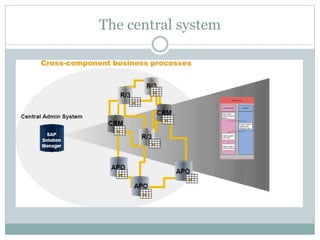
 In such a landscape, SAP Solution Manager is the managing
system, and the business suite applications (e.g. ERP, CRM,
BI, EP) are the managed systems.
 The current version of SAP Solution Manager is SAP
Solution Manager 7.1.
Solution manager approach
 The SAP Solution Manager is a new type of
application, which …
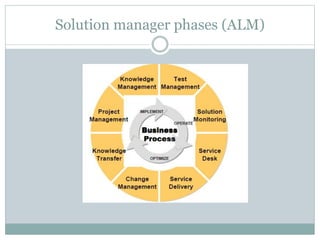
 Takes a consistent business process
and phase-oriented approach
 End-to-end functionality for application
management and
continuous improvement
 Provides full life-cycle support and collaboration
with SAP
 Contains best practices for implementation,
operation and optimization of SAP solutions
Solution manager phases (ALM)
The central system
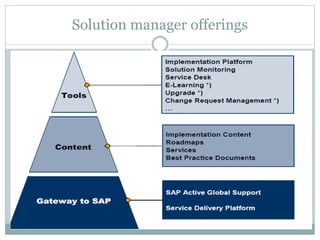
Solution manager offerings
Project management office
 We perform all central project administration tasks,
in the Solution Manager project administration
(transaction SOLAR_PROJECT_ADMIN). You
perform the Business Blueprint and configuration in
the projects which you create in the project
administration.
Service Desk
 The Solution Manager offers all functionality to set up a
Service Desk scenario for the customers system
landscape.
 One-click support message creation from satellite
systems and automatic Data Collection (e.g. Time,
System, Client, User, Transaction) from sending system
 Various possibilities to customize the scenario (e.g.
Support Desk Org., Status scheme, Parties involved)
 Basic Ticket Reporting (no built-in SLA-time reporting!)
 Solution Database functionality to store problems, root-
causes and re-usable solutions
 Service Desk is based on a reduced SAP CRM system
already integrated in SAP Solution Manager
Test plan management
Test Plan Management (transaction STWB_2)
 Define test plan according to your solution manager project
 Create Test Packages
 Assign Tester to Test packages
 Display Test Package => expand structure => test cases visible
 Possibility for Status Analysis => test cases visible
Testing (transaction STWB_WORK)
 Tester will find the worklist with the assigned Test Packages
 Select Test Package
 Expand structure => test cases visible
Test
 test the functionality with reference to the test case directly in your test system
 Maintain status for the test case within Test Package in Solution Manager
Make Status Analysis via Test Packages in Test Plan Management
(transaction STWB_2)
E learning
 E learning
Make the user aware of the process
Change Request Management
 The SolMan Change Request Management (ChaRM) provides all
functionality to govern and operate a system change scenario from the raise
of a request for change (RfC) over the approval process to the
implementation, test and transport management.
 Covers all types of application changes:
 Urgent live system corrections
 Periodic SAP system maintenance
 New software release implementation
 Roll-out based system adaptations
 Supports workflow based role scenario with different roles: Requester,
Change Manager, Developer, Tester)
 Integrates seamlessly with the Service Desk (B03)
 ChaRM is SAP’s answer to the ITIL Service Support Change Mgmt.
scenario: ChaRM is ITIL compliant
 ChaRM provides an overview over all RfCs and change implementations
within the entire system landscape
Business Process Monitoring
 Business process monitoring monitors your most
important business processes, which can be
distributed across complex system landscapes. You
can also monitor the interfaces between your
business process steps.
 This enables you to identify critical problems
proactively.
 Thank you

Solman_overview.pptx

  • 1.
  • 2.
    The need forsolution manager  A different approach is required for managing IT solutions It is characterized by the following aspects  Integration  Integration is vital because you need  one place where all information comes together  Life-cycle orientation  Life-Cycle Orientation is vital because it structures the customers’ tasks that customers from a time perspective  Business-process orientation Business processes are the glue for the information which is acquired during the software life-cycle
  • 3.
    SOLMAN INTRODUCTION  SAPSolution Manager is a centralized support and system management suite. An SAP system landscape may include a large amount of installed SAP systems. SAP Solution Manager tries to reduce and centralize the management of these systems.  In such a landscape, SAP Solution Manager is the managing system, and the business suite applications (e.g. ERP, CRM, BI, EP) are the managed systems.  The current version of SAP Solution Manager is SAP Solution Manager 7.1.
  • 4.
    Solution manager approach The SAP Solution Manager is a new type of application, which …  Takes a consistent business process and phase-oriented approach  End-to-end functionality for application management and continuous improvement  Provides full life-cycle support and collaboration with SAP  Contains best practices for implementation, operation and optimization of SAP solutions
  • 5.
  • 6.
  • 7.
  • 9.
    Project management office We perform all central project administration tasks, in the Solution Manager project administration (transaction SOLAR_PROJECT_ADMIN). You perform the Business Blueprint and configuration in the projects which you create in the project administration.
  • 10.
    Service Desk  TheSolution Manager offers all functionality to set up a Service Desk scenario for the customers system landscape.  One-click support message creation from satellite systems and automatic Data Collection (e.g. Time, System, Client, User, Transaction) from sending system  Various possibilities to customize the scenario (e.g. Support Desk Org., Status scheme, Parties involved)  Basic Ticket Reporting (no built-in SLA-time reporting!)  Solution Database functionality to store problems, root- causes and re-usable solutions  Service Desk is based on a reduced SAP CRM system already integrated in SAP Solution Manager
  • 11.
    Test plan management TestPlan Management (transaction STWB_2)  Define test plan according to your solution manager project  Create Test Packages  Assign Tester to Test packages  Display Test Package => expand structure => test cases visible  Possibility for Status Analysis => test cases visible Testing (transaction STWB_WORK)  Tester will find the worklist with the assigned Test Packages  Select Test Package  Expand structure => test cases visible Test  test the functionality with reference to the test case directly in your test system  Maintain status for the test case within Test Package in Solution Manager Make Status Analysis via Test Packages in Test Plan Management (transaction STWB_2)
  • 12.
    E learning  Elearning Make the user aware of the process
  • 13.
    Change Request Management The SolMan Change Request Management (ChaRM) provides all functionality to govern and operate a system change scenario from the raise of a request for change (RfC) over the approval process to the implementation, test and transport management.  Covers all types of application changes:  Urgent live system corrections  Periodic SAP system maintenance  New software release implementation  Roll-out based system adaptations  Supports workflow based role scenario with different roles: Requester, Change Manager, Developer, Tester)  Integrates seamlessly with the Service Desk (B03)  ChaRM is SAP’s answer to the ITIL Service Support Change Mgmt. scenario: ChaRM is ITIL compliant  ChaRM provides an overview over all RfCs and change implementations within the entire system landscape
  • 14.
    Business Process Monitoring Business process monitoring monitors your most important business processes, which can be distributed across complex system landscapes. You can also monitor the interfaces between your business process steps.  This enables you to identify critical problems proactively.
  • 15.