Software Testing Techniques
Software Bug
• A software bug is a fault in a software program
which can produce unexpected outcome or
terminates the program unexpectedly. If bug is
not handled properly in the software, it may lead
to haphazard results. These bugs may occur due
to error in the source code or in proper design of
the program. Sometimes these bugs may be
inconsequential but in some critical operations
these bugs may lead to major unwanted effects.
Error wise classification
• 1) Database error
Database error occurs when incorrect data is caught in the database or if database is
not accessible to a particular module of code.
2) Design error
When the designing of the software is not appropriate or there are some missing
contents in the design.
3) Ambiguous Design error
No content is missing in the design but the placement of the content is ambiguous.
Due to such error developers are not able to fully understand the requirements of the
customer and end up developing something which doesn’t meet customer’s needs.
4) Logic Error
Logical error is caught in the execution of any of the functionality of the software e.g. a
wrong formula to calculate some figures.
5) Performance Error
Error related with performance of the code. For instance, any of the servers installed
for the execution of application causes more utilization of the CPU
• Testing activity is carried down by a team of
testers, in order to find the defect in the
software. Test engineers run their tests on the
piece of software and if they encounter any
defect (i.e. actual results don't match
expected results), they report it to the
development team.
• Debugging is the activity which is carried out
by the development team (or developer), after
getting the test report from the testing team
about defect(s) (you may note defects can also
be reports by the client). The developer then
tries to find the cause of the defect,
7
What is a “Good” Test?
• A good test has a high probability of finding an
error
• A good test is not redundant.
• A good test should be neither too simple nor
too complex
Software Testing Life Cycle
• Requirements
• Use Case Document
• Test Plan
• Test Case
• Test Case execution
• Report Analysis
• Bug Analysis
• Bug Reporting
9
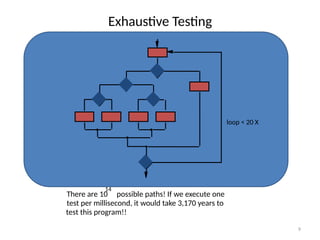
Exhaustive Testing
loop < 20 X
There are 10 possible paths! If we execute one
test per millisecond, it would take 3,170 years to
test this program!!
14
10
Selective Testing
loop < 20 X
Selected path
11
Software Testing Methods
Methods
Strategies
white-box
methods
black-box
methods
12
Black-Box Testing
requirements
events
input
output
Black Box Testing (Cont…)
• Also known as functional testing. A software
testing technique whereby the internal workings of
the item being tested are not known by the tester.
The tester only knows the input and expected
output of the test cases. The tester is unaware
about the actual code of the application and does
not know how the output has been achieved.
Black box testing is also known as specification-
based, input-outpute based or behavioral testing.
• Example: A tester who does have any
information about the internal structure of a
website or the language used, thus he tests
the web pages by using browsers, buttons, link
clicks to verify the output as expected.
Black Box Testing (Cont…)
• The advantages of this type of testing include:
– The test is unbiased because the designer and the tester are independent
of each other.
– The tester does not need knowledge of any specific programming
languages.
– The test is done from the point of view of the user, not the designer.
– Test cases can be designed as soon as the specifications are complete.
• The disadvantages of this type of testing include:
– The test can be redundant if the software designer has already run a test
case.
– The test cases are difficult to design.
– Testing every possible input stream is unrealistic because it would take a
inordinate amount of time; therefore, many program paths will go untested.
Methods of Black box Testing
• Graph Based Testing Methods
• Error Guessing
• Boundary Value Analysis
• Equivalence Partitioning
• Comparison Testing
Graph Based Testing Methods
• Each and every application is build up of some
objects. All such objects are identified and
graph is prepared. From this object graph each
object relationship is identified and test cases
written accordingly to discover the errors.
Error Guessing
• This is purely based on previous experience
and judgment of tester. Error Guessing is the
art of guessing where errors can be hidden.
For this technique there are no specific tools,
writing the test cases that cover all the
application paths.
Equivalence Partitioning
• Equivalence testing is basically generating a
group of test cases with the help of a
technique called equivalence partitioning. It is
basically used in identifying the partition of
value and selecting representative values from
within partitions and deciding how values can
be tested. All possible input parameters are
divided into partitions in such a way that input
values in a partition depict similar behavior.
Boundary Value Analysis
• Many systems have tendency to fail on
boundary. So testing boundary values of
application is important.
• Boundary values include maximum, minimum,
just inside/outside boundaries, typical values,
and error values.
• Example: if we have a condition that accepts
values from 50 to 100, it’s a good practice to
test values like 49,50,51,99,100,101.
21
Comparison Testing
• Used only in situations in which the reliability of software
is absolutely critical (e.g., human-rated systems)
– Separate software engineering teams develop independent
versions of an application using the same specification
– Each version can be tested with the same test data to ensure
that all provide identical output
– Then all versions are executed in parallel with real-time
comparison of results to ensure consistency
White Box Testing
• Also known as glass box, structural, clear box and
open box testing.
• A software testing technique whereby clear
knowledge of the internal workings of the item being
tested are used to select the test data.
• In this kind of testing the internal structure of the
application is exposed to the tester. While designing
the test cases internal coding and logic of the software
is considered as well as the programming skills of the
developer are tested.
• Unlike black box testing, white box testing uses clear
knowledge of programming code to examine
outputs. The test is accurate only if the tester knows
what the program is supposed to do.
• Example of White Box Testing:
A tester studies the programming logic while testing
any of the web pages and depending upon that he
designs the test cases. Testers identify the valid and
invalid inputs and expected outcomes by studying
the code of the webpage to be tested.
White box testing techniques
• 1) Control flow testing
In control flow testing a graphical representation
of all the routes can be traversed in the modules
of the application during its execution is prepared.
• 2) Data flow testing
Data flow testing is basically used to check
whether the declaration and initialization of the
variables in the modules have been used properly
or not.
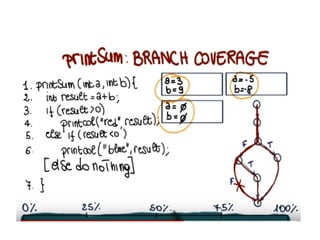
• 3) Branch testing
Branch coverage testing method is used to
check whether each of the branches from logic
of the modules is executed correctly or not.
• 4) Statement coverage
In statement coverage each line in the module
of the application is tested. It is used to check
whether each of the statements in the module
is covered or not.
• 5) Decision coverage
Decision coverage is same as branch coverage. In
decision coverage testing method is used to check
whether each of the branches from logic of the
modules is executed correctly or not.
• 6) Path testing
Path Testing is s structural testing method which is
based on structural testing. It is used in designing
test cases intended to examine all possible paths.
7) Prime path testing
A prime path in path testing is defined as a path
that cannot be extended without losing
simplicity. This cuts down the number of test
cases in path testing.
Advantages of White Box testing
• Testing can start even before the GUI is ready.
• As internal functionality is considered, all the possible conditions
are considered and test cases are generated. Hence all the
functionalities are being tested.
• It identifies the specific procedure accuracy within the application.
• It fully verifies whether the program can be successfully executed
with other parts of the application.
• It identifies error in the hidden code and thus makes debugging
process swift.
• It removes extra lines of code which are not required in the
program.
Disadvantages of White Box testing
• As the internal code of the application has to be considered while
preparing the test cases, skilled testers are required who have
knowledge of programming also. Hence the cost of the resources is
high.
• It is not possible for the tester to look into every bit of the code and
identify the hidden errors. This may result in failure of the application.
• Sometimes a change in the code may be required and thus all the
scenarios may need to be tested again.
• White box testing is an exhaustive method.
• It takes time to tester to develop the test cases.
• If the application is large then complete testing through white box
techniques is not feasible.
Alpha testing
• Alpha testing is simulated or actual operational testing by
potential users/customers or an independent test team at
the developers' site. Alpha testing is often employed for
off-the-shelf software as a form of internal acceptance
testing, before the software goes to beta testing.
• all possible issues/bugs before releasing the product to
everyday users or public.
• The focus of this testing is to simulate real users by using
BlackBox and WhiteBox techniques. The aim is to carry
out the tasks that a typical user might perform.
Advantages of Alpha Testing:
• Provides better view about the reliability of the software at
an early stage.
• Alpha testing provides better insights about the software’s
reliability and robustness at its early stages.
• Alpha test acts as an effective software testing method.
This testing ensures that the user will get high quality
services in the form of complete functionalities
and stability.
• The most common requirement is that the software
provided to the user should work properly according to the
purpose for which it is created.
Beta testing
• Beta testing comes after alpha testing. Versions of the
software, known as beta versions, are released to a
limited audience outside of the company. The software
is released to groups of people so that further testing
can ensure the product has few faults or bugs.
Sometimes, beta versions are made available to the
open public to increase the feedback field to a maximal
number of future users.
• Beta Testing of a product is performed by real users of
the software application in a real environment.
Advantages Beta Testing
• Beta testers can discover issues with your
application that you may have not noticed, such as
confusing application flow, and even crashes.
• Reduces product failure risk via customer validation
• Improves product quality via customer feedback.
• Cost effective compared to similar data gathering
methods.
• Creates goodwill with customers and increases
customer satisfaction.
• Functional testing usually tests the business
functionality the application under
development .
• whereas non-functional testing is done to test
user-friendly, desirable system requirements
of the user.
Functional Testing techniques
• Equivalence partitioning: Equivalence testing is
basically generating a group of test cases with
the help of a technique called partitioning.
• Boundary value analysis
Boundary value analysis (BVA) is another way to
test the functionality of the application under
testing (AUT). The test cases are prepared in
such a way so as to test the boundary
conditions of the logic used in the application.
• Intrusive Testing
Intrusive testing is basically done by
deliberately modifying the behavior of the
application to be tested and see how it
behaves to this modification.
• Random Testing
It is used for generating the test cases
automatically. In this we basically generate the
test cases randomly and generate the output.
• Thread Testing
The purpose here is to test the business
functionality of the application under test
from end to end. Basically in this one tester
tests the transaction processing as they are
going to take place in the application once it is
used by end-user.
Non-functional testing
• installation testing
This testing basically checks whether the
hardware and software have been installed
correctly, all the necessary data connections
have been established, system default testing
has been done or not,
Non-functional testing
• Software performance testing and load testing
– Performance testing is executed to determine how
fast a system or sub-system performs under a
particular workload.
• Stability testing
– Stability testing checks to see if the software can
continuously function well in or above an acceptable
period. This activity of non-functional software
testing is often referred to as load (or endurance)
testing.
Non-functional testing
• Usability testing
– Usability testing is needed to check if the user
interface is easy to use and understand. It is
concerned mainly with the use of the application.
• Security testing
– Security testing is essential for software that
processes confidential data to prevent system
intrusion by hackers.
Non-functional testing
• Graphical user interface testing
GUI is used to test how attractive any system is from user
point of view.
navigation, usability, commands and accessibility are
considered.
• Performance Testing
Performance of the application is tested using various
criteria like system response time, external interface
response time, memory utilization and central processor
unit utilization.
45
Debugging
• Once errors are identified 
first identify the precise location of the error &
then fix it.
– Called Debug.
• Debugging approaches:
– Brute force Method
– Backtracking
Brute-Force Debugging
• Many developers rely on brute-force tactics when
debugging. That involves using the debugger to step
across the code from start to finish until you notice
something odd. "Wait, that variable looks wrong—
how did that happen?" Then you start over and step
through the code again, looking for the source of
that oddity. When you reach the end and don't see
the source of the problem, you start over and step
through the code once more. Repeat over and over
and over again until finally,
Debugging by Backtracking
• For small programs, the method of backtracking is often
used effectively in locating errors. To use this method,
start at the place in the program where an incorrect
result was produced and go backwards in the program
one step at a time, mentally executing the program in
reverse order, to derive the state (or values of all
variables) of the program at the previous step.
Continuing in this fashion, the error is localized between
the point where the state of the program was what was
expected and the first point where the state was not
what was expected.

Software_Testing_Techniques_undergraduate.pptx

  • 1.
  • 2.
    Software Bug • Asoftware bug is a fault in a software program which can produce unexpected outcome or terminates the program unexpectedly. If bug is not handled properly in the software, it may lead to haphazard results. These bugs may occur due to error in the source code or in proper design of the program. Sometimes these bugs may be inconsequential but in some critical operations these bugs may lead to major unwanted effects.
  • 3.
    Error wise classification •1) Database error Database error occurs when incorrect data is caught in the database or if database is not accessible to a particular module of code. 2) Design error When the designing of the software is not appropriate or there are some missing contents in the design. 3) Ambiguous Design error No content is missing in the design but the placement of the content is ambiguous. Due to such error developers are not able to fully understand the requirements of the customer and end up developing something which doesn’t meet customer’s needs. 4) Logic Error Logical error is caught in the execution of any of the functionality of the software e.g. a wrong formula to calculate some figures. 5) Performance Error Error related with performance of the code. For instance, any of the servers installed for the execution of application causes more utilization of the CPU
  • 4.
    • Testing activityis carried down by a team of testers, in order to find the defect in the software. Test engineers run their tests on the piece of software and if they encounter any defect (i.e. actual results don't match expected results), they report it to the development team.
  • 5.
    • Debugging isthe activity which is carried out by the development team (or developer), after getting the test report from the testing team about defect(s) (you may note defects can also be reports by the client). The developer then tries to find the cause of the defect,
  • 7.
    7 What is a“Good” Test? • A good test has a high probability of finding an error • A good test is not redundant. • A good test should be neither too simple nor too complex
  • 8.
    Software Testing LifeCycle • Requirements • Use Case Document • Test Plan • Test Case • Test Case execution • Report Analysis • Bug Analysis • Bug Reporting
  • 9.
    9 Exhaustive Testing loop <20 X There are 10 possible paths! If we execute one test per millisecond, it would take 3,170 years to test this program!! 14
  • 10.
    10 Selective Testing loop <20 X Selected path
  • 11.
  • 12.
  • 13.
    Black Box Testing(Cont…) • Also known as functional testing. A software testing technique whereby the internal workings of the item being tested are not known by the tester. The tester only knows the input and expected output of the test cases. The tester is unaware about the actual code of the application and does not know how the output has been achieved. Black box testing is also known as specification- based, input-outpute based or behavioral testing.
  • 14.
    • Example: Atester who does have any information about the internal structure of a website or the language used, thus he tests the web pages by using browsers, buttons, link clicks to verify the output as expected.
  • 15.
    Black Box Testing(Cont…) • The advantages of this type of testing include: – The test is unbiased because the designer and the tester are independent of each other. – The tester does not need knowledge of any specific programming languages. – The test is done from the point of view of the user, not the designer. – Test cases can be designed as soon as the specifications are complete. • The disadvantages of this type of testing include: – The test can be redundant if the software designer has already run a test case. – The test cases are difficult to design. – Testing every possible input stream is unrealistic because it would take a inordinate amount of time; therefore, many program paths will go untested.
  • 16.
    Methods of Blackbox Testing • Graph Based Testing Methods • Error Guessing • Boundary Value Analysis • Equivalence Partitioning • Comparison Testing
  • 17.
    Graph Based TestingMethods • Each and every application is build up of some objects. All such objects are identified and graph is prepared. From this object graph each object relationship is identified and test cases written accordingly to discover the errors.
  • 18.
    Error Guessing • Thisis purely based on previous experience and judgment of tester. Error Guessing is the art of guessing where errors can be hidden. For this technique there are no specific tools, writing the test cases that cover all the application paths.
  • 19.
    Equivalence Partitioning • Equivalencetesting is basically generating a group of test cases with the help of a technique called equivalence partitioning. It is basically used in identifying the partition of value and selecting representative values from within partitions and deciding how values can be tested. All possible input parameters are divided into partitions in such a way that input values in a partition depict similar behavior.
  • 20.
    Boundary Value Analysis •Many systems have tendency to fail on boundary. So testing boundary values of application is important. • Boundary values include maximum, minimum, just inside/outside boundaries, typical values, and error values. • Example: if we have a condition that accepts values from 50 to 100, it’s a good practice to test values like 49,50,51,99,100,101.
  • 21.
    21 Comparison Testing • Usedonly in situations in which the reliability of software is absolutely critical (e.g., human-rated systems) – Separate software engineering teams develop independent versions of an application using the same specification – Each version can be tested with the same test data to ensure that all provide identical output – Then all versions are executed in parallel with real-time comparison of results to ensure consistency
  • 22.
    White Box Testing •Also known as glass box, structural, clear box and open box testing. • A software testing technique whereby clear knowledge of the internal workings of the item being tested are used to select the test data. • In this kind of testing the internal structure of the application is exposed to the tester. While designing the test cases internal coding and logic of the software is considered as well as the programming skills of the developer are tested.
  • 23.
    • Unlike blackbox testing, white box testing uses clear knowledge of programming code to examine outputs. The test is accurate only if the tester knows what the program is supposed to do. • Example of White Box Testing: A tester studies the programming logic while testing any of the web pages and depending upon that he designs the test cases. Testers identify the valid and invalid inputs and expected outcomes by studying the code of the webpage to be tested.
  • 24.
    White box testingtechniques • 1) Control flow testing In control flow testing a graphical representation of all the routes can be traversed in the modules of the application during its execution is prepared. • 2) Data flow testing Data flow testing is basically used to check whether the declaration and initialization of the variables in the modules have been used properly or not.
  • 25.
    • 3) Branchtesting Branch coverage testing method is used to check whether each of the branches from logic of the modules is executed correctly or not. • 4) Statement coverage In statement coverage each line in the module of the application is tested. It is used to check whether each of the statements in the module is covered or not.
  • 28.
    • 5) Decisioncoverage Decision coverage is same as branch coverage. In decision coverage testing method is used to check whether each of the branches from logic of the modules is executed correctly or not. • 6) Path testing Path Testing is s structural testing method which is based on structural testing. It is used in designing test cases intended to examine all possible paths.
  • 29.
    7) Prime pathtesting A prime path in path testing is defined as a path that cannot be extended without losing simplicity. This cuts down the number of test cases in path testing.
  • 30.
    Advantages of WhiteBox testing • Testing can start even before the GUI is ready. • As internal functionality is considered, all the possible conditions are considered and test cases are generated. Hence all the functionalities are being tested. • It identifies the specific procedure accuracy within the application. • It fully verifies whether the program can be successfully executed with other parts of the application. • It identifies error in the hidden code and thus makes debugging process swift. • It removes extra lines of code which are not required in the program.
  • 31.
    Disadvantages of WhiteBox testing • As the internal code of the application has to be considered while preparing the test cases, skilled testers are required who have knowledge of programming also. Hence the cost of the resources is high. • It is not possible for the tester to look into every bit of the code and identify the hidden errors. This may result in failure of the application. • Sometimes a change in the code may be required and thus all the scenarios may need to be tested again. • White box testing is an exhaustive method. • It takes time to tester to develop the test cases. • If the application is large then complete testing through white box techniques is not feasible.
  • 32.
    Alpha testing • Alphatesting is simulated or actual operational testing by potential users/customers or an independent test team at the developers' site. Alpha testing is often employed for off-the-shelf software as a form of internal acceptance testing, before the software goes to beta testing. • all possible issues/bugs before releasing the product to everyday users or public. • The focus of this testing is to simulate real users by using BlackBox and WhiteBox techniques. The aim is to carry out the tasks that a typical user might perform.
  • 33.
    Advantages of AlphaTesting: • Provides better view about the reliability of the software at an early stage. • Alpha testing provides better insights about the software’s reliability and robustness at its early stages. • Alpha test acts as an effective software testing method. This testing ensures that the user will get high quality services in the form of complete functionalities and stability. • The most common requirement is that the software provided to the user should work properly according to the purpose for which it is created.
  • 34.
    Beta testing • Betatesting comes after alpha testing. Versions of the software, known as beta versions, are released to a limited audience outside of the company. The software is released to groups of people so that further testing can ensure the product has few faults or bugs. Sometimes, beta versions are made available to the open public to increase the feedback field to a maximal number of future users. • Beta Testing of a product is performed by real users of the software application in a real environment.
  • 35.
    Advantages Beta Testing •Beta testers can discover issues with your application that you may have not noticed, such as confusing application flow, and even crashes. • Reduces product failure risk via customer validation • Improves product quality via customer feedback. • Cost effective compared to similar data gathering methods. • Creates goodwill with customers and increases customer satisfaction.
  • 37.
    • Functional testingusually tests the business functionality the application under development . • whereas non-functional testing is done to test user-friendly, desirable system requirements of the user.
  • 38.
    Functional Testing techniques •Equivalence partitioning: Equivalence testing is basically generating a group of test cases with the help of a technique called partitioning. • Boundary value analysis Boundary value analysis (BVA) is another way to test the functionality of the application under testing (AUT). The test cases are prepared in such a way so as to test the boundary conditions of the logic used in the application.
  • 39.
    • Intrusive Testing Intrusivetesting is basically done by deliberately modifying the behavior of the application to be tested and see how it behaves to this modification. • Random Testing It is used for generating the test cases automatically. In this we basically generate the test cases randomly and generate the output.
  • 40.
    • Thread Testing Thepurpose here is to test the business functionality of the application under test from end to end. Basically in this one tester tests the transaction processing as they are going to take place in the application once it is used by end-user.
  • 41.
    Non-functional testing • installationtesting This testing basically checks whether the hardware and software have been installed correctly, all the necessary data connections have been established, system default testing has been done or not,
  • 42.
    Non-functional testing • Softwareperformance testing and load testing – Performance testing is executed to determine how fast a system or sub-system performs under a particular workload. • Stability testing – Stability testing checks to see if the software can continuously function well in or above an acceptable period. This activity of non-functional software testing is often referred to as load (or endurance) testing.
  • 43.
    Non-functional testing • Usabilitytesting – Usability testing is needed to check if the user interface is easy to use and understand. It is concerned mainly with the use of the application. • Security testing – Security testing is essential for software that processes confidential data to prevent system intrusion by hackers.
  • 44.
    Non-functional testing • Graphicaluser interface testing GUI is used to test how attractive any system is from user point of view. navigation, usability, commands and accessibility are considered. • Performance Testing Performance of the application is tested using various criteria like system response time, external interface response time, memory utilization and central processor unit utilization.
  • 45.
    45 Debugging • Once errorsare identified  first identify the precise location of the error & then fix it. – Called Debug. • Debugging approaches: – Brute force Method – Backtracking
  • 46.
    Brute-Force Debugging • Manydevelopers rely on brute-force tactics when debugging. That involves using the debugger to step across the code from start to finish until you notice something odd. "Wait, that variable looks wrong— how did that happen?" Then you start over and step through the code again, looking for the source of that oddity. When you reach the end and don't see the source of the problem, you start over and step through the code once more. Repeat over and over and over again until finally,
  • 47.
    Debugging by Backtracking •For small programs, the method of backtracking is often used effectively in locating errors. To use this method, start at the place in the program where an incorrect result was produced and go backwards in the program one step at a time, mentally executing the program in reverse order, to derive the state (or values of all variables) of the program at the previous step. Continuing in this fashion, the error is localized between the point where the state of the program was what was expected and the first point where the state was not what was expected.