Screencasting ToolsSoftware Evaluation
INTRODUCTION
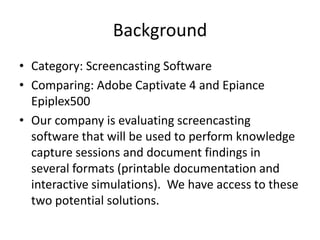
BackgroundCategory: Screencasting SoftwareComparing: Adobe Captivate 4 and Epiance Epiplex500Our company is evaluating screencasting software that will be used to perform knowledge capture sessions and document findings in several formats (printable documentation and interactive simulations).  We have access to these two potential solutions.
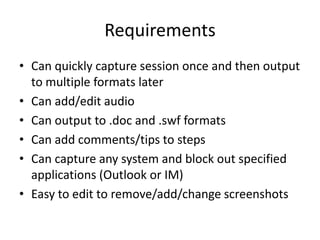
RequirementsCan quickly capture session once and then output to multiple formats laterCan add/edit audioCan output to .doc and .swf formatsCan add comments/tips to stepsCan capture any system and block out specified applications (Outlook or IM)Easy to edit to remove/add/change screenshots
FEATURES
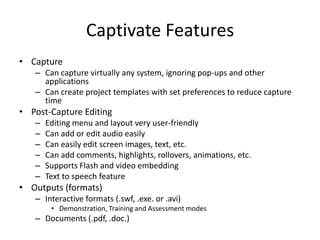
Captivate FeaturesCapture Can capture virtually any system, ignoring pop-ups and other applicationsCan create project templates with set preferences to reduce capture timePost-Capture EditingEditing menu and layout very user-friendlyCan add or edit audio easilyCan easily edit screen images, text, etc.Can add comments, highlights, rollovers, animations, etc.Supports Flash and video embeddingText to speech featureOutputs (formats)Interactive formats (.swf, .exe. or .avi) Demonstration, Training and Assessment modesDocuments (.pdf, .doc.) 
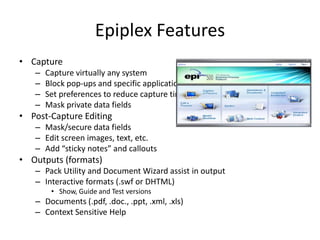
Epiplex FeaturesCapture Capture virtually any systemBlock pop-ups and specific applications from captureSet preferences to reduce capture timeMask private data fieldsPost-Capture EditingMask/secure data fieldsEdit screen images, text, etc.Add “sticky notes” and calloutsOutputs (formats)Pack Utility and Document Wizard assist in outputInteractive formats (.swf or DHTML) Show, Guide and Test versionsDocuments (.pdf, .doc., .ppt, .xml, .xls)Context Sensitive Help 
COMPARISON
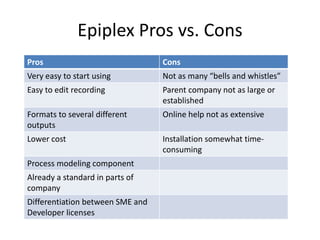
Epiplex Pros vs. Cons
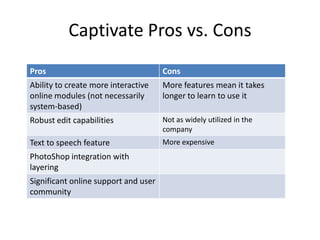
Captivate Pros vs. Cons
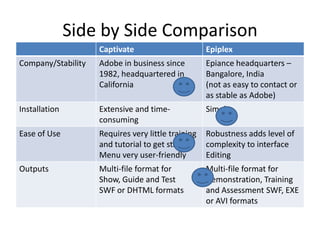
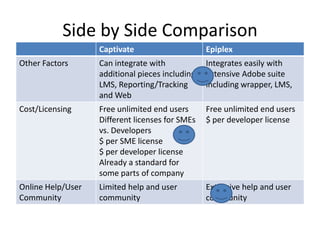
Side by Side Comparison
RECOMMENDATION
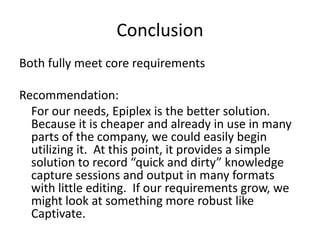
ConclusionBoth fully meet core requirementsRecommendation:	For our needs, Epiplex is the better solution.  Because it is cheaper and already in use in many parts of the company, we could easily begin utilizing it.  At this point, it provides a simple solution to record “quick and dirty” knowledge capture sessions and output in many formats with little editing.  If our requirements grow, we might look at something more robust like Captivate.

Software eval

  • 1.
  • 2.
  • 3.
    BackgroundCategory: Screencasting SoftwareComparing:Adobe Captivate 4 and Epiance Epiplex500Our company is evaluating screencasting software that will be used to perform knowledge capture sessions and document findings in several formats (printable documentation and interactive simulations). We have access to these two potential solutions.
  • 4.
    RequirementsCan quickly capturesession once and then output to multiple formats laterCan add/edit audioCan output to .doc and .swf formatsCan add comments/tips to stepsCan capture any system and block out specified applications (Outlook or IM)Easy to edit to remove/add/change screenshots
  • 5.
  • 6.
    Captivate FeaturesCapture Cancapture virtually any system, ignoring pop-ups and other applicationsCan create project templates with set preferences to reduce capture timePost-Capture EditingEditing menu and layout very user-friendlyCan add or edit audio easilyCan easily edit screen images, text, etc.Can add comments, highlights, rollovers, animations, etc.Supports Flash and video embeddingText to speech featureOutputs (formats)Interactive formats (.swf, .exe. or .avi) Demonstration, Training and Assessment modesDocuments (.pdf, .doc.) 
  • 7.
    Epiplex FeaturesCapture Capturevirtually any systemBlock pop-ups and specific applications from captureSet preferences to reduce capture timeMask private data fieldsPost-Capture EditingMask/secure data fieldsEdit screen images, text, etc.Add “sticky notes” and calloutsOutputs (formats)Pack Utility and Document Wizard assist in outputInteractive formats (.swf or DHTML) Show, Guide and Test versionsDocuments (.pdf, .doc., .ppt, .xml, .xls)Context Sensitive Help 
  • 8.
  • 9.
  • 10.
  • 11.
    Side by SideComparison
  • 12.
    Side by SideComparison
  • 13.
  • 14.
    ConclusionBoth fully meetcore requirementsRecommendation: For our needs, Epiplex is the better solution. Because it is cheaper and already in use in many parts of the company, we could easily begin utilizing it. At this point, it provides a simple solution to record “quick and dirty” knowledge capture sessions and output in many formats with little editing. If our requirements grow, we might look at something more robust like Captivate.