1
Software Design
2
3
4
5
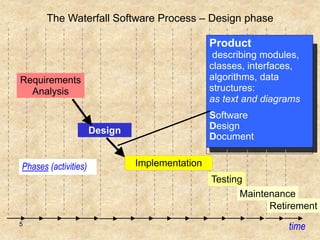
The Waterfall Software Process – Design phase
time
Requirements
Analysis
Design
Phases (activities)
Testing
Maintenance
Product
describing modules,
classes, interfaces,
algorithms, data
structures:
as text and diagrams
Software
Design
Document
Retirement
Implementation
6
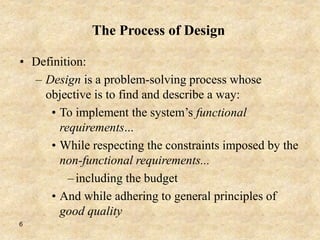
The Process of Design
• Definition:
– Design is a problem-solving process whose
objective is to find and describe a way:
• To implement the system’s functional
requirements...
• While respecting the constraints imposed by the
non-functional requirements...
–including the budget
• And while adhering to general principles of
good quality
7
Design space
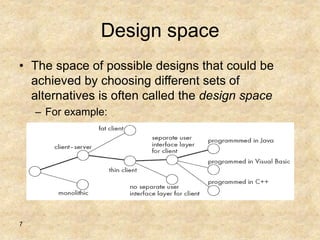
• The space of possible designs that could be
achieved by choosing different sets of
alternatives is often called the design space
– For example:
8
Component
• Any piece of software or hardware that has a
clear role.
– A component can be isolated, allowing you to
replace it with a different component that has
equivalent functionality.
– Many components are designed to be reusable.
– Conversely, others perform special-purpose
functions.
9
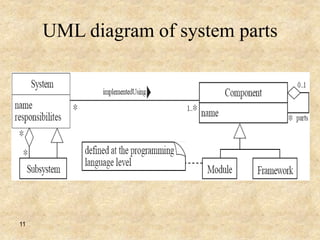
Module
• A component that is defined at the
programming language level
– For example, methods, classes and packages are
modules in Java.
10
System
• A logical entity, having a set of definable
responsibilities or objectives, and consisting of
hardware, software or both.
– A system can have a specification which is then
implemented by a collection of components.
– A system continues to exist, even if its components are
changed or replaced.
– Subsystem:
• A system that is part of a larger system, and which has a definite
interface
11
UML diagram of system parts
12
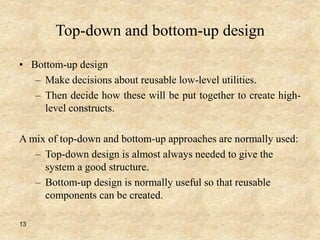
Top-down and bottom-up design
• Top-down design
– First design the very high level structure of the
system.
– Then gradually work down to detailed decisions
about low-level constructs.
– Finally arrive at detailed decisions such as:
• the format of particular data items;
• the individual algorithms that will be used.
13
Top-down and bottom-up design
• Bottom-up design
– Make decisions about reusable low-level utilities.
– Then decide how these will be put together to create high-
level constructs.
A mix of top-down and bottom-up approaches are normally used:
– Top-down design is almost always needed to give the
system a good structure.
– Bottom-up design is normally useful so that reusable
components can be created.
14
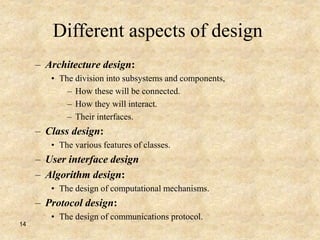
Different aspects of design
– Architecture design:
• The division into subsystems and components,
– How these will be connected.
– How they will interact.
– Their interfaces.
– Class design:
• The various features of classes.
– User interface design
– Algorithm design:
• The design of computational mechanisms.
– Protocol design:
• The design of communications protocol.
15
Design Principle 1: Divide and conquer
• Trying to deal with something big all at once is
normally much harder than dealing with a
series of smaller things
– Separate people can work on each part.
– An individual software engineer can specialize.
– Each individual component is smaller, and
therefore easier to understand.
– Parts can be replaced or changed without having to
replace or extensively change other parts.
16
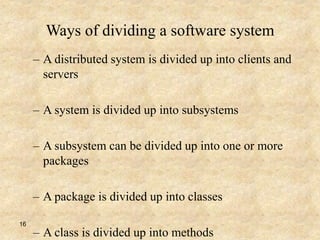
Ways of dividing a software system
– A distributed system is divided up into clients and
servers
– A system is divided up into subsystems
– A subsystem can be divided up into one or more
packages
– A package is divided up into classes
– A class is divided up into methods
17
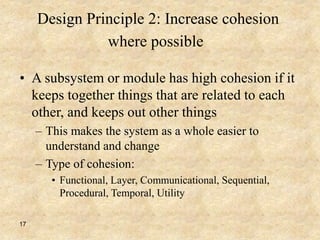
Design Principle 2: Increase cohesion
where possible
• A subsystem or module has high cohesion if it
keeps together things that are related to each
other, and keeps out other things
– This makes the system as a whole easier to
understand and change
– Type of cohesion:
• Functional, Layer, Communicational, Sequential,
Procedural, Temporal, Utility
18
Functional cohesion
• This is achieved when all the code that
computes a particular result is kept together -
and everything else is kept out
– i.e. when a module only performs a single
computation, and returns a result, without having
side-effects.
– Benefits to the system:
• Easier to understand
• More reusable
• Easier to replace
– Modules that update a database, create a new file
or interact with the user are not functionally
cohesive
19
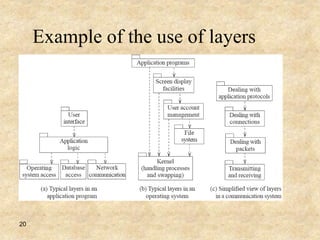
Layer cohesion
• All the facilities for providing or accessing a set of
related services are kept together, and everything else
is kept out
– The layers should form a hierarchy
• Higher layers can access services of lower layers,
• Lower layers do not access higher layers
– The set of procedures through which a layer provides its
services is the application programming interface (API)
– You can replace a layer without having any impact on the
other layers
• You just replicate the API
20
Example of the use of layers
21
Communicational cohesion
• All the modules that access or manipulate certain data
are kept together (e.g. in the same class) - and
everything else is kept out
– A class would have good communicational
cohesion
• if all the system’s facilities for storing and
manipulating its data are contained in this class.
• if the class does not do anything other than
manage its data.
– Main advantage: When you need to make changes
to the data, you find all the code in one place
22
Sequential cohesion
• Procedures, in which one procedure provides
input to the next, are kept together – and
everything else is kept out.
– You should achieve sequential cohesion, only once
you have already achieved the preceding types of
cohesion.
23
Procedural cohesion
• Keep together several procedures that are used
one after another
– Even if one does not necessarily provide input to
the next.
24
Temporal Cohesion
• Operations that are performed during the same
phase of the execution of the program are kept
together, and everything else is kept out
– For example, placing together the code used during
system start-up or initialization.
25
Design Principle 3:
Reduce coupling where possible
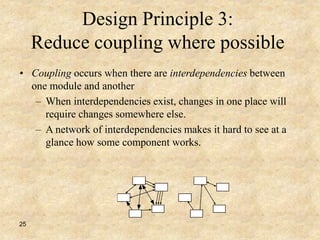
• Coupling occurs when there are interdependencies between
one module and another
– When interdependencies exist, changes in one place will
require changes somewhere else.
– A network of interdependencies makes it hard to see at a
glance how some component works.
26
Design Principle 4:
Keep the level of abstraction as high as
possible
• Ensure that your designs allow you to hide or
defer consideration of details, thus reducing
complexity
– A good abstraction is said to provide information
hiding
– Abstractions allow you to understand the essence
of a subsystem without having to know
unnecessary details
27
Design Principle 5:
Increase reusability where possible
• Design the various aspects of your system so
that they can be used again in other contexts
– Generalize your design as much as possible
– Follow the preceding three design principles
– Design your system to contain hooks
– Simplify your design as much as possible
28
Design Principle 6:
Reuse existing designs and code where possible
• Design with reuse is complementary to design
for reusability
•
– Actively reusing designs or code allows you to
take advantage of the investment you or others
have made in reusable components
29
Design Principle 7:
Design for flexibility
• Actively anticipate changes that a design may
have to undergo in the future, and prepare for
them
– Reduce coupling and increase cohesion
– Create abstractions
– Do not hard-code anything
– Leave all options open
• Do not restrict the options of people who have to
modify the system later
– Use reusable code and make code reusable
30
Design Principle 8:
Anticipate obsolescence
• Plan for changes in the technology or environment so the
software will continue to run or can be easily changed
– Avoid using early releases of technology
– Avoid using software libraries that are specific to
particular environments
– Avoid using undocumented features or little-used
features of software libraries
– Avoid using software or special hardware from
companies that are less likely to provide long-term
support
– Use standard languages and technologies that are
supported by multiple vendors
31
Design Principle 9:
Design for Portability
• Have the software run on as many platforms as
possible
– Avoid the use of facilities that are specific to one
particular environment
– E.g. a library only available in Microsoft Windows
32
Design Principle 10:
Design for Testability
• Take steps to make testing easier
– Design a program to automatically test the
software
33
Design Principle 11:
Design defensively
• Never trust how others will try to use a
component you are designing
– Handle all cases where other code might attempt to
use your component inappropriately
– Check that all of the inputs to your component are
valid.
34
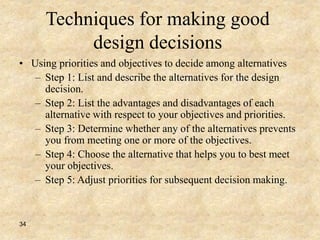
Techniques for making good
design decisions
• Using priorities and objectives to decide among alternatives
– Step 1: List and describe the alternatives for the design
decision.
– Step 2: List the advantages and disadvantages of each
alternative with respect to your objectives and priorities.
– Step 3: Determine whether any of the alternatives prevents
you from meeting one or more of the objectives.
– Step 4: Choose the alternative that helps you to best meet
your objectives.
– Step 5: Adjust priorities for subsequent decision making.
35
End of lecture

Software Engineering Lec 8-design-

  • 1.
  • 2.
  • 3.
  • 4.
  • 5.
    5 The Waterfall SoftwareProcess – Design phase time Requirements Analysis Design Phases (activities) Testing Maintenance Product describing modules, classes, interfaces, algorithms, data structures: as text and diagrams Software Design Document Retirement Implementation
  • 6.
    6 The Process ofDesign • Definition: – Design is a problem-solving process whose objective is to find and describe a way: • To implement the system’s functional requirements... • While respecting the constraints imposed by the non-functional requirements... –including the budget • And while adhering to general principles of good quality
  • 7.
    7 Design space • Thespace of possible designs that could be achieved by choosing different sets of alternatives is often called the design space – For example:
  • 8.
    8 Component • Any pieceof software or hardware that has a clear role. – A component can be isolated, allowing you to replace it with a different component that has equivalent functionality. – Many components are designed to be reusable. – Conversely, others perform special-purpose functions.

  • 9.
    9 Module • A componentthat is defined at the programming language level – For example, methods, classes and packages are modules in Java.
  • 10.
    10 System • A logicalentity, having a set of definable responsibilities or objectives, and consisting of hardware, software or both. – A system can have a specification which is then implemented by a collection of components. – A system continues to exist, even if its components are changed or replaced. – Subsystem: • A system that is part of a larger system, and which has a definite interface
  • 11.
    11 UML diagram ofsystem parts
  • 12.
    12 Top-down and bottom-updesign • Top-down design – First design the very high level structure of the system. – Then gradually work down to detailed decisions about low-level constructs. – Finally arrive at detailed decisions such as: • the format of particular data items; • the individual algorithms that will be used.
  • 13.
    13 Top-down and bottom-updesign • Bottom-up design – Make decisions about reusable low-level utilities. – Then decide how these will be put together to create high- level constructs. A mix of top-down and bottom-up approaches are normally used: – Top-down design is almost always needed to give the system a good structure. – Bottom-up design is normally useful so that reusable components can be created.
  • 14.
    14 Different aspects ofdesign – Architecture design: • The division into subsystems and components, – How these will be connected. – How they will interact. – Their interfaces. – Class design: • The various features of classes. – User interface design – Algorithm design: • The design of computational mechanisms. – Protocol design: • The design of communications protocol.
  • 15.
    15 Design Principle 1:Divide and conquer • Trying to deal with something big all at once is normally much harder than dealing with a series of smaller things – Separate people can work on each part. – An individual software engineer can specialize. – Each individual component is smaller, and therefore easier to understand. – Parts can be replaced or changed without having to replace or extensively change other parts.
  • 16.
    16 Ways of dividinga software system – A distributed system is divided up into clients and servers – A system is divided up into subsystems – A subsystem can be divided up into one or more packages – A package is divided up into classes – A class is divided up into methods
  • 17.
    17 Design Principle 2:Increase cohesion where possible • A subsystem or module has high cohesion if it keeps together things that are related to each other, and keeps out other things – This makes the system as a whole easier to understand and change – Type of cohesion: • Functional, Layer, Communicational, Sequential, Procedural, Temporal, Utility
  • 18.
    18 Functional cohesion • Thisis achieved when all the code that computes a particular result is kept together - and everything else is kept out – i.e. when a module only performs a single computation, and returns a result, without having side-effects. – Benefits to the system: • Easier to understand • More reusable • Easier to replace – Modules that update a database, create a new file or interact with the user are not functionally cohesive
  • 19.
    19 Layer cohesion • Allthe facilities for providing or accessing a set of related services are kept together, and everything else is kept out – The layers should form a hierarchy • Higher layers can access services of lower layers, • Lower layers do not access higher layers – The set of procedures through which a layer provides its services is the application programming interface (API) – You can replace a layer without having any impact on the other layers • You just replicate the API
  • 20.
    20 Example of theuse of layers
  • 21.
    21 Communicational cohesion • Allthe modules that access or manipulate certain data are kept together (e.g. in the same class) - and everything else is kept out – A class would have good communicational cohesion • if all the system’s facilities for storing and manipulating its data are contained in this class. • if the class does not do anything other than manage its data. – Main advantage: When you need to make changes to the data, you find all the code in one place
  • 22.
    22 Sequential cohesion • Procedures,in which one procedure provides input to the next, are kept together – and everything else is kept out. – You should achieve sequential cohesion, only once you have already achieved the preceding types of cohesion.
  • 23.
    23 Procedural cohesion • Keeptogether several procedures that are used one after another – Even if one does not necessarily provide input to the next.
  • 24.
    24 Temporal Cohesion • Operationsthat are performed during the same phase of the execution of the program are kept together, and everything else is kept out – For example, placing together the code used during system start-up or initialization.
  • 25.
    25 Design Principle 3: Reducecoupling where possible • Coupling occurs when there are interdependencies between one module and another – When interdependencies exist, changes in one place will require changes somewhere else. – A network of interdependencies makes it hard to see at a glance how some component works.
  • 26.
    26 Design Principle 4: Keepthe level of abstraction as high as possible • Ensure that your designs allow you to hide or defer consideration of details, thus reducing complexity – A good abstraction is said to provide information hiding – Abstractions allow you to understand the essence of a subsystem without having to know unnecessary details
  • 27.
    27 Design Principle 5: Increasereusability where possible • Design the various aspects of your system so that they can be used again in other contexts – Generalize your design as much as possible – Follow the preceding three design principles – Design your system to contain hooks – Simplify your design as much as possible
  • 28.
    28 Design Principle 6: Reuseexisting designs and code where possible • Design with reuse is complementary to design for reusability • – Actively reusing designs or code allows you to take advantage of the investment you or others have made in reusable components
  • 29.
    29 Design Principle 7: Designfor flexibility • Actively anticipate changes that a design may have to undergo in the future, and prepare for them – Reduce coupling and increase cohesion – Create abstractions – Do not hard-code anything – Leave all options open • Do not restrict the options of people who have to modify the system later – Use reusable code and make code reusable
  • 30.
    30 Design Principle 8: Anticipateobsolescence • Plan for changes in the technology or environment so the software will continue to run or can be easily changed – Avoid using early releases of technology – Avoid using software libraries that are specific to particular environments – Avoid using undocumented features or little-used features of software libraries – Avoid using software or special hardware from companies that are less likely to provide long-term support – Use standard languages and technologies that are supported by multiple vendors
  • 31.
    31 Design Principle 9: Designfor Portability • Have the software run on as many platforms as possible – Avoid the use of facilities that are specific to one particular environment – E.g. a library only available in Microsoft Windows
  • 32.
    32 Design Principle 10: Designfor Testability • Take steps to make testing easier – Design a program to automatically test the software
  • 33.
    33 Design Principle 11: Designdefensively • Never trust how others will try to use a component you are designing – Handle all cases where other code might attempt to use your component inappropriately – Check that all of the inputs to your component are valid.
  • 34.
    34 Techniques for makinggood design decisions • Using priorities and objectives to decide among alternatives – Step 1: List and describe the alternatives for the design decision. – Step 2: List the advantages and disadvantages of each alternative with respect to your objectives and priorities. – Step 3: Determine whether any of the alternatives prevents you from meeting one or more of the objectives. – Step 4: Choose the alternative that helps you to best meet your objectives. – Step 5: Adjust priorities for subsequent decision making.
  • 35.