Software as a Service
Use more Software + Pay less
Do you want more IT with less trouble?
More IT
Anywhere: home, public locations, enterprises, customer/partner sites
Anyhow: no more setup, fluid experience
Any device: mobile, tablets, computers without expensive resources needs
Less trouble
Human errors
Complexity, instability
IT infrastructure to maintain
Operations to care: backup, security, version upgrades
Available expertise: server, network, storage, virtualisation...
Software as a Service is for YOU!
Basically, SaaS is
New licensing model : subscription per usage, per month, per quarter, yearly
New delivery model : no more store, CD/DVD to buy, download from a central place :
the cloud
Basically, SaaS is not
A new software release : the content doesn’t change
A new type of ownership : as soon as you stop paying, you have no more access
Sometimes, it’s a bit confusing when :
The software editor wants to move to SaaS and abandon the legacy model
The SaaS comes with different versions : express, standard, enterprise, enterprise
plus, etc.
One doesn’t really know what features are important or not
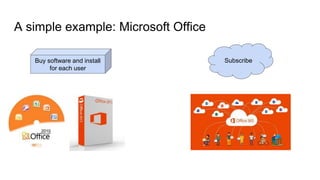
Subscribe
A simple example: Microsoft Office
Buy software and install
for each user
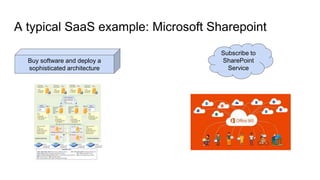
Subscribe to
SharePoint
Service
A typical SaaS example: Microsoft Sharepoint
Buy software and deploy a
sophisticated architecture
Who should I be interested?
Individuals who care about:
Easy start, no installation
Free for limited usage
Basic needs covered: email, files sharing
Minimum costs : 1 $ for extra storage of 50 Gb
Corporations who care about:
No budget to invest upfront
Pay per use
Stop paying anytime
Why should I be interested?
Both Individuals and corporations :
Need only to have a decent mobile, tablet or laptop
Use the power in the cloud (servers, network, storage)
Benefit from Cloud services (data backup, version upgrade)
Corporations are empowered:
Simpler cost structure, all-inclusive
No need to have a large IT department to get extended service
No need to buy servers and manage its obsolescence
IT more aligned to business needs
Using apparently unlimited resources in the Cloud
How may I start using SaaS?
Four easy steps:
○ Choose a software you are comfortable with, say Office
○ Open the Internet browser
○ Search for the SaaS version
○ Follow instructions
Warning
○ The same SaaS is not relevant for both individuals and corporations
○ Software still differ, for instance Office 365 is different from Google Docs
○ You may need to migrate your legacy IT to SaaS. It’s an extra cost
○ You need to migrate eventually everything in the Cloud, else it may cost you more
Software
as a Service
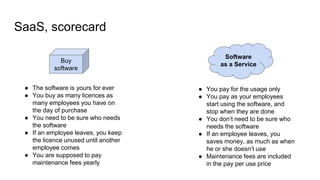
SaaS, scorecard
Buy
software
● The software is yours for ever
● You buy as many licences as
many employees you have on
the day of purchase
● You need to be sure who needs
the software
● If an employee leaves, you keep
the licence unused until another
employee comes
● You are supposed to pay
maintenance fees yearly
● You pay for the usage only
● You pay as your employees
start using the software, and
stop when they are done
● You don’t need to be sure who
needs the software
● If an employee leaves, you
saves money, as much as when
he or she doesn’t use
● Maintenance fees are included
in the pay per use price
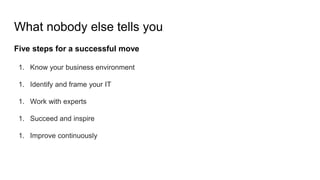
What nobody else tells you
Five steps for a successful move
1. Know your business environment
1. Identify and frame your IT
1. Work with experts
1. Succeed and inspire
1. Improve continuously
Software
as a Service
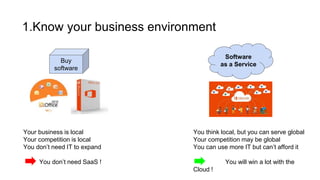
1.Know your business environment
Buy
software
Your business is local
Your competition is local
You don’t need IT to expand
You don’t need SaaS !
You think local, but you can serve global
Your competition may be global
You can use more IT but can’t afford it
You will win a lot with the
Cloud !
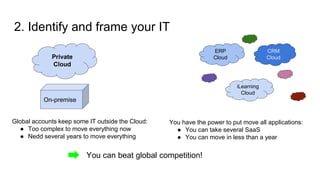
ERP
Cloud
2. Identify and frame your IT
On-premise
Global accounts keep some IT outside the Cloud:
● Too complex to move everything now
● Nedd several years to move everything
Private
Cloud
CRM
Cloud
iLearning
Cloud
You have the power to put move all applications:
● You can take several SaaS
● You can move in less than a year
You can beat global competition!
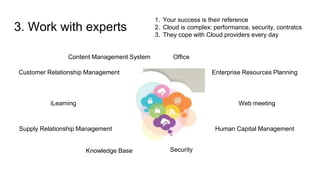
iLearning
Customer Relationship Management
Content Management System
Enterprise Resources Planning
Human Capital ManagementSupply Relationship Management
Web meeting
Knowledge Base
3. Work with experts
Office
Security
1. Your success is their reference
2. Cloud is complex: performance, security, contratcs
3. They cope with Cloud providers every day
4. Succeed and inspire
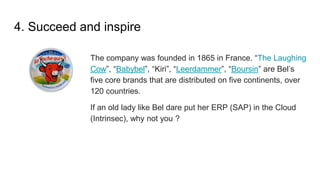
The company was founded in 1865 in France. “The Laughing
Cow”, “Babybel”, “Kiri”, “Leerdammer”, “Boursin” are Bel’s
five core brands that are distributed on five continents, over
120 countries.
If an old lady like Bel dare put her ERP (SAP) in the Cloud
(Intrinsec), why not you ?
4. Succeed and inspire
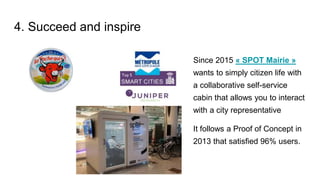
Since 2015 « SPOT Mairie »
wants to simply citizen life with
a collaborative self-service
cabin that allows you to interact
with a city representative
It follows a Proof of Concept in
2013 that satisfied 96% users.
4. Succeed and inspire
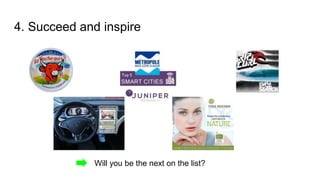
Will you be the next on the list?
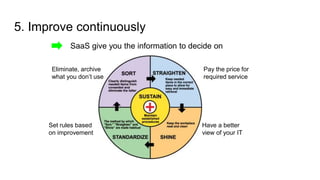
5. Improve continuously
SaaS give you the information to decide on
Eliminate, archive
what you don’t use
Pay the price for
required service
Have a better
view of your IT
Set rules based
on improvement
Want to know more ? Try our Classics series
● Business experts
○ Digital enterprise in 2015,
reality and future
○ Essentials on Cloud for SBE
○ How to drive an Hybrid
Information System
○ Important elements beyond
pure technical aspects on
Cloud
● Technical experts
○ Master the new core
information system
○ Become the cloud broker
○ Architect the new Information
System (base)
○ Architect the new Informtion
System (Advanced)
○ Security, performance, and
cost reduction on a daily basis
Special experience ? Try our Making movies series
1. Cloud Terminator: for those facing fierce competition and in need of
innovation
2. Cloud Inside out: whenever there are many stakeholders and risks
3. Cloud Avatar: whenever ambitions hurt cultures or West meet East
4. Le Petit Cloud: in comfort zone, no apparent need of Cloud
5. Apocalypse Cloud: resist international corporations that already use Cloud
6. Cloud Switch: Corporate Social Responsibility beyond cloudwash
7. Gone with the Cloud: everything to succeed in the Cloud journey
8. Citizen Cloud: analysis of different cases from public sectors worldwide
9. The wizard of Cloud: uncomfortable situation but no defined path
10.Cloud Titanic: on the Cloud journey with iceberg ahead or hit.
Author: Chuyen HUYNH
With 8 years of practice and success in digital transformation, Chuyen joins KST to share his talents with anyone
eager to acquire a competitive weapon for his enterprise.
Previously he was technical director at Pirelli, enterprise architect at IBM, software sales at HP, and Cloud
specialist at Cisco.
He is teaching Cloud at ISEP.
He graduated Engineer at Ecole des Mines d’Alès 1986 and MBA from the University of Texas at Austin in 2003.

Software as a services

  • 1.
    Software as aService Use more Software + Pay less
  • 2.
    Do you wantmore IT with less trouble? More IT Anywhere: home, public locations, enterprises, customer/partner sites Anyhow: no more setup, fluid experience Any device: mobile, tablets, computers without expensive resources needs Less trouble Human errors Complexity, instability IT infrastructure to maintain Operations to care: backup, security, version upgrades Available expertise: server, network, storage, virtualisation...
  • 3.
    Software as aService is for YOU! Basically, SaaS is New licensing model : subscription per usage, per month, per quarter, yearly New delivery model : no more store, CD/DVD to buy, download from a central place : the cloud Basically, SaaS is not A new software release : the content doesn’t change A new type of ownership : as soon as you stop paying, you have no more access Sometimes, it’s a bit confusing when : The software editor wants to move to SaaS and abandon the legacy model The SaaS comes with different versions : express, standard, enterprise, enterprise plus, etc. One doesn’t really know what features are important or not
  • 4.
    Subscribe A simple example:Microsoft Office Buy software and install for each user
  • 5.
    Subscribe to SharePoint Service A typicalSaaS example: Microsoft Sharepoint Buy software and deploy a sophisticated architecture
  • 6.
    Who should Ibe interested? Individuals who care about: Easy start, no installation Free for limited usage Basic needs covered: email, files sharing Minimum costs : 1 $ for extra storage of 50 Gb Corporations who care about: No budget to invest upfront Pay per use Stop paying anytime
  • 7.
    Why should Ibe interested? Both Individuals and corporations : Need only to have a decent mobile, tablet or laptop Use the power in the cloud (servers, network, storage) Benefit from Cloud services (data backup, version upgrade) Corporations are empowered: Simpler cost structure, all-inclusive No need to have a large IT department to get extended service No need to buy servers and manage its obsolescence IT more aligned to business needs Using apparently unlimited resources in the Cloud
  • 8.
    How may Istart using SaaS? Four easy steps: ○ Choose a software you are comfortable with, say Office ○ Open the Internet browser ○ Search for the SaaS version ○ Follow instructions Warning ○ The same SaaS is not relevant for both individuals and corporations ○ Software still differ, for instance Office 365 is different from Google Docs ○ You may need to migrate your legacy IT to SaaS. It’s an extra cost ○ You need to migrate eventually everything in the Cloud, else it may cost you more
  • 9.
    Software as a Service SaaS,scorecard Buy software ● The software is yours for ever ● You buy as many licences as many employees you have on the day of purchase ● You need to be sure who needs the software ● If an employee leaves, you keep the licence unused until another employee comes ● You are supposed to pay maintenance fees yearly ● You pay for the usage only ● You pay as your employees start using the software, and stop when they are done ● You don’t need to be sure who needs the software ● If an employee leaves, you saves money, as much as when he or she doesn’t use ● Maintenance fees are included in the pay per use price
  • 10.
    What nobody elsetells you Five steps for a successful move 1. Know your business environment 1. Identify and frame your IT 1. Work with experts 1. Succeed and inspire 1. Improve continuously
  • 11.
    Software as a Service 1.Knowyour business environment Buy software Your business is local Your competition is local You don’t need IT to expand You don’t need SaaS ! You think local, but you can serve global Your competition may be global You can use more IT but can’t afford it You will win a lot with the Cloud !
  • 12.
    ERP Cloud 2. Identify andframe your IT On-premise Global accounts keep some IT outside the Cloud: ● Too complex to move everything now ● Nedd several years to move everything Private Cloud CRM Cloud iLearning Cloud You have the power to put move all applications: ● You can take several SaaS ● You can move in less than a year You can beat global competition!
  • 13.
    iLearning Customer Relationship Management ContentManagement System Enterprise Resources Planning Human Capital ManagementSupply Relationship Management Web meeting Knowledge Base 3. Work with experts Office Security 1. Your success is their reference 2. Cloud is complex: performance, security, contratcs 3. They cope with Cloud providers every day
  • 14.
    4. Succeed andinspire The company was founded in 1865 in France. “The Laughing Cow”, “Babybel”, “Kiri”, “Leerdammer”, “Boursin” are Bel’s five core brands that are distributed on five continents, over 120 countries. If an old lady like Bel dare put her ERP (SAP) in the Cloud (Intrinsec), why not you ?
  • 15.
    4. Succeed andinspire Since 2015 « SPOT Mairie » wants to simply citizen life with a collaborative self-service cabin that allows you to interact with a city representative It follows a Proof of Concept in 2013 that satisfied 96% users.
  • 16.
    4. Succeed andinspire Will you be the next on the list?
  • 17.
    5. Improve continuously SaaSgive you the information to decide on Eliminate, archive what you don’t use Pay the price for required service Have a better view of your IT Set rules based on improvement
  • 18.
    Want to knowmore ? Try our Classics series ● Business experts ○ Digital enterprise in 2015, reality and future ○ Essentials on Cloud for SBE ○ How to drive an Hybrid Information System ○ Important elements beyond pure technical aspects on Cloud ● Technical experts ○ Master the new core information system ○ Become the cloud broker ○ Architect the new Information System (base) ○ Architect the new Informtion System (Advanced) ○ Security, performance, and cost reduction on a daily basis
  • 19.
    Special experience ?Try our Making movies series 1. Cloud Terminator: for those facing fierce competition and in need of innovation 2. Cloud Inside out: whenever there are many stakeholders and risks 3. Cloud Avatar: whenever ambitions hurt cultures or West meet East 4. Le Petit Cloud: in comfort zone, no apparent need of Cloud 5. Apocalypse Cloud: resist international corporations that already use Cloud 6. Cloud Switch: Corporate Social Responsibility beyond cloudwash 7. Gone with the Cloud: everything to succeed in the Cloud journey 8. Citizen Cloud: analysis of different cases from public sectors worldwide 9. The wizard of Cloud: uncomfortable situation but no defined path 10.Cloud Titanic: on the Cloud journey with iceberg ahead or hit.
  • 20.
    Author: Chuyen HUYNH With8 years of practice and success in digital transformation, Chuyen joins KST to share his talents with anyone eager to acquire a competitive weapon for his enterprise. Previously he was technical director at Pirelli, enterprise architect at IBM, software sales at HP, and Cloud specialist at Cisco. He is teaching Cloud at ISEP. He graduated Engineer at Ecole des Mines d’Alès 1986 and MBA from the University of Texas at Austin in 2003.