www.bakertilly.co.uk
The Cloud for SMEs
Chris Knowles
18 June 2013
Cloud is changing
business!
2
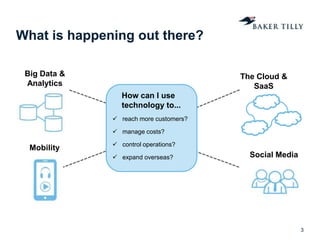
What is happening out there?
3
Big Data &
Analytics
Mobility
The Cloud &
SaaS
Social Media
How can I use
technology to...
 reach more customers?
 manage costs?
 control operations?
 expand overseas?
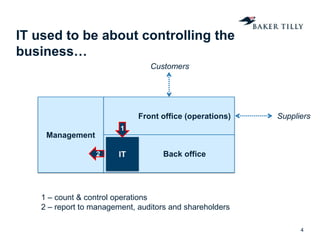
IT used to be about controlling the
business…
4
Front office (operations)
Back office
Management
Customers
Suppliers
IT
1
2
1 – count & control operations
2 – report to management, auditors and shareholders
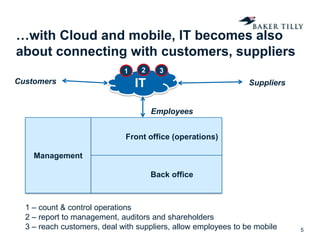
…with Cloud and mobile, IT becomes also
about connecting with customers, suppliers
5
Customers SuppliersIT
Employees
Front office (operations)
Back office
Management
1 – count & control operations
2 – report to management, auditors and shareholders
3 – reach customers, deal with suppliers, allow employees to be mobile
31 2
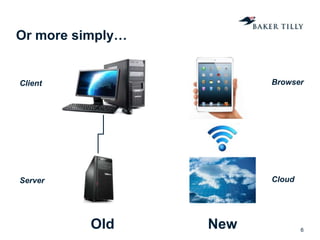
Or more simply…
6
Old New
Client
Server
Browser
Cloud
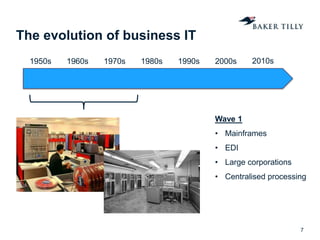
The evolution of business IT
7
1950s 1960s 1970s 1980s 1990s 2000s 2010s
Wave 1
• Mainframes
• EDI
• Large corporations
• Centralised processing
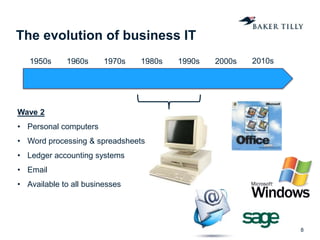
The evolution of business IT
8
1950s 1960s 1970s 1980s 1990s 2000s 2010s
Wave 2
• Personal computers
• Word processing & spreadsheets
• Ledger accounting systems
• Email
• Available to all businesses
The evolution of business IT
9
1950s 1960s 1970s 1980s 1990s 2000s 2010s
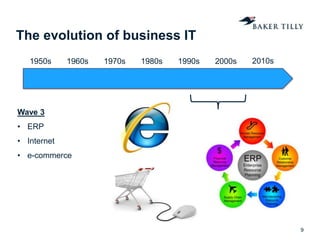
Wave 3
• ERP
• Internet
• e-commerce
The evolution of business IT
10
1950s 1960s 1970s 1980s 1990s 2000s 2010s
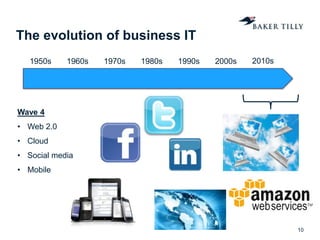
Wave 4
• Web 2.0
• Cloud
• Social media
• Mobile
What is the Cloud...?
11
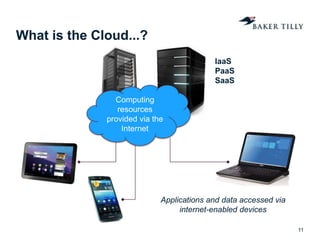
Computing
resources
provided via the
Internet
Applications and data accessed via
internet-enabled devices
IaaS
PaaS
SaaS
A journey into the cloud
12
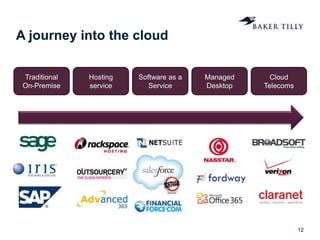
Hosting
service
Managed
Desktop
Cloud
Telecoms
Software as a
Service
Traditional
On-Premise
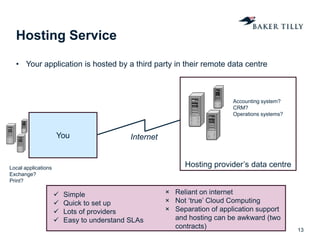
Hosting provider’s data centre
Hosting Service
• Your application is hosted by a third party in their remote data centre
13
You Internet
 Simple
 Quick to set up
 Lots of providers
 Easy to understand SLAs
× Reliant on internet
× Not ‘true’ Cloud Computing
× Separation of application support
and hosting can be awkward (two
contracts)
Accounting system?
CRM?
Operations systems?
Local applications
Exchange?
Print?
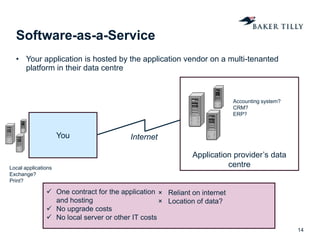
Application provider’s data
centre
Software-as-a-Service
• Your application is hosted by the application vendor on a multi-tenanted
platform in their data centre
14
You Internet
 One contract for the application
and hosting
 No upgrade costs
 No local server or other IT costs
× Reliant on internet
× Location of data?
Accounting system?
CRM?
ERP?
Local applications
Exchange?
Print?
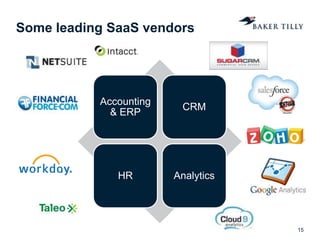
Some leading SaaS vendors
15
Accounting
& ERP
CRM
HR Analytics
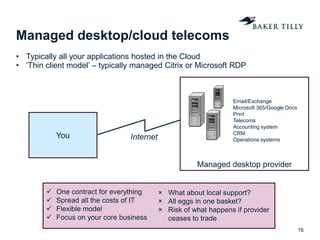
Managed desktop provider
Managed desktop/cloud telecoms
• Typically all your applications hosted in the Cloud
• ‘Thin client model’ – typically managed Citrix or Microsoft RDP
16
You Internet
 One contract for everything
 Spread all the costs of IT
 Flexible model
 Focus on your core business
× What about local support?
× All eggs in one basket?
× Risk of what happens if provider
ceases to trade
Email/Exchange
Microsoft 365/Google Docs
Print
Telecoms
Accounting system
CRM
Operations systems
Cloud – benefits & risks for SMEs
17
Benefits Risks
 ‘Pay as you go’ cost model
 No IT equipment to worry about or
upgrade
 Implement quicker
 Focus on what you’re good at
(management time)
 Work from anywhere
 More flexible to demand
 Perception of data security
 Data location (sometimes offshore)
 Software vendors are relatively
new/small organisations
 Getting your data back if the provider
goes under
 Dependency on internet connection
What to look for in a cloud vendor
18
• Current client base – do they serve similar
clients to you?
• Are they stable?
• How do they provide support? (location, hours,
service levels)
• Security, resilience and DR arrangements?
(copies of backup results)
• Technical validation of internet connection
• Discounts for ‘bundling’ more services e.g.
telephony, mobile, desktop?
• What is the migration process?
• Default data storage/usage volume
• Withdrawal process?
• Don’t forget cultural fit – can you work with these
people?
Technical and commercial due diligence
Are YOU ready for Cloud?
19
Organisations that suit the Cloud…
• are not heavily regulated
• don’t see IT as a ‘core competence’
• don’t want to build a large in-house IT function
• don’t have complex, bespoke systems
• have ambitions to grow
• want to take advantage of mobile, and perhaps
social media
Things you need to know before leaping in…
• which services do you want?
• what are your competitors/peer group doing?
• how is your IT currently delivered?
• who are the main Cloud providers for what you are
looking for?
• how do you see your business changing after
moving to the Cloud?
Concluding thoughts
20
• The Cloud is becoming the default
• For start-ups businesses it is
usually a no-brainer
• Know what is out there and know
what you want
• Negotiate hard – it is a buyer’s
market at the moment
• Don’t think of it as a back-office
cost-saving exercise
Thank you.
21
chris.knowles@bakertilly.co.uk
uk.linkedin.com/in/cknowles/
0203 201 8193

The Cloud for SMEs

  • 1.
    www.bakertilly.co.uk The Cloud forSMEs Chris Knowles 18 June 2013
  • 2.
  • 3.
    What is happeningout there? 3 Big Data & Analytics Mobility The Cloud & SaaS Social Media How can I use technology to...  reach more customers?  manage costs?  control operations?  expand overseas?
  • 4.
    IT used tobe about controlling the business… 4 Front office (operations) Back office Management Customers Suppliers IT 1 2 1 – count & control operations 2 – report to management, auditors and shareholders
  • 5.
    …with Cloud andmobile, IT becomes also about connecting with customers, suppliers 5 Customers SuppliersIT Employees Front office (operations) Back office Management 1 – count & control operations 2 – report to management, auditors and shareholders 3 – reach customers, deal with suppliers, allow employees to be mobile 31 2
  • 6.
    Or more simply… 6 OldNew Client Server Browser Cloud
  • 7.
    The evolution ofbusiness IT 7 1950s 1960s 1970s 1980s 1990s 2000s 2010s Wave 1 • Mainframes • EDI • Large corporations • Centralised processing
  • 8.
    The evolution ofbusiness IT 8 1950s 1960s 1970s 1980s 1990s 2000s 2010s Wave 2 • Personal computers • Word processing & spreadsheets • Ledger accounting systems • Email • Available to all businesses
  • 9.
    The evolution ofbusiness IT 9 1950s 1960s 1970s 1980s 1990s 2000s 2010s Wave 3 • ERP • Internet • e-commerce
  • 10.
    The evolution ofbusiness IT 10 1950s 1960s 1970s 1980s 1990s 2000s 2010s Wave 4 • Web 2.0 • Cloud • Social media • Mobile
  • 11.
    What is theCloud...? 11 Computing resources provided via the Internet Applications and data accessed via internet-enabled devices IaaS PaaS SaaS
  • 12.
    A journey intothe cloud 12 Hosting service Managed Desktop Cloud Telecoms Software as a Service Traditional On-Premise
  • 13.
    Hosting provider’s datacentre Hosting Service • Your application is hosted by a third party in their remote data centre 13 You Internet  Simple  Quick to set up  Lots of providers  Easy to understand SLAs × Reliant on internet × Not ‘true’ Cloud Computing × Separation of application support and hosting can be awkward (two contracts) Accounting system? CRM? Operations systems? Local applications Exchange? Print?
  • 14.
    Application provider’s data centre Software-as-a-Service •Your application is hosted by the application vendor on a multi-tenanted platform in their data centre 14 You Internet  One contract for the application and hosting  No upgrade costs  No local server or other IT costs × Reliant on internet × Location of data? Accounting system? CRM? ERP? Local applications Exchange? Print?
  • 15.
    Some leading SaaSvendors 15 Accounting & ERP CRM HR Analytics
  • 16.
    Managed desktop provider Manageddesktop/cloud telecoms • Typically all your applications hosted in the Cloud • ‘Thin client model’ – typically managed Citrix or Microsoft RDP 16 You Internet  One contract for everything  Spread all the costs of IT  Flexible model  Focus on your core business × What about local support? × All eggs in one basket? × Risk of what happens if provider ceases to trade Email/Exchange Microsoft 365/Google Docs Print Telecoms Accounting system CRM Operations systems
  • 17.
    Cloud – benefits& risks for SMEs 17 Benefits Risks  ‘Pay as you go’ cost model  No IT equipment to worry about or upgrade  Implement quicker  Focus on what you’re good at (management time)  Work from anywhere  More flexible to demand  Perception of data security  Data location (sometimes offshore)  Software vendors are relatively new/small organisations  Getting your data back if the provider goes under  Dependency on internet connection
  • 18.
    What to lookfor in a cloud vendor 18 • Current client base – do they serve similar clients to you? • Are they stable? • How do they provide support? (location, hours, service levels) • Security, resilience and DR arrangements? (copies of backup results) • Technical validation of internet connection • Discounts for ‘bundling’ more services e.g. telephony, mobile, desktop? • What is the migration process? • Default data storage/usage volume • Withdrawal process? • Don’t forget cultural fit – can you work with these people? Technical and commercial due diligence
  • 19.
    Are YOU readyfor Cloud? 19 Organisations that suit the Cloud… • are not heavily regulated • don’t see IT as a ‘core competence’ • don’t want to build a large in-house IT function • don’t have complex, bespoke systems • have ambitions to grow • want to take advantage of mobile, and perhaps social media Things you need to know before leaping in… • which services do you want? • what are your competitors/peer group doing? • how is your IT currently delivered? • who are the main Cloud providers for what you are looking for? • how do you see your business changing after moving to the Cloud?
  • 20.
    Concluding thoughts 20 • TheCloud is becoming the default • For start-ups businesses it is usually a no-brainer • Know what is out there and know what you want • Negotiate hard – it is a buyer’s market at the moment • Don’t think of it as a back-office cost-saving exercise
  • 21.

Editor's Notes

  • #3 Audience survey – who has responsibility for IT? IT frequently discussed at board level? Today’s objective – to demonstrate how IT has changed; it has come out of the back office and should now be a key part of how you sell, how you buy and how you manage your operations.By the time you leave today, I hope that you’ll be convinced that IT should be at the heart of your business.
  • #5 IT can be an opaque topic for those who aren’t from a technical background.It is useful to go back in time and think about how IT came to sit where it does in the business.Anyone in the room who remembers life before IT?!IT originally evolved as a way to capture and record things that the front office does. i.e. bean countingFor that reason it ended up sitting under the Finance Director, as a reporting toolThis is very important – for reasons that I’ll explain that structure is often starting to hold some organisations back from including IT as a key element of their corporate strategy
  • #6 The Cloud transforms your business model by changing the way that you interact with employees, customers and suppliers
  • #8 I won’t go into the origins of computing with Alan Turing and codebreaking in the second world war, but some history is helpful to understand the issues of today.Mainframes – IBM, centralised processing, complex tasks for companies like General Electric. Only the largest companies. EDI came in during the 70s as a basic way of exchanging data between organisations, principally for the purpose of placing purchase orders with suppliers. So that’s what I think of as Wave 1.
  • #9 With Wave 2, starting in the late 70s but really getting going in the 80s we see the advent of personal computers. Initially not much more than word processing and basic spreadsheets – who remembers WordPerfect?!. And no email initially! Data passed around using floppy disks, and if you get much more than a couple of spreadsheets on there the disk is full!And about this time you start to get automation of basic finance processes too, in double-entry accounting software packages. Then in the early 90s email starts to become widely used for the first time, MS Office becomes the default tool for most organisations.So in this wave you’ve got basic office productivity tools coming in, and more and more office workers getting PCs for the first time, but still limited connectivity between organisations other than via basic email.
  • #10 Then with wave 3, we start to get that inter-connectedness. And the internet and world wide web (which sits on top of it) was really a revolution, which we’re still only beginning to understand. A revolution not just in business terms, but also in terms of how we access information, how we engage with other people and ultimately I think how we see the world.With the internet comes early eCommerce companies – Amazon, ebay etc. But of course for each of those there were many more that died at the end of the dotcom boom in 2002/3.And during this period from the early 90s onwards you start to get ERP systems becoming widely deployed – initially by large manufacturers, esp. in the automotive sector – and later by smaller orgs. This really transforms corporate IT. Instead of IT just being about accounting and personal productivity, IT starts to become integral to core business processes such as inventory management and customer contact management.
  • #11 And then we come to today. In around 2007/08 you start to see a convergence of technologies which really together represent a step change in what the internet can do – making it much more interactive and two-way – hence the name web 2.0. You get the explosion in social media that we all know about, with the 3 shown here being the most successful examples. And I think we’re just starting to see the commercial possibilities of exploiting those SM platforms.You have Cloud – which I’ll come onto shortly – and of course you have mobile. Smartphones, with as much computing power than a PC. And this really transforms the way people interact with technology. No longer desk-bound. Suddenly you can consume IT on the move…transactions, comms, business apps. Of course Apple were the main player here in shifting behaviours.
  • #12 Analogy to electric grid
  • #21 IT should no longer be considered back office