<date/time> <footer> 1
Welcome
GRADE 10
<date/time> <footer> 2
Lesson Objectives
 Learn and understand basics of software
 Understand importance of software.
 Classification of software.
 System software and application software
 Conclusion
SOFTWARE
 What is software ?
 Is set of instructions, data or programs used to operate computers
 and execute specific tasks.
 Software is generic term used refer to applications, scripts, and
programs that run on device.
Importance of software
 Software is soul of computer.
 Computer hardware is useless without software.
 To accomplish input, processing, ouput, storage and control
activities we need software.
 Enables you to communicate with the computer without knowing
computer’s language.
Types of software
 Mainly classified into 2 types
 System software
 application software
System software
 These software programs are designed to run a computer’s
application programs and hardware
 System software co-ordinates the activities and functions of the
hardware and software.
 It provides an environment or platform for all the other types of
software to work.
 Examples: Operating system(windows, linux, andriod, mac os),
firmware
Application software
 Refers to computer software package that performs a specific
function for user.
 An application can be single or group of programs that run the
application to the user
 Examples: Microsoft office suites, graphics software, database
software, web browser, software development tools,
communication platforms etc.
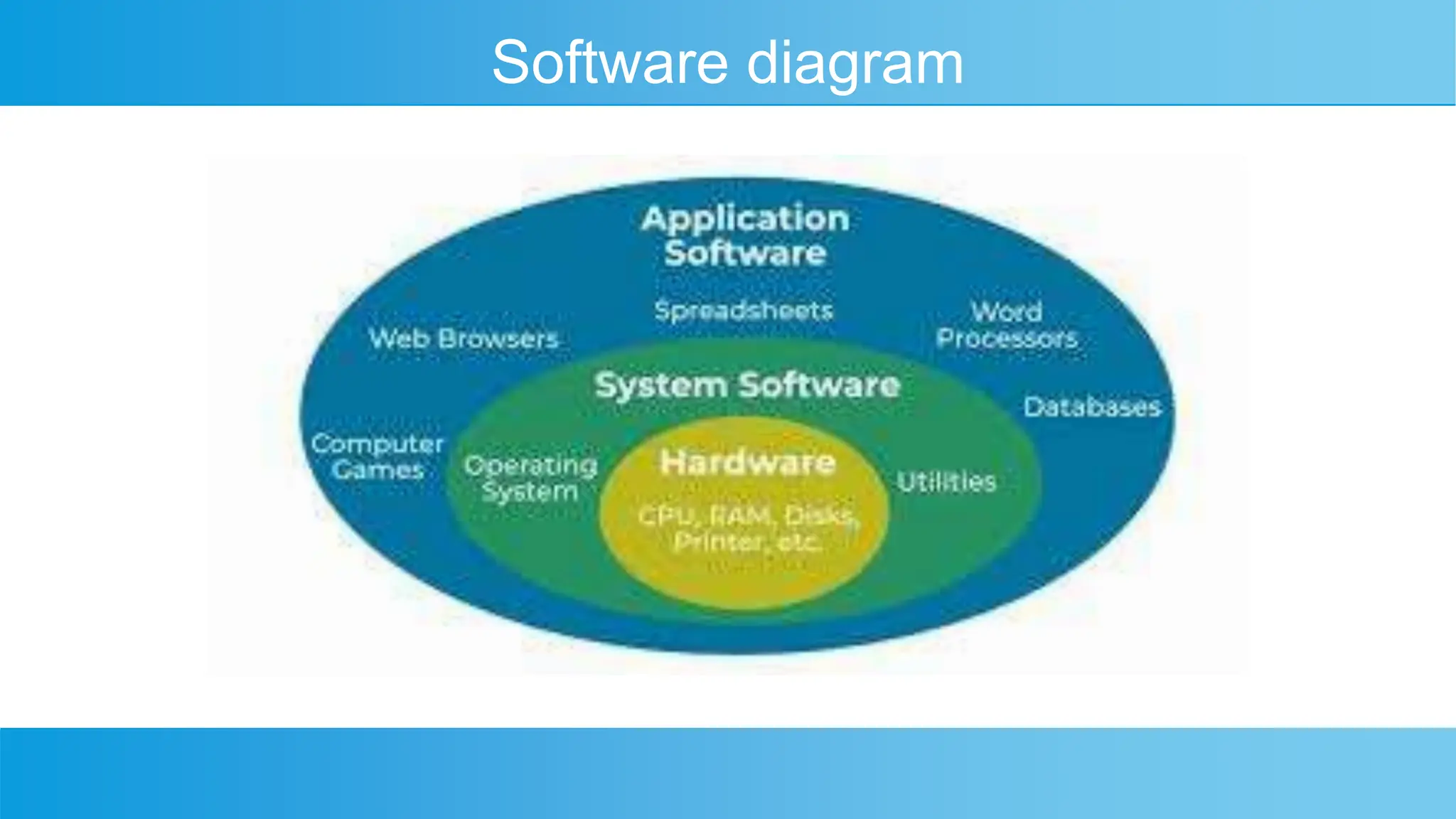
Software diagram
Conclusion
 System software and application software both are needed for a
computer to complete specific task.
 Without software , a computer hardware is useless, because
communication is only possible through software.
THANK YOU
 THANK YOU FOR LISTENING

software and types of software, system software.pptx

  • 1.
  • 2.
    <date/time> <footer> 2 LessonObjectives  Learn and understand basics of software  Understand importance of software.  Classification of software.  System software and application software  Conclusion
  • 3.
    SOFTWARE  What issoftware ?  Is set of instructions, data or programs used to operate computers  and execute specific tasks.  Software is generic term used refer to applications, scripts, and programs that run on device.
  • 4.
    Importance of software Software is soul of computer.  Computer hardware is useless without software.  To accomplish input, processing, ouput, storage and control activities we need software.  Enables you to communicate with the computer without knowing computer’s language.
  • 5.
    Types of software Mainly classified into 2 types  System software  application software
  • 6.
    System software  Thesesoftware programs are designed to run a computer’s application programs and hardware  System software co-ordinates the activities and functions of the hardware and software.  It provides an environment or platform for all the other types of software to work.  Examples: Operating system(windows, linux, andriod, mac os), firmware
  • 7.
    Application software  Refersto computer software package that performs a specific function for user.  An application can be single or group of programs that run the application to the user  Examples: Microsoft office suites, graphics software, database software, web browser, software development tools, communication platforms etc.
  • 8.
  • 9.
    Conclusion  System softwareand application software both are needed for a computer to complete specific task.  Without software , a computer hardware is useless, because communication is only possible through software.
  • 10.
    THANK YOU  THANKYOU FOR LISTENING