
Peter Johansson - Social Media and Web 2.0
Zoho Writer– Collaboration online Diigo – For social bookmarking, annotating, highlighting and comment the web.  Panoramio– Upload and share pictures. TeacherTube – Upload your own video or seach for learning resources.
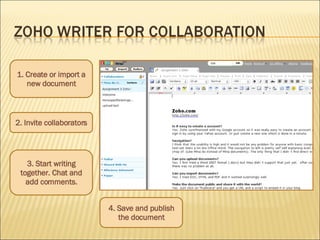
2. Invite collaborators 4. Save and publish the document 1. Create or import a new document 3. Start writing together. Chat and add comments.
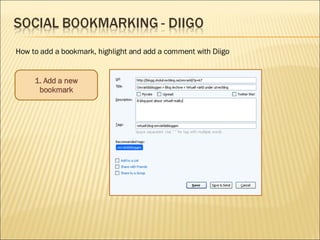
1. Add a new bookmark How to add a bookmark, highlight and add a comment with Diigo
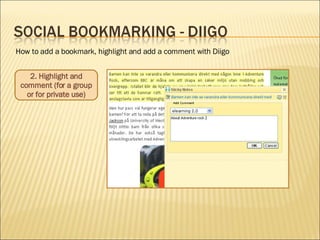
2. Highlight and comment (for a group or for private use) How to add a bookmark, highlight and add a comment with Diigo
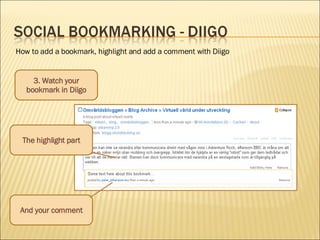
How to add a bookmark, highlight and add a comment with Diigo 3. Watch your bookmark in Diigo The highlight part And your comment
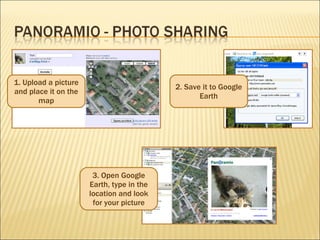
1. Upload a picture and place it on the map 2. Save it to Google Earth 3. Open Google Earth, type in the location and look for your picture
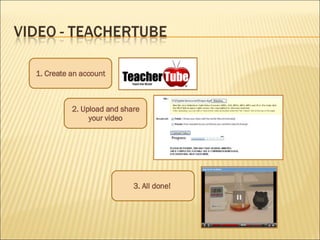
1. Create an account 2. Upload and share your video 3. All done!
 

Social media & web 2.0

  • 1.
    Peter Johansson -Social Media and Web 2.0
  • 2.
    Zoho Writer– Collaborationonline Diigo – For social bookmarking, annotating, highlighting and comment the web. Panoramio– Upload and share pictures. TeacherTube – Upload your own video or seach for learning resources.
  • 3.
    2. Invite collaborators4. Save and publish the document 1. Create or import a new document 3. Start writing together. Chat and add comments.
  • 4.
    1. Add anew bookmark How to add a bookmark, highlight and add a comment with Diigo
  • 5.
    2. Highlight andcomment (for a group or for private use) How to add a bookmark, highlight and add a comment with Diigo
  • 6.
    How to adda bookmark, highlight and add a comment with Diigo 3. Watch your bookmark in Diigo The highlight part And your comment
  • 7.
    1. Upload apicture and place it on the map 2. Save it to Google Earth 3. Open Google Earth, type in the location and look for your picture
  • 8.
    1. Create anaccount 2. Upload and share your video 3. All done!
  • 9.