Social Media from Scratch Salsa Labs, Inc. Adam Rosenberg Online Community Manager
This presentation assumes the following about you: You have no social media budget You have less than 10 people on staff You wear a lot of hats You know the question is not “if” you should be on Facebook but rather “how”
How we’re defining “Social Media” for your purposes Any form of media that promotes conversation Things that can be shared Media that is not restricted to words Blogs Facebook Twitter
Agenda Why have a social media program? What does a social media program look like? Cut to the Chase: What should I do TODAY? Take Home Tactics How Salsa tools can help
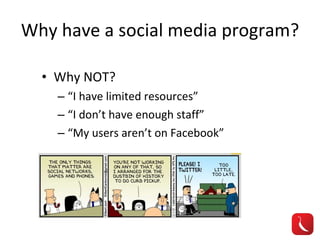
Why have a social media program? Why NOT? “ I have limited resources” “ I don’t have enough staff” “ My users aren’t on Facebook”
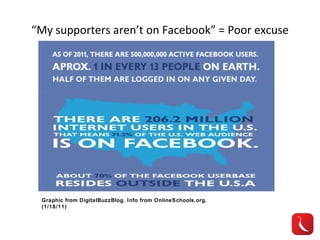
“ My supporters aren’t on Facebook” = Poor excuse Graphic from DigitalBuzzBlog. Info from OnlineSchools.org. (1/18/11)
Why have a social media program? Builds community through sharing Helps identify evangelists Spreads your content through your supporters as the vehicle Cheap, low risk/high reward
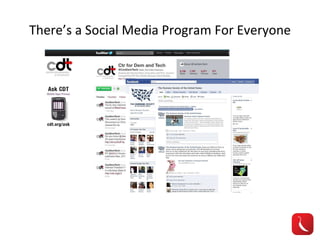
There’s a Social Media Program For Everyone
What do you want to accomplish? Support a new initiative? Enhance communications with membership? Fundraise? Build buzz around issue? Get people to take action? All of the above?
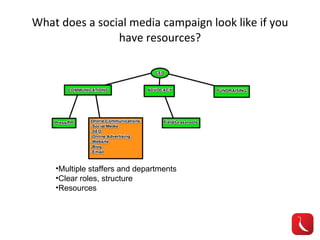
What does a social media campaign look like if you have resources? Multiple staffers and departments Clear roles, structure Resources
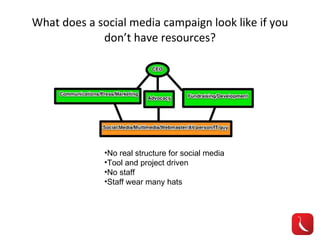
What does a social media campaign look like if you don’t have resources? No real structure for social media Tool and project driven No staff Staff wear many hats
Things to consider... Who will manage this? Short term vs Long term What if people say bad things about me? What if it doesn’t work? Focus on integration
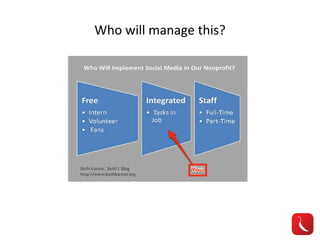
Who will manage this?
Sample Intern Posting: Project Amazing seeks a social media intern to join our growing team.  The social media intern will work across departments and play a major role in our online communications program. The social media intern will: monitor social networks like Twitter and Facebook for mentions prepare statistics and metrics on social networks upload photos, videos, and multimedia content to organization’s social networks create Facebook events for organization monitor Facebook page for likes, comments, activity research emerging media trends and work with organization to implement new technologies help create and manage online profiles Research what other players in the market are doing Qualifications include: passionate about social media/issues active on social networks like Twitter, Facebook, and Foursquare Strong writing skills HTML and CSS skills a plus
Short term vs Long term Short term social media Project and task driven Staff should learn social media elements and apply them to their projects Long term social media Process and conversation driven Eventually should lead to a specific hire
What if people say bad things about me? They already are, you just can’t hear them Opportunity to learn from your supporters Engage in discussion
What if it doesn’t work? Learn more from failure than you do from success Goals are essential and will guide you You get what you put into it Manage your expectations
Focus on Integration Adapt tools to current tasks Make social media elements part of routine Track all activity on an org calendar/task sheet Treat people online the way you would in “real” life
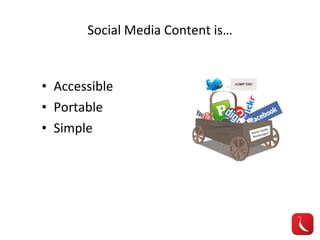
Social Media Content is… Accessible Portable Simple
Cut to the Chase: What should I do TODAY? Map out departments and existing projects Create calendar or list to track activities Start identifying ways to “add-on” social media elements to current projects
I want Facebook! I want Twitter! Know your different Facebook accounts Audiences are different Tactics are different Twitter = Customer Service Facebook = Relationship Building
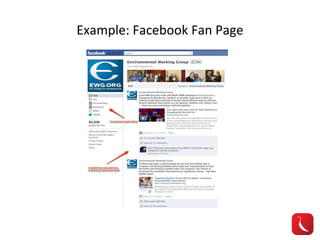
Facebook: What do I do with it? Facebook Fan Page For businesses, organizations, public figures Create and invite your contacts https://www.facebook.com/pages Good for central hub of organization (i.e. think of it as your home page) Example: Environmental Working Group
Example: Facebook Fan Page
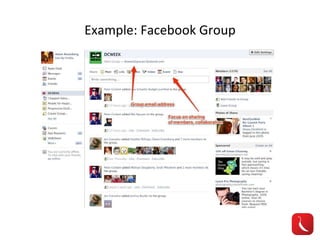
Facebook: What do I do with it? Facebook Groups Organized by interest Smaller sub sections of your overall organization (think: chapters) Focused on discussion between members http://www.allfacebook.com/new-facebook-groups-2010-10 Example: DCWeek
Example: Facebook Group
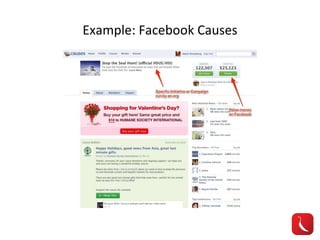
Facebook: What do I do with it? Facebook Causes For specific movements Each org could have many causes GREAT Fundraising method http://www.causes.com/ You can create initiatives or your supporters can link them to you Example: Stop the Seal Hunt (HSUS)
Example: Facebook Causes
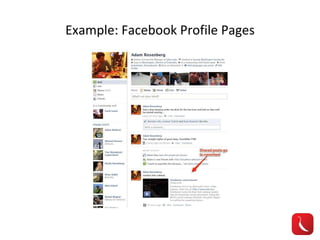
Facebook: What do I do with it? Facebook Profile A real person (example: CEO of org) Each person has one, you can only have one Share your orgs work through your friend networks Example: Adam Rosenberg
Example: Facebook Profile Pages
Twitter: What do I do with it? Customer Service Great for quick responses and real-time convo Host a chat Share links Treat it like a public cocktail party (be social!)
Twitter: Some Guidelines Know who is managing and responding so you don’t double up Follow hashtags for relevant events RT others Keep it simple (140 characters limit) Respond to all mentions, even folks that don’t agree with you (you might turn them to your side!) Use Tweetdeck, Tweetie, Hootsuite
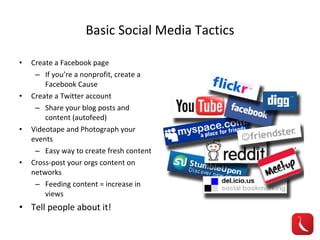
Basic Social Media Tactics Create a Facebook page If you’re a nonprofit, create a Facebook Cause Create a Twitter account Share your blog posts and content (autofeed) Videotape and Photograph your events Easy way to create fresh content Cross-post your orgs content on networks Feeding content = increase in views Tell people about it!
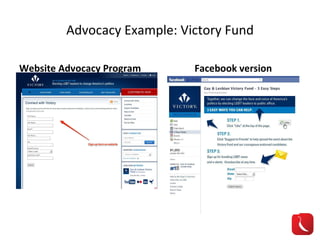
Advocacy Example: Victory Fund Website Advocacy Program Facebook version
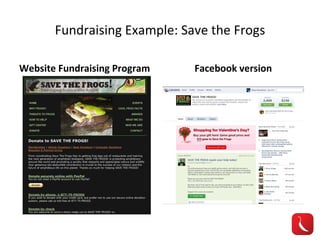
Fundraising Example: Save the Frogs Website Fundraising Program Facebook version
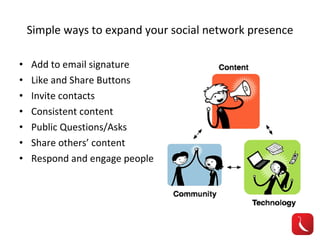
Simple ways to expand your social network presence Add to email signature Like and Share Buttons Invite contacts Consistent content Public Questions/Asks Share others’ content Respond and engage people
Metrics (It’s how you know it’s working!) Web traffic (Google Analytics) Membership Feedback Mentions (Twitter) Revenue (Fundraisers/Facebook Causes) Referrals Growth over time
Take Home Tips Ask Questions! Learn from big brands Politicians, Celebrities, Corporations Privacy/TOS Make sure you understand them Don’t panic, it’s the wild west
Helpful Links Essential Social Media Guides Mashable ( www.mashable.com ) All Facebook ( www.allfacebook.com ) HubSpot ( blog.hubspot.com ) Metrics Twitter Analyzer ( www.twitteranalyzer.com ) Tweetreach ( www.tweetreach.com )
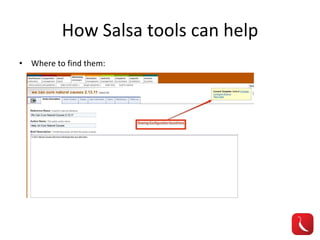
How Salsa tools can help Where to find them:
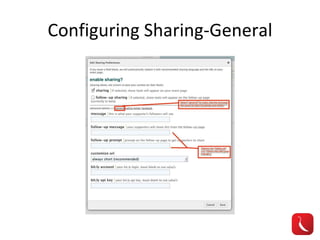
Configuring Sharing-General
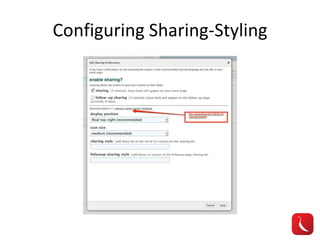
Configuring Sharing-Styling
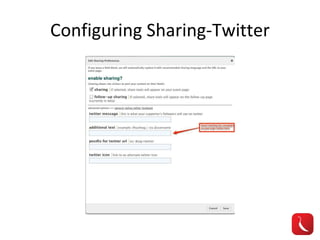
Configuring Sharing-Twitter
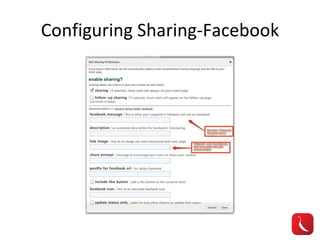
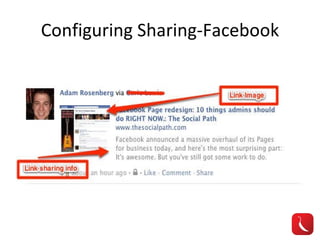
Configuring Sharing-Facebook
Questions? Salsa Support: Email:  [email_address] Twitter: @salsalabs/@salsalabsops http://salsacommons.org   http://www.salsalabs.com   Seek me out, I’m happy to help! Email: arosenberg@salsalabs.com Twitter: @Phillyberg Facebook:  www.facebook.com/Phillyberg Website: www.AdamSRosenberg.com

Social Media From Scratch

  • 1.
    Social Media fromScratch Salsa Labs, Inc. Adam Rosenberg Online Community Manager
  • 2.
    This presentation assumesthe following about you: You have no social media budget You have less than 10 people on staff You wear a lot of hats You know the question is not “if” you should be on Facebook but rather “how”
  • 3.
    How we’re defining“Social Media” for your purposes Any form of media that promotes conversation Things that can be shared Media that is not restricted to words Blogs Facebook Twitter
  • 4.
    Agenda Why havea social media program? What does a social media program look like? Cut to the Chase: What should I do TODAY? Take Home Tactics How Salsa tools can help
  • 5.
    Why have asocial media program? Why NOT? “ I have limited resources” “ I don’t have enough staff” “ My users aren’t on Facebook”
  • 6.
    “ My supportersaren’t on Facebook” = Poor excuse Graphic from DigitalBuzzBlog. Info from OnlineSchools.org. (1/18/11)
  • 7.
    Why have asocial media program? Builds community through sharing Helps identify evangelists Spreads your content through your supporters as the vehicle Cheap, low risk/high reward
  • 8.
    There’s a SocialMedia Program For Everyone
  • 9.
    What do youwant to accomplish? Support a new initiative? Enhance communications with membership? Fundraise? Build buzz around issue? Get people to take action? All of the above?
  • 10.
    What does asocial media campaign look like if you have resources? Multiple staffers and departments Clear roles, structure Resources
  • 11.
    What does asocial media campaign look like if you don’t have resources? No real structure for social media Tool and project driven No staff Staff wear many hats
  • 12.
    Things to consider...Who will manage this? Short term vs Long term What if people say bad things about me? What if it doesn’t work? Focus on integration
  • 13.
  • 14.
    Sample Intern Posting:Project Amazing seeks a social media intern to join our growing team. The social media intern will work across departments and play a major role in our online communications program. The social media intern will: monitor social networks like Twitter and Facebook for mentions prepare statistics and metrics on social networks upload photos, videos, and multimedia content to organization’s social networks create Facebook events for organization monitor Facebook page for likes, comments, activity research emerging media trends and work with organization to implement new technologies help create and manage online profiles Research what other players in the market are doing Qualifications include: passionate about social media/issues active on social networks like Twitter, Facebook, and Foursquare Strong writing skills HTML and CSS skills a plus
  • 15.
    Short term vsLong term Short term social media Project and task driven Staff should learn social media elements and apply them to their projects Long term social media Process and conversation driven Eventually should lead to a specific hire
  • 16.
    What if peoplesay bad things about me? They already are, you just can’t hear them Opportunity to learn from your supporters Engage in discussion
  • 17.
    What if itdoesn’t work? Learn more from failure than you do from success Goals are essential and will guide you You get what you put into it Manage your expectations
  • 18.
    Focus on IntegrationAdapt tools to current tasks Make social media elements part of routine Track all activity on an org calendar/task sheet Treat people online the way you would in “real” life
  • 19.
    Social Media Contentis… Accessible Portable Simple
  • 20.
    Cut to theChase: What should I do TODAY? Map out departments and existing projects Create calendar or list to track activities Start identifying ways to “add-on” social media elements to current projects
  • 21.
    I want Facebook!I want Twitter! Know your different Facebook accounts Audiences are different Tactics are different Twitter = Customer Service Facebook = Relationship Building
  • 22.
    Facebook: What doI do with it? Facebook Fan Page For businesses, organizations, public figures Create and invite your contacts https://www.facebook.com/pages Good for central hub of organization (i.e. think of it as your home page) Example: Environmental Working Group
  • 23.
  • 24.
    Facebook: What doI do with it? Facebook Groups Organized by interest Smaller sub sections of your overall organization (think: chapters) Focused on discussion between members http://www.allfacebook.com/new-facebook-groups-2010-10 Example: DCWeek
  • 25.
  • 26.
    Facebook: What doI do with it? Facebook Causes For specific movements Each org could have many causes GREAT Fundraising method http://www.causes.com/ You can create initiatives or your supporters can link them to you Example: Stop the Seal Hunt (HSUS)
  • 27.
  • 28.
    Facebook: What doI do with it? Facebook Profile A real person (example: CEO of org) Each person has one, you can only have one Share your orgs work through your friend networks Example: Adam Rosenberg
  • 29.
  • 30.
    Twitter: What doI do with it? Customer Service Great for quick responses and real-time convo Host a chat Share links Treat it like a public cocktail party (be social!)
  • 31.
    Twitter: Some GuidelinesKnow who is managing and responding so you don’t double up Follow hashtags for relevant events RT others Keep it simple (140 characters limit) Respond to all mentions, even folks that don’t agree with you (you might turn them to your side!) Use Tweetdeck, Tweetie, Hootsuite
  • 32.
    Basic Social MediaTactics Create a Facebook page If you’re a nonprofit, create a Facebook Cause Create a Twitter account Share your blog posts and content (autofeed) Videotape and Photograph your events Easy way to create fresh content Cross-post your orgs content on networks Feeding content = increase in views Tell people about it!
  • 33.
    Advocacy Example: VictoryFund Website Advocacy Program Facebook version
  • 34.
    Fundraising Example: Savethe Frogs Website Fundraising Program Facebook version
  • 35.
    Simple ways toexpand your social network presence Add to email signature Like and Share Buttons Invite contacts Consistent content Public Questions/Asks Share others’ content Respond and engage people
  • 36.
    Metrics (It’s howyou know it’s working!) Web traffic (Google Analytics) Membership Feedback Mentions (Twitter) Revenue (Fundraisers/Facebook Causes) Referrals Growth over time
  • 37.
    Take Home TipsAsk Questions! Learn from big brands Politicians, Celebrities, Corporations Privacy/TOS Make sure you understand them Don’t panic, it’s the wild west
  • 38.
    Helpful Links EssentialSocial Media Guides Mashable ( www.mashable.com ) All Facebook ( www.allfacebook.com ) HubSpot ( blog.hubspot.com ) Metrics Twitter Analyzer ( www.twitteranalyzer.com ) Tweetreach ( www.tweetreach.com )
  • 39.
    How Salsa toolscan help Where to find them:
  • 40.
  • 41.
  • 42.
  • 43.
  • 44.
  • 45.
    Questions? Salsa Support:Email: [email_address] Twitter: @salsalabs/@salsalabsops http://salsacommons.org http://www.salsalabs.com Seek me out, I’m happy to help! Email: arosenberg@salsalabs.com Twitter: @Phillyberg Facebook: www.facebook.com/Phillyberg Website: www.AdamSRosenberg.com

Editor's Notes

  • #4 Don’t want people to get worried about terms like “microblogging” or “Foursquare” – don’t be afraid.
  • #7 Insert graphic of stats: http://blog.hubspot.com/blog/tabid/6307/bid/5965/The-Ultimate-List-300-Social-Media-Statistics.aspx http://www.digitalbuzzblog.com/facebook-statistics-stats-facts-2011/
  • #9 CDT – which has no staff or budget for this, HSUS – which has a large budget and staff
  • #10 These are all reasons you would have a social media campaign. This is an evolving area, etc. The common thread: They all involve your orgs desire to talk and listen to people!
  • #11 Orgs w/ social media resources (Chain of command) graphic. Ability to easily follow routes on social media and institutional backing. Staff.
  • #12 Orgs w/o social media resources (Chain of command) graphic.
  • #13 Identify one person to track it all – Comm is a natural fit. Focus on integration – will save you time in the long run
  • #14 You’re likely going to be integrating social media as a tool by tool basis on things you’re already doing. Easiest way to start up.
  • #15 You want your intern to do all the things that will take up a lot of your time and scare you from doing social media. They don’t run the program, they fill in the blanks. They need to be users because they will know the tools well.
  • #16 Short term social media is doing hashtags, a random youtube video, a facebook page – all to compliment already running projects. The goals are just to cover the social media bases, not make a giant impact. Low risk, high reward. Long term social media is taking steps towards integrating a larger social media program at your organization with an eventual hire to manage it. These will be driven by conversation you have online with supporters and will be you putting more time resources into this program with the understanding that you may not see quantitative results soon.
  • #17 Identify one person to track it all – Comm is a natural fit. Focus on integration – will save you time in the long run
  • #19 Saves time in the long run. It forces your social media projects to become quality, not quantity. You ask yourself “How can I use social media to make what I’m already doing better?”
  • #20 Make sure you are asking yourself “Is this content fitting this criteria” and you will guide yourself in the right direction for social media. Social media works when its effortless for the user.
  • #23 Going to explain the different uses of Facebook pages. They’re all different.
  • #24 Key aspects to a Facebook page are the newsfeed and comments from “fans”. The more people interact with something you post, the more likely it is to appear on someone’s newsfeed who is following your org. Tabs can be customized through the edit page -> applications setting. You also are able to get great analytics on the types of people following your brand through the Page Insights.
  • #25 Groups are interesting. They’re not quite the robust functionality of fan pages, and serve better as a project management and discussion forum. These would be great for chapters or local followings of your org. Their main purpose is discussion and sharing between the members as opposed to a page, which is meant for interaction between the page and the members and vice versa.
  • #27 Very easy way for an organization to get involved on Facebook. Initiative specific pages with the ability to raise money and recruit members. When you start a cause, you can link it to a nonprofit in Facebook.
  • #29 This is your classic Facebook profile. It’s your personal page. It’s how you as an individual would share your orgs work through your networks.
  • #33 Don’t do autofeeds for Facebook, take the time to post it. Track it all on a calendar.
  • #34 They took what was already being done on their website and simply made a “social network” version of this. This is the same concept you can apply to all your projects.
  • #35 They have a fundraising page on their website and then the complimentary Facebook Cause page.
  • #36 Bottom line – if it’s not something that you’d find interesting, chances are others won’t find it interesting either. Expect to get lonely in the beginning. That’s why calling out the content of others is a great way to build initial readership and community.
  • #37 All can be measured and used as ways to gauge whats working
  • #38 No one is an expert.
  • #39 No one is an expert.
  • #41 General tab is for customizing sharing language across networks and ignoring specific things for Twitter or Facebook (I don’t advise this)
  • #42 Styling tab is for customizing the appearance of the share button
  • #43 Twitter sharing is best when it features use of hashtags or references to the org being shared from.
  • #44 Facebook sharing – a little more complicated but still important. Allows you to customize what appears in the link info which appears on the users wall.
  • #45 This info can now be updated through the Salsa sharing tools