Social Enterprise Java
Apps
Safe Harbor Statement
Safe harbor statement under the Private Securities Litigation Reform Act of 1995.

This presentation may contain forward-looking statements that involve risks, uncertainties, and assumptions. If any such
uncertainties materialize or if any of the assumptions proves incorrect, the results of salesforce.com, inc. could differ materially
from the results expressed or implied by the forward looking-statements we make. All statements other than statements of
historical fact could be deemed forward-looking, including any projections of product or service availability, subscriber
growth, earnings, revenues, or other financial items and any statements regarding strategies or plans of management for future
operations, statements of belief, any statements concerning new, planned, or upgraded services or technology developments
and customer contracts or use of our services.

The risks and uncertainties referred to above include - but are not limited to - risks associated with developing and delivering new
functionality for our service, new products and services, our new business model, our past operating losses, possible fluctuations
in our operating results and rate of growth, interruptions or delays in our Web hosting, breach of our security measures, the
outcome of intellectual property and other litigation, risks associated with possible mergers and acquisitions, the immature
market in which we operate, our relatively limited operating history, our ability to expand, retain, and motivate our employees
and manage our growth, new releases of our service and successful customer deployment, our limited history reselling non-
salesforce.com products, and utilization and selling to larger enterprise customers. Further information on potential factors that
could affect the financial results of salesforce.com, inc. is included in our annual report on Form 10-Q for the most recent fiscal
quarter ended. This documents and others containing important disclosures are available on the SEC Filings section of the
Investor Information section of our Web site.

Any unreleased services or features referenced in this or other presentations, press releases or public statements are not
currently available and may not be delivered on time or at all. Customers who purchase our services should make the purchase
decisions based upon features that are currently available. Salesforce.com, inc. assumes no obligation and does not intend to
update these forward-looking statements.
@forcedotcom , #forcewebinar, @Heroku,
@anand_bn, @_JamesWard


Developer Force Group


facebook.com/forcedotcom
facebook.com/heroku


Developer Force – Force.com Community
Anand B Narasimhan
Senior Product Manager, Heroku
anand@heroku.com
@anand_bn


James L Ward
Principal Developer Evangelist, Heroku
jw@heroku.com
@_JamesWard
- Paul Cheesbrough
CIO, News International
In this webinar…
 What is a “Social Enterprise App”

 Heroku – a short intro

 Hands on with Java on Heroku

 Building a Social Enterprise Heroku app

 Coming soon to an IDE near you

 Q&A
The Social Enterprise

                                                          Customer
                                                        Social Network


                              Social
                              Profile
       Collaborate                             Market


Work                                                      Service


                     Extend             Sell
Market = Engage = Heroku


           5 Years Ago                    Today
    Static, Passive Marketing   Relevant, Active Marketing
What are the
    building blocks
          of a
Social Enterprise App ?
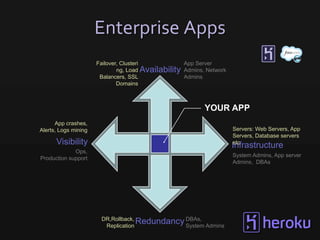
Enterprise Apps
                      Failover, Clusteri            App Server
                              ng, Load Availability Admins, Network
                       Balancers, SSL               Admins
                              Domains


                                                           YOUR APP
      App crashes,
Alerts, Logs mining                                                   Servers: Web Servers, App
                                                                      Servers, Database servers
      Visibility                                                      etc
                                                                      Infrastructure
             Ops,
                                                                      System Admins, App server
Production support
                                                                      Admins, DBAs


                       DR,Rollback,
                        Replication
                                    Redundancy DBAs, Admins
                                               System
Forget                Run                   See              Trust &
  Servers             Anything             Everything          Manage


$ heroku create   worker: java –jar ..   $heroku logs --tail   $heroku ps
Heroku                                               User
                                                 •   Web browser Acces
    Architecture                                 •   API access


                                                        http(s)
                                            Elastic Load Balancing


Developer
                     Control Surface APIs


Code
•Java
•…

Deploy        REST
•GIT

Manage
•Heroku CLI
•Scaling
•Monitoring
Social Enterprise App Architecture
   Polyglot &                Process                    Real time                 Addons
     Open                     Model                     Visibiility


                Social API                   Data API                      Metadata API


                                    Access Management

            Identity     Profiles       Permissions               Record-Level Filtering


                                             Data

                  Business Data          Metadata             Files
Getting started
            with
     Spring MVC app
         on Heroku
( http://java.heroku.com )
DEMO / HANDS ON
Building a Social Enterprise
            App
            With
Heroku and Salesforce.com
Integrating with Salesforce.com
1.Setup OAuth
2.Update dependencies
3.Switch Entity to JSON
4.Switch DAO to Force REST API
5.Switch Spring Config to Force REST +
  OAuth
6.Add Servlet Filter for Oauth
7.Add Oauth Keys to the environment
Dyno
                          1. Build
                          2. Slug Compile
                          3. Deploy to Dyno


   Embedded Container

    WAR
                         $ git push heroku


Dependencies

                        pom.xml
                        $ mvn install

 Your code


                                Under the
Spring MVC app
 With Heroku &
Salesforce.com
      And
 Chatter APIs
What’s possible…
              Social
Feeds, Recommendatio                 Real time/ Push
                 ns                  Notifications


                        Social
                       Enterpris
                        e App


           Streaming               Analytics
                Data
is GA
Java
Heroku Labs
• WAR deployment (http://bit.ly/war-deploy )
• Jenkins plugin for Heroku(http://bit.ly/heroku-ci
  )
• Heroku.jar- Java Wrapper (http://bit.ly/heroku-
  jar )
• Atlassian Bamboo plugin for Heroku (Email
  anand@heroku.com for more details)


                     you can try these out now.

                  We would love your feedback
Coming Soon

+        =    like
Coming Soon

               All day
HEROKU ENTERPRISE DEVELOPER
         WORKSHOP

  Email anand@heroku.com if you are
             interested
Resources
 Getting Started -
     http://java.heroku.com
     http://bit.ly/heroku-java
 Toolbelt (http://toolbelt.herokuapp.com )
 Heroku Dev Center : http://devcenter.heroku.com
 Heroku Add-ons: http://addons.heroku.com
 Git: http://help.github.com/
 Webinar Source code:
     Spring MVC - Force.com : http://bit.ly/KZB68y
     Chatter - http://bit.ly/KgMlPP
     Pusher integration - http://bit.ly/KMVInx
Upcoming Events

•   June 12 – Visualforce CodeTalk
     http://bit.ly/codetalkheroku
•   June 13 – How Salesforce.com Uses
    Hadoop Webinar
     http://bit.ly/hadoopheroku
•   June 26 – Mobile CodeTalk
     http://bit.ly/mct-wr
Survey:
                 http://bit.ly/herokujavasurvey
   Heroku Devcenter: http://devcenter.heroku.com


 James Ward @_JamesWard            Anand Narasimhan @anand_bn
Developer Evangelist at Heroku     Sr. Product Manager at Heroku
      jw@heroku.com                      anand@heroku.com
SFDC Integration Steps

APPENDIX
1. Setup OAuth
i.   Salesforce.com > Setup > Develop >
     Remote Access
ii. Add Remote Access for Dev & Prod
     •   Dev Callback URL: http://localhost:8080/_auth
     •   Prod Callback URL: https://some-app-1234.herokuapp.com/_auth
2. Update dependencies
<repositories>
  <repository>
    <id>force-rest-api</id>
    <name>force-rest-api repository on GitHub</name>
    <url>
    http://jesperfj.github.com/force-rest-api/repository/
    </url>
  </repository>
</repositories>
2. Update dependencies
<dependency>
    <groupId>com.force.api</groupId>
    <artifactId>force-rest-api</artifactId>
    <version>0.0.15</version>
</dependency>
<dependency>
    <groupId>com.force.sdk</groupId>
    <artifactId>force-oauth</artifactId>
    <version>22.0.8-BETA</version>
</dependency>
<dependency>
    <groupId>com.force.sdk</groupId>
    <artifactId>force-springsecurity</artifactId>
    <version>22.0.8-BETA</version>
</dependency>
3. Switch Entity to JSON
@JsonIgnoreProperties(ignoreUnknown=true)
public class Person {

   @JsonProperty(value="Id")
   private String id;

   @JsonProperty(value="FirstName")
   private String firstName;

   @JsonProperty(value="LastName")
   private String lastName;
4. Switch DAO to Force REST
API
private ForceApi getForceApi() {
    SecurityContext sc = ForceSecurityContextHolder.get();
    ApiSession s = new ApiSession();
    s.setAccessToken(sc.getSessionId());
    s.setApiEndpoint(sc.getEndPointHost());
    return new ForceApi(s);
}

// Add Contact
getForceApi().createSObject("contact", person);

// Query Contacts
getForceApi().query("SELECT Id FROM contact", Person.class);

// Delete Contact
getForceApi().deleteSObject("contact", id);
5. Spring Config + OAuth
<fss:oauth>
  <fss:oauthInfo endpoint="http://login.salesforce.com"
    oauth-key="#{systemEnvironment['OAUTH_CLIENT_KEY']}"
    oauth-secret="#{systemEnvironment['OAUTH_CLIENT_SECRET']}"/>
</fss:oauth>

<security:http use-expressions="true">
  <security:intercept-url pattern="/people/*"
    access="isAuthenticated()" />
</security:http>


<!-- https redirect support -->
<property name="redirectHttp10Compatible" value="false" />
6. Add Servlet Filter for Oauth
<filter>
  <filter-name>springSecurityFilterChain</filter-name>
  <filter-class>
    org.springframework.web.filter.DelegatingFilterProxy
  </filter-class>
  <init-param>
    <param-name>contextAttribute</param-name>
    <param-value>
   org.springframework.web.servlet.FrameworkServlet.CONTEXT.spring
    </param-value>
  </init-param>
</filter>
<filter-mapping>
  <filter-name>springSecurityFilterChain</filter-name>
  <url-pattern>/*</url-pattern>
</filter-mapping>
7. Add Oauth Keys
export OAUTH_CLIENT_KEY=CQ3gmEE53MVG99OxTyEMal8ytj1E3NF7...
export OAUTH_CLIENT_SECRET=0905539091246761180


heroku config:add OAUTH_CLIENT_KEY=CQ3gmEE53MVG99OxTyEMal8yt...
heroku config:add OAUTH_CLIENT_SECRET=0905539091246761180

Social ent. with java on heroku

  • 1.
  • 2.
    Safe Harbor Statement Safeharbor statement under the Private Securities Litigation Reform Act of 1995. This presentation may contain forward-looking statements that involve risks, uncertainties, and assumptions. If any such uncertainties materialize or if any of the assumptions proves incorrect, the results of salesforce.com, inc. could differ materially from the results expressed or implied by the forward looking-statements we make. All statements other than statements of historical fact could be deemed forward-looking, including any projections of product or service availability, subscriber growth, earnings, revenues, or other financial items and any statements regarding strategies or plans of management for future operations, statements of belief, any statements concerning new, planned, or upgraded services or technology developments and customer contracts or use of our services. The risks and uncertainties referred to above include - but are not limited to - risks associated with developing and delivering new functionality for our service, new products and services, our new business model, our past operating losses, possible fluctuations in our operating results and rate of growth, interruptions or delays in our Web hosting, breach of our security measures, the outcome of intellectual property and other litigation, risks associated with possible mergers and acquisitions, the immature market in which we operate, our relatively limited operating history, our ability to expand, retain, and motivate our employees and manage our growth, new releases of our service and successful customer deployment, our limited history reselling non- salesforce.com products, and utilization and selling to larger enterprise customers. Further information on potential factors that could affect the financial results of salesforce.com, inc. is included in our annual report on Form 10-Q for the most recent fiscal quarter ended. This documents and others containing important disclosures are available on the SEC Filings section of the Investor Information section of our Web site. Any unreleased services or features referenced in this or other presentations, press releases or public statements are not currently available and may not be delivered on time or at all. Customers who purchase our services should make the purchase decisions based upon features that are currently available. Salesforce.com, inc. assumes no obligation and does not intend to update these forward-looking statements.
  • 3.
    @forcedotcom , #forcewebinar,@Heroku, @anand_bn, @_JamesWard Developer Force Group facebook.com/forcedotcom facebook.com/heroku Developer Force – Force.com Community
  • 4.
    Anand B Narasimhan SeniorProduct Manager, Heroku anand@heroku.com @anand_bn James L Ward Principal Developer Evangelist, Heroku jw@heroku.com @_JamesWard
  • 5.
    - Paul Cheesbrough CIO,News International
  • 6.
    In this webinar… What is a “Social Enterprise App”  Heroku – a short intro  Hands on with Java on Heroku  Building a Social Enterprise Heroku app  Coming soon to an IDE near you  Q&A
  • 7.
    The Social Enterprise Customer Social Network Social Profile Collaborate Market Work Service Extend Sell
  • 8.
    Market = Engage= Heroku 5 Years Ago Today Static, Passive Marketing Relevant, Active Marketing
  • 9.
    What are the building blocks of a Social Enterprise App ?
  • 11.
    Enterprise Apps Failover, Clusteri App Server ng, Load Availability Admins, Network Balancers, SSL Admins Domains YOUR APP App crashes, Alerts, Logs mining Servers: Web Servers, App Servers, Database servers Visibility etc Infrastructure Ops, System Admins, App server Production support Admins, DBAs DR,Rollback, Replication Redundancy DBAs, Admins System
  • 12.
    Forget Run See Trust & Servers Anything Everything Manage $ heroku create worker: java –jar .. $heroku logs --tail $heroku ps
  • 13.
    Heroku User • Web browser Acces Architecture • API access http(s) Elastic Load Balancing Developer Control Surface APIs Code •Java •… Deploy REST •GIT Manage •Heroku CLI •Scaling •Monitoring
  • 14.
    Social Enterprise AppArchitecture Polyglot & Process Real time Addons Open Model Visibiility Social API Data API Metadata API Access Management Identity Profiles Permissions Record-Level Filtering Data Business Data Metadata Files
  • 15.
    Getting started with Spring MVC app on Heroku ( http://java.heroku.com )
  • 16.
  • 17.
    Building a SocialEnterprise App With Heroku and Salesforce.com
  • 18.
    Integrating with Salesforce.com 1.SetupOAuth 2.Update dependencies 3.Switch Entity to JSON 4.Switch DAO to Force REST API 5.Switch Spring Config to Force REST + OAuth 6.Add Servlet Filter for Oauth 7.Add Oauth Keys to the environment
  • 19.
    Dyno 1. Build 2. Slug Compile 3. Deploy to Dyno Embedded Container WAR $ git push heroku Dependencies pom.xml $ mvn install Your code Under the
  • 21.
    Spring MVC app With Heroku & Salesforce.com And Chatter APIs
  • 22.
    What’s possible… Social Feeds, Recommendatio Real time/ Push ns Notifications Social Enterpris e App Streaming Analytics Data
  • 23.
  • 24.
    Heroku Labs • WARdeployment (http://bit.ly/war-deploy ) • Jenkins plugin for Heroku(http://bit.ly/heroku-ci ) • Heroku.jar- Java Wrapper (http://bit.ly/heroku- jar ) • Atlassian Bamboo plugin for Heroku (Email anand@heroku.com for more details) you can try these out now. We would love your feedback
  • 25.
  • 26.
    Coming Soon All day HEROKU ENTERPRISE DEVELOPER WORKSHOP Email anand@heroku.com if you are interested
  • 27.
    Resources  Getting Started-  http://java.heroku.com  http://bit.ly/heroku-java  Toolbelt (http://toolbelt.herokuapp.com )  Heroku Dev Center : http://devcenter.heroku.com  Heroku Add-ons: http://addons.heroku.com  Git: http://help.github.com/  Webinar Source code:  Spring MVC - Force.com : http://bit.ly/KZB68y  Chatter - http://bit.ly/KgMlPP  Pusher integration - http://bit.ly/KMVInx
  • 28.
    Upcoming Events • June 12 – Visualforce CodeTalk  http://bit.ly/codetalkheroku • June 13 – How Salesforce.com Uses Hadoop Webinar  http://bit.ly/hadoopheroku • June 26 – Mobile CodeTalk  http://bit.ly/mct-wr
  • 29.
    Survey: http://bit.ly/herokujavasurvey Heroku Devcenter: http://devcenter.heroku.com James Ward @_JamesWard Anand Narasimhan @anand_bn Developer Evangelist at Heroku Sr. Product Manager at Heroku jw@heroku.com anand@heroku.com
  • 30.
  • 31.
    1. Setup OAuth i. Salesforce.com > Setup > Develop > Remote Access ii. Add Remote Access for Dev & Prod • Dev Callback URL: http://localhost:8080/_auth • Prod Callback URL: https://some-app-1234.herokuapp.com/_auth
  • 32.
    2. Update dependencies <repositories> <repository> <id>force-rest-api</id> <name>force-rest-api repository on GitHub</name> <url> http://jesperfj.github.com/force-rest-api/repository/ </url> </repository> </repositories>
  • 33.
    2. Update dependencies <dependency> <groupId>com.force.api</groupId> <artifactId>force-rest-api</artifactId> <version>0.0.15</version> </dependency> <dependency> <groupId>com.force.sdk</groupId> <artifactId>force-oauth</artifactId> <version>22.0.8-BETA</version> </dependency> <dependency> <groupId>com.force.sdk</groupId> <artifactId>force-springsecurity</artifactId> <version>22.0.8-BETA</version> </dependency>
  • 34.
    3. Switch Entityto JSON @JsonIgnoreProperties(ignoreUnknown=true) public class Person { @JsonProperty(value="Id") private String id; @JsonProperty(value="FirstName") private String firstName; @JsonProperty(value="LastName") private String lastName;
  • 35.
    4. Switch DAOto Force REST API private ForceApi getForceApi() { SecurityContext sc = ForceSecurityContextHolder.get(); ApiSession s = new ApiSession(); s.setAccessToken(sc.getSessionId()); s.setApiEndpoint(sc.getEndPointHost()); return new ForceApi(s); } // Add Contact getForceApi().createSObject("contact", person); // Query Contacts getForceApi().query("SELECT Id FROM contact", Person.class); // Delete Contact getForceApi().deleteSObject("contact", id);
  • 36.
    5. Spring Config+ OAuth <fss:oauth> <fss:oauthInfo endpoint="http://login.salesforce.com" oauth-key="#{systemEnvironment['OAUTH_CLIENT_KEY']}" oauth-secret="#{systemEnvironment['OAUTH_CLIENT_SECRET']}"/> </fss:oauth> <security:http use-expressions="true"> <security:intercept-url pattern="/people/*" access="isAuthenticated()" /> </security:http> <!-- https redirect support --> <property name="redirectHttp10Compatible" value="false" />
  • 37.
    6. Add ServletFilter for Oauth <filter> <filter-name>springSecurityFilterChain</filter-name> <filter-class> org.springframework.web.filter.DelegatingFilterProxy </filter-class> <init-param> <param-name>contextAttribute</param-name> <param-value> org.springframework.web.servlet.FrameworkServlet.CONTEXT.spring </param-value> </init-param> </filter> <filter-mapping> <filter-name>springSecurityFilterChain</filter-name> <url-pattern>/*</url-pattern> </filter-mapping>
  • 38.
    7. Add OauthKeys export OAUTH_CLIENT_KEY=CQ3gmEE53MVG99OxTyEMal8ytj1E3NF7... export OAUTH_CLIENT_SECRET=0905539091246761180 heroku config:add OAUTH_CLIENT_KEY=CQ3gmEE53MVG99OxTyEMal8yt... heroku config:add OAUTH_CLIENT_SECRET=0905539091246761180

Editor's Notes

  • #5 Intros.
  • #6 It’s all about the Cloud.
  • #8 Collaborate, Work, Extend, Sell, Service, Market = Engage = Heroku
  • #11 it is a little paradoxical, but there is more to the idea of a social app than just the overtly social stuffif you think about the canonical social apps in the consumer space, apps like Facebook, Twitter, 4Square, today’s hot darling Pinterest, and othersAnd you look across them to see what they have in common, you’ll see there is more going on than easily fits within the dictionary definition of “social”it’s broader than thatAnd when you think about social enterprise apps, you need to layer in the needs of business, and you need to think even a bit more broadlyI break it down into these six characteristicsCollaboration, mobility, social UX, Interoperability, Rea ltime, and AgilityIf you really want to build a great social enterprise app, you need to think about all of them, though they will not all apply equally to every appLet me talk a little bit about each
  • #15 Heroku can complement your force.com/db.com apps to extend your cloud applicationsWhat are my use cases for Heroku and force.com/db.com?
  • #16 This is how you’re the same Java application looks in Heroku. As you can see not much changes i.e. your application is very much portable to another environment if you choose to do so.