Snap Tools
‫תאור המערכת‬
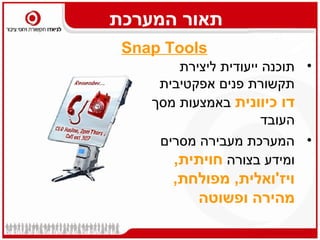
 ‫‪Snap Tools‬‬
        ‫• תוכנה ייעודית ליצירת‬
     ‫תקשורת פנים אפקטיבית‬
    ‫דו כיוונית באמצעות מסך‬
                       ‫העובד‬
     ‫• המערכת מעבירה מסרים‬
       ‫ומידע בצורה חויתית,‬
       ‫ויז'ואלית, מפולחת,‬
          ‫מהירה ופשוטה‬
‫תרומת המערכת‬
    ‫שימוש במימדים ויזואליים‬   ‫‪‬‬
‫העברת מידע ישיר לעובד בדרך‬    ‫‪‬‬
        ‫אחרת )עוקפת דוא"ל(‬
   ‫תקשורת מיידית ומתוזמנת‬     ‫‪‬‬
            ‫תקשורת מפולחת‬     ‫‪‬‬
               ‫מערכת דחיפה‬    ‫‪‬‬
                 ‫‪Bottom UP‬‬    ‫‪‬‬
         ‫מדידת קריאה/הבנה‬     ‫‪‬‬
‫ערוצי תקשורת בכלי אחד 6‬

 ‫שומרי‬
   ‫מסך‬
              ‫הודעות‬
            ‫מתפרצות‬
                           ‫אלקטרוני6 ערוצי תקשורת‬
                             ‫מבזקוני‬
                              ‫חדשות‬
                                     ‫חידונים‬
                                     ‫וסקרים‬
                                             ‫מידעון‬               ‫אינטר‬
                                                                  ‫אקטיב‬
‫שומרי מסך‬   ‫הודעה מתפרצת‬       ‫מבזקונים‬     ‫סקרים‬     ‫מידעון‬      ‫פורומים‬


             ‫הודעת וידאו‬      ‫עדכונים ‪RSS‬‬   ‫חידונים‬               ‫בלוגים‬


             ‫זימון פגישה‬                                        ‫‪Help desk‬‬


                                                               ‫שאלות ותשובות‬
‫-מיבזקון חדשותי‪Snap Ticker‬‬


‫תחפש את החברים שלך! ותביא אותם אלינו‬
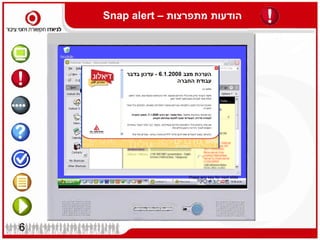
Snap alert – ‫הודעות מתפרצות‬


                    Press any key for next slide


6
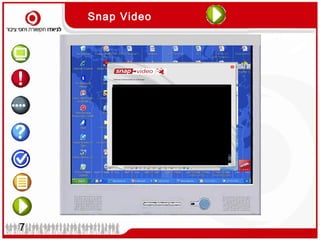
Snap Video


                 Press any key for next slide


7
RSVP


8
‫מדידה‬


            Press any key for next slide


9
‫מדידה‬


‫מדידה‬
‫מדידה‬
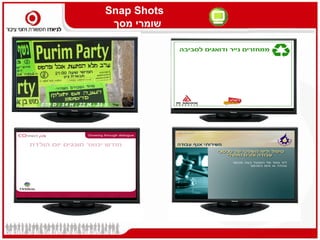
‫‪Snap Shots‬‬
          ‫שומרי מסך‬


 ‫חזון‬
‫וערכים‬
Snap Shots
 ‫שומרי מסך‬
‫סקרים וחידונים – ‪Snap Poll‬‬
‫מגזין אלקטרוני מבוסס עובדים ‪– Snap Mag‬‬
Snap interactive
Snap interactive


                 ‫א‬
                     Press any key for next slide


18
‫‪Snap interactive‬‬

‫עובד שואל הנהלה משיבה- דוגמא ממכון התקנים‬
‫ערוצי תקשורת בכלי אחד 6‬

 ‫שומרי‬
   ‫מסך‬
              ‫הודעות‬
            ‫מתפרצות‬
                           ‫אלקטרוני6 ערוצי תקשורת‬
                             ‫מבזקוני‬
                              ‫חדשות‬
                                     ‫חידונים‬
                                     ‫וסקרים‬
                                             ‫מידעון‬               ‫אינטר‬
                                                                  ‫אקטיב‬
‫שומרי מסך‬   ‫הודעה מתפרצת‬       ‫מבזקונים‬     ‫סקרים‬     ‫מידעון‬      ‫פורומים‬


             ‫הודעת וידאו‬      ‫עדכונים ‪RSS‬‬   ‫חידונים‬               ‫בלוגים‬


             ‫זימון פגישה‬                                        ‫‪Help desk‬‬


                                                               ‫שאלות ותשובות‬
? ‫איך זה עובד‬


                   Content
                 manager data
                    center


                                 Secure path
                                 via Internet


                                http & https


Administrator


                                 Users
‫מי כבר נהנה מחווית ה -‪?snap‬‬


‫שוק בינלאומי‬                 ‫שוק מקומי‬
‫תקשורת אפקטיבית בלחיצת‬
         ‫כפתור‬


          ‫דניאל מור‬
    ‫‪daniel@laniado.co.il‬‬
       ‫9878578-250‬

Snap מצגת

  • 1.
  • 2.
    ‫תאור המערכת‬ ‫‪SnapTools‬‬ ‫• תוכנה ייעודית ליצירת‬ ‫תקשורת פנים אפקטיבית‬ ‫דו כיוונית באמצעות מסך‬ ‫העובד‬ ‫• המערכת מעבירה מסרים‬ ‫ומידע בצורה חויתית,‬ ‫ויז'ואלית, מפולחת,‬ ‫מהירה ופשוטה‬
  • 3.
    ‫תרומת המערכת‬ ‫שימוש במימדים ויזואליים‬ ‫‪‬‬ ‫העברת מידע ישיר לעובד בדרך‬ ‫‪‬‬ ‫אחרת )עוקפת דוא"ל(‬ ‫תקשורת מיידית ומתוזמנת‬ ‫‪‬‬ ‫תקשורת מפולחת‬ ‫‪‬‬ ‫מערכת דחיפה‬ ‫‪‬‬ ‫‪Bottom UP‬‬ ‫‪‬‬ ‫מדידת קריאה/הבנה‬ ‫‪‬‬
  • 4.
    ‫ערוצי תקשורת בכליאחד 6‬ ‫שומרי‬ ‫מסך‬ ‫הודעות‬ ‫מתפרצות‬ ‫אלקטרוני6 ערוצי תקשורת‬ ‫מבזקוני‬ ‫חדשות‬ ‫חידונים‬ ‫וסקרים‬ ‫מידעון‬ ‫אינטר‬ ‫אקטיב‬ ‫שומרי מסך‬ ‫הודעה מתפרצת‬ ‫מבזקונים‬ ‫סקרים‬ ‫מידעון‬ ‫פורומים‬ ‫הודעת וידאו‬ ‫עדכונים ‪RSS‬‬ ‫חידונים‬ ‫בלוגים‬ ‫זימון פגישה‬ ‫‪Help desk‬‬ ‫שאלות ותשובות‬
  • 5.
    ‫-מיבזקון חדשותי‪Snap Ticker‬‬ ‫תחפשאת החברים שלך! ותביא אותם אלינו‬
  • 6.
    Snap alert –‫הודעות מתפרצות‬ Press any key for next slide 6
  • 7.
    Snap Video Press any key for next slide 7
  • 8.
  • 9.
    ‫מדידה‬ Press any key for next slide 9
  • 10.
  • 11.
  • 12.
    ‫‪Snap Shots‬‬ ‫שומרי מסך‬ ‫חזון‬ ‫וערכים‬
  • 13.
  • 14.
  • 15.
  • 16.
    ‫מגזין אלקטרוני מבוססעובדים ‪– Snap Mag‬‬
  • 17.
  • 18.
    Snap interactive ‫א‬ Press any key for next slide 18
  • 20.
    ‫‪Snap interactive‬‬ ‫עובד שואלהנהלה משיבה- דוגמא ממכון התקנים‬
  • 21.
    ‫ערוצי תקשורת בכליאחד 6‬ ‫שומרי‬ ‫מסך‬ ‫הודעות‬ ‫מתפרצות‬ ‫אלקטרוני6 ערוצי תקשורת‬ ‫מבזקוני‬ ‫חדשות‬ ‫חידונים‬ ‫וסקרים‬ ‫מידעון‬ ‫אינטר‬ ‫אקטיב‬ ‫שומרי מסך‬ ‫הודעה מתפרצת‬ ‫מבזקונים‬ ‫סקרים‬ ‫מידעון‬ ‫פורומים‬ ‫הודעת וידאו‬ ‫עדכונים ‪RSS‬‬ ‫חידונים‬ ‫בלוגים‬ ‫זימון פגישה‬ ‫‪Help desk‬‬ ‫שאלות ותשובות‬
  • 22.
    ? ‫איך זהעובד‬ Content manager data center Secure path via Internet http & https Administrator Users
  • 23.
    ‫מי כבר נהנהמחווית ה -‪?snap‬‬ ‫שוק בינלאומי‬ ‫שוק מקומי‬
  • 24.
    ‫תקשורת אפקטיבית בלחיצת‬ ‫כפתור‬ ‫דניאל מור‬ ‫‪daniel@laniado.co.il‬‬ ‫9878578-250‬

Editor's Notes

  • #5 סט כלים חדשניים להעברת מסרים וקמפיינים פנימיים : תקשורת של buttom-up בהשתתפות העובדים The Snap Tools, push communications out to staff….. At times that suit their work flow / they are more receptive All tools have click-through link capability All are able to targeted to different groups of staff, partner etc Generally the communications are displayed on their computer screens but can also be targeted to flat screen displays such as plasmas or kiosks for off-line workers. Staff do not have to be online to receive communications which will display at pre specified times even while offline - a great tool to stay in touch staff who are in the field.
  • #6 מבזקון- רץ בלופ
  • #7 Our user is working away. We have an important message that needs to be delivered to her and we need to ensure she reads it. If she’s right in the middle of something, she can select ‘ read later’ and she can delay reading a specified number of times set by the administrator. When this limit is reached, she may have to read the message in order to remove it from her computer. How Snap Alert works Persistent – the message will not go away until it has been viewed and acted upon (if specified by administrator) Immediate display of message can be specified by the administrator Size, position and prominence of window can be preset for each message If not activated the pop-up window will fade away and reappear later User eventually has to activate the message to remove it from their desktop (unless expiry date or ignore option has been specified) Can report on who has / has not opened the full message Can report on user openings, links clicked to ensure compliance etc Saves management time – no need to chase to ensure responses
  • #8 הודעה מתפרצת וידאו
  • #9 Snap RSVP
  • #11 מדידה לפי כותרות
  • #12 מדידה פרסונלית
  • #17 ניוזלטר – אינטגרלי במערכת
  • #18 Snap interactive Administrator can customise the look and feel – set it up from scratch or have a specific design loaded. The example here if the beta version we have put together for Vodafone NZ initial testing. Access rights, this is where you set it up as a blog, forum or helpdesk. If an employee does not have read writes to a specific forum, they will not even know it exists, making it an ideal tool for sensitive or confidential discussion e.g. proposed change or new product development.
  • #19 פורומים
  • #20 בלוגים
  • #21 עובד שואל הנהלה משיבה- דוגמא ממכון התקנים - snap interactive
  • #22 סט כלים חדשניים להעברת מסרים וקמפיינים פנימיים : תקשורת של buttom-up בהשתתפות העובדים The Snap Tools, push communications out to staff….. At times that suit their work flow / they are more receptive All tools have click-through link capability All are able to targeted to different groups of staff, partner etc Generally the communications are displayed on their computer screens but can also be targeted to flat screen displays such as plasmas or kiosks for off-line workers. Staff do not have to be online to receive communications which will display at pre specified times even while offline - a great tool to stay in touch staff who are in the field.
  • #23 What are the key components to the Snap solution? “ The Platform” and “The “Content Manager” The Snap solution is hosted and managed remotely. A good comparison is internet banking. With internet banking, after logging on with a user name and password, it is then possible to set up tools (such as automatic payments to people etc). In a similar way, “Snap Administrators” (e.g. nominated member(s) of the Internal Communications team with an organisation) go to the Snap website, logon with a user name and password, and can then set up their internal communications tools or “Content” (screen savers, tickers, alerts, quizzes, polls, electronic magazines). “Content” is then delivered to specified “Users” within their organization via communication with the “Snap Client” over the Internet. “ The Client” In order to receive “Content” a “User” must have the “Snap Client” installed on their computer. The Snap Client is a small program (approx. 1.6M) whose sole purpose is to display and manage “Content” directed to it. The “Content” “ Content” consists of any of the snap tools (screen savers, tickers, alerts, quizzes, polls, electronic magazines) customized (with text, display style, flash animation, images etc) to display the appropriate messages as specified by the “Content Manager”.