SUBMITTED BY-
NOORBEGAUM HUSSAIN
ARPITA MURGOD
MANIKYA ANVEKAR
VIDYA GUDAGANATTI
PROJECT GUIDE-
PROF. SAGAR BIRJE
SURESH ANGADI EDUCATION FOUNDATION’S
ANGADI INSTITUTE OF TECHNOLOGY AND MANAGEMENT
Savagaon Road, BELAGAVI – 590 009.
(Approved by AICTE, New Delhi &Affiliated to Visvesvaraya Technological University, Belagavi, Accredited by
NAAC)
INTRODUCTIO
N :
Even today most of the education institutions use conventional methods for marking
attendance that is manually. Some institutions have moved to biometric systems like
fingerprint, RFID(radio frequency identification) to ease out their maintenance. The face
detection model for attendance maintenance aims to identify and locate all the faces
regardless of the position, scale, orientation, lighting conditions, expressions etc.
To get better performance and accuracy this automated technique can be used at multiple
intervals during a typical class hour.
PROBLEM
STATEMENT :
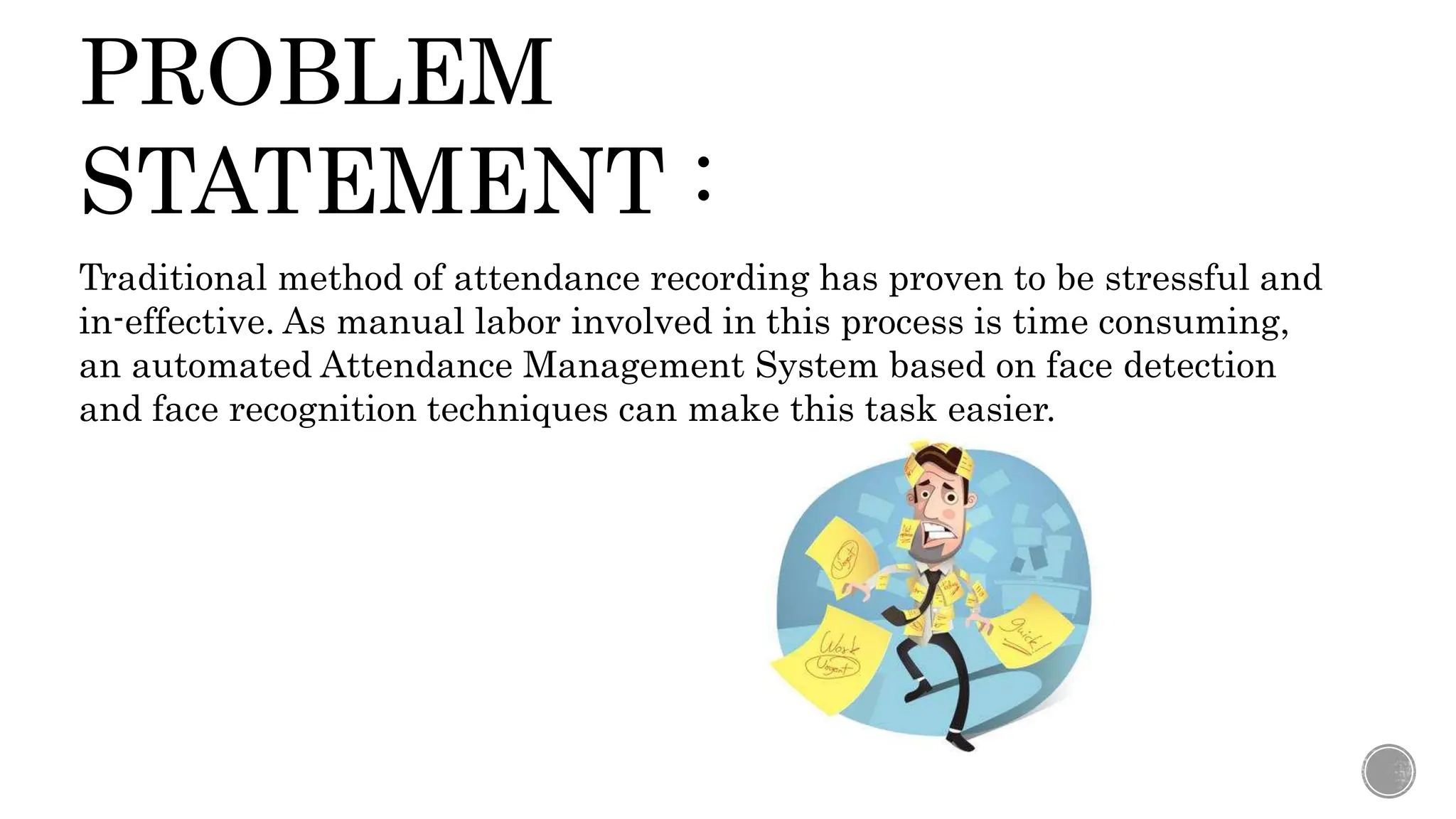
Traditional method of attendance recording has proven to be stressful and
in-effective. As manual labor involved in this process is time consuming,
an automated Attendance Management System based on face detection
and face recognition techniques can make this task easier.
OBJECTIVES :
1. Reducing time wastage during conventional class attendance.
2. Utilizing latest trends to implement a feasible solution for class
attendance system.
3. Automating the whole process so that we have digital environment.
4. Preventing fake roll calls.
5. Encouraging the use of technology in daily lives.
SYSTEM
REQUIREMENTS:
Hardware Requirements:
• Processor core : i5 core
• Processor speed : 2.11 GHz
• Hard disk :1TB
• RAM : 8GB
• Camera : Raspberry pi(5 Mp)
Software Requirements:
• Software Tool :OpenCV
• Database :sqlite
• Operating system :Windows 7 or above
• Coding Language : Python
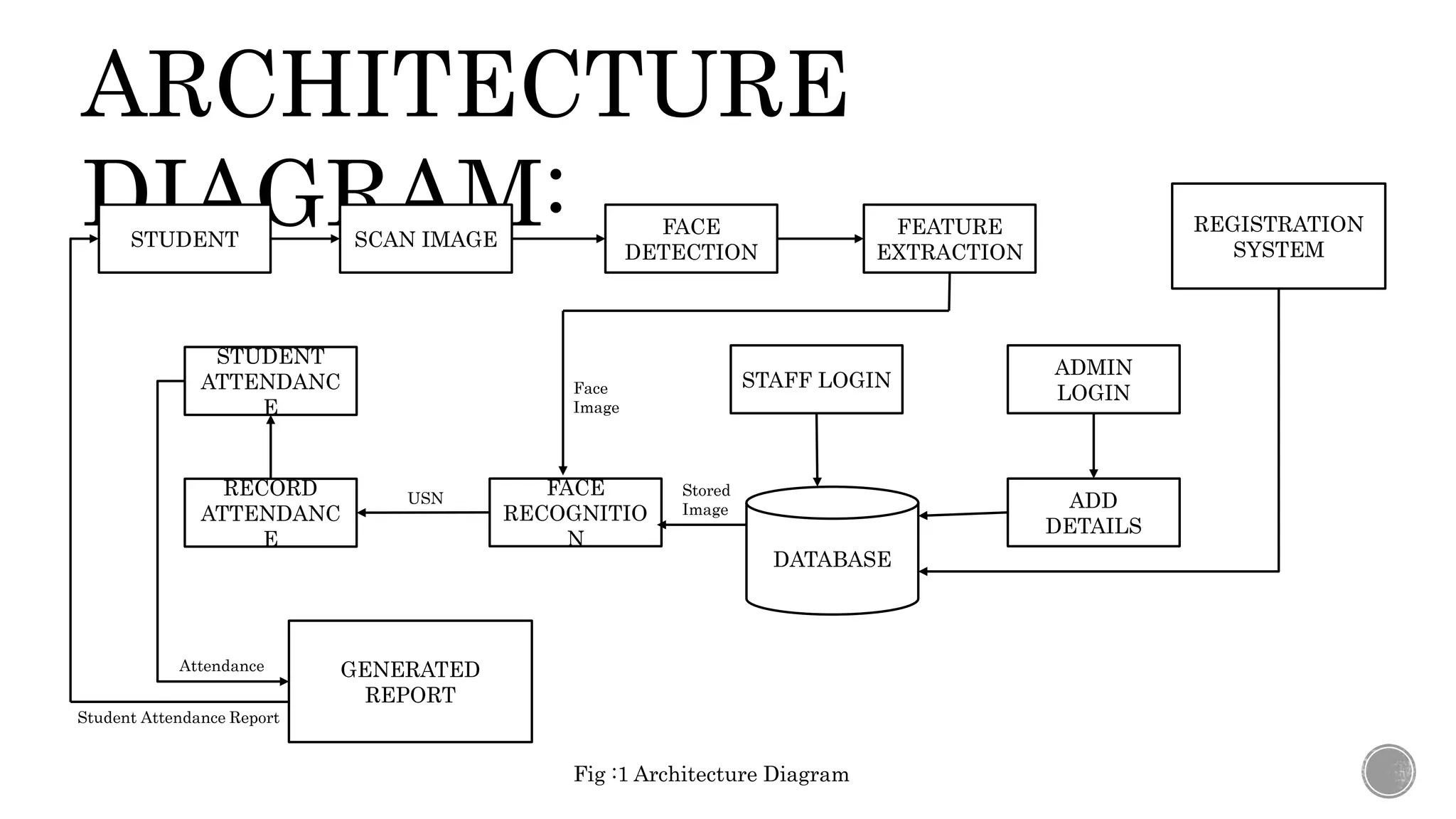
ARCHITECTURE
DIAGRAM:
STUDENT SCAN IMAGE
FACE
DETECTION
FEATURE
EXTRACTION
REGISTRATION
SYSTEM
STUDENT
ATTENDANC
E
RECORD
ATTENDANC
E
FACE
RECOGNITIO
N
ADD
DETAILS
STAFF LOGIN
ADMIN
LOGIN
GENERATED
REPORT
DATABASE
Student Attendance Report
Attendance
USN Stored
Image
Face
Image
Fig :1 Architecture Diagram
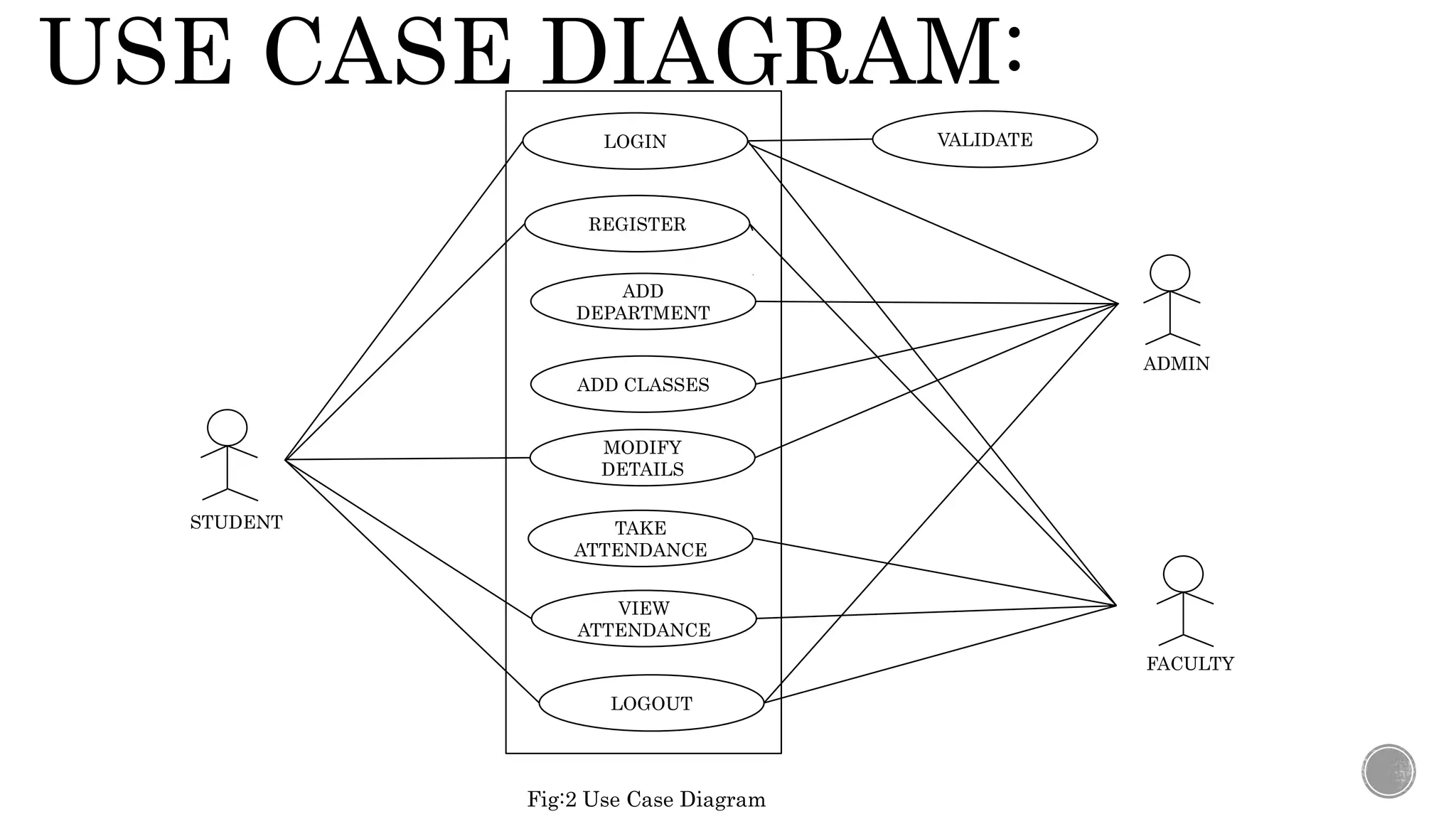
USE CASE DIAGRAM:
LOGIN
REGISTER
ADD
DEPARTMENT
ADD CLASSES
MODIFY
DETAILS
TAKE
ATTENDANCE
VIEW
ATTENDANCE
LOGOUT
VALIDATE
STUDENT
ADMIN
FACULTY
Fig:2 Use Case Diagram
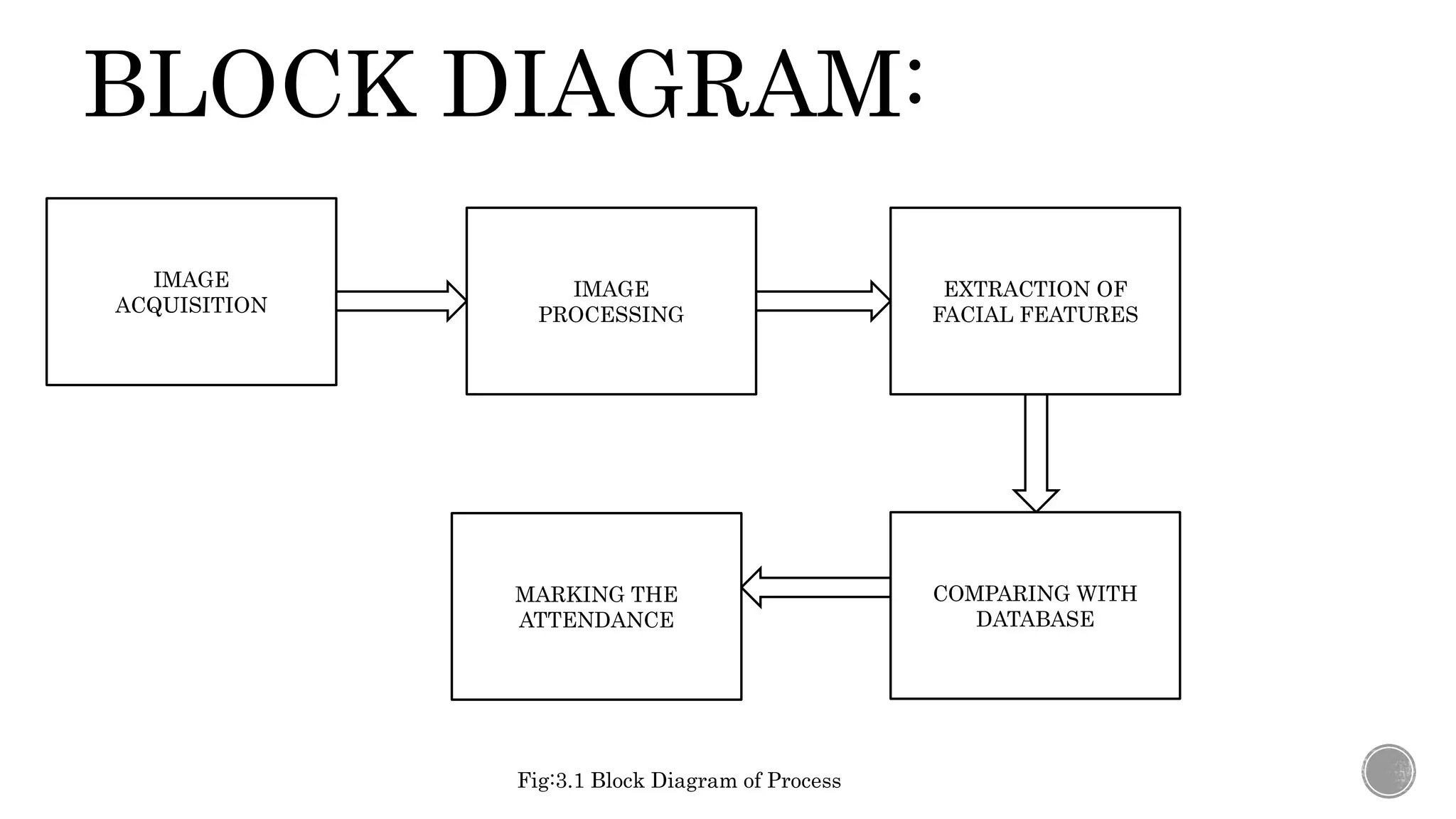
BLOCK DIAGRAM:
IMAGE
ACQUISITION
IMAGE
PROCESSING
EXTRACTION OF
FACIAL FEATURES
COMPARING WITH
DATABASE
MARKING THE
ATTENDANCE
Fig:3.1 Block Diagram of Process
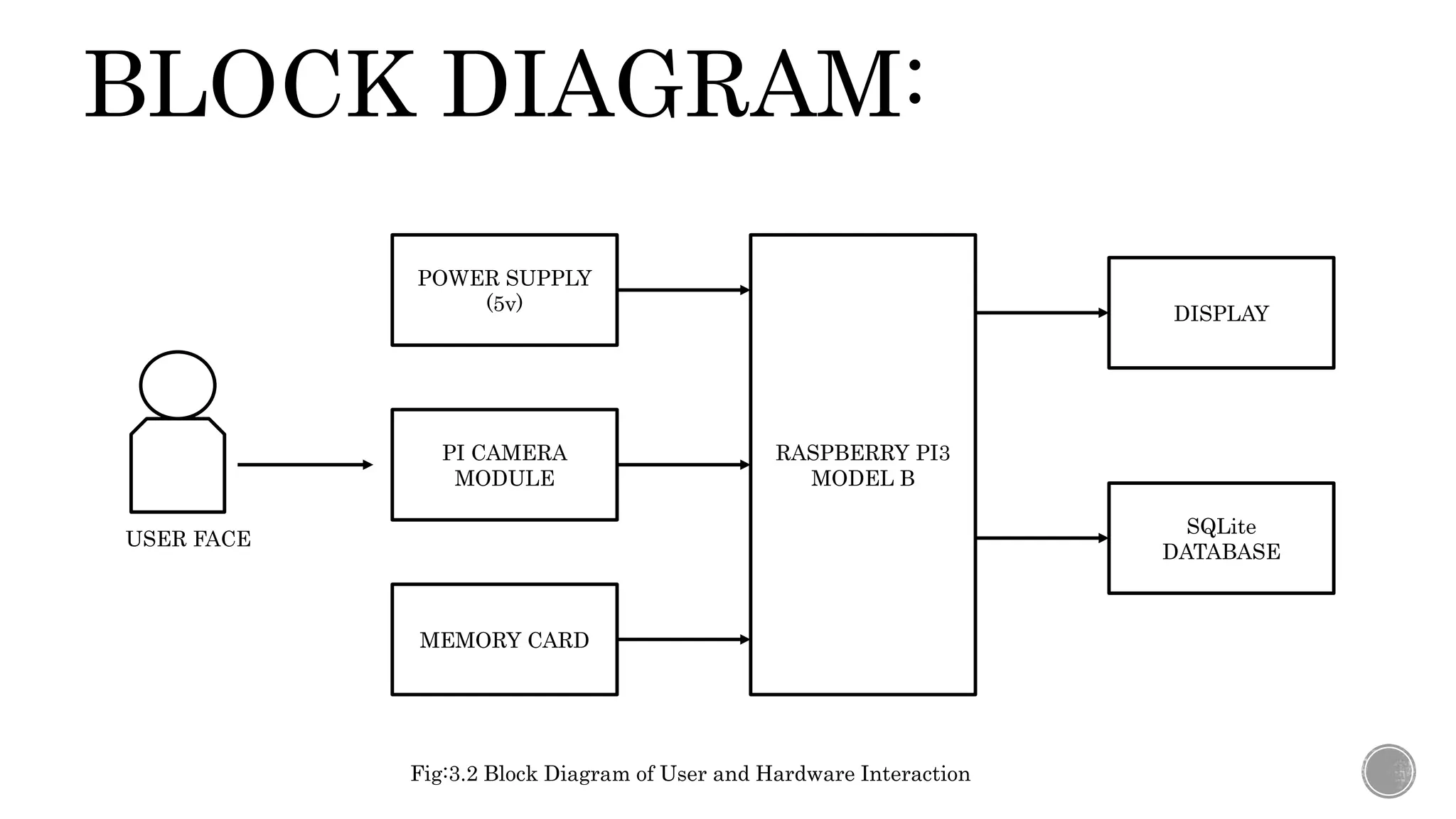
BLOCK DIAGRAM:
POWER SUPPLY
(5v)
PI CAMERA
MODULE
DISPLAY
MEMORY CARD
RASPBERRY PI3
MODEL B
SQLite
DATABASE
USER FACE
Fig:3.2 Block Diagram of User and Hardware Interaction
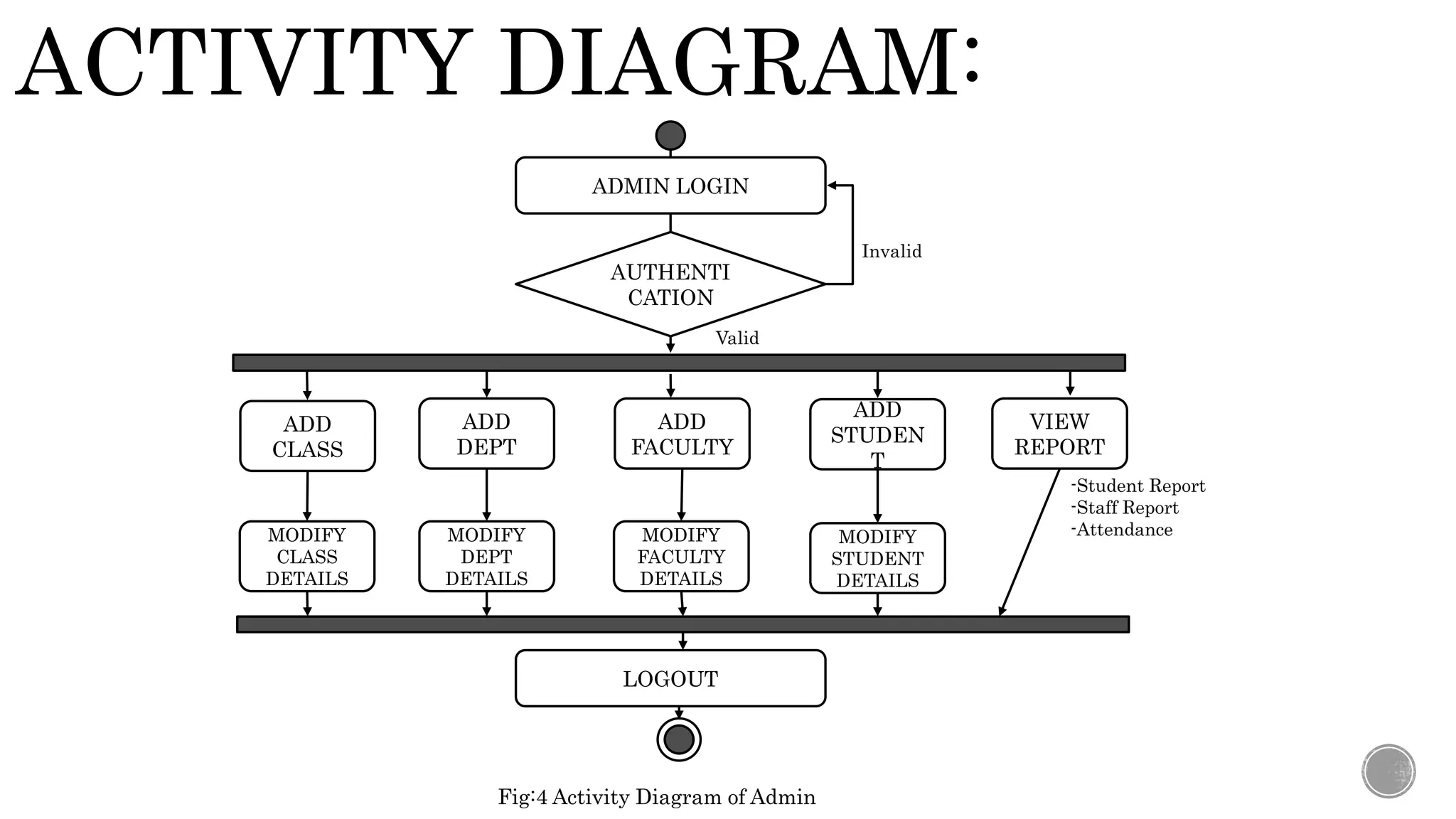
ACTIVITY DIAGRAM:
ADMIN LOGIN
AUTHENTI
CATION
ADD
CLASS
ADD
DEPT
ADD
FACULTY
MODIFY
DEPT
DETAILS
ADD
STUDEN
T
VIEW
REPORT
MODIFY
FACULTY
DETAILS
MODIFY
CLASS
DETAILS
MODIFY
STUDENT
DETAILS
LOGOUT
-Student Report
-Staff Report
-Attendance
Valid
Invalid
Fig:4 Activity Diagram of Admin
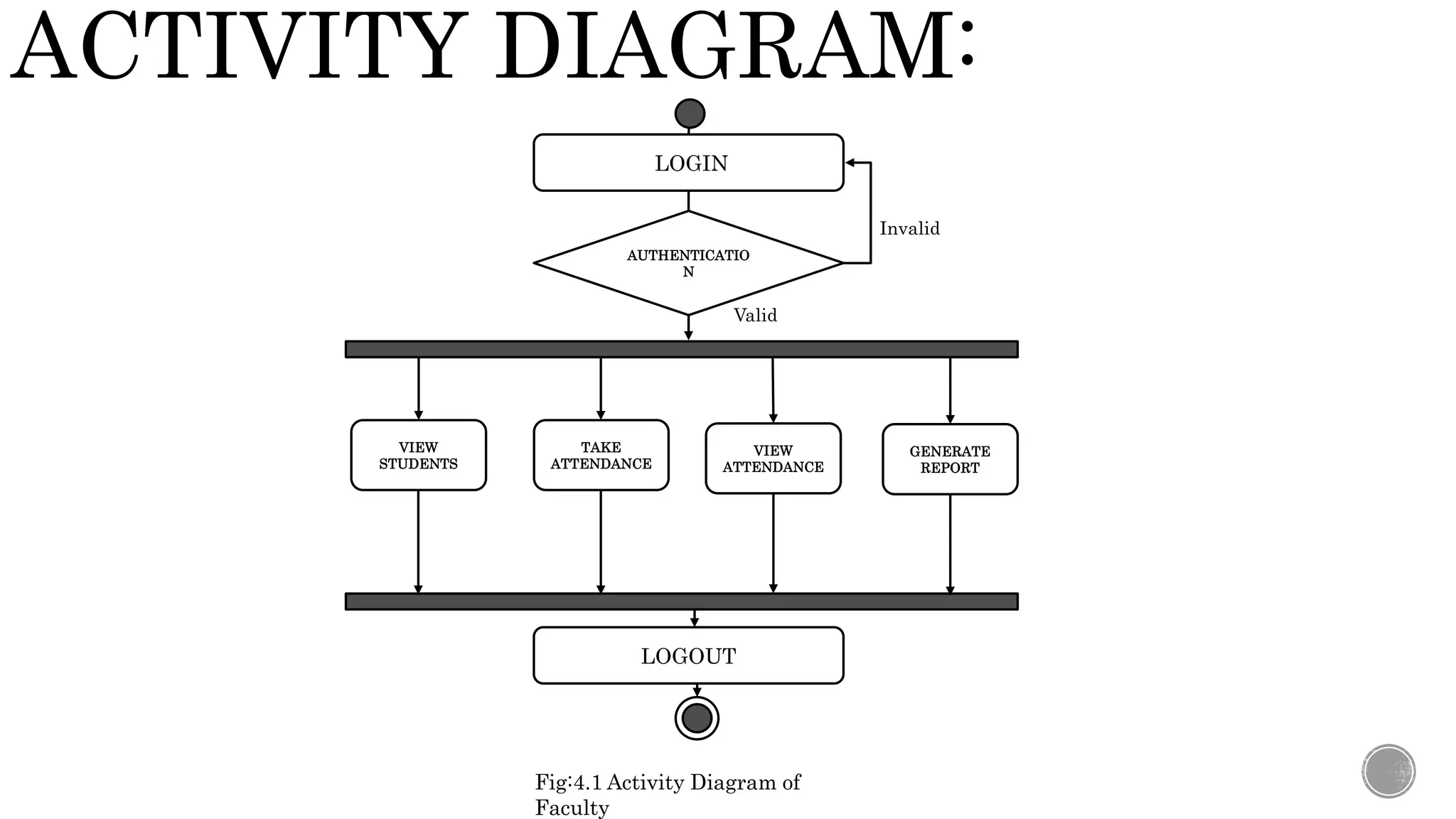
ACTIVITY DIAGRAM:
LOGIN
AUTHENTICATIO
N
TAKE
ATTENDANCE
VIEW
ATTENDANCE
GENERATE
REPORT
LOGOUT
Valid
Invalid
Fig:4.1 Activity Diagram of
Faculty
VIEW
STUDENTS
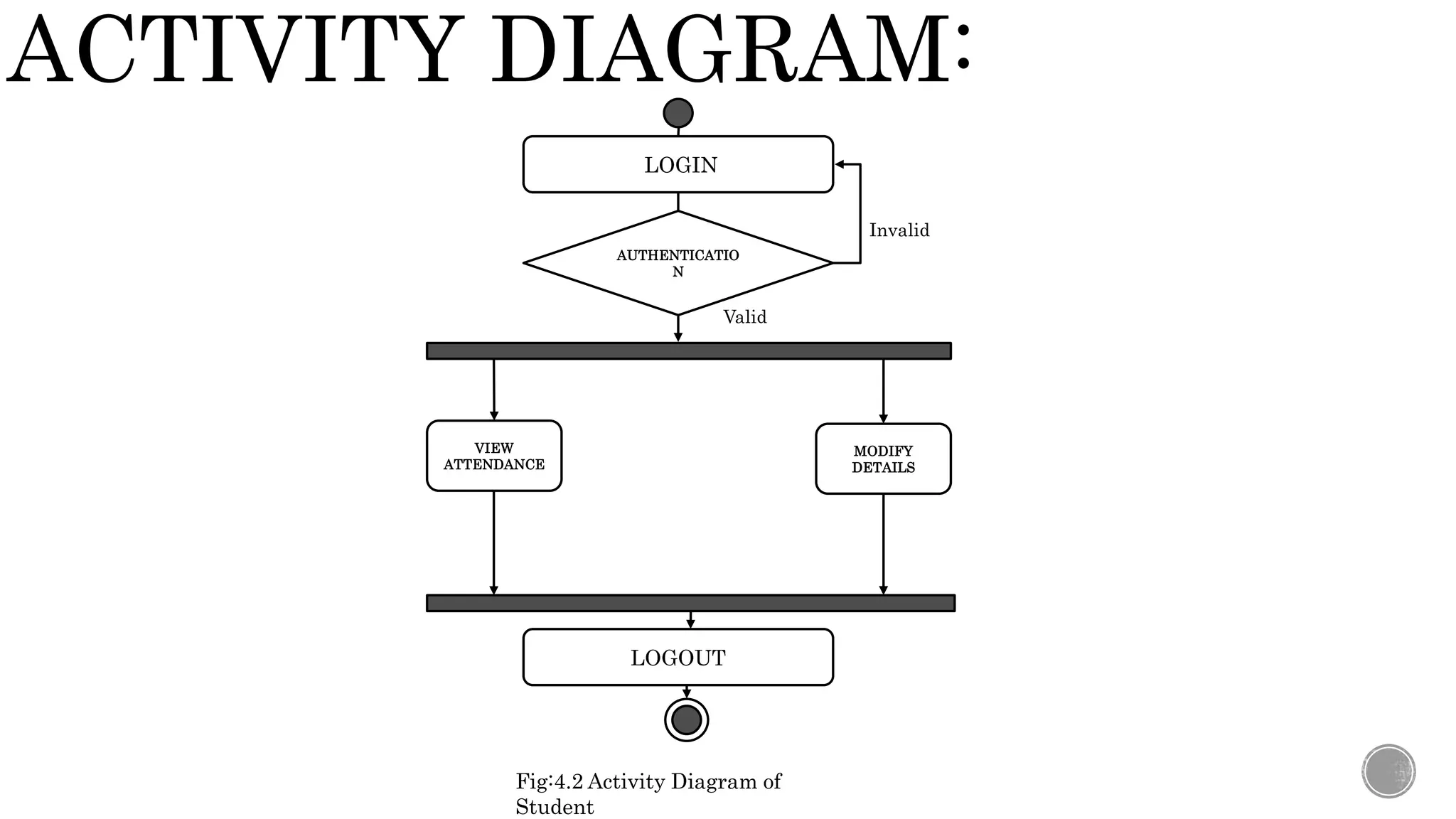
ACTIVITY DIAGRAM:
LOGIN
AUTHENTICATIO
N
VIEW
ATTENDANCE
MODIFY
DETAILS
LOGOUT
Valid
Invalid
Fig:4.2 Activity Diagram of
Student
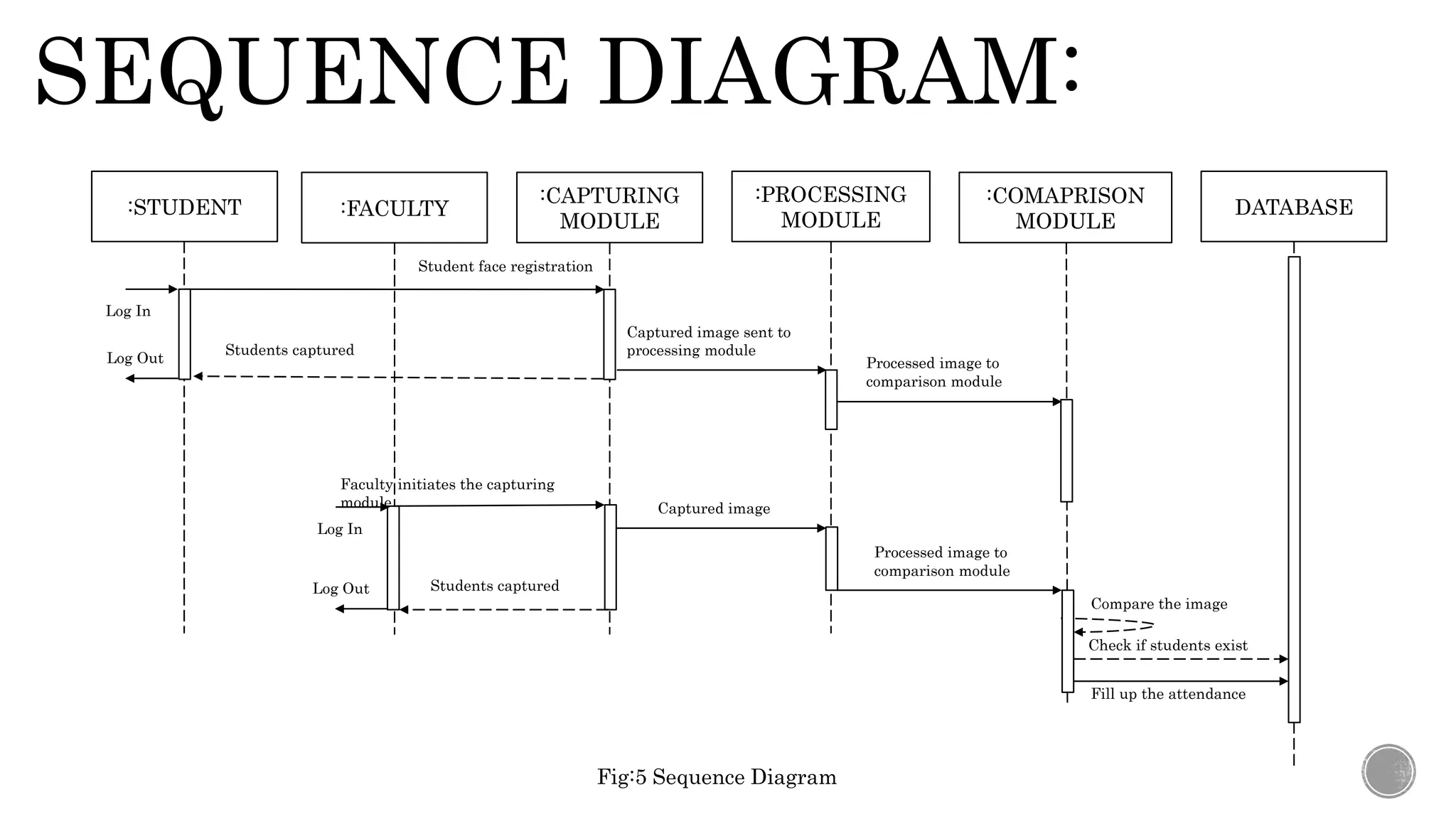
SEQUENCE DIAGRAM:
:FACULTY
:CAPTURING
MODULE
:PROCESSING
MODULE
:COMAPRISON
MODULE
DATABASE
Student face registration
Faculty initiates the capturing
module
Students captured
Captured image sent to
processing module
Processed image to
comparison module
Processed image to
comparison module
Captured image
Check if students exist
Fill up the attendance
Compare the image
Fig:5 Sequence Diagram
Log In
Log Out
:STUDENT
Students captured
Log In
Log Out
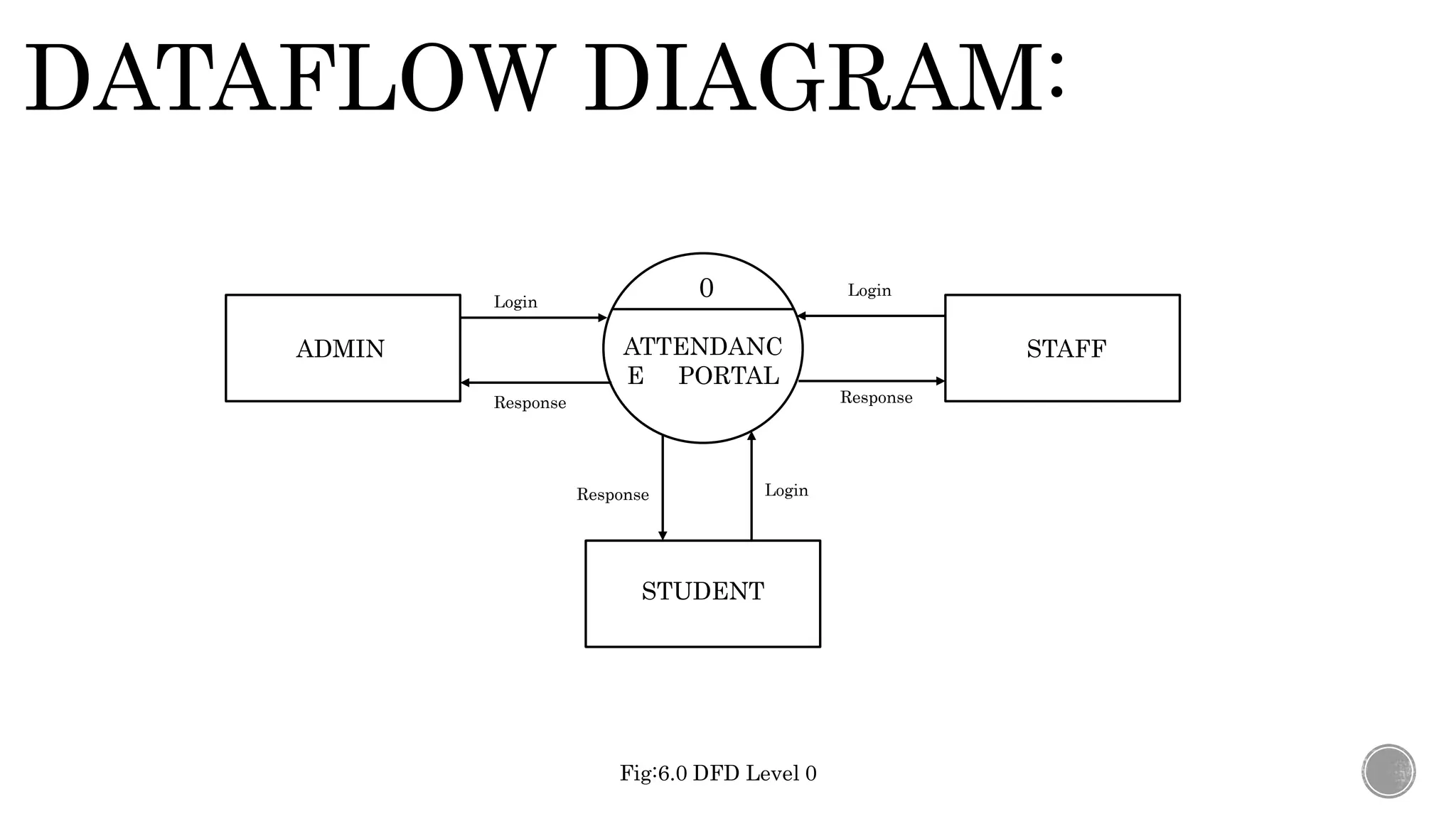
DATAFLOW DIAGRAM:
ATTENDANC
E PORTAL
ADMIN
STUDENT
STAFF
Login
Login
Login
Response Response
Response
0
Fig:6.0 DFD Level 0
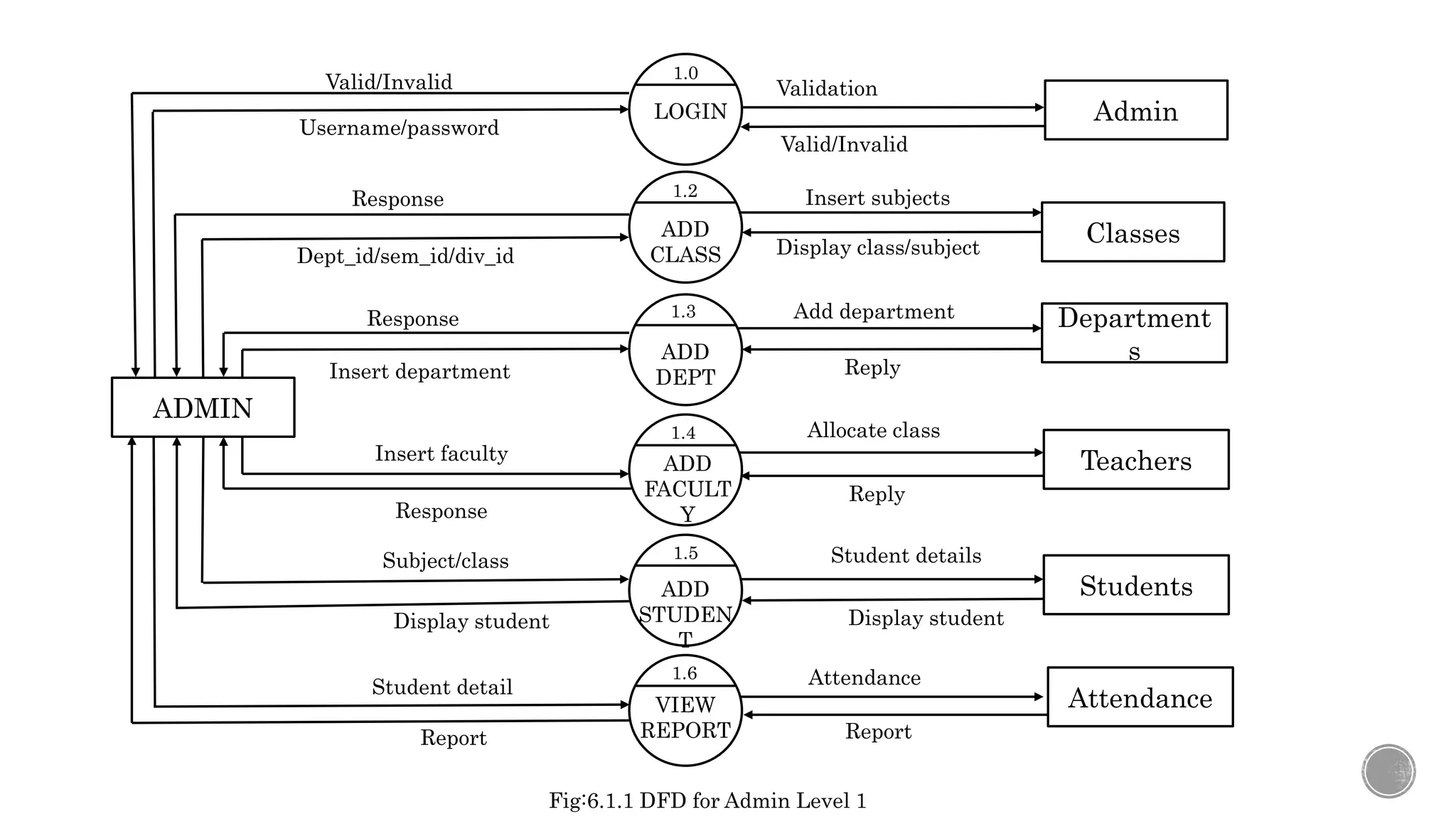
LOGIN
1.0
ADD
CLASS
1.2
ADD
DEPT
1.3
ADD
FACULT
Y
1.4
ADD
STUDEN
T
1.5
VIEW
REPORT
1.6
ADMIN
Classes
Department
s
Teachers
Students
Attendance
Admin
Username/password
Validation
Valid/Invalid
Valid/Invalid
Dept_id/sem_id/div_id
Insert subjects
Display class/subject
Response
Insert department
Add department
Reply
Response
Insert faculty
Allocate class
Reply
Response
Subject/class Student details
Display student
Display student
Student detail Attendance
Report
Report
Fig:6.1.1 DFD for Admin Level 1
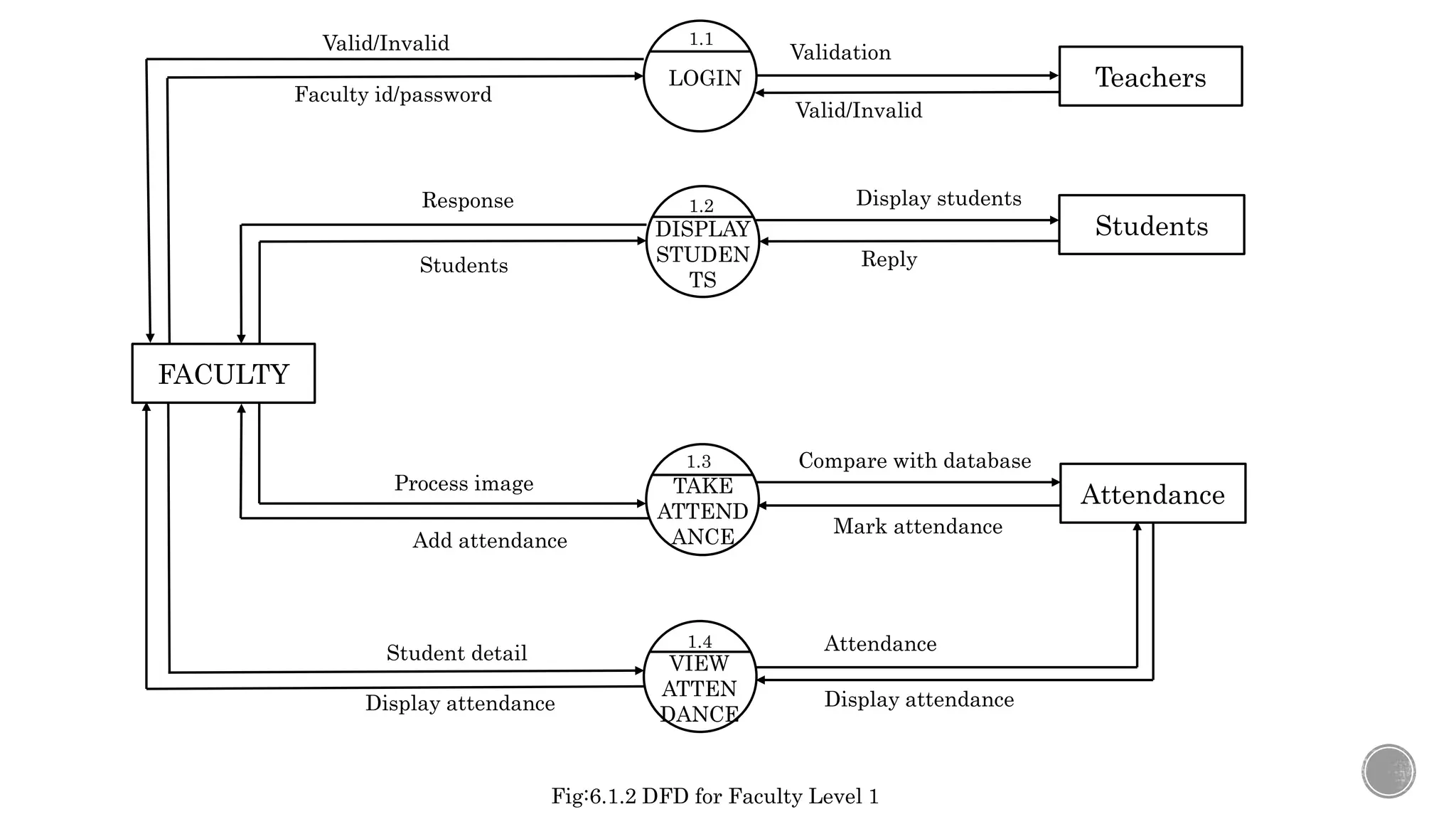
LOGIN
1.1
DISPLAY
STUDEN
TS
1.2
TAKE
ATTEND
ANCE
1.3
VIEW
ATTEN
DANCE
1.4
FACULTY
Students
Attendance
Teachers
Faculty id/password
Validation
Valid/Invalid
Valid/Invalid
Students Reply
Response
Process image
Compare with database
Mark attendance
Add attendance
Student detail Attendance
Display attendance
Display students
Display attendance
Fig:6.1.2 DFD for Faculty Level 1
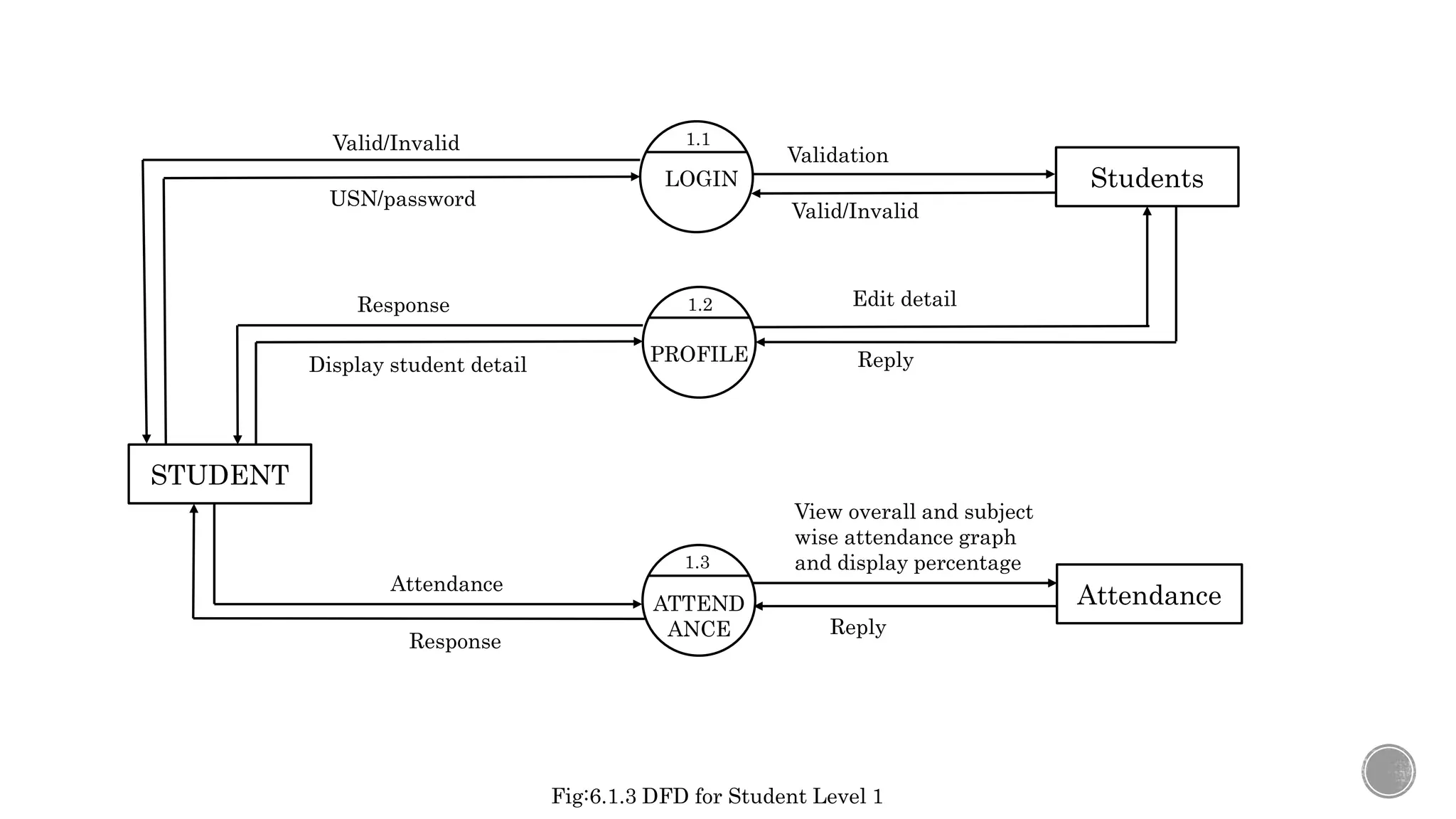
LOGIN
1.1
PROFILE
1.2
ATTEND
ANCE
1.3
STUDENT
Attendance
Students
USN/password
Validation
Valid/Invalid
Valid/Invalid
Display student detail Reply
Response
Attendance
View overall and subject
wise attendance graph
and display percentage
Reply
Response
Edit detail
Fig:6.1.3 DFD for Student Level 1
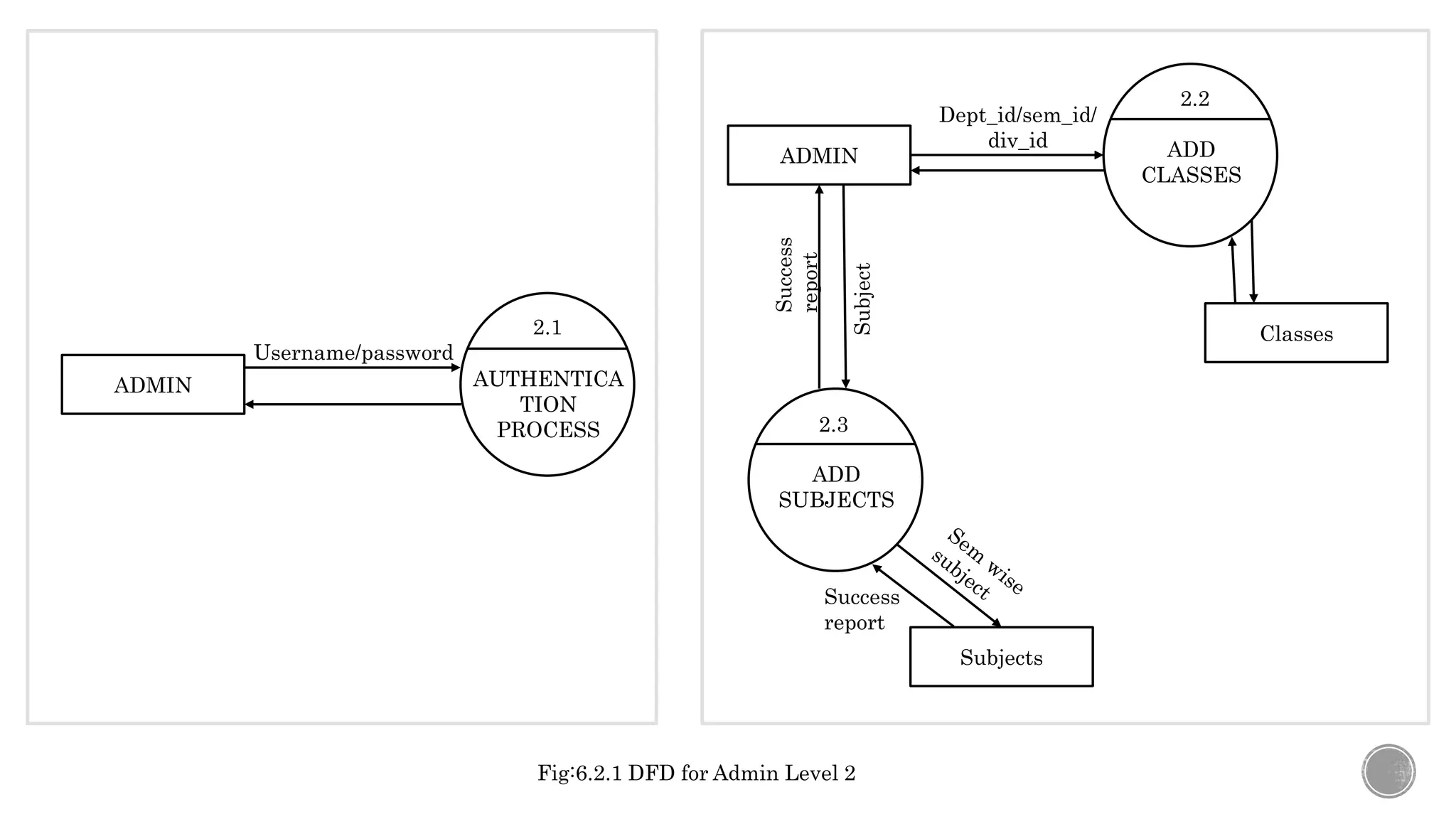
ADMIN AUTHENTICA
TION
PROCESS
2.1
Username/password
ADMIN ADD
CLASSES
2.2
ADD
SUBJECTS
2.3
Dept_id/sem_id/
div_id
Subject
Subjects
Success
report
Success
report
Classes
Fig:6.2.1 DFD for Admin Level 2
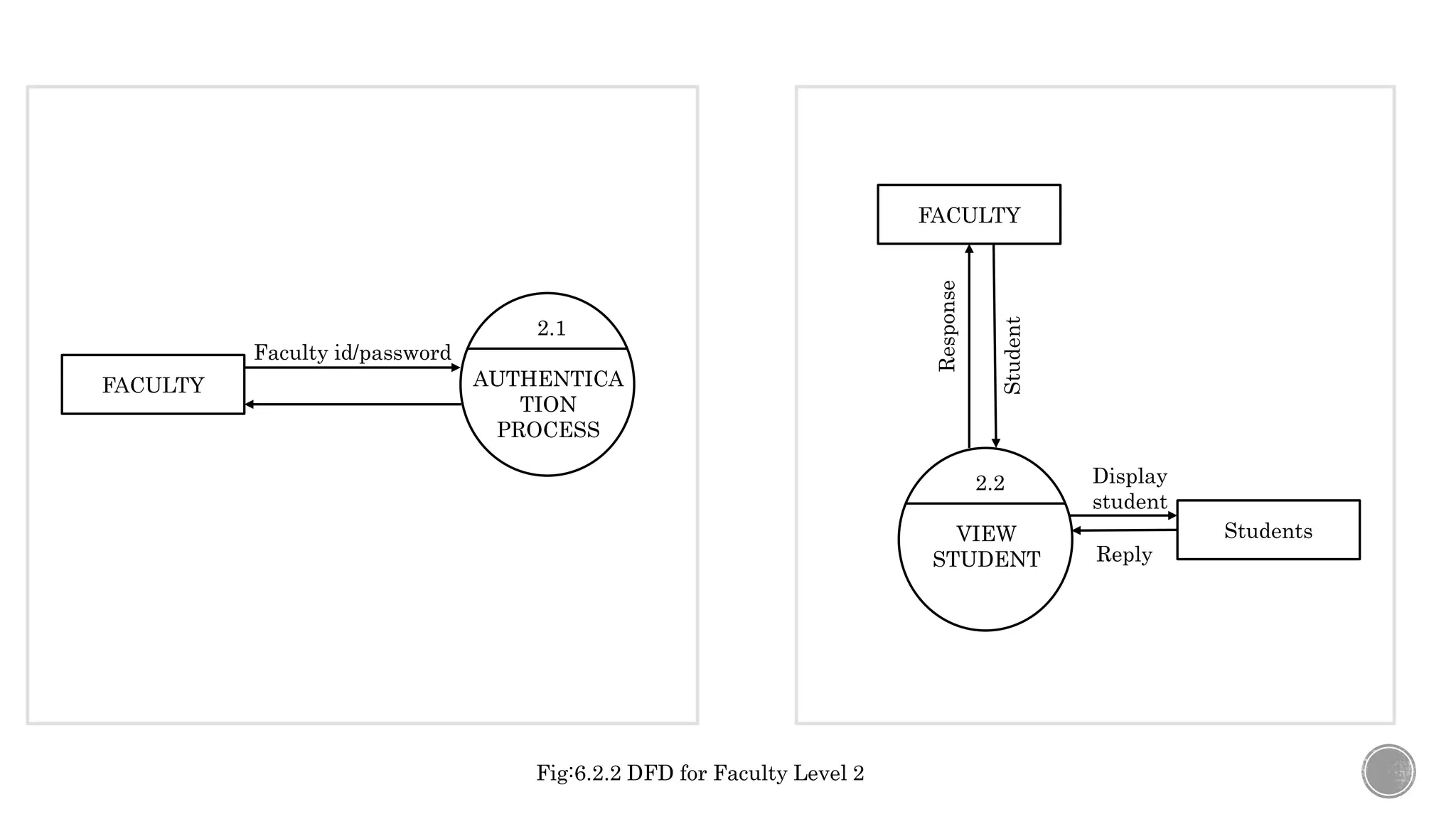
FACULTY AUTHENTICA
TION
PROCESS
2.1
Faculty id/password
FACULTY
VIEW
STUDENT
2.2
Student
Students
Display
student
Reply
Response
Fig:6.2.2 DFD for Faculty Level 2
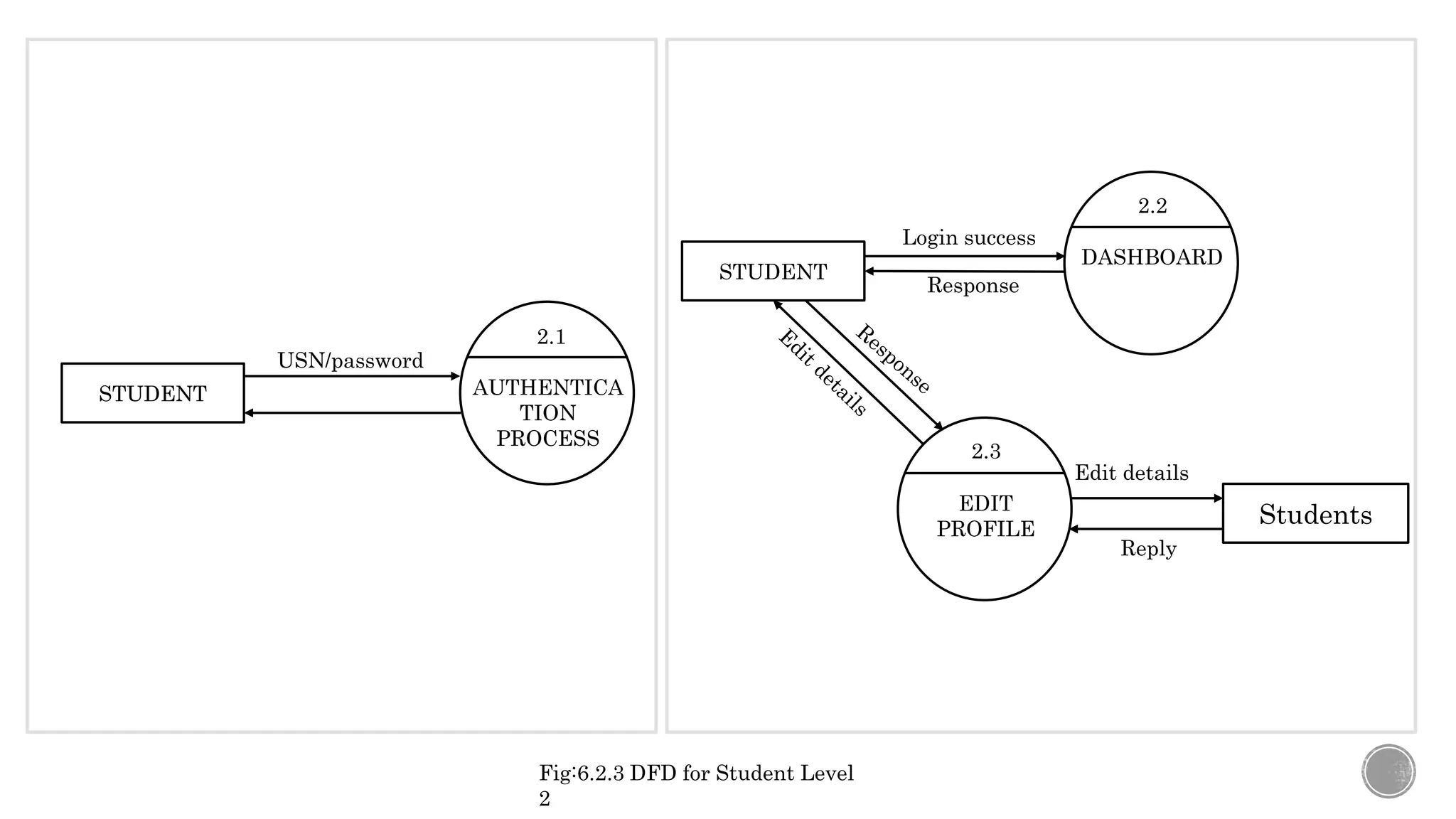
STUDENT
DASHBOARD
2.2
EDIT
PROFILE
2.3
Login success
Students
Response
Reply
Edit details
STUDENT AUTHENTICA
TION
PROCESS
2.1
USN/password
Fig:6.2.3 DFD for Student Level
2
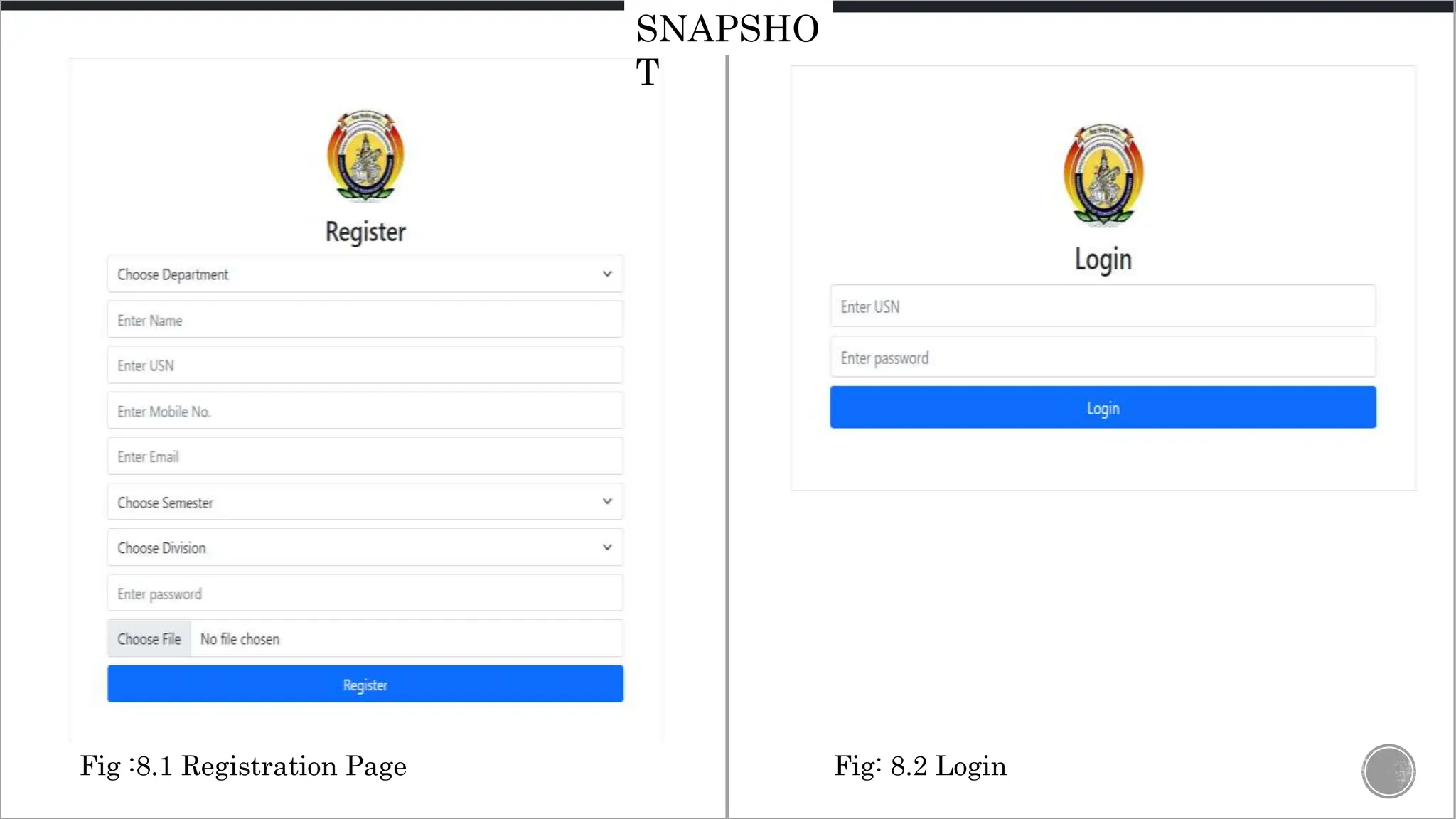
Fig: 8.2 Login
Fig :8.1 Registration Page
SNAPSHO
T
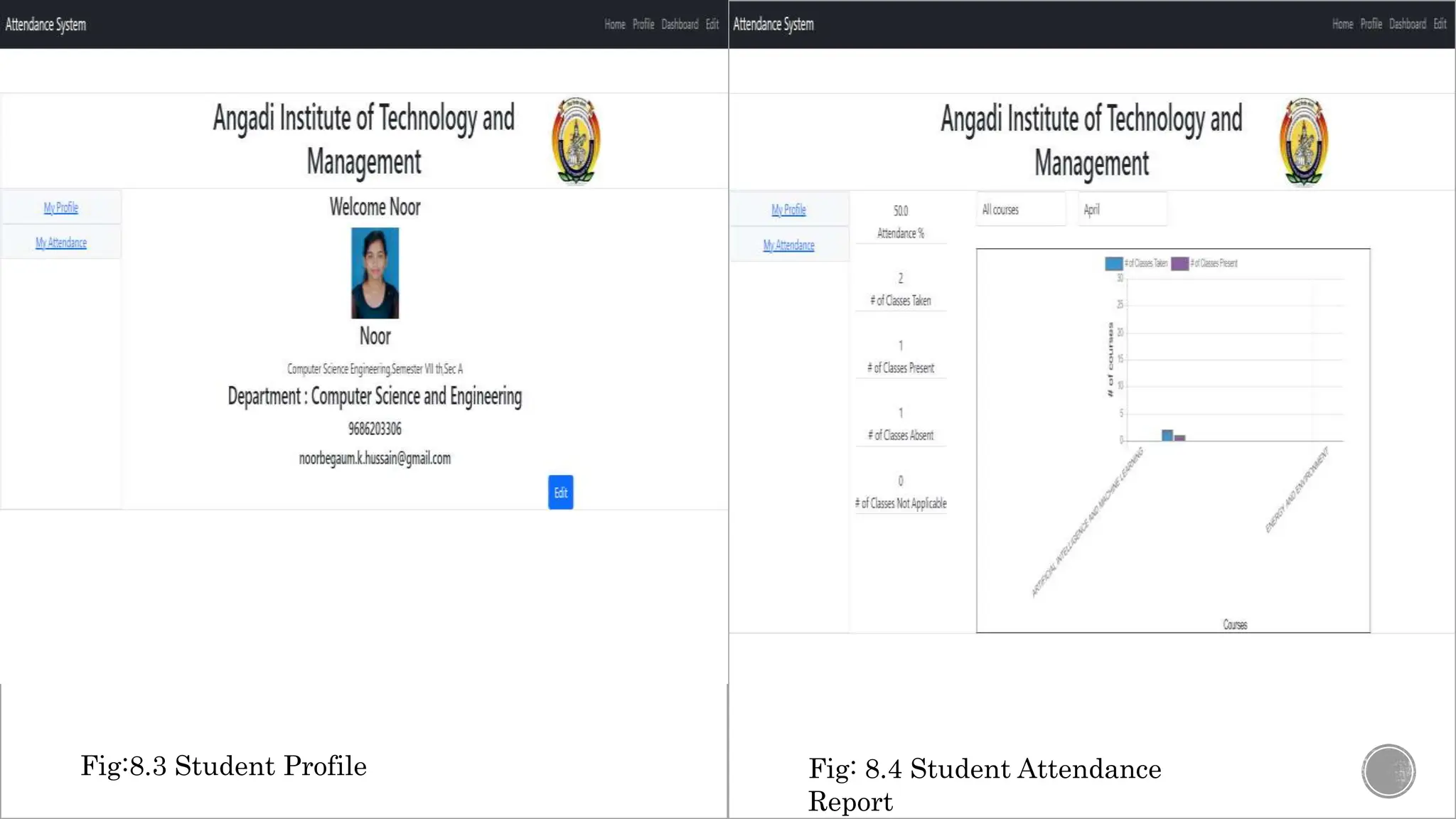
Fig:8.3 Student Profile Fig: 8.4 Student Attendance
Report
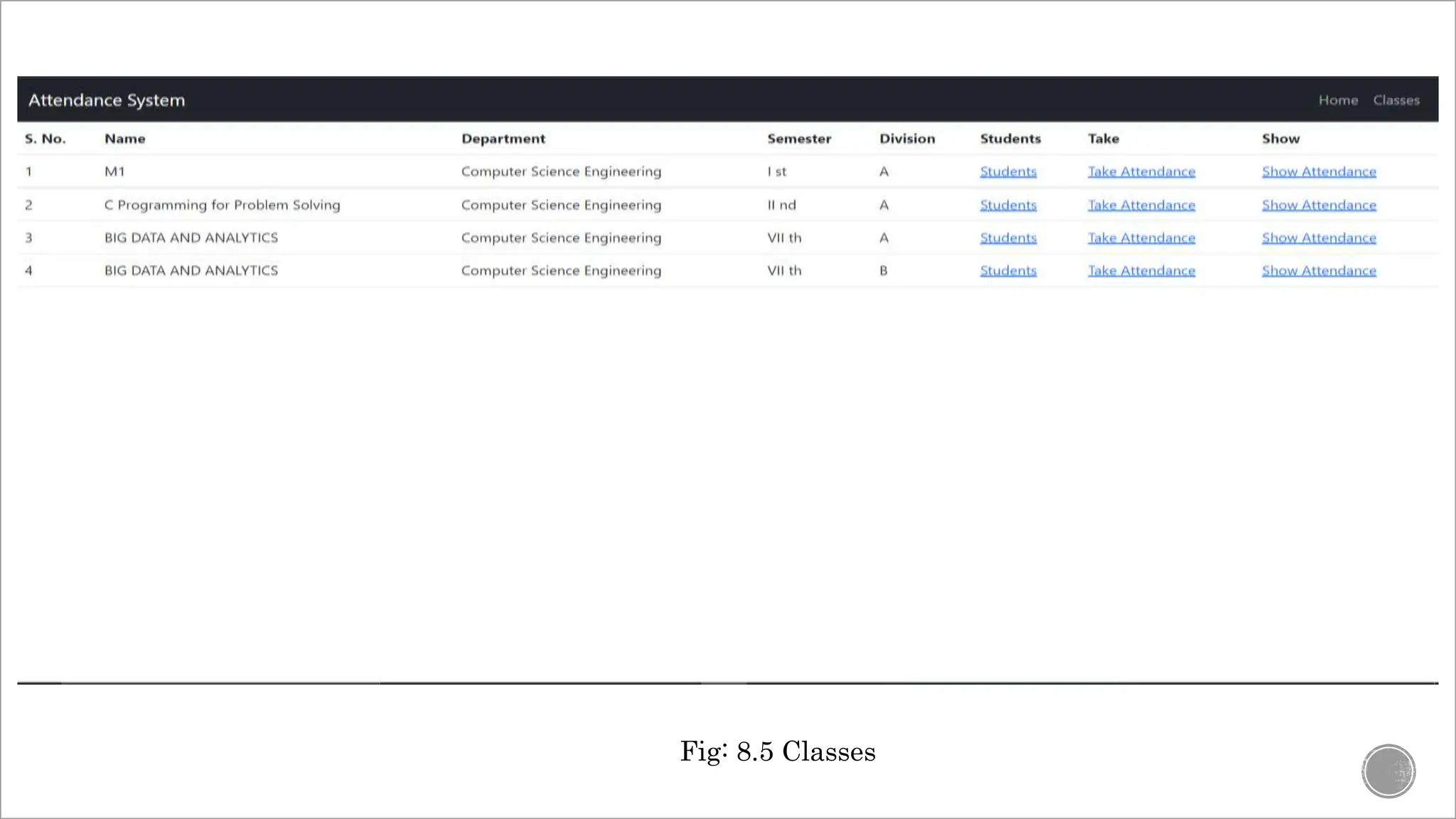
Fig: 8.5 Classes
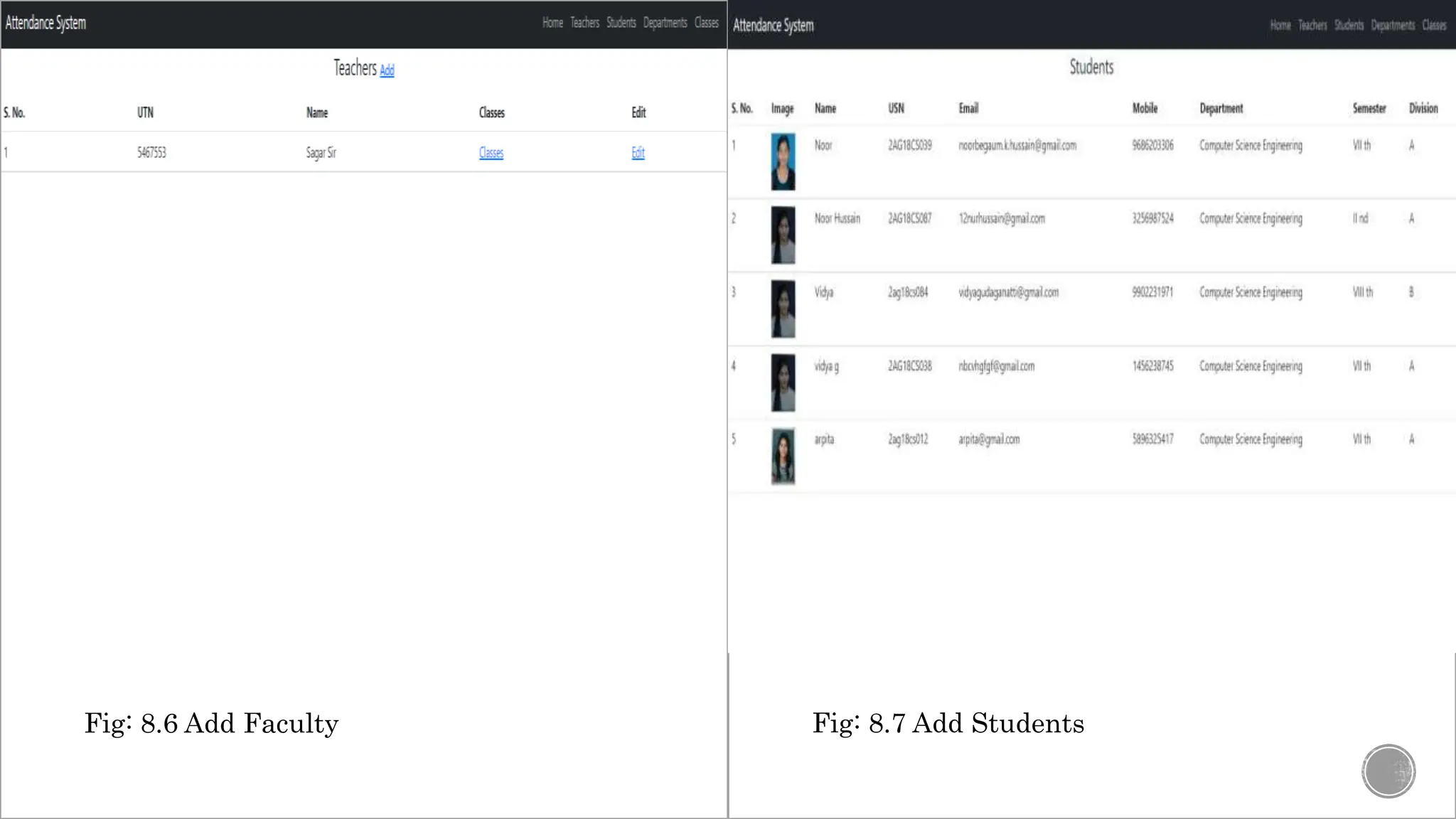
Fig: 8.7 Add Students
Fig: 8.6 Add Faculty
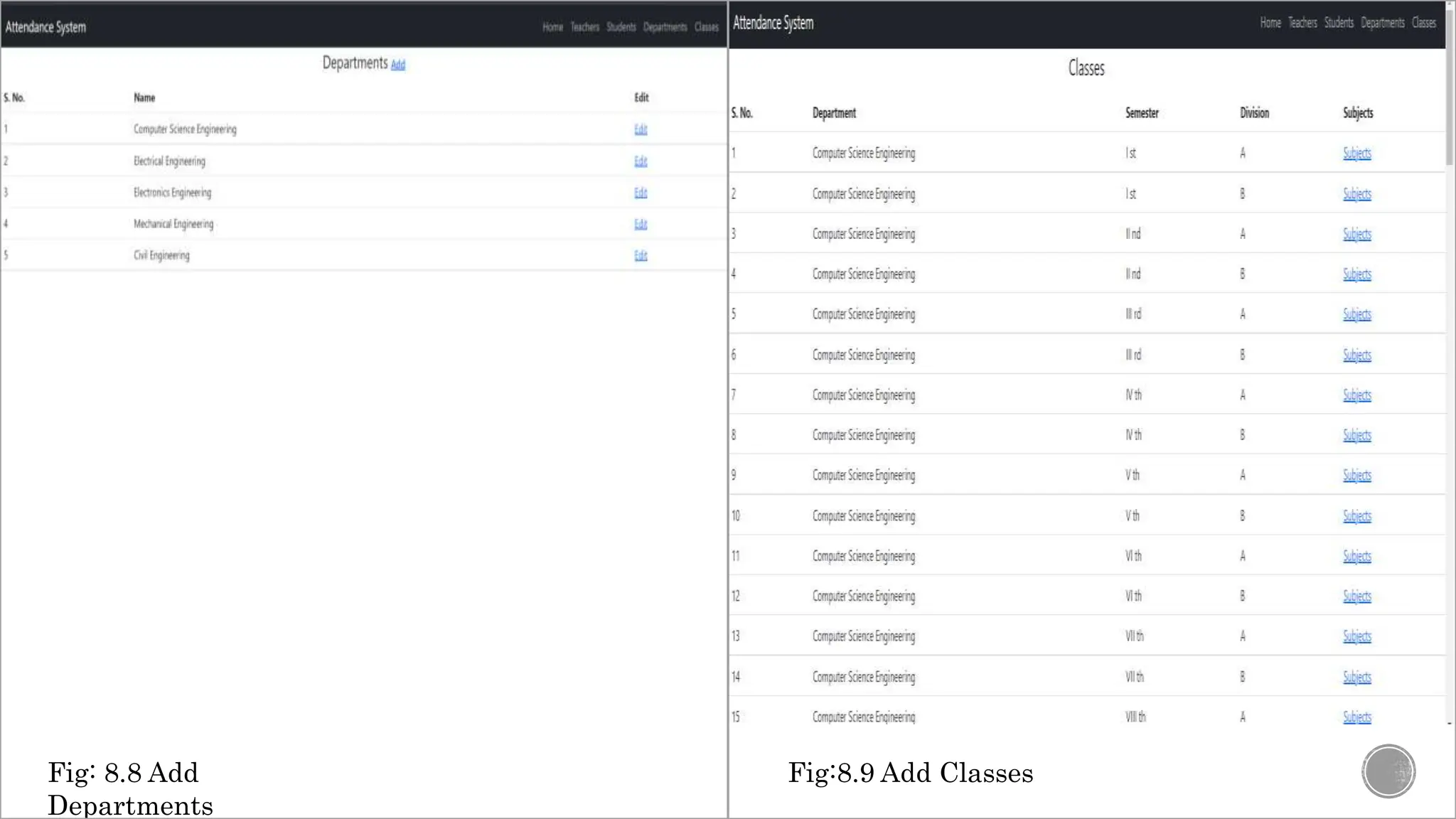
Fig:8.9 Add Classes
Fig: 8.8 Add
Departments
CONCLUSION :
Smart Attendance system is designed to minimize the human effort for taking the attendance manually
that take place in every college. As the attendance marking process is done without any human
interference, which is the main scope in the system. Further work is to improve the design of project
and implement the hardware part.
Thank
You

smart attendance system that detects multiple faces