WHAT IS IT?
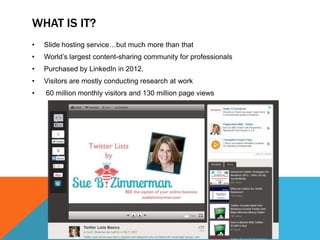
•   Slide hosting service…but much more than that
•   World’s largest content-sharing community for professionals
•   Purchased by LinkedIn in 2012.
•   Visitors are mostly conducting research at work
•   60 million monthly visitors and 130 million page views
WHAT IT CAN DO
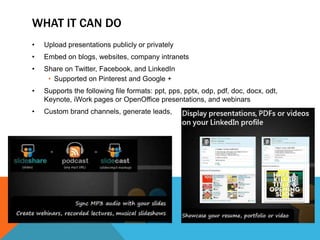
•   Upload presentations publicly or privately
•   Embed on blogs, websites, company intranets
•   Share on Twitter, Facebook, and LinkedIn
     • Supported on Pinterest and Google +
•   Supports the following file formats: ppt, pps, pptx, odp, pdf, doc, docx, odt,
    Keynote, iWork pages or OpenOffice presentations, and webinars
•   Custom brand channels, generate leads,
HOW IT CAN BE UTILIZED
•   Tell a Story
     • Make them simple and make sure slides are concise and well worded
•   Design with Care
     • Highly viewed presentations tend to feature attractive graphics. Your
       presentation should include powerful images and quality fonts that are
       easy to read on small screens
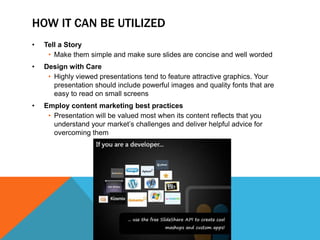
•   Employ content marketing best practices
     • Presentation will be valued most when its content reflects that you
       understand your market’s challenges and deliver helpful advice for
       overcoming them
TYPES OF ACCOUNTS
BENEFITS OF PRO
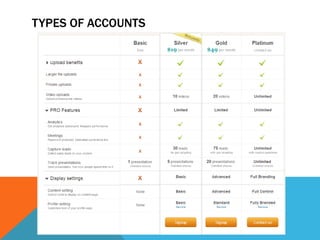
•   Go “pro”—a trio of paid Pro plans are specifically designed to enable you to
    include customizable lead capture forms, create company branded channels,
    and collect detailed analytics including performance metrics, user identities
    and interaction details
      • Can run campaign
      • Capture leads and export as excel
      • Customize and target lead forms
      • Can use it for market surveys, Events RSVPs
      • Branded Channels
•   Analytics
      • Can view presentation stats
         • Views, Email shares, Tweets, FB shares, Downloads, Comments Embeds,
           actual tweets, usernames of people who download, separate LinkedIn stats
•   SEO
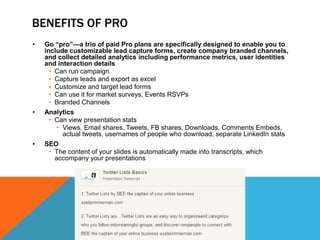
      • The content of your slides is automatically made into transcripts, which
        accompany your presentations
SEND TRACKER – TRACK WHO’S ENGAGING
•   Allows you to send new or existing content from your SlideShare account to a
    prospect via email. Real-time alerts let you know when the recipient has
    opened and clicked your email, while analytics enable you to track how they
    engage with that content
•   The individual tracker pages show exactly where a person started or finished
    viewing slides, if he or she made repeat visits, and how much time was spent
    on each slide
•   Compare engagement across your content library
EXAMPLES
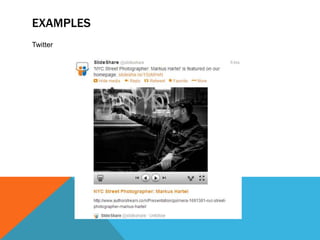
Twitter
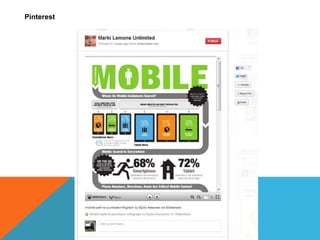
Pinterest
ANY QUESTIONS?

Slide share

  • 2.
    WHAT IS IT? • Slide hosting service…but much more than that • World’s largest content-sharing community for professionals • Purchased by LinkedIn in 2012. • Visitors are mostly conducting research at work • 60 million monthly visitors and 130 million page views
  • 3.
    WHAT IT CANDO • Upload presentations publicly or privately • Embed on blogs, websites, company intranets • Share on Twitter, Facebook, and LinkedIn • Supported on Pinterest and Google + • Supports the following file formats: ppt, pps, pptx, odp, pdf, doc, docx, odt, Keynote, iWork pages or OpenOffice presentations, and webinars • Custom brand channels, generate leads,
  • 4.
    HOW IT CANBE UTILIZED • Tell a Story • Make them simple and make sure slides are concise and well worded • Design with Care • Highly viewed presentations tend to feature attractive graphics. Your presentation should include powerful images and quality fonts that are easy to read on small screens • Employ content marketing best practices • Presentation will be valued most when its content reflects that you understand your market’s challenges and deliver helpful advice for overcoming them
  • 5.
  • 6.
    BENEFITS OF PRO • Go “pro”—a trio of paid Pro plans are specifically designed to enable you to include customizable lead capture forms, create company branded channels, and collect detailed analytics including performance metrics, user identities and interaction details • Can run campaign • Capture leads and export as excel • Customize and target lead forms • Can use it for market surveys, Events RSVPs • Branded Channels • Analytics • Can view presentation stats • Views, Email shares, Tweets, FB shares, Downloads, Comments Embeds, actual tweets, usernames of people who download, separate LinkedIn stats • SEO • The content of your slides is automatically made into transcripts, which accompany your presentations
  • 7.
    SEND TRACKER –TRACK WHO’S ENGAGING • Allows you to send new or existing content from your SlideShare account to a prospect via email. Real-time alerts let you know when the recipient has opened and clicked your email, while analytics enable you to track how they engage with that content • The individual tracker pages show exactly where a person started or finished viewing slides, if he or she made repeat visits, and how much time was spent on each slide • Compare engagement across your content library
  • 8.
  • 9.
  • 10.