JDBC
Definition
• JDBC – Java Database Connectivity
• JDBC provides standard library for accessing relational database
• API standardize: connection establishment, query initiation, method
to stored query, data structure of query syntax
• API doesn’t standardize SQL syntax
7/26/2023 JDBC 2
JDBC Datatypes
7/26/2023 JDBC 3
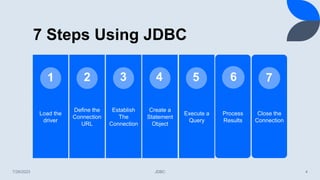
7 Steps Using JDBC
Load the
driver
Define the
Connection
URL
Establish
The
Connection
Create a
Statement
Object
Execute a
Query
Process
Results
Close the
Connection
1 2 3 4 5
7/26/2023 JDBC 4
6 7
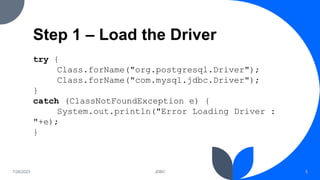
Step 1 – Load the Driver
try {
Class.forName("org.postgresql.Driver");
Class.forName("com.mysql.jdbc.Driver");
}
catch (ClassNotFoundException e) {
System.out.println("Error Loading Driver :
"+e);
}
7/26/2023 JDBC 5
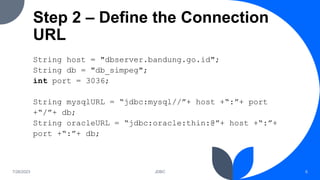
Step 2 – Define the Connection
URL
String host = "dbserver.bandung.go.id";
String db = "db_simpeg";
int port = 3036;
String mysqlURL = “jdbc:mysql//”+ host +“:”+ port
+“/”+ db;
String oracleURL = “jdbc:oracle:thin:@”+ host +“:”+
port +“:”+ db;
7/26/2023 JDBC 6
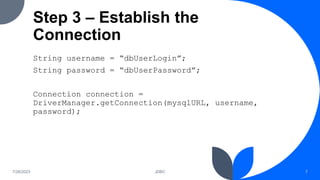
Step 3 – Establish the
Connection
String username = “dbUserLogin”;
String password = “dbUserPassword”;
Connection connection =
DriverManager.getConnection(mysqlURL, username,
password);
7/26/2023 JDBC 7
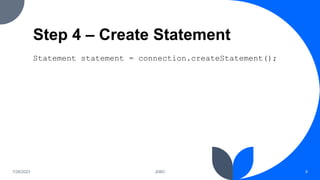
Step 4 – Create Statement
Statement statement = connection.createStatement();
7/26/2023 JDBC 8
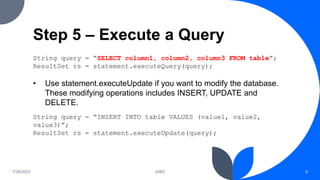
Step 5 – Execute a Query
String query = “SELECT column1, column2, column3 FROM table”;
ResultSet rs = statement.executeQuery(query);
• Use statement.executeUpdate if you want to modify the database.
These modifying operations includes INSERT, UPDATE and
DELETE.
String query = “INSERT INTO table VALUES (value1, value2,
value3)”;
ResultSet rs = statement.executeUpdate(query);
7/26/2023 JDBC 9
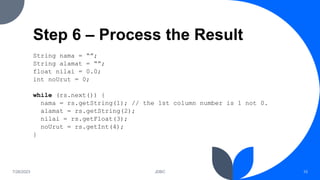
Step 6 – Process the Result
String nama = “”;
String alamat = “”;
float nilai = 0.0;
int noUrut = 0;
while (rs.next()) {
nama = rs.getString(1); // the 1st column number is 1 not 0.
alamat = rs.getString(2);
nilai = rs.getFloat(3);
noUrut = rs.getInt(4);
}
7/26/2023 JDBC 10
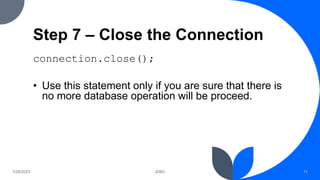
Step 7 – Close the Connection
connection.close();
• Use this statement only if you are sure that there is
no more database operation will be proceed.
7/26/2023 JDBC 11
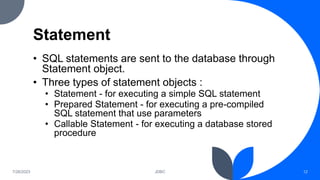
Statement
• SQL statements are sent to the database through
Statement object.
• Three types of statement objects :
• Statement - for executing a simple SQL statement
• Prepared Statement - for executing a pre-compiled
SQL statement that use parameters
• Callable Statement - for executing a database stored
procedure
7/26/2023 JDBC 12
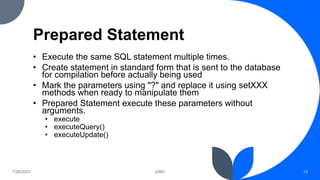
Prepared Statement
• Execute the same SQL statement multiple times.
• Create statement in standard form that is sent to the database
for compilation before actually being used
• Mark the parameters using "?" and replace it using setXXX
methods when ready to manipulate them
• Prepared Statement execute these parameters without
arguments.
• execute
• executeQuery()
• executeUpdate()
7/26/2023 JDBC 13
Prepared Statement Example
Connection connection = DriverManager.getConnection(url, user, password);
PreparedStatement statement =
connection.prepareStatement("UPDATE accounts "+
"SET debit = ?, credit = ? WHERE id = ?");
int[] debits = getDebits();
int[] credits = getCredits();
int[] ids = getIds();
for(int i=0; i<credits.length; i++) {
statement.setInt(1, debits[i]);
statement.setInt(2, credits[i]);
statement.setInt(3, ids[i]);
statement.executeUpdate();
}
7/26/2023 JDBC 14
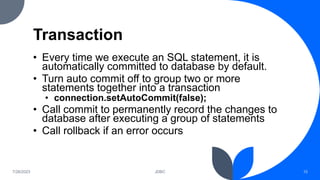
Transaction
• Every time we execute an SQL statement, it is
automatically committed to database by default.
• Turn auto commit off to group two or more
statements together into a transaction
• connection.setAutoCommit(false);
• Call commit to permanently record the changes to
database after executing a group of statements
• Call rollback if an error occurs
7/26/2023 JDBC 15
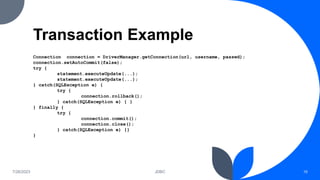
Transaction Example
Connection connection = DriverManager.getConnection(url, username, passwd);
connection.setAutoCommit(false);
try {
statement.executeUpdate(...);
} catch(SQLException e) {
try {
connection.rollback();
} catch(SQLException e) { }
} finally {
try {
connection.commit();
connection.close();
} catch(SQLException e) {}
}
7/26/2023 JDBC 16
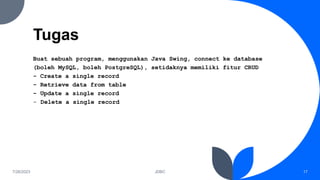
Tugas
Buat sebuah program, menggunakan Java Swing, connect ke database
(boleh MySQL, boleh PostgreSQL), setidaknya memiliki fitur CRUD
- Create a single record
- Retrieve data from table
- Update a single record
- Delete a single record
7/26/2023 JDBC 17
Thank you
Bayu Rimba Pratama, ST, M.Kom

Slide Latihan JDBC

  • 1.
  • 2.
    Definition • JDBC –Java Database Connectivity • JDBC provides standard library for accessing relational database • API standardize: connection establishment, query initiation, method to stored query, data structure of query syntax • API doesn’t standardize SQL syntax 7/26/2023 JDBC 2
  • 3.
  • 4.
    7 Steps UsingJDBC Load the driver Define the Connection URL Establish The Connection Create a Statement Object Execute a Query Process Results Close the Connection 1 2 3 4 5 7/26/2023 JDBC 4 6 7
  • 5.
    Step 1 –Load the Driver try { Class.forName("org.postgresql.Driver"); Class.forName("com.mysql.jdbc.Driver"); } catch (ClassNotFoundException e) { System.out.println("Error Loading Driver : "+e); } 7/26/2023 JDBC 5
  • 6.
    Step 2 –Define the Connection URL String host = "dbserver.bandung.go.id"; String db = "db_simpeg"; int port = 3036; String mysqlURL = “jdbc:mysql//”+ host +“:”+ port +“/”+ db; String oracleURL = “jdbc:oracle:thin:@”+ host +“:”+ port +“:”+ db; 7/26/2023 JDBC 6
  • 7.
    Step 3 –Establish the Connection String username = “dbUserLogin”; String password = “dbUserPassword”; Connection connection = DriverManager.getConnection(mysqlURL, username, password); 7/26/2023 JDBC 7
  • 8.
    Step 4 –Create Statement Statement statement = connection.createStatement(); 7/26/2023 JDBC 8
  • 9.
    Step 5 –Execute a Query String query = “SELECT column1, column2, column3 FROM table”; ResultSet rs = statement.executeQuery(query); • Use statement.executeUpdate if you want to modify the database. These modifying operations includes INSERT, UPDATE and DELETE. String query = “INSERT INTO table VALUES (value1, value2, value3)”; ResultSet rs = statement.executeUpdate(query); 7/26/2023 JDBC 9
  • 10.
    Step 6 –Process the Result String nama = “”; String alamat = “”; float nilai = 0.0; int noUrut = 0; while (rs.next()) { nama = rs.getString(1); // the 1st column number is 1 not 0. alamat = rs.getString(2); nilai = rs.getFloat(3); noUrut = rs.getInt(4); } 7/26/2023 JDBC 10
  • 11.
    Step 7 –Close the Connection connection.close(); • Use this statement only if you are sure that there is no more database operation will be proceed. 7/26/2023 JDBC 11
  • 12.
    Statement • SQL statementsare sent to the database through Statement object. • Three types of statement objects : • Statement - for executing a simple SQL statement • Prepared Statement - for executing a pre-compiled SQL statement that use parameters • Callable Statement - for executing a database stored procedure 7/26/2023 JDBC 12
  • 13.
    Prepared Statement • Executethe same SQL statement multiple times. • Create statement in standard form that is sent to the database for compilation before actually being used • Mark the parameters using "?" and replace it using setXXX methods when ready to manipulate them • Prepared Statement execute these parameters without arguments. • execute • executeQuery() • executeUpdate() 7/26/2023 JDBC 13
  • 14.
    Prepared Statement Example Connectionconnection = DriverManager.getConnection(url, user, password); PreparedStatement statement = connection.prepareStatement("UPDATE accounts "+ "SET debit = ?, credit = ? WHERE id = ?"); int[] debits = getDebits(); int[] credits = getCredits(); int[] ids = getIds(); for(int i=0; i<credits.length; i++) { statement.setInt(1, debits[i]); statement.setInt(2, credits[i]); statement.setInt(3, ids[i]); statement.executeUpdate(); } 7/26/2023 JDBC 14
  • 15.
    Transaction • Every timewe execute an SQL statement, it is automatically committed to database by default. • Turn auto commit off to group two or more statements together into a transaction • connection.setAutoCommit(false); • Call commit to permanently record the changes to database after executing a group of statements • Call rollback if an error occurs 7/26/2023 JDBC 15
  • 16.
    Transaction Example Connection connection= DriverManager.getConnection(url, username, passwd); connection.setAutoCommit(false); try { statement.executeUpdate(...); statement.executeUpdate(...); } catch(SQLException e) { try { connection.rollback(); } catch(SQLException e) { } } finally { try { connection.commit(); connection.close(); } catch(SQLException e) {} } 7/26/2023 JDBC 16
  • 17.
    Tugas Buat sebuah program,menggunakan Java Swing, connect ke database (boleh MySQL, boleh PostgreSQL), setidaknya memiliki fitur CRUD - Create a single record - Retrieve data from table - Update a single record - Delete a single record 7/26/2023 JDBC 17
  • 18.
    Thank you Bayu RimbaPratama, ST, M.Kom