



How to Leverage your Amazon 
Holiday Sales for a Profitable 2015 
Brandon Checketts 
SellerLabs 
Shmuli Goldberg 
Feedvisor
Who are we? 
Shmuli Goldberg 
Feedvisor 
Buy Box Expert 
Brandon Checketts 
Seller Labs 
Feedback Expert
Todays Webinar 
● How the Buy Box works 
● The main variables that affect the Buy Box 
● Using feedback to improve Buy Box chances 
● Practical steps to improve feedback 
● Open Q&A
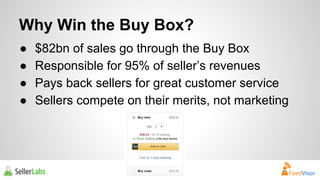
Why Win the Buy Box? 
● $82bn of sales go through the Buy Box 
● Responsible for 95% of seller’s revenues 
● Pays back sellers for great customer service 
● Sellers compete on their merits, not marketing
The Buy Box Fundamentals 
To put it very simply… 
The Amazon Buy Box is an algorithm 
that tries to give the customer the 
best possible value for money
The Buy Box Fundamentals 
To put it very simply… 
It does this by determining which 
product offerings promise the best 
balance of high seller performance 
and low cost price.
Buy Box Rotations 
If there are several merchants offering similar value for money, 
the Buy Box winner changes during the day, these changes are 
called “rotations”. 
For Example: 
● 10 equal sellers will each get 10% of the Buy Box 
● A relatively high performing seller could have 70% of the Buy 
Box against a lower performing seller, who could have 30%
Buy Box Requirements 
In order to be considered for the Buy Box, you will need: 
● Professional Seller account 
● (Featured Merchant Status) Buy Box Eligibility 
● New items 
● Items in stock
Buy Box Requirements 
There are 4 levels of impact that variables can have on the 
Buy Box: 
● Very High -The Mother of all Metrics 
● High -The Big 3 
● Medium –The Differentiators 
● Low – Meh…
Very High Impact Variable 
Fulfilment Method 
● Choosing FBA is the quickest and easiest way to drastically 
improve the chances of winning the Buy Box. 
● If all else is equal, an FBA seller will always have a higher 
share of the Buy Box then an FBM seller. 
● This should be a business decision, not a Buy Box one.
High Impact Variables 
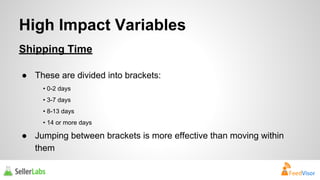
Shipping Time 
● These are divided into brackets: 
• 0-2 days 
• 3-7 days 
• 8-13 days 
• 14 or more days 
● Jumping between brackets is more effective than moving within 
them
High Impact Variables 
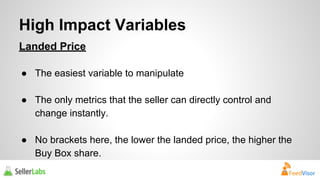
Landed Price 
● The easiest variable to manipulate 
● The only metrics that the seller can directly control and 
change instantly. 
● No brackets here, the lower the landed price, the higher the 
Buy Box share.
High Impact Variables 
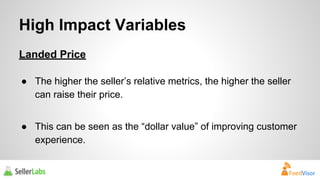
Landed Price 
● The higher the seller’s relative metrics, the higher the seller 
can raise their price. 
● This can be seen as the “dollar value” of improving customer 
experience.
High Impact Variables 
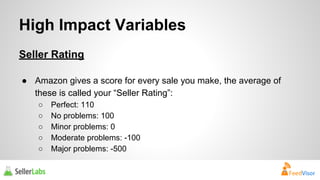
Seller Rating 
● Amazon gives a score for every sale you make, the average of 
these is called your “Seller Rating”: 
○ Perfect: 110 
○ No problems: 100 
○ Minor problems: 0 
○ Moderate problems: -100 
○ Major problems: -500
High Impact Variables 
Seller Rating 
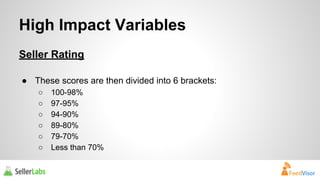
● These scores are then divided into 6 brackets: 
○ 100-98% 
○ 97-95% 
○ 94-90% 
○ 89-80% 
○ 79-70% 
○ Less than 70%
High Impact Variables 
Seller Rating 
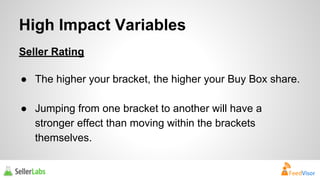
● The higher your bracket, the higher your Buy Box share. 
● Jumping from one bracket to another will have a 
stronger effect than moving within the brackets 
themselves.
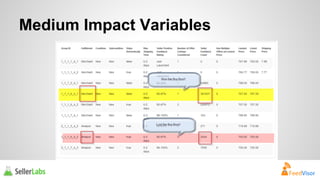
Medium Impact Variables 
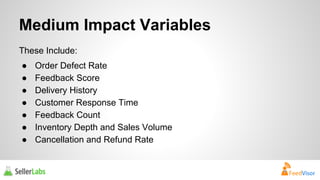
These Include: 
● Order Defect Rate 
● Feedback Score 
● Delivery History 
● Customer Response Time 
● Feedback Count 
● Inventory Depth and Sales Volume 
● Cancellation and Refund Rate
Medium Impact Variables
Negative Feedback Monitoring 
How are you notified of negative feedback? 
1. Review daily in Seller Central 
2. Negative Feedback Report 
3. Use a monitoring service 
a. Email 
b. Text Message
Negative Feedback Removal 
● Work directly with Amazon 
○ Product review 
○ FBA issue 
○ Profanity 
● Work with the customer 
○ Address the problem as quickly as possible 
○ Apologize / Empathize 
○ Ask buyer to remove
Pay attention, but don’t stress over 
perfection 
● Some people will never be satisfied – let it go. 
● Some people are liars – move on. 
● Some people are confused – help them if you can. 
● Some people are absolutely right – pay attention.
Understanding Ratings 
What is the value of a review? 
● 4- and 5-stars are positive 
● 3-stars is neutral but still counts against you. 
● 1- and 2-stars are negative 
2-stars and below count negative 
500 points against your Seller Rating
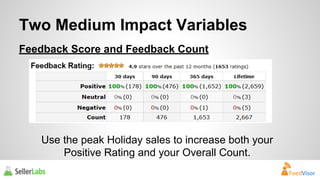
Two Medium Impact Variables 
Feedback Score and Feedback Count 
Use the peak Holiday sales to increase both your 
Positive Rating and your Overall Count.
Amazon Feedback Requests 
How it works? 
● Occasional emails to request feedback on a past purchase. 
● Seller has no control over content or timing 
● Response rate for Amazon-originated feedback requests is 2- 
3%
Asking for Feedback 
How to: 
● Timing is important 
● Focus on customer service first 
● Be polite and convey your brand 
● Soft ask for feedback 
Increase orders with feedback to 6-8% (or more)
Do’s and Don’ts of Feedback Management 
✓ You may request feedback from a buyer. 
⃠ You many not offer pay or any incentive for providing 
feedback. 
✓ You may provide a link to your feedback page. 
⃠ You may not offer a link to any page outside of the 
Amazon ecosystem.
Do’s and Don’ts of Feedback Management 
✓ You may provide links back to your seller page on 
Amazon. 
⃠ You may not offer a link to a company webpage. 
✓ You may communicate with your customer about their 
order. 
⃠ You may not contact them about your newsletter or 
other specials.
Dos and Don’ts of Feedback Management 
✓ You may contact customers through the Amazon email 
messaging system. 
⃠ You may not contact them directly via phone or mail, 
or ask for their direct email address.
Feedback Count 
Why it Matters? 
● Social Proof 
● Helps you absorb a negative review 
● Slight advantage with buybox percentage 
● Should be relative to your competition
Do-It-Yourself vs 
3rd Party
Do-it-Yourself Feedback Management 
Your options: 
Two manual ways to solicit feedback: 
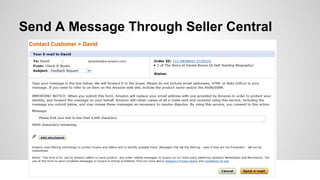
1. Messages on your packing slip 
2. Use the “Contact Buyers” link in Manage Your Order. 
i. Orders => Manage Orders 
ii. Click on buyer name next to “Contact Buyer”
Send A Message Through Seller Central
3rd Party Feedback Management System 
Why consider? 
● Leverage automation to save time and customize 
your message 
● Ensure you are following the rules 
● Filter messages to target customer and increase 
response rate 
● Always be asking for feedback in a timely manner 
● Free up your time to focus on your business
Tip for Success 
● Setup messages to be sent based on actual delivery, not 
shipped date 
● Customize by SKU, ASIN, Condition or Channel to improve 
likelihood of success 
● User variables to personalize your message 
● Eliminate orders/products that have a bad history of reviews 
● Remove orders that were delivered late 
● Respond to negative feedback as soon as possible 
● Work within the Amazon guidelines
Open Q&A 
Brandon Checketts 
Seller Labs 
support@sellerlabs.com 
Shmuli Goldberg 
Feedvisor 
info@feedvisor.com

How to Leverage your Amazon Holiday Sales for a Profitable 2015

  • 1.
    How to Leverageyour Amazon Holiday Sales for a Profitable 2015 Brandon Checketts SellerLabs Shmuli Goldberg Feedvisor
  • 2.
    Who are we? Shmuli Goldberg Feedvisor Buy Box Expert Brandon Checketts Seller Labs Feedback Expert
  • 3.
    Todays Webinar ●How the Buy Box works ● The main variables that affect the Buy Box ● Using feedback to improve Buy Box chances ● Practical steps to improve feedback ● Open Q&A
  • 4.
    Why Win theBuy Box? ● $82bn of sales go through the Buy Box ● Responsible for 95% of seller’s revenues ● Pays back sellers for great customer service ● Sellers compete on their merits, not marketing
  • 5.
    The Buy BoxFundamentals To put it very simply… The Amazon Buy Box is an algorithm that tries to give the customer the best possible value for money
  • 6.
    The Buy BoxFundamentals To put it very simply… It does this by determining which product offerings promise the best balance of high seller performance and low cost price.
  • 7.
    Buy Box Rotations If there are several merchants offering similar value for money, the Buy Box winner changes during the day, these changes are called “rotations”. For Example: ● 10 equal sellers will each get 10% of the Buy Box ● A relatively high performing seller could have 70% of the Buy Box against a lower performing seller, who could have 30%
  • 8.
    Buy Box Requirements In order to be considered for the Buy Box, you will need: ● Professional Seller account ● (Featured Merchant Status) Buy Box Eligibility ● New items ● Items in stock
  • 9.
    Buy Box Requirements There are 4 levels of impact that variables can have on the Buy Box: ● Very High -The Mother of all Metrics ● High -The Big 3 ● Medium –The Differentiators ● Low – Meh…
  • 10.
    Very High ImpactVariable Fulfilment Method ● Choosing FBA is the quickest and easiest way to drastically improve the chances of winning the Buy Box. ● If all else is equal, an FBA seller will always have a higher share of the Buy Box then an FBM seller. ● This should be a business decision, not a Buy Box one.
  • 11.
    High Impact Variables Shipping Time ● These are divided into brackets: • 0-2 days • 3-7 days • 8-13 days • 14 or more days ● Jumping between brackets is more effective than moving within them
  • 12.
    High Impact Variables Landed Price ● The easiest variable to manipulate ● The only metrics that the seller can directly control and change instantly. ● No brackets here, the lower the landed price, the higher the Buy Box share.
  • 13.
    High Impact Variables Landed Price ● The higher the seller’s relative metrics, the higher the seller can raise their price. ● This can be seen as the “dollar value” of improving customer experience.
  • 14.
    High Impact Variables Seller Rating ● Amazon gives a score for every sale you make, the average of these is called your “Seller Rating”: ○ Perfect: 110 ○ No problems: 100 ○ Minor problems: 0 ○ Moderate problems: -100 ○ Major problems: -500
  • 15.
    High Impact Variables Seller Rating ● These scores are then divided into 6 brackets: ○ 100-98% ○ 97-95% ○ 94-90% ○ 89-80% ○ 79-70% ○ Less than 70%
  • 16.
    High Impact Variables Seller Rating ● The higher your bracket, the higher your Buy Box share. ● Jumping from one bracket to another will have a stronger effect than moving within the brackets themselves.
  • 17.
    Medium Impact Variables These Include: ● Order Defect Rate ● Feedback Score ● Delivery History ● Customer Response Time ● Feedback Count ● Inventory Depth and Sales Volume ● Cancellation and Refund Rate
  • 18.
  • 19.
    Negative Feedback Monitoring How are you notified of negative feedback? 1. Review daily in Seller Central 2. Negative Feedback Report 3. Use a monitoring service a. Email b. Text Message
  • 20.
    Negative Feedback Removal ● Work directly with Amazon ○ Product review ○ FBA issue ○ Profanity ● Work with the customer ○ Address the problem as quickly as possible ○ Apologize / Empathize ○ Ask buyer to remove
  • 21.
    Pay attention, butdon’t stress over perfection ● Some people will never be satisfied – let it go. ● Some people are liars – move on. ● Some people are confused – help them if you can. ● Some people are absolutely right – pay attention.
  • 22.
    Understanding Ratings Whatis the value of a review? ● 4- and 5-stars are positive ● 3-stars is neutral but still counts against you. ● 1- and 2-stars are negative 2-stars and below count negative 500 points against your Seller Rating
  • 23.
    Two Medium ImpactVariables Feedback Score and Feedback Count Use the peak Holiday sales to increase both your Positive Rating and your Overall Count.
  • 24.
    Amazon Feedback Requests How it works? ● Occasional emails to request feedback on a past purchase. ● Seller has no control over content or timing ● Response rate for Amazon-originated feedback requests is 2- 3%
  • 25.
    Asking for Feedback How to: ● Timing is important ● Focus on customer service first ● Be polite and convey your brand ● Soft ask for feedback Increase orders with feedback to 6-8% (or more)
  • 26.
    Do’s and Don’tsof Feedback Management ✓ You may request feedback from a buyer. ⃠ You many not offer pay or any incentive for providing feedback. ✓ You may provide a link to your feedback page. ⃠ You may not offer a link to any page outside of the Amazon ecosystem.
  • 27.
    Do’s and Don’tsof Feedback Management ✓ You may provide links back to your seller page on Amazon. ⃠ You may not offer a link to a company webpage. ✓ You may communicate with your customer about their order. ⃠ You may not contact them about your newsletter or other specials.
  • 28.
    Dos and Don’tsof Feedback Management ✓ You may contact customers through the Amazon email messaging system. ⃠ You may not contact them directly via phone or mail, or ask for their direct email address.
  • 29.
    Feedback Count Whyit Matters? ● Social Proof ● Helps you absorb a negative review ● Slight advantage with buybox percentage ● Should be relative to your competition
  • 30.
  • 31.
    Do-it-Yourself Feedback Management Your options: Two manual ways to solicit feedback: 1. Messages on your packing slip 2. Use the “Contact Buyers” link in Manage Your Order. i. Orders => Manage Orders ii. Click on buyer name next to “Contact Buyer”
  • 32.
    Send A MessageThrough Seller Central
  • 33.
    3rd Party FeedbackManagement System Why consider? ● Leverage automation to save time and customize your message ● Ensure you are following the rules ● Filter messages to target customer and increase response rate ● Always be asking for feedback in a timely manner ● Free up your time to focus on your business
  • 34.
    Tip for Success ● Setup messages to be sent based on actual delivery, not shipped date ● Customize by SKU, ASIN, Condition or Channel to improve likelihood of success ● User variables to personalize your message ● Eliminate orders/products that have a bad history of reviews ● Remove orders that were delivered late ● Respond to negative feedback as soon as possible ● Work within the Amazon guidelines
  • 35.
    Open Q&A BrandonChecketts Seller Labs support@sellerlabs.com Shmuli Goldberg Feedvisor info@feedvisor.com