
Sitecore 9 – What’s new?
The Future of Web Development is
already here
Adrian IORGU
November 27, 2017
Keynotes from Sitecore Symposium
LasVegas , October 16 -19 2017
© 2017 Sitecore User Group Conference Europe and its respective speakers. All rights reserved.
Adrian IORGU
Sitecore Consultant @ Boondoggle
Founder ActStudio.ro
SitecoreTechnology MVP 2016 & 2017
About me
• Passionate about web development, 15+ years of experience
• In love with extreme sports, nature and travel
© 2017 Sitecore User Group Conference Europe and its respective speakers. All rights reserved. 4
1. Sitecore 9 - System requirements
2. [New] Installation Framework – SIF
3. [New] Federated Authentication: G+, FB, Twitter
4. Welcome Sitecore Forms. Bye WFFM!
5. [New] Dynamic Placeholders
6. Search - Good Bye Lucene
7. Rule-based Configuration
8. xConnect
9. Marketing Automation
10. [NEW] Machine Learning – Cortex
11. Javascript Services – JSS
12. Sitecore Experience Accelerator - SXA
Agenda - Keynotes from Sitecore Symposium 2017
© 2017 Sitecore User Group Conference Europe and its respective speakers. All rights reserved. 5
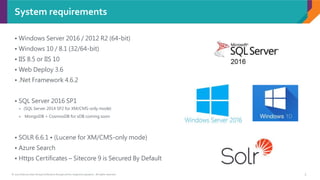
System requirements
• Windows Server 2016 / 2012 R2 (64-bit)
• Windows 10 / 8.1 (32/64-bit)
• IIS 8.5 or IIS 10
• Web Deploy 3.6
• .Net Framework 4.6.2
• SQL Server 2016 SP1
 (SQL Server 2014 SP2 for XM/CMS-only mode)
 MongoDB + CosmosDB for xDB coming soon
• SOLR 6.6.1 • (Lucene for XM/CMS-only mode)
• Azure Search
• Https Certificates – Sitecore 9 is Secured By Default
© 2017 Sitecore User Group Conference Europe and its respective speakers. All rights reserved. 6
Sitecore 9 - Secured by Default
HTTPS communication across platform
 Web Servers (CD, CM, Reporting, Processing)
 xConnect
 SOLR
Encrypted
 Data-at-rest
 Data-in-motion
• Must obtain SSL certifications
• Local => Self Signed Certificates
© 2017 Sitecore User Group Conference Europe and its respective speakers. All rights reserved. 7
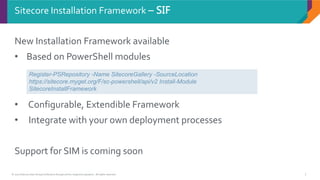
New Installation Framework available
• Based on PowerShell modules
• Configurable, Extendible Framework
• Integrate with your own deployment processes
Support for SIM is coming soon
Sitecore Installation Framework – SIF
Register-PSRepository -Name SitecoreGallery -SourceLocation
https://sitecore.myget.org/F/sc-powershell/api/v2 Install-Module
SitecoreInstallFramework
© 2017 Sitecore User Group Conference Europe and its respective speakers. All rights reserved. 8
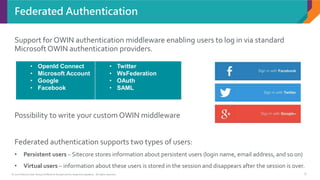
Support for OWIN authentication middleware enabling users to log in via standard
Microsoft OWIN authentication providers.
Possibility to write your custom OWIN middleware
Federated authentication supports two types of users:
• Persistent users – Sitecore stores information about persistent users (login name, email address, and so on)
• Virtual users – information about these users is stored in the session and disappears after the session is over.
Federated Authentication
• OpenId Connect
• Microsoft Account
• Google
• Facebook
• Twitter
• WsFederation
• OAuth
• SAML
© 2017 Sitecore User Group Conference Europe and its respective speakers. All rights reserved. 9
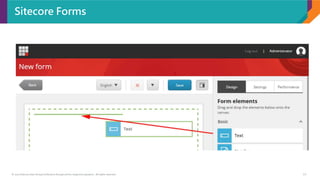
New Sitecore Forms – R.I.P. WFFM
• Allows you to create forms with drag and drop
• Completely resigned UI
• Ability to create form templates
• The Forms are located in /sitecore/forms
• MVC only support
• The oldWFFM is gone. [excitement]
© 2017 Sitecore User Group Conference Europe and its respective speakers. All rights reserved. 10
Sitecore Forms
© 2017 Sitecore User Group Conference Europe and its respective speakers. All rights reserved. 11
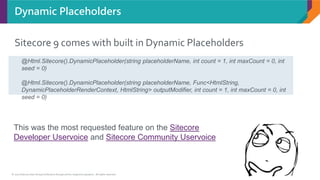
Sitecore 9 comes with built in Dynamic Placeholders
Dynamic Placeholders
@Html.Sitecore().DynamicPlaceholder(string placeholderName, int count = 1, int maxCount = 0, int
seed = 0)
@Html.Sitecore().DynamicPlaceholder(string placeholderName, Func<HtmlString,
DynamicPlaceholderRenderContext, HtmlString> outputModifier, int count = 1, int maxCount = 0, int
seed = 0)
This was the most requested feature on the Sitecore
Developer Uservoice and Sitecore Community Uservoice
© 2017 Sitecore User Group Conference Europe and its respective speakers. All rights reserved. 12
• Sitecore 9 no longer supports Lucene
• Existing solutions must migrate to SOLR or Azure Search
Search - Good Bye Lucene
LUCENE
Clarification: You can still use Lucene if you are running
CMS-only mode (i.e. no Analytics/xDB). If you are running
multi-server, multi-CD set up then best practice
recommendation has been to use SOLR/Azure for a while
now anyway
Kamruz Jaman
https://jammykam.wordpress.com/2017/10/17/sitecore-9-is-here/
© 2017 Sitecore User Group Conference Europe and its respective speakers. All rights reserved. 13
• Sitecore 9 configs are now using layers.The loading order can
be configured in the layers config.
• Conventions on Configuration files
• Ability to configure an server for a particular role by setting a
single setting in config.
• Additional patch folders allowing you to keep your custom
patch files separate from default Sitecore and Modules
configurations
• Ability to control the load order of config file and folders
Rule-based Configuration
© 2017 Sitecore User Group Conference Europe and its respective speakers. All rights reserved. 14
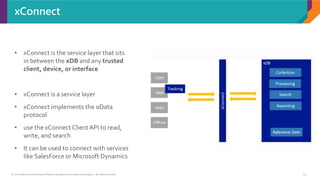
xConnect
• xConnect is the service layer that sits
in between the xDB and any trusted
client, device, or interface
• xConnect is a service layer
• xConnect implements the oData
protocol
• use the xConnect ClientAPI to read,
write, and search
• It can be used to connect with services
like SalesForce or Microsoft Dynamics
© 2017 Sitecore User Group Conference Europe and its respective speakers. All rights reserved. 15
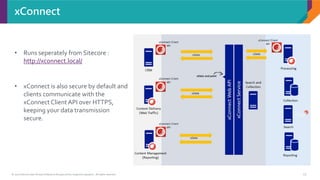
xConnect
• Runs seperately from Sitecore :
http://xconnect.local/
• xConnect is also secure by default and
clients communicate with the
xConnect ClientAPI over HTTPS,
keeping your data transmission
secure.
© 2017 Sitecore User Group Conference Europe and its respective speakers. All rights reserved. 16
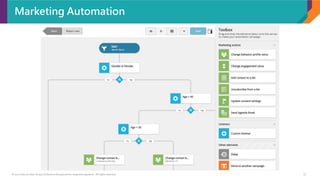
Marketing Automation
• Drag and drop interface to create automated online campaigns in Sitecore
• This is a replacement for Engagement Automation plans
• A lot of actions are already foreseen ( like validate e-mail-address, add contact list,
.... )
• It’s possible to add your own custom actions
© 2017 Sitecore User Group Conference Europe and its respective speakers. All rights reserved. 17
Marketing Automation
© 2017 Sitecore User Group Conference Europe and its respective speakers. All rights reserved. 18
Machine Learning – Cortex
• Machine Learning for real-time insights across native and
third party customer data
• It uses xDB and xConnect for learning
• First usage will be in path Analyzer to suggest
improvements on visitors flow
© 2017 Sitecore User Group Conference Europe and its respective speakers. All rights reserved. 19
Javascript Services – JSS
JSS is built for front-end developers who
use JavaScript and along with modern UI
libraries and frameworks, such as
React.js, Angular,Vue.js, etc.
Software pre-requisites
• node.js >= v6.9
• npm >= 5
Documentation on https://jss.sitecore.net/
© 2017 Sitecore User Group Conference Europe and its respective speakers. All rights reserved. 20
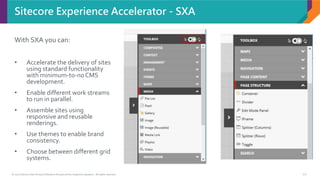
Sitecore Experience Accelerator - SXA
With SXA you can:
• Accelerate the delivery of sites
using standard functionality
with minimum-to-noCMS
development.
• Enable different work streams
to run in parallel.
• Assemble sites using
responsive and reusable
renderings.
• Use themes to enable brand
consistency.
• Choose between different grid
systems.
© 2017 Sitecore User Group Conference Europe and its respective speakers. All rights reserved. 21
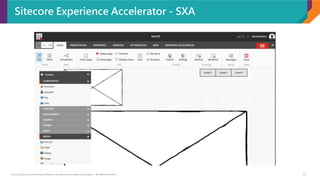
Sitecore Experience Accelerator - SXA
© 2017 Sitecore User Group Conference Europe and its respective speakers. All rights reserved. 22
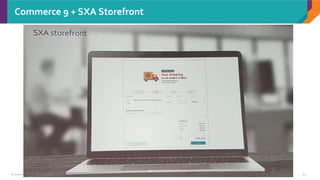
Commerce 9 + SXA Storefront
DEMO
Q &A
ThankYou!
More about Sitecore:
• sitecore.net
• sitecore.stackexchange.com
• sitecorechat.slack.com
• Special thanks to Kamruz Jaman (@jammykam)
https://jammykam.wordpress.com/2017/10/17/sitecore-9-is-here/

Sitecore 9 - What's new?

  • 1.
    Sitecore 9 –What’s new? The Future of Web Development is already here Adrian IORGU November 27, 2017 Keynotes from Sitecore Symposium LasVegas , October 16 -19 2017
  • 2.
    © 2017 SitecoreUser Group Conference Europe and its respective speakers. All rights reserved. Adrian IORGU Sitecore Consultant @ Boondoggle Founder ActStudio.ro SitecoreTechnology MVP 2016 & 2017 About me • Passionate about web development, 15+ years of experience • In love with extreme sports, nature and travel
  • 4.
    © 2017 SitecoreUser Group Conference Europe and its respective speakers. All rights reserved. 4 1. Sitecore 9 - System requirements 2. [New] Installation Framework – SIF 3. [New] Federated Authentication: G+, FB, Twitter 4. Welcome Sitecore Forms. Bye WFFM! 5. [New] Dynamic Placeholders 6. Search - Good Bye Lucene 7. Rule-based Configuration 8. xConnect 9. Marketing Automation 10. [NEW] Machine Learning – Cortex 11. Javascript Services – JSS 12. Sitecore Experience Accelerator - SXA Agenda - Keynotes from Sitecore Symposium 2017
  • 5.
    © 2017 SitecoreUser Group Conference Europe and its respective speakers. All rights reserved. 5 System requirements • Windows Server 2016 / 2012 R2 (64-bit) • Windows 10 / 8.1 (32/64-bit) • IIS 8.5 or IIS 10 • Web Deploy 3.6 • .Net Framework 4.6.2 • SQL Server 2016 SP1  (SQL Server 2014 SP2 for XM/CMS-only mode)  MongoDB + CosmosDB for xDB coming soon • SOLR 6.6.1 • (Lucene for XM/CMS-only mode) • Azure Search • Https Certificates – Sitecore 9 is Secured By Default
  • 6.
    © 2017 SitecoreUser Group Conference Europe and its respective speakers. All rights reserved. 6 Sitecore 9 - Secured by Default HTTPS communication across platform  Web Servers (CD, CM, Reporting, Processing)  xConnect  SOLR Encrypted  Data-at-rest  Data-in-motion • Must obtain SSL certifications • Local => Self Signed Certificates
  • 7.
    © 2017 SitecoreUser Group Conference Europe and its respective speakers. All rights reserved. 7 New Installation Framework available • Based on PowerShell modules • Configurable, Extendible Framework • Integrate with your own deployment processes Support for SIM is coming soon Sitecore Installation Framework – SIF Register-PSRepository -Name SitecoreGallery -SourceLocation https://sitecore.myget.org/F/sc-powershell/api/v2 Install-Module SitecoreInstallFramework
  • 8.
    © 2017 SitecoreUser Group Conference Europe and its respective speakers. All rights reserved. 8 Support for OWIN authentication middleware enabling users to log in via standard Microsoft OWIN authentication providers. Possibility to write your custom OWIN middleware Federated authentication supports two types of users: • Persistent users – Sitecore stores information about persistent users (login name, email address, and so on) • Virtual users – information about these users is stored in the session and disappears after the session is over. Federated Authentication • OpenId Connect • Microsoft Account • Google • Facebook • Twitter • WsFederation • OAuth • SAML
  • 9.
    © 2017 SitecoreUser Group Conference Europe and its respective speakers. All rights reserved. 9 New Sitecore Forms – R.I.P. WFFM • Allows you to create forms with drag and drop • Completely resigned UI • Ability to create form templates • The Forms are located in /sitecore/forms • MVC only support • The oldWFFM is gone. [excitement]
  • 10.
    © 2017 SitecoreUser Group Conference Europe and its respective speakers. All rights reserved. 10 Sitecore Forms
  • 11.
    © 2017 SitecoreUser Group Conference Europe and its respective speakers. All rights reserved. 11 Sitecore 9 comes with built in Dynamic Placeholders Dynamic Placeholders @Html.Sitecore().DynamicPlaceholder(string placeholderName, int count = 1, int maxCount = 0, int seed = 0) @Html.Sitecore().DynamicPlaceholder(string placeholderName, Func<HtmlString, DynamicPlaceholderRenderContext, HtmlString> outputModifier, int count = 1, int maxCount = 0, int seed = 0) This was the most requested feature on the Sitecore Developer Uservoice and Sitecore Community Uservoice
  • 12.
    © 2017 SitecoreUser Group Conference Europe and its respective speakers. All rights reserved. 12 • Sitecore 9 no longer supports Lucene • Existing solutions must migrate to SOLR or Azure Search Search - Good Bye Lucene LUCENE Clarification: You can still use Lucene if you are running CMS-only mode (i.e. no Analytics/xDB). If you are running multi-server, multi-CD set up then best practice recommendation has been to use SOLR/Azure for a while now anyway Kamruz Jaman https://jammykam.wordpress.com/2017/10/17/sitecore-9-is-here/
  • 13.
    © 2017 SitecoreUser Group Conference Europe and its respective speakers. All rights reserved. 13 • Sitecore 9 configs are now using layers.The loading order can be configured in the layers config. • Conventions on Configuration files • Ability to configure an server for a particular role by setting a single setting in config. • Additional patch folders allowing you to keep your custom patch files separate from default Sitecore and Modules configurations • Ability to control the load order of config file and folders Rule-based Configuration
  • 14.
    © 2017 SitecoreUser Group Conference Europe and its respective speakers. All rights reserved. 14 xConnect • xConnect is the service layer that sits in between the xDB and any trusted client, device, or interface • xConnect is a service layer • xConnect implements the oData protocol • use the xConnect ClientAPI to read, write, and search • It can be used to connect with services like SalesForce or Microsoft Dynamics
  • 15.
    © 2017 SitecoreUser Group Conference Europe and its respective speakers. All rights reserved. 15 xConnect • Runs seperately from Sitecore : http://xconnect.local/ • xConnect is also secure by default and clients communicate with the xConnect ClientAPI over HTTPS, keeping your data transmission secure.
  • 16.
    © 2017 SitecoreUser Group Conference Europe and its respective speakers. All rights reserved. 16 Marketing Automation • Drag and drop interface to create automated online campaigns in Sitecore • This is a replacement for Engagement Automation plans • A lot of actions are already foreseen ( like validate e-mail-address, add contact list, .... ) • It’s possible to add your own custom actions
  • 17.
    © 2017 SitecoreUser Group Conference Europe and its respective speakers. All rights reserved. 17 Marketing Automation
  • 18.
    © 2017 SitecoreUser Group Conference Europe and its respective speakers. All rights reserved. 18 Machine Learning – Cortex • Machine Learning for real-time insights across native and third party customer data • It uses xDB and xConnect for learning • First usage will be in path Analyzer to suggest improvements on visitors flow
  • 19.
    © 2017 SitecoreUser Group Conference Europe and its respective speakers. All rights reserved. 19 Javascript Services – JSS JSS is built for front-end developers who use JavaScript and along with modern UI libraries and frameworks, such as React.js, Angular,Vue.js, etc. Software pre-requisites • node.js >= v6.9 • npm >= 5 Documentation on https://jss.sitecore.net/
  • 20.
    © 2017 SitecoreUser Group Conference Europe and its respective speakers. All rights reserved. 20 Sitecore Experience Accelerator - SXA With SXA you can: • Accelerate the delivery of sites using standard functionality with minimum-to-noCMS development. • Enable different work streams to run in parallel. • Assemble sites using responsive and reusable renderings. • Use themes to enable brand consistency. • Choose between different grid systems.
  • 21.
    © 2017 SitecoreUser Group Conference Europe and its respective speakers. All rights reserved. 21 Sitecore Experience Accelerator - SXA
  • 22.
    © 2017 SitecoreUser Group Conference Europe and its respective speakers. All rights reserved. 22 Commerce 9 + SXA Storefront
  • 23.
  • 24.
  • 25.
    ThankYou! More about Sitecore: •sitecore.net • sitecore.stackexchange.com • sitecorechat.slack.com • Special thanks to Kamruz Jaman (@jammykam) https://jammykam.wordpress.com/2017/10/17/sitecore-9-is-here/