






1DC SITECORE USER GROUP
Sitecore Commerce
Catalog Management at
Scale
DC SITECORE USER GROUP
SEPTEMBER 6, 2017
2DC SITECORE USER GROUP
• Email:
dean_thrasher@epam.com
• Blog:
https://deanthrasher.com/
• Twitter:
@dthrasher
• LinkedIn:
https://www.linkedin.com/in/deanthrasher
• Co-organizer of the DC Sitecore User Group
https://www.meetup.com/DC-Sitecore-User-Group/
• Sitecore enthusiast since 2010
ABOUT DEAN THRASHER
3DC SITECORE USER GROUP
AGENDA
Sitecore Commerce Landscape1
Types of Commerce Operations2
Product Catalog Sync3
Decisions, Decisions!4
SCpbMD Example (Microsoft Dynamics 365)5
4DC SITECORE USER GROUP
IF I ONLY HAD A WHITEBOARD…
5DC SITECORE USER GROUP
• Legacy commerce / shopping cart implementations
– Active Commerce
– uCommerce
– Insite
– Others / custom implementations
• First-party Sitecore implementation
– Sitecore Commerce (completely rebuilt version of Microsoft Commerce Server)
• Third-party Sitecore implementations
– Dynamics AX / D365 (joint development by Microsoft and Sitecore)
– Hybris (integration built by EPAM, announced at Symposium 2016)
SITECORE COMMERCE LANDSCAPE
6DC SITECORE USER GROUP
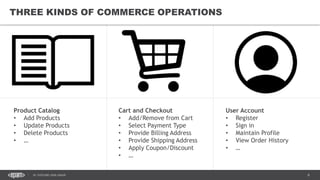
THREE KINDS OF COMMERCE OPERATIONS
Product Catalog
• Add Products
• Update Products
• Delete Products
• …
Cart and Checkout
• Add/Remove from Cart
• Select Payment Type
• Provide Billing Address
• Provide Shipping Address
• Apply Coupon/Discount
• …
User Account
• Register
• Sign in
• Maintain Profile
• View Order History
• …
7DC SITECORE USER GROUP
• Most large retailers have a specialized CMS for managing products called a Product Information
Management system (PIM)
• Data from the PIM is used by a variety of other enterprise systems, including the ERP / Accounting
system and the ecommerce website
• Historically, it was common to separate the “content” side of a website from the “commerce” side
• Sitecore’s approach is to import and cache the product catalog(s) stored in the PIM so that products
can be mixed with non-product content
PRODUCT CATALOG SYNC
8DC SITECORE USER GROUP
• Push vs. pull
• Sync intervals
• Full vs. incremental sync
• Copy vs. transform
• Who writes what when?
DECISIONS, DECISIONS!
9DC SITECORE USER GROUP
D365 EXAMPLE
SITECORE COMMERCE CATALOG MANAGEMENT
10DC SITECORE USER GROUP
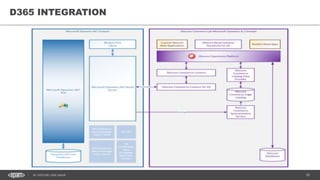
D365 INTEGRATION
11DC SITECORE USER GROUP
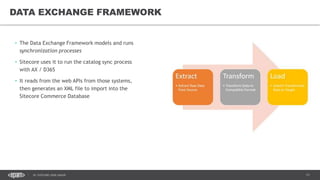
• The Data Exchange Framework models and runs
synchronization processes
• Sitecore uses it to run the catalog sync process
with AX / D365
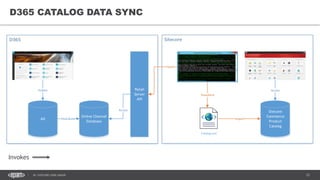
• It reads from the web APIs from those systems,
then generates an XML file to import into the
Sitecore Commerce Database
DATA EXCHANGE FRAMEWORK
12DC SITECORE USER GROUP
D365 CATALOG DATA SYNC
AX
Online Channel
Database
Retail
Server
API
Sitecore
Commerce
Product
Catalog
Distribute
Publish
Transform
Import
Catalog.xml
Fetch
Access
Access
Invokes
13DC SITECORE USER GROUP
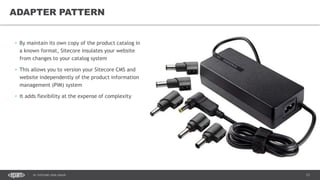
• By maintain its own copy of the product catalog in
a known format, Sitecore insulates your website
from changes to your catalog system
• This allows you to version your Sitecore CMS and
website independently of the product information
management (PIM) system
• It adds flexibility at the expense of complexity
ADAPTER PATTERN
14DC SITECORE USER GROUP
• The Sitecore Commerce database is a known schema, so Sitecore
provides a data provider implementation to make those items
appear like “normal” Sitecore items
• Since product items are not stored in the master or web
databases, they do not participate in publishing in the same way
that regular content does
• Data providers operate at a very low level within Sitecore. They
aren’t documented very well and rely on dark magic.
• Write one at your own risk!
DATA PROVIDER
15DC SITECORE USER GROUP
• The data provider doesn’t make the product catalog appear within
your site directly. Instead, wildcard items are used to point a part
of the Sitecore content tree at the product catalog.
• At scale, you’ll probably want to use a bucket-like experience to
bring the catalog into Sitecore, then modify your
WildcardItemResolver to bring in the products and categories as
needed.
WILDCARD ITEMS
16DC SITECORE USER GROUP
• Product catalog data can be immediately live or
can use the Commerce Server Staging service to
perform a “switch-on-rebuild” operation
• Once catalog data is live, changes need to be
reindexed in your search engine
PUBLISHING AND INDEXING
17DC SITECORE USER GROUP
QUESTIONS?
SITECORE COMMERCE CATALOG MANAGEMENT
18DC SITECORE USER GROUP
APPENDIX
SITECORE COMMERCE CATALOG MANAGEMENT
19DC SITECORE USER GROUP
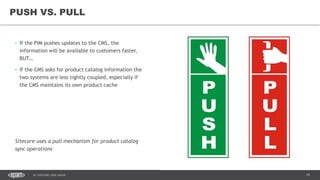
• If the PIM pushes updates to the CMS, the
information will be available to customers faster,
BUT…
• If the CMS asks for product catalog information the
two systems are less tightly coupled, especially if
the CMS maintains its own product cache
Sitecore uses a pull mechanism for product catalog
sync operations
PUSH VS. PULL
20DC SITECORE USER GROUP
• How often do you perform an update?
• Are there any operations that require real-time or
near-real time calls?
– Product availability
– Amount in stock
– Price and promotion changes
Sitecore uses a scheduled job to for product sync – at
an interval you determine – coupled with real-time
operations for sensitive or rapidly changing data
SYNC INTERVALS
21DC SITECORE USER GROUP
• You’ll need to benchmark your systems to
determine which is faster
• But you’ll need to support both, if only to
update products or prices in emergency
situations
Sitecore supports both methods*
*assuming your PIM supports both methods
FULL VS. INCREMENTAL SYNC
22DC SITECORE USER GROUP
• Since information coming from the PIM has gone
through its own review and approval process, you
could simply display it as-is…
• Or you could change or transform it, at the cost of
additional complexity
Sitecore provides a lot of flexibility to transform
product catalog data. Use it wisely!
COPY VS. TRANSFORM
23DC SITECORE USER GROUP
• Ideally, the CMS would have read-only copies of
product catalog data, BUT…
• …You might want to enrich PIM data with additional
information only needed by the website, AND…
• …Mistakes happen, and sometimes you need to
correct information right away
• …So it’s often valuable to allow the CMS to override
or temporarily modify values
• Avoid bi-directional sync if you can!
This one’s up to you…
WHO WRITES WHAT WHEN?

Sitecore Commerce Catalog Management at Scale

  • 1.
    1DC SITECORE USERGROUP Sitecore Commerce Catalog Management at Scale DC SITECORE USER GROUP SEPTEMBER 6, 2017
  • 2.
    2DC SITECORE USERGROUP • Email: dean_thrasher@epam.com • Blog: https://deanthrasher.com/ • Twitter: @dthrasher • LinkedIn: https://www.linkedin.com/in/deanthrasher • Co-organizer of the DC Sitecore User Group https://www.meetup.com/DC-Sitecore-User-Group/ • Sitecore enthusiast since 2010 ABOUT DEAN THRASHER
  • 3.
    3DC SITECORE USERGROUP AGENDA Sitecore Commerce Landscape1 Types of Commerce Operations2 Product Catalog Sync3 Decisions, Decisions!4 SCpbMD Example (Microsoft Dynamics 365)5
  • 4.
    4DC SITECORE USERGROUP IF I ONLY HAD A WHITEBOARD…
  • 5.
    5DC SITECORE USERGROUP • Legacy commerce / shopping cart implementations – Active Commerce – uCommerce – Insite – Others / custom implementations • First-party Sitecore implementation – Sitecore Commerce (completely rebuilt version of Microsoft Commerce Server) • Third-party Sitecore implementations – Dynamics AX / D365 (joint development by Microsoft and Sitecore) – Hybris (integration built by EPAM, announced at Symposium 2016) SITECORE COMMERCE LANDSCAPE
  • 6.
    6DC SITECORE USERGROUP THREE KINDS OF COMMERCE OPERATIONS Product Catalog • Add Products • Update Products • Delete Products • … Cart and Checkout • Add/Remove from Cart • Select Payment Type • Provide Billing Address • Provide Shipping Address • Apply Coupon/Discount • … User Account • Register • Sign in • Maintain Profile • View Order History • …
  • 7.
    7DC SITECORE USERGROUP • Most large retailers have a specialized CMS for managing products called a Product Information Management system (PIM) • Data from the PIM is used by a variety of other enterprise systems, including the ERP / Accounting system and the ecommerce website • Historically, it was common to separate the “content” side of a website from the “commerce” side • Sitecore’s approach is to import and cache the product catalog(s) stored in the PIM so that products can be mixed with non-product content PRODUCT CATALOG SYNC
  • 8.
    8DC SITECORE USERGROUP • Push vs. pull • Sync intervals • Full vs. incremental sync • Copy vs. transform • Who writes what when? DECISIONS, DECISIONS!
  • 9.
    9DC SITECORE USERGROUP D365 EXAMPLE SITECORE COMMERCE CATALOG MANAGEMENT
  • 10.
    10DC SITECORE USERGROUP D365 INTEGRATION
  • 11.
    11DC SITECORE USERGROUP • The Data Exchange Framework models and runs synchronization processes • Sitecore uses it to run the catalog sync process with AX / D365 • It reads from the web APIs from those systems, then generates an XML file to import into the Sitecore Commerce Database DATA EXCHANGE FRAMEWORK
  • 12.
    12DC SITECORE USERGROUP D365 CATALOG DATA SYNC AX Online Channel Database Retail Server API Sitecore Commerce Product Catalog Distribute Publish Transform Import Catalog.xml Fetch Access Access Invokes
  • 13.
    13DC SITECORE USERGROUP • By maintain its own copy of the product catalog in a known format, Sitecore insulates your website from changes to your catalog system • This allows you to version your Sitecore CMS and website independently of the product information management (PIM) system • It adds flexibility at the expense of complexity ADAPTER PATTERN
  • 14.
    14DC SITECORE USERGROUP • The Sitecore Commerce database is a known schema, so Sitecore provides a data provider implementation to make those items appear like “normal” Sitecore items • Since product items are not stored in the master or web databases, they do not participate in publishing in the same way that regular content does • Data providers operate at a very low level within Sitecore. They aren’t documented very well and rely on dark magic. • Write one at your own risk! DATA PROVIDER
  • 15.
    15DC SITECORE USERGROUP • The data provider doesn’t make the product catalog appear within your site directly. Instead, wildcard items are used to point a part of the Sitecore content tree at the product catalog. • At scale, you’ll probably want to use a bucket-like experience to bring the catalog into Sitecore, then modify your WildcardItemResolver to bring in the products and categories as needed. WILDCARD ITEMS
  • 16.
    16DC SITECORE USERGROUP • Product catalog data can be immediately live or can use the Commerce Server Staging service to perform a “switch-on-rebuild” operation • Once catalog data is live, changes need to be reindexed in your search engine PUBLISHING AND INDEXING
  • 17.
    17DC SITECORE USERGROUP QUESTIONS? SITECORE COMMERCE CATALOG MANAGEMENT
  • 18.
    18DC SITECORE USERGROUP APPENDIX SITECORE COMMERCE CATALOG MANAGEMENT
  • 19.
    19DC SITECORE USERGROUP • If the PIM pushes updates to the CMS, the information will be available to customers faster, BUT… • If the CMS asks for product catalog information the two systems are less tightly coupled, especially if the CMS maintains its own product cache Sitecore uses a pull mechanism for product catalog sync operations PUSH VS. PULL
  • 20.
    20DC SITECORE USERGROUP • How often do you perform an update? • Are there any operations that require real-time or near-real time calls? – Product availability – Amount in stock – Price and promotion changes Sitecore uses a scheduled job to for product sync – at an interval you determine – coupled with real-time operations for sensitive or rapidly changing data SYNC INTERVALS
  • 21.
    21DC SITECORE USERGROUP • You’ll need to benchmark your systems to determine which is faster • But you’ll need to support both, if only to update products or prices in emergency situations Sitecore supports both methods* *assuming your PIM supports both methods FULL VS. INCREMENTAL SYNC
  • 22.
    22DC SITECORE USERGROUP • Since information coming from the PIM has gone through its own review and approval process, you could simply display it as-is… • Or you could change or transform it, at the cost of additional complexity Sitecore provides a lot of flexibility to transform product catalog data. Use it wisely! COPY VS. TRANSFORM
  • 23.
    23DC SITECORE USERGROUP • Ideally, the CMS would have read-only copies of product catalog data, BUT… • …You might want to enrich PIM data with additional information only needed by the website, AND… • …Mistakes happen, and sometimes you need to correct information right away • …So it’s often valuable to allow the CMS to override or temporarily modify values • Avoid bi-directional sync if you can! This one’s up to you… WHO WRITES WHAT WHEN?