SimWare Framework
  the full simulation
 What is HLA raised to the power of DDS?
Speakers

José Ramón Martínez          José Carlos Díaz
MSc Industrial Engineering   MSc Computing
Presales Team Leader         International Sales Manager
NADS                         NADS


jrmartinez@nads.es           jcdiaz@nads.es
AGENDA

  Brief introduction to SimWare
  Installation and hands on of SimWare on
   Windows and Linux
  Questions


                   Total time 45 minutes
What is SimWare?
Three main pillars
SimWare: creating simulators
SimWare is a simulation framework for creating new simulators from scratch

• Create new simulators without seeing any code
• Care only about data model
• Simulation backbone is DDS
Modeler: Data modeling from the FOM
                     MULATION


HLA data model


 Modeler is the tool for modelling data HLA-Style
    Objetcs and interactions
    HLA data types

 Data models can be saved and loaded
 The tool generates the data library automatically
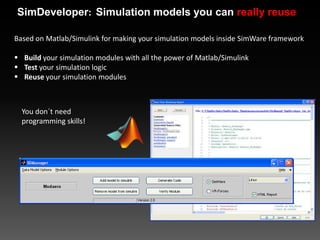
SimDeveloper: Simulation models you can really reuse

Based on Matlab/Simulink for making your simulation models inside SimWare framework

 Build your simulation modules with all the power of Matlab/Simulink
 Test your simulation logic
 Reuse your simulation modules


  You don´t need
  programming skills!
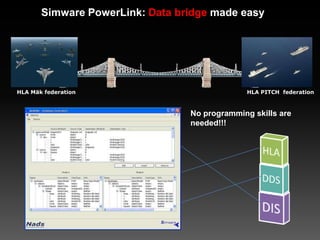
Simware PowerLink: Data bridge made easy


HLA Mäk federation                             HLA PITCH federation


                                 No programming skills are
                                 needed!!!
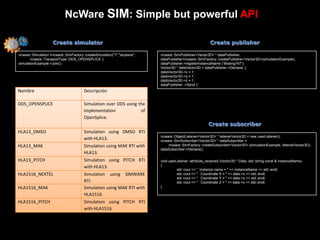
NcWare SIM: Simple but powerful API

                     Create simulator                                                                     Create publisher

ncware::Simulation =ncware::SimFactory::createSimulation("1","airplane",   ncware::SimPublisher<Vector3D> * dataPublisher;
       ncware::TransportType::DDS_OPENSPLICE );                            dataPublisher=ncware::SimFactory::createPublisher<Vector3D>(simulationExample);
simulationExample->Join();                                                 dataPublisher->registerInstanceName (“Boeing747”);
                                                                           Vector3D * dataVector3D = dataPublisher->Declare( );
                                                                           dataVector3D->x = 1;
                                                                           dataVector3D->y = 1;
                                                                           dataVector3D->z = 1;
                                                                           dataPublisher ->Send (“Boeing747”, dataVector3D );
Nombre                                  Descripción

DDS_OPENSPLICE                          Simulation over DDS using the
                                        implementation             of
                                        OpenSplice.
                                                                                                         Create subscriber
HLA13_DMSO                              Simulation using DMSO RTI
                                                                           ncware::ObjectListener<Vector3D> * listenerVector3D = new userListener();
                                        with HLA13.                        ncware::SimSubscriber<Vector3D> * dataSubscriber =
HLA13_MAK                               Simulation using MAK RTI with          ncware::SimFactory::createSubscriber<Vector3D> (simulationExample, listenerVector3D);
                                                                           dataSubscriber->Declare();
                                        HLA13.
HLA13_PITCH                             Simulation using PITCH RTI         void userListener::attribute_received (Vector3D * Data, std::string const & instanceName)
                                        with HLA13.                        {
                                                                                     std::cout << “ Instance name = " << instanceName << std::endl;
HLA1516_NEXTEL                          Simulation using SIMWARE                     std::cout << " Coordinate X = " << data->x << std::endl;
                                                                                     std::cout << " Coordinate Y = " << data->y << std::endl;
                                        RTI.                                         std::cout << " Coordinate Z = " << data->z << std::endl;
HLA1516_MAK                             Simulation using MAK RTI with      }

                                        HLA1516.
HLA1516_PITCH                           Simulation using PITCH RTI
                                        with HLA1516.
SimWare: managing simulators
SimWare is a simulation framework for managing new simulators and old
simulators in joint simulation

• Manage your new
  simulator
    • Control the
      instances of the
      simulation
• Manage old
  simulators in joint
  simulations
eHost: Simulation management
           Configuration file                                                    eHost
- <config>
  <EJEC nid="2" id="3" name="EJEC" HlaFed="Aislado"
HlaSom="Som.xml" SchedFrec="25" HTime="5" GTime="3"
TTime="0" UTime="3" NotIni="no" NotFin="no" NotCierre="no"                               Simulation
Critico="si" NotGrab="si" />
- <EHOST4 nid="2" id="4" name="MOTOR1" SchedSecuencial="si"
                                                                                           engine
NotIni="si" NotFin="si" NotCierre="no" Critico="si" NotGrab="si">
  <Mod0 nid="2" id="16" name="Modulo_ModCIRCLE"
type="Modulo_ModCIRCLE" SchedFrec="50" SchedOrden="0"
SchedPrio="1" SchedOffset="0" NotIni="no" NotDisc="no"
NotEstab="no" NotFin="si" NotCierre="no" Critico="si" NotGrab="si"
/>
  </EHOST4>
  </config>
- <!--                                                               Scheduler


                            ACS
                                                                                         Simulation
                                                                                           engine


               Scheduler: Is an advanced scheduler for controlling the real time clock
                and the state machine. It coordinates and balances many Simulation
                Engines that are in different nodes.
               Simulation Engines: Are the simulation engines, manage the Simulation
                modules in each simulation node.
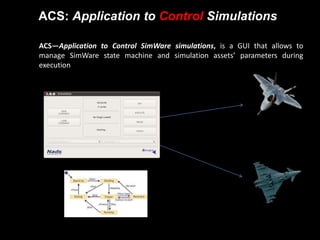
ACS: Application to Control Simulations

 ACS—Application to Control SimWare simulations, is a GUI that allows to
  manage SimWare state machine and simulation assets’ parameters during
  execution
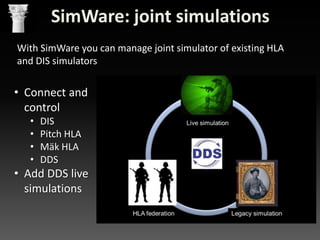
SimWare: joint simulations
With SimWare you can manage joint simulator of existing HLA
and DIS simulators


• Connect and
  control
   •   DIS
   •   Pitch HLA
   •   Mäk HLA
   •   DDS
• Add DDS live
  simulations
Hands on
Believing is good, seeing is better…

      doing it is even better
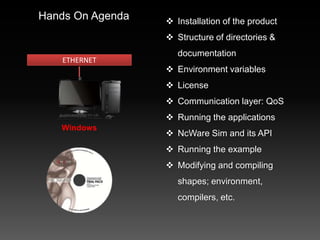
Hands On Agenda    Installation of the product
                   Structure of directories &
                     documentation
   ETHERNET
                   Environment variables
                   License
                   Communication layer: QoS
                   Running the applications
   Windows
                   NcWare Sim and its API
                   Running the example
                   Modifying and compiling
                     shapes; environment,
                     compilers, etc.
QUESTIONS?
Please address any questions about this presentation to:


         José Ramón Martínez Salio
         Technical Presales Director
         jrmartinez@nads.es

 @NADS_news            /NEXTELADS     jrmses     Nextel Aerospace

Simware framework hello world: A webinar

  • 1.
    SimWare Framework the full simulation What is HLA raised to the power of DDS?
  • 2.
    Speakers José Ramón Martínez José Carlos Díaz MSc Industrial Engineering MSc Computing Presales Team Leader International Sales Manager NADS NADS jrmartinez@nads.es jcdiaz@nads.es
  • 3.
    AGENDA  Briefintroduction to SimWare  Installation and hands on of SimWare on Windows and Linux  Questions Total time 45 minutes
  • 4.
  • 5.
    SimWare: creating simulators SimWareis a simulation framework for creating new simulators from scratch • Create new simulators without seeing any code • Care only about data model • Simulation backbone is DDS
  • 6.
    Modeler: Data modelingfrom the FOM MULATION HLA data model  Modeler is the tool for modelling data HLA-Style  Objetcs and interactions  HLA data types  Data models can be saved and loaded  The tool generates the data library automatically
  • 7.
    SimDeveloper: Simulation modelsyou can really reuse Based on Matlab/Simulink for making your simulation models inside SimWare framework  Build your simulation modules with all the power of Matlab/Simulink  Test your simulation logic  Reuse your simulation modules You don´t need programming skills!
  • 8.
    Simware PowerLink: Databridge made easy HLA Mäk federation HLA PITCH federation No programming skills are needed!!!
  • 9.
    NcWare SIM: Simplebut powerful API Create simulator Create publisher ncware::Simulation =ncware::SimFactory::createSimulation("1","airplane", ncware::SimPublisher<Vector3D> * dataPublisher; ncware::TransportType::DDS_OPENSPLICE ); dataPublisher=ncware::SimFactory::createPublisher<Vector3D>(simulationExample); simulationExample->Join(); dataPublisher->registerInstanceName (“Boeing747”); Vector3D * dataVector3D = dataPublisher->Declare( ); dataVector3D->x = 1; dataVector3D->y = 1; dataVector3D->z = 1; dataPublisher ->Send (“Boeing747”, dataVector3D ); Nombre Descripción DDS_OPENSPLICE Simulation over DDS using the implementation of OpenSplice. Create subscriber HLA13_DMSO Simulation using DMSO RTI ncware::ObjectListener<Vector3D> * listenerVector3D = new userListener(); with HLA13. ncware::SimSubscriber<Vector3D> * dataSubscriber = HLA13_MAK Simulation using MAK RTI with ncware::SimFactory::createSubscriber<Vector3D> (simulationExample, listenerVector3D); dataSubscriber->Declare(); HLA13. HLA13_PITCH Simulation using PITCH RTI void userListener::attribute_received (Vector3D * Data, std::string const & instanceName) with HLA13. { std::cout << “ Instance name = " << instanceName << std::endl; HLA1516_NEXTEL Simulation using SIMWARE std::cout << " Coordinate X = " << data->x << std::endl; std::cout << " Coordinate Y = " << data->y << std::endl; RTI. std::cout << " Coordinate Z = " << data->z << std::endl; HLA1516_MAK Simulation using MAK RTI with } HLA1516. HLA1516_PITCH Simulation using PITCH RTI with HLA1516.
  • 10.
    SimWare: managing simulators SimWareis a simulation framework for managing new simulators and old simulators in joint simulation • Manage your new simulator • Control the instances of the simulation • Manage old simulators in joint simulations
  • 11.
    eHost: Simulation management Configuration file eHost - <config> <EJEC nid="2" id="3" name="EJEC" HlaFed="Aislado" HlaSom="Som.xml" SchedFrec="25" HTime="5" GTime="3" TTime="0" UTime="3" NotIni="no" NotFin="no" NotCierre="no" Simulation Critico="si" NotGrab="si" /> - <EHOST4 nid="2" id="4" name="MOTOR1" SchedSecuencial="si" engine NotIni="si" NotFin="si" NotCierre="no" Critico="si" NotGrab="si"> <Mod0 nid="2" id="16" name="Modulo_ModCIRCLE" type="Modulo_ModCIRCLE" SchedFrec="50" SchedOrden="0" SchedPrio="1" SchedOffset="0" NotIni="no" NotDisc="no" NotEstab="no" NotFin="si" NotCierre="no" Critico="si" NotGrab="si" /> </EHOST4> </config> - <!-- Scheduler ACS Simulation engine  Scheduler: Is an advanced scheduler for controlling the real time clock and the state machine. It coordinates and balances many Simulation Engines that are in different nodes.  Simulation Engines: Are the simulation engines, manage the Simulation modules in each simulation node.
  • 12.
    ACS: Application toControl Simulations  ACS—Application to Control SimWare simulations, is a GUI that allows to manage SimWare state machine and simulation assets’ parameters during execution
  • 13.
    SimWare: joint simulations WithSimWare you can manage joint simulator of existing HLA and DIS simulators • Connect and control • DIS • Pitch HLA • Mäk HLA • DDS • Add DDS live simulations
  • 14.
    Hands on Believing isgood, seeing is better… doing it is even better
  • 15.
    Hands On Agenda  Installation of the product  Structure of directories & documentation ETHERNET  Environment variables  License  Communication layer: QoS  Running the applications Windows  NcWare Sim and its API  Running the example  Modifying and compiling shapes; environment, compilers, etc.
  • 16.
  • 17.
    Please address anyquestions about this presentation to: José Ramón Martínez Salio Technical Presales Director jrmartinez@nads.es @NADS_news /NEXTELADS jrmses Nextel Aerospace