Similarity
Check
What is Similarity Check?
Our Similarity Check service offers publishers with a way to
actively engage in efforts to prevent plagiarism. 

Members are provided with access to Turnitin’s powerful text
comparison tool, iThenticate. This allows them to compare
their own documents against the largest comparison database
of scientific, technical and medical content in the world. 

Similarity Check members contribute their own published
content into iThenticate’s database of full-text literature.
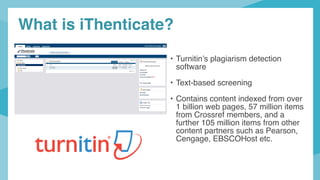
• Turnitin’s plagiarism detection
software
• Text-based screening
• Contains content indexed from over
1 billion web pages, 57 million items
from Crossref members, and a
further 105 million items from other
content partners such as Pearson,
Cengage, EBSCOHost etc.
What is iThenticate?
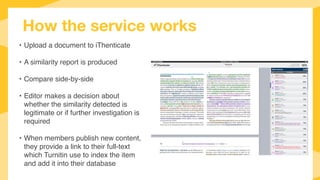
How the service works
• Upload a document to iThenticate
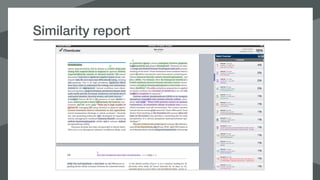
• A similarity report is produced
• Compare side-by-side
• Editor makes a decision about
whether the similarity detected is
legitimate or if further investigation is
required
• When members publish new content,
they provide a link to their full-text
which Turnitin use to index the item
and add it into their database
Who’s using Similarity Check?
Over 1,300 participating Crossref members
Average 405,209 manuscripts screened every month this year
Increase in usage from publishers in Japan, Brazil, South Korea and Turkey
Publishers are putting more time and effort into their plagiarism policies
• resources (staff and time)
• cost
• workflow
• education
• follow-up action
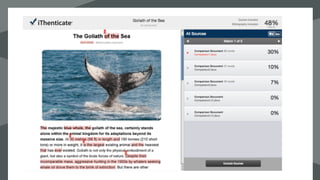
Similarity report
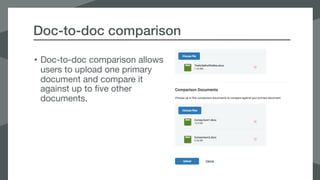
Doc-to-doc comparison
• Doc-to-doc comparison allows
users to upload one primary
document and compare it
against up to five other
documents.
Doc-to-doc comparison
What issues are publishers looking for
• Poor, missing, or incomplete references (can be fixed)

• Self-plagiarism/text recycling (can be fixed)

• Unattributed use of parts of another person’s work

• Submitting another person’s work as your own

• Is the author attempting to mislead/misrepresent?
Who can join Similarity Check?
• Open to Crossref Publisher members in good standing
and who are actively assigning article-level DOIs to their
content.

• Publisher’s DOI metadata must include a URL in the
<iparadigms> field which points to their full-text HTML,
PDF or plain text content.
Participating: What are as-crawled URLs?
• Link used by Turnitin’s crawler service to identify
and index the content associated with your DOIs

• The as-crawled URL points the location of the full-
text content, either PDF or HTML, associated with
the DOI. 

• New DOIs: The URL can be included as part the
deposit metadata

• Existing DOIs may be updated
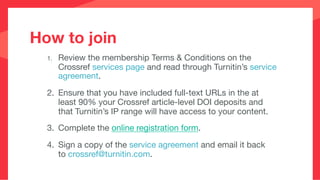
1.	 Review the membership Terms & Conditions on the
Crossref services page and read through Turnitin’s service
agreement.

	 2.	 Ensure that you have included full-text URLs in the at
least 90% your Crossref article-level DOI deposits and
that Turnitin’s IP range will have access to your content.

	 3.	 Complete the online registration form.

	 4.	 Sign a copy of the service agreement and email it back
to crossref@turnitin.com.
How to join
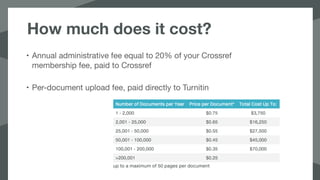
How much does it cost?
• Annual administrative fee equal to 20% of your Crossref
membership fee, paid to Crossref

• Per-document upload fee, paid directly to Turnitin
Interested in joining?
https://www.crossref.org/services/similarity-check/
Email your questions to similaritycheck@crossref.org
Thank you!

Similarity Check - Crossref LIVE Hannover

  • 1.
  • 2.
    What is SimilarityCheck? Our Similarity Check service offers publishers with a way to actively engage in efforts to prevent plagiarism. Members are provided with access to Turnitin’s powerful text comparison tool, iThenticate. This allows them to compare their own documents against the largest comparison database of scientific, technical and medical content in the world. Similarity Check members contribute their own published content into iThenticate’s database of full-text literature.
  • 3.
    • Turnitin’s plagiarismdetection software • Text-based screening • Contains content indexed from over 1 billion web pages, 57 million items from Crossref members, and a further 105 million items from other content partners such as Pearson, Cengage, EBSCOHost etc. What is iThenticate?
  • 4.
    How the serviceworks • Upload a document to iThenticate • A similarity report is produced • Compare side-by-side • Editor makes a decision about whether the similarity detected is legitimate or if further investigation is required • When members publish new content, they provide a link to their full-text which Turnitin use to index the item and add it into their database
  • 5.
    Who’s using SimilarityCheck? Over 1,300 participating Crossref members Average 405,209 manuscripts screened every month this year Increase in usage from publishers in Japan, Brazil, South Korea and Turkey Publishers are putting more time and effort into their plagiarism policies • resources (staff and time) • cost • workflow • education • follow-up action
  • 6.
  • 7.
    Doc-to-doc comparison • Doc-to-doccomparison allows users to upload one primary document and compare it against up to five other documents.
  • 8.
  • 9.
    What issues arepublishers looking for • Poor, missing, or incomplete references (can be fixed) • Self-plagiarism/text recycling (can be fixed) • Unattributed use of parts of another person’s work • Submitting another person’s work as your own • Is the author attempting to mislead/misrepresent?
  • 10.
    Who can joinSimilarity Check? • Open to Crossref Publisher members in good standing and who are actively assigning article-level DOIs to their content. • Publisher’s DOI metadata must include a URL in the <iparadigms> field which points to their full-text HTML, PDF or plain text content.
  • 11.
    Participating: What areas-crawled URLs? • Link used by Turnitin’s crawler service to identify and index the content associated with your DOIs • The as-crawled URL points the location of the full- text content, either PDF or HTML, associated with the DOI. • New DOIs: The URL can be included as part the deposit metadata • Existing DOIs may be updated
  • 12.
    1. Review themembership Terms & Conditions on the Crossref services page and read through Turnitin’s service agreement. 2. Ensure that you have included full-text URLs in the at least 90% your Crossref article-level DOI deposits and that Turnitin’s IP range will have access to your content. 3. Complete the online registration form. 4. Sign a copy of the service agreement and email it back to crossref@turnitin.com. How to join
  • 13.
    How much doesit cost? • Annual administrative fee equal to 20% of your Crossref membership fee, paid to Crossref • Per-document upload fee, paid directly to Turnitin
  • 14.
  • 15.