The document outlines the customer journey mapping process, focusing on understanding customer experiences and optimizing interactions across various touchpoints. It includes insights into the stages of the customer journey, elements for effective mapping, and tools to enhance stakeholder engagement. Additionally, it highlights the importance of performance indicators and customer satisfaction metrics for continuous improvement.
Customer Journey MappingOutline
2
Understanding Customer
Mapping Purpose
01
Information Required
in each stage of
Customer Journey
06
Customer Mapping
Journey Cycle
07
Customer Journey
Analysis at each stage
08
Customer
Journey Layers
09
Channels in each
stage of journey
10
Customer Journey
Map Table11
Customer Journey
Mapping Templates
12
Capturing Customer
Perception based
on their Experience
13
Illustrating Customers
Journey across
Multiple Touchpoints
14
Incorporate
Performance
Indicators
15
Optimize Stakeholders’
understanding, Engagement,
&Decision-Making based on
the Journey map Story
16
Customer Journey
detailed Process
17
Customer Journey Map
Example Slide
18
Customer Journey
Mapping Tools
19
Customer
Satisfaction Metrics
20
Objectives, Needs, Feelings
& Barriers of Customer
Journey Mapping
02
Key Statistics of Customer
Mapping Journey
03
Elements of Customer
Journey Mapping
04
Customer Journey
Mapping Steps
05
3.
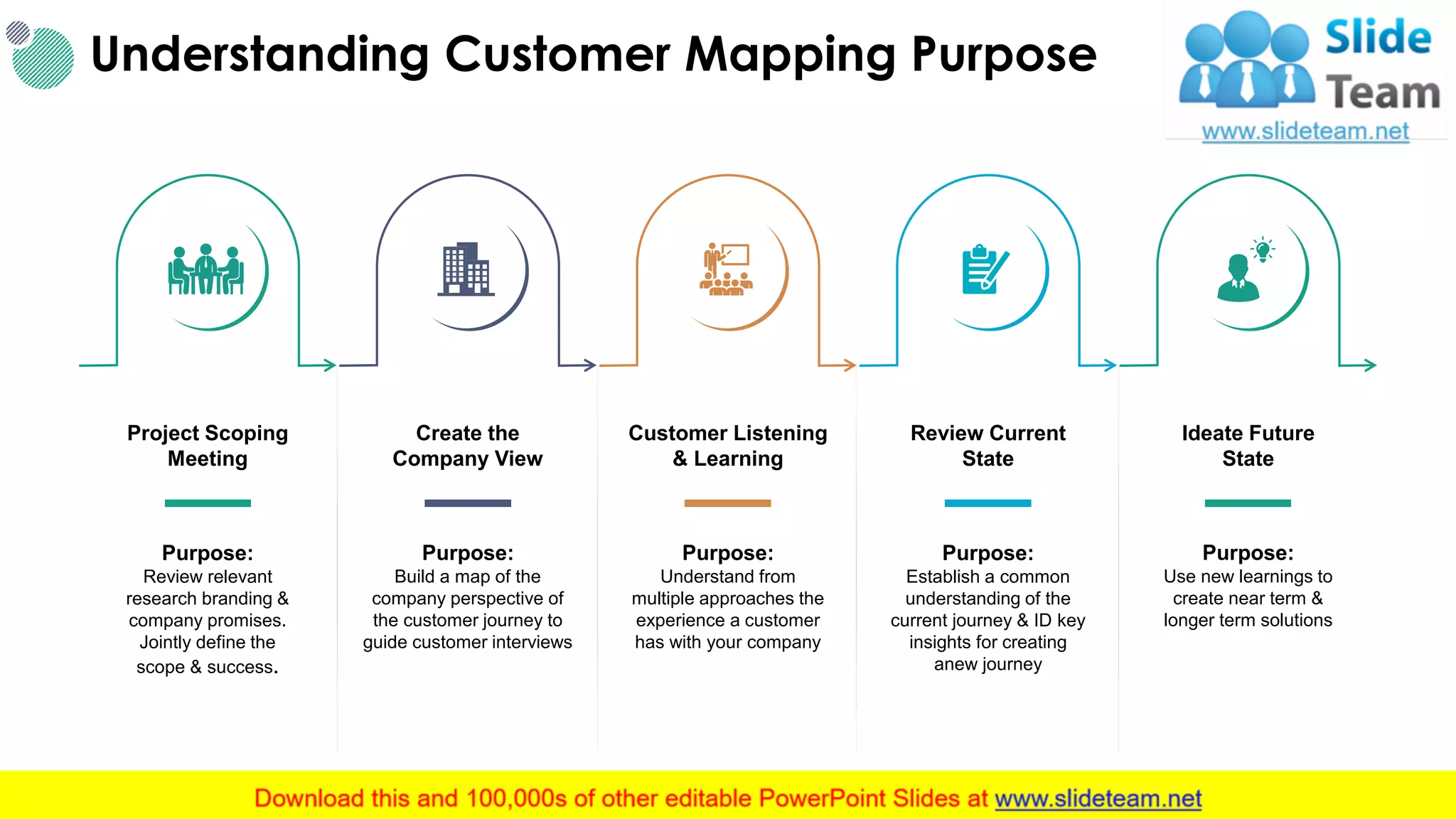
Understanding Customer MappingPurpose
3This slide is 100% editable. Adapt it to your needs and capture your audience's attention.
Create the
Company View
Purpose:
Build a map of the
company perspective of
the customer journey to
guide customer interviews
Project Scoping
Meeting
Purpose:
Review relevant
research branding &
company promises.
Jointly define the
scope & success.
Customer Listening
& Learning
Purpose:
Understand from
multiple approaches the
experience a customer
has with your company
Review Current
State
Purpose:
Establish a common
understanding of the
current journey & ID key
insights for creating
anew journey
Ideate Future
State
Purpose:
Use new learnings to
create near term &
longer term solutions
4.
Objectives, Needs, Feelings& Barriers of Customer Journey Mapping
4
Objectives
Trigger
a Need
Understand
the Need
Provide
Solutions
Act
Needs
• Remind or trigger a need
• Recognize I have a problem
• Address a pain point
• I don’t know what I don’t
know
• Draw me a scenario
• I have questions
• Deal with the immediate need
• Be relevant
• Personalize
• Partnership
• Privacy / Trust
• Clarify
• Validate
• Satisfaction
• Reality
Feelings
• Anxious
• Defensive
• Distracted
• Hopeful
• Ambivalent
• Curious
• Guarded
• Open
• Interested
• Frustrated
• Excited
• Feel good
• Resolved
• Loyal
• Confident
Barriers
Relevance, Trust, Fear,
Acknowledgement, time,
Convenience, Distraction
Style, Approach, Language,
Expectations, time,
Knowledge of Client
Literacy, risk tolerance,
Convenience, time, Commitment
Attract Interact Engage Convert
5.
5
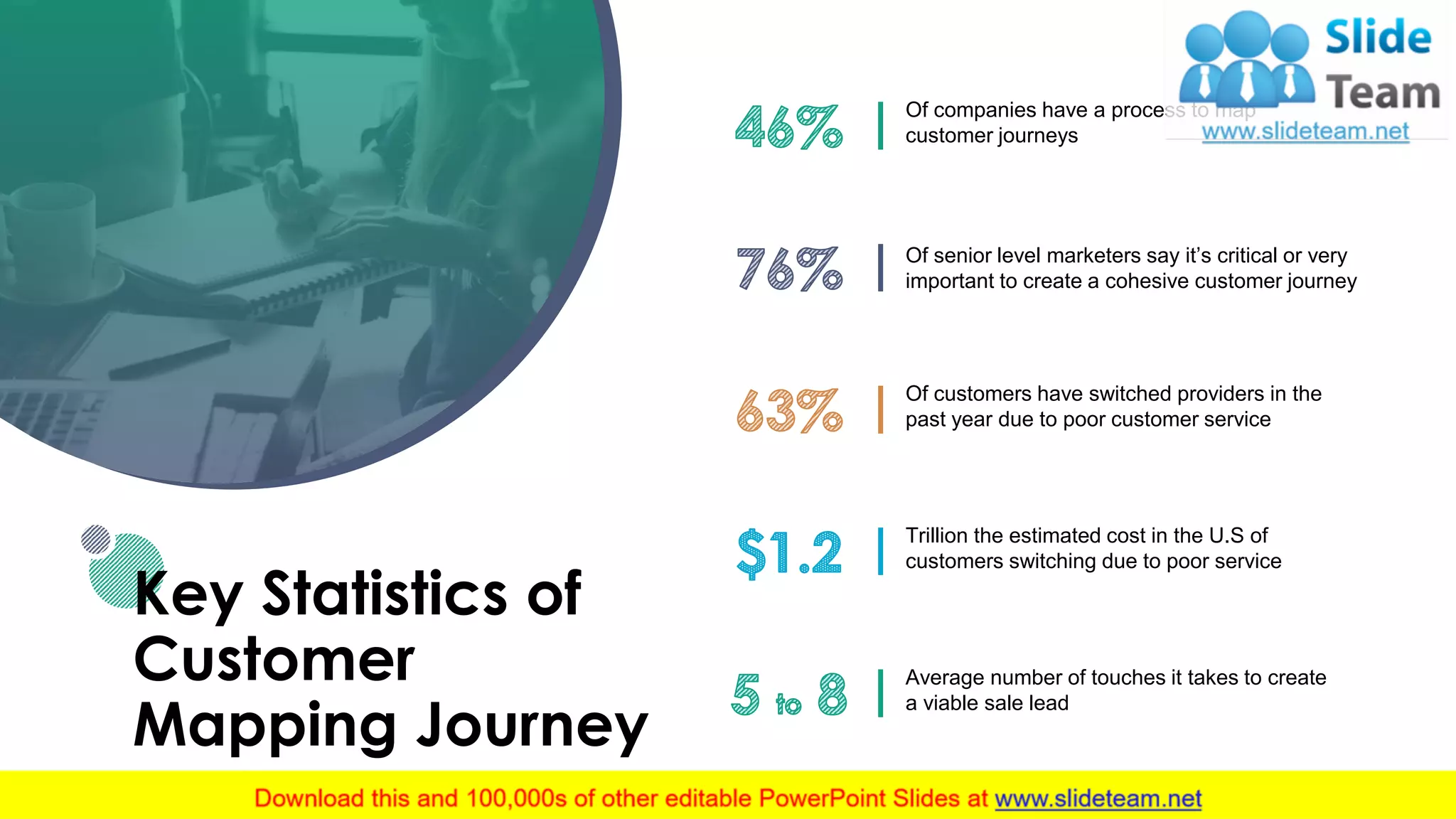
Key Statistics of
Customer
MappingJourney
Of companies have a process to map
customer journeys
Of senior level marketers say it’s critical or very
important to create a cohesive customer journey
Of customers have switched providers in the
past year due to poor customer service
Trillion the estimated cost in the U.S of
customers switching due to poor service
Average number of touches it takes to create
a viable sale lead
6.
Elements of CustomerJourney Mapping
6
Your
Customers
Thoughts
How do customers perceive &
evaluate their experience? What do
they expect?
Actions
What steps do your customers
take to meet their needs?
Feelings
What emotions do your customers
show in their customer journey?
Where do the hights & lows occur?
Quantitative & Quantitative
Research
Key Findings & Actionable insights
Touch points, Channels &
lifecycle stages
This slide is 100% editable. Adapt it to your needs and capture your audience's attention.
7.
7
Customer Journey
Mapping Steps
Planning
•Identify your map’s scope & scale & your
mapping method & team
Data Gathering
• Schedule & conduct any new customer
research/ interviews
Map Creation
• Create a framework
• Synch metrics, customer data & collateral with touch points
Identify & Analyze key findings &
Actionable Insights
• Collaborate with the mapping team & analyze map
• Score, rank & prioritize opportunities
Investigate Issue & Opportunities
• Your text here
• Your text here
Present your findings & plan for
continuous Improvement
• Develop recommendations 7 create roadmap for change
8.
Information Required ineach stage of Customer Journey
8This slide is 100% editable. Adapt it to your needs and capture your audience's attention.
Pre - Trigger Trigger Consideration Purchase Experience Loyalty
• Brand name
• Brand value
prop
• Brand reputation
• Timely & relevant content
• Peer Opinions
• Expert Opinions
• Product comparisons
• Product claims & side effects
• Product pricing & coupons
• Product locator
• Shopping list
guides
• Coupon
availability
• Step - by –
instructions
• Associated
content
• Detailed efficacy
• expectations
• Preventative
information
• Seasonal
content
• Complimentary
product
• New savings
• Exclusive
access
InformationNeeds
Define Refine Purchase
9.
Customer Mapping JourneyCycle
9
• Searches Internet
Need Generation
• Calls contact center
Initial Consideration
• First Interaction
• Subsequent Interactions
Engagement
• Studies Proposal
Evaluation
• Signs contract
• Final presentation
Moment of Purchase
• Training
• Testing
• Invoice raise
Delivery/ Installation
• Proactive Maintenance
• Follow up on trouble ticket
Usage
This slide is 100% editable. Adapt it to your needs and capture your audience's attention.
After
Loyalty
Curve
Before
During
10.
Buyer Stage AwarenessConversion Loyalty
Time Frame
Day 1 – 2
Report: time to transaction
Day 3
Report: time to transaction
Day 21
Report: time to review
Buyer’s goal
Find lasting motivation to live a
healthier life
Start an exercise plan & feel
comfortable in gym clothes
See improvements, buy danced
workout gear
Brand’s goal
Educate, build trust, opt into email
newsletter
Inform on production, add to cart,
purchase
Product review, repeat purchase,
feedback
Channels
• Facebook
• Instagram Pinterest
• Google
• Direct
• Email
• Google
• Direct
• Email
• Facebook group
Pages
/Home
/Blogs/ Motivation
/Blogs/ fitness – research
/Blogs/ Workout - ebook
/Home
/Products/ Shorts
/Products/ sizing – chart
/Cart
/Checkout
/Blogs/ fitness – research
/Product/ rings
/Products/ Kettleblls
/Blogs/fitness - Challenge
Customer Journey Analysis at each statge
10This slide is 100% editable. Adapt it to your needs and capture your audience's attention.
11.
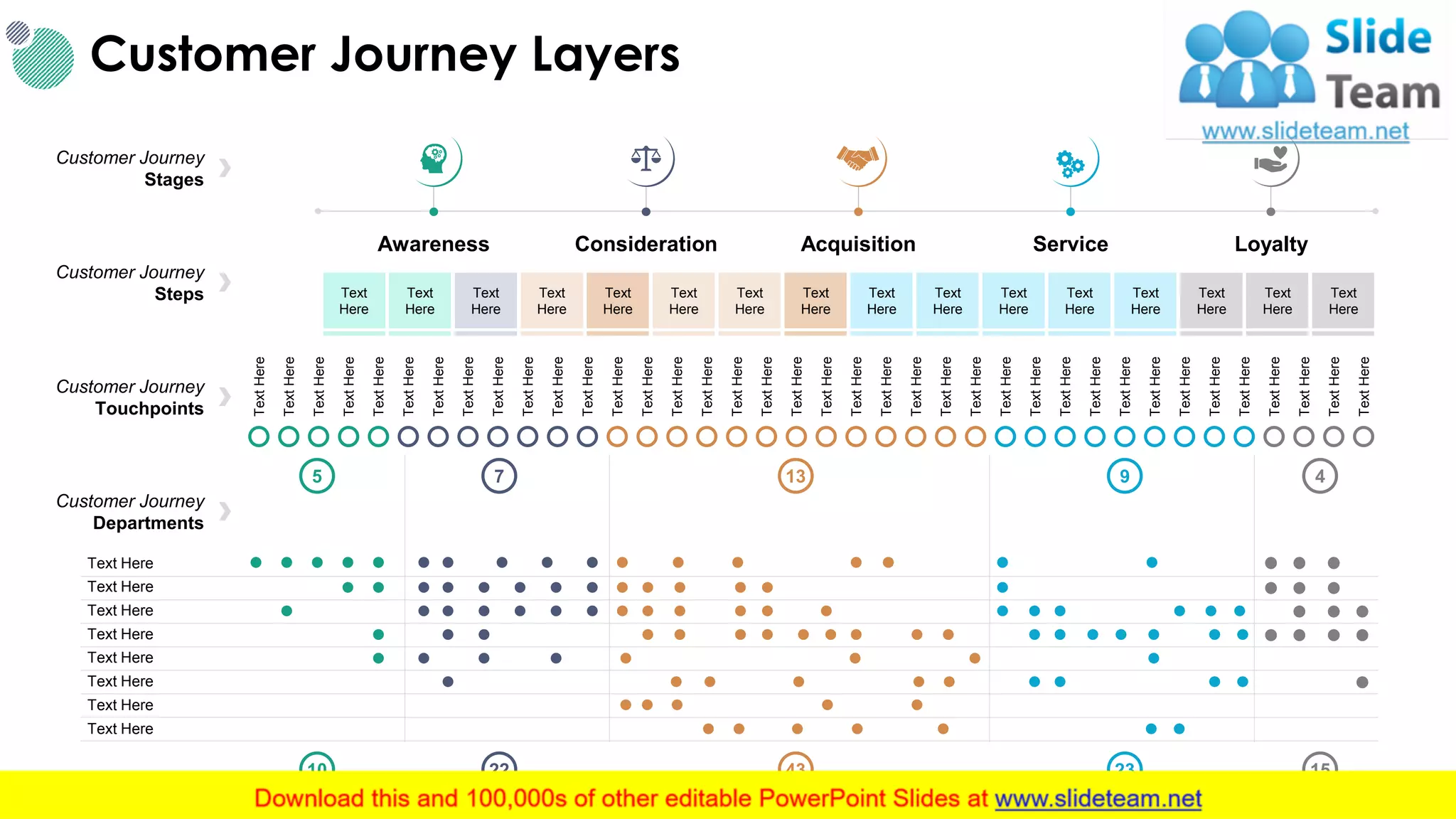
Customer Journey Layers
11
AwarenessConsideration Acquisition Service Loyalty
Text
Here
Text
Here
Text
Here
Text
Here
Text
Here
Text
Here
Text
Here
Text
Here
Text
Here
Text
Here
Text
Here
Text
Here
Text
Here
Text
Here
Text
Here
Text
Here
TextHere
TextHere
TextHere
TextHere
TextHere
TextHere
TextHere
TextHere
TextHere
TextHere
TextHere
TextHere
TextHere
TextHere
TextHere
TextHere
TextHere
TextHere
TextHere
TextHere
TextHere
TextHere
TextHere
TextHere
TextHere
TextHere
TextHere
TextHere
TextHere
TextHere
TextHere
TextHere
TextHere
TextHere
TextHere
TextHere
TextHere
TextHere
Text Here
Text Here
Text Here
Text Here
Text Here
Text Here
Text Here
Text Here
5
10
7 13 9 4
22 43 23 15
Customer Journey
Stages
Customer Journey
Steps
Customer Journey
Touchpoints
Customer Journey
Departments
12.
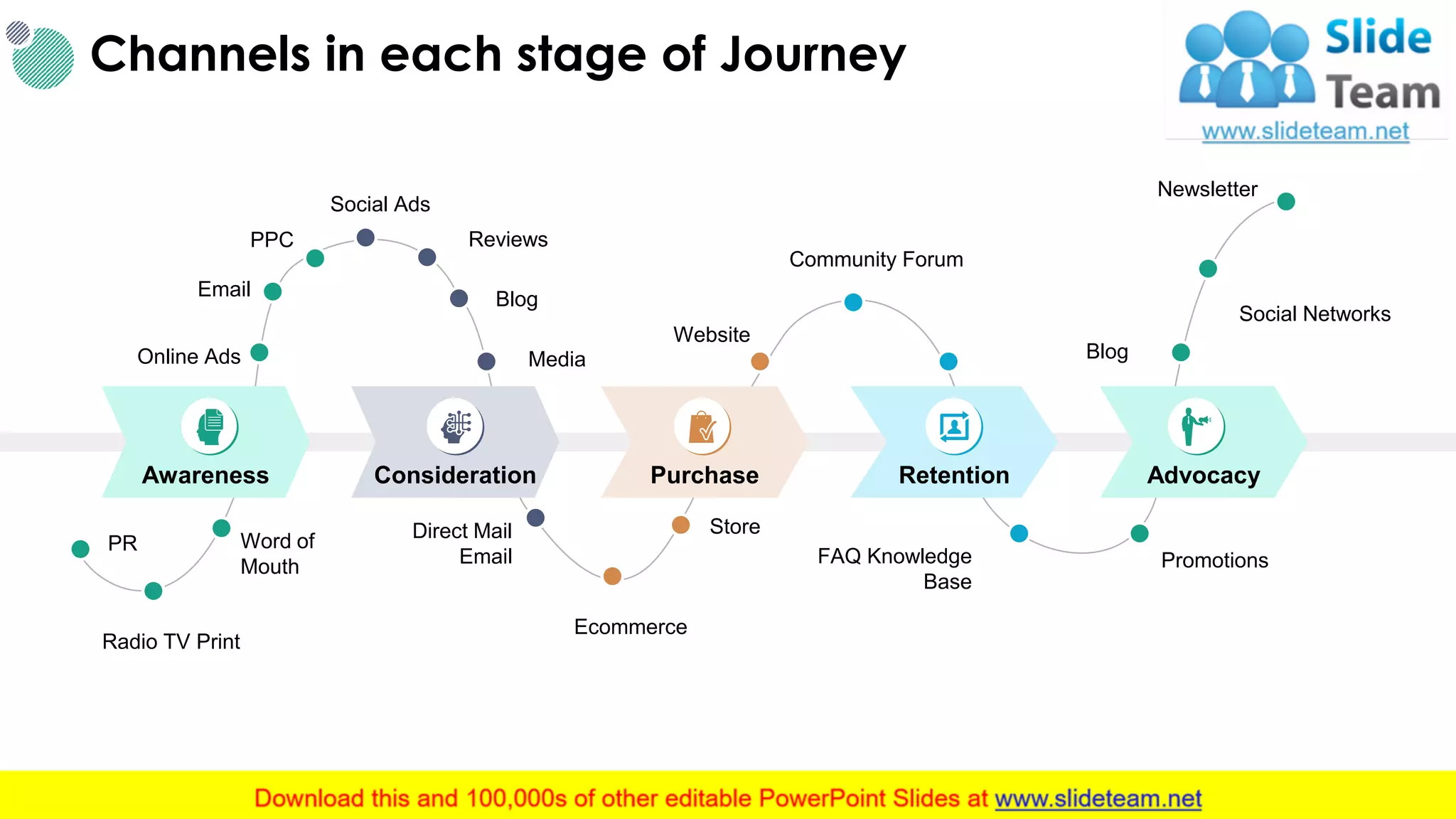
Channels in eachstage of Journey
12
Online Ads
Email
PPC
Social Ads
Reviews
Blog
Media
Website
Community Forum
Blog
Social Networks
Newsletter
PromotionsFAQ Knowledge
Base
Store
Ecommerce
Direct Mail
Email
Word of
Mouth
Radio TV Print
PR
Awareness Consideration Purchase Retention Advocacy
This slide is 100% editable. Adapt it to your needs and capture your audience's attention.
13.
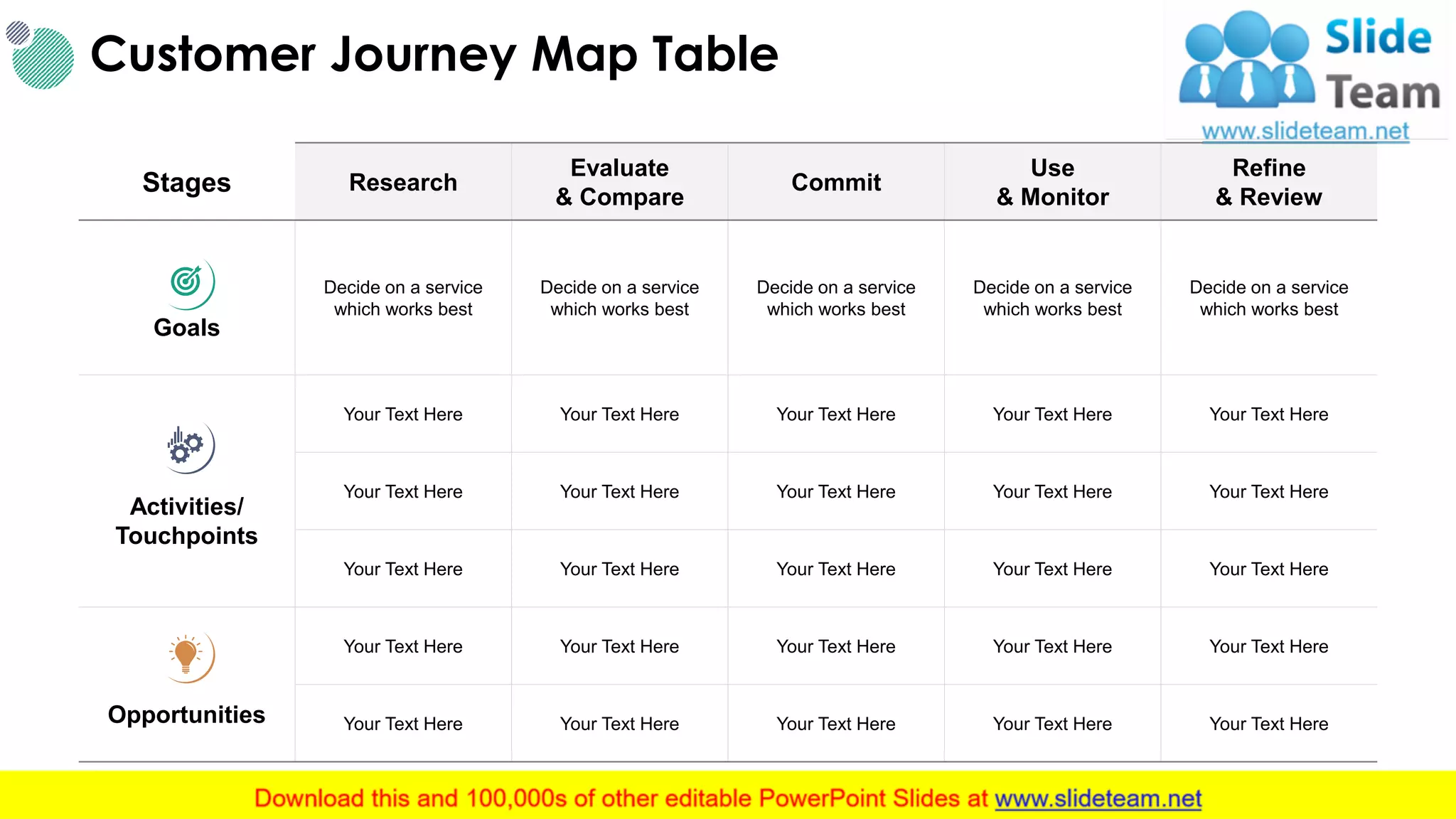
Stages Research
Evaluate
& Compare
Commit
Use
&Monitor
Refine
& Review
Goals
Decide on a service
which works best
Decide on a service
which works best
Decide on a service
which works best
Decide on a service
which works best
Decide on a service
which works best
Activities/
Touchpoints
Your Text Here Your Text Here Your Text Here Your Text Here Your Text Here
Opportunities
Your Text Here Your Text Here Your Text Here Your Text Here Your Text Here
Customer Journey Map Table
13This slide is 100% editable. Adapt it to your needs and capture your audience's attention.
14.
Elements of CustomerJourney
Aware Query/ PoS Pricing Purchase
Post Sales
Support
Complaint Upgrade Renew
Website
Phone
Face to
face
Word of
mouth
Email
Post
Customer Journey Across Various Touchpoints
14
CustomerJourneyTouchpoints
This slide is 100% editable. Adapt it to your needs and capture your audience's attention.
15.
Stage Awareness ConsiderationDecision Delight
Touch Point
Facebook
Posts
Facebook
page
Website Email enquiry Phone call School Tour Sign up Referral
Customer
Process
Browsed
Facebook &
stumbled upon
your facebook
posts
Browsed
through the
photos &
albums
Searched and
arrived
through the
website
Signed up
email enquiry
Scheduled a
phone call to
enquiry more
Asked about
School
curriculum
Decided to
enroll after
pricing
Referred a
friend after 2
months
Experience
Customer Journey Mapping Template
15This slide is 100% editable. Adapt it to your needs and capture your audience's attention.
16.
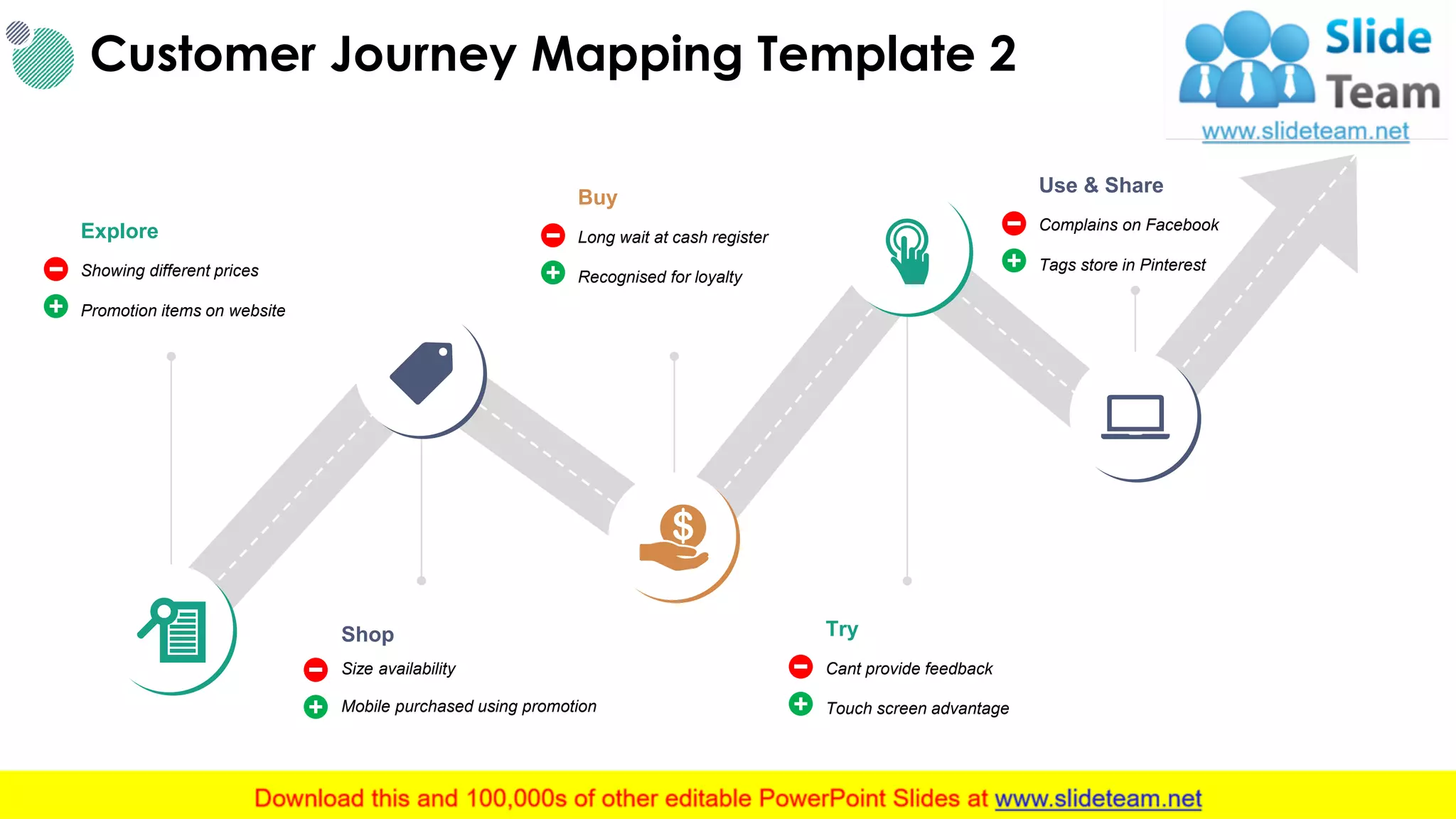
Customer Journey MappingTemplate 2
16
Explore
Showing different prices
Promotion items on website
Shop
Size availability
Mobile purchased using promotion
Buy
Long wait at cash register
Recognised for loyalty
Try
Cant provide feedback
Touch screen advantage
Use & Share
Complains on Facebook
Tags store in Pinterest
This slide is 100% editable. Adapt it to your needs and capture your audience's attention.
17.
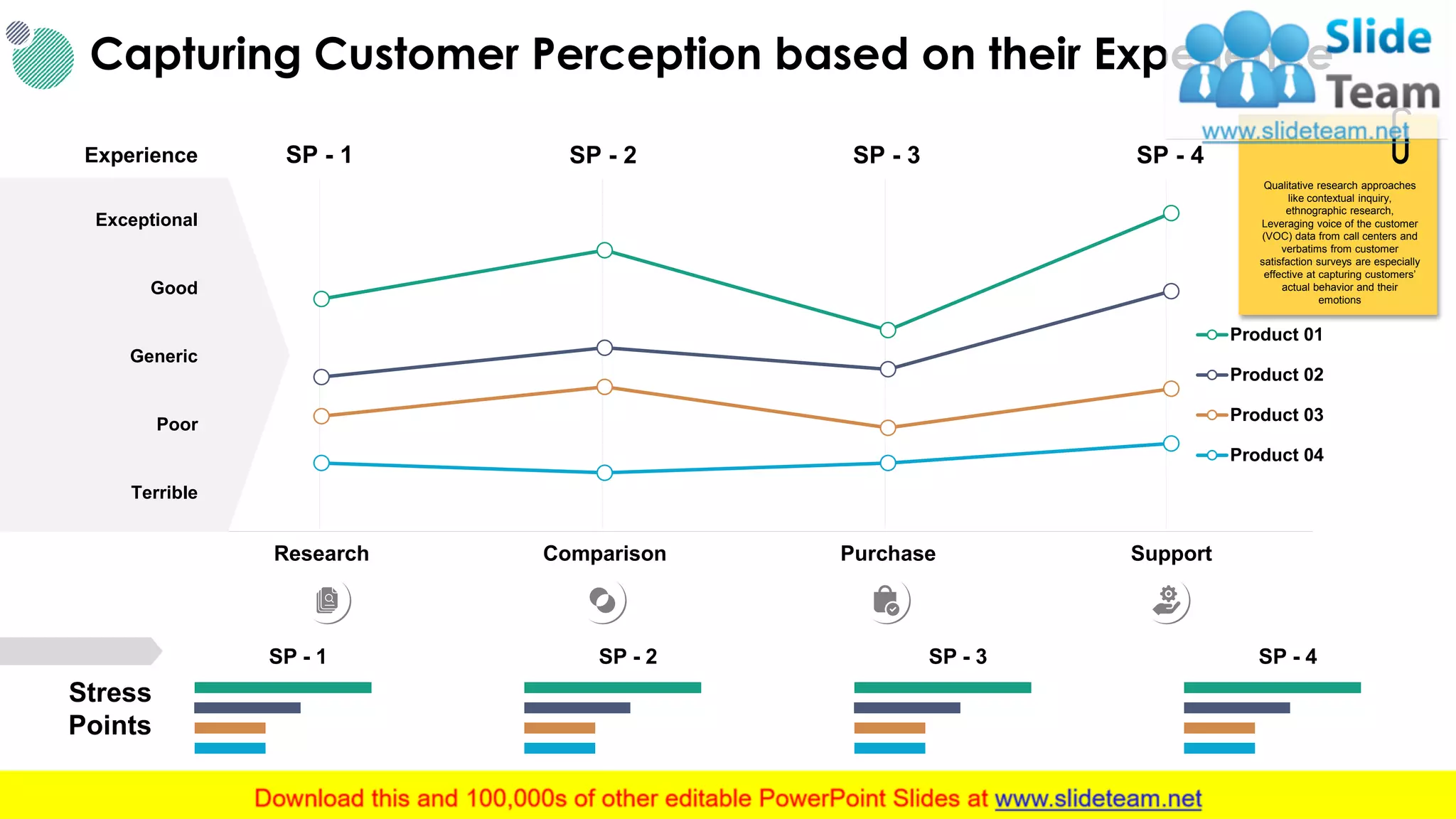
Research Comparison PurchaseSupport
Product 01
Product 02
Product 03
Product 04
Capturing Customer Perception based on their Experience
17
SP - 1 SP - 2 SP - 3 SP - 4
Stress
Points
SP - 1 SP - 2 SP - 3 SP - 4
Terrible
Poor
Generic
Exceptional
Experience
Good
Qualitative research approaches
like contextual inquiry,
ethnographic research,
Leveraging voice of the customer
(VOC) data from call centers and
verbatims from customer
satisfaction surveys are especially
effective at capturing customers’
actual behavior and their
emotions
This slide is 100% editable. Adapt it to your needs and capture your audience's attention.
18.
Illustrating Customers JourneyAcross Multiple Touchpoints
18
FY' 16 FY' 17 FY' 18 FY' 19
Negative
Neutral
Positive
Your
Text Here
Your
Text Here
Your
Text Here
Your
Text Here
Your
Text Here
Your
Text Here
Your
Text Here
Your
Text Here
Your
Text Here
Your
Text HereYour
Text Here
Your
Text Here
See potential gaps in their
customer’s experience between
touchpoints
Assess the impact of these gaps
Provide insights into how to
optimally orchestrate the
customer experience across
touchpoints to drive business
value.
Customer Experience Expectations & Perception Map
This slide is 100% editable. Adapt it to your needs and capture your audience's attention.
19.
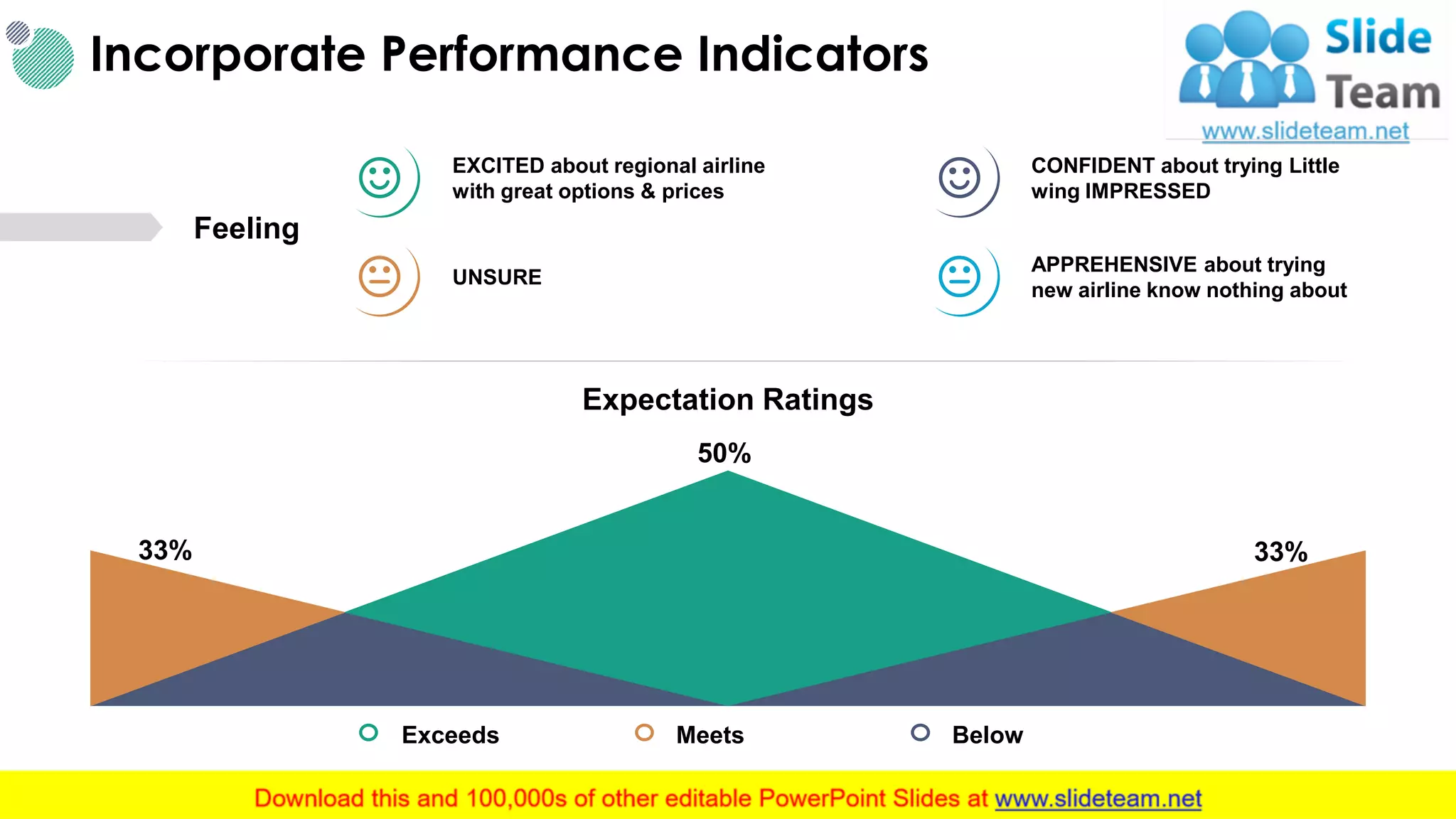
Incorporate Performance Indicators
19
ExceedsMeets Below
33% 33%
50%
Expectation Ratings
EXCITED about regional airline
with great options & prices
CONFIDENT about trying Little
wing IMPRESSED
UNSURE
APPREHENSIVE about trying
new airline know nothing about
Feeling
This slide is 100% editable. Adapt it to your needs and capture your audience's attention.
20.
Touch Point 1Touch Point 2 Touch Point 3 Touch Point 4
Actions Your Text Here Your Text Here Your Text Here Your Text Here
Thinking
Feeling
Opportunities
Optimize Stakeholder’s Understanding, Engagement, and
Decision-making Based on the Journey Map story
20This slide is 100% editable. Adapt it to your needs and capture your audience's attention.
21.
21
Customer Journey
Detailed Process
Attract
&Welcome
Convenience
• Single phone number to interact with the
whole pf organisation
• Calls answered by agents within 30seconds.
Select
Choice
• Customer given choice of key pay (IVR)
payment or agent assisted service
Wait
Better Queuing
• Update on wait time throughout with call
back option repeated
Serve
Range of Transactions
• Simple & easy payment gateway
Wrap-Up
Education
• Informed of other service offerings
• Offer to complete transactions
Feedback
• Intuitive & simple feedback.
• Customer thanked at time of service completion
Feedback
& Exit
22.
Customer Journey MapExample Slide
22
Navigate
Website
Visit
FAQ Section
Submit
a Request
Follow up from
Customer Service
Resolution
Customer
Process
• Arrive at website
• Navigate for help
section
• Look for relevant section
& answers
• Search contact numbers
• Find query form
• Submit Query
• Wait for call back
• Can it be dealt or
referred ?
• Problem is solved by
customer
Internal Process Internal process example Internal process example Internal process example Internal process example Internal process example
Experience
Example of positive
experience
Example of negative
experience
Example of negative
experience
Example of average
experience
Example of positive
experience
Improvements &
Key Learnings
Improvement or learning
to maintain high
performance
Improvement or learning to
maintain high performance
Improvement or learning
to maintain high
performance
Improvement or learning
to maintain high
performance
Improvement or learning
to maintain high
performance
This slide is 100% editable. Adapt it to your needs and capture your audience's attention.
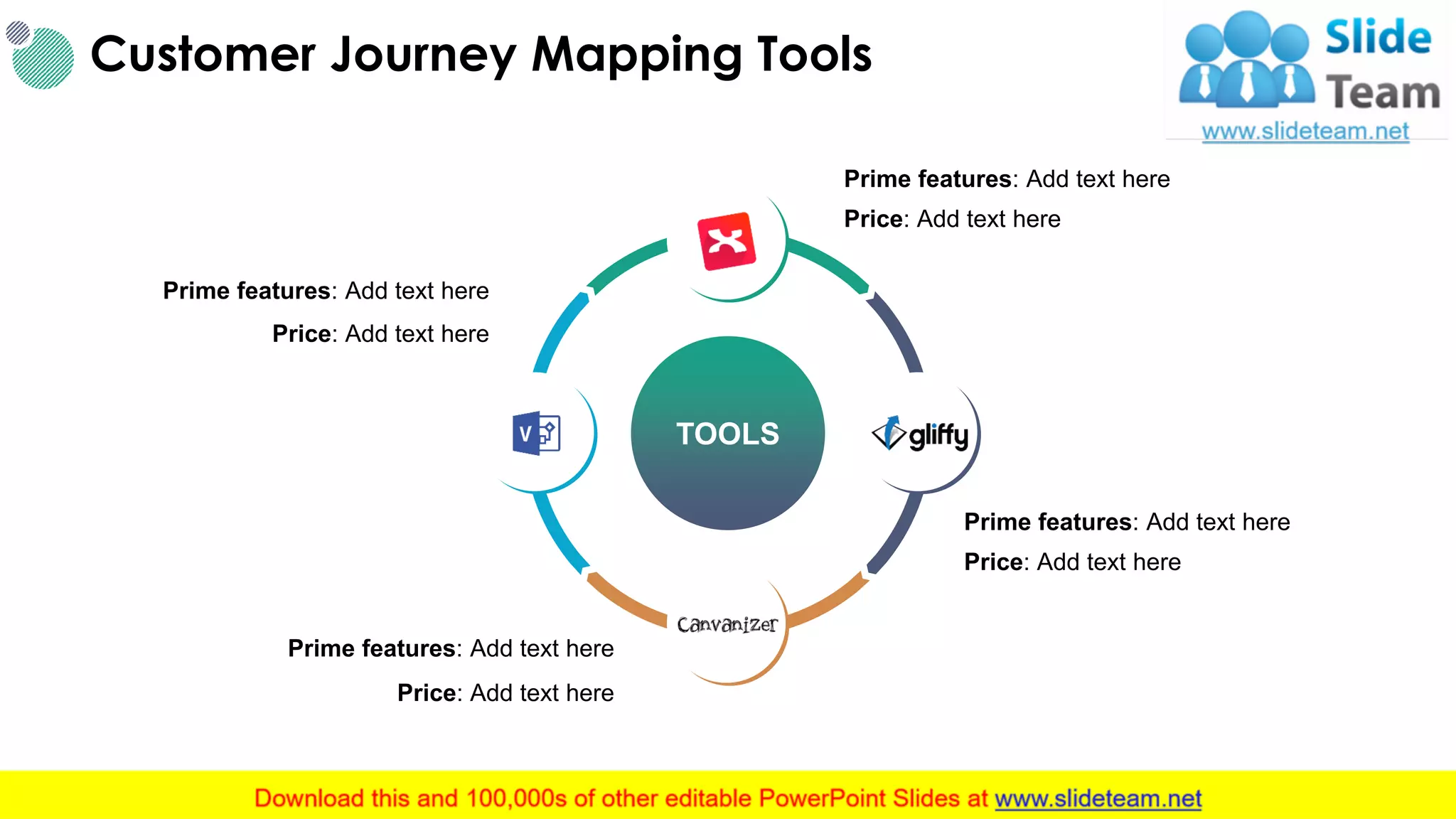
23.
Customer Journey MappingTools
23This slide is 100% editable. Adapt it to your needs and capture your audience's attention.
TOOLS
Prime features: Add text here
Price: Add text here
Prime features: Add text here
Price: Add text here
Prime features: Add text here
Price: Add text here
Prime features: Add text here
Price: Add text here
24.
Customer Satisfaction Metrics
24
AverageFirst
Reply Time
Average
Handle Time
Average
Reply Time
Replies
Per Ticket
24
hours
12
4
min
15
min
This slide is 100% editable. Adapt it to your needs and capture your audience's attention.
26
Presentation Continues
In 15Minutes
Coffee
Break
This is a representative image, and should be replaced by
your own image. Just right click and replace image.
Donut Pie Chart
28
%
10%
TextHere
This graph/chart is linked to
excel, and changes automatically
based on data. Just left click on it
and select “Edit Data”.
%
20%
Text Here
This graph/chart is linked to
excel, and changes automatically
based on data. Just left click on it
and select “Edit Data”.
%
30%
Text Here
This graph/chart is linked to
excel, and changes automatically
based on data. Just left click on it
and select “Edit Data”.
%
40%
Text Here
This graph/chart is linked to
excel, and changes automatically
based on data. Just left click on it
and select “Edit Data”.
29.
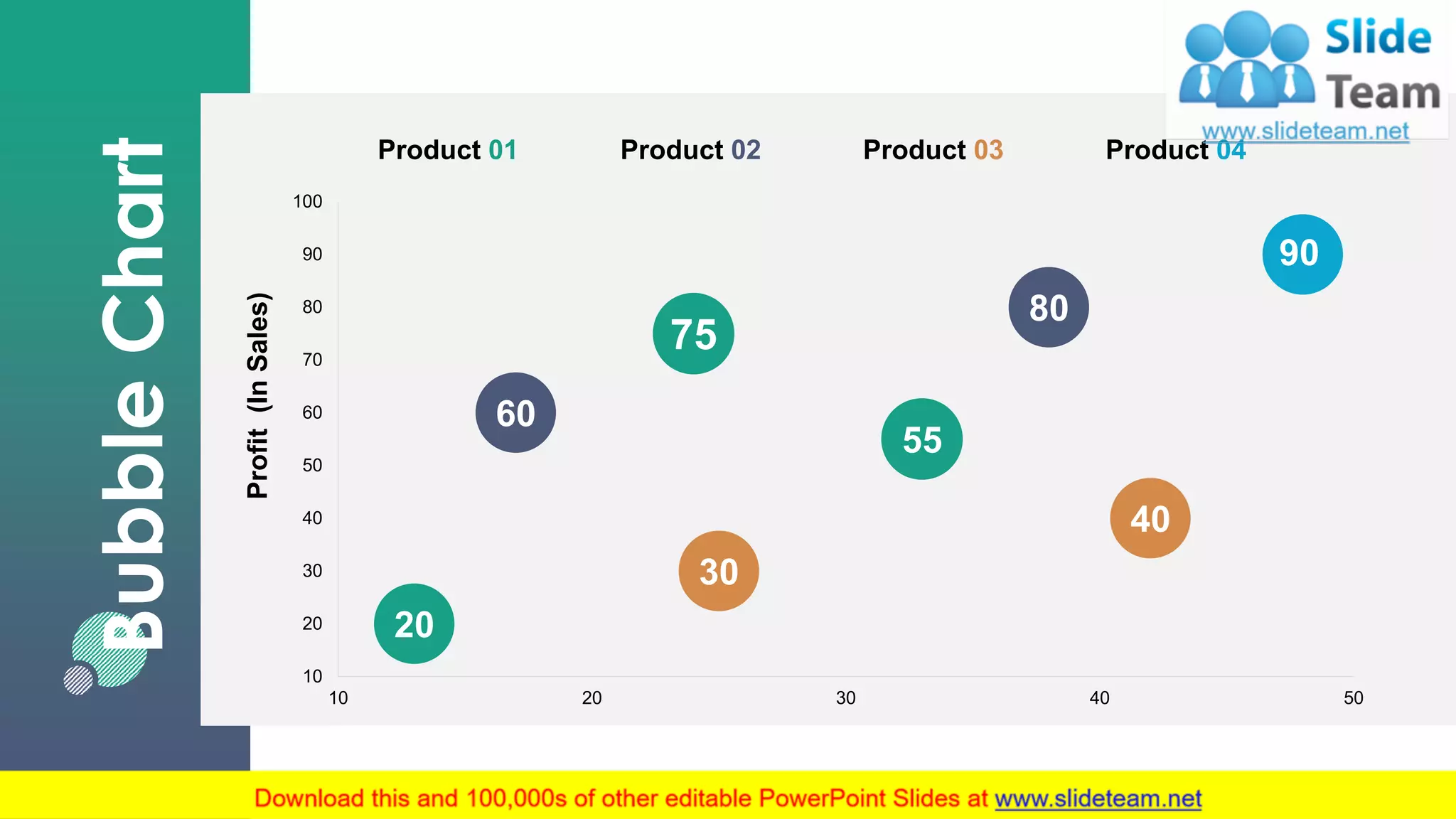
29This graph/chart islinked to excel, and changes automatically based on data. Just left click on it and select “Edit Data”.
BubbleChart
20
60
30
40
75
55
80
90
10
20
30
40
50
60
70
80
90
100
10 20 30 40 50
Profit(InSales)
Product 01 Product 04Product 02 Product 03
30.
30
Our Mission
Mission
This slideis 100% editable. Adapt it to your needs
and capture your audience's attention.
Vision
This slide is 100% editable. Adapt it to your needs
and capture your audience's attention.
Goal
This slide is 100% editable. Adapt it to your needs
and capture your audience's attention.
31.
Financial
31
Minimum
This slide is100% editable. Adapt
it to your needs and capture your
audience's attention.
$150
Medium
This slide is 100% editable. Adapt
it to your needs and capture your
audience's attention.
$250
Maximum
This slide is 100% editable. Adapt
it to your needs and capture your
audience's attention.
$350
32.
Our Awesome Team
32
NameHere
Designation
This slide is 100% editable. Adapt
it to your needs and capture your
audience's attention.
Name Here
Designation
This slide is 100% editable. Adapt
it to your needs and capture your
audience's attention.
Name Here
Designation
This slide is 100% editable. Adapt
it to your needs and capture your
audience's attention.
33.
33
This slide is100%
editable. Adapt it to
your needs and
capture your
audience's attention.
This slide is 100%
editable. Adapt it to
your needs and
capture your
audience's attention.
This slide is 100%
editable. Adapt it to
your needs and
capture your
audience's attention.
This slide is 100%
editable. Adapt it to
your needs and
capture your
audience's attention.
Post It Notes
35
Idea
Generation
IDEA
This slide is100%
editable. Adapt it to your
needs and capture your
audience's attention.
Text Here
This slide is 100%
editable. Adapt it to your
needs and capture your
audience's attention.
Text Here
This slide is 100%
editable. Adapt it to your
needs and capture your
audience's attention.
Text Here
36.
Magnifying Glass
36
This slideis 100%
editable. Adapt it to your
needs and capture your
audience's attention.
This slide is 100%
editable. Adapt it to your
needs and capture your
audience's attention.
This slide is 100%
editable. Adapt it to your
needs and capture your
audience's attention.
This slide is 100%
editable. Adapt it to your
needs and capture your
audience's attention.
This slide is 100%
editable. Adapt it to your
needs and capture your
audience's attention.