Alerts!
Creating alerts using the SP 2010 UI
Improvements, custom WCF services
and jQuery
SharePoint Saturday New Zealand – WCF, jQuery and the SP Status Bar


Session Breakdown
 Introduction (Brief)
  There a couple of things I “prepared earlier” … a brief explanation

 WCF
  Building a custom WCF service for SharePoint 2010
  The focus will not be what the service does but how to wire it up

 jQuery
  Instead of using the ASP.NET Ajax / Script Manager lets talk to the WCF
  service with jQuery

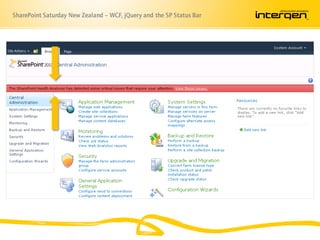
 SharePoint 2010 UI Utilities – Status Bar, Modal Dialog and Notifications
  The UI glue to show the information to users
SharePoint Saturday New Zealand – WCF, jQuery and the SP Status Bar


Introduction
 The Alert architecture
      A SharePoint List – the alert storage
      A custom WCF Service – the basic business objects / logic and
       communication mechanism
      jQuery – asynchronous data retrieval (on the client)
      SP.UI.Status – the presentation layer
WCF
SharePoint Saturday New Zealand – WCF, jQuery and the SP Status Bar


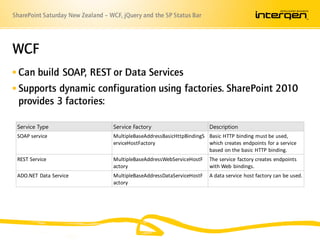
WCF
 Can build SOAP, REST or Data Services
 Supports dynamic configuration using factories. SharePoint 2010
  provides 3 factories:

 Service Type                      Service Factory                       Description
 SOAP service                      MultipleBaseAddressBasicHttpBindingS Basic HTTP binding must be used,
                                   erviceHostFactory                    which creates endpoints for a service
                                                                        based on the basic HTTP binding.
 REST Service                      MultipleBaseAddressWebServiceHostF    The service factory creates endpoints
                                   actory                                with Web bindings.
 ADO.NET Data Service              MultipleBaseAddressDataServiceHostF   A data service host factory can be used.
                                   actory
SharePoint Saturday New Zealand – WCF, jQuery and the SP Status Bar


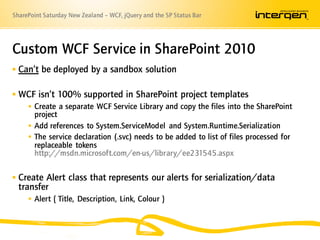
Custom WCF Service in SharePoint 2010
 Can’t be deployed by a sandbox solution

 WCF isn’t 100% supported in SharePoint project templates
    Create a separate WCF Service Library and copy the files into the SharePoint
     project
    Add references to System.ServiceModel and System.Runtime.Serialization
    The service declaration (.svc) needs to be added to list of files processed for
     replaceable tokens
     http://msdn.microsoft.com/en-us/library/ee231545.aspx

 Create Alert class that represents our alerts for serialization/data
  transfer
      Alert { Title, Description, Link, Colour }
SharePoint Saturday New Zealand – WCF, jQuery and the SP Status Bar


Custom WCF Service in SharePoint 2010
 Make the service ASP.NET compatible
    using System.ServiceModel.Activation

     [AspNetCompatibilityRequirements(RequirementsMode =
     AspNetCompatibilityRequirementsMode.Required)]

 Make the service REST capable
    using System.ServiceModel.Web

     [WebGet(UriTemplate = "/Alert", BodyStyle = WebMessageBodyStyle.Bare,
     ResponseFormat = WebMessageFormat.Json)]

 Using MultipleBaseAddressWebServiceHostFactory because its a REST
  service (sort of)
DEMO: Custom WCF Build
jQuery
SharePoint Saturday New Zealand – WCF, jQuery and the SP Status Bar


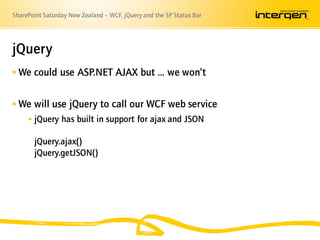
jQuery
 We could use ASP.NET AJAX but … we won’t


 We will use jQuery to call our WCF web service
      jQuery has built in support for ajax and JSON

       jQuery.ajax()
       jQuery.getJSON()
User Interface Utilities – SP.UI
SharePoint Saturday New Zealand – WCF, jQuery and the SP Status Bar


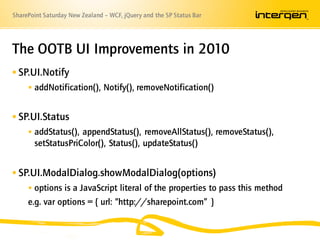
The OOTB UI Improvements in 2010
 SP.UI.Notify
      addNotification(), Notify(), removeNotification()


 SP.UI.Status
      addStatus(), appendStatus(), removeAllStatus(), removeStatus(),
       setStatusPriColor(), Status(), updateStatus()


 SP.UI.ModalDialog.showModalDialog(options)
      options is a JavaScript literal of the properties to pass this method
     e.g. var options = { url: “http://sharepoint.com” }
DEMO: How to use jQuery and SP.UI
SharePoint Saturday New Zealand – WCF, jQuery and the SP Status Bar


Resources
 WCF Services in SharePoint Foundation 2010
  http://msdn.microsoft.com/en-us/library/ff521586.aspx


 Creating a Custom WCF Service in SharePoint Foundation
  http://msdn.microsoft.com/en-us/library/ff521581.aspx

 jQuery ajax and JSON
  http://api.jquery.com/jQuery.ajax/
  http://api.jquery.com/jQuery.getJSON/
SharePoint Saturday New Zealand – WCF, jQuery and the SP Status Bar


Resources
 SP.UI.Notify
  http://msdn.microsoft.com/en-us/library/ff408137.aspx

 SP.UI.Status
  http://msdn.microsoft.com/en-us/library/ff412058.aspx

 SP.UI.ModalDialog
  http://msdn.microsoft.com/en-us/library/ff408909.aspx
  http://msdn.microsoft.com/en-us/library/ff411351.aspx

 Enabling Intellisense in Visual Studio
  http://msdn.microsoft.com/en-us/library/ff798328.aspx
SharePoint Saturday New Zealand – WCF, jQuery and the SP Status Bar


Nick Hadlee
SharePoint Consultant at Intergen

Blog:    nickhadlee.wordpress.com
Twitter: @nickhadlee
Questions
Thank you to our Sponsors


M S C O M M U N IT IE S

SharePoint Alerts with WCF and jQuery

  • 1.
    Alerts! Creating alerts usingthe SP 2010 UI Improvements, custom WCF services and jQuery
  • 2.
    SharePoint Saturday NewZealand – WCF, jQuery and the SP Status Bar
  • 3.
    SharePoint Saturday NewZealand – WCF, jQuery and the SP Status Bar Session Breakdown  Introduction (Brief) There a couple of things I “prepared earlier” … a brief explanation  WCF Building a custom WCF service for SharePoint 2010 The focus will not be what the service does but how to wire it up  jQuery Instead of using the ASP.NET Ajax / Script Manager lets talk to the WCF service with jQuery  SharePoint 2010 UI Utilities – Status Bar, Modal Dialog and Notifications The UI glue to show the information to users
  • 4.
    SharePoint Saturday NewZealand – WCF, jQuery and the SP Status Bar Introduction  The Alert architecture  A SharePoint List – the alert storage  A custom WCF Service – the basic business objects / logic and communication mechanism  jQuery – asynchronous data retrieval (on the client)  SP.UI.Status – the presentation layer
  • 5.
  • 6.
    SharePoint Saturday NewZealand – WCF, jQuery and the SP Status Bar WCF  Can build SOAP, REST or Data Services  Supports dynamic configuration using factories. SharePoint 2010 provides 3 factories: Service Type Service Factory Description SOAP service MultipleBaseAddressBasicHttpBindingS Basic HTTP binding must be used, erviceHostFactory which creates endpoints for a service based on the basic HTTP binding. REST Service MultipleBaseAddressWebServiceHostF The service factory creates endpoints actory with Web bindings. ADO.NET Data Service MultipleBaseAddressDataServiceHostF A data service host factory can be used. actory
  • 7.
    SharePoint Saturday NewZealand – WCF, jQuery and the SP Status Bar Custom WCF Service in SharePoint 2010  Can’t be deployed by a sandbox solution  WCF isn’t 100% supported in SharePoint project templates  Create a separate WCF Service Library and copy the files into the SharePoint project  Add references to System.ServiceModel and System.Runtime.Serialization  The service declaration (.svc) needs to be added to list of files processed for replaceable tokens http://msdn.microsoft.com/en-us/library/ee231545.aspx  Create Alert class that represents our alerts for serialization/data transfer  Alert { Title, Description, Link, Colour }
  • 8.
    SharePoint Saturday NewZealand – WCF, jQuery and the SP Status Bar Custom WCF Service in SharePoint 2010  Make the service ASP.NET compatible  using System.ServiceModel.Activation [AspNetCompatibilityRequirements(RequirementsMode = AspNetCompatibilityRequirementsMode.Required)]  Make the service REST capable  using System.ServiceModel.Web [WebGet(UriTemplate = "/Alert", BodyStyle = WebMessageBodyStyle.Bare, ResponseFormat = WebMessageFormat.Json)]  Using MultipleBaseAddressWebServiceHostFactory because its a REST service (sort of)
  • 9.
  • 10.
  • 11.
    SharePoint Saturday NewZealand – WCF, jQuery and the SP Status Bar jQuery  We could use ASP.NET AJAX but … we won’t  We will use jQuery to call our WCF web service  jQuery has built in support for ajax and JSON jQuery.ajax() jQuery.getJSON()
  • 12.
  • 13.
    SharePoint Saturday NewZealand – WCF, jQuery and the SP Status Bar The OOTB UI Improvements in 2010  SP.UI.Notify  addNotification(), Notify(), removeNotification()  SP.UI.Status  addStatus(), appendStatus(), removeAllStatus(), removeStatus(), setStatusPriColor(), Status(), updateStatus()  SP.UI.ModalDialog.showModalDialog(options)  options is a JavaScript literal of the properties to pass this method e.g. var options = { url: “http://sharepoint.com” }
  • 14.
    DEMO: How touse jQuery and SP.UI
  • 15.
    SharePoint Saturday NewZealand – WCF, jQuery and the SP Status Bar Resources  WCF Services in SharePoint Foundation 2010 http://msdn.microsoft.com/en-us/library/ff521586.aspx  Creating a Custom WCF Service in SharePoint Foundation http://msdn.microsoft.com/en-us/library/ff521581.aspx  jQuery ajax and JSON http://api.jquery.com/jQuery.ajax/ http://api.jquery.com/jQuery.getJSON/
  • 16.
    SharePoint Saturday NewZealand – WCF, jQuery and the SP Status Bar Resources  SP.UI.Notify http://msdn.microsoft.com/en-us/library/ff408137.aspx  SP.UI.Status http://msdn.microsoft.com/en-us/library/ff412058.aspx  SP.UI.ModalDialog http://msdn.microsoft.com/en-us/library/ff408909.aspx http://msdn.microsoft.com/en-us/library/ff411351.aspx  Enabling Intellisense in Visual Studio http://msdn.microsoft.com/en-us/library/ff798328.aspx
  • 17.
    SharePoint Saturday NewZealand – WCF, jQuery and the SP Status Bar Nick Hadlee SharePoint Consultant at Intergen Blog: nickhadlee.wordpress.com Twitter: @nickhadlee
  • 18.
  • 19.
    Thank you toour Sponsors M S C O M M U N IT IE S