The Travelers Indemnity Company confidential and proprietary information
Informatica Cloud – Error Handling framework
Salesforce Outbound Messages & BSI inbound Near Real Time
Confidential and Proprietary.
For Internal Use Only by Travelers Employees. Do Not Distribute Outside Travelers.
Executive Summary
2
AS-IS State
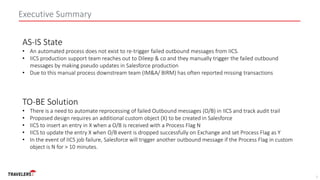
• An automated process does not exist to re-trigger failed outbound messages from IICS.
• IICS production support team reaches out to Dileep & co and they manually trigger the failed outbound
messages by making pseudo updates in Salesforce production
• Due to this manual process downstream team (IM&A/ BIRM) has often reported missing transactions
TO-BE Solution
• There is a need to automate reprocessing of failed Outbound messages (O/B) in IICS and track audit trail
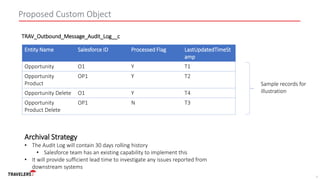
• Proposed design requires an additional custom object (X) to be created in Salesforce
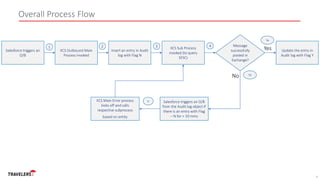
• IICS to insert an entry in X when a O/B is received with a Process Flag N
• IICS to update the entry X when O/B event is dropped successfully on Exchange and set Process Flag as Y
• In the event of IICS job failure, Salesforce will trigger another outbound message if the Process Flag in custom
object is N for > 10 minutes.
Confidential and Proprietary.
For Internal Use Only by Travelers Employees. Do Not Distribute Outside Travelers.
Proposed Custom Object
3
Entity Name Salesforce ID Processed Flag LastUpdatedTimeSt
amp
Opportunity O1 Y T1
Opportunity
Product
OP1 Y T2
Opportunity Delete O1 Y T4
Opportunity
Product Delete
OP1 N T3
TRAV_Outbound_Message_Audit_Log__c
Sample records for
illustration
Archival Strategy
• The Audit Log will contain 30 days rolling history
• Salesforce team has an existing capability to implement this
• It will provide sufficient lead time to investigate any issues reported from
downstream systems
Confidential and Proprietary.
For Internal Use Only by Travelers Employees. Do Not Distribute Outside Travelers.
Overall Process Flow
4
Salesforce triggers an
O/B
IICS Sub Process
invoked (to query
SFSC)
Message
successfully
posted in
Exchange?
Salesforce triggers an O/B
from the Audit log object if
there is an entry with Flag
– N for > 10 mins
IICS Outbound Main
Process invoked
Insert an entry in Audit
log with Flag N
No
Yes Update the entry in
Audit log with Flag Y
IICS Main Error process
kicks off and calls
respective subprocess
based on entity
1 2 3 4
5a
5b
6
Confidential and Proprietary.
For Internal Use Only by Travelers Employees. Do Not Distribute Outside Travelers.
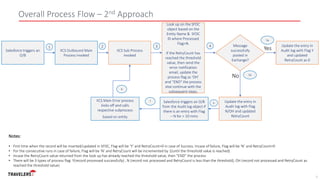
Overall Process Flow – 2nd Approach
5
Salesforce triggers an
O/B
Look up on the SFDC
object based on the
Entity Name & SFDC
ID where Processed
Flag=N.
If the RetryCount has
reached the threshold
value, then send the
error notification
email, update the
process flag as ‘OH’
and “END” the process
else continue with the
subsequent steps.
Message
successfully
posted in
Exchange?
Salesforce triggers an O/B
from the Audit log object if
there is an entry with Flag
– N for > 10 mins
IICS Outbound Main
Process invoked
IICS Sub Process
invoked
No
Yes
Update the entry in
Audit log with Flag Y
and updated
RetryCount as 0
IICS Main Error process
kicks off and calls
respective subprocess
based on entity
1 2 3 4
5a
5b
7
Notes:
• First time when the record will be inserted/updated in SFDC, Flag will be ‘Y’ and RetryCount=0 in case of Success. Incase of failure, Flag will be ‘N’ and RetryCount=0
• For the consecutive runs in case of failure, Flag will be ‘N’ and RetryCount will be incremented by 1(until the threshold value is reached)
• Incase the RetryCount value returned from the look up has already reached the threshold value, then “END” the process
• There will be 3 types of process flag: Y(record processed successfully) , N (record not processed and RetryCount is less than the threshold), OH (record not processed and RetryCount as
reached the threshold value)
Update the entry in
Audit log with Flag
N/OH and updated
RetryCount
6
8

SFSC - IICS Error Handling Framework.pptx

  • 1.
    The Travelers IndemnityCompany confidential and proprietary information Informatica Cloud – Error Handling framework Salesforce Outbound Messages & BSI inbound Near Real Time
  • 2.
    Confidential and Proprietary. ForInternal Use Only by Travelers Employees. Do Not Distribute Outside Travelers. Executive Summary 2 AS-IS State • An automated process does not exist to re-trigger failed outbound messages from IICS. • IICS production support team reaches out to Dileep & co and they manually trigger the failed outbound messages by making pseudo updates in Salesforce production • Due to this manual process downstream team (IM&A/ BIRM) has often reported missing transactions TO-BE Solution • There is a need to automate reprocessing of failed Outbound messages (O/B) in IICS and track audit trail • Proposed design requires an additional custom object (X) to be created in Salesforce • IICS to insert an entry in X when a O/B is received with a Process Flag N • IICS to update the entry X when O/B event is dropped successfully on Exchange and set Process Flag as Y • In the event of IICS job failure, Salesforce will trigger another outbound message if the Process Flag in custom object is N for > 10 minutes.
  • 3.
    Confidential and Proprietary. ForInternal Use Only by Travelers Employees. Do Not Distribute Outside Travelers. Proposed Custom Object 3 Entity Name Salesforce ID Processed Flag LastUpdatedTimeSt amp Opportunity O1 Y T1 Opportunity Product OP1 Y T2 Opportunity Delete O1 Y T4 Opportunity Product Delete OP1 N T3 TRAV_Outbound_Message_Audit_Log__c Sample records for illustration Archival Strategy • The Audit Log will contain 30 days rolling history • Salesforce team has an existing capability to implement this • It will provide sufficient lead time to investigate any issues reported from downstream systems
  • 4.
    Confidential and Proprietary. ForInternal Use Only by Travelers Employees. Do Not Distribute Outside Travelers. Overall Process Flow 4 Salesforce triggers an O/B IICS Sub Process invoked (to query SFSC) Message successfully posted in Exchange? Salesforce triggers an O/B from the Audit log object if there is an entry with Flag – N for > 10 mins IICS Outbound Main Process invoked Insert an entry in Audit log with Flag N No Yes Update the entry in Audit log with Flag Y IICS Main Error process kicks off and calls respective subprocess based on entity 1 2 3 4 5a 5b 6
  • 5.
    Confidential and Proprietary. ForInternal Use Only by Travelers Employees. Do Not Distribute Outside Travelers. Overall Process Flow – 2nd Approach 5 Salesforce triggers an O/B Look up on the SFDC object based on the Entity Name & SFDC ID where Processed Flag=N. If the RetryCount has reached the threshold value, then send the error notification email, update the process flag as ‘OH’ and “END” the process else continue with the subsequent steps. Message successfully posted in Exchange? Salesforce triggers an O/B from the Audit log object if there is an entry with Flag – N for > 10 mins IICS Outbound Main Process invoked IICS Sub Process invoked No Yes Update the entry in Audit log with Flag Y and updated RetryCount as 0 IICS Main Error process kicks off and calls respective subprocess based on entity 1 2 3 4 5a 5b 7 Notes: • First time when the record will be inserted/updated in SFDC, Flag will be ‘Y’ and RetryCount=0 in case of Success. Incase of failure, Flag will be ‘N’ and RetryCount=0 • For the consecutive runs in case of failure, Flag will be ‘N’ and RetryCount will be incremented by 1(until the threshold value is reached) • Incase the RetryCount value returned from the look up has already reached the threshold value, then “END” the process • There will be 3 types of process flag: Y(record processed successfully) , N (record not processed and RetryCount is less than the threshold), OH (record not processed and RetryCount as reached the threshold value) Update the entry in Audit log with Flag N/OH and updated RetryCount 6 8