Scamander	
  Solutions	
  BV	
  |	
  Bernhardstraat	
  1	
  |	
  3433	
  EL	
  	
  NIEUWEGEIN	
  
Tel.	
  030	
  602	
  900	
  |	
  www.scamander.com	


Setup	
  Oracle	
  eBS	
  2	
  Oracle	
  BI	
  SSO	


This	
  document	
  covers	
  all	
  the	
  steps	
  needed	
  to	
  integrate	
  Oracle	
  eBS	
  (R12)	
  and	
  
Oracle	
  BI	
  (11g)	
  with	
  each	
  other.	
  SSO	
  might	
  be	
  a	
  little	
  bit	
  confusing.	
  In	
  this	
  case	
  
it’s	
  meant	
  that	
  you	
  can	
  log	
  into	
  Oracle	
  BI	
  via	
  Oracle	
  eBS	
  without	
  having	
  to	
  log	
  in	
  
again	
  and	
  while	
  maintaining	
  context.	
  
Integrating	
  Oracle	
  eBS	
  and	
  Oracle	
  BI	


It	
  takes	
  a	
  few	
  steps	
  to	
  complete	
  the	
  integration	
  of	
  Oracle	
  eBS	
  and	
  Oracle	
  BI.	


• Connection	
  Oracle	
  eBS	
  &	
  Oracle	
  BI	
  
o Oracle	
  eBS	
  
§ Profile	
  Option	
  
o Oracle	
  BI	
  	
  
§ authenticationschemas.xml	
  	
  
§ instanceconfig.xml	
  	
  
§ RPD	
  (Connection	
  Pool,	
  Initialization	
  Blocks)	


• Navigation	
  Oracle	
  eBS	
  à	
  Oracle	
  BI	
  
o Function	
  
o Menu	
  
o Responsibility	


Please	
  refer	
  to	
  My	
  Oracle	
  Support	
  for	
  more	
  details;	
  “Integrating	
  Oracle	
  
Business	
  Intelligence	
  Applications	
  (OIBEE	
  11g)	
  With	
  Oracle	
  E-­‐Business	
  Suite	
  
(Doc	
  Id	
  -­‐	
  1343143.1)”	
  
Assumptions	
  
• Oracle	
  eBS	
  is	
  installed	
  
• Oracle	
  BI	
  is	
  installed	
  
• Oracle	
  eBS	
  and	
  Oracle	
  BI	
  are	
  compatible	
  with	
  each	
  other	
  (http	
  vs.	
  https)	
  
• All	
  necessary	
  Oracle	
  eBS	
  patches	
  are	
  installed	
  	
  
• R11	
  check	
  
• R12	
  included	
  
• The	
  Web	
  Browser	
  should	
  be	
  able	
  to	
  accept	
  cookies	
  
• The ICX session cookie name is case-sensitive	
  
• Oracle	
  eBS	
  and	
  Oracle	
  BI	
  should	
  be	
  installed	
  into	
  the	
  same	
  domain	
  
(machine1.domain.ext	
  =	
  machine2.domain.ext)	
  
 
Scamander	
  Solutions	
  BV	
  |	
  Bernhardstraat	
  1	
  |	
  3433	
  EL	
  	
  NIEUWEGEIN	
  
Tel.	
  030	
  602	
  900	
  |	
  www.scamander.com	


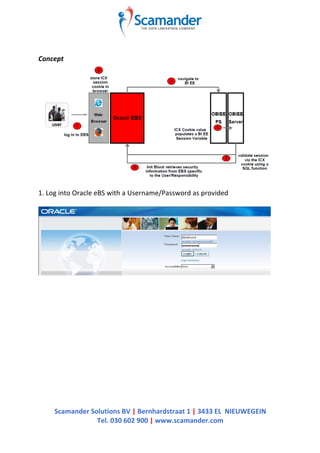
Concept	


1.	
  Log	
  into	
  Oracle	
  eBS	
  with	
  a	
  Username/Password	
  as	
  provided	


Scamander	
  Solutions	
  BV	
  |	
  Bernhardstraat	
  1	
  |	
  3433	
  EL	
  	
  NIEUWEGEIN	
  
Tel.	
  030	
  602	
  900	
  |	
  www.scamander.com	


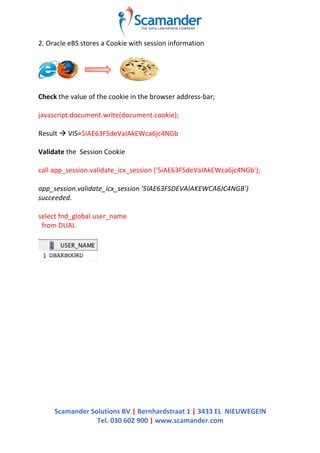
2.	
  Oracle	
  eBS	
  stores	
  a	
  Cookie	
  with	
  session	
  information	


Check	
  the	
  value	
  of	
  the	
  cookie	
  in	
  the	
  browser	
  address-­‐bar;	


javascript:document.write(document.cookie);	


Result	
  à	
  VIS=5iAE63FSdeVaIAkEWca6jc4NGb	


Validate	
  the	
  	
  Session	
  Cookie	


call	
  app_session.validate_icx_session	
  ('5iAE63FSdeVaIAkEWca6jc4NGb');	


app_session.validate_icx_session	
  '5IAE63FSDEVAIAKEWCA6JC4NGB')	
  
succeeded.	


select	
  fnd_global.user_name	


  from	
  DUAL	


Scamander	
  Solutions	
  BV	
  |	
  Bernhardstraat	
  1	
  |	
  3433	
  EL	
  	
  NIEUWEGEIN	
  
Tel.	
  030	
  602	
  900	
  |	
  www.scamander.com	


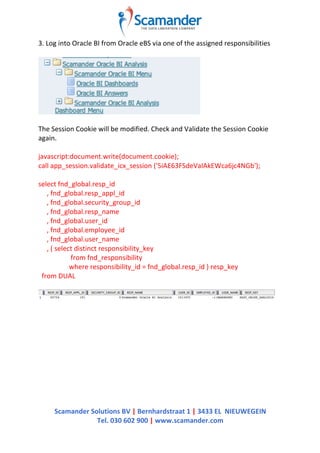
3.	
  Log	
  into	
  Oracle	
  BI	
  from	
  Oracle	
  eBS	
  via	
  one	
  of	
  the	
  assigned	
  responsibilities	


The	
  Session	
  Cookie	
  will	
  be	
  modified.	
  Check	
  and	
  Validate	
  the	
  Session	
  Cookie	
  
again.	


javascript:document.write(document.cookie);	
  
call	
  app_session.validate_icx_session	
  ('5iAE63FSdeVaIAkEWca6jc4NGb');	


select	
  fnd_global.resp_id	


  ,	
  fnd_global.resp_appl_id	


  ,	
  fnd_global.security_group_id	


  ,	
  fnd_global.resp_name	


  ,	
  fnd_global.user_id	


  ,	
  fnd_global.employee_id	


  ,	
  fnd_global.user_name	


  ,	
  (	
  select	
  distinct	
  responsibility_key	


  from	
  fnd_responsibility	


  where	
  responsibility_id	
  =	
  fnd_global.resp_id	
  )	
  resp_key	


  from	
  DUAL	


Scamander	
  Solutions	
  BV	
  |	
  Bernhardstraat	
  1	
  |	
  3433	
  EL	
  	
  NIEUWEGEIN	
  
Tel.	
  030	
  602	
  900	
  |	
  www.scamander.com	


4.	
  	
  The	
  value	
  of	
  the	
  (ICX)	
  Session	
  Cookie	
  will	
  be	
  stored	
  in	
  a	
  variable	


authenticationschemas.xml	
  ($ORACLE_HOME/bifoundation/web/display)	
  	
  
<!-- Note: The name of the cookie here is site-dependent and
needs to be customized. -->
<SchemaKeyVariable source="cookie" nameInSource="VIS"
forceValue="EBS-ICX"/>
<!-- Scheme for Oracle EBS Apps ICX session integration -->
<AuthenticationSchema name="EBS-ICX" displayName="Oracle
eBusiness Applications ICX Session" options="noLogoffUI noLogonUI" >
<!-- Note: The name of the cookie here is site-dependent and
needs to be customized. -->
<!-- The URL parameter name is fixed and should not be
changed. -->
<RequestVariable source="cookie" type="auth"
nameInSource="VIS" biVariableName="NQ_SESSION.ICX_SESSION_COOKIE"/>
<RequestVariable source="url" type="informational"
nameInSource="ACF" biVariableName="NQ_SESSION.ACF"/>
</AuthenticationSchema>
5.	
  Validate	
  the	
  Session	
  Cookie	
  from	
  Oracle	
  BI	


Scamander	
  Solutions	
  BV	
  |	
  Bernhardstraat	
  1	
  |	
  3433	
  EL	
  	
  NIEUWEGEIN	
  
Tel.	
  030	
  602	
  900	
  |	
  www.scamander.com	


6.	
  Retrieve	
  Session	
  specific	
  information	
  in	
  Oracle	
  BI	


select	
  fnd_global.resp_id	


  ,	
  fnd_global.resp_appl_id	


  ,	
  fnd_global.security_group_id	


  ,	
  fnd_global.resp_name	


  ,	
  fnd_global.user_id	


  ,	
  fnd_global.employee_id	


  ,	
  fnd_global.user_name	
  
from	
  DUAL	
  
 
Scamander	
  Solutions	
  BV	
  |	
  Bernhardstraat	
  1	
  |	
  3433	
  EL	
  	
  NIEUWEGEIN	
  
Tel.	
  030	
  602	
  900	
  |	
  www.scamander.com	


Connection	
  Oracle	
  eBS	
  &	
  Oracle	
  BI	
  
To	
  complete	
  the	
  connection	
  between	
  Oracle	
  eBS	
  and	
  Oracle	
  BI	
  you	
  have	
  to	
  
perform	
  some	
  configuration	
  /	
  setup	
  on	
  both	
  Oracle	
  eBS	
  as	
  well	
  as	
  Oracle	
  BI.	


Oracle	
  eBS	


To	
  make	
  navigation	
  between	
  Oracle	
  eBS	
  to	
  Oracle	
  BI	
  possible,	
  you	
  need	
  to	
  
define	
  the	
  url	
  to	
  Oracle	
  BI.	
  This	
  url	
  is	
  stored	
  in	
  a	
  Profile	
  Option	
  in	
  Oracle	
  eBS;	
  
‘FND:	
  Oracle	
  Business	
  Intelligence	
  Suite	
  EE	
  base	
  URL’	


1. Log	
  into	
  Oracle	
  eBS,	
  
2. Navigate	
  via	
  the	
  responsibility;	
  ‘System	
  Administrator’	
  to	
  the	
  function;	
  
‘System	
  Profile	
  Values’	
  (Profile	
  -­‐	
  System)	


3. Search	
  the	
  profile;	
  ‘FND:	
  Oracle	
  Business	
  Intelligence	
  Suite	
  EE	
  base	
  URL’	


Scamander	
  Solutions	
  BV	
  |	
  Bernhardstraat	
  1	
  |	
  3433	
  EL	
  	
  NIEUWEGEIN	
  
Tel.	
  030	
  602	
  900	
  |	
  www.scamander.com	


4. Update	
  the	
  url;	
  http://obiee-­‐server.domain.com:port	


Oracle	
  BI	
  –	
  Configuration	


There	
  are	
  multiple	
  ways	
  to	
  authenticate	
  in	
  Oracle	
  BI.	
  The	
  user	
  /	
  responsibility	
  
combination	
  from	
  Oracle	
  eBS	
  is	
  one	
  of	
  them.	
  Oracle	
  BI	
  must	
  be	
  prepared	
  to	
  
accept	
  login	
  requests	
  from	
  Oracle	
  eBS.	
  Therefore	
  you	
  will	
  have	
  to	
  edit	
  two	
  
configuration	
  files	
  in	
  Oracle	
  BI;	


• instanceconfig.xml	
  	
  
• authenticationschemas.xml	


instanceconfig.xml	
  
($ORACLE_INSTANCE/config/OracleBIPresentationServicesComponent/coreapp
lication_obips1)	


Add	
  ‘EBS-­‐ICX‘	
  as	
  one	
  of	
  the	
  enabled	
  schemas	


Note:	
  Don’t	
  get	
  mislead	
  by	
  the	
  following	
  sentence;	
  ‘<!–This	
  Configuration	
  
setting	
  is	
  managed	
  by	
  Oracle	
  Enterprise	
  Manager	
  Fusion	
  Middleware	
  Control–
>’.	
  You	
  must	
  adjust	
  these	
  settings	
  directly	
  in	
  the	
  instanceconfig.xml	
  itself.	
  
 
Scamander	
  Solutions	
  BV	
  |	
  Bernhardstraat	
  1	
  |	
  3433	
  EL	
  	
  NIEUWEGEIN	
  
Tel.	
  030	
  602	
  900	
  |	
  www.scamander.com	


authenticationschemas.xml	
  ($ORACLE_HOME/bifoundation/web/display)	


Check	
  the	
  name	
  of	
  the	
  cookie	
  in	
  the	
  browser	
  address-­‐bar;	


javascript:document.write(document.cookie);	


Result	
  à	
  VIS=5iAE63FSdeVaIAkEWca6jc4NGb	


1. Update	
  the	
  nameinSource	
  to	
  the	
  name	
  of	
  the	
  ‘EBS-­‐ICX‘-­‐cookie	
  (VIS).	


2. Update	
  the	
  nameinSource	
  to	
  the	
  name	
  of	
  the	
  ‘EBS-­‐ICX‘-­‐cookie	
  (VIS).	


Scamander	
  Solutions	
  BV	
  |	
  Bernhardstraat	
  1	
  |	
  3433	
  EL	
  	
  NIEUWEGEIN	
  
Tel.	
  030	
  602	
  900	
  |	
  www.scamander.com	


Oracle	
  BI	
  –	
  Repository	


Oracle	
  BI	
  needs	
  to	
  validate	
  the	
  Authentication	
  request,	
  coming	
  from	
  Oracle	
  
eBS.	


1. Create	
  a	
  Connection	
  Pool	
  to	
  the	
  Oracle	
  eBS	
  Database.	
  
o Use	
  a	
  separate	
  Connection	
  Pool	
  for	
  use	
  in	
  Initialization	
  Blocks	
  
o Use	
  Variables	
  for	
  the	
  DataSource	
  and	
  the	
  User	
  Name	


2. Add	
  a	
  procedure	
  call	
  to	
  read	
  the	
  contents	
  of	
  the	
  Session	
  Cookie	
  (call	
  /*	
  
valueof(NQ_SESSION.ACF)	
  */	
  
APP_SESSION.validate_icx_session('valueof(NQ_SESSION.ICX_SESSION_C
OOKIE)')	


Scamander	
  Solutions	
  BV	
  |	
  Bernhardstraat	
  1	
  |	
  3433	
  EL	
  	
  NIEUWEGEIN	
  
Tel.	
  030	
  602	
  900	
  |	
  www.scamander.com	


3. Create	
  a	
  Initialization	
  Block	
  –	
  EBS	
  Single	
  Sign-­‐on	
  Integration	


This	
  Initialization	
  Block	
  checks	
  whether	
  the	
  Session	
  Cookie	
  is	
  successfully	
  read	
  
and	
  has	
  a	
  value	


select	
  
case	
  when	


  'VALUEOF(NQ_SESSION.ICX_SESSION_COOKIE)'	
  is	
  null	
  then	
  'Not	
  Integrated'	
  
else	
  'Integrated'	
  
end	
  
from	
  dual	


The	
  following	
  Session	
  Variables	
  is	
  filled;	
  EBS_SSO_INTEGRATION_MODE	


Scamander	
  Solutions	
  BV	
  |	
  Bernhardstraat	
  1	
  |	
  3433	
  EL	
  	
  NIEUWEGEIN	
  
Tel.	
  030	
  602	
  900	
  |	
  www.scamander.com	


4. Create	
  a	
  Initialization	
  Block	
  –	
  EBS	
  Security	
  Context	


If	
  the	
  outcome	
  of	
  the	
  previous	
  Initialization	
  Block;	
  EBS	
  Single	
  Sign-­‐on	
  
Integration’	
  is	
  ‘Integrated‘,	
  which	
  means;	
  successfully	
  read	
  and	
  a	
  value,	
  Oracle	
  
BI	
  should	
  be	
  able	
  to	
  read	
  the	
  context	
  from	
  Oracle	
  eBS.	
  Via	
  the	
  FND_GLOBAL-­‐
package……	


select	
  fnd_global.resp_id	


  ,	
  fnd_global.resp_appl_id	


  ,	
  fnd_global.security_group_id	


  ,	
  fnd_global.resp_name	


  ,	
  fnd_global.user_id	


  ,	
  fnd_global.employee_id	


  ,	
  fnd_global.user_name	
  
from	
  DUAL	


……	
  the	
  following	
  Session	
  Variables	
  
are	
  filled;	


• EBS_RESP_ID	
  
• EBS_RESP_APPL_ID	
  
• EBS_SEC_GROUP_ID	
  
• EBS_RESP_NAME	
  
• EBS_USER_ID	
  
• EBS_EMPLOYEE_ID	
  
• USER	


Note:	
  Make	
  sure	
  the	
  variables	
  are	
  in	
  the	
  above	
  order,	
  with	
  the	
  exact	
  names.	
  
This	
  is	
  especially	
  important	
  when	
  you	
  want	
  to	
  create	
  Action	
  Links	
  from	
  Oracle	
  
BI	
  to	
  Oracle	
  eBS.	
  Next	
  to	
  that	
  fnd_global.user_name	
  must	
  map	
  to	
  the	
  System	
  
Session	
  Variable;	
  ‘USER’	
  
 
Scamander	
  Solutions	
  BV	
  |	
  Bernhardstraat	
  1	
  |	
  3433	
  EL	
  	
  NIEUWEGEIN	
  
Tel.	
  030	
  602	
  900	
  |	
  www.scamander.com	


Navigation	
  Oracle	
  eBS	
  à	
  Oracle	
  BI	


Now	
  that	
  the	
  connection	
  between	
  Oracle	
  eBS	
  and	
  Oracle	
  BI	
  is	
  ready,	
  you	
  want	
  
to	
  navigate	
  form	
  Oracle	
  eBS	
  to	
  Oracle	
  BI.	
  Therefore	
  you	
  need	
  to	
  do	
  some	
  setup	
  
at	
  the	
  Oracle	
  eBS	
  side.	


Oracle	
  eBS	


1. Add	
  a	
  Function	


a. Log	
  into	
  Oracle	
  eBS,	
  
b. Navigate	
  via	
  the	
  responsibility;	
  ‘System	
  Administrator’	
  to	
  the	
  
function;	
  ‘Function’	
  (Application	
  -­‐	
  Function)	


c. Description	
  tab	
  –	
  Function	
  and	
  User	
  Function	
  Name	
  
d. Properties	
  tab	
  –	
  Type:	
  SSWA	
  jsp	
  function	
  
 
Scamander	
  Solutions	
  BV	
  |	
  Bernhardstraat	
  1	
  |	
  3433	
  EL	
  	
  NIEUWEGEIN	
  
Tel.	
  030	
  602	
  900	
  |	
  www.scamander.com	


e. Web	
  HTML	
  tab	
  –	
  HTML	
  Call:	
  	
  
• default	
  
§ OracleOasis.jsp?mode=OBIEE&function=Dashboard	
  
§ OracleOasis.jsp?mode=OBIEE&function=Answers	
  
• custom	
  
§ OracleOasis.jsp?mode=OBIEE&function=Dashboard&param
eters=PortalPath~/shared/[Folder_Name]/_portal/[Dashboa
rd_Name]	
  	
  
–>	
  This	
  will	
  navigate	
  to	
  a	
  specific	
  Oracle	
  BI	
  Dashboard	
  
§ OracleOasis.jsp?mode=OBIEE&function=Dashboard&param
eters=PortalPath~/shared/[Folder_Name]/_portal/[Dashboa
rd_Name]%26Page=[Page	
  Name]	
  	
  
–>	
  This	
  will	
  navigate	
  to	
  a	
  specific	
  Oracle	
  BI	
  Dashboard	
  Page	
  
§ OracleOasis.jsp?mode=OBIEE&function=Answers&paramete
rs=SubjectArea~[Subject	
  Area	
  Name]	
  	
  
–>	
  This	
  will	
  navigate	
  to	
  the	
  Subject	
  Area	
  of	
  your	
  choice	
  
§ OracleOasis.jsp?mode=OBIEE&function=Go&parameters=Pa
th~/shared/[Folder_Name]/[Report_Name]	
  	
  
–>	
  This	
  will	
  directly	
  navigate	
  to	
  the	
  Answer	
  of	
  choice	


Note:	
  The	
  ‘%26ʹ′	
  is	
  used	
  instead	
  of	
  the	
  ‘&’-­‐sign.	
  Make	
  sure	
  you	
  
replace	
  all	
  the	
  spaces	
  with	
  ‘%20ʹ′.	
  It’s	
  even	
  better	
  trying	
  to	
  avoid	
  
using	
  spaces.	


Scamander	
  Solutions	
  BV	
  |	
  Bernhardstraat	
  1	
  |	
  3433	
  EL	
  	
  NIEUWEGEIN	
  
Tel.	
  030	
  602	
  900	
  |	
  www.scamander.com	


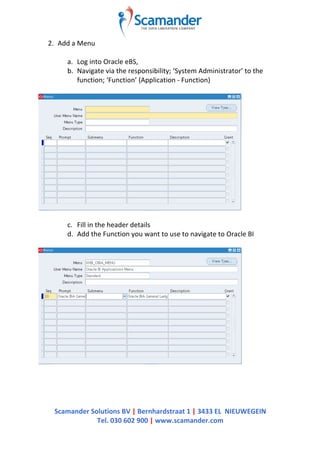
2. Add	
  a	
  Menu	


a. Log	
  into	
  Oracle	
  eBS,	
  
b. Navigate	
  via	
  the	
  responsibility;	
  ‘System	
  Administrator’	
  to	
  the	
  
function;	
  ‘Function’	
  (Application	
  -­‐	
  Function)	


c. Fill	
  in	
  the	
  header	
  details	
  
d. Add	
  the	
  Function	
  you	
  want	
  to	
  use	
  to	
  navigate	
  to	
  Oracle	
  BI	


Scamander	
  Solutions	
  BV	
  |	
  Bernhardstraat	
  1	
  |	
  3433	
  EL	
  	
  NIEUWEGEIN	
  
Tel.	
  030	
  602	
  900	
  |	
  www.scamander.com	


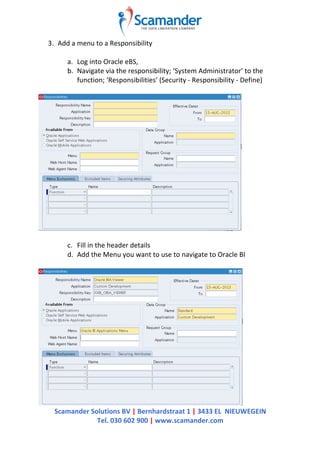
3. Add	
  a	
  menu	
  to	
  a	
  Responsibility	


a. Log	
  into	
  Oracle	
  eBS,	
  
b. Navigate	
  via	
  the	
  responsibility;	
  ‘System	
  Administrator’	
  to	
  the	
  
function;	
  ‘Responsibilities’	
  (Security	
  -­‐	
  Responsibility	
  -­‐	
  Define)	


c. Fill	
  in	
  the	
  header	
  details	
  
d. Add	
  the	
  Menu	
  you	
  want	
  to	
  use	
  to	
  navigate	
  to	
  Oracle	
  BI	


Scamander	
  Solutions	
  BV	
  |	
  Bernhardstraat	
  1	
  |	
  3433	
  EL	
  	
  NIEUWEGEIN	
  
Tel.	
  030	
  602	
  900	
  |	
  www.scamander.com	


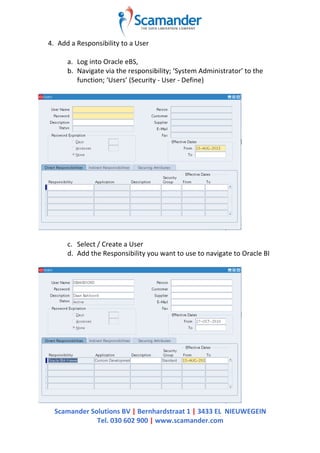
4. Add	
  a	
  Responsibility	
  to	
  a	
  User	


a. Log	
  into	
  Oracle	
  eBS,	
  
b. Navigate	
  via	
  the	
  responsibility;	
  ‘System	
  Administrator’	
  to	
  the	
  
function;	
  ‘Users’	
  (Security	
  -­‐	
  User	
  -­‐	
  Define)	


c. Select	
  /	
  Create	
  a	
  User	
  	
  
d. Add	
  the	
  Responsibility	
  you	
  want	
  to	
  use	
  to	
  navigate	
  to	
  Oracle	
  BI	


Scamander	
  Solutions	
  BV	
  |	
  Bernhardstraat	
  1	
  |	
  3433	
  EL	
  	
  NIEUWEGEIN	
  
Tel.	
  030	
  602	
  900	
  |	
  www.scamander.com	


5. Navigate	
  to	
  Oracle	
  BI	


a. Log	
  into	
  Oracle	
  eBS,	
  
b. Select	
  the	
  responsibility	
  you	
  want	
  to	
  use	
  to	
  navigate	
  to	
  Oracle	
  BI	


c. navigate	
  to	
  Oracle	
  BI	


Scamander	
  Solutions	
  BV	
  |	
  Bernhardstraat	
  1	
  |	
  3433	
  EL	
  	
  NIEUWEGEIN	
  
Tel.	
  030	
  602	
  900	
  |	
  www.scamander.com	


Troubleshooting;	
  "You	
  are	
  not	
  currently	
  logged	
  in	
  to	
  the	
  Oracle	
  BI	
  
Server.."
	
  
The	
  steps	
  above	
  should	
  be	
  sufficient	
  to	
  setup	
  the	
  integration	
  between	
  Oracle	
  
eBS	
  and	
  Oracle	
  BI.	
  Nevertheless	
  it’s	
  possible	
  that	
  you	
  end	
  up	
  with	
  the	
  following	
  
message;	
  	
  "You	
  are	
  not	
  currently	
  logged	
  in	
  to	
  the	
  Oracle	
  BI	
  Server..",	
  when	
  you	
  
try	
  to	
  navigate	
  from	
  Oracle	
  eBS	
  to	
  Oracle	
  BI.	


The	
  steps	
  below	
  will	
  help	
  you	
  solve	
  the	
  error.	


Please	
  refer	
  to	
  My	
  Oracle	
  Support	
  for	
  more	
  details;	
  How	
  To	
  Diagnose	
  "You	
  are	
  
not	
  currently	
  logged	
  in	
  to	
  the	
  Oracle	
  BI	
  Server.."	
  Error	
  When	
  Login	
  From	
  EBS	
  to	
  
OBI	
  (Doc	
  Id	
  -­‐	
  758392.1)”	


1. Assumptions	
  -­‐	
  Oracle	
  eBS	
  and	
  Oracle	
  BI	
  are…..	
  
a. …..	
  in	
  the	
  same	
  domain	
  (machine1.domain.ext	
  =	
  
machine2.domain.ext)	
  
b. …..	
  on	
  the	
  same	
  protocol	
  (http	
  vs.	
  https)	


2. The	
  cookie	
  is	
  passed	
  correctly.	
  Check	
  the	
  value	
  of	
  the	
  cookie	
  at…..	
  
a. …..	
  log	
  into	
  Oracle	
  eBS	
  
b. …..	
  select	
  responsibility	
  
c. …..	
  arrival	
  in	
  Oracle	
  BI	


If	
  necessary…..	
  
d. …..	
  check	
  Oracle	
  BI	
  configuration	
  
• cookie	
  is	
  case-­‐sensitive	
  (‘VIS‘	
  instead	
  of	
  ‘vis‘)	
  
• avoid	
  spaces	
  (‘	
  ’)	
  in	
  the	
  configuration	
  (‘,EBS-­‐ICX‘	
  instead	
  of	
  (‘,	
  
EBS-­‐ICX‘)	
  
e. …..	
  check	
  the	
  Oracle	
  BI	
  RPD	
  setup	
  
• check	
  the	
  password	
  of	
  the	
  Oracle	
  eBS	
  Connection	
  Pool	
  
• check	
  the	
  procedure	
  call	
  to	
  read	
  the	
  contents	
  of	
  the	
  Session	
  
Cookie	


Scamander	
  Solutions	
  BV	
  |	
  Bernhardstraat	
  1	
  |	
  3433	
  EL	
  	
  NIEUWEGEIN	
  
Tel.	
  030	
  602	
  900	
  |	
  www.scamander.com	


3. Check	
  the	
  procedure	
  call	
  directly	
  against	
  the	
  Oracle	
  eBS	
  Database	
  
a. Log	
  into	
  Oracle	
  eBS	
  database	
  (e.g.	
  apps/apps)	
  
b. call	
  app_session.validate_icx_session	
  ('icx-­‐cookie');	
  
c. select	
  fnd_global.user_name	
  
from	
  DUAL	


4. Check	
  the	
  EBS	
  Security	
  Context	
  -­‐	
  Initialization	
  Block	
  
a. Make	
  sure	
  the	
  variables	
  are	
  in	
  the	
  correct	
  order	
  
• EBS_RESP_ID	
  
• EBS_RESP_APPL_ID	
  
• EBS_SEC_GROUP_ID	
  
• EBS_RESP_NAME	
  
• EBS_USER_ID	
  
• EBS_EMPLOYEE_ID	
  
• USER	
  	
  
b. Make	
  sure	
  the	
  System	
  Session	
  Variable;	
  ‘USER‘	
  is	
  populated	
  via	
  
this	
  Initialization	
  Block	


Scamander	
  Solutions	
  BV	
  |	
  Bernhardstraat	
  1	
  |	
  3433	
  EL	
  	
  NIEUWEGEIN	
  
Tel.	
  030	
  602	
  900	
  |	
  www.scamander.com	


References	
  
• Integrating	
  Oracle	
  eBS	
  R12	
  and	
  Oracle	
  BI	
  11g	
  	
  
• Integrating	
  Oracle	
  eBS	
  and	
  Oracle	
  BI	
  EE	
  –	
  Links	
  	
  
• How	
  To	
  Diagnose	
  "You	
  are	
  not	
  currently	
  logged	
  in	
  to	
  the	
  Oracle	
  BI	
  
Server.."	
  Error	
  When	
  Login	
  From	
  EBS	
  to	
  OBI	
  (Doc	
  Id	
  -­‐	
  758392.1)”	
  
• Integrating	
  Oracle	
  Business	
  Intelligence	
  Applications	
  (OIBEE	
  11g)	
  With	
  
Oracle	
  E-­‐Business	
  Suite	
  (Doc	
  Id	
  -­‐	
  1343143.1)	


Setup Oracle eBS 2 Oracle BI SSO

  • 1.
      Scamander  Solutions  BV  |  Bernhardstraat  1  |  3433  EL    NIEUWEGEIN   Tel.  030  602  900  |  www.scamander.com     Setup  Oracle  eBS  2  Oracle  BI  SSO     This  document  covers  all  the  steps  needed  to  integrate  Oracle  eBS  (R12)  and   Oracle  BI  (11g)  with  each  other.  SSO  might  be  a  little  bit  confusing.  In  this  case   it’s  meant  that  you  can  log  into  Oracle  BI  via  Oracle  eBS  without  having  to  log  in   again  and  while  maintaining  context.   Integrating  Oracle  eBS  and  Oracle  BI     It  takes  a  few  steps  to  complete  the  integration  of  Oracle  eBS  and  Oracle  BI.       • Connection  Oracle  eBS  &  Oracle  BI   o Oracle  eBS   § Profile  Option   o Oracle  BI     § authenticationschemas.xml     § instanceconfig.xml     § RPD  (Connection  Pool,  Initialization  Blocks)     • Navigation  Oracle  eBS  à  Oracle  BI   o Function   o Menu   o Responsibility     Please  refer  to  My  Oracle  Support  for  more  details;  “Integrating  Oracle   Business  Intelligence  Applications  (OIBEE  11g)  With  Oracle  E-­‐Business  Suite   (Doc  Id  -­‐  1343143.1)”   Assumptions   • Oracle  eBS  is  installed   • Oracle  BI  is  installed   • Oracle  eBS  and  Oracle  BI  are  compatible  with  each  other  (http  vs.  https)   • All  necessary  Oracle  eBS  patches  are  installed     • R11  check   • R12  included   • The  Web  Browser  should  be  able  to  accept  cookies   • The ICX session cookie name is case-sensitive   • Oracle  eBS  and  Oracle  BI  should  be  installed  into  the  same  domain   (machine1.domain.ext  =  machine2.domain.ext)  
  • 2.
      Scamander  Solutions  BV  |  Bernhardstraat  1  |  3433  EL    NIEUWEGEIN   Tel.  030  602  900  |  www.scamander.com       Concept       1.  Log  into  Oracle  eBS  with  a  Username/Password  as  provided        
  • 3.
      Scamander  Solutions  BV  |  Bernhardstraat  1  |  3433  EL    NIEUWEGEIN   Tel.  030  602  900  |  www.scamander.com     2.  Oracle  eBS  stores  a  Cookie  with  session  information         Check  the  value  of  the  cookie  in  the  browser  address-­‐bar;       javascript:document.write(document.cookie);     Result  à  VIS=5iAE63FSdeVaIAkEWca6jc4NGb     Validate  the    Session  Cookie     call  app_session.validate_icx_session  ('5iAE63FSdeVaIAkEWca6jc4NGb');     app_session.validate_icx_session  '5IAE63FSDEVAIAKEWCA6JC4NGB')   succeeded.     select  fnd_global.user_name      from  DUAL        
  • 4.
      Scamander  Solutions  BV  |  Bernhardstraat  1  |  3433  EL    NIEUWEGEIN   Tel.  030  602  900  |  www.scamander.com     3.  Log  into  Oracle  BI  from  Oracle  eBS  via  one  of  the  assigned  responsibilities         The  Session  Cookie  will  be  modified.  Check  and  Validate  the  Session  Cookie   again.     javascript:document.write(document.cookie);   call  app_session.validate_icx_session  ('5iAE63FSdeVaIAkEWca6jc4NGb');     select  fnd_global.resp_id            ,  fnd_global.resp_appl_id            ,  fnd_global.security_group_id            ,  fnd_global.resp_name            ,  fnd_global.user_id            ,  fnd_global.employee_id            ,  fnd_global.user_name            ,  (  select  distinct  responsibility_key                                        from  fnd_responsibility                                      where  responsibility_id  =  fnd_global.resp_id  )  resp_key      from  DUAL        
  • 5.
      Scamander  Solutions  BV  |  Bernhardstraat  1  |  3433  EL    NIEUWEGEIN   Tel.  030  602  900  |  www.scamander.com     4.    The  value  of  the  (ICX)  Session  Cookie  will  be  stored  in  a  variable     authenticationschemas.xml  ($ORACLE_HOME/bifoundation/web/display)     <!-- Note: The name of the cookie here is site-dependent and needs to be customized. --> <SchemaKeyVariable source="cookie" nameInSource="VIS" forceValue="EBS-ICX"/> <!-- Scheme for Oracle EBS Apps ICX session integration --> <AuthenticationSchema name="EBS-ICX" displayName="Oracle eBusiness Applications ICX Session" options="noLogoffUI noLogonUI" > <!-- Note: The name of the cookie here is site-dependent and needs to be customized. --> <!-- The URL parameter name is fixed and should not be changed. --> <RequestVariable source="cookie" type="auth" nameInSource="VIS" biVariableName="NQ_SESSION.ICX_SESSION_COOKIE"/> <RequestVariable source="url" type="informational" nameInSource="ACF" biVariableName="NQ_SESSION.ACF"/> </AuthenticationSchema> 5.  Validate  the  Session  Cookie  from  Oracle  BI              
  • 6.
      Scamander  Solutions  BV  |  Bernhardstraat  1  |  3433  EL    NIEUWEGEIN   Tel.  030  602  900  |  www.scamander.com     6.  Retrieve  Session  specific  information  in  Oracle  BI         select  fnd_global.resp_id            ,  fnd_global.resp_appl_id            ,  fnd_global.security_group_id            ,  fnd_global.resp_name            ,  fnd_global.user_id            ,  fnd_global.employee_id            ,  fnd_global.user_name   from  DUAL  
  • 7.
      Scamander  Solutions  BV  |  Bernhardstraat  1  |  3433  EL    NIEUWEGEIN   Tel.  030  602  900  |  www.scamander.com     Connection  Oracle  eBS  &  Oracle  BI   To  complete  the  connection  between  Oracle  eBS  and  Oracle  BI  you  have  to   perform  some  configuration  /  setup  on  both  Oracle  eBS  as  well  as  Oracle  BI.     Oracle  eBS       To  make  navigation  between  Oracle  eBS  to  Oracle  BI  possible,  you  need  to   define  the  url  to  Oracle  BI.  This  url  is  stored  in  a  Profile  Option  in  Oracle  eBS;   ‘FND:  Oracle  Business  Intelligence  Suite  EE  base  URL’     1. Log  into  Oracle  eBS,   2. Navigate  via  the  responsibility;  ‘System  Administrator’  to  the  function;   ‘System  Profile  Values’  (Profile  -­‐  System)         3. Search  the  profile;  ‘FND:  Oracle  Business  Intelligence  Suite  EE  base  URL’              
  • 8.
      Scamander  Solutions  BV  |  Bernhardstraat  1  |  3433  EL    NIEUWEGEIN   Tel.  030  602  900  |  www.scamander.com       4. Update  the  url;  http://obiee-­‐server.domain.com:port         Oracle  BI  –  Configuration     There  are  multiple  ways  to  authenticate  in  Oracle  BI.  The  user  /  responsibility   combination  from  Oracle  eBS  is  one  of  them.  Oracle  BI  must  be  prepared  to   accept  login  requests  from  Oracle  eBS.  Therefore  you  will  have  to  edit  two   configuration  files  in  Oracle  BI;     • instanceconfig.xml     • authenticationschemas.xml     instanceconfig.xml   ($ORACLE_INSTANCE/config/OracleBIPresentationServicesComponent/coreapp lication_obips1)       Add  ‘EBS-­‐ICX‘  as  one  of  the  enabled  schemas       Note:  Don’t  get  mislead  by  the  following  sentence;  ‘<!–This  Configuration   setting  is  managed  by  Oracle  Enterprise  Manager  Fusion  Middleware  Control– >’.  You  must  adjust  these  settings  directly  in  the  instanceconfig.xml  itself.  
  • 9.
      Scamander  Solutions  BV  |  Bernhardstraat  1  |  3433  EL    NIEUWEGEIN   Tel.  030  602  900  |  www.scamander.com     authenticationschemas.xml  ($ORACLE_HOME/bifoundation/web/display)       Check  the  name  of  the  cookie  in  the  browser  address-­‐bar;       javascript:document.write(document.cookie);     Result  à  VIS=5iAE63FSdeVaIAkEWca6jc4NGb     1. Update  the  nameinSource  to  the  name  of  the  ‘EBS-­‐ICX‘-­‐cookie  (VIS).           2. Update  the  nameinSource  to  the  name  of  the  ‘EBS-­‐ICX‘-­‐cookie  (VIS).        
  • 10.
      Scamander  Solutions  BV  |  Bernhardstraat  1  |  3433  EL    NIEUWEGEIN   Tel.  030  602  900  |  www.scamander.com     Oracle  BI  –  Repository     Oracle  BI  needs  to  validate  the  Authentication  request,  coming  from  Oracle   eBS.       1. Create  a  Connection  Pool  to  the  Oracle  eBS  Database.   o Use  a  separate  Connection  Pool  for  use  in  Initialization  Blocks   o Use  Variables  for  the  DataSource  and  the  User  Name         2. Add  a  procedure  call  to  read  the  contents  of  the  Session  Cookie  (call  /*   valueof(NQ_SESSION.ACF)  */   APP_SESSION.validate_icx_session('valueof(NQ_SESSION.ICX_SESSION_C OOKIE)')      
  • 11.
      Scamander  Solutions  BV  |  Bernhardstraat  1  |  3433  EL    NIEUWEGEIN   Tel.  030  602  900  |  www.scamander.com         3. Create  a  Initialization  Block  –  EBS  Single  Sign-­‐on  Integration     This  Initialization  Block  checks  whether  the  Session  Cookie  is  successfully  read   and  has  a  value     select   case  when          'VALUEOF(NQ_SESSION.ICX_SESSION_COOKIE)'  is  null  then  'Not  Integrated'   else  'Integrated'   end   from  dual     The  following  Session  Variables  is  filled;  EBS_SSO_INTEGRATION_MODE        
  • 12.
      Scamander  Solutions  BV  |  Bernhardstraat  1  |  3433  EL    NIEUWEGEIN   Tel.  030  602  900  |  www.scamander.com     4. Create  a  Initialization  Block  –  EBS  Security  Context     If  the  outcome  of  the  previous  Initialization  Block;  EBS  Single  Sign-­‐on   Integration’  is  ‘Integrated‘,  which  means;  successfully  read  and  a  value,  Oracle   BI  should  be  able  to  read  the  context  from  Oracle  eBS.  Via  the  FND_GLOBAL-­‐ package……       select  fnd_global.resp_id            ,  fnd_global.resp_appl_id            ,  fnd_global.security_group_id            ,  fnd_global.resp_name            ,  fnd_global.user_id            ,  fnd_global.employee_id            ,  fnd_global.user_name   from  DUAL     ……  the  following  Session  Variables   are  filled;       • EBS_RESP_ID   • EBS_RESP_APPL_ID   • EBS_SEC_GROUP_ID   • EBS_RESP_NAME   • EBS_USER_ID   • EBS_EMPLOYEE_ID   • USER       Note:  Make  sure  the  variables  are  in  the  above  order,  with  the  exact  names.   This  is  especially  important  when  you  want  to  create  Action  Links  from  Oracle   BI  to  Oracle  eBS.  Next  to  that  fnd_global.user_name  must  map  to  the  System   Session  Variable;  ‘USER’  
  • 13.
      Scamander  Solutions  BV  |  Bernhardstraat  1  |  3433  EL    NIEUWEGEIN   Tel.  030  602  900  |  www.scamander.com     Navigation  Oracle  eBS  à  Oracle  BI     Now  that  the  connection  between  Oracle  eBS  and  Oracle  BI  is  ready,  you  want   to  navigate  form  Oracle  eBS  to  Oracle  BI.  Therefore  you  need  to  do  some  setup   at  the  Oracle  eBS  side.     Oracle  eBS     1. Add  a  Function     a. Log  into  Oracle  eBS,   b. Navigate  via  the  responsibility;  ‘System  Administrator’  to  the   function;  ‘Function’  (Application  -­‐  Function)         c. Description  tab  –  Function  and  User  Function  Name   d. Properties  tab  –  Type:  SSWA  jsp  function  
  • 14.
      Scamander  Solutions  BV  |  Bernhardstraat  1  |  3433  EL    NIEUWEGEIN   Tel.  030  602  900  |  www.scamander.com     e. Web  HTML  tab  –  HTML  Call:     • default   § OracleOasis.jsp?mode=OBIEE&function=Dashboard   § OracleOasis.jsp?mode=OBIEE&function=Answers   • custom   § OracleOasis.jsp?mode=OBIEE&function=Dashboard&param eters=PortalPath~/shared/[Folder_Name]/_portal/[Dashboa rd_Name]     –>  This  will  navigate  to  a  specific  Oracle  BI  Dashboard   § OracleOasis.jsp?mode=OBIEE&function=Dashboard&param eters=PortalPath~/shared/[Folder_Name]/_portal/[Dashboa rd_Name]%26Page=[Page  Name]     –>  This  will  navigate  to  a  specific  Oracle  BI  Dashboard  Page   § OracleOasis.jsp?mode=OBIEE&function=Answers&paramete rs=SubjectArea~[Subject  Area  Name]     –>  This  will  navigate  to  the  Subject  Area  of  your  choice   § OracleOasis.jsp?mode=OBIEE&function=Go&parameters=Pa th~/shared/[Folder_Name]/[Report_Name]     –>  This  will  directly  navigate  to  the  Answer  of  choice       Note:  The  ‘%26ʹ′  is  used  instead  of  the  ‘&’-­‐sign.  Make  sure  you   replace  all  the  spaces  with  ‘%20ʹ′.  It’s  even  better  trying  to  avoid   using  spaces.    
  • 15.
      Scamander  Solutions  BV  |  Bernhardstraat  1  |  3433  EL    NIEUWEGEIN   Tel.  030  602  900  |  www.scamander.com     2. Add  a  Menu     a. Log  into  Oracle  eBS,   b. Navigate  via  the  responsibility;  ‘System  Administrator’  to  the   function;  ‘Function’  (Application  -­‐  Function)         c. Fill  in  the  header  details   d. Add  the  Function  you  want  to  use  to  navigate  to  Oracle  BI        
  • 16.
      Scamander  Solutions  BV  |  Bernhardstraat  1  |  3433  EL    NIEUWEGEIN   Tel.  030  602  900  |  www.scamander.com     3. Add  a  menu  to  a  Responsibility     a. Log  into  Oracle  eBS,   b. Navigate  via  the  responsibility;  ‘System  Administrator’  to  the   function;  ‘Responsibilities’  (Security  -­‐  Responsibility  -­‐  Define)         c. Fill  in  the  header  details   d. Add  the  Menu  you  want  to  use  to  navigate  to  Oracle  BI      
  • 17.
      Scamander  Solutions  BV  |  Bernhardstraat  1  |  3433  EL    NIEUWEGEIN   Tel.  030  602  900  |  www.scamander.com     4. Add  a  Responsibility  to  a  User     a. Log  into  Oracle  eBS,   b. Navigate  via  the  responsibility;  ‘System  Administrator’  to  the   function;  ‘Users’  (Security  -­‐  User  -­‐  Define)         c. Select  /  Create  a  User     d. Add  the  Responsibility  you  want  to  use  to  navigate  to  Oracle  BI      
  • 18.
      Scamander  Solutions  BV  |  Bernhardstraat  1  |  3433  EL    NIEUWEGEIN   Tel.  030  602  900  |  www.scamander.com     5. Navigate  to  Oracle  BI     a. Log  into  Oracle  eBS,   b. Select  the  responsibility  you  want  to  use  to  navigate  to  Oracle  BI         c. navigate  to  Oracle  BI        
  • 19.
      Scamander  Solutions  BV  |  Bernhardstraat  1  |  3433  EL    NIEUWEGEIN   Tel.  030  602  900  |  www.scamander.com       Troubleshooting;  "You  are  not  currently  logged  in  to  the  Oracle  BI   Server.."   The  steps  above  should  be  sufficient  to  setup  the  integration  between  Oracle   eBS  and  Oracle  BI.  Nevertheless  it’s  possible  that  you  end  up  with  the  following   message;    "You  are  not  currently  logged  in  to  the  Oracle  BI  Server..",  when  you   try  to  navigate  from  Oracle  eBS  to  Oracle  BI.     The  steps  below  will  help  you  solve  the  error.     Please  refer  to  My  Oracle  Support  for  more  details;  How  To  Diagnose  "You  are   not  currently  logged  in  to  the  Oracle  BI  Server.."  Error  When  Login  From  EBS  to   OBI  (Doc  Id  -­‐  758392.1)”     1. Assumptions  -­‐  Oracle  eBS  and  Oracle  BI  are…..   a. …..  in  the  same  domain  (machine1.domain.ext  =   machine2.domain.ext)   b. …..  on  the  same  protocol  (http  vs.  https)     2. The  cookie  is  passed  correctly.  Check  the  value  of  the  cookie  at…..   a. …..  log  into  Oracle  eBS   b. …..  select  responsibility   c. …..  arrival  in  Oracle  BI     If  necessary…..   d. …..  check  Oracle  BI  configuration   • cookie  is  case-­‐sensitive  (‘VIS‘  instead  of  ‘vis‘)   • avoid  spaces  (‘  ’)  in  the  configuration  (‘,EBS-­‐ICX‘  instead  of  (‘,   EBS-­‐ICX‘)   e. …..  check  the  Oracle  BI  RPD  setup   • check  the  password  of  the  Oracle  eBS  Connection  Pool   • check  the  procedure  call  to  read  the  contents  of  the  Session   Cookie    
  • 20.
      Scamander  Solutions  BV  |  Bernhardstraat  1  |  3433  EL    NIEUWEGEIN   Tel.  030  602  900  |  www.scamander.com     3. Check  the  procedure  call  directly  against  the  Oracle  eBS  Database   a. Log  into  Oracle  eBS  database  (e.g.  apps/apps)   b. call  app_session.validate_icx_session  ('icx-­‐cookie');   c. select  fnd_global.user_name   from  DUAL     4. Check  the  EBS  Security  Context  -­‐  Initialization  Block   a. Make  sure  the  variables  are  in  the  correct  order   • EBS_RESP_ID   • EBS_RESP_APPL_ID   • EBS_SEC_GROUP_ID   • EBS_RESP_NAME   • EBS_USER_ID   • EBS_EMPLOYEE_ID   • USER     b. Make  sure  the  System  Session  Variable;  ‘USER‘  is  populated  via   this  Initialization  Block    
  • 21.
      Scamander  Solutions  BV  |  Bernhardstraat  1  |  3433  EL    NIEUWEGEIN   Tel.  030  602  900  |  www.scamander.com     References   • Integrating  Oracle  eBS  R12  and  Oracle  BI  11g     • Integrating  Oracle  eBS  and  Oracle  BI  EE  –  Links     • How  To  Diagnose  "You  are  not  currently  logged  in  to  the  Oracle  BI   Server.."  Error  When  Login  From  EBS  to  OBI  (Doc  Id  -­‐  758392.1)”   • Integrating  Oracle  Business  Intelligence  Applications  (OIBEE  11g)  With   Oracle  E-­‐Business  Suite  (Doc  Id  -­‐  1343143.1)