Setup a ColdFusion Application
using Fusebox MVC architecture
Presented by
Manjeet Kumar Mahto.
What will we discuss?
●
What Is a Framework and why we need it?
●
What is FuseBox
●
Installing FuseBox
●
MVC In FuseBox
●
Setting up CF App using Fusebox
Framework
●
it makes it easier to work with complex technologies
●
it ties together a bunch of discrete objects/components
into something more useful
●
it forces the team (or just me) to implement code in a
way that promotes consistent coding, fewer bugs, and
more flexible applications
●
everyone can easily test and debug the code, even code
that they didn't write
What is a FuseBox?
●
Fusebox is a framework for building web
applications.
●
It is meant to make your applications easier to
create and maintain.
●
It also makes team development easier.
●
It does this by helping you structure your application
and break things down into discreet pieces.
FuseBox Elements
●
A Fusebox application is made up of Circuits.
●
A Circuit corresponds to a directory in your
application. Within each circuit are one or more
Fuseactions.
●
A Fuseaction is a request handler. And finally, a
Fuseaction does its work by executing one or
more Fuses.
●
Fuses are individual CFML templates such as
display files.
FuseBox Installation
When installing Fusebox, the most important question is
where do you want your fusebox core files as well as the
supporting files from the skeleton to be placed in your
directory structure?
● In a shared directory that several applications can
share. (This will require a web site mapping)
● Within an application and inside the web root (Some
shared servers only give you the web root).
● Within an application, but above the web root.
How to install Fusebox?
● Download the core files from the official Fusebox
Website.
● Unzip the core files.
● Put the 'fusebox5' folder in the root of your application.
● Create the folder structure in M-V-C.
● Create Fusebox.xml.cfm file at the root of your folder
structure.
● Inside each folder create Circuit.xml.cfm file.
● Add corresponding rest of the files in each of their
respective folders of Model or View Or Controller.
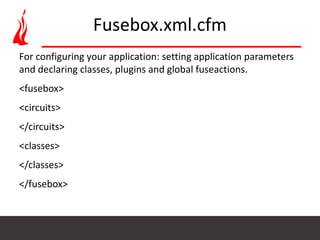
Fusebox.xml.cfm
For configuring your application: setting application parameters
and declaring classes, plugins and global fuseactions.
<fusebox>
<circuits>
</circuits>
<classes>
</classes>
</fusebox>
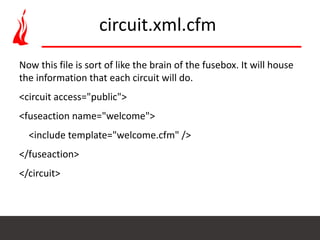
Now this file is sort of like the brain of the fusebox. It will house
the information that each circuit will do.
<circuit access="public">
<fuseaction name="welcome">
<include template="welcome.cfm" />
</fuseaction>
</circuit>
circuit.xml.cfm
MVC in FuseBox
Setting up CF App using Fusebox
We are going to follow MVC architecture for setting
up the ColdFusion App using Fusebox.
Are Fusebox and Mach-II or Model-Glue
competing frameworks?
●
Not really. They represent two different approaches to
building an application. Both Mach-II and Model-Glue
require an object-oriented approach to development.
Fusebox does not require an object-oriented approach,
but can support an OO approach if necessary.
●
Important - Fusebox does not force the Model-View-
Controller (MVC) pattern or Object-Oriented
Programming (OOP) on the developer. However, either
or both of these development approaches can be used
with Fusebox.
Development Mode VS Production Mode
●
The mode can be set to various development modes or
"production". The difference is that in development-full-
load mode, the core files reparses the XML files only if
they have changed and re-builds all the Fusebox
memory structures on every request. Development-
circuit-load, does not re-load the fusebox.xml file,
doesn't re-build the Fusebox memory structures but
does reload any circuit.xml files required by the current
request.
Development Mode VS Production Mode
●
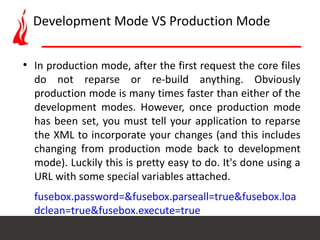
In production mode, after the first request the core files
do not reparse or re-build anything. Obviously
production mode is many times faster than either of the
development modes. However, once production mode
has been set, you must tell your application to reparse
the XML to incorporate your changes (and this includes
changing from production mode back to development
mode). Luckily this is pretty easy to do. It's done using a
URL with some special variables attached.
fusebox.password=&fusebox.parseall=true&fusebox.loa
dclean=true&fusebox.execute=true
Model-View-Controller w/out XML
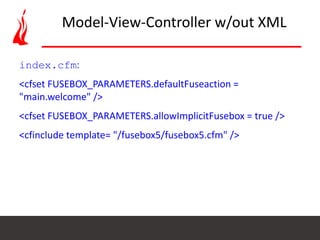
index.cfm:
<cfset FUSEBOX_PARAMETERS.defaultFuseaction =
"main.welcome" />
<cfset FUSEBOX_PARAMETERS.allowImplicitFusebox = true />
<cfinclude template= "/fusebox5/fusebox5.cfm" />
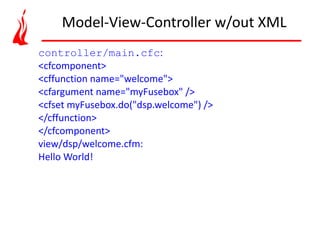
controller/main.cfc:
<cfcomponent>
<cffunction name="welcome">
<cfargument name="myFusebox" />
<cfset myFusebox.do("dsp.welcome") />
</cffunction>
</cfcomponent>
view/dsp/welcome.cfm:
Hello World!
Model-View-Controller w/out XML
References
●
http://www.fusebox.org/index.cfm/fusebox-
downloads/sample-applications/
●
http://tutorial389.easycfm.com/
●
https://www.youtube.com/watch?v=rLbsWRaOC3w
Thanks All
Q & A

Setup ColdFusion application using fusebox mvc architecture

  • 1.
    Setup a ColdFusionApplication using Fusebox MVC architecture Presented by Manjeet Kumar Mahto.
  • 2.
    What will wediscuss? ● What Is a Framework and why we need it? ● What is FuseBox ● Installing FuseBox ● MVC In FuseBox ● Setting up CF App using Fusebox
  • 3.
    Framework ● it makes iteasier to work with complex technologies ● it ties together a bunch of discrete objects/components into something more useful ● it forces the team (or just me) to implement code in a way that promotes consistent coding, fewer bugs, and more flexible applications ● everyone can easily test and debug the code, even code that they didn't write
  • 4.
    What is aFuseBox? ● Fusebox is a framework for building web applications. ● It is meant to make your applications easier to create and maintain. ● It also makes team development easier. ● It does this by helping you structure your application and break things down into discreet pieces.
  • 5.
    FuseBox Elements ● A Fuseboxapplication is made up of Circuits. ● A Circuit corresponds to a directory in your application. Within each circuit are one or more Fuseactions. ● A Fuseaction is a request handler. And finally, a Fuseaction does its work by executing one or more Fuses. ● Fuses are individual CFML templates such as display files.
  • 6.
    FuseBox Installation When installingFusebox, the most important question is where do you want your fusebox core files as well as the supporting files from the skeleton to be placed in your directory structure? ● In a shared directory that several applications can share. (This will require a web site mapping) ● Within an application and inside the web root (Some shared servers only give you the web root). ● Within an application, but above the web root.
  • 7.
    How to installFusebox? ● Download the core files from the official Fusebox Website. ● Unzip the core files. ● Put the 'fusebox5' folder in the root of your application. ● Create the folder structure in M-V-C. ● Create Fusebox.xml.cfm file at the root of your folder structure. ● Inside each folder create Circuit.xml.cfm file. ● Add corresponding rest of the files in each of their respective folders of Model or View Or Controller.
  • 8.
    Fusebox.xml.cfm For configuring yourapplication: setting application parameters and declaring classes, plugins and global fuseactions. <fusebox> <circuits> </circuits> <classes> </classes> </fusebox>
  • 9.
    Now this fileis sort of like the brain of the fusebox. It will house the information that each circuit will do. <circuit access="public"> <fuseaction name="welcome"> <include template="welcome.cfm" /> </fuseaction> </circuit> circuit.xml.cfm
  • 10.
  • 11.
    Setting up CFApp using Fusebox We are going to follow MVC architecture for setting up the ColdFusion App using Fusebox.
  • 12.
    Are Fusebox andMach-II or Model-Glue competing frameworks? ● Not really. They represent two different approaches to building an application. Both Mach-II and Model-Glue require an object-oriented approach to development. Fusebox does not require an object-oriented approach, but can support an OO approach if necessary. ● Important - Fusebox does not force the Model-View- Controller (MVC) pattern or Object-Oriented Programming (OOP) on the developer. However, either or both of these development approaches can be used with Fusebox.
  • 13.
    Development Mode VSProduction Mode ● The mode can be set to various development modes or "production". The difference is that in development-full- load mode, the core files reparses the XML files only if they have changed and re-builds all the Fusebox memory structures on every request. Development- circuit-load, does not re-load the fusebox.xml file, doesn't re-build the Fusebox memory structures but does reload any circuit.xml files required by the current request.
  • 14.
    Development Mode VSProduction Mode ● In production mode, after the first request the core files do not reparse or re-build anything. Obviously production mode is many times faster than either of the development modes. However, once production mode has been set, you must tell your application to reparse the XML to incorporate your changes (and this includes changing from production mode back to development mode). Luckily this is pretty easy to do. It's done using a URL with some special variables attached. fusebox.password=&fusebox.parseall=true&fusebox.loa dclean=true&fusebox.execute=true
  • 15.
    Model-View-Controller w/out XML index.cfm: <cfsetFUSEBOX_PARAMETERS.defaultFuseaction = "main.welcome" /> <cfset FUSEBOX_PARAMETERS.allowImplicitFusebox = true /> <cfinclude template= "/fusebox5/fusebox5.cfm" />
  • 16.
    controller/main.cfc: <cfcomponent> <cffunction name="welcome"> <cfargument name="myFusebox"/> <cfset myFusebox.do("dsp.welcome") /> </cffunction> </cfcomponent> view/dsp/welcome.cfm: Hello World! Model-View-Controller w/out XML
  • 17.
  • 18.