SERVERS
Brochure
 What is a
Server?
 Types of
Servers?
 File Servers.
 Print Servers.
 E-mail Servers.
 Database
Servers.
Servers
What is a SERVER?
 Servers are the one that is
responsible to provide response to each
client’s request simultaneously.
 A Server may be responsible to
process a single request or more than
one request at a time.
Types of Servers
1. File Servers
2. Print Servers
3. E-mail Servers
4. Data Base
Servers
File Servers
o A file server may be dedicated or non-
dedicated.
o A dedicated server is designed
specifically for use as a file server not
for other database purposes.
o File servers may also be categorized by the
method of access: Internet file servers are
frequently accessed by File Transfer
Protocol (FTP) or by HTTP (but are different
from web servers, that often provide
dynamic web content in addition to static
files).
File Servers
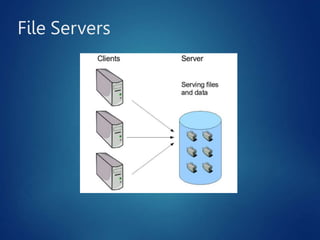
o File server is a computer attached to a
network, that has the primary purpose to
share
contents (such as documents, sound
files, photographs, movies, images,
databases, etc.) that can be accessed by
the other computers that are attached to
the network.
o
A
file server is not intended to
perform
computational tasks, and does not run
programs on behalf of its clients.
File Servers
o It is designed primarily to enable the
storage and retrieval of data while the
computation is carried out by the
workstations.
o File servers are commonly found in
schools and offices and rarely seen in
local internet service providers using
LAN to connect their client computers.
File Servers
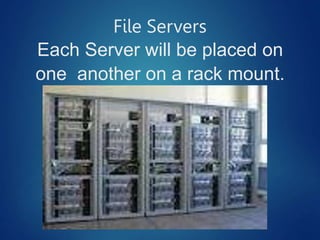
Each Server will be placed on
one another on a rack mount.
File Servers
File
Servers
Minimum Hardware requirements for FILE
SERVERS
Memor
y
• RAM 4 GB for developer evaluation
use.
• 8 GB for production use.
File
Servers
Storage
• 80 GB or greater for system drive.
• You must have sufficient space for the
base installation and sufficient space for
diagnostics such as logging, debugging,
creating memory dumps, and so on.
File
Servers
Processors
• 64-bit, four cores for small
deployments.
• 64-bit, eight cores for medium
deployments.
File Servers
Operating System Used in Server
sites
 Windows Server 2003
 Windows Server 2008
 Windows Server 2008 R2 SP1
 Windows NT
 Ubuntu Server Edition
 Linux
 Novel Netware
 Mac OS 8 and so on….
Print Servers
A print server may be a networked
computer with one or more shared printers.
Alternatively a print server may be a
dedicated device on the network, with
connections to the LAN and one or more
printers.
Print server functionality may be integrated
with other devices such as a wireless router,
a firewall, or both.
Print Servers
A printer may have a built-in print server.
All printers with the right type of
connector are compatible with all print
servers; manufacturers of servers make
available lists of compatible printers
because a server may not implement all
the communications functionality of a
printer (low ink signal, etc.).
Print Servers
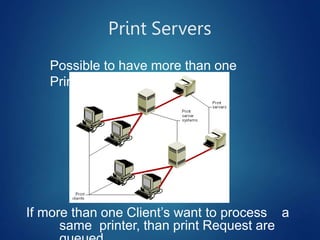
Possible to have more than one
Printers.
If more than one Client’s want to process a
same printer, than print Request are
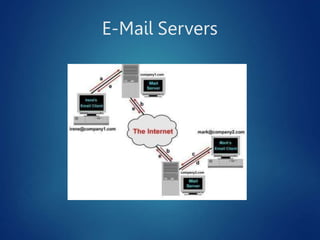
E-Mail Servers
E-Mail Servers
 Often referred to as simply "mail server",
an e-mail server is a computer within
your
network that works as your virtual post
office.
 A mail server usually consists of a
storage area where e-mail is stored for
local users, a set of user definable rules
which determine how the mail server
should react to the destination of a
specific message.
E-Mail Servers
 A database of user accounts that the mail
server recognizes and will deal with locally.
This means each users will be stored in
particular Email Providers Database. Ex:
Yahoo, Gmail, Rediff, Hot mail.
 Generally the person(s) responsible for the
maintenance of the e-mail server (editing
users, monitoring system activity) are
referred to as the postmaster.
Database Server
A database server is a computer program
that provides database services to other
computer programs or computers.
Database management systems
frequently provide database server
functionality, and some DBMS’s (e.g.,
My SQL) rely exclusively on the client–
server model for database access.
Database
Servers
In a master-slave model, database master
servers are centralized and primary locations
of data while database slave servers are
synchronized backups of the master acting
as proxies.
Some examples of Database servers are
Oracle, DB2, Informix, Ingres, SQL Server.
Every server uses its own query logic and
structure.
Database
Servers
Such a server is accessed either
through a "front end“ at the "back end"
which runs on the server and handles
tasks such as data analysis and
storage.
The back-end, sometimes called a
database server, performs tasks such
as data analysis, storage, data
manipulation, archiving, and other non-
Database
Servers
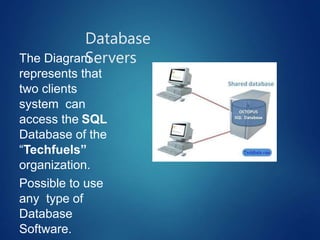
The Diagram
represents that
two clients
system can
access the SQL
Database of the
“Techfuels”
organization.
Possible to use
any type of
Database
Software.
Slides created
by Sir Agrie

Server.pptx

  • 1.
  • 2.
    Brochure  What isa Server?  Types of Servers?  File Servers.  Print Servers.  E-mail Servers.  Database Servers.
  • 3.
    Servers What is aSERVER?  Servers are the one that is responsible to provide response to each client’s request simultaneously.  A Server may be responsible to process a single request or more than one request at a time.
  • 4.
    Types of Servers 1.File Servers 2. Print Servers 3. E-mail Servers 4. Data Base Servers
  • 5.
    File Servers o Afile server may be dedicated or non- dedicated. o A dedicated server is designed specifically for use as a file server not for other database purposes. o File servers may also be categorized by the method of access: Internet file servers are frequently accessed by File Transfer Protocol (FTP) or by HTTP (but are different from web servers, that often provide dynamic web content in addition to static files).
  • 6.
    File Servers o Fileserver is a computer attached to a network, that has the primary purpose to share contents (such as documents, sound files, photographs, movies, images, databases, etc.) that can be accessed by the other computers that are attached to the network. o A file server is not intended to perform computational tasks, and does not run programs on behalf of its clients.
  • 7.
    File Servers o Itis designed primarily to enable the storage and retrieval of data while the computation is carried out by the workstations. o File servers are commonly found in schools and offices and rarely seen in local internet service providers using LAN to connect their client computers.
  • 8.
    File Servers Each Serverwill be placed on one another on a rack mount.
  • 9.
  • 10.
    File Servers Minimum Hardware requirementsfor FILE SERVERS Memor y • RAM 4 GB for developer evaluation use. • 8 GB for production use.
  • 11.
    File Servers Storage • 80 GBor greater for system drive. • You must have sufficient space for the base installation and sufficient space for diagnostics such as logging, debugging, creating memory dumps, and so on.
  • 12.
    File Servers Processors • 64-bit, fourcores for small deployments. • 64-bit, eight cores for medium deployments.
  • 13.
    File Servers Operating SystemUsed in Server sites  Windows Server 2003  Windows Server 2008  Windows Server 2008 R2 SP1  Windows NT  Ubuntu Server Edition  Linux  Novel Netware  Mac OS 8 and so on….
  • 14.
    Print Servers A printserver may be a networked computer with one or more shared printers. Alternatively a print server may be a dedicated device on the network, with connections to the LAN and one or more printers. Print server functionality may be integrated with other devices such as a wireless router, a firewall, or both.
  • 15.
    Print Servers A printermay have a built-in print server. All printers with the right type of connector are compatible with all print servers; manufacturers of servers make available lists of compatible printers because a server may not implement all the communications functionality of a printer (low ink signal, etc.).
  • 16.
    Print Servers Possible tohave more than one Printers. If more than one Client’s want to process a same printer, than print Request are
  • 17.
  • 18.
    E-Mail Servers  Oftenreferred to as simply "mail server", an e-mail server is a computer within your network that works as your virtual post office.  A mail server usually consists of a storage area where e-mail is stored for local users, a set of user definable rules which determine how the mail server should react to the destination of a specific message.
  • 19.
    E-Mail Servers  Adatabase of user accounts that the mail server recognizes and will deal with locally. This means each users will be stored in particular Email Providers Database. Ex: Yahoo, Gmail, Rediff, Hot mail.  Generally the person(s) responsible for the maintenance of the e-mail server (editing users, monitoring system activity) are referred to as the postmaster.
  • 20.
    Database Server A databaseserver is a computer program that provides database services to other computer programs or computers. Database management systems frequently provide database server functionality, and some DBMS’s (e.g., My SQL) rely exclusively on the client– server model for database access.
  • 21.
    Database Servers In a master-slavemodel, database master servers are centralized and primary locations of data while database slave servers are synchronized backups of the master acting as proxies. Some examples of Database servers are Oracle, DB2, Informix, Ingres, SQL Server. Every server uses its own query logic and structure.
  • 22.
    Database Servers Such a serveris accessed either through a "front end“ at the "back end" which runs on the server and handles tasks such as data analysis and storage. The back-end, sometimes called a database server, performs tasks such as data analysis, storage, data manipulation, archiving, and other non-
  • 23.
    Database Servers The Diagram represents that twoclients system can access the SQL Database of the “Techfuels” organization. Possible to use any type of Database Software.
  • 24.