© 2016, Amazon Web Services, Inc. or its Affiliates. All rights reserved.
Daniel Geske <gesked@amazon.de>
24 August 2017
Serverless Architectural
Patterns and Best Practices
Agenda
Serverless characteristics and practices
3-tier web application
Batch processing
Stream processing
Operations automation
Wrap-up/Q&A
Spectrum of AWS offerings
AWS
Lambda
Amazon
Kinesis
Amazon
S3
Amazon API
Gateway
Amazon
SQS
Amazon
DynamoDB
AWS IoT
Amazon
EMR
Amazon
ElastiCache
Amazon
RDS
Amazon
Redshift
Amazon
Elasticsearch
Service
Managed Serverless
Amazon EC2
“On EC2”
Amazon
Cognito
Amazon
CloudWatch
Serverless patterns built with functions
Functions are the unit of deployment and scale
Scales per request—users cannot over or under-provision
Never pay for idle
Skip the boring parts; skip the hard parts
Lambda considerations and best practices
AWS Lambda is stateless—architect accordingly
• Assume no affinity with underlying compute
infrastructure
• Local filesystem access and child process may not
extend beyond the lifetime of the Lambda request
Lambda considerations and best practices
Can your Lambda functions
survive the cold?
• Instantiate AWS clients and
database clients outside the
scope of the handler to take
advantage of connection re-use.
• Schedule with CloudWatch
Events for warmth
• ENIs for VPC support are
attached during cold start
import sys
import logging
import rds_config
import pymysql
rds_host = "rds-instance"
db_name = rds_config.db_name
try:
conn = pymysql.connect(
except:
logger.error("ERROR:
def handler(event, context):
with conn.cursor() as cur:
Executes with
each invocation
Executes during
cold start
Lambda considerations and best practices
How about a file system?
• Don’t forget about /tmp (512 MB
scratch space)
exports.ffmpeg = function(event,context)
{
new ffmpeg('./thumb.MP4', function (err,
video)
{
if (!err) {
video.fnExtractFrameToJPG('/tmp’)
function (error, files) { … }
…
if (!error)
console.log(files);
context.done();
...
Lambda considerations and best practices
Custom CloudWatch metrics
• 40 KB per POST
• Default Acct Limit of 150 TPS
• Consider aggregating with Kinesis
def put_cstate ( iid, state ):
response = cwclient.put_metric_data(
Namespace='AWSx/DirectConnect',
MetricData=[
{
'MetricName':'ConnectionState',
'Dimensions': [
{
'Name': 'ConnectionId',
'Value': iid
},
],
'Value': state,
'Unit': 'None’
…
Pattern 1: 3-Tier Web Application
Web application
Data stored in
Amazon
DynamoDB
Dynamic content
in AWS Lambda
Amazon API
Gateway
Browser
Amazon
CloudFront
Amazon
S3
Amazon API
Gateway AWS
Lambda
Amazon
DynamoDB
Amazon
S3
Amazon
CloudFront
• Bucket Policies
• ACLs
• OAI
• Geo-Restriction
• Signed Cookies
• Signed URLs
• DDOS
IAM
AuthZ
IAM
Serverless web app security
• Throttling
• Caching
• Usage Plans
Browser
Amazon API
Gateway AWS
Lambda
Amazon
DynamoDB
Amazon
S3
Amazon
CloudFront
• Bucket Policies
• ACLs
• OAI
• Geo-Restriction
• Signed Cookies
• Signed URLs
• DDOS
IAMAuthZ IAM
Serverless web app security
• Throttling
• Caching
• Usage Plans
Browser
Amazon
CloudFront
• HTTPS
• Disable Host
Header Forwarding
AWS WAF
Amazon API
Gateway
AWS
Lambda
Amazon
DynamoDB
Amazon
S3
Amazon
CloudFront
• Access Logs in S3
Bucket• Access Logs in S3 Bucket
• CloudWatch Metrics-
https://aws.amazon.com/
cloudfront/reporting/
Serverless web app monitoring
AWS WAF
• WebACL Testing
• Total Requests
• Allowed/Blocked
Requests by ACL
logslogs
• Invocations
• Invocation Errors
• Duration
• Throttled
Invocations
• Latency
• Throughput
• Throttled Reqs
• Returned Bytes
• Documentation
• Latency
• Count
• Cache Hit/Miss
• 4XX/5XX Errors
Streams
AWS
CloudTrail
Browser
Custom CloudWatch
Metrics & Alarms
Serverless web app lifecycle management
AWS SAM (Serverless Application Model) - blog
AWS
Lambda
Amazon API
Gateway
AWS
CloudFormation
Amazon
S3
Amazon
DynamoDB
Package &
Deploy
Code/Packages/
Swagger
Serverless
Template
Serverless
Template
w/ CodeUri
package deploy
CI/CD Tools
Amazon API Gateway best practices
Use mock integrations
Signed URL from API Gateway for large or binary file
uploads to S3
Use request/response mapping templates for legacy
apps and HTTP response codes
Asynchronous calls for Lambda > 30s
Root/
/{proxy+} ANY Your Node.js
Express app
Greedy variable, ANY method, proxy integration
Simple yet very powerful:
• Automatically scale to meet demand
• Only pay for the requests you receive
Pattern 2: Batch Processing
Characteristics
Large data sets
Periodic or scheduled tasks
Extract Transform Load (ETL) jobs
Usually non-interactive and long running
Many problems fit MapReduce programming model
Serverless batch processing
AWS Lambda:
Splitter
Amazon S3
Object
Amazon DynamoDB:
Mapper Results
AWS Lambda:
Mappers
….
….
AWS Lambda:
Reducer
Amazon S3
Results
Considerations and best practices
Cascade mapper functions
Lambda languages vs. SQL
Speed is directly proportional to the concurrent Lambda
function limit
Use DynamoDB/ElastiCache/S3 for intermediate state of
mapper functions
Lambda MapReduce Reference Architecture
Cost of serverless batch processing
200 GB normalized Google Ngram data-set
Serverless:
• 1000 concurrent Lambda invocations
• Processing time: 9 minutes
• Cost: $7.06
Pattern 3: Stream Processing
Stream processing characteristics
• High ingest rate
• Near real-time processing (low latency from ingest to
process)
• Spiky traffic (lots of devices with intermittent network
connections)
• Message durability
• Message ordering
Serverless stream processing architecture
Sensors
Amazon Kinesis:
Stream
Lambda:
Stream Processor
S3:
Final Aggregated Output
Lambda:
Periodic Dump to S3
CloudWatch Events:
Trigger every 5 minutes
S3:
Intermediate Aggregated
Data
Lambda:
Scheduled Dispatcher
KPL:
Producer
Fan-out pattern
• Number of Amazon Kinesis Streams shards corresponds to concurrent
Lambda invocations
• Trade higher throughput & lower latency vs. strict message ordering
Sensors
Amazon Kinesis:
Stream
Lambda:
Dispatcher
KPL:
Producer Lambda:
Processors
Increase throughput, reduce processing latency
More about fan-out pattern
• Keep up with peak shard capacity
• 1000 records / second, OR
• 1 MB / second
• Consider parallel synchronous Lambda invocations
• Rcoil for JS (https://github.com/sapessi/rcoil) can help
• Dead letter queue to retry failed Lambda invocations
Best practices
• Tune batch size when Lambda is triggered by Amazon
Kinesis Streams – reduce number of Lambda
invocations
• Tune memory setting for your Lambda function – shorten
execution time
• Use KPL to batch messages and saturate Amazon
Kinesis Stream capacity
Monitoring
Amazon Kinesis Stream metric GetRecords.IteratorAgeMilliseconds maximum
Amazon Kinesis Analytics
Sensors
Amazon Kinesis:
Stream
Amazon Kinesis Analytics:
Window Aggregation
Amazon Kinesis Streams
Producer S3:
Aggregated Output
CREATE OR REPLACE PUMP "STREAM_PUMP" AS INSERT INTO
"DESTINATION_SQL_STREAM"
SELECT STREAM "device_id",
FLOOR("SOURCE_SQL_STREAM_001".ROWTIME TO MINUTE) as "round_ts",
SUM("measurement") as "sample_sum",
COUNT(*) AS "sample_count"
FROM "SOURCE_SQL_STREAM_001"
GROUP BY "device_id", FLOOR("SOURCE_SQL_STREAM_001".ROWTIME TO MINUTE);
Aggregation
Time Window
Cost comparison - assumptions
• Variable message rate over 6 hours
• Costs extrapolated over 30 days
20,000
10,000
20,000
50,000
20,000
10,000
1 2 3 4 5 6
MESSAGES/SEC
HOURS
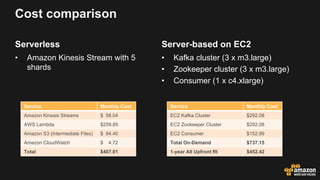
Serverless
• Amazon Kinesis Stream with 5
shards
Cost comparison
Server-based on EC2
• Kafka cluster (3 x m3.large)
• Zookeeper cluster (3 x m3.large)
• Consumer (1 x c4.xlarge)
Service Monthly Cost
Amazon Kinesis Streams $ 58.04
AWS Lambda $259.85
Amazon S3 (Intermediate Files) $ 84.40
Amazon CloudWatch $ 4.72
Total $407.01
Service Monthly Cost
EC2 Kafka Cluster $292.08
EC2 Zookeeper Cluster $292.08
EC2 Consumer $152.99
Total On-Demand $737.15
1-year All Upfront RI $452.42
Compare related services
Amazon Kinesis Streams Amazon SQS Amazon SNS
Message Durability Up to retention period Up to retention period Retry delivery (depends on
destination type)
Maximum Retention Period 7 days 14 days Up to retry delivery limit
Message Ordering Strict within shard Standard - Best effort
FIFO – Strict within Message
Group
None
Delivery semantics Multiple consumers per
shard
Multiple readers per queue (but
one message is only handled
by one reader at a time)
Multiple subscribers per
topic
Scaling By throughput using Shards Automatic Automatic
Iterate over messages Shard iterators No No
Delivery Destination Types Kinesis Consumers SQS Readers HTTP/S, Mobile Push,
SMS, Email, SQS, Lambda
Lambda architecture
Data
Sources
Serving Layer
Speed Layer
AWS Lambda:
Splitter
Amazon S3
Object
Amazon DynamoDB:
Mapper Results
Amazon
S3
AWS Lambda:
Mappers
….
….
AWS Lambda:
Reducer
Amazon S3
Results
Batch Layer
Sensors
Amazon Kinesis:
Stream
Lambda:
Stream Processor
S3:
Final Aggregated Output
Lambda:
Periodic Dump to S3
CloudWatch Events:
Trigger every 5 minutes
S3:
Intermediate Aggregated
Data
Lambda:
Scheduled Dispatcher
KPL:
Producer
Pattern 4: Automation
Automation characteristics
• Respond to alarms or events
• Periodic jobs
• Auditing and Notification
• Extend AWS functionality
…All while being Highly Available and Scalable
Automation: dynamic DNS for EC2 instances
AWS Lambda:
Update Route53
Amazon CloudWatch Events:
Rule Triggered
Amazon EC2 Instance
State Changes
Amazon DynamoDB:
EC2 Instance Properties
Amazon Route53:
Private Hosted Zone
Tag:
CNAME = ‘xyz.example.com’
xyz.example.com A 10.2.0.134
Automation: image thumbnail creation from S3
AWS Lambda:
Resize Images
Users upload photos
S3:
Source Bucket
S3:
Destination Bucket
Triggered on
PUTs
CapitalOne Cloud Custodian
AWS Lambda:
Policy & Compliance Rules
Amazon CloudWatch Events:
Rules Triggered
AWS CloudTrail:
Events
Amazon SNS:
Alert Notifications
Amazon CloudWatch Logs:
Logs
Read more here: http://www.capitalone.io/cloud-custodian/docs/index.html
Best practices
• Document how to disable event triggers for your automation when
troubleshooting
• Gracefully handle API throttling by retrying with an exponential back-
off algorithm (AWS SDKs do this for you)
• Publish custom metrics from your Lambda function that are
meaningful for operations (e.g. number of EBS volumes
snapshotted)
Go build something.
Daniel Geske <gesked@amazon.de>

Serverless Architectural Patterns and Best Practices | AWS

  • 1.
    © 2016, AmazonWeb Services, Inc. or its Affiliates. All rights reserved. Daniel Geske <gesked@amazon.de> 24 August 2017 Serverless Architectural Patterns and Best Practices
  • 2.
    Agenda Serverless characteristics andpractices 3-tier web application Batch processing Stream processing Operations automation Wrap-up/Q&A
  • 3.
    Spectrum of AWSofferings AWS Lambda Amazon Kinesis Amazon S3 Amazon API Gateway Amazon SQS Amazon DynamoDB AWS IoT Amazon EMR Amazon ElastiCache Amazon RDS Amazon Redshift Amazon Elasticsearch Service Managed Serverless Amazon EC2 “On EC2” Amazon Cognito Amazon CloudWatch
  • 4.
    Serverless patterns builtwith functions Functions are the unit of deployment and scale Scales per request—users cannot over or under-provision Never pay for idle Skip the boring parts; skip the hard parts
  • 5.
    Lambda considerations andbest practices AWS Lambda is stateless—architect accordingly • Assume no affinity with underlying compute infrastructure • Local filesystem access and child process may not extend beyond the lifetime of the Lambda request
  • 6.
    Lambda considerations andbest practices Can your Lambda functions survive the cold? • Instantiate AWS clients and database clients outside the scope of the handler to take advantage of connection re-use. • Schedule with CloudWatch Events for warmth • ENIs for VPC support are attached during cold start import sys import logging import rds_config import pymysql rds_host = "rds-instance" db_name = rds_config.db_name try: conn = pymysql.connect( except: logger.error("ERROR: def handler(event, context): with conn.cursor() as cur: Executes with each invocation Executes during cold start
  • 7.
    Lambda considerations andbest practices How about a file system? • Don’t forget about /tmp (512 MB scratch space) exports.ffmpeg = function(event,context) { new ffmpeg('./thumb.MP4', function (err, video) { if (!err) { video.fnExtractFrameToJPG('/tmp’) function (error, files) { … } … if (!error) console.log(files); context.done(); ...
  • 8.
    Lambda considerations andbest practices Custom CloudWatch metrics • 40 KB per POST • Default Acct Limit of 150 TPS • Consider aggregating with Kinesis def put_cstate ( iid, state ): response = cwclient.put_metric_data( Namespace='AWSx/DirectConnect', MetricData=[ { 'MetricName':'ConnectionState', 'Dimensions': [ { 'Name': 'ConnectionId', 'Value': iid }, ], 'Value': state, 'Unit': 'None’ …
  • 9.
    Pattern 1: 3-TierWeb Application
  • 10.
    Web application Data storedin Amazon DynamoDB Dynamic content in AWS Lambda Amazon API Gateway Browser Amazon CloudFront Amazon S3
  • 11.
    Amazon API Gateway AWS Lambda Amazon DynamoDB Amazon S3 Amazon CloudFront •Bucket Policies • ACLs • OAI • Geo-Restriction • Signed Cookies • Signed URLs • DDOS IAM AuthZ IAM Serverless web app security • Throttling • Caching • Usage Plans Browser
  • 12.
    Amazon API Gateway AWS Lambda Amazon DynamoDB Amazon S3 Amazon CloudFront •Bucket Policies • ACLs • OAI • Geo-Restriction • Signed Cookies • Signed URLs • DDOS IAMAuthZ IAM Serverless web app security • Throttling • Caching • Usage Plans Browser Amazon CloudFront • HTTPS • Disable Host Header Forwarding AWS WAF
  • 13.
    Amazon API Gateway AWS Lambda Amazon DynamoDB Amazon S3 Amazon CloudFront • AccessLogs in S3 Bucket• Access Logs in S3 Bucket • CloudWatch Metrics- https://aws.amazon.com/ cloudfront/reporting/ Serverless web app monitoring AWS WAF • WebACL Testing • Total Requests • Allowed/Blocked Requests by ACL logslogs • Invocations • Invocation Errors • Duration • Throttled Invocations • Latency • Throughput • Throttled Reqs • Returned Bytes • Documentation • Latency • Count • Cache Hit/Miss • 4XX/5XX Errors Streams AWS CloudTrail Browser Custom CloudWatch Metrics & Alarms
  • 14.
    Serverless web applifecycle management AWS SAM (Serverless Application Model) - blog AWS Lambda Amazon API Gateway AWS CloudFormation Amazon S3 Amazon DynamoDB Package & Deploy Code/Packages/ Swagger Serverless Template Serverless Template w/ CodeUri package deploy CI/CD Tools
  • 15.
    Amazon API Gatewaybest practices Use mock integrations Signed URL from API Gateway for large or binary file uploads to S3 Use request/response mapping templates for legacy apps and HTTP response codes Asynchronous calls for Lambda > 30s
  • 16.
    Root/ /{proxy+} ANY YourNode.js Express app Greedy variable, ANY method, proxy integration Simple yet very powerful: • Automatically scale to meet demand • Only pay for the requests you receive
  • 17.
    Pattern 2: BatchProcessing
  • 18.
    Characteristics Large data sets Periodicor scheduled tasks Extract Transform Load (ETL) jobs Usually non-interactive and long running Many problems fit MapReduce programming model
  • 19.
    Serverless batch processing AWSLambda: Splitter Amazon S3 Object Amazon DynamoDB: Mapper Results AWS Lambda: Mappers …. …. AWS Lambda: Reducer Amazon S3 Results
  • 20.
    Considerations and bestpractices Cascade mapper functions Lambda languages vs. SQL Speed is directly proportional to the concurrent Lambda function limit Use DynamoDB/ElastiCache/S3 for intermediate state of mapper functions Lambda MapReduce Reference Architecture
  • 21.
    Cost of serverlessbatch processing 200 GB normalized Google Ngram data-set Serverless: • 1000 concurrent Lambda invocations • Processing time: 9 minutes • Cost: $7.06
  • 22.
  • 23.
    Stream processing characteristics •High ingest rate • Near real-time processing (low latency from ingest to process) • Spiky traffic (lots of devices with intermittent network connections) • Message durability • Message ordering
  • 24.
    Serverless stream processingarchitecture Sensors Amazon Kinesis: Stream Lambda: Stream Processor S3: Final Aggregated Output Lambda: Periodic Dump to S3 CloudWatch Events: Trigger every 5 minutes S3: Intermediate Aggregated Data Lambda: Scheduled Dispatcher KPL: Producer
  • 25.
    Fan-out pattern • Numberof Amazon Kinesis Streams shards corresponds to concurrent Lambda invocations • Trade higher throughput & lower latency vs. strict message ordering Sensors Amazon Kinesis: Stream Lambda: Dispatcher KPL: Producer Lambda: Processors Increase throughput, reduce processing latency
  • 26.
    More about fan-outpattern • Keep up with peak shard capacity • 1000 records / second, OR • 1 MB / second • Consider parallel synchronous Lambda invocations • Rcoil for JS (https://github.com/sapessi/rcoil) can help • Dead letter queue to retry failed Lambda invocations
  • 27.
    Best practices • Tunebatch size when Lambda is triggered by Amazon Kinesis Streams – reduce number of Lambda invocations • Tune memory setting for your Lambda function – shorten execution time • Use KPL to batch messages and saturate Amazon Kinesis Stream capacity
  • 28.
    Monitoring Amazon Kinesis Streammetric GetRecords.IteratorAgeMilliseconds maximum
  • 29.
    Amazon Kinesis Analytics Sensors AmazonKinesis: Stream Amazon Kinesis Analytics: Window Aggregation Amazon Kinesis Streams Producer S3: Aggregated Output CREATE OR REPLACE PUMP "STREAM_PUMP" AS INSERT INTO "DESTINATION_SQL_STREAM" SELECT STREAM "device_id", FLOOR("SOURCE_SQL_STREAM_001".ROWTIME TO MINUTE) as "round_ts", SUM("measurement") as "sample_sum", COUNT(*) AS "sample_count" FROM "SOURCE_SQL_STREAM_001" GROUP BY "device_id", FLOOR("SOURCE_SQL_STREAM_001".ROWTIME TO MINUTE); Aggregation Time Window
  • 30.
    Cost comparison -assumptions • Variable message rate over 6 hours • Costs extrapolated over 30 days 20,000 10,000 20,000 50,000 20,000 10,000 1 2 3 4 5 6 MESSAGES/SEC HOURS
  • 31.
    Serverless • Amazon KinesisStream with 5 shards Cost comparison Server-based on EC2 • Kafka cluster (3 x m3.large) • Zookeeper cluster (3 x m3.large) • Consumer (1 x c4.xlarge) Service Monthly Cost Amazon Kinesis Streams $ 58.04 AWS Lambda $259.85 Amazon S3 (Intermediate Files) $ 84.40 Amazon CloudWatch $ 4.72 Total $407.01 Service Monthly Cost EC2 Kafka Cluster $292.08 EC2 Zookeeper Cluster $292.08 EC2 Consumer $152.99 Total On-Demand $737.15 1-year All Upfront RI $452.42
  • 32.
    Compare related services AmazonKinesis Streams Amazon SQS Amazon SNS Message Durability Up to retention period Up to retention period Retry delivery (depends on destination type) Maximum Retention Period 7 days 14 days Up to retry delivery limit Message Ordering Strict within shard Standard - Best effort FIFO – Strict within Message Group None Delivery semantics Multiple consumers per shard Multiple readers per queue (but one message is only handled by one reader at a time) Multiple subscribers per topic Scaling By throughput using Shards Automatic Automatic Iterate over messages Shard iterators No No Delivery Destination Types Kinesis Consumers SQS Readers HTTP/S, Mobile Push, SMS, Email, SQS, Lambda
  • 33.
    Lambda architecture Data Sources Serving Layer SpeedLayer AWS Lambda: Splitter Amazon S3 Object Amazon DynamoDB: Mapper Results Amazon S3 AWS Lambda: Mappers …. …. AWS Lambda: Reducer Amazon S3 Results Batch Layer Sensors Amazon Kinesis: Stream Lambda: Stream Processor S3: Final Aggregated Output Lambda: Periodic Dump to S3 CloudWatch Events: Trigger every 5 minutes S3: Intermediate Aggregated Data Lambda: Scheduled Dispatcher KPL: Producer
  • 34.
  • 35.
    Automation characteristics • Respondto alarms or events • Periodic jobs • Auditing and Notification • Extend AWS functionality …All while being Highly Available and Scalable
  • 36.
    Automation: dynamic DNSfor EC2 instances AWS Lambda: Update Route53 Amazon CloudWatch Events: Rule Triggered Amazon EC2 Instance State Changes Amazon DynamoDB: EC2 Instance Properties Amazon Route53: Private Hosted Zone Tag: CNAME = ‘xyz.example.com’ xyz.example.com A 10.2.0.134
  • 37.
    Automation: image thumbnailcreation from S3 AWS Lambda: Resize Images Users upload photos S3: Source Bucket S3: Destination Bucket Triggered on PUTs
  • 38.
    CapitalOne Cloud Custodian AWSLambda: Policy & Compliance Rules Amazon CloudWatch Events: Rules Triggered AWS CloudTrail: Events Amazon SNS: Alert Notifications Amazon CloudWatch Logs: Logs Read more here: http://www.capitalone.io/cloud-custodian/docs/index.html
  • 39.
    Best practices • Documenthow to disable event triggers for your automation when troubleshooting • Gracefully handle API throttling by retrying with an exponential back- off algorithm (AWS SDKs do this for you) • Publish custom metrics from your Lambda function that are meaningful for operations (e.g. number of EBS volumes snapshotted)
  • 40.
    Go build something. DanielGeske <gesked@amazon.de>