


Usability Testing
The Lowe's Vendor Gateway UX Team
Jaime Brown – Sr. Product Designer
September 2022
Learning
Objectives
• Identify which potential process for removing a
standard-user in the Lowe's Vendor Gateway provides
the greatest value to the actual Admin Vendor users.
• Suss out vendor feedback for future stage
enhancements, such as hard deleting a standard-user's
profile.
• Review terminology for both UAM and VOMA, to
determine the clearest verbiage for vendors to
understand User roles and Contact roles.
• Identify any gaps in vendor expectations as they relate
to updating Contact fields in VOMA, while in the process
of removing a User in UAM.
• Review concept design for UAM application access,
specifically the proposed search field.
• Would you be interested in separating Admin roles, so
that there were standard-admin and "super-admin"
roles, with super admins having default access to certain
applications?
Overview
Today we're going to be presenting several aspects of the UAM application for
Lowe’s Vendor Gateway—the one stop shop for managing your relationship
and business with Lowe’s.
We are really excited to have you collaborate with us as we work to make
vendor-facing applications that will take some of the burden from your
business.
Have you ever been a part of a usability study? A usability study is a study of a
digital product or tool or website where the product is tested when in the
hands of a user. What is being evaluated is the quality of the product not the
user’s knowledge or inherent ability to understand everything about the
product.
There is nothing that you can say today or share that is wrong. We are looking
for your honest feedback about our communication and our product. I did not
design or build this personally….so there is absolutely nothing you could share
that would hurt my feelings.
Preface: We will be recording this session, so that we can capture all your
insights and knowledge. Are you ok with this?
We will have various team members watching us live behind the scenes. They
will not be speaking to you at all until the very end of the session when they
might want to ask you some more specific questions about what you have
shared. If at any time you want to stop, take a break, call it quits for whatever
reason this is your right and we respect that. Do you have any questions for us
before we dive in?
Activity Flow A1 – Remove User
Full Page Concept – Expanding Row Control
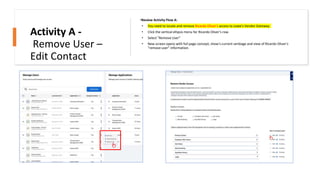
•Review Activity Flow A:
• You need to locate and remove Ricardo Oliver's access to Lowe's Vendor Gateway.
• Click the vertical ellipsis menu for Ricardo Oliver's row.
• Select "Remove User”
• New screen opens with full page concept, show’s current verbiage and view of Ricardo Oliver's
“remove user” information.
Activity A -
Remove User –
Edit Contact
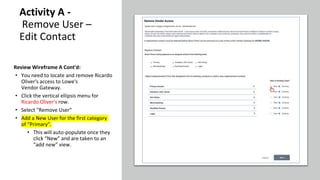
Review Wireframe A Cont'd:
• You need to locate and remove Ricardo
Oliver's access to Lowe's
Vendor Gateway.
• Click the vertical ellipsis menu for
Ricardo Oliver's row.
• Select "Remove User"
• Add a New User for the first category
of “Primary”.
• This will auto-populate once they
click “New” and are taken to an
“add new” view.
Activity A -
Remove User –
Edit Contact
Activity A -
Remove User –
Edit Contact
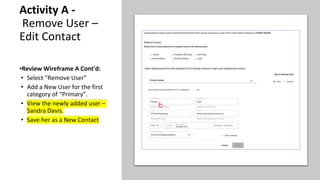
•Review Wireframe A Cont'd:
• Select "Remove User"
• Add a New User for the first
category of “Primary”.
• View the newly added user –
Sandra Davis.
• Save her as a New Contact
Activity A -
Remove User –
Edit Contact
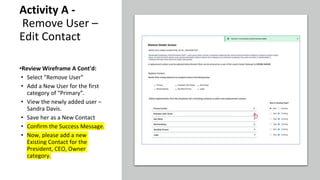
•Review Wireframe A Cont'd:
• Select "Remove User"
• Add a New User for the first
category of “Primary”.
• View the newly added user –
Sandra Davis.
• Save her as a New Contact
• Confirm the Success Message.
• Now, please add a new
Existing Contact for the
President, CEO, Owner
category.
Activity A -
Remove User –
Edit Contact
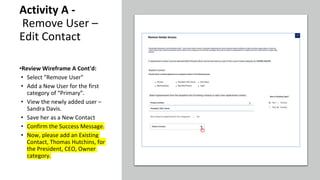
•Review Wireframe A Cont'd:
• Select "Remove User"
• Add a New User for the first
category of “Primary”.
• View the newly added user –
Sandra Davis.
• Save her as a New Contact
• Confirm the Success Message.
• Now, please add an Existing
Contact, Thomas Hutchins, for
the President, CEO, Owner
category.
Activity A -
Remove User –
Edit Contact
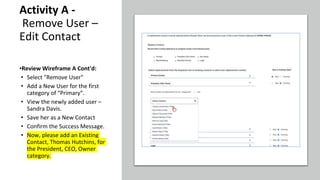
•Review Wireframe A Cont'd:
• Select "Remove User"
• Add a New User for the first
category of “Primary”.
• View the newly added user –
Sandra Davis.
• Save her as a New Contact
• Confirm the Success Message.
• Now, please add an Existing
Contact, Thomas Hutchins, for
the President, CEO, Owner
category.
Activity A -
Remove User –
Edit Contact
•Review Wireframe A Cont'd:
• Select "Remove User"
• Add a New User for the first
category of “Primary”.
• View the newly added user –
Sandra Davis.
• Save her as a New Contact
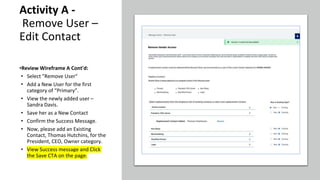
• Confirm the Success Message.
• Now, please add an Existing
Contact, Thomas Hutchins, for the
President, CEO, Owner category.
• View Success message and Click
the Save CTA on the page.
Activity A -
Remove User –
Edit Contact
•Review Wireframe A Cont'd:
• View the newly added user –
Sandra Davis.
• Save her as a New Contact
• Confirm the Success Message.
• Now, please add an Existing
Contact, Thomas Hutchins, for the
President, CEO, Owner category.
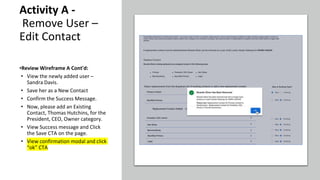
• View Success message and Click
the Save CTA on the page.
• View confirmation modal and click
“ok” CTA
Pause Card
Activity A1 – Post Flow Questions
Questions:
• Ease of Use - Ranking
• On a Scale from 1:5, with 1 being the Easiest and 5 being the most Difficult, how would you rate 'Remove User –
Update Contact' activity that you just completed?
• How do you feel about the time it took you to complete the activity?
• As you completed the activity, what were your thoughts on designations of User versus a Contact? Is the terminology
confusing?
• UX Note – What does the user expect from this flow? Will try to search for the answer or head directly to VOMA,
attempting to unassign the Contact there before realizing they still need to reach out to Ticket Management or a
Business Contact?
• What scenarios would you expect to have the ability to assign a different user (or add a new user) per contact category?
• How useful would the ability to add or assign a different contact per category?
• What scenario would you find the ability to permanently delete a contact most useful? Is this a feature that would benefit
you or others in the role of admin?
• Would you want to see an option to automatically add a 'new' contact to all of the rest of the categories, or for adding the same contact for all
categories.
Activity Flow A2 – A/B Concept
Expanding Rows vs In-line Dropdown
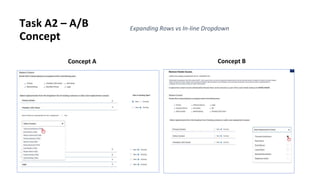
Task A2 – A/B
Concept
Expanding Rows vs In-line Dropdown
Concept A Concept B
Pause Card
Activity A2 – Post Flow Questions
Questions:
• Concept A:
• Overall Design – Scale of 1 to 10, 1 being the worst and 10 being the best.
• Two words you'd use to describe it:
• Thoughts?
• Concept B:
• Overall Design – Scale of 1 to 10, 1 being the worst and 10 being the best.
• Two words you'd use to describe it:
• Thoughts?
• If you had to pick one, which of the two designs do you prefer (A, or B)? Why?
Activity Flow B1 – Application Access
Page (Flow and UI Concept)
Review Wireframe B:
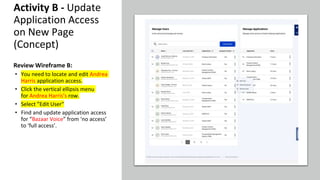
• You need to locate and edit Andrea
Harris application access.
• Click the vertical ellipsis menu
for Andrea Harris’s row.
• Select ”Edit User"
• Find and update application access
for “Bazaar Voice” from ‘no access’
to ‘full access’.
Activity B - Update
Application Access
on New Page
(Concept)
Activity B - Update
Application Access on
New Page (Concept)
•Review Wireframe B:
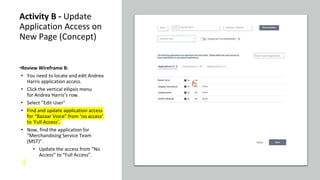
• You need to locate and edit Andrea
Harris application access.
• Click the vertical ellipsis menu
for Andrea Harris’s row.
• Select ”Edit User"
• Find and update application access
for “Bazaar Voice” from ‘no access’
to ‘Full Access’.
• Now, find the application for
“Merchandising Service Team
(MST)”.
• Update the access from ”No
Access” to “Full Access”.
Activity B - Update
Application Access on
New Page (Concept)
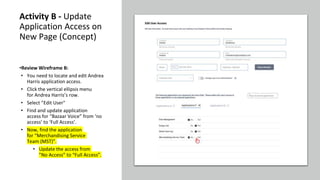
•Review Wireframe B:
• You need to locate and edit Andrea
Harris application access.
• Click the vertical ellipsis menu
for Andrea Harris’s row.
• Select ”Edit User"
• Find and update application
access for “Bazaar Voice” from ‘no
access’ to ‘Full Access’.
• Now, find the application
for “Merchandising Service
Team (MST)”.
• Update the access from
”No Access” to “Full Access”.
Activity B - Update
Application Access on
New Page (Concept)
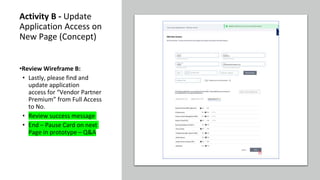
•Review Wireframe B:
• Lastly, please find and
update application
access for “Vendor Partner
Premium” from Full Access
to No.
• Review success message
• End – Pause Card on next
Page in prototype – Q&A
Activity B – Post Flow Questions
Questions:
• Ease of Use - Ranking
• On a Scale from 1:5, with 1 being the Easiest and 5 being the most Difficult, how would you rate 'Remove
User' activity that you just completed?
• Do you have any comments about the activity you just worked on?
• Was anything particularly easy or difficult?
• How do you feel about the time it took you to complete the activity?
• Super Admins - Would you be interested in separating Admin roles, so that there were standard-admin and "super-
admin" roles, with super admins having default access to certain applications?
• What applications would you expect to have default access to?
• What security measures would you expect to be in place? If you have multiple users designated as a "super
admin", would you still expect to have regular admin access for others?
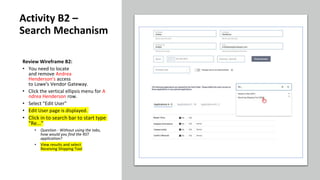
Activity Flow B2 – Application Access
page (Search Mechanism)
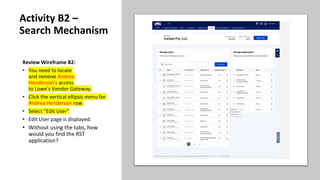
Review Wireframe B2:
• You need to locate
and remove Andrea
Henderson's access
to Lowe's Vendor Gateway.
• Click the vertical ellipsis menu for
Andrea Henderson row.
• Select "Edit User"
• Edit User page is displayed.
• Without using the tabs, how
would you find the RST
application?
Activity B2 –
Search Mechanism
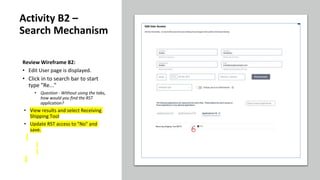
Review Wireframe B2:
• You need to locate
and remove Andrea
Henderson's access
to Lowe's Vendor Gateway.
• Click the vertical ellipsis menu for A
ndrea Henderson row.
• Select "Edit User"
• Edit User page is displayed.
• Click in to search bar to start type
"Re..."
• Question - Without using the tabs,
how would you find the RST
application?
• View results and select
Receiving Shipping Tool
Activity B2 –
Search Mechanism
Review Wireframe B2:
• Edit User page is displayed.
• Click in to search bar to start
type "Re..."
• Question - Without using the tabs,
how would you find the RST
application?
• View results and select Receiving
Shipping Tool
• Update RST access to "No" and
save.
Activity B2 –
Search Mechanism
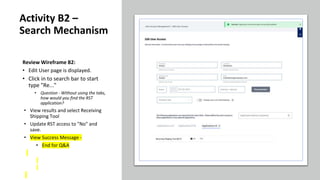
Review Wireframe B2:
• Edit User page is displayed.
• Click in to search bar to start
type "Re..."
• Question - Without using the tabs,
how would you find the RST
application?
• View results and select Receiving
Shipping Tool
• Update RST access to "No" and
save.
• View Success Message -
• End for Q&A
Activity B2 –
Search Mechanism
Activity B2 - Post Flow Questions
Questions:
• Ease of Use - Ranking
• On a Scale from 1:5, with 1 being the Easiest and 5 being the most Difficult, how would you rate 'Search
Mechanism' activity that you just completed?
• How often do you feel you'd use the search field for locating applications?
• If you search for an Application that should be available in the Vendor Gateway and see no results, what would your next step be?
• Would they submit a ticket to find out how to update application access? If they receive an API error and
we can't return results, what would their action be?
Wrap-up Questions
Usability Test Wrap-Up
Conclusion:
• That concludes our questions related to the Lowe's Vendor Gateway for the time being.
• Thank you for participating in this research test.
End

September Usability 2022 - UAM Focus.pptx

  • 1.
    Usability Testing The Lowe'sVendor Gateway UX Team Jaime Brown – Sr. Product Designer September 2022
  • 2.
    Learning Objectives • Identify whichpotential process for removing a standard-user in the Lowe's Vendor Gateway provides the greatest value to the actual Admin Vendor users. • Suss out vendor feedback for future stage enhancements, such as hard deleting a standard-user's profile. • Review terminology for both UAM and VOMA, to determine the clearest verbiage for vendors to understand User roles and Contact roles. • Identify any gaps in vendor expectations as they relate to updating Contact fields in VOMA, while in the process of removing a User in UAM. • Review concept design for UAM application access, specifically the proposed search field. • Would you be interested in separating Admin roles, so that there were standard-admin and "super-admin" roles, with super admins having default access to certain applications?
  • 3.
    Overview Today we're goingto be presenting several aspects of the UAM application for Lowe’s Vendor Gateway—the one stop shop for managing your relationship and business with Lowe’s. We are really excited to have you collaborate with us as we work to make vendor-facing applications that will take some of the burden from your business. Have you ever been a part of a usability study? A usability study is a study of a digital product or tool or website where the product is tested when in the hands of a user. What is being evaluated is the quality of the product not the user’s knowledge or inherent ability to understand everything about the product. There is nothing that you can say today or share that is wrong. We are looking for your honest feedback about our communication and our product. I did not design or build this personally….so there is absolutely nothing you could share that would hurt my feelings. Preface: We will be recording this session, so that we can capture all your insights and knowledge. Are you ok with this? We will have various team members watching us live behind the scenes. They will not be speaking to you at all until the very end of the session when they might want to ask you some more specific questions about what you have shared. If at any time you want to stop, take a break, call it quits for whatever reason this is your right and we respect that. Do you have any questions for us before we dive in?
  • 4.
    Activity Flow A1– Remove User Full Page Concept – Expanding Row Control
  • 5.
    •Review Activity FlowA: • You need to locate and remove Ricardo Oliver's access to Lowe's Vendor Gateway. • Click the vertical ellipsis menu for Ricardo Oliver's row. • Select "Remove User” • New screen opens with full page concept, show’s current verbiage and view of Ricardo Oliver's “remove user” information. Activity A - Remove User – Edit Contact
  • 6.
    Review Wireframe ACont'd: • You need to locate and remove Ricardo Oliver's access to Lowe's Vendor Gateway. • Click the vertical ellipsis menu for Ricardo Oliver's row. • Select "Remove User" • Add a New User for the first category of “Primary”. • This will auto-populate once they click “New” and are taken to an “add new” view. Activity A - Remove User – Edit Contact
  • 7.
    Activity A - RemoveUser – Edit Contact •Review Wireframe A Cont'd: • Select "Remove User" • Add a New User for the first category of “Primary”. • View the newly added user – Sandra Davis. • Save her as a New Contact
  • 8.
    Activity A - RemoveUser – Edit Contact •Review Wireframe A Cont'd: • Select "Remove User" • Add a New User for the first category of “Primary”. • View the newly added user – Sandra Davis. • Save her as a New Contact • Confirm the Success Message. • Now, please add a new Existing Contact for the President, CEO, Owner category.
  • 9.
    Activity A - RemoveUser – Edit Contact •Review Wireframe A Cont'd: • Select "Remove User" • Add a New User for the first category of “Primary”. • View the newly added user – Sandra Davis. • Save her as a New Contact • Confirm the Success Message. • Now, please add an Existing Contact, Thomas Hutchins, for the President, CEO, Owner category.
  • 10.
    Activity A - RemoveUser – Edit Contact •Review Wireframe A Cont'd: • Select "Remove User" • Add a New User for the first category of “Primary”. • View the newly added user – Sandra Davis. • Save her as a New Contact • Confirm the Success Message. • Now, please add an Existing Contact, Thomas Hutchins, for the President, CEO, Owner category.
  • 11.
    Activity A - RemoveUser – Edit Contact •Review Wireframe A Cont'd: • Select "Remove User" • Add a New User for the first category of “Primary”. • View the newly added user – Sandra Davis. • Save her as a New Contact • Confirm the Success Message. • Now, please add an Existing Contact, Thomas Hutchins, for the President, CEO, Owner category. • View Success message and Click the Save CTA on the page.
  • 12.
    Activity A - RemoveUser – Edit Contact •Review Wireframe A Cont'd: • View the newly added user – Sandra Davis. • Save her as a New Contact • Confirm the Success Message. • Now, please add an Existing Contact, Thomas Hutchins, for the President, CEO, Owner category. • View Success message and Click the Save CTA on the page. • View confirmation modal and click “ok” CTA
  • 13.
  • 14.
    Activity A1 –Post Flow Questions Questions: • Ease of Use - Ranking • On a Scale from 1:5, with 1 being the Easiest and 5 being the most Difficult, how would you rate 'Remove User – Update Contact' activity that you just completed? • How do you feel about the time it took you to complete the activity? • As you completed the activity, what were your thoughts on designations of User versus a Contact? Is the terminology confusing? • UX Note – What does the user expect from this flow? Will try to search for the answer or head directly to VOMA, attempting to unassign the Contact there before realizing they still need to reach out to Ticket Management or a Business Contact? • What scenarios would you expect to have the ability to assign a different user (or add a new user) per contact category? • How useful would the ability to add or assign a different contact per category? • What scenario would you find the ability to permanently delete a contact most useful? Is this a feature that would benefit you or others in the role of admin? • Would you want to see an option to automatically add a 'new' contact to all of the rest of the categories, or for adding the same contact for all categories.
  • 15.
    Activity Flow A2– A/B Concept Expanding Rows vs In-line Dropdown
  • 16.
    Task A2 –A/B Concept Expanding Rows vs In-line Dropdown Concept A Concept B
  • 17.
  • 18.
    Activity A2 –Post Flow Questions Questions: • Concept A: • Overall Design – Scale of 1 to 10, 1 being the worst and 10 being the best. • Two words you'd use to describe it: • Thoughts? • Concept B: • Overall Design – Scale of 1 to 10, 1 being the worst and 10 being the best. • Two words you'd use to describe it: • Thoughts? • If you had to pick one, which of the two designs do you prefer (A, or B)? Why?
  • 19.
    Activity Flow B1– Application Access Page (Flow and UI Concept)
  • 20.
    Review Wireframe B: •You need to locate and edit Andrea Harris application access. • Click the vertical ellipsis menu for Andrea Harris’s row. • Select ”Edit User" • Find and update application access for “Bazaar Voice” from ‘no access’ to ‘full access’. Activity B - Update Application Access on New Page (Concept)
  • 21.
    Activity B -Update Application Access on New Page (Concept) •Review Wireframe B: • You need to locate and edit Andrea Harris application access. • Click the vertical ellipsis menu for Andrea Harris’s row. • Select ”Edit User" • Find and update application access for “Bazaar Voice” from ‘no access’ to ‘Full Access’. • Now, find the application for “Merchandising Service Team (MST)”. • Update the access from ”No Access” to “Full Access”.
  • 22.
    Activity B -Update Application Access on New Page (Concept) •Review Wireframe B: • You need to locate and edit Andrea Harris application access. • Click the vertical ellipsis menu for Andrea Harris’s row. • Select ”Edit User" • Find and update application access for “Bazaar Voice” from ‘no access’ to ‘Full Access’. • Now, find the application for “Merchandising Service Team (MST)”. • Update the access from ”No Access” to “Full Access”.
  • 23.
    Activity B -Update Application Access on New Page (Concept) •Review Wireframe B: • Lastly, please find and update application access for “Vendor Partner Premium” from Full Access to No. • Review success message • End – Pause Card on next Page in prototype – Q&A
  • 24.
    Activity B –Post Flow Questions Questions: • Ease of Use - Ranking • On a Scale from 1:5, with 1 being the Easiest and 5 being the most Difficult, how would you rate 'Remove User' activity that you just completed? • Do you have any comments about the activity you just worked on? • Was anything particularly easy or difficult? • How do you feel about the time it took you to complete the activity? • Super Admins - Would you be interested in separating Admin roles, so that there were standard-admin and "super- admin" roles, with super admins having default access to certain applications? • What applications would you expect to have default access to? • What security measures would you expect to be in place? If you have multiple users designated as a "super admin", would you still expect to have regular admin access for others?
  • 25.
    Activity Flow B2– Application Access page (Search Mechanism)
  • 26.
    Review Wireframe B2: •You need to locate and remove Andrea Henderson's access to Lowe's Vendor Gateway. • Click the vertical ellipsis menu for Andrea Henderson row. • Select "Edit User" • Edit User page is displayed. • Without using the tabs, how would you find the RST application? Activity B2 – Search Mechanism
  • 27.
    Review Wireframe B2: •You need to locate and remove Andrea Henderson's access to Lowe's Vendor Gateway. • Click the vertical ellipsis menu for A ndrea Henderson row. • Select "Edit User" • Edit User page is displayed. • Click in to search bar to start type "Re..." • Question - Without using the tabs, how would you find the RST application? • View results and select Receiving Shipping Tool Activity B2 – Search Mechanism
  • 28.
    Review Wireframe B2: •Edit User page is displayed. • Click in to search bar to start type "Re..." • Question - Without using the tabs, how would you find the RST application? • View results and select Receiving Shipping Tool • Update RST access to "No" and save. Activity B2 – Search Mechanism
  • 29.
    Review Wireframe B2: •Edit User page is displayed. • Click in to search bar to start type "Re..." • Question - Without using the tabs, how would you find the RST application? • View results and select Receiving Shipping Tool • Update RST access to "No" and save. • View Success Message - • End for Q&A Activity B2 – Search Mechanism
  • 30.
    Activity B2 -Post Flow Questions Questions: • Ease of Use - Ranking • On a Scale from 1:5, with 1 being the Easiest and 5 being the most Difficult, how would you rate 'Search Mechanism' activity that you just completed? • How often do you feel you'd use the search field for locating applications? • If you search for an Application that should be available in the Vendor Gateway and see no results, what would your next step be? • Would they submit a ticket to find out how to update application access? If they receive an API error and we can't return results, what would their action be?
  • 31.
  • 32.
    Usability Test Wrap-Up Conclusion: •That concludes our questions related to the Lowe's Vendor Gateway for the time being. • Thank you for participating in this research test.
  • 33.