Seismic Analysis Code
(SAC)
Basic Data Manipulation
SAC
 Seismic Analysis Code was developed at Lawrence
Livermore National Laboratory and University of California in
the early 1980's.
 It is a command-driven program generally implemented on
many types of UNIX operating systems and has become a
standard data manipulation tool in seismology.
 Its binary data format is one of the principle data formats
used today in storing and manipulating seismological time
series data.
 SAC was designed as an aid to research seismologists in
the study of seismic events. As such, it is used for quick
preliminary analyses, for routine processing, for testing new
techniques, for detailed research, and for creating
publication quality graphics.
ceri% sac
SEISMIC ANALYSIS CODE [09/04/2008 (Version 101.2)]
Copyright 1995 Regents of the University of California
SAC>
What can it do?
 Interactively read seismogram data
 Perform many standard data processing operations, such as
 Filtering
 Time picks
 Amplitude picks
 Correlation
 Fourier transforms
 Seismic instrument corrections
 Particle motion rotation
 Trace envelopes
 Spectral ratios
 Linear regressions
 Frequency-wavenumber analysis
 Create a variety of plots of the data and resulting analysis
SAC’s competitors (analysis)
 Various versions of DATASCOPE (now Antelope)
 MATSEIS/Coral other Matlab based programs
 SEISAN
 XPICK
 Seismic UNIX
- others
SAC’s competitors
(data format)
 SEED (Standard for the Exchange of Earthquake Data)
 SEISAN (widely used in Central and South America/Europe)
 CSS (Center for Seismic Studies, associated with treaty verification)
 SUDS (Seismic Unified Data System, from Willie Lee PC based
system/USGS)
 SEG-Y (the standard for seismic reflection data)
 AH (Ad Hoc, pre-SEED shows up from AVO/HVO, etc. in archives)
 Others (new ones crop up every 5-10 years to address the chaotic state of
affairs.)
Commands
 SAC commands fall into three main categories
 Parameter-setting: change values of internal SAC
parameters
 Action-producing: perform some operation on the signals
currently in selected memory based upon the values of
these parameters
 Data-set: determine which files are in active (selected)
memory and therefore will be acted upon
Commands
 HELP calls up a list of all commands
 help command can be used to view manual pages
Defaults
 In order to make SAC quick to learn and easy to use,
default values for all operational parameters were
carefully chosen.
 At the same time, almost all of these parameters are
under direct user control.
 SAC can be reinitialized to this default state at any
time by executing the INICM command.
Data Format and Header
 Each signal or seismogram is stored in a separate binary
or alphanumeric data file.
 SAC can read data in a variety of formats:
 SAC Binary Format (most common)
 CSS format
 SDD format
 ASCII formats
 Each data file contains a header that describes the
contents of that file.
listhdr (lh): lists the
headers of the files in
memory.
SAC> listhdr
FILE: ccm_sumatra_.bhe - 1
----------------------
NPTS = 389396
B = 0.000000e+00
E = 1.946975e+04
IFTYPE = TIME SERIES FILE
LEVEN = TRUE
DELTA = 5.000000e-02
IDEP = UNKNOWN
DEPMIN = -1.073057e+06
DEPMAX = 1.091875e+06
DEPMEN = 8.429739e+02
OMARKER = 7.315 (origin )
KZDATE = DEC 26 (361), 2004
KZTIME = 01:09:52.684
IZTYPE = BEGIN TIME
KSTNM = CCM
CMPAZ = 9.000000e+01
CMPINC = 9.000000e+01
STLO = -9.124470e+01
DIST = 8.818225e+03
AZ = 1.854116e+02
BAZ = 2.013326e+02
LOVROK = TRUE
NVHDR = 6
LPSPOL = TRUE
LCALDA = TRUE
KCMPNM = BHE
KNETWK = US
Time
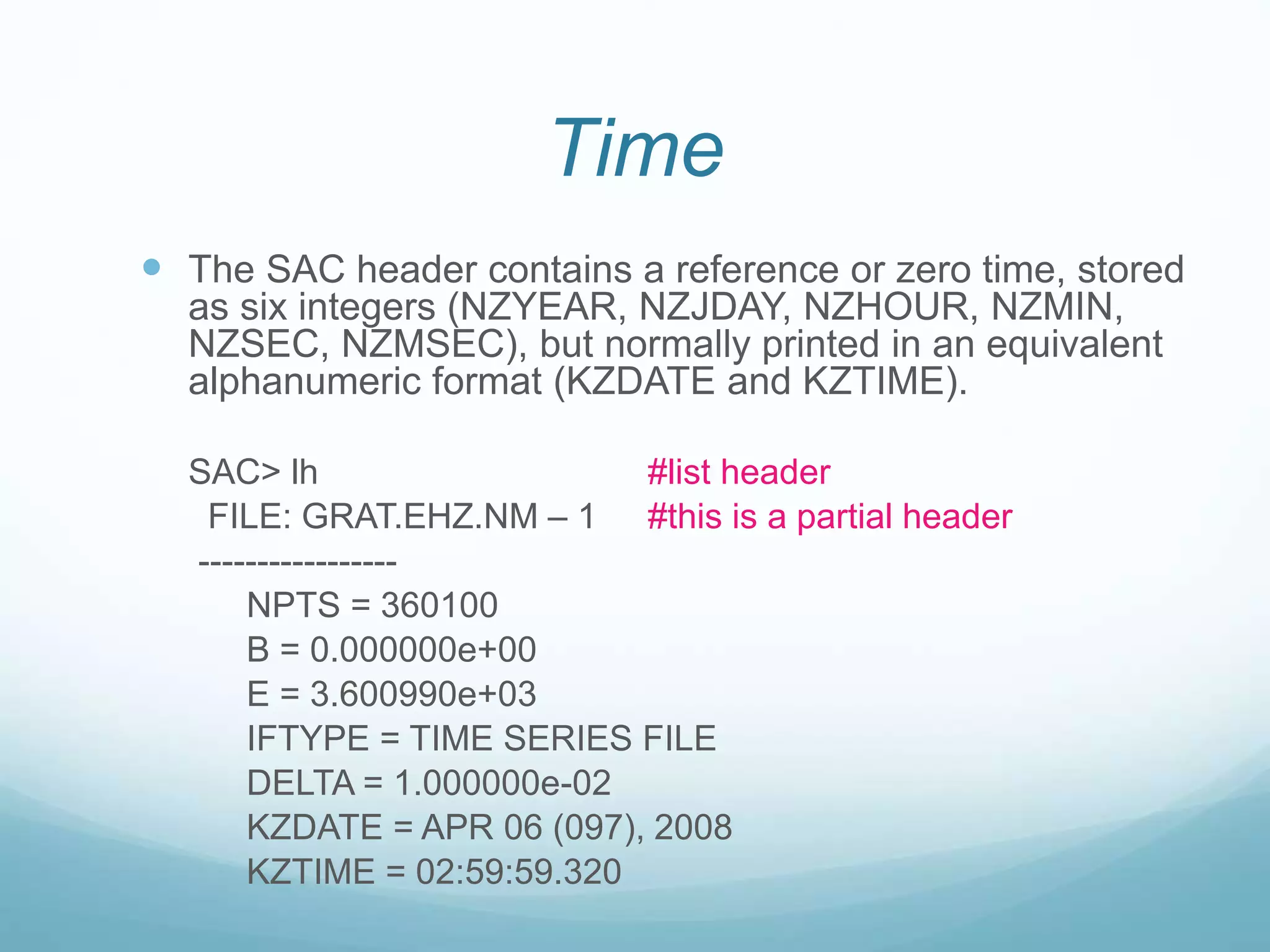
 The SAC header contains a reference or zero time, stored
as six integers (NZYEAR, NZJDAY, NZHOUR, NZMIN,
NZSEC, NZMSEC), but normally printed in an equivalent
alphanumeric format (KZDATE and KZTIME).
SAC> lh #list header
FILE: GRAT.EHZ.NM – 1 #this is a partial header
-----------------
NPTS = 360100
B = 0.000000e+00
E = 3.600990e+03
IFTYPE = TIME SERIES FILE
DELTA = 1.000000e-02
KZDATE = APR 06 (097), 2008
KZTIME = 02:59:59.320
Event and Station Info
 SAC header can store station and event info
SAC> lh
FILE: WMQ.BHZ.D.1995.073:10.34.49 - 1
---------------------------------
KSTNM = WMQ
STLA = 4.382110e+01
STLO = 8.769500e+01
STEL = 8.970000e+02
EVLA = 3.086000e+00
EVLO = 9.584800e+01
EVDP = 3.040000e+01
 Once the event and station information are store, the
program automatically calculates and stores distance (km),
azimuth (degrees), backazimuth (degrees), and great circle
arc length (degrees)
DIST = 4.583862e+03
AZ = 3.510350e+02
BAZ = 1.675856e+02
GCARC = 4.120298e+01
Phase Info
 SAC can be used to pick and store phase information in
header variables A & T0-T9. The Omarker is reserved to for
the origin time. All pick and origin times are stored in secs
from the zero time of the file.
OMARKER = 0
AMARKER #not set in this example
T0MARKER #not set in this example
T1MARKER = 462.7 (P)
T2MARKER = 834.76 (S)
T4MARKER = 472.5 (pP)
T6MARKER = 478 (sP)
Data File Command Module
 This module is used to read, write, and access SAC
data files.
 READ (r): reads data files from disk into memory
SAC> r *.SAC #read any files that end in .SAC
Uses standard UNIX wildcards: reads all files
whose filenames end in “.SAC”
Data File Command Module
 WRITE (w): writes the data currently in memory to
disk
 You can write manipulated data into a range of file formats
or simply overwrite the current set of files (so be careful,
you have been warned!)
Let’s try it (and also jump ahead to graphics
action module to plot (“p”) it) –
% sac
SEISMIC ANALYSIS CODE [8/8/2001 (Version 00.59.44)]
Copyright 1995 Regents of the University of California
SAC> read ccm_sumatra_.bhz
SAC> plot
Let’s try it (and also jump ahead to graphics
action module to plot (“p”) it) –
% sac
SEISMIC ANALYSIS CODE [09/04/2008 (Version 101.2)]
Copyright 1995 Regents of the University of California
SAC> read ccm_sumatra_.bhz
SAC> plot
This seismogram is 20,000 seconds long, with
samples 20 times per second.
It has over 3,890,000 points and would take almost an
hour to draw at 9600 baud, which was the rate of
computers when SAC originally written.
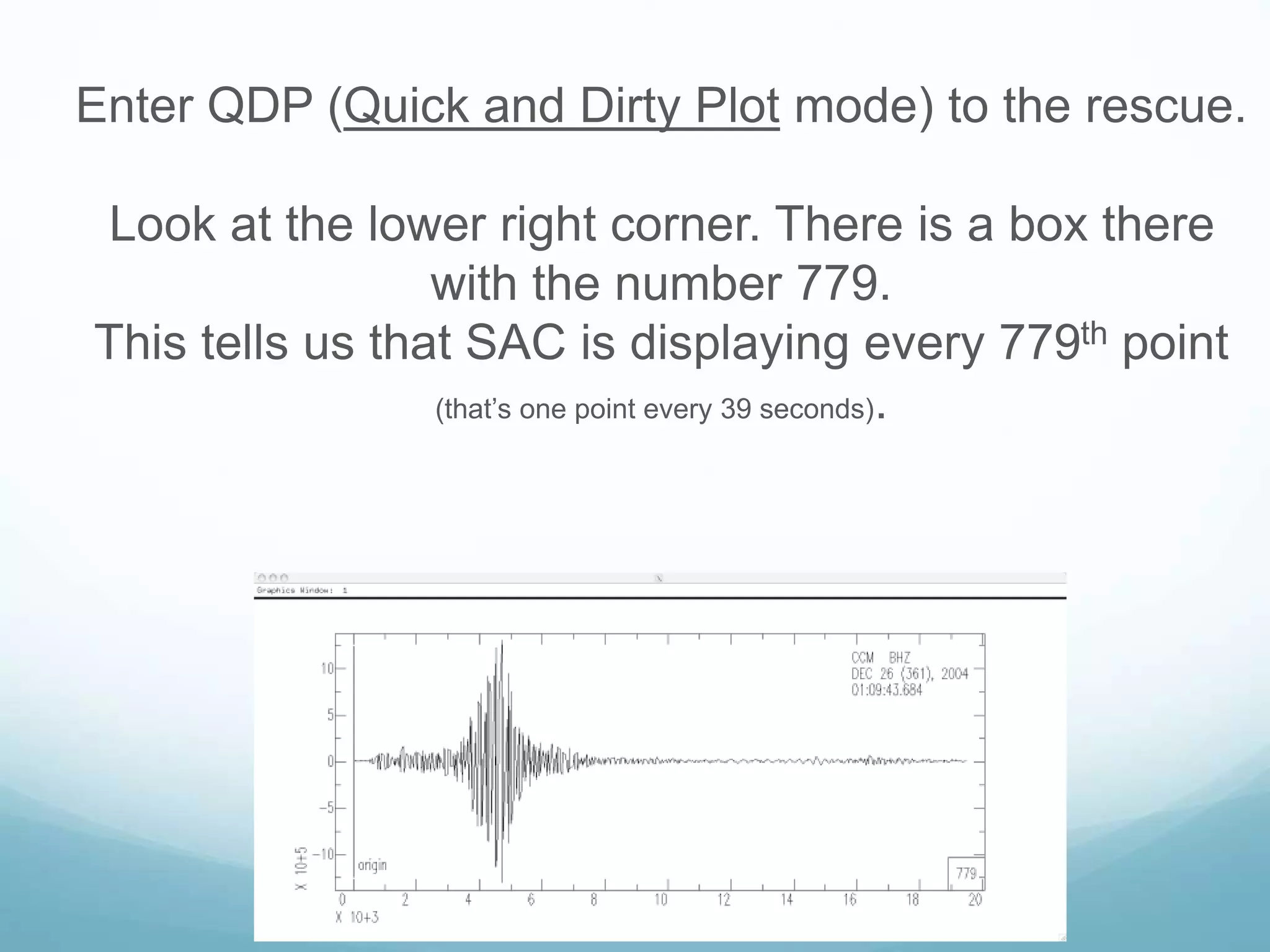
Enter QDP (Quick and Dirty Plot mode) to the rescue.
Look at the lower right corner. There is a box there
with the number 779.
This tells us that SAC is displaying every 779th point
(that’s one point every 39 seconds).
Since we are on a modern computer we can afford to
plot all the data
So we turn the QDP “feature” off
SAC> qdp off
SAC> plot
This plot is now “good”.
• So far there is one file in memory. If we simply read in
another one – it will clobber what we have there.
• If we need to read in more data (say we have processed the
data we’ve read in and now want a spectral ratio of the
processed data with the original data) we have to use the
“more” option to read in the additional data.
SAC>read more filename
• In general SAC does commands to all the files in
memory.
• If the command is starting from scratch (like a read)
it clobbers what is already there.
• Some commands require certain pairs of files
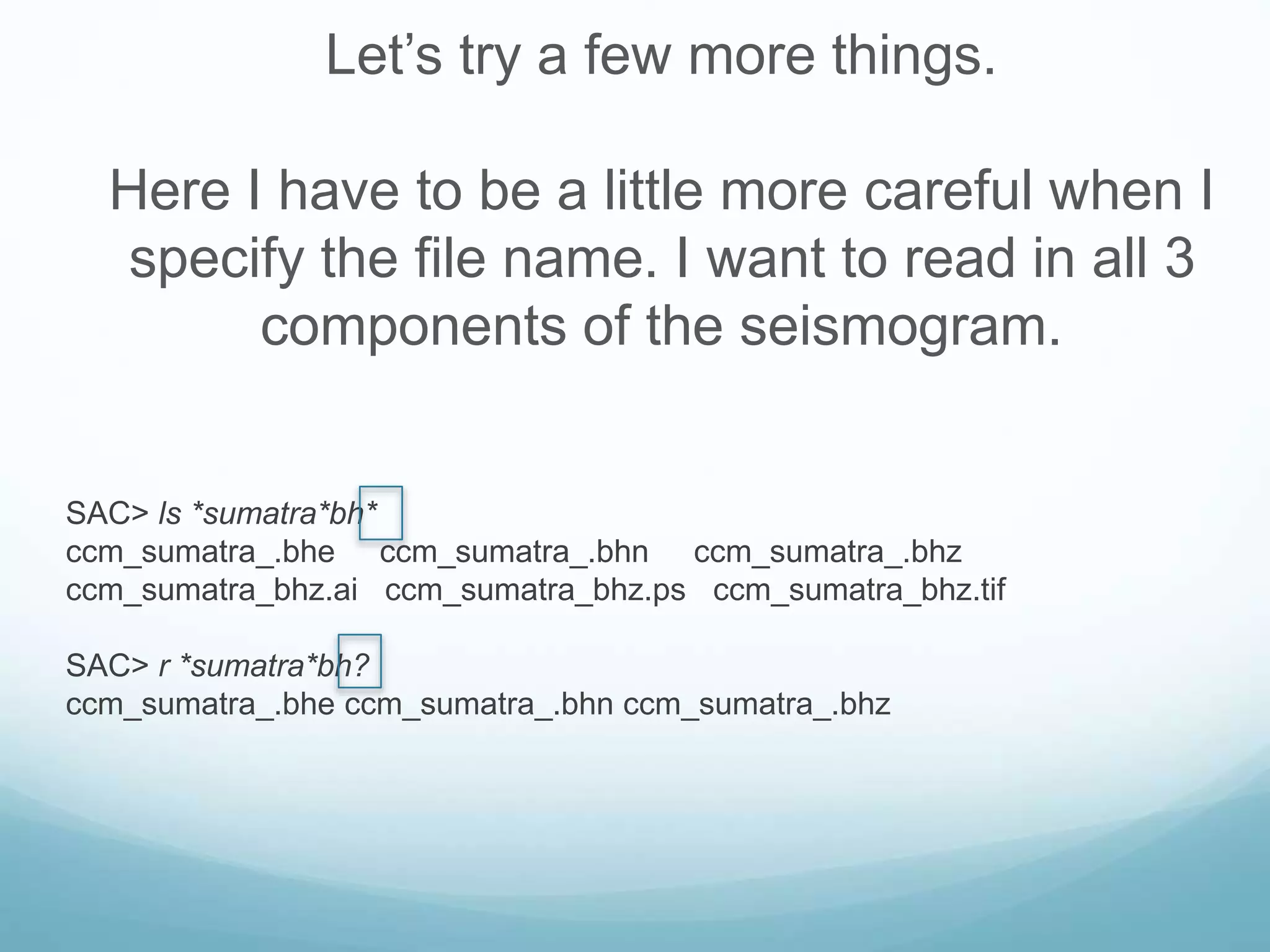
Let’s try a few more things.
Here I have to be a little more careful when I
specify the file name. I want to read in all 3
components of the seismogram.
SAC> ls *sumatra*bh*
ccm_sumatra_.bhe ccm_sumatra_.bhn ccm_sumatra_.bhz
ccm_sumatra_bhz.ai ccm_sumatra_bhz.ps ccm_sumatra_bhz.tif
SAC> r *sumatra*bh?
ccm_sumatra_.bhe ccm_sumatra_.bhn ccm_sumatra_.bhz
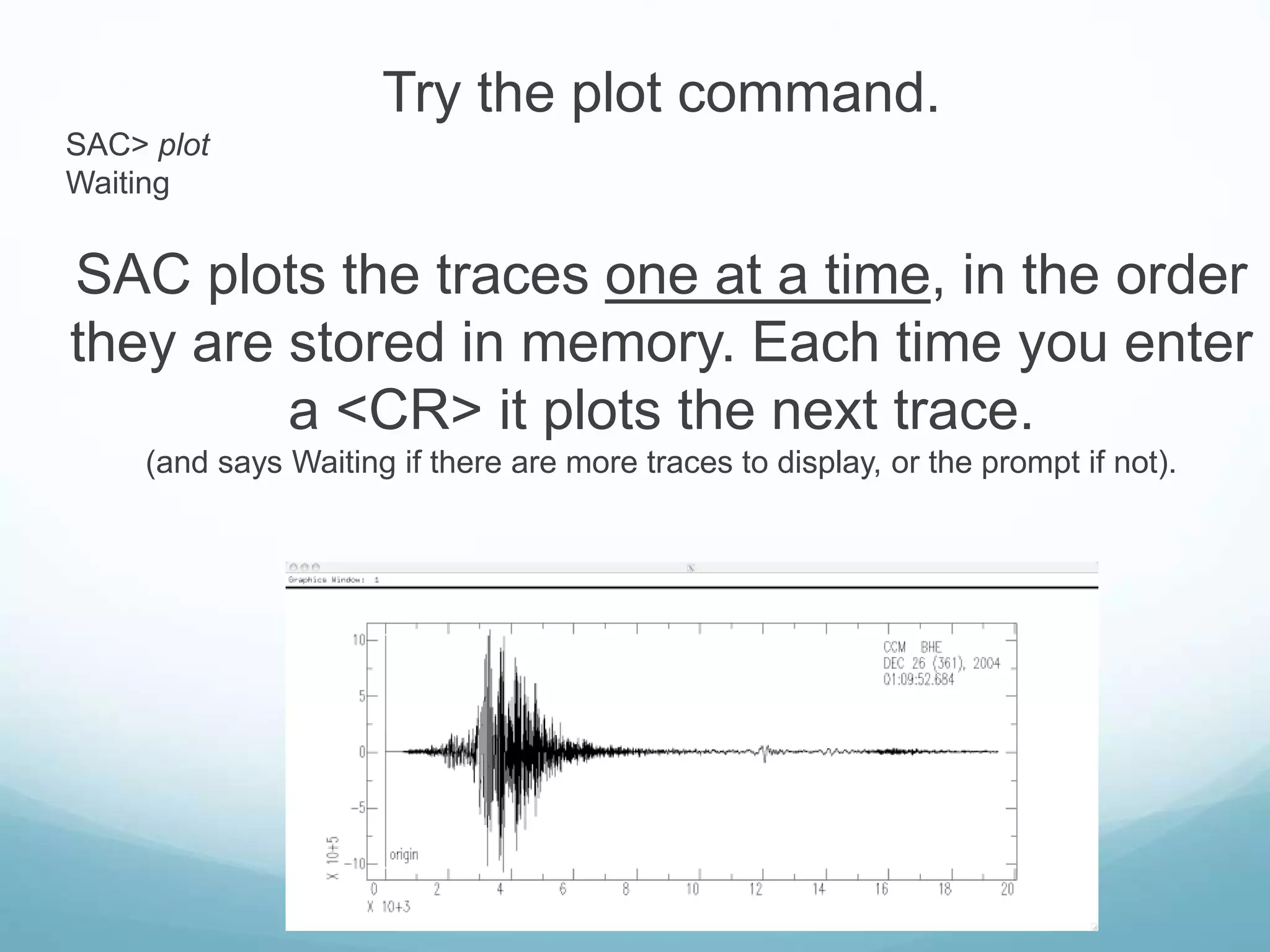
Try the plot command.
SAC> plot
Waiting
SAC plots the traces one at a time, in the order
they are stored in memory. Each time you enter
a <CR> it plots the next trace.
(and says Waiting if there are more traces to display, or the prompt if not).
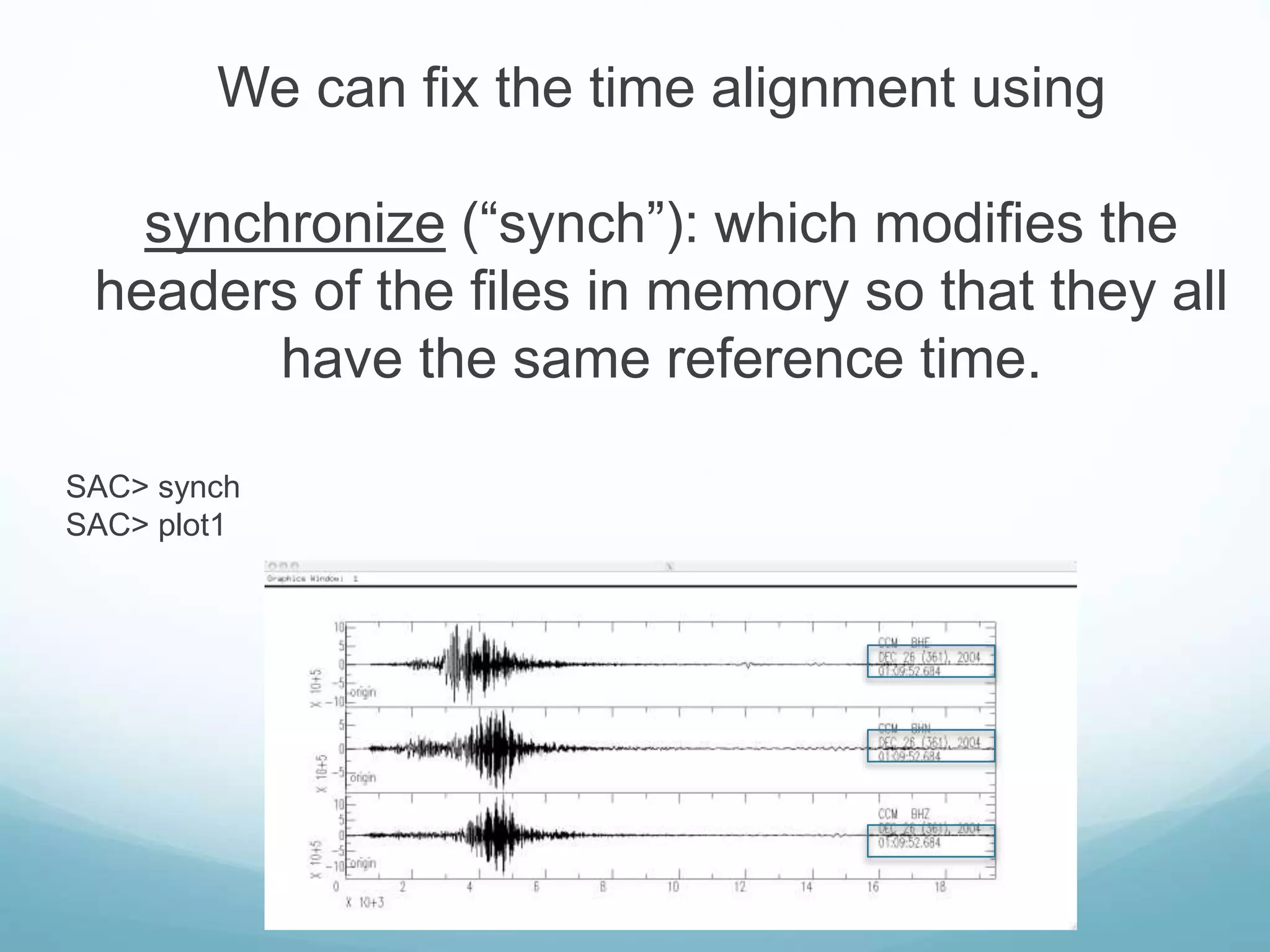
New command – plot1 ( “p1”).
SAC> plot1
SAC>
This command plots all the data in memory on
one plot.
Say I want to process these three traces
together.
Notice that the three traces do not start at the
same time (and we will see that they are not
the same lengths, either).
We can fix the time alignment using
synchronize (“synch”): which modifies the
headers of the files in memory so that they all
have the same reference time.
SAC> synch
SAC> plot1
FILE: ccm_sumatra_.bhe – 1
NPTS = 389396
B = 0.000000e+00
KZDATE = DEC 26 (361), 2004
KZTIME = 01:09:52.684
FILE: ccm_sumatra_.bhn – 2
NPTS = 389328
B = 0.000000e+00
KZDATE = DEC 26 (361), 2004
KZTIME = 01:09:48.485
FILE: ccm_sumatra_.bhz – 3
NPTS = 389600
B = 0.000000e+00
KZDATE = DEC 26 (361), 2004
KZTIME = 01:09:43.684
B = 0.000000e+00
KZDATE = DEC 26 (361), 2004
KZTIME = 01:09:52.684
B = -4.199000e+00
KZDATE = DEC 26 (361), 2004
KZTIME = 01:09:52.684
B = -9.000000e+00
KZDATE = DEC 26 (361), 2004
KZTIME = 01:09:52.684
Before synch After synch
 CUT: defines how much of a data file is to be read.
 Need to reread the data after specifying a cut
SAC> cut t1 -5 30 #cuts 5 s before, 30 s after t1 pick
SAC> r
WMQ.BHZ.D.1995.073:10.34.49
Data File Command Module
 READHDR (rh) and WRITEHDR (wh): read and write
headers without the data
 LISTHDR (lh): list the header contents
 CHNHDR: change header values
 COPYHDR: copy header values from one file to the
others in memory
example:
SAC> r WMQ*
SAC> chnhdr a 439.8
SAC> lh picks
FILE: WMQ.BHZ_10.Q.2004:18:52:27 - 1
-------------------------------
NPTS = 1401
B = 4.347990e+02
E = 4.697990e+02
OMARKER = 0
AMARKER = 439.8
T1MARKER = 439.8 (Pi)
SAC> wh #only overwrite the header because not changes
were made to the time series
Graphics Action Module
 PLOT (p): plots each signal in memory on a separate
plot.
 PLOT1 (p1): plots a set of signals on a single plot with
a common x axis and separate y axes.
 PLOT2 (p2): plots a set of signals on a single plot with
common x and y axes (i.e. an overlay plot).
SAC> r WMQ* AAK*
WMQ.BHZ_10.Q.2004:18:52:27 AAK.BHZ_00.Q.2004:18:52:53
SAC> r more BJT*
BJT.BHZ_00.Q.2004:18:50:19
SAC> plot
Waiting
Waiting
SAC> p1
SAC> p1 rel
SAC> color on increment on
SAC> p2
SAC> p2 rel
Graphics
 There are three graphics ``devices'' currently
supported.
 SGF is a general purpose device driver representing a
large class of actual physical devices.
 XWINDOWS is a general windowing system running on
most high-resolution, bit-mapped graphics workstations.
 SUNWINDOW, is a windowing system that was available
on the Sun in SunOS 4.X.
Xwindows or X
 X is widely used on the graphics workstation and
offers one of the best frameworks for developing
portable window-based applications.
 Should be the default graphics device.
 Can be turned on using the begin device (bg)
command
sac> bd x
SGF (SAC Graphics File)
 SAC Graphics File contains all the information
needed to generate a single plot on any graphics
device.
 Each plot is stored in a separate file. The file names
are of the form ``Fnnn.SGF'' where ``nnn'' is the plot
number, beginning with ``001''.
 Can be turned on using
sac> bd sgf
 To create a postscript plot, you would turn on the sgf
device, create your plot, and then run a conversion
program called sgftops
SAC> bd sgf
SAC> p1 rel #plot waveform to file f001.sgf
SAC> sgftops f001.ps newplot.ps
SAC> ls newplot.ps
newplot.ps
SAC> bd x #or ed sgf

Seismic Analysis Code (SAC)

  • 2.
  • 3.
    SAC  Seismic AnalysisCode was developed at Lawrence Livermore National Laboratory and University of California in the early 1980's.  It is a command-driven program generally implemented on many types of UNIX operating systems and has become a standard data manipulation tool in seismology.  Its binary data format is one of the principle data formats used today in storing and manipulating seismological time series data.
  • 4.
     SAC wasdesigned as an aid to research seismologists in the study of seismic events. As such, it is used for quick preliminary analyses, for routine processing, for testing new techniques, for detailed research, and for creating publication quality graphics. ceri% sac SEISMIC ANALYSIS CODE [09/04/2008 (Version 101.2)] Copyright 1995 Regents of the University of California SAC>
  • 5.
    What can itdo?  Interactively read seismogram data  Perform many standard data processing operations, such as  Filtering  Time picks  Amplitude picks  Correlation  Fourier transforms  Seismic instrument corrections  Particle motion rotation  Trace envelopes  Spectral ratios  Linear regressions  Frequency-wavenumber analysis  Create a variety of plots of the data and resulting analysis
  • 6.
    SAC’s competitors (analysis) Various versions of DATASCOPE (now Antelope)  MATSEIS/Coral other Matlab based programs  SEISAN  XPICK  Seismic UNIX - others
  • 7.
    SAC’s competitors (data format) SEED (Standard for the Exchange of Earthquake Data)  SEISAN (widely used in Central and South America/Europe)  CSS (Center for Seismic Studies, associated with treaty verification)  SUDS (Seismic Unified Data System, from Willie Lee PC based system/USGS)  SEG-Y (the standard for seismic reflection data)  AH (Ad Hoc, pre-SEED shows up from AVO/HVO, etc. in archives)  Others (new ones crop up every 5-10 years to address the chaotic state of affairs.)
  • 8.
    Commands  SAC commandsfall into three main categories  Parameter-setting: change values of internal SAC parameters  Action-producing: perform some operation on the signals currently in selected memory based upon the values of these parameters  Data-set: determine which files are in active (selected) memory and therefore will be acted upon
  • 9.
    Commands  HELP callsup a list of all commands  help command can be used to view manual pages
  • 10.
    Defaults  In orderto make SAC quick to learn and easy to use, default values for all operational parameters were carefully chosen.  At the same time, almost all of these parameters are under direct user control.  SAC can be reinitialized to this default state at any time by executing the INICM command.
  • 11.
    Data Format andHeader  Each signal or seismogram is stored in a separate binary or alphanumeric data file.  SAC can read data in a variety of formats:  SAC Binary Format (most common)  CSS format  SDD format  ASCII formats  Each data file contains a header that describes the contents of that file.
  • 12.
    listhdr (lh): liststhe headers of the files in memory. SAC> listhdr FILE: ccm_sumatra_.bhe - 1 ---------------------- NPTS = 389396 B = 0.000000e+00 E = 1.946975e+04 IFTYPE = TIME SERIES FILE LEVEN = TRUE DELTA = 5.000000e-02 IDEP = UNKNOWN DEPMIN = -1.073057e+06 DEPMAX = 1.091875e+06 DEPMEN = 8.429739e+02 OMARKER = 7.315 (origin ) KZDATE = DEC 26 (361), 2004 KZTIME = 01:09:52.684 IZTYPE = BEGIN TIME KSTNM = CCM CMPAZ = 9.000000e+01 CMPINC = 9.000000e+01 STLO = -9.124470e+01 DIST = 8.818225e+03 AZ = 1.854116e+02 BAZ = 2.013326e+02 LOVROK = TRUE NVHDR = 6 LPSPOL = TRUE LCALDA = TRUE KCMPNM = BHE KNETWK = US
  • 13.
    Time  The SACheader contains a reference or zero time, stored as six integers (NZYEAR, NZJDAY, NZHOUR, NZMIN, NZSEC, NZMSEC), but normally printed in an equivalent alphanumeric format (KZDATE and KZTIME). SAC> lh #list header FILE: GRAT.EHZ.NM – 1 #this is a partial header ----------------- NPTS = 360100 B = 0.000000e+00 E = 3.600990e+03 IFTYPE = TIME SERIES FILE DELTA = 1.000000e-02 KZDATE = APR 06 (097), 2008 KZTIME = 02:59:59.320
  • 14.
    Event and StationInfo  SAC header can store station and event info SAC> lh FILE: WMQ.BHZ.D.1995.073:10.34.49 - 1 --------------------------------- KSTNM = WMQ STLA = 4.382110e+01 STLO = 8.769500e+01 STEL = 8.970000e+02 EVLA = 3.086000e+00 EVLO = 9.584800e+01 EVDP = 3.040000e+01
  • 15.
     Once theevent and station information are store, the program automatically calculates and stores distance (km), azimuth (degrees), backazimuth (degrees), and great circle arc length (degrees) DIST = 4.583862e+03 AZ = 3.510350e+02 BAZ = 1.675856e+02 GCARC = 4.120298e+01
  • 16.
    Phase Info  SACcan be used to pick and store phase information in header variables A & T0-T9. The Omarker is reserved to for the origin time. All pick and origin times are stored in secs from the zero time of the file. OMARKER = 0 AMARKER #not set in this example T0MARKER #not set in this example T1MARKER = 462.7 (P) T2MARKER = 834.76 (S) T4MARKER = 472.5 (pP) T6MARKER = 478 (sP)
  • 17.
    Data File CommandModule  This module is used to read, write, and access SAC data files.  READ (r): reads data files from disk into memory SAC> r *.SAC #read any files that end in .SAC Uses standard UNIX wildcards: reads all files whose filenames end in “.SAC”
  • 18.
    Data File CommandModule  WRITE (w): writes the data currently in memory to disk  You can write manipulated data into a range of file formats or simply overwrite the current set of files (so be careful, you have been warned!)
  • 19.
    Let’s try it(and also jump ahead to graphics action module to plot (“p”) it) – % sac SEISMIC ANALYSIS CODE [8/8/2001 (Version 00.59.44)] Copyright 1995 Regents of the University of California SAC> read ccm_sumatra_.bhz SAC> plot
  • 20.
    Let’s try it(and also jump ahead to graphics action module to plot (“p”) it) – % sac SEISMIC ANALYSIS CODE [09/04/2008 (Version 101.2)] Copyright 1995 Regents of the University of California SAC> read ccm_sumatra_.bhz SAC> plot
  • 21.
    This seismogram is20,000 seconds long, with samples 20 times per second. It has over 3,890,000 points and would take almost an hour to draw at 9600 baud, which was the rate of computers when SAC originally written.
  • 22.
    Enter QDP (Quickand Dirty Plot mode) to the rescue. Look at the lower right corner. There is a box there with the number 779. This tells us that SAC is displaying every 779th point (that’s one point every 39 seconds).
  • 23.
    Since we areon a modern computer we can afford to plot all the data So we turn the QDP “feature” off SAC> qdp off SAC> plot This plot is now “good”.
  • 24.
    • So farthere is one file in memory. If we simply read in another one – it will clobber what we have there. • If we need to read in more data (say we have processed the data we’ve read in and now want a spectral ratio of the processed data with the original data) we have to use the “more” option to read in the additional data. SAC>read more filename
  • 25.
    • In generalSAC does commands to all the files in memory. • If the command is starting from scratch (like a read) it clobbers what is already there. • Some commands require certain pairs of files
  • 26.
    Let’s try afew more things. Here I have to be a little more careful when I specify the file name. I want to read in all 3 components of the seismogram. SAC> ls *sumatra*bh* ccm_sumatra_.bhe ccm_sumatra_.bhn ccm_sumatra_.bhz ccm_sumatra_bhz.ai ccm_sumatra_bhz.ps ccm_sumatra_bhz.tif SAC> r *sumatra*bh? ccm_sumatra_.bhe ccm_sumatra_.bhn ccm_sumatra_.bhz
  • 27.
    Try the plotcommand. SAC> plot Waiting SAC plots the traces one at a time, in the order they are stored in memory. Each time you enter a <CR> it plots the next trace. (and says Waiting if there are more traces to display, or the prompt if not).
  • 28.
    New command –plot1 ( “p1”). SAC> plot1 SAC> This command plots all the data in memory on one plot.
  • 29.
    Say I wantto process these three traces together. Notice that the three traces do not start at the same time (and we will see that they are not the same lengths, either).
  • 30.
    We can fixthe time alignment using synchronize (“synch”): which modifies the headers of the files in memory so that they all have the same reference time. SAC> synch SAC> plot1
  • 31.
    FILE: ccm_sumatra_.bhe –1 NPTS = 389396 B = 0.000000e+00 KZDATE = DEC 26 (361), 2004 KZTIME = 01:09:52.684 FILE: ccm_sumatra_.bhn – 2 NPTS = 389328 B = 0.000000e+00 KZDATE = DEC 26 (361), 2004 KZTIME = 01:09:48.485 FILE: ccm_sumatra_.bhz – 3 NPTS = 389600 B = 0.000000e+00 KZDATE = DEC 26 (361), 2004 KZTIME = 01:09:43.684 B = 0.000000e+00 KZDATE = DEC 26 (361), 2004 KZTIME = 01:09:52.684 B = -4.199000e+00 KZDATE = DEC 26 (361), 2004 KZTIME = 01:09:52.684 B = -9.000000e+00 KZDATE = DEC 26 (361), 2004 KZTIME = 01:09:52.684 Before synch After synch
  • 32.
     CUT: defineshow much of a data file is to be read.  Need to reread the data after specifying a cut SAC> cut t1 -5 30 #cuts 5 s before, 30 s after t1 pick SAC> r WMQ.BHZ.D.1995.073:10.34.49 Data File Command Module
  • 33.
     READHDR (rh)and WRITEHDR (wh): read and write headers without the data  LISTHDR (lh): list the header contents  CHNHDR: change header values  COPYHDR: copy header values from one file to the others in memory
  • 34.
    example: SAC> r WMQ* SAC>chnhdr a 439.8 SAC> lh picks FILE: WMQ.BHZ_10.Q.2004:18:52:27 - 1 ------------------------------- NPTS = 1401 B = 4.347990e+02 E = 4.697990e+02 OMARKER = 0 AMARKER = 439.8 T1MARKER = 439.8 (Pi) SAC> wh #only overwrite the header because not changes were made to the time series
  • 35.
    Graphics Action Module PLOT (p): plots each signal in memory on a separate plot.  PLOT1 (p1): plots a set of signals on a single plot with a common x axis and separate y axes.  PLOT2 (p2): plots a set of signals on a single plot with common x and y axes (i.e. an overlay plot).
  • 36.
    SAC> r WMQ*AAK* WMQ.BHZ_10.Q.2004:18:52:27 AAK.BHZ_00.Q.2004:18:52:53 SAC> r more BJT* BJT.BHZ_00.Q.2004:18:50:19 SAC> plot Waiting Waiting
  • 37.
  • 38.
    SAC> color onincrement on SAC> p2 SAC> p2 rel
  • 39.
    Graphics  There arethree graphics ``devices'' currently supported.  SGF is a general purpose device driver representing a large class of actual physical devices.  XWINDOWS is a general windowing system running on most high-resolution, bit-mapped graphics workstations.  SUNWINDOW, is a windowing system that was available on the Sun in SunOS 4.X.
  • 40.
    Xwindows or X X is widely used on the graphics workstation and offers one of the best frameworks for developing portable window-based applications.  Should be the default graphics device.  Can be turned on using the begin device (bg) command sac> bd x
  • 41.
    SGF (SAC GraphicsFile)  SAC Graphics File contains all the information needed to generate a single plot on any graphics device.  Each plot is stored in a separate file. The file names are of the form ``Fnnn.SGF'' where ``nnn'' is the plot number, beginning with ``001''.  Can be turned on using sac> bd sgf
  • 42.
     To createa postscript plot, you would turn on the sgf device, create your plot, and then run a conversion program called sgftops SAC> bd sgf SAC> p1 rel #plot waveform to file f001.sgf SAC> sgftops f001.ps newplot.ps SAC> ls newplot.ps newplot.ps SAC> bd x #or ed sgf