Securing Your Salesforce Org:
The Human Factor
Francis Pindar
Technical Architect
francis@netstronghold.com
@radnip
www.radnip.com
LinkedIn.com/in/francisuk
March & August 2016
London Admin User Group Meeting
Safe Harbor
Safe harbor statement under the Private Securities Litigation Reform Act of 1995:
This presentation may contain forward-looking statements that involve risks, uncertainties, and assumptions. If any such uncertainties
materialize or if any of the assumptions proves incorrect, the results of salesforce.com, inc. could differ materially from the results
expressed or implied by the forward-looking statements we make. All statements other than statements of historical fact could be deemed
forward-looking, including any projections of product or service availability, subscriber growth, earnings, revenues, or other financial items
and any statements regarding strategies or plans of management for future operations, statements of belief, any statements concerning
new, planned, or upgraded services or technology developments and customer contracts or use of our services.
The risks and uncertainties referred to above include – but are not limited to – risks associated with developing and delivering new
functionality for our service, new products and services, our new business model, our past operating losses, possible fluctuations in our
operating results and rate of growth, interruptions or delays in our Web hosting, breach of our security measures, the outcome of any
litigation, risks associated with completed and any possible mergers and acquisitions, the immature market in which we operate, our
relatively limited operating history, our ability to expand, retain, and motivate our employees and manage our growth, new releases of our
service and successful customer deployment, our limited history reselling non-salesforce.com products, and utilization and selling to
larger enterprise customers. Further information on potential factors that could affect the financial results of salesforce.com, inc. is
included in our annual report on Form 10-K for the most recent fiscal year and in our quarterly report on Form 10-Q for the most recent
fiscal quarter. These documents and others containing important disclosures are available on the SEC Filings section of the Investor
Information section of our Web site.
Any unreleased services or features referenced in this or other presentations, press releases or public statements are not currently
available and may not be delivered on time or at all. Customers who purchase our services should make the purchase decisions based
upon features that are currently available. Salesforce.com, inc. assumes no obligation and does not intend to update these forward-
looking statements.
Agenda
① Setting the Stage: The Human Factor
② Attack Card exercise and discussion
③ Secure Behavior
④ Secure Your Salesforce Org
⑤ Next Steps
Setting the Stage:
The Human Factor
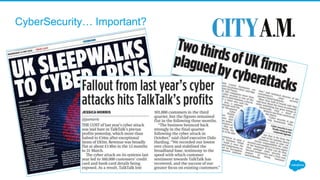
CyberSecurity… Important?
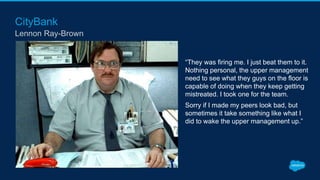
CityBank
Lennon Ray-Brown
“They was firing me. I just beat them to it.
Nothing personal, the upper management
need to see what they guys on the floor is
capable of doing when they keep getting
mistreated. I took one for the team.
Sorry if I made my peers look bad, but
sometimes it take something like what I
did to wake the upper management up.”
I think of security as…
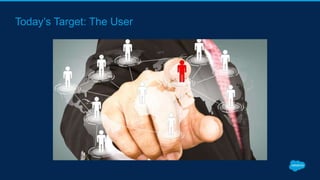
Today’s Target: The User
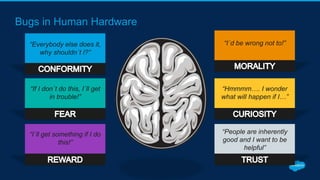
Bugs in Human Hardware
“Everybody else does it,
why shouldn´t I?”
“People are inherently
good and I want to be
helpful”
“Hmmmm…. I wonder
what will happen if I…”
“I´d be wrong not to!”
“If I don´t do this, I´ll get
in trouble!”
“I´ll get something if I do
this!”
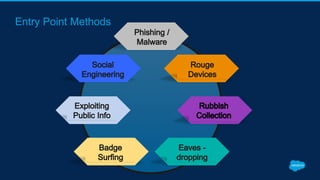
Entry Point Methods
Attack Card Exercise
30 mins
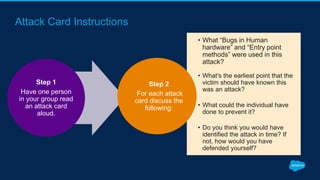
Attack Card Instructions
Step 1
Have one person
in your group read
an attack card
aloud.
• What “Bugs in Human
hardware” and “Entry point
methods” were used in this
attack?
• What's the earliest point that the
victim should have known this
was an attack?
• What could the individual have
done to prevent it?
• Do you think you would have
identified the attack in time? If
not, how would you have
defended yourself?
Step 2
For each attack
card discuss the
following:
Attack Card Exercise #1: Linked-Into the Network
10 minutes
• What Bugs in Human Hardware
and Entry Point Methods were
used in this attack?
• What's the earliest point that the
victim should have known this
was an attack?
• What could the individual have
done to prevent it?
• Do you think you would have
identified the attack in time? If
not, how would you have
defended yourself?
Attack Card Exercise #2: Download on the Road
10 minutes
• What Bugs in Human Hardware
and Entry Point Methods were
used in this attack?
• What's the earliest point that the
victim should have known this
was an attack?
• What could the individual have
done to prevent it?
• Do you think you would have
identified the attack in time? If
not, how would you have
defended yourself?
Group Discussion
10 minutes
• What Bugs in Human Hardware
and Entry Point Methods were
used in this attack?
• What's the earliest point that the
victim should have known this
was an attack?
• What could the individual have
done to prevent it?
• Do you think you would have
identified the attack in time? If
not, how would you have
defended yourself?
Secure Behavior
Educate Employees
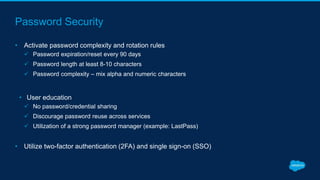
Password Security
• Activate password complexity and rotation rules
 Password expiration/reset every 90 days
 Password length at least 8-10 characters
 Password complexity – mix alpha and numeric characters
• User education
 No password/credential sharing
 Discourage password reuse across services
 Utilization of a strong password manager (example: LastPass)
• Utilize two-factor authentication (2FA) and single sign-on (SSO)
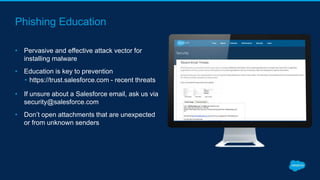
Phishing Education
• Pervasive and effective attack vector for
installing malware
• Education is key to prevention
• https://trust.salesforce.com - recent threats
• If unsure about a Salesforce email, ask us via
security@salesforce.com
• Don’t open attachments that are unexpected
or from unknown senders
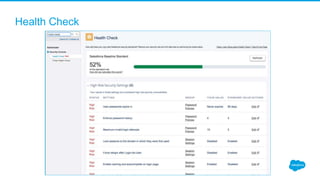
Health Check
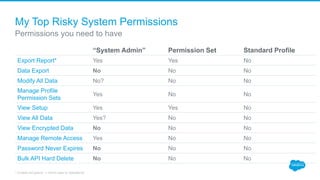
My Top Risky System Permissions
“System Admin” Permission Set Standard Profile
Export Report* Yes Yes No
Data Export No No No
Modify All Data No? No No
Manage Profile
Permission Sets
Yes No No
View Setup Yes Yes No
View All Data Yes? No No
View Encrypted Data No No No
Manage Remote Access Yes No No
Password Never Expires No No No
Bulk API Hard Delete No No No
Permissions you need to have
* Enable reCapture -> Send case to Salesforce
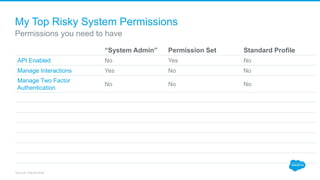
My Top Risky System Permissions
“System Admin” Permission Set Standard Profile
API Enabled No Yes No
Manage Interactions Yes No No
Manage Two Factor
Authentication
No No No
Permissions you need to have
Source: placeholder
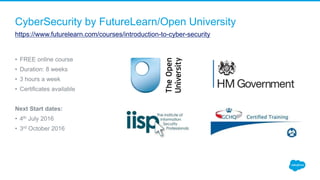
CyberSecurity by FutureLearn/Open University
https://www.futurelearn.com/courses/introduction-to-cyber-security
• FREE online course
• Duration: 8 weeks
• 3 hours a week
• Certificates available
Next Start dates:
• 4th July 2016
• 3rd October 2016
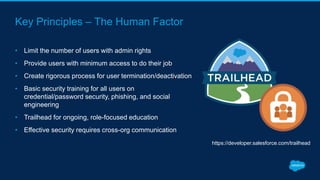
Key Principles – The Human Factor
• Limit the number of users with admin rights
• Provide users with minimum access to do their job
• Create rigorous process for user termination/deactivation
• Basic security training for all users on
credential/password security, phishing, and social
engineering
• Trailhead for ongoing, role-focused education
• Effective security requires cross-org communication
https://developer.salesforce.com/trailhead
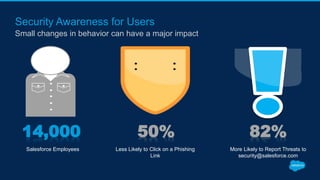
Security Awareness for Users
Small changes in behavior can have a major impact
14,000 50% 82%
Less Likely to Click on a Phishing
Link
More Likely to Report Threats to
security@salesforce.com
Salesforce Employees
Secure Your Salesforce Org
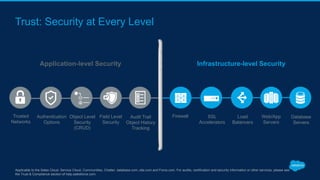
Trust: Security at Every Level
Applicable to the Sales Cloud, Service Cloud, Communities, Chatter, database.com, site.com and Force.com. For audits, certification and security information or other services, please see
the Trust & Compliance section of help.salesforce.com.
Infrastructure-level SecurityApplication-level Security
Firewall SSL
Accelerators
Web/App
Servers
Load
Balancers
Database
Servers
Trusted
Networks
Authentication
Options
Field Level
Security
Object Level
Security
(CRUD)
Audit Trail
Object History
Tracking
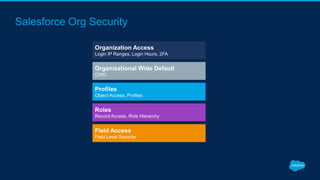
Salesforce Org Security
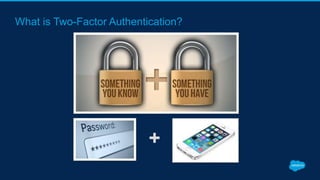
What is Two-Factor Authentication?
+
Two-Factor Authentication (2FA)
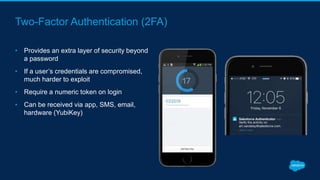
• Provides an extra layer of security beyond
a password
• If a user’s credentials are compromised,
much harder to exploit
• Require a numeric token on login
• Can be received via app, SMS, email,
hardware (YubiKey)
Step-by-Step Guidance for Admins
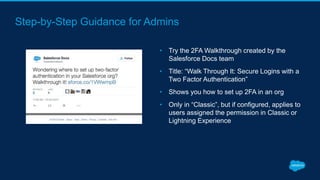
• Try the 2FA Walkthrough created by the
Salesforce Docs team
• Title: “Walk Through It: Secure Logins with a
Two Factor Authentication”
• Shows you how to set up 2FA in an org
• Only in “Classic”, but if configured, applies to
users assigned the permission in Classic or
Lightning Experience
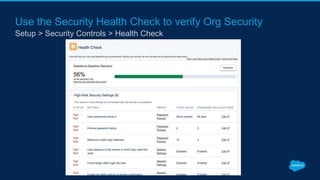
Use the Security Health Check to verify Org Security
Setup > Security Controls > Health Check
Login IP Ranges
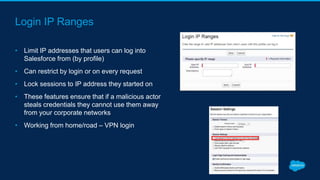
• Limit IP addresses that users can log into
Salesforce from (by profile)
• Can restrict by login or on every request
• Lock sessions to IP address they started on
• These features ensure that if a malicious actor
steals credentials they cannot use them away
from your corporate networks
• Working from home/road – VPN login
Login IP Ranges
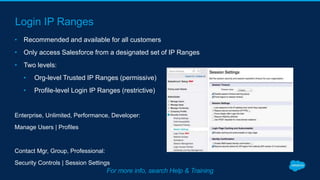
• Recommended and available for all customers
• Only access Salesforce from a designated set of IP Ranges
• Two levels:
• Org-level Trusted IP Ranges (permissive)
• Profile-level Login IP Ranges (restrictive)
Enterprise, Unlimited, Performance, Developer:
Manage Users | Profiles
Contact Mgr, Group, Professional:
Security Controls | Session Settings
For more info, search Help & Training
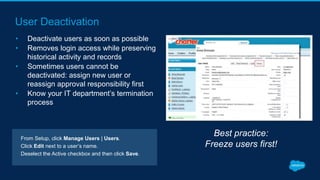
User Deactivation
• Deactivate users as soon as possible
• Removes login access while preserving
historical activity and records
• Sometimes users cannot be
deactivated: assign new user or
reassign approval responsibility first
• Know your IT department’s termination
process
Best practice:
Freeze users first!
From Setup, click Manage Users | Users.
Click Edit next to a user’s name.
Deselect the Active checkbox and then click Save.
Next Steps
CyberSecurity by Open University
https://www.futurelearn.com/courses/introduction-to-cyber-security
4th April
Key Takeaways
Check your Security Settings!
Activate and use turnkey security features:
• Enable two-factor authentication
• Implement identity confirmation
• Activate Login IP Ranges
• Deactivate users in a timely manner (freeze them first!)
Consider the human factor when training Salesforce users:
• Password security
• Emails / phishing
Resources
• Security for Admins Quick Reference Guide (available today!)
• Security & Compliance Release Webinars – What’s New in Security & Compliance, Spring ‘16
(Feb. 25, 8am PST)
• Trailhead: Data Security module (more coming soon!)
• Who Sees What video series (YouTube)
• Dreamforce session recordings (www.dreamforce.com)
• Secure Salesforce series
• Create a Salesforce Force Field for Your Users
• Security Implementation Guide
• ButtonClickAdmin.com
thank y u
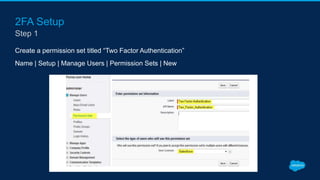
2FA Setup
Create a permission set titled “Two Factor Authentication”
Name | Setup | Manage Users | Permission Sets | New
Step 1
2FA Setup
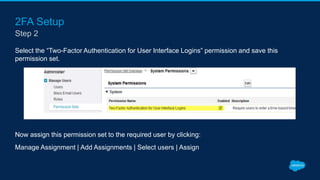
Select the “Two-Factor Authentication for User Interface Logins” permission and save this
permission set.
Now assign this permission set to the required user by clicking:
Manage Assignment | Add Assignments | Select users | Assign
Step 2
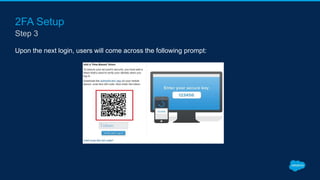
2FA Setup
Upon the next login, users will come across the following prompt:
Step 3

Securing Your Salesforce Org: The Human Factor

  • 1.
    Securing Your SalesforceOrg: The Human Factor Francis Pindar Technical Architect francis@netstronghold.com @radnip www.radnip.com LinkedIn.com/in/francisuk March & August 2016 London Admin User Group Meeting
  • 2.
    Safe Harbor Safe harborstatement under the Private Securities Litigation Reform Act of 1995: This presentation may contain forward-looking statements that involve risks, uncertainties, and assumptions. If any such uncertainties materialize or if any of the assumptions proves incorrect, the results of salesforce.com, inc. could differ materially from the results expressed or implied by the forward-looking statements we make. All statements other than statements of historical fact could be deemed forward-looking, including any projections of product or service availability, subscriber growth, earnings, revenues, or other financial items and any statements regarding strategies or plans of management for future operations, statements of belief, any statements concerning new, planned, or upgraded services or technology developments and customer contracts or use of our services. The risks and uncertainties referred to above include – but are not limited to – risks associated with developing and delivering new functionality for our service, new products and services, our new business model, our past operating losses, possible fluctuations in our operating results and rate of growth, interruptions or delays in our Web hosting, breach of our security measures, the outcome of any litigation, risks associated with completed and any possible mergers and acquisitions, the immature market in which we operate, our relatively limited operating history, our ability to expand, retain, and motivate our employees and manage our growth, new releases of our service and successful customer deployment, our limited history reselling non-salesforce.com products, and utilization and selling to larger enterprise customers. Further information on potential factors that could affect the financial results of salesforce.com, inc. is included in our annual report on Form 10-K for the most recent fiscal year and in our quarterly report on Form 10-Q for the most recent fiscal quarter. These documents and others containing important disclosures are available on the SEC Filings section of the Investor Information section of our Web site. Any unreleased services or features referenced in this or other presentations, press releases or public statements are not currently available and may not be delivered on time or at all. Customers who purchase our services should make the purchase decisions based upon features that are currently available. Salesforce.com, inc. assumes no obligation and does not intend to update these forward- looking statements.
  • 3.
    Agenda ① Setting theStage: The Human Factor ② Attack Card exercise and discussion ③ Secure Behavior ④ Secure Your Salesforce Org ⑤ Next Steps
  • 4.
  • 5.
  • 6.
    CityBank Lennon Ray-Brown “They wasfiring me. I just beat them to it. Nothing personal, the upper management need to see what they guys on the floor is capable of doing when they keep getting mistreated. I took one for the team. Sorry if I made my peers look bad, but sometimes it take something like what I did to wake the upper management up.”
  • 7.
    I think ofsecurity as…
  • 8.
  • 9.
    Bugs in HumanHardware “Everybody else does it, why shouldn´t I?” “People are inherently good and I want to be helpful” “Hmmmm…. I wonder what will happen if I…” “I´d be wrong not to!” “If I don´t do this, I´ll get in trouble!” “I´ll get something if I do this!”
  • 10.
  • 11.
  • 12.
    Attack Card Instructions Step1 Have one person in your group read an attack card aloud. • What “Bugs in Human hardware” and “Entry point methods” were used in this attack? • What's the earliest point that the victim should have known this was an attack? • What could the individual have done to prevent it? • Do you think you would have identified the attack in time? If not, how would you have defended yourself? Step 2 For each attack card discuss the following:
  • 13.
    Attack Card Exercise#1: Linked-Into the Network 10 minutes • What Bugs in Human Hardware and Entry Point Methods were used in this attack? • What's the earliest point that the victim should have known this was an attack? • What could the individual have done to prevent it? • Do you think you would have identified the attack in time? If not, how would you have defended yourself?
  • 14.
    Attack Card Exercise#2: Download on the Road 10 minutes • What Bugs in Human Hardware and Entry Point Methods were used in this attack? • What's the earliest point that the victim should have known this was an attack? • What could the individual have done to prevent it? • Do you think you would have identified the attack in time? If not, how would you have defended yourself?
  • 15.
    Group Discussion 10 minutes •What Bugs in Human Hardware and Entry Point Methods were used in this attack? • What's the earliest point that the victim should have known this was an attack? • What could the individual have done to prevent it? • Do you think you would have identified the attack in time? If not, how would you have defended yourself?
  • 16.
  • 17.
    Password Security • Activatepassword complexity and rotation rules  Password expiration/reset every 90 days  Password length at least 8-10 characters  Password complexity – mix alpha and numeric characters • User education  No password/credential sharing  Discourage password reuse across services  Utilization of a strong password manager (example: LastPass) • Utilize two-factor authentication (2FA) and single sign-on (SSO)
  • 18.
    Phishing Education • Pervasiveand effective attack vector for installing malware • Education is key to prevention • https://trust.salesforce.com - recent threats • If unsure about a Salesforce email, ask us via security@salesforce.com • Don’t open attachments that are unexpected or from unknown senders
  • 19.
  • 20.
    My Top RiskySystem Permissions “System Admin” Permission Set Standard Profile Export Report* Yes Yes No Data Export No No No Modify All Data No? No No Manage Profile Permission Sets Yes No No View Setup Yes Yes No View All Data Yes? No No View Encrypted Data No No No Manage Remote Access Yes No No Password Never Expires No No No Bulk API Hard Delete No No No Permissions you need to have * Enable reCapture -> Send case to Salesforce
  • 21.
    My Top RiskySystem Permissions “System Admin” Permission Set Standard Profile API Enabled No Yes No Manage Interactions Yes No No Manage Two Factor Authentication No No No Permissions you need to have Source: placeholder
  • 22.
    CyberSecurity by FutureLearn/OpenUniversity https://www.futurelearn.com/courses/introduction-to-cyber-security • FREE online course • Duration: 8 weeks • 3 hours a week • Certificates available Next Start dates: • 4th July 2016 • 3rd October 2016
  • 23.
    Key Principles –The Human Factor • Limit the number of users with admin rights • Provide users with minimum access to do their job • Create rigorous process for user termination/deactivation • Basic security training for all users on credential/password security, phishing, and social engineering • Trailhead for ongoing, role-focused education • Effective security requires cross-org communication https://developer.salesforce.com/trailhead
  • 24.
    Security Awareness forUsers Small changes in behavior can have a major impact 14,000 50% 82% Less Likely to Click on a Phishing Link More Likely to Report Threats to security@salesforce.com Salesforce Employees
  • 25.
  • 26.
    Trust: Security atEvery Level Applicable to the Sales Cloud, Service Cloud, Communities, Chatter, database.com, site.com and Force.com. For audits, certification and security information or other services, please see the Trust & Compliance section of help.salesforce.com. Infrastructure-level SecurityApplication-level Security Firewall SSL Accelerators Web/App Servers Load Balancers Database Servers Trusted Networks Authentication Options Field Level Security Object Level Security (CRUD) Audit Trail Object History Tracking
  • 27.
  • 28.
    What is Two-FactorAuthentication? +
  • 29.
    Two-Factor Authentication (2FA) •Provides an extra layer of security beyond a password • If a user’s credentials are compromised, much harder to exploit • Require a numeric token on login • Can be received via app, SMS, email, hardware (YubiKey)
  • 30.
    Step-by-Step Guidance forAdmins • Try the 2FA Walkthrough created by the Salesforce Docs team • Title: “Walk Through It: Secure Logins with a Two Factor Authentication” • Shows you how to set up 2FA in an org • Only in “Classic”, but if configured, applies to users assigned the permission in Classic or Lightning Experience
  • 31.
    Use the SecurityHealth Check to verify Org Security Setup > Security Controls > Health Check
  • 32.
    Login IP Ranges •Limit IP addresses that users can log into Salesforce from (by profile) • Can restrict by login or on every request • Lock sessions to IP address they started on • These features ensure that if a malicious actor steals credentials they cannot use them away from your corporate networks • Working from home/road – VPN login
  • 33.
    Login IP Ranges •Recommended and available for all customers • Only access Salesforce from a designated set of IP Ranges • Two levels: • Org-level Trusted IP Ranges (permissive) • Profile-level Login IP Ranges (restrictive) Enterprise, Unlimited, Performance, Developer: Manage Users | Profiles Contact Mgr, Group, Professional: Security Controls | Session Settings For more info, search Help & Training
  • 34.
    User Deactivation • Deactivateusers as soon as possible • Removes login access while preserving historical activity and records • Sometimes users cannot be deactivated: assign new user or reassign approval responsibility first • Know your IT department’s termination process Best practice: Freeze users first! From Setup, click Manage Users | Users. Click Edit next to a user’s name. Deselect the Active checkbox and then click Save.
  • 35.
  • 36.
    CyberSecurity by OpenUniversity https://www.futurelearn.com/courses/introduction-to-cyber-security 4th April
  • 37.
    Key Takeaways Check yourSecurity Settings! Activate and use turnkey security features: • Enable two-factor authentication • Implement identity confirmation • Activate Login IP Ranges • Deactivate users in a timely manner (freeze them first!) Consider the human factor when training Salesforce users: • Password security • Emails / phishing
  • 38.
    Resources • Security forAdmins Quick Reference Guide (available today!) • Security & Compliance Release Webinars – What’s New in Security & Compliance, Spring ‘16 (Feb. 25, 8am PST) • Trailhead: Data Security module (more coming soon!) • Who Sees What video series (YouTube) • Dreamforce session recordings (www.dreamforce.com) • Secure Salesforce series • Create a Salesforce Force Field for Your Users • Security Implementation Guide • ButtonClickAdmin.com
  • 39.
  • 40.
    2FA Setup Create apermission set titled “Two Factor Authentication” Name | Setup | Manage Users | Permission Sets | New Step 1
  • 41.
    2FA Setup Select the“Two-Factor Authentication for User Interface Logins” permission and save this permission set. Now assign this permission set to the required user by clicking: Manage Assignment | Add Assignments | Select users | Assign Step 2
  • 42.
    2FA Setup Upon thenext login, users will come across the following prompt: Step 3

Editor's Notes

  • #3 If you’ve ever been to Dreamforce, you’ve seen this slide before. The gist of this slide is that any purchasing decisions you make on Salesforce should be based only on currently available functionality.
  • #4 Welcome everyone to the Security Awareness user group! We are so excited to be here and to open a dialogue about security. This topic touches everyone, both as a Salesforce Admin (developer or user) or as a user of the internet in your personal life. We have a jam-packed agenda today, and the Salesforce Trust team has sent us some awesome swag and reference materials I will share with you at the end of the meeting. There will also be a prize or two along the way. We will begin our meeting by sharing some stats that demonstrate our need for improved security awareness and highlighting some of the challenges we face in combating cyber threats that prey on human nature. After providing this context, we will participate in a group exercise that Salesforce runs with all of its employees worldwide as part of their security awareness and training program. Next we will learn about behavioral changes we can work on with our users to make our Salesforce implementations more secure; things like password best practices and phishing training After talking about the human element, I will provide an overview of security controls built into the Salesforce core products that are available to all customers and can be taken advantage of to add layers of security to your org’s data. To wrap up, I will share some key take-aways that can be used when you return to the office to improve your security posture immediately. Additionally we will list some great resources Salesforce has to help you make these changes.
  • #6 Setting the Stage: The Human Factor First, why are we even having this conversation? According to the Verizon 2015 Data Breach Investigation Report, the estimated annual cost of global cyber crime is a whopping $100 billion. A recent report of UK companies showed that nearly half (46%) of small business owners have no employee responsible for data security and more alarming 27% have no process or policy at all. But its not just isolated to small companies. Last year saw an conservative estimate 487,731,758 records (based on public information) of data leaks from companies like Hyatt, Hilton Hhonors, Costa Coffee, Mumsnet, 56 Deans Street clinic leaks 780 HIV patients, JD Wetherspoon nearly 700,000 personal details were stolen and TalkTalk 156,000. (http://www.itgovernance.co.uk/blog/list-of-data-breaches-and-cyber-attacks-in-2015-over-275-million-leaked-records/) The threat landscape is more complex than ever and the ability of security teams to prevent, detect, analyze and respond to threats has never been harder or more crucial.
  • #7 Experts are saying British businesses are not doing enough to protect themselves. Cyber attacks are exacting a heavy toll on british businesses. Research company Cebr last year reported £34bn of increase IT expenditure and lost revenue. [CLICK] The UK Government found boards of half of FTSE 350 companies only hear about cyber incidents only on an occasional basis or when something goes wrong. But Damage can sometimes harm a companies reputation more than the actual attack. UK Governments Public Policy Exchange is saying the threat from cyber attacks to the UK’s national security is “Real and Growing”. Such attacks have been called a “Tier One” threat to the UK. [CLICK] A recent report of UK companies showed that nearly half (46%) of small business owners have no employee responsible for data security and more alarming 27% have no process or policy at all. But its not just isolated to small companies. Last year saw an conservative estimate 487,731,758 records (based on public information) of data leaks from companies like Hyatt, Hilton Hhonors, Costa Coffee, Mumsnet, 56 Deans Street clinic leaks 780 HIV patients (NHS Trust fined £180k), JD Wetherspoon nearly 700,000 personal details were stolen and TalkTalk 156,000.
  • #8 On Dec 23, 2013 he had just had a performance review and he decided to delete configuration of City Banks core routers. Knocking out of service 90 of city banks offices. Last month he admitted intentional damage and got a $77,000 fine and a two year jail term.
  • #10 Setting the Stage: The Human Factor For any organization, its people present the biggest security threat and the greatest opportunity for hackers. Cyber criminals have shifted their tactics from technological attacks to targeted assaults on employees by manipulating basic human behaviors. Now more than ever, every person has an impact on security regardless of their function or title. According to the PWC Global State of Information Security Survey, 2015, employees remain the most cited source of security compromise (over 55%), and incidents attributed to business partners also climbed 22 percent. It takes only one employee to set off a chain of events that can compromise your company’s data. In this way, security is a job expectation critical to your company’s success. There are basic behaviors that every employee can do to make the company more secure. Potential steps your users can take in the spirit of protecting data are: checking links in emails by hovering over them with their mouse, stop letting people in their office without checking for a badge, and continue to update logins using stronger passwords. We will talk about specifics later on.
  • #11 Setting the Stage: The Human Factor First, let’s talk about human nature and the behaviors cyber criminals have learned they can exploit in order to steal credentials or infiltrate your network. A fun way to think about this is “bugs in human hardware”. Here are some examples: Fear could be someone saying: “If you don’t give me the information, I will report you to your manager” Trust might be involved when you receive an authentic looking email from your bank: “Your account has just been closed. Click here to re-activate.” An example of morality would be: “Can you hold that office door open for me, my arm’s broken and this package is heavy.” Rewards are often attractive. For example: “My company is considering investing in your products. Can you answer a few questions about your organization first?” Conformity comes into play in a situation like this: “Bill Stevens from Finance always gives me updates about Q2 earning, but I can’t get ahold of him. Can you help me with the report?” Curiosity is especially common in social media these days: “Holy wow…Check out this video of a giant snake eating a zoo keeper!” These emotions and reactions are natural for people so they can easily lead to harmful behaviors if users are not aware of their potential threat when cyber criminals attack.
  • #12 Setting the Stage: The Human Factor These entry point methods represent common techniques that cyber criminals use to prey on our humanity and get what they want. 1. Phishing/Malware – An attempt to acquire sensitive information such as usernames, passwords, and credit card details by masquerading as a trustworthy entity. This can be used to trick users into downloading software intended to damage a computer, mobile device, computer system, or computer network, or to gain access to its operation. 2. Social Engineering - In the context of security, it is understood to mean the art of manipulating people into taking action or revealing confidential information. 3. Exploiting Public Info - Using publicly available information to help design a social engineering attack, crack a password login, or create a targeted phishing email. 4. Badge Surfing - A method of gaining unauthorized entry into a secured area. Typically, an intruder simply follows behind a legitimate badge holder as they pass through to the secured area or somehow convince that individual to hold the door open for them and knowingly give them access. 5.  Eavesdropping - Secretly listening in on private conversations. 6.  Rubbish Collection - Collecting sensitive information from the recycling or rubbish that was not appropriately destroyed. 7.  Installing Rogue Devices - Malicious wireless routers or USB thumb drives installed on premise to allow a hacker access to a secure network.
  • #13 Attack Card exercise and discussion In this exercise, we will learn about real events in which attackers manipulate their targets in order to gain access to company data. We will discuss what behaviors were exploited and consider the attackers’ motivations and potential gains. Keep in mind the Entry Point Methods and Bugs in Human Hardware that I just told you about. [LEADER: Please have your group split into groups of 6-8 people, and give each group one of each attack card, “Linked Into the Network” and “Download on the Road”]
  • #14 Attack Card exercise and discussion The steps for completing this exercise are here on the screen. First, have one person in your group read the “Linked Into the Network” attack card. Second, please discuss the 4 questions here on the slide, as they pertain to the “Linked into the Network” scenario. [LEADER: read the four questions on the arrow aloud. Refer to Slides 6&7 for reminders of the Bugs in Human Hardware and Entry Point Methods.] Please spend 10 minutes completing this exercise. [LEADER: Advance to next slide as participants start the first attack card exercise] [LEADER: Please provide a one-minute warning to your user group, then call “time” at 10 minutes]
  • #15 Attack Card exercise and discussion [LEADER: once 10 minutes have passed, let the group know that they should move on to the next attack card, “Download on the Road”. Advance to the next slide.]
  • #16 Attack Card exercise and discussion [LEADER: when the 10 minutes expire, call the group back together for a group discussion]
  • #17 Attack Card exercise and discussion [LEADER: Spend 5 minutes per attack card, having a group discussion about the scenario. Call volunteers forward to represent their group. We included Salesforce Trust water bottles to give as rewards to the volunteers.]
  • #18 Secure Behavior As we discussed earlier, today’s target is the user. The first point of entry for any attack, whether it is on a major corporation, a government, or an individual account is to target a user. Educating your Salesforce users about secure behavior can go a long way toward securing your implementation.
  • #19 Secure Behavior First, some critical things to know about passwords. Strong password security is an important first step in protecting your Salesforce accounts. Salesforce recommends these best practices: Password expiration – Salesforce recommends no more than 90 days to force users to reset their passwords Password length – Salesforce suggestions minimum password length of 8-10 characters Password complexity – Require users to include a mix of alpha and numeric characters in their Salesforce password. In addition, remind users to never reuse passwords on multiple accounts, or they risk compromise of more than one of their accounts. Last, users need to understand that they must never share passwords with anyone, either online or in person -- this includes their Salesforce password. Hackers know that people reuse passwords and will take a hacked password and try it on other sites. A study of the 2011 PlayStation Network hack showed that 33% of users had the same password for two unrelated sites, Sony and Gawker. Odds are that some of these reused passwords may have been used for more sensitive accounts, such as email and bank accounts. Password reuse is low-hanging fruit for hackers. << Use LastPass or another password manager that alerts you to duplicate passwords. Because hackers can circumvent passwords, Salesforce also recommends using additional technologies like two factor authentication and single-sign-on to provide extra layers of protection to your orgs.
  • #20 Secure Behavior Salesforce highly recommends phishing education for all Salesforce users (more information on this later on). Most cyber attacks use malware (malicious software) to infect a computer with malicious code designed to steal passwords, data, or disrupt an entire computer/network. Fortunately, you don’t need to be a security expert to help stop malware. Some simple recommendations you can make to your Salesforce users: Teach users to not be fooled by phishing, and to not click links or open attachments in suspicious emails. One of the most effective cyber attack techniques is tricking someone to click a link or open an attachment that installs malware. These are called phishing e-mails because they lure you into opening an email by using the Bugs in Human hardware techniques we discussed earlier. Phishing email can say something intriguing, useful, or appear to be a legitimate message from a real company (package delivery, payroll, IRS, social networking, etc.). If you aren’t sure, try Googling the subject of the email and see if any other sources have reported it to be a phishing attempt. Another simple rule with big impact is to instruct users to never open emails from unknown sources. Hackers want people to click on their link so that they can infect the user’s computer. Similarly, teach users that emails received from an unknown source should be evaluated based on the source and whether it makes sense. If not, it may be malicious. The sender's address should always be verified and and any links to URLs can be hovered over to validate them. For example, if the link says it’s from Salesforce, then hovering over the link should show a URL ending in ".salesforce.com” or “exacttarget.com”. If you or any of your users are unsure about whether a Salesforce email is legitimate, forward the email to security@salesforce.com, and you will hear back from someone on the Salesforce Trust team very quickly. You can also check trust.salesforce.com for a listing of recent email threats that the Trust team is aware of.
  • #25 Secure Behavior There are a few more key principles that can help augment the layers of security at your company. First, limit the number of users with admin rights, and check periodically to make sure that, the same individuals need to have admin permissions. This can change over time. A key principle of security in general is to provide users with the minimum access they need to do their job. There is no need, for example, for a business analyst to see billing information for customers. For those of you who haven’t checked out Trailhead yet, we highly encourage you to check out this fun and engaging educational tool available for self-paced training. There is a Data Security module that will give you hands-on for some of the things we reviewed today. And last, cross-org communication is critical to security, not only between org admins, but also with your IT and security departments. Some key things you can talk about with IT: How can you partner to improve security awareness of Salesforce users How can you better understand company security policies and integrate into your administration of Salesforce, including password policies Creating a process for notifying you when a user should be deactivated What are the most common IP addresses that employees log in from As foreign as it may seem to some, there is a lot to gain from building a relationship with your IT and Security departments.
  • #26 Secure Behavior Salesforce has learned with its own employees that small changes in user behavior through phishing education can have a major impact. Over 14,000 Salesforce employees have taken hands-on security training, which included attack cards similar to the ones we used today. When Salesforce’s Trust team sends employees fake phishing emails, they are 50% less likely to click on phishing links and 82% more likely to report threats to Security. As a Salesforce Admin, you have the opportunity to train users when they are new users, but it is also helpful to refresh this education over time. Reminders can be included in any of your communications to users, and some companies have used Login Flows to either remind users of these principles or link them to training materials.
  • #28 Secure Your Salesforce Org Some administrators are surprised when they learn that security is part of their job. Salesforce is built with security as the foundation for the entire service. This foundation includes both protection for your data and applications, as well as the ability to implement your own security scheme to reflect the needs of your organization. However, protecting your data is a joint responsibility between you and Salesforce but it ultimately your responsibility under EU Data Protection Laws. The security features in Salesforce enable you to help your users to do their jobs efficiently, while also limiting exposure of data to users that need to act upon it. Implement security controls that you think are appropriate for the sensitivity of your data. Your data is protected from unauthorized access from outside your company, and you should also safeguard it from inappropriate usage by your own users. There are features built into the platform that you have the opportunity to activate to make the experience as secure as possible for your company. Today we will focus on two of the key features that Salesforce highly recommends that customers enable – Two Factor Authentication and Login IP Ranges. We will also talk at a high level about protecting data by “who sees what”, or setting up roles and profiles. No security strategy or feature is bullet-proof, but shoring up your implementation with these capabilities will decrease the likelihood that your org is compromised and may reduce the amount of data that can be stolen by attackers.
  • #29 Secure Your Salesforce Org There are several layers of access and control that determine “who sees what” and who “can do what” in a Salesforce org. Those of you at larger companies with multiple Salesforce orgs need to separately configure these controls in each org. First, lets talk about Org Wide Default, or OWD: OWD determines the access and permissions users have to records they don’t own. The admin can’t grant more access to users than they have through their object permissions. [LEADER: OWD is configured at setup>security controls>sharing settings]   Profiles are set up based on what you want a user to be able to DO. By using profiles, you can set whether fields are visible, required, editable or read only. Profiles also control tab visibility, app visibility and standard object permissions, also knows as CRED (create, read, edit, delete). [LEADER: Profiles are configured at setup>manage users> profile] Roles govern what a user can SEE.  Role hierarchy is used to control how your org reports on and accesses data. Examples are hierarchy based on company size, product or territory. [LEADER: Roles are configured at setup>manage users>roles]. Field level security allows you to restrict access to specific fields on a profile by profile basis. The fields that users see on detail and edit pages are a combination of page layouts and field-level security settings. The most restrictive field access settings of the two always apply. For example, if a field is required in the page layout and read-only in the field-level security settings, the field-level security overrides the page layout and the field will be read-only for the user.
  • #30 Secure Your Salesforce Org One of the most important things you can do to enhance the security of your Salesforce org is to implement two factor authentication (2FA). 2FA requires a second level of authentication for every user login. You can also require 2FA when a user meets certain criteria, like attempting to view reports or access a connected app. Two factor authentication is often described as “something you know plus something you have”. Typically this entails requiring users to enter a time-based token as a second form of authentication, once the user enters their password. This second form of authentication may be a token generated via an app on the user’s phone, through SMS, email or a hardware-based token that the user inserts into their computer. 2FA provides an extra layer of security that goes beyond the user’s credentials. So even if those credentials are compromised, the account may still be protected. Salesforce makes it easy to set up 2FA for your Salesforce orgs through Salesforce Authenticator, which you can configure right from Setup. You can also use similar solutions from other security vendors to secure your orgs.
  • #31 Secure Your Salesforce Org Salesforce recommends requiring 2FA each time your users login to Salesforce. By a show of hands, how many of you have 2FA enabled for your orgs? So no-one implemented the Login Flows with YuibiKey that was a 5min feature last year? This can be used if you need higher security than the mobile app. Some companies are concerned about the inconvenience this extra step can create for users. One approach is to set up 2FA for certain profiles, like for admins (who have a high level of permissions) or users who have access to sensitive data, like billing details. Salesforce Authenticator is a free feature, but for a small cost, some customers use a hardware-based token that the user adds to their computer and simply touches to generate the unique code. This can also decrease any inconvenience. 2FA can be enabled through permissions or profile settings. Users add the mobile authenticator app, Salesforce Authenticator, to their mobile device by downloading from the iTunes App Store or Google Play. [LEADER – if participants in your user group would like to see Setup screenshots for 2FA setup, we have provided slides after the Thank You slide at the end that you can use.]
  • #32 Secure Your Salesforce Org If you would like a step-by-step walkthrough of setup for two factor authentication, a great resource is available through Salesforce Docs. You can jot down this link or go to Help & Training and search for “Two Factor Authentication”. You will find a link in the Help & Training article that will lead you to the walk through.
  • #34 Secure Your Salesforce Org One of the key features that Salesforce highly recommends all customers enable are Login IP Ranges. First, the basics: An IP address (Internet Protocol address) refers to a numerical identifier for each device on a network that communicates with other devices over the Internet. The IP address serves both as an “address” that shows the location of particular device, and also as an identifier of the device when it interfaces with the host network. So think of an IP like the address of your house.    Login IP range restrictions limit unauthorized access to Salesforce by requiring users to login to Salesforce from designated IP addresses—typically your corporate network or VPN. By using Login IP Ranges, admins can define a range of permitted IP addresses to control access. Those who try to login to Salesforce from outside the designated IP addresses will not be granted access. What this feature does is ensure that if a malicious actor steals login credentials via a phishing or other attack, that they cannot use them away from your corporate network.
  • #35 Secure Your Salesforce Org Salesforce has two levels of granularity that can be used when applying login IP range restrictions. The first is at the Org level. Org level Trusted IP Ranges require users to log in from designated IP addresses - typically your corporate network or VPN. These are IP addresses from which users can log in to Salesforce without getting a login challenge, where they have to enter a code send to their mobile device or email address before they can successfully log in. The second level of granularity is profile-based login IP range restrictions. For Enterprise, Performance, Unlimited, Developer, and Database.com editions, you can set the Login IP Range addresses from which users can log in on an individual profile. Users outside of the Login IP Range set on a profile cannot access your Salesforce organization.  And if you are using Contact Manager, Group, and Professional Editions, you can set the Login IP Range in Setup, Security Controls | Session Settings. Since this feature can be a little more complex to implement, you can check Help & Training for more detailed information, or work with your IT department to help you identify appropriate IP ranges and to help you set this up. If your company has VPN and/or Single Sign On (SSO), we recommend talking to your IT department about how login IP ranges can work in your environment.
  • #36 Secure Your Salesforce Org These days people change jobs more than ever. And this means that your Salesforce users are constantly changing and shifting - people leave the company and new users are added all the time. When the user no longer works for the company, security is in your hands. Get that user deactivated as soon as possible so they can no longer use their Salesforce credentials! The best practice is to freeze a user as your first step in deactivation. Freezing a user will lock their credentials while you work on deactivating the user across your company’s implementation. Freezing a user is also quick and easy to do: Just log into the User Record and click the box “Freeze”. You may have wondered at some point why a user can’t be deleted from Salesforce. Think of it this way - every user creates records with everything they do in Salesforce, whether they are posting in Chatter, updating a Contact or closing an Opportunity. If a user was to be deleted, it would mean that many of the records created by that user could be orphaned. Orphaned records still exist in Salesforce, but they are not associated with an object or other records, and can only be accessed by the original owner. Deactivating a user, on the other hand, allows the many records and linkages between records to remain, even without an active user associated with them. You may see this occur when you try to deactivate a user, and you get a pop-up message that says “You cannot deactivate this user”.  For example, this occurs when a user is a Default Lead Owner, and someone must be assigned a default for your organization. All you need to do is change the Default Lead Owner, and then you can proceed to deactivate the user. There can be one little kink in this whole thing. The information that a user is leaving may not make it’s way over to your desk...and if it does, it may not be in a timely fashion. Creating a rigorous process of notification with IT or your HR department is extremely helpful. Some companies are required to create this process for compliance reasons, but for many others, the Admin can be in the dark unless the lines of communication are open.
  • #37 Next Steps Let’s wrap up by talking about some key takeaways from today’s meeting, as well as some resources provided by Salesforce so that you can go back home and do some of the things you learned about today.
  • #38 8 Weeks. 3hrs a week approx and take at any time…
  • #39 Next Steps The most important thing you can do when you get back to the office is review the security settings in each of your orgs. If there are other admins at your company who aren’t here today, we’d encourage you to talk to them and share what you learned in this session. Would anyone in the room like to share what they plan to do from a security perspective when they get back to the office, based on what you learned today? Activating and using the turnkey security features in Salesforce is the best way to get started in bolstering the security of your implementation. But security settings aren’t something you set once and walk away from – there is some maintenance required as your company grows and changes and your users come and go. And no one security feature can prevent all malicious actors, so it’s best to implement multiple features at both the org level, profile level and even for sensitive fields and reports. There are additional capabilities available like encryption and monitoring capabilities, but the features we discussed today are a great start. And don’t under-estimate the role of the individual user in keeping your data secure. Educate, educate, educate. Talk to your colleagues about creative ways they have worked with their users to make them more aware and motivated to do their part to keep data secure.
  • #40 Next Steps This is a list of suggested resources to help you take next steps on all of the things we talked about today. Don’t forget about Dreamforce session recordings, which are a great learning resource and almost always include a demo so you can see step-by-step how to configure some of the settings we talked about today. In particular, the Salesforce Trust team ran a whole series of sessions called “Secure Salesforce” that get a step deeper into the technology that we didn’t have time to cover today. The Salesforce Trust and Compliance teams have recently begun a webinar series with each release that focuses specifically on what’s new in security and compliance. Salesforce product managers and experts walk through new features, and there is open Q&A at the end. Finally, Trailhead and Help & Training are always available for self-help.
  • #41 Thanks so much for coming! We welcome your feedback about this meeting, and we will pass it along to our contacts at Salesforce. Look out for an event survey that I will distribute in the next couple of weeks.