Using iPad
Technology to
Support All
Students in Math
Janice Novakowski
Richmond School District
LRT session: March 30 2016
@jnovakowski38
Overview of Session
 Use of iPad-based apps
 Mathematics-specific apps
 Creation, representation, communication and
sharing apps
 App-smashing
 Embracing the transformative potential of iPad
technology
 Examples from Richmond classrooms
Math Apps
 Choosing apps that support mathematical thinking
 Align with our curricular goals, competencies and
content
 Use screenshots for students to capture traces of their
learning and then “smash” within another app to record
their own narratives of their learning
 Send an app list home to parents
 Have RT allocated devices on which you can load
student-specific apps to address IEP goals
Choose a math app…or two
 Choose one of the math apps and investigate
 How do you think your students would respond?
 What does it offer your students?
 How does it provide for differentiation?
 What structures within the app allow for you to assess
student learning?
 How might you use this app?
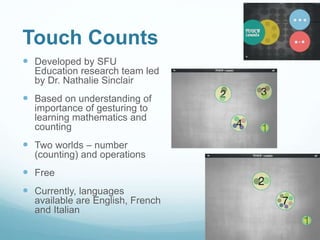
Touch Counts
 Developed by SFU
Education research team led
by Dr. Nathalie Sinclair
 Based on understanding of
importance of gesturing to
learning mathematics and
counting
 Two worlds – number
(counting) and operations
 Free
 Currently, languages
available are English, French
and Italian
Tangram for Osmo
 Developed by parents
from Stanford and Google
for their children
 Uses Reflective Artificial
Intelligence to create an
interactive play
environment
 Other apps include Words,
Newton and Masterpiece
 playosmo.com
Numbers for Osmo
 Just released
last year
 Uses both dot
and digit tiles
 More of a focus
on levels of play,
accumulation of
points
 playosmo.com
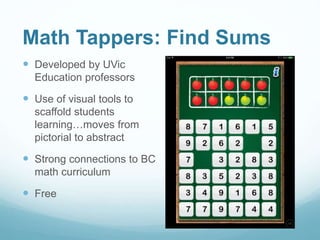
Math Tappers: Find Sums
 Developed by UVic
Education professors
 Use of visual tools to
scaffold students
learning…moves from
pictorial to abstract
 Strong connections to BC
math curriculum
 Free
Math Tappers: Multiples
Math Tappers: Numberline
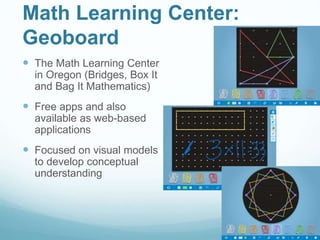
Math Learning Center:
Geoboard
 The Math Learning Center
in Oregon (Bridges, Box It
and Bag It Mathematics)
 Free apps and also
available as web-based
applications
 Focused on visual models
to develop conceptual
understanding
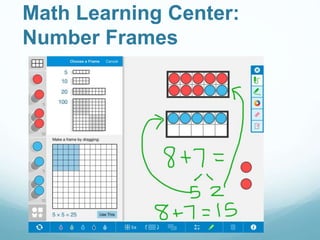
Math Learning Center:
Number Frames
Math Learning Center:
Number Line
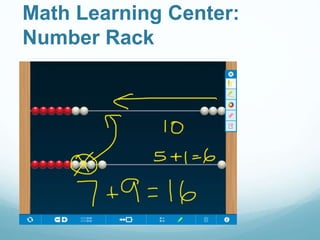
Math Learning Center:
Number Rack
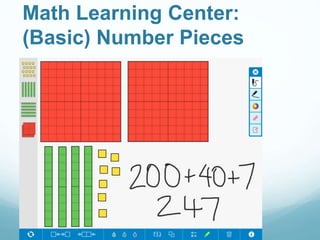
Math Learning Center:
(Basic) Number Pieces
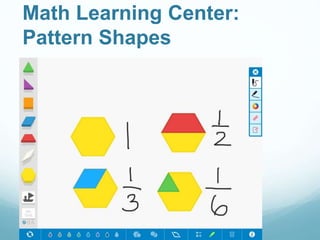
Math Learning Center:
Pattern Shapes
My First Weighing Exercises
 paid app ($1.99)
 Big mathematical ideas of
balance and equality
 Opportunities for mental
mathematics
 Calculations with whole
numbers, mass (ounces or
grams)
 Three levels of difficulty
Let’s do some app-
smashing…
 Consider what different apps offer in terms of
creating, representing, communicating and
sharing – ultimately, we want students to
choose from a variety of apps that they know
how to use
 Use an app like 30Hands, BookCreator or a
screencasting app to annotate and narrate a
learning story with the screenshots you took
using the math app earlier
Things to check out…
 mathtappers.com
 mathlearningcenter.org
 http://blogs.sd38.bc.ca/sd38mathandscience/
contact me through Richnet:
jnovakowski@sd38.bc.ca
@jnovakowski38
#sd38mathandscience
share on twitter this
using #sd38learn

SD38 LRT March 2016 math apps

  • 1.
    Using iPad Technology to SupportAll Students in Math Janice Novakowski Richmond School District LRT session: March 30 2016 @jnovakowski38
  • 2.
    Overview of Session Use of iPad-based apps  Mathematics-specific apps  Creation, representation, communication and sharing apps  App-smashing  Embracing the transformative potential of iPad technology  Examples from Richmond classrooms
  • 3.
    Math Apps  Choosingapps that support mathematical thinking  Align with our curricular goals, competencies and content  Use screenshots for students to capture traces of their learning and then “smash” within another app to record their own narratives of their learning  Send an app list home to parents  Have RT allocated devices on which you can load student-specific apps to address IEP goals
  • 4.
    Choose a mathapp…or two  Choose one of the math apps and investigate  How do you think your students would respond?  What does it offer your students?  How does it provide for differentiation?  What structures within the app allow for you to assess student learning?  How might you use this app?
  • 5.
    Touch Counts  Developedby SFU Education research team led by Dr. Nathalie Sinclair  Based on understanding of importance of gesturing to learning mathematics and counting  Two worlds – number (counting) and operations  Free  Currently, languages available are English, French and Italian
  • 6.
    Tangram for Osmo Developed by parents from Stanford and Google for their children  Uses Reflective Artificial Intelligence to create an interactive play environment  Other apps include Words, Newton and Masterpiece  playosmo.com
  • 7.
    Numbers for Osmo Just released last year  Uses both dot and digit tiles  More of a focus on levels of play, accumulation of points  playosmo.com
  • 8.
    Math Tappers: FindSums  Developed by UVic Education professors  Use of visual tools to scaffold students learning…moves from pictorial to abstract  Strong connections to BC math curriculum  Free
  • 9.
  • 10.
  • 11.
    Math Learning Center: Geoboard The Math Learning Center in Oregon (Bridges, Box It and Bag It Mathematics)  Free apps and also available as web-based applications  Focused on visual models to develop conceptual understanding
  • 12.
  • 13.
  • 14.
  • 15.
  • 16.
  • 17.
    My First WeighingExercises  paid app ($1.99)  Big mathematical ideas of balance and equality  Opportunities for mental mathematics  Calculations with whole numbers, mass (ounces or grams)  Three levels of difficulty
  • 18.
    Let’s do someapp- smashing…  Consider what different apps offer in terms of creating, representing, communicating and sharing – ultimately, we want students to choose from a variety of apps that they know how to use  Use an app like 30Hands, BookCreator or a screencasting app to annotate and narrate a learning story with the screenshots you took using the math app earlier
  • 19.
    Things to checkout…  mathtappers.com  mathlearningcenter.org  http://blogs.sd38.bc.ca/sd38mathandscience/ contact me through Richnet: jnovakowski@sd38.bc.ca @jnovakowski38 #sd38mathandscience share on twitter this using #sd38learn