Gursharan Singh Tatla
professorgstatla@gmail.com
Scheduling Algorithms
15-Feb-2011
1 www.eazynotes.com
Scheduling Algorithms
 CPU Scheduling algorithms deal with the problem
of deciding which process in ready queue should
be allocated to CPU.
 Following are the commonly used scheduling
algorithms:
15-Feb-2011
2 www.eazynotes.com
Scheduling Algorithms
15-Feb-2011
www.eazynotes.com
3
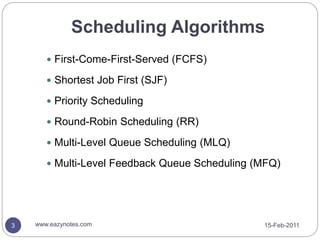
 First-Come-First-Served (FCFS)
 Shortest Job First (SJF)
 Priority Scheduling
 Round-Robin Scheduling (RR)
 Multi-Level Queue Scheduling (MLQ)
 Multi-Level Feedback Queue Scheduling (MFQ)
First-Come-First-Served
Scheduling (FCFS)
15-Feb-2011
www.eazynotes.com
4
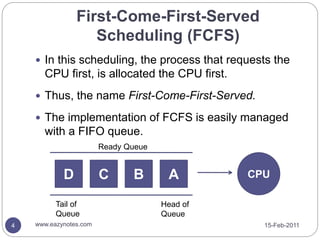
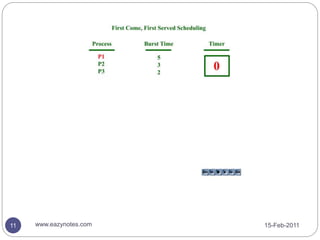
 In this scheduling, the process that requests the
CPU first, is allocated the CPU first.
 Thus, the name First-Come-First-Served.
 The implementation of FCFS is easily managed
with a FIFO queue.
D C B A CPU
Tail of
Queue
Head of
Queue
Ready Queue
15-Feb-2011
www.eazynotes.com
5
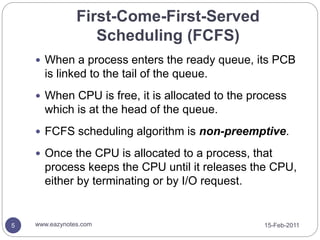
 When a process enters the ready queue, its PCB
is linked to the tail of the queue.
 When CPU is free, it is allocated to the process
which is at the head of the queue.
 FCFS scheduling algorithm is non-preemptive.
 Once the CPU is allocated to a process, that
process keeps the CPU until it releases the CPU,
either by terminating or by I/O request.
First-Come-First-Served
Scheduling (FCFS)
Example of FCFS Scheduling
15-Feb-2011
www.eazynotes.com
6
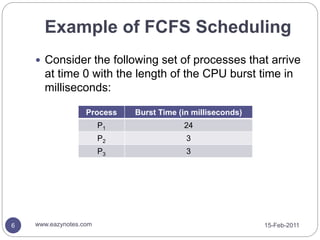
 Consider the following set of processes that arrive
at time 0 with the length of the CPU burst time in
milliseconds:
Process Burst Time (in milliseconds)
P1 24
P2 3
P3 3
Example of FCFS Scheduling
15-Feb-2011
www.eazynotes.com
7
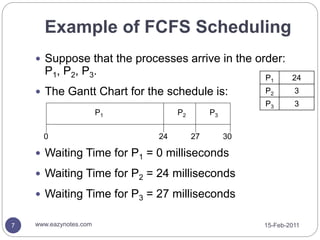
 Suppose that the processes arrive in the order:
P1, P2, P3.
 The Gantt Chart for the schedule is:
 Waiting Time for P1 = 0 milliseconds
 Waiting Time for P2 = 24 milliseconds
 Waiting Time for P3 = 27 milliseconds
P1 P2 P3
24 27 30
0
P1 24
P2 3
P3 3
Example of FCFS Scheduling
15-Feb-2011
www.eazynotes.com
8
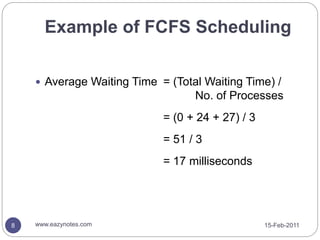
 Average Waiting Time = (Total Waiting Time) /
No. of Processes
= (0 + 24 + 27) / 3
= 51 / 3
= 17 milliseconds
Example of FCFS Scheduling
15-Feb-2011
www.eazynotes.com
9
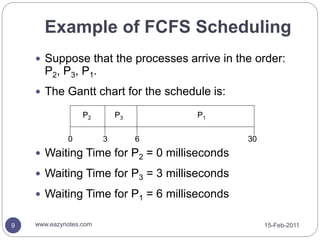
 Suppose that the processes arrive in the order:
P2, P3, P1.
 The Gantt chart for the schedule is:
 Waiting Time for P2 = 0 milliseconds
 Waiting Time for P3 = 3 milliseconds
 Waiting Time for P1 = 6 milliseconds
P1
P3
P2
6
3 30
0
Example of FCFS Scheduling
15-Feb-2011
www.eazynotes.com
10
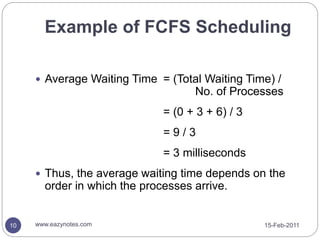
 Average Waiting Time = (Total Waiting Time) /
No. of Processes
= (0 + 3 + 6) / 3
= 9 / 3
= 3 milliseconds
 Thus, the average waiting time depends on the
order in which the processes arrive.
15-Feb-2011
www.eazynotes.com
11
15-Feb-2011
www.eazynotes.com
12
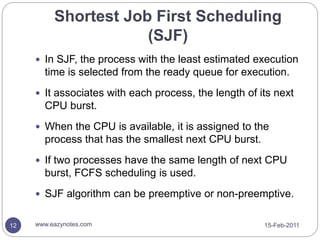
 In SJF, the process with the least estimated execution
time is selected from the ready queue for execution.
 It associates with each process, the length of its next
CPU burst.
 When the CPU is available, it is assigned to the
process that has the smallest next CPU burst.
 If two processes have the same length of next CPU
burst, FCFS scheduling is used.
 SJF algorithm can be preemptive or non-preemptive.
Shortest Job First Scheduling
(SJF)
Non-Preemptive SJF
15-Feb-2011
www.eazynotes.com
13
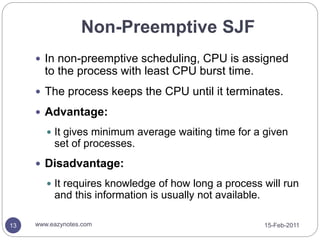
 In non-preemptive scheduling, CPU is assigned
to the process with least CPU burst time.
 The process keeps the CPU until it terminates.
 Advantage:
 It gives minimum average waiting time for a given
set of processes.
 Disadvantage:
 It requires knowledge of how long a process will run
and this information is usually not available.
Preemptive SJF
15-Feb-2011
www.eazynotes.com
14
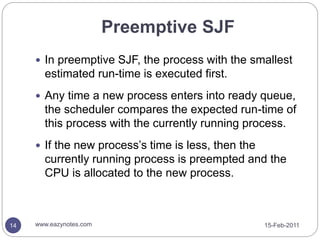
 In preemptive SJF, the process with the smallest
estimated run-time is executed first.
 Any time a new process enters into ready queue,
the scheduler compares the expected run-time of
this process with the currently running process.
 If the new process’s time is less, then the
currently running process is preempted and the
CPU is allocated to the new process.
Example of Non-Preemptive SJF
15-Feb-2011
www.eazynotes.com
15
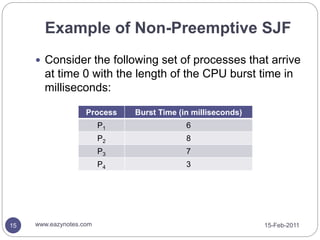
 Consider the following set of processes that arrive
at time 0 with the length of the CPU burst time in
milliseconds:
Process Burst Time (in milliseconds)
P1 6
P2 8
P3 7
P4 3
Example of Non-Preemptive SJF
15-Feb-2011
www.eazynotes.com
16
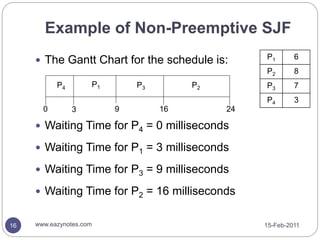
 The Gantt Chart for the schedule is:
 Waiting Time for P4 = 0 milliseconds
 Waiting Time for P1 = 3 milliseconds
 Waiting Time for P3 = 9 milliseconds
 Waiting Time for P2 = 16 milliseconds
P4 P3 P2
9 16 24
0
P1
3
P1 6
P2 8
P3 7
P4 3
Example of Non-Preemptive SJF
15-Feb-2011
www.eazynotes.com
17
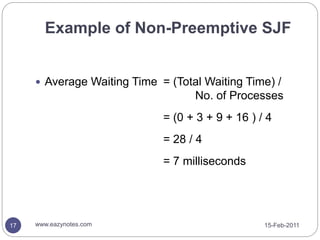
 Average Waiting Time = (Total Waiting Time) /
No. of Processes
= (0 + 3 + 9 + 16 ) / 4
= 28 / 4
= 7 milliseconds
15-Feb-2011
www.eazynotes.com
18
Example of Preemptive SJF
15-Feb-2011
www.eazynotes.com
19
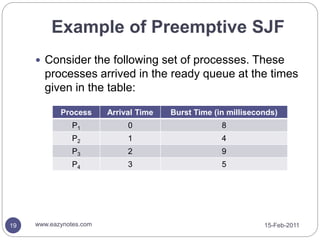
 Consider the following set of processes. These
processes arrived in the ready queue at the times
given in the table:
Process Arrival Time Burst Time (in milliseconds)
P1 0 8
P2 1 4
P3 2 9
P4 3 5
Example of Preemptive SJF
15-Feb-2011
www.eazynotes.com
20
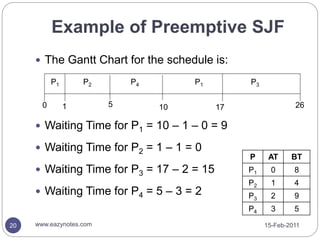
 The Gantt Chart for the schedule is:
 Waiting Time for P1 = 10 – 1 – 0 = 9
 Waiting Time for P2 = 1 – 1 = 0
 Waiting Time for P3 = 17 – 2 = 15
 Waiting Time for P4 = 5 – 3 = 2
P1 P1
P4
1 17
0 10
P3
26
P2
5
P AT BT
P1 0 8
P2 1 4
P3 2 9
P4 3 5
Example of Preemptive SJF
15-Feb-2011
www.eazynotes.com
21
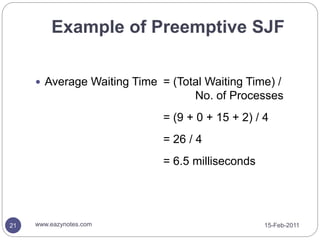
 Average Waiting Time = (Total Waiting Time) /
No. of Processes
= (9 + 0 + 15 + 2) / 4
= 26 / 4
= 6.5 milliseconds
Explanation of the Example
15-Feb-2011
www.eazynotes.com
22
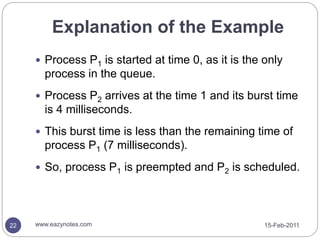
 Process P1 is started at time 0, as it is the only
process in the queue.
 Process P2 arrives at the time 1 and its burst time
is 4 milliseconds.
 This burst time is less than the remaining time of
process P1 (7 milliseconds).
 So, process P1 is preempted and P2 is scheduled.
Explanation of the Example
15-Feb-2011
www.eazynotes.com
23
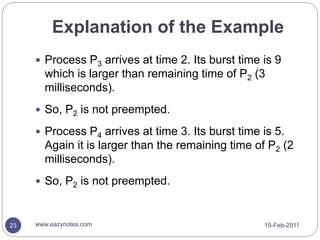
 Process P3 arrives at time 2. Its burst time is 9
which is larger than remaining time of P2 (3
milliseconds).
 So, P2 is not preempted.
 Process P4 arrives at time 3. Its burst time is 5.
Again it is larger than the remaining time of P2 (2
milliseconds).
 So, P2 is not preempted.
Explanation of the Example
15-Feb-2011
www.eazynotes.com
24
 After the termination of P2, the process with
shortest next CPU burst i.e. P4 is scheduled.
 After P4, processes P1 (7 milliseconds) and then
P3 (9 milliseconds) are scheduled.
Priority Scheduling
15-Feb-2011
www.eazynotes.com
25
 In priority scheduling, a priority is associated with
all processes.
 Processes are executed in sequence according
to their priority.
 CPU is allocated to the process with highest
priority.
 If priority of two or more processes are equal than
FCFS is used to break the tie.
Priority Scheduling
15-Feb-2011
www.eazynotes.com
26
 Priority scheduling can be preemptive or non-
preemptive.
 Preemptive Priority Scheduling:
 In this, scheduler allocates the CPU to the new process
if the priority of new process is higher tan the priority of
the running process.
 Non-Preemptive Priority Scheduling:
 The running process is not interrupted even if the new
process has a higher priority.
 In this case, the new process will be placed at the head
of the ready queue.
Priority Scheduling
15-Feb-2011
www.eazynotes.com
27
 Problem:
 In certain situations, a low priority process can be
blocked infinitely if high priority processes arrive in
the ready queue frequently.
 This situation is known as Starvation.
Priority Scheduling
15-Feb-2011
www.eazynotes.com
28
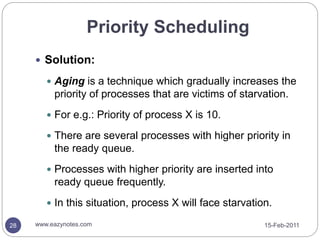
 Solution:
 Aging is a technique which gradually increases the
priority of processes that are victims of starvation.
 For e.g.: Priority of process X is 10.
 There are several processes with higher priority in
the ready queue.
 Processes with higher priority are inserted into
ready queue frequently.
 In this situation, process X will face starvation.
Priority Scheduling
15-Feb-2011
www.eazynotes.com
29
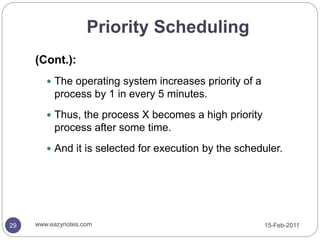
(Cont.):
 The operating system increases priority of a
process by 1 in every 5 minutes.
 Thus, the process X becomes a high priority
process after some time.
 And it is selected for execution by the scheduler.
Example of Priority Scheduling
15-Feb-2011
www.eazynotes.com
30
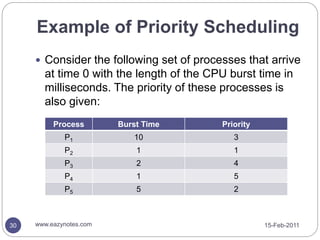
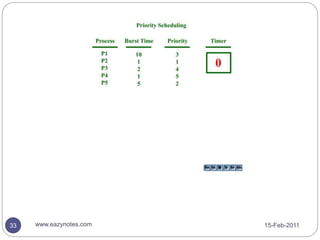
 Consider the following set of processes that arrive
at time 0 with the length of the CPU burst time in
milliseconds. The priority of these processes is
also given:
Process Burst Time Priority
P1 10 3
P2 1 1
P3 2 4
P4 1 5
P5 5 2
Example of Priority Scheduling
15-Feb-2011
www.eazynotes.com
31
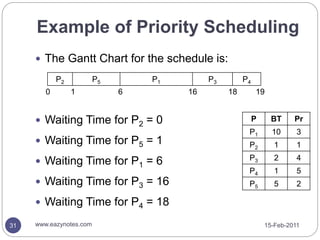
 The Gantt Chart for the schedule is:
 Waiting Time for P2 = 0
 Waiting Time for P5 = 1
 Waiting Time for P1 = 6
 Waiting Time for P3 = 16
 Waiting Time for P4 = 18
P BT Pr
P1 10 3
P2 1 1
P3 2 4
P4 1 5
P5 5 2
P2 P5 P1 P3 P4
0 1 6 16 18 19
Example of Priority Scheduling
15-Feb-2011
www.eazynotes.com
32
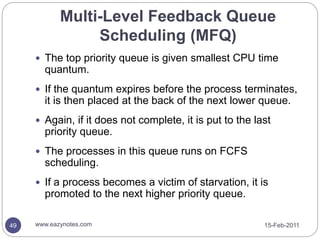
 Average Waiting Time = (Total Waiting Time) /
No. of Processes
= (0 + 1 + 6 + 16 + 18) / 5
= 41 / 5
= 8.2 milliseconds
15-Feb-2011
www.eazynotes.com
33
Another Example of Priority
Scheduling
15-Feb-2011
www.eazynotes.com
34
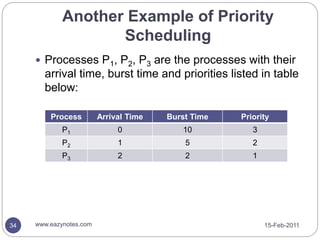
 Processes P1, P2, P3 are the processes with their
arrival time, burst time and priorities listed in table
below:
Process Arrival Time Burst Time Priority
P1 0 10 3
P2 1 5 2
P3 2 2 1
Another Example of Priority
Scheduling
15-Feb-2011
www.eazynotes.com
35
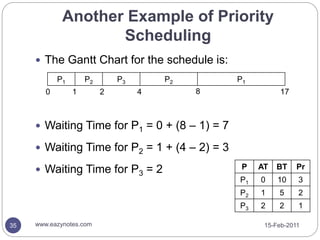
 The Gantt Chart for the schedule is:
 Waiting Time for P1 = 0 + (8 – 1) = 7
 Waiting Time for P2 = 1 + (4 – 2) = 3
 Waiting Time for P3 = 2 P AT BT Pr
P1 0 10 3
P2 1 5 2
P3 2 2 1
P1 P2 P3 P2 P1
0 1 2 4 8 17
Another Example of Priority
Scheduling
15-Feb-2011
www.eazynotes.com
36
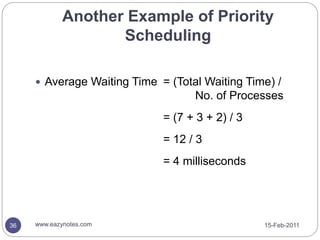
 Average Waiting Time = (Total Waiting Time) /
No. of Processes
= (7 + 3 + 2) / 3
= 12 / 3
= 4 milliseconds
Round Robin Scheduling (RR)
15-Feb-2011
www.eazynotes.com
37
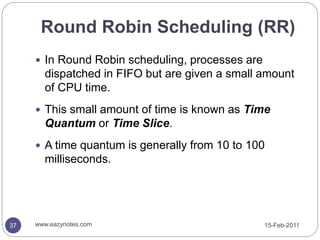
 In Round Robin scheduling, processes are
dispatched in FIFO but are given a small amount
of CPU time.
 This small amount of time is known as Time
Quantum or Time Slice.
 A time quantum is generally from 10 to 100
milliseconds.
Round Robin Scheduling (RR)
15-Feb-2011
www.eazynotes.com
38
 If a process does not complete before its time
slice expires, the CPU is preempted and is given
to the next process in the ready queue.
 The preempted process is then placed at the tail
of the ready queue.
 If a process is completed before its time slice
expires, the process itself releases the CPU.
 The scheduler then proceeds to the next process
in the ready queue.
Round Robin Scheduling (RR)
15-Feb-2011
www.eazynotes.com
39
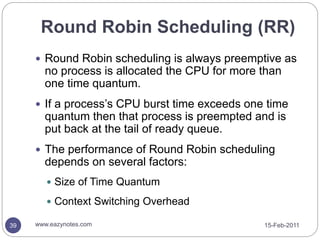
 Round Robin scheduling is always preemptive as
no process is allocated the CPU for more than
one time quantum.
 If a process’s CPU burst time exceeds one time
quantum then that process is preempted and is
put back at the tail of ready queue.
 The performance of Round Robin scheduling
depends on several factors:
 Size of Time Quantum
 Context Switching Overhead
Example of Round Robin
Scheduling
15-Feb-2011
www.eazynotes.com
40
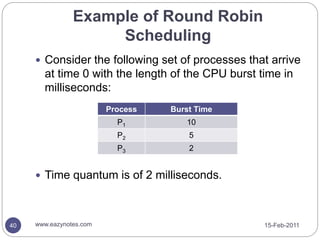
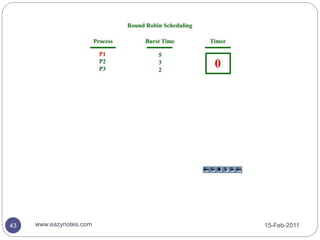
 Consider the following set of processes that arrive
at time 0 with the length of the CPU burst time in
milliseconds:
 Time quantum is of 2 milliseconds.
Process Burst Time
P1 10
P2 5
P3 2
Example of Round Robin
Scheduling
15-Feb-2011
www.eazynotes.com
41
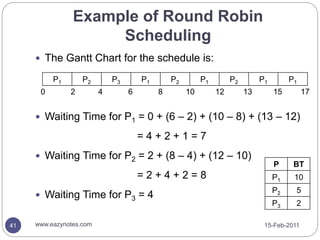
 The Gantt Chart for the schedule is:
 Waiting Time for P1 = 0 + (6 – 2) + (10 – 8) + (13 – 12)
= 4 + 2 + 1 = 7
 Waiting Time for P2 = 2 + (8 – 4) + (12 – 10)
= 2 + 4 + 2 = 8
 Waiting Time for P3 = 4
P BT
P1 10
P2 5
P3 2
P1 P2 P3 P1 P2 P1 P2 P1 P1
0 2 6 10 12 13
4 8 15 17
Example of Round Robin
Scheduling
15-Feb-2011
www.eazynotes.com
42
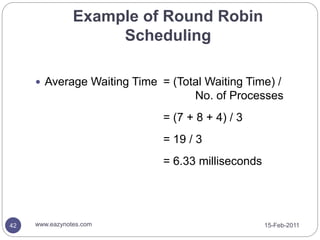
 Average Waiting Time = (Total Waiting Time) /
No. of Processes
= (7 + 8 + 4) / 3
= 19 / 3
= 6.33 milliseconds
15-Feb-2011
www.eazynotes.com
43
Multi-Level Queue Scheduling
(MLQ)
15-Feb-2011
www.eazynotes.com
44
 Multi-Level Queue scheduling classifies the
processes according to their types.
 For e.g.: a MLQ makes common division between
the interactive processes (foreground) and the
batch processes (background).
 These two processes have different response
times, so they have different scheduling
requirements.
 Also, interactive processes have higher priority
than the batch processes.
Multi-Level Queue Scheduling
(MLQ)
15-Feb-2011
www.eazynotes.com
45
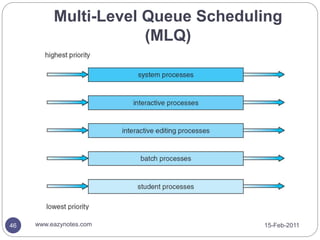
 In this scheduling, ready queue is divided into
various queues that are called subqueues.
 The processes are assigned to subqueues,
based on some properties like memory size,
priority or process type.
 Each subqueue has its own scheduling algorithm.
 For e.g.: interactive processes may use round
robin algorithm while batch processes may use
FCFS.
Multi-Level Queue Scheduling
(MLQ)
15-Feb-2011
www.eazynotes.com
46
Multi-Level Feedback Queue
Scheduling (MFQ)
15-Feb-2011
www.eazynotes.com
47
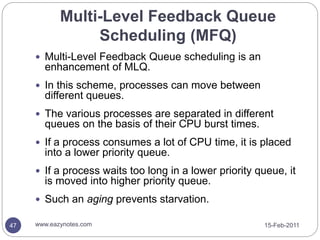
 Multi-Level Feedback Queue scheduling is an
enhancement of MLQ.
 In this scheme, processes can move between
different queues.
 The various processes are separated in different
queues on the basis of their CPU burst times.
 If a process consumes a lot of CPU time, it is placed
into a lower priority queue.
 If a process waits too long in a lower priority queue, it
is moved into higher priority queue.
 Such an aging prevents starvation.
Multi-Level Feedback Queue
Scheduling (MFQ)
15-Feb-2011
www.eazynotes.com
48
Multi-Level Feedback Queue
Scheduling (MFQ)
15-Feb-2011
www.eazynotes.com
49
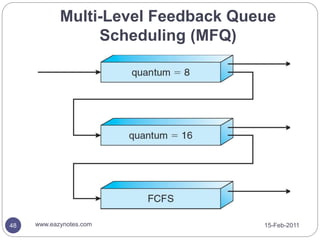
 The top priority queue is given smallest CPU time
quantum.
 If the quantum expires before the process terminates,
it is then placed at the back of the next lower queue.
 Again, if it does not complete, it is put to the last
priority queue.
 The processes in this queue runs on FCFS
scheduling.
 If a process becomes a victim of starvation, it is
promoted to the next higher priority queue.
50 15-Feb-2011
www.eazynotes.com

scheduling-algorithms.ppt

  • 1.
    Gursharan Singh Tatla professorgstatla@gmail.com SchedulingAlgorithms 15-Feb-2011 1 www.eazynotes.com
  • 2.
    Scheduling Algorithms  CPUScheduling algorithms deal with the problem of deciding which process in ready queue should be allocated to CPU.  Following are the commonly used scheduling algorithms: 15-Feb-2011 2 www.eazynotes.com
  • 3.
    Scheduling Algorithms 15-Feb-2011 www.eazynotes.com 3  First-Come-First-Served(FCFS)  Shortest Job First (SJF)  Priority Scheduling  Round-Robin Scheduling (RR)  Multi-Level Queue Scheduling (MLQ)  Multi-Level Feedback Queue Scheduling (MFQ)
  • 4.
    First-Come-First-Served Scheduling (FCFS) 15-Feb-2011 www.eazynotes.com 4  Inthis scheduling, the process that requests the CPU first, is allocated the CPU first.  Thus, the name First-Come-First-Served.  The implementation of FCFS is easily managed with a FIFO queue. D C B A CPU Tail of Queue Head of Queue Ready Queue
  • 5.
    15-Feb-2011 www.eazynotes.com 5  When aprocess enters the ready queue, its PCB is linked to the tail of the queue.  When CPU is free, it is allocated to the process which is at the head of the queue.  FCFS scheduling algorithm is non-preemptive.  Once the CPU is allocated to a process, that process keeps the CPU until it releases the CPU, either by terminating or by I/O request. First-Come-First-Served Scheduling (FCFS)
  • 6.
    Example of FCFSScheduling 15-Feb-2011 www.eazynotes.com 6  Consider the following set of processes that arrive at time 0 with the length of the CPU burst time in milliseconds: Process Burst Time (in milliseconds) P1 24 P2 3 P3 3
  • 7.
    Example of FCFSScheduling 15-Feb-2011 www.eazynotes.com 7  Suppose that the processes arrive in the order: P1, P2, P3.  The Gantt Chart for the schedule is:  Waiting Time for P1 = 0 milliseconds  Waiting Time for P2 = 24 milliseconds  Waiting Time for P3 = 27 milliseconds P1 P2 P3 24 27 30 0 P1 24 P2 3 P3 3
  • 8.
    Example of FCFSScheduling 15-Feb-2011 www.eazynotes.com 8  Average Waiting Time = (Total Waiting Time) / No. of Processes = (0 + 24 + 27) / 3 = 51 / 3 = 17 milliseconds
  • 9.
    Example of FCFSScheduling 15-Feb-2011 www.eazynotes.com 9  Suppose that the processes arrive in the order: P2, P3, P1.  The Gantt chart for the schedule is:  Waiting Time for P2 = 0 milliseconds  Waiting Time for P3 = 3 milliseconds  Waiting Time for P1 = 6 milliseconds P1 P3 P2 6 3 30 0
  • 10.
    Example of FCFSScheduling 15-Feb-2011 www.eazynotes.com 10  Average Waiting Time = (Total Waiting Time) / No. of Processes = (0 + 3 + 6) / 3 = 9 / 3 = 3 milliseconds  Thus, the average waiting time depends on the order in which the processes arrive.
  • 11.
  • 12.
    15-Feb-2011 www.eazynotes.com 12  In SJF,the process with the least estimated execution time is selected from the ready queue for execution.  It associates with each process, the length of its next CPU burst.  When the CPU is available, it is assigned to the process that has the smallest next CPU burst.  If two processes have the same length of next CPU burst, FCFS scheduling is used.  SJF algorithm can be preemptive or non-preemptive. Shortest Job First Scheduling (SJF)
  • 13.
    Non-Preemptive SJF 15-Feb-2011 www.eazynotes.com 13  Innon-preemptive scheduling, CPU is assigned to the process with least CPU burst time.  The process keeps the CPU until it terminates.  Advantage:  It gives minimum average waiting time for a given set of processes.  Disadvantage:  It requires knowledge of how long a process will run and this information is usually not available.
  • 14.
    Preemptive SJF 15-Feb-2011 www.eazynotes.com 14  Inpreemptive SJF, the process with the smallest estimated run-time is executed first.  Any time a new process enters into ready queue, the scheduler compares the expected run-time of this process with the currently running process.  If the new process’s time is less, then the currently running process is preempted and the CPU is allocated to the new process.
  • 15.
    Example of Non-PreemptiveSJF 15-Feb-2011 www.eazynotes.com 15  Consider the following set of processes that arrive at time 0 with the length of the CPU burst time in milliseconds: Process Burst Time (in milliseconds) P1 6 P2 8 P3 7 P4 3
  • 16.
    Example of Non-PreemptiveSJF 15-Feb-2011 www.eazynotes.com 16  The Gantt Chart for the schedule is:  Waiting Time for P4 = 0 milliseconds  Waiting Time for P1 = 3 milliseconds  Waiting Time for P3 = 9 milliseconds  Waiting Time for P2 = 16 milliseconds P4 P3 P2 9 16 24 0 P1 3 P1 6 P2 8 P3 7 P4 3
  • 17.
    Example of Non-PreemptiveSJF 15-Feb-2011 www.eazynotes.com 17  Average Waiting Time = (Total Waiting Time) / No. of Processes = (0 + 3 + 9 + 16 ) / 4 = 28 / 4 = 7 milliseconds
  • 18.
  • 19.
    Example of PreemptiveSJF 15-Feb-2011 www.eazynotes.com 19  Consider the following set of processes. These processes arrived in the ready queue at the times given in the table: Process Arrival Time Burst Time (in milliseconds) P1 0 8 P2 1 4 P3 2 9 P4 3 5
  • 20.
    Example of PreemptiveSJF 15-Feb-2011 www.eazynotes.com 20  The Gantt Chart for the schedule is:  Waiting Time for P1 = 10 – 1 – 0 = 9  Waiting Time for P2 = 1 – 1 = 0  Waiting Time for P3 = 17 – 2 = 15  Waiting Time for P4 = 5 – 3 = 2 P1 P1 P4 1 17 0 10 P3 26 P2 5 P AT BT P1 0 8 P2 1 4 P3 2 9 P4 3 5
  • 21.
    Example of PreemptiveSJF 15-Feb-2011 www.eazynotes.com 21  Average Waiting Time = (Total Waiting Time) / No. of Processes = (9 + 0 + 15 + 2) / 4 = 26 / 4 = 6.5 milliseconds
  • 22.
    Explanation of theExample 15-Feb-2011 www.eazynotes.com 22  Process P1 is started at time 0, as it is the only process in the queue.  Process P2 arrives at the time 1 and its burst time is 4 milliseconds.  This burst time is less than the remaining time of process P1 (7 milliseconds).  So, process P1 is preempted and P2 is scheduled.
  • 23.
    Explanation of theExample 15-Feb-2011 www.eazynotes.com 23  Process P3 arrives at time 2. Its burst time is 9 which is larger than remaining time of P2 (3 milliseconds).  So, P2 is not preempted.  Process P4 arrives at time 3. Its burst time is 5. Again it is larger than the remaining time of P2 (2 milliseconds).  So, P2 is not preempted.
  • 24.
    Explanation of theExample 15-Feb-2011 www.eazynotes.com 24  After the termination of P2, the process with shortest next CPU burst i.e. P4 is scheduled.  After P4, processes P1 (7 milliseconds) and then P3 (9 milliseconds) are scheduled.
  • 25.
    Priority Scheduling 15-Feb-2011 www.eazynotes.com 25  Inpriority scheduling, a priority is associated with all processes.  Processes are executed in sequence according to their priority.  CPU is allocated to the process with highest priority.  If priority of two or more processes are equal than FCFS is used to break the tie.
  • 26.
    Priority Scheduling 15-Feb-2011 www.eazynotes.com 26  Priorityscheduling can be preemptive or non- preemptive.  Preemptive Priority Scheduling:  In this, scheduler allocates the CPU to the new process if the priority of new process is higher tan the priority of the running process.  Non-Preemptive Priority Scheduling:  The running process is not interrupted even if the new process has a higher priority.  In this case, the new process will be placed at the head of the ready queue.
  • 27.
    Priority Scheduling 15-Feb-2011 www.eazynotes.com 27  Problem: In certain situations, a low priority process can be blocked infinitely if high priority processes arrive in the ready queue frequently.  This situation is known as Starvation.
  • 28.
    Priority Scheduling 15-Feb-2011 www.eazynotes.com 28  Solution: Aging is a technique which gradually increases the priority of processes that are victims of starvation.  For e.g.: Priority of process X is 10.  There are several processes with higher priority in the ready queue.  Processes with higher priority are inserted into ready queue frequently.  In this situation, process X will face starvation.
  • 29.
    Priority Scheduling 15-Feb-2011 www.eazynotes.com 29 (Cont.):  Theoperating system increases priority of a process by 1 in every 5 minutes.  Thus, the process X becomes a high priority process after some time.  And it is selected for execution by the scheduler.
  • 30.
    Example of PriorityScheduling 15-Feb-2011 www.eazynotes.com 30  Consider the following set of processes that arrive at time 0 with the length of the CPU burst time in milliseconds. The priority of these processes is also given: Process Burst Time Priority P1 10 3 P2 1 1 P3 2 4 P4 1 5 P5 5 2
  • 31.
    Example of PriorityScheduling 15-Feb-2011 www.eazynotes.com 31  The Gantt Chart for the schedule is:  Waiting Time for P2 = 0  Waiting Time for P5 = 1  Waiting Time for P1 = 6  Waiting Time for P3 = 16  Waiting Time for P4 = 18 P BT Pr P1 10 3 P2 1 1 P3 2 4 P4 1 5 P5 5 2 P2 P5 P1 P3 P4 0 1 6 16 18 19
  • 32.
    Example of PriorityScheduling 15-Feb-2011 www.eazynotes.com 32  Average Waiting Time = (Total Waiting Time) / No. of Processes = (0 + 1 + 6 + 16 + 18) / 5 = 41 / 5 = 8.2 milliseconds
  • 33.
  • 34.
    Another Example ofPriority Scheduling 15-Feb-2011 www.eazynotes.com 34  Processes P1, P2, P3 are the processes with their arrival time, burst time and priorities listed in table below: Process Arrival Time Burst Time Priority P1 0 10 3 P2 1 5 2 P3 2 2 1
  • 35.
    Another Example ofPriority Scheduling 15-Feb-2011 www.eazynotes.com 35  The Gantt Chart for the schedule is:  Waiting Time for P1 = 0 + (8 – 1) = 7  Waiting Time for P2 = 1 + (4 – 2) = 3  Waiting Time for P3 = 2 P AT BT Pr P1 0 10 3 P2 1 5 2 P3 2 2 1 P1 P2 P3 P2 P1 0 1 2 4 8 17
  • 36.
    Another Example ofPriority Scheduling 15-Feb-2011 www.eazynotes.com 36  Average Waiting Time = (Total Waiting Time) / No. of Processes = (7 + 3 + 2) / 3 = 12 / 3 = 4 milliseconds
  • 37.
    Round Robin Scheduling(RR) 15-Feb-2011 www.eazynotes.com 37  In Round Robin scheduling, processes are dispatched in FIFO but are given a small amount of CPU time.  This small amount of time is known as Time Quantum or Time Slice.  A time quantum is generally from 10 to 100 milliseconds.
  • 38.
    Round Robin Scheduling(RR) 15-Feb-2011 www.eazynotes.com 38  If a process does not complete before its time slice expires, the CPU is preempted and is given to the next process in the ready queue.  The preempted process is then placed at the tail of the ready queue.  If a process is completed before its time slice expires, the process itself releases the CPU.  The scheduler then proceeds to the next process in the ready queue.
  • 39.
    Round Robin Scheduling(RR) 15-Feb-2011 www.eazynotes.com 39  Round Robin scheduling is always preemptive as no process is allocated the CPU for more than one time quantum.  If a process’s CPU burst time exceeds one time quantum then that process is preempted and is put back at the tail of ready queue.  The performance of Round Robin scheduling depends on several factors:  Size of Time Quantum  Context Switching Overhead
  • 40.
    Example of RoundRobin Scheduling 15-Feb-2011 www.eazynotes.com 40  Consider the following set of processes that arrive at time 0 with the length of the CPU burst time in milliseconds:  Time quantum is of 2 milliseconds. Process Burst Time P1 10 P2 5 P3 2
  • 41.
    Example of RoundRobin Scheduling 15-Feb-2011 www.eazynotes.com 41  The Gantt Chart for the schedule is:  Waiting Time for P1 = 0 + (6 – 2) + (10 – 8) + (13 – 12) = 4 + 2 + 1 = 7  Waiting Time for P2 = 2 + (8 – 4) + (12 – 10) = 2 + 4 + 2 = 8  Waiting Time for P3 = 4 P BT P1 10 P2 5 P3 2 P1 P2 P3 P1 P2 P1 P2 P1 P1 0 2 6 10 12 13 4 8 15 17
  • 42.
    Example of RoundRobin Scheduling 15-Feb-2011 www.eazynotes.com 42  Average Waiting Time = (Total Waiting Time) / No. of Processes = (7 + 8 + 4) / 3 = 19 / 3 = 6.33 milliseconds
  • 43.
  • 44.
    Multi-Level Queue Scheduling (MLQ) 15-Feb-2011 www.eazynotes.com 44 Multi-Level Queue scheduling classifies the processes according to their types.  For e.g.: a MLQ makes common division between the interactive processes (foreground) and the batch processes (background).  These two processes have different response times, so they have different scheduling requirements.  Also, interactive processes have higher priority than the batch processes.
  • 45.
    Multi-Level Queue Scheduling (MLQ) 15-Feb-2011 www.eazynotes.com 45 In this scheduling, ready queue is divided into various queues that are called subqueues.  The processes are assigned to subqueues, based on some properties like memory size, priority or process type.  Each subqueue has its own scheduling algorithm.  For e.g.: interactive processes may use round robin algorithm while batch processes may use FCFS.
  • 46.
  • 47.
    Multi-Level Feedback Queue Scheduling(MFQ) 15-Feb-2011 www.eazynotes.com 47  Multi-Level Feedback Queue scheduling is an enhancement of MLQ.  In this scheme, processes can move between different queues.  The various processes are separated in different queues on the basis of their CPU burst times.  If a process consumes a lot of CPU time, it is placed into a lower priority queue.  If a process waits too long in a lower priority queue, it is moved into higher priority queue.  Such an aging prevents starvation.
  • 48.
    Multi-Level Feedback Queue Scheduling(MFQ) 15-Feb-2011 www.eazynotes.com 48
  • 49.
    Multi-Level Feedback Queue Scheduling(MFQ) 15-Feb-2011 www.eazynotes.com 49  The top priority queue is given smallest CPU time quantum.  If the quantum expires before the process terminates, it is then placed at the back of the next lower queue.  Again, if it does not complete, it is put to the last priority queue.  The processes in this queue runs on FCFS scheduling.  If a process becomes a victim of starvation, it is promoted to the next higher priority queue.
  • 50.