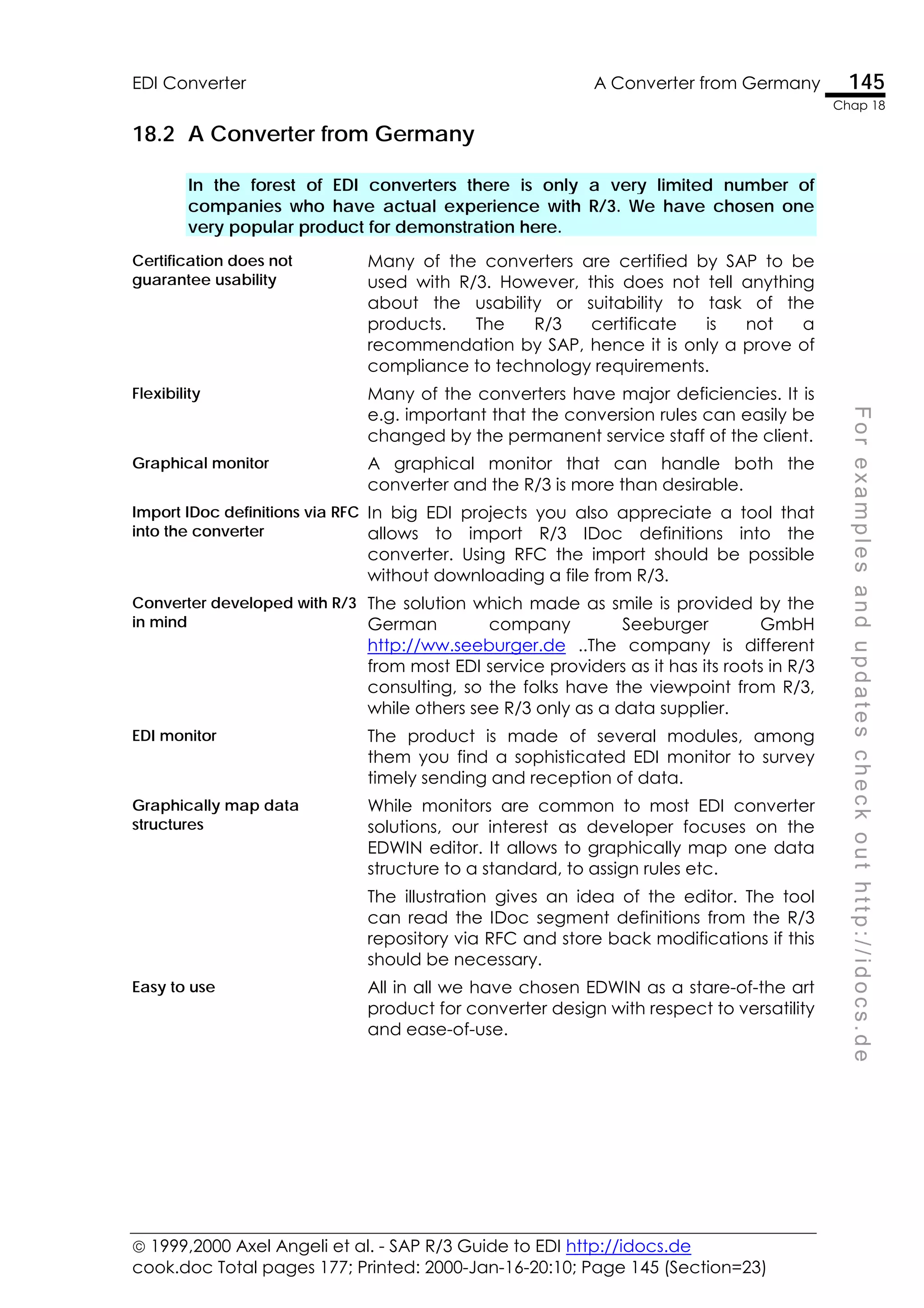
F
o
r
e
x
a
m
p
l
e
s
a
n
d
u
p
d
a
t
e
s
c
h
e
c
k
o
u
t
h
t
t
p
:
/
/
i
d
o
c
s
.
d
e
 1999,2000 Axel Angeli et al. - SAP R/3 Guide to EDI http://idocs.de
cook.doc Total pages 177; Printed: 2000-Jan-16-20:10; Page 1 (Section=1)
Axel Angeli
Robi Gonfalonieri, Ulrich Streit
http://idocs.de
The
SAP R/3 Guide to
EDI, IDocs and Interfaces
 1999 Axel Angeli et al. - SAP R/3 Guide to EDI, IDocs and ALE
F
o
r
e
x
a
m
p
l
e
s
a
n
d
u
p
d
a
t
e
s
c
h
e
c
k
o
u
t
h
t
t
p
:
/
/
i
d
o
c
s
.
d
e
About The Authors
Axel Angeli,
is born in 1961. He is a Top Level SAP R/3 consultant and R/3 cross-application
development coach. He specializes in coaching of large multi-national, multi-
language development teams and troubleshooting development projects.
His job description is also known as computer logistics, a delicate discipline that
methodically wakes the synergetic effects in team to accelerate and mediate IT
projects.
He is a learned Cybernetics scientist (also known as Artificial Intelligence) in the
tradition of the Marvin Minsky [The society of mind] and Synergetics group of
Herman Haken and Maria Krell. His competence in computer science is based on
the works of Donald Knuth [The Art of Computer Programming], Niklas Wirth (the
creator of the PASCAL language), the object oriented approach as described
and developed during the XEROX PARC project (where the mouse and windows
style GUIs have been invented in the early 1970ies) and Borland languages.
Before his life as SAP consultant, he made a living as a computer scientist for
medical biometry and specialist for high precision industry robots. He concentrates
now on big international projects. He speaks fluently several popular languages
including German, English, French and Slavic. ! axela@logosworld.de
Robi Gonfalonieri,
born in 1965 is a senior ABAP IV developer and R/3 consultant for SD and MM. He
is a learned economist turned ABAP IV developer. He specializes in international,
multi-language projects both as developer and SD consultant. He speaks fluently
several languages including German, French, English and Italian.
! robig@logosworld.de
Ulrich Streit,
born in 1975 is ABAP IV developer and interface specialist. He developed a
serious of legacy system interfaces and interface monitors for several clients of the
process industry. ! ulis@logosworld.de
logosworld.com
is a group of loosely related freelance R/3 consultants and consulting companies.
Current members of the logosworld.com bond are the following fine companies:
• Logos! Informatik GmbH, Brühl, Germany: R/3 technical troubleshooting
• OSCo GmbH, Mannheim, Germany: SAP R/3 implementation partner
• UNILAN Corp., Texas: ORACLE implementation competence
For true international R/3 competence and
enthusiastic consultants,
email us ! info@logosworld.de
or visit http://idocs.de
 1999 Axel Angeli et al. - SAP R/3 Guide to EDI, IDocs and ALE
cook.doc Total pages 177; Print date: 16.01.00; Page ii
For Doris, Paul, Mini
 1999 Axel Angeli et al. - SAP R/3 Guide to EDI, IDocs and ALE
F
o
r
e
x
a
m
p
l
e
s
a
n
d
u
p
d
a
t
e
s
c
h
e
c
k
o
u
t
h
t
t
p
:
/
/
i
d
o
c
s
.
d
e
Danke, Thank You, Graçias,
Tack så mycket, Merci, Bedankt,
Grazie, Danjawad, Nandri, Se-Se
I due special thanks to a variety of people, clients, partners and friends. Their
insistence in finding a solution and their way to ask the right questions made this
book only possible.
I want especially honour Francis Bettendorf, who has been exactly that genre of
knowledgeable and experienced IT professionals I had in mind, when writing this
book. A man who understands an algorithm when he sees it and without being
too proud to ask precise and well-prepared questions. He used to see me every
day with the same phrase on the lips: "Every day one question." He heavily
influenced my writing style, when I tried to write down the answers to his questions.
He also often gave the pulse to write down the answers at all. At the age of 52, he
joyfully left work the evening of Tuesday the 23rd March 1999 after I had another
fruitful discussion with him. He entered immortality the following Wednesday
morning. We will all keep his memory in our heart.
Thanks to Detlef and Ingolf Streit for doing the great cartoons.
Thanks also to Pete Kellogg of UNILAN Corp., Texas, Juergen Olbricht, Wolfgang
Seehaus and his team of OSCo, Mannheim for continuously forming such perfect
project teams. It is joy working with them.
Plans are fundamentally ineffective because the "circumstances of our actions are
never fully anticipated and are continuously changing around us". Suchman does not
deny the existence or use of plans but implies that deciding what to do next in the
pursuit of some goal is a far more dynamic and context-dependent activity than
the traditional notion of planning might suggest.
Wendy Suchman, Xerox PARC http://innovate.bt.com/showcase/wearables/
 1999,2000 Axel Angeli et al. - SAP R/3 Guide to EDI http://idocs.de
cook.doc Total pages 177; Printed: 2000-Jan-16-20:10; Page 5 (Section=3)
F
o
r
e
x
a
m
p
l
e
s
a
n
d
u
p
d
a
t
e
s
c
h
e
c
k
o
u
t
h
t
t
p
:
/
/
i
d
o
c
s
.
d
e
Who Would Read This Book?
This book was written for the experienced R/3 consultants, who wants to know
more about interface programming and data migration. It is mainly a compilation
of scripts and answers who arose during my daily work as an R/3 coach.
Quid – What is that
book about?
The R/3 Guide is a Frequently Given Answers book. It is a
collection of answers, I have given to questions regarding EDI
over and over again, both from developers, consultants and
client’s technical staff. It is focussed on the technical aspect of
SAP R/3 IDoc technology. It is not a tutorial, but a supplement
to the R/3 documentation and training courses.
Quis – Who should
read the book?
The R/3 Guide has been written with the experienced
consultant or ABAP developer in mind. It does not expect any
special knowledge about EDI, however, you should be familiar
with ABAP IV and the R/3 repository.
Quo modo – how
do you benefit from
the book?
Well, this book is a “How to” book, or a “Know-how”-book. The
R/3 Guide has its value as a compendium. It is not a novel to
read at a stretch but a book, where you search the answer
when you have a question.
Quo (Ubi) – Where
would you use the
book?
You would most likely use the book when being in a project
involved in data interfaces, not necessarily a clean EDI project.
IDocs are also helpful in data migration.
Quando – when
should you read the
book
The R/3 Guide is not a tutorial. You should be familiar with the
general concept of IDocs and it is meant to be used after you
have attended an R/3 course on IDocs, ALE or similar. Instead
of attending the course you may alternatively read one of the
R/3 IDoc tutorial on the market.
Cur – Why should
you read the book
Because you always wanted to know the technical aspects of
IDoc development, which you cannot find in any of the
publicly accessible R/3 documentation.
 1999,2000 Axel Angeli et al. - SAP R/3 Guide to EDI http://idocs.de
cook.doc Total pages 177; Printed: 2000-Jan-16-20:10; Page i (Section=4)
F
o
r
e
x
a
m
p
l
e
s
a
n
d
u
p
d
a
t
e
s
c
h
e
c
k
o
u
t
h
t
t
p
:
/
/
i
d
o
c
s
.
d
e
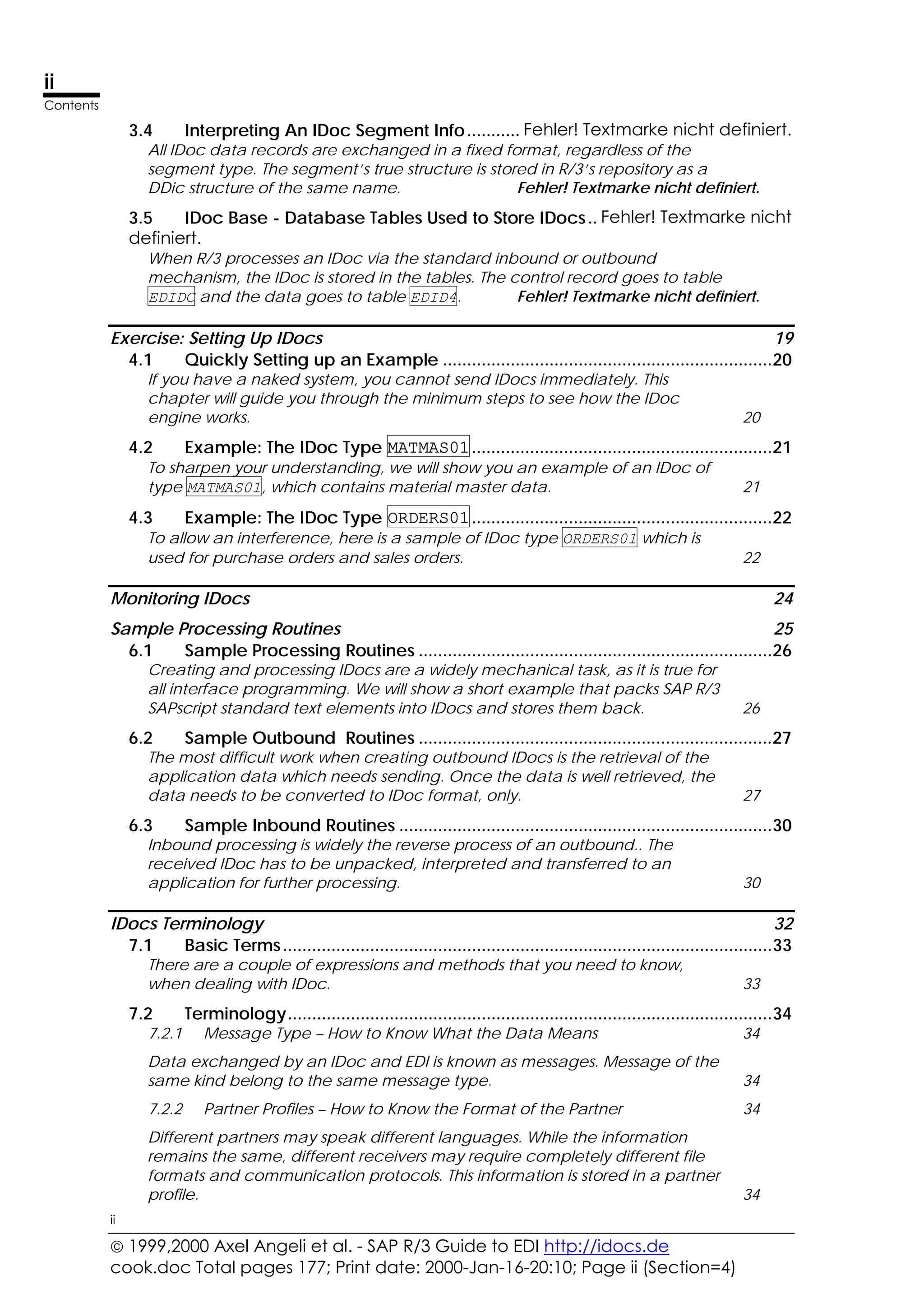
Table Of Contents
Where Has the Money Gone? 1
1.1 Communication............................................................................................... 2
More than 80% of the time of an EDI project is lost in waiting for answers,
trying to understand proposals and retrieving data nobody actually needs. 2
1.2 Psychology of Communication...................................................................... 3
Bringing developers together accelerates every project. Especially when
both parties are so much dependent on each other as in an EDI project, the
partners need to communicate without pause. 3
1.3 Phantom SAP Standards and a Calculation.................................................. 4
It is reported that SAP R/3 delivers standard EDI programs and that they
should not be manipulated and no circumstances. Because this is not true,
much project is lost in chasing the phantom. 4
1.4 Strategy ............................................................................................................ 5
Do not loose your time in plans. Have prototypes developed and take them
as a basis. 5
1.5 Who Is on Duty? ............................................................................................... 5
Writing interface programs is much like translating languages. The same rule
apply. 5
1.6 Marcus T. Cicero.............................................................................................. 6
Some may have learned it in school: the basic rules of rhetoric according to
Cicero. You will know the answers, when your program is at its end. Why
don’t you ask the questions in the beginning? Ask the right question, then
you will know. 6
What Are SAP R/3 IDocs? 7
2.1 What are IDocs? .............................................................................................. 8
IDocs are structured ASCII files (or a virtual equivalent). They are the file
format used by SAP R/3 to exchange data with foreign systems. 8
2.2 Exploring a Typical Scenario .......................................................................... 9
The IDoc process is a straight forward communication scenario. A
communication is requested, then data is retrieved, wrapped and sent to
the destination in a predefined format and envelope. 9
Get a Feeling for IDocs Fehler! Textmarke nicht definiert.
3.1 Get A Feeling For IDocs .............................Fehler! Textmarke nicht definiert.
For the beginning we want to give you a feeling of what IDocs are and how
they may look like, when you receive it as a plain text file.Fehler! Textmarke nicht definiert.
3.2 The IDoc Control Record............................Fehler! Textmarke nicht definiert.
The very first record of an IDoc package is always a control record. The
structure of this control record is the DDic structure EDIDC and describes the
contents of the data contained in the package. Fehler! Textmarke nicht definiert.
3.3 The IDoc Data .............................................Fehler! Textmarke nicht definiert.
All records in the IDoc, which come after the control record are the IDoc
data. They are all structured alike, with a segment information part and a
data part which is 1000 character in length, filling the rest of the line.Fehler! Textmarke nicht definiert.
 1999,2000 Axel Angeli et al. - SAP R/3 Guide to EDI http://idocs.de
cook.doc Total pages 177; Print date: 2000-Jan-16-20:10; Page ii (Section=4)
ii
Contents
ii
3.4 Interpreting An IDoc Segment Info........... Fehler! Textmarke nicht definiert.
All IDoc data records are exchanged in a fixed format, regardless of the
segment type. The segment’s true structure is stored in R/3’s repository as a
DDic structure of the same name. Fehler! Textmarke nicht definiert.
3.5 IDoc Base - Database Tables Used to Store IDocs.. Fehler! Textmarke nicht
definiert.
When R/3 processes an IDoc via the standard inbound or outbound
mechanism, the IDoc is stored in the tables. The control record goes to table
EDIDC and the data goes to table EDID4. Fehler! Textmarke nicht definiert.
Exercise: Setting Up IDocs 19
4.1 Quickly Setting up an Example ....................................................................20
If you have a naked system, you cannot send IDocs immediately. This
chapter will guide you through the minimum steps to see how the IDoc
engine works. 20
4.2 Example: The IDoc Type MATMAS01..............................................................21
To sharpen your understanding, we will show you an example of an IDoc of
type MATMAS01, which contains material master data. 21
4.3 Example: The IDoc Type ORDERS01..............................................................22
To allow an interference, here is a sample of IDoc type ORDERS01 which is
used for purchase orders and sales orders. 22
Monitoring IDocs 24
Sample Processing Routines 25
6.1 Sample Processing Routines .........................................................................26
Creating and processing IDocs are a widely mechanical task, as it is true for
all interface programming. We will show a short example that packs SAP R/3
SAPscript standard text elements into IDocs and stores them back. 26
6.2 Sample Outbound Routines .........................................................................27
The most difficult work when creating outbound IDocs is the retrieval of the
application data which needs sending. Once the data is well retrieved, the
data needs to be converted to IDoc format, only. 27
6.3 Sample Inbound Routines .............................................................................30
Inbound processing is widely the reverse process of an outbound.. The
received IDoc has to be unpacked, interpreted and transferred to an
application for further processing. 30
IDocs Terminology 32
7.1 Basic Terms.....................................................................................................33
There are a couple of expressions and methods that you need to know,
when dealing with IDoc. 33
7.2 Terminology....................................................................................................34
7.2.1 Message Type – How to Know What the Data Means 34
Data exchanged by an IDoc and EDI is known as messages. Message of the
same kind belong to the same message type. 34
7.2.2 Partner Profiles – How to Know the Format of the Partner 34
Different partners may speak different languages. While the information
remains the same, different receivers may require completely different file
formats and communication protocols. This information is stored in a partner
profile. 34
 1999,2000 Axel Angeli et al. - SAP R/3 Guide to EDI http://idocs.de
cook.doc Total pages 177; Printed: 2000-Jan-16-20:10; Page iii (Section=4)
iii
Contents
iii
F
o
r
e
x
a
m
p
l
e
s
a
n
d
u
p
d
a
t
e
s
c
h
e
c
k
o
u
t
h
t
t
p
:
/
/
i
d
o
c
s
.
d
e
7.2.3 IDoc Type – The Structure of The IDoc File 35
The IDoc type is the name of the data structure used to describe the file
format of a specific IDoc. 35
7.2.4 Processing Codes 35
The processing code is a pointer to an algorithm to process an IDoc. It is
used to allow more flexibility in assigning the processing function to an IDoc
message. 35
IDocs Customizing 37
8.1 Basic Customizing Settings ........................................................................... 38
Segments define the structure of the records in an IDoc. They are defined
with transaction WE31. 38
8.2 Creating An IDoc Segment WE31 ............................................................. 40
The segment defines the structure of the records in an IDoc. They are
defined with transaction WE31. We will define a structure to send a text
from the text database. 40
8.3 Defining The Message Type (EDMSG) ........................................................... 43
The message type defines the context under which an IDoc is transferred to
its destination. It allows to use the same IDoc file format to use for several
different applications. 43
8.4 Define Valid Combination Of Message and IDoc Types............................ 44
The valid combinations of message type and IDoc type are stored in table
EDIMSG. 44
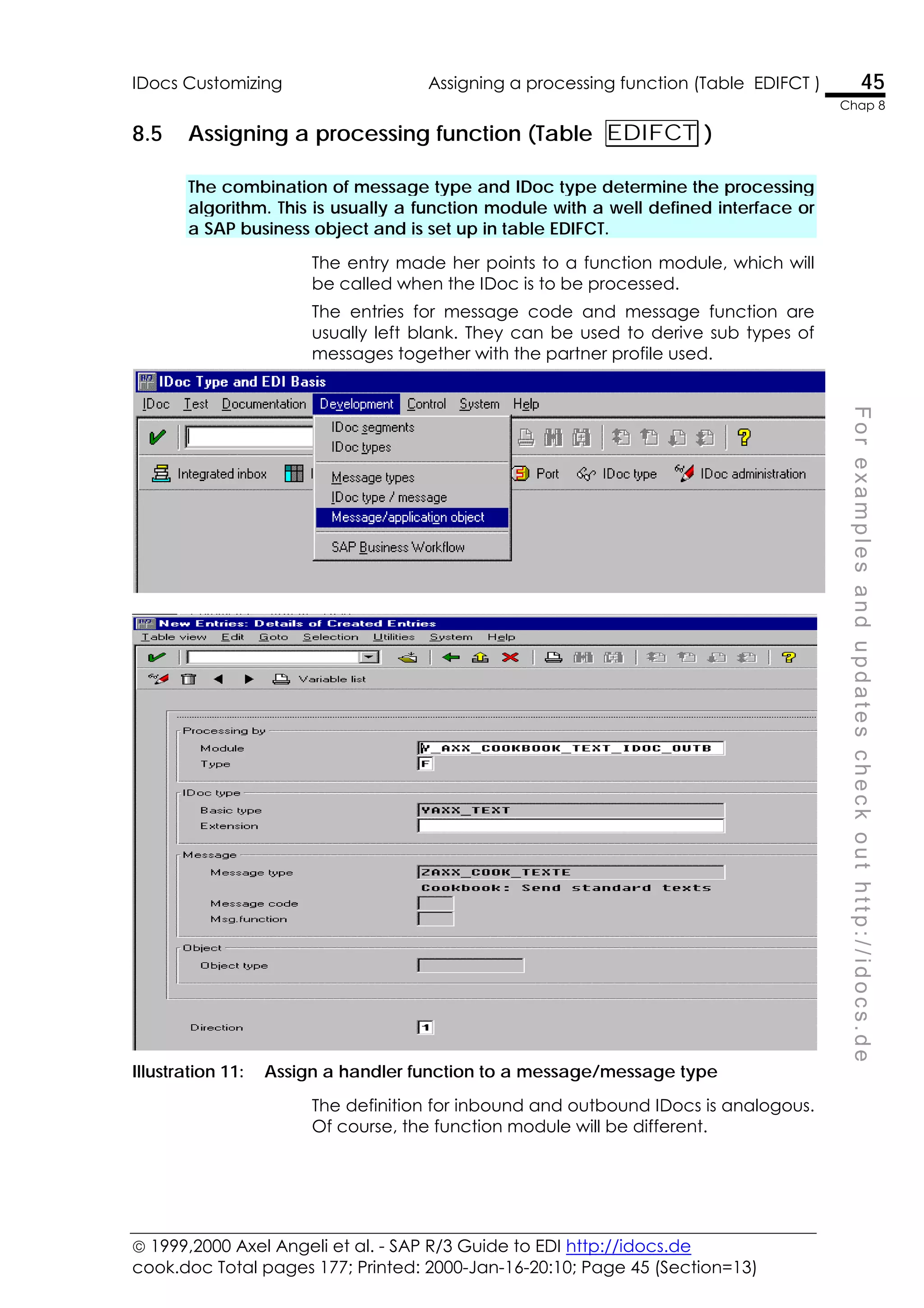
8.5 Assigning a processing function (Table EDIFCT )................................... 45
The combination of message type and IDoc type determine the processing
algorithm. This is usually a function module with a well defined interface or a
SAP business object and is set up in table EDIFCT. 45
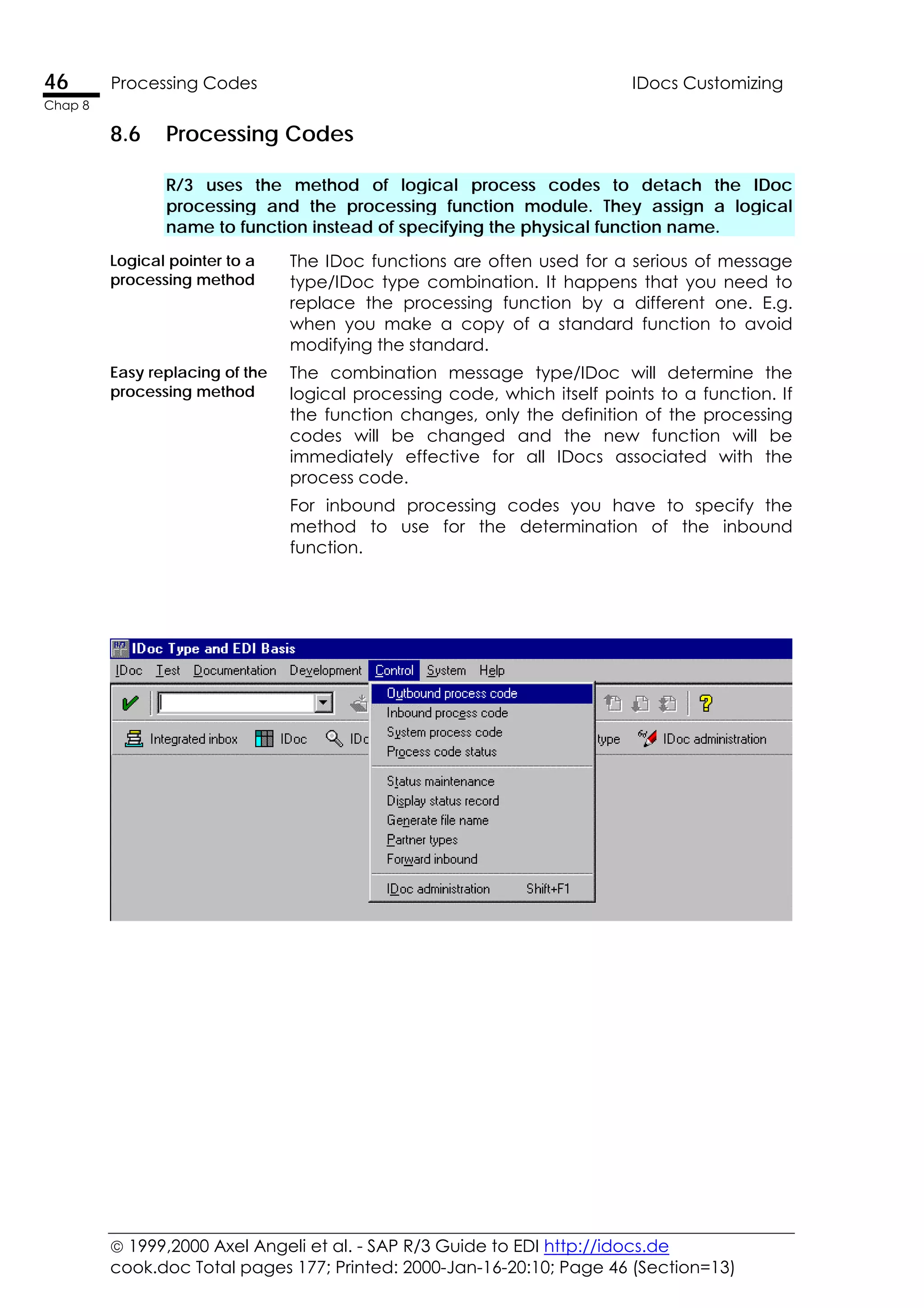
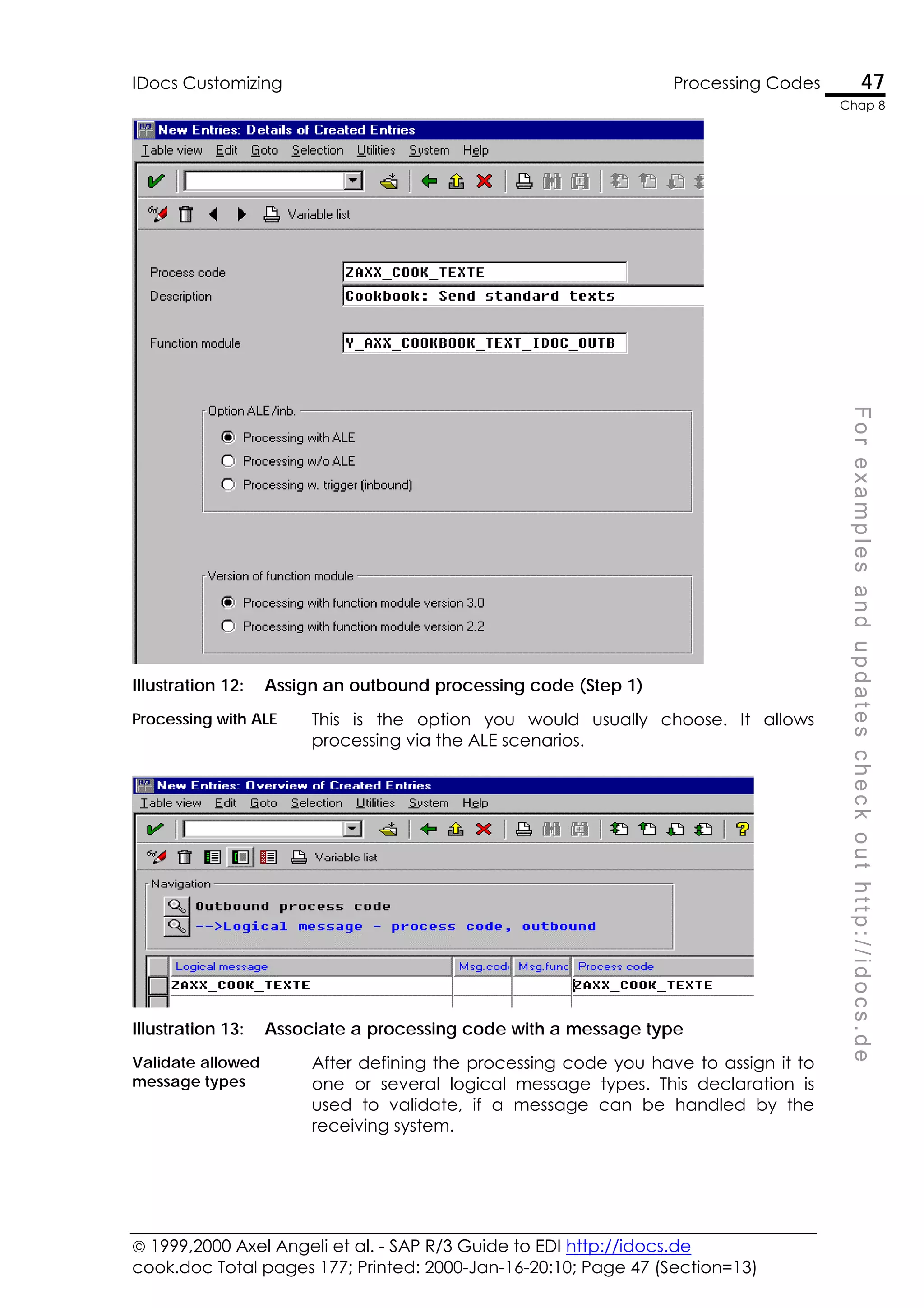
8.6 Processing Codes.......................................................................................... 46
R/3 uses the method of logical process codes to detach the IDoc processing
and the processing function module. They assign a logical name to function
instead of specifying the physical function name. 46
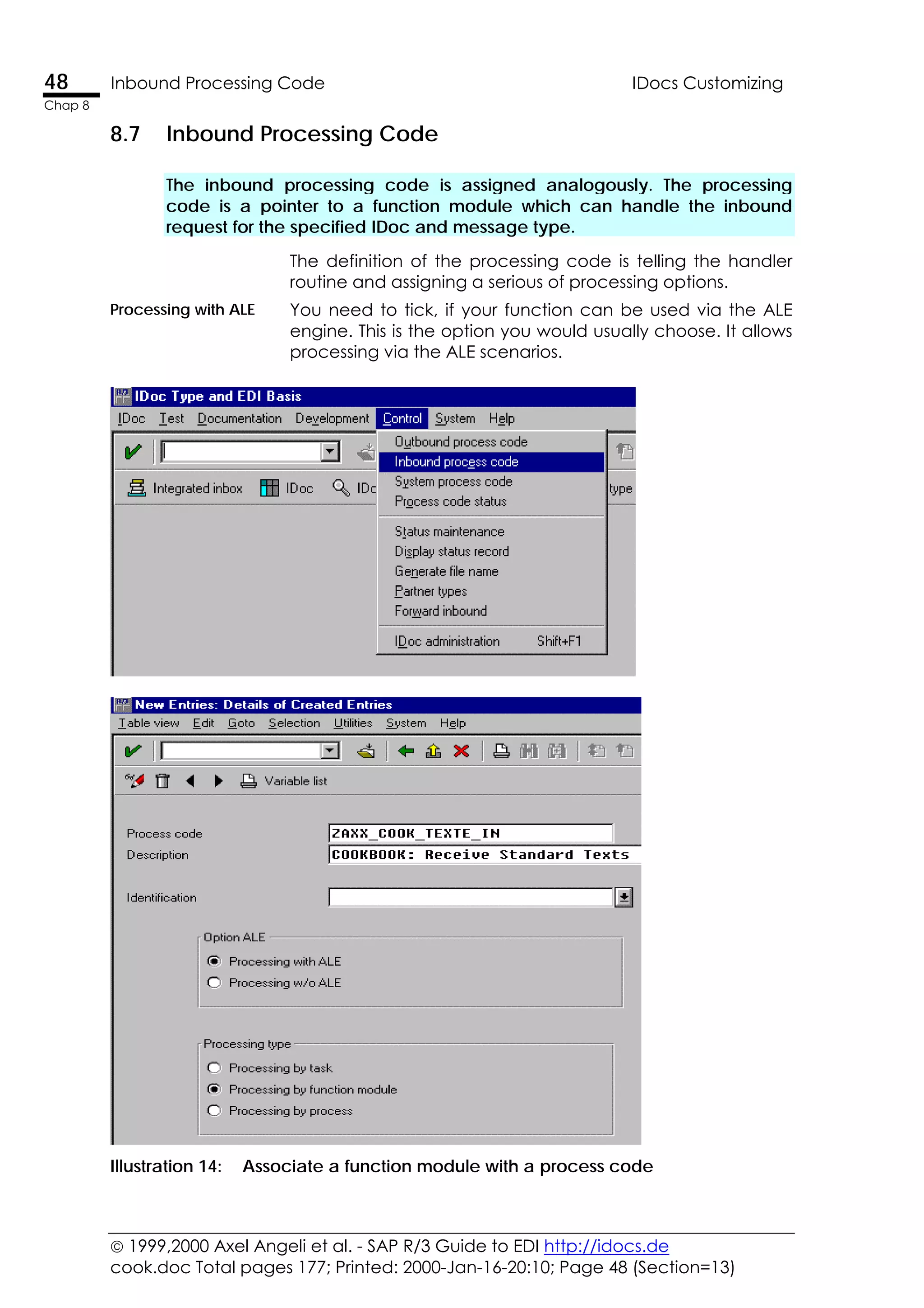
8.7 Inbound Processing Code ............................................................................ 48
The inbound processing code is assigned analogously. The processing code
is a pointer to a function module which can handle the inbound request for
the specified IDoc and message type. 48
IDoc Outbound Triggers Fehler! Textmarke nicht definiert.
9.1 Individual ABAP ..........................................Fehler! Textmarke nicht definiert.
The simplest way to create IDocs, is to write an ABAP which simply does it.Fehler! Textmarke nicht defi
9.2 NAST Messages Based Outbound IDocs ..Fehler! Textmarke nicht definiert.
You can use the R/3 message concept to trigger IDocs the same way as you
trigger SapScript printing. Fehler! Textmarke nicht definiert.
9.3 The RSNAST00 ABAP....................................Fehler! Textmarke nicht definiert.
The ABAP RSNAST00 is the standard ABAP, which is used to collect
unprocessed NAST message and to execute the assigned action.Fehler! Textmarke nicht definiert.
9.4 Sending IDocs Via RSNASTED.....................Fehler! Textmarke nicht definiert.
Standard R/3 provides you with powerful routines, to trigger, prepare and
send out IDocs in a controlled way. There is only a few rare cases, where you
do not want to send IDocs the standard way. Fehler! Textmarke nicht definiert.
 1999,2000 Axel Angeli et al. - SAP R/3 Guide to EDI http://idocs.de
cook.doc Total pages 177; Print date: 2000-Jan-16-20:10; Page iv (Section=4)
iv
Contents
iv
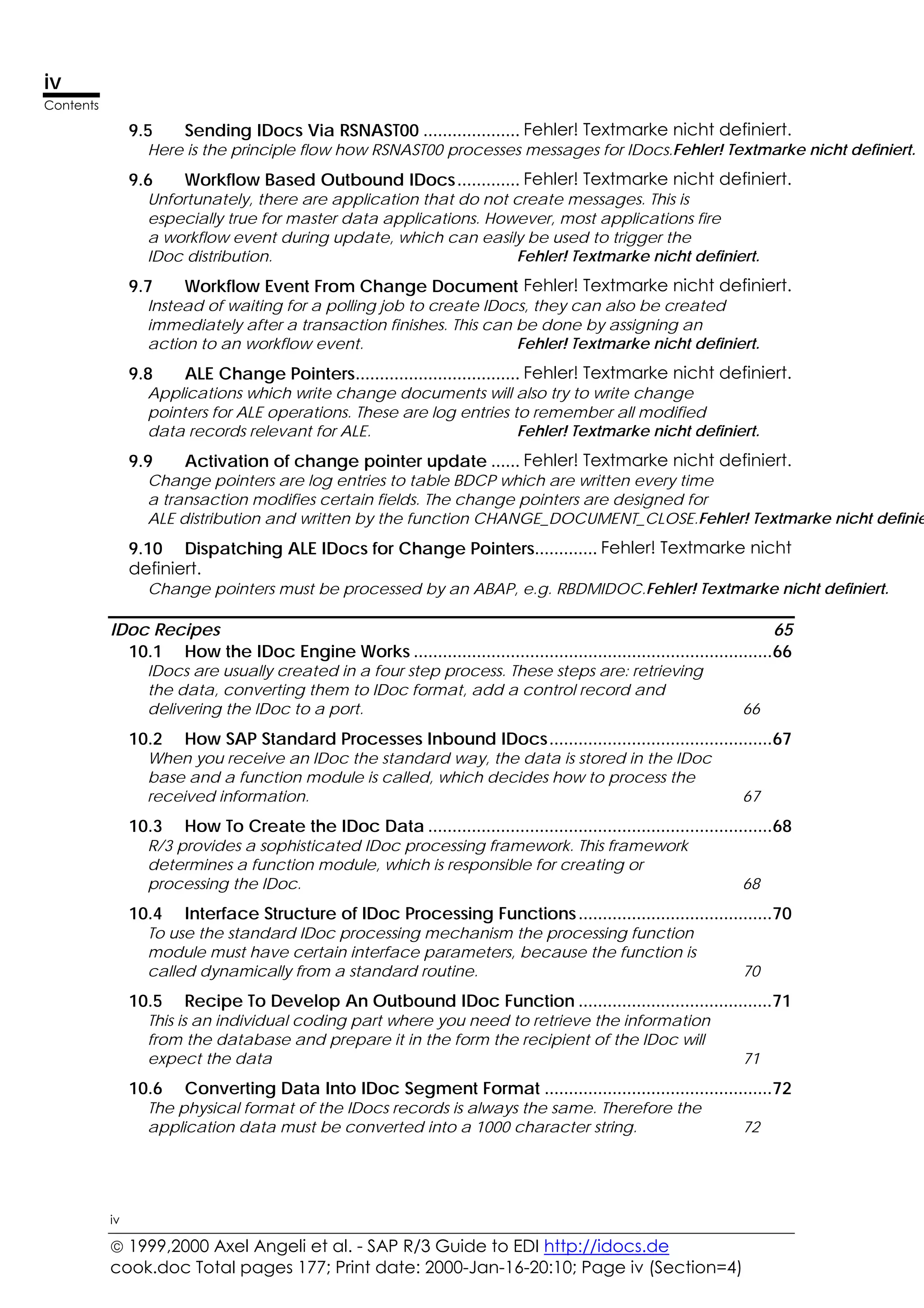
9.5 Sending IDocs Via RSNAST00 .................... Fehler! Textmarke nicht definiert.
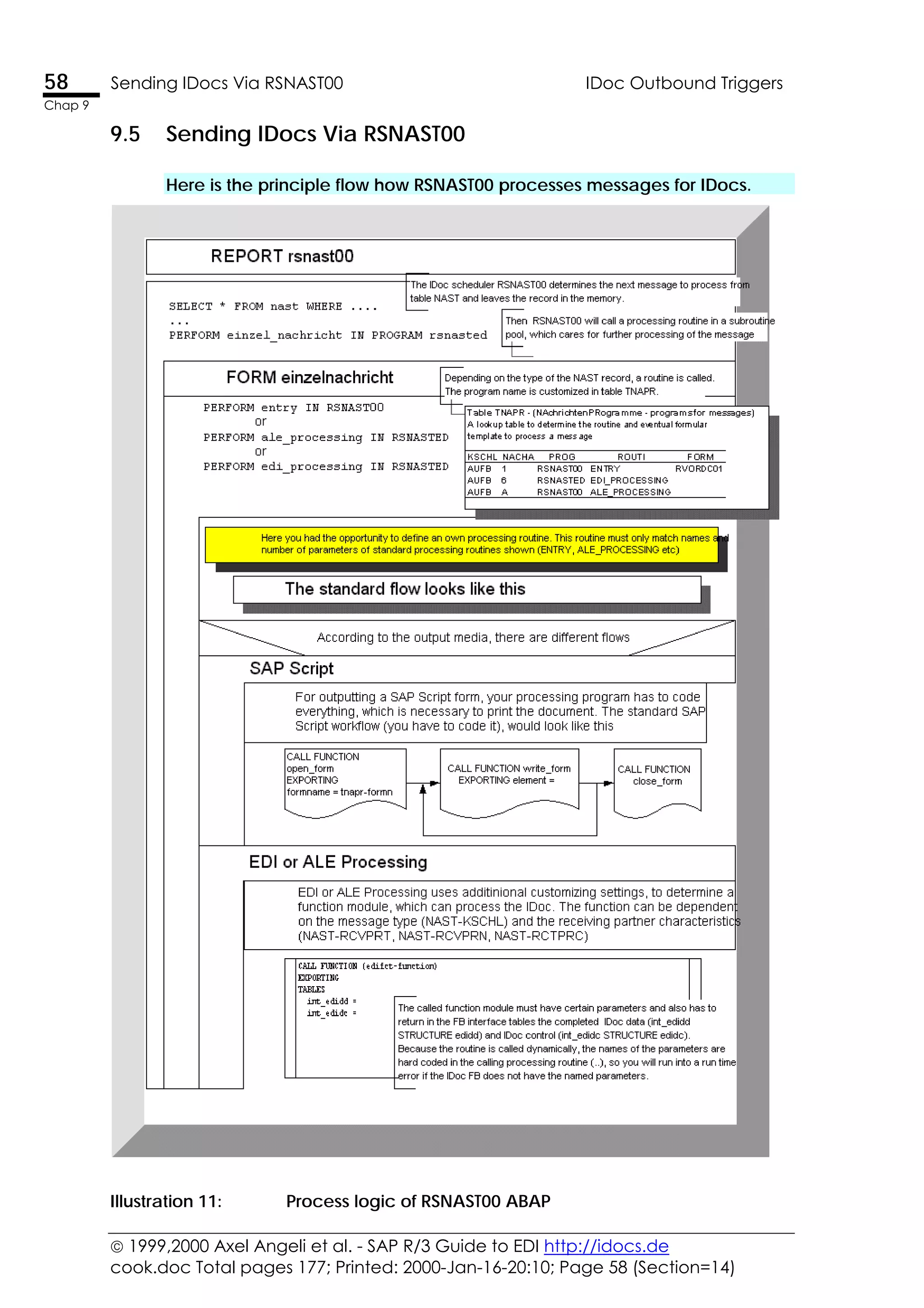
Here is the principle flow how RSNAST00 processes messages for IDocs.Fehler! Textmarke nicht definiert.
9.6 Workflow Based Outbound IDocs............. Fehler! Textmarke nicht definiert.
Unfortunately, there are application that do not create messages. This is
especially true for master data applications. However, most applications fire
a workflow event during update, which can easily be used to trigger the
IDoc distribution. Fehler! Textmarke nicht definiert.
9.7 Workflow Event From Change Document Fehler! Textmarke nicht definiert.
Instead of waiting for a polling job to create IDocs, they can also be created
immediately after a transaction finishes. This can be done by assigning an
action to an workflow event. Fehler! Textmarke nicht definiert.
9.8 ALE Change Pointers.................................. Fehler! Textmarke nicht definiert.
Applications which write change documents will also try to write change
pointers for ALE operations. These are log entries to remember all modified
data records relevant for ALE. Fehler! Textmarke nicht definiert.
9.9 Activation of change pointer update ...... Fehler! Textmarke nicht definiert.
Change pointers are log entries to table BDCP which are written every time
a transaction modifies certain fields. The change pointers are designed for
ALE distribution and written by the function CHANGE_DOCUMENT_CLOSE.Fehler! Textmarke nicht definie
9.10 Dispatching ALE IDocs for Change Pointers............. Fehler! Textmarke nicht
definiert.
Change pointers must be processed by an ABAP, e.g. RBDMIDOC.Fehler! Textmarke nicht definiert.
IDoc Recipes 65
10.1 How the IDoc Engine Works ..........................................................................66
IDocs are usually created in a four step process. These steps are: retrieving
the data, converting them to IDoc format, add a control record and
delivering the IDoc to a port. 66
10.2 How SAP Standard Processes Inbound IDocs..............................................67
When you receive an IDoc the standard way, the data is stored in the IDoc
base and a function module is called, which decides how to process the
received information. 67
10.3 How To Create the IDoc Data .......................................................................68
R/3 provides a sophisticated IDoc processing framework. This framework
determines a function module, which is responsible for creating or
processing the IDoc. 68
10.4 Interface Structure of IDoc Processing Functions........................................70
To use the standard IDoc processing mechanism the processing function
module must have certain interface parameters, because the function is
called dynamically from a standard routine. 70
10.5 Recipe To Develop An Outbound IDoc Function ........................................71
This is an individual coding part where you need to retrieve the information
from the database and prepare it in the form the recipient of the IDoc will
expect the data 71
10.6 Converting Data Into IDoc Segment Format ...............................................72
The physical format of the IDocs records is always the same. Therefore the
application data must be converted into a 1000 character string. 72
 1999,2000 Axel Angeli et al. - SAP R/3 Guide to EDI http://idocs.de
cook.doc Total pages 177; Printed: 2000-Jan-16-20:10; Page v (Section=4)
v
Contents
v
F
o
r
e
x
a
m
p
l
e
s
a
n
d
u
p
d
a
t
e
s
c
h
e
c
k
o
u
t
h
t
t
p
:
/
/
i
d
o
c
s
.
d
e
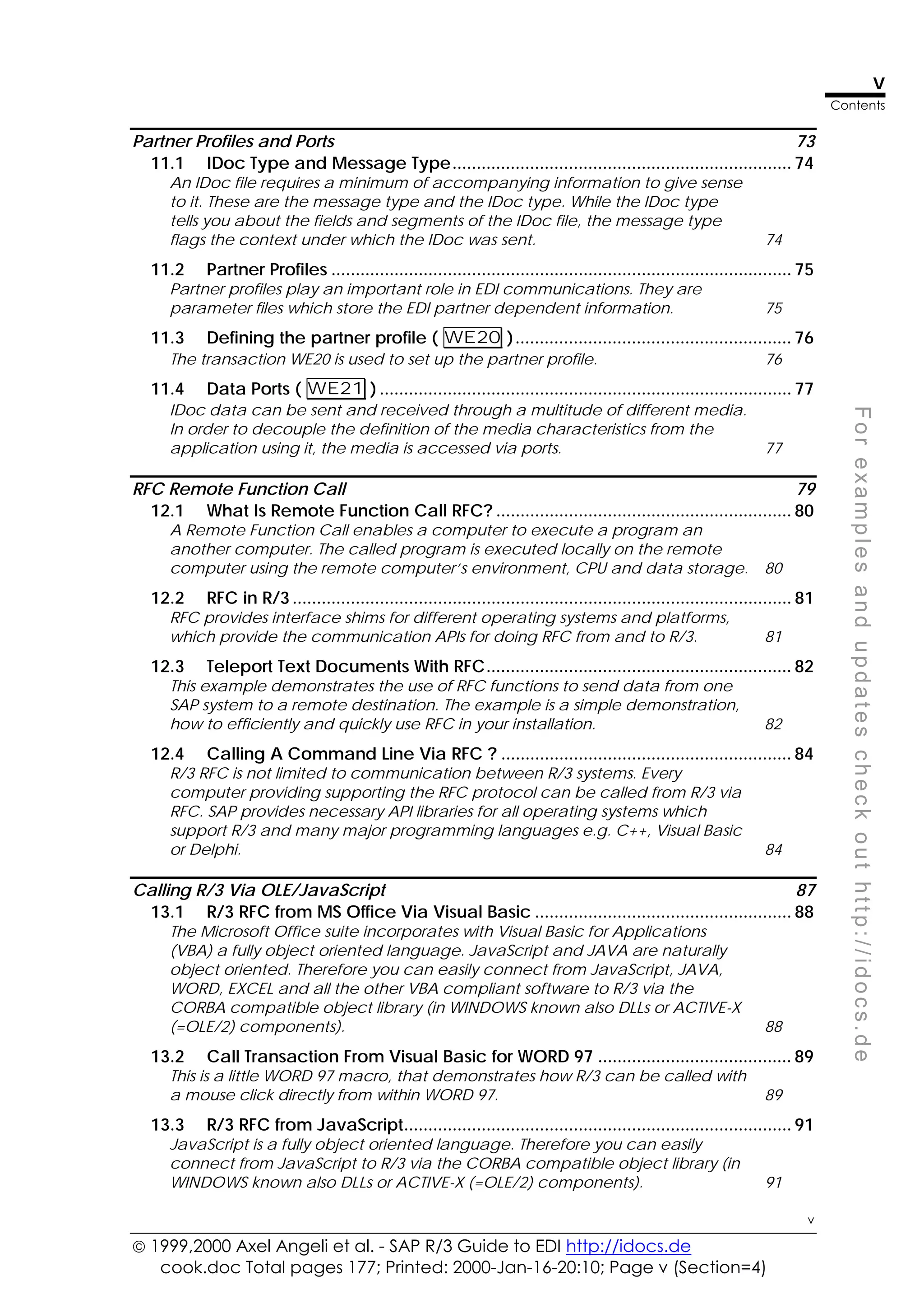
Partner Profiles and Ports 73
11.1 IDoc Type and Message Type...................................................................... 74
An IDoc file requires a minimum of accompanying information to give sense
to it. These are the message type and the IDoc type. While the IDoc type
tells you about the fields and segments of the IDoc file, the message type
flags the context under which the IDoc was sent. 74
11.2 Partner Profiles ............................................................................................... 75
Partner profiles play an important role in EDI communications. They are
parameter files which store the EDI partner dependent information. 75
11.3 Defining the partner profile ( WE20 )......................................................... 76
The transaction WE20 is used to set up the partner profile. 76
11.4 Data Ports ( WE21 ) ..................................................................................... 77
IDoc data can be sent and received through a multitude of different media.
In order to decouple the definition of the media characteristics from the
application using it, the media is accessed via ports. 77
RFC Remote Function Call 79
12.1 What Is Remote Function Call RFC? ............................................................. 80
A Remote Function Call enables a computer to execute a program an
another computer. The called program is executed locally on the remote
computer using the remote computer’s environment, CPU and data storage. 80
12.2 RFC in R/3 ....................................................................................................... 81
RFC provides interface shims for different operating systems and platforms,
which provide the communication APIs for doing RFC from and to R/3. 81
12.3 Teleport Text Documents With RFC............................................................... 82
This example demonstrates the use of RFC functions to send data from one
SAP system to a remote destination. The example is a simple demonstration,
how to efficiently and quickly use RFC in your installation. 82
12.4 Calling A Command Line Via RFC ? ............................................................ 84
R/3 RFC is not limited to communication between R/3 systems. Every
computer providing supporting the RFC protocol can be called from R/3 via
RFC. SAP provides necessary API libraries for all operating systems which
support R/3 and many major programming languages e.g. C++, Visual Basic
or Delphi. 84
Calling R/3 Via OLE/JavaScript 87
13.1 R/3 RFC from MS Office Via Visual Basic ..................................................... 88
The Microsoft Office suite incorporates with Visual Basic for Applications
(VBA) a fully object oriented language. JavaScript and JAVA are naturally
object oriented. Therefore you can easily connect from JavaScript, JAVA,
WORD, EXCEL and all the other VBA compliant software to R/3 via the
CORBA compatible object library (in WINDOWS known also DLLs or ACTIVE-X
(=OLE/2) components). 88
13.2 Call Transaction From Visual Basic for WORD 97 ........................................ 89
This is a little WORD 97 macro, that demonstrates how R/3 can be called with
a mouse click directly from within WORD 97. 89
13.3 R/3 RFC from JavaScript................................................................................ 91
JavaScript is a fully object oriented language. Therefore you can easily
connect from JavaScript to R/3 via the CORBA compatible object library (in
WINDOWS known also DLLs or ACTIVE-X (=OLE/2) components). 91
 1999,2000 Axel Angeli et al. - SAP R/3 Guide to EDI http://idocs.de
cook.doc Total pages 177; Print date: 2000-Jan-16-20:10; Page vi (Section=4)
vi
Contents
vi
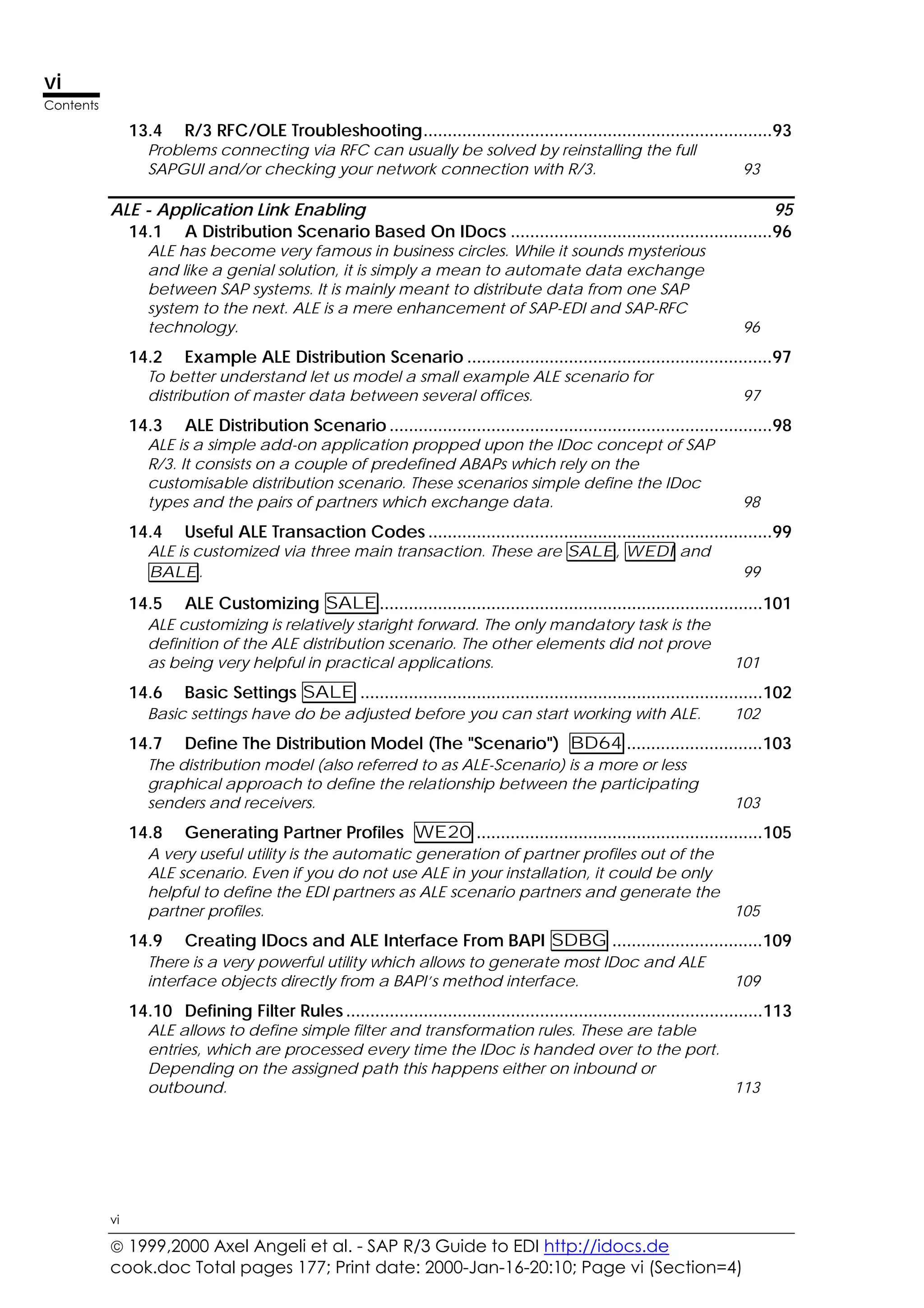
13.4 R/3 RFC/OLE Troubleshooting........................................................................93
Problems connecting via RFC can usually be solved by reinstalling the full
SAPGUI and/or checking your network connection with R/3. 93
ALE - Application Link Enabling 95
14.1 A Distribution Scenario Based On IDocs ......................................................96
ALE has become very famous in business circles. While it sounds mysterious
and like a genial solution, it is simply a mean to automate data exchange
between SAP systems. It is mainly meant to distribute data from one SAP
system to the next. ALE is a mere enhancement of SAP-EDI and SAP-RFC
technology. 96
14.2 Example ALE Distribution Scenario ...............................................................97
To better understand let us model a small example ALE scenario for
distribution of master data between several offices. 97
14.3 ALE Distribution Scenario ...............................................................................98
ALE is a simple add-on application propped upon the IDoc concept of SAP
R/3. It consists on a couple of predefined ABAPs which rely on the
customisable distribution scenario. These scenarios simple define the IDoc
types and the pairs of partners which exchange data. 98
14.4 Useful ALE Transaction Codes .......................................................................99
ALE is customized via three main transaction. These are SALE, WEDI and
BALE. 99
14.5 ALE Customizing SALE...............................................................................101
ALE customizing is relatively staright forward. The only mandatory task is the
definition of the ALE distribution scenario. The other elements did not prove
as being very helpful in practical applications. 101
14.6 Basic Settings SALE ...................................................................................102
Basic settings have do be adjusted before you can start working with ALE. 102
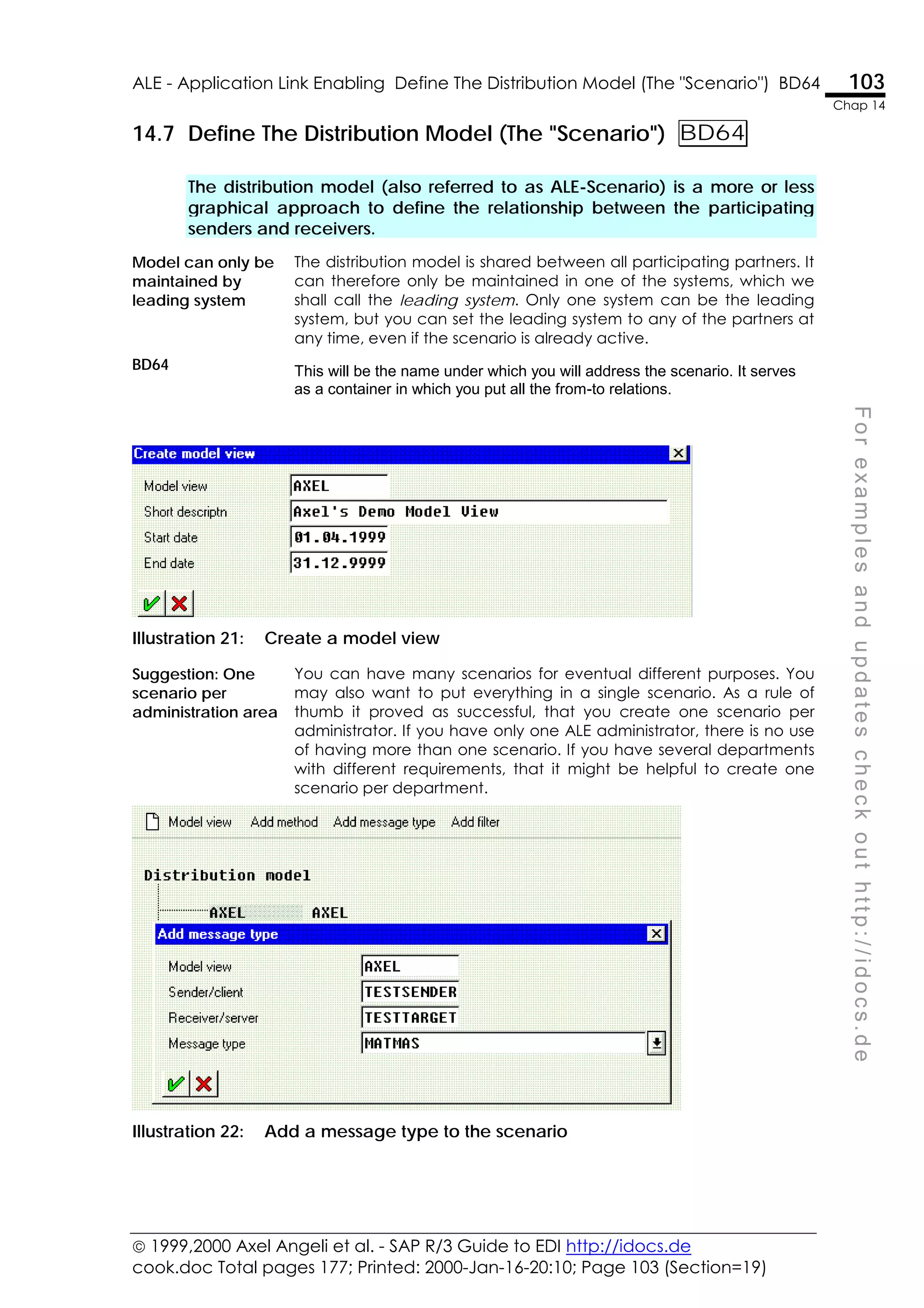
14.7 Define The Distribution Model (The "Scenario") BD64 ............................103
The distribution model (also referred to as ALE-Scenario) is a more or less
graphical approach to define the relationship between the participating
senders and receivers. 103
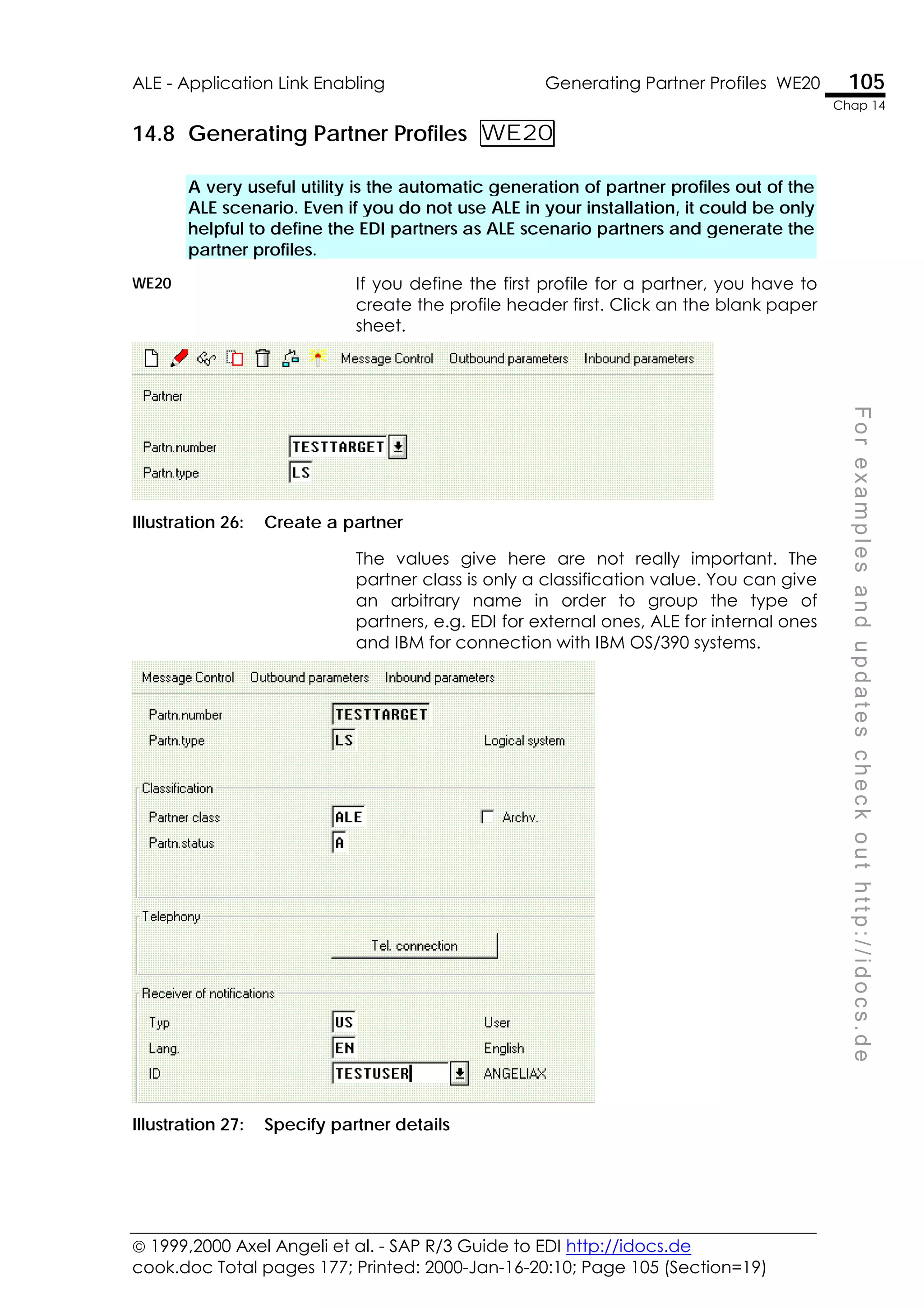
14.8 Generating Partner Profiles WE20 ...........................................................105
A very useful utility is the automatic generation of partner profiles out of the
ALE scenario. Even if you do not use ALE in your installation, it could be only
helpful to define the EDI partners as ALE scenario partners and generate the
partner profiles. 105
14.9 Creating IDocs and ALE Interface From BAPI SDBG ...............................109
There is a very powerful utility which allows to generate most IDoc and ALE
interface objects directly from a BAPI’s method interface. 109
14.10 Defining Filter Rules ......................................................................................113
ALE allows to define simple filter and transformation rules. These are table
entries, which are processed every time the IDoc is handed over to the port.
Depending on the assigned path this happens either on inbound or
outbound. 113
 1999,2000 Axel Angeli et al. - SAP R/3 Guide to EDI http://idocs.de
cook.doc Total pages 177; Printed: 2000-Jan-16-20:10; Page vii (Section=4)
vii
Contents
vii
F
o
r
e
x
a
m
p
l
e
s
a
n
d
u
p
d
a
t
e
s
c
h
e
c
k
o
u
t
h
t
t
p
:
/
/
i
d
o
c
s
.
d
e
Workflow Technology 115
15.1 Workflow in R/3 and Its Use For Development........................................... 116
SAP R/3 provides a mechanism, called Workflow, that allows conditional and
unconditional triggering of subsequent transactions from another
transaction. This allows to build up automatic processing sequences without
having the need to modify the SAP standard transactions. 116
15.2 Event Coupling (Event Linkage)................................................................. 117
Contrary to what you mostly hear about R/3 workflow, it is relatively easy and
mechanical to define a function module as a consecutive action after
another routine raised a workflow event. This can e.g. be used to call the
execution of a transaction after another one has finished. 117
15.3 Workflow from Change Documents........................................................... 118
Every time a change document is written a workflow event for the change
document object is triggered. This can be used to chain unconditionally an
action from a transaction. 118
15.4 Trigger a Workflow from Messaging........................................................... 119
The third common way to trigger a workflow is doing it from messaging. 119
15.5 Example, How To Create A Sample Workflow Handler............................ 120
Let us show you a function module which is suitable to serve as a function
module and define the linkage. 120
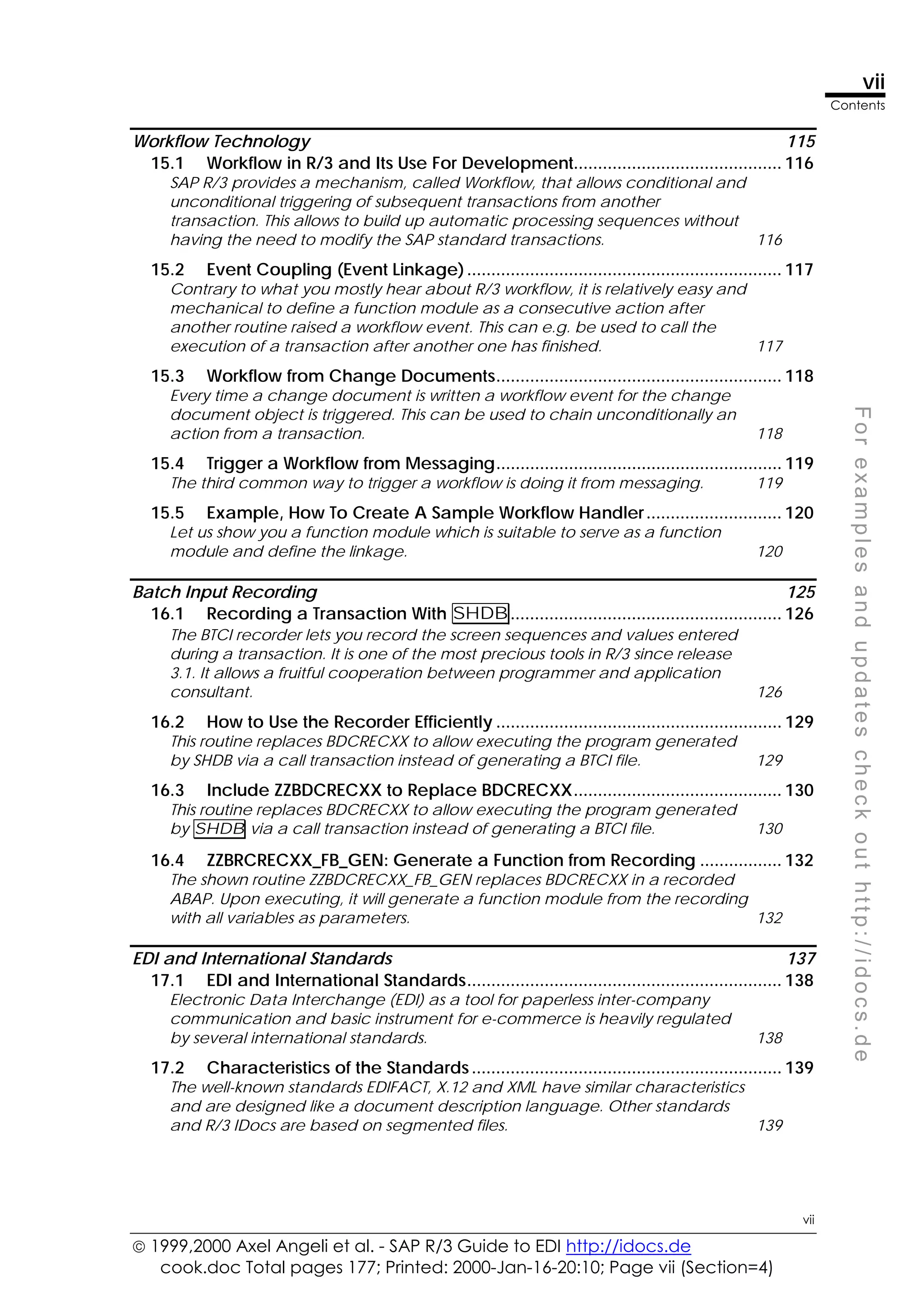
Batch Input Recording 125
16.1 Recording a Transaction With SHDB........................................................ 126
The BTCI recorder lets you record the screen sequences and values entered
during a transaction. It is one of the most precious tools in R/3 since release
3.1. It allows a fruitful cooperation between programmer and application
consultant. 126
16.2 How to Use the Recorder Efficiently ........................................................... 129
This routine replaces BDCRECXX to allow executing the program generated
by SHDB via a call transaction instead of generating a BTCI file. 129
16.3 Include ZZBDCRECXX to Replace BDCRECXX........................................... 130
This routine replaces BDCRECXX to allow executing the program generated
by SHDB via a call transaction instead of generating a BTCI file. 130
16.4 ZZBRCRECXX_FB_GEN: Generate a Function from Recording ................. 132
The shown routine ZZBDCRECXX_FB_GEN replaces BDCRECXX in a recorded
ABAP. Upon executing, it will generate a function module from the recording
with all variables as parameters. 132
EDI and International Standards 137
17.1 EDI and International Standards................................................................. 138
Electronic Data Interchange (EDI) as a tool for paperless inter-company
communication and basic instrument for e-commerce is heavily regulated
by several international standards. 138
17.2 Characteristics of the Standards................................................................ 139
The well-known standards EDIFACT, X.12 and XML have similar characteristics
and are designed like a document description language. Other standards
and R/3 IDocs are based on segmented files. 139
 1999,2000 Axel Angeli et al. - SAP R/3 Guide to EDI http://idocs.de
cook.doc Total pages 177; Print date: 2000-Jan-16-20:10; Page viii (Section=4)
viii
Contents
viii
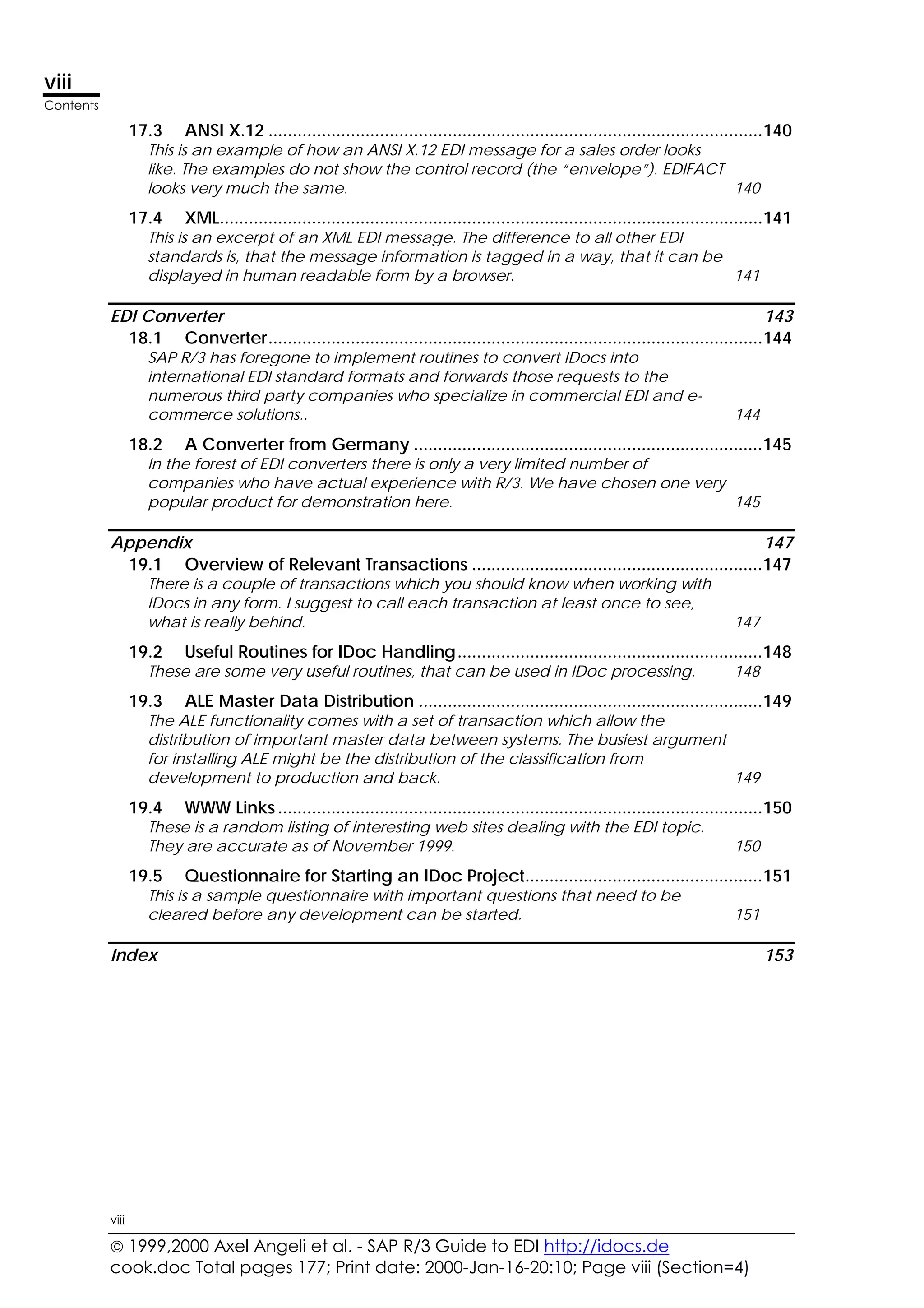
17.3 ANSI X.12 ......................................................................................................140
This is an example of how an ANSI X.12 EDI message for a sales order looks
like. The examples do not show the control record (the “envelope”). EDIFACT
looks very much the same. 140
17.4 XML................................................................................................................141
This is an excerpt of an XML EDI message. The difference to all other EDI
standards is, that the message information is tagged in a way, that it can be
displayed in human readable form by a browser. 141
EDI Converter 143
18.1 Converter......................................................................................................144
SAP R/3 has foregone to implement routines to convert IDocs into
international EDI standard formats and forwards those requests to the
numerous third party companies who specialize in commercial EDI and e-
commerce solutions.. 144
18.2 A Converter from Germany ........................................................................145
In the forest of EDI converters there is only a very limited number of
companies who have actual experience with R/3. We have chosen one very
popular product for demonstration here. 145
Appendix 147
19.1 Overview of Relevant Transactions ............................................................147
There is a couple of transactions which you should know when working with
IDocs in any form. I suggest to call each transaction at least once to see,
what is really behind. 147
19.2 Useful Routines for IDoc Handling...............................................................148
These are some very useful routines, that can be used in IDoc processing. 148
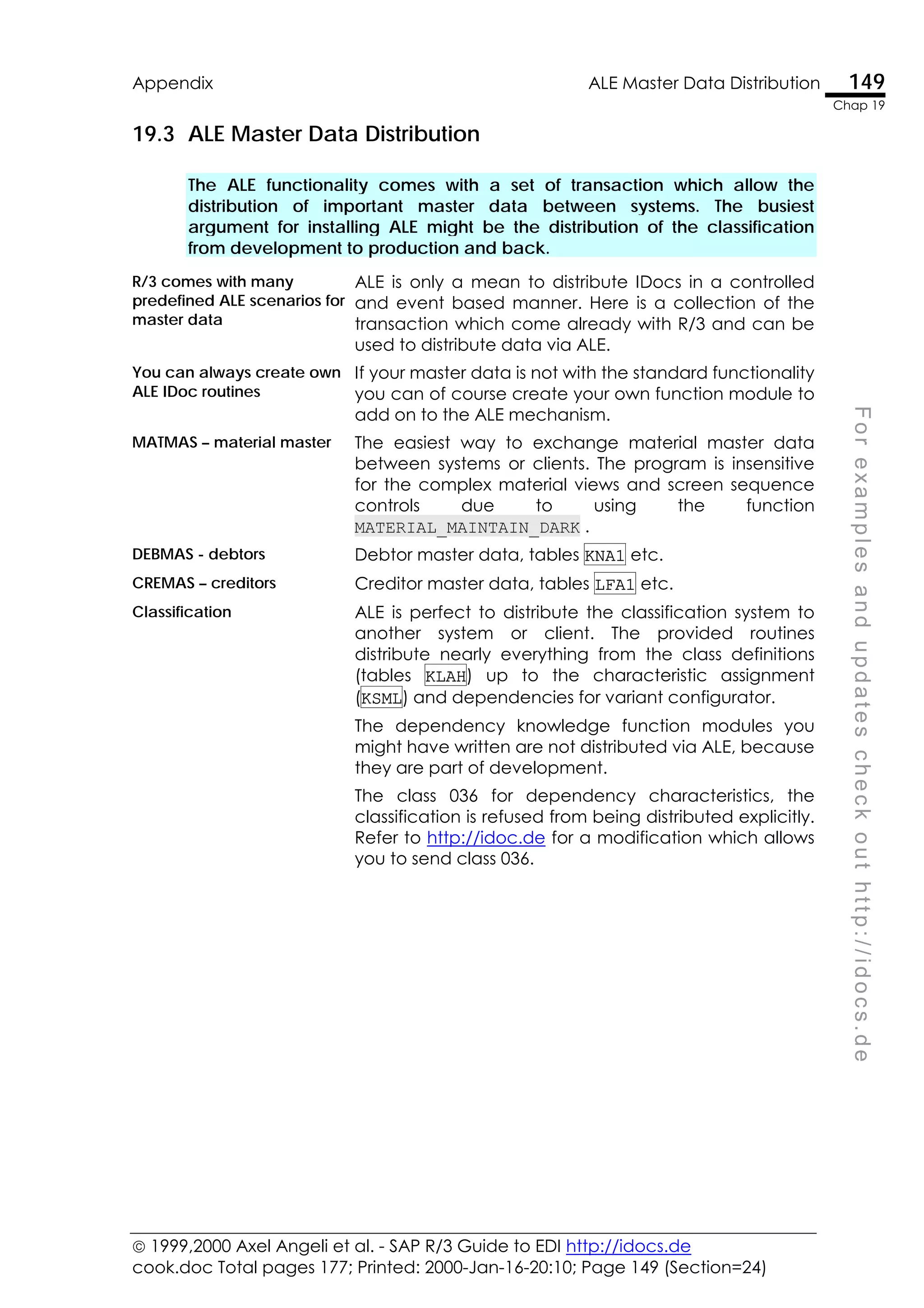
19.3 ALE Master Data Distribution .......................................................................149
The ALE functionality comes with a set of transaction which allow the
distribution of important master data between systems. The busiest argument
for installing ALE might be the distribution of the classification from
development to production and back. 149
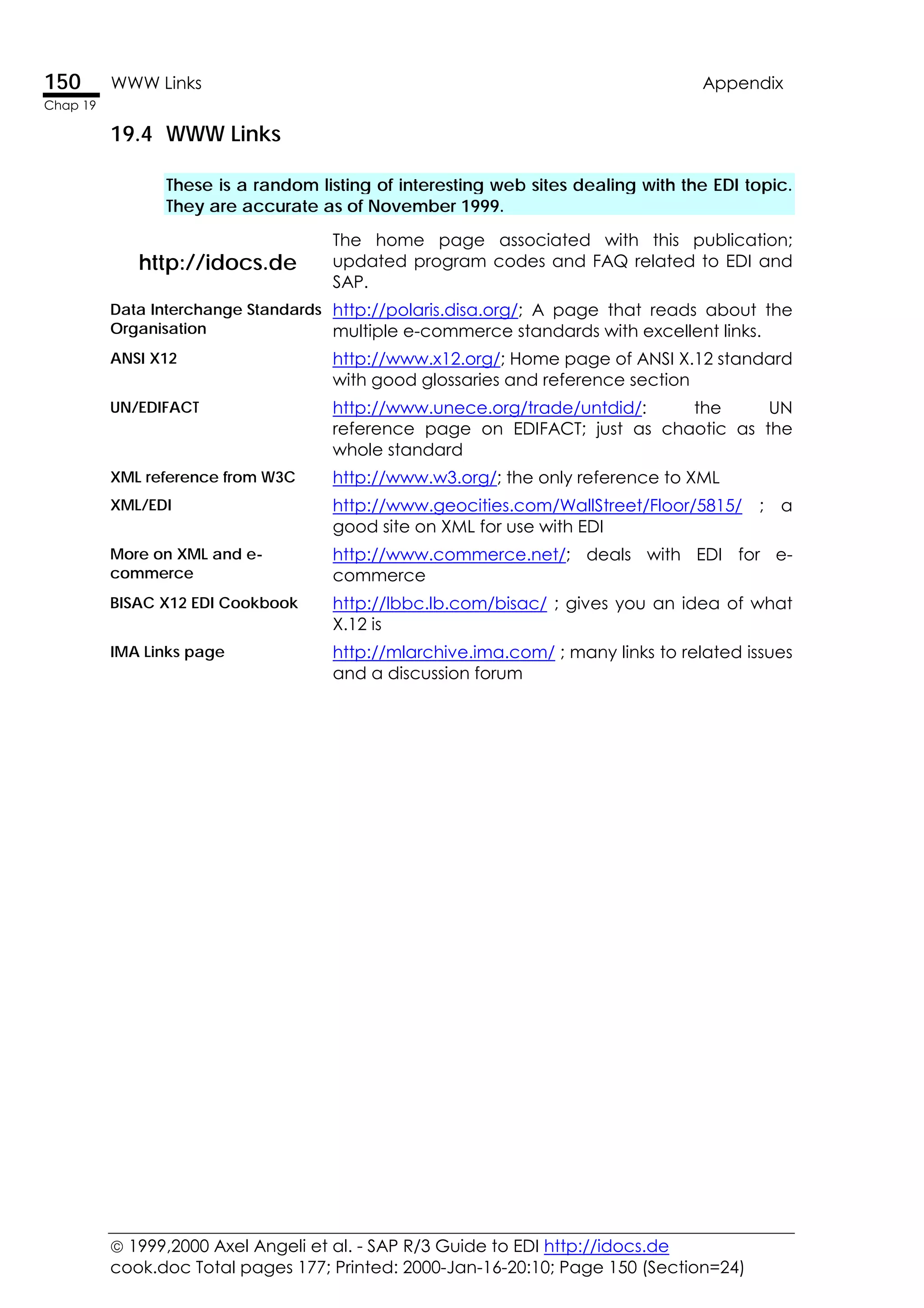
19.4 WWW Links ....................................................................................................150
These is a random listing of interesting web sites dealing with the EDI topic.
They are accurate as of November 1999. 150
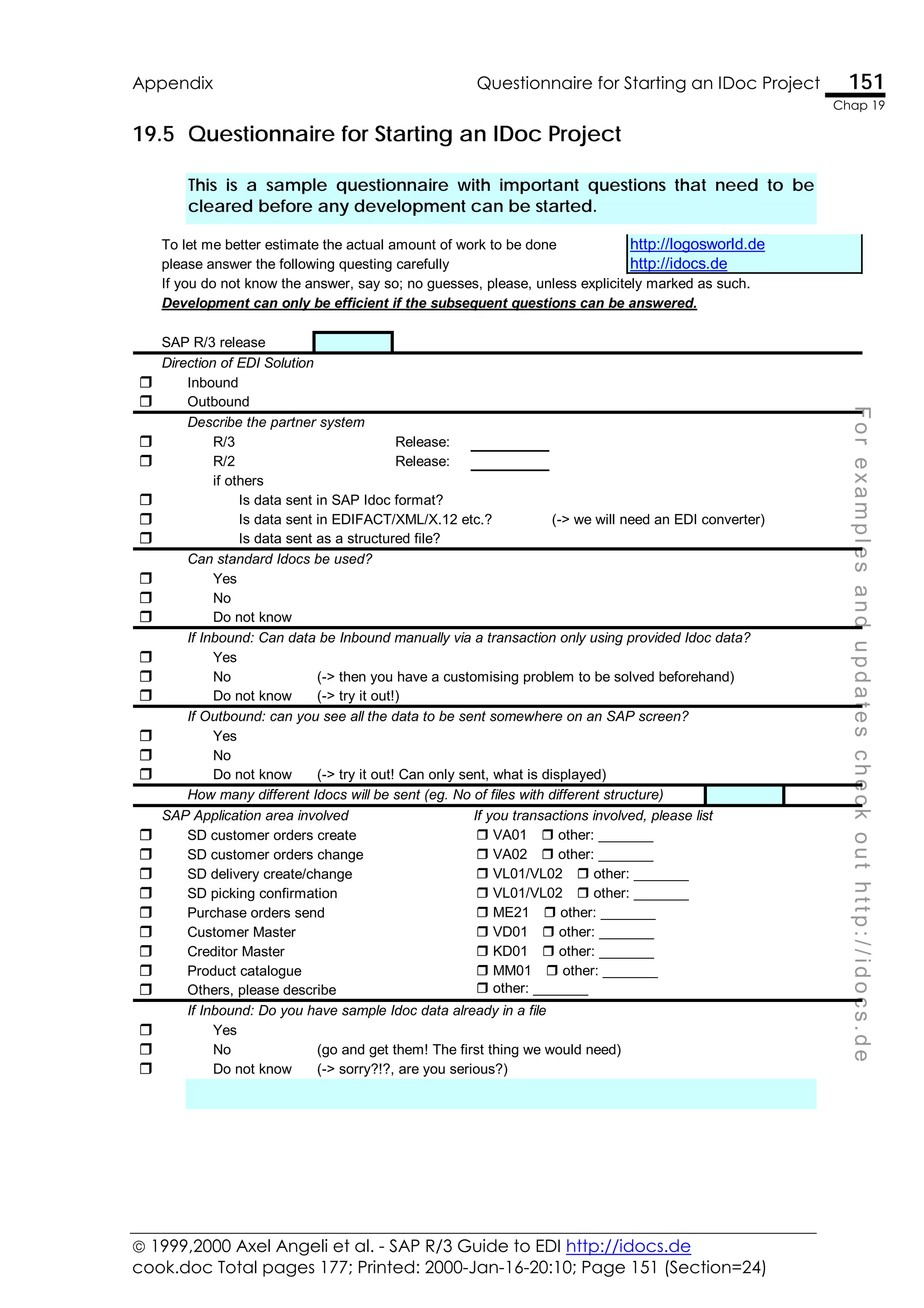
19.5 Questionnaire for Starting an IDoc Project.................................................151
This is a sample questionnaire with important questions that need to be
cleared before any development can be started. 151
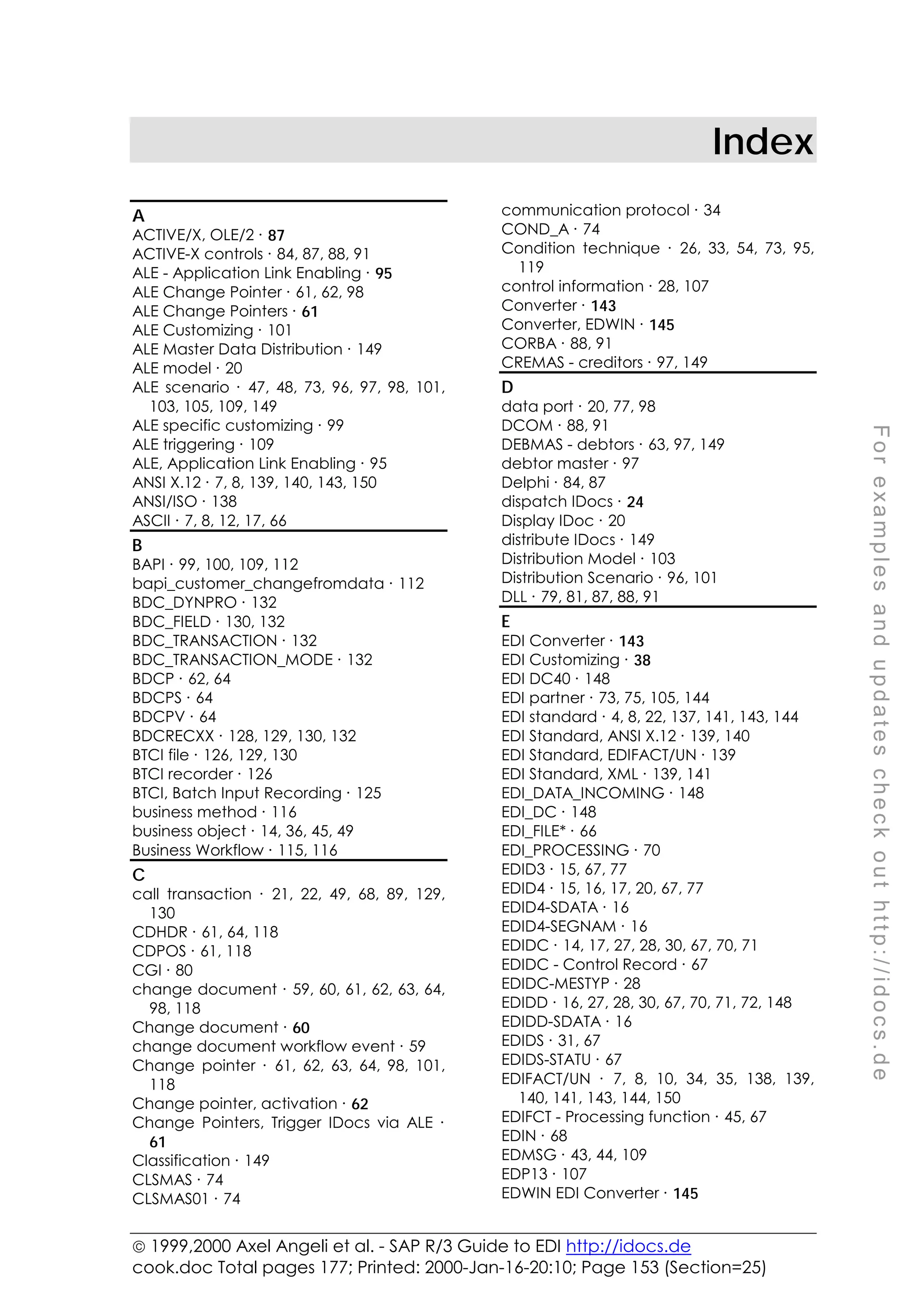
Index 153
 1999,2000 Axel Angeli et al. - SAP R/3 Guide to EDI http://idocs.de
cook.doc Total pages 177; Printed: 2000-Jan-16-20:10; Page ix (Section=4)
ix
Contents
ix
F
o
r
e
x
a
m
p
l
e
s
a
n
d
u
p
d
a
t
e
s
c
h
e
c
k
o
u
t
h
t
t
p
:
/
/
i
d
o
c
s
.
d
e
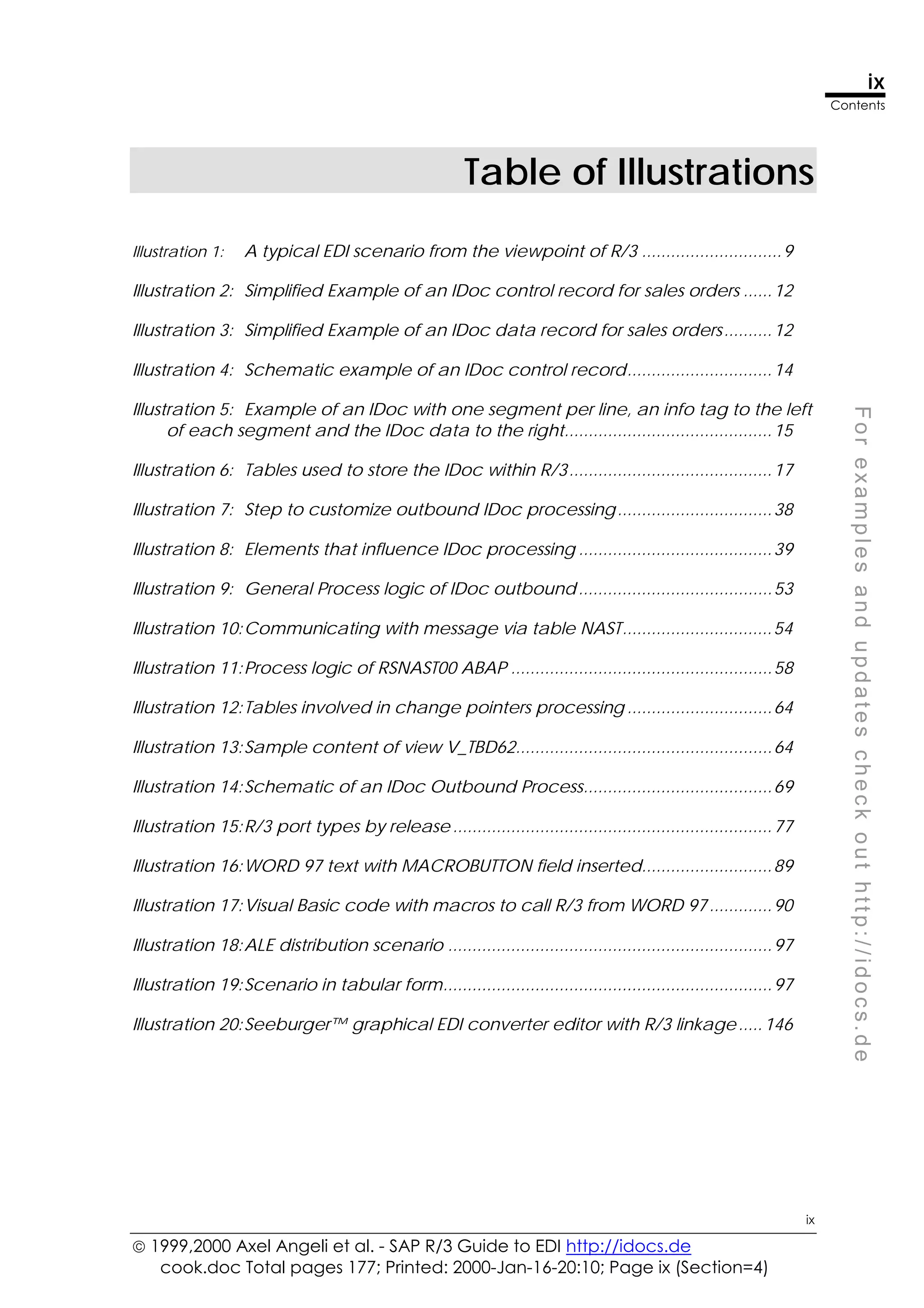
Table of Illustrations
Illustration 1: A typical EDI scenario from the viewpoint of R/3 .............................9
Illustration 2: Simplified Example of an IDoc control record for sales orders ......12
Illustration 3: Simplified Example of an IDoc data record for sales orders..........12
Illustration 4: Schematic example of an IDoc control record..............................14
Illustration 5: Example of an IDoc with one segment per line, an info tag to the left
of each segment and the IDoc data to the right...........................................15
Illustration 6: Tables used to store the IDoc within R/3..........................................17
Illustration 7: Step to customize outbound IDoc processing................................38
Illustration 8: Elements that influence IDoc processing ........................................39
Illustration 9: General Process logic of IDoc outbound........................................53
Illustration 10:Communicating with message via table NAST...............................54
Illustration 11:Process logic of RSNAST00 ABAP ......................................................58
Illustration 12:Tables involved in change pointers processing ..............................64
Illustration 13:Sample content of view V_TBD62.....................................................64
Illustration 14:Schematic of an IDoc Outbound Process.......................................69
Illustration 15:R/3 port types by release ..................................................................77
Illustration 16:WORD 97 text with MACROBUTTON field inserted...........................89
Illustration 17:Visual Basic code with macros to call R/3 from WORD 97.............90
Illustration 18:ALE distribution scenario ...................................................................97
Illustration 19:Scenario in tabular form....................................................................97
Illustration 20:Seeburger™ graphical EDI converter editor with R/3 linkage.....146
 1999,2000 Axel Angeli et al. - SAP R/3 Guide to EDI http://idocs.de
cook.doc Total pages 177; Print date: 2000-Jan-16-20:10; Page x (Section=4)
x
Contents
x
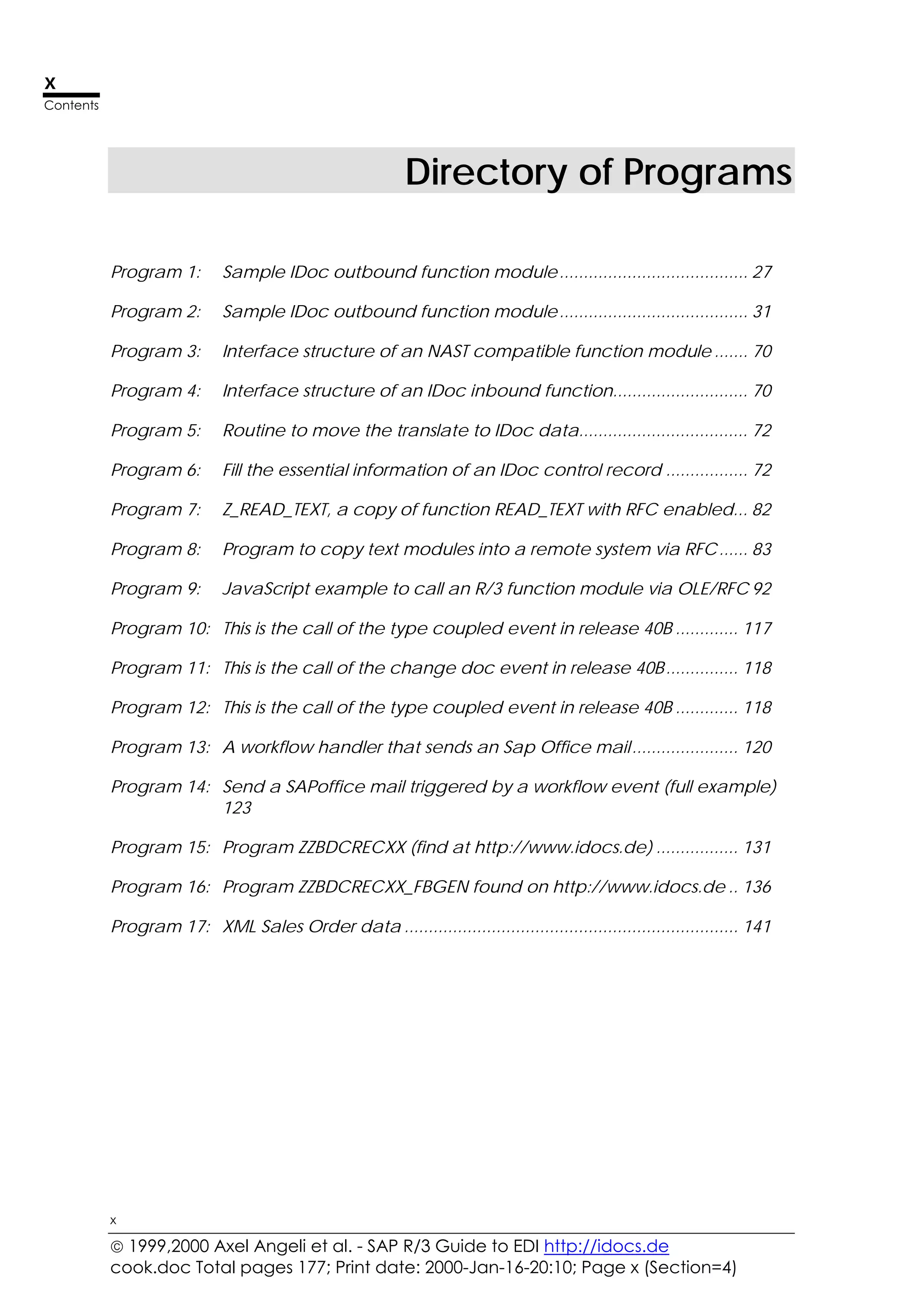
Directory of Programs
Program 1: Sample IDoc outbound function module....................................... 27
Program 2: Sample IDoc outbound function module....................................... 31
Program 3: Interface structure of an NAST compatible function module ....... 70
Program 4: Interface structure of an IDoc inbound function............................ 70
Program 5: Routine to move the translate to IDoc data................................... 72
Program 6: Fill the essential information of an IDoc control record ................. 72
Program 7: Z_READ_TEXT, a copy of function READ_TEXT with RFC enabled... 82
Program 8: Program to copy text modules into a remote system via RFC...... 83
Program 9: JavaScript example to call an R/3 function module via OLE/RFC 92
Program 10: This is the call of the type coupled event in release 40B ............. 117
Program 11: This is the call of the change doc event in release 40B............... 118
Program 12: This is the call of the type coupled event in release 40B ............. 118
Program 13: A workflow handler that sends an Sap Office mail...................... 120
Program 14: Send a SAPoffice mail triggered by a workflow event (full example)
123
Program 15: Program ZZBDCRECXX (find at http://www.idocs.de) ................. 131
Program 16: Program ZZBDCRECXX_FBGEN found on http://www.idocs.de .. 136
Program 17: XML Sales Order data ..................................................................... 141
 1999,2000 Axel Angeli et al. - SAP R/3 Guide to EDI http://idocs.de
cook.doc Total pages 177; Printed: 2000-Jan-16-20:10; Page 11 (Section=5)
F
o
r
e
x
a
m
p
l
e
s
a
n
d
u
p
d
a
t
e
s
c
h
e
c
k
o
u
t
h
t
t
p
:
/
/
i
d
o
c
s
.
d
e
Preface
Proper Know-How Saves Costs
We always believed, what has been confirmed over and over again in manifold
projects: The main source to cutting project costs, is a proper education of the
team. Giving the team members the same book to read homogenizes the
knowledge and sharpens a common sense within the group.
A Frequently Given Answers Book
This book is the result of thousands of hours of discussion and work with R/3
consultants, developer and clients about interface development from and to R/3.
When we started a new big project in autumn 1998 at the Polar Circle, which
involved a big number of interfaces, I observed curiously, that my developers
were ordering numerous books, all being related to EDI.
Well, those books did not say any word about R/3 and it was obvious that they
were not very helpful for our team. I consequently search the directories for books
on R/3 IDocs, but there was nothing. So I started to compile my material on IDocs
and ALE with the intent to publish it in the WWW. Since I submit the site
http://idocs.de to some search engines I got an astonishing amount of hits. Emails
asked for a written version of the stuff on the web. So – here it is.
Mystery EDI Unveiled
EDI and e-commerce are miracle words in today’s IT world. Like any other mystery
it draws its magic from the ignorance of the potential users. It is true that there are
many fortune making companies in the IT world who specialize on EDI. The sell
software and know-how for giant sums of money. Looking behind the scenes
reveals, that the whole EDI business can simply be reduced to writing some
conversion programs. This is not too easy, but the secret of EDI companies is, that
the so-called standards are sold for a lot of money. As soon as you get hold of the
documentation, things turn out to be easy.
IDocs, A Universal Tool for Interface Programming
Although R/3 IDocs had been introduced as a tool to implement EDI solution for
R/3, it is now accepted as a helpful tool for any kind of interface programming.
While this is not taught clearly in SAP’s learning courses, we put our focus on writing
an interface quickly and easily.
http://idocs.de
We praise cutting edge technology. So this book takes advantage of the modern
multimedia hype. Latest updates, corrections and more sophisticated and
detailed examples are found on our web site.
Axel Angeli in December 1999
Logos! Informatik GmbH
 1999,2000 Axel Angeli et al. - SAP R/3 Guide to EDI http://idocs.de
cook.doc Total pages 177; Printed: 2000-Jan-16-20:10; Page 1 (Section=6)
F
o
r
e
x
a
m
p
l
e
s
a
n
d
u
p
d
a
t
e
s
c
h
e
c
k
o
u
t
h
t
t
p
:
/
/
i
d
o
c
s
.
d
e
1
Where Has the Money Gone?
EDI projects can soon become very expensive. However,
when analysing the reasons for high costs, one finds
quickly that it is not the technical implementation of the EDI
project that lets explode the total costs.
Summary
• Most of the implementation time and costs get lost in
agreeing common standards and establishing
formalism between the sender and the receiver
• A successful EDI project requires the developers on
both ends sitting together face to face
• Sticking to a phantom “SAP standard” for IDocs, which
does not actually exist in R/3, lets the costs of the
project soar
Just make a plan, Mach nur einen Plan,
And let your spirit hail. Sei ein großes Licht,
Then you make another plan, Dann mach noch
einen zweiten Plan
And both will fail. Gehen tun sie beide nicht.
Bertold Brecht and Kurt Weill, Three Penny Opera
 1999,2000 Axel Angeli et al. - SAP R/3 Guide to EDI http://idocs.de
cook.doc Total pages 177; Printed: 2000-Jan-16-20:10; Page 2 (Section=6)
2 Communication Where Has the Money Gone?
Chap 1
1.1 Communication
More than 80% of the time of an EDI project is lost in waiting for answers,
trying to understand proposals and retrieving data nobody actually needs.
A common
language
EDI means to exchange information between a sender and a
receiver. Both communication partners need to speak the
same language to understand each other.
The language for EDI are the file formats and description
languages used in the EDI data files. In the simple case of
exchanging plain data files, the partners need to agree on a
common file format.
Finding the common agreement, that is it, where most of the
money gets lost. See a common scenario:
The receiving party defines a file structure in which it likes to
receive the data. This is usually an image of the data structure
of the receiving computer installation.
This is a good approach for the beginning, because you have
to start somewhere. But now the disaster takes course.
The proposal is sent to the other end via email. The developer
of the sender system takes a look on it and remains quiet. Then
he starts programming and tries to squeeze his own data into
the structure.
Waiting for a
response
If it becomes too tedious, a first humble approach takes place
to convince the other party to change the initial file format.
Again it is sent via email and the answer comes some days
later. Dead time, but the consultant is paid.
Badly described
meaning of a field
It can be even worse: one party proposes a format and the
other party does not understand the meaning of some fields.
Echoing Another field cannot be filled, because the sender does not
have the information. Looking closer you find out, that the
information originates from the receiving partner anyway. The
programmer who proposed the format wanted it filled just for
his personal ease. This is known as Echoing and it is always a
nice to have feature.
Using the same
term for different
objects
A real disaster happens if both parties use the same expression
for different items. A classy case is the term “delivery”: many
legacy systems call a delivery what is known as an SD transport
in R/3.
There are many other situation where always one thing
happens: time is spoiled. And time is money.
Face to face The solution is more than easy: bring the people together.
Developers of both parties need to sit together, physically face
to face. If they can see what the other person does, they
understand each other.
 1999,2000 Axel Angeli et al. - SAP R/3 Guide to EDI http://idocs.de
cook.doc Total pages 177; Printed: 2000-Jan-16-20:10; Page 3 (Section=6)
Where Has the Money Gone? Psychology of Communication 3
Chap 1
F
o
r
e
x
a
m
p
l
e
s
a
n
d
u
p
d
a
t
e
s
c
h
e
c
k
o
u
t
h
t
t
p
:
/
/
i
d
o
c
s
.
d
e
1.2 Psychology of Communication
Bringing developers together accelerates every project. Especially when
both parties are so much dependent on each other as in an EDI project, the
partners need to communicate without pause.
There is a psychological aspect in the communication process,
if the parties on both ends do not know each other or reduce
communication with each other to the absolute minimum,
Sporadic communication leads to latent aggression on both
sides, while spending time together builds up mutual tolerance.
Communicating directly and regularly, rises pretty certainly the
mutual respect. Once the parties accept the competence of
each other they accept the other’s requirements more easily.
Send them over the
ocean.
Why, will you say, what if people sit on two ends of the world,
one in America the other in Europe? The answer is strict and
clear: get them a business class flight and send them over the
ocean.
Travel cost will be
refunded by the
saved time
The time you will save when the people sit together will even
up a multitude of the travel costs. So do not think twice.
Sitting together also rises the comprehension of the total
system. An EDI communication forms a logical entity. But if your
left hand does not know what your right hand does, you will
never handle things firm and secure.
See the business on
both ends
Another effect is thus a mutual learning. It means to learn how
the business is executed on both sides. Seeing the commons
and the differences allows flexibility. And it allows to make
correct decisions without needing to ask the communication
partner.
 1999,2000 Axel Angeli et al. - SAP R/3 Guide to EDI http://idocs.de
cook.doc Total pages 177; Printed: 2000-Jan-16-20:10; Page 4 (Section=6)
4 Phantom SAP Standards and a Calculation Where Has the Money Gone?
Chap 1
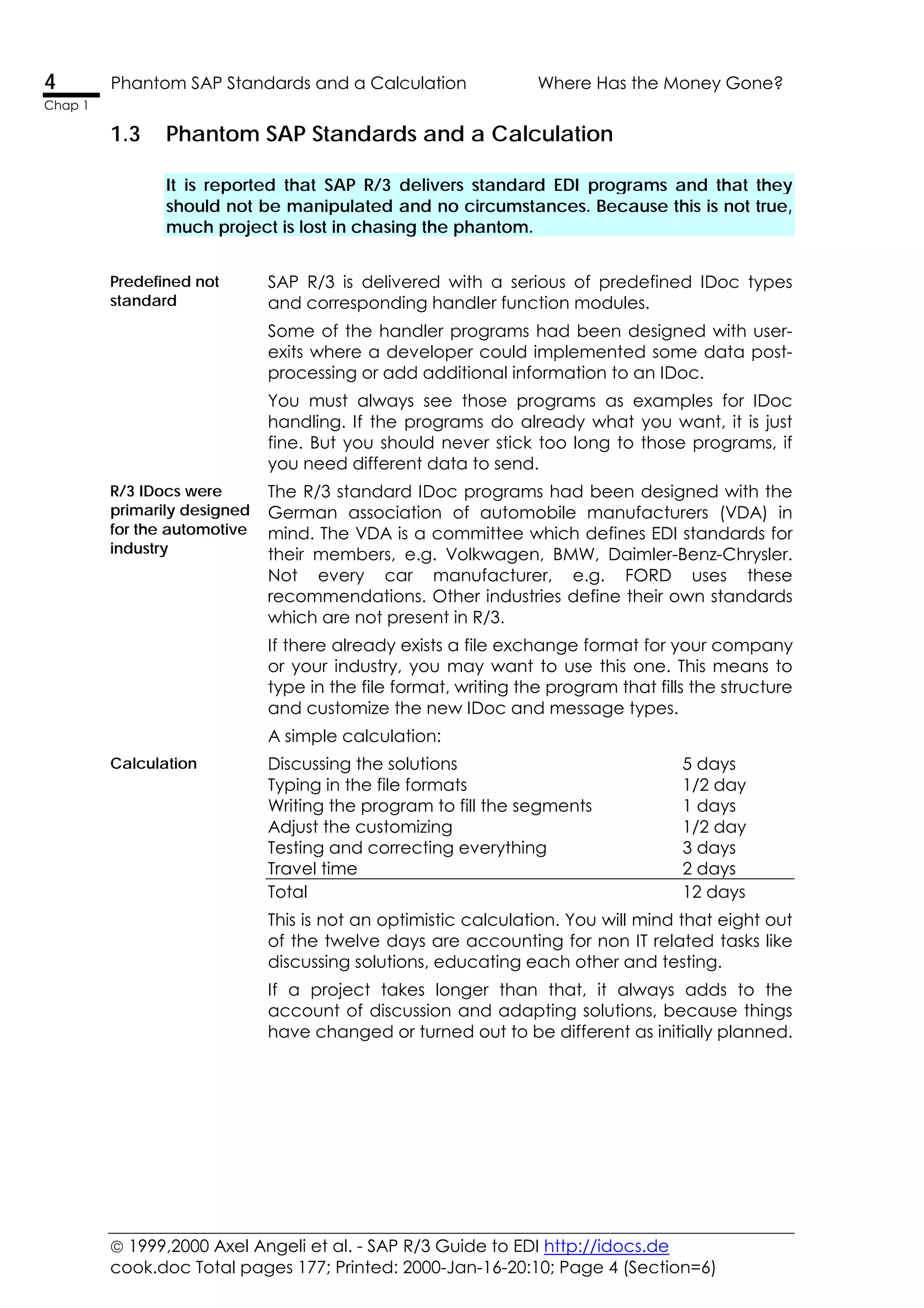
1.3 Phantom SAP Standards and a Calculation
It is reported that SAP R/3 delivers standard EDI programs and that they
should not be manipulated and no circumstances. Because this is not true,
much project is lost in chasing the phantom.
Predefined not
standard
SAP R/3 is delivered with a serious of predefined IDoc types
and corresponding handler function modules.
Some of the handler programs had been designed with user-
exits where a developer could implemented some data post-
processing or add additional information to an IDoc.
You must always see those programs as examples for IDoc
handling. If the programs do already what you want, it is just
fine. But you should never stick too long to those programs, if
you need different data to send.
R/3 IDocs were
primarily designed
for the automotive
industry
The R/3 standard IDoc programs had been designed with the
German association of automobile manufacturers (VDA) in
mind. The VDA is a committee which defines EDI standards for
their members, e.g. Volkwagen, BMW, Daimler-Benz-Chrysler.
Not every car manufacturer, e.g. FORD uses these
recommendations. Other industries define their own standards
which are not present in R/3.
If there already exists a file exchange format for your company
or your industry, you may want to use this one. This means to
type in the file format, writing the program that fills the structure
and customize the new IDoc and message types.
A simple calculation:
Calculation Discussing the solutions 5 days
Typing in the file formats 1/2 day
Writing the program to fill the segments 1 days
Adjust the customizing 1/2 day
Testing and correcting everything 3 days
Travel time 2 days
Total 12 days
This is not an optimistic calculation. You will mind that eight out
of the twelve days are accounting for non IT related tasks like
discussing solutions, educating each other and testing.
If a project takes longer than that, it always adds to the
account of discussion and adapting solutions, because things
have changed or turned out to be different as initially planned.
 1999,2000 Axel Angeli et al. - SAP R/3 Guide to EDI http://idocs.de
cook.doc Total pages 177; Printed: 2000-Jan-16-20:10; Page 5 (Section=6)
Where Has the Money Gone? Strategy 5
Chap 1
F
o
r
e
x
a
m
p
l
e
s
a
n
d
u
p
d
a
t
e
s
c
h
e
c
k
o
u
t
h
t
t
p
:
/
/
i
d
o
c
s
.
d
e
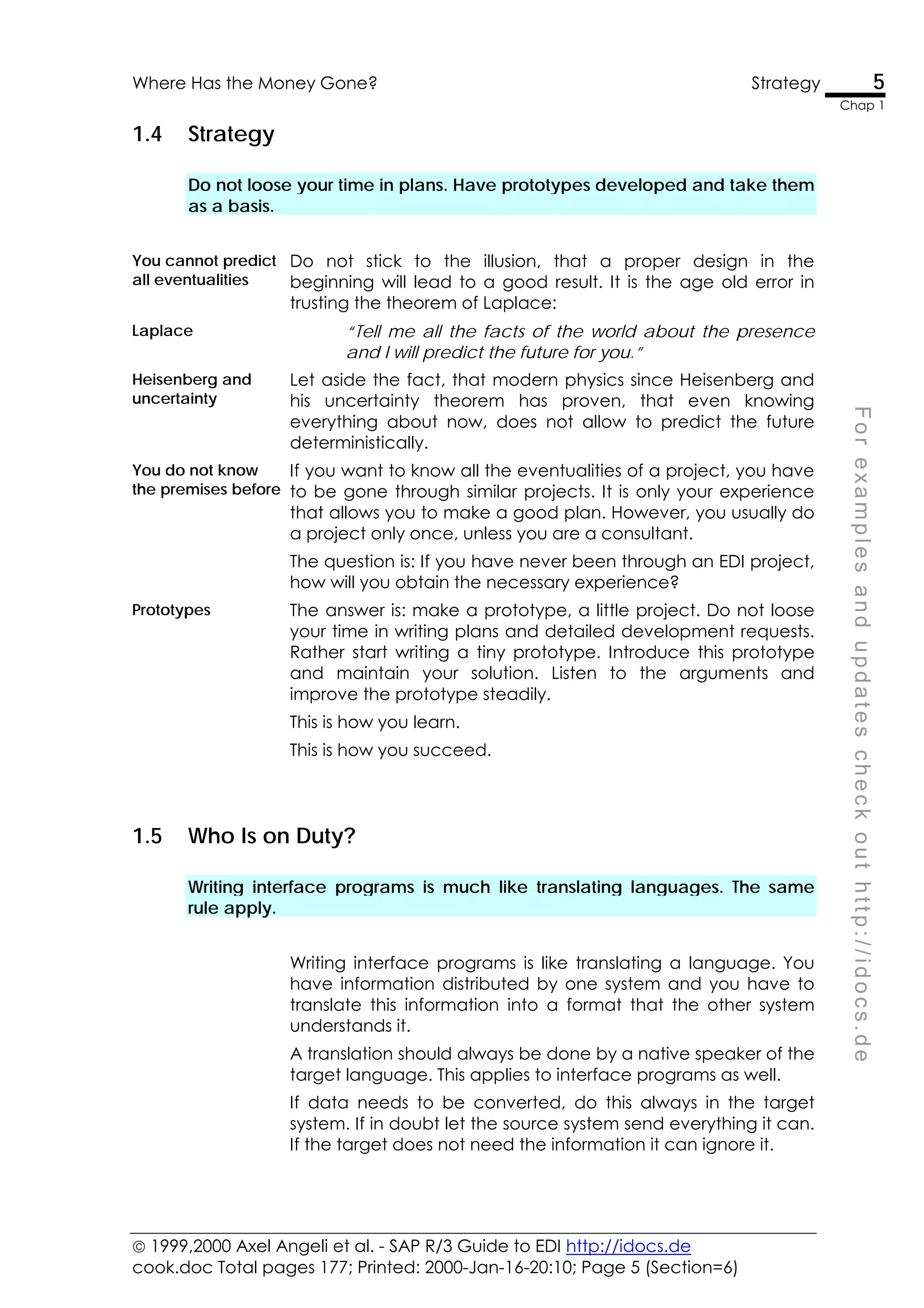
1.4 Strategy
Do not loose your time in plans. Have prototypes developed and take them
as a basis.
You cannot predict
all eventualities
Do not stick to the illusion, that a proper design in the
beginning will lead to a good result. It is the age old error in
trusting the theorem of Laplace:
Laplace “Tell me all the facts of the world about the presence
and I will predict the future for you.”
Heisenberg and
uncertainty
Let aside the fact, that modern physics since Heisenberg and
his uncertainty theorem has proven, that even knowing
everything about now, does not allow to predict the future
deterministically.
You do not know
the premises before
If you want to know all the eventualities of a project, you have
to be gone through similar projects. It is only your experience
that allows you to make a good plan. However, you usually do
a project only once, unless you are a consultant.
The question is: If you have never been through an EDI project,
how will you obtain the necessary experience?
Prototypes The answer is: make a prototype, a little project. Do not loose
your time in writing plans and detailed development requests.
Rather start writing a tiny prototype. Introduce this prototype
and maintain your solution. Listen to the arguments and
improve the prototype steadily.
This is how you learn.
This is how you succeed.
1.5 Who Is on Duty?
Writing interface programs is much like translating languages. The same
rule apply.
Writing interface programs is like translating a language. You
have information distributed by one system and you have to
translate this information into a format that the other system
understands it.
A translation should always be done by a native speaker of the
target language. This applies to interface programs as well.
If data needs to be converted, do this always in the target
system. If in doubt let the source system send everything it can.
If the target does not need the information it can ignore it.
 1999,2000 Axel Angeli et al. - SAP R/3 Guide to EDI http://idocs.de
cook.doc Total pages 177; Printed: 2000-Jan-16-20:10; Page 6 (Section=6)
6 Marcus T. Cicero Where Has the Money Gone?
Chap 1
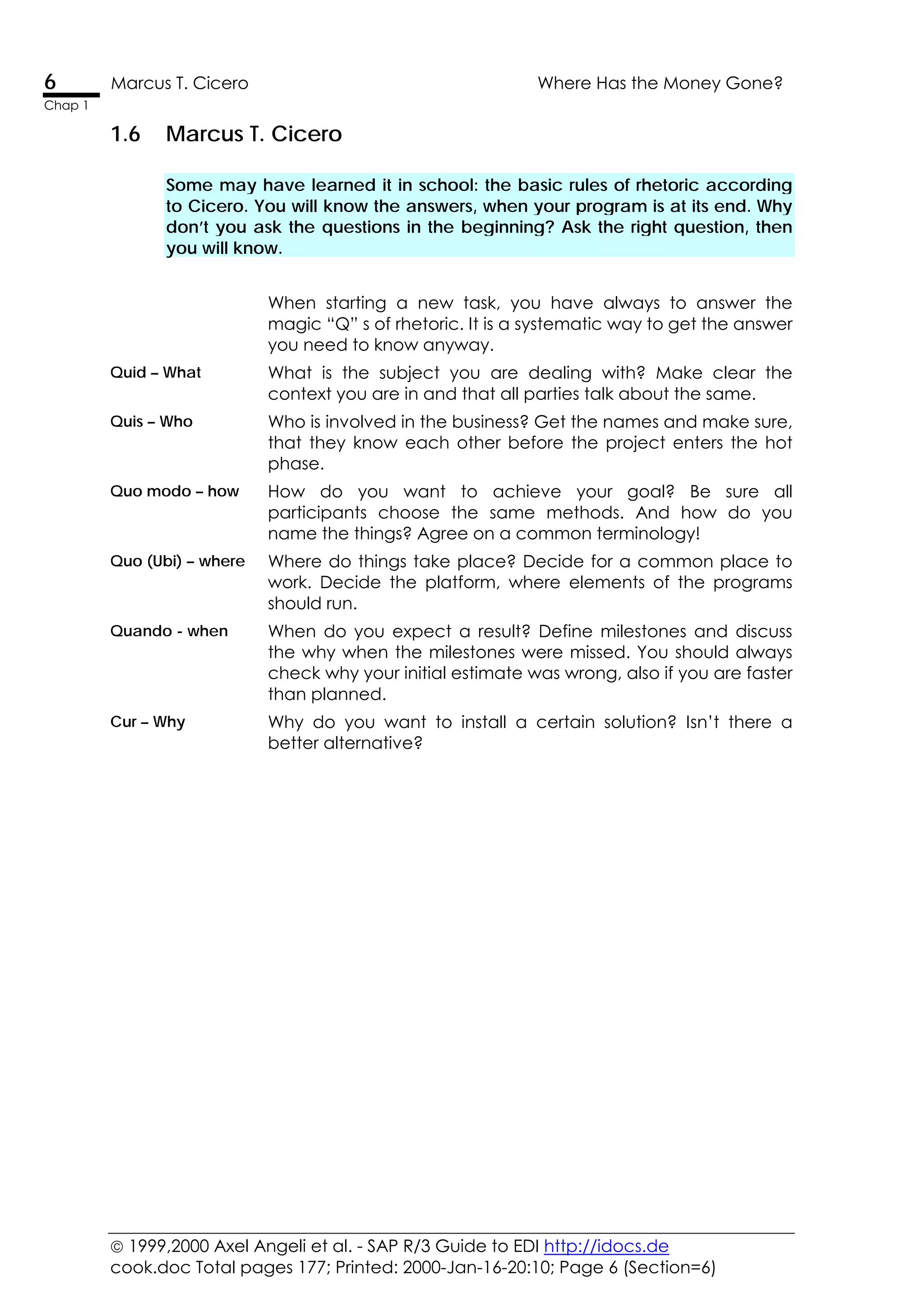
1.6 Marcus T. Cicero
Some may have learned it in school: the basic rules of rhetoric according
to Cicero. You will know the answers, when your program is at its end. Why
don’t you ask the questions in the beginning? Ask the right question, then
you will know.
When starting a new task, you have always to answer the
magic “Q” s of rhetoric. It is a systematic way to get the answer
you need to know anyway.
Quid – What What is the subject you are dealing with? Make clear the
context you are in and that all parties talk about the same.
Quis – Who Who is involved in the business? Get the names and make sure,
that they know each other before the project enters the hot
phase.
Quo modo – how How do you want to achieve your goal? Be sure all
participants choose the same methods. And how do you
name the things? Agree on a common terminology!
Quo (Ubi) – where Where do things take place? Decide for a common place to
work. Decide the platform, where elements of the programs
should run.
Quando - when When do you expect a result? Define milestones and discuss
the why when the milestones were missed. You should always
check why your initial estimate was wrong, also if you are faster
than planned.
Cur – Why Why do you want to install a certain solution? Isn’t there a
better alternative?
 1999,2000 Axel Angeli et al. - SAP R/3 Guide to EDI http://idocs.de
cook.doc Total pages 177; Printed: 2000-Jan-16-20:10; Page 7 (Section=7)
F
o
r
e
x
a
m
p
l
e
s
a
n
d
u
p
d
a
t
e
s
c
h
e
c
k
o
u
t
h
t
t
p
:
/
/
i
d
o
c
s
.
d
e
2
What Are SAP R/3 IDocs?
IDocs are SAP’s file format to exchange data with a foreign
system. This chapter is intended as an introduction to the
concept.
Summary
• IDocs are an ASCII file format to exchange data
between computers; the format is chosen arbitrarily
• IDocs are similar to segmented files; they are not a
description language like ANSI X.12, EDIFACT or XML
• The IDoc contents are processed by function modules,
which can be assigned in customizing
 1999,2000 Axel Angeli et al. - SAP R/3 Guide to EDI http://idocs.de
cook.doc Total pages 177; Printed: 2000-Jan-16-20:10; Page 8 (Section=7)
8 What are IDocs? What Are SAP R/3 IDocs?
Chap 2
2.1 What are IDocs?
IDocs are structured ASCII files (or a virtual equivalent). They are the file
format used by SAP R/3 to exchange data with foreign systems.
IDocs Are SAP's
implementation of
structured text files
IDocs are simple ASCII data streams. When they are
stored to a disk file, the IDocs are simple flat files with
lines of text, where the lines are structured into data
fields. The typical structured file has records, where
each record starts with a leading string, which identifies
the record type. Their specification is stored in the data
dictionary.
Electronic Interchange
Document
IDocs is the acronym for Interchange Document. This
indicates a set of (electronic) information which build a
logical entity. An IDoc is e.g. all the data of a single
customer in your customer master data file. Or the IDoc
is all the data of a single invoice.
Data Is transmitted in ASCII
format, i.e. human readable
form
IDoc data is usually exchanged between systems and
partners who are completely independent. Therefore
the data should be transmitted in a format, that can
easily be corrected by the humans who operate the
computers. It is therefore mandatory to post the data in
a human readable form.
Nowadays, this means that data is coded in ASCII
format, including number, which are sent as string of
figures 0 to 9. Such data can easily be read with any
text editor on any computer, be it a PC, Macintosh,
UNIX System, S/390 or any internet browser.
IDocs exchange messages The information which is exchanged by IDocs is called
a message and the IDoc is the physical representation
of such a message. The name “messages” for the
information sent via IDocs is used in the same ways as
other EDI standards do.
IDocs are used like classical
interface files
Everybody who ever dealt with interface programming,
will find IDocs very much like the hierarchical data files
used in traditional data exchange.
International standards like the ODETTE or VDA formats
are designed in the same way as IDocs are.
XML, ANSI X:12 or EDIFACT
use a description language
Other EDI standards like XML, ANSI X.12 or EDIFACT/UN
are based on a data description language. They differ
principally from the IDocs concept, because they use a
programming language syntax (e.g. like Postscript or
HTML) to embed the data.
 1999,2000 Axel Angeli et al. - SAP R/3 Guide to EDI http://idocs.de
cook.doc Total pages 177; Printed: 2000-Jan-16-20:10; Page 9 (Section=7)
What Are SAP R/3 IDocs? Exploring a Typical Scenario 9
Chap 2
F
o
r
e
x
a
m
p
l
e
s
a
n
d
u
p
d
a
t
e
s
c
h
e
c
k
o
u
t
h
t
t
p
:
/
/
i
d
o
c
s
.
d
e
2.2 Exploring a Typical Scenario
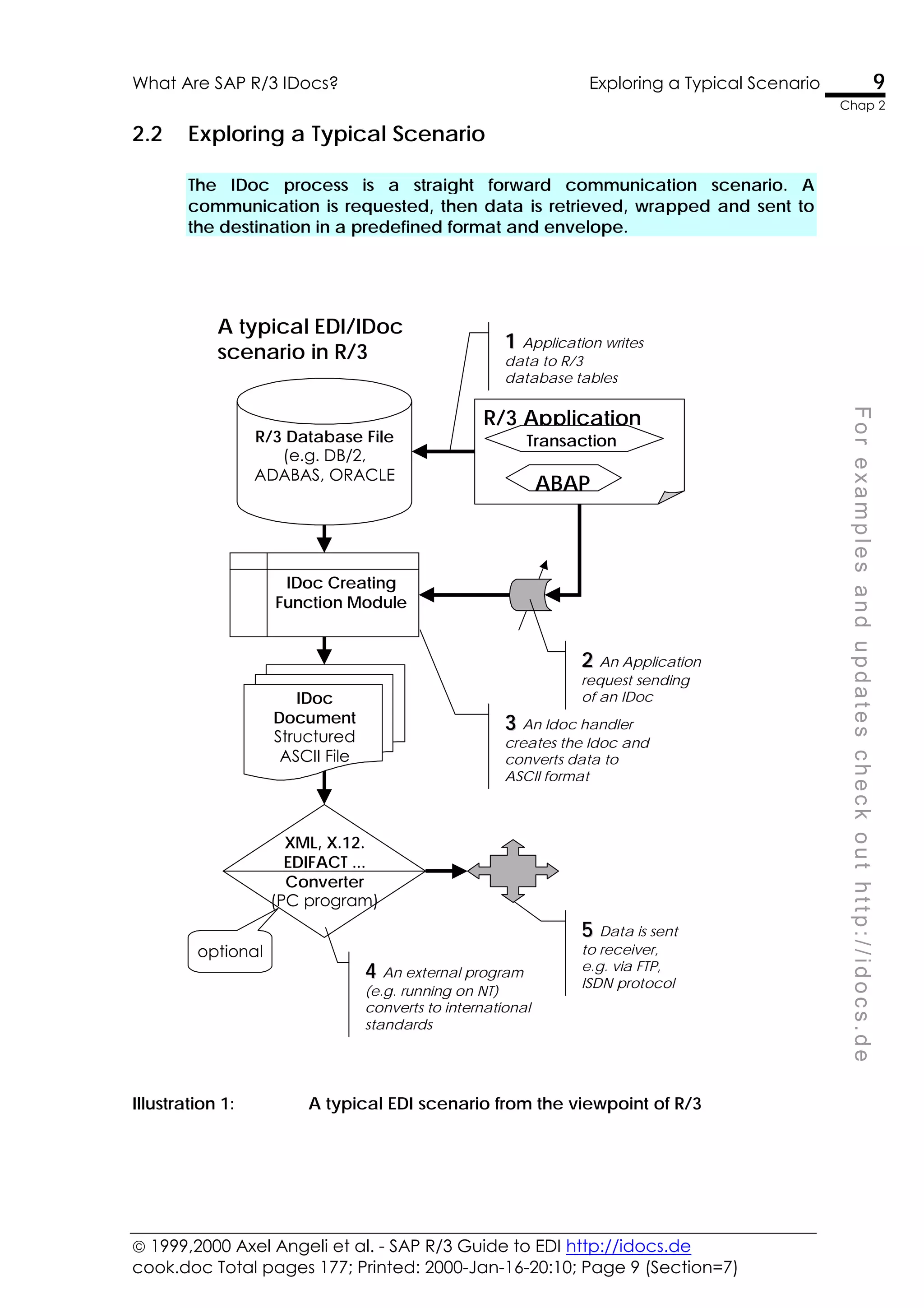
The IDoc process is a straight forward communication scenario. A
communication is requested, then data is retrieved, wrapped and sent to
the destination in a predefined format and envelope.
R/3 Database File
(e.g. DB/2,
ADABAS, ORACLE
IDoc Creating
Function Module
IDoc
Document
Structured
ASCII File
R/3 Application
ABAP
Transaction
1
1 Application writes
data to R/3
database tables
2
2 An Application
request sending
of an IDoc
3
3 An Idoc handler
creates the Idoc and
converts data to
ASCII format
XML, X.12.
EDIFACT ...
Converter
(PC program)
4
4 An external program
(e.g. running on NT)
converts to international
standards
5
5 Data is sent
to receiver,
e.g. via FTP,
ISDN protocol
optional
A typical EDI/IDoc
scenario in R/3
Illustration 1: A typical EDI scenario from the viewpoint of R/3
 1999,2000 Axel Angeli et al. - SAP R/3 Guide to EDI http://idocs.de
cook.doc Total pages 177; Printed: 2000-Jan-16-20:10; Page 10 (Section=7)
10 Exploring a Typical Scenario What Are SAP R/3 IDocs?
Chap 2
The illustration above displays a sketch for a typical
IDoc communication scenario. The steps are just the
same as with every communication scenario. There is a
requesting application, a request handler and a target.
The sketch shows the communication outbound R/3.
Data is leaving the R/3 system.
R/3 application creates
data
An R/3 application creates data and updates the
database appropriately. An application can be a
transaction, a stand-alone ABAP Report or any tool
that can update a database within R/3.
IDoc engine picks up the
request
If the application thinks that data needs to be
distributed to a foreign system, it triggers the IDoc
mechanism, usually by leaving a descriptive message
record in the message table NAST.
The application then either calls directly the IDoc
engine or a collector job eventually picks up all due
IDoc messages and determines what to do with them.
IDoc engine determines a
handler function from
customizing
If the engine believes that data is fine to be sent to a
partner system, then it determines the function module
which can collect and wrap the required IDoc data
into an IDoc.
In IDoc customizing, you specify the name of the
function module to use. This can either be one which is
predefined by R/3 standard or a user-written one.
IDoc is backup up in R/3
and sent out
When the IDoc is created it is stored in an R/3 table
and from there it is sent to the foreign system.
Conversion to standards is
done by external program
If the foreign system requires a special conversion, e.g.
to XML, EDIFACT or X.12 then this job needs to be done
by an external converter, like the Seeburger ELKE™
system. These converters are not part of R/3.
If you have to decide for a converter solution, we
strongly recommend to use a plain PC based solution.
Conversion requires usually a lot of fine tuning which
stands and falls with the quality of the provided tools.
 1999,2000 Axel Angeli et al. - SAP R/3 Guide to EDI http://idocs.de
cook.doc Total pages 177; Printed: 2000-Jan-16-20:10; Page 11 (Section=8)
F
o
r
e
x
a
m
p
l
e
s
a
n
d
u
p
d
a
t
e
s
c
h
e
c
k
o
u
t
h
t
t
p
:
/
/
i
d
o
c
s
.
d
e
3
Get a Feeling for IDocs
IDocs are relatively simple to understand. But, like most
simple things they are difficult to explain. In this chapter we
want to look on some IDoc and describe its elements, so
that you can get a feeling for them.
Summary
• The first record in an IDoc is a control record describing
the content of the data
• All but the first record are data records with the same
formal record structure
• Every record is tagged with the segment type and
followed by the segment data
• The interpretation of the segment is done by the IDoc
application
• Both sent and received IDocs are logged in R/3 tables
for further reference and archiving purposes
 1999,2000 Axel Angeli et al. - SAP R/3 Guide to EDI http://idocs.de
cook.doc Total pages 177; Printed: 2000-Jan-16-20:10; Page 12 (Section=8)
12 Get A Feeling For IDocs Get a Feeling for IDocs
Chap 3
3.1 Get A Feeling For IDocs
For the beginning we want to give you a feeling of what IDocs are and how
they may look like, when you receive it as a plain text file.
IDocs are plain ASCII files
(resp. a virtual equivalent)
IDocs are basically a small number of records in ASCII
format, building a logical entity. It makes sense to see
an IDoc as a plain and simple ASCII text file, even if it
might be transported via other means.
Control record plus many
data records = 1 IDoc
Any IDoc consists of two sections
• The control record
which is always the first line of the file and provides the
administrative information.
The rest of the file is made up by
• the data record
which contain the application dependent data, in our
example below the material master data.
For an example, we will discuss the exchange of the
material master IDoc MATMAS in the paragraphs below.
IDocs are defined in WE31 The definition of the IDoc structure MATMAS01 is
deposited in the data dictionary and can be viewed
with WE30 .
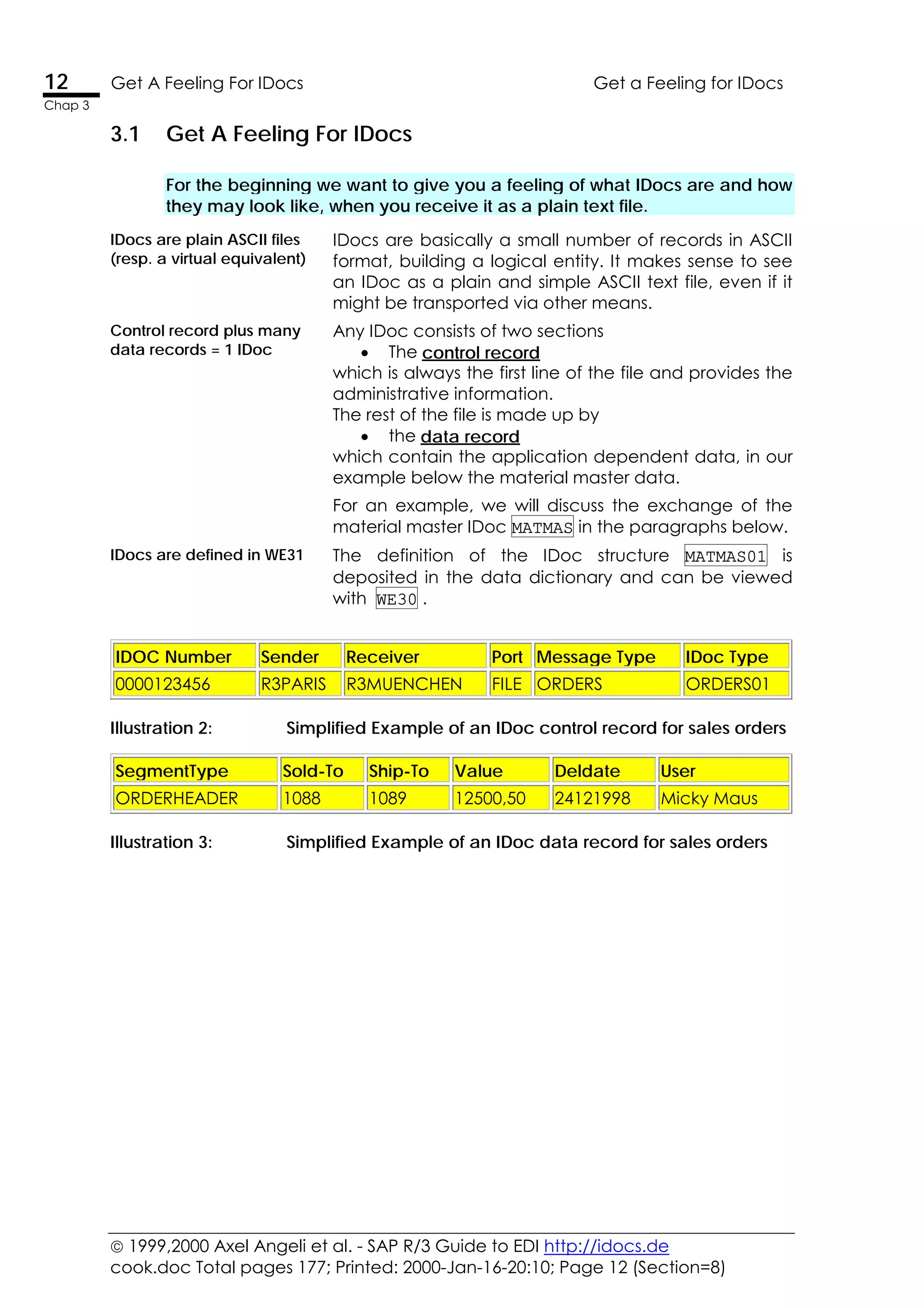
IDOC Number Sender Receiver Port Message Type IDoc Type
0000123456 R3PARIS R3MUENCHEN FILE ORDERS ORDERS01
Illustration 2: Simplified Example of an IDoc control record for sales orders
SegmentType Sold-To Ship-To Value Deldate User
ORDERHEADER 1088 1089 12500,50 24121998 Micky Maus
Illustration 3: Simplified Example of an IDoc data record for sales orders
 1999,2000 Axel Angeli et al. - SAP R/3 Guide to EDI http://idocs.de
cook.doc Total pages 177; Printed: 2000-Jan-16-20:10; Page 13 (Section=8)
Get a Feeling for IDocs Get A Feeling For IDocs 13
Chap 3
F
o
r
e
x
a
m
p
l
e
s
a
n
d
u
p
d
a
t
e
s
c
h
e
c
k
o
u
t
h
t
t
p
:
/
/
i
d
o
c
s
.
d
e
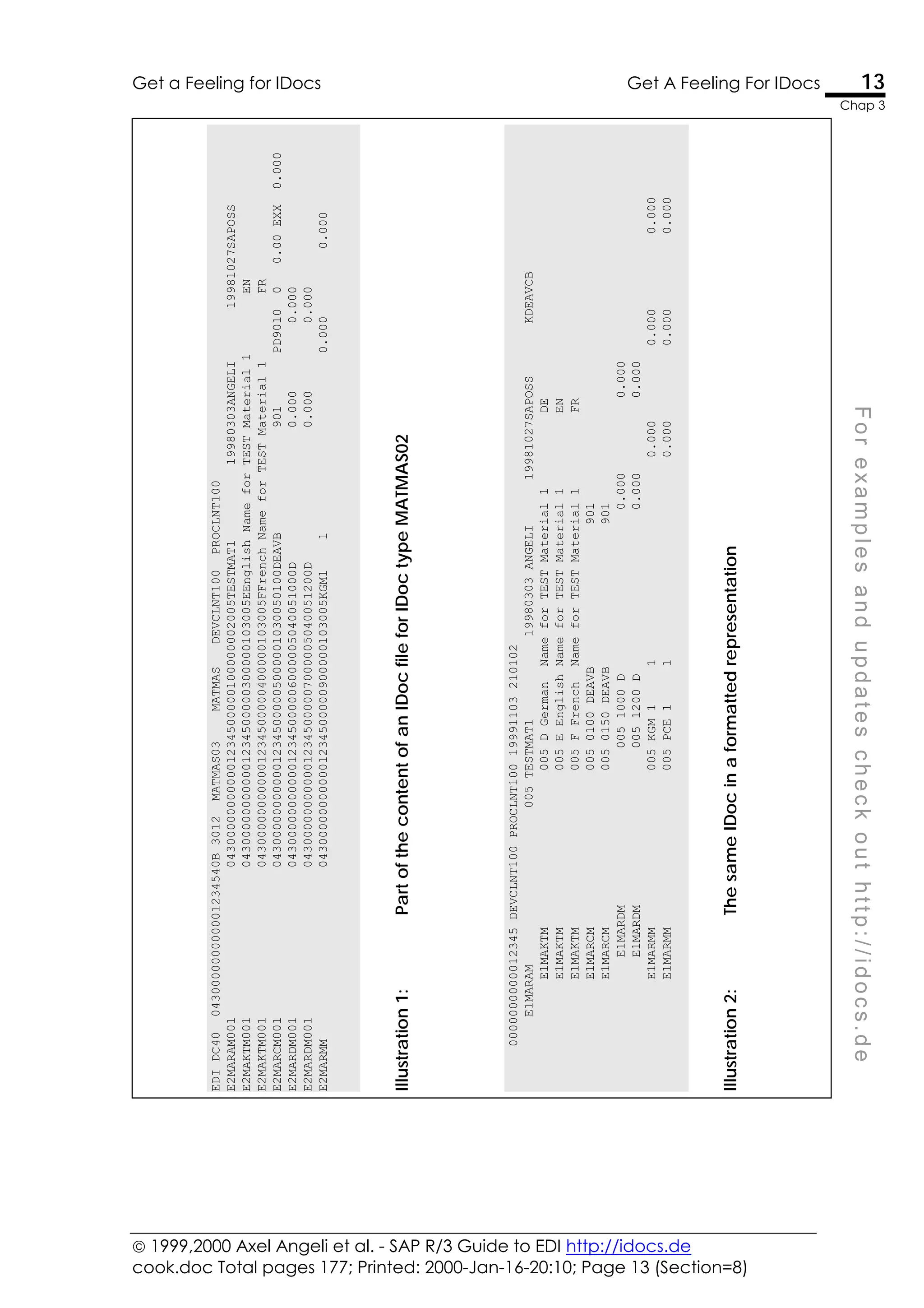
EDI_DC40
043000000000001234540B
3012
MATMAS03
MATMAS
DEVCLNT100
PROCLNT100
E2MARAM001
043000000000001234500000100000002005TESTMAT1
19980303ANGELI
19981027SAPOSS
E2MAKTM001
043000000000001234500000300000103005EEnglish
Name
for
TEST
Material
1
EN
E2MAKTM001
043000000000001234500000400000103005FFrench
Name
for
TEST
Material
1
FR
E2MARCM001
0430000000000012345000005000001030050100DEAVB
901
PD9010
0
0.00
EXX
0.000
E2MARDM001
0430000000000012345000006000005040051000D
0.000
0.000
E2MARDM001
0430000000000012345000007000005040051200D
0.000
0.000
E2MARMM
043000000000001234500000900000103005KGM1
1
0.000
0.000
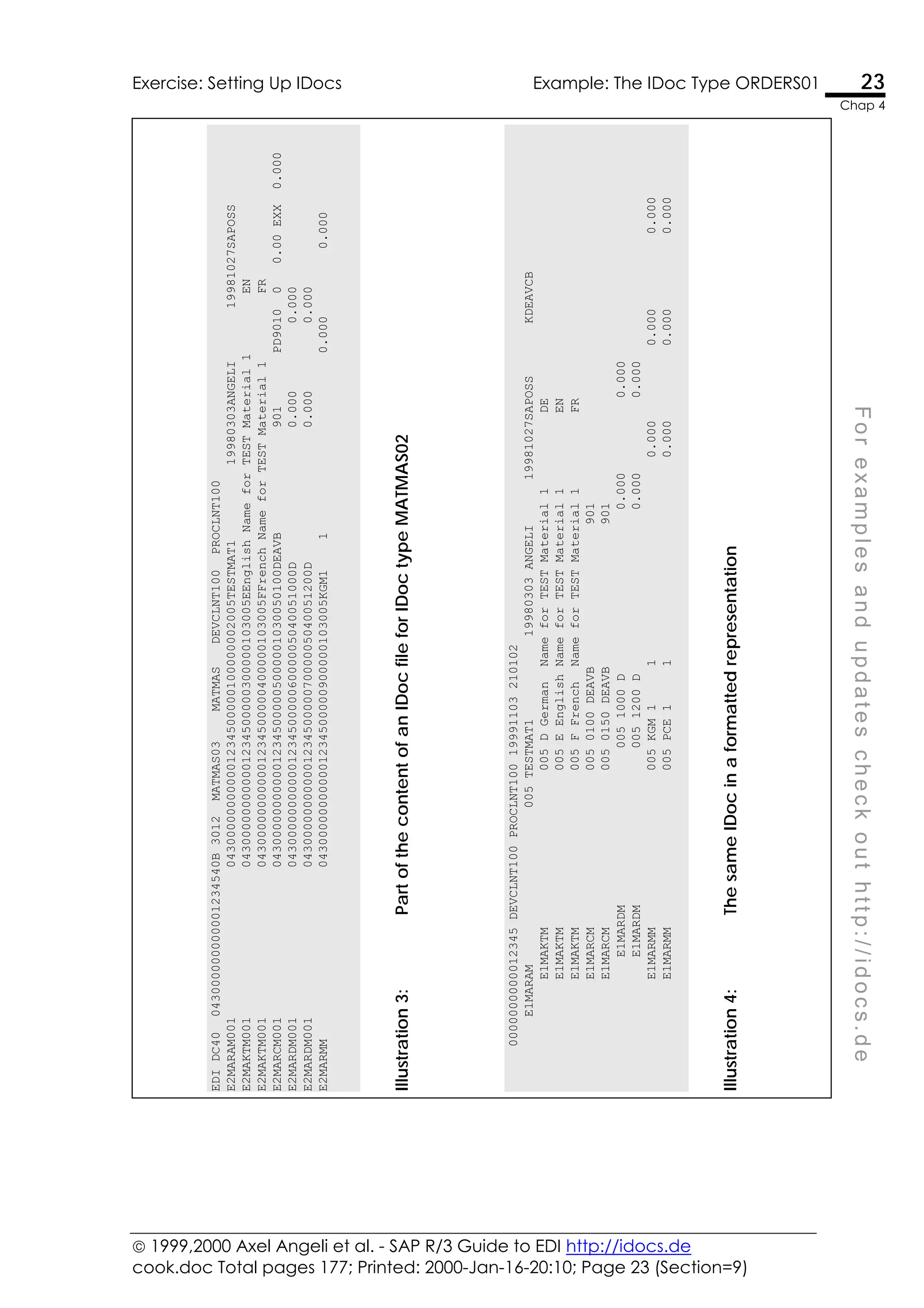
Illustration
1:
Part
of
the
content
of
an
IDoc
file
for
IDoc
type
MATMAS02
0000000000012345
DEVCLNT100
PROCLNT100
19991103
210102
E1MARAM
005
TESTMAT1
19980303
ANGELI
19981027SAPOSS
KDEAVCB
E1MAKTM
005
D
German
Name
for
TEST
Material
1
DE
E1MAKTM
005
E
English
Name
for
TEST
Material
1
EN
E1MAKTM
005
F
French
Name
for
TEST
Material
1
FR
E1MARCM
005
0100
DEAVB
901
E1MARCM
005
0150
DEAVB
901
E1MARDM
005
1000
D
0.000
0.000
E1MARDM
005
1200
D
0.000
0.000
E1MARMM
005
KGM
1
1
0.000
0.000
0.000
E1MARMM
005
PCE
1
1
0.000
0.000
0.000
Illustration
2:
The
same
IDoc
in
a
formatted
representation
 1999,2000 Axel Angeli et al. - SAP R/3 Guide to EDI http://idocs.de
cook.doc Total pages 177; Printed: 2000-Jan-16-20:10; Page 14 (Section=8)
14 The IDoc Control Record Get a Feeling for IDocs
Chap 3
3.2 The IDoc Control Record
The very first record of an IDoc package is always a control record. The
structure of this control record is the DDic structure EDIDC and describes the
contents of the data contained in the package.
Control record serves
as cover slip for the
transport
The control record carries all the administrative information
of the IDoc, such as its origin and its destination and a
categorical description of the contents and context of the
attached IDoc data. This is very much like the envelope or
cover sheet that would accompany any paper document
sent via postal mail.
Control record is used
by the receiver to
determine the
processing algorithm
For R/3 inbound processing, the control record is used by the
standard IDoc processing mechanism, to determine the
method how to process the IDoc. This method is usually a
function module, but may be a business object as well. The
processing method can be fully customized.
Control record not
necessary to process
the IDoc Data
Once the IDoc data is handed over to a processing function
module, you will no longer need the control record
information. The function modules are aware of the
individual structure of the IDoc type and the meaning of the
data. In other words: for every context and syntax of an
IDoc, you would write an individual function module or
business object (note: a business object is also a function
module in R/3) to deal with.
Control Record
structure is defined as
EDIDC in DDic
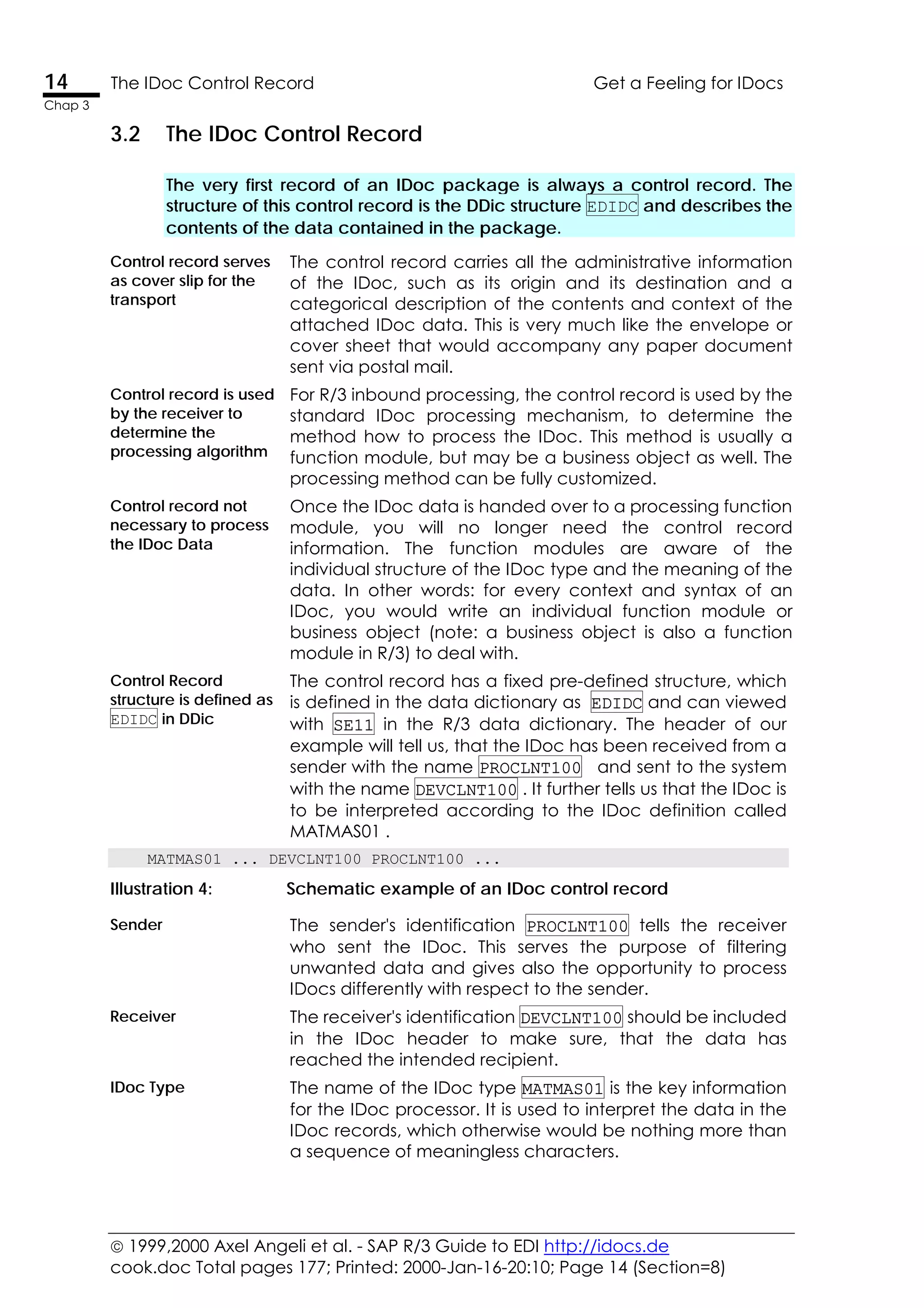
The control record has a fixed pre-defined structure, which
is defined in the data dictionary as EDIDC and can viewed
with SE11 in the R/3 data dictionary. The header of our
example will tell us, that the IDoc has been received from a
sender with the name PROCLNT100 and sent to the system
with the name DEVCLNT100 . It further tells us that the IDoc is
to be interpreted according to the IDoc definition called
MATMAS01 .
MATMAS01 ... DEVCLNT100 PROCLNT100 ...
Illustration 4: Schematic example of an IDoc control record
Sender The sender's identification PROCLNT100 tells the receiver
who sent the IDoc. This serves the purpose of filtering
unwanted data and gives also the opportunity to process
IDocs differently with respect to the sender.
Receiver The receiver's identification DEVCLNT100 should be included
in the IDoc header to make sure, that the data has
reached the intended recipient.
IDoc Type The name of the IDoc type MATMAS01 is the key information
for the IDoc processor. It is used to interpret the data in the
IDoc records, which otherwise would be nothing more than
a sequence of meaningless characters.
 1999,2000 Axel Angeli et al. - SAP R/3 Guide to EDI http://idocs.de
cook.doc Total pages 177; Printed: 2000-Jan-16-20:10; Page 15 (Section=8)
Get a Feeling for IDocs The IDoc Data 15
Chap 3
F
o
r
e
x
a
m
p
l
e
s
a
n
d
u
p
d
a
t
e
s
c
h
e
c
k
o
u
t
h
t
t
p
:
/
/
i
d
o
c
s
.
d
e
3.3 The IDoc Data
All records in the IDoc, which come after the control record are the IDoc
data. They are all structured alike, with a segment information part and a
data part which is 1000 character in length, filling the rest of the line.
All IDoc data record
have a segment info
part and 1000
characters for data
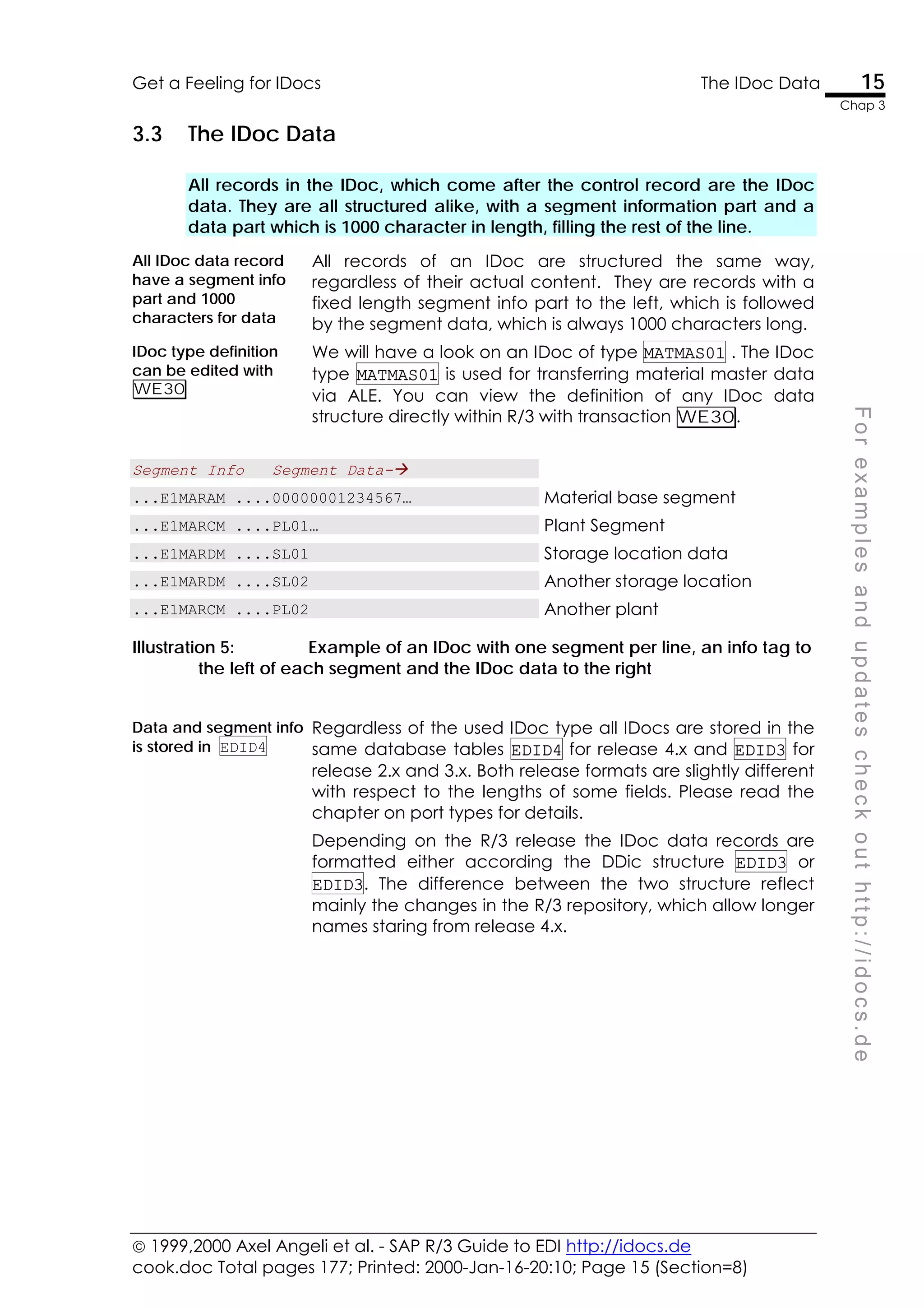
All records of an IDoc are structured the same way,
regardless of their actual content. They are records with a
fixed length segment info part to the left, which is followed
by the segment data, which is always 1000 characters long.
IDoc type definition
can be edited with
WE30
We will have a look on an IDoc of type MATMAS01 . The IDoc
type MATMAS01 is used for transferring material master data
via ALE. You can view the definition of any IDoc data
structure directly within R/3 with transaction WE30.
Segment Info Segment Data-!
...E1MARAM ....00000001234567… Material base segment
...E1MARCM ....PL01… Plant Segment
...E1MARDM ....SL01 Storage location data
...E1MARDM ....SL02 Another storage location
...E1MARCM ....PL02 Another plant
Illustration 5: Example of an IDoc with one segment per line, an info tag to
the left of each segment and the IDoc data to the right
Data and segment info
is stored in EDID4
Regardless of the used IDoc type all IDocs are stored in the
same database tables EDID4 for release 4.x and EDID3 for
release 2.x and 3.x. Both release formats are slightly different
with respect to the lengths of some fields. Please read the
chapter on port types for details.
Depending on the R/3 release the IDoc data records are
formatted either according the DDic structure EDID3 or
EDID3. The difference between the two structure reflect
mainly the changes in the R/3 repository, which allow longer
names staring from release 4.x.
 1999,2000 Axel Angeli et al. - SAP R/3 Guide to EDI http://idocs.de
cook.doc Total pages 177; Printed: 2000-Jan-16-20:10; Page 16 (Section=8)
16 Interpreting An IDoc Segment Info Get a Feeling for IDocs
Chap 3
3.4 Interpreting An IDoc Segment Info
All IDoc data records are exchanged in a fixed format, regardless of the
segment type. The segment’s true structure is stored in R/3’s repository as a
DDic structure of the same name.
R/3 is only interested in
the segment name
The segment info tells the IDoc processor how the current
segment data is structure and should be interpreted. The
information, which is usually of only interest is the name of
the segment EDID4-SEGNAM.
Segment name tells
the data structure
The segment name corresponds to a data dictionary
structure with the same name, which has been created
automatically when defining the IDoc segment definition
with transaction WE31 .
Remaining information
is only for foreign
systems
For most applications, the remaining information in the
segment info can be ignored as being redundant. Some
older, non-SAP-compliant partners may require it. E.g. the
IDoc segment info will also store the unique segment
number for systems, which require numeric segment
identification.
To have the segment made up for processing in an ABAP, it
is usually wise to move the segment data into a structure,
which matches the segment definition.
For a segment of type e1maram the following coding is
commonly used:
Data in EDID4-SDATA TABLES: e1maram.
. . .
MOVE edidd-sdata TO e1maram.
Then you can access the fields of the IDoc segment EDIDD-
SDATA as fields of the structure e1maram .
Data in EDID4-SDATA WRITE: e1maram-matnr.
Sample coding The following coding sample, shows how you may read a
MATMAS IDoc and extract the data for the MARA and MARC
segments to some internal variables and tables.
DATA: xmara LIKE e1maram.
DATA: tmarc AS STANDARD TABLE OF e1marcm
WITH HEADER LINE.
LOOP AT edidd.
CASE edidd-segnam.
WHEN 'E1MARAM'.
MOVE edidd-sdata TO xmara.
WHEN 'E1MARCM'.
MOVE edidd-sdata TO tmarc.
APPEND tmarc.
ENDCASE.
ENDLOOP.
now do something with xmara and tmarc.
 1999,2000 Axel Angeli et al. - SAP R/3 Guide to EDI http://idocs.de
cook.doc Total pages 177; Printed: 2000-Jan-16-20:10; Page 17 (Section=8)
Get a Feeling for IDocs IDoc Base - Database Tables Used to Store IDocs 17
Chap 3
F
o
r
e
x
a
m
p
l
e
s
a
n
d
u
p
d
a
t
e
s
c
h
e
c
k
o
u
t
h
t
t
p
:
/
/
i
d
o
c
s
.
d
e
3.5 IDoc Base - Database Tables Used to Store IDocs
When R/3 processes an IDoc via the standard inbound or outbound
mechanism, the IDoc is stored in the tables. The control record goes to
table EDIDC and the data goes to table EDID4.
All inbound and
outbound Docs are
stored in EDID4
All IDoc, whether sent or received are stored in the table
EDID4. The corresponding control file header go into EDIDC.
There are standard programs who read and write the data
to and from the IDoc base. These programs and transaction
are heavily dependent on the customizing, where rules are
defined which tell how the IDocs are to be processed.
Avoid reinventing the
wheel
Of course, as IDocs are nothing than structured ASCII data,
you could always process them directly with an ABAP. This is
certainly the quick and dirty solution, bypassing all the
internal check and processing mechanism. We will not
reinvent the wheel here.
Customizing is done
from the central menu
WEDI
To do this customizing setting, check with transaction WEDI
and see the points, dealing with ports, partner profiles, and
all under IDoc development.
Illustration 6: Tables used to store the IDoc within R/3
 1999,2000 Axel Angeli et al. - SAP R/3 Guide to EDI http://idocs.de
cook.doc Total pages 177; Printed: 2000-Jan-16-20:10; Page 19 (Section=9)
F
o
r
e
x
a
m
p
l
e
s
a
n
d
u
p
d
a
t
e
s
c
h
e
c
k
o
u
t
h
t
t
p
:
/
/
i
d
o
c
s
.
d
e
4
Exercise: Setting Up IDocs
The best way of learning is doing it. This chapter tells you
how to set up your R/3 system that it can send IDocs to
itself. When sending IDocs to your own system you can test
the procedures without the need for a second client or
installation.
Summary
• Define a new internal RFC destination INTERNAL
• Explore both the transactions WEDI and SALE and
adjust the settings as necessary
• Use transaction BALE to generate an arbitrary IDoc
 1999,2000 Axel Angeli et al. - SAP R/3 Guide to EDI http://idocs.de
cook.doc Total pages 177; Printed: 2000-Jan-16-20:10; Page 20 (Section=9)
20 Quickly Setting up an Example Exercise: Setting Up IDocs
Chap 4
4.1 Quickly Setting up an Example
If you have a naked system, you cannot send IDocs immediately. This
chapter will guide you through the minimum steps to see how the IDoc
engine works.
You can access most of the transactions used in the
example below in the menu WEDI and SALE.
Check EDID4 with SE16 We will assume, that we want to send material master
data from the current system to a remote system. To
simulate this scenario we do not need to have a
second system. With a little trick, we can set up the
system to send an IDoc back to sending client.
We will set up the system to use an RFC call to itself.
Therefore we need to define an RFC remote
destination, which points back to our own client. There
is a virtual RFC destination called NONE which always
refers to the calling client.
1. Declare the RFC
destination to receive
the IDoc
RFC destinations are installed with the transaction
SM59. Create a new R/3 destination of type "L"
(Logical destination) with the name INTERNAL and the
destination NONE.
Note: Do not use RFC type internal. Although you could
create them manually, they are reserved for being
automatically generated. However, there is the internal
connection "NONE" or "BACK" which would do the
same job as the destination we are creating now.
2. Define a data port for
INTERNAL
The next step is defining a data port, which is
referenced by the IDoc sending mechanism to send
the IDoc through. Declaring the port is done by
transaction WE21.
3. Declare a new ALE
model with SALE .
We will now declare an ALE connection from our client
to the partner INTERNAL. ALE uses IDocs to send data
to a remote system. There is a convenient transaction
to send material master as IDocs via the ALE.
4. Declare MATMAS01 as
a valid ALE object to
be sent to INTERNAL
The set up is done in transaction SALE. You first create
a new ALE model, to avoid interfering with eventual
existing definitions. Then you simply add the IDoc
message MATMAS as a valid path from your client to
INTERNAL.
5. Send the IDoc with
transaction BALE.
In order to send the IDoc, you call the transaction
BALE and choose the distribution of material master
data (BD10). Choose a material, enter INTERNAL as
receiver and go.
6. Display IDocs with
WE05
To see, which IDocs have been sent, you can use the
transaction WE05. If you did everything as described
above, you will find the IDocs with an error status of 29,
meaning that there is no valid partner profile. This is
true, because we have not defined one yet.
 1999,2000 Axel Angeli et al. - SAP R/3 Guide to EDI http://idocs.de
cook.doc Total pages 177; Printed: 2000-Jan-16-20:10; Page 21 (Section=9)
Exercise: Setting Up IDocs Example: The IDoc Type MATMAS01 21
Chap 4
F
o
r
e
x
a
m
p
l
e
s
a
n
d
u
p
d
a
t
e
s
c
h
e
c
k
o
u
t
h
t
t
p
:
/
/
i
d
o
c
s
.
d
e
4.2 Example: The IDoc Type MATMAS01
To sharpen your understanding, we will show you an example of an IDoc of
type MATMAS01, which contains material master data.
Note: You can check with transaction WE05 , if there
are already any IDocs in your system.
IDoc structure can be seen
with WE30
You can call transaction WE30 to display the structure
of the IDoc type of the found IDoc.
Here is the display of an IDoc of type MATMAS01.
Illustration 1: Structure of the MATMAS01 IDoc type
MATMAS01 mirrors widely the structure of R/3’s material
master entity.
Content of IDoc file If this IDoc would have been written to a file, the file
content would have looked similar to that:
...MATMAS01 DEVCLNT100 INTERNAL...
...E1MARAM ...and here the data
...E1MARCM ...and here the data
...E1MARDM ...and here the data
 1999,2000 Axel Angeli et al. - SAP R/3 Guide to EDI http://idocs.de
cook.doc Total pages 177; Printed: 2000-Jan-16-20:10; Page 22 (Section=9)
22 Example: The IDoc Type ORDERS01 Exercise: Setting Up IDocs
Chap 4
4.3 Example: The IDoc Type ORDERS01
To allow an interference, here is a sample of IDoc type ORDERS01 which is
used for purchase orders and sales orders.
ORDERS01 is used for
purchasing and sales
order data
Purchasing and sales share naturally the same IDoc type,
because what is a purchase order on sender side will
become a sales order on the receiver side.
Other than MATMAS01, the IDoc type ORDERS01 does not
reflect the structure of the underlying RDB entity, neither the
one of SD (VA01) nor the one of MM (ME21). The structure
is rather derived from the EDI standards used in the
automobile industry. Unfortunately, this does not make it
easier to read.
Note: With transaction WE05 you can check, if there are
already any IDocs in your system.
IDoc structure can be
seen with WE30
You can call transaction WE30 to display the structure of
the IDoc type of the found IDoc
Content of IDoc file If this IDoc would have been written to a file, the file content
would have looked similar to that:
...ORDERS01 DEVCLNT100 INTERNAL...
...E1EDKA1 ....and here the data
...E1EDKA2 ....and here the data
...E1EDP19 ....and here the data
Illustration 2: Structure of the ORDERS01 IDoc type
 1999,2000 Axel Angeli et al. - SAP R/3 Guide to EDI http://idocs.de
cook.doc Total pages 177; Printed: 2000-Jan-16-20:10; Page 23 (Section=9)
Exercise: Setting Up IDocs Example: The IDoc Type ORDERS01 23
Chap 4
F
o
r
e
x
a
m
p
l
e
s
a
n
d
u
p
d
a
t
e
s
c
h
e
c
k
o
u
t
h
t
t
p
:
/
/
i
d
o
c
s
.
d
e
EDI_DC40
043000000000001234540B
3012
MATMAS03
MATMAS
DEVCLNT100
PROCLNT100
E2MARAM001
043000000000001234500000100000002005TESTMAT1
19980303ANGELI
19981027SAPOSS
E2MAKTM001
043000000000001234500000300000103005EEnglish
Name
for
TEST
Material
1
EN
E2MAKTM001
043000000000001234500000400000103005FFrench
Name
for
TEST
Material
1
FR
E2MARCM001
0430000000000012345000005000001030050100DEAVB
901
PD9010
0
0.00
EXX
0.000
E2MARDM001
0430000000000012345000006000005040051000D
0.000
0.000
E2MARDM001
0430000000000012345000007000005040051200D
0.000
0.000
E2MARMM
043000000000001234500000900000103005KGM1
1
0.000
0.000
Illustration
3:
Part
of
the
content
of
an
IDoc
file
for
IDoc
type
MATMAS02
0000000000012345
DEVCLNT100
PROCLNT100
19991103
210102
E1MARAM
005
TESTMAT1
19980303
ANGELI
19981027SAPOSS
KDEAVCB
E1MAKTM
005
D
German
Name
for
TEST
Material
1
DE
E1MAKTM
005
E
English
Name
for
TEST
Material
1
EN
E1MAKTM
005
F
French
Name
for
TEST
Material
1
FR
E1MARCM
005
0100
DEAVB
901
E1MARCM
005
0150
DEAVB
901
E1MARDM
005
1000
D
0.000
0.000
E1MARDM
005
1200
D
0.000
0.000
E1MARMM
005
KGM
1
1
0.000
0.000
0.000
E1MARMM
005
PCE
1
1
0.000
0.000
0.000
Illustration
4:
The
same
IDoc
in
a
formatted
representation
 1999,2000 Axel Angeli et al. - SAP R/3 Guide to EDI http://idocs.de
cook.doc Total pages 177; Printed: 2000-Jan-16-20:10; Page 24 (Section=10)
F
o
r
e
x
a
m
p
l
e
s
a
n
d
u
p
d
a
t
e
s
c
h
e
c
k
o
u
t
h
t
t
p
:
/
/
i
d
o
c
s
.
d
e
5
Monitoring IDocs
There are some utilities in R/3 that help monitoring all the
IDocs in the system. They allow viewing them, analysing
eventual cause of error and retrying IDoc processing in
case of failure.
Summary
• The IDoc monitoring tools can all be accessed from
menu WEDI
• Transaction WE05 and WE02 display IDocs, which
are found in the system; they allow to check if IDocs
have been treated successfully or why they have
failed
• BD87 allows to process inbound IDocs again, if they
have failed for some reason
• BD88 allows dispatching outbound IDocs if they are
stopped for some reason
 1999,2000 Axel Angeli et al. - SAP R/3 Guide to EDI http://idocs.de
cook.doc Total pages 177; Printed: 2000-Jan-16-20:10; Page 25 (Section=11)
F
o
r
e
x
a
m
p
l
e
s
a
n
d
u
p
d
a
t
e
s
c
h
e
c
k
o
u
t
h
t
t
p
:
/
/
i
d
o
c
s
.
d
e
6
Sample Processing Routines
This chapter demonstrates on an example how an IDoc is
prepared in R/3 for outbound and how a receiving R/3
system processes the IDoc.
Keep
I t
Simple and
Smart
 1999,2000 Axel Angeli et al. - SAP R/3 Guide to EDI http://idocs.de
cook.doc Total pages 177; Printed: 2000-Jan-16-20:10; Page 26 (Section=11)
26 Sample Processing Routines Sample Processing Routines
Chap 6
6.1 Sample Processing Routines
Creating and processing IDocs are a widely mechanical task, as it is true
for all interface programming. We will show a short example that packs SAP
R/3 SAPscript standard text elements into IDocs and stores them back.
Outbound function Outbound IDocs from R/3 are usually created by a function
module. This function module is called by the IDoc engine. A
sophisticated customizing lets define the conditions and
parameters to find the correct function module.
The interface parameters of the processing function need to
be compatible with a well defined standard, because the
function module will be called from within another program.
Inbound function IDoc inbound functions are function modules with a standard
interface, which will interpret the received IDoc data and
prepare them for processing.
The received IDoc data is processed record by record and
interpreted according the segment information provided with
each record. The prepared data can then be processed by an
application, a function module or a self-written program.
The example programs in the following chapters will show you
how texts from the text pool can be converted into an IDoc
and processed by an inbound routine to be stored into another
system.
The following will give you the basics to understand the
example:
Text from
READ_TEXT
SAP R/3 allows the creation of text elements, e.g. with
transaction SO10. Each standard text elements has a control
record which is stored in table STXH. The text lines itself are
stored in a special cluster table. To retrieve the text from the
cluster, you will use the standard function module function
READ_TEXT . We will read such a text and pack it into an IDoc.
That is what the following simple function module does.
If there is no convenient routine to process data, the easiest
way to hand over the data to an application is to record a
transaction with transaction SHDB and create a simple
processing function module from that recording.
Outbound is
triggered by the
application
Outbound routines are called by the triggering application,
e.g. the RSNAST00 program.
Inbound is
triggered by an
external event
Inbound processing is triggered by the central IDoc inbound
handler, which is usually the function module IDOC_INPUT . This
function is usually activated by the gatekeeper, who receives
the IDoc.
 1999,2000 Axel Angeli et al. - SAP R/3 Guide to EDI http://idocs.de
cook.doc Total pages 177; Printed: 2000-Jan-16-20:10; Page 27 (Section=11)
Sample Processing Routines Sample Outbound Routines 27
Chap 6
F
o
r
e
x
a
m
p
l
e
s
a
n
d
u
p
d
a
t
e
s
c
h
e
c
k
o
u
t
h
t
t
p
:
/
/
i
d
o
c
s
.
d
e
6.2 Sample Outbound Routines
The most difficult work when creating outbound IDocs is the retrieval of the
application data which needs sending. Once the data is well retrieved, the
data needs to be converted to IDoc format, only.
FUNCTION
*"----------------------------------------------------------------------
*"*"Lokale Schnittstelle:
*" IMPORTING
*" VALUE(I_TDOBJECT) LIKE THEAD-TDOBJECT DEFAULT 'TEXT'
*" VALUE(I_TDID) LIKE THEAD-TDID DEFAULT 'ST'
*" VALUE(I_TDNAME) LIKE THEAD-TDNAME
*" VALUE(I_TDSPRAS) LIKE THEAD-TDSPRAS DEFAULT SY-LANGU
*" EXPORTING
*" VALUE(E_THEAD) LIKE THEAD STRUCTURE THEAD
*" TABLES
*" IDOC_DATA STRUCTURE EDIDD OPTIONAL
*" IDOC_CONTRL STRUCTURE EDIDC OPTIONAL
*" TLINES STRUCTURE TLINE OPTIONAL
*"----------------------------------------------------------------------
* *** --- Reading the application Data --- ****
CALL FUNCTION 'READ_TEXT'
EXPORTING
ID = T_HEAD-TDID
LANGUAGE = T_HEAD-TDSPRAS
NAME = T_HEAD-TDNAME
OBJECT = T_HEAD-TDOBJECT
IMPORTING
HEADER = E_THEAD
TABLES
LINES = TLINES.
* *** --- Packing the application data into IDoc
MOVE E_THEAD TO IDOC_DATA-SDATA.
MOVE 'YAXX_THEAD' TO IDOC_DATA-SEGNAM.
APPEND IDOC_DATA.
LOOP AT TLINES.
MOVE E_THEAD TO IDOC_DATA-SDATA.
* *** -- we still need to fill more segment info
MOVE 'YAXX_TLINE' TO IDOC_DATA-SEGNAM.
APPEND IDOC_DATA.
ENDLOOP.
* *** --- Packing the IDoc control record --- ****
CLEAR IDOC_CONTRL.
IDOC_CONTRL-IDOCTP = 'YAXX_TEXT'.
* *** -- we still should fill more control record info
APPEND IDOC_CONTRL.
ENDFUNCTION.
Program 1: Sample IDoc outbound function module
 1999,2000 Axel Angeli et al. - SAP R/3 Guide to EDI http://idocs.de
cook.doc Total pages 177; Printed: 2000-Jan-16-20:10; Page 28 (Section=11)
28 Sample Outbound Routines Sample Processing Routines
Chap 6
We will show a short example that packs SAP R/3 SAPscript
standard text elements into IDocs and stores them back to texts in
a second routine. The text elements can be edited with SO10.
Text from
READ_TEXT
Each R/3 standard text elements has a header record which is
stored in table STXH. The text lines itself are stored in a special
cluster table. To retrieve the text from the cluster, you will use the
standard function module function READ_TEXT.
Outbound
processing
The program below will retrieve a text document from the text
pool, convert the text lines into IDoc format and create the
necessary control information.
Reading data The first step is reading the data from the application database
by calling the function module READ_TEXT.
* *** --- Reading the application Data --- ****
CALL FUNCTION 'READ_TEXT'
EXPORTING
ID = T_HEAD-TDID
LANGUAGE = T_HEAD-TDSPRAS
NAME = T_HEAD-TDNAME
OBJECT = T_HEAD-TDOBJECT
IMPORTING
HEADER = E_THEAD
TABLES
LINES = TLINES.
Converting
application data
into IDoc format
Our next duty is to pack the data into the IDoc record. This means
moving the application data to the data part of the IDoc record
structure EDIDD and fill the corresponding segment information.
* *** --- Packing the application data into IDoc
MOVE E_THEAD TO IDOC_DATA-SDATA.
* the receiver needs the segment name
in order to interpret the segment
MOVE 'YAXX_THEAD' TO IDOC_DATA-SEGNAM.
APPEND IDOC_DATA.
LOOP AT TLINES.
MOVE E_THEAD TO IDOC_DATA-SDATA.
* *** -- we still need to fill more segment info
MOVE 'YAXX_TLINE' TO IDOC_DATA-SEGNAM.
APPEND IDOC_DATA.
ENDLOOP.
Filling control
record
information
Finally we have to provide a correctly filled control record for this
IDoc. If the IDoc routine is used in a standard automated
environment, it is usually sufficient to fill the field EDIDC-IDOCTP
with the IDoc type, EDIDC-MESTYP with the context message type
and the receiver name. The remaining fields are automatically
filled by the standard processing routines if applicable.
* *** --- Packing the IDoc control record --- ****
CLEAR IDOC_CONTRL.
IDOC_CONTRL-IDOCTP = 'YAXX_TEXT'.
* *** -- we still need to fill more control rec info
APPEND IDOC_CONTRL.
 1999,2000 Axel Angeli et al. - SAP R/3 Guide to EDI http://idocs.de
cook.doc Total pages 177; Printed: 2000-Jan-16-20:10; Page 29 (Section=11)
Sample Processing Routines Sample Outbound Routines 29
Chap 6
F
o
r
e
x
a
m
p
l
e
s
a
n
d
u
p
d
a
t
e
s
c
h
e
c
k
o
u
t
h
t
t
p
:
/
/
i
d
o
c
s
.
d
e
 1999,2000 Axel Angeli et al. - SAP R/3 Guide to EDI http://idocs.de
cook.doc Total pages 177; Printed: 2000-Jan-16-20:10; Page 30 (Section=11)
30 Sample Inbound Routines Sample Processing Routines
Chap 6
6.3 Sample Inbound Routines
Inbound processing is widely the reverse process of an outbound.. The
received IDoc has to be unpacked, interpreted and transferred to an
application for further processing.
FUNCTION
*"----------------------------------------------------------------------
*"*"Lokale Schnittstelle:
*" IMPORTING
*" VALUE(INPUT_METHOD) LIKE BDWFAP_PAR-INPUTMETHD
*" VALUE(MASS_PROCESSING) LIKE BDWFAP_PAR-MASS_PROC
*" EXPORTING
*" VALUE(WORKFLOW_RESULT) LIKE BDWFAP_PAR-RESULT
*" VALUE(APPLICATION_VARIABLE) LIKE BDWFAP_PAR-APPL_VAR
*" VALUE(IN_UPDATE_TASK) LIKE BDWFAP_PAR-UPDATETASK
*" VALUE(CALL_TRANSACTION_DONE) LIKE BDWFAP_PAR-CALLTRANS
*" TABLES
*" IDOC_CONTRL STRUCTURE EDIDC
*" IDOC_DATA STRUCTURE EDIDD
*" IDOC_STATUS STRUCTURE BDIDOCSTAT
*" RETURN_VARIABLES STRUCTURE BDWFRETVAR
*" SERIALIZATION_INFO STRUCTURE BDI_SER
*"----------------------------------------------------------------------
DATA: XTHEAD LIKE THEAD .
DATA: TLINES LIKE TLINE OCCURS 0 WITH HEADER LINE.
CLEAR XTHEAD.
REFRESH TLINES.
* *** --- Unpacking the IDoc --- ***
LOOP AT IDOC_DATA.
CASE IDOC_DATA-SEGNAM.
WHEN 'YAXX_THEAD'.
MOVE IDOC_DATA-SDATA TO XTHEAD.
WHEN 'YAXX_TLINE'.
MOVE IDOC_DATA-SDATA TO TLINES.
ENDCASE.
ENDLOOP.
* *** --- Calling the application to process the received data --- ***
CALL FUNCTION 'SAVE_TEXT'
EXPORTING
HEADER = XTHEAD
SAVEMODE_DIRECT = 'X'
TABLES
LINES = TLINES.
ADD SY-SUBRC TO OK.
* füllen IDOC_Status
* fill IDOC_Status
IDOC_STATUS-DOCNUM = IDOC_CONTRL-DOCNUM.
IDOC_STATUS-MSGV1 = IDOC_CONTRL-IDOCTP.
IDOC_STATUS-MSGV2 = XTHEAD.
IDOC_STATUS-MSGID = '38'.
 1999,2000 Axel Angeli et al. - SAP R/3 Guide to EDI http://idocs.de
cook.doc Total pages 177; Printed: 2000-Jan-16-20:10; Page 31 (Section=11)
Sample Processing Routines Sample Inbound Routines 31
Chap 6
F
o
r
e
x
a
m
p
l
e
s
a
n
d
u
p
d
a
t
e
s
c
h
e
c
k
o
u
t
h
t
t
p
:
/
/
i
d
o
c
s
.
d
e
IDOC_STATUS-MSGNO = '000'.
IF OK NE 0.
IDOC_STATUS-STATUS = '51'.
IDOC_STATUS-MSGTY = 'E'.
ELSE.
IDOC_STATUS-STATUS = '53'.
IDOC_STATUS-MSGTY = 'S'.
CALL_TRANSACTION_DONE = 'X'.
ENDIF.
APPEND IDOC_STATUS.
ENDFUNCTION.
Program 2: Sample IDoc outbound function module
Inbound
processing
function module
This example of a simple inbound function module expects an
IDoc with rows of plain text as created in the outbound example
above. The procedure will extract the text name and the text line
from the IDoc and hand over the text data to the function
module SAVE_TEXT which will store the text in the text pool.
Unpacking the
IDoc data
The received IDoc data is processed record by record and data
is sorted out according the segment type.
* *** --- Unpacking the IDoc --- ***
LOOP AT IDOC_DATA.bb
CASE IDOC_DATA-SEGNAM.
WHEN 'YAXX_THEAD'.
PERFORM UNPACK_IDOC TABLES IDOC_DATA USING XTHEAD.
WHEN 'YAXX_TLINE'.
PERFORM UNPACK_TAB TABLES IDOC_DATA TLINES.
ENDCASE.
ENDLOOP.
Storing data When the IDoc is unpacked data is passed to the application.
* *** --- Calling the application to process the received data --- ***
CALL FUNCTION 'SAVE_TEXT'
EXPORTING
HEADER = XTHEAD
TABLES
LINES = TLINES.
Writing a status
log
Finally the processing routine needs to pass a status record to the
IDoc processor. This status indicates successful or unsuccessful
processing and will be added as a log entry to the table EDIDS.
* fill IDOC_Status
IF OK NE 0.
IDOC_STATUS-STATUS = '51'.
* IDOC_STATUS-.. = . fill the other fields to log information
ELSE.
IDOC_STATUS-STATUS = '53'.
ENDIF.
APPEND IDOC_STATUS.
The status value '51' indicates a general error during application
processing and the status '53' indicates everything is OK.
 1999,2000 Axel Angeli et al. - SAP R/3 Guide to EDI http://idocs.de
cook.doc Total pages 177; Printed: 2000-Jan-16-20:10; Page 32 (Section=12)
F
o
r
e
x
a
m
p
l
e
s
a
n
d
u
p
d
a
t
e
s
c
h
e
c
k
o
u
t
h
t
t
p
:
/
/
i
d
o
c
s
.
d
e
7
IDocs Terminology
This is a collection of expressions used in context with
IDocs. You should be familiar with them. Some are also
used in non-IDoc context with a completely different
meaning, e.g. the term message, so avoid
misunderstandings. Many fights in project teams arise from
different interpretations of the same expression.
 1999,2000 Axel Angeli et al. - SAP R/3 Guide to EDI http://idocs.de
cook.doc Total pages 177; Printed: 2000-Jan-16-20:10; Page 33 (Section=12)
IDocs Terminology Basic Terms 33
Chap 7
F
o
r
e
x
a
m
p
l
e
s
a
n
d
u
p
d
a
t
e
s
c
h
e
c
k
o
u
t
h
t
t
p
:
/
/
i
d
o
c
s
.
d
e
7.1 Basic Terms
There are a couple of expressions and methods that you need to know,
when dealing with IDoc.
Message Type The message type defines the semantic context of an IDoc.
The message type tells the processing routines, how the
message has to be interpreted.
The same IDoc data can be sent under different message
types. E.g. can the same IDoc structure which is used for a
purchase order also be used for transmitting sales order.
Imagine the situation that you receive sales order either from
your clients and also copies of sales orders for information
purposes sent by a subsidiary
IDoc Type An IDoc type defines the syntax of the IDoc data. It tells
which segments are found in an IDoc and what fields the
segments are made of.
Processing Code The processing code is a logical name that determines the
processing routine. This points usually to a function module,
but the processing routine can also be a workflow or an
event.
The use of a logical processing code makes it easy to modify
the processing routine for a series of partner profiles at once.
Partner profile Every sender-receiver relationship needs a profile defined.
This one determines
• the processing code
• the processing times and conditions
• and in the case of outbound IDocs also
• the media port used to send the IDoc and
• the triggers used to send the IDoc
Partner Type The IDoc partners are classified in logical groups. Up to
release 4.5 they were the following standard partner types
defined.
LS - Logical Systems The logical system is meant to be a different computer and
was primarily introduced for use with the ALE functionality.
You would use a partner type of LS, when linking with a
different computer system, e.g. a legacy or subsystem.
KU - Customer [ger.:
Kunde]
The partner type customer is used in classical EDI transmission
to designate a partner, that requires a service from your
company or is in the role of a debtor with respect to your
company, e.g. the payer, sold-to-party, ship-to-party.
LI - Supplier [Ger.:
Lieferant]
The partner type supplier is used in classical EDI transmission
to designate a partner, that delivers a service to your
company. This is typically the supplier in a purchase order. In
SD orders you also find LI type partners, e.g. the shipping
agent.
 1999,2000 Axel Angeli et al. - SAP R/3 Guide to EDI http://idocs.de
cook.doc Total pages 177; Printed: 2000-Jan-16-20:10; Page 34 (Section=12)
34 Terminology IDocs Terminology
Chap 7
7.2 Terminology
7.2.1 Message Type – How to Know What the Data Means
Data exchanged by an IDoc and EDI is known as messages. Message of
the same kind belong to the same message type.
Define the semantic
context
The message type defines the semantic context of an IDoc.
The message type tells the receiver, how the message has to
be interpreted.
Messages is
information aimed for
communicating with a
foreign partner
The term message is commonly used in communication, be it
EDI or telecommunication. Any stream of data sent to a
receiver with a well-defined information in it, is known as a
message. EDIFACT, ANSI/X.12, XML and others use message
the same way.
The term message is
also used for R/3’s
internal
communication
between applications
Unfortunately, the term message is used in many contexts
other than EDI as well. Even R/3 uses the word message for
the internal communication between applications. While this
is totally OK from the abstract point of view of data
modelling, it may sometimes cause confusion, if it is unclear
whether we talk about IDoc messages or internal messages.
The specification of the message type along with the sent
IDoc package is especially important, when the physical
IDoc type (the data structure of the IDoc file) is used for
different purposes.
A classical ambiguity arises in communication with customs
via EDI. The usually set up a universal file format for any kind
of declarations, e.g. Intrastat, Extrastat, Export declarations,
monthly reports etc. Depending on the message type, only
applicable fields are field with valid data. The message type
tells the receiver, which fields are of interest at all.
7.2.2 Partner Profiles – How to Know the Format of the Partner
Different partners may speak different languages. While the information
remains the same, different receivers may require completely different file
formats and communication protocols. This information is stored in a partner
profile.
Partner Profiles are the
catalogue of active EDI
connection from and to
R/3
In a partner profile you will specify the names of the partners which
are allowed to exchange IDocs to your system. For each partner
you have to list the message types which the partner may send.
Partner profiles stores
the IDoc type to use
For any such message type, the profile tells the IDoc type, the
partner expects for that kind of message.
 1999,2000 Axel Angeli et al. - SAP R/3 Guide to EDI http://idocs.de
cook.doc Total pages 177; Printed: 2000-Jan-16-20:10; Page 35 (Section=12)
IDocs Terminology Terminology 35
Chap 7
F
o
r
e
x
a
m
p
l
e
s
a
n
d
u
p
d
a
t
e
s
c
h
e
c
k
o
u
t
h
t
t
p
:
/
/
i
d
o
c
s
.
d
e
Outbound customizing
agrees how data is
electronically
exchanged
For outbound processing, the partner profile also sets the media to
transport the data to its receiver, e.g.
• an operating system file
• automated FTP
• XML or EDIFACT transmission via a broker/converter
• internet
• direct remote function call
The mean of transport depends on the receiving partner, the IDoc
type and message type (context).
Different partners,
different profiles
So you may determine to send the same data as a file to your
vendor and via FTP to your remote plant.
Also you may decide to exchange purchase data with a vendor
via FTP but send payment notes to the same vendor in a file.
Inbound customizing
determines the
processing routine
For inbound processing, the partner profile customizing will also
determine a processing code, which can handle the received
data.
The partner profile may tell you the following:
• Supplier .......................................MAK_CO
sends the message....................SHIPPING_ADVISE
via the port named...................INTERNET
using IDoc type..........................SHPADV01
processed with code................SHIPMENTLEFT
• Sales agent.................................LOWSELL
sends the message....................SALESORDERS
via the port named...................RFCLINK
using IDoc type..........................ORDERS01
processed with code................CUSTOMERORDER
• Sales agent.................................SUPERSELL
sends the message....................SALESORDERS
via the port named...................RFCLINK
using IDoc type..........................ORDERS01
processed with code................AGENTORDER
7.2.3 IDoc Type – The Structure of The IDoc File
The IDoc type is the name of the data structure used to describe the file
format of a specific IDoc.
IDoc type defines the
structure of the
segments
An IDoc is a segmented data file. It has typically several segments.
The segments are usually structured into fields, however different
segments use different fields.
The IDoc type is defined with transaction WE30, the respective
segments are defined with transaction WE31.
7.2.4 Processing Codes
The processing code is a pointer to an algorithm to process an IDoc. It is
used to allow more flexibility in assigning the processing function to an IDoc
message.
 1999,2000 Axel Angeli et al. - SAP R/3 Guide to EDI http://idocs.de
cook.doc Total pages 177; Printed: 2000-Jan-16-20:10; Page 36 (Section=12)
36 Terminology IDocs Terminology
Chap 7
The logical processing
code determines the
algorithm in R/3 used to
process the IDoc
The processing code is a logical name for the algorithm used to
process the IDoc. The processing code points itself to a method or
function, which is capable of processing the IDoc data.
A processing code can point to an SAP predefined or a self-
written business object or function module as long as they comply
with certain interface standards.
Allow to easily change
the algorithm
The processing codes allow to easily change the processing
algorithm. Because the process code can be used more than one
partner profile, the algorithm will be easily changed for every
concerned IDoc.
The processing code
defines a method or
function to process an
IDoc
The IDoc engine will call a function module or a business object
which is expected to perform the application processing for the
received IDoc data. The function module must provide exactly the
interface parameters which are needed to call it from the IDoc
engine.
 1999,2000 Axel Angeli et al. - SAP R/3 Guide to EDI http://idocs.de
cook.doc Total pages 177; Printed: 2000-Jan-16-20:10; Page 37 (Section=13)
F
o
r
e
x
a
m
p
l
e
s
a
n
d
u
p
d
a
t
e
s
c
h
e
c
k
o
u
t
h
t
t
p
:
/
/
i
d
o
c
s
.
d
e
8
IDocs Customizing
Let aside the writing of the processing function modules,
IDoc development requires the definition of the segment
structures and a series customizing settings to control the
flow of the IDoc engine.
Summary
• Customize basic installation parameters
• Define segment structures
• Define message types, processing codes
 1999,2000 Axel Angeli et al. - SAP R/3 Guide to EDI http://idocs.de
cook.doc Total pages 177; Printed: 2000-Jan-16-20:10; Page 38 (Section=13)
38 Basic Customizing Settings IDocs Customizing
Chap 8
8.1 Basic Customizing Settings
Segments define the structure of the records in an IDoc. They are defined
with transaction WE31.
Check first, whether the client you are working in, has
already a logical system name assigned.
T000 – name of own logical
system
The logical system name is stored in table T000 as
T000-LOGSYS. This is the table of installed clients.
TBDLS – list of known logical
destinations
If there is no name defined, yet, you need to create a
logical system name before. This means simply
adding a line to table TBDLS. You can edit the table
directly or access the table from transaction SALE.
The recommended naming convention is
sysid + "CLNT" + client
Naming conventions like:
DEVCLNT100
PROCLNT123
TSTCLNT999 If your system is DEV and client 100, then the logical
system name should be: DEVCLNT100.
System PRO with client 123 would be PROCLNT123 etc.
SM59 – define physical
destination and
characteristics of a logical
system
The logical system needs also be defined as a target
within the R/3 network. Those definitions are done with
transaction SM59 and are usually part of the work of
the R/3 basis team.
Illustration 7: Step to customize outbound IDoc processing
 1999,2000 Axel Angeli et al. - SAP R/3 Guide to EDI http://idocs.de
cook.doc Total pages 177; Printed: 2000-Jan-16-20:10; Page 39 (Section=13)
IDocs Customizing Basic Customizing Settings 39
Chap 8
F
o
r
e
x
a
m
p
l
e
s
a
n
d
u
p
d
a
t
e
s
c
h
e
c
k
o
u
t
h
t
t
p
:
/
/
i
d
o
c
s
.
d
e
Illustration 8: Elements that influence IDoc processing
 1999,2000 Axel Angeli et al. - SAP R/3 Guide to EDI http://idocs.de
cook.doc Total pages 177; Printed: 2000-Jan-16-20:10; Page 40 (Section=13)
40 Creating An IDoc Segment WE31 IDocs Customizing
Chap 8
8.2 Creating An IDoc Segment WE31
The segment defines the structure of the records in an IDoc. They are
defined with transaction WE31. We will define a structure to send a text
from the text database.
Define a DDic structure
with WE31
Transaction WE31 calls the IDoc segment editor. The
editor defines the fields of a single segment structure. The
thus defined IDoc segment is then created as a data
dictionary structure. You can view the created structure
with SE11 and use it in an ABAP as any TABLES
declaration.
Example: To demonstrate the use of the IDoc segment editor we will
set up an example, which allows to send a single text from
the text pool (tables STXH and STXL) as an IDoc. These are
the texts that you can see with SO10 or edit from within
many applications.
We will show the steps to define an IDoc segment
YAXX_THEAD with the DDic structure of THEAD.
Illustration 3: WE31, define the IDoc segment
Illustration 4: Naming the segment
 1999,2000 Axel Angeli et al. - SAP R/3 Guide to EDI http://idocs.de
cook.doc Total pages 177; Printed: 2000-Jan-16-20:10; Page 41 (Section=13)
IDocs Customizing Creating An IDoc Segment WE31 41
Chap 8
F
o
r
e
x
a
m
p
l
e
s
a
n
d
u
p
d
a
t
e
s
c
h
e
c
k
o
u
t
h
t
t
p
:
/
/
i
d
o
c
s
.
d
e
Illustration 5: Selecting a template
Copy the segment
structure from a DDic
object
To facilitate our work, we will use the "copy-from-template-
tool", which reads the definition of a DDIC structure and
inserts the field and the matching definitions as rows in the
IDoc editor. You could of course define the structure
completely manually, but using the template makes it
easier.
Illustration 6: Now select it really
The tool in release 4.0b lets you to use both DDIC structures
or another IDoc segment definition as a template.
 1999,2000 Axel Angeli et al. - SAP R/3 Guide to EDI http://idocs.de
cook.doc Total pages 177; Printed: 2000-Jan-16-20:10; Page 42 (Section=13)
42 Creating An IDoc Segment WE31 IDocs Customizing
Chap 8
Illustration 7: Created structure
The definition creates
automatically a
corresponding DDic
structure
The thus created structure can be edited any time. When
saving, it will create a data dictionary structure based on
the definition in WE31. The DDIC structure will retain the
same name. You can view the structure as a table
definition with SE11 and use it in an ABAP the same way.
 1999,2000 Axel Angeli et al. - SAP R/3 Guide to EDI http://idocs.de
cook.doc Total pages 177; Printed: 2000-Jan-16-20:10; Page 43 (Section=13)
IDocs Customizing Defining The Message Type (EDMSG) 43
Chap 8
F
o
r
e
x
a
m
p
l
e
s
a
n
d
u
p
d
a
t
e
s
c
h
e
c
k
o
u
t
h
t
t
p
:
/
/
i
d
o
c
s
.
d
e
8.3 Defining The Message Type (EDMSG)
The message type defines the context under which an IDoc is transferred to
its destination. It allows to use the same IDoc file format to use for several
different applications.
Sales order becomes
purchase order for
receiver
Imagine the situation of sending a purchase order to a
supplier. When the IDoc with the purchase order reaches
the supplier, it will be interpreted as a sales order received
from a customer, namely you.
Sales order can be
forwarded and
remains a sales order
Simultaneously you want to send the IDoc data to the
suppliers warehouse to inform it, that a purchase order has
been issued and is on the way.
Both IDoc receivers will receive the same IDoc format,
however the IDoc will be tagged with a different message
type. While the IDoc to the supplier will be flagged as a
purchase order (in SAP R/3 standard: message type =
ORDERS), the same IDoc sent to the warehouse should be
flagged differently, so that the warehouse can recognize
the order as a mere informational copy and process them
differently than a true purchase order.
Message type plus
IDoc type determine
processing algorithm
The message type together with the IDoc type determine
the processing function.
EDMSG The message types are stored in table EDMSG.
WEDI Defining the message type can be done from the
transaction WEDI
Illustration 8: EDMSG: Defining The Message Type (1)
EDMSG used as check
table
The entry is only a base entry which tells the system, that the
message type is allowed. Other transactions will use that
table as a check table to validate the entry.
 1999,2000 Axel Angeli et al. - SAP R/3 Guide to EDI http://idocs.de
cook.doc Total pages 177; Printed: 2000-Jan-16-20:10; Page 44 (Section=13)
44 Define Valid Combination Of Message and IDoc Types IDocs Customizing
Chap 8
Illustration 9: EDMSG: Defining The Message Type (2)
8.4 Define Valid Combination Of Message and IDoc Types
The valid combinations of message type and IDoc type are stored in table
EDIMSG.
Used for validation The declaration of valid combinations is done to allow
validation, if the system can handle a certain combination.
Illustration 10: EDIMSG: Define Valid Combination Of Message and IDoc Types
 1999,2000 Axel Angeli et al. - SAP R/3 Guide to EDI http://idocs.de
cook.doc Total pages 177; Printed: 2000-Jan-16-20:10; Page 45 (Section=13)
IDocs Customizing Assigning a processing function (Table EDIFCT ) 45
Chap 8
F
o
r
e
x
a
m
p
l
e
s
a
n
d
u
p
d
a
t
e
s
c
h
e
c
k
o
u
t
h
t
t
p
:
/
/
i
d
o
c
s
.
d
e
8.5 Assigning a processing function (Table EDIFCT )
The combination of message type and IDoc type determine the processing
algorithm. This is usually a function module with a well defined interface or
a SAP business object and is set up in table EDIFCT.
The entry made her points to a function module, which will
be called when the IDoc is to be processed.
The entries for message code and message function are
usually left blank. They can be used to derive sub types of
messages together with the partner profile used.
Illustration 11: Assign a handler function to a message/message type
The definition for inbound and outbound IDocs is analogous.
Of course, the function module will be different.
 1999,2000 Axel Angeli et al. - SAP R/3 Guide to EDI http://idocs.de
cook.doc Total pages 177; Printed: 2000-Jan-16-20:10; Page 46 (Section=13)
46 Processing Codes IDocs Customizing
Chap 8
8.6 Processing Codes
R/3 uses the method of logical process codes to detach the IDoc
processing and the processing function module. They assign a logical
name to function instead of specifying the physical function name.
Logical pointer to a
processing method
The IDoc functions are often used for a serious of message
type/IDoc type combination. It happens that you need to
replace the processing function by a different one. E.g.
when you make a copy of a standard function to avoid
modifying the standard.
Easy replacing of the
processing method
The combination message type/IDoc will determine the
logical processing code, which itself points to a function. If
the function changes, only the definition of the processing
codes will be changed and the new function will be
immediately effective for all IDocs associated with the
process code.
For inbound processing codes you have to specify the
method to use for the determination of the inbound
function.
 1999,2000 Axel Angeli et al. - SAP R/3 Guide to EDI http://idocs.de
cook.doc Total pages 177; Printed: 2000-Jan-16-20:10; Page 47 (Section=13)
IDocs Customizing Processing Codes 47
Chap 8
F
o
r
e
x
a
m
p
l
e
s
a
n
d
u
p
d
a
t
e
s
c
h
e
c
k
o
u
t
h
t
t
p
:
/
/
i
d
o
c
s
.
d
e
Illustration 12: Assign an outbound processing code (Step 1)
Processing with ALE This is the option you would usually choose. It allows
processing via the ALE scenarios.
Illustration 13: Associate a processing code with a message type
Validate allowed
message types
After defining the processing code you have to assign it to
one or several logical message types. This declaration is
used to validate, if a message can be handled by the
receiving system.
 1999,2000 Axel Angeli et al. - SAP R/3 Guide to EDI http://idocs.de
cook.doc Total pages 177; Printed: 2000-Jan-16-20:10; Page 48 (Section=13)
48 Inbound Processing Code IDocs Customizing
Chap 8
8.7 Inbound Processing Code
The inbound processing code is assigned analogously. The processing
code is a pointer to a function module which can handle the inbound
request for the specified IDoc and message type.
The definition of the processing code is telling the handler
routine and assigning a serious of processing options.
Processing with ALE You need to tick, if your function can be used via the ALE
engine. This is the option you would usually choose. It allows
processing via the ALE scenarios.
Illustration 14: Associate a function module with a process code
 1999,2000 Axel Angeli et al. - SAP R/3 Guide to EDI http://idocs.de
cook.doc Total pages 177; Printed: 2000-Jan-16-20:10; Page 49 (Section=13)
IDocs Customizing Inbound Processing Code 49
Chap 8
F
o
r
e
x
a
m
p
l
e
s
a
n
d
u
p
d
a
t
e
s
c
h
e
c
k
o
u
t
h
t
t
p
:
/
/
i
d
o
c
s
.
d
e
Table TBD51 to define
if visible BTCI is
allowed
For inbound processing you need to tell. whether the
function will be capable of dialog processing. This is meant
for those functions, which process the inbound data via call
transaction. Those functions can be replayed in visible batch
input mode to check why the processing might have failed.
Illustration 15: Define if the processing can be done in dialog via call transaction
Validate allowed
message types
After defining the processing code you have to assign it to
one or several logical message types. This declaration is
used to validate, if a message can be handled by the
receiving system.
Illustration 16: Associate a processing code with a message type
The examples above showed only the association with a
function module. You can also define business objects with
transaction SWO1 and define them as a handler. For those
familiar with the object model of R/3 it may be a design
decision. In this book, we will deal with the function modules
only.
 1999,2000 Axel Angeli et al. - SAP R/3 Guide to EDI http://idocs.de
cook.doc Total pages 177; Printed: 2000-Jan-16-20:10; Page 51 (Section=14)
F
o
r
e
x
a
m
p
l
e
s
a
n
d
u
p
d
a
t
e
s
c
h
e
c
k
o
u
t
h
t
t
p
:
/
/
i
d
o
c
s
.
d
e
9
IDoc Outbound Triggers
IDocs should be sent out at certain events. Therefore you
have to define a trigger. A lot of consideration is required to
determine the correct moment when to send out the IDoc.
The IDoc can be triggered at a certain time or when an
event is raised. R/3 uses several completely different
methods to determine the trigger point. There are
messages to tell the system that there is an IDoc waiting for
dispatching, there are log files which may be evaluated to
see if IDocs are due to send and there can be a workflow
chain triggered, which includes the sending of the IDoc.
 1999,2000 Axel Angeli et al. - SAP R/3 Guide to EDI http://idocs.de
cook.doc Total pages 177; Printed: 2000-Jan-16-20:10; Page 52 (Section=14)
52 Individual ABAP IDoc Outbound Triggers
Chap 9
9.1 Individual ABAP
The simplest way to create IDocs, is to write an ABAP which simply does it.
The individual ABAP can either be a triggering ABAP
which runs at certain events, e.g. every night, or it
can be an ABAP which does the compete IDoc
creation from scratch.
Triggering ABAP A triggering ABAP would simply try to determine
which IDocs need sending and call the appropriate
IDoc creation routines.
ABAP creates the whole IDoc You may also imagine the ABAP to do all the job. As
this is mostly reinventing the wheel, it is not really
recommended and should be reserved to situation,
where the other solution do not provide an
appropriate mean.
 1999,2000 Axel Angeli et al. - SAP R/3 Guide to EDI http://idocs.de
cook.doc Total pages 177; Printed: 2000-Jan-16-20:10; Page 53 (Section=14)
IDoc Outbound Triggers Individual ABAP 53
Chap 9
F
o
r
e
x
a
m
p
l
e
s
a
n
d
u
p
d
a
t
e
s
c
h
e
c
k
o
u
t
h
t
t
p
:
/
/
i
d
o
c
s
.
d
e
Illustration 9: General Process logic of IDoc outbound
 1999,2000 Axel Angeli et al. - SAP R/3 Guide to EDI http://idocs.de
cook.doc Total pages 177; Printed: 2000-Jan-16-20:10; Page 54 (Section=14)
54 NAST Messages Based Outbound IDocs IDoc Outbound Triggers
Chap 9
9.2 NAST Messages Based Outbound IDocs
You can use the R/3 message concept to trigger IDocs the same way as
you trigger SapScript printing.
One of the key tables in R/3 is the table NAST. This table
records reminders written by applications. Those reminders
are called messages.
Applications write
messages to NAST,
which will be
processed by a
message handler
Every time when an applications sees the necessity to pass
information to a third party. a message is written to NAST. A
message handler will eventually check the entries in the
table and cause an appropriate action.
EDI uses the same
mechanism as printing
The concept of NAST messages has originally been designed
for triggering SapScript printing. The very same mechanism is
used for IDocs, where the IDoc processor replaces the print
task, as an IDoc is only the paperless form of a printed
document.
Condition technique
can mostly be used
The messages are usually be created using the condition
technique, a mechanism available to all major R/3
applications.
Printing, EDI and ALE
use the same trigger
The conditions are set up the same way for any output
media. So you may define a condition for printing a
document and then just change the output media from
printer to IDoc/EDI or ALE.
Illustration 10: Communicating with message via table NAST
 1999,2000 Axel Angeli et al. - SAP R/3 Guide to EDI http://idocs.de
cook.doc Total pages 177; Printed: 2000-Jan-16-20:10; Page 55 (Section=14)
IDoc Outbound Triggers NAST Messages Based Outbound IDocs 55
Chap 9
F
o
r
e
x
a
m
p
l
e
s
a
n
d
u
p
d
a
t
e
s
c
h
e
c
k
o
u
t
h
t
t
p
:
/
/
i
d
o
c
s
.
d
e
NAST messages are
created by
application by calling
function module
MESSAGING
Creating NAST messages is a standard functionality in most
of the SAP core applications. Those applications - e.g. VA01,
ME21 - perform calls to the central function module
MESSAGING of group V61B. The function module uses
customizing entries, mainly those of the tables T681* to T685*.
NAST contains object
key, sender and
receiver
A NAST output message is stored as a single record in the
table NAST. The record stores all information that is necessary
to create an IDoc. This includes mainly an object key to
identify the processed object and application to the
message handler and the sender and receiver information.
Programs RSNAST00
and RSNASTED provide
versatile subroutines
for NAST processing
The messages are typically processed by
FORM ENTRY in PROGRAM RSNAST00.
If we are dealing with printing or faxing and
FORM EDI_PROCESSING in PROGRAM RSNASTED.
If we are dealing with IDocs
FORM ALE_PROCESSING in PROGRAM RSNASTED.
If we are dealing with ALE.
The following piece of code does principally the same thing
as RSNAST00 does and makes full use of all customizing
settings for message handling.
FORM einzelnachricht
IN PROGRAM
RSNAST00
TABLES: NAST.
SELECT * FROM NAST ...
PERFORM einzelnachricht IN PROGRAM RSNAST00
Programs are
customized in table
TNAPR
The processing routine for the respective media and
message is customized in the table TNAPR. This table records
the name of a FORM routine, which processes the message
for the chosen media and the name of an ABAP where this
FORM is found.
 1999,2000 Axel Angeli et al. - SAP R/3 Guide to EDI http://idocs.de
cook.doc Total pages 177; Printed: 2000-Jan-16-20:10; Page 56 (Section=14)
56 The RSNAST00 ABAP IDoc Outbound Triggers
Chap 9
9.3 The RSNAST00 ABAP
The ABAP RSNAST00 is the standard ABAP, which is used to collect
unprocessed NAST message and to execute the assigned action.
RSNAST00 is the standard
batch collector for messages
RSNAST00 can be executed as a collector batch run,
that eventually looks for unprocessed IDocs. The usual
way of doing that is to define a batch-run job with
transaction SM37. This job has to be set for periodic
processing and start a program that triggers the IDoc
re-sending.
RSNAST00 processes only
messages of a certain status
Cave! RSNAST00 will only look for IDocs which are set
to NAST-VSZTP = '1' or '2' (Time of processing).
VSZPT = '3' or '4' is ignored by RSNAST00.
For batch execution a
selection variant is required
Start RSNAST00 in the foreground first and find the
parameters that match your required selection
criteria. Save them as a VARIANT and then define the
periodic batch job using the variant.
If RSNAST00 does not meet 100% your needs you can
create an own program similar to RSNAST00. The only
requirement for this program are two steps:
* Read the NAST entry to process into structure
NAST
tables nast.
data: subrc like sy-subrc.....
select from NAST where .......
* then call FORM einzelnachricht(rsnast00) to
process the record
PERFORM einzelnachricht(rsnast00) USING subrc.
For special purposes copy
RSNAST00 and modify
If RSNAST00 does not meet 100% your needs you can
create an own program similar to RSNAST00. The only
requirement for this program are two steps:
 1999,2000 Axel Angeli et al. - SAP R/3 Guide to EDI http://idocs.de
cook.doc Total pages 177; Printed: 2000-Jan-16-20:10; Page 57 (Section=14)
IDoc Outbound Triggers Sending IDocs Via RSNASTED 57
Chap 9
F
o
r
e
x
a
m
p
l
e
s
a
n
d
u
p
d
a
t
e
s
c
h
e
c
k
o
u
t
h
t
t
p
:
/
/
i
d
o
c
s
.
d
e
9.4 Sending IDocs Via RSNASTED
Standard R/3 provides you with powerful routines, to trigger, prepare and
send out IDocs in a controlled way. There is only a few rare cases, where
you do not want to send IDocs the standard way.
The ABAP RSNAST00 is the standard routine to send
IDocs from entries in the message control. This
program can be called directly, from a batch routine
with variant or you can call the FORM
einzelnachricht_screen(RSNAST00) from any other
program, while having the structure NAST correctly
filled with all necessary information.
RSNAST00 determines if it is
IDoc or SapScript etc.
If there is an entry in table NAST, RSNAST00 looks up
the associated processing routine in table TNAPR. If it
is to send an IDoc with standard means, this will
usually be the routine RSNASTED(EDI_PROCESSING) or
RSNASTED(ALE_PROCESSING) in the case of ALE
distribution.
RSNASTED processes IDocs RSNASTED itself determines the associated IDoc
outbound function module, executes it to fill the
EDIDx tables and passes the prepared IDoc to the
port.
You can call the standard processing routines from
any ABAP, by executing the following call to the
routine. You only have to make sure that the structure
NAST is declared with the tables statement in the
calling routine and that you fill the at least the key
part and the routing information before.
TABLES NAST.
NAST-MANDT = SY-MANDT.
NAST-KSCHL = 'ZEDIK'.
NAST-KAPPL = 'V1'.
NAST-OBJKY = '0012345678'.
NAST-PARNR = 'D012345678'.
PERFORM einzelnachricht_screen(RSNAST00).
Calling einzelnachricht_screen determines how the
message is processed. If you want to force the IDoc-
processing you can call it directly:
TNAPR-PROGN = ''.
TNAPR-ROUTN = 'ENTRY'.
PERFORM edi_processing(RSNASTED).
 1999,2000 Axel Angeli et al. - SAP R/3 Guide to EDI http://idocs.de
cook.doc Total pages 177; Printed: 2000-Jan-16-20:10; Page 58 (Section=14)
58 Sending IDocs Via RSNAST00 IDoc Outbound Triggers
Chap 9
9.5 Sending IDocs Via RSNAST00
Here is the principle flow how RSNAST00 processes messages for IDocs.
Illustration 11: Process logic of RSNAST00 ABAP
 1999,2000 Axel Angeli et al. - SAP R/3 Guide to EDI http://idocs.de
cook.doc Total pages 177; Printed: 2000-Jan-16-20:10; Page 59 (Section=14)
IDoc Outbound Triggers Workflow Based Outbound IDocs 59
Chap 9
F
o
r
e
x
a
m
p
l
e
s
a
n
d
u
p
d
a
t
e
s
c
h
e
c
k
o
u
t
h
t
t
p
:
/
/
i
d
o
c
s
.
d
e
9.6 Workflow Based Outbound IDocs
Unfortunately, there are application that do not create messages. This is
especially true for master data applications. However, most applications
fire a workflow event during update, which can easily be used to trigger the
IDoc distribution.
SWE_EVENT_CREATE Many SAP R/3 applications issue a call to the function
SWE_EVENT_CREATE during update. This function
module ignites a simple workflow event.
Workflow is a call to a function
module
Technically a workflow event is a timed call to a
function module, which takes the issuing event as the
key to process a subsequent action.
Applications with change
documents always trigger
workflow events
If an application writes regular change documents
(ger.: Änderungsbelege) to the database, it will issue
automatically a workflow event. This event is
triggered from within the function
CHANGEDOCUMENT_CLOSE. The change document
workflow event is always triggered, independent of
the case whether a change document is actually
written.
Workflow coupling can be
done by utility functions
In order to make use of the workflow for IDoc
processing, you do not have to go through the
cumbersome workflow design procedure as it is
described in the workflow documentation. For the
mentioned purpose, you can register the workflow
handler from the menu, which says Event Coupling
from the BALD transaction.
Workflow cannot easily be
restarted
Triggering the IDoc from a workflow event has a
disadvantage: if the IDoc has to be repeated for
some reason, the event cannot be repeated easily.
This is due to the nature of a workflow event, which is
triggered usually from a precedent action. Therefore
you have to find an own way how to make sure that
the IDoc is actually generated, even in the case of an
error. Practically this is not a very big problem for
IDocs. In most cases the creation of the IDoc will
always take place. If there is a problem, then the
IDoc would be stored in the IDoc base with a
respective status, so it will show in transaction WE05
and can be resend from there.
 1999,2000 Axel Angeli et al. - SAP R/3 Guide to EDI http://idocs.de
cook.doc Total pages 177; Printed: 2000-Jan-16-20:10; Page 60 (Section=14)
60 Workflow Event From Change Document IDoc Outbound Triggers
Chap 9
9.7 Workflow Event From Change Document
Instead of waiting for a polling job to create IDocs, they can also be
created immediately after a transaction finishes. This can be done by
assigning an action to an workflow event.
Workflow events are usually
fired from an update routine
Most application fire a workflow event from the
update routine by calling the function
FUNCTION swe_event_create
SWLD lets install and log
workflows
You can check if an application fires events by
activating the event log from transaction SWLD.
Calling and saving a transaction will write the event’s
name and circumstances into the log file.
If an application does not fire workflow events
directly, there is still another chance that a workflow
may be used without touching the R/3 original
programs.
Workflow Events are also fired
from change document
Every application that writes change documents
triggers a workflow event from within the function
module CHANGEDOCUMENT_CLOSE, which is called form
the update processing upon writing the change
document. This will call the workflow processor
FUNCTION swe_event_create_changedocument
Both workflow types are not compatible with each
other with respect to the function modules used to
handle the event.
The workflow types are
incompatible but work
according the same principal
Both will call a function module whose name they
find in the workflow linkage tables.
swe_event_create will look in table SWETYPECOU
while swe_event_create_changedocument would
look in SWECDOBJ for the name of the function
module.
The workflow handler will be
called dynamically
If a name is found, the function module will then be
called dynamically. This is all to say about the linkage
of the workflow.
The dynamic call looks like the following.
CALL FUNCTION swecdobj-objtypefb
EXPORTING
changedocument_header = changedocument_header
objecttype = swecdobj-objtype
IMPORTING
objecttype = swecdobj-objtype
TABLES
changedocument_position =
changedocument_position.
 1999,2000 Axel Angeli et al. - SAP R/3 Guide to EDI http://idocs.de
cook.doc Total pages 177; Printed: 2000-Jan-16-20:10; Page 61 (Section=14)
IDoc Outbound Triggers ALE Change Pointers 61
Chap 9
F
o
r
e
x
a
m
p
l
e
s
a
n
d
u
p
d
a
t
e
s
c
h
e
c
k
o
u
t
h
t
t
p
:
/
/
i
d
o
c
s
.
d
e
9.8 ALE Change Pointers
Applications which write change documents will also try to write change
pointers for ALE operations. These are log entries to remember all modified
data records relevant for ALE.
Most applications write change documents. These
are primarily log entries in the tables CDHDR and
CDPOS.
Change docs remember
changes in transaction
Change documents remember the modified fields
made to the database by an application. They also
remember the user name and the time when the
modification took place.
Data elements are marked to
be relevant for change
documents
The decision whether a field modification is relevant
for a change document is triggered by a flag of the
modified field’s data element. You can set the flag
with SE11 by modifying the data element.
ALE may need other triggers For the purpose of distributing data via ALE to other
systems, you may want to choose other fields, which
shall be regarded relevant for triggering a distribution.
Therefore R/3 introduced the concept of change
pointers, which are nothing else than a second log file
specially designed for writing the change pointers
which are meant to trigger IDoc distribution via ALE.
Change pointers remember
key of the document
So the change pointers will remember the key of the
document every time when a relevant field has
changed.
An ABAP creates the IDocs Change pointers are then evaluated by an ABAP
which calls the IDoc creation, for every modified
document found in the change pointers.
Change pointers are when
change documents have
been written
The Change pointers are written from the routine
CHANGEDOCUMENT_CLOSE when saving the generated
change document. So change pointers are
automatically written when a relevant document
changes.
The following function is called from within
CHANGEDOCUMENT_CLOSE in order to write the change
pointers.
CALL FUNCTION 'CHANGE_POINTERS_CREATE'
EXPORTING
change_document_header = cdhdr
TABLES
change_document_position = ins_cdpos.
 1999,2000 Axel Angeli et al. - SAP R/3 Guide to EDI http://idocs.de
cook.doc Total pages 177; Printed: 2000-Jan-16-20:10; Page 62 (Section=14)
62 Activation of change pointer update IDoc Outbound Triggers
Chap 9
9.9 Activation of change pointer update
Change pointers are log entries to table BDCP which are written every time
a transaction modifies certain fields. The change pointers are designed for
ALE distribution and written by the function CHANGE_DOCUMENT_CLOSE.
Change pointers are written for use with ALE. There are
ABAPs like RBDMIDOC which can read the change pointers
and trigger an IDoc for ALE distribution.
The change pointers are mainly the same as change
documents. They however can be set up differently, so fields
which trigger change documents are not necessarily the
same that cause change pointers to be written.
In order to work with change pointers there are two steps to
be performed
1. Turn on change pointer update generally
2. Decide which message types shall be included for
change pointer update
Activate Change
Pointer Generally
R3 allows to activate or deactivate the change pointer
update. For this purpose it maintains a table TBDA1. The
decision whether the change pointer update is active is
done with a
Function Ale_Component_Check
Currently (release 40B) this check does nothing else than to
check, if this table has an entry or not. If there is an entry in
TBDA1, the ALE change pointers are generally active. If this
table is empty, change pointers are turned off for everybody
and everything, regardless of the other settings.
The two points read like you had the choice between
turning it on generally or selectively. This is not the case: you
always turn them on selectively. The switch to turn on
generally is meant to activate or deactivate the whole
mechanism.
The change pointers which have not been processed yet,
can be read with a function module.
reading the change
pointers which are not
yet processed
Call Function 'CHANGE_POINTERS_READ'
RBDMIDOC The ABAP RBDMIDOC will process all open change pointers
and distribute the matching IDocs.
Use Change
Documents Instead Of
Change Pointers
When you want to send out an IDoc unconditionally every
time a transaction updates, you better use the workflow
from the change documents.
 1999,2000 Axel Angeli et al. - SAP R/3 Guide to EDI http://idocs.de
cook.doc Total pages 177; Printed: 2000-Jan-16-20:10; Page 63 (Section=14)
IDoc Outbound Triggers Dispatching ALE IDocs for Change Pointers 63
Chap 9
F
o
r
e
x
a
m
p
l
e
s
a
n
d
u
p
d
a
t
e
s
c
h
e
c
k
o
u
t
h
t
t
p
:
/
/
i
d
o
c
s
.
d
e
9.10 Dispatching ALE IDocs for Change Pointers
Change pointers must be processed by an ABAP, e.g. RBDMIDOC.
RBDMIDOC processes
change pointers and
sends the IDocs
The actual distribution of documents from change pointers
must be done by an ABAP, which reads the change pointers
and processes them. The standard ABAP for that is
RBDMIDOC. For recurring execution it can be submitted in a
scheduled job using SM35 .
Function module
defined in table TBDME
It then calls dynamically a function module whose name is
stored in table TBDME for each message type.
Call Function Tbdme-Idocfbname
Exporting
Message_Type = Mestyp
Creation_Date_High = Date
Creation_Time_High = Time
Exceptions
Error_Code_1.
Example A complex example for a function module, which collects
the change pointers, can be examined in:
MASTERIDOC_CREATE_SMD_DEBMAS .
This one reads change pointers for debtors (customer
masters). During the processing, it calls the actual IDoc
creating module MASTERIDOC_CREATE_DEBMAS .
To summarize the change pointer concept
• Change pointers record relevant updates of
transaction data
• Change pointers are written separate from the
change documents, while at the same time
• Change pointers are evaluated by a collector run
 1999,2000 Axel Angeli et al. - SAP R/3 Guide to EDI http://idocs.de
cook.doc Total pages 177; Printed: 2000-Jan-16-20:10; Page 64 (Section=14)
64 Dispatching ALE IDocs for Change Pointers IDoc Outbound Triggers
Chap 9
BDCPS Change pointer: Status
BDCP Change pointer
BDCPV A view with BDCP and BDCPS combined: Change
pointer with status
TBDA2 Declare activate message types for change pointers
with view V_TBDA2.or transaction BD50 or .
SALE -> Activate change pointers for message types
TBD62 The view V_TBD62 defines those fields which are
relevant for change pointer creation. The table is
evaluated by the CHANGE_DOCUMENT_CLOSE function.
The object is the same used by the change document.
To find out the object name, look for
CHANGE_DOCUMENT_CLOSE in the transaction you are
inspecting or see table CDHDR for traces.
Illustration 12: Tables involved in change pointers processing
Sample content of view
V_TBD62
Object Table name Field
DEBI KNA1 NAME3
DEBI Kann1 ORT01
DEBI Kann1 REGIO
Illustration 13: Sample content of view V_TBD62
 1999,2000 Axel Angeli et al. - SAP R/3 Guide to EDI http://idocs.de
cook.doc Total pages 177; Printed: 2000-Jan-16-20:10; Page 65 (Section=15)
F
o
r
e
x
a
m
p
l
e
s
a
n
d
u
p
d
a
t
e
s
c
h
e
c
k
o
u
t
h
t
t
p
:
/
/
i
d
o
c
s
.
d
e
10
IDoc Recipes
The chapter shall show you how an IDoc function is
principally designed and how R/3 processes the IDocs.
 1999,2000 Axel Angeli et al. - SAP R/3 Guide to EDI http://idocs.de
cook.doc Total pages 177; Printed: 2000-Jan-16-20:10; Page 66 (Section=15)
66 How the IDoc Engine Works IDoc Recipes
Chap 10
10.1 How the IDoc Engine Works
IDocs are usually created in a four step process. These steps are: retrieving
the data, converting them to IDoc format, add a control record and
delivering the IDoc to a port.
Collect data from R/3
database
This is the most individual task in outbound processing.
You have to identify the database tables and data
dependencies, which are needed in the IDoc to be
sent. The smartest way is usually to select the data
from database into an internal table using SELECT *
FROM dbtable INTO itab ... WHERE ...
Wrap data in IDoc format The collected data must be transformed into ASCII
data and filled into the predefined IDoc segment
structures. The segment definitions are done with
transaction WE31 and the segments allowed in an
IDoc type are set up in transaction WE30. Segment
once defined with WE31 are automatically created
as SAP DDIC structures. They can be viewed with
SE11, however they cannot be edited
Create the IDoc control
record
Every IDoc must be accompanied by a control
record. This record must contain at least the IDoc
type to identify the syntactical structure of the data
and it must contain the name and role of the sender
and the receiver. This header information is checked
against the partner definitions for outbound. Only if a
matching partner definition exists, the IDoc can be
sent. Partner definitions are set up with transaction
WE20.
Send data to port When the partner profile check passes, the IDoc is
forwarded to a logical port, which is also assigned in
the partner profile. This port is set up with transaction
WE21 and defines the medium to transport the IDoc,
e.g. file or RFC. The RFC destinations are set up with
transaction SM57 and must also be entered in table
TBDLS with an SM31 view. Directories for outbound
locations of files are set up with transaction FILE and
directly in WE21. It also allows to use a function
module which generate file names. Standard
functions for that purpose begin like EDI_FILE*.
 1999,2000 Axel Angeli et al. - SAP R/3 Guide to EDI http://idocs.de
cook.doc Total pages 177; Printed: 2000-Jan-16-20:10; Page 67 (Section=15)
IDoc Recipes How SAP Standard Processes Inbound IDocs 67
Chap 10
F
o
r
e
x
a
m
p
l
e
s
a
n
d
u
p
d
a
t
e
s
c
h
e
c
k
o
u
t
h
t
t
p
:
/
/
i
d
o
c
s
.
d
e
10.2 How SAP Standard Processes Inbound IDocs
When you receive an IDoc the standard way, the data is stored in the IDoc
base and a function module is called, which decides how to process the
received information.
EDID4 - Data Data is stored in table EDID4 (EDID3 up to release 3.xx, EDIDD
up to release 2.xx)
EDIDC - Control
Record
An accompanying control record with important context
and administrative information is stored in table EDIDC.
Event signals readiness After the data is stored in the IDoc base tables, an event is
fired to signal that there is an IDoc waiting for processing.
This event is consumed by the IDoc handler, which decides,
whether to process the IDoc immediately, postpone
processing or decline activity for whatever reason.
EDIFCT - Processing
function
When the IDoc processor thinks it is time to process the IDoc
it will have a look into table EDIFCT , where it should find the
name of a function module, which will be called to process
the IDoc data.
This function module is the heart of all inbound processing.
The IDoc processor will call this routine and pass the IDoc
data from EDID4 and the control record from EDIDC for the
respective IDoc.
Function has a fixed
interface
Because this routine is called dynamically it must adhere to
some conventions, where the most important ones are: the
interface parameters of the function must match the
following call:
EDIDS - Status log The processing steps and their respective status results are
stored in table EDIDS.
Status must be logged
properly
In addition the routine has to determine properly the next
status of the IDoc in table EDIDS, usually it will be EDIDS-STATU
= 53 for OK or 51 for error.
 1999,2000 Axel Angeli et al. - SAP R/3 Guide to EDI http://idocs.de
cook.doc Total pages 177; Printed: 2000-Jan-16-20:10; Page 68 (Section=15)
68 How To Create the IDoc Data IDoc Recipes
Chap 10
10.3 How To Create the IDoc Data
R/3 provides a sophisticated IDoc processing framework. This framework
determines a function module, which is responsible for creating or
processing the IDoc.
Function Module to
generate the IDoc
The kernel of the IDoc processing is always a distinct
function module. For the outbound processing the
function module creates the IDoc and leaves it in an
internal table, which is passed as interface parameter.
During inbound processing the function module
receives the IDoc via an interface parameter table. It
would interpret the IDoc data and typically update the
database either directly or via a call transaction.
Function are called
dynamically
The function modules are called dynamically from a
standard routine. Therefore the function must adhere
to a well defined interface.
Function group EDIN with
useful routines
You may want to investigate the function group EDIN,
which contains a number of IDoc handler routines and
would call the customized function.
Copy and modify existing
routines
The easiest way, to start the development of an
Outbound IDoc function module, is to copy an existing
one. There are many samples in the standard R/3
repository, most are named IDOC_OUTBOUND* or
IDOC_OUTPUT*
Outbound sample functions
are named like
IDOC_OUTPUT*
FUNCTION IDOC_OUTPUT_ORDERS01
Inbound sample functions
are named like
IDOC_INPUT*
FUNCTION IDOC_INPUT_ORDERS01
Outbound sample functions
for master data are named
like MASTERIDOC_INPUT*
FUNCTION MASTERIDOC_CREATE_MATMAS
 1999,2000 Axel Angeli et al. - SAP R/3 Guide to EDI http://idocs.de
cook.doc Total pages 177; Printed: 2000-Jan-16-20:10; Page 69 (Section=15)
IDoc Recipes How To Create the IDoc Data 69
Chap 10
F
o
r
e
x
a
m
p
l
e
s
a
n
d
u
p
d
a
t
e
s
c
h
e
c
k
o
u
t
h
t
t
p
:
/
/
i
d
o
c
s
.
d
e
Illustration 14: Schematic of an IDoc Outbound Process
 1999,2000 Axel Angeli et al. - SAP R/3 Guide to EDI http://idocs.de
cook.doc Total pages 177; Printed: 2000-Jan-16-20:10; Page 70 (Section=15)
70 Interface Structure of IDoc Processing Functions IDoc Recipes
Chap 10
10.4 Interface Structure of IDoc Processing Functions
To use the standard IDoc processing mechanism the processing function
module must have certain interface parameters, because the function is
called dynamically from a standard routine.
The automated IDoc processor will call your function module from
within the program RSNASTED, usually either from the FORM
ALE_PROCESSING or EDI_PROCESSING.
In order to be compatible with this automated call, the interface
of the function module must be compliant.
FUNCTION Z_IDOC_OUTBOUND_SAMPLE.
*" IMPORTING
*" VALUE(FL_TEST) LIKE RS38L-OPTIONAL DEFAULT 'X'
*" VALUE(FL_COMMIT) LIKE RS38L-OPTIONAL DEFAULT SPACE
*" EXPORTING
*" VALUE(F_IDOC_HEADER) LIKE EDIDC STRUCTURE EDIDC
*" TABLES
*" T_IDOC_CONTRL STRUCTURE EDIDC
*" T_IDOC_DATA STRUCTURE EDIDD
*" CHANGING
*" VALUE(CONTROL_RECORD_IN) LIKE EDIDC STRUCTURE EDIDC
*" VALUE(OBJECT) LIKE NAST STRUCTURE NAST
*" EXCEPTIONS
*" ERROR_IN_IDOC_CONTROL
*" ERROR_WRITING_IDOC_STATUS
*" ERROR_IN_IDOC_DATA
*" SENDING_LOGICAL_SYSTEM_UNKNOWN
*" UNKNOWN_ERROR
Program 3: Interface structure of an NAST compatible function module
Inbound functions are also called via a standard mechanism.
FUNCTION IDOC_INPUT_SOMETHING.
*" IMPORTING
*" VALUE(INPUT_METHOD) LIKE BDWFAP_PAR-INPUTMETHD
*" VALUE(MASS_PROCESSING) LIKE BDWFAP_PAR-MASS_PROC
*" EXPORTING
*" VALUE(WORKFLOW_RESULT) LIKE BDWFAP_PAR-RESULT
*" VALUE(APPLICATION_VARIABLE) LIKE BDWFAP_PAR-APPL_VAR
*" VALUE(IN_UPDATE_TASK) LIKE BDWFAP_PAR-UPDATETASK
*" VALUE(CALL_TRANSACTION_DONE) LIKE BDWFAP_PAR-CALLTRANS
*" TABLES
*" IDOC_CONTRL STRUCTURE EDIDC
*" IDOC_DATA STRUCTURE EDIDD
*" IDOC_STATUS STRUCTURE BDIDOCSTAT
*" RETURN_VARIABLES STRUCTURE BDWFRETVAR
*" SERIALIZATION_INFO STRUCTURE BDI_SER
Program 4: Interface structure of an IDoc inbound function
 1999,2000 Axel Angeli et al. - SAP R/3 Guide to EDI http://idocs.de
cook.doc Total pages 177; Printed: 2000-Jan-16-20:10; Page 71 (Section=15)
IDoc Recipes Recipe To Develop An Outbound IDoc Function 71
Chap 10
F
o
r
e
x
a
m
p
l
e
s
a
n
d
u
p
d
a
t
e
s
c
h
e
c
k
o
u
t
h
t
t
p
:
/
/
i
d
o
c
s
.
d
e
10.5 Recipe To Develop An Outbound IDoc Function
This is an individual coding part where you need to retrieve the information
from the database and prepare it in the form the recipient of the IDoc will
expect the data
Read data to send The first step is reading the data from the database,
the one you want to send.
FUNCTION Y_AXX_COOKBOOK_TEXT_IDOC_OUTB.
*"----------------------------------------------------------------------
*"*"Lokale Schnittstelle:
*" IMPORTING
*" VALUE(I_TDOBJECT) LIKE THEAD-TDOBJECT DEFAULT 'TEXT'
*" VALUE(I_TDID) LIKE THEAD-TDID DEFAULT 'ST'
*" VALUE(I_TDNAME) LIKE THEAD-TDNAME
*" VALUE(I_TDSPRAS) LIKE THEAD-TDSPRAS DEFAULT SY-LANGU
*" EXPORTING
*" VALUE(E_THEAD) LIKE THEAD STRUCTURE THEAD
*" TABLES
*" IDOC_DATA STRUCTURE EDIDD OPTIONAL
*" IDOC_CONTRL STRUCTURE EDIDC OPTIONAL
*" TLINES STRUCTURE TLINE OPTIONAL
*" EXCEPTIONS
*" FUNCTION_NOT_EXIST
*" VERSION_NOT_FOUND
*"----------------------------------------------------------------------
CALL FUNCTION 'READ_TEXT'
EXPORTING
ID = ID
LANGUAGE = LANGUAGE
NAME = NAME
OBJECT = OBJECT
TABLES
LINES = LINES.
* now stuff the data into the Idoc record format
PERFORM PACK_LINE TABLES IDOC_DATA USING 'THEAD' E_THEAD.
LOOP AT LINES.
PERFORM PACK_LINE TABLES IDOC_DATA USING 'THEAD' LINES.
ENDLOOP.
ENDFUNCTION.
 1999,2000 Axel Angeli et al. - SAP R/3 Guide to EDI http://idocs.de
cook.doc Total pages 177; Printed: 2000-Jan-16-20:10; Page 72 (Section=15)
72 Converting Data Into IDoc Segment Format IDoc Recipes
Chap 10
10.6 Converting Data Into IDoc Segment Format
The physical format of the IDocs records is always the same. Therefore the
application data must be converted into a 1000 character string.
Fill the data segments
which make up the
IDoc
An IDocs is a file with a rigid formal structure. This allows the
correspondents to correctly interpret the IDoc information.
Were it for data exchange between SAP-systems only, the
IDoc segments could be simply structured like the
correspondent DDIC structure of the tables whose data is
sent.
However, IDocs are usually transported to a variety of
legacy systems which do not run SAP. Both correspondents
therefore would agree an IDoc structure which is known to
the sending and the receiving processes.
Transfer the whole
IDoc to an internal
table, having the
structure of EDIDD
All data needs to be compiled in an internal table with the
structure of the standard SAP table EDIDD. The records for
EDIDD are principally made up of a header string describing
the segment and a variable length character field (called
SDATA) which will contain the actual segment data.
FORM PACK_LINE TABLES IDOC_DATA USING 'THEAD' E_THEAD.
TABLES: THEAD.
MOVE-CORRESPONDING E:THEAD to Z1THEAD.
MOVE ‚Z1THEAD’ TO IDOC_DATA-SEGNAM.
MOVE Z1THEAD TO IDOC_DATA-SDATA.
APPEND IDOC_DATA.
ENDFORM.“
Program 5: Routine to move the translate to IDoc data
Fill control record Finally the control record has to be filled with meaningful
data, especially telling the IDoc type and message type.
IF IDOC_CONTRL-SNDPRN IS INITIAL.
SELECT SINGLE * FROM T000 WHERE MANDT EQ SY-MANDT.
MOVE T000-LOGSYS TO IDOC_CONTRL-SNDPRN.
ENDIF.
IDOC_CONTRL-SNDPRT = 'LS'.
* Trans we20 -> Outbound Controls muss entsprechend gesetzt werden.
* 2 = Transfer IDoc immediately
* 4 = Collect IDocs
IDOC_CONTRL-OUTMOD = '2'. "1=imediately, subsystem
CLEAR IDOC_CONTRL.
IDOC_CONTRL-IDOCTP = 'YAXX_TEXT'.
APPEND IDOC_CONTRL.
Program 6: Fill the essential information of an IDoc control record
 1999,2000 Axel Angeli et al. - SAP R/3 Guide to EDI http://idocs.de
cook.doc Total pages 177; Printed: 2000-Jan-16-20:10; Page 73 (Section=16)
F
o
r
e
x
a
m
p
l
e
s
a
n
d
u
p
d
a
t
e
s
c
h
e
c
k
o
u
t
h
t
t
p
:
/
/
i
d
o
c
s
.
d
e
11
Partner Profiles and Ports
R/3 defines partner profiles for every EDI partner. The
profiles are used to declare the communication channels,
schedule and conditions of processing.
Summary
• Partner profiles declare the communication medium to
be used with a partner
• Ports define the physical characteristics of a
communication channel
• If you define an ALE scenario for your IDoc partners,
you can use the ALE automated partner profile
generation ( → ALE )
 1999,2000 Axel Angeli et al. - SAP R/3 Guide to EDI http://idocs.de
cook.doc Total pages 177; Printed: 2000-Jan-16-20:10; Page 74 (Section=16)
74 IDoc Type and Message Type Partner Profiles and Ports
Chap 11
11.1 IDoc Type and Message Type
An IDoc file requires a minimum of accompanying information to give
sense to it. These are the message type and the IDoc type. While the
IDoc type tells you about the fields and segments of the IDoc file, the
message type flags the context under which the IDoc was sent.
IDoc Type signals
Syntactical Structure
A receiver of an IDoc must exactly know the syntactical
structure of the data package received. Naturally, the
receiver only sees a text file with lines of characters. In order
to interpret it, it is necessary to know, which segment types
the file may content and how a segment is structured into
fields. SAP sends the name of the IDoc type in the
communication header.
IDoc type (WE30) The IDoc type describes the file structure. The IDoc type is
defined and viewable with transaction WE30.
Examples: • Examples of IDoc types are: MATMAS01, ORDERS01,
COND_A01 or CLSMAS01.
Message Type signal
the semantic context
The message type is an identifier that tags the IDoc to tell the
receiver, how the IDoc is meant to be interpreted. It is
therefore the tag for the semantic content of the IDoc.
Examples • Examples of IDoc types are: MATMAS, ORDERS, COND_A
or CLSMAS.
For any combination
of message type and
receiving partner, a
profile is maintained
The combination of IDoc type and message type gives the
IDoc the full meaning. Theoretically you could define only a
single IDoc type for every IDoc you send. Then, all IDocs
would have the same segments and the segments would
have always the same field structure. According to the
context some of the record fields are filled, others are simply
void. Many ancient interfaces are still working that way.
Typical combinations of IDoc and message types are the
following:
Message Type IDoc Type
Sales order, older format ORDERS ORDERS01
Sales order, newer format ORDERS ORDERS02
Purchase Requisition PURREQ ORDERS01
The example shows you, that sales orders can be exchanged
in different file formats. There may be some customers who
accept the latest IDoc format ORDERS02, while others still
insist in receiving the old format ORDERS01.
The IDoc format for sales orders would also be used to
transfer a purchase requisition. While the format remains the
same, the different message type signals, that this is not an
actual order but a request.
 1999,2000 Axel Angeli et al. - SAP R/3 Guide to EDI http://idocs.de
cook.doc Total pages 177; Printed: 2000-Jan-16-20:10; Page 75 (Section=16)
Partner Profiles and Ports Partner Profiles 75
Chap 11
F
o
r
e
x
a
m
p
l
e
s
a
n
d
u
p
d
a
t
e
s
c
h
e
c
k
o
u
t
h
t
t
p
:
/
/
i
d
o
c
s
.
d
e
11.2 Partner Profiles
Partner profiles play an important role in EDI communications. They are
parameter files which store the EDI partner dependent information.
Partner profile define the type
of data and communication
paths of data to be
exchanged between partner
When data is exchanged between partners it is
important that sender and receiver agree about the
exact syntax and semantics of the data to be
exchanged. This agreement is called a partner profile
and tells the receiver the structure of the sent file and
how its content is to be interpreted.
The information defined with the partner profile are:
For any combination of
message type and receiving
partner, a profile is
maintained
IDoc type and message type as key identifier of the
partner profile
Names of sender and receiver to exchange the IDoc
information for the respective IDoc and message
type and
Logical port name via which the sender and receiver,
resp. will communicate
The communication media is
assigned by the profile
If you exchange e.g. sales orders with partners, you
may do this via different media with different
customers. There may be one customer to
communicate with you via TCP/IP (the Internet) while
the other still insists in receiving diskette files.
Profiles cannot be transported They must be defined for every R/3 client individually.
They cannot be transported using the R/3 transport
management system. This is because the profile
contain the name of the sending system, which are
naturally different for consolidation and production
systems.
Profiles define the allowed EDI
connections
The profiles allow you to open and close EDI
connection with individual partners and specify in
detail which IDocs are to be exchanged via the
interface.
Profiles can also used to block
an EDI communication
The profile is also the place to lock permanently or
temporarily an IDoc communication with an EDI
partner. So you shut the gate for external
communication with the profile.
 1999,2000 Axel Angeli et al. - SAP R/3 Guide to EDI http://idocs.de
cook.doc Total pages 177; Printed: 2000-Jan-16-20:10; Page 76 (Section=16)
76 Defining the partner profile ( WE20 ) Partner Profiles and Ports
Chap 11
11.3 Defining the partner profile ( WE20 )
The transaction WE20 is used to set up the partner profile.
WE20 The profiles are defined with transaction WE20,
which is also found in the EDI master menu WEDI.
From there you need to specify partner and partner
type and whether you define a profile for inbound or
outbound. Additionally you may assign the profile to
a NAST message type.
Partner type, e.g.
LI=Supplier
CU=Customer
LS=Logical system
The partner type defines from which master data set,
the partner number originates. The partner types are
the ones which are used in the standard applications
for SD, MM or FI. The most important types for EDI are
LI (=Lieferant, supplier), CU (Customer) or LS (Logical
system). The logical system is of special interest, when
you exchange data with computer subsystems via
ALE or other RFC means.
Inbound and Outbound
definitions
For every partner and every direction of
communication, whether you receive or send IDocs,
a different profile is maintained. The inbound profile
defines the processing routine. The outbound profile
defines mainly the target, where to send the data to.
Link message type to
outbound profile
If you send IDocs out of an application’s messaging,
i.e. a communication via the NAST table, then you
have to link the message type with an IDoc profile.
This is also done in transaction WE20..
Inbound profiles determine
the processing logic
The processing code is a logical name for the
processing function module or object method. The
processing code is used to uniquely determine a
function module that will process the received IDoc
data. The inbound profile will point to a processing
code.
 1999,2000 Axel Angeli et al. - SAP R/3 Guide to EDI http://idocs.de
cook.doc Total pages 177; Printed: 2000-Jan-16-20:10; Page 77 (Section=16)
Partner Profiles and Ports Data Ports ( WE21 ) 77
Chap 11
F
o
r
e
x
a
m
p
l
e
s
a
n
d
u
p
d
a
t
e
s
c
h
e
c
k
o
u
t
h
t
t
p
:
/
/
i
d
o
c
s
.
d
e
11.4 Data Ports ( WE21 )
IDoc data can be sent and received through a multitude of different media.
In order to decouple the definition of the media characteristics from the
application using it, the media is accessed via ports.
A port is a logical
name to access a
physical input/output
device
A port is a logical name for an input/output device. A
program talks to a port which is presented to it with a
common standard interface. The port takes care of the
translation between the standard interface format and the
device dependent format.
Communication
media is defined via a
port definition
Instead of defining the communication path directly in the
partner profile, a port number is assigned rather. The port
number then designates the actual medium. This allows to
define the characteristics of a port individually and use that
port in multiple profiles. Changes in the port will than reflect
automatically to all profiles without touching them.
Typical ports for data exchange are:
Communication
Media
• Disk file with a fixed name
• Disk file with dynamic names
• Disk file with trigger of a batch routine
• Standard RFC connection via TCP/IP
• A network channel
• TCP/IP FTP destination (The Internet)
• Call to a individual program e.g. EDI converter
Every program should
communicate with
other computers via
the ports only
Every application should send or receive its data via the
logical ports only. This allows to easily change the hardware
and software used to make the physical I/O connection
without interfering with the programs itself.
The transactions used to define the ports are
WE21 defines the
port; SM59 sets up
media
WE21 to create the port and assign a logical name
SM59 to define the physical characteristics of the
I/O device used
There are different port versions for the respective R/3
releases as shown in the matrix below:
Port Type DDic Format Release
1 not used not used
2 EDID3 2.x, 3.x
3 EDID4 4.x
Illustration 15: R/3 port types by release
Port versions differ in
length of fields
The difference between the port types are mainly the length
of some fields. E.g. does port type 3 allow segment names
up to 30 characters in length, while port type 3 is constraint
to a maximum segment name of 8 characters.
 1999,2000 Axel Angeli et al. - SAP R/3 Guide to EDI http://idocs.de
cook.doc Total pages 177; Printed: 2000-Jan-16-20:10; Page 79 (Section=17)
F
o
r
e
x
a
m
p
l
e
s
a
n
d
u
p
d
a
t
e
s
c
h
e
c
k
o
u
t
h
t
t
p
:
/
/
i
d
o
c
s
.
d
e
12
RFC Remote Function Call
A remote function call RFC enables a computer to execute
a program an a different computer within the same LAN,
WAN or Internet network. RFC is a common UNIX feature,
which is found also in other object-oriented operating
systems. R/3 provides special DLLs for WINDOWS, NT and
UNIX to allow RFC calls from and to R/3.
Summary
• RFC can link two systems together
• RFC function modules are like standard function with
only a few limitations
• RFC can also call program on a non R/3 system
There's a story about some frogs that teaches us all a valuable lesson about life.
The story goes like this :
A group of frogs were travelling through the woods. Two of them fell into a
deep pit. All the other frogs gathered around the pit. When they saw how
deep the pit was they told the two frogs that they were as good as dead.
The two frogs ignored the comments and tried to jump up out of the pit with
all of their might. The other frogs kept telling them to stop, saying that they
were as good as dead. Finally, one of the frogs took heed of what the other
frogs were saying and gave up. He fell down and died.
The other frog continued to jump as hard as he could. Once again, the
crowd of frogs yelled at him to stop the pain and just die. He jumped even
harder and finally made it out. When he got out, the other frogs said, "Did
not you hear us?" The frog explained to them that he was deaf. He thought
they were encouraging him the entire time.
This story teaches us two lessons. There is power of life and death in the tongue. An
encouraging word to someone who is down can lift them up and help them make
it through difficult times. A destructive word to someone who is
down, can be what it takes to kill them.
So let's be careful what we say. Let us speak life to those who cross our path.
Words are so powerful, its sometime hard to understand that an encouraging word
can go such a long way. Keeping this in mind, let's always be careful and think
about what we have to say.
Received as a SPAM (“send phenomenal amount of mail”) e-mail from unknown
 1999,2000 Axel Angeli et al. - SAP R/3 Guide to EDI http://idocs.de
cook.doc Total pages 177; Printed: 2000-Jan-16-20:10; Page 80 (Section=17)
80 What Is Remote Function Call RFC? RFC Remote Function Call
Chap 12
12.1 What Is Remote Function Call RFC?
A Remote Function Call enables a computer to execute a program an
another computer. The called program is executed locally on the remote
computer using the remote computer’s environment, CPU and data
storage.
RFC allows execute
subroutines on a
remote computer
Remote function call is one of the great achievements of
TCP/IP networks. Every computer within the network can
accept an RFC-call and decides whether it wants to
execute the request. Every modern FTP server
implementation includes the RFC calling feature.
Classical networking
loads the program to
the client computer
A classical network server stores the program code in a
central location. When the program is called, the code will
be transported via the network to the calling computer
workstation and executed on the calling computer,
consuming the caller’s resources of CPU, memory and disk.
RFC executes the
program on the server
An RFC calls the program on the remote computer. It is just
like stepping over to the remote computer, typing in the
program command line with all parameters and waiting for
the result to be reported back to the calling computer. The
calling computer does not provide any resources other than
the parameters specified with the call.
Here is again what an RFC does
• Call the program on a remote computer and specify
parameters if and as necessary
• The remote computer decides whether to fulfil the
request and execute the program
• Every manipulation done by the called program is
effective in the same way as if the program would
have been started on the remote system
• The calling program task waits meanwhile for the
called program to terminate
• When the RFC program terminates it returns result
values if applicable
• The called program needs not to be present on the
calling computer
• The called program can be run under a completely
different operation system, so you can call a
WINDOWS program from UNIX and vice versa
The internet is a typical
RFC application
A typical RFC example is the internet with a web browser as
the RFC client and the web server as the RFC server.
Executing a server applet e.g. via CGI or a JAVA or
JAVASCRIPT server side applet is actually a remote function
call from the web browser to the HTTP server.
If R/3 is doing RFC calls into another system, then it does
exactly what a browser does when performing a request on
the HTTP or FTP server.
 1999,2000 Axel Angeli et al. - SAP R/3 Guide to EDI http://idocs.de
cook.doc Total pages 177; Printed: 2000-Jan-16-20:10; Page 81 (Section=17)
RFC Remote Function Call RFC in R/3 81
Chap 12
F
o
r
e
x
a
m
p
l
e
s
a
n
d
u
p
d
a
t
e
s
c
h
e
c
k
o
u
t
h
t
t
p
:
/
/
i
d
o
c
s
.
d
e
12.2 RFC in R/3
RFC provides interface shims for different operating systems and platforms,
which provide the communication APIs for doing RFC from and to R/3.
SAP R/3 is designed as a multi server architecture. Therefore
R/3 is equipped with a communication architecture that
allows data exchange and communication between
individual R/3 application and database servers. This
communication channel also enables R/3 to execute
programs running on a remotely connected server using RFC
technology.
SAP R/3 provides special routines to enable RFC from and to
R/3 for several operation systems. For NT and WINDOWS the
DLLs are delivered with the SAPGUI
Non SAP R/3 programs can access function modules in R/3,
which is done by calling an SAP provided interface stem.
Interfaces exist for UNIX, Windows and IBM S/390 platforms.
R/3 systems which are tied together via TCP/IP are always
RFC capable. One R/3 system can call function modules in a
remote RFC system, just as if the function where part of the
own calling system.
A function module can be called via RFC if the function has
RFC enabled. This is a simple flag on the interface screen of
the function.
Enabling RFC for a function does not change the function.
The only difference between RFC-enabled and standard
functions is, that RFC functions have some restriction,
especially they cannot have untyped parameters.
 1999,2000 Axel Angeli et al. - SAP R/3 Guide to EDI http://idocs.de
cook.doc Total pages 177; Printed: 2000-Jan-16-20:10; Page 82 (Section=17)
82 Teleport Text Documents With RFC RFC Remote Function Call
Chap 12
12.3 Teleport Text Documents With RFC
This example demonstrates the use of RFC functions to send data from one
SAP system to a remote destination. The example is a simple
demonstration, how to efficiently and quickly use RFC in your installation.
A text in SAP is an ordinary document, not a customizing or
development object. Therefore texts are never
automatically transported from development system to a
production system. This example helps to copy text into a
remote system.
Step 1: Reading the
text documents in the
sending system
The ABAP Z_RFC_COPYTEXT selects texts from the text
databases STXH and STXL. The ABAP reads the STXH
database only to retrieve the names of the text documents
that match the selection screen. The text itself is read using
the standard SAP function module READ_TEXT.
Step 2: Sending the
text and saving it in
the destination system
Then the ABAP calls the function module Y_RFC_SAVE_TEXT
remotely in the destination system. The function runs
completely on the other computer. The function needs not
to exist in the calling system.
FUNCTION Z_RFC_SAVE_TEXT.
*"----------------------------------------------------------------------
*"*"Lokale Schnittstelle:
*" IMPORTING
*" VALUE(CLIENT) LIKE SY-MANDT DEFAULT SY-MANDT
*" VALUE(HEADER) LIKE THEAD STRUCTURE THEAD
*" EXPORTING
*" VALUE(NEWHEADER) LIKE THEAD STRUCTURE THEAD
*" TABLES
*" LINES STRUCTURE TLINE
*" EXCEPTIONS
*" ID
*" LANGUAGE
*" NAME
*" OBJECT
*"----------------------------------------------------------------------
CALL FUNCTION 'SAVE_TEXT'
EXPORTING
* CLIENT = SY-MANDT
HEADER = HEADER
* INSERT = ' '
SAVEMODE_DIRECT = 'X'
* OWNER_SPECIFIED = ' '
IMPORTING
* FUNCTION =
NEWHEADER = NEWHEADER
TABLES
LINES = LINES.
ENDFUNCTION.
Program 7: Z_READ_TEXT, a copy of function READ_TEXT with RFC enabled
 1999,2000 Axel Angeli et al. - SAP R/3 Guide to EDI http://idocs.de
cook.doc Total pages 177; Printed: 2000-Jan-16-20:10; Page 83 (Section=17)
RFC Remote Function Call Teleport Text Documents With RFC 83
Chap 12
F
o
r
e
x
a
m
p
l
e
s
a
n
d
u
p
d
a
t
e
s
c
h
e
c
k
o
u
t
h
t
t
p
:
/
/
i
d
o
c
s
.
d
e
REPORT Z_RFC_COPYTEXT.
TABLES: THEAD, STXH, RSSCE.
SELECT-OPTIONS: TDNAME FOR RSSCE-TDNAME MEMORY ID TNA OBLIGATORY.
SELECT-OPTIONS: TDOBJECT FOR RSSCE-TDOBJECT MEMORY ID TOB.
SELECT-OPTIONS: TDID FOR RSSCE-TDID MEMORY ID TID.
PARAMETERS: RCVSYS LIKE T000-LOGSYS MEMORY ID LOG OBLIGATORY.
DATA: THEADS LIKE STXH OCCURS 0 WITH HEADER LINE.
DATA: TLINES LIKE TLINE OCCURS 0 WITH HEADER LINE.
DATA: XTEST LIKE TEST VALUE 'X'.
START-OF-SELECTION.
************************************************************************
* Get all the matching text modules *
************************************************************************
SELECT * FROM STXH INTO TABLE THEADS
WHERE TDOBJECT IN TDOBJECT
AND TDID IN TDID
AND TDNAME IN TDNAME.
************************************************************************
* Process all found text modules *
************************************************************************
LOOP AT THEADS.
************************************************************************
* Read the text from pool *
************************************************************************
CALL FUNCTION 'READ_TEXT'
EXPORTING
ID = THEADS-TDID
LANGUAGE = THEADS-TDSPRAS
NAME = THEADS-TDNAME
OBJECT = THEADS-TDOBJECT
IMPORTING
HEADER = THEAD
TABLES
LINES = TLINES
EXCEPTIONS
OTHERS = 8.
************************************************************************
* RFC call to function in partner system that stores the text there *
************************************************************************
CALL FUNCTION 'Z_RFC_SAVE_TEXT'
DESTINATION ’PROCLNT100’
EXPORTING
HEADER = THEAD
TABLES
LINES = TLINES.
EXCEPTIONS
OTHERS = 5.
Program 8: Program to copy text modules into a remote system via RFC
 1999,2000 Axel Angeli et al. - SAP R/3 Guide to EDI http://idocs.de
cook.doc Total pages 177; Printed: 2000-Jan-16-20:10; Page 84 (Section=17)
84 Calling A Command Line Via RFC ? RFC Remote Function Call
Chap 12
12.4 Calling A Command Line Via RFC ?
R/3 RFC is not limited to communication between R/3 systems. Every
computer providing supporting the RFC protocol can be called from R/3 via
RFC. SAP provides necessary API libraries for all operating systems which
support R/3 and many major programming languages e.g. C++, Visual
Basic or Delphi.
RFC does not now the
physics of the remote
system
Calling a program via RFC on a PC or a UNIX system is very
much like calling it in another R/3 system. Indeed, the calling
system will not even be able to recognize whether the
called program runs on another R/3 or on a PC.
RFC server must be
active on remote
computer
To make a system RFC compliant, you have to run an RFC
server program on the remote computer. This program has
to have a calling interface which is well defined by SAP. In
order to create such a server program, SAP delivers an RFC
development kit along with the SAPGUI.
The RFC call to Windows follows the OLE/ACTIVE-X standard,
while UNIX is connected via TCP/IP RFC which is a standard
in all TCP-compliant systems.
For most purposes you might be satisfied to execute a
command line program and catch the program result in a
table. For that purpose you can use the program RFCEXEC
which comes with the examples of the RFC development kit
both for UNIX and WINDOWS. Search for it in the SAPGUI
directory. This program will call the operating systems
command line interpreter along with an arbitrary string that
you may pass as parameter.
RFCEXEC must be
defined as RFC
destination with SM59
In order to call rfcexec it has to be defined as a TCP/IP
destination in SM59. R/3 comes with two destinations
predefined which will call rfcexec either on the R/3
application server SERVER_EXEC or on the front end
LOCAL_EXEC. By specifying another computer name you
can redirect the call for RFCEXEC to the named computer.
Of course, the target computer needs to be accessible from
the R/3 application server (not from the workstation) and
have rfcexec installed.
The object interface of rfcexec supports two methods only,
which are called as remote function call from R/3.
rfc_remote_exec rfc_remote_exec will call RFCEXEC and execute the
command interpreter with the parameter string. No results
will be returned besides an eventual error code.
CALL FUNCTION ‘RFC_REMOTE_EXEC’
DESTINATION ‘RFC_EXEC’
EXPORTING COMMAND = ’dir c:sapgui >input’
The example call above would execute the following when
run on a DOS system.
command.com /c copy c:config.sys c:temp
 1999,2000 Axel Angeli et al. - SAP R/3 Guide to EDI http://idocs.de
cook.doc Total pages 177; Printed: 2000-Jan-16-20:10; Page 85 (Section=17)
RFC Remote Function Call Calling A Command Line Via RFC ? 85
Chap 12
F
o
r
e
x
a
m
p
l
e
s
a
n
d
u
p
d
a
t
e
s
c
h
e
c
k
o
u
t
h
t
t
p
:
/
/
i
d
o
c
s
.
d
e
rfc_remote_pipe rfc_remote_pipe will call RFCEXEC, execute the command
line interpreter with the parameter string and catch the
output into an internal table.
CALL FUNCTION ‘RFC_REMOTE_PIPE’
DESTINATION ‘RFC_EXEC’
EXPORTING COMMAND = ’dir c:sapgui >input’
The example call above would execute the following when
run on a DOS system.
command.com /c dir c:sapgui >input
while the file input is caught by rfc_remote_pipe and
returned to the calling system.
A common
application is to
process incoming files
A common application for the use of rfc_remote_pipe is to
automatically check a file system for newly arrived files and
process them. For that purpose, you would create three
directories, e.g. the following.
x:incoming
x:work
x:processed
The statement retrieves the file list with rfc_remote_pipe
into an R/3 internal table.
dir x:incoming /b
Then the files are move into a working directory.
move x:incomingfile x:work
Finally the files are processed and moved into an archive
directory.
move x:work x:processed
 1999,2000 Axel Angeli et al. - SAP R/3 Guide to EDI http://idocs.de
cook.doc Total pages 177; Printed: 2000-Jan-16-20:10; Page 87 (Section=18)
F
o
r
e
x
a
m
p
l
e
s
a
n
d
u
p
d
a
t
e
s
c
h
e
c
k
o
u
t
h
t
t
p
:
/
/
i
d
o
c
s
.
d
e
13
Calling R/3 Via OLE/JavaScript
Using the OLE/Active-X functionality of R/3 you can call R/3
from any object aware language. Actually it must be able
to do DLL calls to the RFC libraries of R/3. SAP R/3 scatters
the documentation for these facilities in several
subdirectories of the SAPGUI installation. For details you
have to look for the SAPGUI Automation Server and the SDK
(RFC software development kit).
Summary
• R/3 can exchange its IDoc by calling a program that
resides on the server
• The programs can be written in any language that
supports OLE-2/Active-X technology
• Programming skills are mainly required on the PC side,
e.g. you need to know Delphi, JavaScript or Visual
Basic well
 1999,2000 Axel Angeli et al. - SAP R/3 Guide to EDI http://idocs.de
cook.doc Total pages 177; Printed: 2000-Jan-16-20:10; Page 88 (Section=18)
88 R/3 RFC from MS Office Via Visual Basic Calling R/3 Via OLE/JavaScript
Chap 13
13.1 R/3 RFC from MS Office Via Visual Basic
The Microsoft Office suite incorporates with Visual Basic for Applications
(VBA) a fully object oriented language. JavaScript and JAVA are naturally
object oriented. Therefore you can easily connect from JavaScript, JAVA,
WORD, EXCEL and all the other VBA compliant software to R/3 via the
CORBA compatible object library (in WINDOWS known also DLLs or ACTIVE-
X (=OLE/2) components).
Visual Basic is a DCOM
compliant programming
language
Visual Basic is finally designed as an object oriented
language compliant to DCOM standard.
JavaScript or JAVA are
naturally object
languages
JavaScript is a typical object oriented language which is
compliant to basic CORBA, DCOM and other popular
object standards.
SAP R/3 provides a set of object libraries, which can be
registered with Visual Basic. The library adds object types
to VBA which allow RFC calls to R/3.
DLLs installed with SAPGUI The libraries are installed to the workstation with the
SAPGUI installation. They are technically public linkable
objects, in WINDOWS these are DLLs or ACTIVE-X controls
(which are DLLs themselves).
Object library SAP
provides a method CALL
which will call a function
module with all interface
parameters
The object library SAP contains among others the object
type FUNCTIONS whose basic method CALL performs an
RFC call to a specified R/3 function module. With the call
you can pass object properties which will be interpreted
as the interface parameters of the called function
module.
If the RFC call appear not to be working, you should first
try out to call one of the standard R/3 RFC function like
RFC_CALL_TRANSACTION_USING (calls a specified
transaction or RFC_GET_TABLE (returns the content of a
specified R/3 database table).
SAP R/3 provides a set of object libraries, which can be
registered with JavaScript to allow RFC calls to R/3.
The object library SAP contains among others the object
type FUNCTIONS whose basic method CALL performs an
RFC call to a specified R/3 function module.
Try to call standard
routines for testing
If the RFC call appears to be not working, you should first
try out to call one of the standard R/3 RFC functions like
RFC_CALL_TRANSACTION_USING (calls a specified
transaction) or RFC_GET_TABLE (returns the content of a
specified R/3 database table).
 1999,2000 Axel Angeli et al. - SAP R/3 Guide to EDI http://idocs.de
cook.doc Total pages 177; Printed: 2000-Jan-16-20:10; Page 89 (Section=18)
Calling R/3 Via OLE/JavaScript Call Transaction From Visual Basic for WORD 97 89
Chap 13
F
o
r
e
x
a
m
p
l
e
s
a
n
d
u
p
d
a
t
e
s
c
h
e
c
k
o
u
t
h
t
t
p
:
/
/
i
d
o
c
s
.
d
e
13.2 Call Transaction From Visual Basic for WORD 97
This is a little WORD 97 macro, that demonstrates how R/3 can be called
with a mouse click directly from within WORD 97.
The shown macro calls the function module
RFC_CALL_TRANSACTIION_USING . This function executes
a dynamic call transaction using the transaction code
specified as the parameter.
You can call the macro from within word, by attaching it
to a pseudo-hyperlink. This is done by adding a
MACROBUTTON field to the WORD text. The macrobutton
statement must call the VBA macro R3CallTransaction
and have as the one and only parameter the name of
the requested transaction
MACROBUTTON R3CallTransaction VA02
This will call transaction VA02 when you click on the
macrobutton in the text document. You can replace
VA02 with the code of your transaction.
For more information see the Microsoft Office help for
MACROBUTTON and Visual Basic.
Calling SAP R/3 from within WORD 97 with a mouse click
Word 97 Macro by Axel Angeli Logos! Informatik GmbH D-68782 Bruehl
From website http://www.logosworld.com
This WORD 97 document contains a Visual Basic Project which allows to call SAP
R/3 transaction using the SAP automation GUI. The call is done via the WORD field
insertion MACROBUTTON. You must have the SAP Automation GUI or SAP RFC
Development Kit installed on your workstation to give SAP the required OLE
functionality.
Example:
Click to start transaction { MACROBUTTON R3CallTransaction VA02 }
and another call to { MACROBUTTON R3CallTransaction VA02 } .
To show the coding of the MACROBUTTON statement, right-mouse-click on the
transaction code link and choose "Toggle Field Codes".
Illustration 16: WORD 97 text with MACROBUTTON field inserted
 1999,2000 Axel Angeli et al. - SAP R/3 Guide to EDI http://idocs.de
cook.doc Total pages 177; Printed: 2000-Jan-16-20:10; Page 90 (Section=18)
90 Call Transaction From Visual Basic for WORD 97 Calling R/3 Via OLE/JavaScript
Chap 13
Dim fns As Object
Dim conn As Object
Dim SAP_logon As Boolean
Sub R3CallTransaction()
' get the TCODE from the WORD text, MACROBUTTON does not allow parameters
tcode = Selection.Text & ActiveDocument.Fields(1).Code
ll = Len("MACROBUTTON R3CallTransaction ") + 3
tcode = Mid$(tcode, ll)
R3CallTransactionExecute (tcode)
End Sub
Sub R3CallTransactionExecute(tcode)
On Error GoTo ErrCallTransaction
R3Logon_If_Necessary
Result = fns.RFC_CALL_TRANSACTION(Exception, tcode:=tcode)
the_exception = Exception
ErrCallTransaction: ' Error Handler General
Debug.Print Err
If Err = 438 Then
MsgBox "Function module not found or RFC disabled"
R3Logoff ' Logoff to release the connection !!!
Exit Sub
Else
MsgBox Err.Description
End If
End Sub
Sub R3Logon_If_Necessary()
If SAP_logon <> 1 Then R3Logon
End Sub
Sub R3Logon()
SAP_logon = False
Set fns = CreateObject("SAP.Functions") ' Create functions object
fns.logfilename = "wdtflog.txt"
fns.loglevel = 1
Set conn = fns.connection
conn.ApplicationServer = "r3"
conn.System = "DEV"
conn.user = "userid"
conn.Client = "001"
conn.Language = "E"
conn.tracelevel = 6
conn.RFCWithDialog = True
If conn.logon(0, False) <> True Then
MsgBox "Cannot logon!."
Exit Sub
Else
SAP_logon = conn.IsConnected
End If
End Sub
Sub R3Logoff()
conn.logoff
SAP_logon = False
End Sub
Illustration 17: Visual Basic code with macros to call R/3 from WORD 97
 1999,2000 Axel Angeli et al. - SAP R/3 Guide to EDI http://idocs.de
cook.doc Total pages 177; Printed: 2000-Jan-16-20:10; Page 91 (Section=18)
Calling R/3 Via OLE/JavaScript R/3 RFC from JavaScript 91
Chap 13
F
o
r
e
x
a
m
p
l
e
s
a
n
d
u
p
d
a
t
e
s
c
h
e
c
k
o
u
t
h
t
t
p
:
/
/
i
d
o
c
s
.
d
e
13.3 R/3 RFC from JavaScript
JavaScript is a fully object oriented language. Therefore you can easily
connect from JavaScript to R/3 via the CORBA compatible object library (in
WINDOWS known also DLLs or ACTIVE-X (=OLE/2) components).
JavaScript is a typical object oriented language which is
compliant to basic CORBA, DCOM and other popular
object standards.
SAP R/3 provides a set of object libraries, which can be
registered with JavaScript to allow RFC calls to R/3.
DLLs installed with SAPGUI The libraries are installed to the workstation with the SAPGUI
installation.
The object library SAP contains among others the object
type FUNCTIONS whose basic method CALL performs an RFC
call to a specified R/3 function module.
Try to call standard routines
for testing
If the RFC call appears to be not working, you should first try
out to call one of the standard R/3 RFC functions like
RFC_CALL_TRANSACTION_USING (calls a specified
transaction) or RFC_GET_TABLE (returns the content of a
specified R/3 database table).
Illustration 17: HTML Page with a button to call a transaction via RFC
 1999,2000 Axel Angeli et al. - SAP R/3 Guide to EDI http://idocs.de
cook.doc Total pages 177; Printed: 2000-Jan-16-20:10; Page 92 (Section=18)
92 R/3 RFC from JavaScript Calling R/3 Via OLE/JavaScript
Chap 13
<script language="JavaScript">
<!--
retcd = 0;
exceptions = 0;
// *** SAPLogon() creates an object that has the methods to
// execute a call to an SAP function module
function SAPlogon()
{ fns = new ActiveXObject("SAP.Functions");
trans = fns.Transactions;
conn = fns.connection; /* get a new connection
object */
conn.System = "DEV"; /* Set the system ID (see: SY-SYSID)
*/
conn.user = "userid"; /* set userid (blank for dialog) */
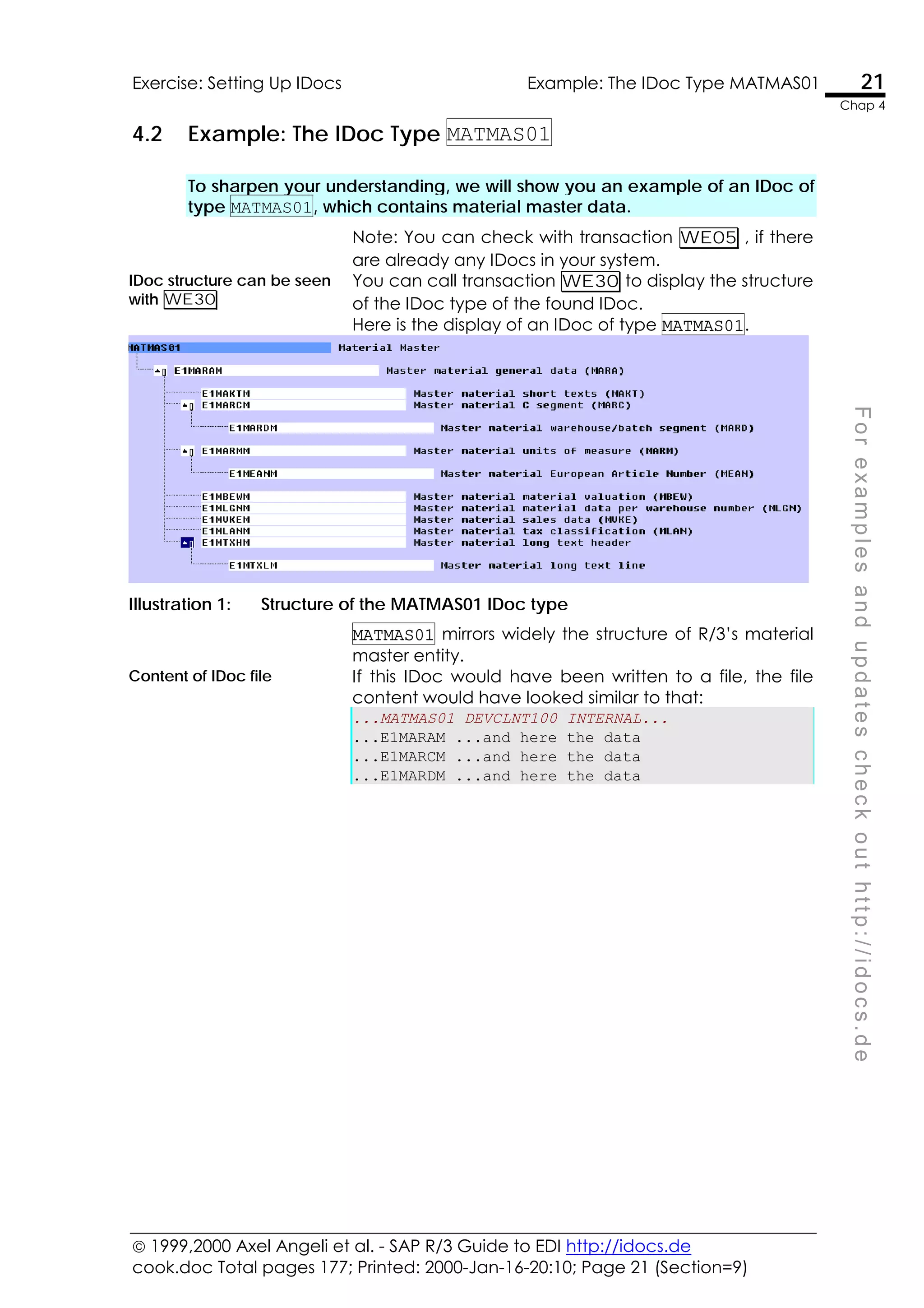
conn.password = ""; /* set password (blank for dialog) */
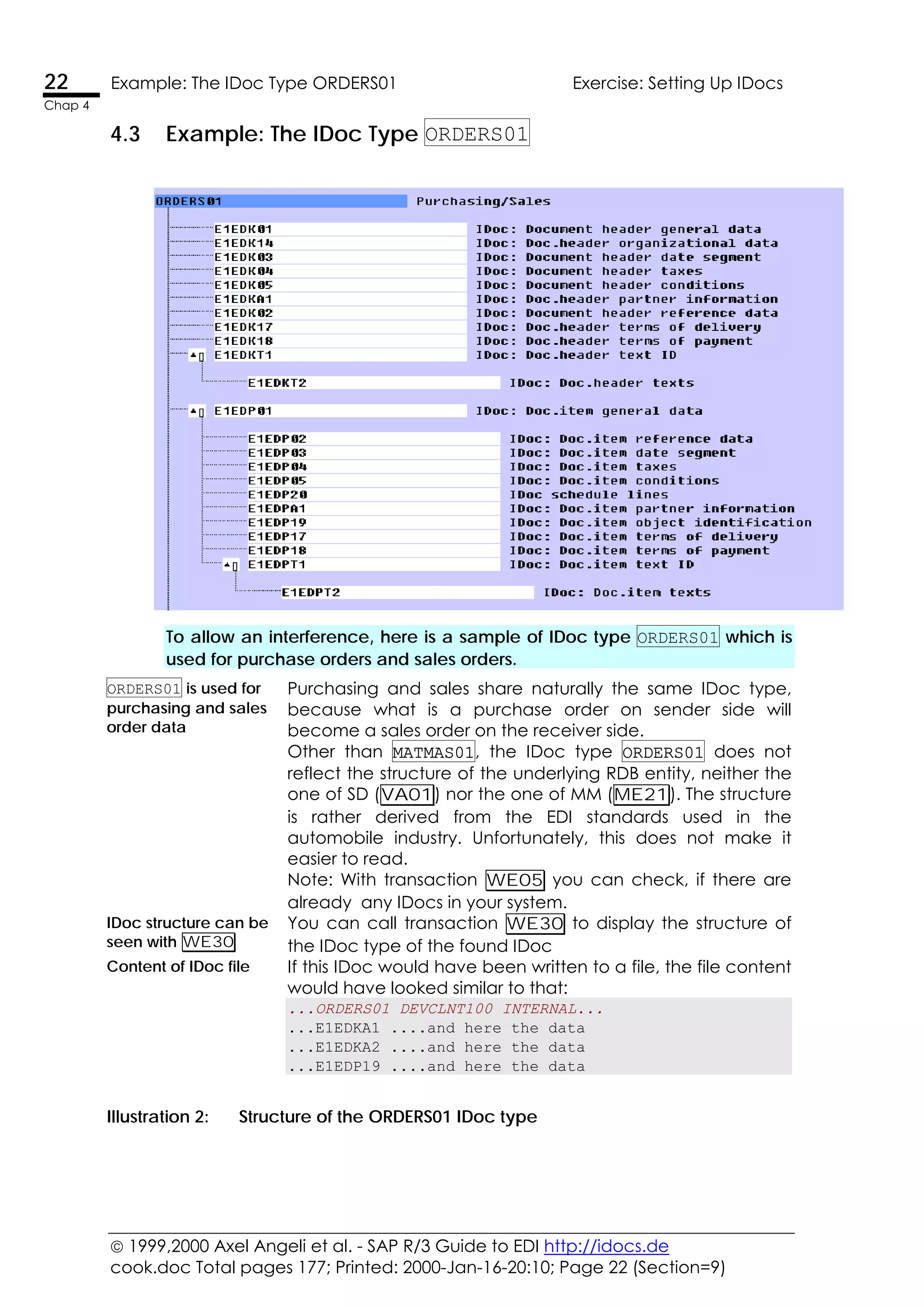
conn.Client = "100"; /* set password (blank for dialog) */
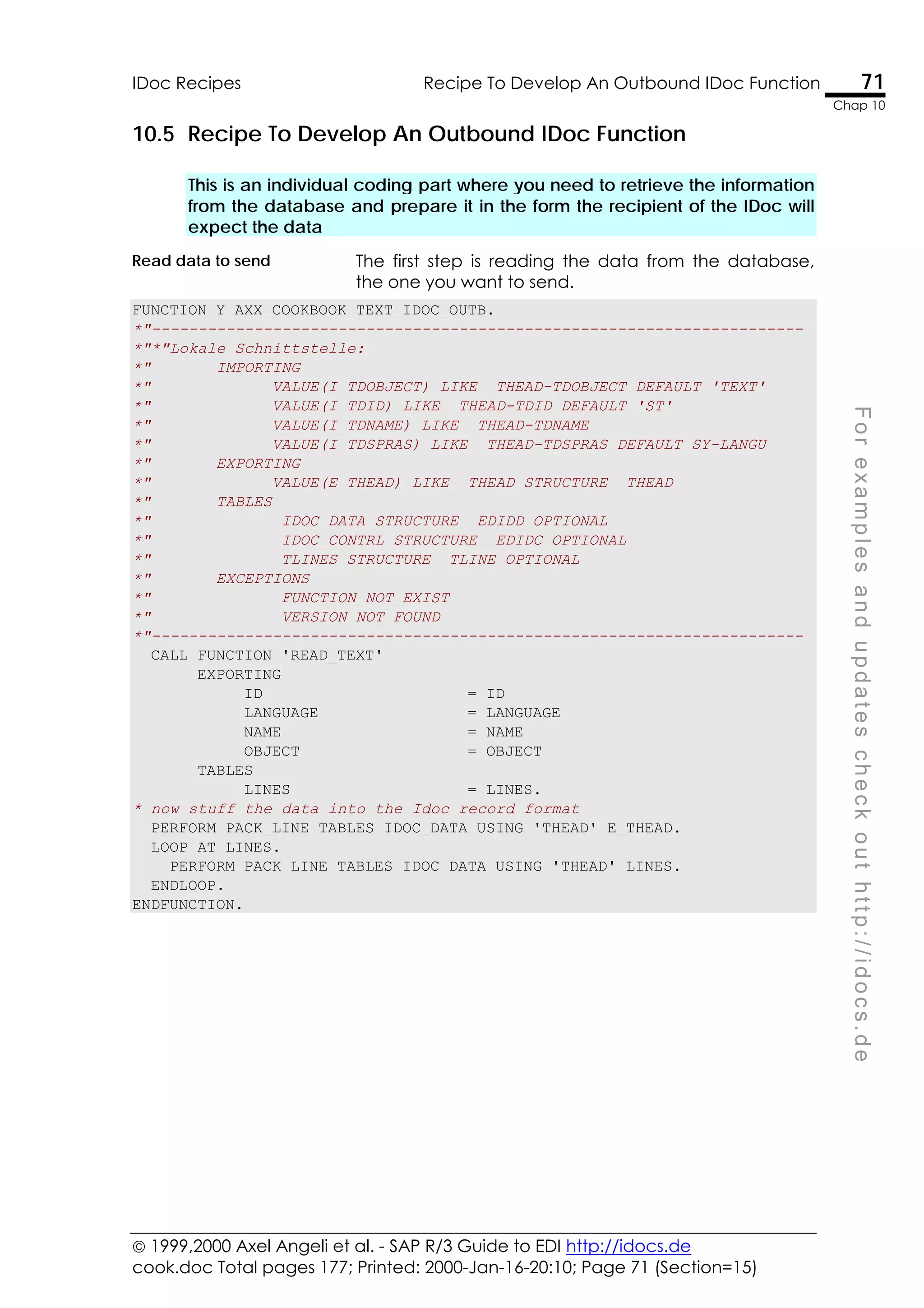
conn.Language = "E"; /* set language (blank for default)
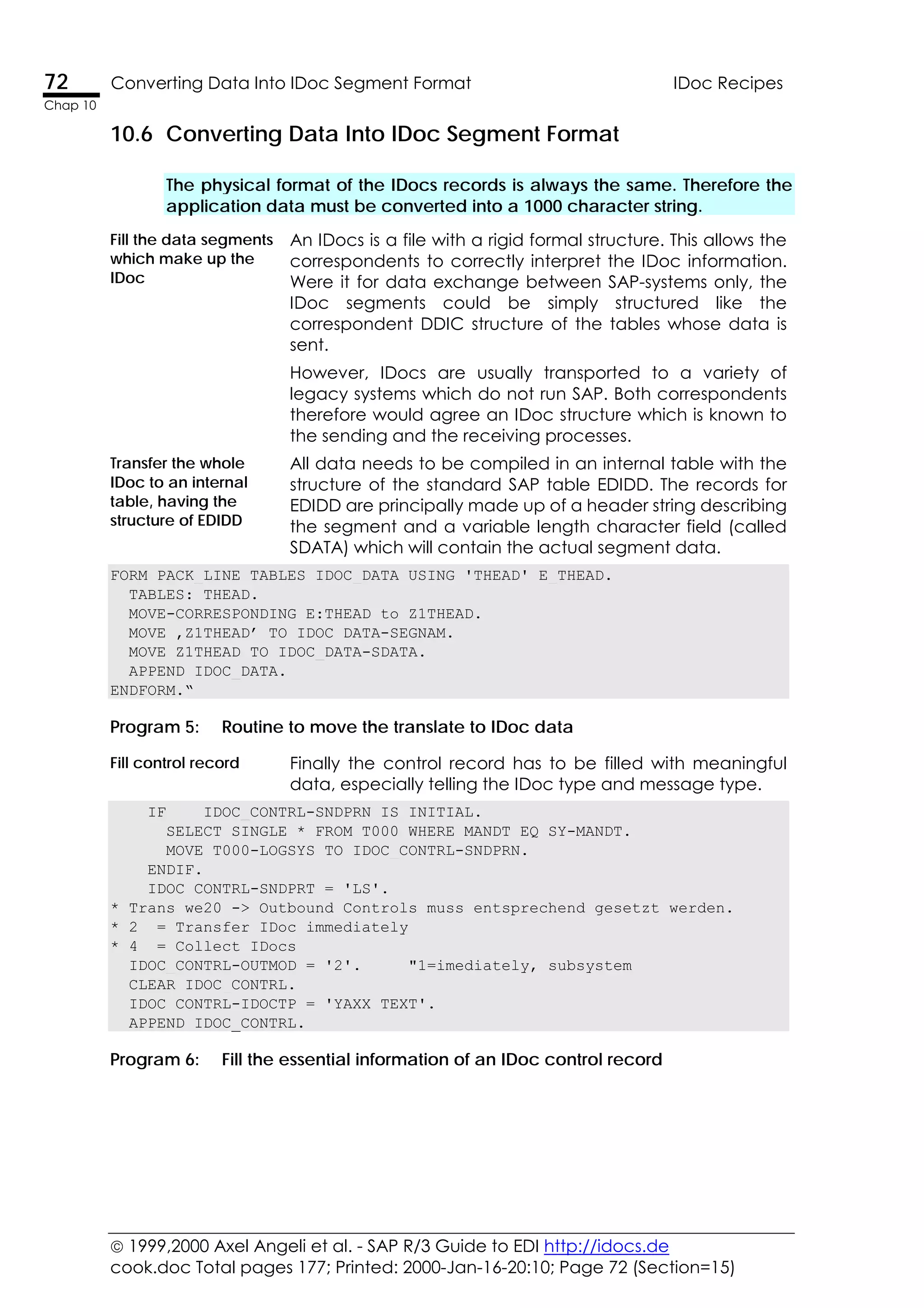
*/
conn.tracelevel = 6; /* set password (blank for dialog) */
conn.RFCWithDialog = 1; /* true: opens visible session window */
exceptions = 0;
conn.logon(0, 0); /* *** this call creates the object *** */
};
function SAPlogoff()
{ conn.logoff(0, 0);
exceptions = 0;
};
// *** execute the SAP function MODULE "RFC_CALL_TRANSACTION_USING"
// as a method execution of object type SAP.functions
function SAPcallTransaction(tcode)
{ exceptions = 0;
callta = fns.add("RFC_CALL_TRANSACTION_USING");
callta.exports("TCODE") = "VA02";
callta.exports("MODE") = "E";
retcd = callta.call;
conn.logoff();
alert(retcd);
SAPcallTransaction = retcd;
};
// --></script>
<body>
<!—Create an HTML button with a JavaScript call attached -->
Call VA02
<input TYPE = "submit"
VALUE = "VA02"
OnClick = "SAPlogon();
SAPcallTransaction(&quot;VA02&quot;);
SAPlogoff()"
>
</body>
Program 9: JavaScript example to call an R/3 function module via OLE/RFC
 1999,2000 Axel Angeli et al. - SAP R/3 Guide to EDI http://idocs.de
cook.doc Total pages 177; Printed: 2000-Jan-16-20:10; Page 93 (Section=18)
Calling R/3 Via OLE/JavaScript R/3 RFC/OLE Troubleshooting 93
Chap 13
F
o
r
e
x
a
m
p
l
e
s
a
n
d
u
p
d
a
t
e
s
c
h
e
c
k
o
u
t
h
t
t
p
:
/
/
i
d
o
c
s
.
d
e
13.4 R/3 RFC/OLE Troubleshooting
Problems connecting via RFC can usually be solved by reinstalling the full
SAPGUI and/or checking your network connection with R/3.
Reinstall the full SAPGUI If you have problems to connect to R/3 via the RFC DLLs
then you should check your network installation. It would
be out of the reach of this publication to detail the
causes and solutions when an RFC connection does not
work.
I may say, that in most cases a full install of the SAPGUI
on the computer which runs the calling program will
secure a reliable connection, provided that you can
login to R/3 problem-free with this very same SAPGUI
installation.
Another trivial but often cause are simple network
problems. So impossible it may appear, you should
always go by the book and first check the network
connection by pinging the R/3 system with the PING
utility and checking the proper access authorities.
Check spelling However, if you successfully passed the SAPlogon
method, then the problem is mostly a misspelling of
object or method names or an incompatibility of the
called function.
Make certain that the
function module in R/3 is
marked as “RFC allowed”
If you are quite sure that you spelled everything right and
correct, and still get an error executing the
SAP.FUNCTIONS.CALL method then you should
investigate the function module in R/3.
Check for syntax errors Generate the function group to see if there is an syntax
error
Make sure that the function is tagged as RFC allowed
 1999,2000 Axel Angeli et al. - SAP R/3 Guide to EDI http://idocs.de
cook.doc Total pages 177; Printed: 2000-Jan-16-20:10; Page 95 (Section=19)
F
o
r
e
x
a
m
p
l
e
s
a
n
d
u
p
d
a
t
e
s
c
h
e
c
k
o
u
t
h
t
t
p
:
/
/
i
d
o
c
s
.
d
e
14
ALE - Application Link Enabling
ALE is an R/3 technology for distribution of data between
independent R/3 installations. ALE is an application which is
built on top of the IDoc engine. It simply adds some
structured way to give R/3 a methodical mean to find
sender, receiver and triggering events for distribution data.
Make Use of ALE for Your Developments
• Transfer master data for material, customer, supplier
and more to a different client or system with BALE
• Copy your settings for the R/3 classification and variant
configurator to another system, also in BALE
• Copy pricing conditions with ALE from the conditions
overview screen (e.g. VV12 )
 1999,2000 Axel Angeli et al. - SAP R/3 Guide to EDI http://idocs.de
cook.doc Total pages 177; Printed: 2000-Jan-16-20:10; Page 96 (Section=19)
96 A Distribution Scenario Based On IDocs ALE - Application Link Enabling
Chap 14
14.1 A Distribution Scenario Based On IDocs
ALE has become very famous in business circles. While it sounds mysterious
and like a genial solution, it is simply a mean to automate data exchange
between SAP systems. It is mainly meant to distribute data from one SAP
system to the next. ALE is a mere enhancement of SAP-EDI and SAP-RFC
technology.
Imagine your company has several sister companies in
different countries. Each company uses its own local SAP
installation. When one company creates master data eg.
material or customer master it is much likely that these data
should be known to all associates. ALE allows to
immediately trigger an IDoc sent to all associates as soon
as the master record is created in one system.
ALE is an SAP designed
concept to automatically
distribute and replicate data
between webbed and
mutually trusting systems
Another common scenario is, that a company uses
different installations for company accounting and
production and sales. In that case ALE allows you to copy
the invoices created in SD immediately to the accounting
installation.
ALE defines the logic and the
triggering events who
describe how and when IDocs
are exchanged between the
systems
ALE defines a set of database entries, which are called the
ALE scenario. These tables contain the information which
IDocs shall be automatically replicated to one or more
connected R/3-compatible data systems.
ALE is an application put upon
the IDoc and RFC
mechanisms of SAP
To be clear: ALE is not a new technology. It is only a
handful of customizing settings and background routines
that allow timed and triggered distribution of data to and
from SAP or RFC-compliant systems. ALE is thus a mere
enhancement of SAP-EDI and SAP-RFC technology.
 1999,2000 Axel Angeli et al. - SAP R/3 Guide to EDI http://idocs.de
cook.doc Total pages 177; Printed: 2000-Jan-16-20:10; Page 97 (Section=19)
ALE - Application Link Enabling Example ALE Distribution Scenario 97
Chap 14
F
o
r
e
x
a
m
p
l
e
s
a
n
d
u
p
d
a
t
e
s
c
h
e
c
k
o
u
t
h
t
t
p
:
/
/
i
d
o
c
s
.
d
e
14.2 Example ALE Distribution Scenario
To better understand let us model a small example ALE scenario for
distribution of master data between several offices.
Let as assume that we want to distribute three types of master
data objects, the material master, the creditor master and the
debtor master.
Let us assume that we have four offices. This graphic scenario
shows the type of data exchanged between the offices. Any of
these offices operates an own stand alone R/3 system. Data is
exchanged as IDocs which are sent from the sending office and
received from the receiving office.
Illustration 18: ALE distribution scenario
Data Object Sender Receiver
MATMAS Material Master R3NYX New York Office R3VEN Venice Office
MATMAS Material Master R3NYX New York Office R3PAR Paris Office
MATMAS Material Master R3NYX New York Office R3LAX Los Angeles
MATMAS Material Master R3PAR Paris Office R3VEN Venice Office
MATMAS Material Master R3LAX Los Angeles R3VEN Venice Office
DEBMAS Debitor Master R3PAR Paris Office R3VEN Venice Office
DEBMAS Debitor Master R3PAR Paris Office R3LAX Los Angeles
CREMAS Creditor Master R3NYX New York Office R3VEN Venice Office
CREMAS Creditor Master R3PAR Paris Office R3VEN Venice Office
CREMAS Creditor Master R3LAX Los Angeles R3VEN Venice Office
Illustration 19: Scenario in tabular form
 1999,2000 Axel Angeli et al. - SAP R/3 Guide to EDI http://idocs.de
cook.doc Total pages 177; Printed: 2000-Jan-16-20:10; Page 98 (Section=19)
98 ALE Distribution Scenario ALE - Application Link Enabling
Chap 14
14.3 ALE Distribution Scenario
ALE is a simple add-on application propped upon the IDoc concept of SAP
R/3. It consists on a couple of predefined ABAPs which rely on the
customisable distribution scenario. These scenarios simple define the IDoc
types and the pairs of partners which exchange data.
ALE defines the logic and the triggering events which describe
how and when IDocs are exchanged between the systems. If the
ALEE engine has determined which data to distribute, it will call
an appropriate routine to create an IDoc. The actual distribution
is then performed by the IDoc layer.
The predefined
distribution
ABAPs can be
used as
templates for
own
development
ALE is of course not restricted to the data types which are already
predefined in the BALE transaction. You can write your ALE
distribution handlers, which should only comply with some formal
standards, e.g. not bypassing the ALE scenarios.
ALE uses IDocs
to transmit data
between
systems
All ALE distribution uses IDocs to replicate the data to the target
system. The ALE applications check with the distribution scenario
and do nothing more than calling the matching IDoc function
module, which is alone responsible for gathering the requested
data and bringing them to the required data port. You need to
thoroughly understand the IDoc concept of SAP beforehand, in
order to understand ALE
The process is extremely simple: Every time a data object, which
is mentioned in an ALE scenario, changes an IDoc is triggered
form one of the defined triggering mechanisms. These are usually
an ABAP or a technical workflow event.
ABAPs can be
used in batch
routine
Distribution ABAPs are started manually or can be set up as a
triggered or timed batch job. Sample ABAPs for ALE distribution
are those used for master data distribution in transaction BALE, like
the ones behind the transaction BD10, BD12 etc.
Workflow is
triggered from
change
document
The workflow for ALE is based on change pointers. Change
pointers are entries in a special database entity, which record the
creation or modification of a database object. These change
pointers are very much like the SAP change documents. They are
also written from within a change document, i.e. from the
function CHANGEDOCUMENT_CLOSE. The workflow is also
triggered from within this function.
Relevance for
change pointers
is defined in IMG
SAP writes those ALE change pointers to circumvent a major draw
back of the change documents. Change documents are and
only are written, if a value of a table column changes, if this
column is associated with a data element which is marked as
relevant for change documents (see SE11). ALE change pointers
use a customized table, which contains the names of those table
fields, which are relevant for change pointers.
 1999,2000 Axel Angeli et al. - SAP R/3 Guide to EDI http://idocs.de
cook.doc Total pages 177; Printed: 2000-Jan-16-20:10; Page 99 (Section=19)
ALE - Application Link Enabling Useful ALE Transaction Codes 99
Chap 14
F
o
r
e
x
a
m
p
l
e
s
a
n
d
u
p
d
a
t
e
s
c
h
e
c
k
o
u
t
h
t
t
p
:
/
/
i
d
o
c
s
.
d
e
14.4 Useful ALE Transaction Codes
ALE is customized via three main transaction. These are SALE, WEDI and
BALE.
This is the core transaction for SALE customizing. Here you find
everything ALE related, which is not already covered by the other
customizing transactions.
SALE - ALE Specific Customizing
WEDI - IDoc
Administration
Here you define all the IDoc related parts, which make up most of
the work related to ALE.
WEDI menu
BALE – Central menu This is a menu, which combines most function necessary for ALE
distribution, especially the triggering of manual distribution of
master data or variant configuration or classification.
BALE menu
BDBG - Automatically
Generate IDocs From
A BAPI
Good stuff for power developers. It allows to generate all IDoc
definitions including segments and IDoc types from the DDIC
entries for a BAPI definition.
 1999,2000 Axel Angeli et al. - SAP R/3 Guide to EDI http://idocs.de
cook.doc Total pages 177; Printed: 2000-Jan-16-20:10; Page 100 (Section=19)
100 Useful ALE Transaction Codes ALE - Application Link Enabling
Chap 14
BDBG create IDoc outbound function from BAPI
 1999,2000 Axel Angeli et al. - SAP R/3 Guide to EDI http://idocs.de
cook.doc Total pages 177; Printed: 2000-Jan-16-20:10; Page 101 (Section=19)
ALE - Application Link Enabling ALE Customizing SALE 101
Chap 14
F
o
r
e
x
a
m
p
l
e
s
a
n
d
u
p
d
a
t
e
s
c
h
e
c
k
o
u
t
h
t
t
p
:
/
/
i
d
o
c
s
.
d
e
14.5 ALE Customizing SALE
ALE customizing is relatively staright forward. The only mandatory task is the
definition of the ALE distribution scenario. The other elements did not prove
as being very helpful in practical applications.
SALE All ALE special customizing is done from within the
transaction SALE, which links you to a subset of the
SAP IMG.
Distribution Scenarios The scenario defines the IDoc types and the pairs of
IDoc partners which participate in the ALE distribution.
The distribution scenario is the reference for all ABAPs
and functionality to determine, which data is to be
replicated and who could be the receiving
candidates. This step is of course mandatory.
Change Pointers The change pointers can be used to trigger the ALE
distribution. This is only necessary if you really want to
use that mechanism. You can however always send
out IDocs every time an application changes data.
This does not require the set-up of the change
pointers.
Filters SAP allows the definition of rules, which allow a
filtering of data, before they are stored in the IDoc
base. This allows you to selective accept or decline
individual IDoc segments.
Conversion ALE allows the definition of conversion rules. These
rules allow the transition of individual field data
according mapping tables. Unfortunately the use of a
function module to convert the data is not realized in
the current R/3 release.
Conversion The filter and conversion functionality is only attractive
on a first glance. Form practical experience we can
state, that they are not really helpful. It takes long
time to set up the rules and rules usually are not
powerful enough to avoid modifications in an
individual scenario. Conversion rules tend to remain
stable, after they have once been defined. Thus it is
usually easier to call am individual IDoc processing
function module, which performs your desired task
more flexible and easier.
 1999,2000 Axel Angeli et al. - SAP R/3 Guide to EDI http://idocs.de
cook.doc Total pages 177; Printed: 2000-Jan-16-20:10; Page 102 (Section=19)
102 Basic Settings SALE ALE - Application Link Enabling
Chap 14
14.6 Basic Settings SALE
Basic settings have do be adjusted before you can start working with ALE.
Illustration 18: Customizing transaction SALE
Logical System Before we start we need to maintain some logical systems.
This a names for the RFC destinations which are used as
communication partners. An entry for the logical system is
created in the table TBDLS.
Illustration 19: SM31 - View Maintenance TBDLS
Assign logical system
to a client
You will finally have to assign a logical system to the clients
involved in ALE or IDoc distribution. This is done in table T000, which
can be edited via SM31 or via the respective SALE tree element.
Illustration 20: SM31 - View Maintenance T000
 1999,2000 Axel Angeli et al. - SAP R/3 Guide to EDI http://idocs.de
cook.doc Total pages 177; Printed: 2000-Jan-16-20:10; Page 103 (Section=19)
ALE - Application Link Enabling Define The Distribution Model (The "Scenario") BD64 103
Chap 14
F
o
r
e
x
a
m
p
l
e
s
a
n
d
u
p
d
a
t
e
s
c
h
e
c
k
o
u
t
h
t
t
p
:
/
/
i
d
o
c
s
.
d
e
14.7 Define The Distribution Model (The "Scenario") BD64
The distribution model (also referred to as ALE-Scenario) is a more or less
graphical approach to define the relationship between the participating
senders and receivers.
Model can only be
maintained by
leading system
The distribution model is shared between all participating partners. It
can therefore only be maintained in one of the systems, which we
shall call the leading system. Only one system can be the leading
system, but you can set the leading system to any of the partners at
any time, even if the scenario is already active.
BD64 This will be the name under which you will address the scenario. It serves
as a container in which you put all the from-to relations.
Illustration 21: Create a model view
Suggestion: One
scenario per
administration area
You can have many scenarios for eventual different purposes. You
may also want to put everything in a single scenario. As a rule of
thumb it proved as successful, that you create one scenario per
administrator. If you have only one ALE administrator, there is no use
of having more than one scenario. If you have several departments
with different requirements, that it might be helpful to create one
scenario per department.
Illustration 22: Add a message type to the scenario
 1999,2000 Axel Angeli et al. - SAP R/3 Guide to EDI http://idocs.de
cook.doc Total pages 177; Printed: 2000-Jan-16-20:10; Page 104 (Section=19)
104 Define The Distribution Model (The "Scenario") BD64ALE - Application Link Enabling
Chap 14
Illustration 23: Model View After Adding MATMAS
Illustration 24: Add an OOP object method the scenario
Illustration 25: Model View After Adding Customer.ChangeFromData
Now go on defining
partner profiles
The model view display graphically the fro-to relations between logical
systems. You now have to generate the partner profiles which are used to
identify the physical means of data transportation between the partners.
 1999,2000 Axel Angeli et al. - SAP R/3 Guide to EDI http://idocs.de
cook.doc Total pages 177; Printed: 2000-Jan-16-20:10; Page 105 (Section=19)
ALE - Application Link Enabling Generating Partner Profiles WE20 105
Chap 14
F
o
r
e
x
a
m
p
l
e
s
a
n
d
u
p
d
a
t
e
s
c
h
e
c
k
o
u
t
h
t
t
p
:
/
/
i
d
o
c
s
.
d
e
14.8 Generating Partner Profiles WE20
A very useful utility is the automatic generation of partner profiles out of the
ALE scenario. Even if you do not use ALE in your installation, it could be only
helpful to define the EDI partners as ALE scenario partners and generate the
partner profiles.
WE20 If you define the first profile for a partner, you have to
create the profile header first. Click an the blank paper
sheet.
Illustration 26: Create a partner
The values give here are not really important. The
partner class is only a classification value. You can give
an arbitrary name in order to group the type of
partners, e.g. EDI for external ones, ALE for internal ones
and IBM for connection with IBM OS/390 systems.
Illustration 27: Specify partner details
 1999,2000 Axel Angeli et al. - SAP R/3 Guide to EDI http://idocs.de
cook.doc Total pages 177; Printed: 2000-Jan-16-20:10; Page 106 (Section=19)
106 Generating Partner Profiles WE20 ALE - Application Link Enabling
Chap 14
Illustration 28: Outbound partner profile before generation
Illustration 29: Inbound partner profile before generation
Illustration 30: Ports defined with SM59
Illustration 31: Generate Partner Profiles Form SALE menu
 1999,2000 Axel Angeli et al. - SAP R/3 Guide to EDI http://idocs.de
cook.doc Total pages 177; Printed: 2000-Jan-16-20:10; Page 107 (Section=19)
ALE - Application Link Enabling Generating Partner Profiles WE20 107
Chap 14
F
o
r
e
x
a
m
p
l
e
s
a
n
d
u
p
d
a
t
e
s
c
h
e
c
k
o
u
t
h
t
t
p
:
/
/
i
d
o
c
s
.
d
e
Illustration 32: Automatically created partner profile
There have been two profiles generated. The one is for
MATMAS, which we explicitly assigned in the distribution
scenario. The second one is a mandatory IDoc type
with the name SYNCH which is used for RFC control
information and synchronisation. This one is only
created if it does not yet exist.
Illustration 33: Outbound partner profile after generation
Here is a detail view of the parameters generated. The
receiver port is the RFC destination, that had been
created for TESTTARGET with SM59.
Data goes to table EDP13.
 1999,2000 Axel Angeli et al. - SAP R/3 Guide to EDI http://idocs.de
cook.doc Total pages 177; Printed: 2000-Jan-16-20:10; Page 108 (Section=19)
108 Generating Partner Profiles WE20 ALE - Application Link Enabling
Chap 14
Illustration 34: Assigning the port to partner link
 1999,2000 Axel Angeli et al. - SAP R/3 Guide to EDI http://idocs.de
cook.doc Total pages 177; Printed: 2000-Jan-16-20:10; Page 109 (Section=19)
ALE - Application Link Enabling Creating IDocs and ALE Interface From BAPI SDBG 109
Chap 14
F
o
r
e
x
a
m
p
l
e
s
a
n
d
u
p
d
a
t
e
s
c
h
e
c
k
o
u
t
h
t
t
p
:
/
/
i
d
o
c
s
.
d
e
14.9 Creating IDocs and ALE Interface From BAPI SDBG
There is a very powerful utility which allows to generate most IDoc and ALE
interface objects directly from a BAPI’s method interface.
BDBG The transaction requires a valid BAPI object and method as it
is defined with SWO1. You will also have to specify a
development class and a function to store the generated
IDoc processing function.
Every time BAPI is executed,
the ALE distribution is
checked
I will demonstrate the use with the object KNA1 and method
CHANGEFROMDATA. This object is executed every time
when the data of a customer (table KNA1) is modified, eg.
via transactions XD01 or XD02. This object will automatically
trigger a workflow event after its own execution, which can
be used for the ALE triggering. BDBG will generate an ALE
interface with all IDoc definitions necessary.This ALE
introduced can be introduced in a scenario. Hence, every
time the customer data is modified, the data is going to be
distributed as an IDoc according the ALE scenario setup.
Enter the object and the method
Specify a name for the created message type
The message type will be created in table EDMSG .
 1999,2000 Axel Angeli et al. - SAP R/3 Guide to EDI http://idocs.de
cook.doc Total pages 177; Printed: 2000-Jan-16-20:10; Page 110 (Section=19)
110 Creating IDocs and ALE Interface From BAPI SDBG ALE - Application Link Enabling
Chap 14
Define the names of the processing function modules
and the associated IDoc types
 1999,2000 Axel Angeli et al. - SAP R/3 Guide to EDI http://idocs.de
cook.doc Total pages 177; Printed: 2000-Jan-16-20:10; Page 111 (Section=19)
ALE - Application Link Enabling Creating IDocs and ALE Interface From BAPI SDBG 111
Chap 14
F
o
r
e
x
a
m
p
l
e
s
a
n
d
u
p
d
a
t
e
s
c
h
e
c
k
o
u
t
h
t
t
p
:
/
/
i
d
o
c
s
.
d
e
Now you can specify the required IDoc types and the
names of the function module and function group for
the processing routines. Note, that the development
class (Entwicklungsklasse) and the function group
(Funktionsgruppe) need to be in your customer name
space, i.e. should begin with Y or Z. The values
proposed on this screen are usually inappropriate.
Result report Click on generated objects to see what was generated in
detail
Illustration 35: Generation protocol
A detailed report is shown. The report is clickable so that
you can directly view the generated objects. The hotspot
will appear when you move over a clickable object.
The transaction has generated an IDoc type
The IDoc type is generated with a header section containing
the interface values of the object, and a data section with
the remaining fields of the object data structure.
The BAPIs interface definition looks like that.
 1999,2000 Axel Angeli et al. - SAP R/3 Guide to EDI http://idocs.de
cook.doc Total pages 177; Printed: 2000-Jan-16-20:10; Page 112 (Section=19)
112 Creating IDocs and ALE Interface From BAPI SDBG ALE - Application Link Enabling
Chap 14
FUNCTION bapi_customer_changefromdata.
*"----------------------------------------------------------------------
*"*"Lokale Schnittstelle:
*" IMPORTING
*" VALUE(PI_ADDRESS) LIKE BAPIKNA101 STRUCTURE BAPIKNA101
*" VALUE(PI_SALESORG) LIKE BAPIKNA102-SALESORG
*" VALUE(PI_DISTR_CHAN) LIKE BAPIKNA102-DISTR_CHAN OPTIONAL
*" VALUE(PI_DIVISION) LIKE BAPIKNA102-DIVISION OPTIONAL
*" VALUE(CUSTOMERNO) LIKE BAPIKNA103-CUSTOMER
*" EXPORTING
*" VALUE(PE_ADDRESS) LIKE BAPIKNA101 STRUCTURE BAPIKNA101
*" VALUE(RETURN) LIKE BAPIRETURN STRUCTURE BAPIRETURN
*"----------------------------------------------------------------------
Illustration 36: Function interface of the BAPI
Generated segment
structure from BAPI
function interface
parameter
For each of the parameters in the BAPIs interface, the
generator created a segment for the IDoc type. Some
segments are used for IDoc inbound only, others for IDoc
outbound instead. Parameter fields that are not structured
will be combined in a single segment which is placed as first
segment of the IDoc type and contains all these fields. This
collection segment receives the name of the IDoc type. In
our example this is the generated segment
Z1ZAXX_KNA1_CHANGED.
The segment below has been created as a header level
segment and combines all function module parameters,
which do not have a structure, i.e. which are single fields. E.g.
if the BAPI has parameters a parameter i_material LIKE mara-
matnr then it will be placed in the control segment. However
if it is declared i_material STRUCTURE mara then it will create
an own IDoc segment.
Illustration 37: Segment Z1ZAXX_KNA1_CHANGED
 1999,2000 Axel Angeli et al. - SAP R/3 Guide to EDI http://idocs.de
cook.doc Total pages 177; Printed: 2000-Jan-16-20:10; Page 113 (Section=19)
ALE - Application Link Enabling Defining Filter Rules 113
Chap 14
F
o
r
e
x
a
m
p
l
e
s
a
n
d
u
p
d
a
t
e
s
c
h
e
c
k
o
u
t
h
t
t
p
:
/
/
i
d
o
c
s
.
d
e
14.10Defining Filter Rules
ALE allows to define simple filter and transformation rules. These are table
entries, which are processed every time the IDoc is handed over to the
port. Depending on the assigned path this happens either on inbound or
outbound.
SALE Rules are defined with the SALE transaction.
Illustration 38: SALE
Illustration 39: Assigning the conversion rule to an IDoc segment
 1999,2000 Axel Angeli et al. - SAP R/3 Guide to EDI http://idocs.de
cook.doc Total pages 177; Printed: 2000-Jan-16-20:10; Page 114 (Section=19)
114 Defining Filter Rules ALE - Application Link Enabling
Chap 14
Illustration 40: Tell, where the value for a field should come fromt
Illustration 41: Define a rule
Illustration 42: Assigning the filter to a partner link
 1999,2000 Axel Angeli et al. - SAP R/3 Guide to EDI http://idocs.de
cook.doc Total pages 177; Printed: 2000-Jan-16-20:10; Page 115 (Section=20)
F
o
r
e
x
a
m
p
l
e
s
a
n
d
u
p
d
a
t
e
s
c
h
e
c
k
o
u
t
h
t
t
p
:
/
/
i
d
o
c
s
.
d
e
15
Workflow Technology
There are two faces of workflow in R/3. There is once the
business oriented workflow design as it is taught in
universities. This is implemented by the SAP Business
Workflow™. However, the workflow is also a tool to link
transactions easily. It can be used to easily define
execution chains of transactions or to trigger user actions
without the need to modify the SAP standard code. This can
even be achieved without laboriously customizing the HR
related workflow settings.
Summary
• Workflow event linkage allows the execution of
another program when a transaction finishes
• The workflow event linkage mechanism can be easily
used without customizing the full workflow scenarios
• This way we use the workflow engine to chain the
execution of transaction and circumvent the setup of
the SAP Business Workflow™
• There are several independent ways to trigger the
workflow event linkage
Americans work hard because they are optimists.
Germans work hard because they fear the future.
 1999,2000 Axel Angeli et al. - SAP R/3 Guide to EDI http://idocs.de
cook.doc Total pages 177; Printed: 2000-Jan-16-20:10; Page 116 (Section=20)
116 Workflow in R/3 and Its Use For Development Workflow Technology
Chap 15
15.1 Workflow in R/3 and Its Use For Development
SAP R/3 provides a mechanism, called Workflow, that allows conditional
and unconditional triggering of subsequent transactions from another
transaction. This allows to build up automatic processing sequences without
having the need to modify the SAP standard transactions.
Workflow as business method The SAP business workflow was originally designed to
model business workflows according to scientific
theories with the same name Business Workflow. This is
mainly a modelling tool, that uses graphical means,
egg. flow charting, to sketch the flow of events in a
system to achieve the required result. SAP allows to
transcript these event modelling into customizing
entries, which are then executed by the SAP Workflow
mechanism.
Transaction SWO1 The transaction to enter the graphical model, to
define the events and objects and to develop
necessary triggering and processing objects, is SWO1
(it is an O not a zero).
SAP approach unnecessary
complex and formal
I will not even try to describe, how to design workflows
in SAP. I believe, that the way how workflows are
realized in SAP is far to complicated and
unnecessarily complex and will fill a separate book.
Workflow events can be used
for own developments
Fortunately the underlying mechanism for workflows is
less complex as the formal overhead. Most major
transactions will trigger the workflow via
SWE_EVENT_CREATE . This will make a call to a
workflow handler routine, whose name can usually be
customized dynamically and implemented as a
function module.
 1999,2000 Axel Angeli et al. - SAP R/3 Guide to EDI http://idocs.de
cook.doc Total pages 177; Printed: 2000-Jan-16-20:10; Page 117 (Section=20)
Workflow Technology Event Coupling (Event Linkage) 117
Chap 15
F
o
r
e
x
a
m
p
l
e
s
a
n
d
u
p
d
a
t
e
s
c
h
e
c
k
o
u
t
h
t
t
p
:
/
/
i
d
o
c
s
.
d
e
15.2 Event Coupling (Event Linkage)
Contrary to what you mostly hear about R/3 workflow, it is relatively easy
and mechanical to define a function module as a consecutive action after
another routine raised a workflow event. This can e.g. be used to call the
execution of a transaction after another one has finished.
Every workflow enabled
transaction will call
SWE_EVENT_CREATE
The whole workflow mechanism is based on a very
simple principle. Every workflow enabled transaction will
call directly or indirectly the function module during
SWE_EVENT_CREATE update.
SWE_EVENT_CREATE will
look in a table, e.g.
SWETYPECOU to get the
name of the following
action
The function module SWE_EVENT_CREATE will then
consult a customizing table. For a simple workflow
coupling, the information is found in the table
SWETYPECOU . The table will tell the name of the
subsequent program to call, either a function module or
an object method.
This way of defining the subsequent action is called
type coupling because the action depends on the
object type of the calling event.
The call to the following event is done with a dynamic
function call. This requires, that the called function
module has a well-defined interface definition. Here you
see the call as it is found in SWE_EVENT_CREATE .
CALL FUNCTION typecou-recgetfb " call receiver_type_get_fb
EXPORTING
objtype = typecou-objtype
objkey = objkey
event = event
generic_rectype = typecou-rectype
IMPORTING
rectype = typecou-rectype
TABLES
event_container = event_container
EXCEPTIONS
OTHERS = 1.
Program 10: This is the call of the type coupled event in release 40B
reading the change
pointers which are not
yet processed
Call Function 'CHANGE_POINTERS_READ'
RBDMIDOC The ABAP RBDMIDOC will process all open change pointers
and distribute the matching IDocs.
 1999,2000 Axel Angeli et al. - SAP R/3 Guide to EDI http://idocs.de
cook.doc Total pages 177; Printed: 2000-Jan-16-20:10; Page 118 (Section=20)
118 Workflow from Change Documents Workflow Technology
Chap 15
15.3 Workflow from Change Documents
Every time a change document is written a workflow event for the change
document object is triggered. This can be used to chain unconditionally an
action from a transaction.
CHANGEDOCUMENT_CLOSE The most interesting chaining point for workflow events
is the creation of the change document. Nearly every
transaction writes change documents to the
database. This document is committed to the
database with the function module
CHANGEDOCUMENT_CLOSE. This function will also trigger a
workflow event.
The workflow handler triggered by an event which is
fired from change documents is defined in table
SWECDOBJ . For every change document type a
different event handler can be assigned. This is usually
a function module and the call for it is the following
CALL FUNCTION swecdobj-objtypefb
EXPORTING
changedocument_header = changedocument_header
objecttype = swecdobj-objtype
IMPORTING
objecttype = swecdobj-objtype
TABLES
changedocument_position = changedocument_position.
Program 11: This is the call of the change doc event in release 40B
In addition change pointers
for ALE are written
Change pointers are created by calling FUNCTION
CHANGEDOCUMENT_CLOSE , which writes the usual
change documents into table CDHDR and CDPOS. This
function calls then the routine
CHANGE_POINTERS_CREATE which create the change
pointers.
CALL FUNCTION 'CHANGE_POINTERS_CREATE'
EXPORTING
change_document_header = cdhdr
TABLES
change_document_position = ins_cdpos.
Program 12: This is the call of the type coupled event in release 40B
 1999,2000 Axel Angeli et al. - SAP R/3 Guide to EDI http://idocs.de
cook.doc Total pages 177; Printed: 2000-Jan-16-20:10; Page 119 (Section=20)
Workflow Technology Trigger a Workflow from Messaging 119
Chap 15
F
o
r
e
x
a
m
p
l
e
s
a
n
d
u
p
d
a
t
e
s
c
h
e
c
k
o
u
t
h
t
t
p
:
/
/
i
d
o
c
s
.
d
e
15.4 Trigger a Workflow from Messaging
The third common way to trigger a workflow is doing it from messaging.
Define a message for
condition technique
When the R/3 messaging creates a message and processes
it immediately, then it actually triggers a workflow. You can
use this to set up conditional workflow triggers, by defining a
message with the message finding and link the message to
a workflow.
Assign media W or 8 You define the message the usual way for your application
as you would do it for defining a message for SAPscript etc.
As a processing media you can assign either the type W for
workflow or 8 for special processing.
The media type W for workflow would require defining an
object in the object repository. We will only show how you
can trigger the workflow with a standard ABAP using the
media type 8.
Form routine requires
two parameters
You need to assign a program and a form routine to the
message in table TNAPR. The form routine you specify needs
exactly two USING-parameters as in the example below.
REPORT ZSNASTWF.
TABLES: NAST.
FORM ENTRY USING RETURN_CODE US_SCREEN.
* Here you gonna call your workflow action
RETURN_CODE = 0.
SY-MSGID = '38'.
SY-MSGNO = '000'.
SY-MSGNO = 'I'.
SY-MSGV1 = 'Workflow called via NAST'.
CALL FUNCTION 'NAST_PROTOCOL_UPDATE'
EXPORTING
MSG_ARBGB = SYST-MSGID
MSG_NR = SYST-MSGNO
MSG_TY = SYST-MSGTY
MSG_V1 = SYST-MSGV1
MSG_V2 = SYST-MSGV2
MSG_V3 = SYST-MSGV3
MSG_V4 = SYST-MSGV4
EXCEPTIONS
OTHERS = 1.
ENDFORM.
NAST must be declared
public in the called
program
In addition, you need to declare the table NAST with a
tables statement public in the ABAP where the form routine
resides. When the form is called the variable NAST is filled
with the values of the calling NAST message.
 1999,2000 Axel Angeli et al. - SAP R/3 Guide to EDI http://idocs.de
cook.doc Total pages 177; Printed: 2000-Jan-16-20:10; Page 120 (Section=20)
120 Example, How To Create A Sample Workflow Handler Workflow Technology
Chap 15
15.5 Example, How To Create A Sample Workflow Handler
Let us show you a function module which is suitable to serve as a function
module and define the linkage.
Create a function
module that will be
triggered by a
workflow event
We want to create a very simple function module that will
be triggered upon a workflow event. This function is called
from within function SWE_EVENT_CREATE. The parameters
must comply the calling standard as shown below.
This is the call of the
type coupled event in
release 40B
CALL FUNCTION typecou-recgetfb
EXPORTING
objtype = typecou-objtype
objkey = objkey
event = event
generic_rectype = typecou-rectype
IMPORTING
rectype = typecou-rectype
TABLES
event_container = event_container
EXCEPTIONS
OTHERS = 1.
Template for workflow
handler
Release 40B provides the function module
WF_EQUI_CHANGE_AFTER_ASSET which could be used as
template for the interface. So we will copy it and put our
coding in instead..
FUNCTION Z_WORKFLOW_HANDLER.
*"*"Lokale Schnittstelle:
*" IMPORTING
*" VALUE(OBJKEY) LIKE SWEINSTCOU-OBJKEY
*" VALUE(EVENT) LIKE SWETYPECOU-EVENT
*" VALUE(RECTYPE) LIKE SWETYPECOU-RECTYPE
*" VALUE(OBJTYPE) LIKE SWETYPECOU-OBJTYPE
*" TABLES
*" EVENT_CONTAINER STRUCTURE SWCONT
*" EXCEPTIONS
*" NO_WORKFLOW
RECEIVERS-EXPRESS = ' '.
RECEIVERS-RECEIVER = SY-SUBRC.
APPEND RECEIVERS.
DOCUMENT_DATA-OBJ_DESCR
= OBJ_KEY.
CONTENT = OBJ_KEY.
APPEND CONTENT.
CALL FUNCTION 'SO_NEW_DOCUMENT_SEND_API1'
EXPORTING DOCUMENT_DATA = DOCUMENT_DATA
TABLES OBJECT_CONTENT = CONTENT
RECEIVERS = RECEIVERS.
ENDFUNCTION.
Program 13: A workflow handler that sends an Sap Office mail
Link handler to The function can be registered as a handler for an event. This is
 1999,2000 Axel Angeli et al. - SAP R/3 Guide to EDI http://idocs.de
cook.doc Total pages 177; Printed: 2000-Jan-16-20:10; Page 121 (Section=20)
Workflow Technology Example, How To Create A Sample Workflow Handler 121
Chap 15
F
o
r
e
x
a
m
p
l
e
s
a
n
d
u
p
d
a
t
e
s
c
h
e
c
k
o
u
t
h
t
t
p
:
/
/
i
d
o
c
s
.
d
e
caller done with transaction SWLD.
Event logging If you do not know the object type, that will trigger the event,
you can use the event log. You have to activate it from SWLD
and then execute the event firing transaction. When the event
has been fired it will a trace in the event log.
Illustration 43: Transaction SWLD to define event linkage and see event log
All workflow handlers are called via RFC to a dummy
destination WORKFLOW_LOCAL_000 where 000 is to be replaced
by the client number.
Most errors are caused by following reasons
Hit list of common
errors
• You forgot to set the RFC flag in the interface definition
of your event handling function module
• There is a syntax error in your function module (check
with generate function group)
• You mistyped something when defining the coupling
• The internal workflow destination WORKFLOW_LOCAL_000
is not defined
SM58 to display
what happened to
your event
If you think your handler did not execute at all, you can check
the list of pending background tasks with transaction SM58. If
you event is not there it has either neither been triggered (so
your tables SWETYPEENA and SSWETYPEOBJ may have the
wrong entries) or your event handler executed indeed and
may probably have done something else than you expected.
Ergo: your mistake.
Read carefully the
help for CALL
FUNCTION .. IN
BACKGROUND TASK
Your event handler function is called IN BACKGROUND TASK.
You may want to read carefully the help on this topic in the SAP
help. (help for “call function” from the editor command line)
 1999,2000 Axel Angeli et al. - SAP R/3 Guide to EDI http://idocs.de
cook.doc Total pages 177; Printed: 2000-Jan-16-20:10; Page 122 (Section=20)
122 Example, How To Create A Sample Workflow Handler Workflow Technology
Chap 15
FUNCTION YAXXWF_MAIL_ON_EVENT.
*" IMPORTING
*" VALUE(OBJKEY) LIKE SWEINSTCOU-OBJKEY
*" VALUE(EVENT) LIKE SWETYPECOU-EVENT
*" VALUE(RECTYPE) LIKE SWETYPECOU-RECTYPE
*" VALUE(OBJTYPE) LIKE SWETYPECOU-OBJTYPE
*" TABLES
*" EVENT_CONTAINER STRUCTURE SWCONT
************************************************************************
* This example sends a mail to the calling user and tells
* about the circumstances when the event was fired.
* Just for fun, it lists also all current enqueue locks
************************************************************************
DATA: ENQ LIKE SEQG3 OCCURS 0 WITH HEADER LINE.
DATA: DOC_DATA LIKE SODOCCHGI1.
DATA: MAIL LIKE STANDARD TABLE OF SOLISTI1 WITH HEADER LINE.
DATA: RECLIST LIKE STANDARD TABLE OF SOMLRECI1 WITH HEADER LINE.
MAIL-LINE = 'Event fired by user: &'.
REPLACE '&' WITH SY-UNAME INTO MAIL-LINE.
APPEND MAIL.
*----------------------------------------------------------------------*
MAIL-LINE = 'Object Key: &'.
REPLACE '&' WITH OBJKEY INTO MAIL-LINE.
APPEND MAIL.
*----------------------------------------------------------------------*
MAIL-LINE = 'Event Name: &'.
REPLACE '&' WITH EVENT INTO MAIL-LINE.
APPEND MAIL.
*----------------------------------------------------------------------*
MAIL-LINE = 'Rectype: &'.
REPLACE '&' WITH RECTYPE INTO MAIL-LINE.
APPEND MAIL.
*----------------------------------------------------------------------*
MAIL-LINE = 'Object Type: &'.
REPLACE '&' WITH OBJTYPE INTO MAIL-LINE.
APPEND MAIL.
*----------------------------------------------------------------------*
MAIL-LINE = 'Container contents:'.
APPEND MAIL.
*----------------------------------------------------------------------*
LOOP AT EVENT_CONTAINER.
CONCATENATE EVENT_CONTAINER-ELEMENT EVENT_CONTAINER-VALUE
INTO MAIL-LINE SEPARATED BY SPACE.
APPEND MAIL.
ENDLOOP.
*----- write the current enqueues into the message -(for demo)---------*
MAIL-LINE = 'Active enqueue locks when event was triggered:'.
APPEND MAIL.
CALL FUNCTION 'ENQUEUE_READ' TABLES ENQ = ENQ.
LOOP AT ENQ.
CONCATENATE ENQ-GNAME ENQ-GARG ENQ-GMODE ENQ-GUSR ENQ-GUSRVB
ENQ-GOBJ ENQ-GCLIENT ENQ-GUNAME ENQ-GTARG ENQ-GTCODE
INTO MAIL-LINE SEPARATED BY '/'.
APPEND MAIL.
ENDLOOP.
 1999,2000 Axel Angeli et al. - SAP R/3 Guide to EDI http://idocs.de
cook.doc Total pages 177; Printed: 2000-Jan-16-20:10; Page 123 (Section=20)
Workflow Technology Example, How To Create A Sample Workflow Handler 123
Chap 15
F
o
r
e
x
a
m
p
l
e
s
a
n
d
u
p
d
a
t
e
s
c
h
e
c
k
o
u
t
h
t
t
p
:
/
/
i
d
o
c
s
.
d
e
IF ENQ[] IS INITIAL.
MAIL-LINE = '*** NONE ***'.
APPEND MAIL.
ENDIF.
*----------------------------------------------------------------------*
* fill the receiver list
REFRESH RECLIST.
RECLIST-RECEIVER = 'USERXYZ'.
RECLIST-REC_TYPE = 'B'.
RECLIST-EXPRESS = ' '.
* reclist-express = 'X'. "will pop up a notification on receiver screen
APPEND RECLIST.
*----------------------------------------------------------------------*
CLEAR DOC_DATA.
DOC_DATA-OBJ_NAME = 'WF-EVENT'.
DOC_DATA-OBJ_DESCR = 'Event triggered by workflow type coupling'.
DOC_DATA-OBJ_SORT = 'WORKFLOW'.
* doc_data-obj_expdat
* doc_data-sensitivty
* doc_data-obj_prio
* doc_data-no_change
*----------------------------------------------------------------------*
CALL FUNCTION 'SO_NEW_DOCUMENT_SEND_API1'
EXPORTING
DOCUMENT_DATA = DOC_DATA
* DOCUMENT_TYPE = 'RAW'
* PUT_IN_OUTBOX = ' '
* IMPORTING
* SENT_TO_ALL =
* NEW_OBJECT_ID =
TABLES
* OBJECT_HEADER =
OBJECT_CONTENT = MAIL
* OBJECT_PARA =
* OBJECT_PARB =
RECEIVERS = RECLIST
EXCEPTIONS
TOO_MANY_RECEIVERS = 1
DOCUMENT_NOT_SENT = 2
DOCUMENT_TYPE_NOT_EXIST = 3
OPERATION_NO_AUTHORIZATION = 4
PARAMETER_ERROR = 5
X_ERROR = 6
ENQUEUE_ERROR = 7
OTHERS = 8.
*----------------------------------------------------------------------*
ENDFUNCTION.
Program 14: Send a SAPoffice mail triggered by a workflow event (full example)
 1999,2000 Axel Angeli et al. - SAP R/3 Guide to EDI http://idocs.de
cook.doc Total pages 177; Printed: 2000-Jan-16-20:10; Page 125 (Section=21)
F
o
r
e
x
a
m
p
l
e
s
a
n
d
u
p
d
a
t
e
s
c
h
e
c
k
o
u
t
h
t
t
p
:
/
/
i
d
o
c
s
.
d
e
16
Batch Input Recording
The batch input (BTCI) recorder (SHDB) is a precious tool
to develop inbound IDocs. It records any transaction like a
macro recorder. From the recording an ABAP fragment can
be created. This lets you easily create data input programs,
without coding new transactions.
 1999,2000 Axel Angeli et al. - SAP R/3 Guide to EDI http://idocs.de
cook.doc Total pages 177; Printed: 2000-Jan-16-20:10; Page 126 (Section=21)
126 Recording a Transaction With SHDB Batch Input Recording
Chap 16
16.1 Recording a Transaction With SHDB
The BTCI recorder lets you record the screen sequences and values entered
during a transaction. It is one of the most precious tools in R/3 since release
3.1. It allows a fruitful cooperation between programmer and application
consultant.
The section below will show you an example of, how the
transaction SHDB works. With the recording you can easily
create an ABAP, which is able to create BTCI files.
Record a session with
transaction SHDB
You will be asked for a session name and the name of the
transaction to record. Then you can enter the data into the
transaction as usual.
Illustration 44: Starting a new recording with SHDB
Now the transaction is
played and all entries
recorded
The following screens will show the usual transaction screens.
All entries that you make are recorded together with the
screen name and eventual cursor positions.
 1999,2000 Axel Angeli et al. - SAP R/3 Guide to EDI http://idocs.de
cook.doc Total pages 177; Printed: 2000-Jan-16-20:10; Page 127 (Section=21)
Batch Input Recording Recording a Transaction With SHDB 127
Chap 16
F
o
r
e
x
a
m
p
l
e
s
a
n
d
u
p
d
a
t
e
s
c
h
e
c
k
o
u
t
h
t
t
p
:
/
/
i
d
o
c
s
.
d
e
Illustration 45: First screen of MB1C (goods entry)
Illustration 46: Recorded list screen for goods entry
 1999,2000 Axel Angeli et al. - SAP R/3 Guide to EDI http://idocs.de
cook.doc Total pages 177; Printed: 2000-Jan-16-20:10; Page 128 (Section=21)
128 Recording a Transaction With SHDB Batch Input Recording
Chap 16
Illustration 47: Recorded Detail Screen for goods entry
From the recorded
session, you can
generate an ABAP
After you finished the recording you have the possibility to
generate ABAP coding from it. This will be a sequence of
statements which can generate a batch input session,
which is an exact replay of the recorded one.
The generated program contains an include BDCRECXX
which contains all the FORM routines referenced.
Put the coding into a
function module
To make the recorded code usable for other program, you
should make a function module out of it. Start9ing with
release 4.5A the recorded provides a feature to
automatically generate such a function module. For earlier
release we give the coding of a program which fulfils this
task further down.
 1999,2000 Axel Angeli et al. - SAP R/3 Guide to EDI http://idocs.de
cook.doc Total pages 177; Printed: 2000-Jan-16-20:10; Page 129 (Section=21)
Batch Input Recording How to Use the Recorder Efficiently 129
Chap 16
F
o
r
e
x
a
m
p
l
e
s
a
n
d
u
p
d
a
t
e
s
c
h
e
c
k
o
u
t
h
t
t
p
:
/
/
i
d
o
c
s
.
d
e
16.2 How to Use the Recorder Efficiently
This routine replaces BDCRECXX to allow executing the program generated
by SHDB via a call transaction instead of generating a BTCI file.
From the recorded session,
you can generate an ABAP
The SHDB transaction creates an ABAP from the
recording. When you run this ABAP, it will generate a
BTCI group file, with exactly the same data as in the
recording.
The recorder is able to generate an ABAP. Releases
before 4.5A include a routine BDCRECXX. This include
contains FORM routines which fill the BDCDATA table
and execute the routines BDC_OPEN_GROUP and
BDC_CLOSE_GROUP. These are the routines which
create batch input files.
Replace the include with
modified FORM routines to
allow CALL TRANSACTION
If we modified this FORM routines a little bit, we can
make the ABAP replay the recording online via a CALL
TRANSACTION, which is much more suitable for our
development and testing purposes. If you replace the
standard include BDCRECXX with the shown one
ZZBDCRECXX, you can replay the recording online.
Starting with release 4.5A you can create a function
module from the recording. This function modules
replace the recorded constants with parameters and
give you the option to choose between a batch input
file or a direct call transaction.
Scrolling areas with table
controls require to modify
the recording and to add a
loop.
A remark on screen processing, if there are table
controls (scroll areas). If you enter many lines or try to
extend a list, where you do cannot tell before, how
many lines the list contains, you will not know, where to
place the cursor. Therefore most transactions provide a
menu option, that positions the list in a calculable
manner. If you choose a new item, most transaction
will either pop up a detail screen or will position the list,
so that the next free line is always line 2. If this feature is
not provided in a transaction, it is regarded as a
malfunction by SAP and can be reported to
SAPNET/OSS.
 1999,2000 Axel Angeli et al. - SAP R/3 Guide to EDI http://idocs.de
cook.doc Total pages 177; Printed: 2000-Jan-16-20:10; Page 130 (Section=21)
130 Include ZZBDCRECXX to Replace BDCRECXX Batch Input Recording
Chap 16
16.3 Include ZZBDCRECXX to Replace BDCRECXX
This routine replaces BDCRECXX to allow executing the program generated
by SHDB via a call transaction instead of generating a BTCI file.
*----------------------------------------------------------------------*
* INCLUDE ZZBDCRECXX *
*----------------------------------------------------------------------*
FORM OPEN_GROUP.
REFRESH BDCDATA.
ENDFORM.
*---------------------------------------------------------------------*
FORM CLOSE_GROUP.
ENDFORM.
*----------------------------------------------------------------------*
FORM BDC_TRANSACTION USING TCODE.
CALL TRANSACTION TCODE USING BDCDATA MODE 'A' MESSAGES INTO BDCMESS.
ENDFORM.
*---------------------------------------------------------------------*
FORM BDC_TRANSACTION_MODE USING TCODE AMODE.
CALL TRANSACTION TCODE USING BDCDATA UPDATE 'S'
MODE AMODE MESSAGES INTO BDCMESS.
ENDFORM.
*----------------------------------------------------------------------*
FORM BDC_DYNPRO USING PROGRAM DYNPRO.
CLEAR BDCDATA.
BDCDATA-PROGRAM = PROGRAM.
BDCDATA-DYNPRO = DYNPRO.
BDCDATA-DYNBEGIN = 'X'.
APPEND BDCDATA.
ENDFORM.
*----------------------------------------------------------------------*
FORM BDC_FIELD USING FNAM FVAL.
FIELD-SYMBOLS: <FLD>.
ASSIGN (FNAM) TO <FLD>.
CLEAR BDCDATA.
DESCRIBE FIELD FVAL TYPE SY-FTYPE.
CASE SY-FTYPE.
WHEN 'C'.
WRITE FVAL TO BDCDATA-FVAL.
WHEN OTHERS.
CONDENSE FVAL.
WRITE FVAL TO BDCDATA-FVAL LEFT-JUSTIFIED.
ENDCASE.
BDCDATA-FNAM = FNAM.
APPEND BDCDATA.
ENDFORM. " BDC_FIELD
 1999,2000 Axel Angeli et al. - SAP R/3 Guide to EDI http://idocs.de
cook.doc Total pages 177; Printed: 2000-Jan-16-20:10; Page 131 (Section=21)
Batch Input Recording Include ZZBDCRECXX to Replace BDCRECXX 131
Chap 16
F
o
r
e
x
a
m
p
l
e
s
a
n
d
u
p
d
a
t
e
s
c
h
e
c
k
o
u
t
h
t
t
p
:
/
/
i
d
o
c
s
.
d
e
*----------------------------------------------------------------------*
FORM GET_MESSAGES TABLES P_MESSTAB STRUCTURE BDCMSGCOLL.
P_MESSTAB[] = BDCMESS[].
LOOP AT P_MESSTAB.
AT LAST.
READ TABLE P_MESSTAB INDEX SY-TABIX.
MOVE-CORRESPONDING P_MESSTAB TO SYST.
ENDAT.
ENDLOOP.
ENDFORM. " GET_MESSAGES
*----------------------------------------------------------------------*
FORM GET_RESULTS TABLES MESSTAB STRUCTURE BDCMSGCOLL
RETURN_VARIABLES STRUCTURE BDWFRETVAR
CHANGING WORKFLOW_RESULT LIKE BDWF_PARAM-RESULT.
PERFORM GET_MESSAGES TABLES MESSTAB.
DESCRIBE TABLE MESSTAB LINES SY-TFILL.
REFRESH: RETURN_VARIABLES.
CLEAR: WORKFLOW_RESULT, RETURN_VARIABLES.
WORKFLOW_RESULT = 99999.
IF SY-TFILL GT 0.
READ TABLE MESSTAB INDEX SY-TFILL.
IF MESSTAB-MSGTYP CA 'S'.
WORKFLOW_RESULT = 0.
RETURN_VARIABLES-DOC_NUMBER = MESSTAB-MSGV1.
APPEND RETURN_VARIABLES.
ENDIF.
ENDIF.
ENDFORM. " GET_RESULTS
Program 15: Program ZZBDCRECXX (find at http://www.idocs.de)
 1999,2000 Axel Angeli et al. - SAP R/3 Guide to EDI http://idocs.de
cook.doc Total pages 177; Printed: 2000-Jan-16-20:10; Page 132 (Section=21)
132 ZZBRCRECXX_FB_GEN: Generate a Function from RecordingBatch Input Recording
Chap 16
16.4 ZZBRCRECXX_FB_GEN: Generate a Function from Recording
The shown routine ZZBDCRECXX_FB_GEN replaces BDCRECXX in a recorded
ABAP. Upon executing, it will generate a function module from the
recording with all variables as parameters.
The ABAP generated by SHDB is a very useful tool for
developers. However, it does not replace the recorded
constants by variables.
The following routine generates a function module from the
recording. All you have to do is, to put the coding below in an
include.
ZZBDCRECXX_FBGEN Give it the name ZZBDCRECXX_FBGEN.
Replace BDCRECXX Then replace the include BDCRECXX in the recording with
ZZBDCRECXX_FBGEN.
Execute the ABAP
once
When you execute the ABAP, a function module in an existing
function group will be created. The created function will
contain the recording with all the constants replaced by
variables, which show in the function module interface.
The following useful routine is written for releases up to 4.0B. In
release 4.5B a similar functionality is provided. You can
generate a function module from the recording transaction
directly.
Before you generate the function, a function group must exist.
This you have to do manually. The function group must also
contain the include ZZBDCRECXX shown before, to have the
declarations of the referenced FORM routines.
*----------------------------------------------------------------------*
PARAMETERS: FUNCNAME LIKE RS38L-NAME DEFAULT 'Z_TESTING_BTCI_$1'.
PARAMETERS: FUGR LIKE RS38L-AREA DEFAULT 'Z_BTCI_TESTING'.
*----------------------------------------------------------------------*
DATA: TABAP LIKE ABAPTEXT OCCURS 0 WITH HEADER LINE.
DATA: BEGIN OF XCONST OCCURS 0,
NAM LIKE DD03L-FIELDNAME, FREF LIKE DD03L-FIELDNAME,
FVAL LIKE BDCDATA-FVAL, FIDX(6),
END OF XCONST.
DATA: STRL1 LIKE SY-FDPOS.
DATA: STRL2 LIKE STRL1.
DATA: IMPORT_PARAMETER LIKE RSIMP OCCURS 0 WITH HEADER LINE.
DATA: EXPORT_PARAMETER LIKE RSEXP OCCURS 0 WITH HEADER LINE.
DATA: TABLES_PARAMETER LIKE RSTBL OCCURS 0 WITH HEADER LINE.
DATA: CHANGING_PARAMETER LIKE RSCHA OCCURS 0 WITH HEADER LINE.
DATA: EXCEPTION_LIST LIKE RSEXC OCCURS 0 WITH HEADER LINE.
DATA: PARAMETER_DOCU LIKE RSFDO OCCURS 0 WITH HEADER LINE.
DATA: SHORT_TEXT LIKE TFTIT-STEXT
VALUE 'Generated BTCI for transaction ##'.
DATA: XTCODE LIKE SY-TCODE.
DATA: STR255(255).
TABLES: TLIBG, TFDIR.
*----------------------------------------------------------------------*
FORM OPEN_GROUP.
 1999,2000 Axel Angeli et al. - SAP R/3 Guide to EDI http://idocs.de
cook.doc Total pages 177; Printed: 2000-Jan-16-20:10; Page 133 (Section=21)
Batch Input Recording ZZBRCRECXX_FB_GEN: Generate a Function from Recording 133
Chap 16
F
o
r
e
x
a
m
p
l
e
s
a
n
d
u
p
d
a
t
e
s
c
h
e
c
k
o
u
t
h
t
t
p
:
/
/
i
d
o
c
s
.
d
e
FORMAT COLOR COL_TOTAL.
WRITE: / 'Trying to generate function ', FUNCNAME.
FORMAT RESET.
ULINE.
SELECT SINGLE * FROM TLIBG WHERE AREA EQ FUGR.
IF SY-SUBRC NE 0.
MESSAGE I000(38) WITH 'Function Pool' FUGR 'does not exit'.
EXIT.
ENDIF.
MOVE 'PERFORM OPEN_GROUP.' TO TABAP.
APPEND TABAP.
*----------------------------------------------------------------------*
XCONST-FNAM = 'INPUT_METHOD'.
XCONST-FREF = 'BDWFAP_PAR-INPUTMETHD'.
XCONST-FVAL = 'A'.
APPEND XCONST.
ENDFORM.
*---------------------------------------------------------------------*
FORM CLOSE_GROUP.
LOOP AT XCONST.
IMPORT_PARAMETER-PARAMETER = XCONST-FNAM.
IMPORT_PARAMETER-DBFIELD = XCONST-FREF.
CONCATENATE '''' XCONST-FVAL '''' INTO
IMPORT_PARAMETER-DEFAULT.
IMPORT_PARAMETER-OPTIONAL = 'X'.
CASE XCONST-FIDX.
WHEN 'E'.
MOVE-CORRESPONDING IMPORT_PARAMETER TO EXPORT_PARAMETER.
APPEND EXPORT_PARAMETER.
WHEN '*'.
WHEN OTHERS.
APPEND IMPORT_PARAMETER.
ENDCASE.
* --make table parameters for obvious loop fields (fields with index)
IF XCONST-FIDX CA ')*'.
MOVE-CORRESPONDING IMPORT_PARAMETER TO TABLES_PARAMETER.
TABLES_PARAMETER-DBSTRUCT = IMPORT_PARAMETER-DBFIELD.
IF XCONST-FIDX NE '*'.
TABLES_PARAMETER-PARAMETER(1) = 'T'.
ENDIF.
IF XCONST-FIDX CA '*'.
APPEND TABLES_PARAMETER.
ENDIF.
FORMAT COLOR COL_POSITIVE.
ENDIF.
WRITE: / XCONST-FNAM COLOR COL_TOTAL, (60) XCONST-FVAL.
ENDLOOP.
* SORT import_parameter BY parameter.
* DELETE ADJACENT DUPLICATES FROM import_parameter COMPARING parameter.
* SORT tables_parameter BY parameter.
* DELETE ADJACENT DUPLICATES FROM tables_parameter COMPARING parameter.
*----------------------------------------------------------------------*
LOOP AT TABAP.
 1999,2000 Axel Angeli et al. - SAP R/3 Guide to EDI http://idocs.de
cook.doc Total pages 177; Printed: 2000-Jan-16-20:10; Page 134 (Section=21)
134 ZZBRCRECXX_FB_GEN: Generate a Function from RecordingBatch Input Recording
Chap 16
WRITE: / TABAP COLOR COL_KEY.
ENDLOOP.
*----------------------------------------------------------------------*
REPLACE '##' WITH XTCODE INTO SHORT_TEXT.
WRITE: / FUNCNAME COLOR COL_NEGATIVE.
WRITE: / SHORT_TEXT.
SELECT SINGLE * FROM TFDIR WHERE FUNCNAME EQ FUNCNAME.
IF SY-SUBRC EQ 0.
MESSAGE I000(38) WITH 'Function' FUNCNAME 'already exists'.
PERFORM SUCCESS_MESSAGE
USING 'Function' FUNCNAME 'already exists' SPACE ' '.
EXIT.
ENDIF.
CALL FUNCTION 'RPY_FUNCTIONMODULE_INSERT'
EXPORTING
FUNCNAME = FUNCNAME
FUNCTION_POOL = FUGR
SHORT_TEXT = SHORT_TEXT
TABLES
IMPORT_PARAMETER = IMPORT_PARAMETER
EXPORT_PARAMETER = EXPORT_PARAMETER
TABLES_PARAMETER = TABLES_PARAMETER
CHANGING_PARAMETER = CHANGING_PARAMETER
EXCEPTION_LIST = EXCEPTION_LIST
PARAMETER_DOCU = PARAMETER_DOCU
SOURCE = TABAP
EXCEPTIONS
OTHERS = 7.
IF SY-SUBRC NE 0.
MESSAGE I000(38) WITH 'Error creating' 'Function ' FUNCNAME.
ENDIF.
ENDFORM.
*----------------------------------------------------------------------*
FORM BDC_TRANSACTION USING TCODE.
APPEND '*' TO TABAP.
MOVE 'PERFORM BDC_TRANSACTION_MODE USING I_TCODE INPUT_METHOD.'
TO TABAP.
APPEND TABAP.
*----------------------------------------------------------------------*
XTCODE = TCODE.
STR255 = FUNCNAME.
REPLACE '$1' WITH XTCODE INTO STR255.
CONDENSE STR255 NO-GAPS.
FUNCNAME = STR255.
*----------------------------------------------------------------------*
XCONST-FNAM = 'I_TCODE'.
XCONST-FREF = 'SYST-TCODE'.
XCONST-FVAL = TCODE.
XCONST-FIDX = SPACE.
INSERT XCONST INDEX 1.
*----------------------------------------------------------------------*
MOVE 'PERFORM GET_RESULTS TABLES TMESSTAB' TO TABAP.
APPEND TABAP.
MOVE ' RETURN_VARIABLES' TO TABAP.
APPEND TABAP.
MOVE ' USING ''1'' ' TO TABAP.
 1999,2000 Axel Angeli et al. - SAP R/3 Guide to EDI http://idocs.de
cook.doc Total pages 177; Printed: 2000-Jan-16-20:10; Page 135 (Section=21)
Batch Input Recording ZZBRCRECXX_FB_GEN: Generate a Function from Recording 135
Chap 16
F
o
r
e
x
a
m
p
l
e
s
a
n
d
u
p
d
a
t
e
s
c
h
e
c
k
o
u
t
h
t
t
p
:
/
/
i
d
o
c
s
.
d
e
APPEND TABAP.
MOVE ' CHANGING WORKFLOW_RESULT .' TO TABAP.
APPEND TABAP.
MOVE ' READ TABLE RETURN_VARIABLES INDEX 1.' TO TABAP.
APPEND TABAP.
MOVE ' DOC_NUMBER = RETURN_VARIABLES-DOC_NUMBER.' TO TABAP.
APPEND TABAP.
*----------------------------------------------------------------------*
XCONST-FNAM = 'TMESSTAB'.
XCONST-FREF = 'BDCMSGCOLL'.
XCONST-FVAL = SPACE.
XCONST-FIDX = '*'.
INSERT XCONST INDEX 1.
*----------------------------------------------------------------------*
XCONST-FNAM = 'RETURN_VARIABLES'.
XCONST-FREF = 'BDWFRETVAR'.
XCONST-FVAL = SPACE.
XCONST-FIDX = '*'.
INSERT XCONST INDEX 1.
*----------------------------------------------------------------------*
XCONST-FNAM = 'WORKFLOW_RESULT'.
XCONST-FREF = 'BDWF_PARAM-RESULT'.
XCONST-FVAL = SPACE.
XCONST-FIDX = 'E'.
INSERT XCONST INDEX 1.
*----------------------------------------------------------------------*
XCONST-FNAM = 'APPLICATION_VARIABLE'.
XCONST-FREF = 'BDWF_PARAM-APPL_VAR'.
XCONST-FIDX = 'E'.
INSERT XCONST INDEX 1.
*----------------------------------------------------------------------*
XCONST-FNAM = 'DOC_NUMBER'.
XCONST-FREF = SPACE.
XCONST-FIDX = 'E'.
INSERT XCONST INDEX 1.
ENDFORM.
*----------------------------------------------------------------------*
FORM BDC_DYNPRO USING PROGRAM DYNPRO.
TABAP = '*'.
APPEND TABAP.
CONCATENATE
'PERFORM BDC_DYNPRO USING ''' PROGRAM '''' ' ''' DYNPRO '''.'
INTO TABAP.
APPEND TABAP.
ENDFORM.
*----------------------------------------------------------------------*
FORM BDC_FIELD USING FNAM FVAL.
DATA: XFVAL LIKE BDCDATA-FVAL.
CLEAR XCONST.
CASE FNAM.
WHEN 'BDC_OKCODE' OR 'BDC_CURSOR' OR 'BDC_SUBSCR'.
CONCATENATE '''' FVAL '''' INTO XFVAL.
PERFORM ADD_BDCFIELD USING FNAM XFVAL.
WHEN OTHERS.
SPLIT FNAM AT '(' INTO XCONST-FREF XCONST-FIDX.
CONCATENATE 'I_' FNAM INTO XCONST-FNAM.
 1999,2000 Axel Angeli et al. - SAP R/3 Guide to EDI http://idocs.de
cook.doc Total pages 177; Printed: 2000-Jan-16-20:10; Page 136 (Section=21)
136 ZZBRCRECXX_FB_GEN: Generate a Function from RecordingBatch Input Recording
Chap 16
TRANSLATE XCONST-FNAM USING '-_(_) '." No dashes allowed
MOVE FVAL TO XCONST-FVAL.
TRANSLATE XCONST-FVAL TO UPPER CASE.
APPEND XCONST.
PERFORM ADD_BDCFIELD USING FNAM XCONST-FNAM.
ENDCASE.
ENDFORM. " BDC_FIELD
*---------------------------------------------------------------------*
FORM ADD_BDCFIELD USING FNAM XFNAM.
CONCATENATE
'PERFORM BDC_FIELD USING ''' FNAM ''' ' INTO TABAP.
STRL1 = STRLEN( TABAP ) + STRLEN( XFNAM ).
IF STRL1 GT 76.
APPEND TABAP.
CLEAR TABAP.
ENDIF.
CONCATENATE TABAP XFNAM '.' INTO TABAP SEPARATED BY SPACE.
APPEND TABAP.
ENDFORM. " add_bdcfield usinf fnam fval.
*----------------------------------------------------------------------*
FORM SUCCESS_MESSAGE USING V1 V2 V3 V4 OK.
CONCATENATE V1 V2 V3 V4 INTO SY-LISEL SEPARATED BY SPACE.
REPLACE '##' WITH FUNCNAME INTO SY-LISEL.
MODIFY LINE 1.
IF OK EQ SPACE.
MODIFY LINE 1 LINE FORMAT COLOR COL_NEGATIVE.
ELSE.
MODIFY LINE 1 LINE FORMAT COLOR COL_POSITIVE.
ENDIF.
ENDFORM. "ccess_message USING v1 v2 v3 v4 ok.
Program 16: Program ZZBDCRECXX_FBGEN found on http://www.idocs.de
Test the function module
with the test tool and add
eventual loops for detail
processing.
The created function module should work without
modification for testing at least. However, you
probably will need to modify it, e.g. by adding a loop
for processing multiple entries in a table control (scroll
area).
 1999,2000 Axel Angeli et al. - SAP R/3 Guide to EDI http://idocs.de
cook.doc Total pages 177; Printed: 2000-Jan-16-20:10; Page 137 (Section=22)
F
o
r
e
x
a
m
p
l
e
s
a
n
d
u
p
d
a
t
e
s
c
h
e
c
k
o
u
t
h
t
t
p
:
/
/
i
d
o
c
s
.
d
e
17
EDI and International Standards
With the growing importance of EDI the fight for
international standards heats up. While there are many
business sectors like the automotive industry and book
distribution who use EDI for a long time and want to
continue their investment, there are others who insist in a
new modern standard for everybody.
The battle is still to reach its climax, but I shall estimate that
the foray of the W3C for XML will succeed and make XML
the EDI standard of the future
 1999,2000 Axel Angeli et al. - SAP R/3 Guide to EDI http://idocs.de
cook.doc Total pages 177; Printed: 2000-Jan-16-20:10; Page 138 (Section=22)
138 EDI and International Standards EDI and International Standards
Chap 17
17.1 EDI and International Standards
Electronic Data Interchange (EDI) as a tool for paperless inter-company
communication and basic instrument for e-commerce is heavily regulated
by several international standards.
Unfortunately it is true for many areas in the industry,
that an international standard does not mean, that
everybody uses the same conventions.
Manifold standards result in
a Babylon
Too many organizations play their own game and
define standards more or less compatible with those set
by competing organizations.
National organizations
versus ANSI/ISO
The main contenders are the national standards
organizations and private companies versus the big
international organizations ISO and ANSI.
Private companies want well
established standards
The private companies being backed up by their
country organizations usually fight for maintaining
conventions, which have been often established for
many years with satisfaction.
All inclusive standards by
the big ones ANSI and ISO
The big American National Standards Organisation
ANSI and the international partner International
Standards Organization ISO would usually fight for a
solid open standard to cover the requirements of
everybody.
Pragmatism beats
completeness
This generally leads to a more or less foul trade-off
between pragmatism and completeness . Tragically
the big organizations put themselves in question. Their
publications are not free of charge. The standards are
publications which cost a lot of money. So the mostly
remain unread.
Standards need to be
accessible and published
free of charge
Nowadays computing standards have mostly been
published and established by private organizations
who made their knowledge accessible free of charge
to everybody. Examples are manifold like PostScript by
Adobe, HTML and JavaScript by Netscape, Java by
SUN, SCSI by APPLE, ZIP by PK Systems or MP3 by – who
cares, XML by W3C and EDIFACT by the United Nations
Organization UNESCO.
 1999,2000 Axel Angeli et al. - SAP R/3 Guide to EDI http://idocs.de
cook.doc Total pages 177; Printed: 2000-Jan-16-20:10; Page 139 (Section=22)
EDI and International Standards Characteristics of the Standards 139
Chap 17
F
o
r
e
x
a
m
p
l
e
s
a
n
d
u
p
d
a
t
e
s
c
h
e
c
k
o
u
t
h
t
t
p
:
/
/
i
d
o
c
s
.
d
e
17.2 Characteristics of the Standards
The well-known standards EDIFACT, X.12 and XML have similar
characteristics and are designed like a document description language.
Other standards and R/3 IDocs are based on segmented files.
ANSI X.12 ANSI X.12 is the US standard for EDI and e-commerce. Why, still it
is. There are chances that X.12 will be soon replaced by the
more flexible XML, especially with the upcoming boost of e-
commerce. ANSI X.12 is a document description language.
An ANSI X.12 message is made up of segments with fields. The
segments have a segment identifier and the fields are separated
by a special separator character, e.g. an asterisk.
BEG*00*NE*123456789**991125**AC~
EDIFACT/UN EDIFACT has originally been a European standard. It became
popular when being chosen by the UNO for their EDI
transactions. EDIFACT is a document description language.
EDIFACT is very similar to ANSI X.12 and differs merely in
syntactical details and the meaning of tags.
XML XML and the internet page description language HTML are both
subsets derived from the super standard SGML...
The patent and trademark holder of XML (W3C, http://w3c.org)
describes the advantages of XML very precisely as follows.
1. XML is a method for putting structured data in a text file
2. XML looks a bit like HTML but isn't HTML
3. XML is text, but isn't meant to be read
4. XML is verbose, but that is not a problem
5. XML is license-free and platform-independent
And XML is fully integrated in the world wide web. It can be said
briefly: XML sends the form just as the customer entered the
data.
 1999,2000 Axel Angeli et al. - SAP R/3 Guide to EDI http://idocs.de
cook.doc Total pages 177; Printed: 2000-Jan-16-20:10; Page 140 (Section=22)
140 ANSI X.12 EDI and International Standards
Chap 17
17.3 ANSI X.12
This is an example of how an ANSI X.12 EDI message for a sales order looks
like. The examples do not show the control record (the “envelope”).
EDIFACT looks very much the same.
The example describes a sales order from customer 0111213 for 250
KGM. The fields of a segment are separated by an asterisk (*).
We start with a header record describing the type of message (850). IDocs would
store this information in the control record.
ST*850*000000101~
ST01
ST02
Transaction 850 = Purchase Order
Set control number 453
Signal begin of transaction and identifies sender
BEG*00*NE*123456789**991125**AC~
BEG01
BEG02
BEG03
BEG04
BEG05
BEG07
00 - Original transaction, not a resend
NE - New Order
PO Number 123456789
VOID
PO Date 25/NOV/1999
Client requests an acknowledgment with details and changes
Bill-to party and Ship-to party
N1*BT***0111213~
N101
N104
Bill to (VBPA-PARVW)
0111213 number of bill-to-party ( VBPA-PARNR)
N1*ST***5566789~
N101
N104
Ship to (VBPA-PARVW)
5566789 (VBPA-PARNR)
The item segments for item 01 – 250 kg of material MY1001 for $15.3 per kg
PO1*1*250*KGM*15.3*SR*EAN*MY1001~
PO101
PO102
PO103
PO104
PO106
PO107
Line item 1 – VBAP-POSNR
Quantity 250 - VBAP-KWMENG
Units Kilogram VBAP-MEINS
$15.30 - VBAP-PREIS
EAN – Material number
MY1001 (VBAP-MATNR)
Summary information to verify completeness
CTT*1*2~
CTT01
CTT02
1 PO1 segments
2 some of quantities (ignore unit)
SE*7*000000101~
SE01
SE02
7 segments altogether
Control number 453. This is the same as ST02
 1999,2000 Axel Angeli et al. - SAP R/3 Guide to EDI http://idocs.de
cook.doc Total pages 177; Printed: 2000-Jan-16-20:10; Page 141 (Section=22)
EDI and International Standards XML 141
Chap 17
F
o
r
e
x
a
m
p
l
e
s
a
n
d
u
p
d
a
t
e
s
c
h
e
c
k
o
u
t
h
t
t
p
:
/
/
i
d
o
c
s
.
d
e
17.4 XML
This is an excerpt of an XML EDI message. The difference to all other EDI
standards is, that the message information is tagged in a way, that it can be
displayed in human readable form by a browser.
XML differs from the other standards. It is a document
markup language like its sister and subset HTML.
XML defines additional tags to HTML, which are specially
designed to mark up formatted data information.
The advantage is, that the XML message has the same
information as an EDIFACT or X.12 message. In addition it
can be displayed in an XML capable web browser
<!DOCTYPE Sales-Order PUBLIC>
<Purchase Order Customer="123456789" Send-
to="http://www.idocs.de/order.in">
<title>IDOC.de Order Form</title>
<Order-No>1234567</Order-No>
<Message-Date>19991128</Message-Date>
<Buyer-EAN>12345000</Buyer-EAN>
<Order-Line Reference-No="0121314">
<Quantity>250</Quantity>
</Order-Line>
<input type="checkbox" name="partial" value="allowed"/>
<text>Tick here if a delayed/partial supply of order is acceptable
</text>
<input type="checkbox" name="confirmation" value="requested"/>
<text>Tick here if Confirmation of Acceptance of Order is to be returned
by e-mail
</text>
<input type="checkbox" name="DeliveryNote" value="required"/>
<text>Tick here if e-mail Delivery Note is required to confirm details of
delivery
</text>
</Book-Order>
Program 17: XML Sales Order data
 1999,2000 Axel Angeli et al. - SAP R/3 Guide to EDI http://idocs.de
cook.doc Total pages 177; Printed: 2000-Jan-16-20:10; Page 142 (Section=22)
142 XML EDI and International Standards
Chap 17
Illustration 48: XML Order form as displayed in a browser after interpretation by a
JAVA applet
XML plug-ins exist often
as JAVA applets for
standard browsers
The example shows some XML sales order. In order to be
displayed with a standard browser like Internet Explorer 5,
there exist plug-ins and JAVA applets that interpret the
XML and translate the XML specific data tags into HTML
form.
 1999,2000 Axel Angeli et al. - SAP R/3 Guide to EDI http://idocs.de
cook.doc Total pages 177; Printed: 2000-Jan-16-20:10; Page 143 (Section=23)
F
o
r
e
x
a
m
p
l
e
s
a
n
d
u
p
d
a
t
e
s
c
h
e
c
k
o
u
t
h
t
t
p
:
/
/
i
d
o
c
s
.
d
e
18
EDI Converter
R/3 does not provide any tool to convert IDocs into
international EDI format like ANSI X.12, EDIFACT or XML. This
conversion needs to be done by an external add-on
product which is provided by a variety of companies who
specialized in general EDI and e-commerce solutions.
Summary
• R/3 does not provide conversion to EDI standard
formats like X.12, EDIFACT or XML
• Converters exist on UNIX and PC platforms
• Many converters are simple PC programs
• R/3 certification does only guarantee that the
converter complies to RFC technology and works fine
with standard IDoc scenarios
• Real life situations require a flexible and easily
adaptable converter program
 1999,2000 Axel Angeli et al. - SAP R/3 Guide to EDI http://idocs.de
cook.doc Total pages 177; Printed: 2000-Jan-16-20:10; Page 144 (Section=23)
144 Converter EDI Converter
Chap 18
18.1 Converter
SAP R/3 has foregone to implement routines to convert IDocs into
international EDI standard formats and forwards those requests to the
numerous third party companies who specialize in commercial EDI and e-
commerce solutions..
Numerous EDI standards Nearly every standard organization defined an own
EDI standard for their members. So there is X.12 by
ANSI for the US, EDIFACT/UN adopted by the United
Nations Organization UNO or XML as proposed by the
internet research gurus of W3C.
Big companies define their
own standards or dialects
But there is still more about it. Every major industry
company defines an additional file format standard
for their EDI partners. Even if they adhere officially to
one of the big standards, they yet issue interpretation
guidelines with own modifications according to their
needs.
If a company does not play in the premier league of
industry or banking companies, it will have to comply
with the demands of the large corporations.
A converter needs to be open
and flexible
As this leads to the insight, that there are as many
different EDI formats as companies, it is evident that
an EDI converter needs to have at least one major
feature, which is flexibility in the sense of openness
towards modification of the conversion rules.
There are hundreds of converter solutions on the
market not counting the individual in-house
programming solutions done by many companies.
EDI is a market on its own. There are numerous
companies who specialized in providing EDI solutions
and services. The majority of those companies do also
provide converters.
Many of the converters are certified by SAP to be
used with R/3. However, this does not tell anything
about the usability or suitability to task of the
products.
 1999,2000 Axel Angeli et al. - SAP R/3 Guide to EDI http://idocs.de
cook.doc Total pages 177; Printed: 2000-Jan-16-20:10; Page 145 (Section=23)
EDI Converter A Converter from Germany 145
Chap 18
F
o
r
e
x
a
m
p
l
e
s
a
n
d
u
p
d
a
t
e
s
c
h
e
c
k
o
u
t
h
t
t
p
:
/
/
i
d
o
c
s
.
d
e
18.2 A Converter from Germany
In the forest of EDI converters there is only a very limited number of
companies who have actual experience with R/3. We have chosen one
very popular product for demonstration here.
Certification does not
guarantee usability
Many of the converters are certified by SAP to be
used with R/3. However, this does not tell anything
about the usability or suitability to task of the
products. The R/3 certificate is not a
recommendation by SAP, hence it is only a prove of
compliance to technology requirements.
Flexibility Many of the converters have major deficiencies. It is
e.g. important that the conversion rules can easily be
changed by the permanent service staff of the client.
Graphical monitor A graphical monitor that can handle both the
converter and the R/3 is more than desirable.
Import IDoc definitions via RFC
into the converter
In big EDI projects you also appreciate a tool that
allows to import R/3 IDoc definitions into the
converter. Using RFC the import should be possible
without downloading a file from R/3.
Converter developed with R/3
in mind
The solution which made as smile is provided by the
German company Seeburger GmbH
http://ww.seeburger.de ..The company is different
from most EDI service providers as it has its roots in R/3
consulting, so the folks have the viewpoint from R/3,
while others see R/3 only as a data supplier.
EDI monitor The product is made of several modules, among
them you find a sophisticated EDI monitor to survey
timely sending and reception of data.
Graphically map data
structures
While monitors are common to most EDI converter
solutions, our interest as developer focuses on the
EDWIN editor. It allows to graphically map one data
structure to a standard, to assign rules etc.
The illustration gives an idea of the editor. The tool
can read the IDoc segment definitions from the R/3
repository via RFC and store back modifications if this
should be necessary.
Easy to use All in all we have chosen EDWIN as a stare-of-the art
product for converter design with respect to versatility
and ease-of-use.
 1999,2000 Axel Angeli et al. - SAP R/3 Guide to EDI http://idocs.de
cook.doc Total pages 177; Printed: 2000-Jan-16-20:10; Page 146 (Section=23)
146 A Converter from Germany EDI Converter
Chap 18
Illustration 20: Seeburger™ graphical EDI converter editor with R/3 linkage
 1999,2000 Axel Angeli et al. - SAP R/3 Guide to EDI http://idocs.de
cook.doc Total pages 177; Printed: 2000-Jan-16-20:10; Page 147 (Section=24)
F
o
r
e
x
a
m
p
l
e
s
a
n
d
u
p
d
a
t
e
s
c
h
e
c
k
o
u
t
h
t
t
p
:
/
/
i
d
o
c
s
.
d
e
19
Appendix
19.1 Overview of Relevant Transactions
There is a couple of transactions which you should know when working with
IDocs in any form. I suggest to call each transaction at least once to see,
what is really behind.
SALE – ALE and EDI
Customizing
Originally the main menu for ALE operations. However,
you find here some activities which would belong to
WEDI as well.
WEDI – Main EDI Menu This is the central menu, where you can find most of the
EDI and IDoc relevant transactions.
BALE – Main ALE Menu Originally the main menu for ALE operations. However,
you find here some activities which would belong to
WEDI as well.
BALM – Distribute master
data
This is the menu for all the transactions which distribute
master data.
WE05 – Show IDocs List of all IDocs in the database, both processed, and
unprocessed ones and those signalled as erroneous.
WE30 – Edit IDoc type The IDoc type is the syntax of an IDoc, i.e. is structuring
into segments.
WE31 – Edit Segment type Edit the structure of the IDoc segments. Segments are
the records in an IDoc file.
BD88 – Dispatch IDocs If IDocs have not been sent to a partner for whatever
reason, the IDocs remain in a certain blocked status.
You may also have checked in the partner profile not
to send IDocs immediately after creation. BD88 selects
IDoc which are not yet sent and dispatches them.
BD87 – Process received
IDocs
If IDocs have not been processed after reception, you
have to treat them manually. This may have happened
because the IDoc signalled an error during initial
processing or you set up the partner profile, to manual
processing. BD87 selects all IDocs which have not been
treated yet and processes them.
 1999,2000 Axel Angeli et al. - SAP R/3 Guide to EDI http://idocs.de
cook.doc Total pages 177; Printed: 2000-Jan-16-20:10; Page 148 (Section=24)
148 Useful Routines for IDoc Handling Appendix
Chap 19
19.2 Useful Routines for IDoc Handling
These are some very useful routines, that can be used in IDoc processing.
Function IDOC_CTRL_INBOUND_CONVERT
Convert an IDoc control
record into internal format
Convert an IDoc control record with structure EDIDD
into the version dependent format EDI_DC or EDI
DC40.
Function IDOC_DATA_INBOUND_CONVERT
Convert an IDoc control
record into internal format
Convert an IDoc control record from the version
dependent format EDI_DC or EDI_DC40 into the version
independent format with structure EDIDD.
Function IDOC_INBOUND_FROM_FILE
Read a file and treat it as an
IDoc
This function reads a specified file and handles it as an
IDoc package. It stores the IDoc to the IDoc base and
processes it according the preset customizing.
Function EDI_DATA_INCOMING
Read a file and treat it as an
IDoc
Same as Function IDOC_INBOUND_FROM_FILE . This one
has additional parameters, especially it allows using
logical names instead of a physical filename
Read a file and treat it as an
IDoc
This function reads a specified file and handles it as an
IDoc package. It stores the IDoc to the IDoc base and
processes it according the preset customizing.
Function IDOC_INBOUND_SINGLE
Central IDoc processing
routine
This is an RFC capable function module, which takes an
IDoc and its control record as a parameter, stores the
IDoc to the IDoc base and processes it according the
preset customizing.
Function IDOC_INBOUND_SYNCHRONOUS
Predecessor of IDOC_INBOUND_SINGLE for version 3.x.
Function OWN_LOGICAL_SYSTEM_GET
The routine reads the name of the logical system, on
which the program is running. This is currently the entry
found in table T000-LOGSYS. .
Function MASTERIDOC_DISTRIBUTE
Sends an IDoc immediately to the port according while
making use of the appropriate customizing settings.
 1999,2000 Axel Angeli et al. - SAP R/3 Guide to EDI http://idocs.de
cook.doc Total pages 177; Printed: 2000-Jan-16-20:10; Page 149 (Section=24)
Appendix ALE Master Data Distribution 149
Chap 19
F
o
r
e
x
a
m
p
l
e
s
a
n
d
u
p
d
a
t
e
s
c
h
e
c
k
o
u
t
h
t
t
p
:
/
/
i
d
o
c
s
.
d
e
19.3 ALE Master Data Distribution
The ALE functionality comes with a set of transaction which allow the
distribution of important master data between systems. The busiest
argument for installing ALE might be the distribution of the classification
from development to production and back.
R/3 comes with many
predefined ALE scenarios for
master data
ALE is only a mean to distribute IDocs in a controlled
and event based manner. Here is a collection of the
transaction which come already with R/3 and can be
used to distribute data via ALE.
You can always create own
ALE IDoc routines
If your master data is not with the standard functionality
you can of course create your own function module to
add on to the ALE mechanism.
MATMAS – material master The easiest way to exchange material master data
between systems or clients. The program is insensitive
for the complex material views and screen sequence
controls due to using the function
MATERIAL_MAINTAIN_DARK .
DEBMAS - debtors Debtor master data, tables KNA1 etc.
CREMAS – creditors Creditor master data, tables LFA1 etc.
Classification ALE is perfect to distribute the classification system to
another system or client. The provided routines
distribute nearly everything from the class definitions
(tables KLAH) up to the characteristic assignment
(KSML) and dependencies for variant configurator.
The dependency knowledge function modules you
might have written are not distributed via ALE, because
they are part of development.
The class 036 for dependency characteristics, the
classification is refused from being distributed explicitly.
Refer to http://idoc.de for a modification which allows
you to send class 036.
 1999,2000 Axel Angeli et al. - SAP R/3 Guide to EDI http://idocs.de
cook.doc Total pages 177; Printed: 2000-Jan-16-20:10; Page 150 (Section=24)
150 WWW Links Appendix
Chap 19
19.4 WWW Links
These is a random listing of interesting web sites dealing with the EDI topic.
They are accurate as of November 1999.
http://idocs.de
The home page associated with this publication;
updated program codes and FAQ related to EDI and
SAP.
Data Interchange Standards
Organisation
http://polaris.disa.org/; A page that reads about the
multiple e-commerce standards with excellent links.
ANSI X12 http://www.x12.org/; Home page of ANSI X.12 standard
with good glossaries and reference section
UN/EDIFACT http://www.unece.org/trade/untdid/: the UN
reference page on EDIFACT; just as chaotic as the
whole standard
XML reference from W3C http://www.w3.org/; the only reference to XML
XML/EDI http://www.geocities.com/WallStreet/Floor/5815/ ; a
good site on XML for use with EDI
More on XML and e-
commerce
http://www.commerce.net/; deals with EDI for e-
commerce
BISAC X12 EDI Cookbook http://lbbc.lb.com/bisac/ ; gives you an idea of what
X.12 is
IMA Links page http://mlarchive.ima.com/ ; many links to related issues
and a discussion forum
 1999,2000 Axel Angeli et al. - SAP R/3 Guide to EDI http://idocs.de
cook.doc Total pages 177; Printed: 2000-Jan-16-20:10; Page 151 (Section=24)
Appendix Questionnaire for Starting an IDoc Project 151
Chap 19
F
o
r
e
x
a
m
p
l
e
s
a
n
d
u
p
d
a
t
e
s
c
h
e
c
k
o
u
t
h
t
t
p
:
/
/
i
d
o
c
s
.
d
e
19.5 Questionnaire for Starting an IDoc Project
This is a sample questionnaire with important questions that need to be
cleared before any development can be started.
To let me better estimate the actual amount of work to be done http://logosworld.de
please answer the following questing carefully http://idocs.de
If you do not know the answer, say so; no guesses, please, unless explicitely marked as such.
Development can only be efficient if the subsequent questions can be answered.
SAP R/3 release
Direction of EDI Solution
" Inbound
" Outbound
Describe the partner system
" R/3 Release:
" R/2 Release:
if others
" Is data sent in SAP Idoc format?
" Is data sent in EDIFACT/XML/X.12 etc.? (-> we will need an EDI converter)
" Is data sent as a structured file?
Can standard Idocs be used?
" Yes
" No
" Do not know
If Inbound: Can data be Inbound manually via a transaction only using provided Idoc data?
" Yes
" No (-> then you have a customising problem to be solved beforehand)
" Do not know (-> try it out!)
If Outbound: can you see all the data to be sent somewhere on an SAP screen?
" Yes
" No
" Do not know (-> try it out! Can only sent, what is displayed)
How many different Idocs will be sent (eg. No of files with different structure)
SAP Application area involved If you transactions involved, please list
" SD customer orders create " VA01#" other: _______
" SD customer orders change " VA02#" other: _______
" SD delivery create/change " VL01/VL02#" other: _______
" SD picking confirmation " VL01/VL02#" other: _______
" Purchase orders send " ME21#" other: _______
" Customer Master " VD01#" other: _______
" Creditor Master " KD01#" other: _______
" Product catalogue " MM01#" other: _______
" Others, please describe " other: _______
If Inbound: Do you have sample Idoc data already in a file
" Yes
" No (go and get them! The first thing we would need)
" Do not know (-> sorry?!?, are you serious?)
 1999,2000 Axel Angeli et al. - SAP R/3 Guide to EDI http://idocs.de
cook.doc Total pages 177; Printed: 2000-Jan-16-20:10; Page 153 (Section=25)
F
o
r
e
x
a
m
p
l
e
s
a
n
d
u
p
d
a
t
e
s
c
h
e
c
k
o
u
t
h
t
t
p
:
/
/
i
d
o
c
s
.
d
e
Index
A
ACTIVE/X, OLE/2 ∙ 87
ACTIVE-X controls ∙ 84, 87, 88, 91
ALE - Application Link Enabling ∙ 95
ALE Change Pointer ∙ 61, 62, 98
ALE Change Pointers ∙ 61
ALE Customizing ∙ 101
ALE Master Data Distribution ∙ 149
ALE model ∙ 20
ALE scenario ∙ 47, 48, 73, 96, 97, 98, 101,
103, 105, 109, 149
ALE specific customizing ∙ 99
ALE triggering ∙ 109
ALE, Application Link Enabling ∙ 95
ANSI X.12 ∙ 7, 8, 139, 140, 143, 150
ANSI/ISO ∙ 138
ASCII ∙ 7, 8, 12, 17, 66
B
BAPI ∙ 99, 100, 109, 112
bapi_customer_changefromdata ∙ 112
BDC_DYNPRO ∙ 132
BDC_FIELD ∙ 130, 132
BDC_TRANSACTION ∙ 132
BDC_TRANSACTION_MODE ∙ 132
BDCP ∙ 62, 64
BDCPS ∙ 64
BDCPV ∙ 64
BDCRECXX ∙ 128, 129, 130, 132
BTCI file ∙ 126, 129, 130
BTCI recorder ∙ 126
BTCI, Batch Input Recording ∙ 125
business method ∙ 116
business object ∙ 14, 36, 45, 49
Business Workflow ∙ 115, 116
C
call transaction ∙ 21, 22, 49, 68, 89, 129,
130
CDHDR ∙ 61, 64, 118
CDPOS ∙ 61, 118
CGI ∙ 80
change document ∙ 59, 60, 61, 62, 63, 64,
98, 118
Change document ∙ 60
change document workflow event ∙ 59
Change pointer ∙ 61, 62, 63, 64, 98, 101,
118
Change pointer, activation ∙ 62
Change Pointers, Trigger IDocs via ALE ∙
61
Classification ∙ 149
CLSMAS ∙ 74
CLSMAS01 ∙ 74
communication protocol ∙ 34
COND_A ∙ 74
Condition technique ∙ 26, 33, 54, 73, 95,
119
control information ∙ 28, 107
Converter ∙ 143
Converter, EDWIN ∙ 145
CORBA ∙ 88, 91
CREMAS - creditors ∙ 97, 149
D
data port ∙ 20, 77, 98
DCOM ∙ 88, 91
DEBMAS - debtors ∙ 63, 97, 149
debtor master ∙ 97
Delphi ∙ 84, 87
dispatch IDocs ∙ 24
Display IDoc ∙ 20
distribute IDocs ∙ 149
Distribution Model ∙ 103
Distribution Scenario ∙ 96, 101
DLL ∙ 79, 81, 87, 88, 91
E
EDI Converter ∙ 143
EDI Customizing ∙ 38
EDI DC40 ∙ 148
EDI partner ∙ 73, 75, 105, 144
EDI standard ∙ 4, 8, 22, 137, 141, 143, 144
EDI Standard, ANSI X.12 ∙ 139, 140
EDI Standard, EDIFACT/UN ∙ 139
EDI Standard, XML ∙ 139, 141
EDI_DATA_INCOMING ∙ 148
EDI_DC ∙ 148
EDI_FILE* ∙ 66
EDI_PROCESSING ∙ 70
EDID3 ∙ 15, 67, 77
EDID4 ∙ 15, 16, 17, 20, 67, 77
EDID4-SDATA ∙ 16
EDID4-SEGNAM ∙ 16
EDIDC ∙ 14, 17, 27, 28, 30, 67, 70, 71
EDIDC - Control Record ∙ 67
EDIDC-MESTYP ∙ 28
EDIDD ∙ 16, 27, 28, 30, 67, 70, 71, 72, 148
EDIDD-SDATA ∙ 16
EDIDS ∙ 31, 67
EDIDS-STATU ∙ 67
EDIFACT/UN ∙ 7, 8, 10, 34, 35, 138, 139,
140, 141, 143, 144, 150
EDIFCT - Processing function ∙ 45, 67
EDIN ∙ 68
EDMSG ∙ 43, 44, 109
EDP13 ∙ 107
EDWIN EDI Converter ∙ 145
 1999,2000 Axel Angeli et al. - SAP R/3 Guide to EDI http://idocs.de
cook.doc Total pages 177; Printed: 2000-Jan-16-20:10; Page 154 (Section=26)
154
Index
Electronic Data Interchange ∙ 138
Electronic Interchange Document ∙ 8
Engine, IDoc engine ∙ 65
ENTRY ∙ 57
Event ∙ 33, 51, 59, 60, 67, 116, 117, 118,
120, 121, 122, 123, 149
Event Coupling ∙ 59, 117
Event Linkage ∙ 117
Event linkage, Workflow ∙ 117
EXCEL ∙ 88
external event ∙ 26
F
FORM ALE_PROCESSING ∙ 55, 70
FORM ALE_PROCESSING in PROGRAM
RSNASTED ∙ 55, 70
FORM BDC_DYNPRO ∙ 130, 132
FORM BDC_FIELD ∙ 130, 132
FORM BDC_TRANSACTION ∙ 130, 132
FORM BDC_TRANSACTION_MODE ∙ 130
FORM CLOSE_GROUP ∙ 130, 132
FORM EDI_PROCESSING in PROGRAM
RSNASTED ∙ 55
FORM einzelnachricht ∙ 55, 56, 57
FORM einzelnachricht_screen(RSNAST00)
∙ 57
FORM ENTRY in PROGRAM RSNAST00 ∙ 55,
119
FORM GET_MESSAGES ∙ 131
FORM GET_RESULTS ∙ 131
FORM OPEN_GROUP ∙ 130, 132
FORM PACK_LINE ∙ 72
FUNCTION CHANGEDOCUMENT_CLOSE ∙
59, 60, 61, 98, 118
FUNCTION Ale_Component_Check ∙ 62
FUNCTION
bapi_customer_changefromdata ∙ 112
FUNCTION CHANGEDOCUMENT_CLOSE ∙
59, 60, 61, 98, 118
FUNCTION CLOSE_GROUP ∙ 129
FUNCTION EDI_DATA_INCOMING ∙ 148
FUNCTION
IDOC_CTRL_INBOUND_CONVERT ∙ 148
FUNCTION
IDOC_DATA_INBOUND_CONVERT ∙ 148
FUNCTION IDOC_INBOUND_FROM_FILE ∙
148
FUNCTION IDOC_INBOUND_SINGLE ∙ 148
FUNCTION
IDOC_INBOUND_SYNCHRONOUS ∙ 148
FUNCTION IDOC_INPUT ∙ 26, 68, 70
FUNCTION IDOC_INPUT* ∙ 68
FUNCTION IDOC_INPUT_ORDERS01 ∙ 68
FUNCTION IDOC_INPUT_SOMETHING ∙ 70
FUNCTION IDOC_OUTBOUND* ∙ 68
FUNCTION IDOC_OUTPUT* ∙ 68
FUNCTION IDOC_OUTPUT_ORDERS01 ∙ 68
FUNCTION
MASTERIDOC_CREATE_DEBMAS ∙ 63
FUNCTION
MASTERIDOC_CREATE_MATMAS ∙ 68
FUNCTION MASTERIDOC_DISTRIBUTE ∙ 148
FUNCTION MASTERIDOC_INPUT* ∙ 68
FUNCTION MATERIAL_MAINTAIN_DARK ∙
149
FUNCTION MESSAGING ∙ 55
FUNCTION OPEN_GROUP ∙ 129, 132
FUNCTION OWN_LOGICAL_SYSTEM_GET ∙
148
FUNCTION READ_TEXT ∙ 26, 27, 28, 71, 82,
83
FUNCTION
RFC_CALL_TRANSACTIION_USING ∙ 89
FUNCTION
RFC_CALL_TRANSACTION_USING ∙ 88,
91, 92
FUNCTION RFC_GET_TABLE ∙ 88, 91
FUNCTION SAVE_TEXT ∙ 30, 31, 82, 83
FUNCTION SWE_EVENT_CREATE ∙ 59, 116,
117, 120
FUNCTION swecdobj-objtypefb ∙ 60, 118
FUNCTION Tbdme-Idocfbname ∙ 63
FUNCTION typecou-recgetfb ∙ 117, 120
FUNCTION
Y_AXX_COOKBOOK_TEXT_IDOC_OUTB ∙
71
FUNCTION Y_RFC_SAVE_TEXT ∙ 82
FUNCTION Z_IDOC_OUTBOUND_SAMPLE ∙
70
G
Generating Partner Profiles ∙ 105
GET_MESSAGES ∙ 131
GET_RESULTS ∙ 131, 132
I
IDoc base ∙ 17, 59, 67, 101, 148
Idoc control record ∙ 11, 12, 14, 15, 17, 26,
27, 28, 66, 67, 72, 140, 148
IDoc development ∙ 5, 17, 37
IDoc engine ∙ 10, 20, 26, 36, 37, 66, 95
IDoc Engine ∙ 65
IDoc header ∙ 14
IDoc inbound ∙ 26, 70, 112
IDoc message ∙ 10, 20, 34, 35
IDoc Outbound ∙ 51, 69
IDoc Outbound Process ∙ 69
IDoc Outbound Trigger ∙ 51
IDoc package ∙ 14, 34, 148
IDoc Processing Function ∙ 70
IDoc processor ∙ 14, 16, 31, 54, 67, 70
IDoc receiver ∙ 43
IDoc Recipe ∙ 65
IDoc record ∙ 14, 28
 1999,2000 Axel Angeli et al. - SAP R/3 Guide to EDI http://idocs.de
cook.doc Total pages 177; Printed: 2000-Jan-16-20:10; Page 155 (Section=26)
Index 155
Index
F
o
r
e
x
a
m
p
l
e
s
a
n
d
u
p
d
a
t
e
s
c
h
e
c
k
o
u
t
h
t
t
p
:
/
/
i
d
o
c
s
.
d
e
IDoc segment ∙ 16, 40, 41, 66, 72, 101, 112,
113, 145, 147
IDoc segment editor ∙ 40
IDoc Segment format ∙ 72
IDoc segment info ∙ 16
IDoc segment structure ∙ 66
IDoc Segment, Creating ∙ 40
IDoc structure ∙ 12, 21, 22, 33, 72
IDoc type ∙ 4, 12, 14, 15, 21, 22, 28, 33, 34,
35, 43, 44, 45, 46, 66, 72, 74, 75, 98, 99,
101, 107, 110, 111, 112, 147
IDoc Type ∙ 33
IDoc type, purpose ∙ 74
Inbound customizing ∙ 35
Inbound function ∙ 26, 70
inbound processing ∙ 14, 35, 46, 48, 49, 67,
68
Inbound sample function ∙ 68
input/output device ∙ 77
INTERNAL ∙ 19, 20, 21, 22
J
JAVA ∙ 80, 88, 142
JavaScript ∙ 80, 87, 88, 91, 92, 138
JavaScript, RFC ∙ 91
K
KU - Customer [ger.
Kunde] ∙ 33
L
LI - Supplier [Ger.
Lieferant] ∙ 33, 76
LOCAL_EXEC ∙ 84
LOCAL_EXEC, RFC ∙ 84
logical name ∙ 33, 36, 46, 76, 77, 148
logical port ∙ 66, 75, 77
logical system ∙ 33, 38, 76, 102, 104, 148
Logical System ∙ 38
LS - Logical System ∙ 33, 72, 76
M
macro ∙ 89, 125
MACROBUTTON ∙ 89, 90
Mail, send via SAPoffice ∙ 120
material master IDoc ∙ 12
MATMAS IDoc ∙ 12, 14, 15, 16, 20, 21, 22,
74, 97, 104, 107, 149
MATMAS01 ∙ 12, 14, 15, 20, 21, 22, 74
ME21 ∙ 22, 55
message type ∙ 4, 12, 28, 33, 34, 35, 37, 43,
44, 45, 46, 47, 48, 49, 62, 63, 64, 72, 74,
75, 76, 103, 109
Message Type ∙ 34
Message Type, define ∙ 43
Message type, purpose ∙ 74
MESSAGING ∙ 55
method CHANGEFROMDATA ∙ 109
Microsoft Office ∙ 88, 89
monitoring IDocs ∙ 24
N
NAST ∙ 10, 54, 55, 56, 57, 70, 76, 119
NAST processing ∙ 55
NAST, RSNAST00 ∙ 56
NAST, send via RSNASTED ∙ 57
NONE ∙ 20, 123
O
object oriented language ∙ 88, 91
ODETTE ∙ 8
OLE, ACTIVE/X ∙ 87
OLE/Active-X ∙ 84, 87, 88, 89, 91, 92, 93
OOP object method ∙ 104
ORDERS IDoc ∙ 12, 43, 74
ORDERS IDoc type ∙ 12, 22, 35, 74
ORDERS01 ∙ 12, 22, 35, 74
Outbound Routines ∙ 27
Outbound customizing ∙ 35
Outbound function ∙ 26
outbound IDoc ∙ 24, 26, 27, 33, 38, 45, 54,
59, 68, 71
Outbound processing ∙ 28
Outbound routine ∙ 26
Outbound sample function ∙ 68
P
partner definition ∙ 66
partner details ∙ 105
partner link ∙ 108, 114
partner profile ∙ 17, 20, 33, 34, 35, 36, 45,
66, 73, 75, 76, 77, 104, 105, 106, 107, 147
partner profiles ∙ 17, 33, 34, 73, 104, 105
Partner Profiles, Define with WE20 ∙ 75
partner type ∙ 33, 76
Plant Segment ∙ 15
port ∙ 12, 15, 20, 33, 35, 57, 66, 77, 107,
108, 113, 148
Port, Define with WE21 ∙ 77
processing code ∙ 33, 35, 36, 37, 46, 47,
48, 49, 76
Processing Code ∙ 33, 35, 46, 48
processing code, inbound ∙ 48
processing function ∙ 14, 26, 31, 35, 37, 43,
45, 46, 70, 76, 101, 109, 110
Processing function, assign ∙ 45
processing routine ∙ 25, 26, 28, 31, 33, 35,
55, 57, 76, 111, 148
PROGRAM RSNAST00 ∙ 26, 55, 56, 57, 58
PROGRAM RSNASTED ∙ 55, 57, 70
PROGRAM RSNASTED(ALE_PROCESSING) ∙
57
PROGRAM ZZBDCRECXX ∙ 129, 130, 131,
132, 136
PROGRAM ZZBDCRECXX_FBGEN ∙ 132, 136
purchase order ∙ 22, 33, 43
purchase requisition ∙ 74
PURREQ ∙ 74
 1999,2000 Axel Angeli et al. - SAP R/3 Guide to EDI http://idocs.de
cook.doc Total pages 177; Printed: 2000-Jan-16-20:10; Page 156 (Section=26)
156
Index
R
R/3 destination ∙ 20
RBDMIDOC ∙ 62, 63, 117
READ_TEXT ∙ 26, 27, 28, 71, 82, 83
remote destination ∙ 20, 82
remote system ∙ 20, 80, 82, 83, 84
reprocess IDocs ∙ 24
RFC connection ∙ 77, 93
RFC destination ∙ 19, 20, 66, 84, 102, 107
RFC DLLs ∙ 93
RFC libraries ∙ 87
RFC remote function call ∙ 35, 79, 80, 84
RFC server ∙ 80, 84
RFC software development kit ∙ 84, 87
RFC, Calling R/3 from JavaScript ∙ 91
RFC, Calling R/3 from MS Excel ∙ 88
RFC, Calling R/3 with MSWORD ∙ 89
RFC, calling the operating system ∙ 84
RFC, LOCAL_EXEC ∙ 84
RFC, remote function call ∙ 19, 20, 66, 76,
77, 79, 80, 81, 82, 83, 84, 85, 87, 88, 89,
90, 91, 92, 93, 96, 102, 107, 121, 143,
145, 148
RFC, troubleshooting ∙ 93
rfc_remote_exec ∙ 84
rfc_remote_pipe ∙ 85
RFCEXEC ∙ 84, 85
RSNAST00 ∙ 58
RSNAST00, send NAST messages ∙ 56
RSNASTED processes IDoc ∙ 57
RSNASTED(EDI_PROCESSING) ∙ 57
RSNASTED, send IDocs from NAST ∙ 57
S
SALE - ALE and EDI Customizing ∙ 19, 20,
38, 64, 99, 101, 102, 106, 113, 147
sales order ∙ 12, 22, 33, 43, 74, 75, 140, 142
Sample Inbound Routine ∙ 30
Sample Outbound Routine ∙ 27
Sample workflow handler ∙ 120
SAPGUI ∙ 81, 84, 87, 88, 91, 93
SAPGUI Automation Server ∙ 87
SAPGUI installation ∙ 87, 88, 91, 93
SAPoffice mail ∙ 120
SapScript ∙ 26, 28, 54, 57, 119
SDK ∙ 87
segment ∙ 11, 15, 16, 26, 27, 28, 31, 37, 40,
41, 66, 72, 74, 77, 112, 139, 140, 147
Segment Type ∙ 12
SERVER_EXEC ∙ 84
SHDB ∙ 26, 125, 126, 129, 130, 132
SSWETYPEOBJ ∙ 121
standard IDoc processing mechanism ∙
14, 70
standard text element ∙ 26, 28
status log ∙ 31, 67
Storage location data ∙ 15
STXH ∙ 26, 28, 40, 82, 83
STXH database ∙ 82
STXL ∙ 40, 82
SWECDOBJ ∙ 60, 118
SWETYPECOU ∙ 60, 117, 120, 122
SWETYPEENA ∙ 121
SYNCH ∙ 107
T
T000-LOGSYS ∙ 38, 72, 83, 148
T681* ∙ 55
T685* ∙ 55
TBD62 ∙ 64
TBDA1 ∙ 62
TBDA2 ∙ 64
TBDLS ∙ 38, 66, 102
TBDME ∙ 63
TCP/IP ∙ 75, 77, 80, 81, 84
TCP/IP destination ∙ 84
TCP/IP FTP ∙ 77
TCP/IP FTP destination ∙ 77
TCP/IP network ∙ 80
Terminolgy ∙ 34
Terminology ∙ 32, 34
THEAD ∙ 27, 28, 30, 40, 71, 72, 82, 83
timed batch job ∙ 98
TLINE ∙ 27, 30, 71, 82, 83
TNAPR ∙ 55, 57, 119
Transaction BALD ∙ 59
Transaction BALE - Main ALE Menu ∙ 19,
20, 95, 98, 99, 147
Transaction BD10 ∙ 20, 98
Transaction BD50 ∙ 64
Transaction BD64 ∙ 103
Transaction BDBG ∙ 99, 100, 109
Transaction FILE ∙ 66
Transaction SM37 ∙ 56
Transaction SM57 ∙ 66
Transaction SM58 ∙ 121
Transaction SM59 ∙ 20, 38, 77, 84, 106, 107
Transaction SO10 ∙ 26, 28, 40
Transaction SWLD ∙ 60, 120, 121
Transaction SWO1 ∙ 49, 109, 116
Transaction WE05 - Monitor IDocs ∙ 20, 21,
22, 24, 59, 147
Transaction WE20 – edit partner profile ∙
66, 76, 105
Transaction WE21 – edit ports ∙ 20, 66, 77
Transaction WE30 - Edit IDoc type ∙ 12, 15,
21, 22, 35, 66, 74, 147
Transaction WE31 ∙ 40
Transaction WE31 - Edit Segment type ∙
12, 16, 35, 38, 40, 42, 66, 147
Transaction WEDI - Main EDI Menu ∙ 17,
19, 20, 24, 43, 76, 99, 147
trigger ∙ 51, 54, 57, 59, 61, 62, 77, 96, 101,
109, 115, 116, 118, 119, 121
Trigger from change document ∙ 60
 1999,2000 Axel Angeli et al. - SAP R/3 Guide to EDI http://idocs.de
cook.doc Total pages 177; Printed: 2000-Jan-16-20:10; Page 157 (Section=26)
Index 157
Index
F
o
r
e
x
a
m
p
l
e
s
a
n
d
u
p
d
a
t
e
s
c
h
e
c
k
o
u
t
h
t
t
p
:
/
/
i
d
o
c
s
.
d
e
Trigger IDoc send ∙ 51
Trigger via ALE Change Pointers ∙ 61
Trigger via NAST ∙ 54
Trigger via RSNAST00 ∙ 56
Trigger via workflow ∙ 59
triggering event ∙ 95, 96, 98
Troubleshooting, RFC ∙ 93
U
UNIX ∙ 8, 79, 80, 81, 84, 143
V
V_TBD62 ∙ 64
V61B ∙ 55
VA01 ∙ 22, 55
VA02 ∙ 89, 92
VBA ∙ 88, 89
VDA ∙ 4, 8
Visual Basic ∙ 84, 87, 88, 89, 90
Visual Basic, RFC via OLE ∙ 88
Visual Basic, RFC with WORD ∙ 89
W
W3C ∙ 137, 138, 139, 144, 150
WF_EQUI_CHANGE_AFTER_ASSET ∙ 120
WORD ∙ 88, 89, 90
Workflow ∙ 33, 51, 59, 60, 62, 98, 109, 115,
116, 117, 118, 119, 120, 121, 123
workflow chain ∙ 51
Workflow event ∙ 59, 60, 98, 109, 115, 116,
117, 118, 120, 123
Workflow event coupling ∙ 117
Workflow event linkage ∙ 117
Workflow from change document ∙ 60
Workflow from change documents ∙ 118
Workflow from messaging (NAST) ∙ 119
Workflow handler ∙ 120
Workflow handler, how to ∙ 120
Workflow, send SAPoffice mail ∙ 120
X
X.12, ANSI ∙ 139, 140
XML ∙ 139, 141
XML – Extended Markup Language ∙ 7, 8,
10, 34, 35, 137, 138, 139, 141, 142, 143,
144, 150
Y
YAXX_THEAD ∙ 27, 28, 30, 31, 40
YAXX_TLINE ∙ 27, 28, 30, 31
Z
Z1ZAXX_KNA1_CHANGED ∙ 112

SAP Guide to EDI & Interfaces.pdf

  • 2.
    F o r e x a m p l e s a n d u p d a t e s c h e c k o u t h t t p : / / i d o c s . d e  1999,2000 AxelAngeli et al. - SAP R/3 Guide to EDI http://idocs.de cook.doc Total pages 177; Printed: 2000-Jan-16-20:10; Page 1 (Section=1) Axel Angeli Robi Gonfalonieri, Ulrich Streit http://idocs.de The SAP R/3 Guide to EDI, IDocs and Interfaces
  • 4.
     1999 AxelAngeli et al. - SAP R/3 Guide to EDI, IDocs and ALE F o r e x a m p l e s a n d u p d a t e s c h e c k o u t h t t p : / / i d o c s . d e About The Authors Axel Angeli, is born in 1961. He is a Top Level SAP R/3 consultant and R/3 cross-application development coach. He specializes in coaching of large multi-national, multi- language development teams and troubleshooting development projects. His job description is also known as computer logistics, a delicate discipline that methodically wakes the synergetic effects in team to accelerate and mediate IT projects. He is a learned Cybernetics scientist (also known as Artificial Intelligence) in the tradition of the Marvin Minsky [The society of mind] and Synergetics group of Herman Haken and Maria Krell. His competence in computer science is based on the works of Donald Knuth [The Art of Computer Programming], Niklas Wirth (the creator of the PASCAL language), the object oriented approach as described and developed during the XEROX PARC project (where the mouse and windows style GUIs have been invented in the early 1970ies) and Borland languages. Before his life as SAP consultant, he made a living as a computer scientist for medical biometry and specialist for high precision industry robots. He concentrates now on big international projects. He speaks fluently several popular languages including German, English, French and Slavic. ! axela@logosworld.de Robi Gonfalonieri, born in 1965 is a senior ABAP IV developer and R/3 consultant for SD and MM. He is a learned economist turned ABAP IV developer. He specializes in international, multi-language projects both as developer and SD consultant. He speaks fluently several languages including German, French, English and Italian. ! robig@logosworld.de Ulrich Streit, born in 1975 is ABAP IV developer and interface specialist. He developed a serious of legacy system interfaces and interface monitors for several clients of the process industry. ! ulis@logosworld.de logosworld.com is a group of loosely related freelance R/3 consultants and consulting companies. Current members of the logosworld.com bond are the following fine companies: • Logos! Informatik GmbH, Brühl, Germany: R/3 technical troubleshooting • OSCo GmbH, Mannheim, Germany: SAP R/3 implementation partner • UNILAN Corp., Texas: ORACLE implementation competence For true international R/3 competence and enthusiastic consultants, email us ! info@logosworld.de or visit http://idocs.de
  • 5.
     1999 AxelAngeli et al. - SAP R/3 Guide to EDI, IDocs and ALE cook.doc Total pages 177; Print date: 16.01.00; Page ii For Doris, Paul, Mini
  • 6.
     1999 AxelAngeli et al. - SAP R/3 Guide to EDI, IDocs and ALE F o r e x a m p l e s a n d u p d a t e s c h e c k o u t h t t p : / / i d o c s . d e Danke, Thank You, Graçias, Tack så mycket, Merci, Bedankt, Grazie, Danjawad, Nandri, Se-Se I due special thanks to a variety of people, clients, partners and friends. Their insistence in finding a solution and their way to ask the right questions made this book only possible. I want especially honour Francis Bettendorf, who has been exactly that genre of knowledgeable and experienced IT professionals I had in mind, when writing this book. A man who understands an algorithm when he sees it and without being too proud to ask precise and well-prepared questions. He used to see me every day with the same phrase on the lips: "Every day one question." He heavily influenced my writing style, when I tried to write down the answers to his questions. He also often gave the pulse to write down the answers at all. At the age of 52, he joyfully left work the evening of Tuesday the 23rd March 1999 after I had another fruitful discussion with him. He entered immortality the following Wednesday morning. We will all keep his memory in our heart. Thanks to Detlef and Ingolf Streit for doing the great cartoons. Thanks also to Pete Kellogg of UNILAN Corp., Texas, Juergen Olbricht, Wolfgang Seehaus and his team of OSCo, Mannheim for continuously forming such perfect project teams. It is joy working with them. Plans are fundamentally ineffective because the "circumstances of our actions are never fully anticipated and are continuously changing around us". Suchman does not deny the existence or use of plans but implies that deciding what to do next in the pursuit of some goal is a far more dynamic and context-dependent activity than the traditional notion of planning might suggest. Wendy Suchman, Xerox PARC http://innovate.bt.com/showcase/wearables/
  • 8.
     1999,2000 AxelAngeli et al. - SAP R/3 Guide to EDI http://idocs.de cook.doc Total pages 177; Printed: 2000-Jan-16-20:10; Page 5 (Section=3) F o r e x a m p l e s a n d u p d a t e s c h e c k o u t h t t p : / / i d o c s . d e Who Would Read This Book? This book was written for the experienced R/3 consultants, who wants to know more about interface programming and data migration. It is mainly a compilation of scripts and answers who arose during my daily work as an R/3 coach. Quid – What is that book about? The R/3 Guide is a Frequently Given Answers book. It is a collection of answers, I have given to questions regarding EDI over and over again, both from developers, consultants and client’s technical staff. It is focussed on the technical aspect of SAP R/3 IDoc technology. It is not a tutorial, but a supplement to the R/3 documentation and training courses. Quis – Who should read the book? The R/3 Guide has been written with the experienced consultant or ABAP developer in mind. It does not expect any special knowledge about EDI, however, you should be familiar with ABAP IV and the R/3 repository. Quo modo – how do you benefit from the book? Well, this book is a “How to” book, or a “Know-how”-book. The R/3 Guide has its value as a compendium. It is not a novel to read at a stretch but a book, where you search the answer when you have a question. Quo (Ubi) – Where would you use the book? You would most likely use the book when being in a project involved in data interfaces, not necessarily a clean EDI project. IDocs are also helpful in data migration. Quando – when should you read the book The R/3 Guide is not a tutorial. You should be familiar with the general concept of IDocs and it is meant to be used after you have attended an R/3 course on IDocs, ALE or similar. Instead of attending the course you may alternatively read one of the R/3 IDoc tutorial on the market. Cur – Why should you read the book Because you always wanted to know the technical aspects of IDoc development, which you cannot find in any of the publicly accessible R/3 documentation.
  • 10.
     1999,2000 AxelAngeli et al. - SAP R/3 Guide to EDI http://idocs.de cook.doc Total pages 177; Printed: 2000-Jan-16-20:10; Page i (Section=4) F o r e x a m p l e s a n d u p d a t e s c h e c k o u t h t t p : / / i d o c s . d e Table Of Contents Where Has the Money Gone? 1 1.1 Communication............................................................................................... 2 More than 80% of the time of an EDI project is lost in waiting for answers, trying to understand proposals and retrieving data nobody actually needs. 2 1.2 Psychology of Communication...................................................................... 3 Bringing developers together accelerates every project. Especially when both parties are so much dependent on each other as in an EDI project, the partners need to communicate without pause. 3 1.3 Phantom SAP Standards and a Calculation.................................................. 4 It is reported that SAP R/3 delivers standard EDI programs and that they should not be manipulated and no circumstances. Because this is not true, much project is lost in chasing the phantom. 4 1.4 Strategy ............................................................................................................ 5 Do not loose your time in plans. Have prototypes developed and take them as a basis. 5 1.5 Who Is on Duty? ............................................................................................... 5 Writing interface programs is much like translating languages. The same rule apply. 5 1.6 Marcus T. Cicero.............................................................................................. 6 Some may have learned it in school: the basic rules of rhetoric according to Cicero. You will know the answers, when your program is at its end. Why don’t you ask the questions in the beginning? Ask the right question, then you will know. 6 What Are SAP R/3 IDocs? 7 2.1 What are IDocs? .............................................................................................. 8 IDocs are structured ASCII files (or a virtual equivalent). They are the file format used by SAP R/3 to exchange data with foreign systems. 8 2.2 Exploring a Typical Scenario .......................................................................... 9 The IDoc process is a straight forward communication scenario. A communication is requested, then data is retrieved, wrapped and sent to the destination in a predefined format and envelope. 9 Get a Feeling for IDocs Fehler! Textmarke nicht definiert. 3.1 Get A Feeling For IDocs .............................Fehler! Textmarke nicht definiert. For the beginning we want to give you a feeling of what IDocs are and how they may look like, when you receive it as a plain text file.Fehler! Textmarke nicht definiert. 3.2 The IDoc Control Record............................Fehler! Textmarke nicht definiert. The very first record of an IDoc package is always a control record. The structure of this control record is the DDic structure EDIDC and describes the contents of the data contained in the package. Fehler! Textmarke nicht definiert. 3.3 The IDoc Data .............................................Fehler! Textmarke nicht definiert. All records in the IDoc, which come after the control record are the IDoc data. They are all structured alike, with a segment information part and a data part which is 1000 character in length, filling the rest of the line.Fehler! Textmarke nicht definiert.
  • 11.
     1999,2000 AxelAngeli et al. - SAP R/3 Guide to EDI http://idocs.de cook.doc Total pages 177; Print date: 2000-Jan-16-20:10; Page ii (Section=4) ii Contents ii 3.4 Interpreting An IDoc Segment Info........... Fehler! Textmarke nicht definiert. All IDoc data records are exchanged in a fixed format, regardless of the segment type. The segment’s true structure is stored in R/3’s repository as a DDic structure of the same name. Fehler! Textmarke nicht definiert. 3.5 IDoc Base - Database Tables Used to Store IDocs.. Fehler! Textmarke nicht definiert. When R/3 processes an IDoc via the standard inbound or outbound mechanism, the IDoc is stored in the tables. The control record goes to table EDIDC and the data goes to table EDID4. Fehler! Textmarke nicht definiert. Exercise: Setting Up IDocs 19 4.1 Quickly Setting up an Example ....................................................................20 If you have a naked system, you cannot send IDocs immediately. This chapter will guide you through the minimum steps to see how the IDoc engine works. 20 4.2 Example: The IDoc Type MATMAS01..............................................................21 To sharpen your understanding, we will show you an example of an IDoc of type MATMAS01, which contains material master data. 21 4.3 Example: The IDoc Type ORDERS01..............................................................22 To allow an interference, here is a sample of IDoc type ORDERS01 which is used for purchase orders and sales orders. 22 Monitoring IDocs 24 Sample Processing Routines 25 6.1 Sample Processing Routines .........................................................................26 Creating and processing IDocs are a widely mechanical task, as it is true for all interface programming. We will show a short example that packs SAP R/3 SAPscript standard text elements into IDocs and stores them back. 26 6.2 Sample Outbound Routines .........................................................................27 The most difficult work when creating outbound IDocs is the retrieval of the application data which needs sending. Once the data is well retrieved, the data needs to be converted to IDoc format, only. 27 6.3 Sample Inbound Routines .............................................................................30 Inbound processing is widely the reverse process of an outbound.. The received IDoc has to be unpacked, interpreted and transferred to an application for further processing. 30 IDocs Terminology 32 7.1 Basic Terms.....................................................................................................33 There are a couple of expressions and methods that you need to know, when dealing with IDoc. 33 7.2 Terminology....................................................................................................34 7.2.1 Message Type – How to Know What the Data Means 34 Data exchanged by an IDoc and EDI is known as messages. Message of the same kind belong to the same message type. 34 7.2.2 Partner Profiles – How to Know the Format of the Partner 34 Different partners may speak different languages. While the information remains the same, different receivers may require completely different file formats and communication protocols. This information is stored in a partner profile. 34
  • 12.
     1999,2000 AxelAngeli et al. - SAP R/3 Guide to EDI http://idocs.de cook.doc Total pages 177; Printed: 2000-Jan-16-20:10; Page iii (Section=4) iii Contents iii F o r e x a m p l e s a n d u p d a t e s c h e c k o u t h t t p : / / i d o c s . d e 7.2.3 IDoc Type – The Structure of The IDoc File 35 The IDoc type is the name of the data structure used to describe the file format of a specific IDoc. 35 7.2.4 Processing Codes 35 The processing code is a pointer to an algorithm to process an IDoc. It is used to allow more flexibility in assigning the processing function to an IDoc message. 35 IDocs Customizing 37 8.1 Basic Customizing Settings ........................................................................... 38 Segments define the structure of the records in an IDoc. They are defined with transaction WE31. 38 8.2 Creating An IDoc Segment WE31 ............................................................. 40 The segment defines the structure of the records in an IDoc. They are defined with transaction WE31. We will define a structure to send a text from the text database. 40 8.3 Defining The Message Type (EDMSG) ........................................................... 43 The message type defines the context under which an IDoc is transferred to its destination. It allows to use the same IDoc file format to use for several different applications. 43 8.4 Define Valid Combination Of Message and IDoc Types............................ 44 The valid combinations of message type and IDoc type are stored in table EDIMSG. 44 8.5 Assigning a processing function (Table EDIFCT )................................... 45 The combination of message type and IDoc type determine the processing algorithm. This is usually a function module with a well defined interface or a SAP business object and is set up in table EDIFCT. 45 8.6 Processing Codes.......................................................................................... 46 R/3 uses the method of logical process codes to detach the IDoc processing and the processing function module. They assign a logical name to function instead of specifying the physical function name. 46 8.7 Inbound Processing Code ............................................................................ 48 The inbound processing code is assigned analogously. The processing code is a pointer to a function module which can handle the inbound request for the specified IDoc and message type. 48 IDoc Outbound Triggers Fehler! Textmarke nicht definiert. 9.1 Individual ABAP ..........................................Fehler! Textmarke nicht definiert. The simplest way to create IDocs, is to write an ABAP which simply does it.Fehler! Textmarke nicht defi 9.2 NAST Messages Based Outbound IDocs ..Fehler! Textmarke nicht definiert. You can use the R/3 message concept to trigger IDocs the same way as you trigger SapScript printing. Fehler! Textmarke nicht definiert. 9.3 The RSNAST00 ABAP....................................Fehler! Textmarke nicht definiert. The ABAP RSNAST00 is the standard ABAP, which is used to collect unprocessed NAST message and to execute the assigned action.Fehler! Textmarke nicht definiert. 9.4 Sending IDocs Via RSNASTED.....................Fehler! Textmarke nicht definiert. Standard R/3 provides you with powerful routines, to trigger, prepare and send out IDocs in a controlled way. There is only a few rare cases, where you do not want to send IDocs the standard way. Fehler! Textmarke nicht definiert.
  • 13.
     1999,2000 AxelAngeli et al. - SAP R/3 Guide to EDI http://idocs.de cook.doc Total pages 177; Print date: 2000-Jan-16-20:10; Page iv (Section=4) iv Contents iv 9.5 Sending IDocs Via RSNAST00 .................... Fehler! Textmarke nicht definiert. Here is the principle flow how RSNAST00 processes messages for IDocs.Fehler! Textmarke nicht definiert. 9.6 Workflow Based Outbound IDocs............. Fehler! Textmarke nicht definiert. Unfortunately, there are application that do not create messages. This is especially true for master data applications. However, most applications fire a workflow event during update, which can easily be used to trigger the IDoc distribution. Fehler! Textmarke nicht definiert. 9.7 Workflow Event From Change Document Fehler! Textmarke nicht definiert. Instead of waiting for a polling job to create IDocs, they can also be created immediately after a transaction finishes. This can be done by assigning an action to an workflow event. Fehler! Textmarke nicht definiert. 9.8 ALE Change Pointers.................................. Fehler! Textmarke nicht definiert. Applications which write change documents will also try to write change pointers for ALE operations. These are log entries to remember all modified data records relevant for ALE. Fehler! Textmarke nicht definiert. 9.9 Activation of change pointer update ...... Fehler! Textmarke nicht definiert. Change pointers are log entries to table BDCP which are written every time a transaction modifies certain fields. The change pointers are designed for ALE distribution and written by the function CHANGE_DOCUMENT_CLOSE.Fehler! Textmarke nicht definie 9.10 Dispatching ALE IDocs for Change Pointers............. Fehler! Textmarke nicht definiert. Change pointers must be processed by an ABAP, e.g. RBDMIDOC.Fehler! Textmarke nicht definiert. IDoc Recipes 65 10.1 How the IDoc Engine Works ..........................................................................66 IDocs are usually created in a four step process. These steps are: retrieving the data, converting them to IDoc format, add a control record and delivering the IDoc to a port. 66 10.2 How SAP Standard Processes Inbound IDocs..............................................67 When you receive an IDoc the standard way, the data is stored in the IDoc base and a function module is called, which decides how to process the received information. 67 10.3 How To Create the IDoc Data .......................................................................68 R/3 provides a sophisticated IDoc processing framework. This framework determines a function module, which is responsible for creating or processing the IDoc. 68 10.4 Interface Structure of IDoc Processing Functions........................................70 To use the standard IDoc processing mechanism the processing function module must have certain interface parameters, because the function is called dynamically from a standard routine. 70 10.5 Recipe To Develop An Outbound IDoc Function ........................................71 This is an individual coding part where you need to retrieve the information from the database and prepare it in the form the recipient of the IDoc will expect the data 71 10.6 Converting Data Into IDoc Segment Format ...............................................72 The physical format of the IDocs records is always the same. Therefore the application data must be converted into a 1000 character string. 72
  • 14.
     1999,2000 AxelAngeli et al. - SAP R/3 Guide to EDI http://idocs.de cook.doc Total pages 177; Printed: 2000-Jan-16-20:10; Page v (Section=4) v Contents v F o r e x a m p l e s a n d u p d a t e s c h e c k o u t h t t p : / / i d o c s . d e Partner Profiles and Ports 73 11.1 IDoc Type and Message Type...................................................................... 74 An IDoc file requires a minimum of accompanying information to give sense to it. These are the message type and the IDoc type. While the IDoc type tells you about the fields and segments of the IDoc file, the message type flags the context under which the IDoc was sent. 74 11.2 Partner Profiles ............................................................................................... 75 Partner profiles play an important role in EDI communications. They are parameter files which store the EDI partner dependent information. 75 11.3 Defining the partner profile ( WE20 )......................................................... 76 The transaction WE20 is used to set up the partner profile. 76 11.4 Data Ports ( WE21 ) ..................................................................................... 77 IDoc data can be sent and received through a multitude of different media. In order to decouple the definition of the media characteristics from the application using it, the media is accessed via ports. 77 RFC Remote Function Call 79 12.1 What Is Remote Function Call RFC? ............................................................. 80 A Remote Function Call enables a computer to execute a program an another computer. The called program is executed locally on the remote computer using the remote computer’s environment, CPU and data storage. 80 12.2 RFC in R/3 ....................................................................................................... 81 RFC provides interface shims for different operating systems and platforms, which provide the communication APIs for doing RFC from and to R/3. 81 12.3 Teleport Text Documents With RFC............................................................... 82 This example demonstrates the use of RFC functions to send data from one SAP system to a remote destination. The example is a simple demonstration, how to efficiently and quickly use RFC in your installation. 82 12.4 Calling A Command Line Via RFC ? ............................................................ 84 R/3 RFC is not limited to communication between R/3 systems. Every computer providing supporting the RFC protocol can be called from R/3 via RFC. SAP provides necessary API libraries for all operating systems which support R/3 and many major programming languages e.g. C++, Visual Basic or Delphi. 84 Calling R/3 Via OLE/JavaScript 87 13.1 R/3 RFC from MS Office Via Visual Basic ..................................................... 88 The Microsoft Office suite incorporates with Visual Basic for Applications (VBA) a fully object oriented language. JavaScript and JAVA are naturally object oriented. Therefore you can easily connect from JavaScript, JAVA, WORD, EXCEL and all the other VBA compliant software to R/3 via the CORBA compatible object library (in WINDOWS known also DLLs or ACTIVE-X (=OLE/2) components). 88 13.2 Call Transaction From Visual Basic for WORD 97 ........................................ 89 This is a little WORD 97 macro, that demonstrates how R/3 can be called with a mouse click directly from within WORD 97. 89 13.3 R/3 RFC from JavaScript................................................................................ 91 JavaScript is a fully object oriented language. Therefore you can easily connect from JavaScript to R/3 via the CORBA compatible object library (in WINDOWS known also DLLs or ACTIVE-X (=OLE/2) components). 91
  • 15.
     1999,2000 AxelAngeli et al. - SAP R/3 Guide to EDI http://idocs.de cook.doc Total pages 177; Print date: 2000-Jan-16-20:10; Page vi (Section=4) vi Contents vi 13.4 R/3 RFC/OLE Troubleshooting........................................................................93 Problems connecting via RFC can usually be solved by reinstalling the full SAPGUI and/or checking your network connection with R/3. 93 ALE - Application Link Enabling 95 14.1 A Distribution Scenario Based On IDocs ......................................................96 ALE has become very famous in business circles. While it sounds mysterious and like a genial solution, it is simply a mean to automate data exchange between SAP systems. It is mainly meant to distribute data from one SAP system to the next. ALE is a mere enhancement of SAP-EDI and SAP-RFC technology. 96 14.2 Example ALE Distribution Scenario ...............................................................97 To better understand let us model a small example ALE scenario for distribution of master data between several offices. 97 14.3 ALE Distribution Scenario ...............................................................................98 ALE is a simple add-on application propped upon the IDoc concept of SAP R/3. It consists on a couple of predefined ABAPs which rely on the customisable distribution scenario. These scenarios simple define the IDoc types and the pairs of partners which exchange data. 98 14.4 Useful ALE Transaction Codes .......................................................................99 ALE is customized via three main transaction. These are SALE, WEDI and BALE. 99 14.5 ALE Customizing SALE...............................................................................101 ALE customizing is relatively staright forward. The only mandatory task is the definition of the ALE distribution scenario. The other elements did not prove as being very helpful in practical applications. 101 14.6 Basic Settings SALE ...................................................................................102 Basic settings have do be adjusted before you can start working with ALE. 102 14.7 Define The Distribution Model (The "Scenario") BD64 ............................103 The distribution model (also referred to as ALE-Scenario) is a more or less graphical approach to define the relationship between the participating senders and receivers. 103 14.8 Generating Partner Profiles WE20 ...........................................................105 A very useful utility is the automatic generation of partner profiles out of the ALE scenario. Even if you do not use ALE in your installation, it could be only helpful to define the EDI partners as ALE scenario partners and generate the partner profiles. 105 14.9 Creating IDocs and ALE Interface From BAPI SDBG ...............................109 There is a very powerful utility which allows to generate most IDoc and ALE interface objects directly from a BAPI’s method interface. 109 14.10 Defining Filter Rules ......................................................................................113 ALE allows to define simple filter and transformation rules. These are table entries, which are processed every time the IDoc is handed over to the port. Depending on the assigned path this happens either on inbound or outbound. 113
  • 16.
     1999,2000 AxelAngeli et al. - SAP R/3 Guide to EDI http://idocs.de cook.doc Total pages 177; Printed: 2000-Jan-16-20:10; Page vii (Section=4) vii Contents vii F o r e x a m p l e s a n d u p d a t e s c h e c k o u t h t t p : / / i d o c s . d e Workflow Technology 115 15.1 Workflow in R/3 and Its Use For Development........................................... 116 SAP R/3 provides a mechanism, called Workflow, that allows conditional and unconditional triggering of subsequent transactions from another transaction. This allows to build up automatic processing sequences without having the need to modify the SAP standard transactions. 116 15.2 Event Coupling (Event Linkage)................................................................. 117 Contrary to what you mostly hear about R/3 workflow, it is relatively easy and mechanical to define a function module as a consecutive action after another routine raised a workflow event. This can e.g. be used to call the execution of a transaction after another one has finished. 117 15.3 Workflow from Change Documents........................................................... 118 Every time a change document is written a workflow event for the change document object is triggered. This can be used to chain unconditionally an action from a transaction. 118 15.4 Trigger a Workflow from Messaging........................................................... 119 The third common way to trigger a workflow is doing it from messaging. 119 15.5 Example, How To Create A Sample Workflow Handler............................ 120 Let us show you a function module which is suitable to serve as a function module and define the linkage. 120 Batch Input Recording 125 16.1 Recording a Transaction With SHDB........................................................ 126 The BTCI recorder lets you record the screen sequences and values entered during a transaction. It is one of the most precious tools in R/3 since release 3.1. It allows a fruitful cooperation between programmer and application consultant. 126 16.2 How to Use the Recorder Efficiently ........................................................... 129 This routine replaces BDCRECXX to allow executing the program generated by SHDB via a call transaction instead of generating a BTCI file. 129 16.3 Include ZZBDCRECXX to Replace BDCRECXX........................................... 130 This routine replaces BDCRECXX to allow executing the program generated by SHDB via a call transaction instead of generating a BTCI file. 130 16.4 ZZBRCRECXX_FB_GEN: Generate a Function from Recording ................. 132 The shown routine ZZBDCRECXX_FB_GEN replaces BDCRECXX in a recorded ABAP. Upon executing, it will generate a function module from the recording with all variables as parameters. 132 EDI and International Standards 137 17.1 EDI and International Standards................................................................. 138 Electronic Data Interchange (EDI) as a tool for paperless inter-company communication and basic instrument for e-commerce is heavily regulated by several international standards. 138 17.2 Characteristics of the Standards................................................................ 139 The well-known standards EDIFACT, X.12 and XML have similar characteristics and are designed like a document description language. Other standards and R/3 IDocs are based on segmented files. 139
  • 17.
     1999,2000 AxelAngeli et al. - SAP R/3 Guide to EDI http://idocs.de cook.doc Total pages 177; Print date: 2000-Jan-16-20:10; Page viii (Section=4) viii Contents viii 17.3 ANSI X.12 ......................................................................................................140 This is an example of how an ANSI X.12 EDI message for a sales order looks like. The examples do not show the control record (the “envelope”). EDIFACT looks very much the same. 140 17.4 XML................................................................................................................141 This is an excerpt of an XML EDI message. The difference to all other EDI standards is, that the message information is tagged in a way, that it can be displayed in human readable form by a browser. 141 EDI Converter 143 18.1 Converter......................................................................................................144 SAP R/3 has foregone to implement routines to convert IDocs into international EDI standard formats and forwards those requests to the numerous third party companies who specialize in commercial EDI and e- commerce solutions.. 144 18.2 A Converter from Germany ........................................................................145 In the forest of EDI converters there is only a very limited number of companies who have actual experience with R/3. We have chosen one very popular product for demonstration here. 145 Appendix 147 19.1 Overview of Relevant Transactions ............................................................147 There is a couple of transactions which you should know when working with IDocs in any form. I suggest to call each transaction at least once to see, what is really behind. 147 19.2 Useful Routines for IDoc Handling...............................................................148 These are some very useful routines, that can be used in IDoc processing. 148 19.3 ALE Master Data Distribution .......................................................................149 The ALE functionality comes with a set of transaction which allow the distribution of important master data between systems. The busiest argument for installing ALE might be the distribution of the classification from development to production and back. 149 19.4 WWW Links ....................................................................................................150 These is a random listing of interesting web sites dealing with the EDI topic. They are accurate as of November 1999. 150 19.5 Questionnaire for Starting an IDoc Project.................................................151 This is a sample questionnaire with important questions that need to be cleared before any development can be started. 151 Index 153
  • 18.
     1999,2000 AxelAngeli et al. - SAP R/3 Guide to EDI http://idocs.de cook.doc Total pages 177; Printed: 2000-Jan-16-20:10; Page ix (Section=4) ix Contents ix F o r e x a m p l e s a n d u p d a t e s c h e c k o u t h t t p : / / i d o c s . d e Table of Illustrations Illustration 1: A typical EDI scenario from the viewpoint of R/3 .............................9 Illustration 2: Simplified Example of an IDoc control record for sales orders ......12 Illustration 3: Simplified Example of an IDoc data record for sales orders..........12 Illustration 4: Schematic example of an IDoc control record..............................14 Illustration 5: Example of an IDoc with one segment per line, an info tag to the left of each segment and the IDoc data to the right...........................................15 Illustration 6: Tables used to store the IDoc within R/3..........................................17 Illustration 7: Step to customize outbound IDoc processing................................38 Illustration 8: Elements that influence IDoc processing ........................................39 Illustration 9: General Process logic of IDoc outbound........................................53 Illustration 10:Communicating with message via table NAST...............................54 Illustration 11:Process logic of RSNAST00 ABAP ......................................................58 Illustration 12:Tables involved in change pointers processing ..............................64 Illustration 13:Sample content of view V_TBD62.....................................................64 Illustration 14:Schematic of an IDoc Outbound Process.......................................69 Illustration 15:R/3 port types by release ..................................................................77 Illustration 16:WORD 97 text with MACROBUTTON field inserted...........................89 Illustration 17:Visual Basic code with macros to call R/3 from WORD 97.............90 Illustration 18:ALE distribution scenario ...................................................................97 Illustration 19:Scenario in tabular form....................................................................97 Illustration 20:Seeburger™ graphical EDI converter editor with R/3 linkage.....146
  • 19.
     1999,2000 AxelAngeli et al. - SAP R/3 Guide to EDI http://idocs.de cook.doc Total pages 177; Print date: 2000-Jan-16-20:10; Page x (Section=4) x Contents x Directory of Programs Program 1: Sample IDoc outbound function module....................................... 27 Program 2: Sample IDoc outbound function module....................................... 31 Program 3: Interface structure of an NAST compatible function module ....... 70 Program 4: Interface structure of an IDoc inbound function............................ 70 Program 5: Routine to move the translate to IDoc data................................... 72 Program 6: Fill the essential information of an IDoc control record ................. 72 Program 7: Z_READ_TEXT, a copy of function READ_TEXT with RFC enabled... 82 Program 8: Program to copy text modules into a remote system via RFC...... 83 Program 9: JavaScript example to call an R/3 function module via OLE/RFC 92 Program 10: This is the call of the type coupled event in release 40B ............. 117 Program 11: This is the call of the change doc event in release 40B............... 118 Program 12: This is the call of the type coupled event in release 40B ............. 118 Program 13: A workflow handler that sends an Sap Office mail...................... 120 Program 14: Send a SAPoffice mail triggered by a workflow event (full example) 123 Program 15: Program ZZBDCRECXX (find at http://www.idocs.de) ................. 131 Program 16: Program ZZBDCRECXX_FBGEN found on http://www.idocs.de .. 136 Program 17: XML Sales Order data ..................................................................... 141
  • 20.
     1999,2000 AxelAngeli et al. - SAP R/3 Guide to EDI http://idocs.de cook.doc Total pages 177; Printed: 2000-Jan-16-20:10; Page 11 (Section=5) F o r e x a m p l e s a n d u p d a t e s c h e c k o u t h t t p : / / i d o c s . d e Preface Proper Know-How Saves Costs We always believed, what has been confirmed over and over again in manifold projects: The main source to cutting project costs, is a proper education of the team. Giving the team members the same book to read homogenizes the knowledge and sharpens a common sense within the group. A Frequently Given Answers Book This book is the result of thousands of hours of discussion and work with R/3 consultants, developer and clients about interface development from and to R/3. When we started a new big project in autumn 1998 at the Polar Circle, which involved a big number of interfaces, I observed curiously, that my developers were ordering numerous books, all being related to EDI. Well, those books did not say any word about R/3 and it was obvious that they were not very helpful for our team. I consequently search the directories for books on R/3 IDocs, but there was nothing. So I started to compile my material on IDocs and ALE with the intent to publish it in the WWW. Since I submit the site http://idocs.de to some search engines I got an astonishing amount of hits. Emails asked for a written version of the stuff on the web. So – here it is. Mystery EDI Unveiled EDI and e-commerce are miracle words in today’s IT world. Like any other mystery it draws its magic from the ignorance of the potential users. It is true that there are many fortune making companies in the IT world who specialize on EDI. The sell software and know-how for giant sums of money. Looking behind the scenes reveals, that the whole EDI business can simply be reduced to writing some conversion programs. This is not too easy, but the secret of EDI companies is, that the so-called standards are sold for a lot of money. As soon as you get hold of the documentation, things turn out to be easy. IDocs, A Universal Tool for Interface Programming Although R/3 IDocs had been introduced as a tool to implement EDI solution for R/3, it is now accepted as a helpful tool for any kind of interface programming. While this is not taught clearly in SAP’s learning courses, we put our focus on writing an interface quickly and easily. http://idocs.de We praise cutting edge technology. So this book takes advantage of the modern multimedia hype. Latest updates, corrections and more sophisticated and detailed examples are found on our web site. Axel Angeli in December 1999 Logos! Informatik GmbH
  • 22.
     1999,2000 AxelAngeli et al. - SAP R/3 Guide to EDI http://idocs.de cook.doc Total pages 177; Printed: 2000-Jan-16-20:10; Page 1 (Section=6) F o r e x a m p l e s a n d u p d a t e s c h e c k o u t h t t p : / / i d o c s . d e 1 Where Has the Money Gone? EDI projects can soon become very expensive. However, when analysing the reasons for high costs, one finds quickly that it is not the technical implementation of the EDI project that lets explode the total costs. Summary • Most of the implementation time and costs get lost in agreeing common standards and establishing formalism between the sender and the receiver • A successful EDI project requires the developers on both ends sitting together face to face • Sticking to a phantom “SAP standard” for IDocs, which does not actually exist in R/3, lets the costs of the project soar Just make a plan, Mach nur einen Plan, And let your spirit hail. Sei ein großes Licht, Then you make another plan, Dann mach noch einen zweiten Plan And both will fail. Gehen tun sie beide nicht. Bertold Brecht and Kurt Weill, Three Penny Opera
  • 23.
     1999,2000 AxelAngeli et al. - SAP R/3 Guide to EDI http://idocs.de cook.doc Total pages 177; Printed: 2000-Jan-16-20:10; Page 2 (Section=6) 2 Communication Where Has the Money Gone? Chap 1 1.1 Communication More than 80% of the time of an EDI project is lost in waiting for answers, trying to understand proposals and retrieving data nobody actually needs. A common language EDI means to exchange information between a sender and a receiver. Both communication partners need to speak the same language to understand each other. The language for EDI are the file formats and description languages used in the EDI data files. In the simple case of exchanging plain data files, the partners need to agree on a common file format. Finding the common agreement, that is it, where most of the money gets lost. See a common scenario: The receiving party defines a file structure in which it likes to receive the data. This is usually an image of the data structure of the receiving computer installation. This is a good approach for the beginning, because you have to start somewhere. But now the disaster takes course. The proposal is sent to the other end via email. The developer of the sender system takes a look on it and remains quiet. Then he starts programming and tries to squeeze his own data into the structure. Waiting for a response If it becomes too tedious, a first humble approach takes place to convince the other party to change the initial file format. Again it is sent via email and the answer comes some days later. Dead time, but the consultant is paid. Badly described meaning of a field It can be even worse: one party proposes a format and the other party does not understand the meaning of some fields. Echoing Another field cannot be filled, because the sender does not have the information. Looking closer you find out, that the information originates from the receiving partner anyway. The programmer who proposed the format wanted it filled just for his personal ease. This is known as Echoing and it is always a nice to have feature. Using the same term for different objects A real disaster happens if both parties use the same expression for different items. A classy case is the term “delivery”: many legacy systems call a delivery what is known as an SD transport in R/3. There are many other situation where always one thing happens: time is spoiled. And time is money. Face to face The solution is more than easy: bring the people together. Developers of both parties need to sit together, physically face to face. If they can see what the other person does, they understand each other.
  • 24.
     1999,2000 AxelAngeli et al. - SAP R/3 Guide to EDI http://idocs.de cook.doc Total pages 177; Printed: 2000-Jan-16-20:10; Page 3 (Section=6) Where Has the Money Gone? Psychology of Communication 3 Chap 1 F o r e x a m p l e s a n d u p d a t e s c h e c k o u t h t t p : / / i d o c s . d e 1.2 Psychology of Communication Bringing developers together accelerates every project. Especially when both parties are so much dependent on each other as in an EDI project, the partners need to communicate without pause. There is a psychological aspect in the communication process, if the parties on both ends do not know each other or reduce communication with each other to the absolute minimum, Sporadic communication leads to latent aggression on both sides, while spending time together builds up mutual tolerance. Communicating directly and regularly, rises pretty certainly the mutual respect. Once the parties accept the competence of each other they accept the other’s requirements more easily. Send them over the ocean. Why, will you say, what if people sit on two ends of the world, one in America the other in Europe? The answer is strict and clear: get them a business class flight and send them over the ocean. Travel cost will be refunded by the saved time The time you will save when the people sit together will even up a multitude of the travel costs. So do not think twice. Sitting together also rises the comprehension of the total system. An EDI communication forms a logical entity. But if your left hand does not know what your right hand does, you will never handle things firm and secure. See the business on both ends Another effect is thus a mutual learning. It means to learn how the business is executed on both sides. Seeing the commons and the differences allows flexibility. And it allows to make correct decisions without needing to ask the communication partner.
  • 25.
     1999,2000 AxelAngeli et al. - SAP R/3 Guide to EDI http://idocs.de cook.doc Total pages 177; Printed: 2000-Jan-16-20:10; Page 4 (Section=6) 4 Phantom SAP Standards and a Calculation Where Has the Money Gone? Chap 1 1.3 Phantom SAP Standards and a Calculation It is reported that SAP R/3 delivers standard EDI programs and that they should not be manipulated and no circumstances. Because this is not true, much project is lost in chasing the phantom. Predefined not standard SAP R/3 is delivered with a serious of predefined IDoc types and corresponding handler function modules. Some of the handler programs had been designed with user- exits where a developer could implemented some data post- processing or add additional information to an IDoc. You must always see those programs as examples for IDoc handling. If the programs do already what you want, it is just fine. But you should never stick too long to those programs, if you need different data to send. R/3 IDocs were primarily designed for the automotive industry The R/3 standard IDoc programs had been designed with the German association of automobile manufacturers (VDA) in mind. The VDA is a committee which defines EDI standards for their members, e.g. Volkwagen, BMW, Daimler-Benz-Chrysler. Not every car manufacturer, e.g. FORD uses these recommendations. Other industries define their own standards which are not present in R/3. If there already exists a file exchange format for your company or your industry, you may want to use this one. This means to type in the file format, writing the program that fills the structure and customize the new IDoc and message types. A simple calculation: Calculation Discussing the solutions 5 days Typing in the file formats 1/2 day Writing the program to fill the segments 1 days Adjust the customizing 1/2 day Testing and correcting everything 3 days Travel time 2 days Total 12 days This is not an optimistic calculation. You will mind that eight out of the twelve days are accounting for non IT related tasks like discussing solutions, educating each other and testing. If a project takes longer than that, it always adds to the account of discussion and adapting solutions, because things have changed or turned out to be different as initially planned.
  • 26.
     1999,2000 AxelAngeli et al. - SAP R/3 Guide to EDI http://idocs.de cook.doc Total pages 177; Printed: 2000-Jan-16-20:10; Page 5 (Section=6) Where Has the Money Gone? Strategy 5 Chap 1 F o r e x a m p l e s a n d u p d a t e s c h e c k o u t h t t p : / / i d o c s . d e 1.4 Strategy Do not loose your time in plans. Have prototypes developed and take them as a basis. You cannot predict all eventualities Do not stick to the illusion, that a proper design in the beginning will lead to a good result. It is the age old error in trusting the theorem of Laplace: Laplace “Tell me all the facts of the world about the presence and I will predict the future for you.” Heisenberg and uncertainty Let aside the fact, that modern physics since Heisenberg and his uncertainty theorem has proven, that even knowing everything about now, does not allow to predict the future deterministically. You do not know the premises before If you want to know all the eventualities of a project, you have to be gone through similar projects. It is only your experience that allows you to make a good plan. However, you usually do a project only once, unless you are a consultant. The question is: If you have never been through an EDI project, how will you obtain the necessary experience? Prototypes The answer is: make a prototype, a little project. Do not loose your time in writing plans and detailed development requests. Rather start writing a tiny prototype. Introduce this prototype and maintain your solution. Listen to the arguments and improve the prototype steadily. This is how you learn. This is how you succeed. 1.5 Who Is on Duty? Writing interface programs is much like translating languages. The same rule apply. Writing interface programs is like translating a language. You have information distributed by one system and you have to translate this information into a format that the other system understands it. A translation should always be done by a native speaker of the target language. This applies to interface programs as well. If data needs to be converted, do this always in the target system. If in doubt let the source system send everything it can. If the target does not need the information it can ignore it.
  • 27.
     1999,2000 AxelAngeli et al. - SAP R/3 Guide to EDI http://idocs.de cook.doc Total pages 177; Printed: 2000-Jan-16-20:10; Page 6 (Section=6) 6 Marcus T. Cicero Where Has the Money Gone? Chap 1 1.6 Marcus T. Cicero Some may have learned it in school: the basic rules of rhetoric according to Cicero. You will know the answers, when your program is at its end. Why don’t you ask the questions in the beginning? Ask the right question, then you will know. When starting a new task, you have always to answer the magic “Q” s of rhetoric. It is a systematic way to get the answer you need to know anyway. Quid – What What is the subject you are dealing with? Make clear the context you are in and that all parties talk about the same. Quis – Who Who is involved in the business? Get the names and make sure, that they know each other before the project enters the hot phase. Quo modo – how How do you want to achieve your goal? Be sure all participants choose the same methods. And how do you name the things? Agree on a common terminology! Quo (Ubi) – where Where do things take place? Decide for a common place to work. Decide the platform, where elements of the programs should run. Quando - when When do you expect a result? Define milestones and discuss the why when the milestones were missed. You should always check why your initial estimate was wrong, also if you are faster than planned. Cur – Why Why do you want to install a certain solution? Isn’t there a better alternative?
  • 28.
     1999,2000 AxelAngeli et al. - SAP R/3 Guide to EDI http://idocs.de cook.doc Total pages 177; Printed: 2000-Jan-16-20:10; Page 7 (Section=7) F o r e x a m p l e s a n d u p d a t e s c h e c k o u t h t t p : / / i d o c s . d e 2 What Are SAP R/3 IDocs? IDocs are SAP’s file format to exchange data with a foreign system. This chapter is intended as an introduction to the concept. Summary • IDocs are an ASCII file format to exchange data between computers; the format is chosen arbitrarily • IDocs are similar to segmented files; they are not a description language like ANSI X.12, EDIFACT or XML • The IDoc contents are processed by function modules, which can be assigned in customizing
  • 29.
     1999,2000 AxelAngeli et al. - SAP R/3 Guide to EDI http://idocs.de cook.doc Total pages 177; Printed: 2000-Jan-16-20:10; Page 8 (Section=7) 8 What are IDocs? What Are SAP R/3 IDocs? Chap 2 2.1 What are IDocs? IDocs are structured ASCII files (or a virtual equivalent). They are the file format used by SAP R/3 to exchange data with foreign systems. IDocs Are SAP's implementation of structured text files IDocs are simple ASCII data streams. When they are stored to a disk file, the IDocs are simple flat files with lines of text, where the lines are structured into data fields. The typical structured file has records, where each record starts with a leading string, which identifies the record type. Their specification is stored in the data dictionary. Electronic Interchange Document IDocs is the acronym for Interchange Document. This indicates a set of (electronic) information which build a logical entity. An IDoc is e.g. all the data of a single customer in your customer master data file. Or the IDoc is all the data of a single invoice. Data Is transmitted in ASCII format, i.e. human readable form IDoc data is usually exchanged between systems and partners who are completely independent. Therefore the data should be transmitted in a format, that can easily be corrected by the humans who operate the computers. It is therefore mandatory to post the data in a human readable form. Nowadays, this means that data is coded in ASCII format, including number, which are sent as string of figures 0 to 9. Such data can easily be read with any text editor on any computer, be it a PC, Macintosh, UNIX System, S/390 or any internet browser. IDocs exchange messages The information which is exchanged by IDocs is called a message and the IDoc is the physical representation of such a message. The name “messages” for the information sent via IDocs is used in the same ways as other EDI standards do. IDocs are used like classical interface files Everybody who ever dealt with interface programming, will find IDocs very much like the hierarchical data files used in traditional data exchange. International standards like the ODETTE or VDA formats are designed in the same way as IDocs are. XML, ANSI X:12 or EDIFACT use a description language Other EDI standards like XML, ANSI X.12 or EDIFACT/UN are based on a data description language. They differ principally from the IDocs concept, because they use a programming language syntax (e.g. like Postscript or HTML) to embed the data.
  • 30.
     1999,2000 AxelAngeli et al. - SAP R/3 Guide to EDI http://idocs.de cook.doc Total pages 177; Printed: 2000-Jan-16-20:10; Page 9 (Section=7) What Are SAP R/3 IDocs? Exploring a Typical Scenario 9 Chap 2 F o r e x a m p l e s a n d u p d a t e s c h e c k o u t h t t p : / / i d o c s . d e 2.2 Exploring a Typical Scenario The IDoc process is a straight forward communication scenario. A communication is requested, then data is retrieved, wrapped and sent to the destination in a predefined format and envelope. R/3 Database File (e.g. DB/2, ADABAS, ORACLE IDoc Creating Function Module IDoc Document Structured ASCII File R/3 Application ABAP Transaction 1 1 Application writes data to R/3 database tables 2 2 An Application request sending of an IDoc 3 3 An Idoc handler creates the Idoc and converts data to ASCII format XML, X.12. EDIFACT ... Converter (PC program) 4 4 An external program (e.g. running on NT) converts to international standards 5 5 Data is sent to receiver, e.g. via FTP, ISDN protocol optional A typical EDI/IDoc scenario in R/3 Illustration 1: A typical EDI scenario from the viewpoint of R/3
  • 31.
     1999,2000 AxelAngeli et al. - SAP R/3 Guide to EDI http://idocs.de cook.doc Total pages 177; Printed: 2000-Jan-16-20:10; Page 10 (Section=7) 10 Exploring a Typical Scenario What Are SAP R/3 IDocs? Chap 2 The illustration above displays a sketch for a typical IDoc communication scenario. The steps are just the same as with every communication scenario. There is a requesting application, a request handler and a target. The sketch shows the communication outbound R/3. Data is leaving the R/3 system. R/3 application creates data An R/3 application creates data and updates the database appropriately. An application can be a transaction, a stand-alone ABAP Report or any tool that can update a database within R/3. IDoc engine picks up the request If the application thinks that data needs to be distributed to a foreign system, it triggers the IDoc mechanism, usually by leaving a descriptive message record in the message table NAST. The application then either calls directly the IDoc engine or a collector job eventually picks up all due IDoc messages and determines what to do with them. IDoc engine determines a handler function from customizing If the engine believes that data is fine to be sent to a partner system, then it determines the function module which can collect and wrap the required IDoc data into an IDoc. In IDoc customizing, you specify the name of the function module to use. This can either be one which is predefined by R/3 standard or a user-written one. IDoc is backup up in R/3 and sent out When the IDoc is created it is stored in an R/3 table and from there it is sent to the foreign system. Conversion to standards is done by external program If the foreign system requires a special conversion, e.g. to XML, EDIFACT or X.12 then this job needs to be done by an external converter, like the Seeburger ELKE™ system. These converters are not part of R/3. If you have to decide for a converter solution, we strongly recommend to use a plain PC based solution. Conversion requires usually a lot of fine tuning which stands and falls with the quality of the provided tools.
  • 32.
     1999,2000 AxelAngeli et al. - SAP R/3 Guide to EDI http://idocs.de cook.doc Total pages 177; Printed: 2000-Jan-16-20:10; Page 11 (Section=8) F o r e x a m p l e s a n d u p d a t e s c h e c k o u t h t t p : / / i d o c s . d e 3 Get a Feeling for IDocs IDocs are relatively simple to understand. But, like most simple things they are difficult to explain. In this chapter we want to look on some IDoc and describe its elements, so that you can get a feeling for them. Summary • The first record in an IDoc is a control record describing the content of the data • All but the first record are data records with the same formal record structure • Every record is tagged with the segment type and followed by the segment data • The interpretation of the segment is done by the IDoc application • Both sent and received IDocs are logged in R/3 tables for further reference and archiving purposes
  • 33.
     1999,2000 AxelAngeli et al. - SAP R/3 Guide to EDI http://idocs.de cook.doc Total pages 177; Printed: 2000-Jan-16-20:10; Page 12 (Section=8) 12 Get A Feeling For IDocs Get a Feeling for IDocs Chap 3 3.1 Get A Feeling For IDocs For the beginning we want to give you a feeling of what IDocs are and how they may look like, when you receive it as a plain text file. IDocs are plain ASCII files (resp. a virtual equivalent) IDocs are basically a small number of records in ASCII format, building a logical entity. It makes sense to see an IDoc as a plain and simple ASCII text file, even if it might be transported via other means. Control record plus many data records = 1 IDoc Any IDoc consists of two sections • The control record which is always the first line of the file and provides the administrative information. The rest of the file is made up by • the data record which contain the application dependent data, in our example below the material master data. For an example, we will discuss the exchange of the material master IDoc MATMAS in the paragraphs below. IDocs are defined in WE31 The definition of the IDoc structure MATMAS01 is deposited in the data dictionary and can be viewed with WE30 . IDOC Number Sender Receiver Port Message Type IDoc Type 0000123456 R3PARIS R3MUENCHEN FILE ORDERS ORDERS01 Illustration 2: Simplified Example of an IDoc control record for sales orders SegmentType Sold-To Ship-To Value Deldate User ORDERHEADER 1088 1089 12500,50 24121998 Micky Maus Illustration 3: Simplified Example of an IDoc data record for sales orders
  • 34.
     1999,2000 AxelAngeli et al. - SAP R/3 Guide to EDI http://idocs.de cook.doc Total pages 177; Printed: 2000-Jan-16-20:10; Page 13 (Section=8) Get a Feeling for IDocs Get A Feeling For IDocs 13 Chap 3 F o r e x a m p l e s a n d u p d a t e s c h e c k o u t h t t p : / / i d o c s . d e EDI_DC40 043000000000001234540B 3012 MATMAS03 MATMAS DEVCLNT100 PROCLNT100 E2MARAM001 043000000000001234500000100000002005TESTMAT1 19980303ANGELI 19981027SAPOSS E2MAKTM001 043000000000001234500000300000103005EEnglish Name for TEST Material 1 EN E2MAKTM001 043000000000001234500000400000103005FFrench Name for TEST Material 1 FR E2MARCM001 0430000000000012345000005000001030050100DEAVB 901 PD9010 0 0.00 EXX 0.000 E2MARDM001 0430000000000012345000006000005040051000D 0.000 0.000 E2MARDM001 0430000000000012345000007000005040051200D 0.000 0.000 E2MARMM 043000000000001234500000900000103005KGM1 1 0.000 0.000 Illustration 1: Part of the content of an IDoc file for IDoc type MATMAS02 0000000000012345 DEVCLNT100 PROCLNT100 19991103 210102 E1MARAM 005 TESTMAT1 19980303 ANGELI 19981027SAPOSS KDEAVCB E1MAKTM 005 D German Name for TEST Material 1 DE E1MAKTM 005 E English Name for TEST Material 1 EN E1MAKTM 005 F French Name for TEST Material 1 FR E1MARCM 005 0100 DEAVB 901 E1MARCM 005 0150 DEAVB 901 E1MARDM 005 1000 D 0.000 0.000 E1MARDM 005 1200 D 0.000 0.000 E1MARMM 005 KGM 1 1 0.000 0.000 0.000 E1MARMM 005 PCE 1 1 0.000 0.000 0.000 Illustration 2: The same IDoc in a formatted representation
  • 35.
     1999,2000 AxelAngeli et al. - SAP R/3 Guide to EDI http://idocs.de cook.doc Total pages 177; Printed: 2000-Jan-16-20:10; Page 14 (Section=8) 14 The IDoc Control Record Get a Feeling for IDocs Chap 3 3.2 The IDoc Control Record The very first record of an IDoc package is always a control record. The structure of this control record is the DDic structure EDIDC and describes the contents of the data contained in the package. Control record serves as cover slip for the transport The control record carries all the administrative information of the IDoc, such as its origin and its destination and a categorical description of the contents and context of the attached IDoc data. This is very much like the envelope or cover sheet that would accompany any paper document sent via postal mail. Control record is used by the receiver to determine the processing algorithm For R/3 inbound processing, the control record is used by the standard IDoc processing mechanism, to determine the method how to process the IDoc. This method is usually a function module, but may be a business object as well. The processing method can be fully customized. Control record not necessary to process the IDoc Data Once the IDoc data is handed over to a processing function module, you will no longer need the control record information. The function modules are aware of the individual structure of the IDoc type and the meaning of the data. In other words: for every context and syntax of an IDoc, you would write an individual function module or business object (note: a business object is also a function module in R/3) to deal with. Control Record structure is defined as EDIDC in DDic The control record has a fixed pre-defined structure, which is defined in the data dictionary as EDIDC and can viewed with SE11 in the R/3 data dictionary. The header of our example will tell us, that the IDoc has been received from a sender with the name PROCLNT100 and sent to the system with the name DEVCLNT100 . It further tells us that the IDoc is to be interpreted according to the IDoc definition called MATMAS01 . MATMAS01 ... DEVCLNT100 PROCLNT100 ... Illustration 4: Schematic example of an IDoc control record Sender The sender's identification PROCLNT100 tells the receiver who sent the IDoc. This serves the purpose of filtering unwanted data and gives also the opportunity to process IDocs differently with respect to the sender. Receiver The receiver's identification DEVCLNT100 should be included in the IDoc header to make sure, that the data has reached the intended recipient. IDoc Type The name of the IDoc type MATMAS01 is the key information for the IDoc processor. It is used to interpret the data in the IDoc records, which otherwise would be nothing more than a sequence of meaningless characters.
  • 36.
     1999,2000 AxelAngeli et al. - SAP R/3 Guide to EDI http://idocs.de cook.doc Total pages 177; Printed: 2000-Jan-16-20:10; Page 15 (Section=8) Get a Feeling for IDocs The IDoc Data 15 Chap 3 F o r e x a m p l e s a n d u p d a t e s c h e c k o u t h t t p : / / i d o c s . d e 3.3 The IDoc Data All records in the IDoc, which come after the control record are the IDoc data. They are all structured alike, with a segment information part and a data part which is 1000 character in length, filling the rest of the line. All IDoc data record have a segment info part and 1000 characters for data All records of an IDoc are structured the same way, regardless of their actual content. They are records with a fixed length segment info part to the left, which is followed by the segment data, which is always 1000 characters long. IDoc type definition can be edited with WE30 We will have a look on an IDoc of type MATMAS01 . The IDoc type MATMAS01 is used for transferring material master data via ALE. You can view the definition of any IDoc data structure directly within R/3 with transaction WE30. Segment Info Segment Data-! ...E1MARAM ....00000001234567… Material base segment ...E1MARCM ....PL01… Plant Segment ...E1MARDM ....SL01 Storage location data ...E1MARDM ....SL02 Another storage location ...E1MARCM ....PL02 Another plant Illustration 5: Example of an IDoc with one segment per line, an info tag to the left of each segment and the IDoc data to the right Data and segment info is stored in EDID4 Regardless of the used IDoc type all IDocs are stored in the same database tables EDID4 for release 4.x and EDID3 for release 2.x and 3.x. Both release formats are slightly different with respect to the lengths of some fields. Please read the chapter on port types for details. Depending on the R/3 release the IDoc data records are formatted either according the DDic structure EDID3 or EDID3. The difference between the two structure reflect mainly the changes in the R/3 repository, which allow longer names staring from release 4.x.
  • 37.
     1999,2000 AxelAngeli et al. - SAP R/3 Guide to EDI http://idocs.de cook.doc Total pages 177; Printed: 2000-Jan-16-20:10; Page 16 (Section=8) 16 Interpreting An IDoc Segment Info Get a Feeling for IDocs Chap 3 3.4 Interpreting An IDoc Segment Info All IDoc data records are exchanged in a fixed format, regardless of the segment type. The segment’s true structure is stored in R/3’s repository as a DDic structure of the same name. R/3 is only interested in the segment name The segment info tells the IDoc processor how the current segment data is structure and should be interpreted. The information, which is usually of only interest is the name of the segment EDID4-SEGNAM. Segment name tells the data structure The segment name corresponds to a data dictionary structure with the same name, which has been created automatically when defining the IDoc segment definition with transaction WE31 . Remaining information is only for foreign systems For most applications, the remaining information in the segment info can be ignored as being redundant. Some older, non-SAP-compliant partners may require it. E.g. the IDoc segment info will also store the unique segment number for systems, which require numeric segment identification. To have the segment made up for processing in an ABAP, it is usually wise to move the segment data into a structure, which matches the segment definition. For a segment of type e1maram the following coding is commonly used: Data in EDID4-SDATA TABLES: e1maram. . . . MOVE edidd-sdata TO e1maram. Then you can access the fields of the IDoc segment EDIDD- SDATA as fields of the structure e1maram . Data in EDID4-SDATA WRITE: e1maram-matnr. Sample coding The following coding sample, shows how you may read a MATMAS IDoc and extract the data for the MARA and MARC segments to some internal variables and tables. DATA: xmara LIKE e1maram. DATA: tmarc AS STANDARD TABLE OF e1marcm WITH HEADER LINE. LOOP AT edidd. CASE edidd-segnam. WHEN 'E1MARAM'. MOVE edidd-sdata TO xmara. WHEN 'E1MARCM'. MOVE edidd-sdata TO tmarc. APPEND tmarc. ENDCASE. ENDLOOP. now do something with xmara and tmarc.
  • 38.
     1999,2000 AxelAngeli et al. - SAP R/3 Guide to EDI http://idocs.de cook.doc Total pages 177; Printed: 2000-Jan-16-20:10; Page 17 (Section=8) Get a Feeling for IDocs IDoc Base - Database Tables Used to Store IDocs 17 Chap 3 F o r e x a m p l e s a n d u p d a t e s c h e c k o u t h t t p : / / i d o c s . d e 3.5 IDoc Base - Database Tables Used to Store IDocs When R/3 processes an IDoc via the standard inbound or outbound mechanism, the IDoc is stored in the tables. The control record goes to table EDIDC and the data goes to table EDID4. All inbound and outbound Docs are stored in EDID4 All IDoc, whether sent or received are stored in the table EDID4. The corresponding control file header go into EDIDC. There are standard programs who read and write the data to and from the IDoc base. These programs and transaction are heavily dependent on the customizing, where rules are defined which tell how the IDocs are to be processed. Avoid reinventing the wheel Of course, as IDocs are nothing than structured ASCII data, you could always process them directly with an ABAP. This is certainly the quick and dirty solution, bypassing all the internal check and processing mechanism. We will not reinvent the wheel here. Customizing is done from the central menu WEDI To do this customizing setting, check with transaction WEDI and see the points, dealing with ports, partner profiles, and all under IDoc development. Illustration 6: Tables used to store the IDoc within R/3
  • 40.
     1999,2000 AxelAngeli et al. - SAP R/3 Guide to EDI http://idocs.de cook.doc Total pages 177; Printed: 2000-Jan-16-20:10; Page 19 (Section=9) F o r e x a m p l e s a n d u p d a t e s c h e c k o u t h t t p : / / i d o c s . d e 4 Exercise: Setting Up IDocs The best way of learning is doing it. This chapter tells you how to set up your R/3 system that it can send IDocs to itself. When sending IDocs to your own system you can test the procedures without the need for a second client or installation. Summary • Define a new internal RFC destination INTERNAL • Explore both the transactions WEDI and SALE and adjust the settings as necessary • Use transaction BALE to generate an arbitrary IDoc
  • 41.
     1999,2000 AxelAngeli et al. - SAP R/3 Guide to EDI http://idocs.de cook.doc Total pages 177; Printed: 2000-Jan-16-20:10; Page 20 (Section=9) 20 Quickly Setting up an Example Exercise: Setting Up IDocs Chap 4 4.1 Quickly Setting up an Example If you have a naked system, you cannot send IDocs immediately. This chapter will guide you through the minimum steps to see how the IDoc engine works. You can access most of the transactions used in the example below in the menu WEDI and SALE. Check EDID4 with SE16 We will assume, that we want to send material master data from the current system to a remote system. To simulate this scenario we do not need to have a second system. With a little trick, we can set up the system to send an IDoc back to sending client. We will set up the system to use an RFC call to itself. Therefore we need to define an RFC remote destination, which points back to our own client. There is a virtual RFC destination called NONE which always refers to the calling client. 1. Declare the RFC destination to receive the IDoc RFC destinations are installed with the transaction SM59. Create a new R/3 destination of type "L" (Logical destination) with the name INTERNAL and the destination NONE. Note: Do not use RFC type internal. Although you could create them manually, they are reserved for being automatically generated. However, there is the internal connection "NONE" or "BACK" which would do the same job as the destination we are creating now. 2. Define a data port for INTERNAL The next step is defining a data port, which is referenced by the IDoc sending mechanism to send the IDoc through. Declaring the port is done by transaction WE21. 3. Declare a new ALE model with SALE . We will now declare an ALE connection from our client to the partner INTERNAL. ALE uses IDocs to send data to a remote system. There is a convenient transaction to send material master as IDocs via the ALE. 4. Declare MATMAS01 as a valid ALE object to be sent to INTERNAL The set up is done in transaction SALE. You first create a new ALE model, to avoid interfering with eventual existing definitions. Then you simply add the IDoc message MATMAS as a valid path from your client to INTERNAL. 5. Send the IDoc with transaction BALE. In order to send the IDoc, you call the transaction BALE and choose the distribution of material master data (BD10). Choose a material, enter INTERNAL as receiver and go. 6. Display IDocs with WE05 To see, which IDocs have been sent, you can use the transaction WE05. If you did everything as described above, you will find the IDocs with an error status of 29, meaning that there is no valid partner profile. This is true, because we have not defined one yet.
  • 42.
     1999,2000 AxelAngeli et al. - SAP R/3 Guide to EDI http://idocs.de cook.doc Total pages 177; Printed: 2000-Jan-16-20:10; Page 21 (Section=9) Exercise: Setting Up IDocs Example: The IDoc Type MATMAS01 21 Chap 4 F o r e x a m p l e s a n d u p d a t e s c h e c k o u t h t t p : / / i d o c s . d e 4.2 Example: The IDoc Type MATMAS01 To sharpen your understanding, we will show you an example of an IDoc of type MATMAS01, which contains material master data. Note: You can check with transaction WE05 , if there are already any IDocs in your system. IDoc structure can be seen with WE30 You can call transaction WE30 to display the structure of the IDoc type of the found IDoc. Here is the display of an IDoc of type MATMAS01. Illustration 1: Structure of the MATMAS01 IDoc type MATMAS01 mirrors widely the structure of R/3’s material master entity. Content of IDoc file If this IDoc would have been written to a file, the file content would have looked similar to that: ...MATMAS01 DEVCLNT100 INTERNAL... ...E1MARAM ...and here the data ...E1MARCM ...and here the data ...E1MARDM ...and here the data
  • 43.
     1999,2000 AxelAngeli et al. - SAP R/3 Guide to EDI http://idocs.de cook.doc Total pages 177; Printed: 2000-Jan-16-20:10; Page 22 (Section=9) 22 Example: The IDoc Type ORDERS01 Exercise: Setting Up IDocs Chap 4 4.3 Example: The IDoc Type ORDERS01 To allow an interference, here is a sample of IDoc type ORDERS01 which is used for purchase orders and sales orders. ORDERS01 is used for purchasing and sales order data Purchasing and sales share naturally the same IDoc type, because what is a purchase order on sender side will become a sales order on the receiver side. Other than MATMAS01, the IDoc type ORDERS01 does not reflect the structure of the underlying RDB entity, neither the one of SD (VA01) nor the one of MM (ME21). The structure is rather derived from the EDI standards used in the automobile industry. Unfortunately, this does not make it easier to read. Note: With transaction WE05 you can check, if there are already any IDocs in your system. IDoc structure can be seen with WE30 You can call transaction WE30 to display the structure of the IDoc type of the found IDoc Content of IDoc file If this IDoc would have been written to a file, the file content would have looked similar to that: ...ORDERS01 DEVCLNT100 INTERNAL... ...E1EDKA1 ....and here the data ...E1EDKA2 ....and here the data ...E1EDP19 ....and here the data Illustration 2: Structure of the ORDERS01 IDoc type
  • 44.
     1999,2000 AxelAngeli et al. - SAP R/3 Guide to EDI http://idocs.de cook.doc Total pages 177; Printed: 2000-Jan-16-20:10; Page 23 (Section=9) Exercise: Setting Up IDocs Example: The IDoc Type ORDERS01 23 Chap 4 F o r e x a m p l e s a n d u p d a t e s c h e c k o u t h t t p : / / i d o c s . d e EDI_DC40 043000000000001234540B 3012 MATMAS03 MATMAS DEVCLNT100 PROCLNT100 E2MARAM001 043000000000001234500000100000002005TESTMAT1 19980303ANGELI 19981027SAPOSS E2MAKTM001 043000000000001234500000300000103005EEnglish Name for TEST Material 1 EN E2MAKTM001 043000000000001234500000400000103005FFrench Name for TEST Material 1 FR E2MARCM001 0430000000000012345000005000001030050100DEAVB 901 PD9010 0 0.00 EXX 0.000 E2MARDM001 0430000000000012345000006000005040051000D 0.000 0.000 E2MARDM001 0430000000000012345000007000005040051200D 0.000 0.000 E2MARMM 043000000000001234500000900000103005KGM1 1 0.000 0.000 Illustration 3: Part of the content of an IDoc file for IDoc type MATMAS02 0000000000012345 DEVCLNT100 PROCLNT100 19991103 210102 E1MARAM 005 TESTMAT1 19980303 ANGELI 19981027SAPOSS KDEAVCB E1MAKTM 005 D German Name for TEST Material 1 DE E1MAKTM 005 E English Name for TEST Material 1 EN E1MAKTM 005 F French Name for TEST Material 1 FR E1MARCM 005 0100 DEAVB 901 E1MARCM 005 0150 DEAVB 901 E1MARDM 005 1000 D 0.000 0.000 E1MARDM 005 1200 D 0.000 0.000 E1MARMM 005 KGM 1 1 0.000 0.000 0.000 E1MARMM 005 PCE 1 1 0.000 0.000 0.000 Illustration 4: The same IDoc in a formatted representation
  • 45.
     1999,2000 AxelAngeli et al. - SAP R/3 Guide to EDI http://idocs.de cook.doc Total pages 177; Printed: 2000-Jan-16-20:10; Page 24 (Section=10) F o r e x a m p l e s a n d u p d a t e s c h e c k o u t h t t p : / / i d o c s . d e 5 Monitoring IDocs There are some utilities in R/3 that help monitoring all the IDocs in the system. They allow viewing them, analysing eventual cause of error and retrying IDoc processing in case of failure. Summary • The IDoc monitoring tools can all be accessed from menu WEDI • Transaction WE05 and WE02 display IDocs, which are found in the system; they allow to check if IDocs have been treated successfully or why they have failed • BD87 allows to process inbound IDocs again, if they have failed for some reason • BD88 allows dispatching outbound IDocs if they are stopped for some reason
  • 46.
     1999,2000 AxelAngeli et al. - SAP R/3 Guide to EDI http://idocs.de cook.doc Total pages 177; Printed: 2000-Jan-16-20:10; Page 25 (Section=11) F o r e x a m p l e s a n d u p d a t e s c h e c k o u t h t t p : / / i d o c s . d e 6 Sample Processing Routines This chapter demonstrates on an example how an IDoc is prepared in R/3 for outbound and how a receiving R/3 system processes the IDoc. Keep I t Simple and Smart
  • 47.
     1999,2000 AxelAngeli et al. - SAP R/3 Guide to EDI http://idocs.de cook.doc Total pages 177; Printed: 2000-Jan-16-20:10; Page 26 (Section=11) 26 Sample Processing Routines Sample Processing Routines Chap 6 6.1 Sample Processing Routines Creating and processing IDocs are a widely mechanical task, as it is true for all interface programming. We will show a short example that packs SAP R/3 SAPscript standard text elements into IDocs and stores them back. Outbound function Outbound IDocs from R/3 are usually created by a function module. This function module is called by the IDoc engine. A sophisticated customizing lets define the conditions and parameters to find the correct function module. The interface parameters of the processing function need to be compatible with a well defined standard, because the function module will be called from within another program. Inbound function IDoc inbound functions are function modules with a standard interface, which will interpret the received IDoc data and prepare them for processing. The received IDoc data is processed record by record and interpreted according the segment information provided with each record. The prepared data can then be processed by an application, a function module or a self-written program. The example programs in the following chapters will show you how texts from the text pool can be converted into an IDoc and processed by an inbound routine to be stored into another system. The following will give you the basics to understand the example: Text from READ_TEXT SAP R/3 allows the creation of text elements, e.g. with transaction SO10. Each standard text elements has a control record which is stored in table STXH. The text lines itself are stored in a special cluster table. To retrieve the text from the cluster, you will use the standard function module function READ_TEXT . We will read such a text and pack it into an IDoc. That is what the following simple function module does. If there is no convenient routine to process data, the easiest way to hand over the data to an application is to record a transaction with transaction SHDB and create a simple processing function module from that recording. Outbound is triggered by the application Outbound routines are called by the triggering application, e.g. the RSNAST00 program. Inbound is triggered by an external event Inbound processing is triggered by the central IDoc inbound handler, which is usually the function module IDOC_INPUT . This function is usually activated by the gatekeeper, who receives the IDoc.
  • 48.
     1999,2000 AxelAngeli et al. - SAP R/3 Guide to EDI http://idocs.de cook.doc Total pages 177; Printed: 2000-Jan-16-20:10; Page 27 (Section=11) Sample Processing Routines Sample Outbound Routines 27 Chap 6 F o r e x a m p l e s a n d u p d a t e s c h e c k o u t h t t p : / / i d o c s . d e 6.2 Sample Outbound Routines The most difficult work when creating outbound IDocs is the retrieval of the application data which needs sending. Once the data is well retrieved, the data needs to be converted to IDoc format, only. FUNCTION *"---------------------------------------------------------------------- *"*"Lokale Schnittstelle: *" IMPORTING *" VALUE(I_TDOBJECT) LIKE THEAD-TDOBJECT DEFAULT 'TEXT' *" VALUE(I_TDID) LIKE THEAD-TDID DEFAULT 'ST' *" VALUE(I_TDNAME) LIKE THEAD-TDNAME *" VALUE(I_TDSPRAS) LIKE THEAD-TDSPRAS DEFAULT SY-LANGU *" EXPORTING *" VALUE(E_THEAD) LIKE THEAD STRUCTURE THEAD *" TABLES *" IDOC_DATA STRUCTURE EDIDD OPTIONAL *" IDOC_CONTRL STRUCTURE EDIDC OPTIONAL *" TLINES STRUCTURE TLINE OPTIONAL *"---------------------------------------------------------------------- * *** --- Reading the application Data --- **** CALL FUNCTION 'READ_TEXT' EXPORTING ID = T_HEAD-TDID LANGUAGE = T_HEAD-TDSPRAS NAME = T_HEAD-TDNAME OBJECT = T_HEAD-TDOBJECT IMPORTING HEADER = E_THEAD TABLES LINES = TLINES. * *** --- Packing the application data into IDoc MOVE E_THEAD TO IDOC_DATA-SDATA. MOVE 'YAXX_THEAD' TO IDOC_DATA-SEGNAM. APPEND IDOC_DATA. LOOP AT TLINES. MOVE E_THEAD TO IDOC_DATA-SDATA. * *** -- we still need to fill more segment info MOVE 'YAXX_TLINE' TO IDOC_DATA-SEGNAM. APPEND IDOC_DATA. ENDLOOP. * *** --- Packing the IDoc control record --- **** CLEAR IDOC_CONTRL. IDOC_CONTRL-IDOCTP = 'YAXX_TEXT'. * *** -- we still should fill more control record info APPEND IDOC_CONTRL. ENDFUNCTION. Program 1: Sample IDoc outbound function module
  • 49.
     1999,2000 AxelAngeli et al. - SAP R/3 Guide to EDI http://idocs.de cook.doc Total pages 177; Printed: 2000-Jan-16-20:10; Page 28 (Section=11) 28 Sample Outbound Routines Sample Processing Routines Chap 6 We will show a short example that packs SAP R/3 SAPscript standard text elements into IDocs and stores them back to texts in a second routine. The text elements can be edited with SO10. Text from READ_TEXT Each R/3 standard text elements has a header record which is stored in table STXH. The text lines itself are stored in a special cluster table. To retrieve the text from the cluster, you will use the standard function module function READ_TEXT. Outbound processing The program below will retrieve a text document from the text pool, convert the text lines into IDoc format and create the necessary control information. Reading data The first step is reading the data from the application database by calling the function module READ_TEXT. * *** --- Reading the application Data --- **** CALL FUNCTION 'READ_TEXT' EXPORTING ID = T_HEAD-TDID LANGUAGE = T_HEAD-TDSPRAS NAME = T_HEAD-TDNAME OBJECT = T_HEAD-TDOBJECT IMPORTING HEADER = E_THEAD TABLES LINES = TLINES. Converting application data into IDoc format Our next duty is to pack the data into the IDoc record. This means moving the application data to the data part of the IDoc record structure EDIDD and fill the corresponding segment information. * *** --- Packing the application data into IDoc MOVE E_THEAD TO IDOC_DATA-SDATA. * the receiver needs the segment name in order to interpret the segment MOVE 'YAXX_THEAD' TO IDOC_DATA-SEGNAM. APPEND IDOC_DATA. LOOP AT TLINES. MOVE E_THEAD TO IDOC_DATA-SDATA. * *** -- we still need to fill more segment info MOVE 'YAXX_TLINE' TO IDOC_DATA-SEGNAM. APPEND IDOC_DATA. ENDLOOP. Filling control record information Finally we have to provide a correctly filled control record for this IDoc. If the IDoc routine is used in a standard automated environment, it is usually sufficient to fill the field EDIDC-IDOCTP with the IDoc type, EDIDC-MESTYP with the context message type and the receiver name. The remaining fields are automatically filled by the standard processing routines if applicable. * *** --- Packing the IDoc control record --- **** CLEAR IDOC_CONTRL. IDOC_CONTRL-IDOCTP = 'YAXX_TEXT'. * *** -- we still need to fill more control rec info APPEND IDOC_CONTRL.
  • 50.
     1999,2000 AxelAngeli et al. - SAP R/3 Guide to EDI http://idocs.de cook.doc Total pages 177; Printed: 2000-Jan-16-20:10; Page 29 (Section=11) Sample Processing Routines Sample Outbound Routines 29 Chap 6 F o r e x a m p l e s a n d u p d a t e s c h e c k o u t h t t p : / / i d o c s . d e
  • 51.
     1999,2000 AxelAngeli et al. - SAP R/3 Guide to EDI http://idocs.de cook.doc Total pages 177; Printed: 2000-Jan-16-20:10; Page 30 (Section=11) 30 Sample Inbound Routines Sample Processing Routines Chap 6 6.3 Sample Inbound Routines Inbound processing is widely the reverse process of an outbound.. The received IDoc has to be unpacked, interpreted and transferred to an application for further processing. FUNCTION *"---------------------------------------------------------------------- *"*"Lokale Schnittstelle: *" IMPORTING *" VALUE(INPUT_METHOD) LIKE BDWFAP_PAR-INPUTMETHD *" VALUE(MASS_PROCESSING) LIKE BDWFAP_PAR-MASS_PROC *" EXPORTING *" VALUE(WORKFLOW_RESULT) LIKE BDWFAP_PAR-RESULT *" VALUE(APPLICATION_VARIABLE) LIKE BDWFAP_PAR-APPL_VAR *" VALUE(IN_UPDATE_TASK) LIKE BDWFAP_PAR-UPDATETASK *" VALUE(CALL_TRANSACTION_DONE) LIKE BDWFAP_PAR-CALLTRANS *" TABLES *" IDOC_CONTRL STRUCTURE EDIDC *" IDOC_DATA STRUCTURE EDIDD *" IDOC_STATUS STRUCTURE BDIDOCSTAT *" RETURN_VARIABLES STRUCTURE BDWFRETVAR *" SERIALIZATION_INFO STRUCTURE BDI_SER *"---------------------------------------------------------------------- DATA: XTHEAD LIKE THEAD . DATA: TLINES LIKE TLINE OCCURS 0 WITH HEADER LINE. CLEAR XTHEAD. REFRESH TLINES. * *** --- Unpacking the IDoc --- *** LOOP AT IDOC_DATA. CASE IDOC_DATA-SEGNAM. WHEN 'YAXX_THEAD'. MOVE IDOC_DATA-SDATA TO XTHEAD. WHEN 'YAXX_TLINE'. MOVE IDOC_DATA-SDATA TO TLINES. ENDCASE. ENDLOOP. * *** --- Calling the application to process the received data --- *** CALL FUNCTION 'SAVE_TEXT' EXPORTING HEADER = XTHEAD SAVEMODE_DIRECT = 'X' TABLES LINES = TLINES. ADD SY-SUBRC TO OK. * füllen IDOC_Status * fill IDOC_Status IDOC_STATUS-DOCNUM = IDOC_CONTRL-DOCNUM. IDOC_STATUS-MSGV1 = IDOC_CONTRL-IDOCTP. IDOC_STATUS-MSGV2 = XTHEAD. IDOC_STATUS-MSGID = '38'.
  • 52.
     1999,2000 AxelAngeli et al. - SAP R/3 Guide to EDI http://idocs.de cook.doc Total pages 177; Printed: 2000-Jan-16-20:10; Page 31 (Section=11) Sample Processing Routines Sample Inbound Routines 31 Chap 6 F o r e x a m p l e s a n d u p d a t e s c h e c k o u t h t t p : / / i d o c s . d e IDOC_STATUS-MSGNO = '000'. IF OK NE 0. IDOC_STATUS-STATUS = '51'. IDOC_STATUS-MSGTY = 'E'. ELSE. IDOC_STATUS-STATUS = '53'. IDOC_STATUS-MSGTY = 'S'. CALL_TRANSACTION_DONE = 'X'. ENDIF. APPEND IDOC_STATUS. ENDFUNCTION. Program 2: Sample IDoc outbound function module Inbound processing function module This example of a simple inbound function module expects an IDoc with rows of plain text as created in the outbound example above. The procedure will extract the text name and the text line from the IDoc and hand over the text data to the function module SAVE_TEXT which will store the text in the text pool. Unpacking the IDoc data The received IDoc data is processed record by record and data is sorted out according the segment type. * *** --- Unpacking the IDoc --- *** LOOP AT IDOC_DATA.bb CASE IDOC_DATA-SEGNAM. WHEN 'YAXX_THEAD'. PERFORM UNPACK_IDOC TABLES IDOC_DATA USING XTHEAD. WHEN 'YAXX_TLINE'. PERFORM UNPACK_TAB TABLES IDOC_DATA TLINES. ENDCASE. ENDLOOP. Storing data When the IDoc is unpacked data is passed to the application. * *** --- Calling the application to process the received data --- *** CALL FUNCTION 'SAVE_TEXT' EXPORTING HEADER = XTHEAD TABLES LINES = TLINES. Writing a status log Finally the processing routine needs to pass a status record to the IDoc processor. This status indicates successful or unsuccessful processing and will be added as a log entry to the table EDIDS. * fill IDOC_Status IF OK NE 0. IDOC_STATUS-STATUS = '51'. * IDOC_STATUS-.. = . fill the other fields to log information ELSE. IDOC_STATUS-STATUS = '53'. ENDIF. APPEND IDOC_STATUS. The status value '51' indicates a general error during application processing and the status '53' indicates everything is OK.
  • 53.
     1999,2000 AxelAngeli et al. - SAP R/3 Guide to EDI http://idocs.de cook.doc Total pages 177; Printed: 2000-Jan-16-20:10; Page 32 (Section=12) F o r e x a m p l e s a n d u p d a t e s c h e c k o u t h t t p : / / i d o c s . d e 7 IDocs Terminology This is a collection of expressions used in context with IDocs. You should be familiar with them. Some are also used in non-IDoc context with a completely different meaning, e.g. the term message, so avoid misunderstandings. Many fights in project teams arise from different interpretations of the same expression.
  • 54.
     1999,2000 AxelAngeli et al. - SAP R/3 Guide to EDI http://idocs.de cook.doc Total pages 177; Printed: 2000-Jan-16-20:10; Page 33 (Section=12) IDocs Terminology Basic Terms 33 Chap 7 F o r e x a m p l e s a n d u p d a t e s c h e c k o u t h t t p : / / i d o c s . d e 7.1 Basic Terms There are a couple of expressions and methods that you need to know, when dealing with IDoc. Message Type The message type defines the semantic context of an IDoc. The message type tells the processing routines, how the message has to be interpreted. The same IDoc data can be sent under different message types. E.g. can the same IDoc structure which is used for a purchase order also be used for transmitting sales order. Imagine the situation that you receive sales order either from your clients and also copies of sales orders for information purposes sent by a subsidiary IDoc Type An IDoc type defines the syntax of the IDoc data. It tells which segments are found in an IDoc and what fields the segments are made of. Processing Code The processing code is a logical name that determines the processing routine. This points usually to a function module, but the processing routine can also be a workflow or an event. The use of a logical processing code makes it easy to modify the processing routine for a series of partner profiles at once. Partner profile Every sender-receiver relationship needs a profile defined. This one determines • the processing code • the processing times and conditions • and in the case of outbound IDocs also • the media port used to send the IDoc and • the triggers used to send the IDoc Partner Type The IDoc partners are classified in logical groups. Up to release 4.5 they were the following standard partner types defined. LS - Logical Systems The logical system is meant to be a different computer and was primarily introduced for use with the ALE functionality. You would use a partner type of LS, when linking with a different computer system, e.g. a legacy or subsystem. KU - Customer [ger.: Kunde] The partner type customer is used in classical EDI transmission to designate a partner, that requires a service from your company or is in the role of a debtor with respect to your company, e.g. the payer, sold-to-party, ship-to-party. LI - Supplier [Ger.: Lieferant] The partner type supplier is used in classical EDI transmission to designate a partner, that delivers a service to your company. This is typically the supplier in a purchase order. In SD orders you also find LI type partners, e.g. the shipping agent.
  • 55.
     1999,2000 AxelAngeli et al. - SAP R/3 Guide to EDI http://idocs.de cook.doc Total pages 177; Printed: 2000-Jan-16-20:10; Page 34 (Section=12) 34 Terminology IDocs Terminology Chap 7 7.2 Terminology 7.2.1 Message Type – How to Know What the Data Means Data exchanged by an IDoc and EDI is known as messages. Message of the same kind belong to the same message type. Define the semantic context The message type defines the semantic context of an IDoc. The message type tells the receiver, how the message has to be interpreted. Messages is information aimed for communicating with a foreign partner The term message is commonly used in communication, be it EDI or telecommunication. Any stream of data sent to a receiver with a well-defined information in it, is known as a message. EDIFACT, ANSI/X.12, XML and others use message the same way. The term message is also used for R/3’s internal communication between applications Unfortunately, the term message is used in many contexts other than EDI as well. Even R/3 uses the word message for the internal communication between applications. While this is totally OK from the abstract point of view of data modelling, it may sometimes cause confusion, if it is unclear whether we talk about IDoc messages or internal messages. The specification of the message type along with the sent IDoc package is especially important, when the physical IDoc type (the data structure of the IDoc file) is used for different purposes. A classical ambiguity arises in communication with customs via EDI. The usually set up a universal file format for any kind of declarations, e.g. Intrastat, Extrastat, Export declarations, monthly reports etc. Depending on the message type, only applicable fields are field with valid data. The message type tells the receiver, which fields are of interest at all. 7.2.2 Partner Profiles – How to Know the Format of the Partner Different partners may speak different languages. While the information remains the same, different receivers may require completely different file formats and communication protocols. This information is stored in a partner profile. Partner Profiles are the catalogue of active EDI connection from and to R/3 In a partner profile you will specify the names of the partners which are allowed to exchange IDocs to your system. For each partner you have to list the message types which the partner may send. Partner profiles stores the IDoc type to use For any such message type, the profile tells the IDoc type, the partner expects for that kind of message.
  • 56.
     1999,2000 AxelAngeli et al. - SAP R/3 Guide to EDI http://idocs.de cook.doc Total pages 177; Printed: 2000-Jan-16-20:10; Page 35 (Section=12) IDocs Terminology Terminology 35 Chap 7 F o r e x a m p l e s a n d u p d a t e s c h e c k o u t h t t p : / / i d o c s . d e Outbound customizing agrees how data is electronically exchanged For outbound processing, the partner profile also sets the media to transport the data to its receiver, e.g. • an operating system file • automated FTP • XML or EDIFACT transmission via a broker/converter • internet • direct remote function call The mean of transport depends on the receiving partner, the IDoc type and message type (context). Different partners, different profiles So you may determine to send the same data as a file to your vendor and via FTP to your remote plant. Also you may decide to exchange purchase data with a vendor via FTP but send payment notes to the same vendor in a file. Inbound customizing determines the processing routine For inbound processing, the partner profile customizing will also determine a processing code, which can handle the received data. The partner profile may tell you the following: • Supplier .......................................MAK_CO sends the message....................SHIPPING_ADVISE via the port named...................INTERNET using IDoc type..........................SHPADV01 processed with code................SHIPMENTLEFT • Sales agent.................................LOWSELL sends the message....................SALESORDERS via the port named...................RFCLINK using IDoc type..........................ORDERS01 processed with code................CUSTOMERORDER • Sales agent.................................SUPERSELL sends the message....................SALESORDERS via the port named...................RFCLINK using IDoc type..........................ORDERS01 processed with code................AGENTORDER 7.2.3 IDoc Type – The Structure of The IDoc File The IDoc type is the name of the data structure used to describe the file format of a specific IDoc. IDoc type defines the structure of the segments An IDoc is a segmented data file. It has typically several segments. The segments are usually structured into fields, however different segments use different fields. The IDoc type is defined with transaction WE30, the respective segments are defined with transaction WE31. 7.2.4 Processing Codes The processing code is a pointer to an algorithm to process an IDoc. It is used to allow more flexibility in assigning the processing function to an IDoc message.
  • 57.
     1999,2000 AxelAngeli et al. - SAP R/3 Guide to EDI http://idocs.de cook.doc Total pages 177; Printed: 2000-Jan-16-20:10; Page 36 (Section=12) 36 Terminology IDocs Terminology Chap 7 The logical processing code determines the algorithm in R/3 used to process the IDoc The processing code is a logical name for the algorithm used to process the IDoc. The processing code points itself to a method or function, which is capable of processing the IDoc data. A processing code can point to an SAP predefined or a self- written business object or function module as long as they comply with certain interface standards. Allow to easily change the algorithm The processing codes allow to easily change the processing algorithm. Because the process code can be used more than one partner profile, the algorithm will be easily changed for every concerned IDoc. The processing code defines a method or function to process an IDoc The IDoc engine will call a function module or a business object which is expected to perform the application processing for the received IDoc data. The function module must provide exactly the interface parameters which are needed to call it from the IDoc engine.
  • 58.
     1999,2000 AxelAngeli et al. - SAP R/3 Guide to EDI http://idocs.de cook.doc Total pages 177; Printed: 2000-Jan-16-20:10; Page 37 (Section=13) F o r e x a m p l e s a n d u p d a t e s c h e c k o u t h t t p : / / i d o c s . d e 8 IDocs Customizing Let aside the writing of the processing function modules, IDoc development requires the definition of the segment structures and a series customizing settings to control the flow of the IDoc engine. Summary • Customize basic installation parameters • Define segment structures • Define message types, processing codes
  • 59.
     1999,2000 AxelAngeli et al. - SAP R/3 Guide to EDI http://idocs.de cook.doc Total pages 177; Printed: 2000-Jan-16-20:10; Page 38 (Section=13) 38 Basic Customizing Settings IDocs Customizing Chap 8 8.1 Basic Customizing Settings Segments define the structure of the records in an IDoc. They are defined with transaction WE31. Check first, whether the client you are working in, has already a logical system name assigned. T000 – name of own logical system The logical system name is stored in table T000 as T000-LOGSYS. This is the table of installed clients. TBDLS – list of known logical destinations If there is no name defined, yet, you need to create a logical system name before. This means simply adding a line to table TBDLS. You can edit the table directly or access the table from transaction SALE. The recommended naming convention is sysid + "CLNT" + client Naming conventions like: DEVCLNT100 PROCLNT123 TSTCLNT999 If your system is DEV and client 100, then the logical system name should be: DEVCLNT100. System PRO with client 123 would be PROCLNT123 etc. SM59 – define physical destination and characteristics of a logical system The logical system needs also be defined as a target within the R/3 network. Those definitions are done with transaction SM59 and are usually part of the work of the R/3 basis team. Illustration 7: Step to customize outbound IDoc processing
  • 60.
     1999,2000 AxelAngeli et al. - SAP R/3 Guide to EDI http://idocs.de cook.doc Total pages 177; Printed: 2000-Jan-16-20:10; Page 39 (Section=13) IDocs Customizing Basic Customizing Settings 39 Chap 8 F o r e x a m p l e s a n d u p d a t e s c h e c k o u t h t t p : / / i d o c s . d e Illustration 8: Elements that influence IDoc processing
  • 61.
     1999,2000 AxelAngeli et al. - SAP R/3 Guide to EDI http://idocs.de cook.doc Total pages 177; Printed: 2000-Jan-16-20:10; Page 40 (Section=13) 40 Creating An IDoc Segment WE31 IDocs Customizing Chap 8 8.2 Creating An IDoc Segment WE31 The segment defines the structure of the records in an IDoc. They are defined with transaction WE31. We will define a structure to send a text from the text database. Define a DDic structure with WE31 Transaction WE31 calls the IDoc segment editor. The editor defines the fields of a single segment structure. The thus defined IDoc segment is then created as a data dictionary structure. You can view the created structure with SE11 and use it in an ABAP as any TABLES declaration. Example: To demonstrate the use of the IDoc segment editor we will set up an example, which allows to send a single text from the text pool (tables STXH and STXL) as an IDoc. These are the texts that you can see with SO10 or edit from within many applications. We will show the steps to define an IDoc segment YAXX_THEAD with the DDic structure of THEAD. Illustration 3: WE31, define the IDoc segment Illustration 4: Naming the segment
  • 62.
     1999,2000 AxelAngeli et al. - SAP R/3 Guide to EDI http://idocs.de cook.doc Total pages 177; Printed: 2000-Jan-16-20:10; Page 41 (Section=13) IDocs Customizing Creating An IDoc Segment WE31 41 Chap 8 F o r e x a m p l e s a n d u p d a t e s c h e c k o u t h t t p : / / i d o c s . d e Illustration 5: Selecting a template Copy the segment structure from a DDic object To facilitate our work, we will use the "copy-from-template- tool", which reads the definition of a DDIC structure and inserts the field and the matching definitions as rows in the IDoc editor. You could of course define the structure completely manually, but using the template makes it easier. Illustration 6: Now select it really The tool in release 4.0b lets you to use both DDIC structures or another IDoc segment definition as a template.
  • 63.
     1999,2000 AxelAngeli et al. - SAP R/3 Guide to EDI http://idocs.de cook.doc Total pages 177; Printed: 2000-Jan-16-20:10; Page 42 (Section=13) 42 Creating An IDoc Segment WE31 IDocs Customizing Chap 8 Illustration 7: Created structure The definition creates automatically a corresponding DDic structure The thus created structure can be edited any time. When saving, it will create a data dictionary structure based on the definition in WE31. The DDIC structure will retain the same name. You can view the structure as a table definition with SE11 and use it in an ABAP the same way.
  • 64.
     1999,2000 AxelAngeli et al. - SAP R/3 Guide to EDI http://idocs.de cook.doc Total pages 177; Printed: 2000-Jan-16-20:10; Page 43 (Section=13) IDocs Customizing Defining The Message Type (EDMSG) 43 Chap 8 F o r e x a m p l e s a n d u p d a t e s c h e c k o u t h t t p : / / i d o c s . d e 8.3 Defining The Message Type (EDMSG) The message type defines the context under which an IDoc is transferred to its destination. It allows to use the same IDoc file format to use for several different applications. Sales order becomes purchase order for receiver Imagine the situation of sending a purchase order to a supplier. When the IDoc with the purchase order reaches the supplier, it will be interpreted as a sales order received from a customer, namely you. Sales order can be forwarded and remains a sales order Simultaneously you want to send the IDoc data to the suppliers warehouse to inform it, that a purchase order has been issued and is on the way. Both IDoc receivers will receive the same IDoc format, however the IDoc will be tagged with a different message type. While the IDoc to the supplier will be flagged as a purchase order (in SAP R/3 standard: message type = ORDERS), the same IDoc sent to the warehouse should be flagged differently, so that the warehouse can recognize the order as a mere informational copy and process them differently than a true purchase order. Message type plus IDoc type determine processing algorithm The message type together with the IDoc type determine the processing function. EDMSG The message types are stored in table EDMSG. WEDI Defining the message type can be done from the transaction WEDI Illustration 8: EDMSG: Defining The Message Type (1) EDMSG used as check table The entry is only a base entry which tells the system, that the message type is allowed. Other transactions will use that table as a check table to validate the entry.
  • 65.
     1999,2000 AxelAngeli et al. - SAP R/3 Guide to EDI http://idocs.de cook.doc Total pages 177; Printed: 2000-Jan-16-20:10; Page 44 (Section=13) 44 Define Valid Combination Of Message and IDoc Types IDocs Customizing Chap 8 Illustration 9: EDMSG: Defining The Message Type (2) 8.4 Define Valid Combination Of Message and IDoc Types The valid combinations of message type and IDoc type are stored in table EDIMSG. Used for validation The declaration of valid combinations is done to allow validation, if the system can handle a certain combination. Illustration 10: EDIMSG: Define Valid Combination Of Message and IDoc Types
  • 66.
     1999,2000 AxelAngeli et al. - SAP R/3 Guide to EDI http://idocs.de cook.doc Total pages 177; Printed: 2000-Jan-16-20:10; Page 45 (Section=13) IDocs Customizing Assigning a processing function (Table EDIFCT ) 45 Chap 8 F o r e x a m p l e s a n d u p d a t e s c h e c k o u t h t t p : / / i d o c s . d e 8.5 Assigning a processing function (Table EDIFCT ) The combination of message type and IDoc type determine the processing algorithm. This is usually a function module with a well defined interface or a SAP business object and is set up in table EDIFCT. The entry made her points to a function module, which will be called when the IDoc is to be processed. The entries for message code and message function are usually left blank. They can be used to derive sub types of messages together with the partner profile used. Illustration 11: Assign a handler function to a message/message type The definition for inbound and outbound IDocs is analogous. Of course, the function module will be different.
  • 67.
     1999,2000 AxelAngeli et al. - SAP R/3 Guide to EDI http://idocs.de cook.doc Total pages 177; Printed: 2000-Jan-16-20:10; Page 46 (Section=13) 46 Processing Codes IDocs Customizing Chap 8 8.6 Processing Codes R/3 uses the method of logical process codes to detach the IDoc processing and the processing function module. They assign a logical name to function instead of specifying the physical function name. Logical pointer to a processing method The IDoc functions are often used for a serious of message type/IDoc type combination. It happens that you need to replace the processing function by a different one. E.g. when you make a copy of a standard function to avoid modifying the standard. Easy replacing of the processing method The combination message type/IDoc will determine the logical processing code, which itself points to a function. If the function changes, only the definition of the processing codes will be changed and the new function will be immediately effective for all IDocs associated with the process code. For inbound processing codes you have to specify the method to use for the determination of the inbound function.
  • 68.
     1999,2000 AxelAngeli et al. - SAP R/3 Guide to EDI http://idocs.de cook.doc Total pages 177; Printed: 2000-Jan-16-20:10; Page 47 (Section=13) IDocs Customizing Processing Codes 47 Chap 8 F o r e x a m p l e s a n d u p d a t e s c h e c k o u t h t t p : / / i d o c s . d e Illustration 12: Assign an outbound processing code (Step 1) Processing with ALE This is the option you would usually choose. It allows processing via the ALE scenarios. Illustration 13: Associate a processing code with a message type Validate allowed message types After defining the processing code you have to assign it to one or several logical message types. This declaration is used to validate, if a message can be handled by the receiving system.
  • 69.
     1999,2000 AxelAngeli et al. - SAP R/3 Guide to EDI http://idocs.de cook.doc Total pages 177; Printed: 2000-Jan-16-20:10; Page 48 (Section=13) 48 Inbound Processing Code IDocs Customizing Chap 8 8.7 Inbound Processing Code The inbound processing code is assigned analogously. The processing code is a pointer to a function module which can handle the inbound request for the specified IDoc and message type. The definition of the processing code is telling the handler routine and assigning a serious of processing options. Processing with ALE You need to tick, if your function can be used via the ALE engine. This is the option you would usually choose. It allows processing via the ALE scenarios. Illustration 14: Associate a function module with a process code
  • 70.
     1999,2000 AxelAngeli et al. - SAP R/3 Guide to EDI http://idocs.de cook.doc Total pages 177; Printed: 2000-Jan-16-20:10; Page 49 (Section=13) IDocs Customizing Inbound Processing Code 49 Chap 8 F o r e x a m p l e s a n d u p d a t e s c h e c k o u t h t t p : / / i d o c s . d e Table TBD51 to define if visible BTCI is allowed For inbound processing you need to tell. whether the function will be capable of dialog processing. This is meant for those functions, which process the inbound data via call transaction. Those functions can be replayed in visible batch input mode to check why the processing might have failed. Illustration 15: Define if the processing can be done in dialog via call transaction Validate allowed message types After defining the processing code you have to assign it to one or several logical message types. This declaration is used to validate, if a message can be handled by the receiving system. Illustration 16: Associate a processing code with a message type The examples above showed only the association with a function module. You can also define business objects with transaction SWO1 and define them as a handler. For those familiar with the object model of R/3 it may be a design decision. In this book, we will deal with the function modules only.
  • 72.
     1999,2000 AxelAngeli et al. - SAP R/3 Guide to EDI http://idocs.de cook.doc Total pages 177; Printed: 2000-Jan-16-20:10; Page 51 (Section=14) F o r e x a m p l e s a n d u p d a t e s c h e c k o u t h t t p : / / i d o c s . d e 9 IDoc Outbound Triggers IDocs should be sent out at certain events. Therefore you have to define a trigger. A lot of consideration is required to determine the correct moment when to send out the IDoc. The IDoc can be triggered at a certain time or when an event is raised. R/3 uses several completely different methods to determine the trigger point. There are messages to tell the system that there is an IDoc waiting for dispatching, there are log files which may be evaluated to see if IDocs are due to send and there can be a workflow chain triggered, which includes the sending of the IDoc.
  • 73.
     1999,2000 AxelAngeli et al. - SAP R/3 Guide to EDI http://idocs.de cook.doc Total pages 177; Printed: 2000-Jan-16-20:10; Page 52 (Section=14) 52 Individual ABAP IDoc Outbound Triggers Chap 9 9.1 Individual ABAP The simplest way to create IDocs, is to write an ABAP which simply does it. The individual ABAP can either be a triggering ABAP which runs at certain events, e.g. every night, or it can be an ABAP which does the compete IDoc creation from scratch. Triggering ABAP A triggering ABAP would simply try to determine which IDocs need sending and call the appropriate IDoc creation routines. ABAP creates the whole IDoc You may also imagine the ABAP to do all the job. As this is mostly reinventing the wheel, it is not really recommended and should be reserved to situation, where the other solution do not provide an appropriate mean.
  • 74.
     1999,2000 AxelAngeli et al. - SAP R/3 Guide to EDI http://idocs.de cook.doc Total pages 177; Printed: 2000-Jan-16-20:10; Page 53 (Section=14) IDoc Outbound Triggers Individual ABAP 53 Chap 9 F o r e x a m p l e s a n d u p d a t e s c h e c k o u t h t t p : / / i d o c s . d e Illustration 9: General Process logic of IDoc outbound
  • 75.
     1999,2000 AxelAngeli et al. - SAP R/3 Guide to EDI http://idocs.de cook.doc Total pages 177; Printed: 2000-Jan-16-20:10; Page 54 (Section=14) 54 NAST Messages Based Outbound IDocs IDoc Outbound Triggers Chap 9 9.2 NAST Messages Based Outbound IDocs You can use the R/3 message concept to trigger IDocs the same way as you trigger SapScript printing. One of the key tables in R/3 is the table NAST. This table records reminders written by applications. Those reminders are called messages. Applications write messages to NAST, which will be processed by a message handler Every time when an applications sees the necessity to pass information to a third party. a message is written to NAST. A message handler will eventually check the entries in the table and cause an appropriate action. EDI uses the same mechanism as printing The concept of NAST messages has originally been designed for triggering SapScript printing. The very same mechanism is used for IDocs, where the IDoc processor replaces the print task, as an IDoc is only the paperless form of a printed document. Condition technique can mostly be used The messages are usually be created using the condition technique, a mechanism available to all major R/3 applications. Printing, EDI and ALE use the same trigger The conditions are set up the same way for any output media. So you may define a condition for printing a document and then just change the output media from printer to IDoc/EDI or ALE. Illustration 10: Communicating with message via table NAST
  • 76.
     1999,2000 AxelAngeli et al. - SAP R/3 Guide to EDI http://idocs.de cook.doc Total pages 177; Printed: 2000-Jan-16-20:10; Page 55 (Section=14) IDoc Outbound Triggers NAST Messages Based Outbound IDocs 55 Chap 9 F o r e x a m p l e s a n d u p d a t e s c h e c k o u t h t t p : / / i d o c s . d e NAST messages are created by application by calling function module MESSAGING Creating NAST messages is a standard functionality in most of the SAP core applications. Those applications - e.g. VA01, ME21 - perform calls to the central function module MESSAGING of group V61B. The function module uses customizing entries, mainly those of the tables T681* to T685*. NAST contains object key, sender and receiver A NAST output message is stored as a single record in the table NAST. The record stores all information that is necessary to create an IDoc. This includes mainly an object key to identify the processed object and application to the message handler and the sender and receiver information. Programs RSNAST00 and RSNASTED provide versatile subroutines for NAST processing The messages are typically processed by FORM ENTRY in PROGRAM RSNAST00. If we are dealing with printing or faxing and FORM EDI_PROCESSING in PROGRAM RSNASTED. If we are dealing with IDocs FORM ALE_PROCESSING in PROGRAM RSNASTED. If we are dealing with ALE. The following piece of code does principally the same thing as RSNAST00 does and makes full use of all customizing settings for message handling. FORM einzelnachricht IN PROGRAM RSNAST00 TABLES: NAST. SELECT * FROM NAST ... PERFORM einzelnachricht IN PROGRAM RSNAST00 Programs are customized in table TNAPR The processing routine for the respective media and message is customized in the table TNAPR. This table records the name of a FORM routine, which processes the message for the chosen media and the name of an ABAP where this FORM is found.
  • 77.
     1999,2000 AxelAngeli et al. - SAP R/3 Guide to EDI http://idocs.de cook.doc Total pages 177; Printed: 2000-Jan-16-20:10; Page 56 (Section=14) 56 The RSNAST00 ABAP IDoc Outbound Triggers Chap 9 9.3 The RSNAST00 ABAP The ABAP RSNAST00 is the standard ABAP, which is used to collect unprocessed NAST message and to execute the assigned action. RSNAST00 is the standard batch collector for messages RSNAST00 can be executed as a collector batch run, that eventually looks for unprocessed IDocs. The usual way of doing that is to define a batch-run job with transaction SM37. This job has to be set for periodic processing and start a program that triggers the IDoc re-sending. RSNAST00 processes only messages of a certain status Cave! RSNAST00 will only look for IDocs which are set to NAST-VSZTP = '1' or '2' (Time of processing). VSZPT = '3' or '4' is ignored by RSNAST00. For batch execution a selection variant is required Start RSNAST00 in the foreground first and find the parameters that match your required selection criteria. Save them as a VARIANT and then define the periodic batch job using the variant. If RSNAST00 does not meet 100% your needs you can create an own program similar to RSNAST00. The only requirement for this program are two steps: * Read the NAST entry to process into structure NAST tables nast. data: subrc like sy-subrc..... select from NAST where ....... * then call FORM einzelnachricht(rsnast00) to process the record PERFORM einzelnachricht(rsnast00) USING subrc. For special purposes copy RSNAST00 and modify If RSNAST00 does not meet 100% your needs you can create an own program similar to RSNAST00. The only requirement for this program are two steps:
  • 78.
     1999,2000 AxelAngeli et al. - SAP R/3 Guide to EDI http://idocs.de cook.doc Total pages 177; Printed: 2000-Jan-16-20:10; Page 57 (Section=14) IDoc Outbound Triggers Sending IDocs Via RSNASTED 57 Chap 9 F o r e x a m p l e s a n d u p d a t e s c h e c k o u t h t t p : / / i d o c s . d e 9.4 Sending IDocs Via RSNASTED Standard R/3 provides you with powerful routines, to trigger, prepare and send out IDocs in a controlled way. There is only a few rare cases, where you do not want to send IDocs the standard way. The ABAP RSNAST00 is the standard routine to send IDocs from entries in the message control. This program can be called directly, from a batch routine with variant or you can call the FORM einzelnachricht_screen(RSNAST00) from any other program, while having the structure NAST correctly filled with all necessary information. RSNAST00 determines if it is IDoc or SapScript etc. If there is an entry in table NAST, RSNAST00 looks up the associated processing routine in table TNAPR. If it is to send an IDoc with standard means, this will usually be the routine RSNASTED(EDI_PROCESSING) or RSNASTED(ALE_PROCESSING) in the case of ALE distribution. RSNASTED processes IDocs RSNASTED itself determines the associated IDoc outbound function module, executes it to fill the EDIDx tables and passes the prepared IDoc to the port. You can call the standard processing routines from any ABAP, by executing the following call to the routine. You only have to make sure that the structure NAST is declared with the tables statement in the calling routine and that you fill the at least the key part and the routing information before. TABLES NAST. NAST-MANDT = SY-MANDT. NAST-KSCHL = 'ZEDIK'. NAST-KAPPL = 'V1'. NAST-OBJKY = '0012345678'. NAST-PARNR = 'D012345678'. PERFORM einzelnachricht_screen(RSNAST00). Calling einzelnachricht_screen determines how the message is processed. If you want to force the IDoc- processing you can call it directly: TNAPR-PROGN = ''. TNAPR-ROUTN = 'ENTRY'. PERFORM edi_processing(RSNASTED).
  • 79.
     1999,2000 AxelAngeli et al. - SAP R/3 Guide to EDI http://idocs.de cook.doc Total pages 177; Printed: 2000-Jan-16-20:10; Page 58 (Section=14) 58 Sending IDocs Via RSNAST00 IDoc Outbound Triggers Chap 9 9.5 Sending IDocs Via RSNAST00 Here is the principle flow how RSNAST00 processes messages for IDocs. Illustration 11: Process logic of RSNAST00 ABAP
  • 80.
     1999,2000 AxelAngeli et al. - SAP R/3 Guide to EDI http://idocs.de cook.doc Total pages 177; Printed: 2000-Jan-16-20:10; Page 59 (Section=14) IDoc Outbound Triggers Workflow Based Outbound IDocs 59 Chap 9 F o r e x a m p l e s a n d u p d a t e s c h e c k o u t h t t p : / / i d o c s . d e 9.6 Workflow Based Outbound IDocs Unfortunately, there are application that do not create messages. This is especially true for master data applications. However, most applications fire a workflow event during update, which can easily be used to trigger the IDoc distribution. SWE_EVENT_CREATE Many SAP R/3 applications issue a call to the function SWE_EVENT_CREATE during update. This function module ignites a simple workflow event. Workflow is a call to a function module Technically a workflow event is a timed call to a function module, which takes the issuing event as the key to process a subsequent action. Applications with change documents always trigger workflow events If an application writes regular change documents (ger.: Änderungsbelege) to the database, it will issue automatically a workflow event. This event is triggered from within the function CHANGEDOCUMENT_CLOSE. The change document workflow event is always triggered, independent of the case whether a change document is actually written. Workflow coupling can be done by utility functions In order to make use of the workflow for IDoc processing, you do not have to go through the cumbersome workflow design procedure as it is described in the workflow documentation. For the mentioned purpose, you can register the workflow handler from the menu, which says Event Coupling from the BALD transaction. Workflow cannot easily be restarted Triggering the IDoc from a workflow event has a disadvantage: if the IDoc has to be repeated for some reason, the event cannot be repeated easily. This is due to the nature of a workflow event, which is triggered usually from a precedent action. Therefore you have to find an own way how to make sure that the IDoc is actually generated, even in the case of an error. Practically this is not a very big problem for IDocs. In most cases the creation of the IDoc will always take place. If there is a problem, then the IDoc would be stored in the IDoc base with a respective status, so it will show in transaction WE05 and can be resend from there.
  • 81.
     1999,2000 AxelAngeli et al. - SAP R/3 Guide to EDI http://idocs.de cook.doc Total pages 177; Printed: 2000-Jan-16-20:10; Page 60 (Section=14) 60 Workflow Event From Change Document IDoc Outbound Triggers Chap 9 9.7 Workflow Event From Change Document Instead of waiting for a polling job to create IDocs, they can also be created immediately after a transaction finishes. This can be done by assigning an action to an workflow event. Workflow events are usually fired from an update routine Most application fire a workflow event from the update routine by calling the function FUNCTION swe_event_create SWLD lets install and log workflows You can check if an application fires events by activating the event log from transaction SWLD. Calling and saving a transaction will write the event’s name and circumstances into the log file. If an application does not fire workflow events directly, there is still another chance that a workflow may be used without touching the R/3 original programs. Workflow Events are also fired from change document Every application that writes change documents triggers a workflow event from within the function module CHANGEDOCUMENT_CLOSE, which is called form the update processing upon writing the change document. This will call the workflow processor FUNCTION swe_event_create_changedocument Both workflow types are not compatible with each other with respect to the function modules used to handle the event. The workflow types are incompatible but work according the same principal Both will call a function module whose name they find in the workflow linkage tables. swe_event_create will look in table SWETYPECOU while swe_event_create_changedocument would look in SWECDOBJ for the name of the function module. The workflow handler will be called dynamically If a name is found, the function module will then be called dynamically. This is all to say about the linkage of the workflow. The dynamic call looks like the following. CALL FUNCTION swecdobj-objtypefb EXPORTING changedocument_header = changedocument_header objecttype = swecdobj-objtype IMPORTING objecttype = swecdobj-objtype TABLES changedocument_position = changedocument_position.
  • 82.
     1999,2000 AxelAngeli et al. - SAP R/3 Guide to EDI http://idocs.de cook.doc Total pages 177; Printed: 2000-Jan-16-20:10; Page 61 (Section=14) IDoc Outbound Triggers ALE Change Pointers 61 Chap 9 F o r e x a m p l e s a n d u p d a t e s c h e c k o u t h t t p : / / i d o c s . d e 9.8 ALE Change Pointers Applications which write change documents will also try to write change pointers for ALE operations. These are log entries to remember all modified data records relevant for ALE. Most applications write change documents. These are primarily log entries in the tables CDHDR and CDPOS. Change docs remember changes in transaction Change documents remember the modified fields made to the database by an application. They also remember the user name and the time when the modification took place. Data elements are marked to be relevant for change documents The decision whether a field modification is relevant for a change document is triggered by a flag of the modified field’s data element. You can set the flag with SE11 by modifying the data element. ALE may need other triggers For the purpose of distributing data via ALE to other systems, you may want to choose other fields, which shall be regarded relevant for triggering a distribution. Therefore R/3 introduced the concept of change pointers, which are nothing else than a second log file specially designed for writing the change pointers which are meant to trigger IDoc distribution via ALE. Change pointers remember key of the document So the change pointers will remember the key of the document every time when a relevant field has changed. An ABAP creates the IDocs Change pointers are then evaluated by an ABAP which calls the IDoc creation, for every modified document found in the change pointers. Change pointers are when change documents have been written The Change pointers are written from the routine CHANGEDOCUMENT_CLOSE when saving the generated change document. So change pointers are automatically written when a relevant document changes. The following function is called from within CHANGEDOCUMENT_CLOSE in order to write the change pointers. CALL FUNCTION 'CHANGE_POINTERS_CREATE' EXPORTING change_document_header = cdhdr TABLES change_document_position = ins_cdpos.
  • 83.
     1999,2000 AxelAngeli et al. - SAP R/3 Guide to EDI http://idocs.de cook.doc Total pages 177; Printed: 2000-Jan-16-20:10; Page 62 (Section=14) 62 Activation of change pointer update IDoc Outbound Triggers Chap 9 9.9 Activation of change pointer update Change pointers are log entries to table BDCP which are written every time a transaction modifies certain fields. The change pointers are designed for ALE distribution and written by the function CHANGE_DOCUMENT_CLOSE. Change pointers are written for use with ALE. There are ABAPs like RBDMIDOC which can read the change pointers and trigger an IDoc for ALE distribution. The change pointers are mainly the same as change documents. They however can be set up differently, so fields which trigger change documents are not necessarily the same that cause change pointers to be written. In order to work with change pointers there are two steps to be performed 1. Turn on change pointer update generally 2. Decide which message types shall be included for change pointer update Activate Change Pointer Generally R3 allows to activate or deactivate the change pointer update. For this purpose it maintains a table TBDA1. The decision whether the change pointer update is active is done with a Function Ale_Component_Check Currently (release 40B) this check does nothing else than to check, if this table has an entry or not. If there is an entry in TBDA1, the ALE change pointers are generally active. If this table is empty, change pointers are turned off for everybody and everything, regardless of the other settings. The two points read like you had the choice between turning it on generally or selectively. This is not the case: you always turn them on selectively. The switch to turn on generally is meant to activate or deactivate the whole mechanism. The change pointers which have not been processed yet, can be read with a function module. reading the change pointers which are not yet processed Call Function 'CHANGE_POINTERS_READ' RBDMIDOC The ABAP RBDMIDOC will process all open change pointers and distribute the matching IDocs. Use Change Documents Instead Of Change Pointers When you want to send out an IDoc unconditionally every time a transaction updates, you better use the workflow from the change documents.
  • 84.
     1999,2000 AxelAngeli et al. - SAP R/3 Guide to EDI http://idocs.de cook.doc Total pages 177; Printed: 2000-Jan-16-20:10; Page 63 (Section=14) IDoc Outbound Triggers Dispatching ALE IDocs for Change Pointers 63 Chap 9 F o r e x a m p l e s a n d u p d a t e s c h e c k o u t h t t p : / / i d o c s . d e 9.10 Dispatching ALE IDocs for Change Pointers Change pointers must be processed by an ABAP, e.g. RBDMIDOC. RBDMIDOC processes change pointers and sends the IDocs The actual distribution of documents from change pointers must be done by an ABAP, which reads the change pointers and processes them. The standard ABAP for that is RBDMIDOC. For recurring execution it can be submitted in a scheduled job using SM35 . Function module defined in table TBDME It then calls dynamically a function module whose name is stored in table TBDME for each message type. Call Function Tbdme-Idocfbname Exporting Message_Type = Mestyp Creation_Date_High = Date Creation_Time_High = Time Exceptions Error_Code_1. Example A complex example for a function module, which collects the change pointers, can be examined in: MASTERIDOC_CREATE_SMD_DEBMAS . This one reads change pointers for debtors (customer masters). During the processing, it calls the actual IDoc creating module MASTERIDOC_CREATE_DEBMAS . To summarize the change pointer concept • Change pointers record relevant updates of transaction data • Change pointers are written separate from the change documents, while at the same time • Change pointers are evaluated by a collector run
  • 85.
     1999,2000 AxelAngeli et al. - SAP R/3 Guide to EDI http://idocs.de cook.doc Total pages 177; Printed: 2000-Jan-16-20:10; Page 64 (Section=14) 64 Dispatching ALE IDocs for Change Pointers IDoc Outbound Triggers Chap 9 BDCPS Change pointer: Status BDCP Change pointer BDCPV A view with BDCP and BDCPS combined: Change pointer with status TBDA2 Declare activate message types for change pointers with view V_TBDA2.or transaction BD50 or . SALE -> Activate change pointers for message types TBD62 The view V_TBD62 defines those fields which are relevant for change pointer creation. The table is evaluated by the CHANGE_DOCUMENT_CLOSE function. The object is the same used by the change document. To find out the object name, look for CHANGE_DOCUMENT_CLOSE in the transaction you are inspecting or see table CDHDR for traces. Illustration 12: Tables involved in change pointers processing Sample content of view V_TBD62 Object Table name Field DEBI KNA1 NAME3 DEBI Kann1 ORT01 DEBI Kann1 REGIO Illustration 13: Sample content of view V_TBD62
  • 86.
     1999,2000 AxelAngeli et al. - SAP R/3 Guide to EDI http://idocs.de cook.doc Total pages 177; Printed: 2000-Jan-16-20:10; Page 65 (Section=15) F o r e x a m p l e s a n d u p d a t e s c h e c k o u t h t t p : / / i d o c s . d e 10 IDoc Recipes The chapter shall show you how an IDoc function is principally designed and how R/3 processes the IDocs.
  • 87.
     1999,2000 AxelAngeli et al. - SAP R/3 Guide to EDI http://idocs.de cook.doc Total pages 177; Printed: 2000-Jan-16-20:10; Page 66 (Section=15) 66 How the IDoc Engine Works IDoc Recipes Chap 10 10.1 How the IDoc Engine Works IDocs are usually created in a four step process. These steps are: retrieving the data, converting them to IDoc format, add a control record and delivering the IDoc to a port. Collect data from R/3 database This is the most individual task in outbound processing. You have to identify the database tables and data dependencies, which are needed in the IDoc to be sent. The smartest way is usually to select the data from database into an internal table using SELECT * FROM dbtable INTO itab ... WHERE ... Wrap data in IDoc format The collected data must be transformed into ASCII data and filled into the predefined IDoc segment structures. The segment definitions are done with transaction WE31 and the segments allowed in an IDoc type are set up in transaction WE30. Segment once defined with WE31 are automatically created as SAP DDIC structures. They can be viewed with SE11, however they cannot be edited Create the IDoc control record Every IDoc must be accompanied by a control record. This record must contain at least the IDoc type to identify the syntactical structure of the data and it must contain the name and role of the sender and the receiver. This header information is checked against the partner definitions for outbound. Only if a matching partner definition exists, the IDoc can be sent. Partner definitions are set up with transaction WE20. Send data to port When the partner profile check passes, the IDoc is forwarded to a logical port, which is also assigned in the partner profile. This port is set up with transaction WE21 and defines the medium to transport the IDoc, e.g. file or RFC. The RFC destinations are set up with transaction SM57 and must also be entered in table TBDLS with an SM31 view. Directories for outbound locations of files are set up with transaction FILE and directly in WE21. It also allows to use a function module which generate file names. Standard functions for that purpose begin like EDI_FILE*.
  • 88.
     1999,2000 AxelAngeli et al. - SAP R/3 Guide to EDI http://idocs.de cook.doc Total pages 177; Printed: 2000-Jan-16-20:10; Page 67 (Section=15) IDoc Recipes How SAP Standard Processes Inbound IDocs 67 Chap 10 F o r e x a m p l e s a n d u p d a t e s c h e c k o u t h t t p : / / i d o c s . d e 10.2 How SAP Standard Processes Inbound IDocs When you receive an IDoc the standard way, the data is stored in the IDoc base and a function module is called, which decides how to process the received information. EDID4 - Data Data is stored in table EDID4 (EDID3 up to release 3.xx, EDIDD up to release 2.xx) EDIDC - Control Record An accompanying control record with important context and administrative information is stored in table EDIDC. Event signals readiness After the data is stored in the IDoc base tables, an event is fired to signal that there is an IDoc waiting for processing. This event is consumed by the IDoc handler, which decides, whether to process the IDoc immediately, postpone processing or decline activity for whatever reason. EDIFCT - Processing function When the IDoc processor thinks it is time to process the IDoc it will have a look into table EDIFCT , where it should find the name of a function module, which will be called to process the IDoc data. This function module is the heart of all inbound processing. The IDoc processor will call this routine and pass the IDoc data from EDID4 and the control record from EDIDC for the respective IDoc. Function has a fixed interface Because this routine is called dynamically it must adhere to some conventions, where the most important ones are: the interface parameters of the function must match the following call: EDIDS - Status log The processing steps and their respective status results are stored in table EDIDS. Status must be logged properly In addition the routine has to determine properly the next status of the IDoc in table EDIDS, usually it will be EDIDS-STATU = 53 for OK or 51 for error.
  • 89.
     1999,2000 AxelAngeli et al. - SAP R/3 Guide to EDI http://idocs.de cook.doc Total pages 177; Printed: 2000-Jan-16-20:10; Page 68 (Section=15) 68 How To Create the IDoc Data IDoc Recipes Chap 10 10.3 How To Create the IDoc Data R/3 provides a sophisticated IDoc processing framework. This framework determines a function module, which is responsible for creating or processing the IDoc. Function Module to generate the IDoc The kernel of the IDoc processing is always a distinct function module. For the outbound processing the function module creates the IDoc and leaves it in an internal table, which is passed as interface parameter. During inbound processing the function module receives the IDoc via an interface parameter table. It would interpret the IDoc data and typically update the database either directly or via a call transaction. Function are called dynamically The function modules are called dynamically from a standard routine. Therefore the function must adhere to a well defined interface. Function group EDIN with useful routines You may want to investigate the function group EDIN, which contains a number of IDoc handler routines and would call the customized function. Copy and modify existing routines The easiest way, to start the development of an Outbound IDoc function module, is to copy an existing one. There are many samples in the standard R/3 repository, most are named IDOC_OUTBOUND* or IDOC_OUTPUT* Outbound sample functions are named like IDOC_OUTPUT* FUNCTION IDOC_OUTPUT_ORDERS01 Inbound sample functions are named like IDOC_INPUT* FUNCTION IDOC_INPUT_ORDERS01 Outbound sample functions for master data are named like MASTERIDOC_INPUT* FUNCTION MASTERIDOC_CREATE_MATMAS
  • 90.
     1999,2000 AxelAngeli et al. - SAP R/3 Guide to EDI http://idocs.de cook.doc Total pages 177; Printed: 2000-Jan-16-20:10; Page 69 (Section=15) IDoc Recipes How To Create the IDoc Data 69 Chap 10 F o r e x a m p l e s a n d u p d a t e s c h e c k o u t h t t p : / / i d o c s . d e Illustration 14: Schematic of an IDoc Outbound Process
  • 91.
     1999,2000 AxelAngeli et al. - SAP R/3 Guide to EDI http://idocs.de cook.doc Total pages 177; Printed: 2000-Jan-16-20:10; Page 70 (Section=15) 70 Interface Structure of IDoc Processing Functions IDoc Recipes Chap 10 10.4 Interface Structure of IDoc Processing Functions To use the standard IDoc processing mechanism the processing function module must have certain interface parameters, because the function is called dynamically from a standard routine. The automated IDoc processor will call your function module from within the program RSNASTED, usually either from the FORM ALE_PROCESSING or EDI_PROCESSING. In order to be compatible with this automated call, the interface of the function module must be compliant. FUNCTION Z_IDOC_OUTBOUND_SAMPLE. *" IMPORTING *" VALUE(FL_TEST) LIKE RS38L-OPTIONAL DEFAULT 'X' *" VALUE(FL_COMMIT) LIKE RS38L-OPTIONAL DEFAULT SPACE *" EXPORTING *" VALUE(F_IDOC_HEADER) LIKE EDIDC STRUCTURE EDIDC *" TABLES *" T_IDOC_CONTRL STRUCTURE EDIDC *" T_IDOC_DATA STRUCTURE EDIDD *" CHANGING *" VALUE(CONTROL_RECORD_IN) LIKE EDIDC STRUCTURE EDIDC *" VALUE(OBJECT) LIKE NAST STRUCTURE NAST *" EXCEPTIONS *" ERROR_IN_IDOC_CONTROL *" ERROR_WRITING_IDOC_STATUS *" ERROR_IN_IDOC_DATA *" SENDING_LOGICAL_SYSTEM_UNKNOWN *" UNKNOWN_ERROR Program 3: Interface structure of an NAST compatible function module Inbound functions are also called via a standard mechanism. FUNCTION IDOC_INPUT_SOMETHING. *" IMPORTING *" VALUE(INPUT_METHOD) LIKE BDWFAP_PAR-INPUTMETHD *" VALUE(MASS_PROCESSING) LIKE BDWFAP_PAR-MASS_PROC *" EXPORTING *" VALUE(WORKFLOW_RESULT) LIKE BDWFAP_PAR-RESULT *" VALUE(APPLICATION_VARIABLE) LIKE BDWFAP_PAR-APPL_VAR *" VALUE(IN_UPDATE_TASK) LIKE BDWFAP_PAR-UPDATETASK *" VALUE(CALL_TRANSACTION_DONE) LIKE BDWFAP_PAR-CALLTRANS *" TABLES *" IDOC_CONTRL STRUCTURE EDIDC *" IDOC_DATA STRUCTURE EDIDD *" IDOC_STATUS STRUCTURE BDIDOCSTAT *" RETURN_VARIABLES STRUCTURE BDWFRETVAR *" SERIALIZATION_INFO STRUCTURE BDI_SER Program 4: Interface structure of an IDoc inbound function
  • 92.
     1999,2000 AxelAngeli et al. - SAP R/3 Guide to EDI http://idocs.de cook.doc Total pages 177; Printed: 2000-Jan-16-20:10; Page 71 (Section=15) IDoc Recipes Recipe To Develop An Outbound IDoc Function 71 Chap 10 F o r e x a m p l e s a n d u p d a t e s c h e c k o u t h t t p : / / i d o c s . d e 10.5 Recipe To Develop An Outbound IDoc Function This is an individual coding part where you need to retrieve the information from the database and prepare it in the form the recipient of the IDoc will expect the data Read data to send The first step is reading the data from the database, the one you want to send. FUNCTION Y_AXX_COOKBOOK_TEXT_IDOC_OUTB. *"---------------------------------------------------------------------- *"*"Lokale Schnittstelle: *" IMPORTING *" VALUE(I_TDOBJECT) LIKE THEAD-TDOBJECT DEFAULT 'TEXT' *" VALUE(I_TDID) LIKE THEAD-TDID DEFAULT 'ST' *" VALUE(I_TDNAME) LIKE THEAD-TDNAME *" VALUE(I_TDSPRAS) LIKE THEAD-TDSPRAS DEFAULT SY-LANGU *" EXPORTING *" VALUE(E_THEAD) LIKE THEAD STRUCTURE THEAD *" TABLES *" IDOC_DATA STRUCTURE EDIDD OPTIONAL *" IDOC_CONTRL STRUCTURE EDIDC OPTIONAL *" TLINES STRUCTURE TLINE OPTIONAL *" EXCEPTIONS *" FUNCTION_NOT_EXIST *" VERSION_NOT_FOUND *"---------------------------------------------------------------------- CALL FUNCTION 'READ_TEXT' EXPORTING ID = ID LANGUAGE = LANGUAGE NAME = NAME OBJECT = OBJECT TABLES LINES = LINES. * now stuff the data into the Idoc record format PERFORM PACK_LINE TABLES IDOC_DATA USING 'THEAD' E_THEAD. LOOP AT LINES. PERFORM PACK_LINE TABLES IDOC_DATA USING 'THEAD' LINES. ENDLOOP. ENDFUNCTION.
  • 93.
     1999,2000 AxelAngeli et al. - SAP R/3 Guide to EDI http://idocs.de cook.doc Total pages 177; Printed: 2000-Jan-16-20:10; Page 72 (Section=15) 72 Converting Data Into IDoc Segment Format IDoc Recipes Chap 10 10.6 Converting Data Into IDoc Segment Format The physical format of the IDocs records is always the same. Therefore the application data must be converted into a 1000 character string. Fill the data segments which make up the IDoc An IDocs is a file with a rigid formal structure. This allows the correspondents to correctly interpret the IDoc information. Were it for data exchange between SAP-systems only, the IDoc segments could be simply structured like the correspondent DDIC structure of the tables whose data is sent. However, IDocs are usually transported to a variety of legacy systems which do not run SAP. Both correspondents therefore would agree an IDoc structure which is known to the sending and the receiving processes. Transfer the whole IDoc to an internal table, having the structure of EDIDD All data needs to be compiled in an internal table with the structure of the standard SAP table EDIDD. The records for EDIDD are principally made up of a header string describing the segment and a variable length character field (called SDATA) which will contain the actual segment data. FORM PACK_LINE TABLES IDOC_DATA USING 'THEAD' E_THEAD. TABLES: THEAD. MOVE-CORRESPONDING E:THEAD to Z1THEAD. MOVE ‚Z1THEAD’ TO IDOC_DATA-SEGNAM. MOVE Z1THEAD TO IDOC_DATA-SDATA. APPEND IDOC_DATA. ENDFORM.“ Program 5: Routine to move the translate to IDoc data Fill control record Finally the control record has to be filled with meaningful data, especially telling the IDoc type and message type. IF IDOC_CONTRL-SNDPRN IS INITIAL. SELECT SINGLE * FROM T000 WHERE MANDT EQ SY-MANDT. MOVE T000-LOGSYS TO IDOC_CONTRL-SNDPRN. ENDIF. IDOC_CONTRL-SNDPRT = 'LS'. * Trans we20 -> Outbound Controls muss entsprechend gesetzt werden. * 2 = Transfer IDoc immediately * 4 = Collect IDocs IDOC_CONTRL-OUTMOD = '2'. "1=imediately, subsystem CLEAR IDOC_CONTRL. IDOC_CONTRL-IDOCTP = 'YAXX_TEXT'. APPEND IDOC_CONTRL. Program 6: Fill the essential information of an IDoc control record
  • 94.
     1999,2000 AxelAngeli et al. - SAP R/3 Guide to EDI http://idocs.de cook.doc Total pages 177; Printed: 2000-Jan-16-20:10; Page 73 (Section=16) F o r e x a m p l e s a n d u p d a t e s c h e c k o u t h t t p : / / i d o c s . d e 11 Partner Profiles and Ports R/3 defines partner profiles for every EDI partner. The profiles are used to declare the communication channels, schedule and conditions of processing. Summary • Partner profiles declare the communication medium to be used with a partner • Ports define the physical characteristics of a communication channel • If you define an ALE scenario for your IDoc partners, you can use the ALE automated partner profile generation ( → ALE )
  • 95.
     1999,2000 AxelAngeli et al. - SAP R/3 Guide to EDI http://idocs.de cook.doc Total pages 177; Printed: 2000-Jan-16-20:10; Page 74 (Section=16) 74 IDoc Type and Message Type Partner Profiles and Ports Chap 11 11.1 IDoc Type and Message Type An IDoc file requires a minimum of accompanying information to give sense to it. These are the message type and the IDoc type. While the IDoc type tells you about the fields and segments of the IDoc file, the message type flags the context under which the IDoc was sent. IDoc Type signals Syntactical Structure A receiver of an IDoc must exactly know the syntactical structure of the data package received. Naturally, the receiver only sees a text file with lines of characters. In order to interpret it, it is necessary to know, which segment types the file may content and how a segment is structured into fields. SAP sends the name of the IDoc type in the communication header. IDoc type (WE30) The IDoc type describes the file structure. The IDoc type is defined and viewable with transaction WE30. Examples: • Examples of IDoc types are: MATMAS01, ORDERS01, COND_A01 or CLSMAS01. Message Type signal the semantic context The message type is an identifier that tags the IDoc to tell the receiver, how the IDoc is meant to be interpreted. It is therefore the tag for the semantic content of the IDoc. Examples • Examples of IDoc types are: MATMAS, ORDERS, COND_A or CLSMAS. For any combination of message type and receiving partner, a profile is maintained The combination of IDoc type and message type gives the IDoc the full meaning. Theoretically you could define only a single IDoc type for every IDoc you send. Then, all IDocs would have the same segments and the segments would have always the same field structure. According to the context some of the record fields are filled, others are simply void. Many ancient interfaces are still working that way. Typical combinations of IDoc and message types are the following: Message Type IDoc Type Sales order, older format ORDERS ORDERS01 Sales order, newer format ORDERS ORDERS02 Purchase Requisition PURREQ ORDERS01 The example shows you, that sales orders can be exchanged in different file formats. There may be some customers who accept the latest IDoc format ORDERS02, while others still insist in receiving the old format ORDERS01. The IDoc format for sales orders would also be used to transfer a purchase requisition. While the format remains the same, the different message type signals, that this is not an actual order but a request.
  • 96.
     1999,2000 AxelAngeli et al. - SAP R/3 Guide to EDI http://idocs.de cook.doc Total pages 177; Printed: 2000-Jan-16-20:10; Page 75 (Section=16) Partner Profiles and Ports Partner Profiles 75 Chap 11 F o r e x a m p l e s a n d u p d a t e s c h e c k o u t h t t p : / / i d o c s . d e 11.2 Partner Profiles Partner profiles play an important role in EDI communications. They are parameter files which store the EDI partner dependent information. Partner profile define the type of data and communication paths of data to be exchanged between partner When data is exchanged between partners it is important that sender and receiver agree about the exact syntax and semantics of the data to be exchanged. This agreement is called a partner profile and tells the receiver the structure of the sent file and how its content is to be interpreted. The information defined with the partner profile are: For any combination of message type and receiving partner, a profile is maintained IDoc type and message type as key identifier of the partner profile Names of sender and receiver to exchange the IDoc information for the respective IDoc and message type and Logical port name via which the sender and receiver, resp. will communicate The communication media is assigned by the profile If you exchange e.g. sales orders with partners, you may do this via different media with different customers. There may be one customer to communicate with you via TCP/IP (the Internet) while the other still insists in receiving diskette files. Profiles cannot be transported They must be defined for every R/3 client individually. They cannot be transported using the R/3 transport management system. This is because the profile contain the name of the sending system, which are naturally different for consolidation and production systems. Profiles define the allowed EDI connections The profiles allow you to open and close EDI connection with individual partners and specify in detail which IDocs are to be exchanged via the interface. Profiles can also used to block an EDI communication The profile is also the place to lock permanently or temporarily an IDoc communication with an EDI partner. So you shut the gate for external communication with the profile.
  • 97.
     1999,2000 AxelAngeli et al. - SAP R/3 Guide to EDI http://idocs.de cook.doc Total pages 177; Printed: 2000-Jan-16-20:10; Page 76 (Section=16) 76 Defining the partner profile ( WE20 ) Partner Profiles and Ports Chap 11 11.3 Defining the partner profile ( WE20 ) The transaction WE20 is used to set up the partner profile. WE20 The profiles are defined with transaction WE20, which is also found in the EDI master menu WEDI. From there you need to specify partner and partner type and whether you define a profile for inbound or outbound. Additionally you may assign the profile to a NAST message type. Partner type, e.g. LI=Supplier CU=Customer LS=Logical system The partner type defines from which master data set, the partner number originates. The partner types are the ones which are used in the standard applications for SD, MM or FI. The most important types for EDI are LI (=Lieferant, supplier), CU (Customer) or LS (Logical system). The logical system is of special interest, when you exchange data with computer subsystems via ALE or other RFC means. Inbound and Outbound definitions For every partner and every direction of communication, whether you receive or send IDocs, a different profile is maintained. The inbound profile defines the processing routine. The outbound profile defines mainly the target, where to send the data to. Link message type to outbound profile If you send IDocs out of an application’s messaging, i.e. a communication via the NAST table, then you have to link the message type with an IDoc profile. This is also done in transaction WE20.. Inbound profiles determine the processing logic The processing code is a logical name for the processing function module or object method. The processing code is used to uniquely determine a function module that will process the received IDoc data. The inbound profile will point to a processing code.
  • 98.
     1999,2000 AxelAngeli et al. - SAP R/3 Guide to EDI http://idocs.de cook.doc Total pages 177; Printed: 2000-Jan-16-20:10; Page 77 (Section=16) Partner Profiles and Ports Data Ports ( WE21 ) 77 Chap 11 F o r e x a m p l e s a n d u p d a t e s c h e c k o u t h t t p : / / i d o c s . d e 11.4 Data Ports ( WE21 ) IDoc data can be sent and received through a multitude of different media. In order to decouple the definition of the media characteristics from the application using it, the media is accessed via ports. A port is a logical name to access a physical input/output device A port is a logical name for an input/output device. A program talks to a port which is presented to it with a common standard interface. The port takes care of the translation between the standard interface format and the device dependent format. Communication media is defined via a port definition Instead of defining the communication path directly in the partner profile, a port number is assigned rather. The port number then designates the actual medium. This allows to define the characteristics of a port individually and use that port in multiple profiles. Changes in the port will than reflect automatically to all profiles without touching them. Typical ports for data exchange are: Communication Media • Disk file with a fixed name • Disk file with dynamic names • Disk file with trigger of a batch routine • Standard RFC connection via TCP/IP • A network channel • TCP/IP FTP destination (The Internet) • Call to a individual program e.g. EDI converter Every program should communicate with other computers via the ports only Every application should send or receive its data via the logical ports only. This allows to easily change the hardware and software used to make the physical I/O connection without interfering with the programs itself. The transactions used to define the ports are WE21 defines the port; SM59 sets up media WE21 to create the port and assign a logical name SM59 to define the physical characteristics of the I/O device used There are different port versions for the respective R/3 releases as shown in the matrix below: Port Type DDic Format Release 1 not used not used 2 EDID3 2.x, 3.x 3 EDID4 4.x Illustration 15: R/3 port types by release Port versions differ in length of fields The difference between the port types are mainly the length of some fields. E.g. does port type 3 allow segment names up to 30 characters in length, while port type 3 is constraint to a maximum segment name of 8 characters.
  • 100.
     1999,2000 AxelAngeli et al. - SAP R/3 Guide to EDI http://idocs.de cook.doc Total pages 177; Printed: 2000-Jan-16-20:10; Page 79 (Section=17) F o r e x a m p l e s a n d u p d a t e s c h e c k o u t h t t p : / / i d o c s . d e 12 RFC Remote Function Call A remote function call RFC enables a computer to execute a program an a different computer within the same LAN, WAN or Internet network. RFC is a common UNIX feature, which is found also in other object-oriented operating systems. R/3 provides special DLLs for WINDOWS, NT and UNIX to allow RFC calls from and to R/3. Summary • RFC can link two systems together • RFC function modules are like standard function with only a few limitations • RFC can also call program on a non R/3 system There's a story about some frogs that teaches us all a valuable lesson about life. The story goes like this : A group of frogs were travelling through the woods. Two of them fell into a deep pit. All the other frogs gathered around the pit. When they saw how deep the pit was they told the two frogs that they were as good as dead. The two frogs ignored the comments and tried to jump up out of the pit with all of their might. The other frogs kept telling them to stop, saying that they were as good as dead. Finally, one of the frogs took heed of what the other frogs were saying and gave up. He fell down and died. The other frog continued to jump as hard as he could. Once again, the crowd of frogs yelled at him to stop the pain and just die. He jumped even harder and finally made it out. When he got out, the other frogs said, "Did not you hear us?" The frog explained to them that he was deaf. He thought they were encouraging him the entire time. This story teaches us two lessons. There is power of life and death in the tongue. An encouraging word to someone who is down can lift them up and help them make it through difficult times. A destructive word to someone who is down, can be what it takes to kill them. So let's be careful what we say. Let us speak life to those who cross our path. Words are so powerful, its sometime hard to understand that an encouraging word can go such a long way. Keeping this in mind, let's always be careful and think about what we have to say. Received as a SPAM (“send phenomenal amount of mail”) e-mail from unknown
  • 101.
     1999,2000 AxelAngeli et al. - SAP R/3 Guide to EDI http://idocs.de cook.doc Total pages 177; Printed: 2000-Jan-16-20:10; Page 80 (Section=17) 80 What Is Remote Function Call RFC? RFC Remote Function Call Chap 12 12.1 What Is Remote Function Call RFC? A Remote Function Call enables a computer to execute a program an another computer. The called program is executed locally on the remote computer using the remote computer’s environment, CPU and data storage. RFC allows execute subroutines on a remote computer Remote function call is one of the great achievements of TCP/IP networks. Every computer within the network can accept an RFC-call and decides whether it wants to execute the request. Every modern FTP server implementation includes the RFC calling feature. Classical networking loads the program to the client computer A classical network server stores the program code in a central location. When the program is called, the code will be transported via the network to the calling computer workstation and executed on the calling computer, consuming the caller’s resources of CPU, memory and disk. RFC executes the program on the server An RFC calls the program on the remote computer. It is just like stepping over to the remote computer, typing in the program command line with all parameters and waiting for the result to be reported back to the calling computer. The calling computer does not provide any resources other than the parameters specified with the call. Here is again what an RFC does • Call the program on a remote computer and specify parameters if and as necessary • The remote computer decides whether to fulfil the request and execute the program • Every manipulation done by the called program is effective in the same way as if the program would have been started on the remote system • The calling program task waits meanwhile for the called program to terminate • When the RFC program terminates it returns result values if applicable • The called program needs not to be present on the calling computer • The called program can be run under a completely different operation system, so you can call a WINDOWS program from UNIX and vice versa The internet is a typical RFC application A typical RFC example is the internet with a web browser as the RFC client and the web server as the RFC server. Executing a server applet e.g. via CGI or a JAVA or JAVASCRIPT server side applet is actually a remote function call from the web browser to the HTTP server. If R/3 is doing RFC calls into another system, then it does exactly what a browser does when performing a request on the HTTP or FTP server.
  • 102.
     1999,2000 AxelAngeli et al. - SAP R/3 Guide to EDI http://idocs.de cook.doc Total pages 177; Printed: 2000-Jan-16-20:10; Page 81 (Section=17) RFC Remote Function Call RFC in R/3 81 Chap 12 F o r e x a m p l e s a n d u p d a t e s c h e c k o u t h t t p : / / i d o c s . d e 12.2 RFC in R/3 RFC provides interface shims for different operating systems and platforms, which provide the communication APIs for doing RFC from and to R/3. SAP R/3 is designed as a multi server architecture. Therefore R/3 is equipped with a communication architecture that allows data exchange and communication between individual R/3 application and database servers. This communication channel also enables R/3 to execute programs running on a remotely connected server using RFC technology. SAP R/3 provides special routines to enable RFC from and to R/3 for several operation systems. For NT and WINDOWS the DLLs are delivered with the SAPGUI Non SAP R/3 programs can access function modules in R/3, which is done by calling an SAP provided interface stem. Interfaces exist for UNIX, Windows and IBM S/390 platforms. R/3 systems which are tied together via TCP/IP are always RFC capable. One R/3 system can call function modules in a remote RFC system, just as if the function where part of the own calling system. A function module can be called via RFC if the function has RFC enabled. This is a simple flag on the interface screen of the function. Enabling RFC for a function does not change the function. The only difference between RFC-enabled and standard functions is, that RFC functions have some restriction, especially they cannot have untyped parameters.
  • 103.
     1999,2000 AxelAngeli et al. - SAP R/3 Guide to EDI http://idocs.de cook.doc Total pages 177; Printed: 2000-Jan-16-20:10; Page 82 (Section=17) 82 Teleport Text Documents With RFC RFC Remote Function Call Chap 12 12.3 Teleport Text Documents With RFC This example demonstrates the use of RFC functions to send data from one SAP system to a remote destination. The example is a simple demonstration, how to efficiently and quickly use RFC in your installation. A text in SAP is an ordinary document, not a customizing or development object. Therefore texts are never automatically transported from development system to a production system. This example helps to copy text into a remote system. Step 1: Reading the text documents in the sending system The ABAP Z_RFC_COPYTEXT selects texts from the text databases STXH and STXL. The ABAP reads the STXH database only to retrieve the names of the text documents that match the selection screen. The text itself is read using the standard SAP function module READ_TEXT. Step 2: Sending the text and saving it in the destination system Then the ABAP calls the function module Y_RFC_SAVE_TEXT remotely in the destination system. The function runs completely on the other computer. The function needs not to exist in the calling system. FUNCTION Z_RFC_SAVE_TEXT. *"---------------------------------------------------------------------- *"*"Lokale Schnittstelle: *" IMPORTING *" VALUE(CLIENT) LIKE SY-MANDT DEFAULT SY-MANDT *" VALUE(HEADER) LIKE THEAD STRUCTURE THEAD *" EXPORTING *" VALUE(NEWHEADER) LIKE THEAD STRUCTURE THEAD *" TABLES *" LINES STRUCTURE TLINE *" EXCEPTIONS *" ID *" LANGUAGE *" NAME *" OBJECT *"---------------------------------------------------------------------- CALL FUNCTION 'SAVE_TEXT' EXPORTING * CLIENT = SY-MANDT HEADER = HEADER * INSERT = ' ' SAVEMODE_DIRECT = 'X' * OWNER_SPECIFIED = ' ' IMPORTING * FUNCTION = NEWHEADER = NEWHEADER TABLES LINES = LINES. ENDFUNCTION. Program 7: Z_READ_TEXT, a copy of function READ_TEXT with RFC enabled
  • 104.
     1999,2000 AxelAngeli et al. - SAP R/3 Guide to EDI http://idocs.de cook.doc Total pages 177; Printed: 2000-Jan-16-20:10; Page 83 (Section=17) RFC Remote Function Call Teleport Text Documents With RFC 83 Chap 12 F o r e x a m p l e s a n d u p d a t e s c h e c k o u t h t t p : / / i d o c s . d e REPORT Z_RFC_COPYTEXT. TABLES: THEAD, STXH, RSSCE. SELECT-OPTIONS: TDNAME FOR RSSCE-TDNAME MEMORY ID TNA OBLIGATORY. SELECT-OPTIONS: TDOBJECT FOR RSSCE-TDOBJECT MEMORY ID TOB. SELECT-OPTIONS: TDID FOR RSSCE-TDID MEMORY ID TID. PARAMETERS: RCVSYS LIKE T000-LOGSYS MEMORY ID LOG OBLIGATORY. DATA: THEADS LIKE STXH OCCURS 0 WITH HEADER LINE. DATA: TLINES LIKE TLINE OCCURS 0 WITH HEADER LINE. DATA: XTEST LIKE TEST VALUE 'X'. START-OF-SELECTION. ************************************************************************ * Get all the matching text modules * ************************************************************************ SELECT * FROM STXH INTO TABLE THEADS WHERE TDOBJECT IN TDOBJECT AND TDID IN TDID AND TDNAME IN TDNAME. ************************************************************************ * Process all found text modules * ************************************************************************ LOOP AT THEADS. ************************************************************************ * Read the text from pool * ************************************************************************ CALL FUNCTION 'READ_TEXT' EXPORTING ID = THEADS-TDID LANGUAGE = THEADS-TDSPRAS NAME = THEADS-TDNAME OBJECT = THEADS-TDOBJECT IMPORTING HEADER = THEAD TABLES LINES = TLINES EXCEPTIONS OTHERS = 8. ************************************************************************ * RFC call to function in partner system that stores the text there * ************************************************************************ CALL FUNCTION 'Z_RFC_SAVE_TEXT' DESTINATION ’PROCLNT100’ EXPORTING HEADER = THEAD TABLES LINES = TLINES. EXCEPTIONS OTHERS = 5. Program 8: Program to copy text modules into a remote system via RFC
  • 105.
     1999,2000 AxelAngeli et al. - SAP R/3 Guide to EDI http://idocs.de cook.doc Total pages 177; Printed: 2000-Jan-16-20:10; Page 84 (Section=17) 84 Calling A Command Line Via RFC ? RFC Remote Function Call Chap 12 12.4 Calling A Command Line Via RFC ? R/3 RFC is not limited to communication between R/3 systems. Every computer providing supporting the RFC protocol can be called from R/3 via RFC. SAP provides necessary API libraries for all operating systems which support R/3 and many major programming languages e.g. C++, Visual Basic or Delphi. RFC does not now the physics of the remote system Calling a program via RFC on a PC or a UNIX system is very much like calling it in another R/3 system. Indeed, the calling system will not even be able to recognize whether the called program runs on another R/3 or on a PC. RFC server must be active on remote computer To make a system RFC compliant, you have to run an RFC server program on the remote computer. This program has to have a calling interface which is well defined by SAP. In order to create such a server program, SAP delivers an RFC development kit along with the SAPGUI. The RFC call to Windows follows the OLE/ACTIVE-X standard, while UNIX is connected via TCP/IP RFC which is a standard in all TCP-compliant systems. For most purposes you might be satisfied to execute a command line program and catch the program result in a table. For that purpose you can use the program RFCEXEC which comes with the examples of the RFC development kit both for UNIX and WINDOWS. Search for it in the SAPGUI directory. This program will call the operating systems command line interpreter along with an arbitrary string that you may pass as parameter. RFCEXEC must be defined as RFC destination with SM59 In order to call rfcexec it has to be defined as a TCP/IP destination in SM59. R/3 comes with two destinations predefined which will call rfcexec either on the R/3 application server SERVER_EXEC or on the front end LOCAL_EXEC. By specifying another computer name you can redirect the call for RFCEXEC to the named computer. Of course, the target computer needs to be accessible from the R/3 application server (not from the workstation) and have rfcexec installed. The object interface of rfcexec supports two methods only, which are called as remote function call from R/3. rfc_remote_exec rfc_remote_exec will call RFCEXEC and execute the command interpreter with the parameter string. No results will be returned besides an eventual error code. CALL FUNCTION ‘RFC_REMOTE_EXEC’ DESTINATION ‘RFC_EXEC’ EXPORTING COMMAND = ’dir c:sapgui >input’ The example call above would execute the following when run on a DOS system. command.com /c copy c:config.sys c:temp
  • 106.
     1999,2000 AxelAngeli et al. - SAP R/3 Guide to EDI http://idocs.de cook.doc Total pages 177; Printed: 2000-Jan-16-20:10; Page 85 (Section=17) RFC Remote Function Call Calling A Command Line Via RFC ? 85 Chap 12 F o r e x a m p l e s a n d u p d a t e s c h e c k o u t h t t p : / / i d o c s . d e rfc_remote_pipe rfc_remote_pipe will call RFCEXEC, execute the command line interpreter with the parameter string and catch the output into an internal table. CALL FUNCTION ‘RFC_REMOTE_PIPE’ DESTINATION ‘RFC_EXEC’ EXPORTING COMMAND = ’dir c:sapgui >input’ The example call above would execute the following when run on a DOS system. command.com /c dir c:sapgui >input while the file input is caught by rfc_remote_pipe and returned to the calling system. A common application is to process incoming files A common application for the use of rfc_remote_pipe is to automatically check a file system for newly arrived files and process them. For that purpose, you would create three directories, e.g. the following. x:incoming x:work x:processed The statement retrieves the file list with rfc_remote_pipe into an R/3 internal table. dir x:incoming /b Then the files are move into a working directory. move x:incomingfile x:work Finally the files are processed and moved into an archive directory. move x:work x:processed
  • 108.
     1999,2000 AxelAngeli et al. - SAP R/3 Guide to EDI http://idocs.de cook.doc Total pages 177; Printed: 2000-Jan-16-20:10; Page 87 (Section=18) F o r e x a m p l e s a n d u p d a t e s c h e c k o u t h t t p : / / i d o c s . d e 13 Calling R/3 Via OLE/JavaScript Using the OLE/Active-X functionality of R/3 you can call R/3 from any object aware language. Actually it must be able to do DLL calls to the RFC libraries of R/3. SAP R/3 scatters the documentation for these facilities in several subdirectories of the SAPGUI installation. For details you have to look for the SAPGUI Automation Server and the SDK (RFC software development kit). Summary • R/3 can exchange its IDoc by calling a program that resides on the server • The programs can be written in any language that supports OLE-2/Active-X technology • Programming skills are mainly required on the PC side, e.g. you need to know Delphi, JavaScript or Visual Basic well
  • 109.
     1999,2000 AxelAngeli et al. - SAP R/3 Guide to EDI http://idocs.de cook.doc Total pages 177; Printed: 2000-Jan-16-20:10; Page 88 (Section=18) 88 R/3 RFC from MS Office Via Visual Basic Calling R/3 Via OLE/JavaScript Chap 13 13.1 R/3 RFC from MS Office Via Visual Basic The Microsoft Office suite incorporates with Visual Basic for Applications (VBA) a fully object oriented language. JavaScript and JAVA are naturally object oriented. Therefore you can easily connect from JavaScript, JAVA, WORD, EXCEL and all the other VBA compliant software to R/3 via the CORBA compatible object library (in WINDOWS known also DLLs or ACTIVE- X (=OLE/2) components). Visual Basic is a DCOM compliant programming language Visual Basic is finally designed as an object oriented language compliant to DCOM standard. JavaScript or JAVA are naturally object languages JavaScript is a typical object oriented language which is compliant to basic CORBA, DCOM and other popular object standards. SAP R/3 provides a set of object libraries, which can be registered with Visual Basic. The library adds object types to VBA which allow RFC calls to R/3. DLLs installed with SAPGUI The libraries are installed to the workstation with the SAPGUI installation. They are technically public linkable objects, in WINDOWS these are DLLs or ACTIVE-X controls (which are DLLs themselves). Object library SAP provides a method CALL which will call a function module with all interface parameters The object library SAP contains among others the object type FUNCTIONS whose basic method CALL performs an RFC call to a specified R/3 function module. With the call you can pass object properties which will be interpreted as the interface parameters of the called function module. If the RFC call appear not to be working, you should first try out to call one of the standard R/3 RFC function like RFC_CALL_TRANSACTION_USING (calls a specified transaction or RFC_GET_TABLE (returns the content of a specified R/3 database table). SAP R/3 provides a set of object libraries, which can be registered with JavaScript to allow RFC calls to R/3. The object library SAP contains among others the object type FUNCTIONS whose basic method CALL performs an RFC call to a specified R/3 function module. Try to call standard routines for testing If the RFC call appears to be not working, you should first try out to call one of the standard R/3 RFC functions like RFC_CALL_TRANSACTION_USING (calls a specified transaction) or RFC_GET_TABLE (returns the content of a specified R/3 database table).
  • 110.
     1999,2000 AxelAngeli et al. - SAP R/3 Guide to EDI http://idocs.de cook.doc Total pages 177; Printed: 2000-Jan-16-20:10; Page 89 (Section=18) Calling R/3 Via OLE/JavaScript Call Transaction From Visual Basic for WORD 97 89 Chap 13 F o r e x a m p l e s a n d u p d a t e s c h e c k o u t h t t p : / / i d o c s . d e 13.2 Call Transaction From Visual Basic for WORD 97 This is a little WORD 97 macro, that demonstrates how R/3 can be called with a mouse click directly from within WORD 97. The shown macro calls the function module RFC_CALL_TRANSACTIION_USING . This function executes a dynamic call transaction using the transaction code specified as the parameter. You can call the macro from within word, by attaching it to a pseudo-hyperlink. This is done by adding a MACROBUTTON field to the WORD text. The macrobutton statement must call the VBA macro R3CallTransaction and have as the one and only parameter the name of the requested transaction MACROBUTTON R3CallTransaction VA02 This will call transaction VA02 when you click on the macrobutton in the text document. You can replace VA02 with the code of your transaction. For more information see the Microsoft Office help for MACROBUTTON and Visual Basic. Calling SAP R/3 from within WORD 97 with a mouse click Word 97 Macro by Axel Angeli Logos! Informatik GmbH D-68782 Bruehl From website http://www.logosworld.com This WORD 97 document contains a Visual Basic Project which allows to call SAP R/3 transaction using the SAP automation GUI. The call is done via the WORD field insertion MACROBUTTON. You must have the SAP Automation GUI or SAP RFC Development Kit installed on your workstation to give SAP the required OLE functionality. Example: Click to start transaction { MACROBUTTON R3CallTransaction VA02 } and another call to { MACROBUTTON R3CallTransaction VA02 } . To show the coding of the MACROBUTTON statement, right-mouse-click on the transaction code link and choose "Toggle Field Codes". Illustration 16: WORD 97 text with MACROBUTTON field inserted
  • 111.
     1999,2000 AxelAngeli et al. - SAP R/3 Guide to EDI http://idocs.de cook.doc Total pages 177; Printed: 2000-Jan-16-20:10; Page 90 (Section=18) 90 Call Transaction From Visual Basic for WORD 97 Calling R/3 Via OLE/JavaScript Chap 13 Dim fns As Object Dim conn As Object Dim SAP_logon As Boolean Sub R3CallTransaction() ' get the TCODE from the WORD text, MACROBUTTON does not allow parameters tcode = Selection.Text & ActiveDocument.Fields(1).Code ll = Len("MACROBUTTON R3CallTransaction ") + 3 tcode = Mid$(tcode, ll) R3CallTransactionExecute (tcode) End Sub Sub R3CallTransactionExecute(tcode) On Error GoTo ErrCallTransaction R3Logon_If_Necessary Result = fns.RFC_CALL_TRANSACTION(Exception, tcode:=tcode) the_exception = Exception ErrCallTransaction: ' Error Handler General Debug.Print Err If Err = 438 Then MsgBox "Function module not found or RFC disabled" R3Logoff ' Logoff to release the connection !!! Exit Sub Else MsgBox Err.Description End If End Sub Sub R3Logon_If_Necessary() If SAP_logon <> 1 Then R3Logon End Sub Sub R3Logon() SAP_logon = False Set fns = CreateObject("SAP.Functions") ' Create functions object fns.logfilename = "wdtflog.txt" fns.loglevel = 1 Set conn = fns.connection conn.ApplicationServer = "r3" conn.System = "DEV" conn.user = "userid" conn.Client = "001" conn.Language = "E" conn.tracelevel = 6 conn.RFCWithDialog = True If conn.logon(0, False) <> True Then MsgBox "Cannot logon!." Exit Sub Else SAP_logon = conn.IsConnected End If End Sub Sub R3Logoff() conn.logoff SAP_logon = False End Sub Illustration 17: Visual Basic code with macros to call R/3 from WORD 97
  • 112.
     1999,2000 AxelAngeli et al. - SAP R/3 Guide to EDI http://idocs.de cook.doc Total pages 177; Printed: 2000-Jan-16-20:10; Page 91 (Section=18) Calling R/3 Via OLE/JavaScript R/3 RFC from JavaScript 91 Chap 13 F o r e x a m p l e s a n d u p d a t e s c h e c k o u t h t t p : / / i d o c s . d e 13.3 R/3 RFC from JavaScript JavaScript is a fully object oriented language. Therefore you can easily connect from JavaScript to R/3 via the CORBA compatible object library (in WINDOWS known also DLLs or ACTIVE-X (=OLE/2) components). JavaScript is a typical object oriented language which is compliant to basic CORBA, DCOM and other popular object standards. SAP R/3 provides a set of object libraries, which can be registered with JavaScript to allow RFC calls to R/3. DLLs installed with SAPGUI The libraries are installed to the workstation with the SAPGUI installation. The object library SAP contains among others the object type FUNCTIONS whose basic method CALL performs an RFC call to a specified R/3 function module. Try to call standard routines for testing If the RFC call appears to be not working, you should first try out to call one of the standard R/3 RFC functions like RFC_CALL_TRANSACTION_USING (calls a specified transaction) or RFC_GET_TABLE (returns the content of a specified R/3 database table). Illustration 17: HTML Page with a button to call a transaction via RFC
  • 113.
     1999,2000 AxelAngeli et al. - SAP R/3 Guide to EDI http://idocs.de cook.doc Total pages 177; Printed: 2000-Jan-16-20:10; Page 92 (Section=18) 92 R/3 RFC from JavaScript Calling R/3 Via OLE/JavaScript Chap 13 <script language="JavaScript"> <!-- retcd = 0; exceptions = 0; // *** SAPLogon() creates an object that has the methods to // execute a call to an SAP function module function SAPlogon() { fns = new ActiveXObject("SAP.Functions"); trans = fns.Transactions; conn = fns.connection; /* get a new connection object */ conn.System = "DEV"; /* Set the system ID (see: SY-SYSID) */ conn.user = "userid"; /* set userid (blank for dialog) */ conn.password = ""; /* set password (blank for dialog) */ conn.Client = "100"; /* set password (blank for dialog) */ conn.Language = "E"; /* set language (blank for default) */ conn.tracelevel = 6; /* set password (blank for dialog) */ conn.RFCWithDialog = 1; /* true: opens visible session window */ exceptions = 0; conn.logon(0, 0); /* *** this call creates the object *** */ }; function SAPlogoff() { conn.logoff(0, 0); exceptions = 0; }; // *** execute the SAP function MODULE "RFC_CALL_TRANSACTION_USING" // as a method execution of object type SAP.functions function SAPcallTransaction(tcode) { exceptions = 0; callta = fns.add("RFC_CALL_TRANSACTION_USING"); callta.exports("TCODE") = "VA02"; callta.exports("MODE") = "E"; retcd = callta.call; conn.logoff(); alert(retcd); SAPcallTransaction = retcd; }; // --></script> <body> <!—Create an HTML button with a JavaScript call attached --> Call VA02 <input TYPE = "submit" VALUE = "VA02" OnClick = "SAPlogon(); SAPcallTransaction(&quot;VA02&quot;); SAPlogoff()" > </body> Program 9: JavaScript example to call an R/3 function module via OLE/RFC
  • 114.
     1999,2000 AxelAngeli et al. - SAP R/3 Guide to EDI http://idocs.de cook.doc Total pages 177; Printed: 2000-Jan-16-20:10; Page 93 (Section=18) Calling R/3 Via OLE/JavaScript R/3 RFC/OLE Troubleshooting 93 Chap 13 F o r e x a m p l e s a n d u p d a t e s c h e c k o u t h t t p : / / i d o c s . d e 13.4 R/3 RFC/OLE Troubleshooting Problems connecting via RFC can usually be solved by reinstalling the full SAPGUI and/or checking your network connection with R/3. Reinstall the full SAPGUI If you have problems to connect to R/3 via the RFC DLLs then you should check your network installation. It would be out of the reach of this publication to detail the causes and solutions when an RFC connection does not work. I may say, that in most cases a full install of the SAPGUI on the computer which runs the calling program will secure a reliable connection, provided that you can login to R/3 problem-free with this very same SAPGUI installation. Another trivial but often cause are simple network problems. So impossible it may appear, you should always go by the book and first check the network connection by pinging the R/3 system with the PING utility and checking the proper access authorities. Check spelling However, if you successfully passed the SAPlogon method, then the problem is mostly a misspelling of object or method names or an incompatibility of the called function. Make certain that the function module in R/3 is marked as “RFC allowed” If you are quite sure that you spelled everything right and correct, and still get an error executing the SAP.FUNCTIONS.CALL method then you should investigate the function module in R/3. Check for syntax errors Generate the function group to see if there is an syntax error Make sure that the function is tagged as RFC allowed
  • 116.
     1999,2000 AxelAngeli et al. - SAP R/3 Guide to EDI http://idocs.de cook.doc Total pages 177; Printed: 2000-Jan-16-20:10; Page 95 (Section=19) F o r e x a m p l e s a n d u p d a t e s c h e c k o u t h t t p : / / i d o c s . d e 14 ALE - Application Link Enabling ALE is an R/3 technology for distribution of data between independent R/3 installations. ALE is an application which is built on top of the IDoc engine. It simply adds some structured way to give R/3 a methodical mean to find sender, receiver and triggering events for distribution data. Make Use of ALE for Your Developments • Transfer master data for material, customer, supplier and more to a different client or system with BALE • Copy your settings for the R/3 classification and variant configurator to another system, also in BALE • Copy pricing conditions with ALE from the conditions overview screen (e.g. VV12 )
  • 117.
     1999,2000 AxelAngeli et al. - SAP R/3 Guide to EDI http://idocs.de cook.doc Total pages 177; Printed: 2000-Jan-16-20:10; Page 96 (Section=19) 96 A Distribution Scenario Based On IDocs ALE - Application Link Enabling Chap 14 14.1 A Distribution Scenario Based On IDocs ALE has become very famous in business circles. While it sounds mysterious and like a genial solution, it is simply a mean to automate data exchange between SAP systems. It is mainly meant to distribute data from one SAP system to the next. ALE is a mere enhancement of SAP-EDI and SAP-RFC technology. Imagine your company has several sister companies in different countries. Each company uses its own local SAP installation. When one company creates master data eg. material or customer master it is much likely that these data should be known to all associates. ALE allows to immediately trigger an IDoc sent to all associates as soon as the master record is created in one system. ALE is an SAP designed concept to automatically distribute and replicate data between webbed and mutually trusting systems Another common scenario is, that a company uses different installations for company accounting and production and sales. In that case ALE allows you to copy the invoices created in SD immediately to the accounting installation. ALE defines the logic and the triggering events who describe how and when IDocs are exchanged between the systems ALE defines a set of database entries, which are called the ALE scenario. These tables contain the information which IDocs shall be automatically replicated to one or more connected R/3-compatible data systems. ALE is an application put upon the IDoc and RFC mechanisms of SAP To be clear: ALE is not a new technology. It is only a handful of customizing settings and background routines that allow timed and triggered distribution of data to and from SAP or RFC-compliant systems. ALE is thus a mere enhancement of SAP-EDI and SAP-RFC technology.
  • 118.
     1999,2000 AxelAngeli et al. - SAP R/3 Guide to EDI http://idocs.de cook.doc Total pages 177; Printed: 2000-Jan-16-20:10; Page 97 (Section=19) ALE - Application Link Enabling Example ALE Distribution Scenario 97 Chap 14 F o r e x a m p l e s a n d u p d a t e s c h e c k o u t h t t p : / / i d o c s . d e 14.2 Example ALE Distribution Scenario To better understand let us model a small example ALE scenario for distribution of master data between several offices. Let as assume that we want to distribute three types of master data objects, the material master, the creditor master and the debtor master. Let us assume that we have four offices. This graphic scenario shows the type of data exchanged between the offices. Any of these offices operates an own stand alone R/3 system. Data is exchanged as IDocs which are sent from the sending office and received from the receiving office. Illustration 18: ALE distribution scenario Data Object Sender Receiver MATMAS Material Master R3NYX New York Office R3VEN Venice Office MATMAS Material Master R3NYX New York Office R3PAR Paris Office MATMAS Material Master R3NYX New York Office R3LAX Los Angeles MATMAS Material Master R3PAR Paris Office R3VEN Venice Office MATMAS Material Master R3LAX Los Angeles R3VEN Venice Office DEBMAS Debitor Master R3PAR Paris Office R3VEN Venice Office DEBMAS Debitor Master R3PAR Paris Office R3LAX Los Angeles CREMAS Creditor Master R3NYX New York Office R3VEN Venice Office CREMAS Creditor Master R3PAR Paris Office R3VEN Venice Office CREMAS Creditor Master R3LAX Los Angeles R3VEN Venice Office Illustration 19: Scenario in tabular form
  • 119.
     1999,2000 AxelAngeli et al. - SAP R/3 Guide to EDI http://idocs.de cook.doc Total pages 177; Printed: 2000-Jan-16-20:10; Page 98 (Section=19) 98 ALE Distribution Scenario ALE - Application Link Enabling Chap 14 14.3 ALE Distribution Scenario ALE is a simple add-on application propped upon the IDoc concept of SAP R/3. It consists on a couple of predefined ABAPs which rely on the customisable distribution scenario. These scenarios simple define the IDoc types and the pairs of partners which exchange data. ALE defines the logic and the triggering events which describe how and when IDocs are exchanged between the systems. If the ALEE engine has determined which data to distribute, it will call an appropriate routine to create an IDoc. The actual distribution is then performed by the IDoc layer. The predefined distribution ABAPs can be used as templates for own development ALE is of course not restricted to the data types which are already predefined in the BALE transaction. You can write your ALE distribution handlers, which should only comply with some formal standards, e.g. not bypassing the ALE scenarios. ALE uses IDocs to transmit data between systems All ALE distribution uses IDocs to replicate the data to the target system. The ALE applications check with the distribution scenario and do nothing more than calling the matching IDoc function module, which is alone responsible for gathering the requested data and bringing them to the required data port. You need to thoroughly understand the IDoc concept of SAP beforehand, in order to understand ALE The process is extremely simple: Every time a data object, which is mentioned in an ALE scenario, changes an IDoc is triggered form one of the defined triggering mechanisms. These are usually an ABAP or a technical workflow event. ABAPs can be used in batch routine Distribution ABAPs are started manually or can be set up as a triggered or timed batch job. Sample ABAPs for ALE distribution are those used for master data distribution in transaction BALE, like the ones behind the transaction BD10, BD12 etc. Workflow is triggered from change document The workflow for ALE is based on change pointers. Change pointers are entries in a special database entity, which record the creation or modification of a database object. These change pointers are very much like the SAP change documents. They are also written from within a change document, i.e. from the function CHANGEDOCUMENT_CLOSE. The workflow is also triggered from within this function. Relevance for change pointers is defined in IMG SAP writes those ALE change pointers to circumvent a major draw back of the change documents. Change documents are and only are written, if a value of a table column changes, if this column is associated with a data element which is marked as relevant for change documents (see SE11). ALE change pointers use a customized table, which contains the names of those table fields, which are relevant for change pointers.
  • 120.
     1999,2000 AxelAngeli et al. - SAP R/3 Guide to EDI http://idocs.de cook.doc Total pages 177; Printed: 2000-Jan-16-20:10; Page 99 (Section=19) ALE - Application Link Enabling Useful ALE Transaction Codes 99 Chap 14 F o r e x a m p l e s a n d u p d a t e s c h e c k o u t h t t p : / / i d o c s . d e 14.4 Useful ALE Transaction Codes ALE is customized via three main transaction. These are SALE, WEDI and BALE. This is the core transaction for SALE customizing. Here you find everything ALE related, which is not already covered by the other customizing transactions. SALE - ALE Specific Customizing WEDI - IDoc Administration Here you define all the IDoc related parts, which make up most of the work related to ALE. WEDI menu BALE – Central menu This is a menu, which combines most function necessary for ALE distribution, especially the triggering of manual distribution of master data or variant configuration or classification. BALE menu BDBG - Automatically Generate IDocs From A BAPI Good stuff for power developers. It allows to generate all IDoc definitions including segments and IDoc types from the DDIC entries for a BAPI definition.
  • 121.
     1999,2000 AxelAngeli et al. - SAP R/3 Guide to EDI http://idocs.de cook.doc Total pages 177; Printed: 2000-Jan-16-20:10; Page 100 (Section=19) 100 Useful ALE Transaction Codes ALE - Application Link Enabling Chap 14 BDBG create IDoc outbound function from BAPI
  • 122.
     1999,2000 AxelAngeli et al. - SAP R/3 Guide to EDI http://idocs.de cook.doc Total pages 177; Printed: 2000-Jan-16-20:10; Page 101 (Section=19) ALE - Application Link Enabling ALE Customizing SALE 101 Chap 14 F o r e x a m p l e s a n d u p d a t e s c h e c k o u t h t t p : / / i d o c s . d e 14.5 ALE Customizing SALE ALE customizing is relatively staright forward. The only mandatory task is the definition of the ALE distribution scenario. The other elements did not prove as being very helpful in practical applications. SALE All ALE special customizing is done from within the transaction SALE, which links you to a subset of the SAP IMG. Distribution Scenarios The scenario defines the IDoc types and the pairs of IDoc partners which participate in the ALE distribution. The distribution scenario is the reference for all ABAPs and functionality to determine, which data is to be replicated and who could be the receiving candidates. This step is of course mandatory. Change Pointers The change pointers can be used to trigger the ALE distribution. This is only necessary if you really want to use that mechanism. You can however always send out IDocs every time an application changes data. This does not require the set-up of the change pointers. Filters SAP allows the definition of rules, which allow a filtering of data, before they are stored in the IDoc base. This allows you to selective accept or decline individual IDoc segments. Conversion ALE allows the definition of conversion rules. These rules allow the transition of individual field data according mapping tables. Unfortunately the use of a function module to convert the data is not realized in the current R/3 release. Conversion The filter and conversion functionality is only attractive on a first glance. Form practical experience we can state, that they are not really helpful. It takes long time to set up the rules and rules usually are not powerful enough to avoid modifications in an individual scenario. Conversion rules tend to remain stable, after they have once been defined. Thus it is usually easier to call am individual IDoc processing function module, which performs your desired task more flexible and easier.
  • 123.
     1999,2000 AxelAngeli et al. - SAP R/3 Guide to EDI http://idocs.de cook.doc Total pages 177; Printed: 2000-Jan-16-20:10; Page 102 (Section=19) 102 Basic Settings SALE ALE - Application Link Enabling Chap 14 14.6 Basic Settings SALE Basic settings have do be adjusted before you can start working with ALE. Illustration 18: Customizing transaction SALE Logical System Before we start we need to maintain some logical systems. This a names for the RFC destinations which are used as communication partners. An entry for the logical system is created in the table TBDLS. Illustration 19: SM31 - View Maintenance TBDLS Assign logical system to a client You will finally have to assign a logical system to the clients involved in ALE or IDoc distribution. This is done in table T000, which can be edited via SM31 or via the respective SALE tree element. Illustration 20: SM31 - View Maintenance T000
  • 124.
     1999,2000 AxelAngeli et al. - SAP R/3 Guide to EDI http://idocs.de cook.doc Total pages 177; Printed: 2000-Jan-16-20:10; Page 103 (Section=19) ALE - Application Link Enabling Define The Distribution Model (The "Scenario") BD64 103 Chap 14 F o r e x a m p l e s a n d u p d a t e s c h e c k o u t h t t p : / / i d o c s . d e 14.7 Define The Distribution Model (The "Scenario") BD64 The distribution model (also referred to as ALE-Scenario) is a more or less graphical approach to define the relationship between the participating senders and receivers. Model can only be maintained by leading system The distribution model is shared between all participating partners. It can therefore only be maintained in one of the systems, which we shall call the leading system. Only one system can be the leading system, but you can set the leading system to any of the partners at any time, even if the scenario is already active. BD64 This will be the name under which you will address the scenario. It serves as a container in which you put all the from-to relations. Illustration 21: Create a model view Suggestion: One scenario per administration area You can have many scenarios for eventual different purposes. You may also want to put everything in a single scenario. As a rule of thumb it proved as successful, that you create one scenario per administrator. If you have only one ALE administrator, there is no use of having more than one scenario. If you have several departments with different requirements, that it might be helpful to create one scenario per department. Illustration 22: Add a message type to the scenario
  • 125.
     1999,2000 AxelAngeli et al. - SAP R/3 Guide to EDI http://idocs.de cook.doc Total pages 177; Printed: 2000-Jan-16-20:10; Page 104 (Section=19) 104 Define The Distribution Model (The "Scenario") BD64ALE - Application Link Enabling Chap 14 Illustration 23: Model View After Adding MATMAS Illustration 24: Add an OOP object method the scenario Illustration 25: Model View After Adding Customer.ChangeFromData Now go on defining partner profiles The model view display graphically the fro-to relations between logical systems. You now have to generate the partner profiles which are used to identify the physical means of data transportation between the partners.
  • 126.
     1999,2000 AxelAngeli et al. - SAP R/3 Guide to EDI http://idocs.de cook.doc Total pages 177; Printed: 2000-Jan-16-20:10; Page 105 (Section=19) ALE - Application Link Enabling Generating Partner Profiles WE20 105 Chap 14 F o r e x a m p l e s a n d u p d a t e s c h e c k o u t h t t p : / / i d o c s . d e 14.8 Generating Partner Profiles WE20 A very useful utility is the automatic generation of partner profiles out of the ALE scenario. Even if you do not use ALE in your installation, it could be only helpful to define the EDI partners as ALE scenario partners and generate the partner profiles. WE20 If you define the first profile for a partner, you have to create the profile header first. Click an the blank paper sheet. Illustration 26: Create a partner The values give here are not really important. The partner class is only a classification value. You can give an arbitrary name in order to group the type of partners, e.g. EDI for external ones, ALE for internal ones and IBM for connection with IBM OS/390 systems. Illustration 27: Specify partner details
  • 127.
     1999,2000 AxelAngeli et al. - SAP R/3 Guide to EDI http://idocs.de cook.doc Total pages 177; Printed: 2000-Jan-16-20:10; Page 106 (Section=19) 106 Generating Partner Profiles WE20 ALE - Application Link Enabling Chap 14 Illustration 28: Outbound partner profile before generation Illustration 29: Inbound partner profile before generation Illustration 30: Ports defined with SM59 Illustration 31: Generate Partner Profiles Form SALE menu
  • 128.
     1999,2000 AxelAngeli et al. - SAP R/3 Guide to EDI http://idocs.de cook.doc Total pages 177; Printed: 2000-Jan-16-20:10; Page 107 (Section=19) ALE - Application Link Enabling Generating Partner Profiles WE20 107 Chap 14 F o r e x a m p l e s a n d u p d a t e s c h e c k o u t h t t p : / / i d o c s . d e Illustration 32: Automatically created partner profile There have been two profiles generated. The one is for MATMAS, which we explicitly assigned in the distribution scenario. The second one is a mandatory IDoc type with the name SYNCH which is used for RFC control information and synchronisation. This one is only created if it does not yet exist. Illustration 33: Outbound partner profile after generation Here is a detail view of the parameters generated. The receiver port is the RFC destination, that had been created for TESTTARGET with SM59. Data goes to table EDP13.
  • 129.
     1999,2000 AxelAngeli et al. - SAP R/3 Guide to EDI http://idocs.de cook.doc Total pages 177; Printed: 2000-Jan-16-20:10; Page 108 (Section=19) 108 Generating Partner Profiles WE20 ALE - Application Link Enabling Chap 14 Illustration 34: Assigning the port to partner link
  • 130.
     1999,2000 AxelAngeli et al. - SAP R/3 Guide to EDI http://idocs.de cook.doc Total pages 177; Printed: 2000-Jan-16-20:10; Page 109 (Section=19) ALE - Application Link Enabling Creating IDocs and ALE Interface From BAPI SDBG 109 Chap 14 F o r e x a m p l e s a n d u p d a t e s c h e c k o u t h t t p : / / i d o c s . d e 14.9 Creating IDocs and ALE Interface From BAPI SDBG There is a very powerful utility which allows to generate most IDoc and ALE interface objects directly from a BAPI’s method interface. BDBG The transaction requires a valid BAPI object and method as it is defined with SWO1. You will also have to specify a development class and a function to store the generated IDoc processing function. Every time BAPI is executed, the ALE distribution is checked I will demonstrate the use with the object KNA1 and method CHANGEFROMDATA. This object is executed every time when the data of a customer (table KNA1) is modified, eg. via transactions XD01 or XD02. This object will automatically trigger a workflow event after its own execution, which can be used for the ALE triggering. BDBG will generate an ALE interface with all IDoc definitions necessary.This ALE introduced can be introduced in a scenario. Hence, every time the customer data is modified, the data is going to be distributed as an IDoc according the ALE scenario setup. Enter the object and the method Specify a name for the created message type The message type will be created in table EDMSG .
  • 131.
     1999,2000 AxelAngeli et al. - SAP R/3 Guide to EDI http://idocs.de cook.doc Total pages 177; Printed: 2000-Jan-16-20:10; Page 110 (Section=19) 110 Creating IDocs and ALE Interface From BAPI SDBG ALE - Application Link Enabling Chap 14 Define the names of the processing function modules and the associated IDoc types
  • 132.
     1999,2000 AxelAngeli et al. - SAP R/3 Guide to EDI http://idocs.de cook.doc Total pages 177; Printed: 2000-Jan-16-20:10; Page 111 (Section=19) ALE - Application Link Enabling Creating IDocs and ALE Interface From BAPI SDBG 111 Chap 14 F o r e x a m p l e s a n d u p d a t e s c h e c k o u t h t t p : / / i d o c s . d e Now you can specify the required IDoc types and the names of the function module and function group for the processing routines. Note, that the development class (Entwicklungsklasse) and the function group (Funktionsgruppe) need to be in your customer name space, i.e. should begin with Y or Z. The values proposed on this screen are usually inappropriate. Result report Click on generated objects to see what was generated in detail Illustration 35: Generation protocol A detailed report is shown. The report is clickable so that you can directly view the generated objects. The hotspot will appear when you move over a clickable object. The transaction has generated an IDoc type The IDoc type is generated with a header section containing the interface values of the object, and a data section with the remaining fields of the object data structure. The BAPIs interface definition looks like that.
  • 133.
     1999,2000 AxelAngeli et al. - SAP R/3 Guide to EDI http://idocs.de cook.doc Total pages 177; Printed: 2000-Jan-16-20:10; Page 112 (Section=19) 112 Creating IDocs and ALE Interface From BAPI SDBG ALE - Application Link Enabling Chap 14 FUNCTION bapi_customer_changefromdata. *"---------------------------------------------------------------------- *"*"Lokale Schnittstelle: *" IMPORTING *" VALUE(PI_ADDRESS) LIKE BAPIKNA101 STRUCTURE BAPIKNA101 *" VALUE(PI_SALESORG) LIKE BAPIKNA102-SALESORG *" VALUE(PI_DISTR_CHAN) LIKE BAPIKNA102-DISTR_CHAN OPTIONAL *" VALUE(PI_DIVISION) LIKE BAPIKNA102-DIVISION OPTIONAL *" VALUE(CUSTOMERNO) LIKE BAPIKNA103-CUSTOMER *" EXPORTING *" VALUE(PE_ADDRESS) LIKE BAPIKNA101 STRUCTURE BAPIKNA101 *" VALUE(RETURN) LIKE BAPIRETURN STRUCTURE BAPIRETURN *"---------------------------------------------------------------------- Illustration 36: Function interface of the BAPI Generated segment structure from BAPI function interface parameter For each of the parameters in the BAPIs interface, the generator created a segment for the IDoc type. Some segments are used for IDoc inbound only, others for IDoc outbound instead. Parameter fields that are not structured will be combined in a single segment which is placed as first segment of the IDoc type and contains all these fields. This collection segment receives the name of the IDoc type. In our example this is the generated segment Z1ZAXX_KNA1_CHANGED. The segment below has been created as a header level segment and combines all function module parameters, which do not have a structure, i.e. which are single fields. E.g. if the BAPI has parameters a parameter i_material LIKE mara- matnr then it will be placed in the control segment. However if it is declared i_material STRUCTURE mara then it will create an own IDoc segment. Illustration 37: Segment Z1ZAXX_KNA1_CHANGED
  • 134.
     1999,2000 AxelAngeli et al. - SAP R/3 Guide to EDI http://idocs.de cook.doc Total pages 177; Printed: 2000-Jan-16-20:10; Page 113 (Section=19) ALE - Application Link Enabling Defining Filter Rules 113 Chap 14 F o r e x a m p l e s a n d u p d a t e s c h e c k o u t h t t p : / / i d o c s . d e 14.10Defining Filter Rules ALE allows to define simple filter and transformation rules. These are table entries, which are processed every time the IDoc is handed over to the port. Depending on the assigned path this happens either on inbound or outbound. SALE Rules are defined with the SALE transaction. Illustration 38: SALE Illustration 39: Assigning the conversion rule to an IDoc segment
  • 135.
     1999,2000 AxelAngeli et al. - SAP R/3 Guide to EDI http://idocs.de cook.doc Total pages 177; Printed: 2000-Jan-16-20:10; Page 114 (Section=19) 114 Defining Filter Rules ALE - Application Link Enabling Chap 14 Illustration 40: Tell, where the value for a field should come fromt Illustration 41: Define a rule Illustration 42: Assigning the filter to a partner link
  • 136.
     1999,2000 AxelAngeli et al. - SAP R/3 Guide to EDI http://idocs.de cook.doc Total pages 177; Printed: 2000-Jan-16-20:10; Page 115 (Section=20) F o r e x a m p l e s a n d u p d a t e s c h e c k o u t h t t p : / / i d o c s . d e 15 Workflow Technology There are two faces of workflow in R/3. There is once the business oriented workflow design as it is taught in universities. This is implemented by the SAP Business Workflow™. However, the workflow is also a tool to link transactions easily. It can be used to easily define execution chains of transactions or to trigger user actions without the need to modify the SAP standard code. This can even be achieved without laboriously customizing the HR related workflow settings. Summary • Workflow event linkage allows the execution of another program when a transaction finishes • The workflow event linkage mechanism can be easily used without customizing the full workflow scenarios • This way we use the workflow engine to chain the execution of transaction and circumvent the setup of the SAP Business Workflow™ • There are several independent ways to trigger the workflow event linkage Americans work hard because they are optimists. Germans work hard because they fear the future.
  • 137.
     1999,2000 AxelAngeli et al. - SAP R/3 Guide to EDI http://idocs.de cook.doc Total pages 177; Printed: 2000-Jan-16-20:10; Page 116 (Section=20) 116 Workflow in R/3 and Its Use For Development Workflow Technology Chap 15 15.1 Workflow in R/3 and Its Use For Development SAP R/3 provides a mechanism, called Workflow, that allows conditional and unconditional triggering of subsequent transactions from another transaction. This allows to build up automatic processing sequences without having the need to modify the SAP standard transactions. Workflow as business method The SAP business workflow was originally designed to model business workflows according to scientific theories with the same name Business Workflow. This is mainly a modelling tool, that uses graphical means, egg. flow charting, to sketch the flow of events in a system to achieve the required result. SAP allows to transcript these event modelling into customizing entries, which are then executed by the SAP Workflow mechanism. Transaction SWO1 The transaction to enter the graphical model, to define the events and objects and to develop necessary triggering and processing objects, is SWO1 (it is an O not a zero). SAP approach unnecessary complex and formal I will not even try to describe, how to design workflows in SAP. I believe, that the way how workflows are realized in SAP is far to complicated and unnecessarily complex and will fill a separate book. Workflow events can be used for own developments Fortunately the underlying mechanism for workflows is less complex as the formal overhead. Most major transactions will trigger the workflow via SWE_EVENT_CREATE . This will make a call to a workflow handler routine, whose name can usually be customized dynamically and implemented as a function module.
  • 138.
     1999,2000 AxelAngeli et al. - SAP R/3 Guide to EDI http://idocs.de cook.doc Total pages 177; Printed: 2000-Jan-16-20:10; Page 117 (Section=20) Workflow Technology Event Coupling (Event Linkage) 117 Chap 15 F o r e x a m p l e s a n d u p d a t e s c h e c k o u t h t t p : / / i d o c s . d e 15.2 Event Coupling (Event Linkage) Contrary to what you mostly hear about R/3 workflow, it is relatively easy and mechanical to define a function module as a consecutive action after another routine raised a workflow event. This can e.g. be used to call the execution of a transaction after another one has finished. Every workflow enabled transaction will call SWE_EVENT_CREATE The whole workflow mechanism is based on a very simple principle. Every workflow enabled transaction will call directly or indirectly the function module during SWE_EVENT_CREATE update. SWE_EVENT_CREATE will look in a table, e.g. SWETYPECOU to get the name of the following action The function module SWE_EVENT_CREATE will then consult a customizing table. For a simple workflow coupling, the information is found in the table SWETYPECOU . The table will tell the name of the subsequent program to call, either a function module or an object method. This way of defining the subsequent action is called type coupling because the action depends on the object type of the calling event. The call to the following event is done with a dynamic function call. This requires, that the called function module has a well-defined interface definition. Here you see the call as it is found in SWE_EVENT_CREATE . CALL FUNCTION typecou-recgetfb " call receiver_type_get_fb EXPORTING objtype = typecou-objtype objkey = objkey event = event generic_rectype = typecou-rectype IMPORTING rectype = typecou-rectype TABLES event_container = event_container EXCEPTIONS OTHERS = 1. Program 10: This is the call of the type coupled event in release 40B reading the change pointers which are not yet processed Call Function 'CHANGE_POINTERS_READ' RBDMIDOC The ABAP RBDMIDOC will process all open change pointers and distribute the matching IDocs.
  • 139.
     1999,2000 AxelAngeli et al. - SAP R/3 Guide to EDI http://idocs.de cook.doc Total pages 177; Printed: 2000-Jan-16-20:10; Page 118 (Section=20) 118 Workflow from Change Documents Workflow Technology Chap 15 15.3 Workflow from Change Documents Every time a change document is written a workflow event for the change document object is triggered. This can be used to chain unconditionally an action from a transaction. CHANGEDOCUMENT_CLOSE The most interesting chaining point for workflow events is the creation of the change document. Nearly every transaction writes change documents to the database. This document is committed to the database with the function module CHANGEDOCUMENT_CLOSE. This function will also trigger a workflow event. The workflow handler triggered by an event which is fired from change documents is defined in table SWECDOBJ . For every change document type a different event handler can be assigned. This is usually a function module and the call for it is the following CALL FUNCTION swecdobj-objtypefb EXPORTING changedocument_header = changedocument_header objecttype = swecdobj-objtype IMPORTING objecttype = swecdobj-objtype TABLES changedocument_position = changedocument_position. Program 11: This is the call of the change doc event in release 40B In addition change pointers for ALE are written Change pointers are created by calling FUNCTION CHANGEDOCUMENT_CLOSE , which writes the usual change documents into table CDHDR and CDPOS. This function calls then the routine CHANGE_POINTERS_CREATE which create the change pointers. CALL FUNCTION 'CHANGE_POINTERS_CREATE' EXPORTING change_document_header = cdhdr TABLES change_document_position = ins_cdpos. Program 12: This is the call of the type coupled event in release 40B
  • 140.
     1999,2000 AxelAngeli et al. - SAP R/3 Guide to EDI http://idocs.de cook.doc Total pages 177; Printed: 2000-Jan-16-20:10; Page 119 (Section=20) Workflow Technology Trigger a Workflow from Messaging 119 Chap 15 F o r e x a m p l e s a n d u p d a t e s c h e c k o u t h t t p : / / i d o c s . d e 15.4 Trigger a Workflow from Messaging The third common way to trigger a workflow is doing it from messaging. Define a message for condition technique When the R/3 messaging creates a message and processes it immediately, then it actually triggers a workflow. You can use this to set up conditional workflow triggers, by defining a message with the message finding and link the message to a workflow. Assign media W or 8 You define the message the usual way for your application as you would do it for defining a message for SAPscript etc. As a processing media you can assign either the type W for workflow or 8 for special processing. The media type W for workflow would require defining an object in the object repository. We will only show how you can trigger the workflow with a standard ABAP using the media type 8. Form routine requires two parameters You need to assign a program and a form routine to the message in table TNAPR. The form routine you specify needs exactly two USING-parameters as in the example below. REPORT ZSNASTWF. TABLES: NAST. FORM ENTRY USING RETURN_CODE US_SCREEN. * Here you gonna call your workflow action RETURN_CODE = 0. SY-MSGID = '38'. SY-MSGNO = '000'. SY-MSGNO = 'I'. SY-MSGV1 = 'Workflow called via NAST'. CALL FUNCTION 'NAST_PROTOCOL_UPDATE' EXPORTING MSG_ARBGB = SYST-MSGID MSG_NR = SYST-MSGNO MSG_TY = SYST-MSGTY MSG_V1 = SYST-MSGV1 MSG_V2 = SYST-MSGV2 MSG_V3 = SYST-MSGV3 MSG_V4 = SYST-MSGV4 EXCEPTIONS OTHERS = 1. ENDFORM. NAST must be declared public in the called program In addition, you need to declare the table NAST with a tables statement public in the ABAP where the form routine resides. When the form is called the variable NAST is filled with the values of the calling NAST message.
  • 141.
     1999,2000 AxelAngeli et al. - SAP R/3 Guide to EDI http://idocs.de cook.doc Total pages 177; Printed: 2000-Jan-16-20:10; Page 120 (Section=20) 120 Example, How To Create A Sample Workflow Handler Workflow Technology Chap 15 15.5 Example, How To Create A Sample Workflow Handler Let us show you a function module which is suitable to serve as a function module and define the linkage. Create a function module that will be triggered by a workflow event We want to create a very simple function module that will be triggered upon a workflow event. This function is called from within function SWE_EVENT_CREATE. The parameters must comply the calling standard as shown below. This is the call of the type coupled event in release 40B CALL FUNCTION typecou-recgetfb EXPORTING objtype = typecou-objtype objkey = objkey event = event generic_rectype = typecou-rectype IMPORTING rectype = typecou-rectype TABLES event_container = event_container EXCEPTIONS OTHERS = 1. Template for workflow handler Release 40B provides the function module WF_EQUI_CHANGE_AFTER_ASSET which could be used as template for the interface. So we will copy it and put our coding in instead.. FUNCTION Z_WORKFLOW_HANDLER. *"*"Lokale Schnittstelle: *" IMPORTING *" VALUE(OBJKEY) LIKE SWEINSTCOU-OBJKEY *" VALUE(EVENT) LIKE SWETYPECOU-EVENT *" VALUE(RECTYPE) LIKE SWETYPECOU-RECTYPE *" VALUE(OBJTYPE) LIKE SWETYPECOU-OBJTYPE *" TABLES *" EVENT_CONTAINER STRUCTURE SWCONT *" EXCEPTIONS *" NO_WORKFLOW RECEIVERS-EXPRESS = ' '. RECEIVERS-RECEIVER = SY-SUBRC. APPEND RECEIVERS. DOCUMENT_DATA-OBJ_DESCR = OBJ_KEY. CONTENT = OBJ_KEY. APPEND CONTENT. CALL FUNCTION 'SO_NEW_DOCUMENT_SEND_API1' EXPORTING DOCUMENT_DATA = DOCUMENT_DATA TABLES OBJECT_CONTENT = CONTENT RECEIVERS = RECEIVERS. ENDFUNCTION. Program 13: A workflow handler that sends an Sap Office mail Link handler to The function can be registered as a handler for an event. This is
  • 142.
     1999,2000 AxelAngeli et al. - SAP R/3 Guide to EDI http://idocs.de cook.doc Total pages 177; Printed: 2000-Jan-16-20:10; Page 121 (Section=20) Workflow Technology Example, How To Create A Sample Workflow Handler 121 Chap 15 F o r e x a m p l e s a n d u p d a t e s c h e c k o u t h t t p : / / i d o c s . d e caller done with transaction SWLD. Event logging If you do not know the object type, that will trigger the event, you can use the event log. You have to activate it from SWLD and then execute the event firing transaction. When the event has been fired it will a trace in the event log. Illustration 43: Transaction SWLD to define event linkage and see event log All workflow handlers are called via RFC to a dummy destination WORKFLOW_LOCAL_000 where 000 is to be replaced by the client number. Most errors are caused by following reasons Hit list of common errors • You forgot to set the RFC flag in the interface definition of your event handling function module • There is a syntax error in your function module (check with generate function group) • You mistyped something when defining the coupling • The internal workflow destination WORKFLOW_LOCAL_000 is not defined SM58 to display what happened to your event If you think your handler did not execute at all, you can check the list of pending background tasks with transaction SM58. If you event is not there it has either neither been triggered (so your tables SWETYPEENA and SSWETYPEOBJ may have the wrong entries) or your event handler executed indeed and may probably have done something else than you expected. Ergo: your mistake. Read carefully the help for CALL FUNCTION .. IN BACKGROUND TASK Your event handler function is called IN BACKGROUND TASK. You may want to read carefully the help on this topic in the SAP help. (help for “call function” from the editor command line)
  • 143.
     1999,2000 AxelAngeli et al. - SAP R/3 Guide to EDI http://idocs.de cook.doc Total pages 177; Printed: 2000-Jan-16-20:10; Page 122 (Section=20) 122 Example, How To Create A Sample Workflow Handler Workflow Technology Chap 15 FUNCTION YAXXWF_MAIL_ON_EVENT. *" IMPORTING *" VALUE(OBJKEY) LIKE SWEINSTCOU-OBJKEY *" VALUE(EVENT) LIKE SWETYPECOU-EVENT *" VALUE(RECTYPE) LIKE SWETYPECOU-RECTYPE *" VALUE(OBJTYPE) LIKE SWETYPECOU-OBJTYPE *" TABLES *" EVENT_CONTAINER STRUCTURE SWCONT ************************************************************************ * This example sends a mail to the calling user and tells * about the circumstances when the event was fired. * Just for fun, it lists also all current enqueue locks ************************************************************************ DATA: ENQ LIKE SEQG3 OCCURS 0 WITH HEADER LINE. DATA: DOC_DATA LIKE SODOCCHGI1. DATA: MAIL LIKE STANDARD TABLE OF SOLISTI1 WITH HEADER LINE. DATA: RECLIST LIKE STANDARD TABLE OF SOMLRECI1 WITH HEADER LINE. MAIL-LINE = 'Event fired by user: &'. REPLACE '&' WITH SY-UNAME INTO MAIL-LINE. APPEND MAIL. *----------------------------------------------------------------------* MAIL-LINE = 'Object Key: &'. REPLACE '&' WITH OBJKEY INTO MAIL-LINE. APPEND MAIL. *----------------------------------------------------------------------* MAIL-LINE = 'Event Name: &'. REPLACE '&' WITH EVENT INTO MAIL-LINE. APPEND MAIL. *----------------------------------------------------------------------* MAIL-LINE = 'Rectype: &'. REPLACE '&' WITH RECTYPE INTO MAIL-LINE. APPEND MAIL. *----------------------------------------------------------------------* MAIL-LINE = 'Object Type: &'. REPLACE '&' WITH OBJTYPE INTO MAIL-LINE. APPEND MAIL. *----------------------------------------------------------------------* MAIL-LINE = 'Container contents:'. APPEND MAIL. *----------------------------------------------------------------------* LOOP AT EVENT_CONTAINER. CONCATENATE EVENT_CONTAINER-ELEMENT EVENT_CONTAINER-VALUE INTO MAIL-LINE SEPARATED BY SPACE. APPEND MAIL. ENDLOOP. *----- write the current enqueues into the message -(for demo)---------* MAIL-LINE = 'Active enqueue locks when event was triggered:'. APPEND MAIL. CALL FUNCTION 'ENQUEUE_READ' TABLES ENQ = ENQ. LOOP AT ENQ. CONCATENATE ENQ-GNAME ENQ-GARG ENQ-GMODE ENQ-GUSR ENQ-GUSRVB ENQ-GOBJ ENQ-GCLIENT ENQ-GUNAME ENQ-GTARG ENQ-GTCODE INTO MAIL-LINE SEPARATED BY '/'. APPEND MAIL. ENDLOOP.
  • 144.
     1999,2000 AxelAngeli et al. - SAP R/3 Guide to EDI http://idocs.de cook.doc Total pages 177; Printed: 2000-Jan-16-20:10; Page 123 (Section=20) Workflow Technology Example, How To Create A Sample Workflow Handler 123 Chap 15 F o r e x a m p l e s a n d u p d a t e s c h e c k o u t h t t p : / / i d o c s . d e IF ENQ[] IS INITIAL. MAIL-LINE = '*** NONE ***'. APPEND MAIL. ENDIF. *----------------------------------------------------------------------* * fill the receiver list REFRESH RECLIST. RECLIST-RECEIVER = 'USERXYZ'. RECLIST-REC_TYPE = 'B'. RECLIST-EXPRESS = ' '. * reclist-express = 'X'. "will pop up a notification on receiver screen APPEND RECLIST. *----------------------------------------------------------------------* CLEAR DOC_DATA. DOC_DATA-OBJ_NAME = 'WF-EVENT'. DOC_DATA-OBJ_DESCR = 'Event triggered by workflow type coupling'. DOC_DATA-OBJ_SORT = 'WORKFLOW'. * doc_data-obj_expdat * doc_data-sensitivty * doc_data-obj_prio * doc_data-no_change *----------------------------------------------------------------------* CALL FUNCTION 'SO_NEW_DOCUMENT_SEND_API1' EXPORTING DOCUMENT_DATA = DOC_DATA * DOCUMENT_TYPE = 'RAW' * PUT_IN_OUTBOX = ' ' * IMPORTING * SENT_TO_ALL = * NEW_OBJECT_ID = TABLES * OBJECT_HEADER = OBJECT_CONTENT = MAIL * OBJECT_PARA = * OBJECT_PARB = RECEIVERS = RECLIST EXCEPTIONS TOO_MANY_RECEIVERS = 1 DOCUMENT_NOT_SENT = 2 DOCUMENT_TYPE_NOT_EXIST = 3 OPERATION_NO_AUTHORIZATION = 4 PARAMETER_ERROR = 5 X_ERROR = 6 ENQUEUE_ERROR = 7 OTHERS = 8. *----------------------------------------------------------------------* ENDFUNCTION. Program 14: Send a SAPoffice mail triggered by a workflow event (full example)
  • 146.
     1999,2000 AxelAngeli et al. - SAP R/3 Guide to EDI http://idocs.de cook.doc Total pages 177; Printed: 2000-Jan-16-20:10; Page 125 (Section=21) F o r e x a m p l e s a n d u p d a t e s c h e c k o u t h t t p : / / i d o c s . d e 16 Batch Input Recording The batch input (BTCI) recorder (SHDB) is a precious tool to develop inbound IDocs. It records any transaction like a macro recorder. From the recording an ABAP fragment can be created. This lets you easily create data input programs, without coding new transactions.
  • 147.
     1999,2000 AxelAngeli et al. - SAP R/3 Guide to EDI http://idocs.de cook.doc Total pages 177; Printed: 2000-Jan-16-20:10; Page 126 (Section=21) 126 Recording a Transaction With SHDB Batch Input Recording Chap 16 16.1 Recording a Transaction With SHDB The BTCI recorder lets you record the screen sequences and values entered during a transaction. It is one of the most precious tools in R/3 since release 3.1. It allows a fruitful cooperation between programmer and application consultant. The section below will show you an example of, how the transaction SHDB works. With the recording you can easily create an ABAP, which is able to create BTCI files. Record a session with transaction SHDB You will be asked for a session name and the name of the transaction to record. Then you can enter the data into the transaction as usual. Illustration 44: Starting a new recording with SHDB Now the transaction is played and all entries recorded The following screens will show the usual transaction screens. All entries that you make are recorded together with the screen name and eventual cursor positions.
  • 148.
     1999,2000 AxelAngeli et al. - SAP R/3 Guide to EDI http://idocs.de cook.doc Total pages 177; Printed: 2000-Jan-16-20:10; Page 127 (Section=21) Batch Input Recording Recording a Transaction With SHDB 127 Chap 16 F o r e x a m p l e s a n d u p d a t e s c h e c k o u t h t t p : / / i d o c s . d e Illustration 45: First screen of MB1C (goods entry) Illustration 46: Recorded list screen for goods entry
  • 149.
     1999,2000 AxelAngeli et al. - SAP R/3 Guide to EDI http://idocs.de cook.doc Total pages 177; Printed: 2000-Jan-16-20:10; Page 128 (Section=21) 128 Recording a Transaction With SHDB Batch Input Recording Chap 16 Illustration 47: Recorded Detail Screen for goods entry From the recorded session, you can generate an ABAP After you finished the recording you have the possibility to generate ABAP coding from it. This will be a sequence of statements which can generate a batch input session, which is an exact replay of the recorded one. The generated program contains an include BDCRECXX which contains all the FORM routines referenced. Put the coding into a function module To make the recorded code usable for other program, you should make a function module out of it. Start9ing with release 4.5A the recorded provides a feature to automatically generate such a function module. For earlier release we give the coding of a program which fulfils this task further down.
  • 150.
     1999,2000 AxelAngeli et al. - SAP R/3 Guide to EDI http://idocs.de cook.doc Total pages 177; Printed: 2000-Jan-16-20:10; Page 129 (Section=21) Batch Input Recording How to Use the Recorder Efficiently 129 Chap 16 F o r e x a m p l e s a n d u p d a t e s c h e c k o u t h t t p : / / i d o c s . d e 16.2 How to Use the Recorder Efficiently This routine replaces BDCRECXX to allow executing the program generated by SHDB via a call transaction instead of generating a BTCI file. From the recorded session, you can generate an ABAP The SHDB transaction creates an ABAP from the recording. When you run this ABAP, it will generate a BTCI group file, with exactly the same data as in the recording. The recorder is able to generate an ABAP. Releases before 4.5A include a routine BDCRECXX. This include contains FORM routines which fill the BDCDATA table and execute the routines BDC_OPEN_GROUP and BDC_CLOSE_GROUP. These are the routines which create batch input files. Replace the include with modified FORM routines to allow CALL TRANSACTION If we modified this FORM routines a little bit, we can make the ABAP replay the recording online via a CALL TRANSACTION, which is much more suitable for our development and testing purposes. If you replace the standard include BDCRECXX with the shown one ZZBDCRECXX, you can replay the recording online. Starting with release 4.5A you can create a function module from the recording. This function modules replace the recorded constants with parameters and give you the option to choose between a batch input file or a direct call transaction. Scrolling areas with table controls require to modify the recording and to add a loop. A remark on screen processing, if there are table controls (scroll areas). If you enter many lines or try to extend a list, where you do cannot tell before, how many lines the list contains, you will not know, where to place the cursor. Therefore most transactions provide a menu option, that positions the list in a calculable manner. If you choose a new item, most transaction will either pop up a detail screen or will position the list, so that the next free line is always line 2. If this feature is not provided in a transaction, it is regarded as a malfunction by SAP and can be reported to SAPNET/OSS.
  • 151.
     1999,2000 AxelAngeli et al. - SAP R/3 Guide to EDI http://idocs.de cook.doc Total pages 177; Printed: 2000-Jan-16-20:10; Page 130 (Section=21) 130 Include ZZBDCRECXX to Replace BDCRECXX Batch Input Recording Chap 16 16.3 Include ZZBDCRECXX to Replace BDCRECXX This routine replaces BDCRECXX to allow executing the program generated by SHDB via a call transaction instead of generating a BTCI file. *----------------------------------------------------------------------* * INCLUDE ZZBDCRECXX * *----------------------------------------------------------------------* FORM OPEN_GROUP. REFRESH BDCDATA. ENDFORM. *---------------------------------------------------------------------* FORM CLOSE_GROUP. ENDFORM. *----------------------------------------------------------------------* FORM BDC_TRANSACTION USING TCODE. CALL TRANSACTION TCODE USING BDCDATA MODE 'A' MESSAGES INTO BDCMESS. ENDFORM. *---------------------------------------------------------------------* FORM BDC_TRANSACTION_MODE USING TCODE AMODE. CALL TRANSACTION TCODE USING BDCDATA UPDATE 'S' MODE AMODE MESSAGES INTO BDCMESS. ENDFORM. *----------------------------------------------------------------------* FORM BDC_DYNPRO USING PROGRAM DYNPRO. CLEAR BDCDATA. BDCDATA-PROGRAM = PROGRAM. BDCDATA-DYNPRO = DYNPRO. BDCDATA-DYNBEGIN = 'X'. APPEND BDCDATA. ENDFORM. *----------------------------------------------------------------------* FORM BDC_FIELD USING FNAM FVAL. FIELD-SYMBOLS: <FLD>. ASSIGN (FNAM) TO <FLD>. CLEAR BDCDATA. DESCRIBE FIELD FVAL TYPE SY-FTYPE. CASE SY-FTYPE. WHEN 'C'. WRITE FVAL TO BDCDATA-FVAL. WHEN OTHERS. CONDENSE FVAL. WRITE FVAL TO BDCDATA-FVAL LEFT-JUSTIFIED. ENDCASE. BDCDATA-FNAM = FNAM. APPEND BDCDATA. ENDFORM. " BDC_FIELD
  • 152.
     1999,2000 AxelAngeli et al. - SAP R/3 Guide to EDI http://idocs.de cook.doc Total pages 177; Printed: 2000-Jan-16-20:10; Page 131 (Section=21) Batch Input Recording Include ZZBDCRECXX to Replace BDCRECXX 131 Chap 16 F o r e x a m p l e s a n d u p d a t e s c h e c k o u t h t t p : / / i d o c s . d e *----------------------------------------------------------------------* FORM GET_MESSAGES TABLES P_MESSTAB STRUCTURE BDCMSGCOLL. P_MESSTAB[] = BDCMESS[]. LOOP AT P_MESSTAB. AT LAST. READ TABLE P_MESSTAB INDEX SY-TABIX. MOVE-CORRESPONDING P_MESSTAB TO SYST. ENDAT. ENDLOOP. ENDFORM. " GET_MESSAGES *----------------------------------------------------------------------* FORM GET_RESULTS TABLES MESSTAB STRUCTURE BDCMSGCOLL RETURN_VARIABLES STRUCTURE BDWFRETVAR CHANGING WORKFLOW_RESULT LIKE BDWF_PARAM-RESULT. PERFORM GET_MESSAGES TABLES MESSTAB. DESCRIBE TABLE MESSTAB LINES SY-TFILL. REFRESH: RETURN_VARIABLES. CLEAR: WORKFLOW_RESULT, RETURN_VARIABLES. WORKFLOW_RESULT = 99999. IF SY-TFILL GT 0. READ TABLE MESSTAB INDEX SY-TFILL. IF MESSTAB-MSGTYP CA 'S'. WORKFLOW_RESULT = 0. RETURN_VARIABLES-DOC_NUMBER = MESSTAB-MSGV1. APPEND RETURN_VARIABLES. ENDIF. ENDIF. ENDFORM. " GET_RESULTS Program 15: Program ZZBDCRECXX (find at http://www.idocs.de)
  • 153.
     1999,2000 AxelAngeli et al. - SAP R/3 Guide to EDI http://idocs.de cook.doc Total pages 177; Printed: 2000-Jan-16-20:10; Page 132 (Section=21) 132 ZZBRCRECXX_FB_GEN: Generate a Function from RecordingBatch Input Recording Chap 16 16.4 ZZBRCRECXX_FB_GEN: Generate a Function from Recording The shown routine ZZBDCRECXX_FB_GEN replaces BDCRECXX in a recorded ABAP. Upon executing, it will generate a function module from the recording with all variables as parameters. The ABAP generated by SHDB is a very useful tool for developers. However, it does not replace the recorded constants by variables. The following routine generates a function module from the recording. All you have to do is, to put the coding below in an include. ZZBDCRECXX_FBGEN Give it the name ZZBDCRECXX_FBGEN. Replace BDCRECXX Then replace the include BDCRECXX in the recording with ZZBDCRECXX_FBGEN. Execute the ABAP once When you execute the ABAP, a function module in an existing function group will be created. The created function will contain the recording with all the constants replaced by variables, which show in the function module interface. The following useful routine is written for releases up to 4.0B. In release 4.5B a similar functionality is provided. You can generate a function module from the recording transaction directly. Before you generate the function, a function group must exist. This you have to do manually. The function group must also contain the include ZZBDCRECXX shown before, to have the declarations of the referenced FORM routines. *----------------------------------------------------------------------* PARAMETERS: FUNCNAME LIKE RS38L-NAME DEFAULT 'Z_TESTING_BTCI_$1'. PARAMETERS: FUGR LIKE RS38L-AREA DEFAULT 'Z_BTCI_TESTING'. *----------------------------------------------------------------------* DATA: TABAP LIKE ABAPTEXT OCCURS 0 WITH HEADER LINE. DATA: BEGIN OF XCONST OCCURS 0, NAM LIKE DD03L-FIELDNAME, FREF LIKE DD03L-FIELDNAME, FVAL LIKE BDCDATA-FVAL, FIDX(6), END OF XCONST. DATA: STRL1 LIKE SY-FDPOS. DATA: STRL2 LIKE STRL1. DATA: IMPORT_PARAMETER LIKE RSIMP OCCURS 0 WITH HEADER LINE. DATA: EXPORT_PARAMETER LIKE RSEXP OCCURS 0 WITH HEADER LINE. DATA: TABLES_PARAMETER LIKE RSTBL OCCURS 0 WITH HEADER LINE. DATA: CHANGING_PARAMETER LIKE RSCHA OCCURS 0 WITH HEADER LINE. DATA: EXCEPTION_LIST LIKE RSEXC OCCURS 0 WITH HEADER LINE. DATA: PARAMETER_DOCU LIKE RSFDO OCCURS 0 WITH HEADER LINE. DATA: SHORT_TEXT LIKE TFTIT-STEXT VALUE 'Generated BTCI for transaction ##'. DATA: XTCODE LIKE SY-TCODE. DATA: STR255(255). TABLES: TLIBG, TFDIR. *----------------------------------------------------------------------* FORM OPEN_GROUP.
  • 154.
     1999,2000 AxelAngeli et al. - SAP R/3 Guide to EDI http://idocs.de cook.doc Total pages 177; Printed: 2000-Jan-16-20:10; Page 133 (Section=21) Batch Input Recording ZZBRCRECXX_FB_GEN: Generate a Function from Recording 133 Chap 16 F o r e x a m p l e s a n d u p d a t e s c h e c k o u t h t t p : / / i d o c s . d e FORMAT COLOR COL_TOTAL. WRITE: / 'Trying to generate function ', FUNCNAME. FORMAT RESET. ULINE. SELECT SINGLE * FROM TLIBG WHERE AREA EQ FUGR. IF SY-SUBRC NE 0. MESSAGE I000(38) WITH 'Function Pool' FUGR 'does not exit'. EXIT. ENDIF. MOVE 'PERFORM OPEN_GROUP.' TO TABAP. APPEND TABAP. *----------------------------------------------------------------------* XCONST-FNAM = 'INPUT_METHOD'. XCONST-FREF = 'BDWFAP_PAR-INPUTMETHD'. XCONST-FVAL = 'A'. APPEND XCONST. ENDFORM. *---------------------------------------------------------------------* FORM CLOSE_GROUP. LOOP AT XCONST. IMPORT_PARAMETER-PARAMETER = XCONST-FNAM. IMPORT_PARAMETER-DBFIELD = XCONST-FREF. CONCATENATE '''' XCONST-FVAL '''' INTO IMPORT_PARAMETER-DEFAULT. IMPORT_PARAMETER-OPTIONAL = 'X'. CASE XCONST-FIDX. WHEN 'E'. MOVE-CORRESPONDING IMPORT_PARAMETER TO EXPORT_PARAMETER. APPEND EXPORT_PARAMETER. WHEN '*'. WHEN OTHERS. APPEND IMPORT_PARAMETER. ENDCASE. * --make table parameters for obvious loop fields (fields with index) IF XCONST-FIDX CA ')*'. MOVE-CORRESPONDING IMPORT_PARAMETER TO TABLES_PARAMETER. TABLES_PARAMETER-DBSTRUCT = IMPORT_PARAMETER-DBFIELD. IF XCONST-FIDX NE '*'. TABLES_PARAMETER-PARAMETER(1) = 'T'. ENDIF. IF XCONST-FIDX CA '*'. APPEND TABLES_PARAMETER. ENDIF. FORMAT COLOR COL_POSITIVE. ENDIF. WRITE: / XCONST-FNAM COLOR COL_TOTAL, (60) XCONST-FVAL. ENDLOOP. * SORT import_parameter BY parameter. * DELETE ADJACENT DUPLICATES FROM import_parameter COMPARING parameter. * SORT tables_parameter BY parameter. * DELETE ADJACENT DUPLICATES FROM tables_parameter COMPARING parameter. *----------------------------------------------------------------------* LOOP AT TABAP.
  • 155.
     1999,2000 AxelAngeli et al. - SAP R/3 Guide to EDI http://idocs.de cook.doc Total pages 177; Printed: 2000-Jan-16-20:10; Page 134 (Section=21) 134 ZZBRCRECXX_FB_GEN: Generate a Function from RecordingBatch Input Recording Chap 16 WRITE: / TABAP COLOR COL_KEY. ENDLOOP. *----------------------------------------------------------------------* REPLACE '##' WITH XTCODE INTO SHORT_TEXT. WRITE: / FUNCNAME COLOR COL_NEGATIVE. WRITE: / SHORT_TEXT. SELECT SINGLE * FROM TFDIR WHERE FUNCNAME EQ FUNCNAME. IF SY-SUBRC EQ 0. MESSAGE I000(38) WITH 'Function' FUNCNAME 'already exists'. PERFORM SUCCESS_MESSAGE USING 'Function' FUNCNAME 'already exists' SPACE ' '. EXIT. ENDIF. CALL FUNCTION 'RPY_FUNCTIONMODULE_INSERT' EXPORTING FUNCNAME = FUNCNAME FUNCTION_POOL = FUGR SHORT_TEXT = SHORT_TEXT TABLES IMPORT_PARAMETER = IMPORT_PARAMETER EXPORT_PARAMETER = EXPORT_PARAMETER TABLES_PARAMETER = TABLES_PARAMETER CHANGING_PARAMETER = CHANGING_PARAMETER EXCEPTION_LIST = EXCEPTION_LIST PARAMETER_DOCU = PARAMETER_DOCU SOURCE = TABAP EXCEPTIONS OTHERS = 7. IF SY-SUBRC NE 0. MESSAGE I000(38) WITH 'Error creating' 'Function ' FUNCNAME. ENDIF. ENDFORM. *----------------------------------------------------------------------* FORM BDC_TRANSACTION USING TCODE. APPEND '*' TO TABAP. MOVE 'PERFORM BDC_TRANSACTION_MODE USING I_TCODE INPUT_METHOD.' TO TABAP. APPEND TABAP. *----------------------------------------------------------------------* XTCODE = TCODE. STR255 = FUNCNAME. REPLACE '$1' WITH XTCODE INTO STR255. CONDENSE STR255 NO-GAPS. FUNCNAME = STR255. *----------------------------------------------------------------------* XCONST-FNAM = 'I_TCODE'. XCONST-FREF = 'SYST-TCODE'. XCONST-FVAL = TCODE. XCONST-FIDX = SPACE. INSERT XCONST INDEX 1. *----------------------------------------------------------------------* MOVE 'PERFORM GET_RESULTS TABLES TMESSTAB' TO TABAP. APPEND TABAP. MOVE ' RETURN_VARIABLES' TO TABAP. APPEND TABAP. MOVE ' USING ''1'' ' TO TABAP.
  • 156.
     1999,2000 AxelAngeli et al. - SAP R/3 Guide to EDI http://idocs.de cook.doc Total pages 177; Printed: 2000-Jan-16-20:10; Page 135 (Section=21) Batch Input Recording ZZBRCRECXX_FB_GEN: Generate a Function from Recording 135 Chap 16 F o r e x a m p l e s a n d u p d a t e s c h e c k o u t h t t p : / / i d o c s . d e APPEND TABAP. MOVE ' CHANGING WORKFLOW_RESULT .' TO TABAP. APPEND TABAP. MOVE ' READ TABLE RETURN_VARIABLES INDEX 1.' TO TABAP. APPEND TABAP. MOVE ' DOC_NUMBER = RETURN_VARIABLES-DOC_NUMBER.' TO TABAP. APPEND TABAP. *----------------------------------------------------------------------* XCONST-FNAM = 'TMESSTAB'. XCONST-FREF = 'BDCMSGCOLL'. XCONST-FVAL = SPACE. XCONST-FIDX = '*'. INSERT XCONST INDEX 1. *----------------------------------------------------------------------* XCONST-FNAM = 'RETURN_VARIABLES'. XCONST-FREF = 'BDWFRETVAR'. XCONST-FVAL = SPACE. XCONST-FIDX = '*'. INSERT XCONST INDEX 1. *----------------------------------------------------------------------* XCONST-FNAM = 'WORKFLOW_RESULT'. XCONST-FREF = 'BDWF_PARAM-RESULT'. XCONST-FVAL = SPACE. XCONST-FIDX = 'E'. INSERT XCONST INDEX 1. *----------------------------------------------------------------------* XCONST-FNAM = 'APPLICATION_VARIABLE'. XCONST-FREF = 'BDWF_PARAM-APPL_VAR'. XCONST-FIDX = 'E'. INSERT XCONST INDEX 1. *----------------------------------------------------------------------* XCONST-FNAM = 'DOC_NUMBER'. XCONST-FREF = SPACE. XCONST-FIDX = 'E'. INSERT XCONST INDEX 1. ENDFORM. *----------------------------------------------------------------------* FORM BDC_DYNPRO USING PROGRAM DYNPRO. TABAP = '*'. APPEND TABAP. CONCATENATE 'PERFORM BDC_DYNPRO USING ''' PROGRAM '''' ' ''' DYNPRO '''.' INTO TABAP. APPEND TABAP. ENDFORM. *----------------------------------------------------------------------* FORM BDC_FIELD USING FNAM FVAL. DATA: XFVAL LIKE BDCDATA-FVAL. CLEAR XCONST. CASE FNAM. WHEN 'BDC_OKCODE' OR 'BDC_CURSOR' OR 'BDC_SUBSCR'. CONCATENATE '''' FVAL '''' INTO XFVAL. PERFORM ADD_BDCFIELD USING FNAM XFVAL. WHEN OTHERS. SPLIT FNAM AT '(' INTO XCONST-FREF XCONST-FIDX. CONCATENATE 'I_' FNAM INTO XCONST-FNAM.
  • 157.
     1999,2000 AxelAngeli et al. - SAP R/3 Guide to EDI http://idocs.de cook.doc Total pages 177; Printed: 2000-Jan-16-20:10; Page 136 (Section=21) 136 ZZBRCRECXX_FB_GEN: Generate a Function from RecordingBatch Input Recording Chap 16 TRANSLATE XCONST-FNAM USING '-_(_) '." No dashes allowed MOVE FVAL TO XCONST-FVAL. TRANSLATE XCONST-FVAL TO UPPER CASE. APPEND XCONST. PERFORM ADD_BDCFIELD USING FNAM XCONST-FNAM. ENDCASE. ENDFORM. " BDC_FIELD *---------------------------------------------------------------------* FORM ADD_BDCFIELD USING FNAM XFNAM. CONCATENATE 'PERFORM BDC_FIELD USING ''' FNAM ''' ' INTO TABAP. STRL1 = STRLEN( TABAP ) + STRLEN( XFNAM ). IF STRL1 GT 76. APPEND TABAP. CLEAR TABAP. ENDIF. CONCATENATE TABAP XFNAM '.' INTO TABAP SEPARATED BY SPACE. APPEND TABAP. ENDFORM. " add_bdcfield usinf fnam fval. *----------------------------------------------------------------------* FORM SUCCESS_MESSAGE USING V1 V2 V3 V4 OK. CONCATENATE V1 V2 V3 V4 INTO SY-LISEL SEPARATED BY SPACE. REPLACE '##' WITH FUNCNAME INTO SY-LISEL. MODIFY LINE 1. IF OK EQ SPACE. MODIFY LINE 1 LINE FORMAT COLOR COL_NEGATIVE. ELSE. MODIFY LINE 1 LINE FORMAT COLOR COL_POSITIVE. ENDIF. ENDFORM. "ccess_message USING v1 v2 v3 v4 ok. Program 16: Program ZZBDCRECXX_FBGEN found on http://www.idocs.de Test the function module with the test tool and add eventual loops for detail processing. The created function module should work without modification for testing at least. However, you probably will need to modify it, e.g. by adding a loop for processing multiple entries in a table control (scroll area).
  • 158.
     1999,2000 AxelAngeli et al. - SAP R/3 Guide to EDI http://idocs.de cook.doc Total pages 177; Printed: 2000-Jan-16-20:10; Page 137 (Section=22) F o r e x a m p l e s a n d u p d a t e s c h e c k o u t h t t p : / / i d o c s . d e 17 EDI and International Standards With the growing importance of EDI the fight for international standards heats up. While there are many business sectors like the automotive industry and book distribution who use EDI for a long time and want to continue their investment, there are others who insist in a new modern standard for everybody. The battle is still to reach its climax, but I shall estimate that the foray of the W3C for XML will succeed and make XML the EDI standard of the future
  • 159.
     1999,2000 AxelAngeli et al. - SAP R/3 Guide to EDI http://idocs.de cook.doc Total pages 177; Printed: 2000-Jan-16-20:10; Page 138 (Section=22) 138 EDI and International Standards EDI and International Standards Chap 17 17.1 EDI and International Standards Electronic Data Interchange (EDI) as a tool for paperless inter-company communication and basic instrument for e-commerce is heavily regulated by several international standards. Unfortunately it is true for many areas in the industry, that an international standard does not mean, that everybody uses the same conventions. Manifold standards result in a Babylon Too many organizations play their own game and define standards more or less compatible with those set by competing organizations. National organizations versus ANSI/ISO The main contenders are the national standards organizations and private companies versus the big international organizations ISO and ANSI. Private companies want well established standards The private companies being backed up by their country organizations usually fight for maintaining conventions, which have been often established for many years with satisfaction. All inclusive standards by the big ones ANSI and ISO The big American National Standards Organisation ANSI and the international partner International Standards Organization ISO would usually fight for a solid open standard to cover the requirements of everybody. Pragmatism beats completeness This generally leads to a more or less foul trade-off between pragmatism and completeness . Tragically the big organizations put themselves in question. Their publications are not free of charge. The standards are publications which cost a lot of money. So the mostly remain unread. Standards need to be accessible and published free of charge Nowadays computing standards have mostly been published and established by private organizations who made their knowledge accessible free of charge to everybody. Examples are manifold like PostScript by Adobe, HTML and JavaScript by Netscape, Java by SUN, SCSI by APPLE, ZIP by PK Systems or MP3 by – who cares, XML by W3C and EDIFACT by the United Nations Organization UNESCO.
  • 160.
     1999,2000 AxelAngeli et al. - SAP R/3 Guide to EDI http://idocs.de cook.doc Total pages 177; Printed: 2000-Jan-16-20:10; Page 139 (Section=22) EDI and International Standards Characteristics of the Standards 139 Chap 17 F o r e x a m p l e s a n d u p d a t e s c h e c k o u t h t t p : / / i d o c s . d e 17.2 Characteristics of the Standards The well-known standards EDIFACT, X.12 and XML have similar characteristics and are designed like a document description language. Other standards and R/3 IDocs are based on segmented files. ANSI X.12 ANSI X.12 is the US standard for EDI and e-commerce. Why, still it is. There are chances that X.12 will be soon replaced by the more flexible XML, especially with the upcoming boost of e- commerce. ANSI X.12 is a document description language. An ANSI X.12 message is made up of segments with fields. The segments have a segment identifier and the fields are separated by a special separator character, e.g. an asterisk. BEG*00*NE*123456789**991125**AC~ EDIFACT/UN EDIFACT has originally been a European standard. It became popular when being chosen by the UNO for their EDI transactions. EDIFACT is a document description language. EDIFACT is very similar to ANSI X.12 and differs merely in syntactical details and the meaning of tags. XML XML and the internet page description language HTML are both subsets derived from the super standard SGML... The patent and trademark holder of XML (W3C, http://w3c.org) describes the advantages of XML very precisely as follows. 1. XML is a method for putting structured data in a text file 2. XML looks a bit like HTML but isn't HTML 3. XML is text, but isn't meant to be read 4. XML is verbose, but that is not a problem 5. XML is license-free and platform-independent And XML is fully integrated in the world wide web. It can be said briefly: XML sends the form just as the customer entered the data.
  • 161.
     1999,2000 AxelAngeli et al. - SAP R/3 Guide to EDI http://idocs.de cook.doc Total pages 177; Printed: 2000-Jan-16-20:10; Page 140 (Section=22) 140 ANSI X.12 EDI and International Standards Chap 17 17.3 ANSI X.12 This is an example of how an ANSI X.12 EDI message for a sales order looks like. The examples do not show the control record (the “envelope”). EDIFACT looks very much the same. The example describes a sales order from customer 0111213 for 250 KGM. The fields of a segment are separated by an asterisk (*). We start with a header record describing the type of message (850). IDocs would store this information in the control record. ST*850*000000101~ ST01 ST02 Transaction 850 = Purchase Order Set control number 453 Signal begin of transaction and identifies sender BEG*00*NE*123456789**991125**AC~ BEG01 BEG02 BEG03 BEG04 BEG05 BEG07 00 - Original transaction, not a resend NE - New Order PO Number 123456789 VOID PO Date 25/NOV/1999 Client requests an acknowledgment with details and changes Bill-to party and Ship-to party N1*BT***0111213~ N101 N104 Bill to (VBPA-PARVW) 0111213 number of bill-to-party ( VBPA-PARNR) N1*ST***5566789~ N101 N104 Ship to (VBPA-PARVW) 5566789 (VBPA-PARNR) The item segments for item 01 – 250 kg of material MY1001 for $15.3 per kg PO1*1*250*KGM*15.3*SR*EAN*MY1001~ PO101 PO102 PO103 PO104 PO106 PO107 Line item 1 – VBAP-POSNR Quantity 250 - VBAP-KWMENG Units Kilogram VBAP-MEINS $15.30 - VBAP-PREIS EAN – Material number MY1001 (VBAP-MATNR) Summary information to verify completeness CTT*1*2~ CTT01 CTT02 1 PO1 segments 2 some of quantities (ignore unit) SE*7*000000101~ SE01 SE02 7 segments altogether Control number 453. This is the same as ST02
  • 162.
     1999,2000 AxelAngeli et al. - SAP R/3 Guide to EDI http://idocs.de cook.doc Total pages 177; Printed: 2000-Jan-16-20:10; Page 141 (Section=22) EDI and International Standards XML 141 Chap 17 F o r e x a m p l e s a n d u p d a t e s c h e c k o u t h t t p : / / i d o c s . d e 17.4 XML This is an excerpt of an XML EDI message. The difference to all other EDI standards is, that the message information is tagged in a way, that it can be displayed in human readable form by a browser. XML differs from the other standards. It is a document markup language like its sister and subset HTML. XML defines additional tags to HTML, which are specially designed to mark up formatted data information. The advantage is, that the XML message has the same information as an EDIFACT or X.12 message. In addition it can be displayed in an XML capable web browser <!DOCTYPE Sales-Order PUBLIC> <Purchase Order Customer="123456789" Send- to="http://www.idocs.de/order.in"> <title>IDOC.de Order Form</title> <Order-No>1234567</Order-No> <Message-Date>19991128</Message-Date> <Buyer-EAN>12345000</Buyer-EAN> <Order-Line Reference-No="0121314"> <Quantity>250</Quantity> </Order-Line> <input type="checkbox" name="partial" value="allowed"/> <text>Tick here if a delayed/partial supply of order is acceptable </text> <input type="checkbox" name="confirmation" value="requested"/> <text>Tick here if Confirmation of Acceptance of Order is to be returned by e-mail </text> <input type="checkbox" name="DeliveryNote" value="required"/> <text>Tick here if e-mail Delivery Note is required to confirm details of delivery </text> </Book-Order> Program 17: XML Sales Order data
  • 163.
     1999,2000 AxelAngeli et al. - SAP R/3 Guide to EDI http://idocs.de cook.doc Total pages 177; Printed: 2000-Jan-16-20:10; Page 142 (Section=22) 142 XML EDI and International Standards Chap 17 Illustration 48: XML Order form as displayed in a browser after interpretation by a JAVA applet XML plug-ins exist often as JAVA applets for standard browsers The example shows some XML sales order. In order to be displayed with a standard browser like Internet Explorer 5, there exist plug-ins and JAVA applets that interpret the XML and translate the XML specific data tags into HTML form.
  • 164.
     1999,2000 AxelAngeli et al. - SAP R/3 Guide to EDI http://idocs.de cook.doc Total pages 177; Printed: 2000-Jan-16-20:10; Page 143 (Section=23) F o r e x a m p l e s a n d u p d a t e s c h e c k o u t h t t p : / / i d o c s . d e 18 EDI Converter R/3 does not provide any tool to convert IDocs into international EDI format like ANSI X.12, EDIFACT or XML. This conversion needs to be done by an external add-on product which is provided by a variety of companies who specialized in general EDI and e-commerce solutions. Summary • R/3 does not provide conversion to EDI standard formats like X.12, EDIFACT or XML • Converters exist on UNIX and PC platforms • Many converters are simple PC programs • R/3 certification does only guarantee that the converter complies to RFC technology and works fine with standard IDoc scenarios • Real life situations require a flexible and easily adaptable converter program
  • 165.
     1999,2000 AxelAngeli et al. - SAP R/3 Guide to EDI http://idocs.de cook.doc Total pages 177; Printed: 2000-Jan-16-20:10; Page 144 (Section=23) 144 Converter EDI Converter Chap 18 18.1 Converter SAP R/3 has foregone to implement routines to convert IDocs into international EDI standard formats and forwards those requests to the numerous third party companies who specialize in commercial EDI and e- commerce solutions.. Numerous EDI standards Nearly every standard organization defined an own EDI standard for their members. So there is X.12 by ANSI for the US, EDIFACT/UN adopted by the United Nations Organization UNO or XML as proposed by the internet research gurus of W3C. Big companies define their own standards or dialects But there is still more about it. Every major industry company defines an additional file format standard for their EDI partners. Even if they adhere officially to one of the big standards, they yet issue interpretation guidelines with own modifications according to their needs. If a company does not play in the premier league of industry or banking companies, it will have to comply with the demands of the large corporations. A converter needs to be open and flexible As this leads to the insight, that there are as many different EDI formats as companies, it is evident that an EDI converter needs to have at least one major feature, which is flexibility in the sense of openness towards modification of the conversion rules. There are hundreds of converter solutions on the market not counting the individual in-house programming solutions done by many companies. EDI is a market on its own. There are numerous companies who specialized in providing EDI solutions and services. The majority of those companies do also provide converters. Many of the converters are certified by SAP to be used with R/3. However, this does not tell anything about the usability or suitability to task of the products.
  • 166.
     1999,2000 AxelAngeli et al. - SAP R/3 Guide to EDI http://idocs.de cook.doc Total pages 177; Printed: 2000-Jan-16-20:10; Page 145 (Section=23) EDI Converter A Converter from Germany 145 Chap 18 F o r e x a m p l e s a n d u p d a t e s c h e c k o u t h t t p : / / i d o c s . d e 18.2 A Converter from Germany In the forest of EDI converters there is only a very limited number of companies who have actual experience with R/3. We have chosen one very popular product for demonstration here. Certification does not guarantee usability Many of the converters are certified by SAP to be used with R/3. However, this does not tell anything about the usability or suitability to task of the products. The R/3 certificate is not a recommendation by SAP, hence it is only a prove of compliance to technology requirements. Flexibility Many of the converters have major deficiencies. It is e.g. important that the conversion rules can easily be changed by the permanent service staff of the client. Graphical monitor A graphical monitor that can handle both the converter and the R/3 is more than desirable. Import IDoc definitions via RFC into the converter In big EDI projects you also appreciate a tool that allows to import R/3 IDoc definitions into the converter. Using RFC the import should be possible without downloading a file from R/3. Converter developed with R/3 in mind The solution which made as smile is provided by the German company Seeburger GmbH http://ww.seeburger.de ..The company is different from most EDI service providers as it has its roots in R/3 consulting, so the folks have the viewpoint from R/3, while others see R/3 only as a data supplier. EDI monitor The product is made of several modules, among them you find a sophisticated EDI monitor to survey timely sending and reception of data. Graphically map data structures While monitors are common to most EDI converter solutions, our interest as developer focuses on the EDWIN editor. It allows to graphically map one data structure to a standard, to assign rules etc. The illustration gives an idea of the editor. The tool can read the IDoc segment definitions from the R/3 repository via RFC and store back modifications if this should be necessary. Easy to use All in all we have chosen EDWIN as a stare-of-the art product for converter design with respect to versatility and ease-of-use.
  • 167.
     1999,2000 AxelAngeli et al. - SAP R/3 Guide to EDI http://idocs.de cook.doc Total pages 177; Printed: 2000-Jan-16-20:10; Page 146 (Section=23) 146 A Converter from Germany EDI Converter Chap 18 Illustration 20: Seeburger™ graphical EDI converter editor with R/3 linkage
  • 168.
     1999,2000 AxelAngeli et al. - SAP R/3 Guide to EDI http://idocs.de cook.doc Total pages 177; Printed: 2000-Jan-16-20:10; Page 147 (Section=24) F o r e x a m p l e s a n d u p d a t e s c h e c k o u t h t t p : / / i d o c s . d e 19 Appendix 19.1 Overview of Relevant Transactions There is a couple of transactions which you should know when working with IDocs in any form. I suggest to call each transaction at least once to see, what is really behind. SALE – ALE and EDI Customizing Originally the main menu for ALE operations. However, you find here some activities which would belong to WEDI as well. WEDI – Main EDI Menu This is the central menu, where you can find most of the EDI and IDoc relevant transactions. BALE – Main ALE Menu Originally the main menu for ALE operations. However, you find here some activities which would belong to WEDI as well. BALM – Distribute master data This is the menu for all the transactions which distribute master data. WE05 – Show IDocs List of all IDocs in the database, both processed, and unprocessed ones and those signalled as erroneous. WE30 – Edit IDoc type The IDoc type is the syntax of an IDoc, i.e. is structuring into segments. WE31 – Edit Segment type Edit the structure of the IDoc segments. Segments are the records in an IDoc file. BD88 – Dispatch IDocs If IDocs have not been sent to a partner for whatever reason, the IDocs remain in a certain blocked status. You may also have checked in the partner profile not to send IDocs immediately after creation. BD88 selects IDoc which are not yet sent and dispatches them. BD87 – Process received IDocs If IDocs have not been processed after reception, you have to treat them manually. This may have happened because the IDoc signalled an error during initial processing or you set up the partner profile, to manual processing. BD87 selects all IDocs which have not been treated yet and processes them.
  • 169.
     1999,2000 AxelAngeli et al. - SAP R/3 Guide to EDI http://idocs.de cook.doc Total pages 177; Printed: 2000-Jan-16-20:10; Page 148 (Section=24) 148 Useful Routines for IDoc Handling Appendix Chap 19 19.2 Useful Routines for IDoc Handling These are some very useful routines, that can be used in IDoc processing. Function IDOC_CTRL_INBOUND_CONVERT Convert an IDoc control record into internal format Convert an IDoc control record with structure EDIDD into the version dependent format EDI_DC or EDI DC40. Function IDOC_DATA_INBOUND_CONVERT Convert an IDoc control record into internal format Convert an IDoc control record from the version dependent format EDI_DC or EDI_DC40 into the version independent format with structure EDIDD. Function IDOC_INBOUND_FROM_FILE Read a file and treat it as an IDoc This function reads a specified file and handles it as an IDoc package. It stores the IDoc to the IDoc base and processes it according the preset customizing. Function EDI_DATA_INCOMING Read a file and treat it as an IDoc Same as Function IDOC_INBOUND_FROM_FILE . This one has additional parameters, especially it allows using logical names instead of a physical filename Read a file and treat it as an IDoc This function reads a specified file and handles it as an IDoc package. It stores the IDoc to the IDoc base and processes it according the preset customizing. Function IDOC_INBOUND_SINGLE Central IDoc processing routine This is an RFC capable function module, which takes an IDoc and its control record as a parameter, stores the IDoc to the IDoc base and processes it according the preset customizing. Function IDOC_INBOUND_SYNCHRONOUS Predecessor of IDOC_INBOUND_SINGLE for version 3.x. Function OWN_LOGICAL_SYSTEM_GET The routine reads the name of the logical system, on which the program is running. This is currently the entry found in table T000-LOGSYS. . Function MASTERIDOC_DISTRIBUTE Sends an IDoc immediately to the port according while making use of the appropriate customizing settings.
  • 170.
     1999,2000 AxelAngeli et al. - SAP R/3 Guide to EDI http://idocs.de cook.doc Total pages 177; Printed: 2000-Jan-16-20:10; Page 149 (Section=24) Appendix ALE Master Data Distribution 149 Chap 19 F o r e x a m p l e s a n d u p d a t e s c h e c k o u t h t t p : / / i d o c s . d e 19.3 ALE Master Data Distribution The ALE functionality comes with a set of transaction which allow the distribution of important master data between systems. The busiest argument for installing ALE might be the distribution of the classification from development to production and back. R/3 comes with many predefined ALE scenarios for master data ALE is only a mean to distribute IDocs in a controlled and event based manner. Here is a collection of the transaction which come already with R/3 and can be used to distribute data via ALE. You can always create own ALE IDoc routines If your master data is not with the standard functionality you can of course create your own function module to add on to the ALE mechanism. MATMAS – material master The easiest way to exchange material master data between systems or clients. The program is insensitive for the complex material views and screen sequence controls due to using the function MATERIAL_MAINTAIN_DARK . DEBMAS - debtors Debtor master data, tables KNA1 etc. CREMAS – creditors Creditor master data, tables LFA1 etc. Classification ALE is perfect to distribute the classification system to another system or client. The provided routines distribute nearly everything from the class definitions (tables KLAH) up to the characteristic assignment (KSML) and dependencies for variant configurator. The dependency knowledge function modules you might have written are not distributed via ALE, because they are part of development. The class 036 for dependency characteristics, the classification is refused from being distributed explicitly. Refer to http://idoc.de for a modification which allows you to send class 036.
  • 171.
     1999,2000 AxelAngeli et al. - SAP R/3 Guide to EDI http://idocs.de cook.doc Total pages 177; Printed: 2000-Jan-16-20:10; Page 150 (Section=24) 150 WWW Links Appendix Chap 19 19.4 WWW Links These is a random listing of interesting web sites dealing with the EDI topic. They are accurate as of November 1999. http://idocs.de The home page associated with this publication; updated program codes and FAQ related to EDI and SAP. Data Interchange Standards Organisation http://polaris.disa.org/; A page that reads about the multiple e-commerce standards with excellent links. ANSI X12 http://www.x12.org/; Home page of ANSI X.12 standard with good glossaries and reference section UN/EDIFACT http://www.unece.org/trade/untdid/: the UN reference page on EDIFACT; just as chaotic as the whole standard XML reference from W3C http://www.w3.org/; the only reference to XML XML/EDI http://www.geocities.com/WallStreet/Floor/5815/ ; a good site on XML for use with EDI More on XML and e- commerce http://www.commerce.net/; deals with EDI for e- commerce BISAC X12 EDI Cookbook http://lbbc.lb.com/bisac/ ; gives you an idea of what X.12 is IMA Links page http://mlarchive.ima.com/ ; many links to related issues and a discussion forum
  • 172.
     1999,2000 AxelAngeli et al. - SAP R/3 Guide to EDI http://idocs.de cook.doc Total pages 177; Printed: 2000-Jan-16-20:10; Page 151 (Section=24) Appendix Questionnaire for Starting an IDoc Project 151 Chap 19 F o r e x a m p l e s a n d u p d a t e s c h e c k o u t h t t p : / / i d o c s . d e 19.5 Questionnaire for Starting an IDoc Project This is a sample questionnaire with important questions that need to be cleared before any development can be started. To let me better estimate the actual amount of work to be done http://logosworld.de please answer the following questing carefully http://idocs.de If you do not know the answer, say so; no guesses, please, unless explicitely marked as such. Development can only be efficient if the subsequent questions can be answered. SAP R/3 release Direction of EDI Solution " Inbound " Outbound Describe the partner system " R/3 Release: " R/2 Release: if others " Is data sent in SAP Idoc format? " Is data sent in EDIFACT/XML/X.12 etc.? (-> we will need an EDI converter) " Is data sent as a structured file? Can standard Idocs be used? " Yes " No " Do not know If Inbound: Can data be Inbound manually via a transaction only using provided Idoc data? " Yes " No (-> then you have a customising problem to be solved beforehand) " Do not know (-> try it out!) If Outbound: can you see all the data to be sent somewhere on an SAP screen? " Yes " No " Do not know (-> try it out! Can only sent, what is displayed) How many different Idocs will be sent (eg. No of files with different structure) SAP Application area involved If you transactions involved, please list " SD customer orders create " VA01#" other: _______ " SD customer orders change " VA02#" other: _______ " SD delivery create/change " VL01/VL02#" other: _______ " SD picking confirmation " VL01/VL02#" other: _______ " Purchase orders send " ME21#" other: _______ " Customer Master " VD01#" other: _______ " Creditor Master " KD01#" other: _______ " Product catalogue " MM01#" other: _______ " Others, please describe " other: _______ If Inbound: Do you have sample Idoc data already in a file " Yes " No (go and get them! The first thing we would need) " Do not know (-> sorry?!?, are you serious?)
  • 174.
     1999,2000 AxelAngeli et al. - SAP R/3 Guide to EDI http://idocs.de cook.doc Total pages 177; Printed: 2000-Jan-16-20:10; Page 153 (Section=25) F o r e x a m p l e s a n d u p d a t e s c h e c k o u t h t t p : / / i d o c s . d e Index A ACTIVE/X, OLE/2 ∙ 87 ACTIVE-X controls ∙ 84, 87, 88, 91 ALE - Application Link Enabling ∙ 95 ALE Change Pointer ∙ 61, 62, 98 ALE Change Pointers ∙ 61 ALE Customizing ∙ 101 ALE Master Data Distribution ∙ 149 ALE model ∙ 20 ALE scenario ∙ 47, 48, 73, 96, 97, 98, 101, 103, 105, 109, 149 ALE specific customizing ∙ 99 ALE triggering ∙ 109 ALE, Application Link Enabling ∙ 95 ANSI X.12 ∙ 7, 8, 139, 140, 143, 150 ANSI/ISO ∙ 138 ASCII ∙ 7, 8, 12, 17, 66 B BAPI ∙ 99, 100, 109, 112 bapi_customer_changefromdata ∙ 112 BDC_DYNPRO ∙ 132 BDC_FIELD ∙ 130, 132 BDC_TRANSACTION ∙ 132 BDC_TRANSACTION_MODE ∙ 132 BDCP ∙ 62, 64 BDCPS ∙ 64 BDCPV ∙ 64 BDCRECXX ∙ 128, 129, 130, 132 BTCI file ∙ 126, 129, 130 BTCI recorder ∙ 126 BTCI, Batch Input Recording ∙ 125 business method ∙ 116 business object ∙ 14, 36, 45, 49 Business Workflow ∙ 115, 116 C call transaction ∙ 21, 22, 49, 68, 89, 129, 130 CDHDR ∙ 61, 64, 118 CDPOS ∙ 61, 118 CGI ∙ 80 change document ∙ 59, 60, 61, 62, 63, 64, 98, 118 Change document ∙ 60 change document workflow event ∙ 59 Change pointer ∙ 61, 62, 63, 64, 98, 101, 118 Change pointer, activation ∙ 62 Change Pointers, Trigger IDocs via ALE ∙ 61 Classification ∙ 149 CLSMAS ∙ 74 CLSMAS01 ∙ 74 communication protocol ∙ 34 COND_A ∙ 74 Condition technique ∙ 26, 33, 54, 73, 95, 119 control information ∙ 28, 107 Converter ∙ 143 Converter, EDWIN ∙ 145 CORBA ∙ 88, 91 CREMAS - creditors ∙ 97, 149 D data port ∙ 20, 77, 98 DCOM ∙ 88, 91 DEBMAS - debtors ∙ 63, 97, 149 debtor master ∙ 97 Delphi ∙ 84, 87 dispatch IDocs ∙ 24 Display IDoc ∙ 20 distribute IDocs ∙ 149 Distribution Model ∙ 103 Distribution Scenario ∙ 96, 101 DLL ∙ 79, 81, 87, 88, 91 E EDI Converter ∙ 143 EDI Customizing ∙ 38 EDI DC40 ∙ 148 EDI partner ∙ 73, 75, 105, 144 EDI standard ∙ 4, 8, 22, 137, 141, 143, 144 EDI Standard, ANSI X.12 ∙ 139, 140 EDI Standard, EDIFACT/UN ∙ 139 EDI Standard, XML ∙ 139, 141 EDI_DATA_INCOMING ∙ 148 EDI_DC ∙ 148 EDI_FILE* ∙ 66 EDI_PROCESSING ∙ 70 EDID3 ∙ 15, 67, 77 EDID4 ∙ 15, 16, 17, 20, 67, 77 EDID4-SDATA ∙ 16 EDID4-SEGNAM ∙ 16 EDIDC ∙ 14, 17, 27, 28, 30, 67, 70, 71 EDIDC - Control Record ∙ 67 EDIDC-MESTYP ∙ 28 EDIDD ∙ 16, 27, 28, 30, 67, 70, 71, 72, 148 EDIDD-SDATA ∙ 16 EDIDS ∙ 31, 67 EDIDS-STATU ∙ 67 EDIFACT/UN ∙ 7, 8, 10, 34, 35, 138, 139, 140, 141, 143, 144, 150 EDIFCT - Processing function ∙ 45, 67 EDIN ∙ 68 EDMSG ∙ 43, 44, 109 EDP13 ∙ 107 EDWIN EDI Converter ∙ 145
  • 175.
     1999,2000 AxelAngeli et al. - SAP R/3 Guide to EDI http://idocs.de cook.doc Total pages 177; Printed: 2000-Jan-16-20:10; Page 154 (Section=26) 154 Index Electronic Data Interchange ∙ 138 Electronic Interchange Document ∙ 8 Engine, IDoc engine ∙ 65 ENTRY ∙ 57 Event ∙ 33, 51, 59, 60, 67, 116, 117, 118, 120, 121, 122, 123, 149 Event Coupling ∙ 59, 117 Event Linkage ∙ 117 Event linkage, Workflow ∙ 117 EXCEL ∙ 88 external event ∙ 26 F FORM ALE_PROCESSING ∙ 55, 70 FORM ALE_PROCESSING in PROGRAM RSNASTED ∙ 55, 70 FORM BDC_DYNPRO ∙ 130, 132 FORM BDC_FIELD ∙ 130, 132 FORM BDC_TRANSACTION ∙ 130, 132 FORM BDC_TRANSACTION_MODE ∙ 130 FORM CLOSE_GROUP ∙ 130, 132 FORM EDI_PROCESSING in PROGRAM RSNASTED ∙ 55 FORM einzelnachricht ∙ 55, 56, 57 FORM einzelnachricht_screen(RSNAST00) ∙ 57 FORM ENTRY in PROGRAM RSNAST00 ∙ 55, 119 FORM GET_MESSAGES ∙ 131 FORM GET_RESULTS ∙ 131 FORM OPEN_GROUP ∙ 130, 132 FORM PACK_LINE ∙ 72 FUNCTION CHANGEDOCUMENT_CLOSE ∙ 59, 60, 61, 98, 118 FUNCTION Ale_Component_Check ∙ 62 FUNCTION bapi_customer_changefromdata ∙ 112 FUNCTION CHANGEDOCUMENT_CLOSE ∙ 59, 60, 61, 98, 118 FUNCTION CLOSE_GROUP ∙ 129 FUNCTION EDI_DATA_INCOMING ∙ 148 FUNCTION IDOC_CTRL_INBOUND_CONVERT ∙ 148 FUNCTION IDOC_DATA_INBOUND_CONVERT ∙ 148 FUNCTION IDOC_INBOUND_FROM_FILE ∙ 148 FUNCTION IDOC_INBOUND_SINGLE ∙ 148 FUNCTION IDOC_INBOUND_SYNCHRONOUS ∙ 148 FUNCTION IDOC_INPUT ∙ 26, 68, 70 FUNCTION IDOC_INPUT* ∙ 68 FUNCTION IDOC_INPUT_ORDERS01 ∙ 68 FUNCTION IDOC_INPUT_SOMETHING ∙ 70 FUNCTION IDOC_OUTBOUND* ∙ 68 FUNCTION IDOC_OUTPUT* ∙ 68 FUNCTION IDOC_OUTPUT_ORDERS01 ∙ 68 FUNCTION MASTERIDOC_CREATE_DEBMAS ∙ 63 FUNCTION MASTERIDOC_CREATE_MATMAS ∙ 68 FUNCTION MASTERIDOC_DISTRIBUTE ∙ 148 FUNCTION MASTERIDOC_INPUT* ∙ 68 FUNCTION MATERIAL_MAINTAIN_DARK ∙ 149 FUNCTION MESSAGING ∙ 55 FUNCTION OPEN_GROUP ∙ 129, 132 FUNCTION OWN_LOGICAL_SYSTEM_GET ∙ 148 FUNCTION READ_TEXT ∙ 26, 27, 28, 71, 82, 83 FUNCTION RFC_CALL_TRANSACTIION_USING ∙ 89 FUNCTION RFC_CALL_TRANSACTION_USING ∙ 88, 91, 92 FUNCTION RFC_GET_TABLE ∙ 88, 91 FUNCTION SAVE_TEXT ∙ 30, 31, 82, 83 FUNCTION SWE_EVENT_CREATE ∙ 59, 116, 117, 120 FUNCTION swecdobj-objtypefb ∙ 60, 118 FUNCTION Tbdme-Idocfbname ∙ 63 FUNCTION typecou-recgetfb ∙ 117, 120 FUNCTION Y_AXX_COOKBOOK_TEXT_IDOC_OUTB ∙ 71 FUNCTION Y_RFC_SAVE_TEXT ∙ 82 FUNCTION Z_IDOC_OUTBOUND_SAMPLE ∙ 70 G Generating Partner Profiles ∙ 105 GET_MESSAGES ∙ 131 GET_RESULTS ∙ 131, 132 I IDoc base ∙ 17, 59, 67, 101, 148 Idoc control record ∙ 11, 12, 14, 15, 17, 26, 27, 28, 66, 67, 72, 140, 148 IDoc development ∙ 5, 17, 37 IDoc engine ∙ 10, 20, 26, 36, 37, 66, 95 IDoc Engine ∙ 65 IDoc header ∙ 14 IDoc inbound ∙ 26, 70, 112 IDoc message ∙ 10, 20, 34, 35 IDoc Outbound ∙ 51, 69 IDoc Outbound Process ∙ 69 IDoc Outbound Trigger ∙ 51 IDoc package ∙ 14, 34, 148 IDoc Processing Function ∙ 70 IDoc processor ∙ 14, 16, 31, 54, 67, 70 IDoc receiver ∙ 43 IDoc Recipe ∙ 65 IDoc record ∙ 14, 28
  • 176.
     1999,2000 AxelAngeli et al. - SAP R/3 Guide to EDI http://idocs.de cook.doc Total pages 177; Printed: 2000-Jan-16-20:10; Page 155 (Section=26) Index 155 Index F o r e x a m p l e s a n d u p d a t e s c h e c k o u t h t t p : / / i d o c s . d e IDoc segment ∙ 16, 40, 41, 66, 72, 101, 112, 113, 145, 147 IDoc segment editor ∙ 40 IDoc Segment format ∙ 72 IDoc segment info ∙ 16 IDoc segment structure ∙ 66 IDoc Segment, Creating ∙ 40 IDoc structure ∙ 12, 21, 22, 33, 72 IDoc type ∙ 4, 12, 14, 15, 21, 22, 28, 33, 34, 35, 43, 44, 45, 46, 66, 72, 74, 75, 98, 99, 101, 107, 110, 111, 112, 147 IDoc Type ∙ 33 IDoc type, purpose ∙ 74 Inbound customizing ∙ 35 Inbound function ∙ 26, 70 inbound processing ∙ 14, 35, 46, 48, 49, 67, 68 Inbound sample function ∙ 68 input/output device ∙ 77 INTERNAL ∙ 19, 20, 21, 22 J JAVA ∙ 80, 88, 142 JavaScript ∙ 80, 87, 88, 91, 92, 138 JavaScript, RFC ∙ 91 K KU - Customer [ger. Kunde] ∙ 33 L LI - Supplier [Ger. Lieferant] ∙ 33, 76 LOCAL_EXEC ∙ 84 LOCAL_EXEC, RFC ∙ 84 logical name ∙ 33, 36, 46, 76, 77, 148 logical port ∙ 66, 75, 77 logical system ∙ 33, 38, 76, 102, 104, 148 Logical System ∙ 38 LS - Logical System ∙ 33, 72, 76 M macro ∙ 89, 125 MACROBUTTON ∙ 89, 90 Mail, send via SAPoffice ∙ 120 material master IDoc ∙ 12 MATMAS IDoc ∙ 12, 14, 15, 16, 20, 21, 22, 74, 97, 104, 107, 149 MATMAS01 ∙ 12, 14, 15, 20, 21, 22, 74 ME21 ∙ 22, 55 message type ∙ 4, 12, 28, 33, 34, 35, 37, 43, 44, 45, 46, 47, 48, 49, 62, 63, 64, 72, 74, 75, 76, 103, 109 Message Type ∙ 34 Message Type, define ∙ 43 Message type, purpose ∙ 74 MESSAGING ∙ 55 method CHANGEFROMDATA ∙ 109 Microsoft Office ∙ 88, 89 monitoring IDocs ∙ 24 N NAST ∙ 10, 54, 55, 56, 57, 70, 76, 119 NAST processing ∙ 55 NAST, RSNAST00 ∙ 56 NAST, send via RSNASTED ∙ 57 NONE ∙ 20, 123 O object oriented language ∙ 88, 91 ODETTE ∙ 8 OLE, ACTIVE/X ∙ 87 OLE/Active-X ∙ 84, 87, 88, 89, 91, 92, 93 OOP object method ∙ 104 ORDERS IDoc ∙ 12, 43, 74 ORDERS IDoc type ∙ 12, 22, 35, 74 ORDERS01 ∙ 12, 22, 35, 74 Outbound Routines ∙ 27 Outbound customizing ∙ 35 Outbound function ∙ 26 outbound IDoc ∙ 24, 26, 27, 33, 38, 45, 54, 59, 68, 71 Outbound processing ∙ 28 Outbound routine ∙ 26 Outbound sample function ∙ 68 P partner definition ∙ 66 partner details ∙ 105 partner link ∙ 108, 114 partner profile ∙ 17, 20, 33, 34, 35, 36, 45, 66, 73, 75, 76, 77, 104, 105, 106, 107, 147 partner profiles ∙ 17, 33, 34, 73, 104, 105 Partner Profiles, Define with WE20 ∙ 75 partner type ∙ 33, 76 Plant Segment ∙ 15 port ∙ 12, 15, 20, 33, 35, 57, 66, 77, 107, 108, 113, 148 Port, Define with WE21 ∙ 77 processing code ∙ 33, 35, 36, 37, 46, 47, 48, 49, 76 Processing Code ∙ 33, 35, 46, 48 processing code, inbound ∙ 48 processing function ∙ 14, 26, 31, 35, 37, 43, 45, 46, 70, 76, 101, 109, 110 Processing function, assign ∙ 45 processing routine ∙ 25, 26, 28, 31, 33, 35, 55, 57, 76, 111, 148 PROGRAM RSNAST00 ∙ 26, 55, 56, 57, 58 PROGRAM RSNASTED ∙ 55, 57, 70 PROGRAM RSNASTED(ALE_PROCESSING) ∙ 57 PROGRAM ZZBDCRECXX ∙ 129, 130, 131, 132, 136 PROGRAM ZZBDCRECXX_FBGEN ∙ 132, 136 purchase order ∙ 22, 33, 43 purchase requisition ∙ 74 PURREQ ∙ 74
  • 177.
     1999,2000 AxelAngeli et al. - SAP R/3 Guide to EDI http://idocs.de cook.doc Total pages 177; Printed: 2000-Jan-16-20:10; Page 156 (Section=26) 156 Index R R/3 destination ∙ 20 RBDMIDOC ∙ 62, 63, 117 READ_TEXT ∙ 26, 27, 28, 71, 82, 83 remote destination ∙ 20, 82 remote system ∙ 20, 80, 82, 83, 84 reprocess IDocs ∙ 24 RFC connection ∙ 77, 93 RFC destination ∙ 19, 20, 66, 84, 102, 107 RFC DLLs ∙ 93 RFC libraries ∙ 87 RFC remote function call ∙ 35, 79, 80, 84 RFC server ∙ 80, 84 RFC software development kit ∙ 84, 87 RFC, Calling R/3 from JavaScript ∙ 91 RFC, Calling R/3 from MS Excel ∙ 88 RFC, Calling R/3 with MSWORD ∙ 89 RFC, calling the operating system ∙ 84 RFC, LOCAL_EXEC ∙ 84 RFC, remote function call ∙ 19, 20, 66, 76, 77, 79, 80, 81, 82, 83, 84, 85, 87, 88, 89, 90, 91, 92, 93, 96, 102, 107, 121, 143, 145, 148 RFC, troubleshooting ∙ 93 rfc_remote_exec ∙ 84 rfc_remote_pipe ∙ 85 RFCEXEC ∙ 84, 85 RSNAST00 ∙ 58 RSNAST00, send NAST messages ∙ 56 RSNASTED processes IDoc ∙ 57 RSNASTED(EDI_PROCESSING) ∙ 57 RSNASTED, send IDocs from NAST ∙ 57 S SALE - ALE and EDI Customizing ∙ 19, 20, 38, 64, 99, 101, 102, 106, 113, 147 sales order ∙ 12, 22, 33, 43, 74, 75, 140, 142 Sample Inbound Routine ∙ 30 Sample Outbound Routine ∙ 27 Sample workflow handler ∙ 120 SAPGUI ∙ 81, 84, 87, 88, 91, 93 SAPGUI Automation Server ∙ 87 SAPGUI installation ∙ 87, 88, 91, 93 SAPoffice mail ∙ 120 SapScript ∙ 26, 28, 54, 57, 119 SDK ∙ 87 segment ∙ 11, 15, 16, 26, 27, 28, 31, 37, 40, 41, 66, 72, 74, 77, 112, 139, 140, 147 Segment Type ∙ 12 SERVER_EXEC ∙ 84 SHDB ∙ 26, 125, 126, 129, 130, 132 SSWETYPEOBJ ∙ 121 standard IDoc processing mechanism ∙ 14, 70 standard text element ∙ 26, 28 status log ∙ 31, 67 Storage location data ∙ 15 STXH ∙ 26, 28, 40, 82, 83 STXH database ∙ 82 STXL ∙ 40, 82 SWECDOBJ ∙ 60, 118 SWETYPECOU ∙ 60, 117, 120, 122 SWETYPEENA ∙ 121 SYNCH ∙ 107 T T000-LOGSYS ∙ 38, 72, 83, 148 T681* ∙ 55 T685* ∙ 55 TBD62 ∙ 64 TBDA1 ∙ 62 TBDA2 ∙ 64 TBDLS ∙ 38, 66, 102 TBDME ∙ 63 TCP/IP ∙ 75, 77, 80, 81, 84 TCP/IP destination ∙ 84 TCP/IP FTP ∙ 77 TCP/IP FTP destination ∙ 77 TCP/IP network ∙ 80 Terminolgy ∙ 34 Terminology ∙ 32, 34 THEAD ∙ 27, 28, 30, 40, 71, 72, 82, 83 timed batch job ∙ 98 TLINE ∙ 27, 30, 71, 82, 83 TNAPR ∙ 55, 57, 119 Transaction BALD ∙ 59 Transaction BALE - Main ALE Menu ∙ 19, 20, 95, 98, 99, 147 Transaction BD10 ∙ 20, 98 Transaction BD50 ∙ 64 Transaction BD64 ∙ 103 Transaction BDBG ∙ 99, 100, 109 Transaction FILE ∙ 66 Transaction SM37 ∙ 56 Transaction SM57 ∙ 66 Transaction SM58 ∙ 121 Transaction SM59 ∙ 20, 38, 77, 84, 106, 107 Transaction SO10 ∙ 26, 28, 40 Transaction SWLD ∙ 60, 120, 121 Transaction SWO1 ∙ 49, 109, 116 Transaction WE05 - Monitor IDocs ∙ 20, 21, 22, 24, 59, 147 Transaction WE20 – edit partner profile ∙ 66, 76, 105 Transaction WE21 – edit ports ∙ 20, 66, 77 Transaction WE30 - Edit IDoc type ∙ 12, 15, 21, 22, 35, 66, 74, 147 Transaction WE31 ∙ 40 Transaction WE31 - Edit Segment type ∙ 12, 16, 35, 38, 40, 42, 66, 147 Transaction WEDI - Main EDI Menu ∙ 17, 19, 20, 24, 43, 76, 99, 147 trigger ∙ 51, 54, 57, 59, 61, 62, 77, 96, 101, 109, 115, 116, 118, 119, 121 Trigger from change document ∙ 60
  • 178.
     1999,2000 AxelAngeli et al. - SAP R/3 Guide to EDI http://idocs.de cook.doc Total pages 177; Printed: 2000-Jan-16-20:10; Page 157 (Section=26) Index 157 Index F o r e x a m p l e s a n d u p d a t e s c h e c k o u t h t t p : / / i d o c s . d e Trigger IDoc send ∙ 51 Trigger via ALE Change Pointers ∙ 61 Trigger via NAST ∙ 54 Trigger via RSNAST00 ∙ 56 Trigger via workflow ∙ 59 triggering event ∙ 95, 96, 98 Troubleshooting, RFC ∙ 93 U UNIX ∙ 8, 79, 80, 81, 84, 143 V V_TBD62 ∙ 64 V61B ∙ 55 VA01 ∙ 22, 55 VA02 ∙ 89, 92 VBA ∙ 88, 89 VDA ∙ 4, 8 Visual Basic ∙ 84, 87, 88, 89, 90 Visual Basic, RFC via OLE ∙ 88 Visual Basic, RFC with WORD ∙ 89 W W3C ∙ 137, 138, 139, 144, 150 WF_EQUI_CHANGE_AFTER_ASSET ∙ 120 WORD ∙ 88, 89, 90 Workflow ∙ 33, 51, 59, 60, 62, 98, 109, 115, 116, 117, 118, 119, 120, 121, 123 workflow chain ∙ 51 Workflow event ∙ 59, 60, 98, 109, 115, 116, 117, 118, 120, 123 Workflow event coupling ∙ 117 Workflow event linkage ∙ 117 Workflow from change document ∙ 60 Workflow from change documents ∙ 118 Workflow from messaging (NAST) ∙ 119 Workflow handler ∙ 120 Workflow handler, how to ∙ 120 Workflow, send SAPoffice mail ∙ 120 X X.12, ANSI ∙ 139, 140 XML ∙ 139, 141 XML – Extended Markup Language ∙ 7, 8, 10, 34, 35, 137, 138, 139, 141, 142, 143, 144, 150 Y YAXX_THEAD ∙ 27, 28, 30, 31, 40 YAXX_TLINE ∙ 27, 28, 30, 31 Z Z1ZAXX_KNA1_CHANGED ∙ 112