
© 2016, Right IT Services. All rights reserved.
Continuous Integration
Salesforce.com
Corporate Presentation
Continuous Integration | Practice
3
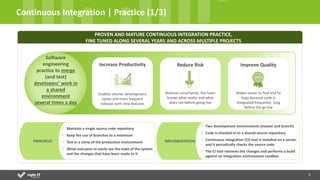
Continuous Integration | Practice (1/3)
PROVEN AND MATURE CONTINUOUS INTEGRATION PRACTICE,
FINE TUNED ALONG SEVERAL YEARS AND ACROSS MULTIPLE PROJECTS
 Maintain a single source code repository
 Keep the use of branches to a minimum
 Test in a clone of the production environment
 Allow everyone to easily see the state of the system
and the changes that have been made to it
PRINCIPLES
 Two development environments (master and branch)
 Code is checked-in to a shared source repository
 Continuous integration (CI) tool is installed on a server,
and it periodically checks the source code
 The CI tool retrieves the changes and performs a build
against an integration environment sandbox
IMPLEMENTATION
Software
engineering
practice to merge
(and test)
developers’ work in
a shared
environment
several times a day
Increase Productivity
Enables shorter development
cycles and more frequent
releases with new features
Reduce Risk
Reduces uncertainty: the team
knows what works and what
does not before going live
Improve Quality
Makes easier to find and fix
bugs because code is
integrated frequently long
before the go live
4
Continuous Integration | Practice (2/3)
ON-PREMISES OR CLOUD CLOUDCLOUD
CONTINUOUS INTEGRATION ARCHITECTURE AND TOOLS
ARCHITECTURE
DEVELOPMENT INTEGRATION
INTEGRATION
ENVIRONMENT
DEV ENVIRONMENT
TOOLS
INTEGRATION
SANDBOX
DEV
SANDBOX
5
Continuous Integration | Practice (3/3)
Our
Solution:
Sandbox
Synchronizer
CONTINUOUS INTEGRATION CLOUD CHALLENGE
 Developers must share Sandboxes
 Geographically spread development
resources
What is the
Cloud
challenge?
Not enough sandboxes with storage
capacity for the business data that
developers need to do their work
CONSTRAINTS
API
DEVELOPERS
PROCESS
Plugin
ReportsCustom Objects
1. Mark File
Developer marks the file
that needs to be changed
using the Sandbox
Synchronizer
2. Refresh GIT
Developer updates
the code from GIT
using GIT client
3. Copy code to
GIT Local
Developer copies
the code to GIT
client (can use
Sandbox
Synchronizer to do
it)
4. Commit to GIT
Developer commits
the code in GIT
5. Unmark File
Developer unmarks
the file that was
commited with
Sandbox
Synchronizer
Fully trackable Governance KPIs
Corporate Presentation
Continuous Integration | Setup
7
Continuous Integration | Setup (1/2)
People
Tools
Process
Dimensions
People
Process
Tools
Establish rules regarding DEV
collaboration and code promotion
Check in / out
Error correction after running
automatic builds
Coach the DEV team regarding the
new DEV collaboration process
Monitor and maintain CI process
running
Analyse Release Plan
Evaluate branching needs due to
minor releases (Fast Tracks)
Design the new Continuous
Integration process
Implement the new Continuous
Integration process
Install the necessary tools to support
the process
Include Right IT Services plugin
Integrate the various tools
Test the “workflow”
8
Continuous Integration | Setup (2/2)
PROJECT
PROCESS SETUP
TOOLS SETUP PEOPLE COACHING
Week 1 Week 2 Week 3 Week 4 Week 5 Week 6
ENVIRONMENT MANAGEMENT
RELEASE MANAGEMENT/EXECUTION
CI Setup Plan Profile
CI Specialist
Master Continuous Integration
principles
Master the tools needed for a
Continuous Integration
technical process
Skills
1
1
2
2
3
3
4
4
5
5
Process Design
Tools Configured and Integrated
Deliverables
100% DEV Team Coached
Environment Design and Plan
Release Plan and Deployment
WHEN YOU HAVE TO DO IT, DO IT RIGHT.
© 2016, Right IT Services. All rights reserved Rua Odette Saint Maurice | Lote 3L | Escritório A | 1700-921 Lisboa | Portugal | contact@rightitservices.com | +351 218 232 261

Salesforce.com Continuous Integration

  • 1.
    © 2016, RightIT Services. All rights reserved. Continuous Integration Salesforce.com
  • 2.
  • 3.
    3 Continuous Integration |Practice (1/3) PROVEN AND MATURE CONTINUOUS INTEGRATION PRACTICE, FINE TUNED ALONG SEVERAL YEARS AND ACROSS MULTIPLE PROJECTS  Maintain a single source code repository  Keep the use of branches to a minimum  Test in a clone of the production environment  Allow everyone to easily see the state of the system and the changes that have been made to it PRINCIPLES  Two development environments (master and branch)  Code is checked-in to a shared source repository  Continuous integration (CI) tool is installed on a server, and it periodically checks the source code  The CI tool retrieves the changes and performs a build against an integration environment sandbox IMPLEMENTATION Software engineering practice to merge (and test) developers’ work in a shared environment several times a day Increase Productivity Enables shorter development cycles and more frequent releases with new features Reduce Risk Reduces uncertainty: the team knows what works and what does not before going live Improve Quality Makes easier to find and fix bugs because code is integrated frequently long before the go live
  • 4.
    4 Continuous Integration |Practice (2/3) ON-PREMISES OR CLOUD CLOUDCLOUD CONTINUOUS INTEGRATION ARCHITECTURE AND TOOLS ARCHITECTURE DEVELOPMENT INTEGRATION INTEGRATION ENVIRONMENT DEV ENVIRONMENT TOOLS INTEGRATION SANDBOX DEV SANDBOX
  • 5.
    5 Continuous Integration |Practice (3/3) Our Solution: Sandbox Synchronizer CONTINUOUS INTEGRATION CLOUD CHALLENGE  Developers must share Sandboxes  Geographically spread development resources What is the Cloud challenge? Not enough sandboxes with storage capacity for the business data that developers need to do their work CONSTRAINTS API DEVELOPERS PROCESS Plugin ReportsCustom Objects 1. Mark File Developer marks the file that needs to be changed using the Sandbox Synchronizer 2. Refresh GIT Developer updates the code from GIT using GIT client 3. Copy code to GIT Local Developer copies the code to GIT client (can use Sandbox Synchronizer to do it) 4. Commit to GIT Developer commits the code in GIT 5. Unmark File Developer unmarks the file that was commited with Sandbox Synchronizer Fully trackable Governance KPIs
  • 6.
  • 7.
    7 Continuous Integration |Setup (1/2) People Tools Process Dimensions People Process Tools Establish rules regarding DEV collaboration and code promotion Check in / out Error correction after running automatic builds Coach the DEV team regarding the new DEV collaboration process Monitor and maintain CI process running Analyse Release Plan Evaluate branching needs due to minor releases (Fast Tracks) Design the new Continuous Integration process Implement the new Continuous Integration process Install the necessary tools to support the process Include Right IT Services plugin Integrate the various tools Test the “workflow”
  • 8.
    8 Continuous Integration |Setup (2/2) PROJECT PROCESS SETUP TOOLS SETUP PEOPLE COACHING Week 1 Week 2 Week 3 Week 4 Week 5 Week 6 ENVIRONMENT MANAGEMENT RELEASE MANAGEMENT/EXECUTION CI Setup Plan Profile CI Specialist Master Continuous Integration principles Master the tools needed for a Continuous Integration technical process Skills 1 1 2 2 3 3 4 4 5 5 Process Design Tools Configured and Integrated Deliverables 100% DEV Team Coached Environment Design and Plan Release Plan and Deployment
  • 9.
    WHEN YOU HAVETO DO IT, DO IT RIGHT. © 2016, Right IT Services. All rights reserved Rua Odette Saint Maurice | Lote 3L | Escritório A | 1700-921 Lisboa | Portugal | contact@rightitservices.com | +351 218 232 261