Safer Internet Day
11th February 2020
Thyme: ‘Safer Internet Day:
Free to be me – exploring
identity online.’
Together for a Better Internet
Source: www.saferinternet.org.uk
The web is for everyone
and collectively we hold
the power to change it.
Lesson aim
This lesson aims to help young
people consider the barriers experienced by
some people which prevent them from
expressing themselves freely online, and
offer a range of strategies for working
together to make the internet a
more inclusive space for everyone.
Sir Tim Berners-Lee,
inventor of the World Wide
Source: www.saferinternet.org.uk
Online identity
• I don’t understand fake people online. Be
real or don’t bother?
• Is the internet a safe and welcoming
place for all?
• Do people feel free to be themselves
online?
• Being yourself online makes you more
vulnerable to the haters and bullies.
Source: www.saferinternet.org.uk
AGRE
E
DISA
GRE
What needs to change?
Individuals need
to be more real
and express
themselves?
All of us need to
make the online
world a more
welcoming place?
Source: www.saferinternet.org.uk
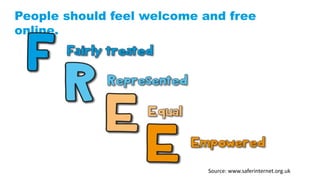
People should feel welcome and free
online.
Source: www.saferinternet.org.uk
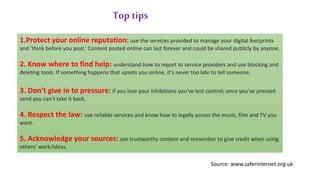
1.Protect your online reputation: use the services provided to manage your digital footprints
and ‘think before you post.’ Content posted online can last forever and could be shared publicly by anyone.
2. Know where to find help: understand how to report to service providers and use blocking and
deleting tools. If something happens that upsets you online, it’s never too late to tell someone.
3. Don’t give in to pressure: if you lose your inhibitions you've lost control; once you’ve pressed
send you can’t take it back.
4. Respect the law: use reliable services and know how to legally access the music, film and TV you
want.
5. Acknowledge your sources: use trustworthy content and remember to give credit when using
others’ work/ideas.
Top tips
Source: www.saferinternet.org.uk
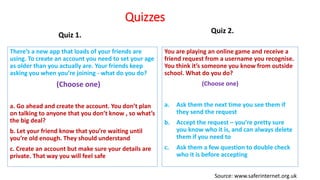
Quizzes
Quiz 1.
There’s a new app that loads of your friends are
using. To create an account you need to set your age
as older than you actually are. Your friends keep
asking you when you’re joining - what do you do?
(Choose one)
a. Go ahead and create the account. You don’t plan
on talking to anyone that you don’t know , so what’s
the big deal?
b. Let your friend know that you’re waiting until
you’re old enough. They should understand
c. Create an account but make sure your details are
private. That way you will feel safe
Quiz 2.
You are playing an online game and receive a
friend request from a username you recognise.
You think it’s someone you know from outside
school. What do you do?
(Choose one)
a. Ask them the next time you see them if
they send the request
b. Accept the request – you’re pretty sure
you know who it is, and can always delete
them if you need to
c. Ask them a few question to double check
who it is before accepting
Source: www.saferinternet.org.uk
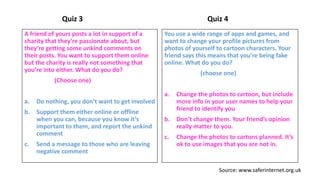
Quiz 3
A friend of yours posts a lot in support of a
charity that they’re passionate about, but
they’re getting some unkind comments on
their posts. You want to support them online
but the charity is really not something that
you’re into either. What do you do?
(Choose one)
a. Do nothing, you don’t want to get involved
b. Support them either online or offline
when you can, because you know it’s
important to them, and report the unkind
comment
c. Send a message to those who are leaving
negative comment
Quiz 4
You use a wide range of apps and games, and
want to change your profile pictures from
photos of yourself to cartoon characters. Your
friend says this means that you’re being fake
online. What do you do?
(choose one)
a. Change the photos to cartoon, but include
more info in your user names to help your
friend to identify you
b. Don’t change them. Your friend’s opinion
really matter to you.
c. Change the photos to cartons planned. It’s
ok to use images that you are not in.
Source: www.saferinternet.org.uk
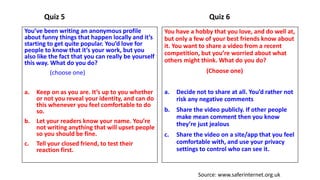
Quiz 5
You’ve been writing an anonymous profile
about funny things that happen locally and it’s
starting to get quite popular. You’d love for
people to know that it’s your work, but you
also like the fact that you can really be yourself
this way. What do you do?
(choose one)
a. Keep on as you are. It’s up to you whether
or not you reveal your identity, and can do
this whenever you feel comfortable to do
so.
b. Let your readers know your name. You’re
not writing anything that will upset people
so you should be fine.
c. Tell your closed friend, to test their
reaction first.
Quiz 6
You have a hobby that you love, and do well at,
but only a few of your best friends know about
it. You want to share a video from a recent
competition, but you’re worried about what
others might think. What do you do?
(Choose one)
a. Decide not to share at all. You’d rather not
risk any negative comments
b. Share the video publicly. If other people
make mean comment then you know
they’re just jealous
c. Share the video on a site/app that you feel
comfortable with, and use your privacy
settings to control who can see it.
Source: www.saferinternet.org.uk
Internet Safety Organisations UK

Safer internet day

  • 1.
    Safer Internet Day 11thFebruary 2020 Thyme: ‘Safer Internet Day: Free to be me – exploring identity online.’ Together for a Better Internet Source: www.saferinternet.org.uk
  • 2.
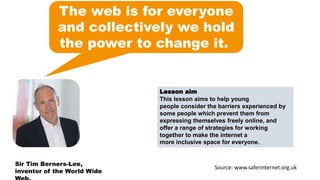
    The web isfor everyone and collectively we hold the power to change it. Lesson aim This lesson aims to help young people consider the barriers experienced by some people which prevent them from expressing themselves freely online, and offer a range of strategies for working together to make the internet a more inclusive space for everyone. Sir Tim Berners-Lee, inventor of the World Wide Source: www.saferinternet.org.uk
  • 3.
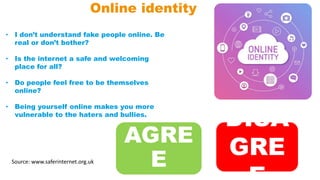
    Online identity • Idon’t understand fake people online. Be real or don’t bother? • Is the internet a safe and welcoming place for all? • Do people feel free to be themselves online? • Being yourself online makes you more vulnerable to the haters and bullies. Source: www.saferinternet.org.uk AGRE E DISA GRE
  • 4.
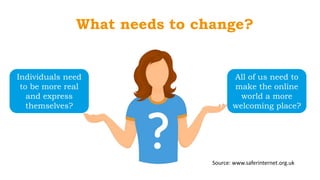
    What needs tochange? Individuals need to be more real and express themselves? All of us need to make the online world a more welcoming place? Source: www.saferinternet.org.uk
  • 5.
    People should feelwelcome and free online. Source: www.saferinternet.org.uk
  • 6.
    1.Protect your onlinereputation: use the services provided to manage your digital footprints and ‘think before you post.’ Content posted online can last forever and could be shared publicly by anyone. 2. Know where to find help: understand how to report to service providers and use blocking and deleting tools. If something happens that upsets you online, it’s never too late to tell someone. 3. Don’t give in to pressure: if you lose your inhibitions you've lost control; once you’ve pressed send you can’t take it back. 4. Respect the law: use reliable services and know how to legally access the music, film and TV you want. 5. Acknowledge your sources: use trustworthy content and remember to give credit when using others’ work/ideas. Top tips Source: www.saferinternet.org.uk
  • 7.
    Quizzes Quiz 1. There’s anew app that loads of your friends are using. To create an account you need to set your age as older than you actually are. Your friends keep asking you when you’re joining - what do you do? (Choose one) a. Go ahead and create the account. You don’t plan on talking to anyone that you don’t know , so what’s the big deal? b. Let your friend know that you’re waiting until you’re old enough. They should understand c. Create an account but make sure your details are private. That way you will feel safe Quiz 2. You are playing an online game and receive a friend request from a username you recognise. You think it’s someone you know from outside school. What do you do? (Choose one) a. Ask them the next time you see them if they send the request b. Accept the request – you’re pretty sure you know who it is, and can always delete them if you need to c. Ask them a few question to double check who it is before accepting Source: www.saferinternet.org.uk
  • 8.
    Quiz 3 A friendof yours posts a lot in support of a charity that they’re passionate about, but they’re getting some unkind comments on their posts. You want to support them online but the charity is really not something that you’re into either. What do you do? (Choose one) a. Do nothing, you don’t want to get involved b. Support them either online or offline when you can, because you know it’s important to them, and report the unkind comment c. Send a message to those who are leaving negative comment Quiz 4 You use a wide range of apps and games, and want to change your profile pictures from photos of yourself to cartoon characters. Your friend says this means that you’re being fake online. What do you do? (choose one) a. Change the photos to cartoon, but include more info in your user names to help your friend to identify you b. Don’t change them. Your friend’s opinion really matter to you. c. Change the photos to cartons planned. It’s ok to use images that you are not in. Source: www.saferinternet.org.uk
  • 9.
    Quiz 5 You’ve beenwriting an anonymous profile about funny things that happen locally and it’s starting to get quite popular. You’d love for people to know that it’s your work, but you also like the fact that you can really be yourself this way. What do you do? (choose one) a. Keep on as you are. It’s up to you whether or not you reveal your identity, and can do this whenever you feel comfortable to do so. b. Let your readers know your name. You’re not writing anything that will upset people so you should be fine. c. Tell your closed friend, to test their reaction first. Quiz 6 You have a hobby that you love, and do well at, but only a few of your best friends know about it. You want to share a video from a recent competition, but you’re worried about what others might think. What do you do? (Choose one) a. Decide not to share at all. You’d rather not risk any negative comments b. Share the video publicly. If other people make mean comment then you know they’re just jealous c. Share the video on a site/app that you feel comfortable with, and use your privacy settings to control who can see it. Source: www.saferinternet.org.uk
  • 10.

Editor's Notes

  • #2 Discussion: What does ‘Free to be me – exploring identity online’ means to the students. Tips for the discussion: It’s encourage young generation to explore their identity online and how the internet shapes the way that they think of themselves and others such as the things we share with each other, how others perceive us and interact with us, as well as how online services use the information we share to identify and profile us. Focus on how offline stereotypes and discrimination are challenged or reinforced online, and what young people can do in response to discrimination, hate or bullying online. Focusing on identity online supports young people to consider whether they feel free to experiment and express themselves online, or if they feel limited in who they can be when they’re online. By opening up conversations around identity online, young people can be inspired and empowered to support each other to be who they want to be, both online and offline.
  • #3 This slide will help students to know the inventor of World Wide Web and understand the purpose of celebrating ‘Safer Internet Day’.
  • #4 Discuss with the students above mentioned points and ask their opinion, whether they agree or disagree with the above statement.
  • #5 What we need to do to make internet a safer and welcoming place.
  • #7 Top tips- How each and every student can protect themselves and be safe on the internet.
  • #8 Answer for Quiz 1. The correct answer is b. It is always advisable to respect the age ratings that have been put into place on any site and service, even if you have friends who are using it. Answer for Quiz 2: The correct answer is a. In this situation, asking the person face-to-face if they sent the request is the best way to find out if it was them.
  • #9 Answer for Quiz 3: The correct answer is b - Support them either online or offline when you can, because you know it’s important to them, and report the unkind comments. Answer for Quiz 4: The correct answer is c - Change the photos to cartoons as planned. It’s ok to use images that you are not in. It’s perfectly ok to use cartoons or avatars as your profile pictures, and this can be a helpful way to protect your identity. Some sites and services where you can interact with others allow you to use usernames that don’t fully identify you either, and this is also good practice online. If you are worried that your friends won’t be able to connect with you because they can’t find your accounts online, just let them know privately which username or profile picture you are using and ask them to do the same for you.
  • #10 Answer for Quiz 5: The correct answer is a - Keep on as you are. It’s up to you whether or not you reveal your identity, and can do this whenever you feel comfortable to do so. It’s great that your creative talents have caused such interest! It’s important to remember that if you decide to reveal your identity, this may be publicly visible to a wider audience, and could be seen by more than your immediate circle of friends. This page can also form part of your online identity and reputation, as anything posted on there may now be associated with you. If you are happy as you are then there’s no rush to change anything, but if you wanted some advice or reassurance, then talking to an adult that you trust (e.g. a teacher or family member) would be helpful too. Quiz 6: The correct answer is c.