Sabre Reservation Course
                                       (Revision 10)


Address: 24 Alkeou St, Engomi
         P.O.Box 25326, 1308 Nicosia – Cyprus
         Tel: 357-22664515, Fax: 357-22664502,
         SITA:NICXZCY
         e-mail:zenon@cyprusair.com.cy


                  ©Copyright 2002 ZENON National Distribution Centre Ltd.
                                   All rights reserved.

 All trademarked product and company names are the property of their respective trademark
                                       holders.


 No part of this publication may be reproduced, stored in a retrieval system, or transmitted in
 any form or by any means, electronic, mechanical, photocopying, recording or otherwise, or
      translated into any language, without the prior written permission of the publisher.

Copying software used in this course is prohibited without the express permission of ZENON
  National Distribution Centre Ltd. Making unauthorised copies of such software violates
              copyright law, which includes both civil and criminal penalties.
Table of Contents


SIGN-IN AND SIGN-OUT ......................................................................................4

ENCODE AND DECODE .......................................................................................6

SABRE ATLAS ....................................................................................................7

CITY PAIR AVAILABILITY ......................................................................................8

SELL A SEAT....................................................................................................11

WAITLIST .........................................................................................................13

BUILD A PASSENGER NAME RECORD (PNR) ......................................................14

VERIFY FLIGHTS ...............................................................................................28

PRE-RESERVED SEATING (PRS) ........................................................................30

CLONE A PNR ..................................................................................................32

DISPLΑY A PNR ................................................................................................33

LONG SELL ENTRIES.........................................................................................34

DELETE AND CHANGE PASSENGER DATA ...........................................................37

CANCEL AN ITINERARY .....................................................................................41

INSERT SEGMENTS ...........................................................................................43

DIVIDE A PNR ..................................................................................................45

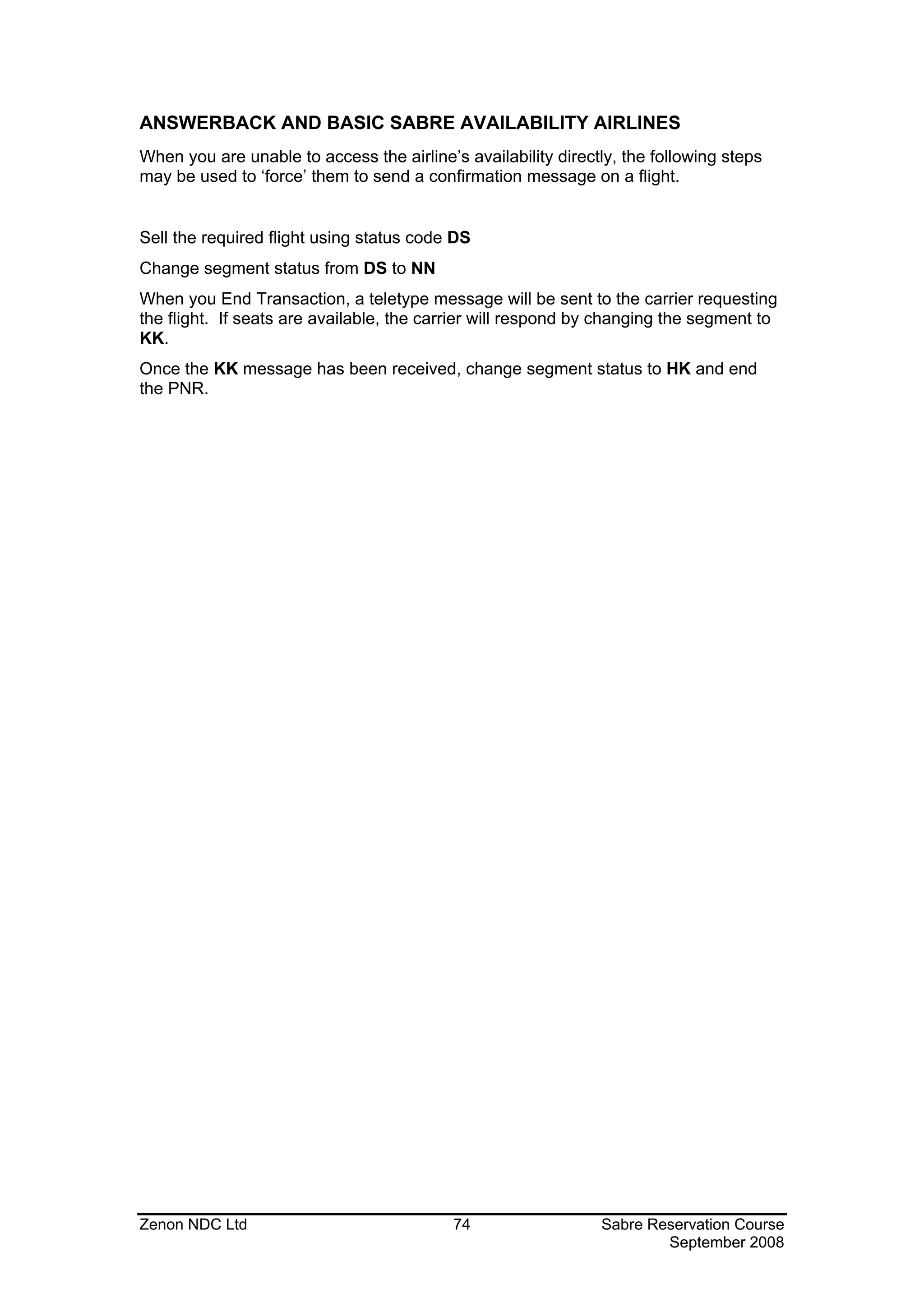
CHANGE SEGMENT STATUS ..............................................................................46

HISTORY OF A PNR ..........................................................................................48

GROUP PNR.....................................................................................................50

QUEUES ..........................................................................................................52

SPECTRA .........................................................................................................62

REFERENCE SOURCES IN SABRE .......................................................................63

VIRTUALLY THERE ............................................................................................64


Zenon NDC Ltd                                            2                         Sabre Reservation Course
                                                                                           September 2008
WEATHER / CALCULATOR ..................................................................................65

CLAIM A PNR ...................................................................................................67

TOTAL ACCESS ................................................................................................68

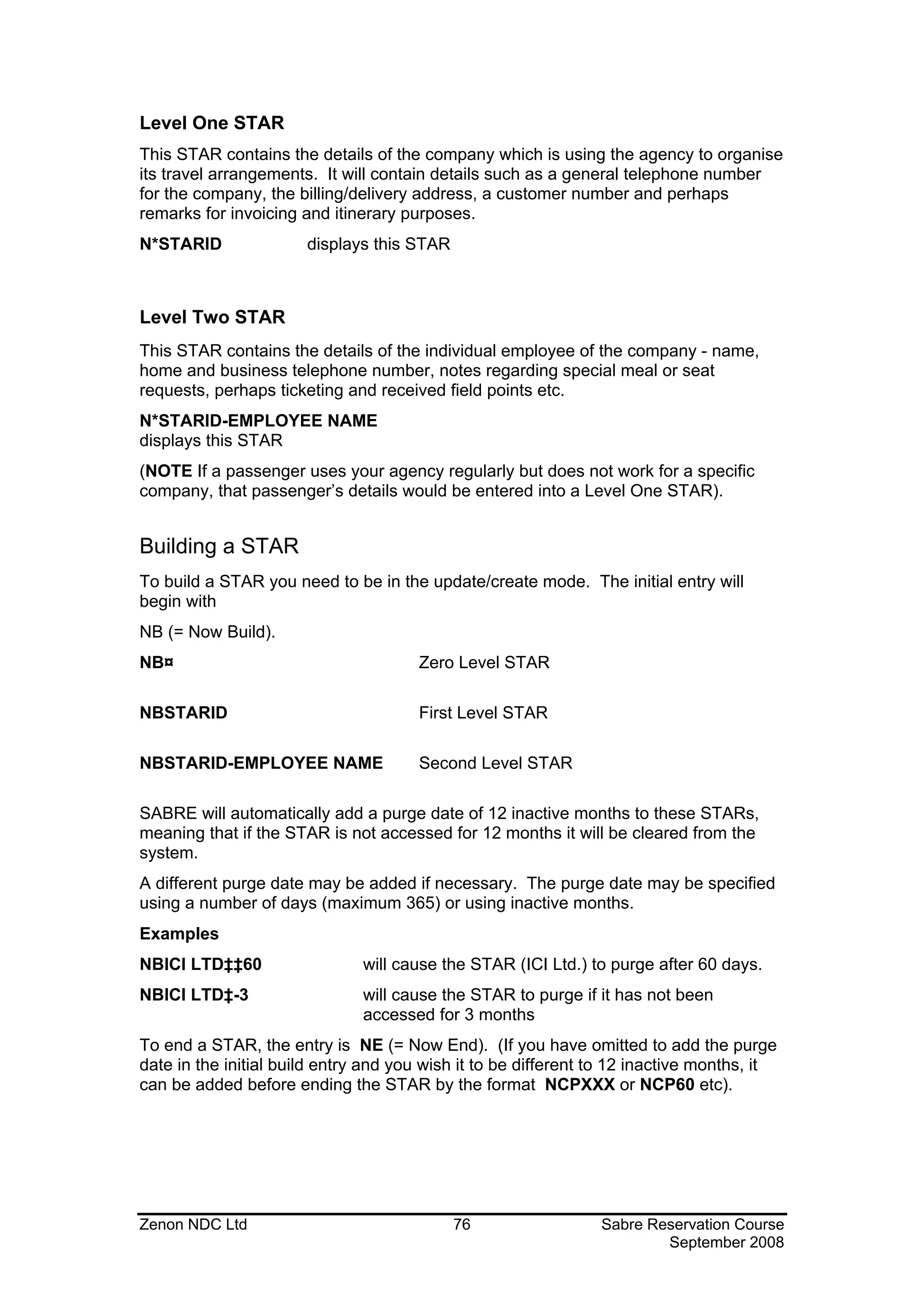
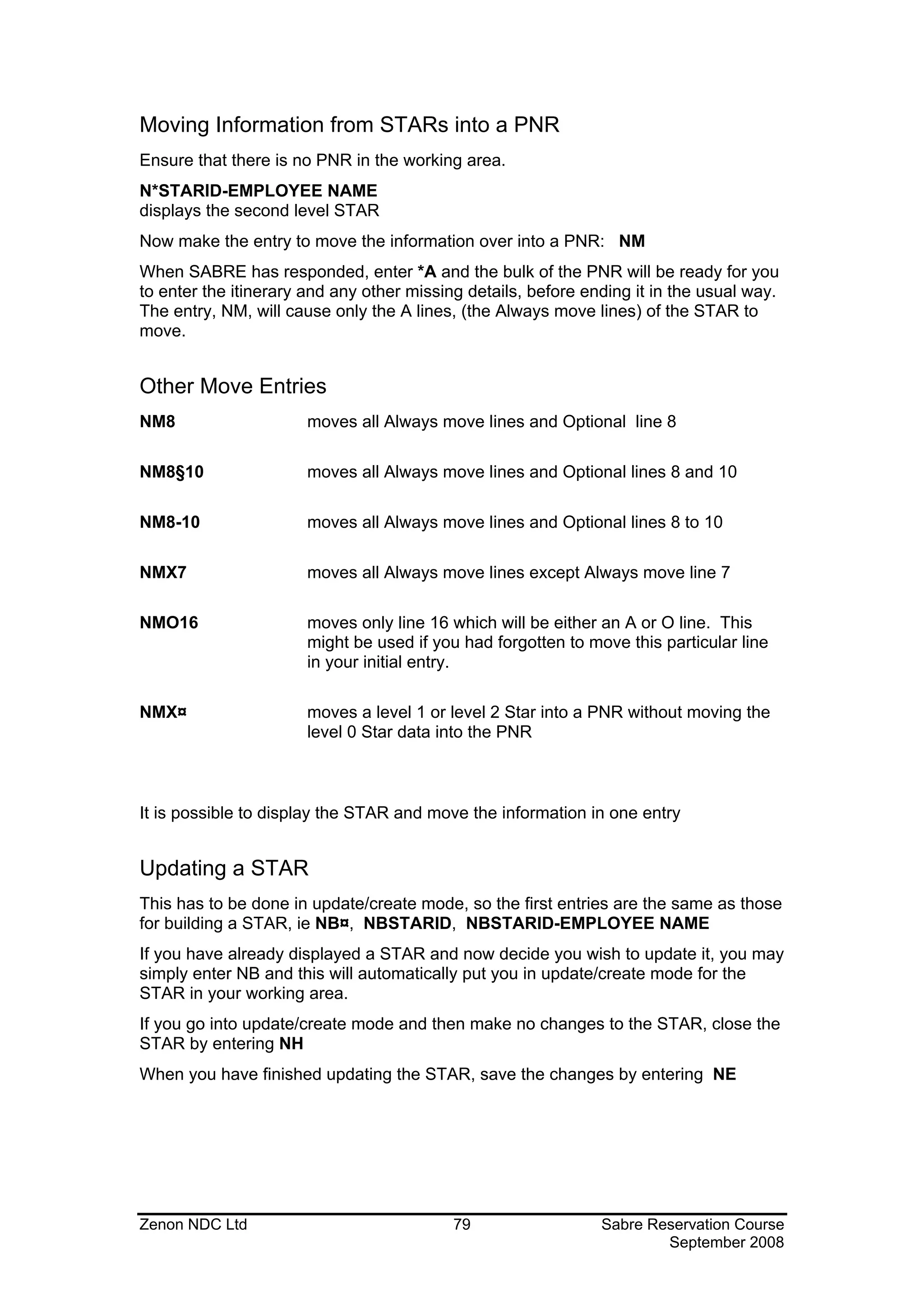
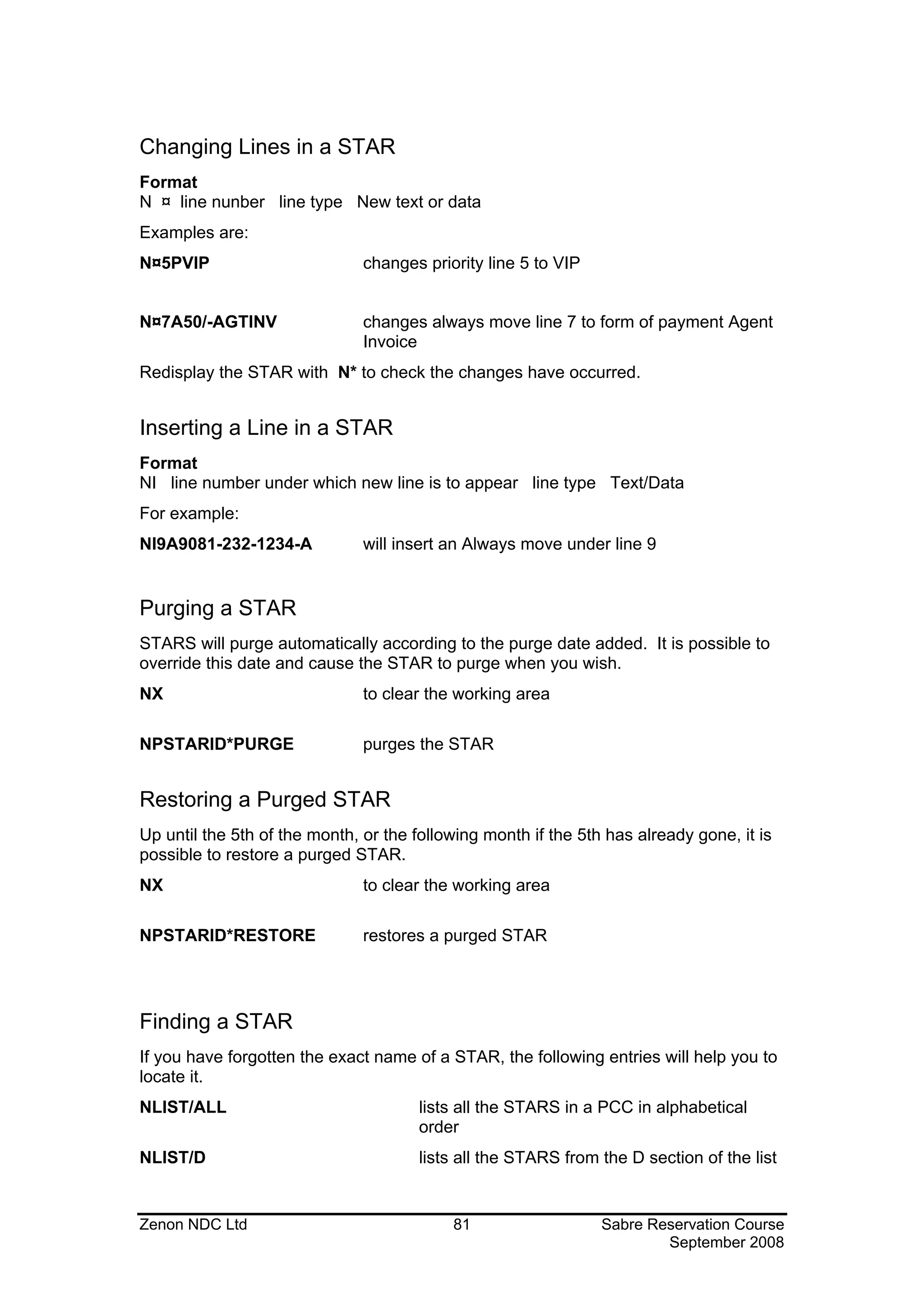
STARS .............................................................................................................75

CYPRAIR PACKAGES .........................................................................................83

REVISION HISTORY ...........................................................................................89


Zenon NDC Ltd                                            3                         Sabre Reservation Course
                                                                                           September 2008
SIGN-IN AND SIGN-OUT

SIGN-IN

To be able to use the SABRE Reservation System you must first sign in.
To sign in, the entry will always begin with SI followed by a sign-in code, which can
be a combination of between 1 and 8 digits.
Example
SI1234
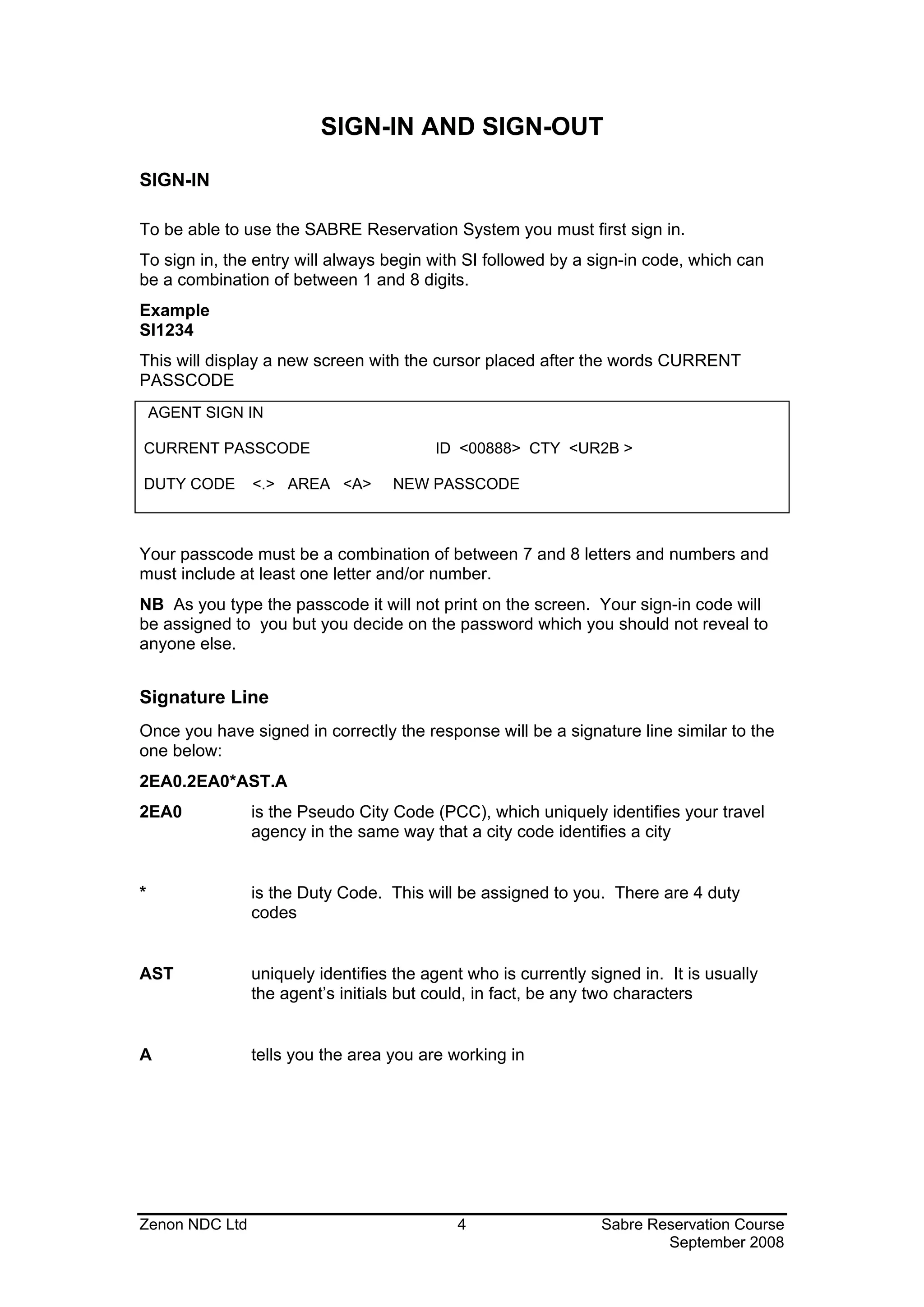
This will display a new screen with the cursor placed after the words CURRENT
PASSCODE
    AGENT SIGN IN

CURRENT PASSCODE                         ID <00888> CTY <UR2B >

DUTY CODE       <.> AREA <A>       NEW PASSCODE


Your passcode must be a combination of between 7 and 8 letters and numbers and
must include at least one letter and/or number.
NB As you type the passcode it will not print on the screen. Your sign-in code will
be assigned to you but you decide on the password which you should not reveal to
anyone else.


Signature Line
Once you have signed in correctly the response will be a signature line similar to the
one below:
2EA0.2EA0*AST.A
2EA0            is the Pseudo City Code (PCC), which uniquely identifies your travel
                agency in the same way that a city code identifies a city


*               is the Duty Code. This will be assigned to you. There are 4 duty
                codes


AST             uniquely identifies the agent who is currently signed in. It is usually
                the agent’s initials but could, in fact, be any two characters


A               tells you the area you are working in


Zenon NDC Ltd                               4                    Sabre Reservation Course
                                                                         September 2008
The Sign-In Message
When you first sign in, a short message is usually displayed. This contains
information on updates in SABRE or promotional material from the vendors selling
their services through SABRE.


Signing into all Areas
The above entry will sign you into one area of SABRE. There are actually six
working areas in SABRE:- A, B, C, D, E, F. To sign into all areas place a * after SI
Example
SI*5000
The password will remain the same. This time the response will be:
2EA0.2EA0*AST.A.B.C.D.E.F.


Changing Areas
If you wish to change from one area to another make the entry ¤F. This will move
you into area F
Notes:
1) The 6 working areas allow the agent to move quickly from one area to another
without having to complete the transaction currently in progress
2) More than one agent can be signed into the same CRT, each one signing into
specific areas, thus eliminating the need for continual signing in and out
3) To sign into a specific area: SID1234 where D is the area you wish to sign into


Displaying the Sign-In
The following are entries to display the sign-in status:
*S               displays who is currently signed into that working area


*S*              displays who is currently signed into which working areas

S/*              redisplays the sign-in message


SIGN-OUT
To sign out of the area you are currently working in use the entry SO
To sign out of all areas you are currently signed into, use the entry SO*
If you have a transaction active in any area when you attempt to sign out eg.a PNR
or a STAR, SABRE will not sign out but will tell you in which area you must finish a
transaction


Zenon NDC Ltd                               5                 Sabre Reservation Course
                                                                      September 2008
ENCODE AND DECODE

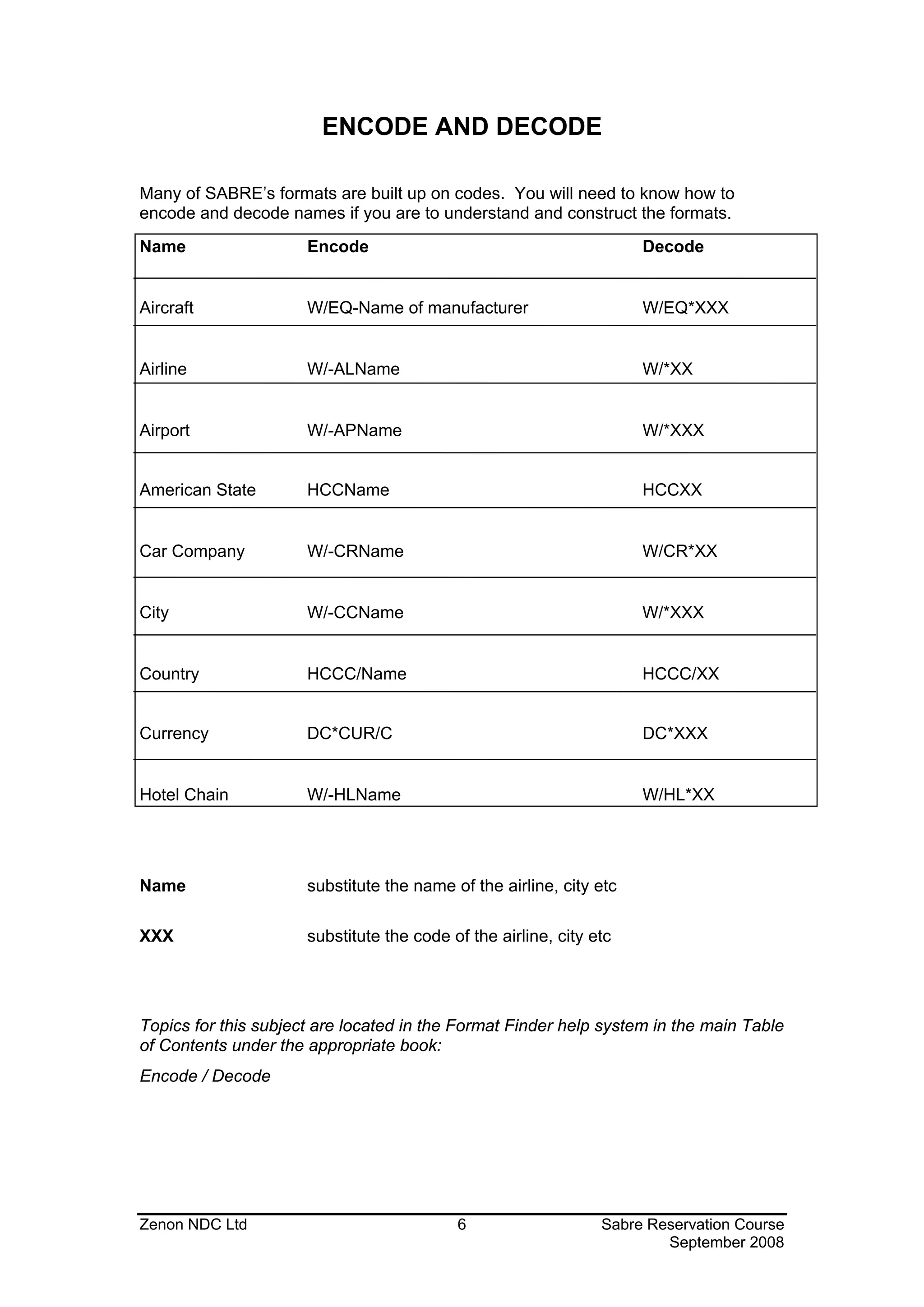
Many of SABRE’s formats are built up on codes. You will need to know how to
encode and decode names if you are to understand and construct the formats.
Name                  Encode                                         Decode


Aircraft              W/EQ-Name of manufacturer                      W/EQ*XXX


Airline               W/-ALName                                      W/*XX


Airport               W/-APName                                      W/*XXX


American State        HCCName                                        HCCXX


Car Company           W/-CRName                                      W/CR*XX


City                  W/-CCName                                      W/*XXX


Country               HCCC/Name                                      HCCC/XX


Currency              DC*CUR/C                                       DC*XXX


Hotel Chain           W/-HLName                                      W/HL*XX


Name                  substitute the name of the airline, city etc

XXX                   substitute the code of the airline, city etc


Topics for this subject are located in the Format Finder help system in the main Table
of Contents under the appropriate book:
Encode / Decode


Zenon NDC Ltd                              6                    Sabre Reservation Course
                                                                        September 2008
SABRE ATLAS

Using the SABRE ATLAS distance calculator feature, it is possible to locate the ten
closest airports to a specific location or to caluculate the distance and direction
between two locations. The location can be International airport and city codes,
cities and/or military bases.
Formats
W/-CYCITY NAME, COUNTRY CODE
W/-ATAIRPORT CODE
W/-MBMILITARY BASE, COUNTRY CODE
For example:
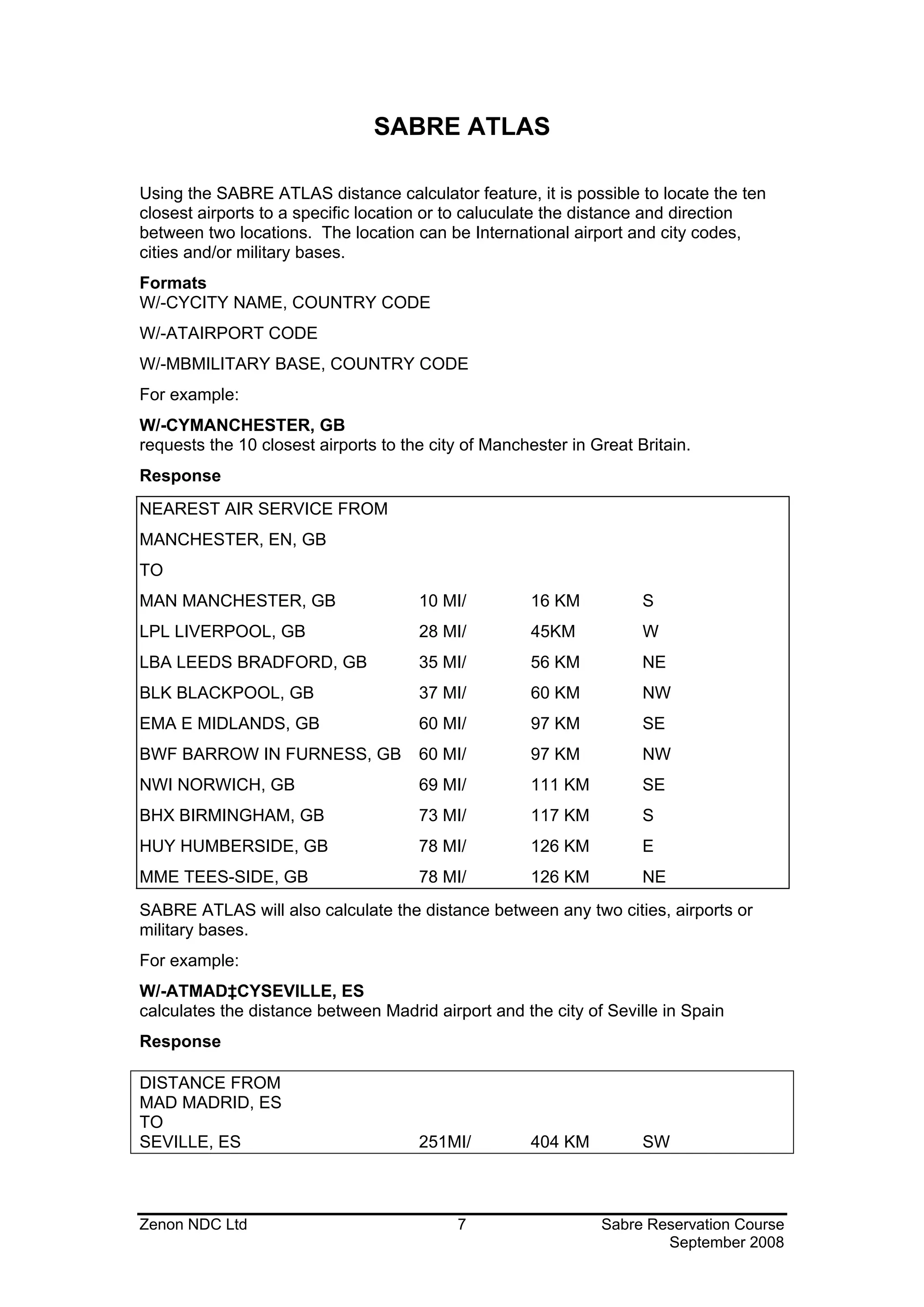
W/-CYMANCHESTER, GB
requests the 10 closest airports to the city of Manchester in Great Britain.
Response
NEAREST AIR SERVICE FROM
MANCHESTER, EN, GB
TO
MAN MANCHESTER, GB                    10 MI/         16 KM           S
LPL LIVERPOOL, GB                     28 MI/         45KM            W
LBA LEEDS BRADFORD, GB                35 MI/         56 KM           NE
BLK BLACKPOOL, GB                     37 MI/         60 KM           NW
EMA E MIDLANDS, GB                    60 MI/         97 KM           SE
BWF BARROW IN FURNESS, GB             60 MI/         97 KM           NW
NWI NORWICH, GB                       69 MI/         111 KM          SE
BHX BIRMINGHAM, GB                    73 MI/         117 KM          S
HUY HUMBERSIDE, GB                    78 MI/         126 KM          E
MME TEES-SIDE, GB                     78 MI/         126 KM          NE
SABRE ATLAS will also calculate the distance between any two cities, airports or
military bases.
For example:
W/-ATMAD‡CYSEVILLE, ES
calculates the distance between Madrid airport and the city of Seville in Spain
Response

DISTANCE FROM
MAD MADRID, ES
TO
SEVILLE, ES                           251MI/         404 KM          SW


Zenon NDC Ltd                              7                   Sabre Reservation Course
                                                                       September 2008
CITY PAIR AVAILABILITY

To request a City Pair Availability (CPA) display in SABRE the procedure is as
follows:
Format
1 Date City of Departure City of Arrival Time of departure (optional)
Example
110MARLCAATH0900
Format
1 Date City of Departure City of Arrival / Time of arrival (optional)

Example
110MARLCAATH/1400
1                       is the Identification Code Key for availability

03JAN                   is the date. The month must always be the first 3 letters. If
                        date is omitted SABRE assumes today’s.
0900                    The time may be written either as 9, 09, 0900 or 9A. If the time
                        is omitted SABRE will default to the flight closest to 1300
Response

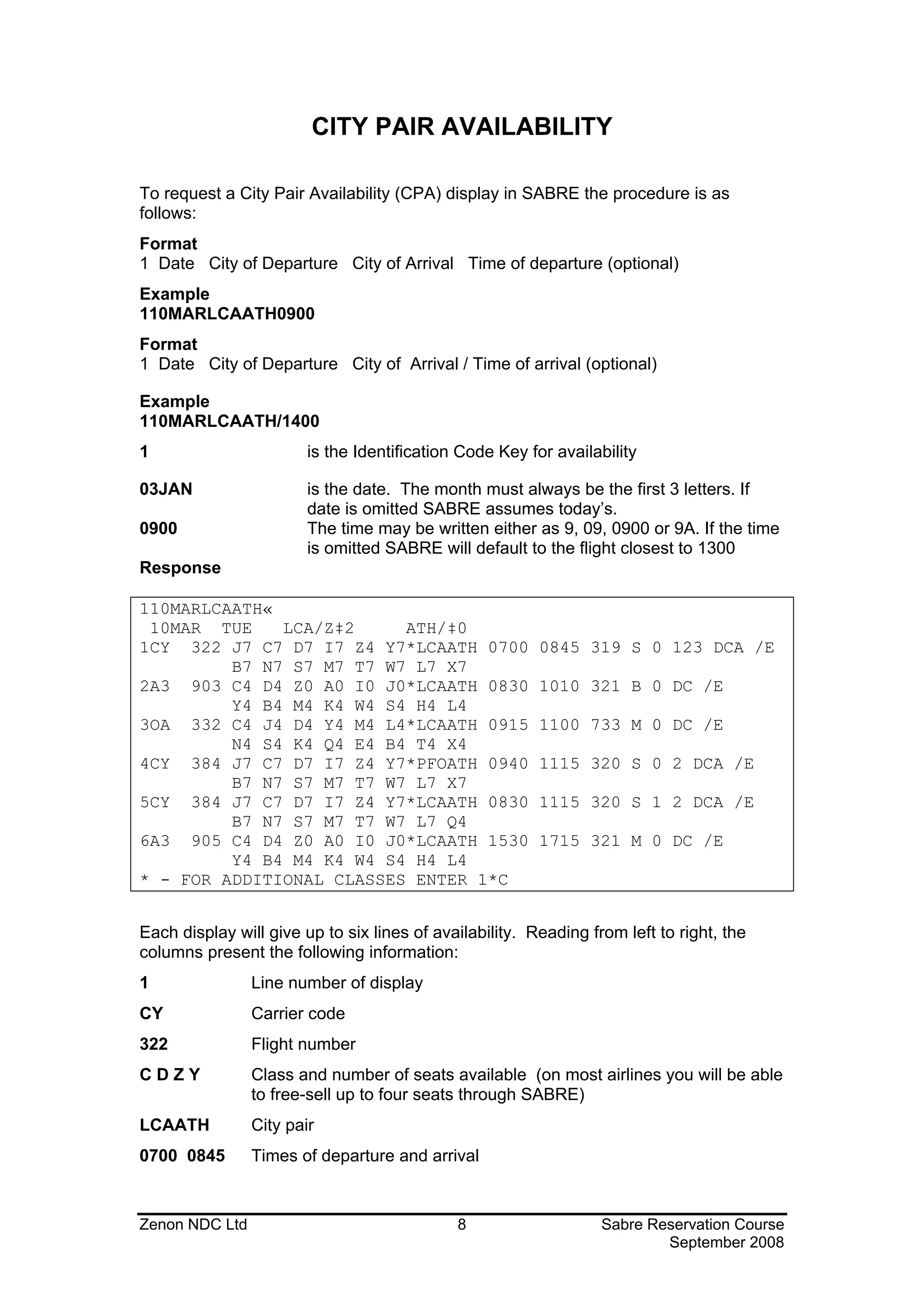
110MARLCAATH«
 10MAR TUE    LCA/Z‡2     ATH/‡0
1CY 322 J7 C7 D7 I7 Z4 Y7*LCAATH 0700                    0845 319 S 0 123 DCA /E
         B7 N7 S7 M7 T7 W7 L7 X7
2A3 903 C4 D4 Z0 A0 I0 J0*LCAATH 0830                    1010 321 B 0 DC /E
         Y4 B4 M4 K4 W4 S4 H4 L4
3OA 332 C4 J4 D4 Y4 M4 L4*LCAATH 0915                    1100 733 M 0 DC /E
         N4 S4 K4 Q4 E4 B4 T4 X4
4CY 384 J7 C7 D7 I7 Z4 Y7*PFOATH 0940                    1115 320 S 0 2 DCA /E
         B7 N7 S7 M7 T7 W7 L7 X7
5CY 384 J7 C7 D7 I7 Z4 Y7*LCAATH 0830                    1115 320 S 1 2 DCA /E
         B7 N7 S7 M7 T7 W7 L7 Q4
6A3 905 C4 D4 Z0 A0 I0 J0*LCAATH 1530                    1715 321 M 0 DC /E
         Y4 B4 M4 K4 W4 S4 H4 L4
* - FOR ADDITIONAL CLASSES ENTER 1*C


Each display will give up to six lines of availability. Reading from left to right, the
columns present the following information:
1               Line number of display
CY              Carrier code
322             Flight number
CDZY            Class and number of seats available (on most airlines you will be able
                to free-sell up to four seats through SABRE)
LCAATH          City pair
0700 0845       Times of departure and arrival


Zenon NDC Ltd                                8                    Sabre Reservation Course
                                                                          September 2008
319             Type of aircraft
S               Meal service (B=Breakfast, L=Lunch, D=Dinner, R=Refreshment,
                S=Snack, M=Meals)
0               Number of stops on route
X2              Operating frequency of flight (no information indicates a daily flight, a
                letter or a number indicates days on which flight operates, X with
                letter(s) or number(s) indicates a daily flight except for those days)
DC              Level of connectivity that the carrier has with the Sabre system.
                (AT,TA, AB, DC, DCA)


SPECIFYING THE CPA REQUEST
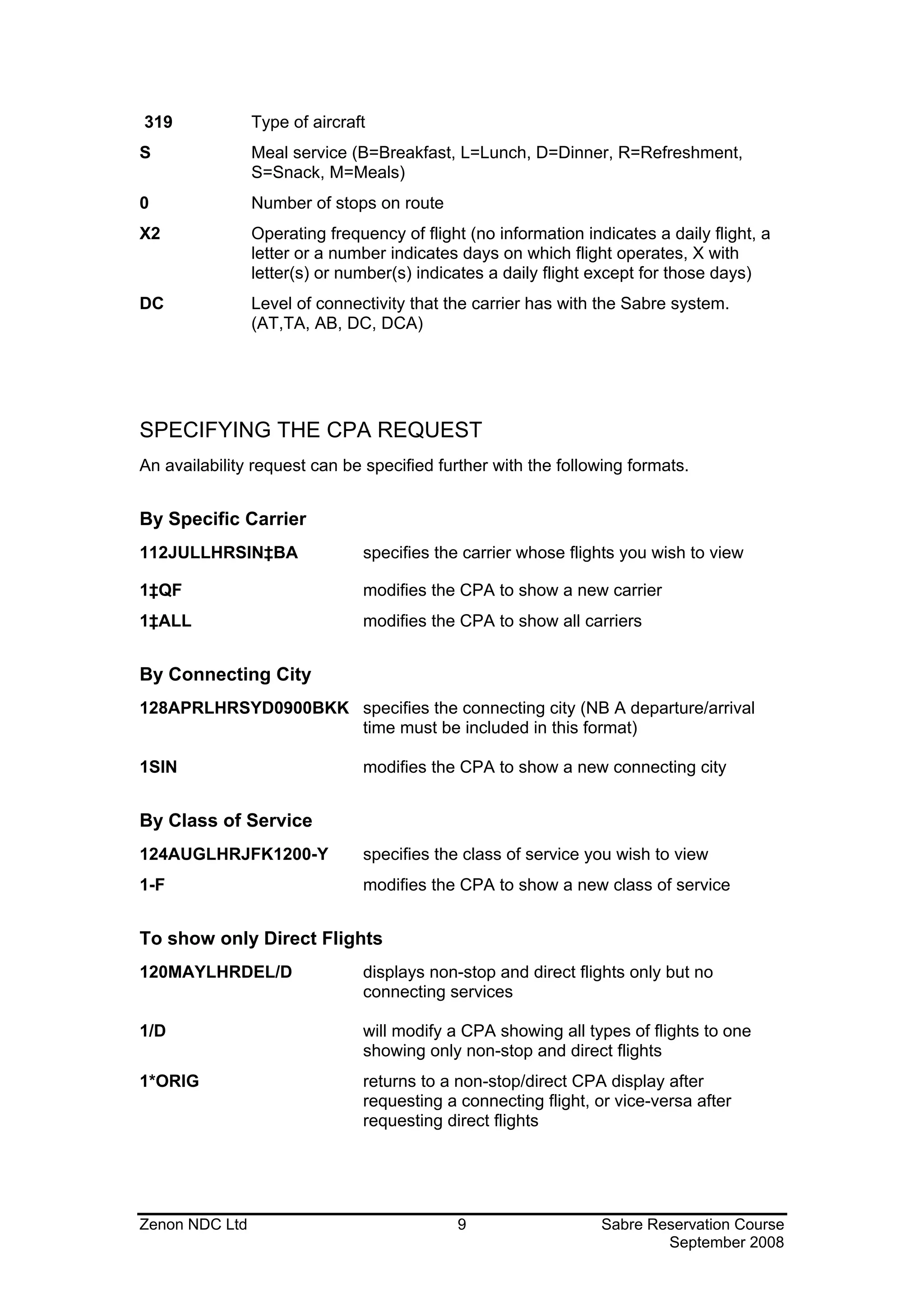
An availability request can be specified further with the following formats.


By Specific Carrier
112JULLHRSIN‡BA                specifies the carrier whose flights you wish to view

1‡QF                           modifies the CPA to show a new carrier
1‡ALL                          modifies the CPA to show all carriers


By Connecting City
128APRLHRSYD0900BKK specifies the connecting city (NB A departure/arrival
                    time must be included in this format)

1SIN                           modifies the CPA to show a new connecting city


By Class of Service
124AUGLHRJFK1200-Y             specifies the class of service you wish to view
1-F                            modifies the CPA to show a new class of service


To show only Direct Flights
120MAYLHRDEL/D                 displays non-stop and direct flights only but no
                               connecting services

1/D                            will modify a CPA showing all types of flights to one
                               showing only non-stop and direct flights
1*ORIG                         returns to a non-stop/direct CPA display after
                               requesting a connecting flight, or vice-versa after
                               requesting direct flights


Zenon NDC Ltd                                9                   Sabre Reservation Course
                                                                         September 2008
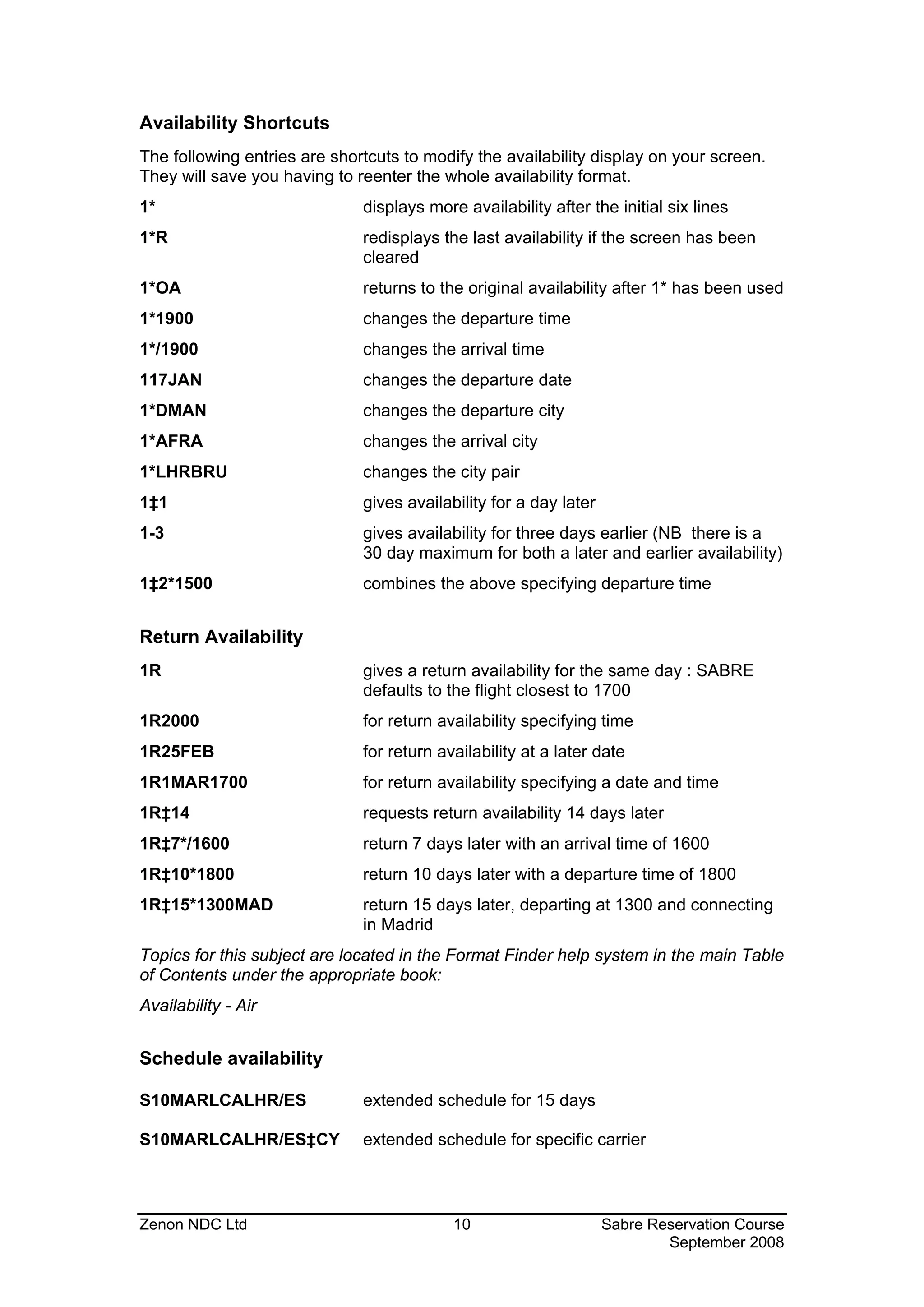
Availability Shortcuts
The following entries are shortcuts to modify the availability display on your screen.
They will save you having to reenter the whole availability format.
1*                            displays more availability after the initial six lines
1*R                           redisplays the last availability if the screen has been
                              cleared
1*OA                          returns to the original availability after 1* has been used
1*1900                        changes the departure time
1*/1900                       changes the arrival time
117JAN                        changes the departure date
1*DMAN                        changes the departure city
1*AFRA                        changes the arrival city
1*LHRBRU                      changes the city pair
1‡1                           gives availability for a day later
1-3                           gives availability for three days earlier (NB there is a
                              30 day maximum for both a later and earlier availability)
1‡2*1500                      combines the above specifying departure time


Return Availability
1R                            gives a return availability for the same day : SABRE
                              defaults to the flight closest to 1700
1R2000                        for return availability specifying time
1R25FEB                       for return availability at a later date
1R1MAR1700                    for return availability specifying a date and time
1R‡14                         requests return availability 14 days later
1R‡7*/1600                    return 7 days later with an arrival time of 1600
1R‡10*1800                    return 10 days later with a departure time of 1800
1R‡15*1300MAD                 return 15 days later, departing at 1300 and connecting
                              in Madrid
Topics for this subject are located in the Format Finder help system in the main Table
of Contents under the appropriate book:
Availability - Air


Schedule availability

S10MARLCALHR/ES               extended schedule for 15 days

S10MARLCALHR/ES‡CY            extended schedule for specific carrier


Zenon NDC Ltd                              10                      Sabre Reservation Course
                                                                           September 2008
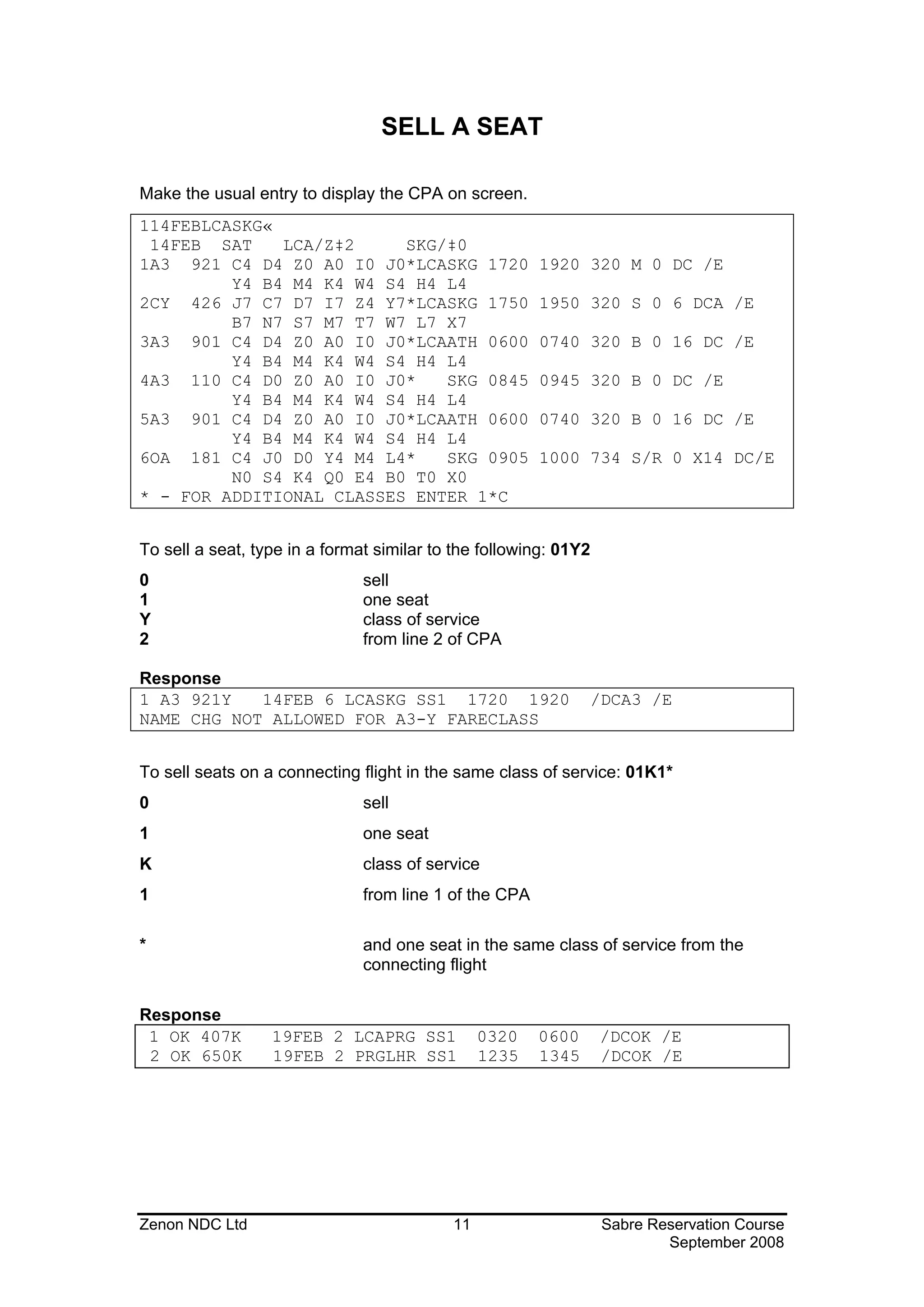
SELL A SEAT

Make the usual entry to display the CPA on screen.
114FEBLCASKG«
 14FEB SAT    LCA/Z‡2     SKG/‡0
1A3 921 C4 D4 Z0 A0 I0 J0*LCASKG 1720                   1920 320 M 0 DC /E
         Y4 B4 M4 K4 W4 S4 H4 L4
2CY 426 J7 C7 D7 I7 Z4 Y7*LCASKG 1750                   1950 320 S 0 6 DCA /E
         B7 N7 S7 M7 T7 W7 L7 X7
3A3 901 C4 D4 Z0 A0 I0 J0*LCAATH 0600                   0740 320 B 0 16 DC /E
         Y4 B4 M4 K4 W4 S4 H4 L4
4A3 110 C4 D0 Z0 A0 I0 J0*    SKG 0845                  0945 320 B 0 DC /E
         Y4 B4 M4 K4 W4 S4 H4 L4
5A3 901 C4 D4 Z0 A0 I0 J0*LCAATH 0600                   0740 320 B 0 16 DC /E
         Y4 B4 M4 K4 W4 S4 H4 L4
6OA 181 C4 J0 D0 Y4 M4 L4*    SKG 0905                  1000 734 S/R 0 X14 DC/E
         N0 S4 K4 Q0 E4 B0 T0 X0
* - FOR ADDITIONAL CLASSES ENTER 1*C


To sell a seat, type in a format similar to the following: 01Y2
0                              sell
1                              one seat
Y                              class of service
2                              from line 2 of CPA

Response
1 A3 921Y   14FEB 6 LCASKG SS1 1720 1920                       /DCA3 /E
NAME CHG NOT ALLOWED FOR A3-Y FARECLASS


To sell seats on a connecting flight in the same class of service: 01K1*
0                              sell
1                              one seat
K                              class of service
1                              from line 1 of the CPA

*                              and one seat in the same class of service from the
                               connecting flight

Response
 1 OK 407K        19FEB 2 LCAPRG SS1            0320    0600      /DCOK /E
 2 OK 650K        19FEB 2 PRGLHR SS1            1235    1345      /DCOK /E


Zenon NDC Ltd                              11                     Sabre Reservation Course
                                                                          September 2008
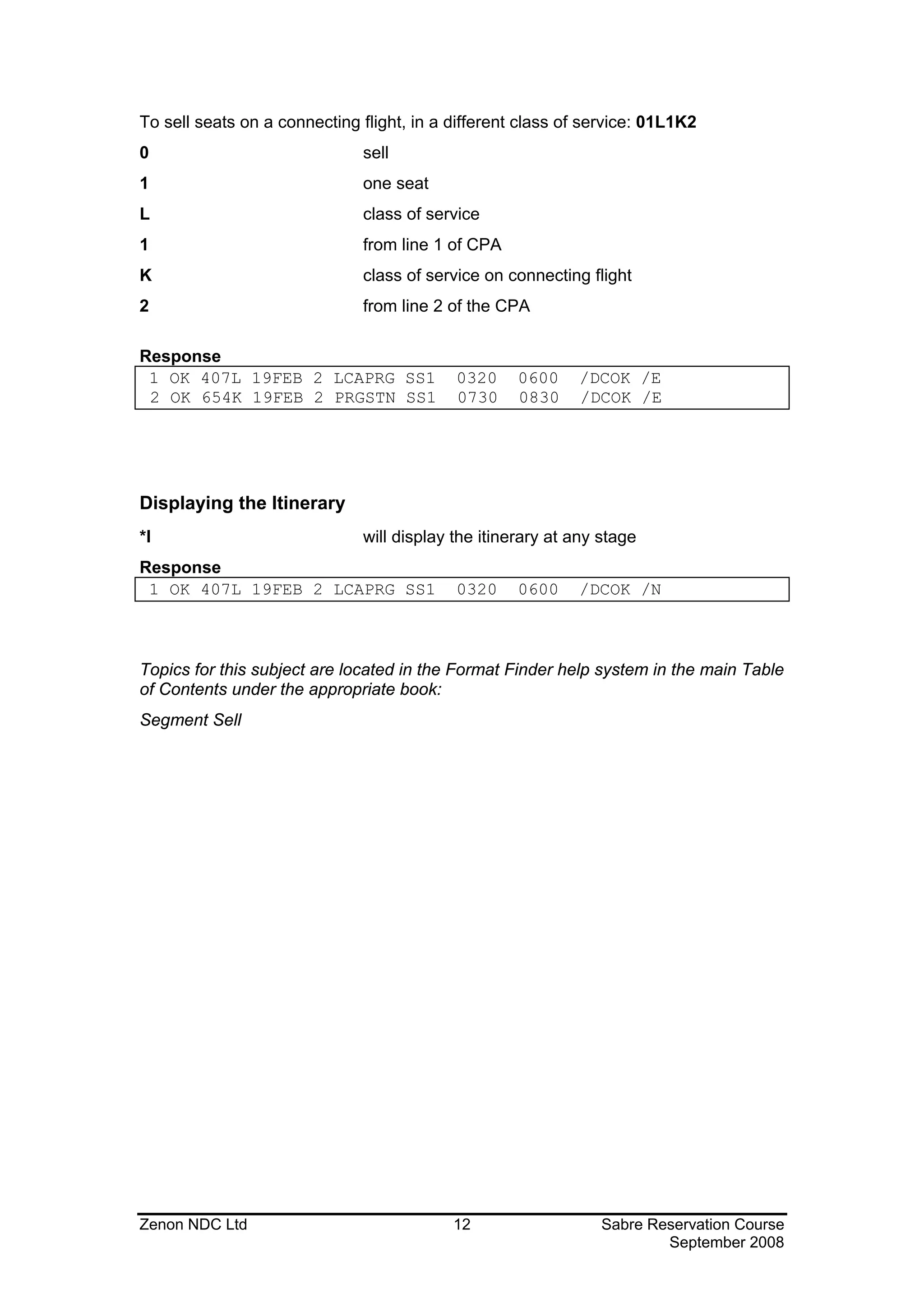
To sell seats on a connecting flight, in a different class of service: 01L1K2
0                             sell
1                             one seat
L                             class of service
1                             from line 1 of CPA
K                             class of service on connecting flight
2                             from line 2 of the CPA

Response
 1 OK 407L 19FEB 2 LCAPRG SS1              0320     0600    /DCOK /E
 2 OK 654K 19FEB 2 PRGSTN SS1              0730     0830    /DCOK /E


Displaying the Itinerary
*I                            will display the itinerary at any stage
Response
 1 OK 407L 19FEB 2 LCAPRG SS1              0320     0600    /DCOK /N


Topics for this subject are located in the Format Finder help system in the main Table
of Contents under the appropriate book:
Segment Sell


Zenon NDC Ltd                              12                   Sabre Reservation Course
                                                                        September 2008
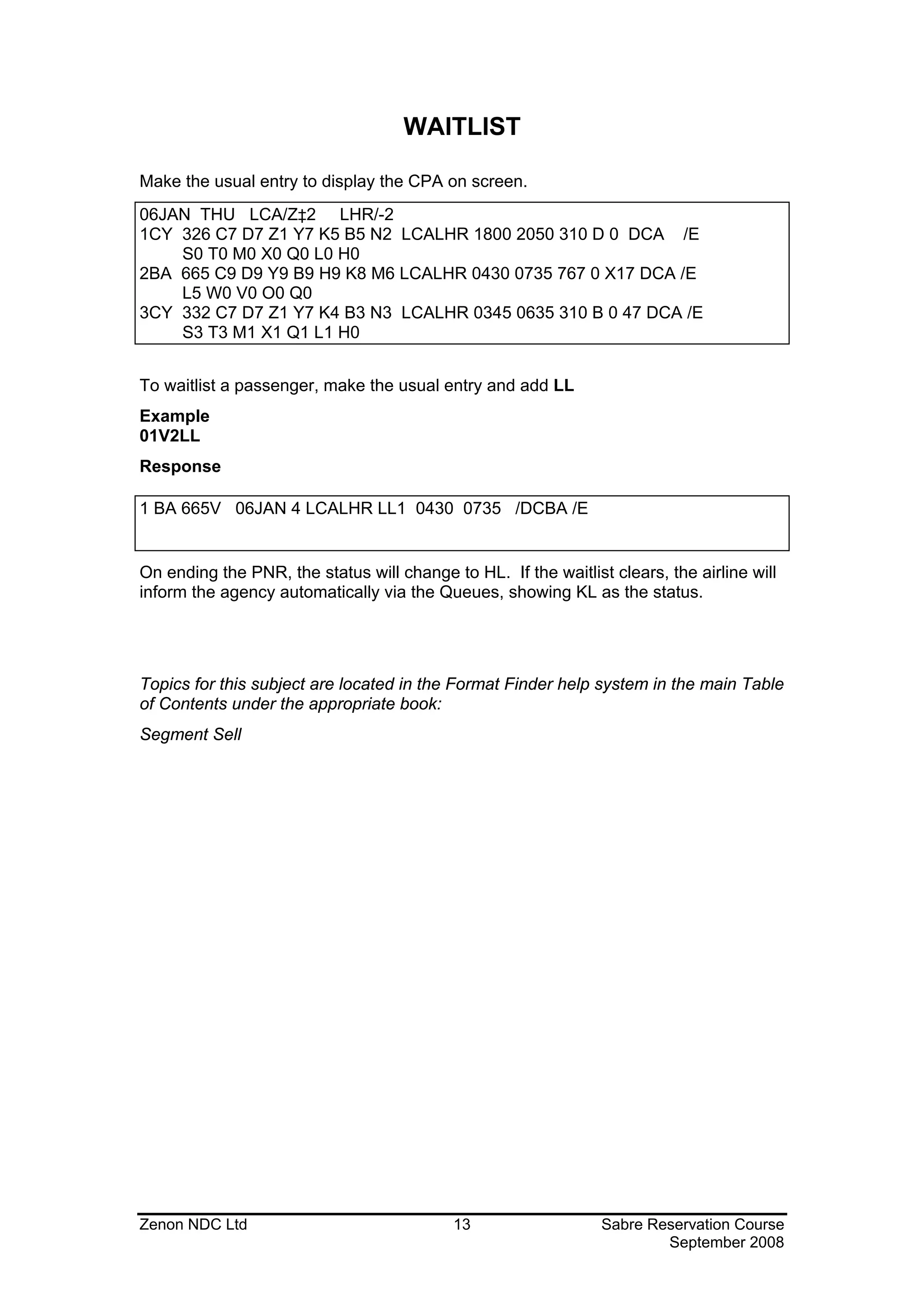
WAITLIST

Make the usual entry to display the CPA on screen.
06JAN THU LCA/Z‡2 LHR/-2
1CY 326 C7 D7 Z1 Y7 K5 B5 N2 LCALHR 1800 2050 310 D 0 DCA /E
    S0 T0 M0 X0 Q0 L0 H0
2BA 665 C9 D9 Y9 B9 H9 K8 M6 LCALHR 0430 0735 767 0 X17 DCA /E
    L5 W0 V0 O0 Q0
3CY 332 C7 D7 Z1 Y7 K4 B3 N3 LCALHR 0345 0635 310 B 0 47 DCA /E
    S3 T3 M1 X1 Q1 L1 H0


To waitlist a passenger, make the usual entry and add LL
Example
01V2LL
Response

1 BA 665V 06JAN 4 LCALHR LL1 0430 0735 /DCBA /E


On ending the PNR, the status will change to HL. If the waitlist clears, the airline will
inform the agency automatically via the Queues, showing KL as the status.


Topics for this subject are located in the Format Finder help system in the main Table
of Contents under the appropriate book:
Segment Sell


Zenon NDC Ltd                              13                   Sabre Reservation Course
                                                                        September 2008
BUILD A PASSENGER NAME RECORD (PNR)

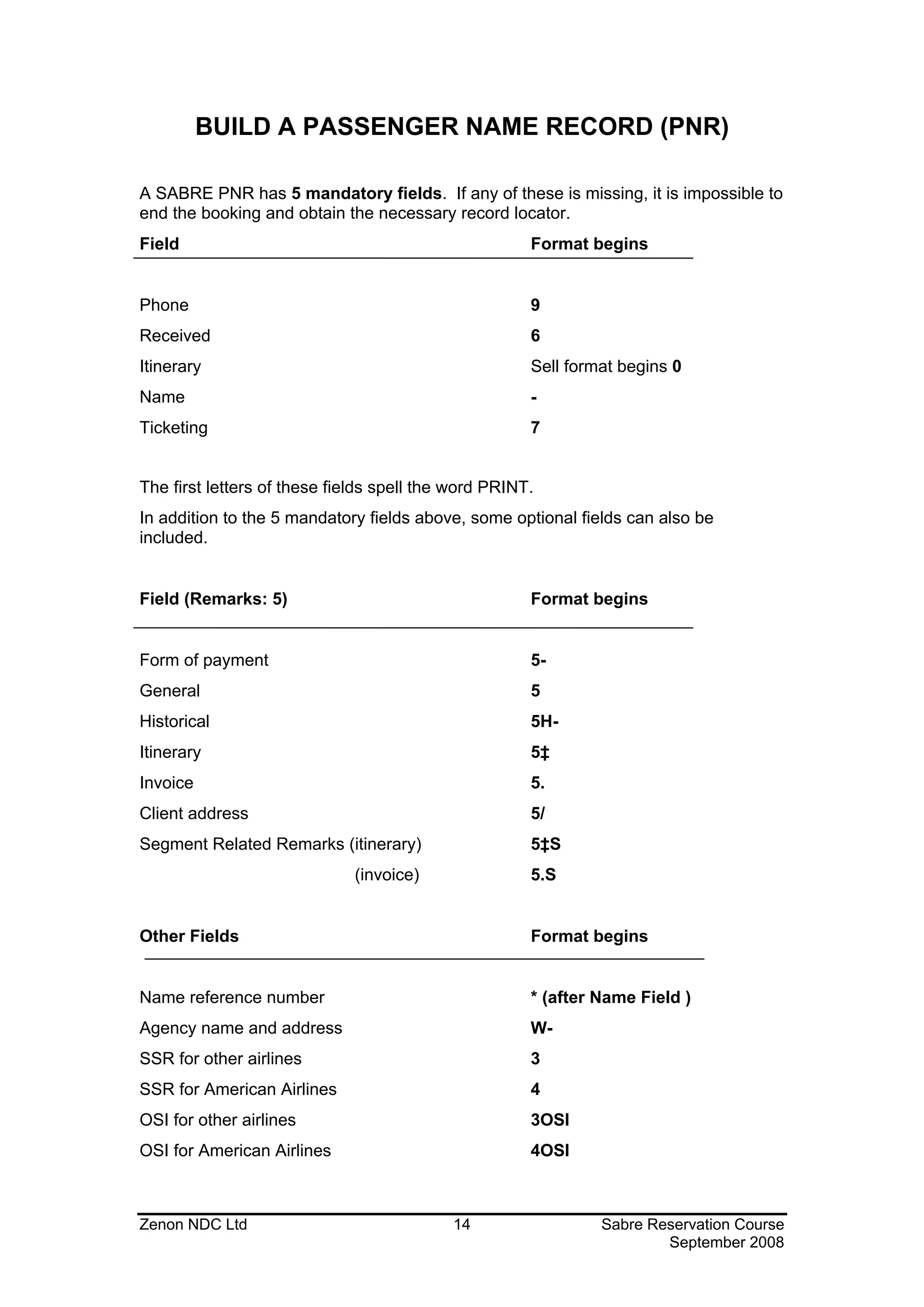
A SABRE PNR has 5 mandatory fields. If any of these is missing, it is impossible to
end the booking and obtain the necessary record locator.
Field                                                 Format begins


Phone                                                 9
Received                                              6
Itinerary                                             Sell format begins 0
Name                                                  -
Ticketing                                             7


The first letters of these fields spell the word PRINT.
In addition to the 5 mandatory fields above, some optional fields can also be
included.


Field (Remarks: 5)                                    Format begins


Form of payment                                       5-
General                                               5
Historical                                            5H-
Itinerary                                             5‡
Invoice                                               5.
Client address                                        5/
Segment Related Remarks (itinerary)                   5‡S
                              (invoice)               5.S


Other Fields                                          Format begins


Name reference number                                 * (after Name Field )
Agency name and address                               W-
SSR for other airlines                                3
SSR for American Airlines                             4
OSI for other airlines                                3OSI
OSI for American Airlines                             4OSI


Zenon NDC Ltd                              14                  Sabre Reservation Course
                                                                       September 2008
THE 5 MANDATORY FIELDS

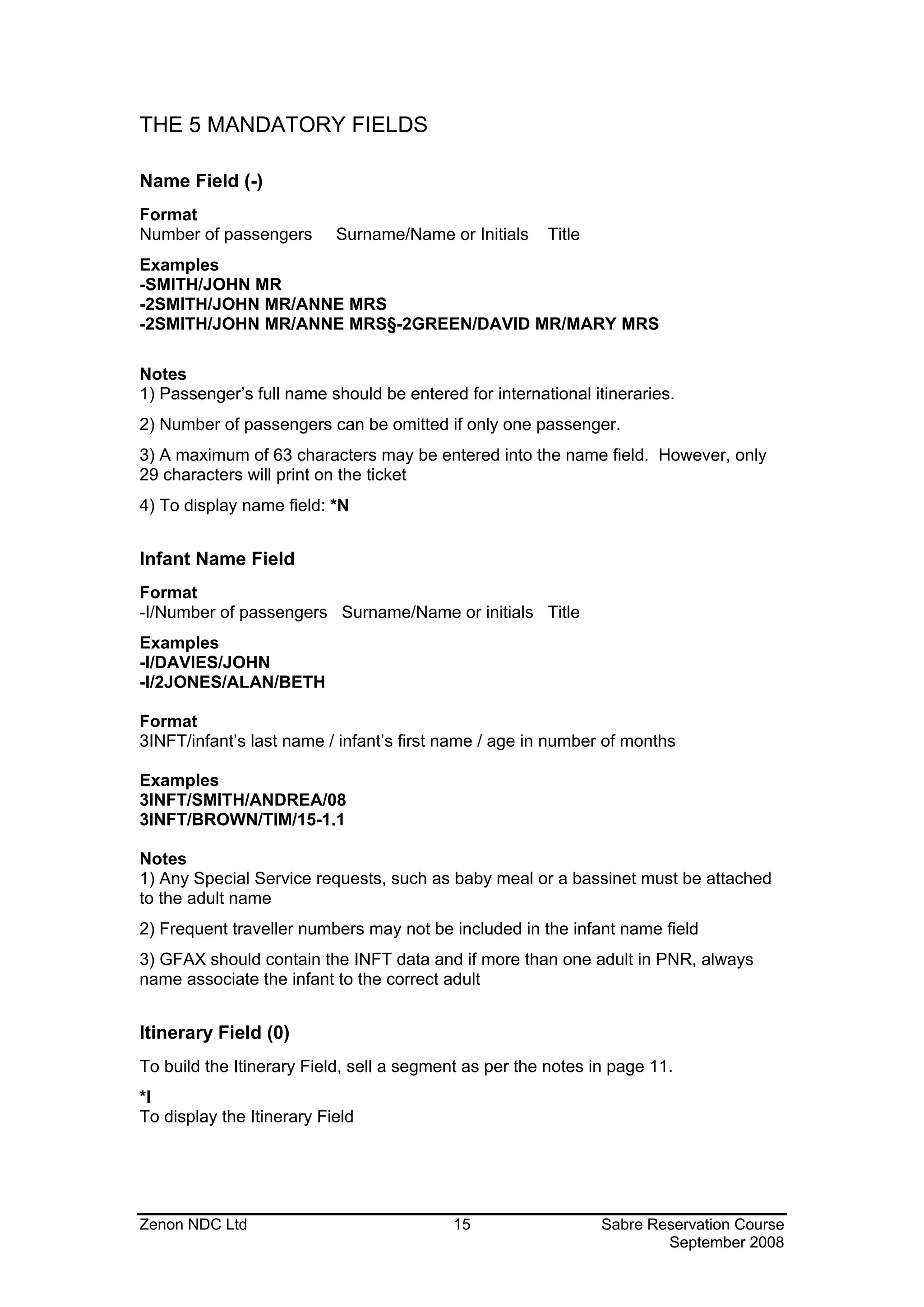
Name Field (-)
Format
Number of passengers       Surname/Name or Initials    Title
Examples
-SMITH/JOHN MR
-2SMITH/JOHN MR/ANNE MRS
-2SMITH/JOHN MR/ANNE MRS§-2GREEN/DAVID MR/MARY MRS

Notes
1) Passenger’s full name should be entered for international itineraries.
2) Number of passengers can be omitted if only one passenger.
3) A maximum of 63 characters may be entered into the name field. However, only
29 characters will print on the ticket
4) To display name field: *N


Infant Name Field
Format
-I/Number of passengers Surname/Name or initials Title
Examples
-I/DAVIES/JOHN
-I/2JONES/ALAN/BETH

Format
3INFT/infant’s last name / infant’s first name / age in number of months

Examples
3INFT/SMITH/ANDREA/08
3INFT/BROWN/TIM/15-1.1

Notes
1) Any Special Service requests, such as baby meal or a bassinet must be attached
to the adult name
2) Frequent traveller numbers may not be included in the infant name field
3) GFAX should contain the INFT data and if more than one adult in PNR, always
name associate the infant to the correct adult


Itinerary Field (0)
To build the Itinerary Field, sell a segment as per the notes in page 11.
*I
To display the Itinerary Field


Zenon NDC Ltd                             15                   Sabre Reservation Course
                                                                       September 2008
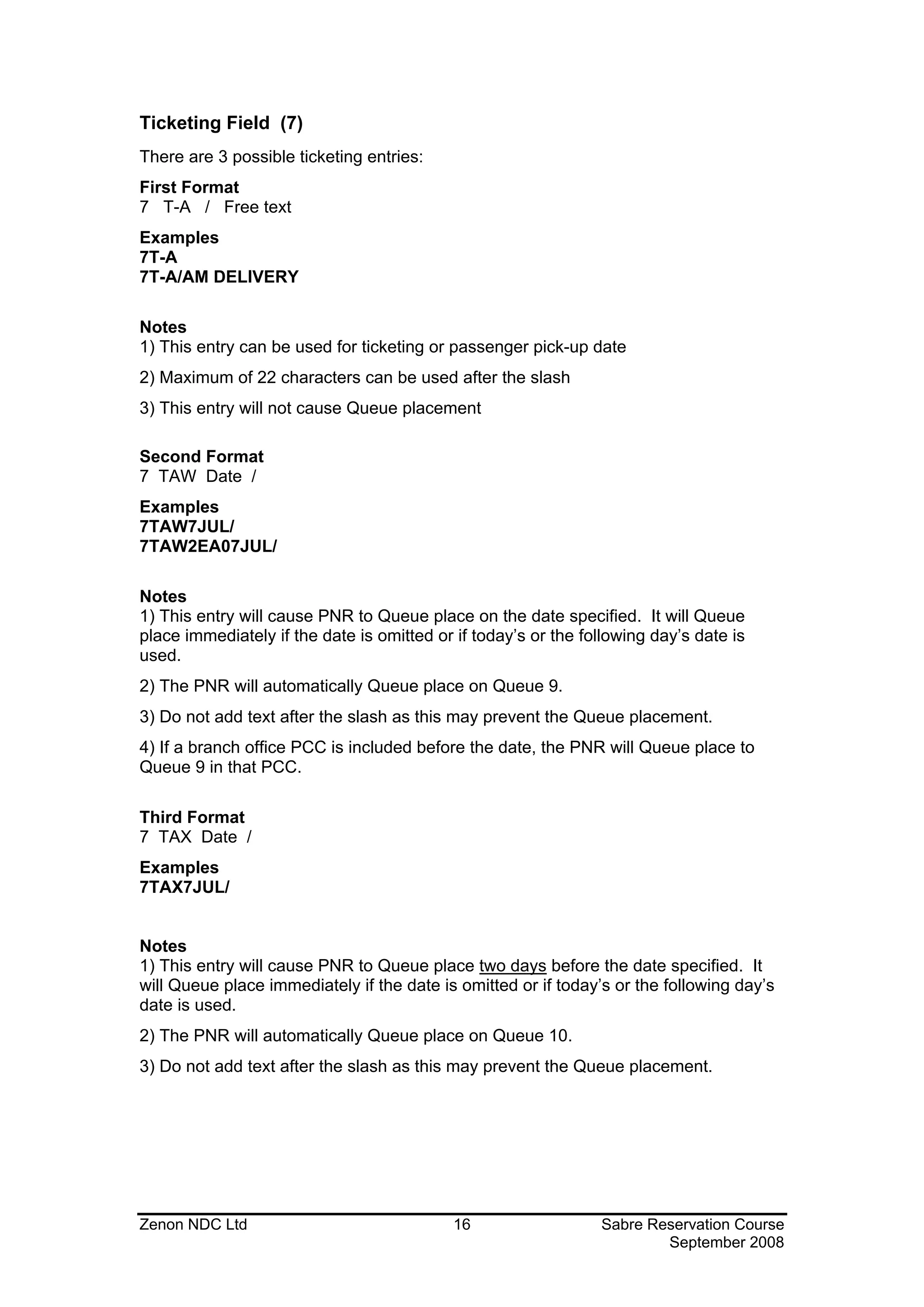
Ticketing Field (7)
There are 3 possible ticketing entries:
First Format
7 T-A / Free text
Examples
7T-A
7T-A/AM DELIVERY

Notes
1) This entry can be used for ticketing or passenger pick-up date
2) Maximum of 22 characters can be used after the slash
3) This entry will not cause Queue placement

Second Format
7 TAW Date /
Examples
7TAW7JUL/
7TAW2EA07JUL/

Notes
1) This entry will cause PNR to Queue place on the date specified. It will Queue
place immediately if the date is omitted or if today’s or the following day’s date is
used.
2) The PNR will automatically Queue place on Queue 9.
3) Do not add text after the slash as this may prevent the Queue placement.
4) If a branch office PCC is included before the date, the PNR will Queue place to
Queue 9 in that PCC.

Third Format
7 TAX Date /
Examples
7TAX7JUL/


Notes
1) This entry will cause PNR to Queue place two days before the date specified. It
will Queue place immediately if the date is omitted or if today’s or the following day’s
date is used.
2) The PNR will automatically Queue place on Queue 10.
3) Do not add text after the slash as this may prevent the Queue placement.


Zenon NDC Ltd                               16                  Sabre Reservation Course
                                                                        September 2008
Telephone Field (9)
Format
9 Area code + exchange number + number -A
9 Area code + exchange number + number -B
9 Area code + exchange number + number -M
9 Area code + exchange number + number -H
NB. Divide up telephone number with dashes for ease of reading.
Examples
90181-577-4670-A
90181-881-1272-B
90181-881-7621-H
With an extension added:
90181-786-2345X241-B MRS GREEN

Notes
1) A = Agency B = Business H = Home
2) When the Phone Field is redisplayed the number will be preceded by the code of
the city where the terminal is situated.
3) Maximum of 30 characters in the Phone Field. It is possible to add free text after
the -A -B -H but this may hinder the processing of the message by the other airline's
computer system
4) To display Phone Field: *P9


Received From Field (6)
Format
6 Free text
Examples
6MR SMITH
6P
6MR SMITHS SECRETARY

Notes
1) P for Passenger can be used when there is only one passenger in the Name Field.
This field is used to record the name of the person who asked to make the itinerary.
2) A Received from Field must be added if any changes are made to the PNR after
its initial creation.
3) To display the Received from Field: *P6


Zenon NDC Ltd                             17                 Sabre Reservation Course
                                                                     September 2008
OPTIONAL FIELDS IN A PNR


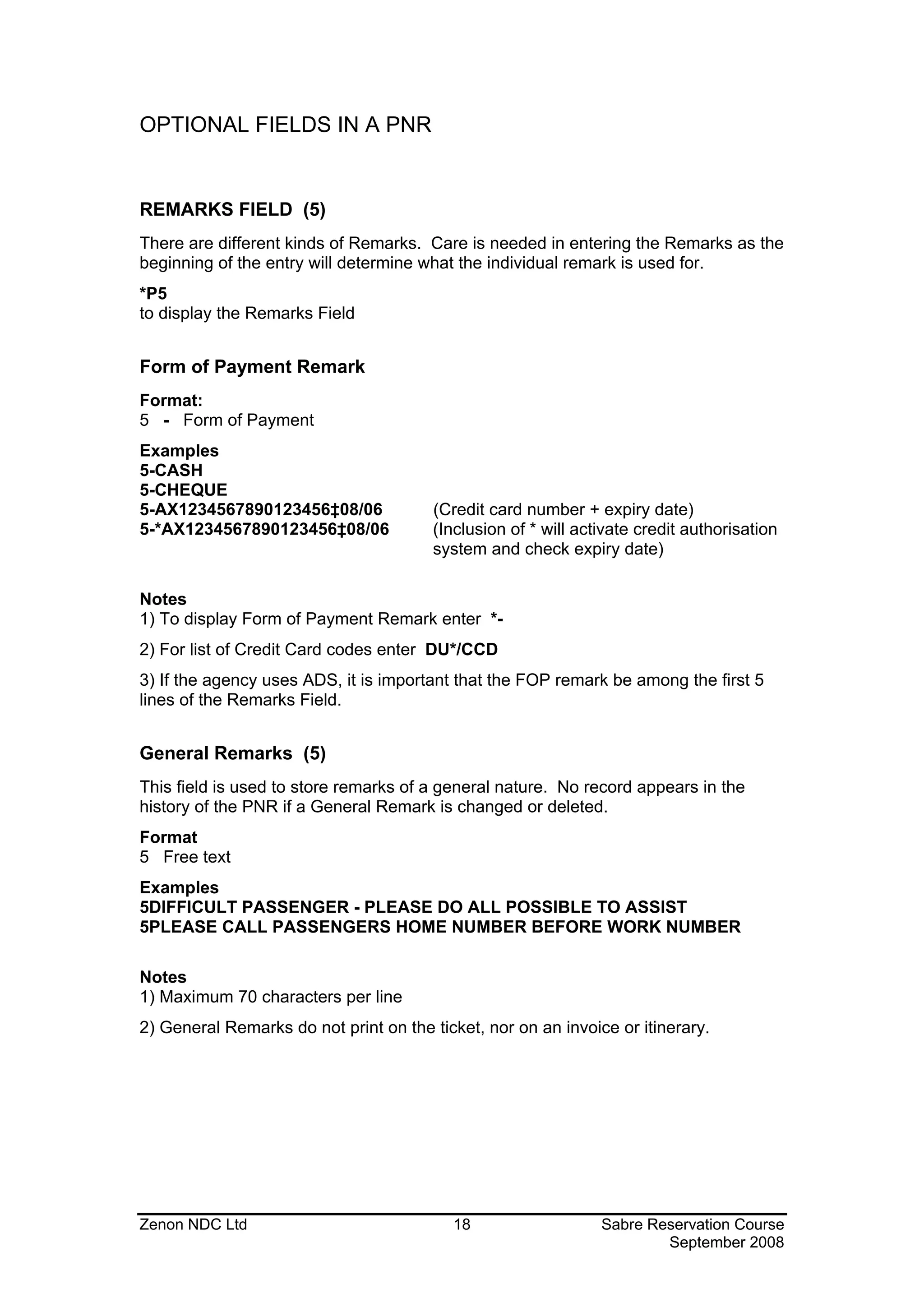
REMARKS FIELD (5)
There are different kinds of Remarks. Care is needed in entering the Remarks as the
beginning of the entry will determine what the individual remark is used for.
*P5
to display the Remarks Field


Form of Payment Remark
Format:
5 - Form of Payment
Examples
5-CASH
5-CHEQUE
5-AX1234567890123456‡08/06              (Credit card number + expiry date)
5-*AX1234567890123456‡08/06             (Inclusion of * will activate credit authorisation
                                        system and check expiry date)

Notes
1) To display Form of Payment Remark enter *-
2) For list of Credit Card codes enter DU*/CCD
3) If the agency uses ADS, it is important that the FOP remark be among the first 5
lines of the Remarks Field.


General Remarks (5)
This field is used to store remarks of a general nature. No record appears in the
history of the PNR if a General Remark is changed or deleted.
Format
5 Free text
Examples
5DIFFICULT PASSENGER - PLEASE DO ALL POSSIBLE TO ASSIST
5PLEASE CALL PASSENGERS HOME NUMBER BEFORE WORK NUMBER

Notes
1) Maximum 70 characters per line
2) General Remarks do not print on the ticket, nor on an invoice or itinerary.


Zenon NDC Ltd                             18                    Sabre Reservation Course
                                                                        September 2008
Historical Remarks (5H-)
Historical Remarks should be used to store information of greater importance which
needs to be kept on record. They pass into the history of the PNR, if changed,
deleted or added.
Format
5 H - Free text
Examples
5H-HAVE ADVISED PASSENGER OF PENALTY CLAUSES
5H-HAVE ADVISED PASSENGER OF DOCUMENTS REQUIRED

Notes
1) Maximum of 68 characters per line after 5H-
2) Used for passport details.
3) To display Historical Remarks in the history of the PNR enter *H5 and to display
historical remarks in the active PNR enter *P5H


Itinerary Remarks (5‡ )
These Remarks will print on an Itinerary document or on a combined Invoice &
Itinerary document.
Format
5 ‡ Free text

Examples
5‡PLEASE RECONFIRM ALL YOUR FLIGHTS BEFORE DEPARTURE
5‡CHECK IN TIME FOR INTERNATIONAL FLIGHTS IS 2 HRS


Notes
1) Maximum of 922 characters in the whole Itinerary Remarks Field, (including the
5‡s). Each line must be entered separately
2) To display Itinerary Remarks enter *‡


Zenon NDC Ltd                              19                Sabre Reservation Course
                                                                     September 2008
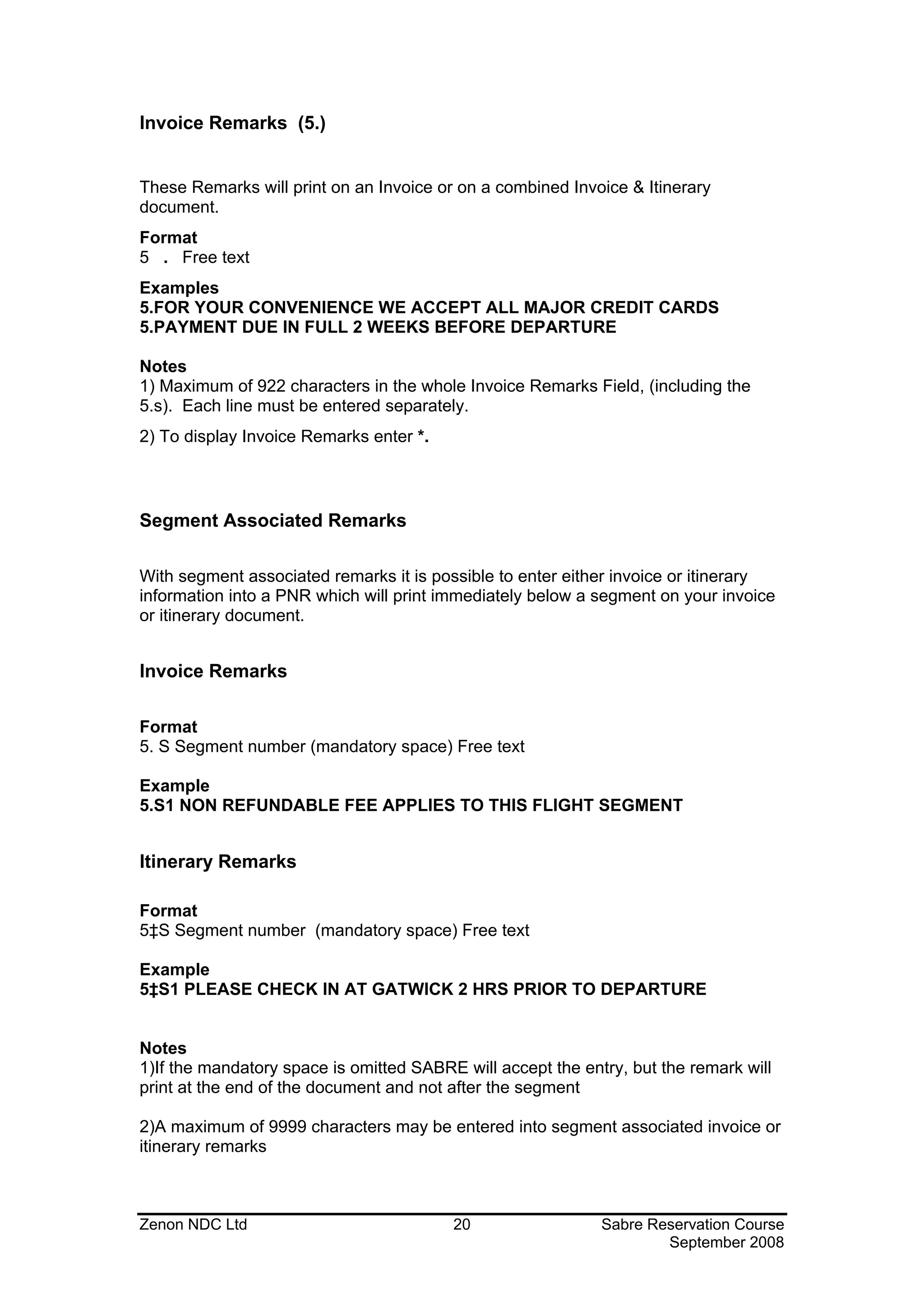
Invoice Remarks (5.)


These Remarks will print on an Invoice or on a combined Invoice & Itinerary
document.
Format
5 . Free text
Examples
5.FOR YOUR CONVENIENCE WE ACCEPT ALL MAJOR CREDIT CARDS
5.PAYMENT DUE IN FULL 2 WEEKS BEFORE DEPARTURE

Notes
1) Maximum of 922 characters in the whole Invoice Remarks Field, (including the
5.s). Each line must be entered separately.
2) To display Invoice Remarks enter *.


Segment Associated Remarks

With segment associated remarks it is possible to enter either invoice or itinerary
information into a PNR which will print immediately below a segment on your invoice
or itinerary document.


Invoice Remarks

Format
5. S Segment number (mandatory space) Free text

Example
5.S1 NON REFUNDABLE FEE APPLIES TO THIS FLIGHT SEGMENT


Itinerary Remarks

Format
5‡S Segment number (mandatory space) Free text

Example
5‡S1 PLEASE CHECK IN AT GATWICK 2 HRS PRIOR TO DEPARTURE


Notes
1)If the mandatory space is omitted SABRE will accept the entry, but the remark will
print at the end of the document and not after the segment

2)A maximum of 9999 characters may be entered into segment associated invoice or
itinerary remarks


Zenon NDC Ltd                            20                  Sabre Reservation Course
                                                                     September 2008
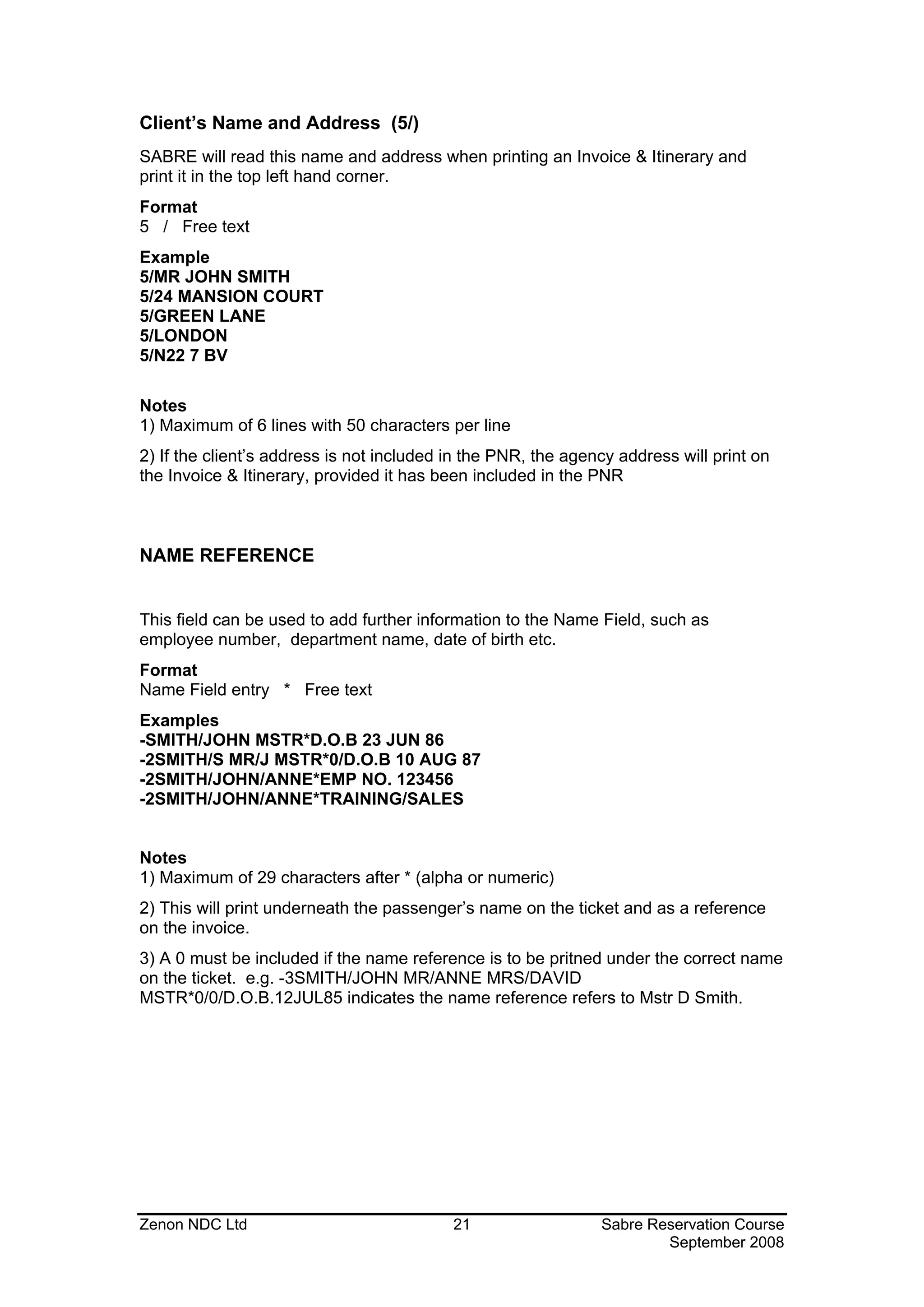
Client’s Name and Address (5/)
SABRE will read this name and address when printing an Invoice & Itinerary and
print it in the top left hand corner.
Format
5 / Free text
Example
5/MR JOHN SMITH
5/24 MANSION COURT
5/GREEN LANE
5/LONDON
5/N22 7 BV

Notes
1) Maximum of 6 lines with 50 characters per line
2) If the client’s address is not included in the PNR, the agency address will print on
the Invoice & Itinerary, provided it has been included in the PNR


NAME REFERENCE


This field can be used to add further information to the Name Field, such as
employee number, department name, date of birth etc.
Format
Name Field entry * Free text
Examples
-SMITH/JOHN MSTR*D.O.B 23 JUN 86
-2SMITH/S MR/J MSTR*0/D.O.B 10 AUG 87
-2SMITH/JOHN/ANNE*EMP NO. 123456
-2SMITH/JOHN/ANNE*TRAINING/SALES


Notes
1) Maximum of 29 characters after * (alpha or numeric)
2) This will print underneath the passenger’s name on the ticket and as a reference
on the invoice.
3) A 0 must be included if the name reference is to be pritned under the correct name
on the ticket. e.g. -3SMITH/JOHN MR/ANNE MRS/DAVID
MSTR*0/0/D.O.B.12JUL85 indicates the name reference refers to Mstr D Smith.


Zenon NDC Ltd                              21                  Sabre Reservation Course
                                                                       September 2008
AGENCY NAME AND ADDRESS

Format
W- Agency name ‡ Address ‡ Address ‡ Address
Example
W-STIN Travel‡123 High Street‡LOWTOWN‡LW1 7FG‡UK

Notes
1) Put the name of the agency immediately after W-
2) Minimum of 3 lines, maximum of 6, with 50 characters maximum per line in the
agency address
3) Include in bookings with hotel, car and tour segments if written confirmation is
required
4) The inclusion of the agency address assists with commission tracking through
SABRE
5) To display the agency address enter *PAD
6) Only one agency address is allowed per PNR


Topics for this subject (Build PNR) are located in the Format Finder help system in
the main Table of Contents under the appropriate book:
PNR (Passenger Name Record)


Zenon NDC Ltd                              22                  Sabre Reservation Course
                                                                       September 2008
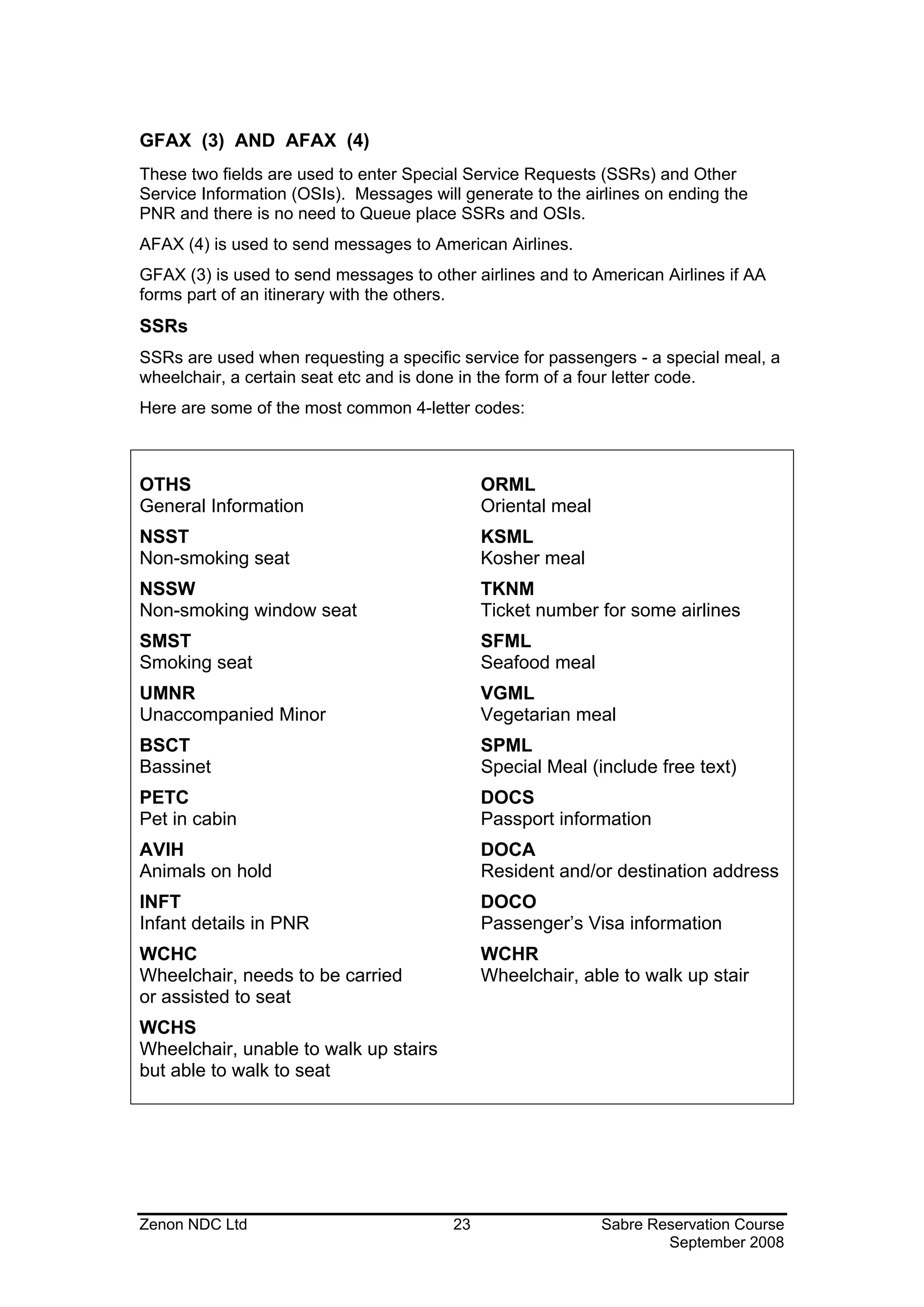
GFAX (3) AND AFAX (4)
These two fields are used to enter Special Service Requests (SSRs) and Other
Service Information (OSIs). Messages will generate to the airlines on ending the
PNR and there is no need to Queue place SSRs and OSIs.
AFAX (4) is used to send messages to American Airlines.
GFAX (3) is used to send messages to other airlines and to American Airlines if AA
forms part of an itinerary with the others.
SSRs
SSRs are used when requesting a specific service for passengers - a special meal, a
wheelchair, a certain seat etc and is done in the form of a four letter code.
Here are some of the most common 4-letter codes:


OTHS                                          ORML
General Information                           Oriental meal
NSST                                          KSML
Non-smoking seat                              Kosher meal
NSSW                                          TKNM
Non-smoking window seat                       Ticket number for some airlines
SMST                                          SFML
Smoking seat                                  Seafood meal
UMNR                                          VGML
Unaccompanied Minor                           Vegetarian meal
BSCT                                          SPML
Bassinet                                      Special Meal (include free text)
PETC                                          DOCS
Pet in cabin                                  Passport information
AVIH                                          DOCA
Animals on hold                               Resident and/or destination address
INFT                                          DOCO
Infant details in PNR                         Passenger’s Visa information
WCHC                                          WCHR
Wheelchair, needs to be carried               Wheelchair, able to walk up stair
or assisted to seat
WCHS
Wheelchair, unable to walk up stairs
but able to walk to seat


Zenon NDC Ltd                            23                   Sabre Reservation Course
                                                                      September 2008
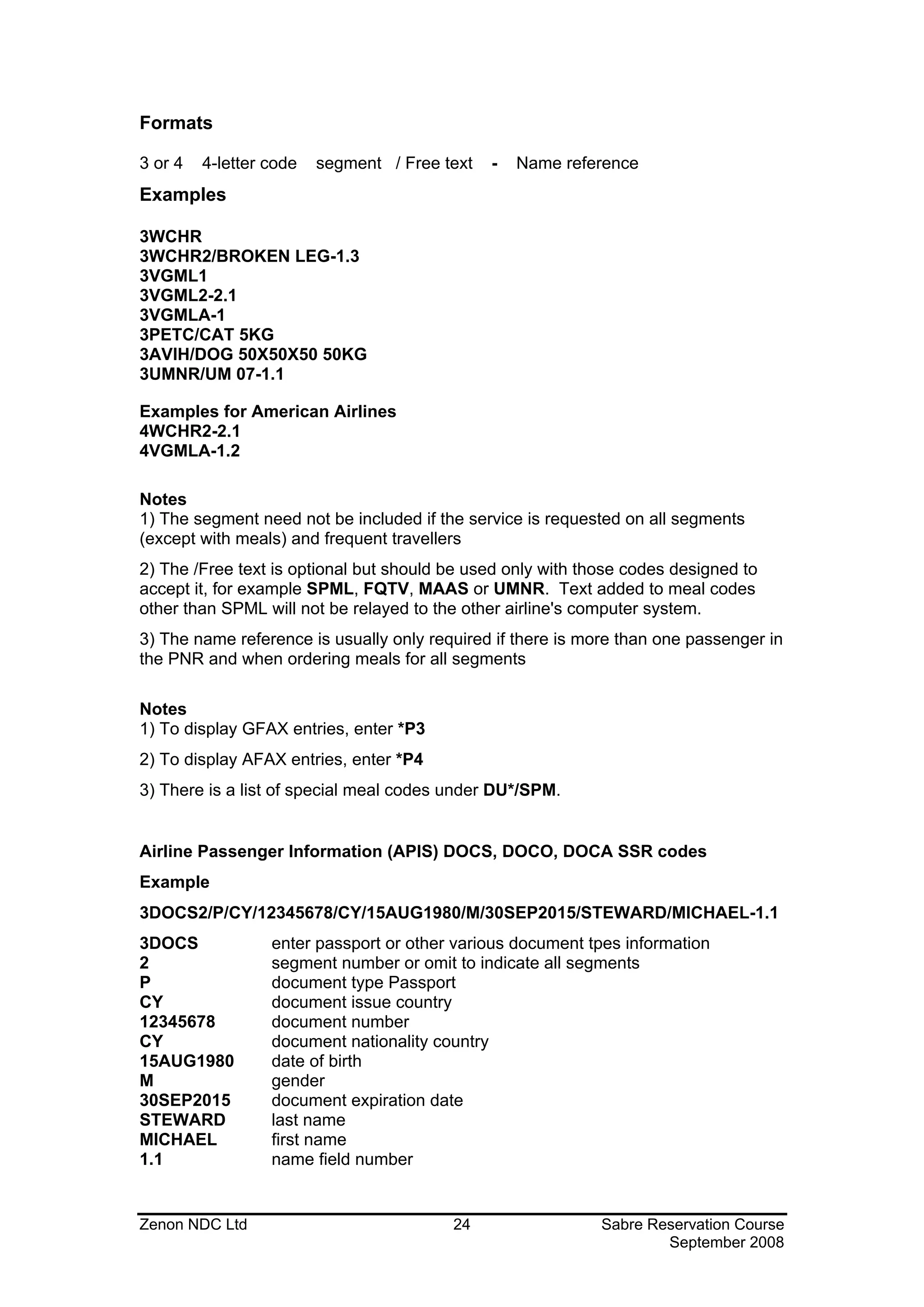
Formats

3 or 4   4-letter code   segment / Free text   -   Name reference
Examples

3WCHR
3WCHR2/BROKEN LEG-1.3
3VGML1
3VGML2-2.1
3VGMLA-1
3PETC/CAT 5KG
3AVIH/DOG 50X50X50 50KG
3UMNR/UM 07-1.1

Examples for American Airlines
4WCHR2-2.1
4VGMLA-1.2

Notes
1) The segment need not be included if the service is requested on all segments
(except with meals) and frequent travellers
2) The /Free text is optional but should be used only with those codes designed to
accept it, for example SPML, FQTV, MAAS or UMNR. Text added to meal codes
other than SPML will not be relayed to the other airline's computer system.
3) The name reference is usually only required if there is more than one passenger in
the PNR and when ordering meals for all segments

Notes
1) To display GFAX entries, enter *P3
2) To display AFAX entries, enter *P4
3) There is a list of special meal codes under DU*/SPM.


Airline Passenger Information (APIS) DOCS, DOCO, DOCA SSR codes
Example
3DOCS2/P/CY/12345678/CY/15AUG1980/M/30SEP2015/STEWARD/MICHAEL-1.1
3DOCS             enter passport or other various document tpes information
2                 segment number or omit to indicate all segments
P                 document type Passport
CY                document issue country
12345678          document number
CY                document nationality country
15AUG1980         date of birth
M                 gender
30SEP2015         document expiration date
STEWARD           last name
MICHAEL           first name
1.1               name field number


Zenon NDC Ltd                            24                  Sabre Reservation Course
                                                                     September 2008
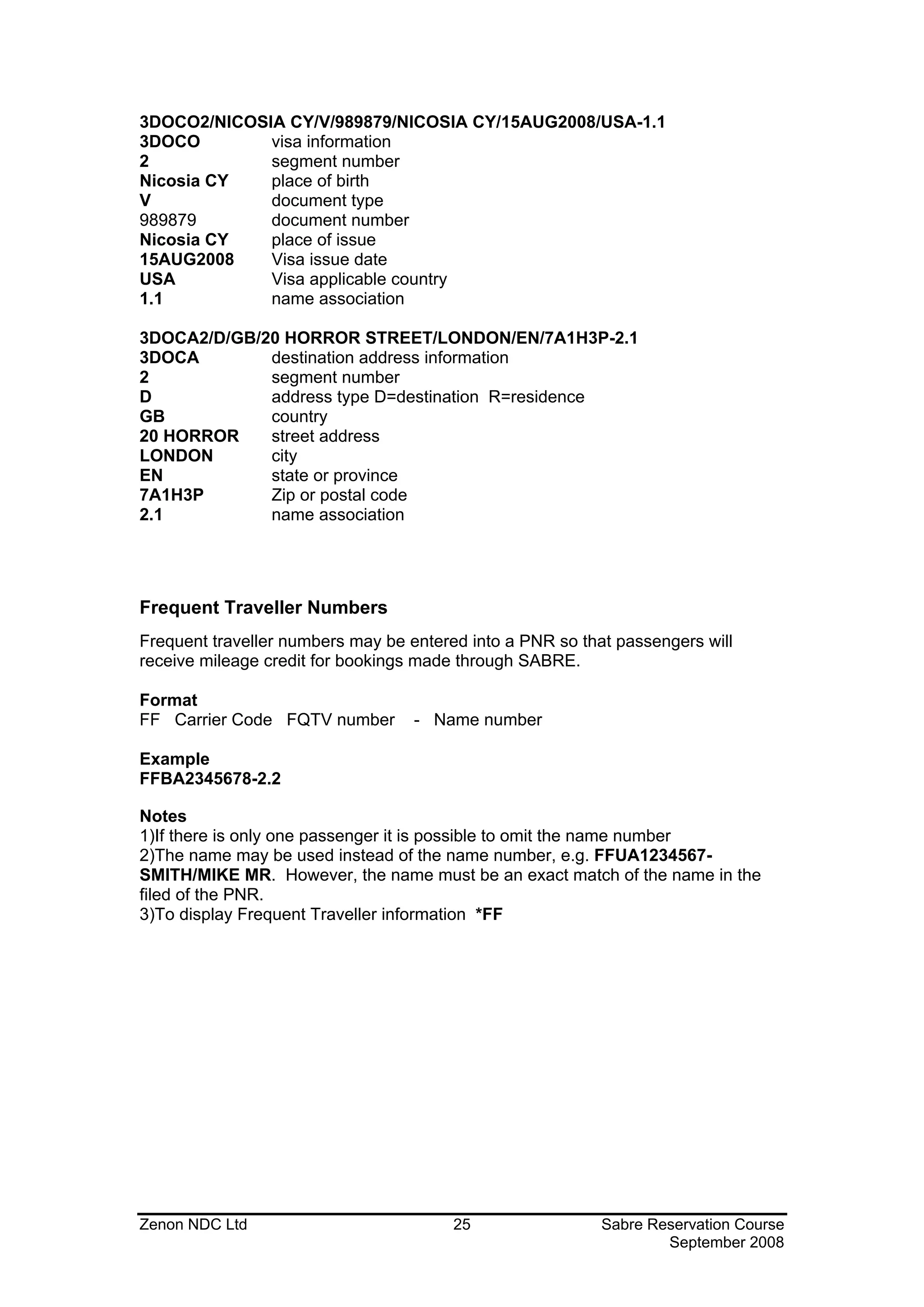
3DOCO2/NICOSIA CY/V/989879/NICOSIA CY/15AUG2008/USA-1.1
3DOCO        visa information
2            segment number
Nicosia CY   place of birth
V            document type
989879       document number
Nicosia CY   place of issue
15AUG2008    Visa issue date
USA          Visa applicable country
1.1          name association

3DOCA2/D/GB/20 HORROR STREET/LONDON/EN/7A1H3P-2.1
3DOCA        destination address information
2            segment number
D            address type D=destination R=residence
GB           country
20 HORROR    street address
LONDON       city
EN           state or province
7A1H3P       Zip or postal code
2.1          name association


Frequent Traveller Numbers
Frequent traveller numbers may be entered into a PNR so that passengers will
receive mileage credit for bookings made through SABRE.

Format
FF Carrier Code FQTV number        - Name number

Example
FFBA2345678-2.2

Notes
1)If there is only one passenger it is possible to omit the name number
2)The name may be used instead of the name number, e.g. FFUA1234567-
SMITH/MIKE MR. However, the name must be an exact match of the name in the
filed of the PNR.
3)To display Frequent Traveller information *FF


Zenon NDC Ltd                           25                 Sabre Reservation Course
                                                                   September 2008
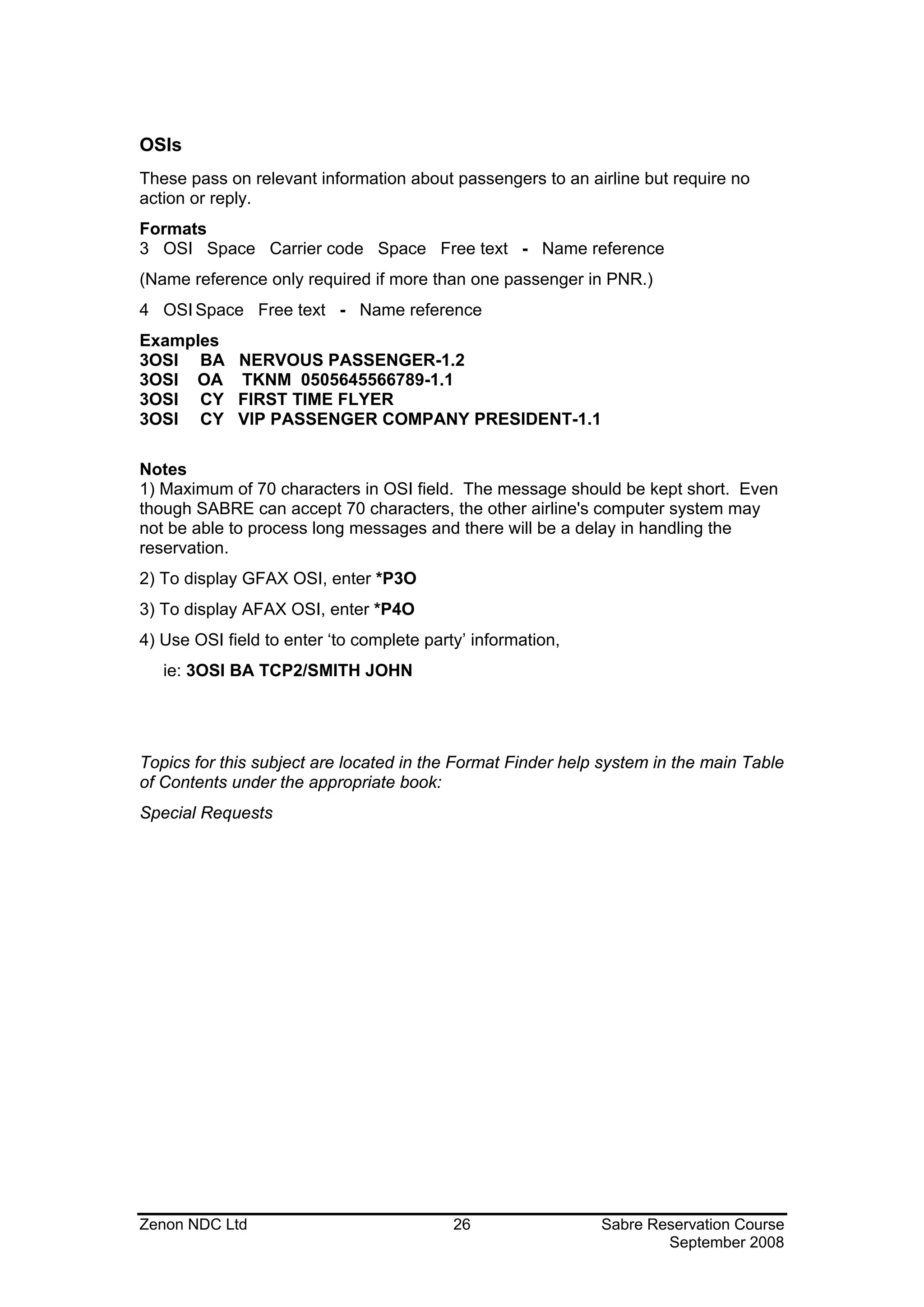
OSIs
These pass on relevant information about passengers to an airline but require no
action or reply.
Formats
3 OSI Space Carrier code Space Free text - Name reference
(Name reference only required if more than one passenger in PNR.)
4 OSI Space Free text - Name reference
Examples
3OSI BA NERVOUS PASSENGER-1.2
3OSI OA TKNM 0505645566789-1.1
3OSI CY FIRST TIME FLYER
3OSI CY VIP PASSENGER COMPANY PRESIDENT-1.1

Notes
1) Maximum of 70 characters in OSI field. The message should be kept short. Even
though SABRE can accept 70 characters, the other airline's computer system may
not be able to process long messages and there will be a delay in handling the
reservation.
2) To display GFAX OSI, enter *P3O
3) To display AFAX OSI, enter *P4O
4) Use OSI field to enter ‘to complete party’ information,
   ie: 3OSI BA TCP2/SMITH JOHN


Topics for this subject are located in the Format Finder help system in the main Table
of Contents under the appropriate book:
Special Requests


Zenon NDC Ltd                              26                Sabre Reservation Course
                                                                     September 2008
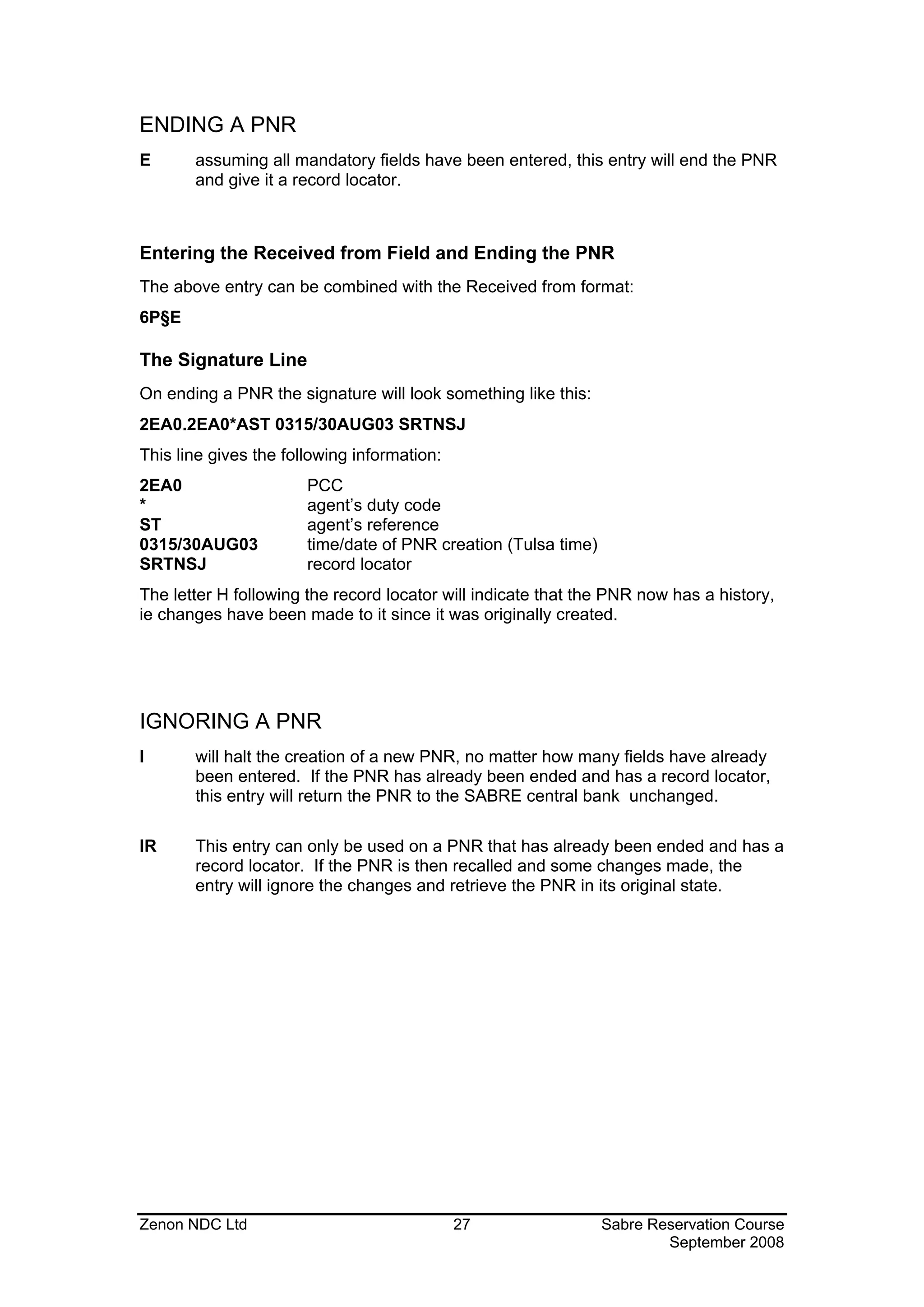
ENDING A PNR
E      assuming all mandatory fields have been entered, this entry will end the PNR
       and give it a record locator.


Entering the Received from Field and Ending the PNR
The above entry can be combined with the Received from format:
6P§E

The Signature Line
On ending a PNR the signature will look something like this:
2EA0.2EA0*AST 0315/30AUG03 SRTNSJ
This line gives the following information:
2EA0                   PCC
*                      agent’s duty code
ST                     agent’s reference
0315/30AUG03           time/date of PNR creation (Tulsa time)
SRTNSJ                 record locator
The letter H following the record locator will indicate that the PNR now has a history,
ie changes have been made to it since it was originally created.


IGNORING A PNR
I      will halt the creation of a new PNR, no matter how many fields have already
       been entered. If the PNR has already been ended and has a record locator,
       this entry will return the PNR to the SABRE central bank unchanged.

IR     This entry can only be used on a PNR that has already been ended and has a
       record locator. If the PNR is then recalled and some changes made, the
       entry will ignore the changes and retrieve the PNR in its original state.


Zenon NDC Ltd                                27                 Sabre Reservation Course
                                                                        September 2008
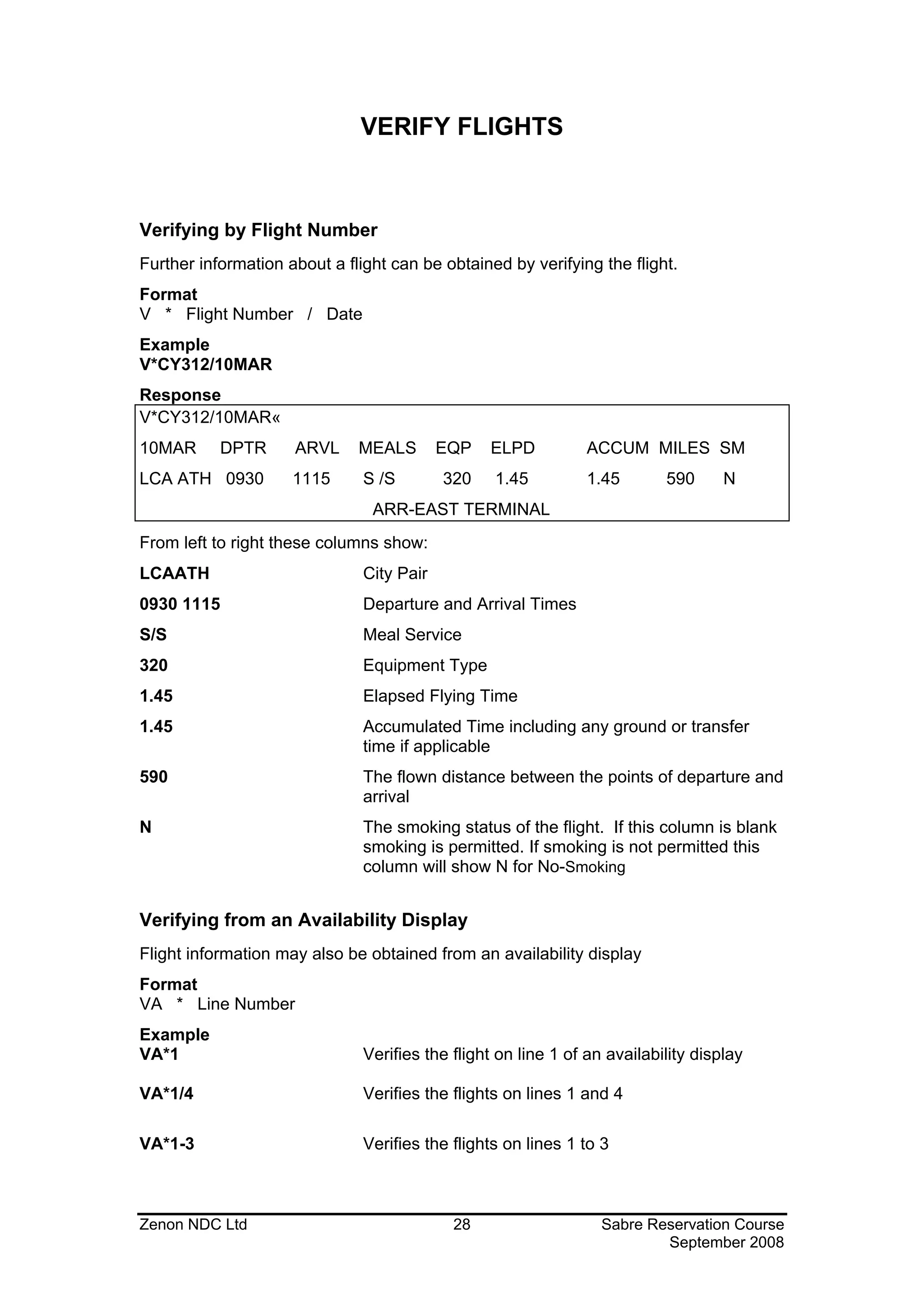
VERIFY FLIGHTS


Verifying by Flight Number
Further information about a flight can be obtained by verifying the flight.
Format
V * Flight Number / Date
Example
V*CY312/10MAR
Response
V*CY312/10MAR«
10MAR      DPTR      ARVL     MEALS        EQP   ELPD          ACCUM MILES SM
LCA ATH 0930         1115      S /S        320    1.45         1.45        590      N
                                ARR-EAST TERMINAL
From left to right these columns show:
LCAATH                         City Pair
0930 1115                      Departure and Arrival Times
S/S                            Meal Service
320                            Equipment Type
1.45                           Elapsed Flying Time
1.45                           Accumulated Time including any ground or transfer
                               time if applicable
590                            The flown distance between the points of departure and
                               arrival
N                              The smoking status of the flight. If this column is blank
                               smoking is permitted. If smoking is not permitted this
                               column will show N for No-Smoking


Verifying from an Availability Display
Flight information may also be obtained from an availability display
Format
VA * Line Number
Example
VA*1                           Verifies the flight on line 1 of an availability display

VA*1/4                         Verifies the flights on lines 1 and 4

VA*1-3                         Verifies the flights on lines 1 to 3


Zenon NDC Ltd                               28                    Sabre Reservation Course
                                                                          September 2008
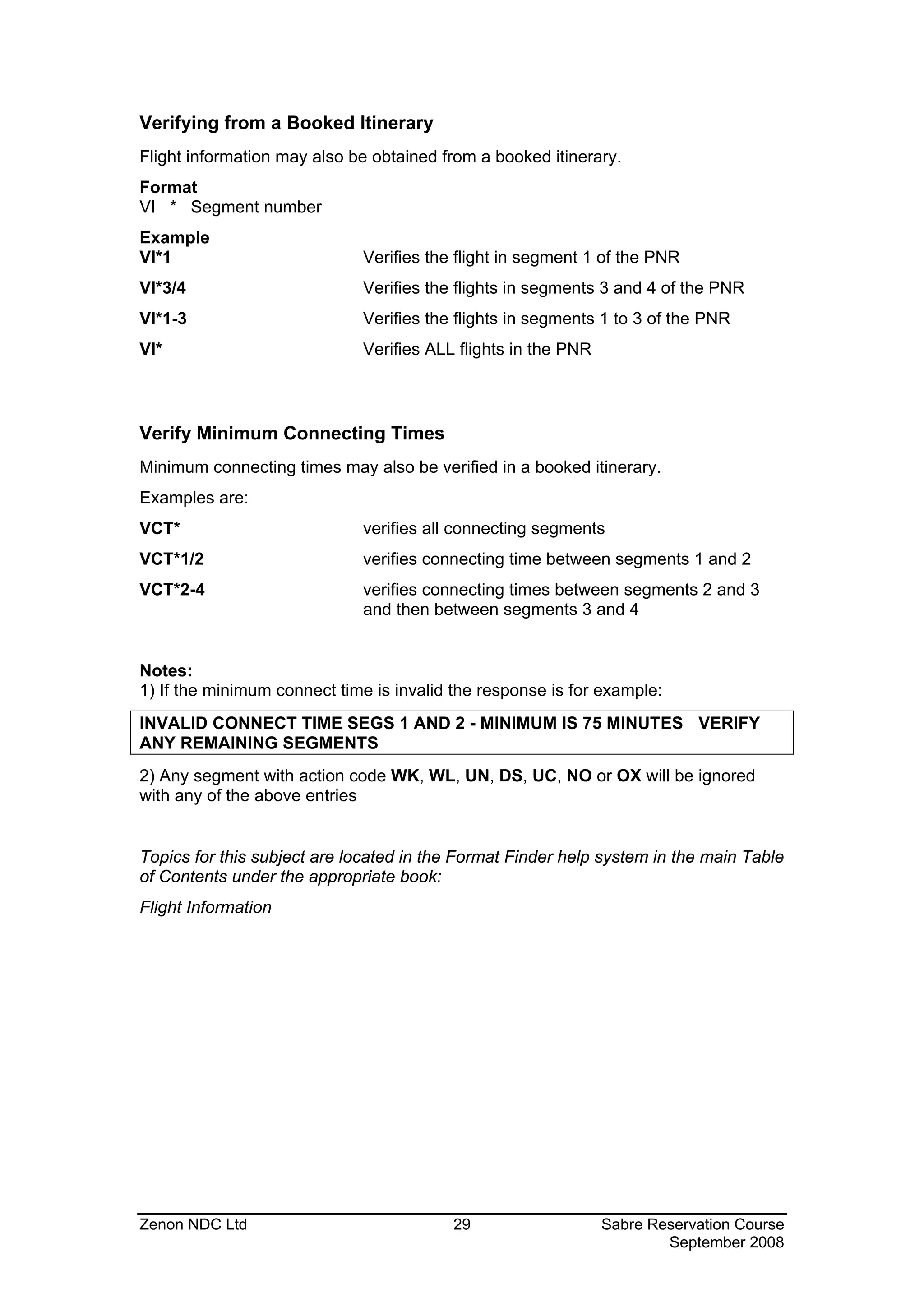
Verifying from a Booked Itinerary
Flight information may also be obtained from a booked itinerary.
Format
VI * Segment number
Example
VI*1                         Verifies the flight in segment 1 of the PNR
VI*3/4                       Verifies the flights in segments 3 and 4 of the PNR
VI*1-3                       Verifies the flights in segments 1 to 3 of the PNR
VI*                          Verifies ALL flights in the PNR


Verify Minimum Connecting Times
Minimum connecting times may also be verified in a booked itinerary.
Examples are:
VCT*                         verifies all connecting segments
VCT*1/2                      verifies connecting time between segments 1 and 2
VCT*2-4                      verifies connecting times between segments 2 and 3
                             and then between segments 3 and 4


Notes:
1) If the minimum connect time is invalid the response is for example:
INVALID CONNECT TIME SEGS 1 AND 2 - MINIMUM IS 75 MINUTES VERIFY
ANY REMAINING SEGMENTS
2) Any segment with action code WK, WL, UN, DS, UC, NO or OX will be ignored
with any of the above entries


Topics for this subject are located in the Format Finder help system in the main Table
of Contents under the appropriate book:
Flight Information


Zenon NDC Ltd                             29                   Sabre Reservation Course
                                                                       September 2008
PRE-RESERVED SEATING (PRS)


All seat and seat map request entries begin with the identifier 4G.


Codes
Location codes or actual seat numbers may be used in requests. The codes used
are as follows:
N – Non Smoking              A – Aisle                  NW – Non smoking/Window

W – Window                    S – Smoking                   SA – Smoking/Aisle


View seat map
You must book the segment(s) and enter the names first before entering the format.


Examples
4G1*            Display full seat map for segment 1
4G1*-AN         Display all Non smoking seats for Segment 1
4G2*-AS         Display all Smoking seats for Segment 2


Book Seats
4G1/33A         Book seat 33A segment 1
4G2/33AB        Book seats 33A and 33B segment 2
4G1/N           Book any Non-Smoking seat segment 1
4G1/S           Book any smoking seat segment 1
4G3/NA          Book non smoking aisle seat segment 3
4G1/SW          Book smoking window seat segment 1
4GA/NW          Book non smoking window, all segments


View Booked Seats
The actual seat numbers booked will not be displayed in the main part of the P.N.R.

To view booked seats *B.

To view any changes made to PRS *HB


Zenon NDC Ltd                               30                Sabre Reservation Course
                                                                      September 2008
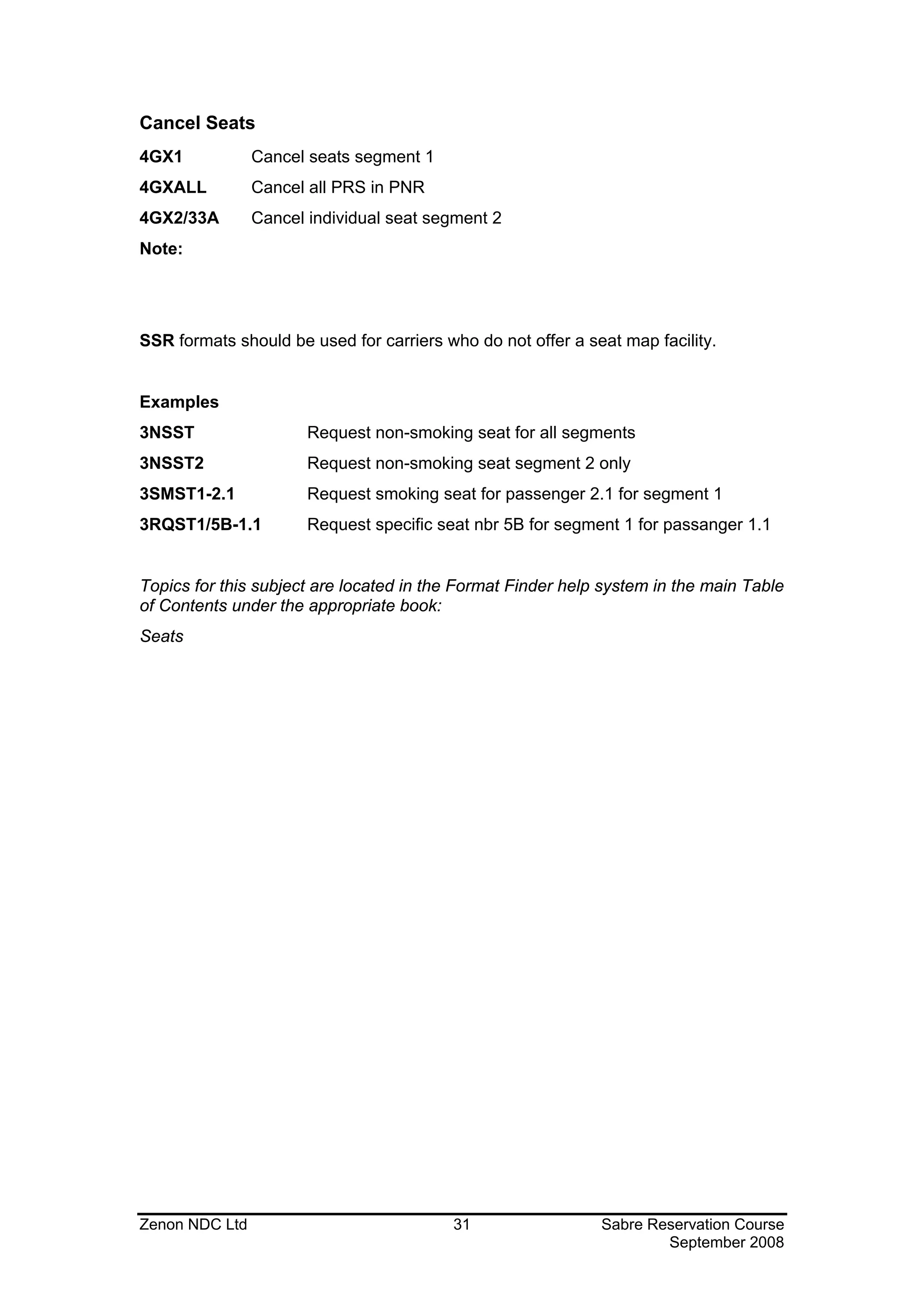
Cancel Seats
4GX1            Cancel seats segment 1
4GXALL          Cancel all PRS in PNR
4GX2/33A        Cancel individual seat segment 2
Note:


SSR formats should be used for carriers who do not offer a seat map facility.


Examples
3NSST                  Request non-smoking seat for all segments
3NSST2                 Request non-smoking seat segment 2 only
3SMST1-2.1             Request smoking seat for passenger 2.1 for segment 1
3RQST1/5B-1.1          Request specific seat nbr 5B for segment 1 for passanger 1.1


Topics for this subject are located in the Format Finder help system in the main Table
of Contents under the appropriate book:
Seats


Zenon NDC Ltd                            31                  Sabre Reservation Course
                                                                     September 2008
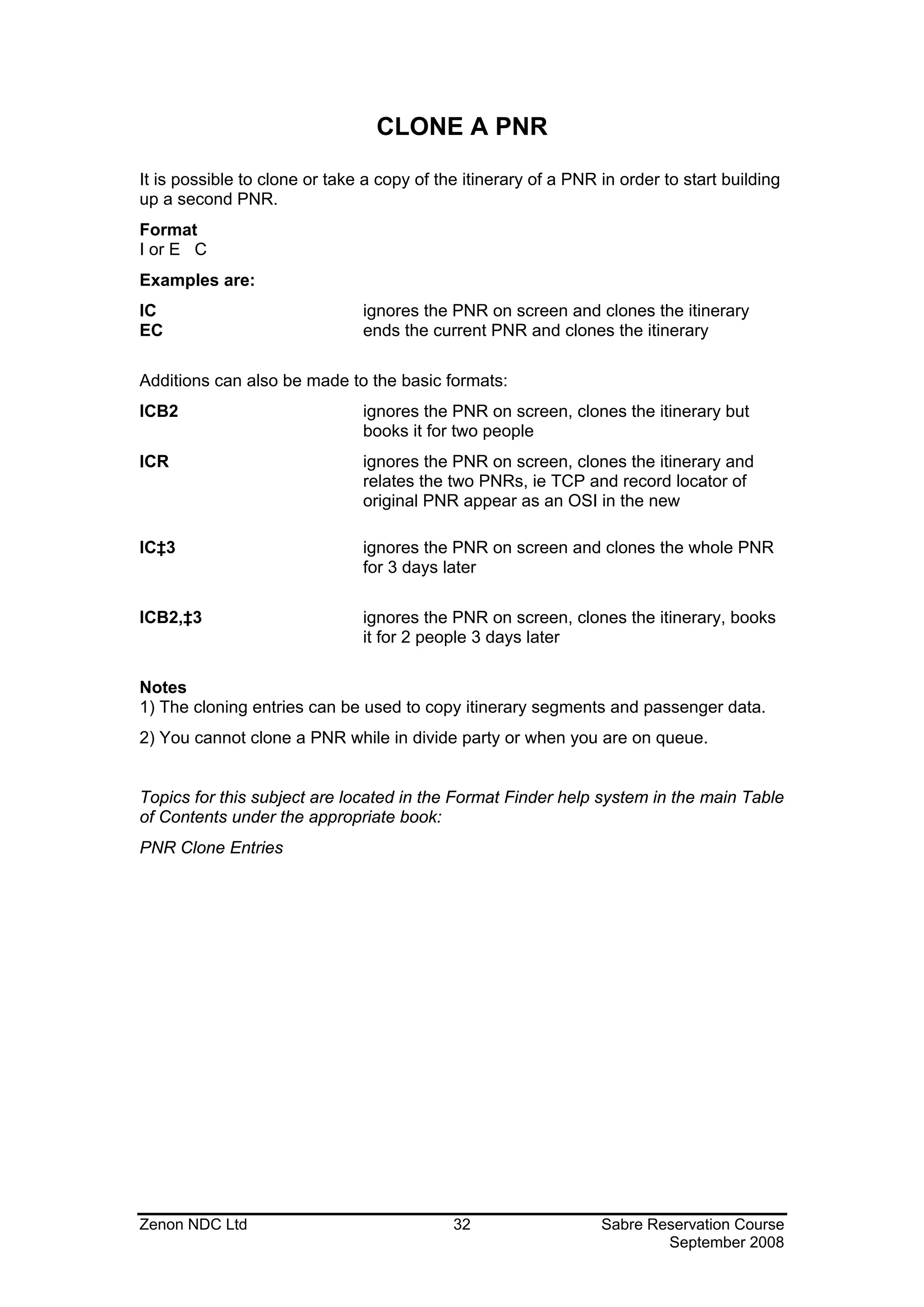
CLONE A PNR

It is possible to clone or take a copy of the itinerary of a PNR in order to start building
up a second PNR.
Format
I or E C
Examples are:
IC                             ignores the PNR on screen and clones the itinerary
EC                             ends the current PNR and clones the itinerary

Additions can also be made to the basic formats:
ICB2                           ignores the PNR on screen, clones the itinerary but
                               books it for two people
ICR                            ignores the PNR on screen, clones the itinerary and
                               relates the two PNRs, ie TCP and record locator of
                               original PNR appear as an OSI in the new

IC‡3                           ignores the PNR on screen and clones the whole PNR
                               for 3 days later

ICB2,‡3                        ignores the PNR on screen, clones the itinerary, books
                               it for 2 people 3 days later

Notes
1) The cloning entries can be used to copy itinerary segments and passenger data.
2) You cannot clone a PNR while in divide party or when you are on queue.


Topics for this subject are located in the Format Finder help system in the main Table
of Contents under the appropriate book:
PNR Clone Entries


Zenon NDC Ltd                               32                   Sabre Reservation Course
                                                                         September 2008
DISPLAY A PNR


Displaying the whole PNR
A PNR can be displayed in 4 different ways:
*-STOWERS                     by the Identification Code Keys (ICKs) * and - followed
                              by the surname of the passenger

*-2EA0-STOWERS                retrieves the PNR built in another PCC with which your
                              agency has branch access

*AA81/5JUN-MCMILLER           * followed by the flight number / the departure date -
                              the surname

*SSRVHK                       * followed by the record locator


Displaying Parts of a PNR
To display parts of a PNR use the following entries:
*A                            displays the whole PNR (once it is in the working area)
                              if it has been cleared from the screen or if you want to
                              see how it is building up
*I                            displays the itinerary only
*N                            displays the name or names only
*H                            displays the history of a PNR only
*P                            displays passenger data only; passenger data is the
                              information in the PNR apart from the itinerary. It is
                              possible to display specific parts of passenger data by
                              including the appropriate ICK
*P7                           displays only the Ticketing Field
*P9                           displays only the Phone Field
*P5                           displays only the Remarks Field
*P3                           displays only the GFAX Field
*P4                           displays only the AFAX Field

Topics for this subject are located in the Format Finder help system in the main Table
of Contents under the appropriate book:
Display Functions


Zenon NDC Ltd                             33                     Sabre Reservation Course
                                                                         September 2008
LONG SELL ENTRIES
In addition to selling flights from a CPA, certain long sell entries are possible. Most of
the following entries depend on the agent knowing the flight number and the exact
three letter airport codes for departure and arrival.
Format
0 Carrier code Flight no Class of service Date City Pair Action code No of seats
Example
0BA11J24JANLHRSINNN2
Response
The response will appear at the side of the entry rather than below it, as with a sell
entry from a CPA:


1400 1105 4 25JAN 5 SEG 1 SS J
If the class of service requested is closed out, this will be indicated and a CPA will
appear, for example:
0QF2Y22DECLHRSYDNN1
 Y CL P CL J AS2 M CL
22DEC SAT LHR/Z                       SYD/‡11
USE LON FOR LGW / LHR / LTN / STN / LCY / SEN
1QF   2    P0 J2 Y0 M0         LHRSYD 1215 2110‡1                747   D  1   TA
2BA   11   F4 J4 M0 S0 B0 Q0 LHRSYD 1200 2055‡1                  747      1   X34 TA
3QF   10   P2 J2 Y0 M0         LHRSYD 2145 0900‡2                744   LD 2   TA
4QF   2    P2 J2 Y0 M0 V4      LHRBKK 1215 0700‡1                747   DB 0   TA
5QF   16   J0 Y0 M0                SYD 0825 2115                 74L   BL 0   7 TA


From the given CPA, the usual sell or waitlist entries are possible. The seats sold via
long sell entries with NN action code will be confirmed immediately if available and
the status will change to SS.


Waitlisting
Format
0 Carrier code Flight no      Class of service   Date    City Pair Action code     No of
seats
Example
0BA318C06APRLHRCDGLL1
On other Airlines
Response
The response will appear at the side of the entry rather than below it, as with a sell
entry from a CPA:
1630 1835 2 S SEG 2 LL C


Zenon NDC Ltd                              34                   Sabre Reservation Course
                                                                        September 2008
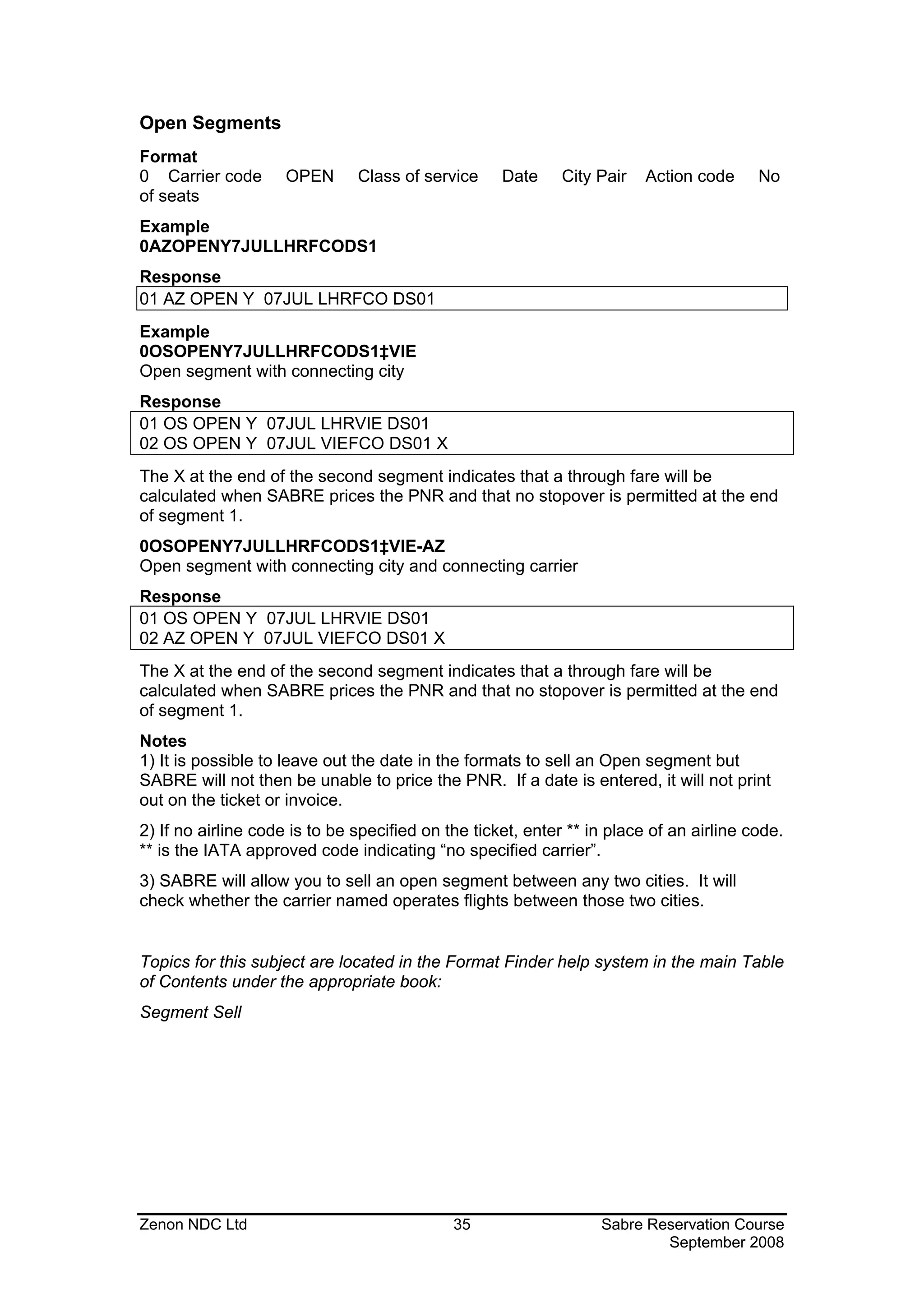
Open Segments
Format
0 Carrier code       OPEN      Class of service     Date     City Pair   Action code     No
of seats
Example
0AZOPENY7JULLHRFCODS1
Response
01 AZ OPEN Y 07JUL LHRFCO DS01
Example
0OSOPENY7JULLHRFCODS1‡VIE
Open segment with connecting city
Response
01 OS OPEN Y 07JUL LHRVIE DS01
02 OS OPEN Y 07JUL VIEFCO DS01 X
The X at the end of the second segment indicates that a through fare will be
calculated when SABRE prices the PNR and that no stopover is permitted at the end
of segment 1.
0OSOPENY7JULLHRFCODS1‡VIE-AZ
Open segment with connecting city and connecting carrier
Response
01 OS OPEN Y 07JUL LHRVIE DS01
02 AZ OPEN Y 07JUL VIEFCO DS01 X
The X at the end of the second segment indicates that a through fare will be
calculated when SABRE prices the PNR and that no stopover is permitted at the end
of segment 1.
Notes
1) It is possible to leave out the date in the formats to sell an Open segment but
SABRE will not then be unable to price the PNR. If a date is entered, it will not print
out on the ticket or invoice.
2) If no airline code is to be specified on the ticket, enter ** in place of an airline code.
** is the IATA approved code indicating “no specified carrier”.
3) SABRE will allow you to sell an open segment between any two cities. It will
check whether the carrier named operates flights between those two cities.


Topics for this subject are located in the Format Finder help system in the main Table
of Contents under the appropriate book:
Segment Sell


Zenon NDC Ltd                                35                   Sabre Reservation Course
                                                                          September 2008
SHOWING A BOOKING CONFIRMED IN A SYSTEM OTHER THAN SABRE
If a passenger has already booked a seat directly with the airline and you now wish
to take a copy of this in SABRE for pricing and ticketing purposes, the following
format will create a dummy booking.
You must ring the airline for this information.
Format
0 Carrier code Flt no Class Date City Pair Action code No of seats * Airline ref
Examples
0AZ459C7JULLHRLINBK1*JOHN
0KQ145Y23SEPLHRNBOGK1
Notes
1) Prior to making this entry you must contact the airline to check the information is
correct and to obtain a record locator.
2) Following the GK or BK action code and the number of seats, the * can be
followed by 5 characters of free text. This could be used to note name or the initials
of the person you spoke to at the other airline. You might also like to note the other
system’s record locator in the Remarks Field of the PNR.
3) If the passenger cancels the flight and the segment has BK status you should
cancel the segment in the usual way and this will generate a cancellation message to
the airline concerned.
If the segment has been booked with GK status do not make the usual cancellation
entry as no message will be sent to the airline. With a GK status, if the passenger
cancels or changes the flight, call the airline concerned and ask them to make the
changes.
4) It is possible to price and ticket a GK or BK segment. Both print as 'status OK' on
the ticket.


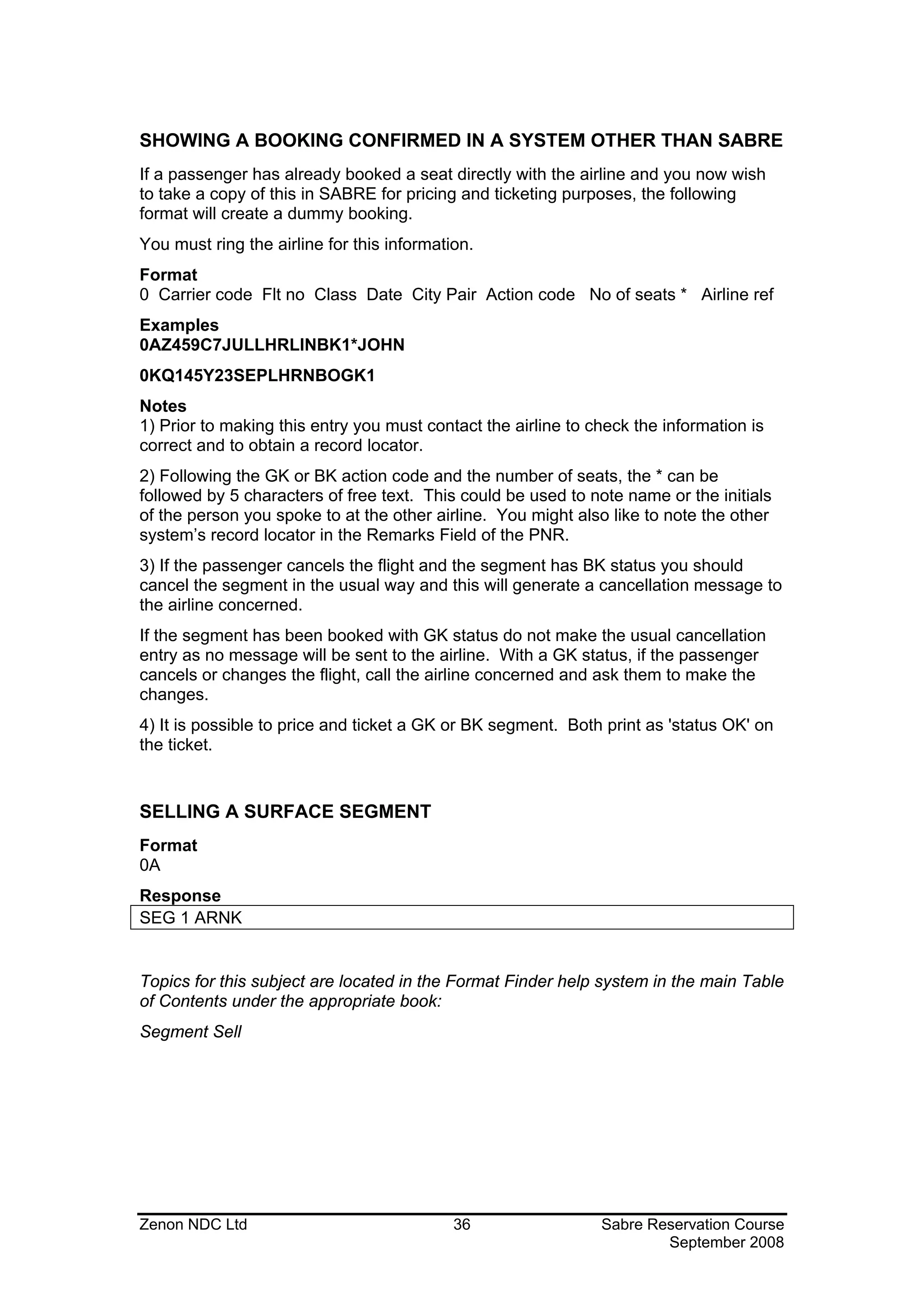
SELLING A SURFACE SEGMENT
Format
0A
Response
SEG 1 ARNK


Topics for this subject are located in the Format Finder help system in the main Table
of Contents under the appropriate book:
Segment Sell


Zenon NDC Ltd                               36                 Sabre Reservation Course
                                                                       September 2008
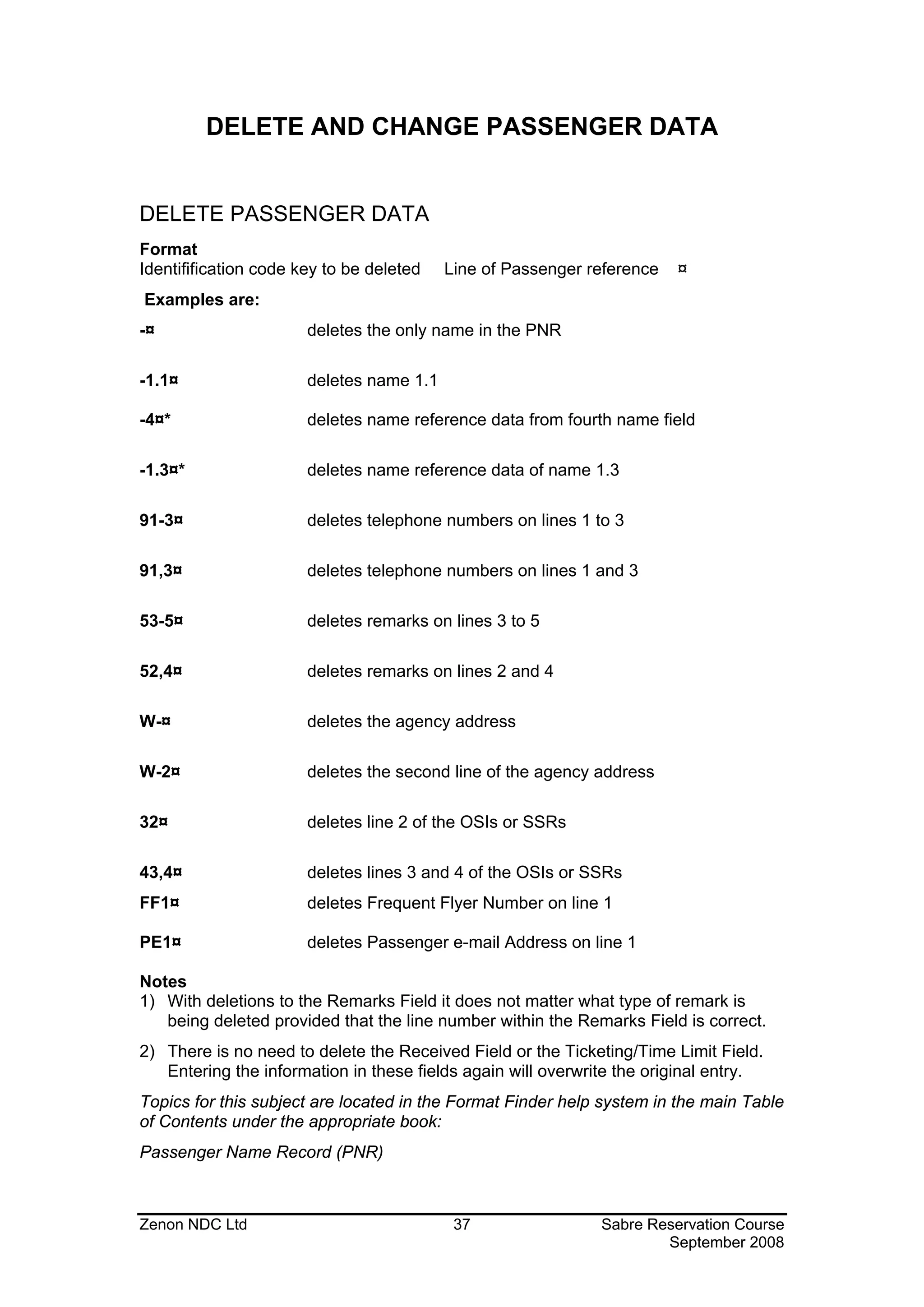
DELETE AND CHANGE PASSENGER DATA


DELETE PASSENGER DATA
Format
Identifification code key to be deleted   Line of Passenger reference   ¤
Examples are:
-¤                     deletes the only name in the PNR

-1.1¤                  deletes name 1.1

-4¤*                   deletes name reference data from fourth name field

-1.3¤*                 deletes name reference data of name 1.3

91-3¤                  deletes telephone numbers on lines 1 to 3

91,3¤                  deletes telephone numbers on lines 1 and 3

53-5¤                  deletes remarks on lines 3 to 5

52,4¤                  deletes remarks on lines 2 and 4

W-¤                    deletes the agency address

W-2¤                   deletes the second line of the agency address

32¤                    deletes line 2 of the OSIs or SSRs

43,4¤                  deletes lines 3 and 4 of the OSIs or SSRs
FF1¤                   deletes Frequent Flyer Number on line 1

PE1¤                   deletes Passenger e-mail Address on line 1

Notes
1) With deletions to the Remarks Field it does not matter what type of remark is
   being deleted provided that the line number within the Remarks Field is correct.
2) There is no need to delete the Received Field or the Ticketing/Time Limit Field.
   Entering the information in these fields again will overwrite the original entry.
Topics for this subject are located in the Format Finder help system in the main Table
of Contents under the appropriate book:
Passenger Name Record (PNR)


Zenon NDC Ltd                              37                 Sabre Reservation Course
                                                                      September 2008
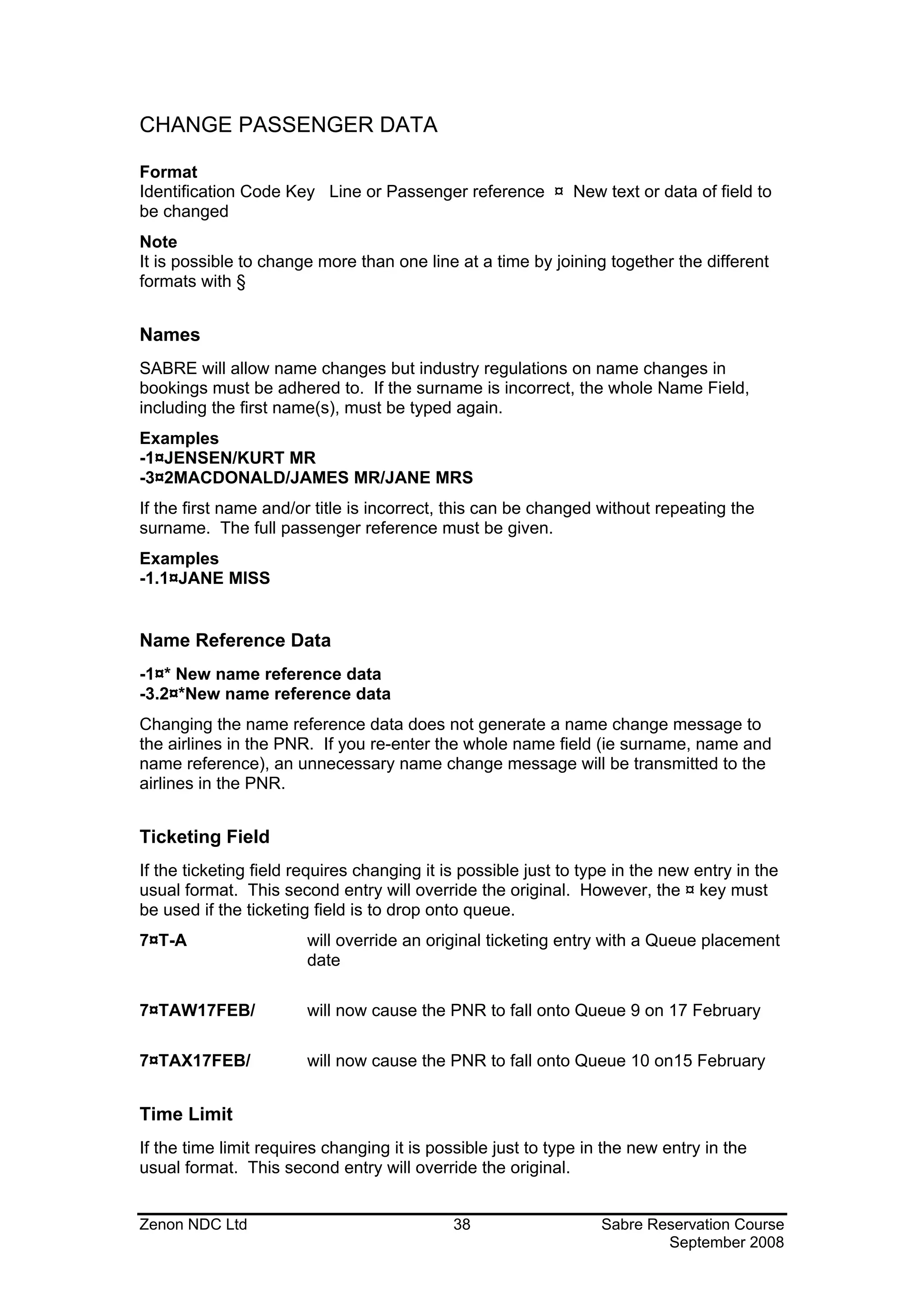
CHANGE PASSENGER DATA

Format
Identification Code Key Line or Passenger reference ¤ New text or data of field to
be changed
Note
It is possible to change more than one line at a time by joining together the different
formats with §


Names
SABRE will allow name changes but industry regulations on name changes in
bookings must be adhered to. If the surname is incorrect, the whole Name Field,
including the first name(s), must be typed again.
Examples
-1¤JENSEN/KURT MR
-3¤2MACDONALD/JAMES MR/JANE MRS
If the first name and/or title is incorrect, this can be changed without repeating the
surname. The full passenger reference must be given.
Examples
-1.1¤JANE MISS


Name Reference Data
-1¤* New name reference data
-3.2¤*New name reference data
Changing the name reference data does not generate a name change message to
the airlines in the PNR. If you re-enter the whole name field (ie surname, name and
name reference), an unnecessary name change message will be transmitted to the
airlines in the PNR.


Ticketing Field
If the ticketing field requires changing it is possible just to type in the new entry in the
usual format. This second entry will override the original. However, the ¤ key must
be used if the ticketing field is to drop onto queue.
7¤T-A                   will override an original ticketing entry with a Queue placement
                        date

7¤TAW17FEB/             will now cause the PNR to fall onto Queue 9 on 17 February

7¤TAX17FEB/             will now cause the PNR to fall onto Queue 10 on15 February


Time Limit
If the time limit requires changing it is possible just to type in the new entry in the
usual format. This second entry will override the original.


Zenon NDC Ltd                                38                   Sabre Reservation Course
                                                                          September 2008
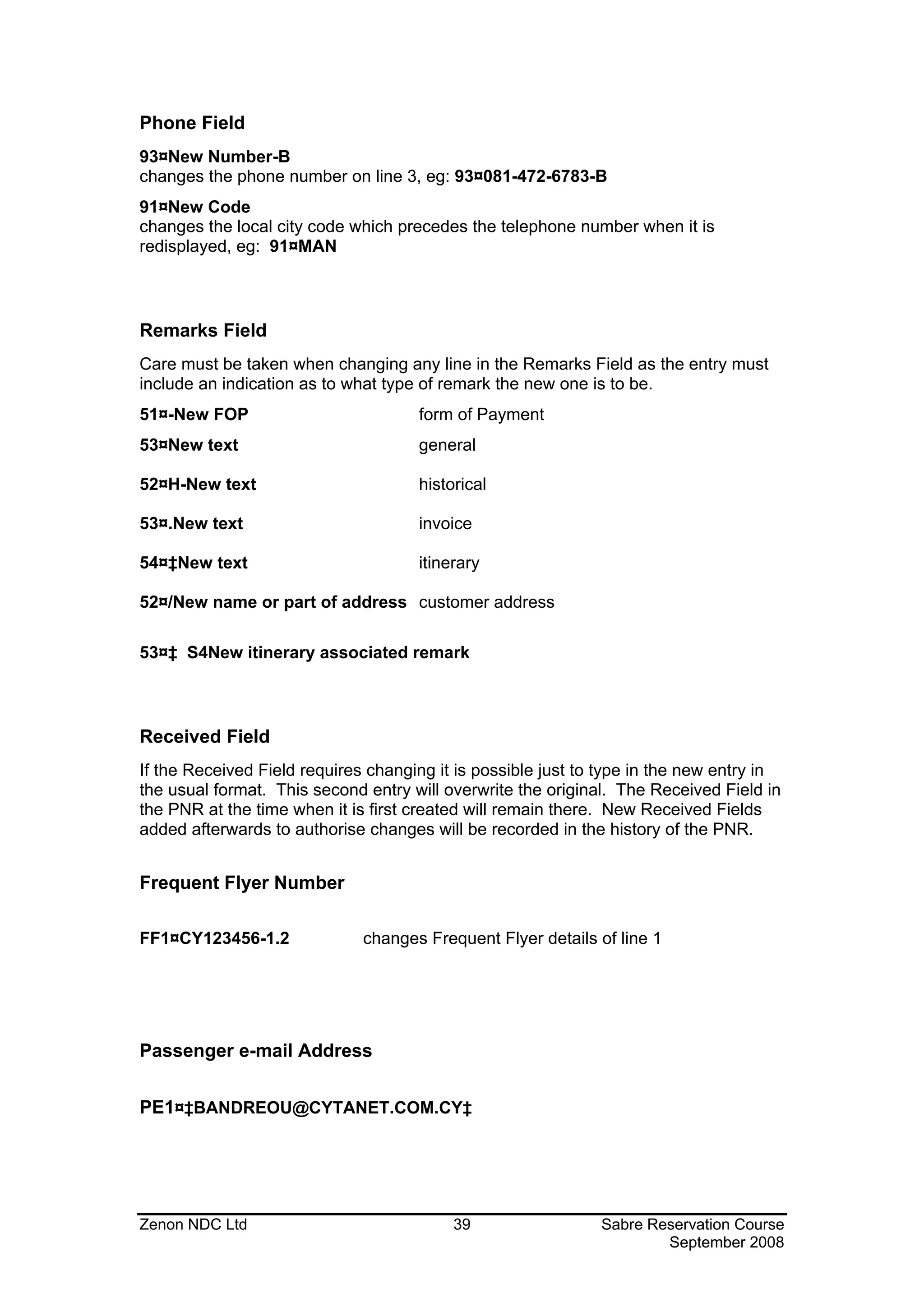
Phone Field
93¤New Number-B
changes the phone number on line 3, eg: 93¤081-472-6783-B
91¤New Code
changes the local city code which precedes the telephone number when it is
redisplayed, eg: 91¤MAN


Remarks Field
Care must be taken when changing any line in the Remarks Field as the entry must
include an indication as to what type of remark the new one is to be.
51¤-New FOP                          form of Payment
53¤New text                          general

52¤H-New text                        historical

53¤.New text                         invoice

54¤‡New text                         itinerary

52¤/New name or part of address customer address

53¤‡ S4New itinerary associated remark


Received Field
If the Received Field requires changing it is possible just to type in the new entry in
the usual format. This second entry will overwrite the original. The Received Field in
the PNR at the time when it is first created will remain there. New Received Fields
added afterwards to authorise changes will be recorded in the history of the PNR.


Frequent Flyer Number

FF1¤CY123456-1.2              changes Frequent Flyer details of line 1


Passenger e-mail Address


PE1¤‡BANDREOU@CYTANET.COM.CY‡


Zenon NDC Ltd                             39                  Sabre Reservation Course
                                                                      September 2008
Agency Address
Only one agency address per PNR is permitted. If the whole agency name and
address needs to be changed, you must first delete the original one and then add the
new one using the usual format.
W-¤                          deletes the address

W - 2 ¤ new address          changes line number 2 of the address


Zenon NDC Ltd                            40                 Sabre Reservation Course
                                                                    September 2008
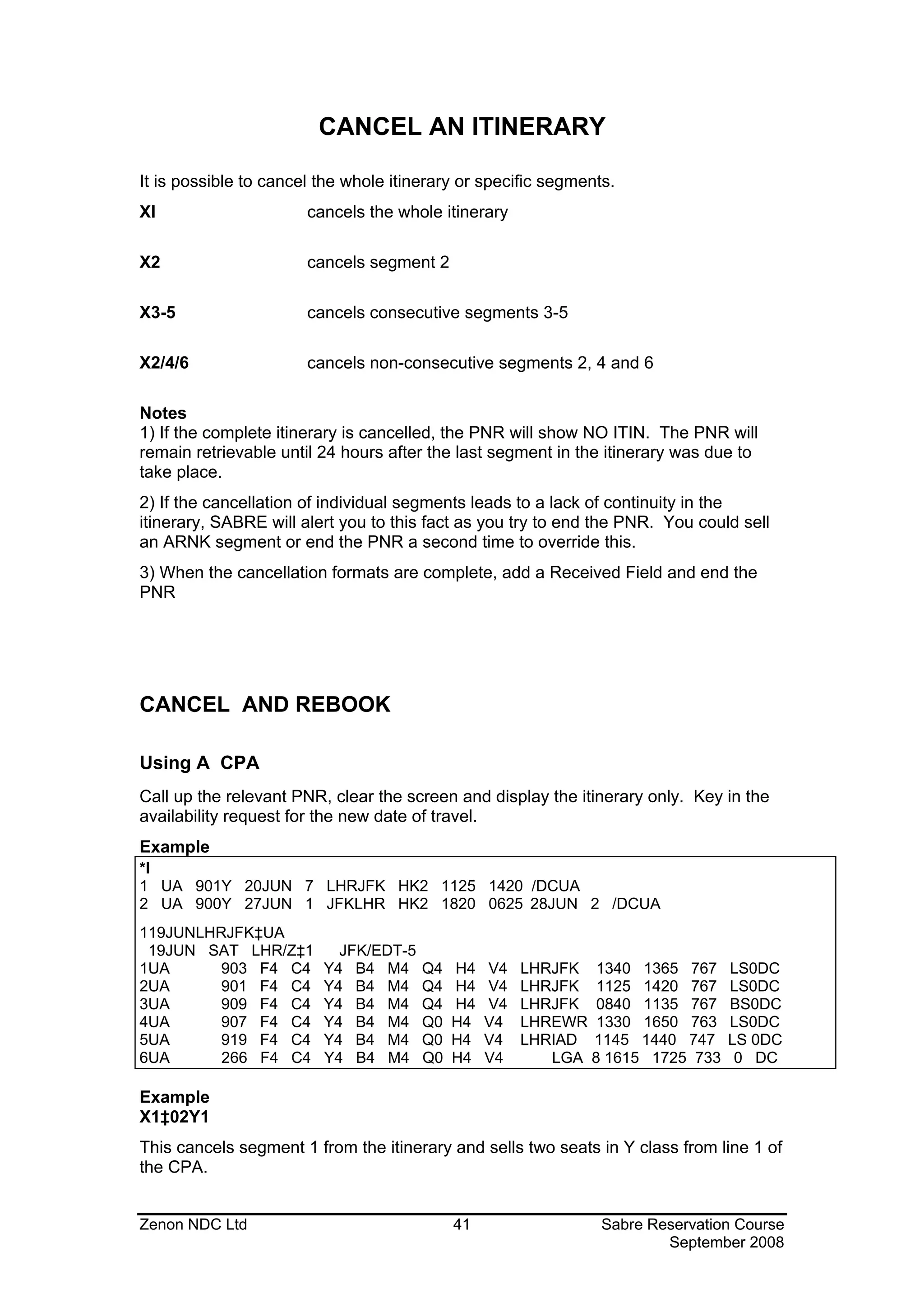
CANCEL AN ITINERARY

It is possible to cancel the whole itinerary or specific segments.
XI                     cancels the whole itinerary

X2                     cancels segment 2

X3-5                   cancels consecutive segments 3-5

X2/4/6                 cancels non-consecutive segments 2, 4 and 6

Notes
1) If the complete itinerary is cancelled, the PNR will show NO ITIN. The PNR will
remain retrievable until 24 hours after the last segment in the itinerary was due to
take place.
2) If the cancellation of individual segments leads to a lack of continuity in the
itinerary, SABRE will alert you to this fact as you try to end the PNR. You could sell
an ARNK segment or end the PNR a second time to override this.
3) When the cancellation formats are complete, add a Received Field and end the
PNR


CANCEL AND REBOOK

Using A CPA
Call up the relevant PNR, clear the screen and display the itinerary only. Key in the
availability request for the new date of travel.
Example
*I
1 UA 901Y 20JUN 7 LHRJFK HK2 1125 1420 /DCUA
2 UA 900Y 27JUN 1 JFKLHR HK2 1820 0625 28JUN 2 /DCUA
119JUNLHRJFK‡UA
 19JUN SAT LHR/Z‡1         JFK/EDT-5
1UA      903 F4 C4       Y4 B4 M4      Q4   H4   V4   LHRJFK 1340 1365 767      LS0DC
2UA      901 F4 C4       Y4 B4 M4      Q4   H4   V4   LHRJFK 1125 1420 767      LS0DC
3UA      909 F4 C4       Y4 B4 M4      Q4   H4   V4   LHRJFK 0840 1135 767      BS0DC
4UA      907 F4 C4       Y4 B4 M4      Q0   H4   V4   LHREWR 1330 1650 763      LS0DC
5UA      919 F4 C4       Y4 B4 M4      Q0   H4   V4   LHRIAD 1145 1440 747      LS 0DC
6UA      266 F4 C4       Y4 B4 M4      Q0   H4   V4      LGA 8 1615 1725 733     0 DC

Example
X1‡02Y1
This cancels segment 1 from the itinerary and sells two seats in Y class from line 1 of
the CPA.


Zenon NDC Ltd                               41                  Sabre Reservation Course
                                                                        September 2008
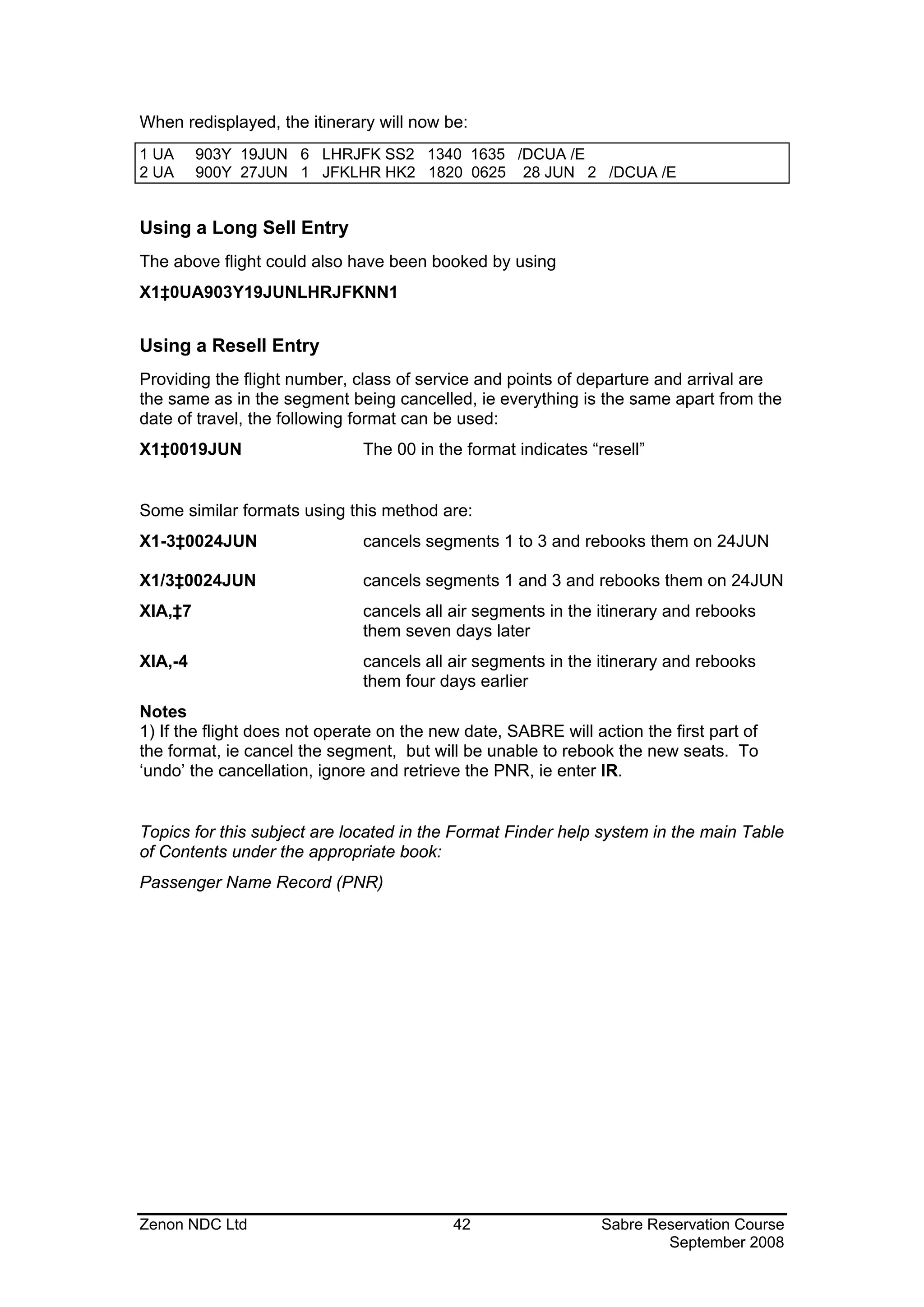
When redisplayed, the itinerary will now be:
1 UA     903Y 19JUN 6 LHRJFK SS2 1340 1635 /DCUA /E
2 UA     900Y 27JUN 1 JFKLHR HK2 1820 0625 28 JUN 2 /DCUA /E


Using a Long Sell Entry
The above flight could also have been booked by using
X1‡0UA903Y19JUNLHRJFKNN1


Using a Resell Entry
Providing the flight number, class of service and points of departure and arrival are
the same as in the segment being cancelled, ie everything is the same apart from the
date of travel, the following format can be used:
X1‡0019JUN                     The 00 in the format indicates “resell”


Some similar formats using this method are:
X1-3‡0024JUN                   cancels segments 1 to 3 and rebooks them on 24JUN

X1/3‡0024JUN                   cancels segments 1 and 3 and rebooks them on 24JUN
XIA,‡7                         cancels all air segments in the itinerary and rebooks
                               them seven days later
XIA,-4                         cancels all air segments in the itinerary and rebooks
                               them four days earlier
Notes
1) If the flight does not operate on the new date, SABRE will action the first part of
the format, ie cancel the segment, but will be unable to rebook the new seats. To
‘undo’ the cancellation, ignore and retrieve the PNR, ie enter IR.


Topics for this subject are located in the Format Finder help system in the main Table
of Contents under the appropriate book:
Passenger Name Record (PNR)


Zenon NDC Ltd                              42                   Sabre Reservation Course
                                                                        September 2008
INSERT SEGMENTS


The Identification Code Key to insert segments or items of passenger data is the
Slash Key, / (NB IAS on the front of the key means Insert After Segment).


Inserting Segment into an Itinerary
Format
/ Segment number after which new segment is to be inserted
Example
/2                             inserts the new segment after segment 2 of current
                               itinerary

Notes
Note the two ways to proceed with these entries:
1) Put SABRE into the Insert Mode with /segment number as above. Enter. Make
sell entries (long sell or sell from CPA). Any subsequent sell entries will continue to
insert at that point. *A or *I will cancel the Insert Mode.
2) Put SABRE into the Insert Mode and make the sell entry in one format
Examples are:
/2/01Y2
/2/0BA11Y24JUNLHRSINNN1
*A or *I will cancel the Insert Mode.
3) /0 inserts a new segment as the first segment
Topics for this subject are located in the Format Finder help system in the main Table
of Contents under the appropriate book:
Passenger Name Record (PNR)


Inserting Passenger Data
Format
Identification Code Key    Line Reference / Text or Data
Examples:
90/081-881-6754-A              inserts the agency phone number to be the first in the
                               Phone Field
50/-CASH                       inserts this Form of Payment remark as the first line in
                               the Remarks Field
W-1/25 HIGH STREET             inserts this line as the second line in the Agency
                               Address Field


Zenon NDC Ltd                              43                  Sabre Reservation Course
                                                                       September 2008
Moving Segments in the Itinerary
Segments within an itinerary may need to be repositioned to ensure continuity.
Format
/ Segment to be inserted after / Segment(s) to be moved
Examples:
/1/6                         inserts line 6 after line 1

/3/5-7                       inserts lines 5-7 after line 3

/2/4,6,8                     inserts lines 4, 6, 8 after line 2


Zenon NDC Ltd                             44                      Sabre Reservation Course
                                                                          September 2008
DIVIDE A PNR


If one or more passengers, but not all of them, wish to make any changes to the
current itinerary in a PNR, the PNR can be divided, allowing changes to be made to
the new PNR without affecting the original.
Format
D Passenger Name Reference(s)
Examples are:
D1                           divides off passenger(s) in the first Name Field
D2.1                         divides off passenger 2.1
D3.1*4.1                     divides off passengers 3.1 and 4.1
D1.2-3.2                     divides off all passengers between 1.2 and 3.2 inclusive


Dividing Procedure:
1) Recall original PNR onto screen
2) Type the appropriate divide format
3) The names of the passengers divided off from the original PNR now appear in the
new PNR along with their seats. The record locator of the original PNR will appear in
the Remarks Field of the new PNR
4) Make the necessary changes to the itinerary in the new PNR
5) Adapt any other details in the new PNR, ie check phone numbers, Remarks and
AFAX and GFAX are all relevant
6) Add a Received Field
7) File the PNR type F . A divided PNR is NOT ended but filed: F. (This can be
combined with the Received Field entry as 6P§F)
8) The response will be PNR FILED and the original PNR will reappear on the
screen, minus the passengers who have been divided off. The record locator of the
new PNR will be cross referenced in the Remarks Field of the original
9) Adapt any details in the original PNR, ie check phone numbers, Remarks and
AFAX and GFAX are all relevant
10) If no changes have been made, end the PNR in the usual way. If changes have
been made, add a Received Field and end the PNR


Topics for this subject are located in the Format Finder help system in the main Table
of Contents under the appropriate book:
Passenger Name Record (PNR)


Zenon NDC Ltd                            45                  Sabre Reservation Course
                                                                     September 2008
CHANGE SEGMENT STATUS


Notification of schedule changes and waitlist clearance will come through on the
Queues which should be checked regularly throughout the day.
Agents have up to 72 hours to confirm new booking.
Here are some of the most common:
KL              confirming from waitlist. Segment status must be changed to HK
                within 72 hours or the segment will automatically be cancelled
KK              OA confirming request. Change segment status to HK
TK              holds confirmed, schedule change. Advise passenger of new times
                and change segment status to HK
HK              holds confirmed
NO              No action taken, cancel segment and request an alternate

WK              was confirmed. AA schedule change. Segment should be cancelled.
                Will appear in PNR followed by an SC segment
SC              AA schedule change. Shows new segment. Change segment status
                to HK
HL              holds waitlist status
UN              unable, flight not operating. Change segment status to XK and
                request an alternative
XK              removes segment and no message is generated to the airline
HX              cancelled segment by the airline. Change segment status to XK

The Identification Code Key which introduces all formats to change segment status is
the Full Stop Key.
Once status has been changed, any OSIs giving further information should be
deleted once noted and a Received Field added before ending the PNR.
Format
. Segment Number Segment Status
Examples are:
.1HK            changes segment 1 to HK

.2/4HK          changes segments 2 and 4 to HK

.1-3HK          changes segments 1 to 3 to HK


Zenon NDC Ltd                             46                 Sabre Reservation Course
                                                                     September 2008
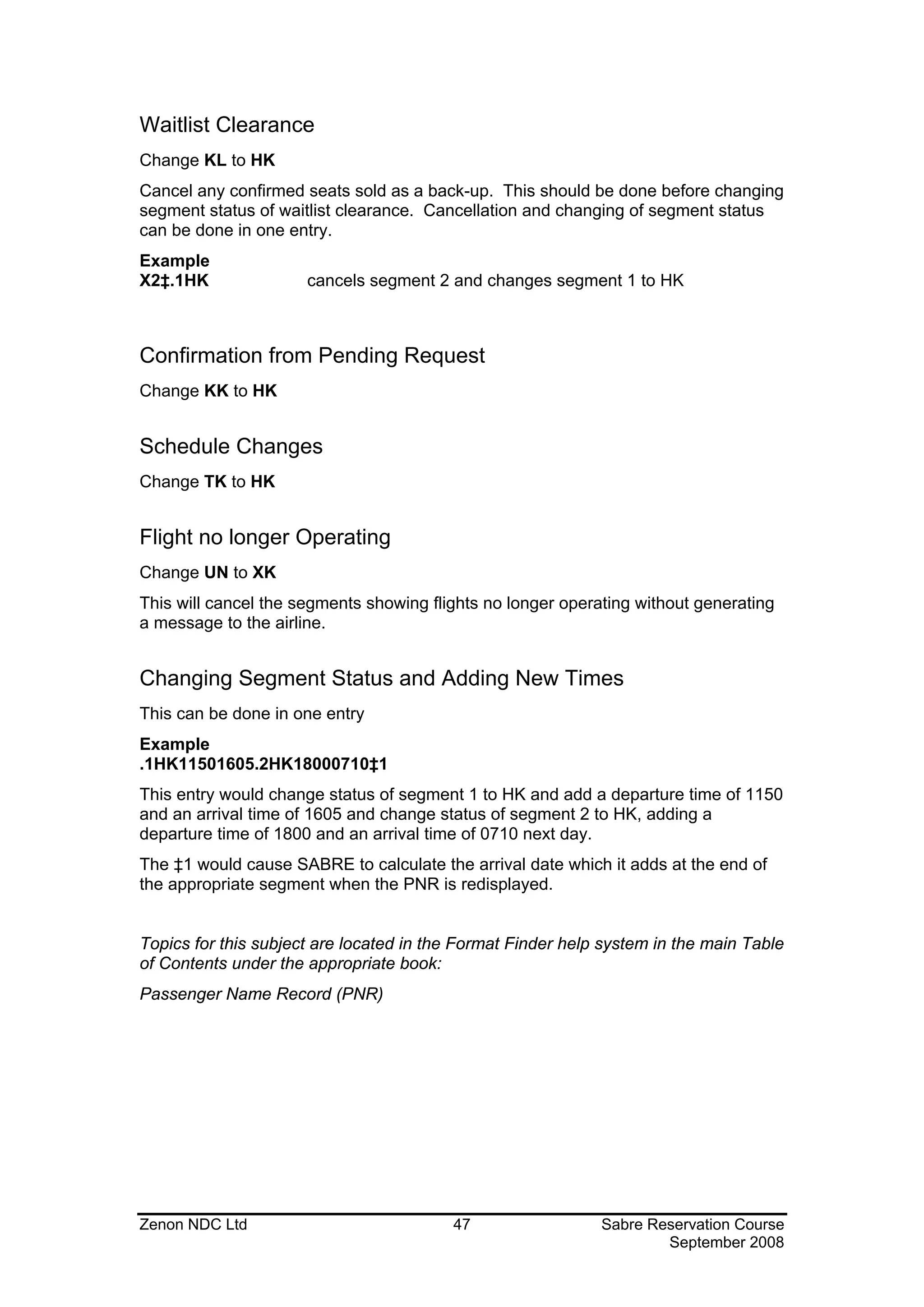
Waitlist Clearance
Change KL to HK
Cancel any confirmed seats sold as a back-up. This should be done before changing
segment status of waitlist clearance. Cancellation and changing of segment status
can be done in one entry.
Example
X2‡.1HK               cancels segment 2 and changes segment 1 to HK


Confirmation from Pending Request
Change KK to HK


Schedule Changes
Change TK to HK


Flight no longer Operating
Change UN to XK
This will cancel the segments showing flights no longer operating without generating
a message to the airline.


Changing Segment Status and Adding New Times
This can be done in one entry
Example
.1HK11501605.2HK18000710‡1
This entry would change status of segment 1 to HK and add a departure time of 1150
and an arrival time of 1605 and change status of segment 2 to HK, adding a
departure time of 1800 and an arrival time of 0710 next day.
The ‡1 would cause SABRE to calculate the arrival date which it adds at the end of
the appropriate segment when the PNR is redisplayed.


Topics for this subject are located in the Format Finder help system in the main Table
of Contents under the appropriate book:
Passenger Name Record (PNR)


Zenon NDC Ltd                            47                  Sabre Reservation Course
                                                                     September 2008
HISTORY OF A PNR

To display the History of changes made to a PNR after the first end transaction.
Format
*H
The PNR must be in your current working area.
The time of the changes to PNR is shown in U.S Central Time (SABRE time).

ACTION CODES


 XS              Cancelled segment
 AS              Added segment
 SC              Schedule changed segment
 MS              Modified Car or Hotel segment
 X9              Cancelled Phone item
 A9              Added Phone item
 X7              Cancelled Ticketing field
 A7              Added Ticketing field
 AT              Added Ticketing entry /W‡ ENTRY/
 X8              Cancelled Time Limit field
 A8              Added Time Limit field
 R-              Entered Received From /6 FIELD/
      **Cannot change Original**
AAC              Added Manual Accounting line
XAC              Deleted Accounting line
A4O              Added OSI Facts
X4O              Cancelled OSI Facts – Followed by data
A4S              Added SSR Facts
X4S              Cancelled SSR Facts
A5F              Added Form of Payment
X5F              Deleted or Changed Form of Payment
A5H              Added Historical Remark - Includes text
X5H              Cancelled Historical Remark – Includes text


Zenon NDC Ltd                              48                  Sabre Reservation Course
                                                                       September 2008
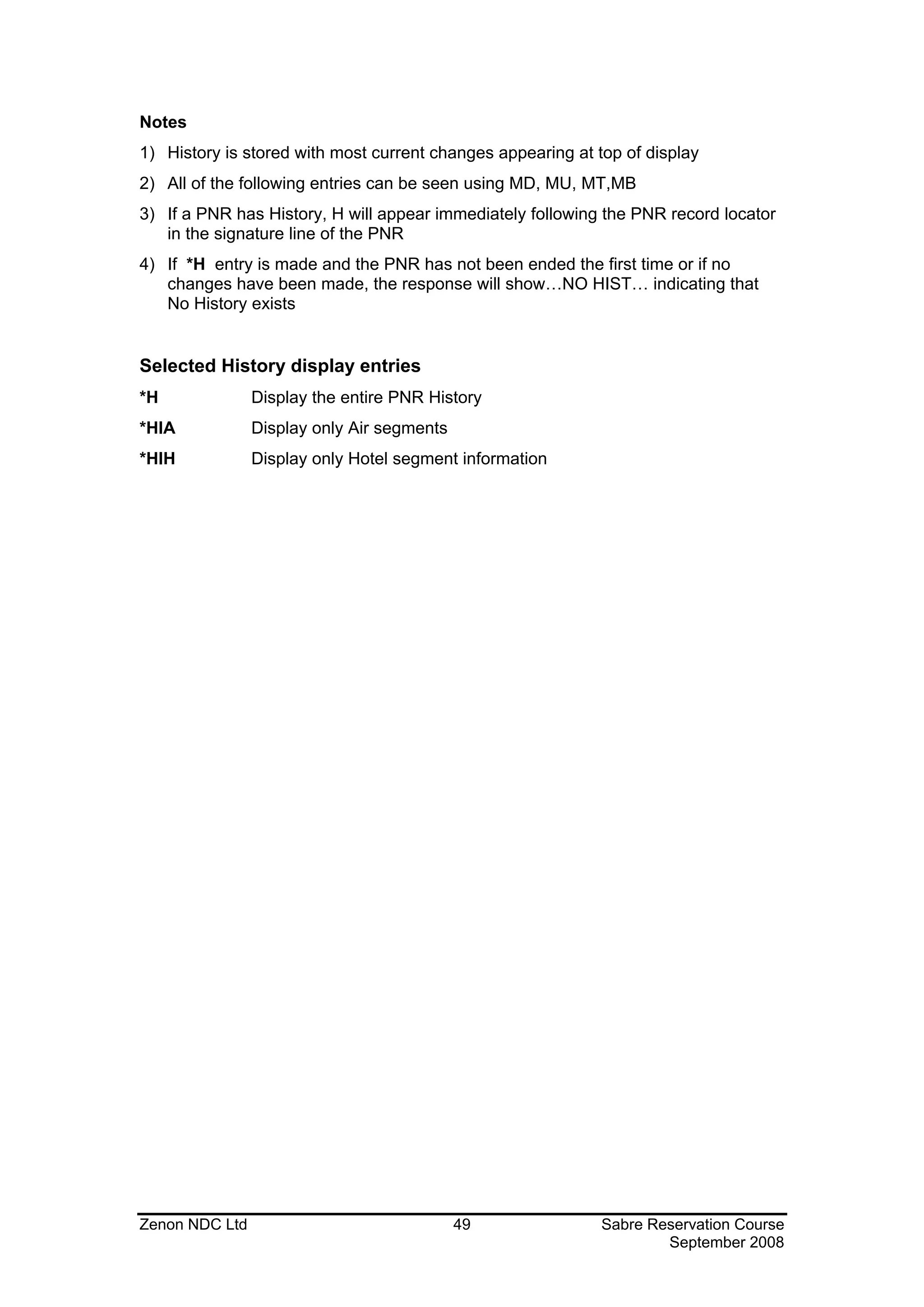
Notes
1) History is stored with most current changes appearing at top of display
2) All of the following entries can be seen using MD, MU, MT,MB
3) If a PNR has History, H will appear immediately following the PNR record locator
   in the signature line of the PNR
4) If *H entry is made and the PNR has not been ended the first time or if no
   changes have been made, the response will show…NO HIST… indicating that
   No History exists


Selected History display entries
*H              Display the entire PNR History
*HIA            Display only Air segments
*HIH            Display only Hotel segment information


Zenon NDC Ltd                               49               Sabre Reservation Course
                                                                     September 2008
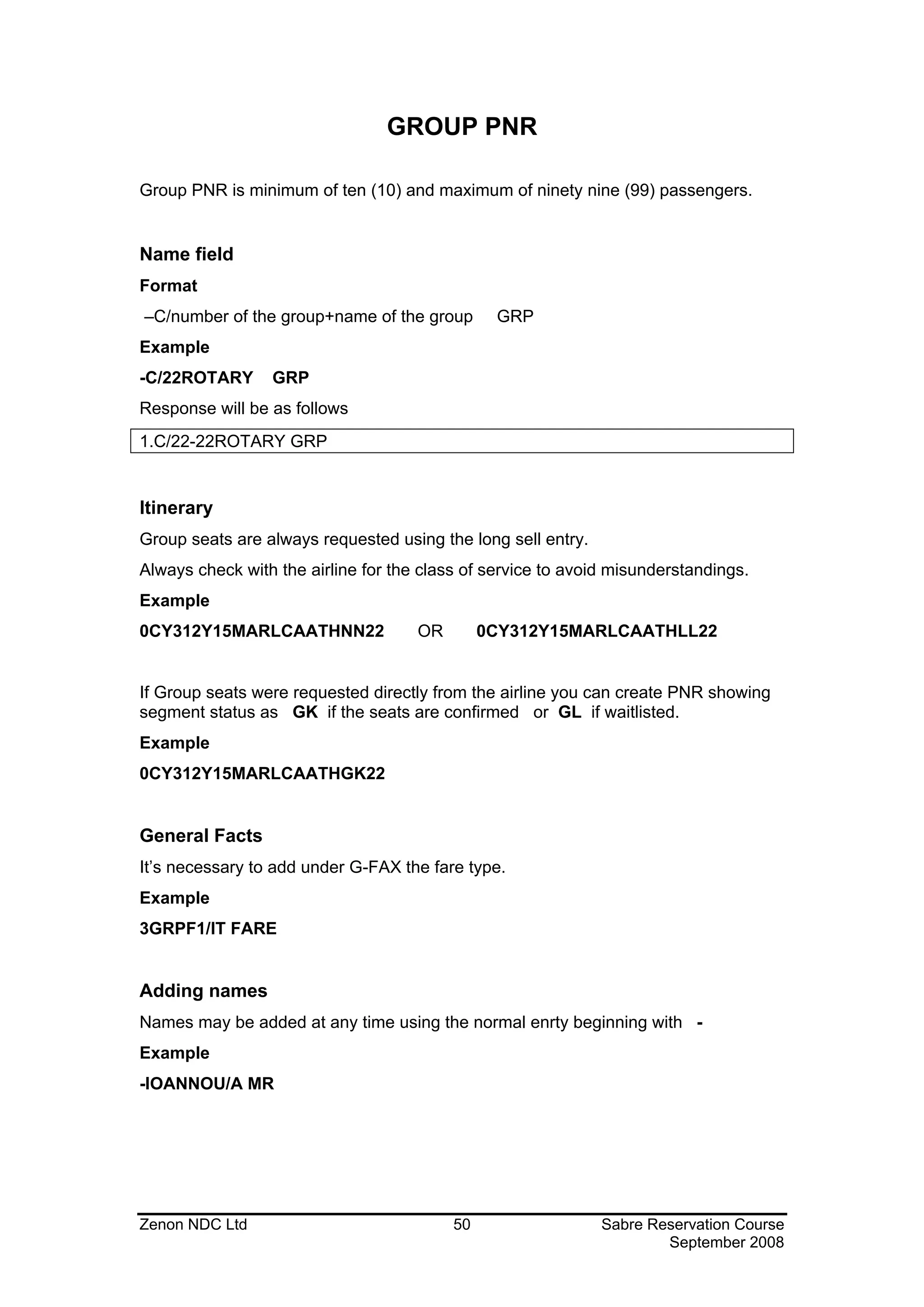
GROUP PNR

Group PNR is minimum of ten (10) and maximum of ninety nine (99) passengers.


Name field
Format
–C/number of the group+name of the group        GRP
Example
-C/22ROTARY      GRP
Response will be as follows
1.C/22-22ROTARY GRP


Itinerary
Group seats are always requested using the long sell entry.
Always check with the airline for the class of service to avoid misunderstandings.
Example
0CY312Y15MARLCAATHNN22               OR        0CY312Y15MARLCAATHLL22


If Group seats were requested directly from the airline you can create PNR showing
segment status as GK if the seats are confirmed or GL if waitlisted.
Example
0CY312Y15MARLCAATHGK22


General Facts
It’s necessary to add under G-FAX the fare type.
Example
3GRPF1/IT FARE


Adding names
Names may be added at any time using the normal enrty beginning with -
Example
-IOANNOU/A MR


Zenon NDC Ltd                             50                  Sabre Reservation Course
                                                                      September 2008
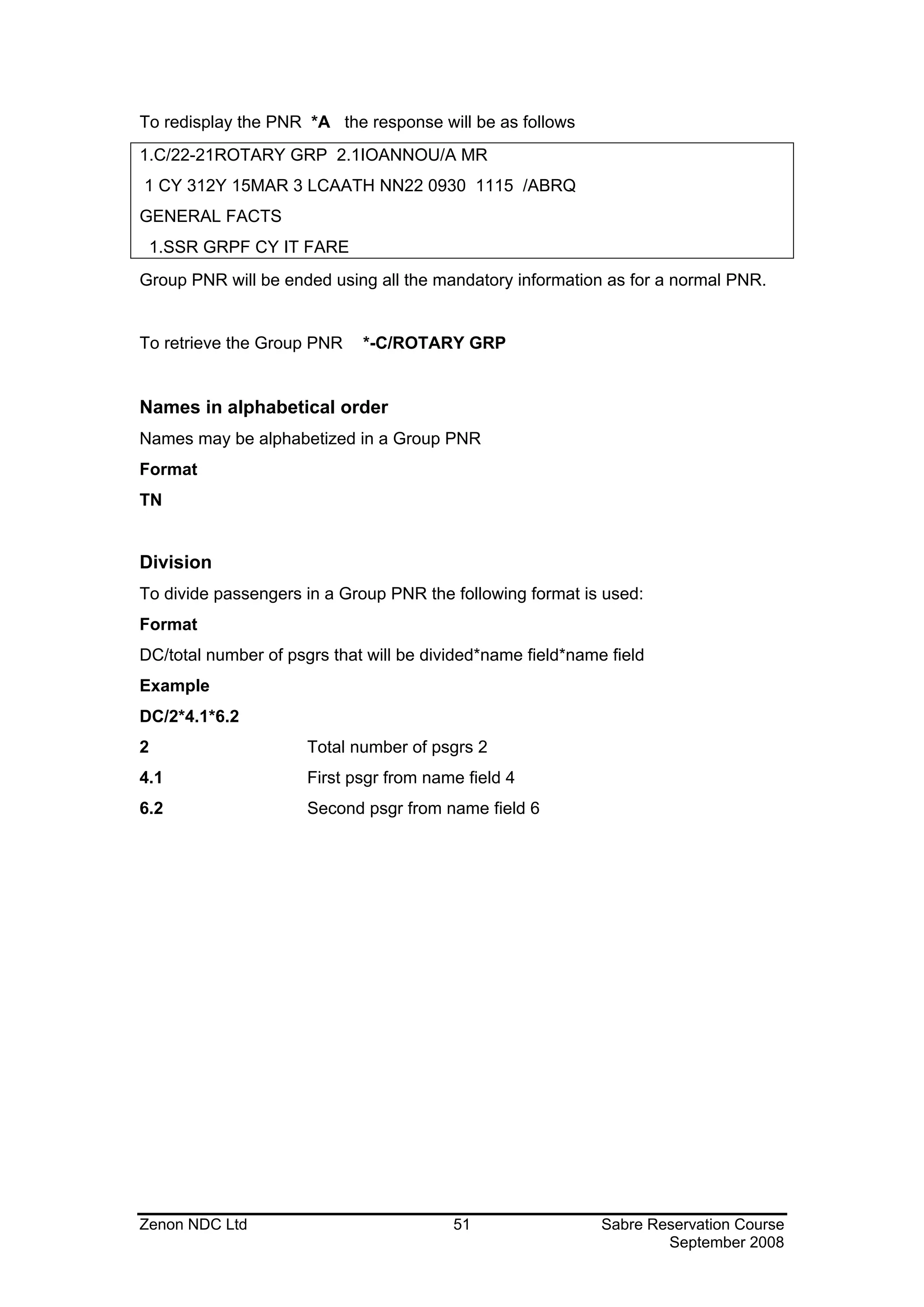
To redisplay the PNR *A the response will be as follows
1.C/22-21ROTARY GRP 2.1IOANNOU/A MR
1 CY 312Y 15MAR 3 LCAATH NN22 0930 1115 /ABRQ
GENERAL FACTS
    1.SSR GRPF CY IT FARE
Group PNR will be ended using all the mandatory information as for a normal PNR.


To retrieve the Group PNR    *-C/ROTARY GRP


Names in alphabetical order
Names may be alphabetized in a Group PNR
Format
TN


Division
To divide passengers in a Group PNR the following format is used:
Format
DC/total number of psgrs that will be divided*name field*name field
Example
DC/2*4.1*6.2
2                     Total number of psgrs 2
4.1                   First psgr from name field 4
6.2                   Second psgr from name field 6


Zenon NDC Ltd                            51                  Sabre Reservation Course
                                                                     September 2008
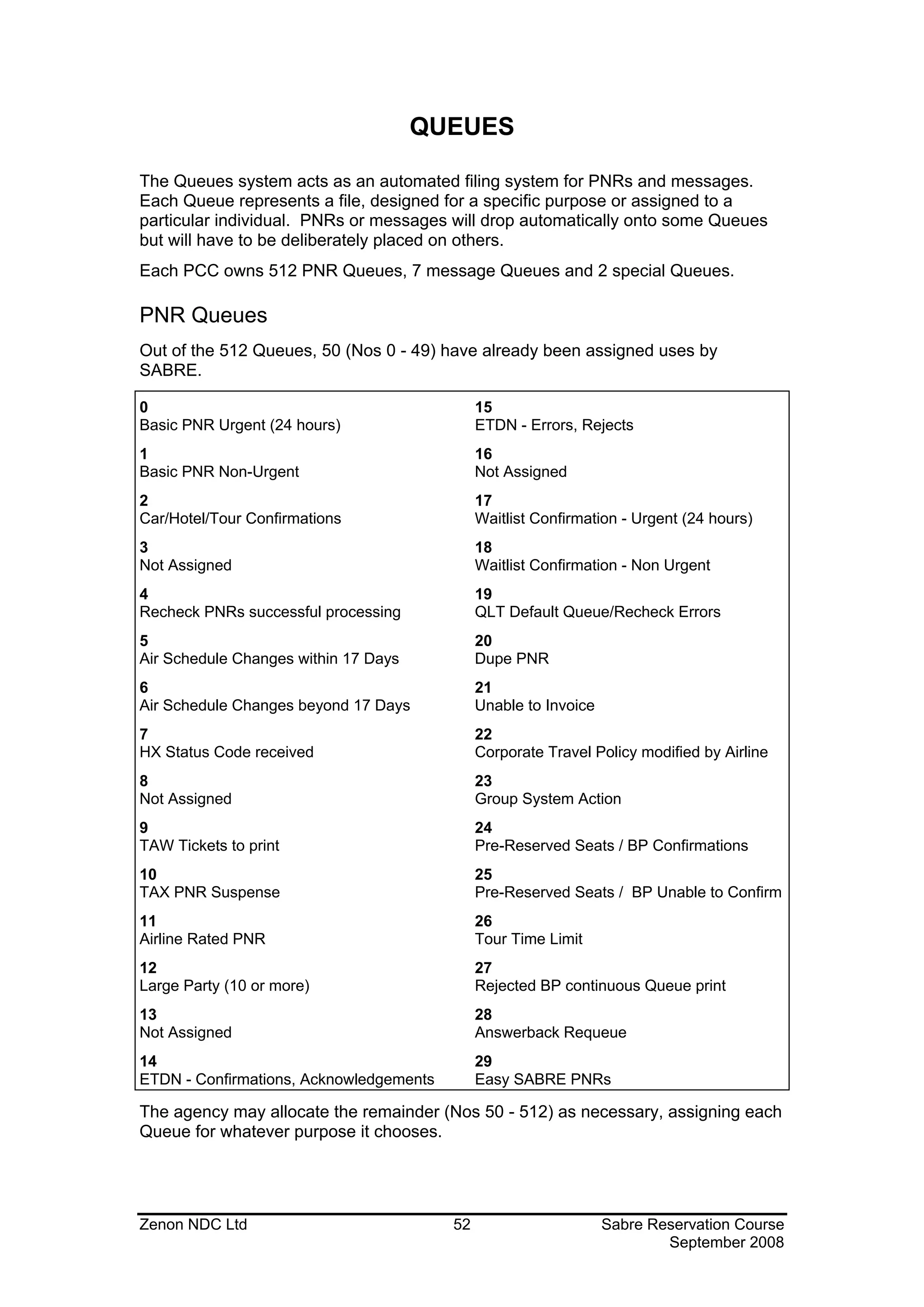
QUEUES

The Queues system acts as an automated filing system for PNRs and messages.
Each Queue represents a file, designed for a specific purpose or assigned to a
particular individual. PNRs or messages will drop automatically onto some Queues
but will have to be deliberately placed on others.
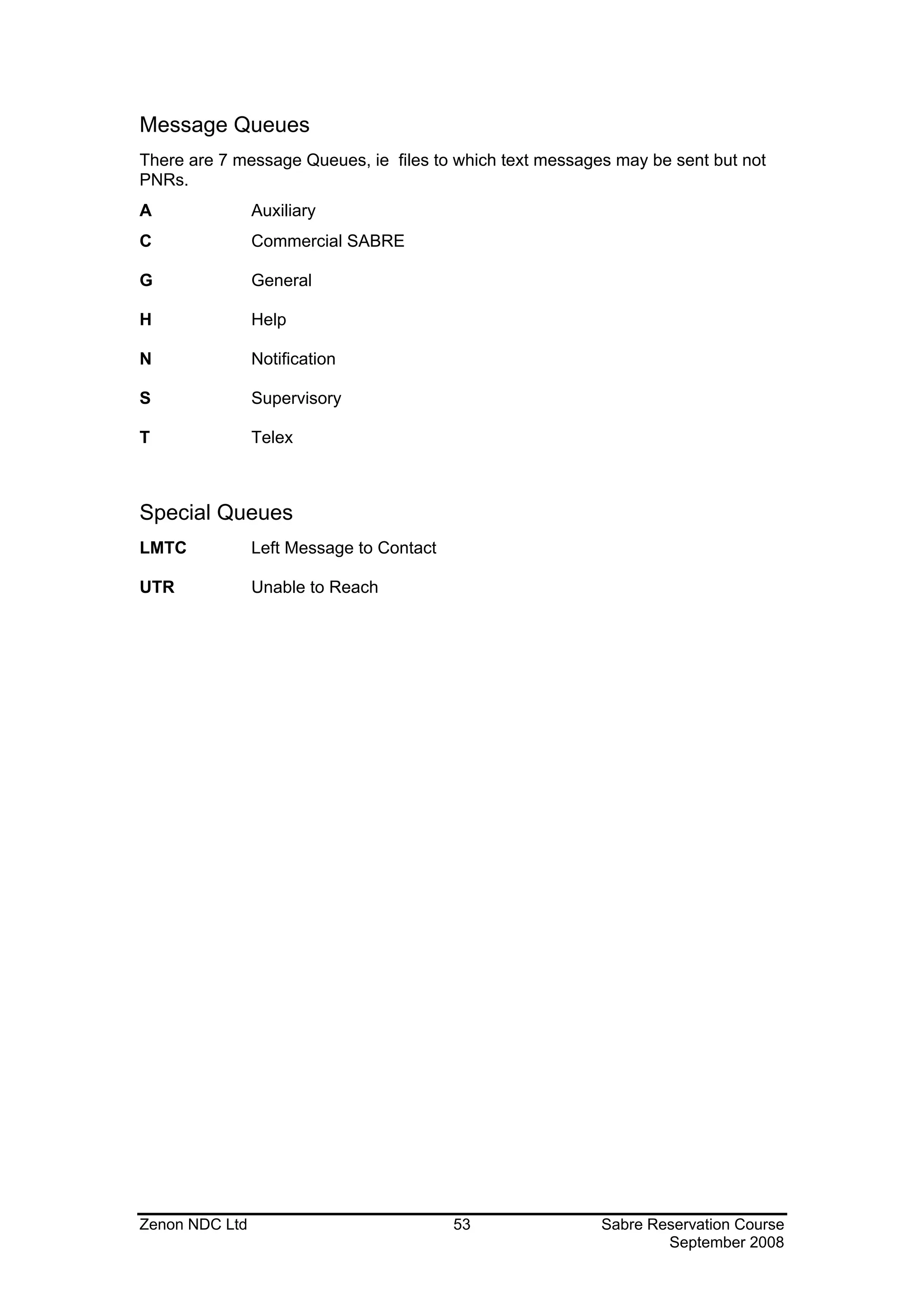
Each PCC owns 512 PNR Queues, 7 message Queues and 2 special Queues.

PNR Queues
Out of the 512 Queues, 50 (Nos 0 - 49) have already been assigned uses by
SABRE.

0                                             15
Basic PNR Urgent (24 hours)                   ETDN - Errors, Rejects
1                                             16
Basic PNR Non-Urgent                          Not Assigned
2                                             17
Car/Hotel/Tour Confirmations                  Waitlist Confirmation - Urgent (24 hours)
3                                             18
Not Assigned                                  Waitlist Confirmation - Non Urgent
4                                             19
Recheck PNRs successful processing            QLT Default Queue/Recheck Errors
5                                             20
Air Schedule Changes within 17 Days           Dupe PNR
6                                             21
Air Schedule Changes beyond 17 Days           Unable to Invoice
7                                             22
HX Status Code received                       Corporate Travel Policy modified by Airline
8                                             23
Not Assigned                                  Group System Action
9                                             24
TAW Tickets to print                          Pre-Reserved Seats / BP Confirmations
10                                            25
TAX PNR Suspense                              Pre-Reserved Seats / BP Unable to Confirm
11                                            26
Airline Rated PNR                             Tour Time Limit
12                                            27
Large Party (10 or more)                      Rejected BP continuous Queue print
13                                            28
Not Assigned                                  Answerback Requeue
14                                            29
ETDN - Confirmations, Acknowledgements        Easy SABRE PNRs

The agency may allocate the remainder (Nos 50 - 512) as necessary, assigning each
Queue for whatever purpose it chooses.


Zenon NDC Ltd                            52                       Sabre Reservation Course
                                                                          September 2008
Message Queues
There are 7 message Queues, ie files to which text messages may be sent but not
PNRs.
A               Auxiliary
C               Commercial SABRE

G               General

H               Help

N               Notification

S               Supervisory

T               Telex


Special Queues
LMTC            Left Message to Contact

UTR             Unable to Reach


Zenon NDC Ltd                             53              Sabre Reservation Course
                                                                  September 2008
Queue Count


QC/                          displays number of items on all Queues within the PCC.
                             (Queues not mentioned on list are empty)

QC/PCC (eg: QC/2EA0)         displays number of items on all Queues for agency
                             other than your own but with which branch access has
                             been established

QC/1 (QC/2, QC/3 etc)        displays number of items on a specific Queue

QC/15-23                     displays number of items on range of consecutive
                             Queues

QC/5/9                       displays number of items on non-consecutive Queues
                             (maximum 2)

QC/A (QC/C, QC/G etc)        displays number of items on message Queues

QC/L (QC/U)                  displays number of items on LMTC/UTR Queues


PIC (PREFATORY INSTRUCTION CODE)

PNRs will Queue place automatically onto the 49 pre-assigned Queues. Sholud a
PNR need to be placed on any other Queue, it will be necessary to alert the recipient
of the action to be taken with that PNR. This is done by a Prefatory Instruction code
(PIC) , a number which will change into an instruction.


QI*SYS                       displays a list of established codes in SABRE
QI*SYS11                     decodes PIC number 11


Zenon NDC Ltd                            54                  Sabre Reservation Course
                                                                     September 2008
Queue Placement

Within an Agency
Format
QP / No of Queue to which item is to be sent / PIC (Prefatory Instruction Code)
Examples are:
QP/100/11                    places PNR on Queue 100 with PIC number 11, which
                             translates as ‘See Remarks’

QP/172/33                    places PNR on Queue 172 with PIC number 33, which
                             translates as ‘Fare change’

QP/100/75‡75/15‡172/38       places the PNR to Queue 100 with PIC 75, Queue 75
                             with PIC 15 and Queue 172 with PIC 38. A PNR can
                             be placed on up to three Queues at any one time.


Between Agencies
The PCC will have to be included in the format:
Example
QP/2EA055/11
Notes:
1) 6P§QP/32/200 receives ends and Queue places the PNR in one entry
2) Queue placement with these entries is immediate
3) To Queue place between agencies Branch Access must be open


Zenon NDC Ltd                            55               Sabre Reservation Course
                                                                  September 2008
Suspending a PNR for Future Queue Placement
The following formats cause the PNR to drop onto Queue on the date specified in the
entry.


Within an Agency
5Q-14NOV39/50                will drop onto Queue 39 with PIC number 50 within the
                             agency on 14 November

Between Agencies
5Q-2EA014NOV39/50            will drop onto Queue 39 with PIC number 50 in PCC
                             2EA0 on 14 November

Notes
1) The date cannot be either today’s or tomorrow’s date
2) The suspension entries are logged in the Remarks Field of the PNR
3) The maximum number of suspension entries per PNR is eight
4) 51¤Q-New text changes the suspension entry (where 1 represents the line number
in the Remarks Field)


Zenon NDC Ltd                            56                Sabre Reservation Course
                                                                   September 2008
Ticketing Queues
7TAW12JUL/                  entry in Ticketing Field of PNR causes automatic
                            Queue placement on Queue 9 within the PCC on date
                            specified.

7TAX12JUL/                  entry in Ticketing Field of PNR causes automatic
                            Queue placement on Queue 10 within the PCC 2 days
                            before the date specified.

7TAWPCC12JUL/
(eg: 7TAW2EA012JUL/)        entry in Ticketing Field of PNR causes automatic
                            Queue placement on Queue 9 in PCC 2EA0 on date
                            specified
7TAXPCC12JUL/
(eg: 7TAX2EA012JUL/)        entry in Ticketing Field of PNR causes automatic
                            Queue placement on Queue 10 of PCC 2EA0 2 days
                            before the date specified.


Accessing Queues
Format
Q / Queue Number or Initial letter
Examples:
Q/10                 accesses Queue 10


Q/213                accesses Queue 213


Q/S                  accesses Supervisory Queue

Q/L                  accesses Left Message to Contact Queue

The above examples will make the first PNR or message appear on screen
Notes
1) Only one Queue per working area can be accessed at any one time
2) *Q displays Queue currently being accessed
3) Q* redisplays the PIC attached to current PNR if working a PNR Queue or
redisplays current message if working message Queue


Zenon NDC Ltd                          57                 Sabre Reservation Course
                                                                  September 2008
Working Queues
Each of the entries below will remove the current PNR/message from the screen and
replace it by the following one until all PNRs/messages have been dealt with and the
response END OF DISPLAY FOR REQUESTED DATA is displayed


I                     ignores PNR/message on screen but leaves it on Queue

E                     ends transaction on current PNR and removes it from the
                      Queue. Used when PNR is changed in some way (segment
                      status changed, segment cancelled, rebooked etc)

QR                    removes PNR/message unaltered from Queue

QL                    removes PNR from Queue and places it automatically on
                      LMTC Queue, where it remains for 24 hours, after which it will
                      requeue place onto the original Queue. QL can be combined
                      with a short message (maximum 15 characters), eg: QL-
                      WITH SECRETARY

QU                    removes PNR from Queue and places it automatically on UTR
                      Queue, where it remains for anything between 15 minutes and
                      4 hours (time determined by agency), after which it will
                      requeue place onto the original Queue. QU can be combined
                      with a short message (maximum 15 characters), eg: QU-
                      LINE ENGAGED

QXIR                  ignores the PNR, exits the Queue and redisplays the PNR on
                      screen


QXER                  ends the transaction, exits the Queue and redisplays the PNR
                      on the screen


Notes
1) Entry logged in Remarks Field of PNR if message added
QP/44/9               requeue places PNR to Queue 44 with PIC number 9

QBI‡4                 ignores current PNR and moves forward by 4 PNRs

QBI-3                 ignores current PNR and moves backwards by 3 PNRs


Zenon NDC Ltd                            58                  Sabre Reservation Course
                                                                     September 2008
Exiting Queues
If Queue needs to be exited before all the PNRs/messages have been accessed, the
following entries can be used:


QXI                 ignores PNR/message on screen and exits Queue

QXE                 ends PNR where changes have been made and exits Queue

QXR                 removes current PNR/message from Queue and exits Queue

QXL                 places current PNR on LMTC Queue and exits Queue

QXU                 places current PNR on UTR Queue and exits Queue


Zenon NDC Ltd                          59                Sabre Reservation Course
                                                                 September 2008
Message Queues
Messages have to be written in a certain way before being placed on Queue. In fact,
they are written as if each line were a General Remark in a PNR.
Example
5ATTN HELP DESK
5FROM JOHN SMITH STIN TRAVEL SERVICE QP/5OT0S
5.
5RE TICKETING PRINTER
5.
5TICKETS JUMPING UP AND UPSETTING NUMBER SEQUENCE
5APPRECIATE HELP ASAP - TEL NO 081-577-4670
5.
5BRGDS JOHN
To check the message and amend any lines before sending it:
*A
NO NAMES
NO ITIN
REMARKS
      1.ATTN HELP DESK
      2.FROM JOHN SMITH STIN TRAVEL SERVICE 5OT0 QP/5OT0S
      3..
      4.RE TICKETING PRINTER
      5..
      6.TICKETS JUMPING UP AND UPSETTING NUMBER SEQUENCE
      7.APPRECIATE HELP ASAP - TEL NO 081-577-4670
      8..
      9.BRGDS JOHN
5OT0.5OT0*AST 1007/31DEC90
To change or delete lines, use the same formats as for changing the Remarks Field
of a PNR


Queue Placing a Message
QP/G                        places message on General Queue within the PCC

QP/G‡S‡T                    places message on General, Supervisory and Telex
                            Queue within the PCC (maximum 9 addresses)

QP/2EA0G                    places message on General Queue of PCC 2EA0

QP/2EA0G‡5OT0S‡A            places message on General Queue of PCC 2EA0 and
                            Supervisory Queue of PCC 5OT0 and on Auxiliary
                            Queue within the PCC. These entries can only be used
                            where Branch Access has been established.


Zenon NDC Ltd                           60                 Sabre Reservation Course
                                                                   September 2008
Queue Placing to Other Airlines, Hotel Companies, Car
Companies
The Queue address will be the 3-letter DRS code: use this address and add S
(Supervisory) or G (General) to the end and Queue place your message in the usual
way.
For example, to queue a message to Avis enter: QP/QZIS or QP/QZIG


Topics for this subject are located in the Format Finder help system in the main Table
of Contents under the appropriate book:
Queues


Zenon NDC Ltd                            61                  Sabre Reservation Course
                                                                     September 2008
SPECTRA

Spectra (SABRE PNR Exclusive Count Ticketing Request Airline) is a program used
to retrieve future reservation records that have specific characteristics.
It is necessary to have the keyword SUBMGR in your EPR in order to make the
following entries.


Step one              Make a QK entry           Example QK‡ALL
Response              OK STARTED
Step two :            UMSG appears on the screen (above the Start) to show that
                      SPECTRA was completed. Press ctrl + U to show number
                      of PNRs found
Response will be as follows
5JH1 SPECTRA KEYS:
ALL PNRS
22DEC /04355JH1*ATR           END TIME - 0435
TOTAL -      8
Step three            QJ/100 Jump PNRs onto an empty Queue (eg 100)
                      or
                      QJ/100/11 Jump PNRs onto the queue 100 with the PIC 11
                      which is ‘’SEE REMARKS’’
Response              ON Q 100 5JH1 0447/22DEC


Then you can access the relevant queue and work out the PNRs.
Notes
1) Each agency is allowed 20 FREE SPECTRA entries a month. Each additional
   entry costs 12.00USD per entry.
2) After the QK input, your computer is released for normal functions.


QK entries
QK‡ALL                         collects all PNRs in PCC
QK‡AL-CY                       collects all PNRs containing airline (CY)
QK‡CL-Y                        collects all PNRs containing Y class of service
QK‡SD-18FEB                    collects all PNRs with travel on a specific date (18FEB)
QK‡NA-IOANNOU                  collects all PNRs containing name Ioannou
QK*                            redisplays last SPECTRA response


Zenon NDC Ltd                              62                  Sabre Reservation Course
                                                                       September 2008
REFERENCE SOURCES IN SABRE

There are two main sources of information in SABRE: the DIRECT REFERENCE
SYSTEM and FORMAT FINDER HELP SYSTEM.


THE DIRECT REFERENCE SYSTEM
The Direct Reference System, known as the DRS Information is now available at
AGENCY ESERVICES - BUSINESS TOOLS MENU. It gives information on the
associate companies who sell their services through SABRE: car companies,
airlines, hotel chains etc.


FORMAT FINDER HELP SYSTEM
The Format Finder Help system provides quick access to Sabre global distribution
system formats, descriptions, detailed procedural information and has all the
functionality of a standard Windows Help system.
Once you are logged into Sabre system, there are two ways to launch Format Finder
help system:


   •   Press Ctrl + Z or Ctrl + H on the keyboard as a shortcut, or
   •   From your browser window, open the Agent Tools tab and select Format
       Finder . Type the desired search words into the search box and click Search
       Format Finder.


Using the Format Finder Home Page
The Format Finder opens with the search words entered and a list of search results
in the left navigation pane and the home page on the right.

Click the desired page name form the list. The selected page displays on the right.
Click the desired section link from the page menu and will take you to that section of
the page.

Move down the page to the section you selected. An overview, procedures and
guidelines related to the topic are presented first, followed by a format and/or
procedures table, depending on the content. Scroll down the page to view the
format section. Scroll again through a list of scenarios to find the appropriate format
which includes a description, sample format and applicable notes.


Zenon NDC Ltd                              63                  Sabre Reservation Course
                                                                       September 2008
VIRTUALLY THERE

Virtually There web site, www.virtuallythere.com, allows all Sabre agency
customers to access their itineraries and travel information on the Internet. All they
need is a Sabre record locator.
Each detailed itinerary contains:
•   Flight information, including the following, and more:
        Flight numbers and times, Type of aircraft, Meal service, Miles for the
        segment, Flight time, Gate information.
•   Car rental information, including the following, and more:
        Rates, Confirmation number.
•   Hotel information, including the following and more:
        Rates, Confirmation number.
•   Agency remarks
•   Maps and directions with zoom in/zoom out capability including:
        City, Airport, Hotel, National, Regional, Street.
•   Weather
•   Destination information including:
Business customs and etiquette (appointments, entertaining, negotiating, and so on),
Currency information (including description of currency, credit cards, tipping, and so
on), Communications (telephone, fax, postal services, and so on), General (including
time zone, electrical current, electrical plugs and adaptors and so on), Dining
(including restaurant listings with ratings, descriptions and cost), Airport map.


The following steps should be made to automatically send a message at End
Transaction to the customer’s email address. This message provides a link to a
personalized travel web page on Virtually There.
Step 1: Enter customer email address into PNR:
        Format: PE‡(email address)‡
        Example: PE‡AANDREOU@CYTANET.COM.CY‡
Step 2: End and Mail: EM
        Instead of E to end transaction only, you type EM that means End
        Transaction and Mail.


Topics for this subject are located in the Format Finder help system in the main Table
of Contents under the appropriate book:
Email


Zenon NDC Ltd                               64                   Sabre Reservation Course
                                                                         September 2008
WEATHER / CALCULATOR

WEATHER


There are three types of weather forecasts
WX              Current Weather Conditions (For today and tomorrow)
CF              City forecast (For three days)
EF              Extended Regional forecast (Up to five days)


Format
¤WEA/WX*CITY CODE
Examples
¤WEA/WX*FRA                    Current weather Condition


Format
¤WEA/CF*CITY CODE
Examples
¤WEA/CF*TYO                    City forecast (For today, tonight and tomorrow)


Format
¤WEA/EF*CITY CODE
Examples
¤WEA/EF*LAX                    Extended Regional forecast (For up to five days)


Format
¤WEA/AV*CITY CODE
Examples
¤WEA/AV*FRA                    Average monthly temperature


Topics for this subject are located in the Format Finder help system in the main Table
of Contents under the appropriate book:
Weather


Zenon NDC Ltd                              65                  Sabre Reservation Course
                                                                       September 2008
CALCULATOR

T¤9‡7           Addition
T¤44-32         Subtract
T¤44*56         Multiply
T¤36/6          Divide


T¤MON           Displays the dates of four concecutive weekdays
T¤JUN/99


T¤JAN/2000      Month and year calendar display
T*LHR           Displays local time in a specified city
T¤12JUN‡3       Displays the date three days after 12JUN
T¤12JUN-3       Displays the date three days before 12JUN


T¤T30C          Converts Celsious to Fahrenheit
T¤T86F          Converts Fahrenheit to Celsious
T¤MIKM100       Converts 100 Miles into Kilometers
T¤KMMI160       Converts 160 Kilometers into Miles


Zenon NDC Ltd                       66                    Sabre Reservation Course
                                                                  September 2008
CLAIM A PNR

The Claim PNR process allows you to gain ownership of an available PNR booked
by a participating carrier. PNR must be displayed prior to claiming.


Format
¤QCY/*RECLOC                         Displays the PNR that you want to claim using
                                     the record locator
OR
¤QCY/*FLIGHT/DATE-NAME               Displays the PNR that you want to claim using
                                     the flight, the date and the name


¤QCY/CLM                             Claims the PNR


After claiming the PNR all other entries (the telephone, received from and ticketing
fields) are necessary to close the PNR.
For carrier specific information refer to F*TTL/CLAIM/CY where CY is the carrier
2-letter code.


Zenon NDC Ltd                             67                  Sabre Reservation Course
                                                                      September 2008
TOTAL ACCESS
                               TOTAL ACCESS


   It is possible to access information through SABRE from another computer
   system’s database. This facility is called TOTAL ACCESS and the other
   computer systems which we access are called HOSTS.


   Informaton on Total Access

   Use Format Finder to check information of all vendors with which SABRE has a
   Total Access agreement. Use Total Access as your keywords to search Format
   Finder. List of airlines appear on the left side of your screen. Click on the airline
   of your choice.


Zenon NDC Ltd                             68                   Sabre Reservation Course
                                                                       September 2008
Total Access consists of ANSWERBACK, DIRECT ACCESS, DIRECT CONNECT,
DIRECT CONNECT AVAILABILITY, and MULTI ACCESS.


ANSWERBACK
Answerback allows other airline systems to return a record locator and append it to
the segment via normal teletype transmission. Once the record locator is received
the segment is confirmed in the other airline's system.
Example
102SEPLHRMLA
 02SEP SAT LHR/Z‡1 MLA/‡1
1KM 101 C4 M L V                                LHRMLA 1045 1510 310 0 AB
2KM 103 C4 M4 L V4                              LHRMLA 1725 2150 733 0 6 AB
3BA 730 C9 D7 S9 B9 K9 M9 L9 Q9 V9              LHRGVA 1535 1805 757 0 DCA
4KM 571 C4 M4 L4 V4 B4                              MLA 1850 2100 733 0 6 AB
5SR 833 C9 W9 Y9 M9 L9 H9 K9 B0                  LHRGVA 1505 1735 321 L 0 DC
6KM 571 C4 M4 L4 V4 B4                              MLA 1850 2100 733 0 6 AB
Note that here some lines of availability have the tag AB which means that those
carriers are participants of Answerback. If the carrier were also a participant of Direct
or Multi Access the tag would be AT. The steps to sell from this display are the same
as a normal SABRE sell entry.
On redisplaying the PNR the response will be:
*A
NO NAMES
 1 KM 103V 02SEP 6 LHRMLA SS1 1725 2150 /ABRQ

Note that the tag ABRQ shows that an Answerback locator has been requested, but
this segment is not confirmed until the record locator has been returned. Once the
record locator has been sent it will be appended to the end of the segment.
Example
*A
 1.1WALTON/R MR
 1 KM 103V 02SEP 6 LHRMIA SS1 1725 2150 /ABKM*AASWR
TKT/TIME LIMIT
 1.TAW10SEP/
PHONES
 1.LON081-577-4561 -A
RECEIVED FROM - P
2EA0.2EA0*HJR 0359/01MAY97 QBVBZL
Note
1) It is possible that a record locator is not received immediately. On retrieving the
PNR a heading RECORD LOCATOR REQUESTED may appear above the client's
name. This heading will remain for a maximum of 3 minutes or until the record
locator has been returned. The segment is confirmed once the record locator has
been returned.
2) If no record locator has been received within 22 hours SABRE will automatically
generate another message to request this.
3) If the Record Locator is not returned within 44 hours SABRE will automatically
send the PNR to queues.

Zenon NDC Ltd                              69                  Sabre Reservation Course
                                                                       September 2008
DIRECT ACCESS
Direct Access is defined as obtaining information from a Host’s data base while ALL
work is done in SABRE.
Format
125OCTLHRJNB¤SA
gives a SA CPA display
Response
125OCTLHRJNB¤SA
 25OCT SUN LHR/Z           JNB/‡2
SA RESPONSE
 7SA 215 F7 J7 C7 Y7 M7 B7 K7 H7 S7 Q7 LHRJNB 2015 0905‡1 747 0
      T7 V7
 8SA 229 F7 J7 C7 Y7 M7 B7 K7 H7 S7 Q7 LHRJNB 2145 1035‡1 747 0
      T7 V7
Note that you are looking at the availability as it appears in the SA computer system.
The line numbering will continue from the SABRE display.


Selling from a Direct Access CPA Display
Use the normal format to sell from this display
Example
01Y7
Response
  1 SA 215Y 25OCT 7 LHRJNB SS1 2015 0905 26OCT 1
Note that you will have only 2 minutes from the CPA appearing on screen in which to
make the sell entry. If the 2 minutes has expired, repeat the format to call up the
Direct Access CPA.
On redisplaying the PNR, the response will be:
1 SA 215Y 25OCT 7 LHRJNB SS1 2015 0905 26OCT 1 /TASA


Note the segment is tagged /TASA indicating that this segment was sold under the
Total Access agreement with SA. The desired seat was seen in the SA system but
SOLD in SABRE.


Zenon NDC Ltd                             70                  Sabre Reservation Course
                                                                      September 2008
Additional Entries and Shortcuts
Examples
1¤ BA
1¤ TW

If a CPA display has already been accessed in SABRE, a shortcut (using the 2-letter
airline code) etc to convert it to a Direct Access display can be used.


1¤ R                         gives Direct Access CPA for return flights

1¤ R25JAN                    gives Direct Access CPA for return flights on date
                             specified

FQ¤                          fare Quote same CPA, same airline, once a Direct
                             Access availability has been displayed

FQ¤ AC                       fare Quote same CPA, new airline

FQ¤ R                        fare Quote in reverse direction of last CPA displayed in
                             Direct Access

¤BAL/FQLONSIN23NOV           gives a BA Fare Quote display

1*D                          redisplays the last Direct Access CPA


Zenon NDC Ltd                            71                  Sabre Reservation Course
                                                                     September 2008
DIRECT CONNECT
Direct Connect is defined as obtaining information and a record locator from the Host
while all work is done in SABRE using SABRE formats. The seats are
simultaneously taken from the other airline system.
The normal SABRE entry is made to request availability.
Example
13OCTLHRSYD
 03OCT        TUE LHR/Z‡1 SYD/‡9
1QF 2 P7 J7 Y0 Q0 M7 T0 K0     LHRSYD 1300 1945‡1 744 M 1 DC
2BA 9 F9 J9 S9 B9 K9 M9 L0 Q7 LHRSYD 2210 0505‡2 744 1 DCA
    V9
3QF 10 P7 J7 Y7 Q0 M0 T0 K0    LHRSYD 2230 0800‡2 744 MS 2 DC
4BA 5 F9 J9 S9 B9 K9 M9 L0 Q9 LHRNRT 1325 0910‡1 744 0 DCA
    V0
5QF 22 P7 J7 Y7 B7 T7 M7 Q7 K7    SYD 1100 2115 747 M 0 DC

Note the lines of availability are tagged DC or DCA, which means that the carrier is a
participant of Direct Connect or Direct Connect Availability.


Selling from a Direct Connect Display
Use the normal SABRE format to sell from this display.
Example
01Y3
Response
01Y3
 1 QF 10Y       03OCT 2 LHRSYD SS1 2230 0800 05OCT 4
On redisplaying the PNR, the response will be:
NO NAMES
 1 QF 10Y 03OCT 2 LHRSYD SS1 2230 0800 05OCT 6/DCQF

Note the segment is now tagged /DCQF indicating that the segment was sold under
the Direct Connect agreement with QF. Once the PNR has been ended a record
locator from the Direct Connect participant will be appended to the segment. This
will guarantee the booking.
Example
*QPLAHB
 1.1KENNEDY/P
 1 QF 2Y 30OCT 5 LHRSYD HK1 1300 1950 31OCT 6
                                       /DCQF*JQ7PLQ
TKT/TIME LIMIT
 1.TAW30SEP/
PHONES
 1.LON081-577-4532-A
RECEIVED FROM - P
2EAO.2EA0*HJR 0402/11MAR97 QPLAHB


Zenon NDC Ltd                            72                  Sabre Reservation Course
                                                                     September 2008
AVAIL     DEFINITION           ACCESS         SALES          RECORD         GUAR
TAG                            HOST           TAG            LOCATOR


DCA       Direct Connect       YES            /DCXX          YES            YES
          Availability


DC        Direct Connect       YES            /DCXX          YES            YES


TA        Direct Access        YES            /TAXX          NO             YES


AT        Direct Access with   YES            /TAXX          YES            YES
          Answerback


AB        Answerback           NO             /ABRQ          YES            NO
                                              changes to
                                              /ABXX


          SABRE Availability   NO             NONE           NO             NO


XX = the applicable 2 letter airline code


With Direct Connect Availability and Direct Connect airlines, SABRE instantaneously
accesses and sells from the airlines’ own inventory. You will obtain a Record Locator
and the space is guaranteed even if selling from the basic SABRE availability display.


N.B. With AT airlines, if Direct Access is not used then the sale reverts to AB and
would not be guaranteed - always use Direct Access.


Zenon NDC Ltd                            73                  Sabre Reservation Course
                                                                     September 2008
ANSWERBACK AND BASIC SABRE AVAILABILITY AIRLINES
When you are unable to access the airline’s availability directly, the following steps
may be used to ‘force’ them to send a confirmation message on a flight.


Sell the required flight using status code DS
Change segment status from DS to NN
When you End Transaction, a teletype message will be sent to the carrier requesting
the flight. If seats are available, the carrier will respond by changing the segment to
KK.
Once the KK message has been received, change segment status to HK and end
the PNR.


Zenon NDC Ltd                              74                  Sabre Reservation Course
                                                                       September 2008
STARS

             Special Traveller’s Account Record System

STARS are used for storing and distributing information.
STARS can be updated and created (U/C mode) or retrieved and displayed for
reading purposes (R/D mode).
If you are unsure whether you are in retrieve and display mode or update and create
mode make the entry NM* The response will be STARS MODE IS DISPLAY or
STARS MODE IS UPDATE.


Retrieving and Displaying a STAR
To display a STAR in order to read its contents, the entry is: N*STARID
Note that the signature line at the end of a STAR gives the following information - the
PCC in which the STAR was built, when the STAR was last updated and by whom,
the word OPEN which indicates the STAR is available for viewing and update to all
agents in that office, when the STAR has been set to purge (NB if it is set for infinity
the signature line will show P-NONE), when it was last displayed, and how many
times it has been displayed since the 5th day of the month.


STARs containing General Information
General items of news for agency personnel, or detailed information concerning
special deals with airlines, tours etc can be stored in STARS and easily accessed.
N*STARID
displays the information in a STAR


STARs containing PNR Information
In order to save time when building PNRs, it is possible to store the information
concerning the agency, the company and the individual company employee in
separate STARs. This information can be merged so that most of the PNR is ready
within a few key strokes.


Level Zero STAR
Each agency can only have one zero level STAR in which to store its agency details -
eg telephone number, address, remarks about payment etc.
N*¤                    displays the agency level zero star


Zenon NDC Ltd                              75                  Sabre Reservation Course
                                                                       September 2008
Level One STAR
This STAR contains the details of the company which is using the agency to organise
its travel arrangements. It will contain details such as a general telephone number
for the company, the billing/delivery address, a customer number and perhaps
remarks for invoicing and itinerary purposes.
N*STARID               displays this STAR


Level Two STAR
This STAR contains the details of the individual employee of the company - name,
home and business telephone number, notes regarding special meal or seat
requests, perhaps ticketing and received field points etc.
N*STARID-EMPLOYEE NAME
displays this STAR
(NOTE If a passenger uses your agency regularly but does not work for a specific
company, that passenger’s details would be entered into a Level One STAR).


Building a STAR
To build a STAR you need to be in the update/create mode. The initial entry will
begin with
NB (= Now Build).
NB¤                                    Zero Level STAR

NBSTARID                               First Level STAR

NBSTARID-EMPLOYEE NAME                 Second Level STAR

SABRE will automatically add a purge date of 12 inactive months to these STARs,
meaning that if the STAR is not accessed for 12 months it will be cleared from the
system.
A different purge date may be added if necessary. The purge date may be specified
using a number of days (maximum 365) or using inactive months.
Examples
NBICI LTD‡‡60                  will cause the STAR (ICI Ltd.) to purge after 60 days.
NBICI LTD‡-3                   will cause the STAR to purge if it has not been
                               accessed for 3 months
To end a STAR, the entry is NE (= Now End). (If you have omitted to add the purge
date in the initial build entry and you wish it to be different to 12 inactive months, it
can be added before ending the STAR by the format NCPXXX or NCP60 etc).


Zenon NDC Ltd                               76                  Sabre Reservation Course
                                                                        September 2008
Different Types of Lines in a STAR
Notice that each line in a STAR starts with a certain letter, which indicates the use of
that line
S               the SUBJECT line of the STAR - one per STAR, and is mandatory

P               PRIORITY line - always appears at top of STAR and never moves into
                a PNR

A               the line will ALWAYS move into a PNR

O               an OPTIONAL move line - will only move into a PNR when required to
                do so

N               the line will NEVER move into a PNR

R               REMARKS line - never moves into a PNR

The lines can be entered randomly when building a STAR but will always reappear in
groups in the order given above.


Example for Level Zero Star

NB¤             create a Level Zero Star
NASWINTER TRAVEL AGENCY
NAP**BE PROFESSIONAL**
NAA922455645-A
NAA5‡**PLEASE CHECK IN 2 HOURS BEFORE DEPARTURE**
NAA5‡**THANK YOU FOR BOOKING WITH WINTER TRAVEL AGENCY**
NAA5‡**HAVE A NICE TRIP**
NAAW-WINTER TRAVEL‡24 MAKARIOS AVE.‡2064 NICOSIA‡CYPRUS
NAR**ONLY SUPERVISOR CAN UPDATE THIS STAR**
N*              redisplays the star
NE              ends the star


Zenon NDC Ltd                              77                  Sabre Reservation Course
                                                                       September 2008
Example for Level One Star

NBZENON
NASZENON NDC LTD
NAP** CONFIRM LOWEST POSSIBLE FARE ON ALL BOOKINGS**
NAA922664515-B
NAA922664502-FAX
NAA5/ZENON NDC LTD
NAA5/24 ALKEOU ST.
NAA5/2064 NICOSIA
NAA5/CYPRUS
NAN**ALWAYS BOOK MERIDIEN OR HILTON HTLS**
N*
NE


Example for Level Two Star
NBZENON-MICHAEL
NASMICHAEL NICOS
NAA-MICHAEL /NICOS MR
NAA922675432-H
NAA999547898
NAA6SECRETARY
NAO-MICHAEL/MARIA MRS
NAOFFCY3456788-1.1
NAOFFBA6787658-1.1
NAO3VGMLA-1.1
NAO3OTHS1/GSEC 325678 MICHAEL/NICOS MR
NANPASSPORT EXPIRES 12/01
NANDOB12.05.65
N*
NE


Zenon NDC Ltd                 78             Sabre Reservation Course
                                                     September 2008
Moving Information from STARs into a PNR
Ensure that there is no PNR in the working area.
N*STARID-EMPLOYEE NAME
displays the second level STAR
Now make the entry to move the information over into a PNR: NM
When SABRE has responded, enter *A and the bulk of the PNR will be ready for you
to enter the itinerary and any other missing details, before ending it in the usual way.
The entry, NM, will cause only the A lines, (the Always move lines) of the STAR to
move.


Other Move Entries
NM8                    moves all Always move lines and Optional line 8

NM8§10                 moves all Always move lines and Optional lines 8 and 10

NM8-10                 moves all Always move lines and Optional lines 8 to 10

NMX7                   moves all Always move lines except Always move line 7

NMO16                  moves only line 16 which will be either an A or O line. This
                       might be used if you had forgotten to move this particular line
                       in your initial entry.

NMX¤                   moves a level 1 or level 2 Star into a PNR without moving the
                       level 0 Star data into the PNR


It is possible to display the STAR and move the information in one entry


Updating a STAR
This has to be done in update/create mode, so the first entries are the same as those
for building a STAR, ie NB¤, NBSTARID, NBSTARID-EMPLOYEE NAME
If you have already displayed a STAR and now decide you wish to update it, you may
simply enter NB and this will automatically put you in update/create mode for the
STAR in your working area.
If you go into update/create mode and then make no changes to the STAR, close the
STAR by entering NH
When you have finished updating the STAR, save the changes by entering NE


Zenon NDC Ltd                              79                  Sabre Reservation Course
                                                                       September 2008
Deleting Lines from a STAR
Format
N ¤ line number     line type
Examples:
N¤5P                 deletes Priority line 5

N¤7A                 deletes Always move line 7

N¤23O                deletes Optional move line 23

N¤25N                deletes Never move line 25

Redisplay the STAR with N* to check the deletions have occurred.


Zenon NDC Ltd                             80              Sabre Reservation Course
                                                                  September 2008
Changing Lines in a STAR
Format
N ¤ line nunber line type New text or data
Examples are:
N¤5PVIP                        changes priority line 5 to VIP


N¤7A50/-AGTINV                 changes always move line 7 to form of payment Agent
                               Invoice
Redisplay the STAR with N* to check the changes have occurred.


Inserting a Line in a STAR
Format
NI line number under which new line is to appear line type Text/Data
For example:
NI9A9081-232-1234-A            will insert an Always move under line 9


Purging a STAR
STARS will purge automatically according to the purge date added. It is possible to
override this date and cause the STAR to purge when you wish.
NX                             to clear the working area

NPSTARID*PURGE                 purges the STAR


Restoring a Purged STAR
Up until the 5th of the month, or the following month if the 5th has already gone, it is
possible to restore a purged STAR.
NX                             to clear the working area

NPSTARID*RESTORE               restores a purged STAR


Finding a STAR
If you have forgotten the exact name of a STAR, the following entries will help you to
locate it.
NLIST/ALL                             lists all the STARS in a PCC in alphabetical
                                      order
NLIST/D                               lists all the STARS from the D section of the list


Zenon NDC Ltd                              81                   Sabre Reservation Course
                                                                        September 2008
From this list, the following format will display the STAR: N*line number
You must enter NX before trying to display any additional STARs and also before
creating a new, or updating an existing STAR.


Finding a Second Level STAR
A second level STAR will not be listed by name. To access this you would need to
make the entry NU and the name of the first level STAR, for example: NUSTARID


UNIVERSAL STARS
These STARs are information packages which are built by Sabre for the use of all
our Subscribers. They contain mainly general tourist information or functional and
operational information. The entry always begins with N*/ followed by the name of
the star.
To display all categories of Universal Stars N*/VL
To display a particular cetegory from the list N*/39


Functional/Operational Information
Universal STARs are also used to store information about procedures,
eg: N*/TOD UK
The Sign-In Message may also refer you to a Universal STAR when there are
enhancements to the system or if formats have changed or are introduced.


Moving round in a STAR
N**1                          will take you to line 1 of the STAR


N*                            redisplays the last page once the screen has been
                              cleared

Once the STAR has been accessed, for further information either MD or make the
entry shown on the right hand side of the screen.


Topics for this subject are located in the Format Finder help system in the main Table
of Contents under the appropriate book:
Stars


Zenon NDC Ltd                              82                 Sabre Reservation Course
                                                                      September 2008
CYPRAIR PACKAGES


Cyprair packages can be requested through SABRE from Triaena Destination
Management S.A. (AHR).

Requesting a Hotel Booking
Always have in mind that the hotel segment must follow the date order in the PNR. It
must be under the flight segment arriving in the town that we will request the hotel
accommodation. Failing to add the hotel request in the correct order may cause
reject message.

1 CY 312Y 12FEB 6 LCAATH SS1 0930 1115 /TACY
2 CY 385Y 15FEB 2 ATHLCA SS1 1845 2130 /TACY

/1                    to insert after segment one


0HTLCYNN1AHRIN12FEB-OUT 15FEB SGLB MERIDIEN ATH/SI-FACING
SYNTAGMA

0HTL                  sell hotel entry

CY                    two letter carrier code

NN1                   action code need-need following the requested number of
                      rooms

AHR                   three letter code of Triaena Destination Management

IN12FEB               check-in date

OUT 15FEB             check-out date

SGLB                  room type

MERIDIEN ATH          hotel name following the three letter city code

/SI-                  supplementary information where free text is used

The maximum number of characters in a hotel segment is 150.
Although after the dash – is free format it is necessary to use the above
order and the correct spaces.


SABRE response will be:

SEG NN


Zenon NDC Ltd                             83                  Sabre Reservation Course
                                                                      September 2008
*A              The PNR will be shown as follows:


1 CY 312Y 12FEB 6 LCAATH SS1 0930 1115 /TACY /E
2 HTL CY 12FEB J NN1 AHR/OUT 15FEB SGLB MERIDIEN ATH/SI-FACI
  NG SYNTAGMA/CF-
3 CY 385Y 15FEB 2 ATHLCA SS1 1845 2130 /TACY /E


6PSGR           received from

E               end transaction

The PNR with the Hotel confirmation will be placed in your Queues as KK and the
option to issue the MPD (Multiple Purpose Document) will be found in AFAX of the
PNR.

Action to be taken:

.2HK            change the hotel segment from KK to HK

6PSGR           received from Passenger

E               end transaction

Upon issuance of MPD within option given by AHR you must send MPD Number to
Hellenic using the following format:

3OTHS/ATTN AHR MPD NBR 04812345678901
3OTHS/ISSUED FOR 1SGLB IN12FEB OUT15FEB MERIDIEN ATH


•    Example how to request an extra bed:

0HTLCYNN1AHRIN12FEB-OUT 15FEB DBLB PLUS EXTRA BED ASTOR ATH

NOTE: In this case Date of Birth of the child must be inserted using OSI
      e.g. 3OSI CY CHD DOB 08.09.95 or 3OSI CY CHD 5 YRS


•    Example how to request two different types of rooms:

0HTLCYNN3AHRIN12FEB-OUT 15FEB 2DBLB 1SGLB ASTOR ATH


•    Example how to give any option to Triaena Destination Management :

0HTLCYNN1AHRIN12FEB-OUT 15FEB DBLB ASTOR OR ANY SIMILAR ATH


Zenon NDC Ltd                             84                 Sabre Reservation Course
                                                                     September 2008
CANCELLING A HOTEL BOOKING

The usual SABRE cancellation formats are also valid when cancelling a hotel
booking.

X2                cancels segment 2 of the itinerary

XI                cancels whole itinerary

NOTE: In order to cancel a hotel accommodation that Triaena have proposed
through general message queue the confirmed segment must be transferred in the
PNR as KK and then cancelled normally as segment X2.


MODIFYING A HOTEL BOOKING

EXTENSION OF ACCOMMODATION

When an extension of Hotel reservation is required insert a new Hotel segment in the
correct date order using the normal procedure.

1 CY 312Y 12FEB 6 LCAATH HK1 0930 1115 /TACY*TTREIW /E
2 HTL CY 12FEB J HK1 AHR/OUT 14FEB SGLB MERIDIEN /TA14277432/CF-
3 CY 385Y 15FEB 2 ATHLCA HK1 1845 2130 /TACY*TTREIW /E

/2                       insert after segment 2

0HTLCYNN1AHRIN14FEB-OUT 15FEB SGLB MERIDIEN ATH
request extension of the accommodation for another night

or in one entry

/2/0HTLCYNN1AHRIN14FEB-OUT 15FEB SGLB MERIDIEN ATH
insert after segment 2 the new requested segment

SABRE RESPONSE:

SEG NN

*A                The PNR will be shown as follows:

     1 CY 312Y 12FEB 6 LCAATH HK1 0930 1115 /TACY
     2 HTL CY 12FEB J HK1 AHR/OUT 14FEB SGLB MERIDIEN
      ATH/SI-FACI NG SYNTAGMA/CF-
     3 HTL CY 14FEB T NN1 AHR/OUT 15FEB SGLB MERIDIEN
      ATH/CF-
     4 CY 385Y 15FEB 2 ATHLCA SS1 1845 2130 /TACY


6PSGR             received from Passenger
E                 end transaction


Zenon NDC Ltd                               85              Sabre Reservation Course
                                                                    September 2008
REDUCING OF ACCOMMODATION

There is a certain procedure to reduce the number of nights.

1 CY 312Y 12FEB 6 LCAATH HK1 0930 1115 /TACY
2 HTL CY 12FEB J HK1 AHR/OUT 15FEB SGLB MERIDIEN ATH/CF-
3 CY 385Y 15FEB 2 ATHLCA HK1 1845 2130 /TACY

/2                     insert after segment 2

0HTLCYHK1AHRIN12FEB-OUT 14FEB SGLB MERIDIEN ATH
the new segment with the already confirmed days as HK

0HTLCYIX1AHRIN14FEB-OUT 15FEB SGLB MERIDIEN ATH
the segment with the days that will be cancelled as IX

.2XK                   change the original Hotel segment status to XK

6PSGR                  received from Passenger

E                      end transaction

By ending the transaction a message is sent to Triaena and the IX segment is
automatically removed from the itinerary and placed in its history.

Retrieving the PNR will be shown as follows:


     1 CY 312Y 12FEB 6 LCAATH HK1 0930 1115 /TACY
     2 HTL CY 12FEB J HK1 AHR/OUT 14FEB SGLB MERIDIEN ATH/CF-
     3 CY 385Y 15FEB 2 ATHLCA HK1 1845 2130 /TACY


Codes for room Types:

SGLB            single bed

DBLB            double bed

TWNB            twin bed

TRPB            triple bed

NOTE: If 2SGLB are confirmed and passengers want DBLB a new segment must be
made while keeping the old. It’s necessary to clarify in OTHS what your passengers
prefer.

3OTHS1/ATT AHR PLS BOOK DBLB AND CANCEL 2SGLB

1    is the number of the flight segment.
After receiving confirmation, the old segment must be cancelled.


Zenon NDC Ltd                             86                   Sabre Reservation Course
                                                                       September 2008
When the Hotel you have requested is fully booked

An alternative Hotel is confirmed and a General message is placed
in your General message Queue.

Q/G                    retrieve General message queue

The General Message will be shown as follows:


 PNR ADDR IS RETCWE
 QP HDQRMAA
 .HDQRMCY 020209
 HDQAAUKCOHO/5JH1/1427743
 1KYRIACOY/KMISS
 HTL CY KK1 AHR IN12FEB OUT 15FEB 1SGLB ASTIR PALACE
 HTL CY UC1 AHR IN12FEB OUT 15FEB 1SGLB MERIDIEN
 /TA14277432/CF-
 SSR OTHS AA OPTION FOR 12-15FEB 1SGLB ASTIR PALACE
 HOTAC TILL
 SSR OTHS AA 07FEB/13.00H.....ES/AHR/26AUG


*RETCWE                retrieve the PNR

.2UC                   change the Hotel segment that is fully booked and shows PN
                       to UC

0HTLCYKK1AHRIN12FEB-OUT 15FEB SGLB ASTIR PALACE ATH
insert alternative Hotel offered as KK

SABRE response will be:

SEG 2 KK

6HDQRMCY020209 insert in the received field the date-time group of the message

5H-OPTION FOR HOTAC 1300H/07FEB
insert in the historical remarks the option for the Service Order.

E                      end of transaction


While taking all the above steps both the PNR and the General queue message are
in front of you.

*A              to redisplay the PNR
Q*              to redisplay the Queue message G.


Zenon NDC Ltd                               87                  Sabre Reservation Course
                                                                        September 2008
The action is always taken in the PNR. Once the PNR will be ended then the Queue
message will have to be removed. QR

Very important note:
The General messages have to be seen and taken for action before the end of the
day.

The confirmation of the new Hotel segment will be inserted in Queues.
The PNR will be shown as follows:


1 CY 312Y 12FEB 6 LCAATH HK1 0930 1115 /TACY*TTREIW
2 HTL CY 12FEB J UC1 AHR/OUT 15FEB SGLB MERIDIEN/CF-
3 HTL CY 12FEB J KK1 AHR/OUT 15FEB ASTIR
PALACE/TA14277432/CF-
4 CY 385Y 15FEB 2 ATHLCA HK1 1845 2130 /TACY*TTREIW


.2XK                  change UC TO XK

.3HK                  change KK to HK

6PSGR                 received from Passenger

E                     end transaction


To send a message to Triaena Destination Management the format is as follows:

3OTHS1/FREE FORMAT

1   is the number of the flight segment.

3OTHS1/ATTN AHR PLS EXT OPTION TILL 08FEB 1100H


Zenon NDC Ltd                              88               Sabre Reservation Course
                                                                    September 2008
REVISION HISTORY


Revision        Date       Description

01              15.01.01   Change of symbols (cross of lorain and
                           change)
02              21.05.03   Delete and change Frequent Flyer
                           Number, Insert MPD Number for Cyprair
                           Packages
03              20.11.03   Remove SAI Lessons and Tourist
                           Information from Universal Stars
04              25.02.04   Group PNR minimum 10 pax
05              14.07.04   Remove Fox and replace with Format
                           Finder Help System, Add Virtually There
06              04.05.05   Remove TIM, DRS pages through
                           Agency eServices
07              01.11.05   Change of Cyprair’s code
08              05.09.06   SSR INFT and DOCS codes added, SAI
                           Lessons for Total Access removed
09              01.09.07   /E in all availability and sell transactions
                           added
10              10.09.08   Encode/Decode amended with currency
                           encode, Sabre Atlas information added,
                           SSR codes DOCO, DOCA, PETC, AVIH
                           added, Clone information added, Reference
                           Sources update with information on Format
                           Finder and removed not applicable files,
                           Total Access updated to remove not
                           applicable files


Zenon NDC Ltd              89                  Sabre Reservation Course
                                                       September 2008

Sabre reservation manual

  • 1.
    Sabre Reservation Course (Revision 10) Address: 24 Alkeou St, Engomi P.O.Box 25326, 1308 Nicosia – Cyprus Tel: 357-22664515, Fax: 357-22664502, SITA:NICXZCY e-mail:zenon@cyprusair.com.cy ©Copyright 2002 ZENON National Distribution Centre Ltd. All rights reserved. All trademarked product and company names are the property of their respective trademark holders. No part of this publication may be reproduced, stored in a retrieval system, or transmitted in any form or by any means, electronic, mechanical, photocopying, recording or otherwise, or translated into any language, without the prior written permission of the publisher. Copying software used in this course is prohibited without the express permission of ZENON National Distribution Centre Ltd. Making unauthorised copies of such software violates copyright law, which includes both civil and criminal penalties.
  • 2.
    Table of Contents SIGN-INAND SIGN-OUT ......................................................................................4 ENCODE AND DECODE .......................................................................................6 SABRE ATLAS ....................................................................................................7 CITY PAIR AVAILABILITY ......................................................................................8 SELL A SEAT....................................................................................................11 WAITLIST .........................................................................................................13 BUILD A PASSENGER NAME RECORD (PNR) ......................................................14 VERIFY FLIGHTS ...............................................................................................28 PRE-RESERVED SEATING (PRS) ........................................................................30 CLONE A PNR ..................................................................................................32 DISPLΑY A PNR ................................................................................................33 LONG SELL ENTRIES.........................................................................................34 DELETE AND CHANGE PASSENGER DATA ...........................................................37 CANCEL AN ITINERARY .....................................................................................41 INSERT SEGMENTS ...........................................................................................43 DIVIDE A PNR ..................................................................................................45 CHANGE SEGMENT STATUS ..............................................................................46 HISTORY OF A PNR ..........................................................................................48 GROUP PNR.....................................................................................................50 QUEUES ..........................................................................................................52 SPECTRA .........................................................................................................62 REFERENCE SOURCES IN SABRE .......................................................................63 VIRTUALLY THERE ............................................................................................64 Zenon NDC Ltd 2 Sabre Reservation Course September 2008
  • 3.
    WEATHER / CALCULATOR..................................................................................65 CLAIM A PNR ...................................................................................................67 TOTAL ACCESS ................................................................................................68 STARS .............................................................................................................75 CYPRAIR PACKAGES .........................................................................................83 REVISION HISTORY ...........................................................................................89 Zenon NDC Ltd 3 Sabre Reservation Course September 2008
  • 4.
    SIGN-IN AND SIGN-OUT SIGN-IN Tobe able to use the SABRE Reservation System you must first sign in. To sign in, the entry will always begin with SI followed by a sign-in code, which can be a combination of between 1 and 8 digits. Example SI1234 This will display a new screen with the cursor placed after the words CURRENT PASSCODE AGENT SIGN IN CURRENT PASSCODE ID <00888> CTY <UR2B > DUTY CODE <.> AREA <A> NEW PASSCODE Your passcode must be a combination of between 7 and 8 letters and numbers and must include at least one letter and/or number. NB As you type the passcode it will not print on the screen. Your sign-in code will be assigned to you but you decide on the password which you should not reveal to anyone else. Signature Line Once you have signed in correctly the response will be a signature line similar to the one below: 2EA0.2EA0*AST.A 2EA0 is the Pseudo City Code (PCC), which uniquely identifies your travel agency in the same way that a city code identifies a city * is the Duty Code. This will be assigned to you. There are 4 duty codes AST uniquely identifies the agent who is currently signed in. It is usually the agent’s initials but could, in fact, be any two characters A tells you the area you are working in Zenon NDC Ltd 4 Sabre Reservation Course September 2008
  • 5.
    The Sign-In Message Whenyou first sign in, a short message is usually displayed. This contains information on updates in SABRE or promotional material from the vendors selling their services through SABRE. Signing into all Areas The above entry will sign you into one area of SABRE. There are actually six working areas in SABRE:- A, B, C, D, E, F. To sign into all areas place a * after SI Example SI*5000 The password will remain the same. This time the response will be: 2EA0.2EA0*AST.A.B.C.D.E.F. Changing Areas If you wish to change from one area to another make the entry ¤F. This will move you into area F Notes: 1) The 6 working areas allow the agent to move quickly from one area to another without having to complete the transaction currently in progress 2) More than one agent can be signed into the same CRT, each one signing into specific areas, thus eliminating the need for continual signing in and out 3) To sign into a specific area: SID1234 where D is the area you wish to sign into Displaying the Sign-In The following are entries to display the sign-in status: *S displays who is currently signed into that working area *S* displays who is currently signed into which working areas S/* redisplays the sign-in message SIGN-OUT To sign out of the area you are currently working in use the entry SO To sign out of all areas you are currently signed into, use the entry SO* If you have a transaction active in any area when you attempt to sign out eg.a PNR or a STAR, SABRE will not sign out but will tell you in which area you must finish a transaction Zenon NDC Ltd 5 Sabre Reservation Course September 2008
  • 6.
    ENCODE AND DECODE Manyof SABRE’s formats are built up on codes. You will need to know how to encode and decode names if you are to understand and construct the formats. Name Encode Decode Aircraft W/EQ-Name of manufacturer W/EQ*XXX Airline W/-ALName W/*XX Airport W/-APName W/*XXX American State HCCName HCCXX Car Company W/-CRName W/CR*XX City W/-CCName W/*XXX Country HCCC/Name HCCC/XX Currency DC*CUR/C DC*XXX Hotel Chain W/-HLName W/HL*XX Name substitute the name of the airline, city etc XXX substitute the code of the airline, city etc Topics for this subject are located in the Format Finder help system in the main Table of Contents under the appropriate book: Encode / Decode Zenon NDC Ltd 6 Sabre Reservation Course September 2008
  • 7.
    SABRE ATLAS Using theSABRE ATLAS distance calculator feature, it is possible to locate the ten closest airports to a specific location or to caluculate the distance and direction between two locations. The location can be International airport and city codes, cities and/or military bases. Formats W/-CYCITY NAME, COUNTRY CODE W/-ATAIRPORT CODE W/-MBMILITARY BASE, COUNTRY CODE For example: W/-CYMANCHESTER, GB requests the 10 closest airports to the city of Manchester in Great Britain. Response NEAREST AIR SERVICE FROM MANCHESTER, EN, GB TO MAN MANCHESTER, GB 10 MI/ 16 KM S LPL LIVERPOOL, GB 28 MI/ 45KM W LBA LEEDS BRADFORD, GB 35 MI/ 56 KM NE BLK BLACKPOOL, GB 37 MI/ 60 KM NW EMA E MIDLANDS, GB 60 MI/ 97 KM SE BWF BARROW IN FURNESS, GB 60 MI/ 97 KM NW NWI NORWICH, GB 69 MI/ 111 KM SE BHX BIRMINGHAM, GB 73 MI/ 117 KM S HUY HUMBERSIDE, GB 78 MI/ 126 KM E MME TEES-SIDE, GB 78 MI/ 126 KM NE SABRE ATLAS will also calculate the distance between any two cities, airports or military bases. For example: W/-ATMAD‡CYSEVILLE, ES calculates the distance between Madrid airport and the city of Seville in Spain Response DISTANCE FROM MAD MADRID, ES TO SEVILLE, ES 251MI/ 404 KM SW Zenon NDC Ltd 7 Sabre Reservation Course September 2008
  • 8.
    CITY PAIR AVAILABILITY Torequest a City Pair Availability (CPA) display in SABRE the procedure is as follows: Format 1 Date City of Departure City of Arrival Time of departure (optional) Example 110MARLCAATH0900 Format 1 Date City of Departure City of Arrival / Time of arrival (optional) Example 110MARLCAATH/1400 1 is the Identification Code Key for availability 03JAN is the date. The month must always be the first 3 letters. If date is omitted SABRE assumes today’s. 0900 The time may be written either as 9, 09, 0900 or 9A. If the time is omitted SABRE will default to the flight closest to 1300 Response 110MARLCAATH« 10MAR TUE LCA/Z‡2 ATH/‡0 1CY 322 J7 C7 D7 I7 Z4 Y7*LCAATH 0700 0845 319 S 0 123 DCA /E B7 N7 S7 M7 T7 W7 L7 X7 2A3 903 C4 D4 Z0 A0 I0 J0*LCAATH 0830 1010 321 B 0 DC /E Y4 B4 M4 K4 W4 S4 H4 L4 3OA 332 C4 J4 D4 Y4 M4 L4*LCAATH 0915 1100 733 M 0 DC /E N4 S4 K4 Q4 E4 B4 T4 X4 4CY 384 J7 C7 D7 I7 Z4 Y7*PFOATH 0940 1115 320 S 0 2 DCA /E B7 N7 S7 M7 T7 W7 L7 X7 5CY 384 J7 C7 D7 I7 Z4 Y7*LCAATH 0830 1115 320 S 1 2 DCA /E B7 N7 S7 M7 T7 W7 L7 Q4 6A3 905 C4 D4 Z0 A0 I0 J0*LCAATH 1530 1715 321 M 0 DC /E Y4 B4 M4 K4 W4 S4 H4 L4 * - FOR ADDITIONAL CLASSES ENTER 1*C Each display will give up to six lines of availability. Reading from left to right, the columns present the following information: 1 Line number of display CY Carrier code 322 Flight number CDZY Class and number of seats available (on most airlines you will be able to free-sell up to four seats through SABRE) LCAATH City pair 0700 0845 Times of departure and arrival Zenon NDC Ltd 8 Sabre Reservation Course September 2008
  • 9.
    319 Type of aircraft S Meal service (B=Breakfast, L=Lunch, D=Dinner, R=Refreshment, S=Snack, M=Meals) 0 Number of stops on route X2 Operating frequency of flight (no information indicates a daily flight, a letter or a number indicates days on which flight operates, X with letter(s) or number(s) indicates a daily flight except for those days) DC Level of connectivity that the carrier has with the Sabre system. (AT,TA, AB, DC, DCA) SPECIFYING THE CPA REQUEST An availability request can be specified further with the following formats. By Specific Carrier 112JULLHRSIN‡BA specifies the carrier whose flights you wish to view 1‡QF modifies the CPA to show a new carrier 1‡ALL modifies the CPA to show all carriers By Connecting City 128APRLHRSYD0900BKK specifies the connecting city (NB A departure/arrival time must be included in this format) 1SIN modifies the CPA to show a new connecting city By Class of Service 124AUGLHRJFK1200-Y specifies the class of service you wish to view 1-F modifies the CPA to show a new class of service To show only Direct Flights 120MAYLHRDEL/D displays non-stop and direct flights only but no connecting services 1/D will modify a CPA showing all types of flights to one showing only non-stop and direct flights 1*ORIG returns to a non-stop/direct CPA display after requesting a connecting flight, or vice-versa after requesting direct flights Zenon NDC Ltd 9 Sabre Reservation Course September 2008
  • 10.
    Availability Shortcuts The followingentries are shortcuts to modify the availability display on your screen. They will save you having to reenter the whole availability format. 1* displays more availability after the initial six lines 1*R redisplays the last availability if the screen has been cleared 1*OA returns to the original availability after 1* has been used 1*1900 changes the departure time 1*/1900 changes the arrival time 117JAN changes the departure date 1*DMAN changes the departure city 1*AFRA changes the arrival city 1*LHRBRU changes the city pair 1‡1 gives availability for a day later 1-3 gives availability for three days earlier (NB there is a 30 day maximum for both a later and earlier availability) 1‡2*1500 combines the above specifying departure time Return Availability 1R gives a return availability for the same day : SABRE defaults to the flight closest to 1700 1R2000 for return availability specifying time 1R25FEB for return availability at a later date 1R1MAR1700 for return availability specifying a date and time 1R‡14 requests return availability 14 days later 1R‡7*/1600 return 7 days later with an arrival time of 1600 1R‡10*1800 return 10 days later with a departure time of 1800 1R‡15*1300MAD return 15 days later, departing at 1300 and connecting in Madrid Topics for this subject are located in the Format Finder help system in the main Table of Contents under the appropriate book: Availability - Air Schedule availability S10MARLCALHR/ES extended schedule for 15 days S10MARLCALHR/ES‡CY extended schedule for specific carrier Zenon NDC Ltd 10 Sabre Reservation Course September 2008
  • 11.
    SELL A SEAT Makethe usual entry to display the CPA on screen. 114FEBLCASKG« 14FEB SAT LCA/Z‡2 SKG/‡0 1A3 921 C4 D4 Z0 A0 I0 J0*LCASKG 1720 1920 320 M 0 DC /E Y4 B4 M4 K4 W4 S4 H4 L4 2CY 426 J7 C7 D7 I7 Z4 Y7*LCASKG 1750 1950 320 S 0 6 DCA /E B7 N7 S7 M7 T7 W7 L7 X7 3A3 901 C4 D4 Z0 A0 I0 J0*LCAATH 0600 0740 320 B 0 16 DC /E Y4 B4 M4 K4 W4 S4 H4 L4 4A3 110 C4 D0 Z0 A0 I0 J0* SKG 0845 0945 320 B 0 DC /E Y4 B4 M4 K4 W4 S4 H4 L4 5A3 901 C4 D4 Z0 A0 I0 J0*LCAATH 0600 0740 320 B 0 16 DC /E Y4 B4 M4 K4 W4 S4 H4 L4 6OA 181 C4 J0 D0 Y4 M4 L4* SKG 0905 1000 734 S/R 0 X14 DC/E N0 S4 K4 Q0 E4 B0 T0 X0 * - FOR ADDITIONAL CLASSES ENTER 1*C To sell a seat, type in a format similar to the following: 01Y2 0 sell 1 one seat Y class of service 2 from line 2 of CPA Response 1 A3 921Y 14FEB 6 LCASKG SS1 1720 1920 /DCA3 /E NAME CHG NOT ALLOWED FOR A3-Y FARECLASS To sell seats on a connecting flight in the same class of service: 01K1* 0 sell 1 one seat K class of service 1 from line 1 of the CPA * and one seat in the same class of service from the connecting flight Response 1 OK 407K 19FEB 2 LCAPRG SS1 0320 0600 /DCOK /E 2 OK 650K 19FEB 2 PRGLHR SS1 1235 1345 /DCOK /E Zenon NDC Ltd 11 Sabre Reservation Course September 2008
  • 12.
    To sell seatson a connecting flight, in a different class of service: 01L1K2 0 sell 1 one seat L class of service 1 from line 1 of CPA K class of service on connecting flight 2 from line 2 of the CPA Response 1 OK 407L 19FEB 2 LCAPRG SS1 0320 0600 /DCOK /E 2 OK 654K 19FEB 2 PRGSTN SS1 0730 0830 /DCOK /E Displaying the Itinerary *I will display the itinerary at any stage Response 1 OK 407L 19FEB 2 LCAPRG SS1 0320 0600 /DCOK /N Topics for this subject are located in the Format Finder help system in the main Table of Contents under the appropriate book: Segment Sell Zenon NDC Ltd 12 Sabre Reservation Course September 2008
  • 13.
    WAITLIST Make the usualentry to display the CPA on screen. 06JAN THU LCA/Z‡2 LHR/-2 1CY 326 C7 D7 Z1 Y7 K5 B5 N2 LCALHR 1800 2050 310 D 0 DCA /E S0 T0 M0 X0 Q0 L0 H0 2BA 665 C9 D9 Y9 B9 H9 K8 M6 LCALHR 0430 0735 767 0 X17 DCA /E L5 W0 V0 O0 Q0 3CY 332 C7 D7 Z1 Y7 K4 B3 N3 LCALHR 0345 0635 310 B 0 47 DCA /E S3 T3 M1 X1 Q1 L1 H0 To waitlist a passenger, make the usual entry and add LL Example 01V2LL Response 1 BA 665V 06JAN 4 LCALHR LL1 0430 0735 /DCBA /E On ending the PNR, the status will change to HL. If the waitlist clears, the airline will inform the agency automatically via the Queues, showing KL as the status. Topics for this subject are located in the Format Finder help system in the main Table of Contents under the appropriate book: Segment Sell Zenon NDC Ltd 13 Sabre Reservation Course September 2008
  • 14.
    BUILD A PASSENGERNAME RECORD (PNR) A SABRE PNR has 5 mandatory fields. If any of these is missing, it is impossible to end the booking and obtain the necessary record locator. Field Format begins Phone 9 Received 6 Itinerary Sell format begins 0 Name - Ticketing 7 The first letters of these fields spell the word PRINT. In addition to the 5 mandatory fields above, some optional fields can also be included. Field (Remarks: 5) Format begins Form of payment 5- General 5 Historical 5H- Itinerary 5‡ Invoice 5. Client address 5/ Segment Related Remarks (itinerary) 5‡S (invoice) 5.S Other Fields Format begins Name reference number * (after Name Field ) Agency name and address W- SSR for other airlines 3 SSR for American Airlines 4 OSI for other airlines 3OSI OSI for American Airlines 4OSI Zenon NDC Ltd 14 Sabre Reservation Course September 2008
  • 15.
    THE 5 MANDATORYFIELDS Name Field (-) Format Number of passengers Surname/Name or Initials Title Examples -SMITH/JOHN MR -2SMITH/JOHN MR/ANNE MRS -2SMITH/JOHN MR/ANNE MRS§-2GREEN/DAVID MR/MARY MRS Notes 1) Passenger’s full name should be entered for international itineraries. 2) Number of passengers can be omitted if only one passenger. 3) A maximum of 63 characters may be entered into the name field. However, only 29 characters will print on the ticket 4) To display name field: *N Infant Name Field Format -I/Number of passengers Surname/Name or initials Title Examples -I/DAVIES/JOHN -I/2JONES/ALAN/BETH Format 3INFT/infant’s last name / infant’s first name / age in number of months Examples 3INFT/SMITH/ANDREA/08 3INFT/BROWN/TIM/15-1.1 Notes 1) Any Special Service requests, such as baby meal or a bassinet must be attached to the adult name 2) Frequent traveller numbers may not be included in the infant name field 3) GFAX should contain the INFT data and if more than one adult in PNR, always name associate the infant to the correct adult Itinerary Field (0) To build the Itinerary Field, sell a segment as per the notes in page 11. *I To display the Itinerary Field Zenon NDC Ltd 15 Sabre Reservation Course September 2008
  • 16.
    Ticketing Field (7) Thereare 3 possible ticketing entries: First Format 7 T-A / Free text Examples 7T-A 7T-A/AM DELIVERY Notes 1) This entry can be used for ticketing or passenger pick-up date 2) Maximum of 22 characters can be used after the slash 3) This entry will not cause Queue placement Second Format 7 TAW Date / Examples 7TAW7JUL/ 7TAW2EA07JUL/ Notes 1) This entry will cause PNR to Queue place on the date specified. It will Queue place immediately if the date is omitted or if today’s or the following day’s date is used. 2) The PNR will automatically Queue place on Queue 9. 3) Do not add text after the slash as this may prevent the Queue placement. 4) If a branch office PCC is included before the date, the PNR will Queue place to Queue 9 in that PCC. Third Format 7 TAX Date / Examples 7TAX7JUL/ Notes 1) This entry will cause PNR to Queue place two days before the date specified. It will Queue place immediately if the date is omitted or if today’s or the following day’s date is used. 2) The PNR will automatically Queue place on Queue 10. 3) Do not add text after the slash as this may prevent the Queue placement. Zenon NDC Ltd 16 Sabre Reservation Course September 2008
  • 17.
    Telephone Field (9) Format 9Area code + exchange number + number -A 9 Area code + exchange number + number -B 9 Area code + exchange number + number -M 9 Area code + exchange number + number -H NB. Divide up telephone number with dashes for ease of reading. Examples 90181-577-4670-A 90181-881-1272-B 90181-881-7621-H With an extension added: 90181-786-2345X241-B MRS GREEN Notes 1) A = Agency B = Business H = Home 2) When the Phone Field is redisplayed the number will be preceded by the code of the city where the terminal is situated. 3) Maximum of 30 characters in the Phone Field. It is possible to add free text after the -A -B -H but this may hinder the processing of the message by the other airline's computer system 4) To display Phone Field: *P9 Received From Field (6) Format 6 Free text Examples 6MR SMITH 6P 6MR SMITHS SECRETARY Notes 1) P for Passenger can be used when there is only one passenger in the Name Field. This field is used to record the name of the person who asked to make the itinerary. 2) A Received from Field must be added if any changes are made to the PNR after its initial creation. 3) To display the Received from Field: *P6 Zenon NDC Ltd 17 Sabre Reservation Course September 2008
  • 18.
    OPTIONAL FIELDS INA PNR REMARKS FIELD (5) There are different kinds of Remarks. Care is needed in entering the Remarks as the beginning of the entry will determine what the individual remark is used for. *P5 to display the Remarks Field Form of Payment Remark Format: 5 - Form of Payment Examples 5-CASH 5-CHEQUE 5-AX1234567890123456‡08/06 (Credit card number + expiry date) 5-*AX1234567890123456‡08/06 (Inclusion of * will activate credit authorisation system and check expiry date) Notes 1) To display Form of Payment Remark enter *- 2) For list of Credit Card codes enter DU*/CCD 3) If the agency uses ADS, it is important that the FOP remark be among the first 5 lines of the Remarks Field. General Remarks (5) This field is used to store remarks of a general nature. No record appears in the history of the PNR if a General Remark is changed or deleted. Format 5 Free text Examples 5DIFFICULT PASSENGER - PLEASE DO ALL POSSIBLE TO ASSIST 5PLEASE CALL PASSENGERS HOME NUMBER BEFORE WORK NUMBER Notes 1) Maximum 70 characters per line 2) General Remarks do not print on the ticket, nor on an invoice or itinerary. Zenon NDC Ltd 18 Sabre Reservation Course September 2008
  • 19.
    Historical Remarks (5H-) HistoricalRemarks should be used to store information of greater importance which needs to be kept on record. They pass into the history of the PNR, if changed, deleted or added. Format 5 H - Free text Examples 5H-HAVE ADVISED PASSENGER OF PENALTY CLAUSES 5H-HAVE ADVISED PASSENGER OF DOCUMENTS REQUIRED Notes 1) Maximum of 68 characters per line after 5H- 2) Used for passport details. 3) To display Historical Remarks in the history of the PNR enter *H5 and to display historical remarks in the active PNR enter *P5H Itinerary Remarks (5‡ ) These Remarks will print on an Itinerary document or on a combined Invoice & Itinerary document. Format 5 ‡ Free text Examples 5‡PLEASE RECONFIRM ALL YOUR FLIGHTS BEFORE DEPARTURE 5‡CHECK IN TIME FOR INTERNATIONAL FLIGHTS IS 2 HRS Notes 1) Maximum of 922 characters in the whole Itinerary Remarks Field, (including the 5‡s). Each line must be entered separately 2) To display Itinerary Remarks enter *‡ Zenon NDC Ltd 19 Sabre Reservation Course September 2008
  • 20.
    Invoice Remarks (5.) TheseRemarks will print on an Invoice or on a combined Invoice & Itinerary document. Format 5 . Free text Examples 5.FOR YOUR CONVENIENCE WE ACCEPT ALL MAJOR CREDIT CARDS 5.PAYMENT DUE IN FULL 2 WEEKS BEFORE DEPARTURE Notes 1) Maximum of 922 characters in the whole Invoice Remarks Field, (including the 5.s). Each line must be entered separately. 2) To display Invoice Remarks enter *. Segment Associated Remarks With segment associated remarks it is possible to enter either invoice or itinerary information into a PNR which will print immediately below a segment on your invoice or itinerary document. Invoice Remarks Format 5. S Segment number (mandatory space) Free text Example 5.S1 NON REFUNDABLE FEE APPLIES TO THIS FLIGHT SEGMENT Itinerary Remarks Format 5‡S Segment number (mandatory space) Free text Example 5‡S1 PLEASE CHECK IN AT GATWICK 2 HRS PRIOR TO DEPARTURE Notes 1)If the mandatory space is omitted SABRE will accept the entry, but the remark will print at the end of the document and not after the segment 2)A maximum of 9999 characters may be entered into segment associated invoice or itinerary remarks Zenon NDC Ltd 20 Sabre Reservation Course September 2008
  • 21.
    Client’s Name andAddress (5/) SABRE will read this name and address when printing an Invoice & Itinerary and print it in the top left hand corner. Format 5 / Free text Example 5/MR JOHN SMITH 5/24 MANSION COURT 5/GREEN LANE 5/LONDON 5/N22 7 BV Notes 1) Maximum of 6 lines with 50 characters per line 2) If the client’s address is not included in the PNR, the agency address will print on the Invoice & Itinerary, provided it has been included in the PNR NAME REFERENCE This field can be used to add further information to the Name Field, such as employee number, department name, date of birth etc. Format Name Field entry * Free text Examples -SMITH/JOHN MSTR*D.O.B 23 JUN 86 -2SMITH/S MR/J MSTR*0/D.O.B 10 AUG 87 -2SMITH/JOHN/ANNE*EMP NO. 123456 -2SMITH/JOHN/ANNE*TRAINING/SALES Notes 1) Maximum of 29 characters after * (alpha or numeric) 2) This will print underneath the passenger’s name on the ticket and as a reference on the invoice. 3) A 0 must be included if the name reference is to be pritned under the correct name on the ticket. e.g. -3SMITH/JOHN MR/ANNE MRS/DAVID MSTR*0/0/D.O.B.12JUL85 indicates the name reference refers to Mstr D Smith. Zenon NDC Ltd 21 Sabre Reservation Course September 2008
  • 22.
    AGENCY NAME ANDADDRESS Format W- Agency name ‡ Address ‡ Address ‡ Address Example W-STIN Travel‡123 High Street‡LOWTOWN‡LW1 7FG‡UK Notes 1) Put the name of the agency immediately after W- 2) Minimum of 3 lines, maximum of 6, with 50 characters maximum per line in the agency address 3) Include in bookings with hotel, car and tour segments if written confirmation is required 4) The inclusion of the agency address assists with commission tracking through SABRE 5) To display the agency address enter *PAD 6) Only one agency address is allowed per PNR Topics for this subject (Build PNR) are located in the Format Finder help system in the main Table of Contents under the appropriate book: PNR (Passenger Name Record) Zenon NDC Ltd 22 Sabre Reservation Course September 2008
  • 23.
    GFAX (3) ANDAFAX (4) These two fields are used to enter Special Service Requests (SSRs) and Other Service Information (OSIs). Messages will generate to the airlines on ending the PNR and there is no need to Queue place SSRs and OSIs. AFAX (4) is used to send messages to American Airlines. GFAX (3) is used to send messages to other airlines and to American Airlines if AA forms part of an itinerary with the others. SSRs SSRs are used when requesting a specific service for passengers - a special meal, a wheelchair, a certain seat etc and is done in the form of a four letter code. Here are some of the most common 4-letter codes: OTHS ORML General Information Oriental meal NSST KSML Non-smoking seat Kosher meal NSSW TKNM Non-smoking window seat Ticket number for some airlines SMST SFML Smoking seat Seafood meal UMNR VGML Unaccompanied Minor Vegetarian meal BSCT SPML Bassinet Special Meal (include free text) PETC DOCS Pet in cabin Passport information AVIH DOCA Animals on hold Resident and/or destination address INFT DOCO Infant details in PNR Passenger’s Visa information WCHC WCHR Wheelchair, needs to be carried Wheelchair, able to walk up stair or assisted to seat WCHS Wheelchair, unable to walk up stairs but able to walk to seat Zenon NDC Ltd 23 Sabre Reservation Course September 2008
  • 24.
    Formats 3 or 4 4-letter code segment / Free text - Name reference Examples 3WCHR 3WCHR2/BROKEN LEG-1.3 3VGML1 3VGML2-2.1 3VGMLA-1 3PETC/CAT 5KG 3AVIH/DOG 50X50X50 50KG 3UMNR/UM 07-1.1 Examples for American Airlines 4WCHR2-2.1 4VGMLA-1.2 Notes 1) The segment need not be included if the service is requested on all segments (except with meals) and frequent travellers 2) The /Free text is optional but should be used only with those codes designed to accept it, for example SPML, FQTV, MAAS or UMNR. Text added to meal codes other than SPML will not be relayed to the other airline's computer system. 3) The name reference is usually only required if there is more than one passenger in the PNR and when ordering meals for all segments Notes 1) To display GFAX entries, enter *P3 2) To display AFAX entries, enter *P4 3) There is a list of special meal codes under DU*/SPM. Airline Passenger Information (APIS) DOCS, DOCO, DOCA SSR codes Example 3DOCS2/P/CY/12345678/CY/15AUG1980/M/30SEP2015/STEWARD/MICHAEL-1.1 3DOCS enter passport or other various document tpes information 2 segment number or omit to indicate all segments P document type Passport CY document issue country 12345678 document number CY document nationality country 15AUG1980 date of birth M gender 30SEP2015 document expiration date STEWARD last name MICHAEL first name 1.1 name field number Zenon NDC Ltd 24 Sabre Reservation Course September 2008
  • 25.
    3DOCO2/NICOSIA CY/V/989879/NICOSIA CY/15AUG2008/USA-1.1 3DOCO visa information 2 segment number Nicosia CY place of birth V document type 989879 document number Nicosia CY place of issue 15AUG2008 Visa issue date USA Visa applicable country 1.1 name association 3DOCA2/D/GB/20 HORROR STREET/LONDON/EN/7A1H3P-2.1 3DOCA destination address information 2 segment number D address type D=destination R=residence GB country 20 HORROR street address LONDON city EN state or province 7A1H3P Zip or postal code 2.1 name association Frequent Traveller Numbers Frequent traveller numbers may be entered into a PNR so that passengers will receive mileage credit for bookings made through SABRE. Format FF Carrier Code FQTV number - Name number Example FFBA2345678-2.2 Notes 1)If there is only one passenger it is possible to omit the name number 2)The name may be used instead of the name number, e.g. FFUA1234567- SMITH/MIKE MR. However, the name must be an exact match of the name in the filed of the PNR. 3)To display Frequent Traveller information *FF Zenon NDC Ltd 25 Sabre Reservation Course September 2008
  • 26.
    OSIs These pass onrelevant information about passengers to an airline but require no action or reply. Formats 3 OSI Space Carrier code Space Free text - Name reference (Name reference only required if more than one passenger in PNR.) 4 OSI Space Free text - Name reference Examples 3OSI BA NERVOUS PASSENGER-1.2 3OSI OA TKNM 0505645566789-1.1 3OSI CY FIRST TIME FLYER 3OSI CY VIP PASSENGER COMPANY PRESIDENT-1.1 Notes 1) Maximum of 70 characters in OSI field. The message should be kept short. Even though SABRE can accept 70 characters, the other airline's computer system may not be able to process long messages and there will be a delay in handling the reservation. 2) To display GFAX OSI, enter *P3O 3) To display AFAX OSI, enter *P4O 4) Use OSI field to enter ‘to complete party’ information, ie: 3OSI BA TCP2/SMITH JOHN Topics for this subject are located in the Format Finder help system in the main Table of Contents under the appropriate book: Special Requests Zenon NDC Ltd 26 Sabre Reservation Course September 2008
  • 27.
    ENDING A PNR E assuming all mandatory fields have been entered, this entry will end the PNR and give it a record locator. Entering the Received from Field and Ending the PNR The above entry can be combined with the Received from format: 6P§E The Signature Line On ending a PNR the signature will look something like this: 2EA0.2EA0*AST 0315/30AUG03 SRTNSJ This line gives the following information: 2EA0 PCC * agent’s duty code ST agent’s reference 0315/30AUG03 time/date of PNR creation (Tulsa time) SRTNSJ record locator The letter H following the record locator will indicate that the PNR now has a history, ie changes have been made to it since it was originally created. IGNORING A PNR I will halt the creation of a new PNR, no matter how many fields have already been entered. If the PNR has already been ended and has a record locator, this entry will return the PNR to the SABRE central bank unchanged. IR This entry can only be used on a PNR that has already been ended and has a record locator. If the PNR is then recalled and some changes made, the entry will ignore the changes and retrieve the PNR in its original state. Zenon NDC Ltd 27 Sabre Reservation Course September 2008
  • 28.
    VERIFY FLIGHTS Verifying byFlight Number Further information about a flight can be obtained by verifying the flight. Format V * Flight Number / Date Example V*CY312/10MAR Response V*CY312/10MAR« 10MAR DPTR ARVL MEALS EQP ELPD ACCUM MILES SM LCA ATH 0930 1115 S /S 320 1.45 1.45 590 N ARR-EAST TERMINAL From left to right these columns show: LCAATH City Pair 0930 1115 Departure and Arrival Times S/S Meal Service 320 Equipment Type 1.45 Elapsed Flying Time 1.45 Accumulated Time including any ground or transfer time if applicable 590 The flown distance between the points of departure and arrival N The smoking status of the flight. If this column is blank smoking is permitted. If smoking is not permitted this column will show N for No-Smoking Verifying from an Availability Display Flight information may also be obtained from an availability display Format VA * Line Number Example VA*1 Verifies the flight on line 1 of an availability display VA*1/4 Verifies the flights on lines 1 and 4 VA*1-3 Verifies the flights on lines 1 to 3 Zenon NDC Ltd 28 Sabre Reservation Course September 2008
  • 29.
    Verifying from aBooked Itinerary Flight information may also be obtained from a booked itinerary. Format VI * Segment number Example VI*1 Verifies the flight in segment 1 of the PNR VI*3/4 Verifies the flights in segments 3 and 4 of the PNR VI*1-3 Verifies the flights in segments 1 to 3 of the PNR VI* Verifies ALL flights in the PNR Verify Minimum Connecting Times Minimum connecting times may also be verified in a booked itinerary. Examples are: VCT* verifies all connecting segments VCT*1/2 verifies connecting time between segments 1 and 2 VCT*2-4 verifies connecting times between segments 2 and 3 and then between segments 3 and 4 Notes: 1) If the minimum connect time is invalid the response is for example: INVALID CONNECT TIME SEGS 1 AND 2 - MINIMUM IS 75 MINUTES VERIFY ANY REMAINING SEGMENTS 2) Any segment with action code WK, WL, UN, DS, UC, NO or OX will be ignored with any of the above entries Topics for this subject are located in the Format Finder help system in the main Table of Contents under the appropriate book: Flight Information Zenon NDC Ltd 29 Sabre Reservation Course September 2008
  • 30.
    PRE-RESERVED SEATING (PRS) Allseat and seat map request entries begin with the identifier 4G. Codes Location codes or actual seat numbers may be used in requests. The codes used are as follows: N – Non Smoking A – Aisle NW – Non smoking/Window W – Window S – Smoking SA – Smoking/Aisle View seat map You must book the segment(s) and enter the names first before entering the format. Examples 4G1* Display full seat map for segment 1 4G1*-AN Display all Non smoking seats for Segment 1 4G2*-AS Display all Smoking seats for Segment 2 Book Seats 4G1/33A Book seat 33A segment 1 4G2/33AB Book seats 33A and 33B segment 2 4G1/N Book any Non-Smoking seat segment 1 4G1/S Book any smoking seat segment 1 4G3/NA Book non smoking aisle seat segment 3 4G1/SW Book smoking window seat segment 1 4GA/NW Book non smoking window, all segments View Booked Seats The actual seat numbers booked will not be displayed in the main part of the P.N.R. To view booked seats *B. To view any changes made to PRS *HB Zenon NDC Ltd 30 Sabre Reservation Course September 2008
  • 31.
    Cancel Seats 4GX1 Cancel seats segment 1 4GXALL Cancel all PRS in PNR 4GX2/33A Cancel individual seat segment 2 Note: SSR formats should be used for carriers who do not offer a seat map facility. Examples 3NSST Request non-smoking seat for all segments 3NSST2 Request non-smoking seat segment 2 only 3SMST1-2.1 Request smoking seat for passenger 2.1 for segment 1 3RQST1/5B-1.1 Request specific seat nbr 5B for segment 1 for passanger 1.1 Topics for this subject are located in the Format Finder help system in the main Table of Contents under the appropriate book: Seats Zenon NDC Ltd 31 Sabre Reservation Course September 2008
  • 32.
    CLONE A PNR Itis possible to clone or take a copy of the itinerary of a PNR in order to start building up a second PNR. Format I or E C Examples are: IC ignores the PNR on screen and clones the itinerary EC ends the current PNR and clones the itinerary Additions can also be made to the basic formats: ICB2 ignores the PNR on screen, clones the itinerary but books it for two people ICR ignores the PNR on screen, clones the itinerary and relates the two PNRs, ie TCP and record locator of original PNR appear as an OSI in the new IC‡3 ignores the PNR on screen and clones the whole PNR for 3 days later ICB2,‡3 ignores the PNR on screen, clones the itinerary, books it for 2 people 3 days later Notes 1) The cloning entries can be used to copy itinerary segments and passenger data. 2) You cannot clone a PNR while in divide party or when you are on queue. Topics for this subject are located in the Format Finder help system in the main Table of Contents under the appropriate book: PNR Clone Entries Zenon NDC Ltd 32 Sabre Reservation Course September 2008
  • 33.
    DISPLAY A PNR Displayingthe whole PNR A PNR can be displayed in 4 different ways: *-STOWERS by the Identification Code Keys (ICKs) * and - followed by the surname of the passenger *-2EA0-STOWERS retrieves the PNR built in another PCC with which your agency has branch access *AA81/5JUN-MCMILLER * followed by the flight number / the departure date - the surname *SSRVHK * followed by the record locator Displaying Parts of a PNR To display parts of a PNR use the following entries: *A displays the whole PNR (once it is in the working area) if it has been cleared from the screen or if you want to see how it is building up *I displays the itinerary only *N displays the name or names only *H displays the history of a PNR only *P displays passenger data only; passenger data is the information in the PNR apart from the itinerary. It is possible to display specific parts of passenger data by including the appropriate ICK *P7 displays only the Ticketing Field *P9 displays only the Phone Field *P5 displays only the Remarks Field *P3 displays only the GFAX Field *P4 displays only the AFAX Field Topics for this subject are located in the Format Finder help system in the main Table of Contents under the appropriate book: Display Functions Zenon NDC Ltd 33 Sabre Reservation Course September 2008
  • 34.
    LONG SELL ENTRIES Inaddition to selling flights from a CPA, certain long sell entries are possible. Most of the following entries depend on the agent knowing the flight number and the exact three letter airport codes for departure and arrival. Format 0 Carrier code Flight no Class of service Date City Pair Action code No of seats Example 0BA11J24JANLHRSINNN2 Response The response will appear at the side of the entry rather than below it, as with a sell entry from a CPA: 1400 1105 4 25JAN 5 SEG 1 SS J If the class of service requested is closed out, this will be indicated and a CPA will appear, for example: 0QF2Y22DECLHRSYDNN1 Y CL P CL J AS2 M CL 22DEC SAT LHR/Z SYD/‡11 USE LON FOR LGW / LHR / LTN / STN / LCY / SEN 1QF 2 P0 J2 Y0 M0 LHRSYD 1215 2110‡1 747 D 1 TA 2BA 11 F4 J4 M0 S0 B0 Q0 LHRSYD 1200 2055‡1 747 1 X34 TA 3QF 10 P2 J2 Y0 M0 LHRSYD 2145 0900‡2 744 LD 2 TA 4QF 2 P2 J2 Y0 M0 V4 LHRBKK 1215 0700‡1 747 DB 0 TA 5QF 16 J0 Y0 M0 SYD 0825 2115 74L BL 0 7 TA From the given CPA, the usual sell or waitlist entries are possible. The seats sold via long sell entries with NN action code will be confirmed immediately if available and the status will change to SS. Waitlisting Format 0 Carrier code Flight no Class of service Date City Pair Action code No of seats Example 0BA318C06APRLHRCDGLL1 On other Airlines Response The response will appear at the side of the entry rather than below it, as with a sell entry from a CPA: 1630 1835 2 S SEG 2 LL C Zenon NDC Ltd 34 Sabre Reservation Course September 2008
  • 35.
    Open Segments Format 0 Carriercode OPEN Class of service Date City Pair Action code No of seats Example 0AZOPENY7JULLHRFCODS1 Response 01 AZ OPEN Y 07JUL LHRFCO DS01 Example 0OSOPENY7JULLHRFCODS1‡VIE Open segment with connecting city Response 01 OS OPEN Y 07JUL LHRVIE DS01 02 OS OPEN Y 07JUL VIEFCO DS01 X The X at the end of the second segment indicates that a through fare will be calculated when SABRE prices the PNR and that no stopover is permitted at the end of segment 1. 0OSOPENY7JULLHRFCODS1‡VIE-AZ Open segment with connecting city and connecting carrier Response 01 OS OPEN Y 07JUL LHRVIE DS01 02 AZ OPEN Y 07JUL VIEFCO DS01 X The X at the end of the second segment indicates that a through fare will be calculated when SABRE prices the PNR and that no stopover is permitted at the end of segment 1. Notes 1) It is possible to leave out the date in the formats to sell an Open segment but SABRE will not then be unable to price the PNR. If a date is entered, it will not print out on the ticket or invoice. 2) If no airline code is to be specified on the ticket, enter ** in place of an airline code. ** is the IATA approved code indicating “no specified carrier”. 3) SABRE will allow you to sell an open segment between any two cities. It will check whether the carrier named operates flights between those two cities. Topics for this subject are located in the Format Finder help system in the main Table of Contents under the appropriate book: Segment Sell Zenon NDC Ltd 35 Sabre Reservation Course September 2008
  • 36.
    SHOWING A BOOKINGCONFIRMED IN A SYSTEM OTHER THAN SABRE If a passenger has already booked a seat directly with the airline and you now wish to take a copy of this in SABRE for pricing and ticketing purposes, the following format will create a dummy booking. You must ring the airline for this information. Format 0 Carrier code Flt no Class Date City Pair Action code No of seats * Airline ref Examples 0AZ459C7JULLHRLINBK1*JOHN 0KQ145Y23SEPLHRNBOGK1 Notes 1) Prior to making this entry you must contact the airline to check the information is correct and to obtain a record locator. 2) Following the GK or BK action code and the number of seats, the * can be followed by 5 characters of free text. This could be used to note name or the initials of the person you spoke to at the other airline. You might also like to note the other system’s record locator in the Remarks Field of the PNR. 3) If the passenger cancels the flight and the segment has BK status you should cancel the segment in the usual way and this will generate a cancellation message to the airline concerned. If the segment has been booked with GK status do not make the usual cancellation entry as no message will be sent to the airline. With a GK status, if the passenger cancels or changes the flight, call the airline concerned and ask them to make the changes. 4) It is possible to price and ticket a GK or BK segment. Both print as 'status OK' on the ticket. SELLING A SURFACE SEGMENT Format 0A Response SEG 1 ARNK Topics for this subject are located in the Format Finder help system in the main Table of Contents under the appropriate book: Segment Sell Zenon NDC Ltd 36 Sabre Reservation Course September 2008
  • 37.
    DELETE AND CHANGEPASSENGER DATA DELETE PASSENGER DATA Format Identifification code key to be deleted Line of Passenger reference ¤ Examples are: -¤ deletes the only name in the PNR -1.1¤ deletes name 1.1 -4¤* deletes name reference data from fourth name field -1.3¤* deletes name reference data of name 1.3 91-3¤ deletes telephone numbers on lines 1 to 3 91,3¤ deletes telephone numbers on lines 1 and 3 53-5¤ deletes remarks on lines 3 to 5 52,4¤ deletes remarks on lines 2 and 4 W-¤ deletes the agency address W-2¤ deletes the second line of the agency address 32¤ deletes line 2 of the OSIs or SSRs 43,4¤ deletes lines 3 and 4 of the OSIs or SSRs FF1¤ deletes Frequent Flyer Number on line 1 PE1¤ deletes Passenger e-mail Address on line 1 Notes 1) With deletions to the Remarks Field it does not matter what type of remark is being deleted provided that the line number within the Remarks Field is correct. 2) There is no need to delete the Received Field or the Ticketing/Time Limit Field. Entering the information in these fields again will overwrite the original entry. Topics for this subject are located in the Format Finder help system in the main Table of Contents under the appropriate book: Passenger Name Record (PNR) Zenon NDC Ltd 37 Sabre Reservation Course September 2008
  • 38.
    CHANGE PASSENGER DATA Format IdentificationCode Key Line or Passenger reference ¤ New text or data of field to be changed Note It is possible to change more than one line at a time by joining together the different formats with § Names SABRE will allow name changes but industry regulations on name changes in bookings must be adhered to. If the surname is incorrect, the whole Name Field, including the first name(s), must be typed again. Examples -1¤JENSEN/KURT MR -3¤2MACDONALD/JAMES MR/JANE MRS If the first name and/or title is incorrect, this can be changed without repeating the surname. The full passenger reference must be given. Examples -1.1¤JANE MISS Name Reference Data -1¤* New name reference data -3.2¤*New name reference data Changing the name reference data does not generate a name change message to the airlines in the PNR. If you re-enter the whole name field (ie surname, name and name reference), an unnecessary name change message will be transmitted to the airlines in the PNR. Ticketing Field If the ticketing field requires changing it is possible just to type in the new entry in the usual format. This second entry will override the original. However, the ¤ key must be used if the ticketing field is to drop onto queue. 7¤T-A will override an original ticketing entry with a Queue placement date 7¤TAW17FEB/ will now cause the PNR to fall onto Queue 9 on 17 February 7¤TAX17FEB/ will now cause the PNR to fall onto Queue 10 on15 February Time Limit If the time limit requires changing it is possible just to type in the new entry in the usual format. This second entry will override the original. Zenon NDC Ltd 38 Sabre Reservation Course September 2008
  • 39.
    Phone Field 93¤New Number-B changesthe phone number on line 3, eg: 93¤081-472-6783-B 91¤New Code changes the local city code which precedes the telephone number when it is redisplayed, eg: 91¤MAN Remarks Field Care must be taken when changing any line in the Remarks Field as the entry must include an indication as to what type of remark the new one is to be. 51¤-New FOP form of Payment 53¤New text general 52¤H-New text historical 53¤.New text invoice 54¤‡New text itinerary 52¤/New name or part of address customer address 53¤‡ S4New itinerary associated remark Received Field If the Received Field requires changing it is possible just to type in the new entry in the usual format. This second entry will overwrite the original. The Received Field in the PNR at the time when it is first created will remain there. New Received Fields added afterwards to authorise changes will be recorded in the history of the PNR. Frequent Flyer Number FF1¤CY123456-1.2 changes Frequent Flyer details of line 1 Passenger e-mail Address PE1¤‡BANDREOU@CYTANET.COM.CY‡ Zenon NDC Ltd 39 Sabre Reservation Course September 2008
  • 40.
    Agency Address Only oneagency address per PNR is permitted. If the whole agency name and address needs to be changed, you must first delete the original one and then add the new one using the usual format. W-¤ deletes the address W - 2 ¤ new address changes line number 2 of the address Zenon NDC Ltd 40 Sabre Reservation Course September 2008
  • 41.
    CANCEL AN ITINERARY Itis possible to cancel the whole itinerary or specific segments. XI cancels the whole itinerary X2 cancels segment 2 X3-5 cancels consecutive segments 3-5 X2/4/6 cancels non-consecutive segments 2, 4 and 6 Notes 1) If the complete itinerary is cancelled, the PNR will show NO ITIN. The PNR will remain retrievable until 24 hours after the last segment in the itinerary was due to take place. 2) If the cancellation of individual segments leads to a lack of continuity in the itinerary, SABRE will alert you to this fact as you try to end the PNR. You could sell an ARNK segment or end the PNR a second time to override this. 3) When the cancellation formats are complete, add a Received Field and end the PNR CANCEL AND REBOOK Using A CPA Call up the relevant PNR, clear the screen and display the itinerary only. Key in the availability request for the new date of travel. Example *I 1 UA 901Y 20JUN 7 LHRJFK HK2 1125 1420 /DCUA 2 UA 900Y 27JUN 1 JFKLHR HK2 1820 0625 28JUN 2 /DCUA 119JUNLHRJFK‡UA 19JUN SAT LHR/Z‡1 JFK/EDT-5 1UA 903 F4 C4 Y4 B4 M4 Q4 H4 V4 LHRJFK 1340 1365 767 LS0DC 2UA 901 F4 C4 Y4 B4 M4 Q4 H4 V4 LHRJFK 1125 1420 767 LS0DC 3UA 909 F4 C4 Y4 B4 M4 Q4 H4 V4 LHRJFK 0840 1135 767 BS0DC 4UA 907 F4 C4 Y4 B4 M4 Q0 H4 V4 LHREWR 1330 1650 763 LS0DC 5UA 919 F4 C4 Y4 B4 M4 Q0 H4 V4 LHRIAD 1145 1440 747 LS 0DC 6UA 266 F4 C4 Y4 B4 M4 Q0 H4 V4 LGA 8 1615 1725 733 0 DC Example X1‡02Y1 This cancels segment 1 from the itinerary and sells two seats in Y class from line 1 of the CPA. Zenon NDC Ltd 41 Sabre Reservation Course September 2008
  • 42.
    When redisplayed, theitinerary will now be: 1 UA 903Y 19JUN 6 LHRJFK SS2 1340 1635 /DCUA /E 2 UA 900Y 27JUN 1 JFKLHR HK2 1820 0625 28 JUN 2 /DCUA /E Using a Long Sell Entry The above flight could also have been booked by using X1‡0UA903Y19JUNLHRJFKNN1 Using a Resell Entry Providing the flight number, class of service and points of departure and arrival are the same as in the segment being cancelled, ie everything is the same apart from the date of travel, the following format can be used: X1‡0019JUN The 00 in the format indicates “resell” Some similar formats using this method are: X1-3‡0024JUN cancels segments 1 to 3 and rebooks them on 24JUN X1/3‡0024JUN cancels segments 1 and 3 and rebooks them on 24JUN XIA,‡7 cancels all air segments in the itinerary and rebooks them seven days later XIA,-4 cancels all air segments in the itinerary and rebooks them four days earlier Notes 1) If the flight does not operate on the new date, SABRE will action the first part of the format, ie cancel the segment, but will be unable to rebook the new seats. To ‘undo’ the cancellation, ignore and retrieve the PNR, ie enter IR. Topics for this subject are located in the Format Finder help system in the main Table of Contents under the appropriate book: Passenger Name Record (PNR) Zenon NDC Ltd 42 Sabre Reservation Course September 2008
  • 43.
    INSERT SEGMENTS The IdentificationCode Key to insert segments or items of passenger data is the Slash Key, / (NB IAS on the front of the key means Insert After Segment). Inserting Segment into an Itinerary Format / Segment number after which new segment is to be inserted Example /2 inserts the new segment after segment 2 of current itinerary Notes Note the two ways to proceed with these entries: 1) Put SABRE into the Insert Mode with /segment number as above. Enter. Make sell entries (long sell or sell from CPA). Any subsequent sell entries will continue to insert at that point. *A or *I will cancel the Insert Mode. 2) Put SABRE into the Insert Mode and make the sell entry in one format Examples are: /2/01Y2 /2/0BA11Y24JUNLHRSINNN1 *A or *I will cancel the Insert Mode. 3) /0 inserts a new segment as the first segment Topics for this subject are located in the Format Finder help system in the main Table of Contents under the appropriate book: Passenger Name Record (PNR) Inserting Passenger Data Format Identification Code Key Line Reference / Text or Data Examples: 90/081-881-6754-A inserts the agency phone number to be the first in the Phone Field 50/-CASH inserts this Form of Payment remark as the first line in the Remarks Field W-1/25 HIGH STREET inserts this line as the second line in the Agency Address Field Zenon NDC Ltd 43 Sabre Reservation Course September 2008
  • 44.
    Moving Segments inthe Itinerary Segments within an itinerary may need to be repositioned to ensure continuity. Format / Segment to be inserted after / Segment(s) to be moved Examples: /1/6 inserts line 6 after line 1 /3/5-7 inserts lines 5-7 after line 3 /2/4,6,8 inserts lines 4, 6, 8 after line 2 Zenon NDC Ltd 44 Sabre Reservation Course September 2008
  • 45.
    DIVIDE A PNR Ifone or more passengers, but not all of them, wish to make any changes to the current itinerary in a PNR, the PNR can be divided, allowing changes to be made to the new PNR without affecting the original. Format D Passenger Name Reference(s) Examples are: D1 divides off passenger(s) in the first Name Field D2.1 divides off passenger 2.1 D3.1*4.1 divides off passengers 3.1 and 4.1 D1.2-3.2 divides off all passengers between 1.2 and 3.2 inclusive Dividing Procedure: 1) Recall original PNR onto screen 2) Type the appropriate divide format 3) The names of the passengers divided off from the original PNR now appear in the new PNR along with their seats. The record locator of the original PNR will appear in the Remarks Field of the new PNR 4) Make the necessary changes to the itinerary in the new PNR 5) Adapt any other details in the new PNR, ie check phone numbers, Remarks and AFAX and GFAX are all relevant 6) Add a Received Field 7) File the PNR type F . A divided PNR is NOT ended but filed: F. (This can be combined with the Received Field entry as 6P§F) 8) The response will be PNR FILED and the original PNR will reappear on the screen, minus the passengers who have been divided off. The record locator of the new PNR will be cross referenced in the Remarks Field of the original 9) Adapt any details in the original PNR, ie check phone numbers, Remarks and AFAX and GFAX are all relevant 10) If no changes have been made, end the PNR in the usual way. If changes have been made, add a Received Field and end the PNR Topics for this subject are located in the Format Finder help system in the main Table of Contents under the appropriate book: Passenger Name Record (PNR) Zenon NDC Ltd 45 Sabre Reservation Course September 2008
  • 46.
    CHANGE SEGMENT STATUS Notificationof schedule changes and waitlist clearance will come through on the Queues which should be checked regularly throughout the day. Agents have up to 72 hours to confirm new booking. Here are some of the most common: KL confirming from waitlist. Segment status must be changed to HK within 72 hours or the segment will automatically be cancelled KK OA confirming request. Change segment status to HK TK holds confirmed, schedule change. Advise passenger of new times and change segment status to HK HK holds confirmed NO No action taken, cancel segment and request an alternate WK was confirmed. AA schedule change. Segment should be cancelled. Will appear in PNR followed by an SC segment SC AA schedule change. Shows new segment. Change segment status to HK HL holds waitlist status UN unable, flight not operating. Change segment status to XK and request an alternative XK removes segment and no message is generated to the airline HX cancelled segment by the airline. Change segment status to XK The Identification Code Key which introduces all formats to change segment status is the Full Stop Key. Once status has been changed, any OSIs giving further information should be deleted once noted and a Received Field added before ending the PNR. Format . Segment Number Segment Status Examples are: .1HK changes segment 1 to HK .2/4HK changes segments 2 and 4 to HK .1-3HK changes segments 1 to 3 to HK Zenon NDC Ltd 46 Sabre Reservation Course September 2008
  • 47.
    Waitlist Clearance Change KLto HK Cancel any confirmed seats sold as a back-up. This should be done before changing segment status of waitlist clearance. Cancellation and changing of segment status can be done in one entry. Example X2‡.1HK cancels segment 2 and changes segment 1 to HK Confirmation from Pending Request Change KK to HK Schedule Changes Change TK to HK Flight no longer Operating Change UN to XK This will cancel the segments showing flights no longer operating without generating a message to the airline. Changing Segment Status and Adding New Times This can be done in one entry Example .1HK11501605.2HK18000710‡1 This entry would change status of segment 1 to HK and add a departure time of 1150 and an arrival time of 1605 and change status of segment 2 to HK, adding a departure time of 1800 and an arrival time of 0710 next day. The ‡1 would cause SABRE to calculate the arrival date which it adds at the end of the appropriate segment when the PNR is redisplayed. Topics for this subject are located in the Format Finder help system in the main Table of Contents under the appropriate book: Passenger Name Record (PNR) Zenon NDC Ltd 47 Sabre Reservation Course September 2008
  • 48.
    HISTORY OF APNR To display the History of changes made to a PNR after the first end transaction. Format *H The PNR must be in your current working area. The time of the changes to PNR is shown in U.S Central Time (SABRE time). ACTION CODES XS Cancelled segment AS Added segment SC Schedule changed segment MS Modified Car or Hotel segment X9 Cancelled Phone item A9 Added Phone item X7 Cancelled Ticketing field A7 Added Ticketing field AT Added Ticketing entry /W‡ ENTRY/ X8 Cancelled Time Limit field A8 Added Time Limit field R- Entered Received From /6 FIELD/ **Cannot change Original** AAC Added Manual Accounting line XAC Deleted Accounting line A4O Added OSI Facts X4O Cancelled OSI Facts – Followed by data A4S Added SSR Facts X4S Cancelled SSR Facts A5F Added Form of Payment X5F Deleted or Changed Form of Payment A5H Added Historical Remark - Includes text X5H Cancelled Historical Remark – Includes text Zenon NDC Ltd 48 Sabre Reservation Course September 2008
  • 49.
    Notes 1) History isstored with most current changes appearing at top of display 2) All of the following entries can be seen using MD, MU, MT,MB 3) If a PNR has History, H will appear immediately following the PNR record locator in the signature line of the PNR 4) If *H entry is made and the PNR has not been ended the first time or if no changes have been made, the response will show…NO HIST… indicating that No History exists Selected History display entries *H Display the entire PNR History *HIA Display only Air segments *HIH Display only Hotel segment information Zenon NDC Ltd 49 Sabre Reservation Course September 2008
  • 50.
    GROUP PNR Group PNRis minimum of ten (10) and maximum of ninety nine (99) passengers. Name field Format –C/number of the group+name of the group GRP Example -C/22ROTARY GRP Response will be as follows 1.C/22-22ROTARY GRP Itinerary Group seats are always requested using the long sell entry. Always check with the airline for the class of service to avoid misunderstandings. Example 0CY312Y15MARLCAATHNN22 OR 0CY312Y15MARLCAATHLL22 If Group seats were requested directly from the airline you can create PNR showing segment status as GK if the seats are confirmed or GL if waitlisted. Example 0CY312Y15MARLCAATHGK22 General Facts It’s necessary to add under G-FAX the fare type. Example 3GRPF1/IT FARE Adding names Names may be added at any time using the normal enrty beginning with - Example -IOANNOU/A MR Zenon NDC Ltd 50 Sabre Reservation Course September 2008
  • 51.
    To redisplay thePNR *A the response will be as follows 1.C/22-21ROTARY GRP 2.1IOANNOU/A MR 1 CY 312Y 15MAR 3 LCAATH NN22 0930 1115 /ABRQ GENERAL FACTS 1.SSR GRPF CY IT FARE Group PNR will be ended using all the mandatory information as for a normal PNR. To retrieve the Group PNR *-C/ROTARY GRP Names in alphabetical order Names may be alphabetized in a Group PNR Format TN Division To divide passengers in a Group PNR the following format is used: Format DC/total number of psgrs that will be divided*name field*name field Example DC/2*4.1*6.2 2 Total number of psgrs 2 4.1 First psgr from name field 4 6.2 Second psgr from name field 6 Zenon NDC Ltd 51 Sabre Reservation Course September 2008
  • 52.
    QUEUES The Queues systemacts as an automated filing system for PNRs and messages. Each Queue represents a file, designed for a specific purpose or assigned to a particular individual. PNRs or messages will drop automatically onto some Queues but will have to be deliberately placed on others. Each PCC owns 512 PNR Queues, 7 message Queues and 2 special Queues. PNR Queues Out of the 512 Queues, 50 (Nos 0 - 49) have already been assigned uses by SABRE. 0 15 Basic PNR Urgent (24 hours) ETDN - Errors, Rejects 1 16 Basic PNR Non-Urgent Not Assigned 2 17 Car/Hotel/Tour Confirmations Waitlist Confirmation - Urgent (24 hours) 3 18 Not Assigned Waitlist Confirmation - Non Urgent 4 19 Recheck PNRs successful processing QLT Default Queue/Recheck Errors 5 20 Air Schedule Changes within 17 Days Dupe PNR 6 21 Air Schedule Changes beyond 17 Days Unable to Invoice 7 22 HX Status Code received Corporate Travel Policy modified by Airline 8 23 Not Assigned Group System Action 9 24 TAW Tickets to print Pre-Reserved Seats / BP Confirmations 10 25 TAX PNR Suspense Pre-Reserved Seats / BP Unable to Confirm 11 26 Airline Rated PNR Tour Time Limit 12 27 Large Party (10 or more) Rejected BP continuous Queue print 13 28 Not Assigned Answerback Requeue 14 29 ETDN - Confirmations, Acknowledgements Easy SABRE PNRs The agency may allocate the remainder (Nos 50 - 512) as necessary, assigning each Queue for whatever purpose it chooses. Zenon NDC Ltd 52 Sabre Reservation Course September 2008
  • 53.
    Message Queues There are7 message Queues, ie files to which text messages may be sent but not PNRs. A Auxiliary C Commercial SABRE G General H Help N Notification S Supervisory T Telex Special Queues LMTC Left Message to Contact UTR Unable to Reach Zenon NDC Ltd 53 Sabre Reservation Course September 2008
  • 54.
    Queue Count QC/ displays number of items on all Queues within the PCC. (Queues not mentioned on list are empty) QC/PCC (eg: QC/2EA0) displays number of items on all Queues for agency other than your own but with which branch access has been established QC/1 (QC/2, QC/3 etc) displays number of items on a specific Queue QC/15-23 displays number of items on range of consecutive Queues QC/5/9 displays number of items on non-consecutive Queues (maximum 2) QC/A (QC/C, QC/G etc) displays number of items on message Queues QC/L (QC/U) displays number of items on LMTC/UTR Queues PIC (PREFATORY INSTRUCTION CODE) PNRs will Queue place automatically onto the 49 pre-assigned Queues. Sholud a PNR need to be placed on any other Queue, it will be necessary to alert the recipient of the action to be taken with that PNR. This is done by a Prefatory Instruction code (PIC) , a number which will change into an instruction. QI*SYS displays a list of established codes in SABRE QI*SYS11 decodes PIC number 11 Zenon NDC Ltd 54 Sabre Reservation Course September 2008
  • 55.
    Queue Placement Within anAgency Format QP / No of Queue to which item is to be sent / PIC (Prefatory Instruction Code) Examples are: QP/100/11 places PNR on Queue 100 with PIC number 11, which translates as ‘See Remarks’ QP/172/33 places PNR on Queue 172 with PIC number 33, which translates as ‘Fare change’ QP/100/75‡75/15‡172/38 places the PNR to Queue 100 with PIC 75, Queue 75 with PIC 15 and Queue 172 with PIC 38. A PNR can be placed on up to three Queues at any one time. Between Agencies The PCC will have to be included in the format: Example QP/2EA055/11 Notes: 1) 6P§QP/32/200 receives ends and Queue places the PNR in one entry 2) Queue placement with these entries is immediate 3) To Queue place between agencies Branch Access must be open Zenon NDC Ltd 55 Sabre Reservation Course September 2008
  • 56.
    Suspending a PNRfor Future Queue Placement The following formats cause the PNR to drop onto Queue on the date specified in the entry. Within an Agency 5Q-14NOV39/50 will drop onto Queue 39 with PIC number 50 within the agency on 14 November Between Agencies 5Q-2EA014NOV39/50 will drop onto Queue 39 with PIC number 50 in PCC 2EA0 on 14 November Notes 1) The date cannot be either today’s or tomorrow’s date 2) The suspension entries are logged in the Remarks Field of the PNR 3) The maximum number of suspension entries per PNR is eight 4) 51¤Q-New text changes the suspension entry (where 1 represents the line number in the Remarks Field) Zenon NDC Ltd 56 Sabre Reservation Course September 2008
  • 57.
    Ticketing Queues 7TAW12JUL/ entry in Ticketing Field of PNR causes automatic Queue placement on Queue 9 within the PCC on date specified. 7TAX12JUL/ entry in Ticketing Field of PNR causes automatic Queue placement on Queue 10 within the PCC 2 days before the date specified. 7TAWPCC12JUL/ (eg: 7TAW2EA012JUL/) entry in Ticketing Field of PNR causes automatic Queue placement on Queue 9 in PCC 2EA0 on date specified 7TAXPCC12JUL/ (eg: 7TAX2EA012JUL/) entry in Ticketing Field of PNR causes automatic Queue placement on Queue 10 of PCC 2EA0 2 days before the date specified. Accessing Queues Format Q / Queue Number or Initial letter Examples: Q/10 accesses Queue 10 Q/213 accesses Queue 213 Q/S accesses Supervisory Queue Q/L accesses Left Message to Contact Queue The above examples will make the first PNR or message appear on screen Notes 1) Only one Queue per working area can be accessed at any one time 2) *Q displays Queue currently being accessed 3) Q* redisplays the PIC attached to current PNR if working a PNR Queue or redisplays current message if working message Queue Zenon NDC Ltd 57 Sabre Reservation Course September 2008
  • 58.
    Working Queues Each ofthe entries below will remove the current PNR/message from the screen and replace it by the following one until all PNRs/messages have been dealt with and the response END OF DISPLAY FOR REQUESTED DATA is displayed I ignores PNR/message on screen but leaves it on Queue E ends transaction on current PNR and removes it from the Queue. Used when PNR is changed in some way (segment status changed, segment cancelled, rebooked etc) QR removes PNR/message unaltered from Queue QL removes PNR from Queue and places it automatically on LMTC Queue, where it remains for 24 hours, after which it will requeue place onto the original Queue. QL can be combined with a short message (maximum 15 characters), eg: QL- WITH SECRETARY QU removes PNR from Queue and places it automatically on UTR Queue, where it remains for anything between 15 minutes and 4 hours (time determined by agency), after which it will requeue place onto the original Queue. QU can be combined with a short message (maximum 15 characters), eg: QU- LINE ENGAGED QXIR ignores the PNR, exits the Queue and redisplays the PNR on screen QXER ends the transaction, exits the Queue and redisplays the PNR on the screen Notes 1) Entry logged in Remarks Field of PNR if message added QP/44/9 requeue places PNR to Queue 44 with PIC number 9 QBI‡4 ignores current PNR and moves forward by 4 PNRs QBI-3 ignores current PNR and moves backwards by 3 PNRs Zenon NDC Ltd 58 Sabre Reservation Course September 2008
  • 59.
    Exiting Queues If Queueneeds to be exited before all the PNRs/messages have been accessed, the following entries can be used: QXI ignores PNR/message on screen and exits Queue QXE ends PNR where changes have been made and exits Queue QXR removes current PNR/message from Queue and exits Queue QXL places current PNR on LMTC Queue and exits Queue QXU places current PNR on UTR Queue and exits Queue Zenon NDC Ltd 59 Sabre Reservation Course September 2008
  • 60.
    Message Queues Messages haveto be written in a certain way before being placed on Queue. In fact, they are written as if each line were a General Remark in a PNR. Example 5ATTN HELP DESK 5FROM JOHN SMITH STIN TRAVEL SERVICE QP/5OT0S 5. 5RE TICKETING PRINTER 5. 5TICKETS JUMPING UP AND UPSETTING NUMBER SEQUENCE 5APPRECIATE HELP ASAP - TEL NO 081-577-4670 5. 5BRGDS JOHN To check the message and amend any lines before sending it: *A NO NAMES NO ITIN REMARKS 1.ATTN HELP DESK 2.FROM JOHN SMITH STIN TRAVEL SERVICE 5OT0 QP/5OT0S 3.. 4.RE TICKETING PRINTER 5.. 6.TICKETS JUMPING UP AND UPSETTING NUMBER SEQUENCE 7.APPRECIATE HELP ASAP - TEL NO 081-577-4670 8.. 9.BRGDS JOHN 5OT0.5OT0*AST 1007/31DEC90 To change or delete lines, use the same formats as for changing the Remarks Field of a PNR Queue Placing a Message QP/G places message on General Queue within the PCC QP/G‡S‡T places message on General, Supervisory and Telex Queue within the PCC (maximum 9 addresses) QP/2EA0G places message on General Queue of PCC 2EA0 QP/2EA0G‡5OT0S‡A places message on General Queue of PCC 2EA0 and Supervisory Queue of PCC 5OT0 and on Auxiliary Queue within the PCC. These entries can only be used where Branch Access has been established. Zenon NDC Ltd 60 Sabre Reservation Course September 2008
  • 61.
    Queue Placing toOther Airlines, Hotel Companies, Car Companies The Queue address will be the 3-letter DRS code: use this address and add S (Supervisory) or G (General) to the end and Queue place your message in the usual way. For example, to queue a message to Avis enter: QP/QZIS or QP/QZIG Topics for this subject are located in the Format Finder help system in the main Table of Contents under the appropriate book: Queues Zenon NDC Ltd 61 Sabre Reservation Course September 2008
  • 62.
    SPECTRA Spectra (SABRE PNRExclusive Count Ticketing Request Airline) is a program used to retrieve future reservation records that have specific characteristics. It is necessary to have the keyword SUBMGR in your EPR in order to make the following entries. Step one Make a QK entry Example QK‡ALL Response OK STARTED Step two : UMSG appears on the screen (above the Start) to show that SPECTRA was completed. Press ctrl + U to show number of PNRs found Response will be as follows 5JH1 SPECTRA KEYS: ALL PNRS 22DEC /04355JH1*ATR END TIME - 0435 TOTAL - 8 Step three QJ/100 Jump PNRs onto an empty Queue (eg 100) or QJ/100/11 Jump PNRs onto the queue 100 with the PIC 11 which is ‘’SEE REMARKS’’ Response ON Q 100 5JH1 0447/22DEC Then you can access the relevant queue and work out the PNRs. Notes 1) Each agency is allowed 20 FREE SPECTRA entries a month. Each additional entry costs 12.00USD per entry. 2) After the QK input, your computer is released for normal functions. QK entries QK‡ALL collects all PNRs in PCC QK‡AL-CY collects all PNRs containing airline (CY) QK‡CL-Y collects all PNRs containing Y class of service QK‡SD-18FEB collects all PNRs with travel on a specific date (18FEB) QK‡NA-IOANNOU collects all PNRs containing name Ioannou QK* redisplays last SPECTRA response Zenon NDC Ltd 62 Sabre Reservation Course September 2008
  • 63.
    REFERENCE SOURCES INSABRE There are two main sources of information in SABRE: the DIRECT REFERENCE SYSTEM and FORMAT FINDER HELP SYSTEM. THE DIRECT REFERENCE SYSTEM The Direct Reference System, known as the DRS Information is now available at AGENCY ESERVICES - BUSINESS TOOLS MENU. It gives information on the associate companies who sell their services through SABRE: car companies, airlines, hotel chains etc. FORMAT FINDER HELP SYSTEM The Format Finder Help system provides quick access to Sabre global distribution system formats, descriptions, detailed procedural information and has all the functionality of a standard Windows Help system. Once you are logged into Sabre system, there are two ways to launch Format Finder help system: • Press Ctrl + Z or Ctrl + H on the keyboard as a shortcut, or • From your browser window, open the Agent Tools tab and select Format Finder . Type the desired search words into the search box and click Search Format Finder. Using the Format Finder Home Page The Format Finder opens with the search words entered and a list of search results in the left navigation pane and the home page on the right. Click the desired page name form the list. The selected page displays on the right. Click the desired section link from the page menu and will take you to that section of the page. Move down the page to the section you selected. An overview, procedures and guidelines related to the topic are presented first, followed by a format and/or procedures table, depending on the content. Scroll down the page to view the format section. Scroll again through a list of scenarios to find the appropriate format which includes a description, sample format and applicable notes. Zenon NDC Ltd 63 Sabre Reservation Course September 2008
  • 64.
    VIRTUALLY THERE Virtually Thereweb site, www.virtuallythere.com, allows all Sabre agency customers to access their itineraries and travel information on the Internet. All they need is a Sabre record locator. Each detailed itinerary contains: • Flight information, including the following, and more: Flight numbers and times, Type of aircraft, Meal service, Miles for the segment, Flight time, Gate information. • Car rental information, including the following, and more: Rates, Confirmation number. • Hotel information, including the following and more: Rates, Confirmation number. • Agency remarks • Maps and directions with zoom in/zoom out capability including: City, Airport, Hotel, National, Regional, Street. • Weather • Destination information including: Business customs and etiquette (appointments, entertaining, negotiating, and so on), Currency information (including description of currency, credit cards, tipping, and so on), Communications (telephone, fax, postal services, and so on), General (including time zone, electrical current, electrical plugs and adaptors and so on), Dining (including restaurant listings with ratings, descriptions and cost), Airport map. The following steps should be made to automatically send a message at End Transaction to the customer’s email address. This message provides a link to a personalized travel web page on Virtually There. Step 1: Enter customer email address into PNR: Format: PE‡(email address)‡ Example: PE‡AANDREOU@CYTANET.COM.CY‡ Step 2: End and Mail: EM Instead of E to end transaction only, you type EM that means End Transaction and Mail. Topics for this subject are located in the Format Finder help system in the main Table of Contents under the appropriate book: Email Zenon NDC Ltd 64 Sabre Reservation Course September 2008
  • 65.
    WEATHER / CALCULATOR WEATHER Thereare three types of weather forecasts WX Current Weather Conditions (For today and tomorrow) CF City forecast (For three days) EF Extended Regional forecast (Up to five days) Format ¤WEA/WX*CITY CODE Examples ¤WEA/WX*FRA Current weather Condition Format ¤WEA/CF*CITY CODE Examples ¤WEA/CF*TYO City forecast (For today, tonight and tomorrow) Format ¤WEA/EF*CITY CODE Examples ¤WEA/EF*LAX Extended Regional forecast (For up to five days) Format ¤WEA/AV*CITY CODE Examples ¤WEA/AV*FRA Average monthly temperature Topics for this subject are located in the Format Finder help system in the main Table of Contents under the appropriate book: Weather Zenon NDC Ltd 65 Sabre Reservation Course September 2008
  • 66.
    CALCULATOR T¤9‡7 Addition T¤44-32 Subtract T¤44*56 Multiply T¤36/6 Divide T¤MON Displays the dates of four concecutive weekdays T¤JUN/99 T¤JAN/2000 Month and year calendar display T*LHR Displays local time in a specified city T¤12JUN‡3 Displays the date three days after 12JUN T¤12JUN-3 Displays the date three days before 12JUN T¤T30C Converts Celsious to Fahrenheit T¤T86F Converts Fahrenheit to Celsious T¤MIKM100 Converts 100 Miles into Kilometers T¤KMMI160 Converts 160 Kilometers into Miles Zenon NDC Ltd 66 Sabre Reservation Course September 2008
  • 67.
    CLAIM A PNR TheClaim PNR process allows you to gain ownership of an available PNR booked by a participating carrier. PNR must be displayed prior to claiming. Format ¤QCY/*RECLOC Displays the PNR that you want to claim using the record locator OR ¤QCY/*FLIGHT/DATE-NAME Displays the PNR that you want to claim using the flight, the date and the name ¤QCY/CLM Claims the PNR After claiming the PNR all other entries (the telephone, received from and ticketing fields) are necessary to close the PNR. For carrier specific information refer to F*TTL/CLAIM/CY where CY is the carrier 2-letter code. Zenon NDC Ltd 67 Sabre Reservation Course September 2008
  • 68.
    TOTAL ACCESS TOTAL ACCESS It is possible to access information through SABRE from another computer system’s database. This facility is called TOTAL ACCESS and the other computer systems which we access are called HOSTS. Informaton on Total Access Use Format Finder to check information of all vendors with which SABRE has a Total Access agreement. Use Total Access as your keywords to search Format Finder. List of airlines appear on the left side of your screen. Click on the airline of your choice. Zenon NDC Ltd 68 Sabre Reservation Course September 2008
  • 69.
    Total Access consistsof ANSWERBACK, DIRECT ACCESS, DIRECT CONNECT, DIRECT CONNECT AVAILABILITY, and MULTI ACCESS. ANSWERBACK Answerback allows other airline systems to return a record locator and append it to the segment via normal teletype transmission. Once the record locator is received the segment is confirmed in the other airline's system. Example 102SEPLHRMLA 02SEP SAT LHR/Z‡1 MLA/‡1 1KM 101 C4 M L V LHRMLA 1045 1510 310 0 AB 2KM 103 C4 M4 L V4 LHRMLA 1725 2150 733 0 6 AB 3BA 730 C9 D7 S9 B9 K9 M9 L9 Q9 V9 LHRGVA 1535 1805 757 0 DCA 4KM 571 C4 M4 L4 V4 B4 MLA 1850 2100 733 0 6 AB 5SR 833 C9 W9 Y9 M9 L9 H9 K9 B0 LHRGVA 1505 1735 321 L 0 DC 6KM 571 C4 M4 L4 V4 B4 MLA 1850 2100 733 0 6 AB Note that here some lines of availability have the tag AB which means that those carriers are participants of Answerback. If the carrier were also a participant of Direct or Multi Access the tag would be AT. The steps to sell from this display are the same as a normal SABRE sell entry. On redisplaying the PNR the response will be: *A NO NAMES 1 KM 103V 02SEP 6 LHRMLA SS1 1725 2150 /ABRQ Note that the tag ABRQ shows that an Answerback locator has been requested, but this segment is not confirmed until the record locator has been returned. Once the record locator has been sent it will be appended to the end of the segment. Example *A 1.1WALTON/R MR 1 KM 103V 02SEP 6 LHRMIA SS1 1725 2150 /ABKM*AASWR TKT/TIME LIMIT 1.TAW10SEP/ PHONES 1.LON081-577-4561 -A RECEIVED FROM - P 2EA0.2EA0*HJR 0359/01MAY97 QBVBZL Note 1) It is possible that a record locator is not received immediately. On retrieving the PNR a heading RECORD LOCATOR REQUESTED may appear above the client's name. This heading will remain for a maximum of 3 minutes or until the record locator has been returned. The segment is confirmed once the record locator has been returned. 2) If no record locator has been received within 22 hours SABRE will automatically generate another message to request this. 3) If the Record Locator is not returned within 44 hours SABRE will automatically send the PNR to queues. Zenon NDC Ltd 69 Sabre Reservation Course September 2008
  • 70.
    DIRECT ACCESS Direct Accessis defined as obtaining information from a Host’s data base while ALL work is done in SABRE. Format 125OCTLHRJNB¤SA gives a SA CPA display Response 125OCTLHRJNB¤SA 25OCT SUN LHR/Z JNB/‡2 SA RESPONSE 7SA 215 F7 J7 C7 Y7 M7 B7 K7 H7 S7 Q7 LHRJNB 2015 0905‡1 747 0 T7 V7 8SA 229 F7 J7 C7 Y7 M7 B7 K7 H7 S7 Q7 LHRJNB 2145 1035‡1 747 0 T7 V7 Note that you are looking at the availability as it appears in the SA computer system. The line numbering will continue from the SABRE display. Selling from a Direct Access CPA Display Use the normal format to sell from this display Example 01Y7 Response 1 SA 215Y 25OCT 7 LHRJNB SS1 2015 0905 26OCT 1 Note that you will have only 2 minutes from the CPA appearing on screen in which to make the sell entry. If the 2 minutes has expired, repeat the format to call up the Direct Access CPA. On redisplaying the PNR, the response will be: 1 SA 215Y 25OCT 7 LHRJNB SS1 2015 0905 26OCT 1 /TASA Note the segment is tagged /TASA indicating that this segment was sold under the Total Access agreement with SA. The desired seat was seen in the SA system but SOLD in SABRE. Zenon NDC Ltd 70 Sabre Reservation Course September 2008
  • 71.
    Additional Entries andShortcuts Examples 1¤ BA 1¤ TW If a CPA display has already been accessed in SABRE, a shortcut (using the 2-letter airline code) etc to convert it to a Direct Access display can be used. 1¤ R gives Direct Access CPA for return flights 1¤ R25JAN gives Direct Access CPA for return flights on date specified FQ¤ fare Quote same CPA, same airline, once a Direct Access availability has been displayed FQ¤ AC fare Quote same CPA, new airline FQ¤ R fare Quote in reverse direction of last CPA displayed in Direct Access ¤BAL/FQLONSIN23NOV gives a BA Fare Quote display 1*D redisplays the last Direct Access CPA Zenon NDC Ltd 71 Sabre Reservation Course September 2008
  • 72.
    DIRECT CONNECT Direct Connectis defined as obtaining information and a record locator from the Host while all work is done in SABRE using SABRE formats. The seats are simultaneously taken from the other airline system. The normal SABRE entry is made to request availability. Example 13OCTLHRSYD 03OCT TUE LHR/Z‡1 SYD/‡9 1QF 2 P7 J7 Y0 Q0 M7 T0 K0 LHRSYD 1300 1945‡1 744 M 1 DC 2BA 9 F9 J9 S9 B9 K9 M9 L0 Q7 LHRSYD 2210 0505‡2 744 1 DCA V9 3QF 10 P7 J7 Y7 Q0 M0 T0 K0 LHRSYD 2230 0800‡2 744 MS 2 DC 4BA 5 F9 J9 S9 B9 K9 M9 L0 Q9 LHRNRT 1325 0910‡1 744 0 DCA V0 5QF 22 P7 J7 Y7 B7 T7 M7 Q7 K7 SYD 1100 2115 747 M 0 DC Note the lines of availability are tagged DC or DCA, which means that the carrier is a participant of Direct Connect or Direct Connect Availability. Selling from a Direct Connect Display Use the normal SABRE format to sell from this display. Example 01Y3 Response 01Y3 1 QF 10Y 03OCT 2 LHRSYD SS1 2230 0800 05OCT 4 On redisplaying the PNR, the response will be: NO NAMES 1 QF 10Y 03OCT 2 LHRSYD SS1 2230 0800 05OCT 6/DCQF Note the segment is now tagged /DCQF indicating that the segment was sold under the Direct Connect agreement with QF. Once the PNR has been ended a record locator from the Direct Connect participant will be appended to the segment. This will guarantee the booking. Example *QPLAHB 1.1KENNEDY/P 1 QF 2Y 30OCT 5 LHRSYD HK1 1300 1950 31OCT 6 /DCQF*JQ7PLQ TKT/TIME LIMIT 1.TAW30SEP/ PHONES 1.LON081-577-4532-A RECEIVED FROM - P 2EAO.2EA0*HJR 0402/11MAR97 QPLAHB Zenon NDC Ltd 72 Sabre Reservation Course September 2008
  • 73.
    AVAIL DEFINITION ACCESS SALES RECORD GUAR TAG HOST TAG LOCATOR DCA Direct Connect YES /DCXX YES YES Availability DC Direct Connect YES /DCXX YES YES TA Direct Access YES /TAXX NO YES AT Direct Access with YES /TAXX YES YES Answerback AB Answerback NO /ABRQ YES NO changes to /ABXX SABRE Availability NO NONE NO NO XX = the applicable 2 letter airline code With Direct Connect Availability and Direct Connect airlines, SABRE instantaneously accesses and sells from the airlines’ own inventory. You will obtain a Record Locator and the space is guaranteed even if selling from the basic SABRE availability display. N.B. With AT airlines, if Direct Access is not used then the sale reverts to AB and would not be guaranteed - always use Direct Access. Zenon NDC Ltd 73 Sabre Reservation Course September 2008
  • 74.
    ANSWERBACK AND BASICSABRE AVAILABILITY AIRLINES When you are unable to access the airline’s availability directly, the following steps may be used to ‘force’ them to send a confirmation message on a flight. Sell the required flight using status code DS Change segment status from DS to NN When you End Transaction, a teletype message will be sent to the carrier requesting the flight. If seats are available, the carrier will respond by changing the segment to KK. Once the KK message has been received, change segment status to HK and end the PNR. Zenon NDC Ltd 74 Sabre Reservation Course September 2008
  • 75.
    STARS Special Traveller’s Account Record System STARS are used for storing and distributing information. STARS can be updated and created (U/C mode) or retrieved and displayed for reading purposes (R/D mode). If you are unsure whether you are in retrieve and display mode or update and create mode make the entry NM* The response will be STARS MODE IS DISPLAY or STARS MODE IS UPDATE. Retrieving and Displaying a STAR To display a STAR in order to read its contents, the entry is: N*STARID Note that the signature line at the end of a STAR gives the following information - the PCC in which the STAR was built, when the STAR was last updated and by whom, the word OPEN which indicates the STAR is available for viewing and update to all agents in that office, when the STAR has been set to purge (NB if it is set for infinity the signature line will show P-NONE), when it was last displayed, and how many times it has been displayed since the 5th day of the month. STARs containing General Information General items of news for agency personnel, or detailed information concerning special deals with airlines, tours etc can be stored in STARS and easily accessed. N*STARID displays the information in a STAR STARs containing PNR Information In order to save time when building PNRs, it is possible to store the information concerning the agency, the company and the individual company employee in separate STARs. This information can be merged so that most of the PNR is ready within a few key strokes. Level Zero STAR Each agency can only have one zero level STAR in which to store its agency details - eg telephone number, address, remarks about payment etc. N*¤ displays the agency level zero star Zenon NDC Ltd 75 Sabre Reservation Course September 2008
  • 76.
    Level One STAR ThisSTAR contains the details of the company which is using the agency to organise its travel arrangements. It will contain details such as a general telephone number for the company, the billing/delivery address, a customer number and perhaps remarks for invoicing and itinerary purposes. N*STARID displays this STAR Level Two STAR This STAR contains the details of the individual employee of the company - name, home and business telephone number, notes regarding special meal or seat requests, perhaps ticketing and received field points etc. N*STARID-EMPLOYEE NAME displays this STAR (NOTE If a passenger uses your agency regularly but does not work for a specific company, that passenger’s details would be entered into a Level One STAR). Building a STAR To build a STAR you need to be in the update/create mode. The initial entry will begin with NB (= Now Build). NB¤ Zero Level STAR NBSTARID First Level STAR NBSTARID-EMPLOYEE NAME Second Level STAR SABRE will automatically add a purge date of 12 inactive months to these STARs, meaning that if the STAR is not accessed for 12 months it will be cleared from the system. A different purge date may be added if necessary. The purge date may be specified using a number of days (maximum 365) or using inactive months. Examples NBICI LTD‡‡60 will cause the STAR (ICI Ltd.) to purge after 60 days. NBICI LTD‡-3 will cause the STAR to purge if it has not been accessed for 3 months To end a STAR, the entry is NE (= Now End). (If you have omitted to add the purge date in the initial build entry and you wish it to be different to 12 inactive months, it can be added before ending the STAR by the format NCPXXX or NCP60 etc). Zenon NDC Ltd 76 Sabre Reservation Course September 2008
  • 77.
    Different Types ofLines in a STAR Notice that each line in a STAR starts with a certain letter, which indicates the use of that line S the SUBJECT line of the STAR - one per STAR, and is mandatory P PRIORITY line - always appears at top of STAR and never moves into a PNR A the line will ALWAYS move into a PNR O an OPTIONAL move line - will only move into a PNR when required to do so N the line will NEVER move into a PNR R REMARKS line - never moves into a PNR The lines can be entered randomly when building a STAR but will always reappear in groups in the order given above. Example for Level Zero Star NB¤ create a Level Zero Star NASWINTER TRAVEL AGENCY NAP**BE PROFESSIONAL** NAA922455645-A NAA5‡**PLEASE CHECK IN 2 HOURS BEFORE DEPARTURE** NAA5‡**THANK YOU FOR BOOKING WITH WINTER TRAVEL AGENCY** NAA5‡**HAVE A NICE TRIP** NAAW-WINTER TRAVEL‡24 MAKARIOS AVE.‡2064 NICOSIA‡CYPRUS NAR**ONLY SUPERVISOR CAN UPDATE THIS STAR** N* redisplays the star NE ends the star Zenon NDC Ltd 77 Sabre Reservation Course September 2008
  • 78.
    Example for LevelOne Star NBZENON NASZENON NDC LTD NAP** CONFIRM LOWEST POSSIBLE FARE ON ALL BOOKINGS** NAA922664515-B NAA922664502-FAX NAA5/ZENON NDC LTD NAA5/24 ALKEOU ST. NAA5/2064 NICOSIA NAA5/CYPRUS NAN**ALWAYS BOOK MERIDIEN OR HILTON HTLS** N* NE Example for Level Two Star NBZENON-MICHAEL NASMICHAEL NICOS NAA-MICHAEL /NICOS MR NAA922675432-H NAA999547898 NAA6SECRETARY NAO-MICHAEL/MARIA MRS NAOFFCY3456788-1.1 NAOFFBA6787658-1.1 NAO3VGMLA-1.1 NAO3OTHS1/GSEC 325678 MICHAEL/NICOS MR NANPASSPORT EXPIRES 12/01 NANDOB12.05.65 N* NE Zenon NDC Ltd 78 Sabre Reservation Course September 2008
  • 79.
    Moving Information fromSTARs into a PNR Ensure that there is no PNR in the working area. N*STARID-EMPLOYEE NAME displays the second level STAR Now make the entry to move the information over into a PNR: NM When SABRE has responded, enter *A and the bulk of the PNR will be ready for you to enter the itinerary and any other missing details, before ending it in the usual way. The entry, NM, will cause only the A lines, (the Always move lines) of the STAR to move. Other Move Entries NM8 moves all Always move lines and Optional line 8 NM8§10 moves all Always move lines and Optional lines 8 and 10 NM8-10 moves all Always move lines and Optional lines 8 to 10 NMX7 moves all Always move lines except Always move line 7 NMO16 moves only line 16 which will be either an A or O line. This might be used if you had forgotten to move this particular line in your initial entry. NMX¤ moves a level 1 or level 2 Star into a PNR without moving the level 0 Star data into the PNR It is possible to display the STAR and move the information in one entry Updating a STAR This has to be done in update/create mode, so the first entries are the same as those for building a STAR, ie NB¤, NBSTARID, NBSTARID-EMPLOYEE NAME If you have already displayed a STAR and now decide you wish to update it, you may simply enter NB and this will automatically put you in update/create mode for the STAR in your working area. If you go into update/create mode and then make no changes to the STAR, close the STAR by entering NH When you have finished updating the STAR, save the changes by entering NE Zenon NDC Ltd 79 Sabre Reservation Course September 2008
  • 80.
    Deleting Lines froma STAR Format N ¤ line number line type Examples: N¤5P deletes Priority line 5 N¤7A deletes Always move line 7 N¤23O deletes Optional move line 23 N¤25N deletes Never move line 25 Redisplay the STAR with N* to check the deletions have occurred. Zenon NDC Ltd 80 Sabre Reservation Course September 2008
  • 81.
    Changing Lines ina STAR Format N ¤ line nunber line type New text or data Examples are: N¤5PVIP changes priority line 5 to VIP N¤7A50/-AGTINV changes always move line 7 to form of payment Agent Invoice Redisplay the STAR with N* to check the changes have occurred. Inserting a Line in a STAR Format NI line number under which new line is to appear line type Text/Data For example: NI9A9081-232-1234-A will insert an Always move under line 9 Purging a STAR STARS will purge automatically according to the purge date added. It is possible to override this date and cause the STAR to purge when you wish. NX to clear the working area NPSTARID*PURGE purges the STAR Restoring a Purged STAR Up until the 5th of the month, or the following month if the 5th has already gone, it is possible to restore a purged STAR. NX to clear the working area NPSTARID*RESTORE restores a purged STAR Finding a STAR If you have forgotten the exact name of a STAR, the following entries will help you to locate it. NLIST/ALL lists all the STARS in a PCC in alphabetical order NLIST/D lists all the STARS from the D section of the list Zenon NDC Ltd 81 Sabre Reservation Course September 2008
  • 82.
    From this list,the following format will display the STAR: N*line number You must enter NX before trying to display any additional STARs and also before creating a new, or updating an existing STAR. Finding a Second Level STAR A second level STAR will not be listed by name. To access this you would need to make the entry NU and the name of the first level STAR, for example: NUSTARID UNIVERSAL STARS These STARs are information packages which are built by Sabre for the use of all our Subscribers. They contain mainly general tourist information or functional and operational information. The entry always begins with N*/ followed by the name of the star. To display all categories of Universal Stars N*/VL To display a particular cetegory from the list N*/39 Functional/Operational Information Universal STARs are also used to store information about procedures, eg: N*/TOD UK The Sign-In Message may also refer you to a Universal STAR when there are enhancements to the system or if formats have changed or are introduced. Moving round in a STAR N**1 will take you to line 1 of the STAR N* redisplays the last page once the screen has been cleared Once the STAR has been accessed, for further information either MD or make the entry shown on the right hand side of the screen. Topics for this subject are located in the Format Finder help system in the main Table of Contents under the appropriate book: Stars Zenon NDC Ltd 82 Sabre Reservation Course September 2008
  • 83.
    CYPRAIR PACKAGES Cyprair packagescan be requested through SABRE from Triaena Destination Management S.A. (AHR). Requesting a Hotel Booking Always have in mind that the hotel segment must follow the date order in the PNR. It must be under the flight segment arriving in the town that we will request the hotel accommodation. Failing to add the hotel request in the correct order may cause reject message. 1 CY 312Y 12FEB 6 LCAATH SS1 0930 1115 /TACY 2 CY 385Y 15FEB 2 ATHLCA SS1 1845 2130 /TACY /1 to insert after segment one 0HTLCYNN1AHRIN12FEB-OUT 15FEB SGLB MERIDIEN ATH/SI-FACING SYNTAGMA 0HTL sell hotel entry CY two letter carrier code NN1 action code need-need following the requested number of rooms AHR three letter code of Triaena Destination Management IN12FEB check-in date OUT 15FEB check-out date SGLB room type MERIDIEN ATH hotel name following the three letter city code /SI- supplementary information where free text is used The maximum number of characters in a hotel segment is 150. Although after the dash – is free format it is necessary to use the above order and the correct spaces. SABRE response will be: SEG NN Zenon NDC Ltd 83 Sabre Reservation Course September 2008
  • 84.
    *A The PNR will be shown as follows: 1 CY 312Y 12FEB 6 LCAATH SS1 0930 1115 /TACY /E 2 HTL CY 12FEB J NN1 AHR/OUT 15FEB SGLB MERIDIEN ATH/SI-FACI NG SYNTAGMA/CF- 3 CY 385Y 15FEB 2 ATHLCA SS1 1845 2130 /TACY /E 6PSGR received from E end transaction The PNR with the Hotel confirmation will be placed in your Queues as KK and the option to issue the MPD (Multiple Purpose Document) will be found in AFAX of the PNR. Action to be taken: .2HK change the hotel segment from KK to HK 6PSGR received from Passenger E end transaction Upon issuance of MPD within option given by AHR you must send MPD Number to Hellenic using the following format: 3OTHS/ATTN AHR MPD NBR 04812345678901 3OTHS/ISSUED FOR 1SGLB IN12FEB OUT15FEB MERIDIEN ATH • Example how to request an extra bed: 0HTLCYNN1AHRIN12FEB-OUT 15FEB DBLB PLUS EXTRA BED ASTOR ATH NOTE: In this case Date of Birth of the child must be inserted using OSI e.g. 3OSI CY CHD DOB 08.09.95 or 3OSI CY CHD 5 YRS • Example how to request two different types of rooms: 0HTLCYNN3AHRIN12FEB-OUT 15FEB 2DBLB 1SGLB ASTOR ATH • Example how to give any option to Triaena Destination Management : 0HTLCYNN1AHRIN12FEB-OUT 15FEB DBLB ASTOR OR ANY SIMILAR ATH Zenon NDC Ltd 84 Sabre Reservation Course September 2008
  • 85.
    CANCELLING A HOTELBOOKING The usual SABRE cancellation formats are also valid when cancelling a hotel booking. X2 cancels segment 2 of the itinerary XI cancels whole itinerary NOTE: In order to cancel a hotel accommodation that Triaena have proposed through general message queue the confirmed segment must be transferred in the PNR as KK and then cancelled normally as segment X2. MODIFYING A HOTEL BOOKING EXTENSION OF ACCOMMODATION When an extension of Hotel reservation is required insert a new Hotel segment in the correct date order using the normal procedure. 1 CY 312Y 12FEB 6 LCAATH HK1 0930 1115 /TACY*TTREIW /E 2 HTL CY 12FEB J HK1 AHR/OUT 14FEB SGLB MERIDIEN /TA14277432/CF- 3 CY 385Y 15FEB 2 ATHLCA HK1 1845 2130 /TACY*TTREIW /E /2 insert after segment 2 0HTLCYNN1AHRIN14FEB-OUT 15FEB SGLB MERIDIEN ATH request extension of the accommodation for another night or in one entry /2/0HTLCYNN1AHRIN14FEB-OUT 15FEB SGLB MERIDIEN ATH insert after segment 2 the new requested segment SABRE RESPONSE: SEG NN *A The PNR will be shown as follows: 1 CY 312Y 12FEB 6 LCAATH HK1 0930 1115 /TACY 2 HTL CY 12FEB J HK1 AHR/OUT 14FEB SGLB MERIDIEN ATH/SI-FACI NG SYNTAGMA/CF- 3 HTL CY 14FEB T NN1 AHR/OUT 15FEB SGLB MERIDIEN ATH/CF- 4 CY 385Y 15FEB 2 ATHLCA SS1 1845 2130 /TACY 6PSGR received from Passenger E end transaction Zenon NDC Ltd 85 Sabre Reservation Course September 2008
  • 86.
    REDUCING OF ACCOMMODATION Thereis a certain procedure to reduce the number of nights. 1 CY 312Y 12FEB 6 LCAATH HK1 0930 1115 /TACY 2 HTL CY 12FEB J HK1 AHR/OUT 15FEB SGLB MERIDIEN ATH/CF- 3 CY 385Y 15FEB 2 ATHLCA HK1 1845 2130 /TACY /2 insert after segment 2 0HTLCYHK1AHRIN12FEB-OUT 14FEB SGLB MERIDIEN ATH the new segment with the already confirmed days as HK 0HTLCYIX1AHRIN14FEB-OUT 15FEB SGLB MERIDIEN ATH the segment with the days that will be cancelled as IX .2XK change the original Hotel segment status to XK 6PSGR received from Passenger E end transaction By ending the transaction a message is sent to Triaena and the IX segment is automatically removed from the itinerary and placed in its history. Retrieving the PNR will be shown as follows: 1 CY 312Y 12FEB 6 LCAATH HK1 0930 1115 /TACY 2 HTL CY 12FEB J HK1 AHR/OUT 14FEB SGLB MERIDIEN ATH/CF- 3 CY 385Y 15FEB 2 ATHLCA HK1 1845 2130 /TACY Codes for room Types: SGLB single bed DBLB double bed TWNB twin bed TRPB triple bed NOTE: If 2SGLB are confirmed and passengers want DBLB a new segment must be made while keeping the old. It’s necessary to clarify in OTHS what your passengers prefer. 3OTHS1/ATT AHR PLS BOOK DBLB AND CANCEL 2SGLB 1 is the number of the flight segment. After receiving confirmation, the old segment must be cancelled. Zenon NDC Ltd 86 Sabre Reservation Course September 2008
  • 87.
    When the Hotelyou have requested is fully booked An alternative Hotel is confirmed and a General message is placed in your General message Queue. Q/G retrieve General message queue The General Message will be shown as follows: PNR ADDR IS RETCWE QP HDQRMAA .HDQRMCY 020209 HDQAAUKCOHO/5JH1/1427743 1KYRIACOY/KMISS HTL CY KK1 AHR IN12FEB OUT 15FEB 1SGLB ASTIR PALACE HTL CY UC1 AHR IN12FEB OUT 15FEB 1SGLB MERIDIEN /TA14277432/CF- SSR OTHS AA OPTION FOR 12-15FEB 1SGLB ASTIR PALACE HOTAC TILL SSR OTHS AA 07FEB/13.00H.....ES/AHR/26AUG *RETCWE retrieve the PNR .2UC change the Hotel segment that is fully booked and shows PN to UC 0HTLCYKK1AHRIN12FEB-OUT 15FEB SGLB ASTIR PALACE ATH insert alternative Hotel offered as KK SABRE response will be: SEG 2 KK 6HDQRMCY020209 insert in the received field the date-time group of the message 5H-OPTION FOR HOTAC 1300H/07FEB insert in the historical remarks the option for the Service Order. E end of transaction While taking all the above steps both the PNR and the General queue message are in front of you. *A to redisplay the PNR Q* to redisplay the Queue message G. Zenon NDC Ltd 87 Sabre Reservation Course September 2008
  • 88.
    The action isalways taken in the PNR. Once the PNR will be ended then the Queue message will have to be removed. QR Very important note: The General messages have to be seen and taken for action before the end of the day. The confirmation of the new Hotel segment will be inserted in Queues. The PNR will be shown as follows: 1 CY 312Y 12FEB 6 LCAATH HK1 0930 1115 /TACY*TTREIW 2 HTL CY 12FEB J UC1 AHR/OUT 15FEB SGLB MERIDIEN/CF- 3 HTL CY 12FEB J KK1 AHR/OUT 15FEB ASTIR PALACE/TA14277432/CF- 4 CY 385Y 15FEB 2 ATHLCA HK1 1845 2130 /TACY*TTREIW .2XK change UC TO XK .3HK change KK to HK 6PSGR received from Passenger E end transaction To send a message to Triaena Destination Management the format is as follows: 3OTHS1/FREE FORMAT 1 is the number of the flight segment. 3OTHS1/ATTN AHR PLS EXT OPTION TILL 08FEB 1100H Zenon NDC Ltd 88 Sabre Reservation Course September 2008
  • 89.
    REVISION HISTORY Revision Date Description 01 15.01.01 Change of symbols (cross of lorain and change) 02 21.05.03 Delete and change Frequent Flyer Number, Insert MPD Number for Cyprair Packages 03 20.11.03 Remove SAI Lessons and Tourist Information from Universal Stars 04 25.02.04 Group PNR minimum 10 pax 05 14.07.04 Remove Fox and replace with Format Finder Help System, Add Virtually There 06 04.05.05 Remove TIM, DRS pages through Agency eServices 07 01.11.05 Change of Cyprair’s code 08 05.09.06 SSR INFT and DOCS codes added, SAI Lessons for Total Access removed 09 01.09.07 /E in all availability and sell transactions added 10 10.09.08 Encode/Decode amended with currency encode, Sabre Atlas information added, SSR codes DOCO, DOCA, PETC, AVIH added, Clone information added, Reference Sources update with information on Format Finder and removed not applicable files, Total Access updated to remove not applicable files Zenon NDC Ltd 89 Sabre Reservation Course September 2008