IBM Storage Insights:
Effective ways to make
Storage Admin life easier
Tony Pearson
IBM Master Inventor and Senior IT
Architect
2020 IBM Systems Technical University
5-7 February | Istanbul, Turkey
Agenda
IBM Systems Technical University © Copyright IBM Corporation 2020 2
What is IBM Storage Insights?
Steps to deploy the collector
Make Storage Admin life even
easier with Storage Insights Pro!
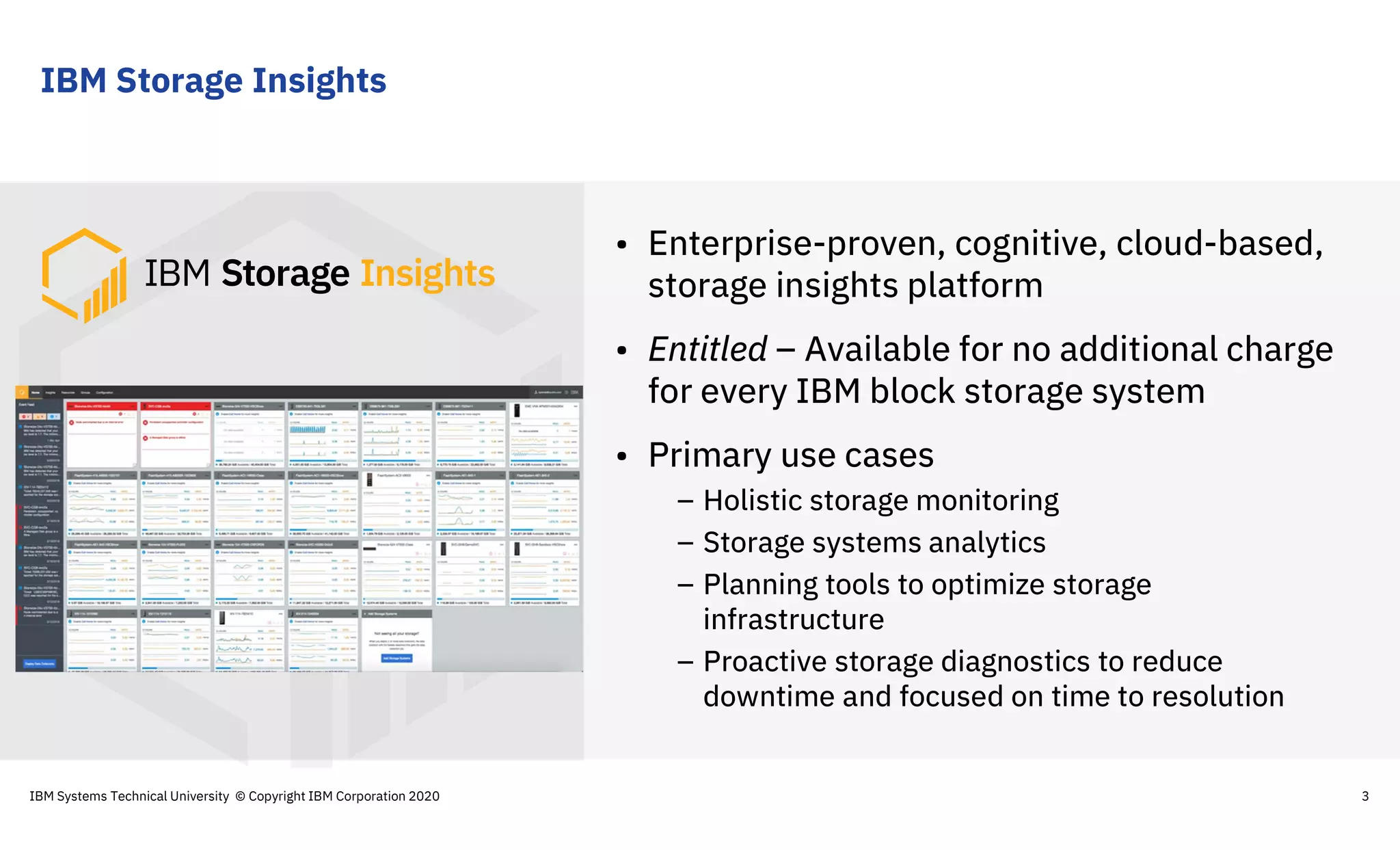
IBM Storage Insights
3
• Enterprise-proven, cognitive, cloud-based,
storage insights platform
• Entitled – Available for no additional charge
for every IBM block storage system
• Primary use cases
– Holistic storage monitoring
– Storage systems analytics
– Planning tools to optimize storage
infrastructure
– Proactive storage diagnostics to reduce
downtime and focused on time to resolution
IBM Systems Technical University © Copyright IBM Corporation 2020
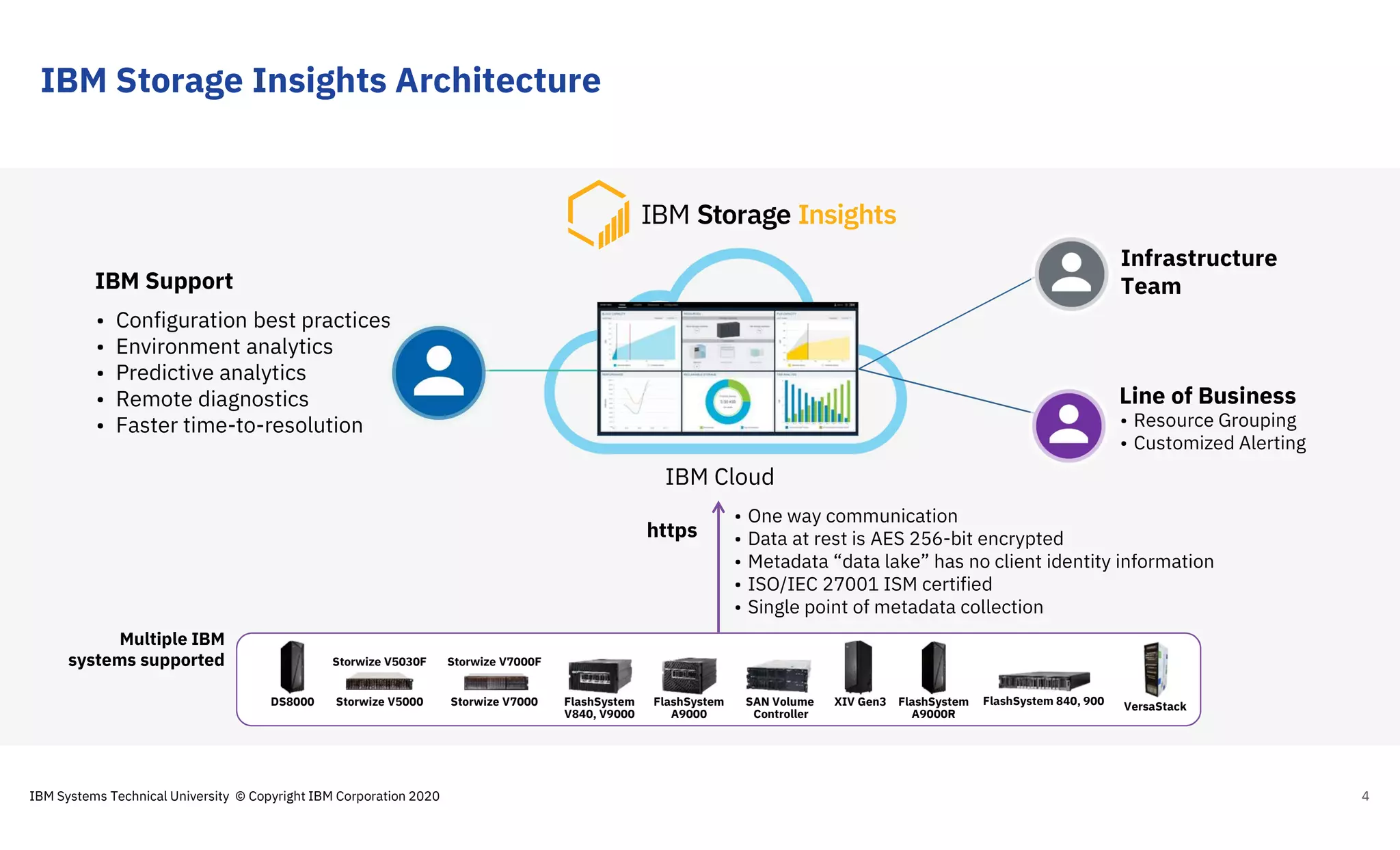
IBM Storage Insights Architecture
4
Line of Business
Infrastructure
Team
• Resource Grouping
• Customized Alerting
IBM Support
• Configuration best practices
• Environment analytics
• Predictive analytics
• Remote diagnostics
• Faster time-to-resolution
IBM Cloud
https
• One way communication
• Data at rest is AES 256-bit encrypted
• Metadata “data lake” has no client identity information
• ISO/IEC 27001 ISM certified
• Single point of metadata collection
FlashSystem
A9000R
FlashSystem
V840, V9000
SAN Volume
Controller
Storwize V5030F
Storwize V5000
Storwize V7000F
Storwize V7000 XIV Gen3 FlashSystem 840, 900FlashSystem
A9000
Multiple IBM
systems supported
DS8000 VersaStack
IBM Systems Technical University © Copyright IBM Corporation 2020
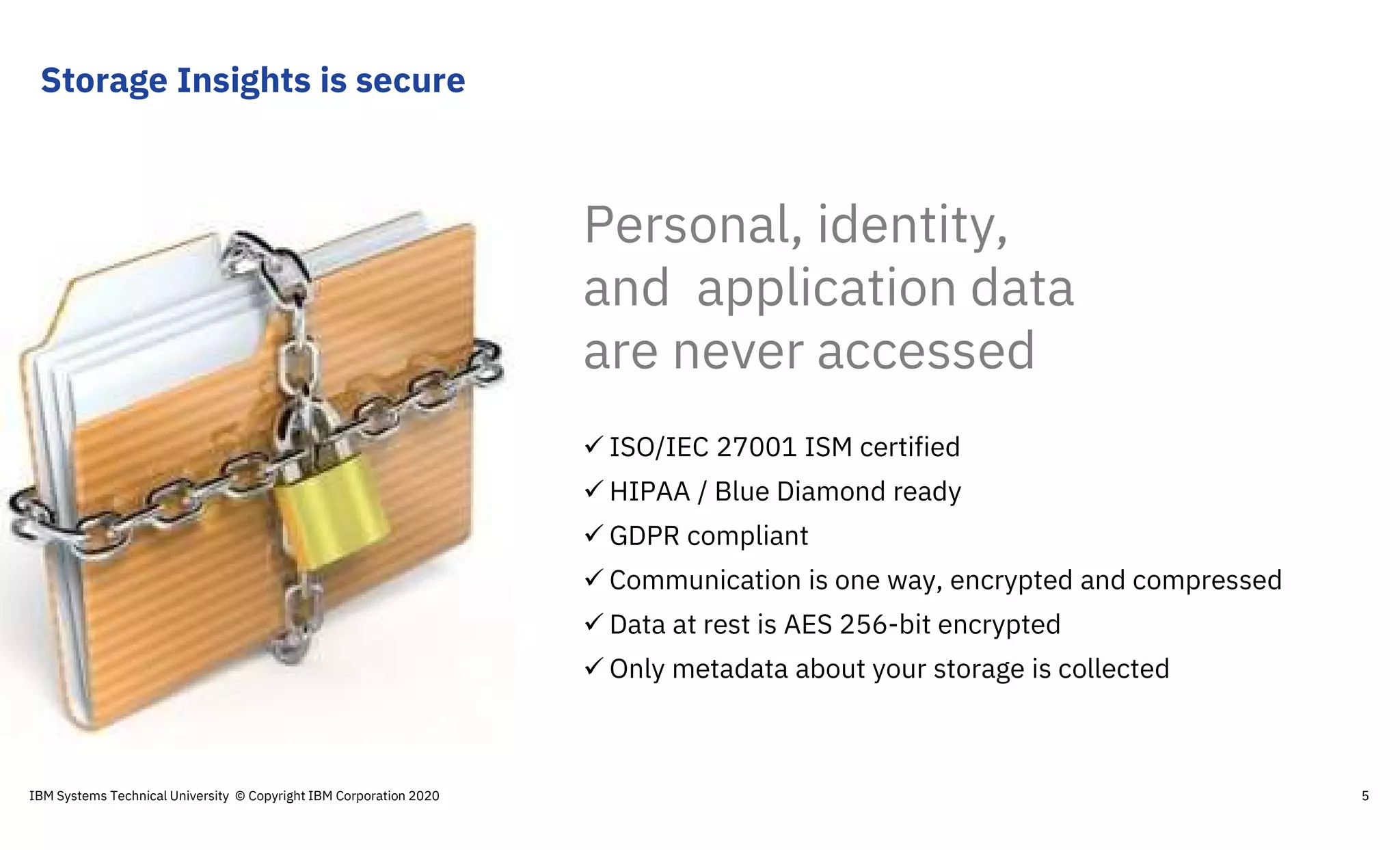
 ISO/IEC 27001 ISM certified
 HIPAA / Blue Diamond ready
 GDPR compliant
 Communication is one way, encrypted and compressed
 Data at rest is AES 256-bit encrypted
 Only metadata about your storage is collected
Personal, identity,
and application data
are never accessed
Storage Insights is secure
IBM Systems Technical University © Copyright IBM Corporation 2020 5
IBM Storage Insights
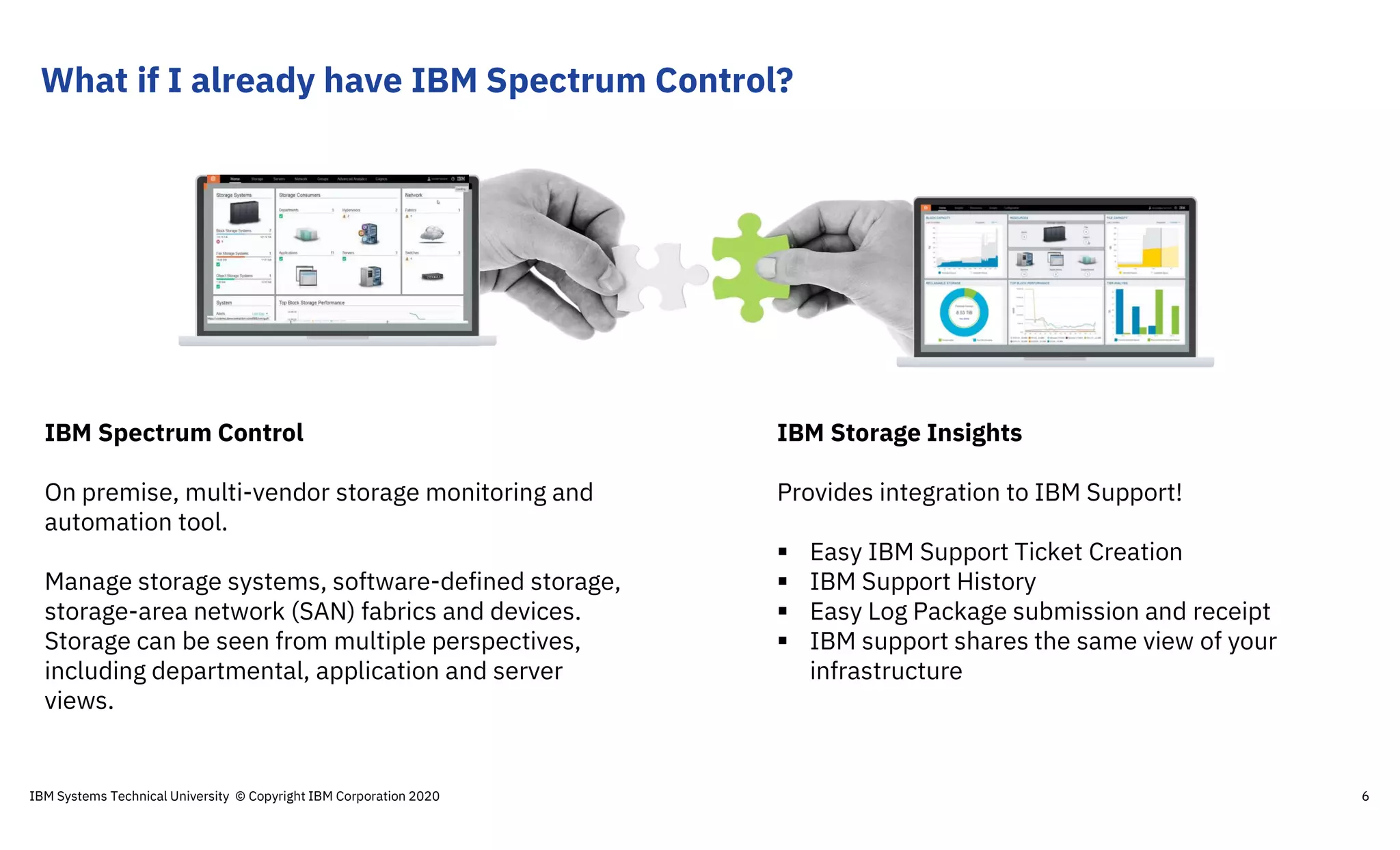
Provides integration to IBM Support!
 Easy IBM Support Ticket Creation
 IBM Support History
 Easy Log Package submission and receipt
 IBM support shares the same view of your
infrastructure
IBM Spectrum Control
On premise, multi-vendor storage monitoring and
automation tool.
Manage storage systems, software-defined storage,
storage-area network (SAN) fabrics and devices.
Storage can be seen from multiple perspectives,
including departmental, application and server
views.
What if I already have IBM Spectrum Control?
IBM Systems Technical University © Copyright IBM Corporation 2020 6
Agenda
IBM Systems Technical University © Copyright IBM Corporation 2020 7
What is IBM Storage Insights?
How to get started
Make Storage Admin life even
easier with Storage Insights Pro!
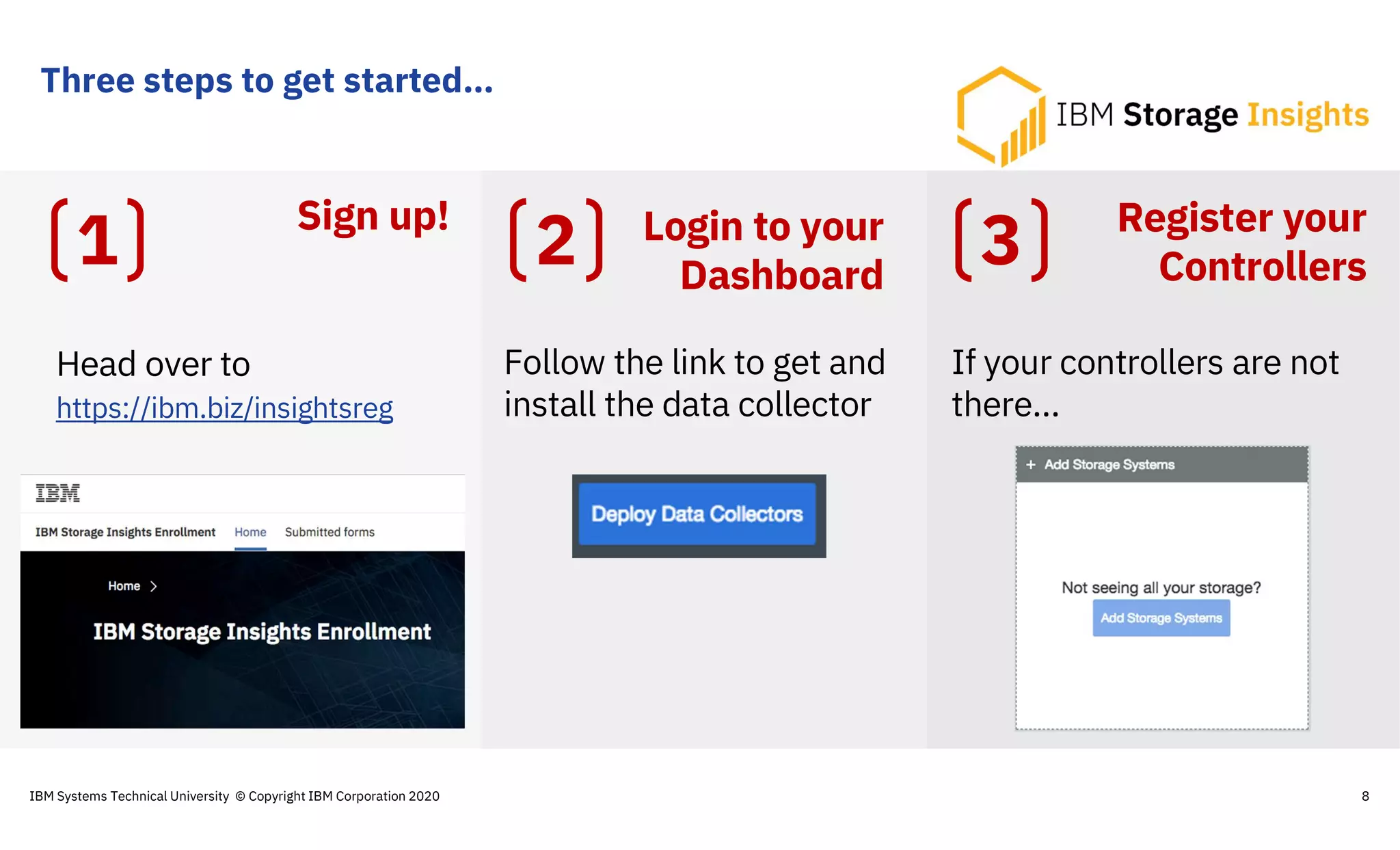
Three steps to get started…
8
Head over to
https://ibm.biz/insightsreg
Follow the link to get and
install the data collector
If your controllers are not
there…
1 2 3Sign up! Login to your
Dashboard
Register your
Controllers
IBM Systems Technical University © Copyright IBM Corporation 2020
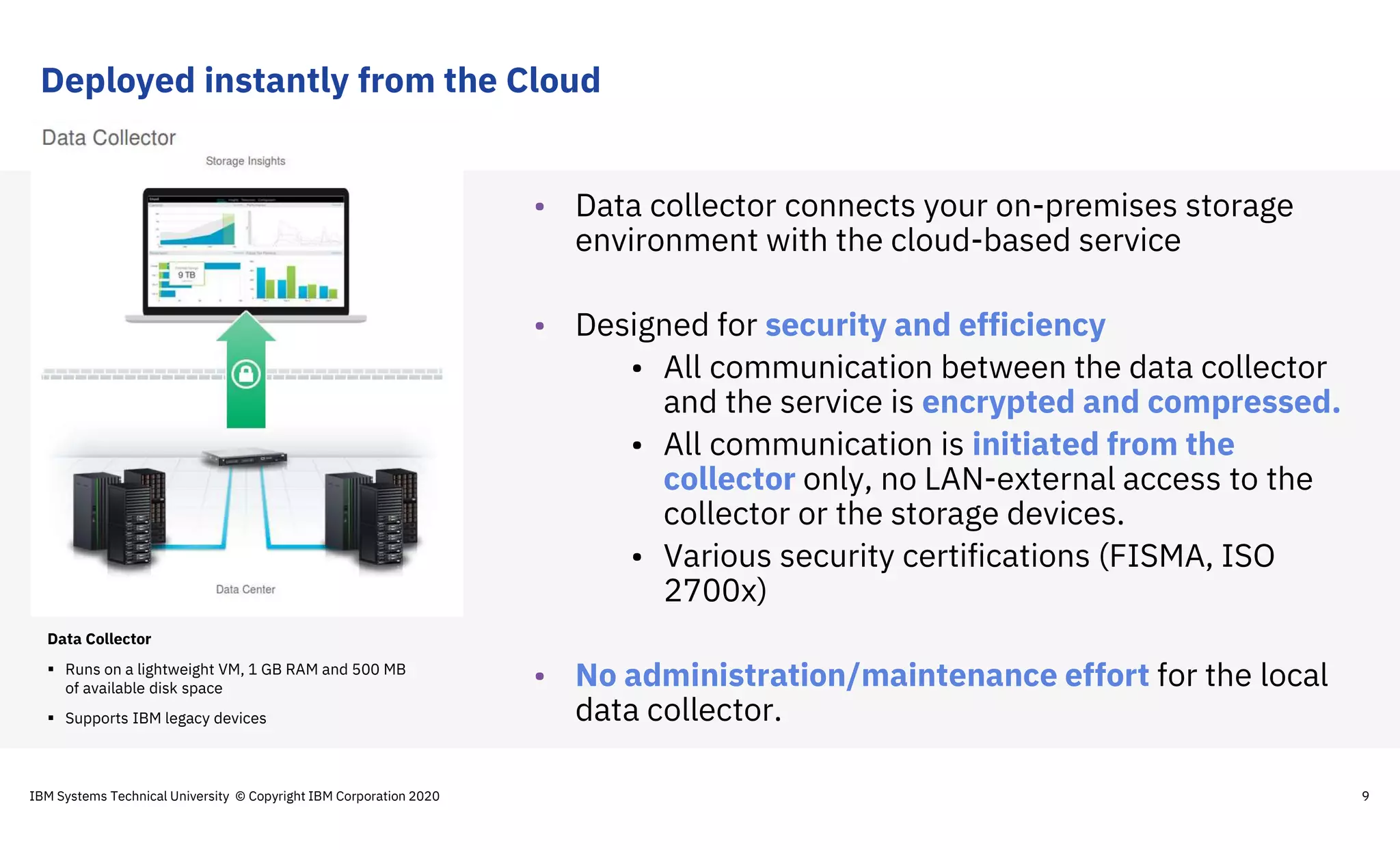
Deployed instantly from the Cloud
9
Data Collector
 Runs on a lightweight VM, 1 GB RAM and 500 MB
of available disk space
 Supports IBM legacy devices
• Data collector connects your on-premises storage
environment with the cloud-based service
• Designed for security and efficiency
• All communication between the data collector
and the service is encrypted and compressed.
• All communication is initiated from the
collector only, no LAN-external access to the
collector or the storage devices.
• Various security certifications (FISMA, ISO
2700x)
• No administration/maintenance effort for the local
data collector.
IBM Systems Technical University © Copyright IBM Corporation 2020
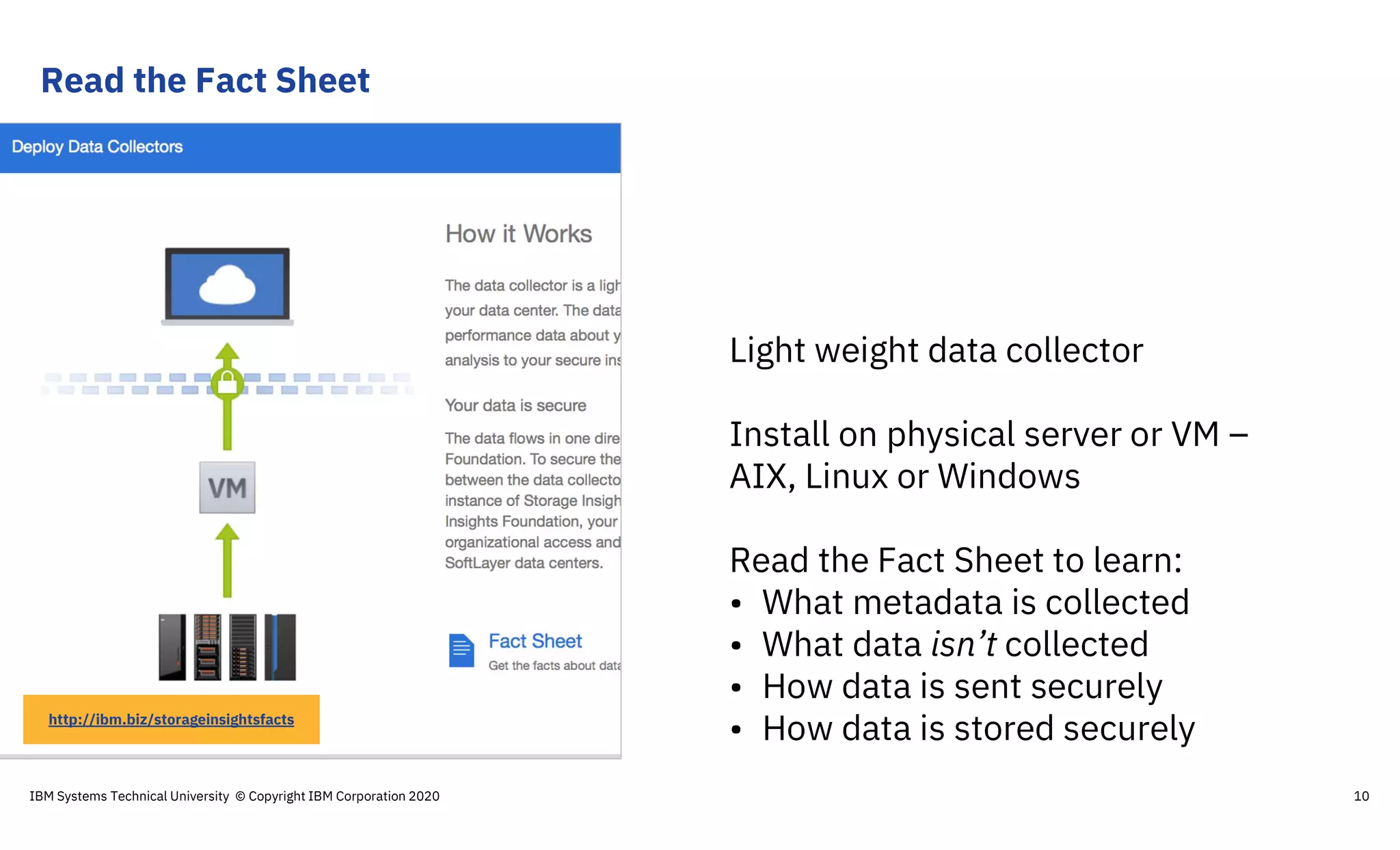
Read the Fact Sheet
10
Light weight data collector
Install on physical server or VM –
AIX, Linux or Windows
Read the Fact Sheet to learn:
• What metadata is collected
• What data isn’t collected
• How data is sent securely
• How data is stored securelyhttp://ibm.biz/storageinsightsfacts
IBM Systems Technical University © Copyright IBM Corporation 2020
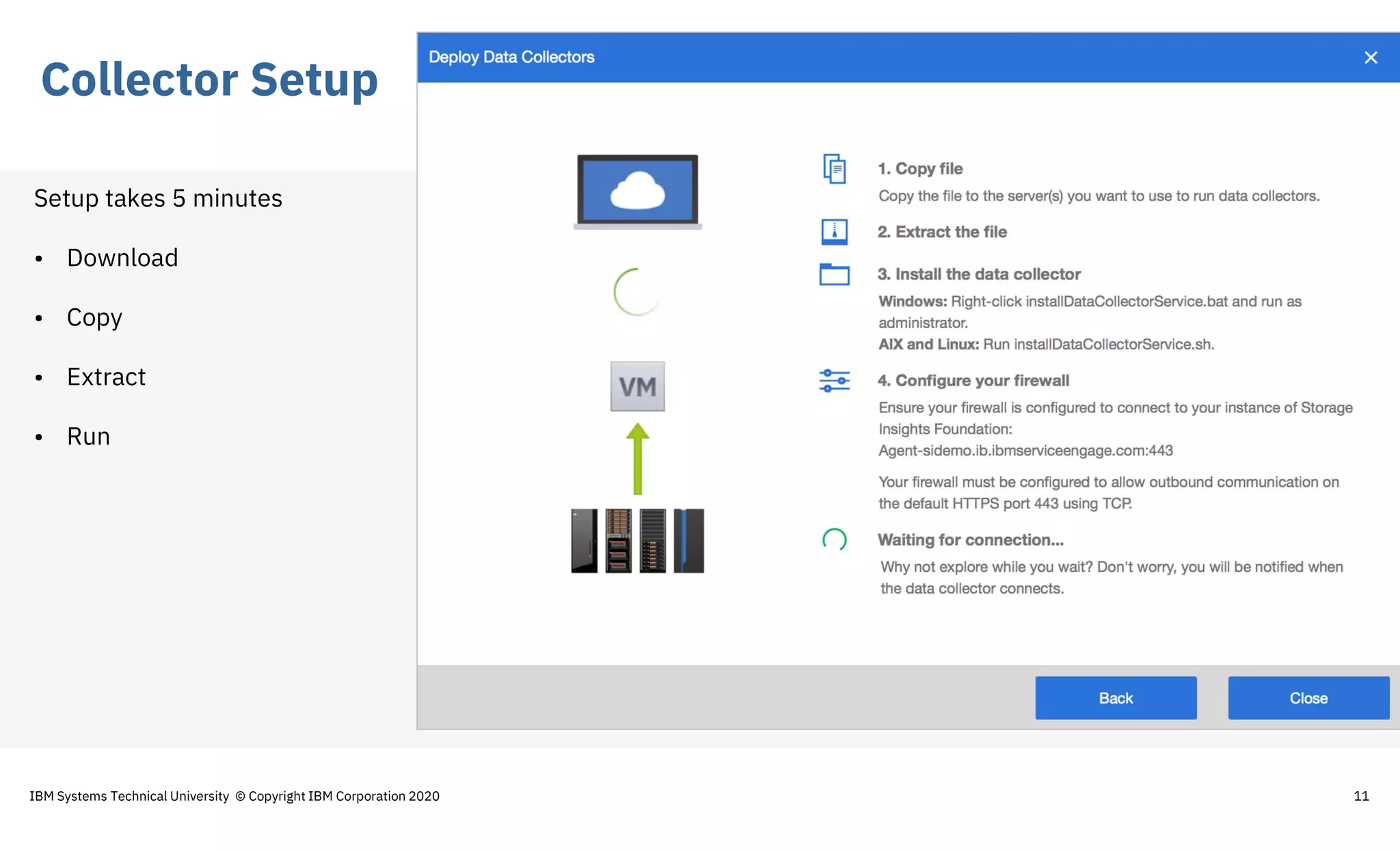
Collector Setup
11
Setup takes 5 minutes
• Download
• Copy
• Extract
• Run
IBM Systems Technical University © Copyright IBM Corporation 2020
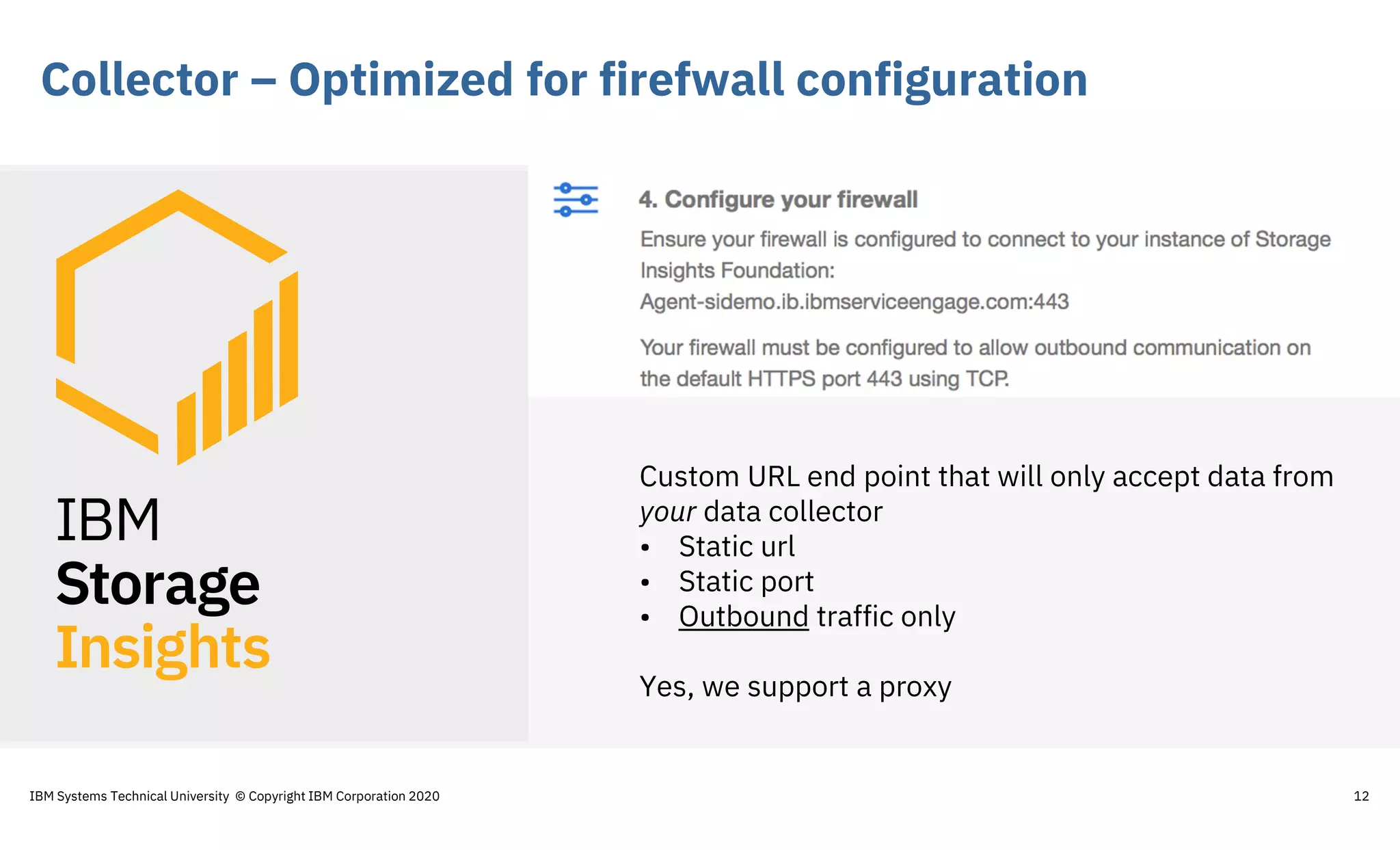
Collector – Optimized for firefwall configuration
12
Custom URL end point that will only accept data from
your data collector
• Static url
• Static port
• Outbound traffic only
Yes, we support a proxy
IBM Systems Technical University © Copyright IBM Corporation 2020
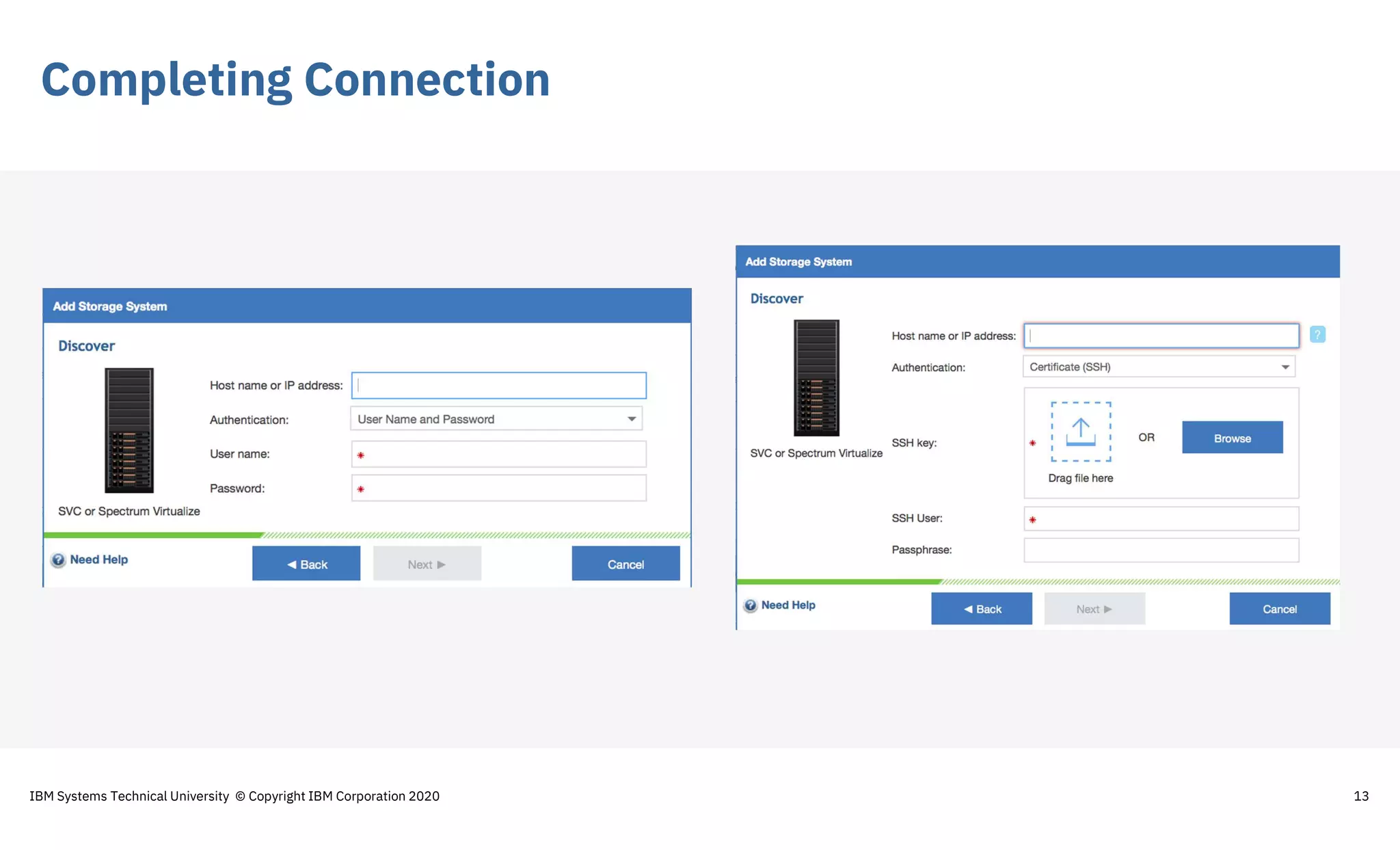
Completing Connection
13IBM Systems Technical University © Copyright IBM Corporation 2020
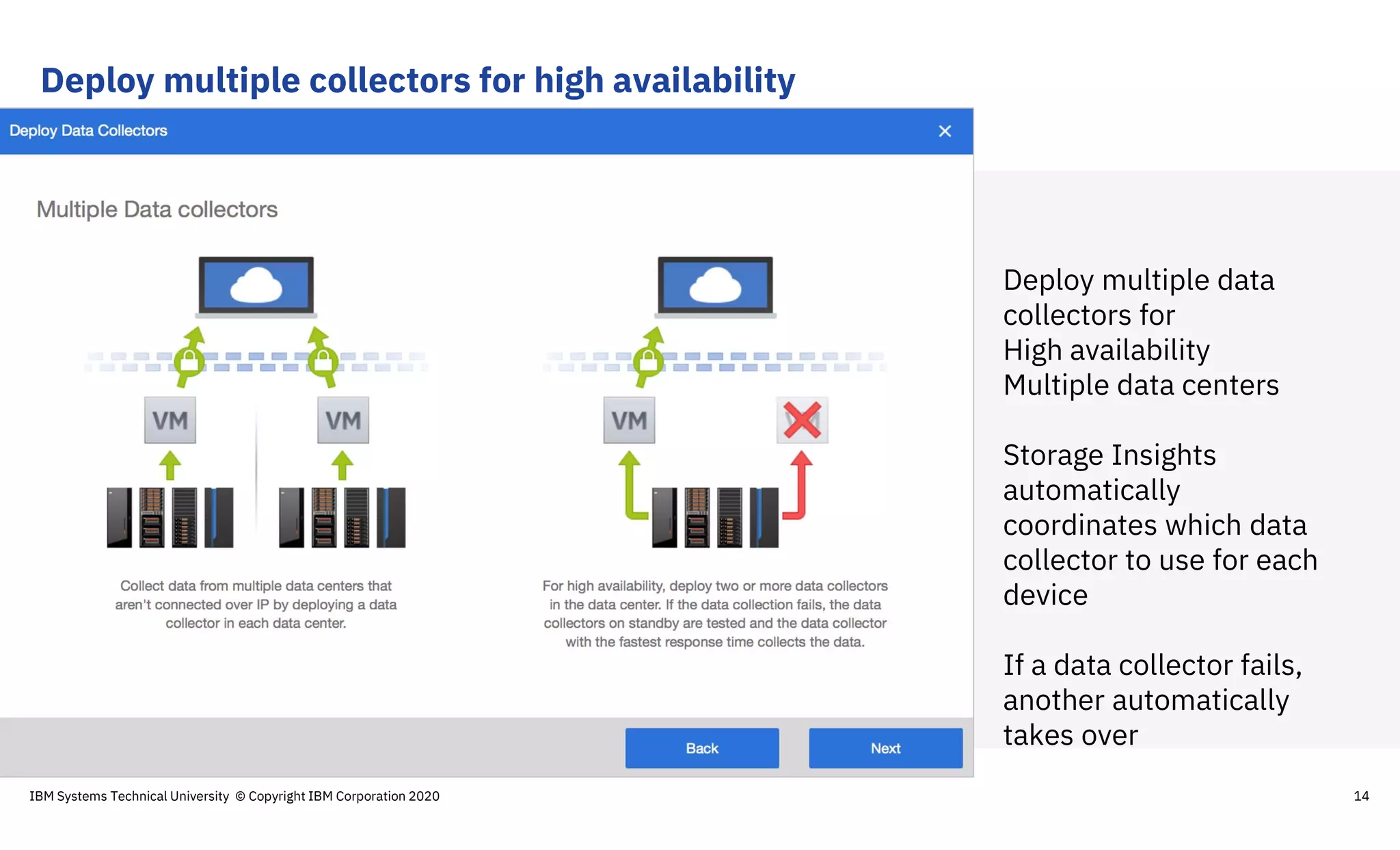
Deploy multiple collectors for high availability
14
Deploy multiple data
collectors for
High availability
Multiple data centers
Storage Insights
automatically
coordinates which data
collector to use for each
device
If a data collector fails,
another automatically
takes over
IBM Systems Technical University © Copyright IBM Corporation 2020
Enterprise Storage Dashboard – Tile View
15IBM Systems Technical University © Copyright IBM Corporation 2020
All your storage shown on a
single dashboard.
This dashboard is on the
cloud, so even if you support
your storage systems after
hours, you can get to it and
use it as your first point for
any problem validation and
diagnosis.
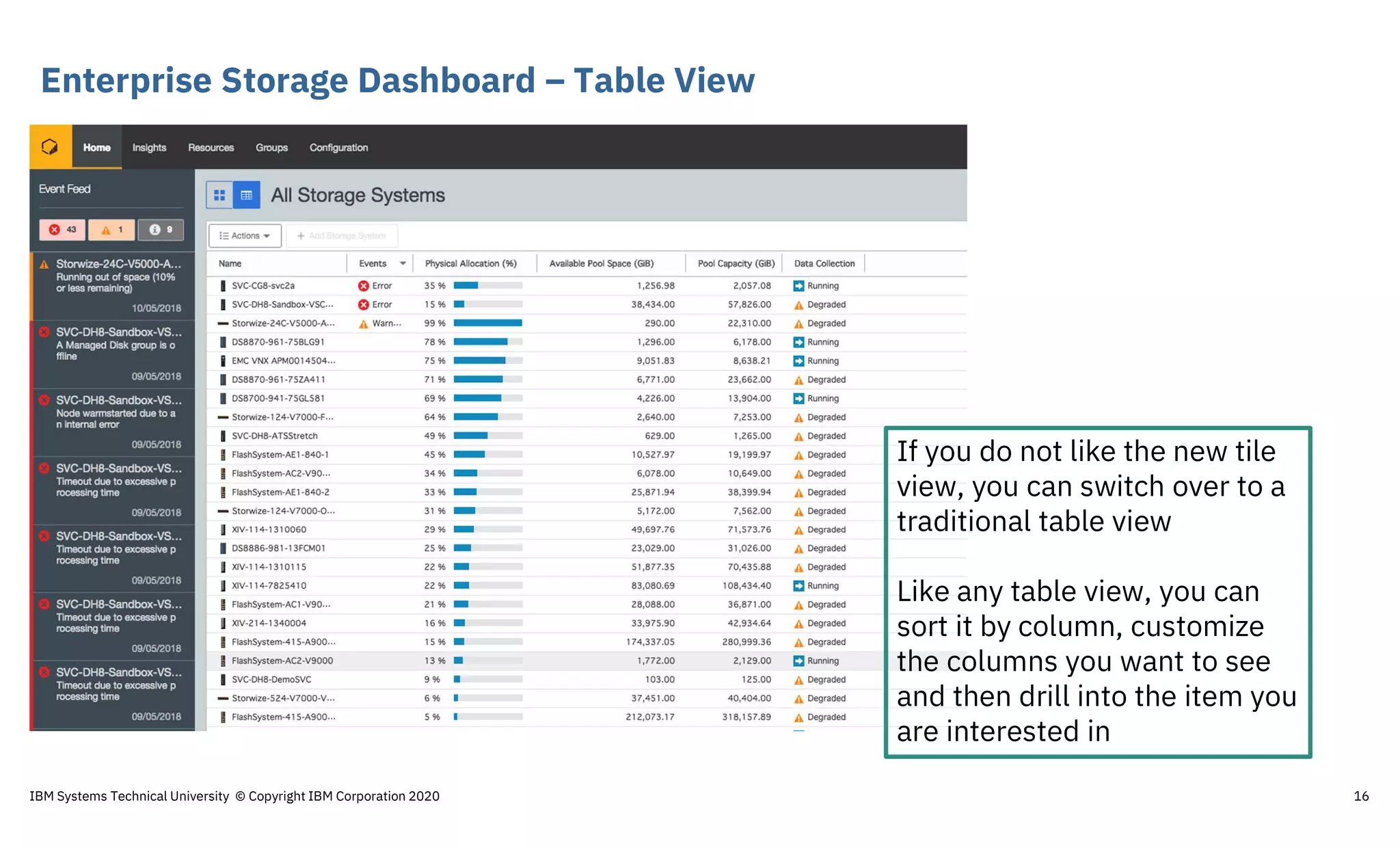
Enterprise Storage Dashboard – Table View
16
If you do not like the new tile
view, you can switch over to a
traditional table view
Like any table view, you can
sort it by column, customize
the columns you want to see
and then drill into the item you
are interested in
IBM Systems Technical University © Copyright IBM Corporation 2020
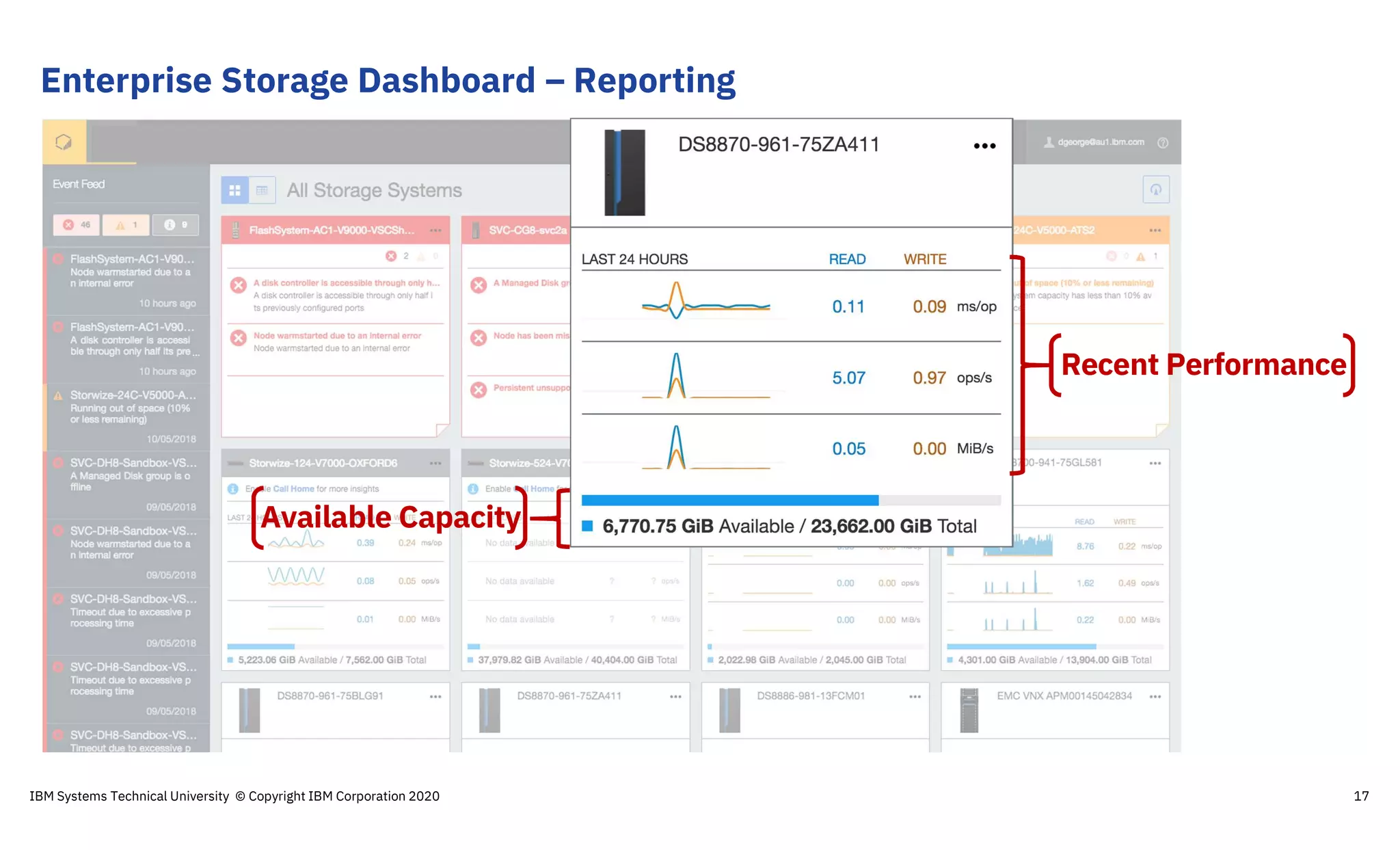
Enterprise Storage Dashboard – Reporting
17
Available Capacity
Recent Performance
IBM Systems Technical University © Copyright IBM Corporation 2020
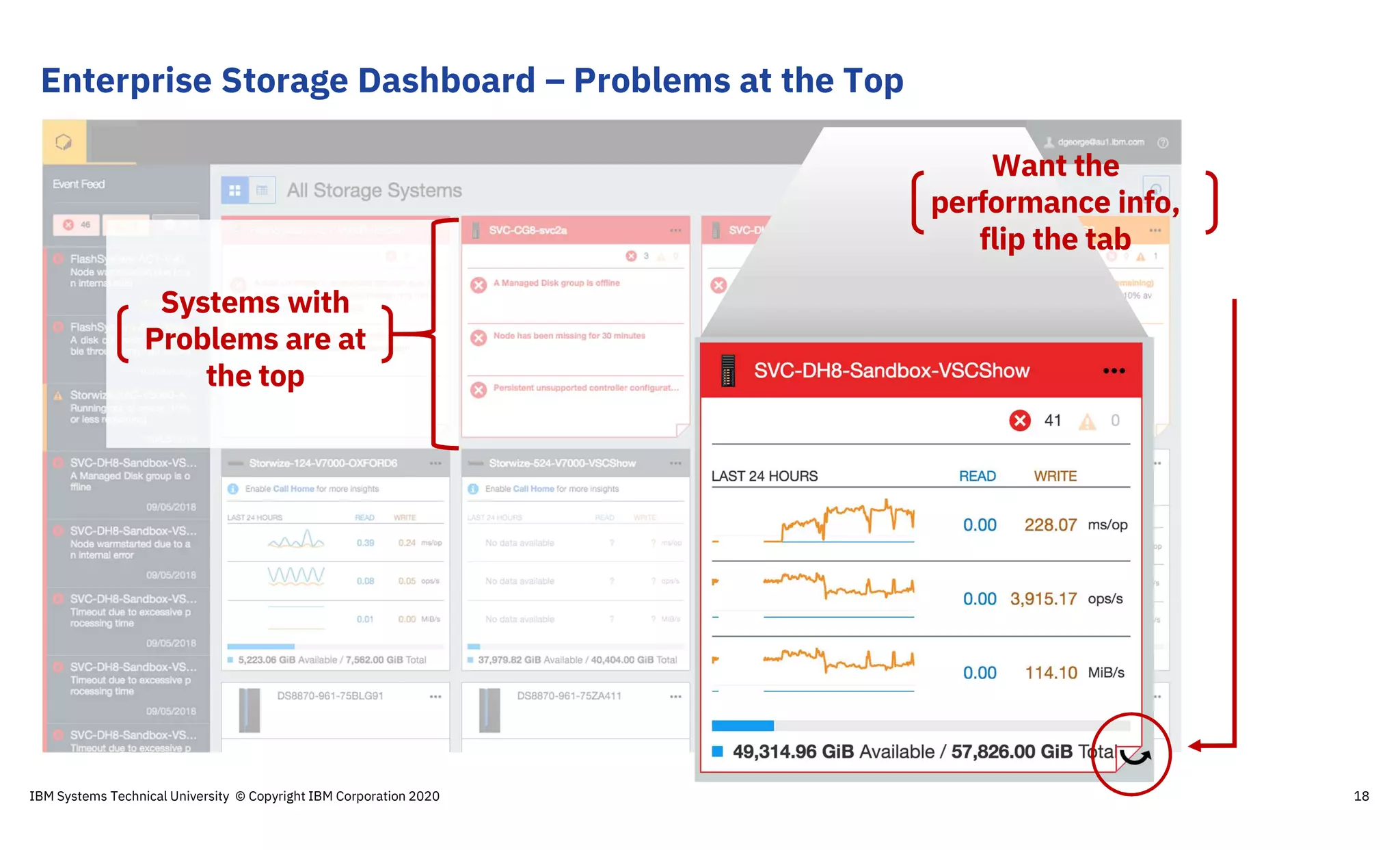
Enterprise Storage Dashboard – Problems at the Top
18
Systems with
Problems are at
the top
Want the
performance info,
flip the tab
IBM Systems Technical University © Copyright IBM Corporation 2020
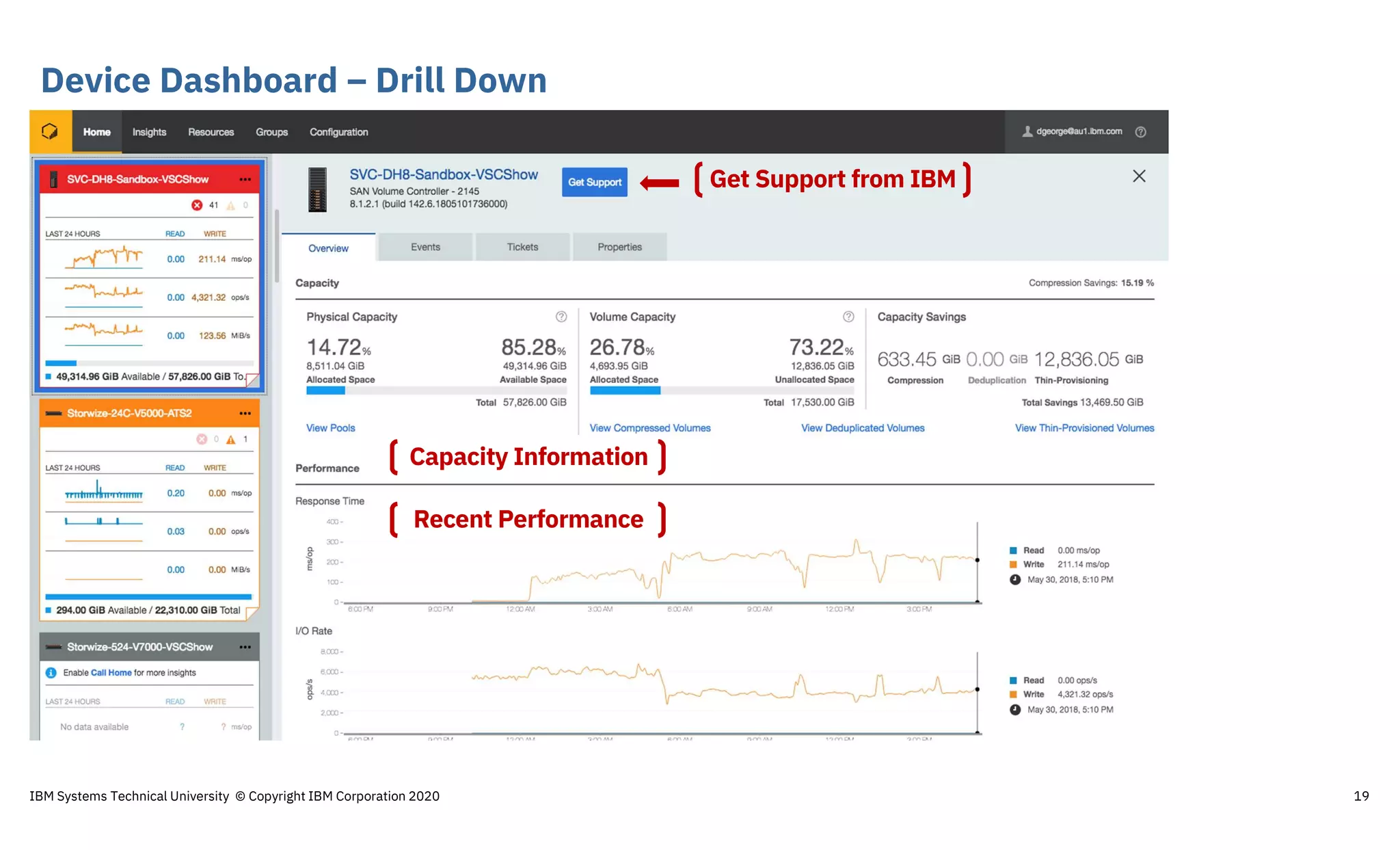
Device Dashboard – Drill Down
19
Recent Performance
Capacity Information
Get Support from IBM
IBM Systems Technical University © Copyright IBM Corporation 2020
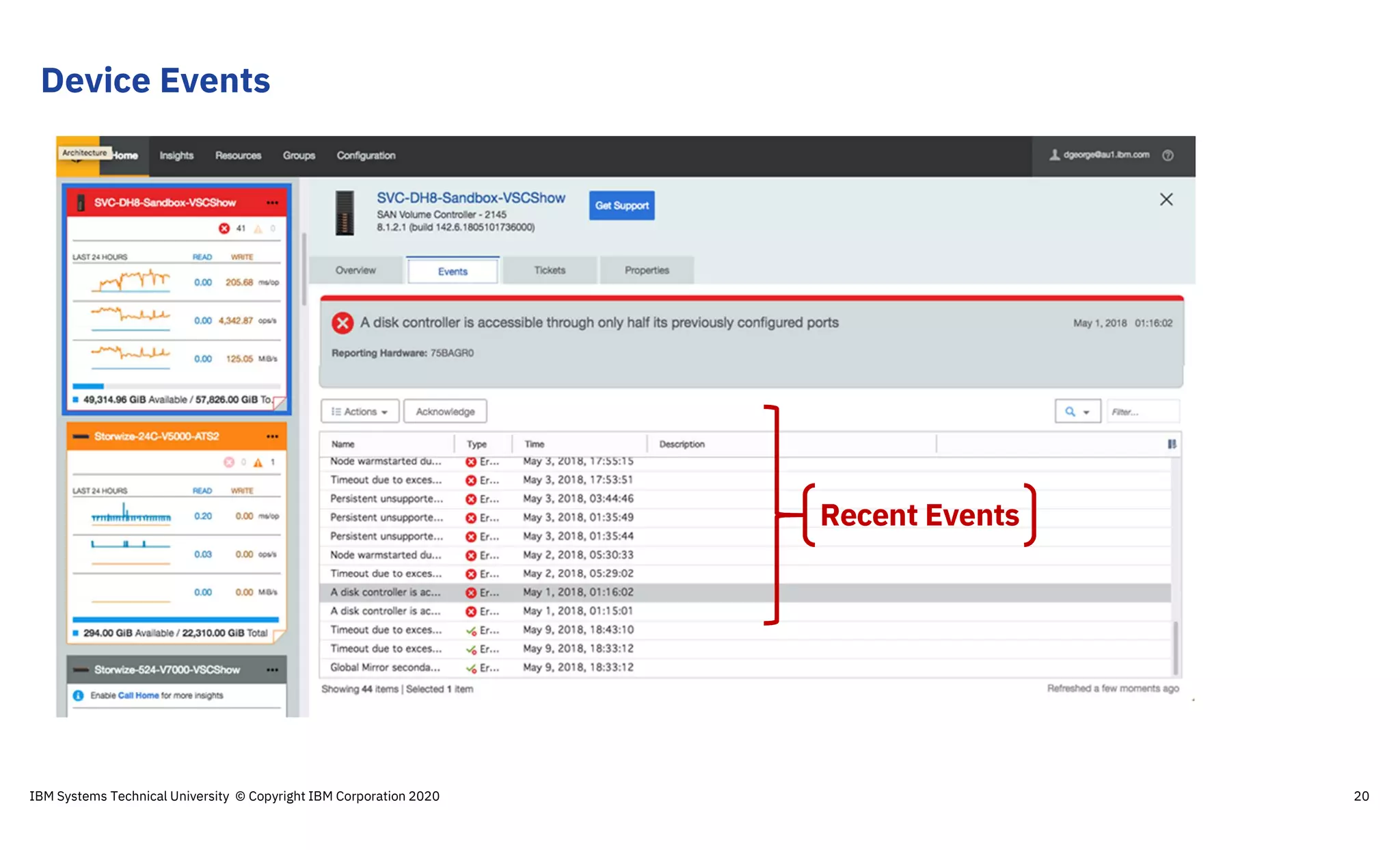
Recent Events
Device Events
IBM Systems Technical University © Copyright IBM Corporation 2020 20
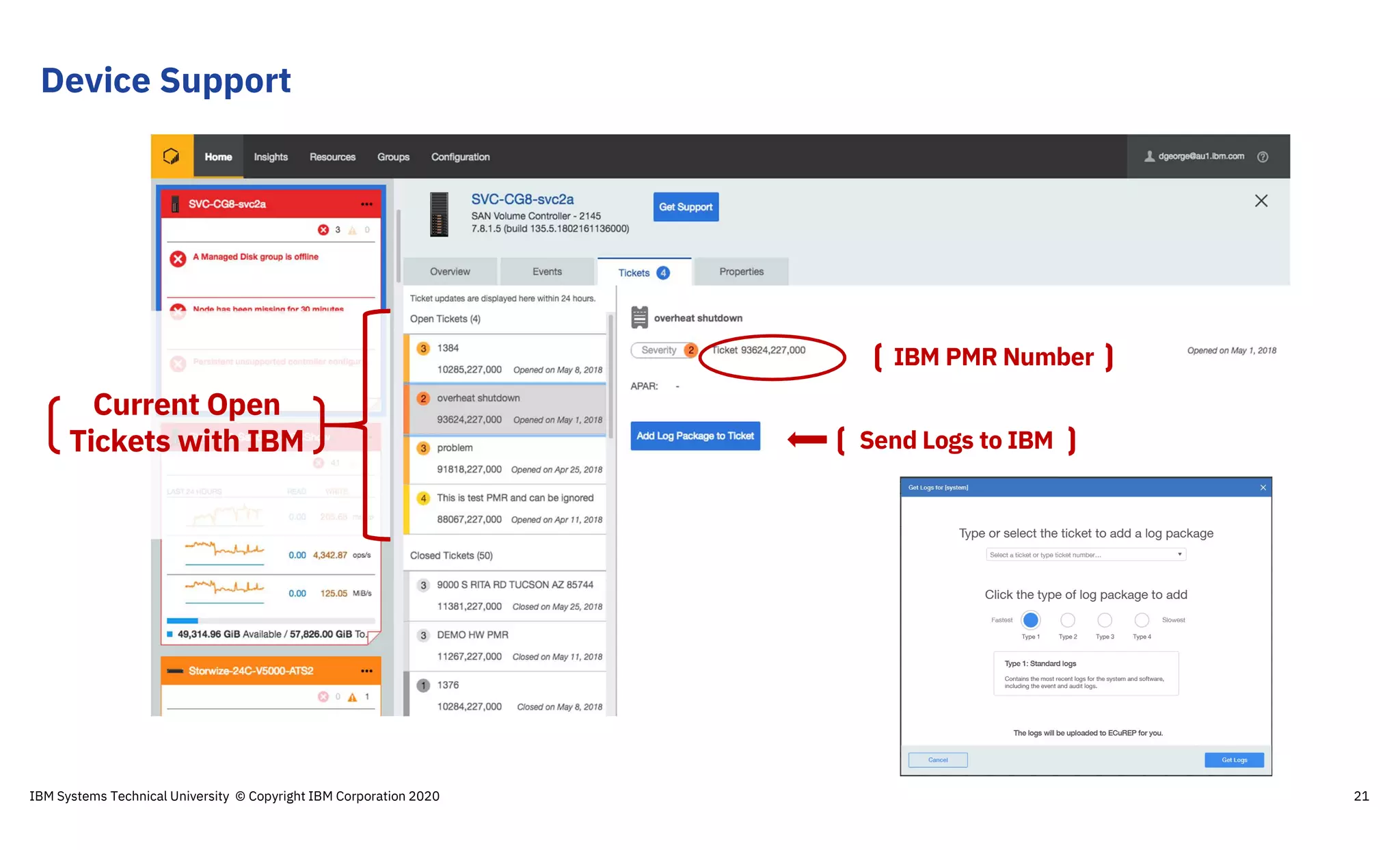
Device Support
IBM Systems Technical University © Copyright IBM Corporation 2020 21
Current Open
Tickets with IBM Send Logs to IBM
IBM PMR Number
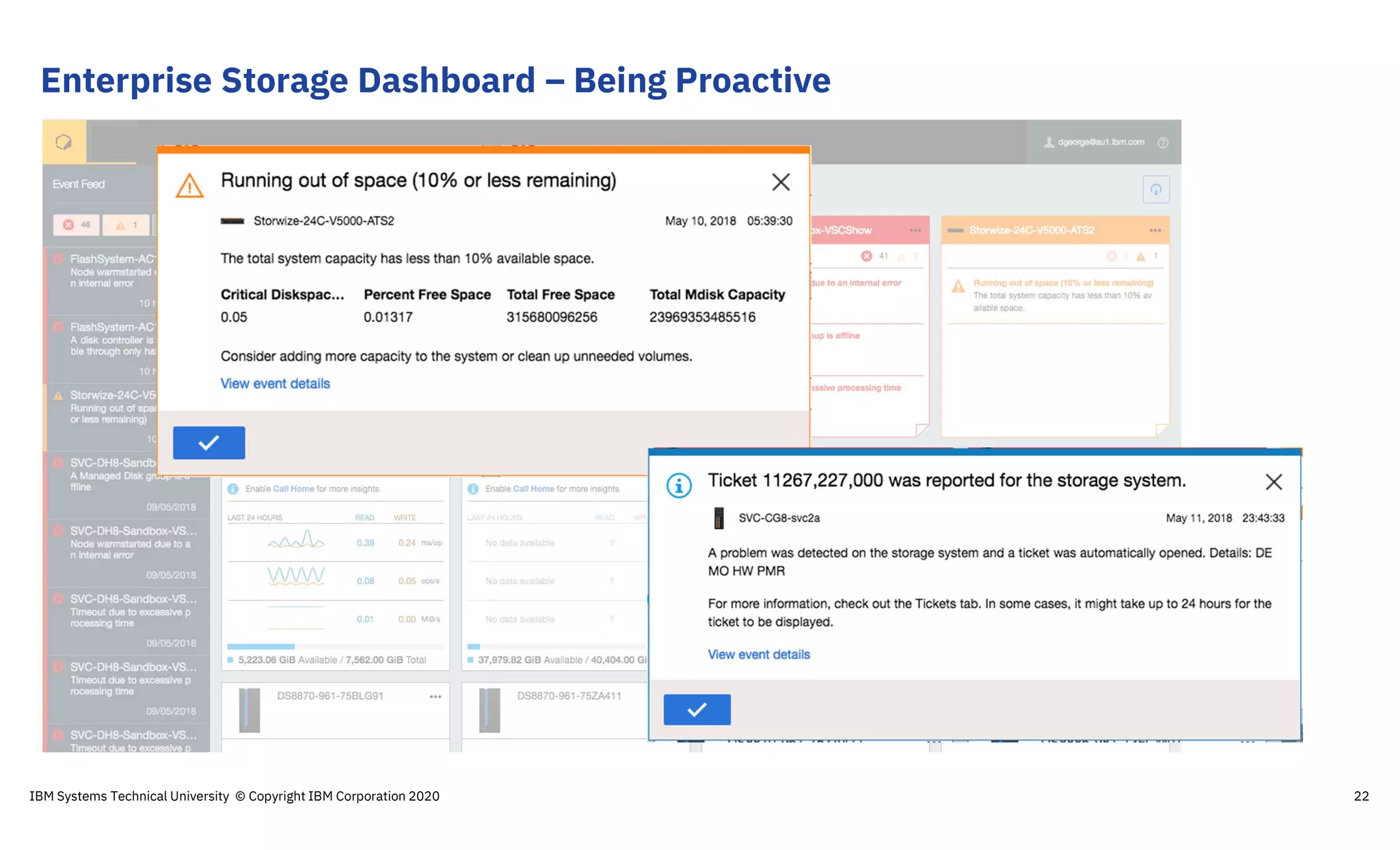
Enterprise Storage Dashboard – Being Proactive
22IBM Systems Technical University © Copyright IBM Corporation 2020
Agenda
IBM Systems Technical University © Copyright IBM Corporation 2020 23
What is IBM Storage Insights?
How to get started
Make Storage Admin life even
easier with Storage Insights Pro!
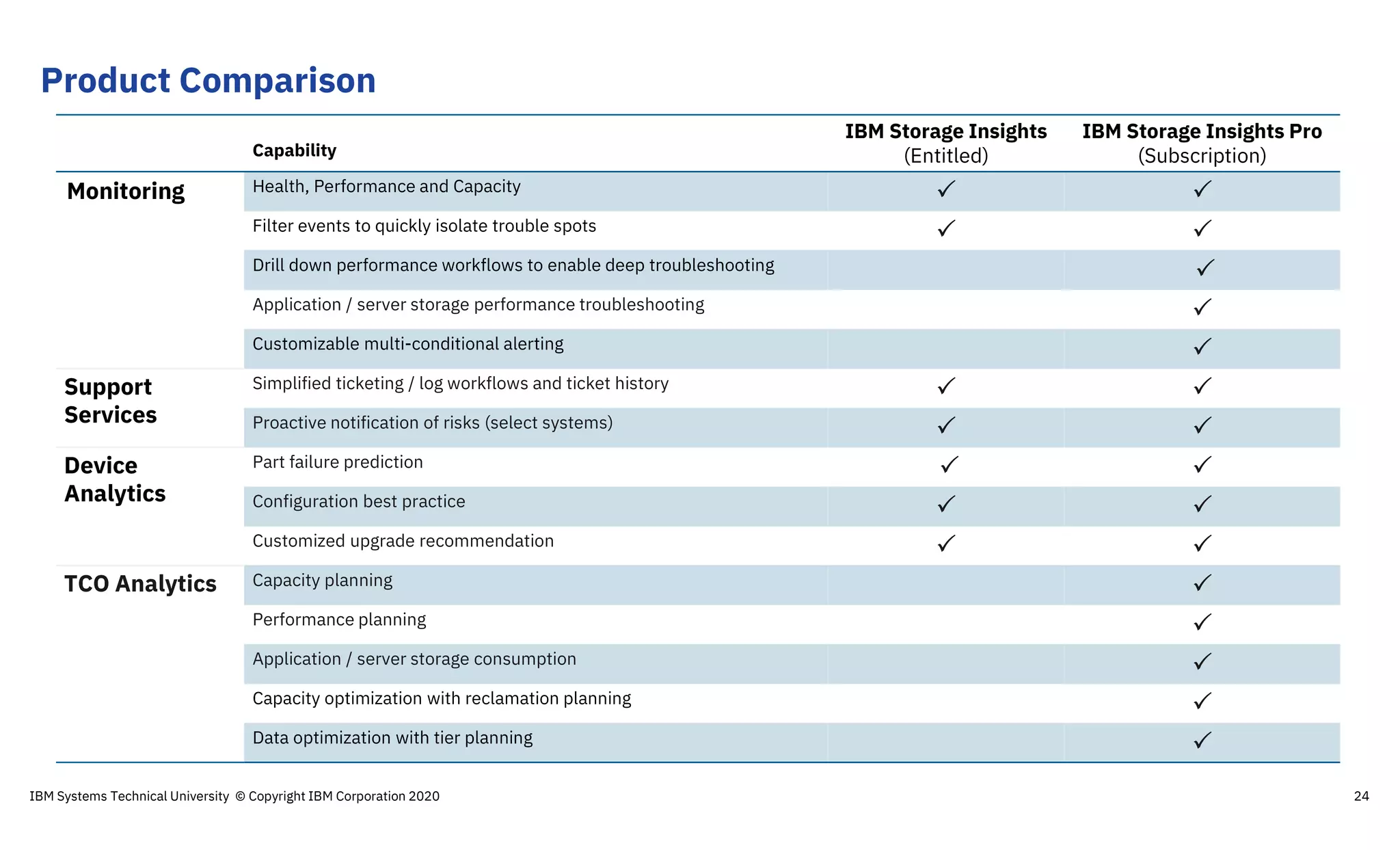
Product Comparison
24
Capability
IBM Storage Insights
(Entitled)
IBM Storage Insights Pro
(Subscription)
Monitoring Health, Performance and Capacity  
Filter events to quickly isolate trouble spots  
Drill down performance workflows to enable deep troubleshooting 
Application / server storage performance troubleshooting 
Customizable multi-conditional alerting 
Support
Services
Simplified ticketing / log workflows and ticket history  
Proactive notification of risks (select systems)  
Device
Analytics
Part failure prediction  
Configuration best practice  
Customized upgrade recommendation  
TCO Analytics Capacity planning 
Performance planning 
Application / server storage consumption 
Capacity optimization with reclamation planning 
Data optimization with tier planning 
IBM Systems Technical University © Copyright IBM Corporation 2020
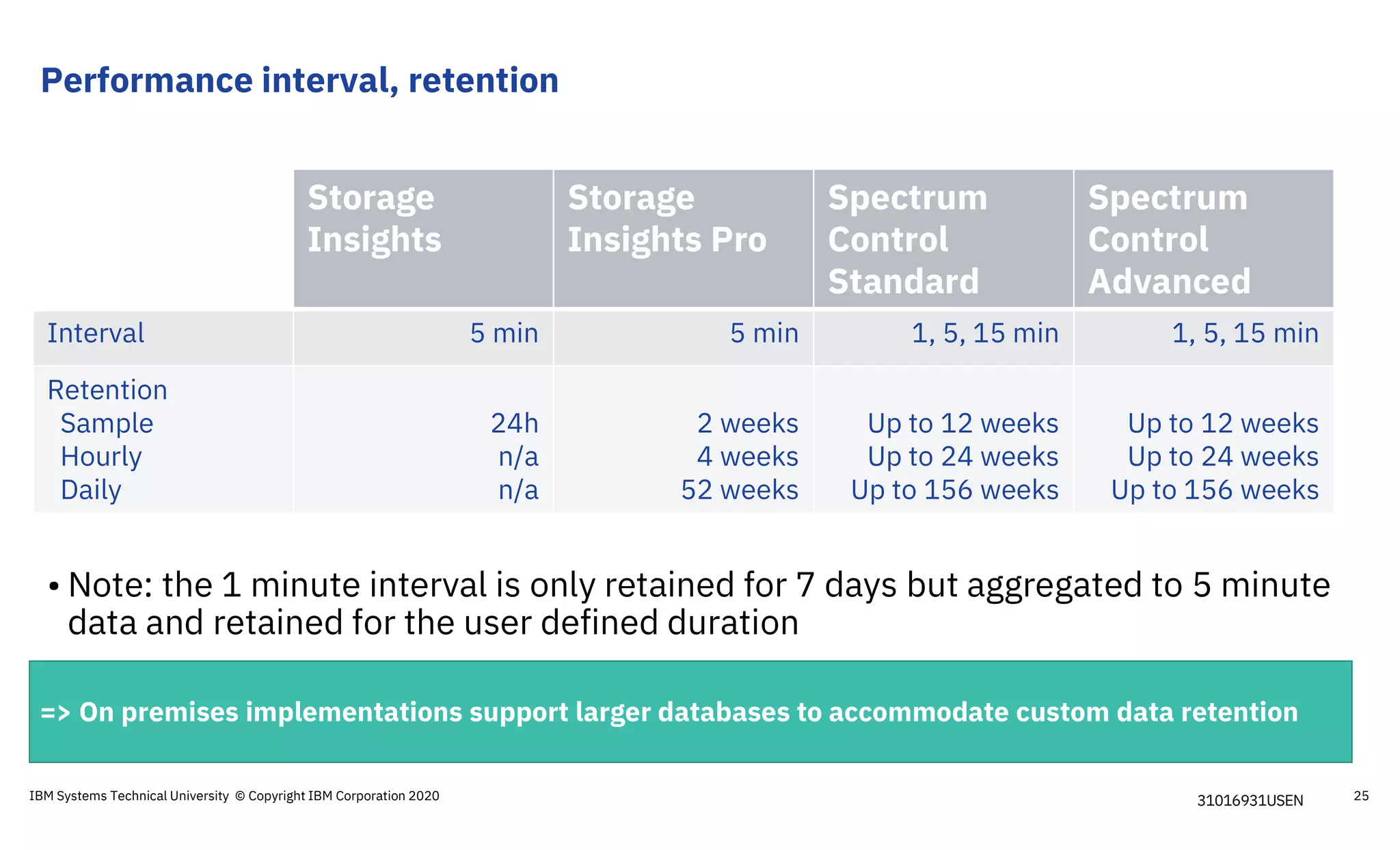
Performance interval, retention
Storage
Insights
Storage
Insights Pro
Spectrum
Control
Standard
Spectrum
Control
Advanced
Interval 5 min 5 min 1, 5, 15 min 1, 5, 15 min
Retention
Sample
Hourly
Daily
24h
n/a
n/a
2 weeks
4 weeks
52 weeks
Up to 12 weeks
Up to 24 weeks
Up to 156 weeks
Up to 12 weeks
Up to 24 weeks
Up to 156 weeks
• Note: the 1 minute interval is only retained for 7 days but aggregated to 5 minute
data and retained for the user defined duration
=> On premises implementations support larger databases to accommodate custom data retention
31016931USENIBM Systems Technical University © Copyright IBM Corporation 2020 25
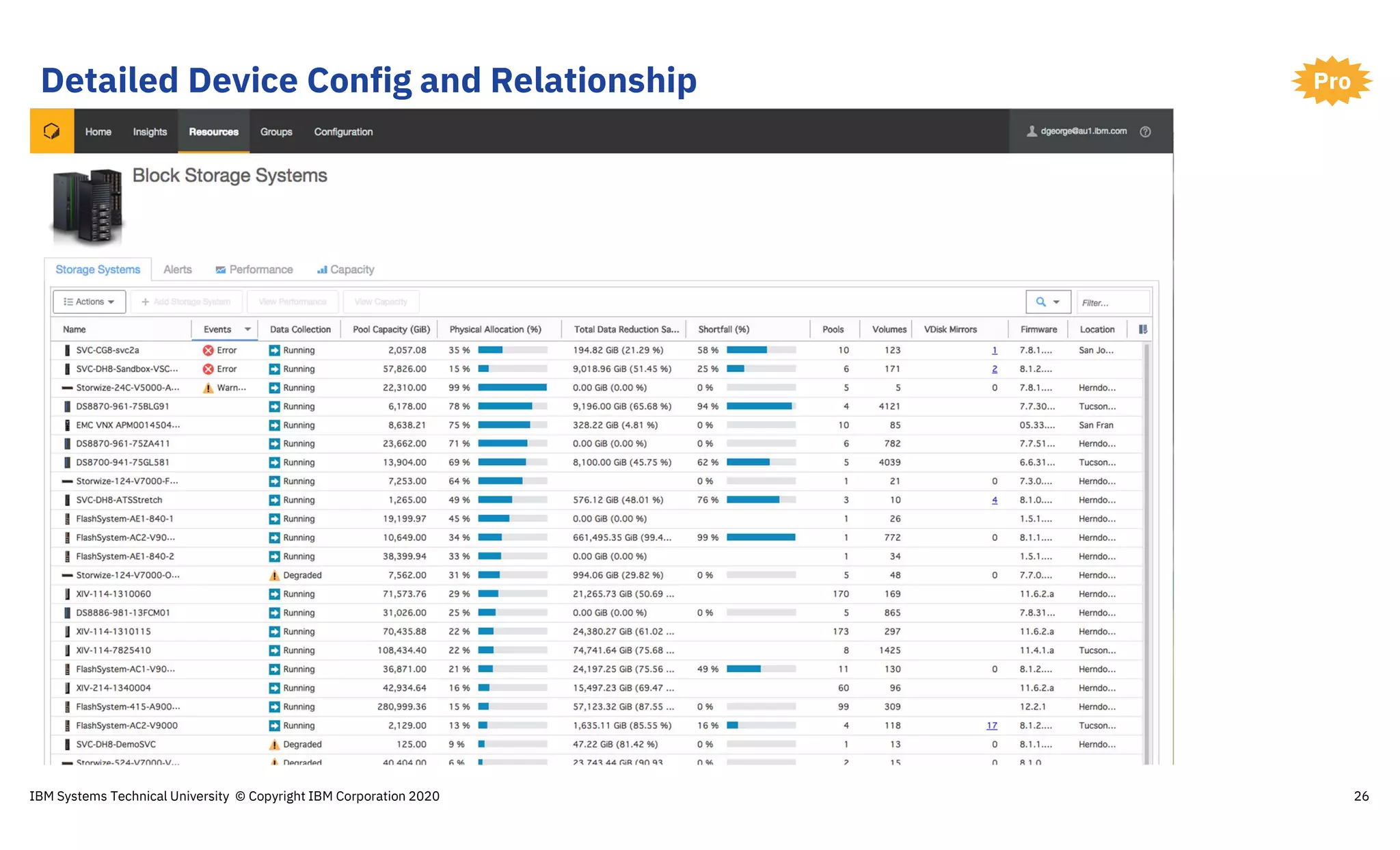
Detailed Device Config and Relationship
26
Pro
IBM Systems Technical University © Copyright IBM Corporation 2020
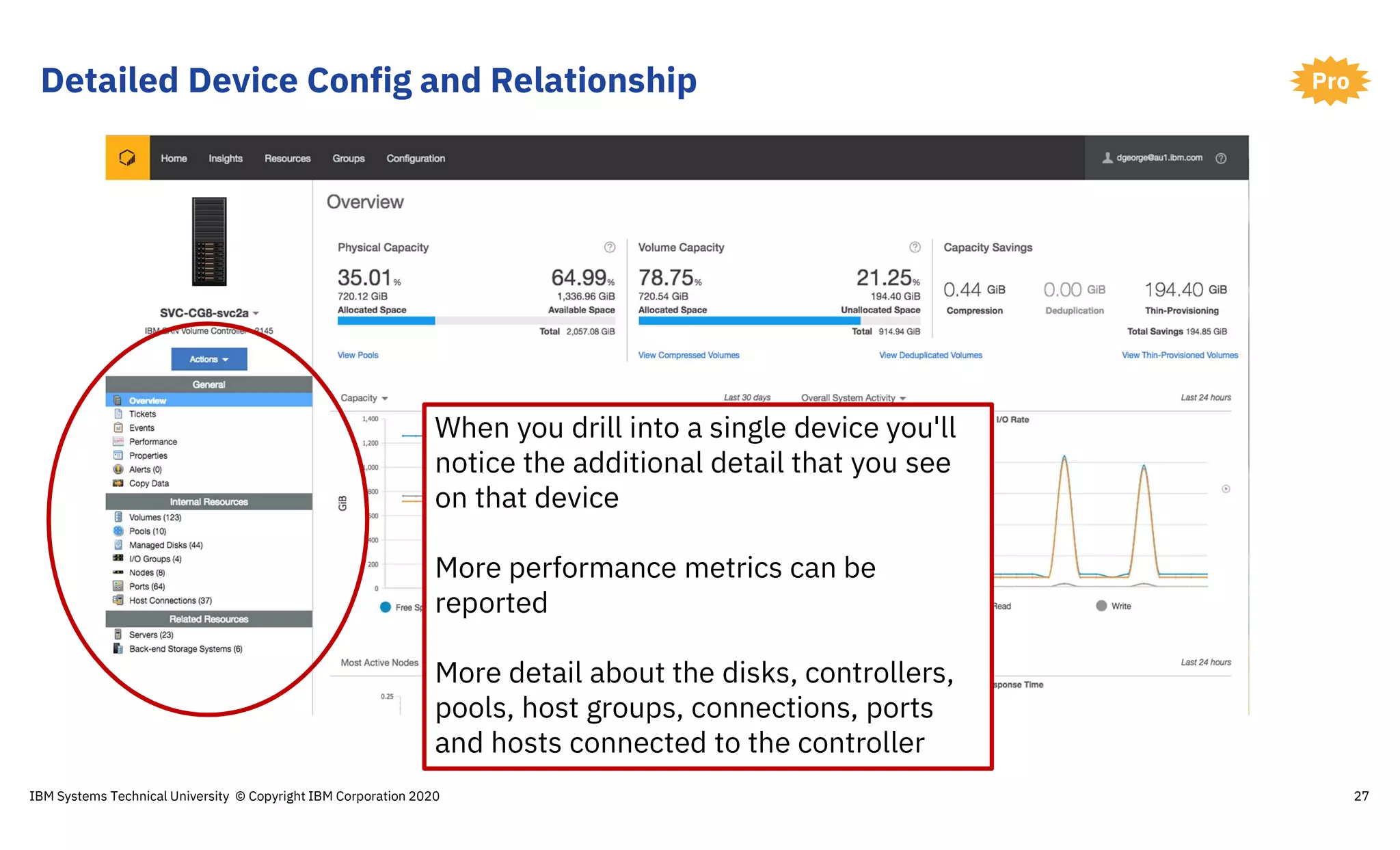
Detailed Device Config and Relationship
27
Pro
When you drill into a single device you'll
notice the additional detail that you see
on that device
More performance metrics can be
reported
More detail about the disks, controllers,
pools, host groups, connections, ports
and hosts connected to the controller
IBM Systems Technical University © Copyright IBM Corporation 2020
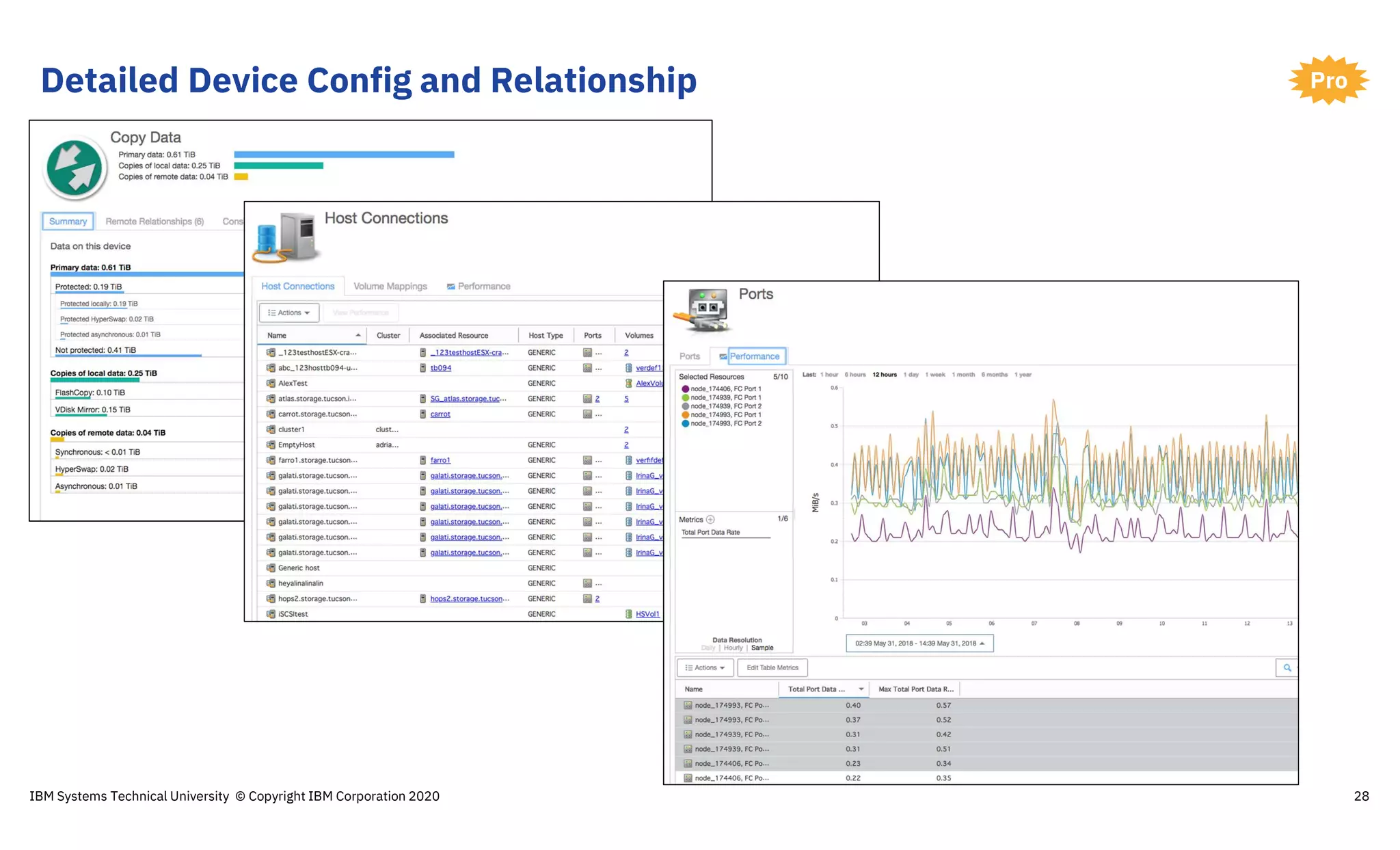
Detailed Device Config and Relationship
28
Pro
IBM Systems Technical University © Copyright IBM Corporation 2020
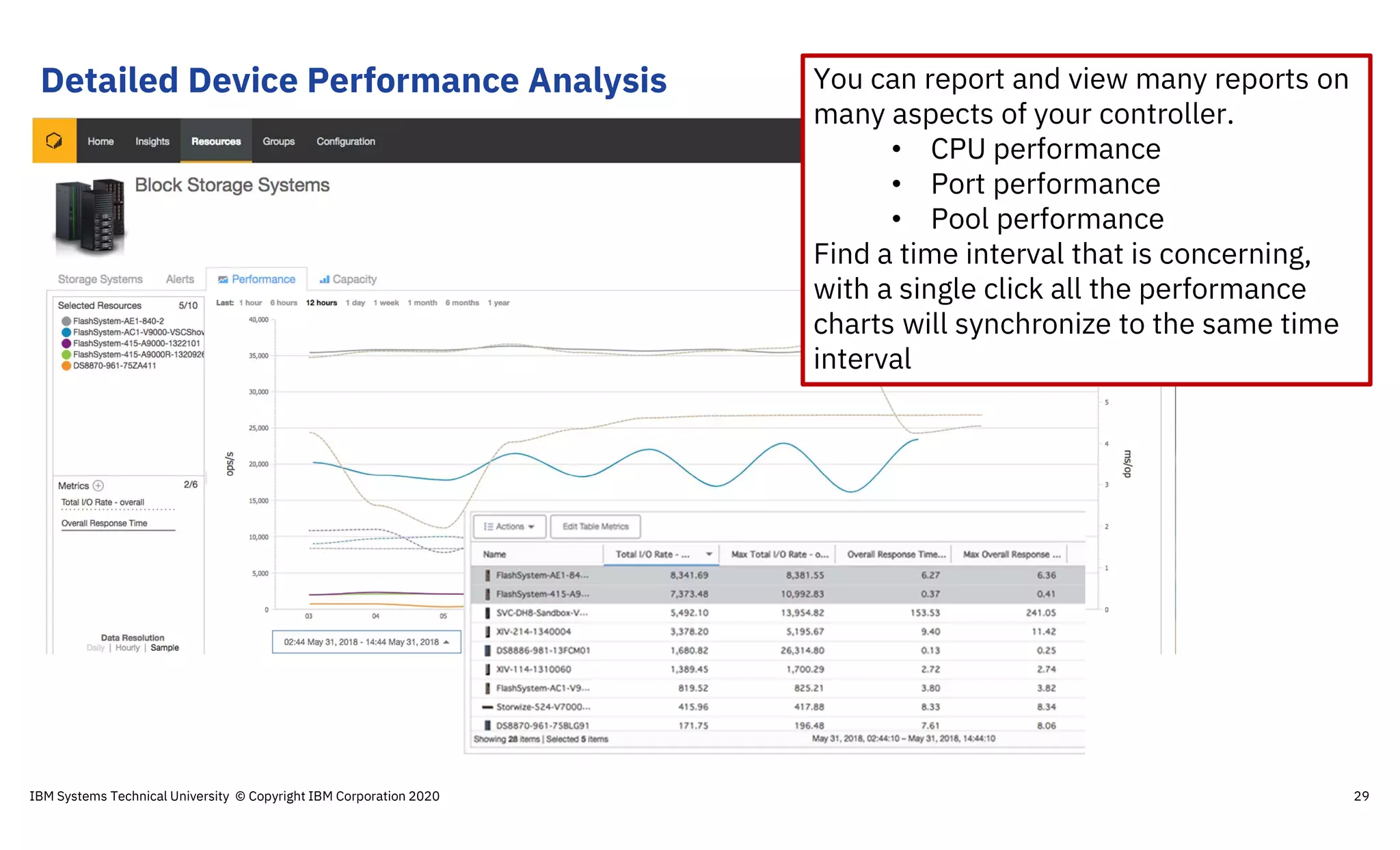
Detailed Device Performance Analysis You can report and view many reports on
many aspects of your controller.
• CPU performance
• Port performance
• Pool performance
Find a time interval that is concerning,
with a single click all the performance
charts will synchronize to the same time
interval
IBM Systems Technical University © Copyright IBM Corporation 2020 29
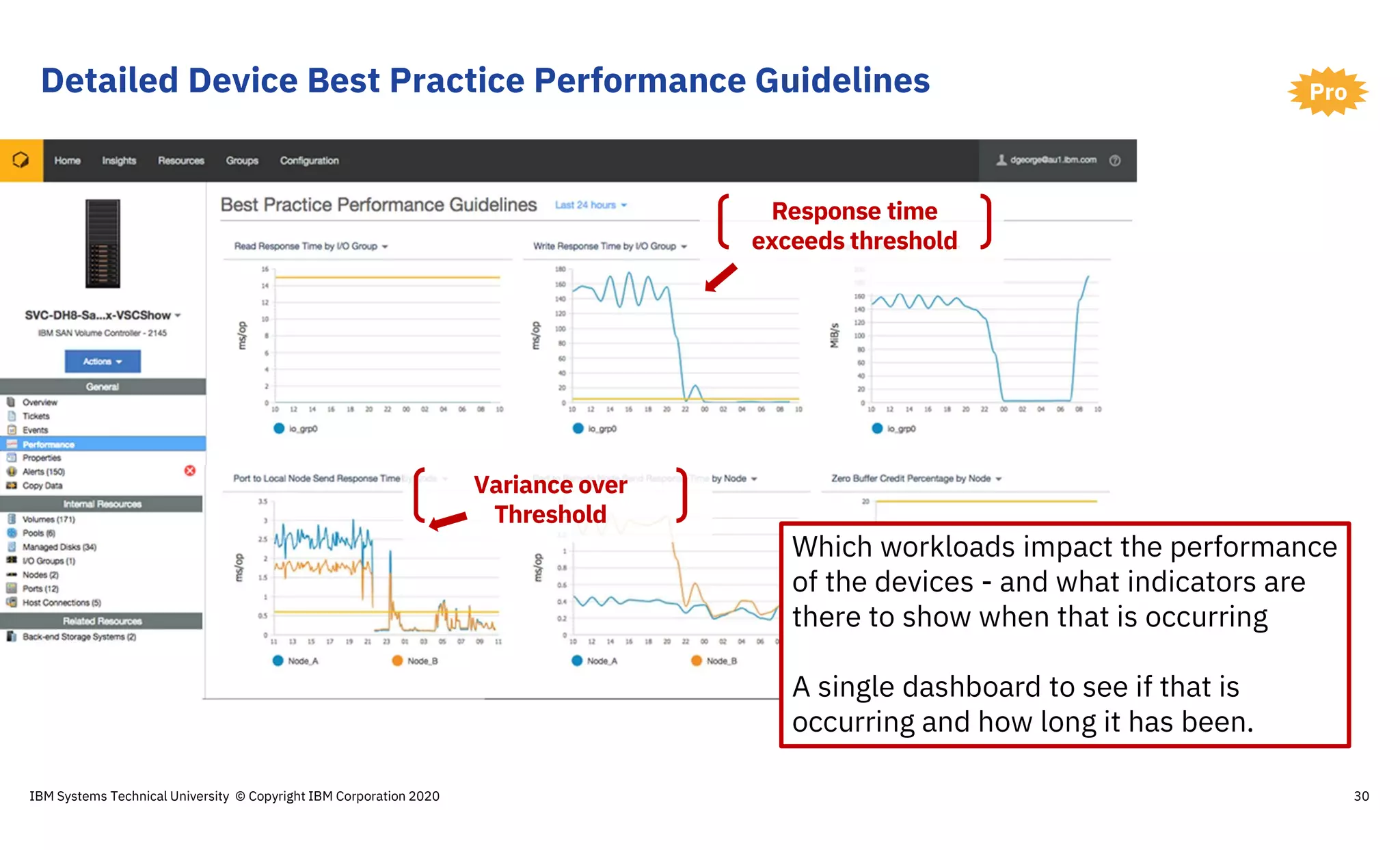
Detailed Device Best Practice Performance Guidelines
30
Pro
Response time
exceeds threshold
Variance over
Threshold
Which workloads impact the performance
of the devices - and what indicators are
there to show when that is occurring
A single dashboard to see if that is
occurring and how long it has been.
IBM Systems Technical University © Copyright IBM Corporation 2020
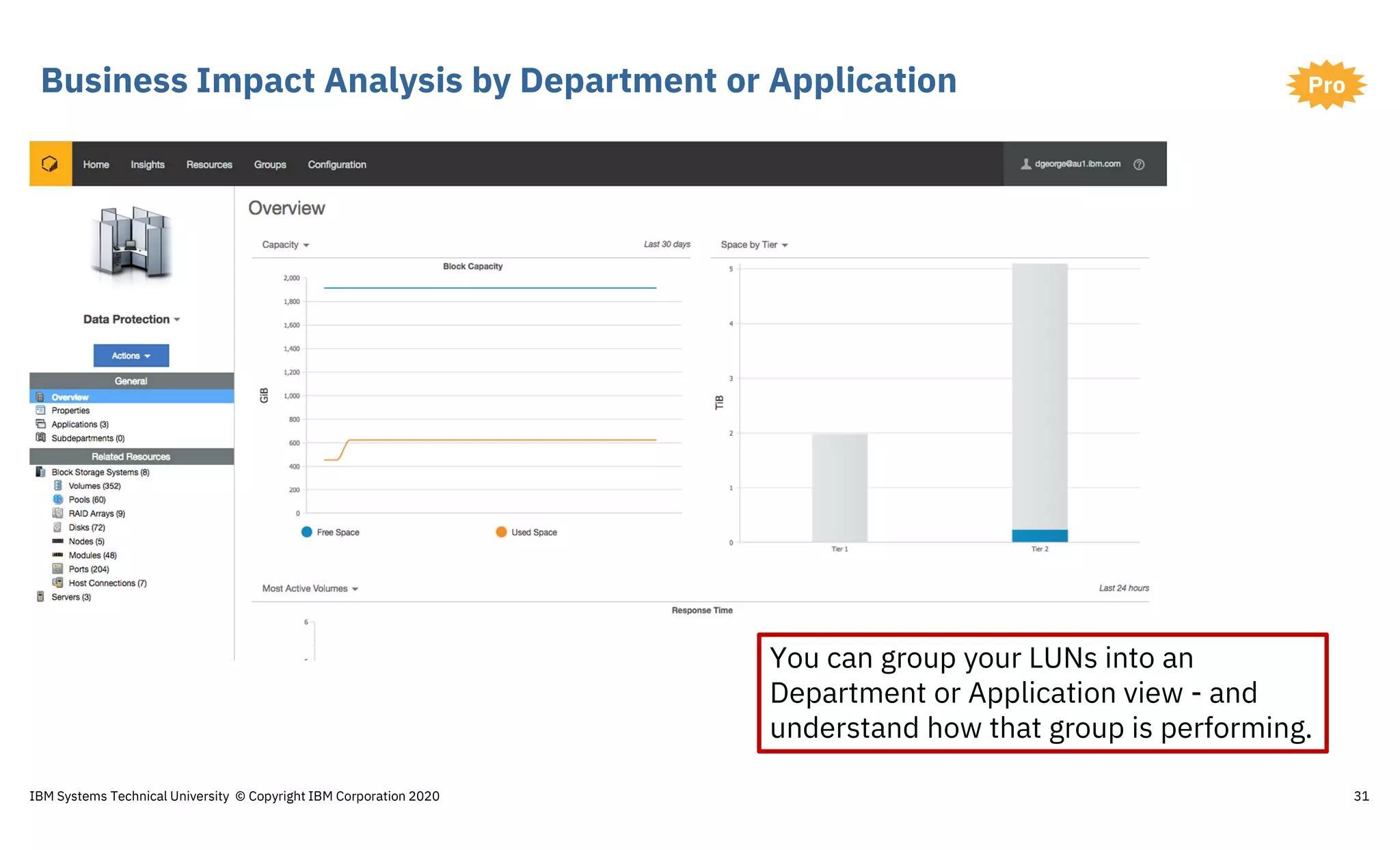
Business Impact Analysis by Department or Application
31
Pro
You can group your LUNs into an
Department or Application view - and
understand how that group is performing.
IBM Systems Technical University © Copyright IBM Corporation 2020
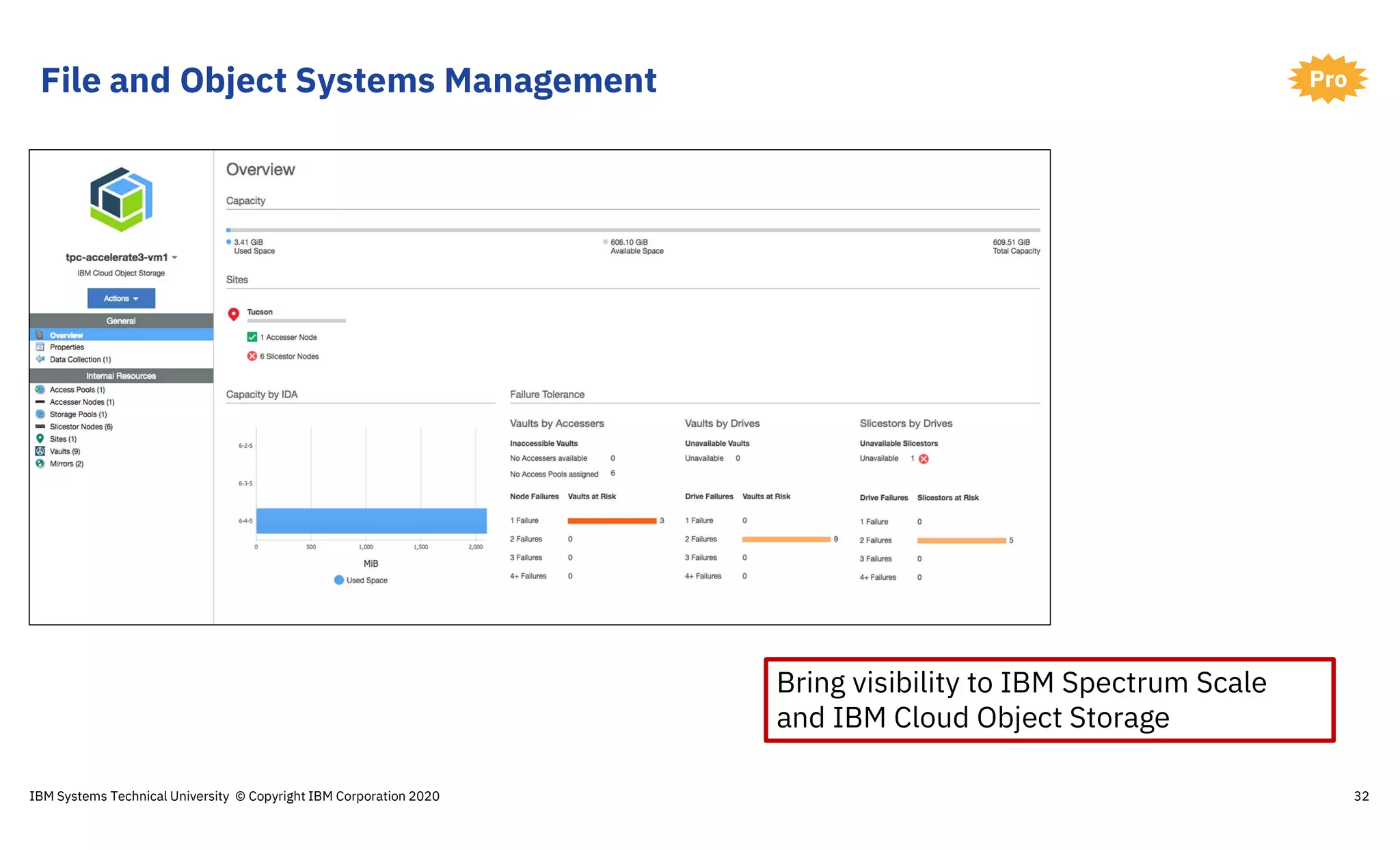
File and Object Systems Management
32
Pro
Bring visibility to IBM Spectrum Scale
and IBM Cloud Object Storage
IBM Systems Technical University © Copyright IBM Corporation 2020
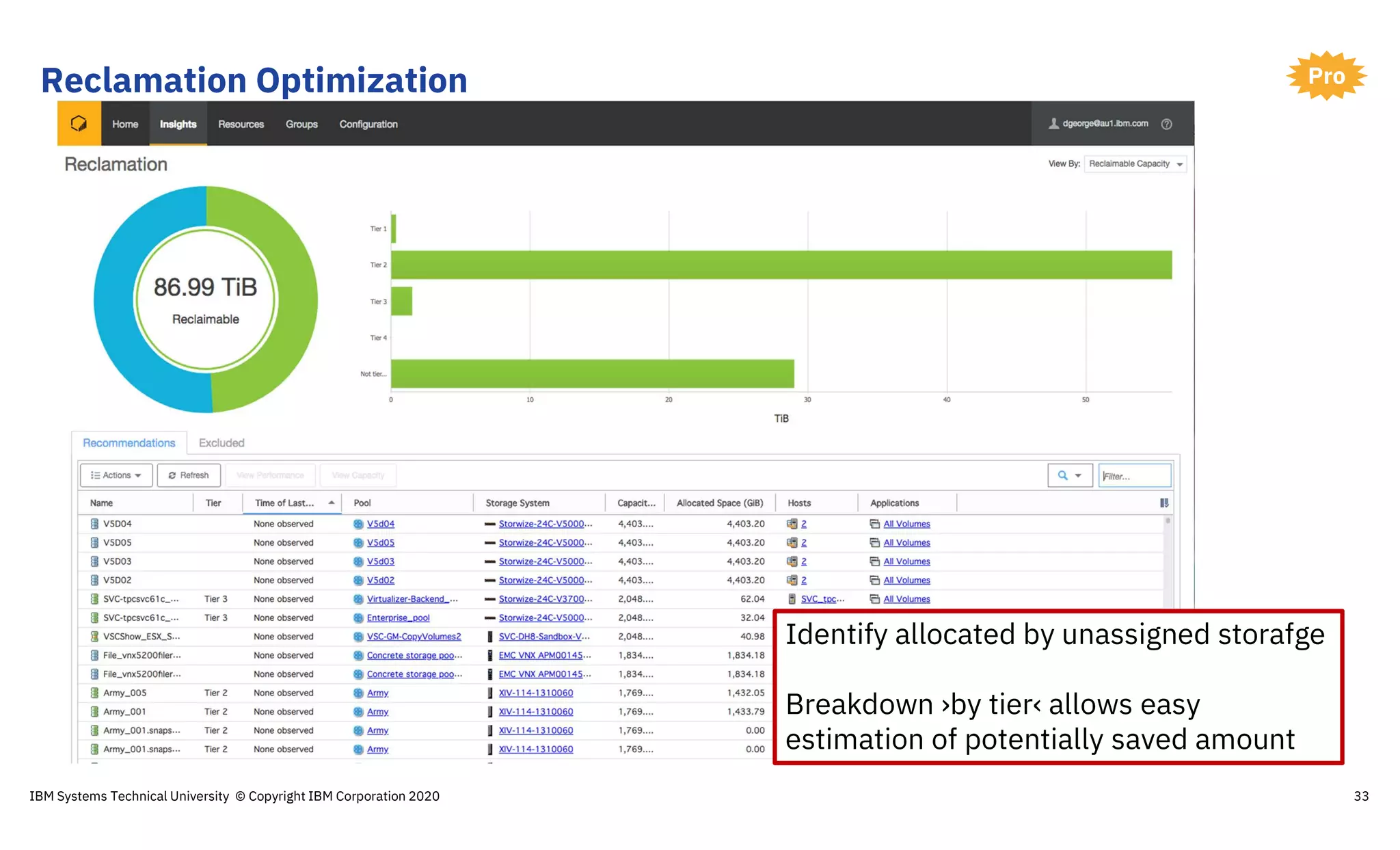
Reclamation Optimization
33
Pro
Identify allocated by unassigned storafge
Breakdown ›by tier‹ allows easy
estimation of potentially saved amount
IBM Systems Technical University © Copyright IBM Corporation 2020
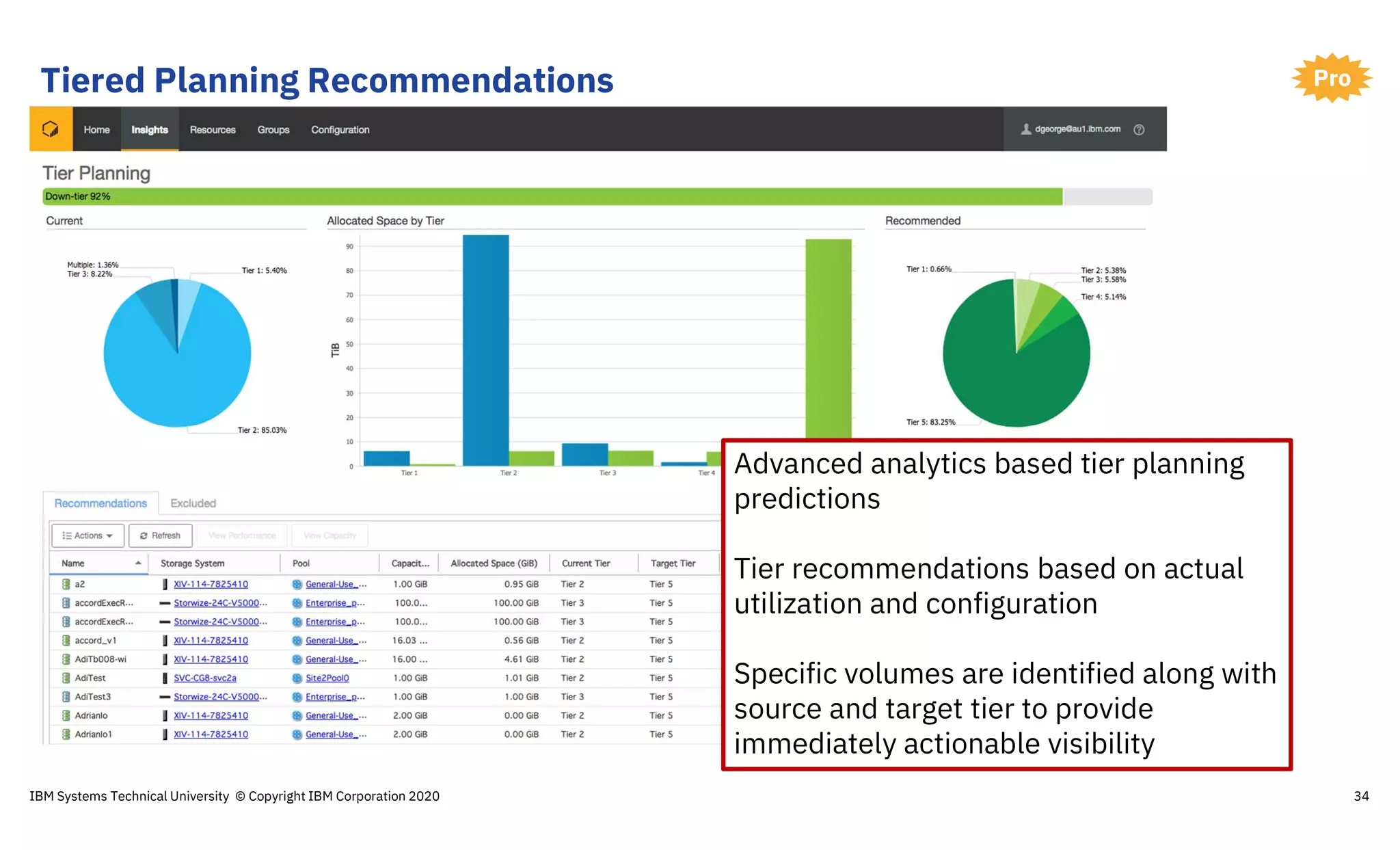
Tiered Planning Recommendations
34
Pro
Advanced analytics based tier planning
predictions
Tier recommendations based on actual
utilization and configuration
Specific volumes are identified along with
source and target tier to provide
immediately actionable visibility
IBM Systems Technical University © Copyright IBM Corporation 2020
Thank you!
Tony Pearson
IBM Master Inventor and Senior IT Architect
tpearson@us.ibm.com
+1-520-799-4309
Please complete the Session
Evaluation!
IBM Systems Technical University © Copyright IBM Corporation 2020 35
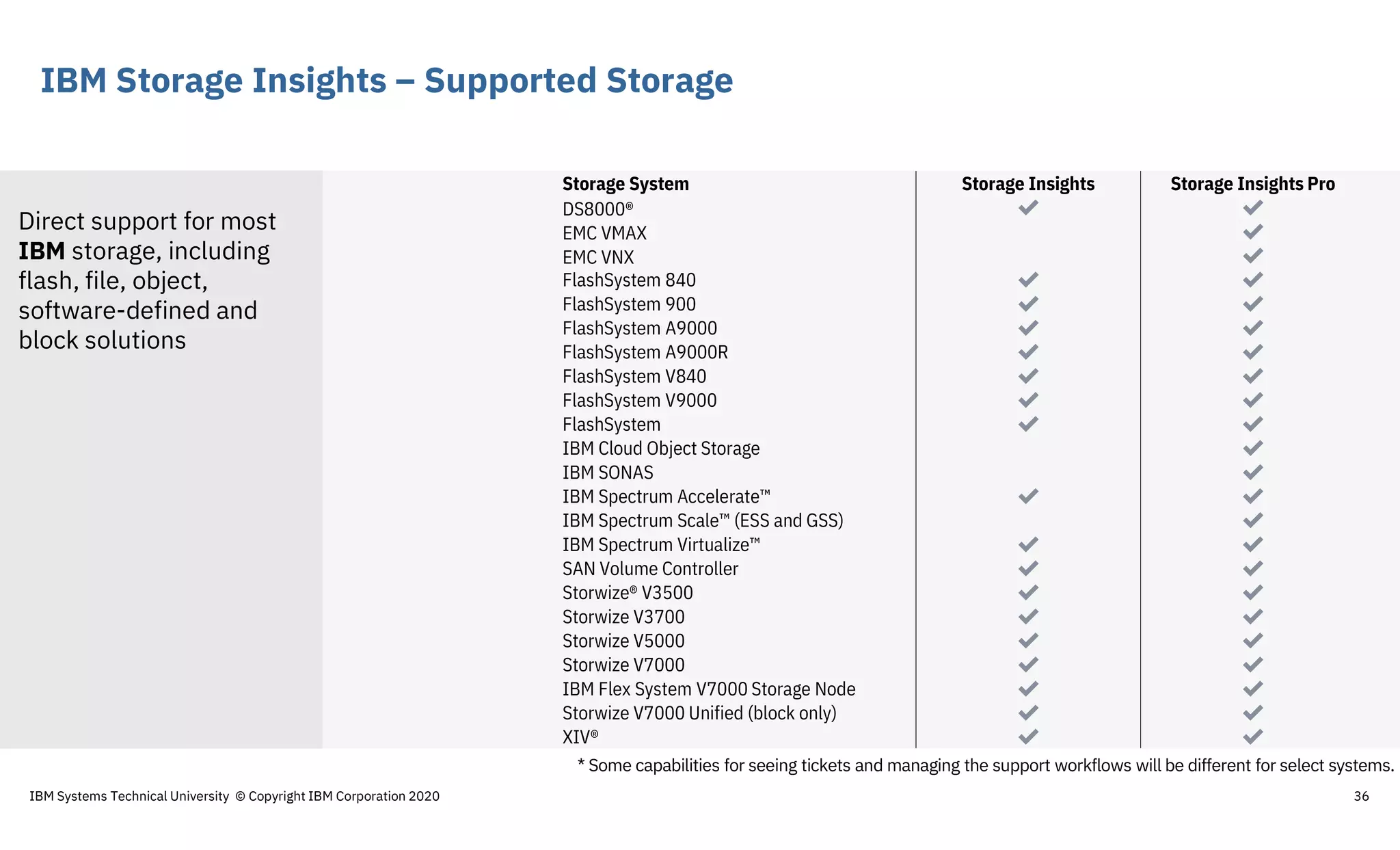
IBM Storage Insights – Supported Storage
36
Storage System Storage Insights Storage Insights Pro
DS8000® ✔ ✔
EMC VMAX ✔
EMC VNX ✔
FlashSystem 840 ✔ ✔
FlashSystem 900 ✔ ✔
FlashSystem A9000 ✔ ✔
FlashSystem A9000R ✔ ✔
FlashSystem V840 ✔ ✔
FlashSystem V9000 ✔ ✔
FlashSystem ✔ ✔
IBM Cloud Object Storage ✔
IBM SONAS ✔
IBM Spectrum Accelerate™ ✔ ✔
IBM Spectrum Scale™ (ESS and GSS) ✔
IBM Spectrum Virtualize™ ✔ ✔
SAN Volume Controller ✔ ✔
Storwize® V3500 ✔ ✔
Storwize V3700 ✔ ✔
Storwize V5000 ✔ ✔
Storwize V7000 ✔ ✔
IBM Flex System V7000 Storage Node ✔ ✔
Storwize V7000 Unified (block only) ✔ ✔
XIV® ✔ ✔
* Some capabilities for seeing tickets and managing the support workflows will be different for select systems.
Direct support for most
IBM storage, including
flash, file, object,
software-defined and
block solutions
IBM Systems Technical University © Copyright IBM Corporation 2020
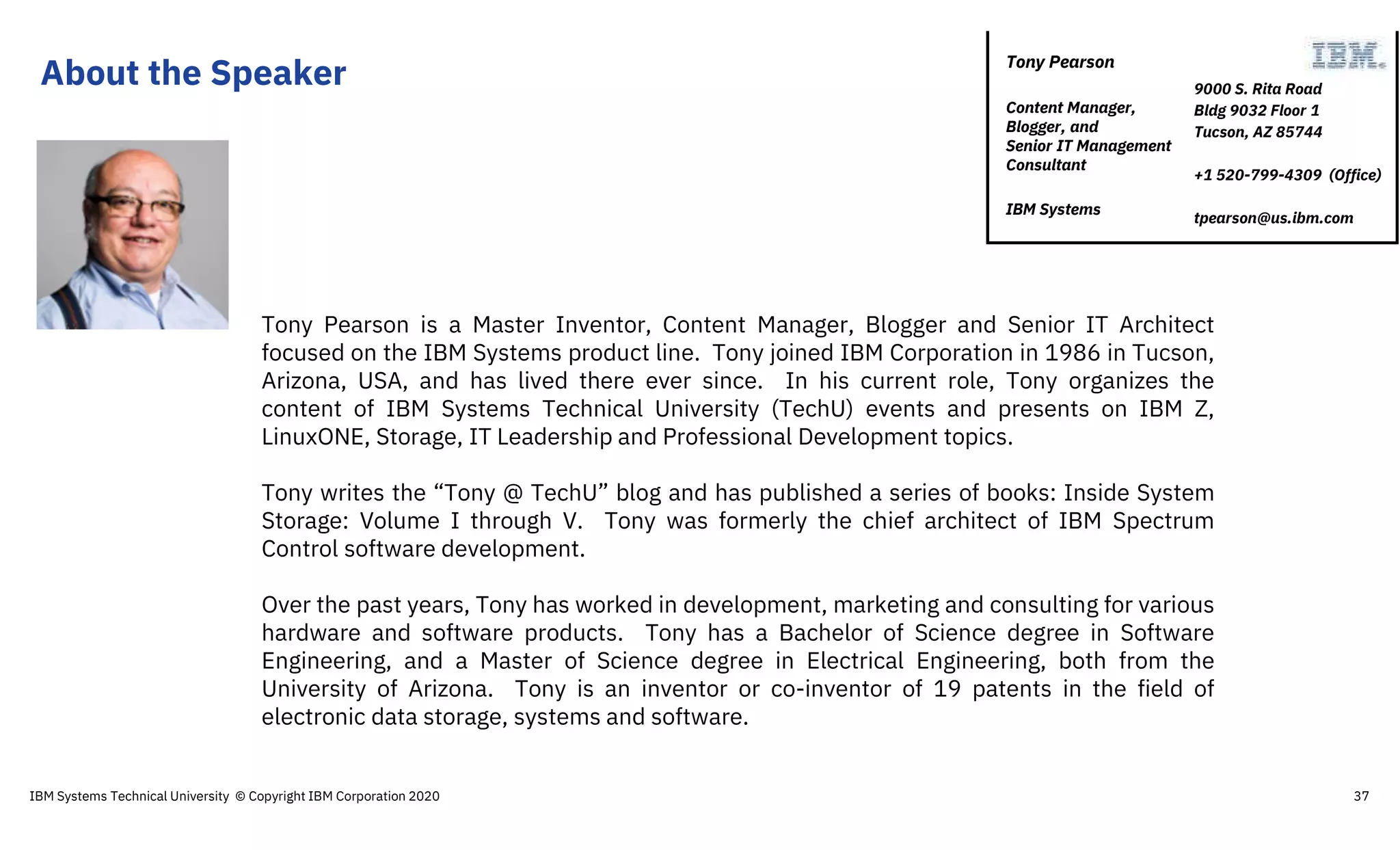
About the Speaker
Tony Pearson is a Master Inventor, Content Manager, Blogger and Senior IT Architect
focused on the IBM Systems product line. Tony joined IBM Corporation in 1986 in Tucson,
Arizona, USA, and has lived there ever since. In his current role, Tony organizes the
content of IBM Systems Technical University (TechU) events and presents on IBM Z,
LinuxONE, Storage, IT Leadership and Professional Development topics.
Tony writes the “Tony @ TechU” blog and has published a series of books: Inside System
Storage: Volume I through V. Tony was formerly the chief architect of IBM Spectrum
Control software development.
Over the past years, Tony has worked in development, marketing and consulting for various
hardware and software products. Tony has a Bachelor of Science degree in Software
Engineering, and a Master of Science degree in Electrical Engineering, both from the
University of Arizona. Tony is an inventor or co-inventor of 19 patents in the field of
electronic data storage, systems and software.
9000 S. Rita Road
Bldg 9032 Floor 1
Tucson, AZ 85744
+1 520-799-4309 (Office)
tpearson@us.ibm.com
Tony Pearson
Content Manager,
Blogger, and
Senior IT Management
Consultant
IBM Systems
IBM Systems Technical University © Copyright IBM Corporation 2020 37
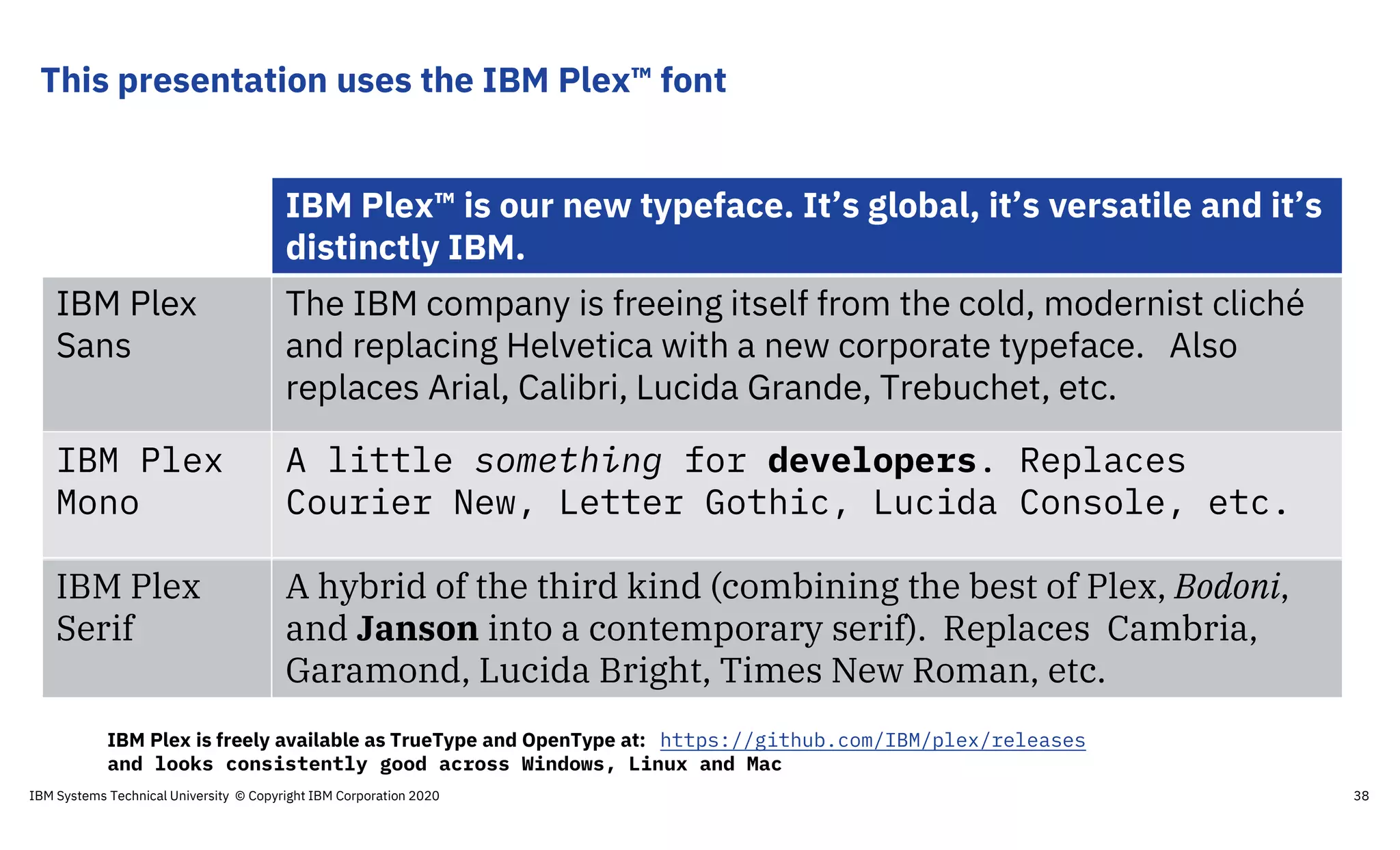
This presentation uses the IBM Plex™ font
IBM Plex™ is our new typeface. It’s global, it’s versatile and it’s
distinctly IBM.
IBM Plex
Sans
The IBM company is freeing itself from the cold, modernist cliché
and replacing Helvetica with a new corporate typeface. Also
replaces Arial, Calibri, Lucida Grande, Trebuchet, etc.
IBM Plex
Mono
A little something for developers. Replaces
Courier New, Letter Gothic, Lucida Console, etc.
IBM Plex
Serif
A hybrid of the third kind (combining the best of Plex, Bodoni,
and Janson into a contemporary serif). Replaces Cambria,
Garamond, Lucida Bright, Times New Roman, etc.
IBM Plex is freely available as TrueType and OpenType at: https://github.com/IBM/plex/releases
and looks consistently good across Windows, Linux and Mac
IBM Systems Technical University © Copyright IBM Corporation 2020 38

S200515 storage-insights-ist2020-v2001d

  • 1.
    IBM Storage Insights: Effectiveways to make Storage Admin life easier Tony Pearson IBM Master Inventor and Senior IT Architect 2020 IBM Systems Technical University 5-7 February | Istanbul, Turkey
  • 2.
    Agenda IBM Systems TechnicalUniversity © Copyright IBM Corporation 2020 2 What is IBM Storage Insights? Steps to deploy the collector Make Storage Admin life even easier with Storage Insights Pro!
  • 3.
    IBM Storage Insights 3 •Enterprise-proven, cognitive, cloud-based, storage insights platform • Entitled – Available for no additional charge for every IBM block storage system • Primary use cases – Holistic storage monitoring – Storage systems analytics – Planning tools to optimize storage infrastructure – Proactive storage diagnostics to reduce downtime and focused on time to resolution IBM Systems Technical University © Copyright IBM Corporation 2020
  • 4.
    IBM Storage InsightsArchitecture 4 Line of Business Infrastructure Team • Resource Grouping • Customized Alerting IBM Support • Configuration best practices • Environment analytics • Predictive analytics • Remote diagnostics • Faster time-to-resolution IBM Cloud https • One way communication • Data at rest is AES 256-bit encrypted • Metadata “data lake” has no client identity information • ISO/IEC 27001 ISM certified • Single point of metadata collection FlashSystem A9000R FlashSystem V840, V9000 SAN Volume Controller Storwize V5030F Storwize V5000 Storwize V7000F Storwize V7000 XIV Gen3 FlashSystem 840, 900FlashSystem A9000 Multiple IBM systems supported DS8000 VersaStack IBM Systems Technical University © Copyright IBM Corporation 2020
  • 5.
     ISO/IEC 27001ISM certified  HIPAA / Blue Diamond ready  GDPR compliant  Communication is one way, encrypted and compressed  Data at rest is AES 256-bit encrypted  Only metadata about your storage is collected Personal, identity, and application data are never accessed Storage Insights is secure IBM Systems Technical University © Copyright IBM Corporation 2020 5
  • 6.
    IBM Storage Insights Providesintegration to IBM Support!  Easy IBM Support Ticket Creation  IBM Support History  Easy Log Package submission and receipt  IBM support shares the same view of your infrastructure IBM Spectrum Control On premise, multi-vendor storage monitoring and automation tool. Manage storage systems, software-defined storage, storage-area network (SAN) fabrics and devices. Storage can be seen from multiple perspectives, including departmental, application and server views. What if I already have IBM Spectrum Control? IBM Systems Technical University © Copyright IBM Corporation 2020 6
  • 7.
    Agenda IBM Systems TechnicalUniversity © Copyright IBM Corporation 2020 7 What is IBM Storage Insights? How to get started Make Storage Admin life even easier with Storage Insights Pro!
  • 8.
    Three steps toget started… 8 Head over to https://ibm.biz/insightsreg Follow the link to get and install the data collector If your controllers are not there… 1 2 3Sign up! Login to your Dashboard Register your Controllers IBM Systems Technical University © Copyright IBM Corporation 2020
  • 9.
    Deployed instantly fromthe Cloud 9 Data Collector  Runs on a lightweight VM, 1 GB RAM and 500 MB of available disk space  Supports IBM legacy devices • Data collector connects your on-premises storage environment with the cloud-based service • Designed for security and efficiency • All communication between the data collector and the service is encrypted and compressed. • All communication is initiated from the collector only, no LAN-external access to the collector or the storage devices. • Various security certifications (FISMA, ISO 2700x) • No administration/maintenance effort for the local data collector. IBM Systems Technical University © Copyright IBM Corporation 2020
  • 10.
    Read the FactSheet 10 Light weight data collector Install on physical server or VM – AIX, Linux or Windows Read the Fact Sheet to learn: • What metadata is collected • What data isn’t collected • How data is sent securely • How data is stored securelyhttp://ibm.biz/storageinsightsfacts IBM Systems Technical University © Copyright IBM Corporation 2020
  • 11.
    Collector Setup 11 Setup takes5 minutes • Download • Copy • Extract • Run IBM Systems Technical University © Copyright IBM Corporation 2020
  • 12.
    Collector – Optimizedfor firefwall configuration 12 Custom URL end point that will only accept data from your data collector • Static url • Static port • Outbound traffic only Yes, we support a proxy IBM Systems Technical University © Copyright IBM Corporation 2020
  • 13.
    Completing Connection 13IBM SystemsTechnical University © Copyright IBM Corporation 2020
  • 14.
    Deploy multiple collectorsfor high availability 14 Deploy multiple data collectors for High availability Multiple data centers Storage Insights automatically coordinates which data collector to use for each device If a data collector fails, another automatically takes over IBM Systems Technical University © Copyright IBM Corporation 2020
  • 15.
    Enterprise Storage Dashboard– Tile View 15IBM Systems Technical University © Copyright IBM Corporation 2020 All your storage shown on a single dashboard. This dashboard is on the cloud, so even if you support your storage systems after hours, you can get to it and use it as your first point for any problem validation and diagnosis.
  • 16.
    Enterprise Storage Dashboard– Table View 16 If you do not like the new tile view, you can switch over to a traditional table view Like any table view, you can sort it by column, customize the columns you want to see and then drill into the item you are interested in IBM Systems Technical University © Copyright IBM Corporation 2020
  • 17.
    Enterprise Storage Dashboard– Reporting 17 Available Capacity Recent Performance IBM Systems Technical University © Copyright IBM Corporation 2020
  • 18.
    Enterprise Storage Dashboard– Problems at the Top 18 Systems with Problems are at the top Want the performance info, flip the tab IBM Systems Technical University © Copyright IBM Corporation 2020
  • 19.
    Device Dashboard –Drill Down 19 Recent Performance Capacity Information Get Support from IBM IBM Systems Technical University © Copyright IBM Corporation 2020
  • 20.
    Recent Events Device Events IBMSystems Technical University © Copyright IBM Corporation 2020 20
  • 21.
    Device Support IBM SystemsTechnical University © Copyright IBM Corporation 2020 21 Current Open Tickets with IBM Send Logs to IBM IBM PMR Number
  • 22.
    Enterprise Storage Dashboard– Being Proactive 22IBM Systems Technical University © Copyright IBM Corporation 2020
  • 23.
    Agenda IBM Systems TechnicalUniversity © Copyright IBM Corporation 2020 23 What is IBM Storage Insights? How to get started Make Storage Admin life even easier with Storage Insights Pro!
  • 24.
    Product Comparison 24 Capability IBM StorageInsights (Entitled) IBM Storage Insights Pro (Subscription) Monitoring Health, Performance and Capacity   Filter events to quickly isolate trouble spots   Drill down performance workflows to enable deep troubleshooting  Application / server storage performance troubleshooting  Customizable multi-conditional alerting  Support Services Simplified ticketing / log workflows and ticket history   Proactive notification of risks (select systems)   Device Analytics Part failure prediction   Configuration best practice   Customized upgrade recommendation   TCO Analytics Capacity planning  Performance planning  Application / server storage consumption  Capacity optimization with reclamation planning  Data optimization with tier planning  IBM Systems Technical University © Copyright IBM Corporation 2020
  • 25.
    Performance interval, retention Storage Insights Storage InsightsPro Spectrum Control Standard Spectrum Control Advanced Interval 5 min 5 min 1, 5, 15 min 1, 5, 15 min Retention Sample Hourly Daily 24h n/a n/a 2 weeks 4 weeks 52 weeks Up to 12 weeks Up to 24 weeks Up to 156 weeks Up to 12 weeks Up to 24 weeks Up to 156 weeks • Note: the 1 minute interval is only retained for 7 days but aggregated to 5 minute data and retained for the user defined duration => On premises implementations support larger databases to accommodate custom data retention 31016931USENIBM Systems Technical University © Copyright IBM Corporation 2020 25
  • 26.
    Detailed Device Configand Relationship 26 Pro IBM Systems Technical University © Copyright IBM Corporation 2020
  • 27.
    Detailed Device Configand Relationship 27 Pro When you drill into a single device you'll notice the additional detail that you see on that device More performance metrics can be reported More detail about the disks, controllers, pools, host groups, connections, ports and hosts connected to the controller IBM Systems Technical University © Copyright IBM Corporation 2020
  • 28.
    Detailed Device Configand Relationship 28 Pro IBM Systems Technical University © Copyright IBM Corporation 2020
  • 29.
    Detailed Device PerformanceAnalysis You can report and view many reports on many aspects of your controller. • CPU performance • Port performance • Pool performance Find a time interval that is concerning, with a single click all the performance charts will synchronize to the same time interval IBM Systems Technical University © Copyright IBM Corporation 2020 29
  • 30.
    Detailed Device BestPractice Performance Guidelines 30 Pro Response time exceeds threshold Variance over Threshold Which workloads impact the performance of the devices - and what indicators are there to show when that is occurring A single dashboard to see if that is occurring and how long it has been. IBM Systems Technical University © Copyright IBM Corporation 2020
  • 31.
    Business Impact Analysisby Department or Application 31 Pro You can group your LUNs into an Department or Application view - and understand how that group is performing. IBM Systems Technical University © Copyright IBM Corporation 2020
  • 32.
    File and ObjectSystems Management 32 Pro Bring visibility to IBM Spectrum Scale and IBM Cloud Object Storage IBM Systems Technical University © Copyright IBM Corporation 2020
  • 33.
    Reclamation Optimization 33 Pro Identify allocatedby unassigned storafge Breakdown ›by tier‹ allows easy estimation of potentially saved amount IBM Systems Technical University © Copyright IBM Corporation 2020
  • 34.
    Tiered Planning Recommendations 34 Pro Advancedanalytics based tier planning predictions Tier recommendations based on actual utilization and configuration Specific volumes are identified along with source and target tier to provide immediately actionable visibility IBM Systems Technical University © Copyright IBM Corporation 2020
  • 35.
    Thank you! Tony Pearson IBMMaster Inventor and Senior IT Architect tpearson@us.ibm.com +1-520-799-4309 Please complete the Session Evaluation! IBM Systems Technical University © Copyright IBM Corporation 2020 35
  • 36.
    IBM Storage Insights– Supported Storage 36 Storage System Storage Insights Storage Insights Pro DS8000® ✔ ✔ EMC VMAX ✔ EMC VNX ✔ FlashSystem 840 ✔ ✔ FlashSystem 900 ✔ ✔ FlashSystem A9000 ✔ ✔ FlashSystem A9000R ✔ ✔ FlashSystem V840 ✔ ✔ FlashSystem V9000 ✔ ✔ FlashSystem ✔ ✔ IBM Cloud Object Storage ✔ IBM SONAS ✔ IBM Spectrum Accelerate™ ✔ ✔ IBM Spectrum Scale™ (ESS and GSS) ✔ IBM Spectrum Virtualize™ ✔ ✔ SAN Volume Controller ✔ ✔ Storwize® V3500 ✔ ✔ Storwize V3700 ✔ ✔ Storwize V5000 ✔ ✔ Storwize V7000 ✔ ✔ IBM Flex System V7000 Storage Node ✔ ✔ Storwize V7000 Unified (block only) ✔ ✔ XIV® ✔ ✔ * Some capabilities for seeing tickets and managing the support workflows will be different for select systems. Direct support for most IBM storage, including flash, file, object, software-defined and block solutions IBM Systems Technical University © Copyright IBM Corporation 2020
  • 37.
    About the Speaker TonyPearson is a Master Inventor, Content Manager, Blogger and Senior IT Architect focused on the IBM Systems product line. Tony joined IBM Corporation in 1986 in Tucson, Arizona, USA, and has lived there ever since. In his current role, Tony organizes the content of IBM Systems Technical University (TechU) events and presents on IBM Z, LinuxONE, Storage, IT Leadership and Professional Development topics. Tony writes the “Tony @ TechU” blog and has published a series of books: Inside System Storage: Volume I through V. Tony was formerly the chief architect of IBM Spectrum Control software development. Over the past years, Tony has worked in development, marketing and consulting for various hardware and software products. Tony has a Bachelor of Science degree in Software Engineering, and a Master of Science degree in Electrical Engineering, both from the University of Arizona. Tony is an inventor or co-inventor of 19 patents in the field of electronic data storage, systems and software. 9000 S. Rita Road Bldg 9032 Floor 1 Tucson, AZ 85744 +1 520-799-4309 (Office) tpearson@us.ibm.com Tony Pearson Content Manager, Blogger, and Senior IT Management Consultant IBM Systems IBM Systems Technical University © Copyright IBM Corporation 2020 37
  • 38.
    This presentation usesthe IBM Plex™ font IBM Plex™ is our new typeface. It’s global, it’s versatile and it’s distinctly IBM. IBM Plex Sans The IBM company is freeing itself from the cold, modernist cliché and replacing Helvetica with a new corporate typeface. Also replaces Arial, Calibri, Lucida Grande, Trebuchet, etc. IBM Plex Mono A little something for developers. Replaces Courier New, Letter Gothic, Lucida Console, etc. IBM Plex Serif A hybrid of the third kind (combining the best of Plex, Bodoni, and Janson into a contemporary serif). Replaces Cambria, Garamond, Lucida Bright, Times New Roman, etc. IBM Plex is freely available as TrueType and OpenType at: https://github.com/IBM/plex/releases and looks consistently good across Windows, Linux and Mac IBM Systems Technical University © Copyright IBM Corporation 2020 38