Introduction to MariaDB
Tony Pearson
IBM Master Inventor and
Senior Technical Advisor
tpearson@us.ibm.com
IBM TechU
October 26-29, 2020 | Virtual Event
Agenda
What is Structured Query
Language (SQL)?
History of MariaDB
Getting started with MariaDB
Practical examples
2(c) Copyright IBM Corporation, 2020
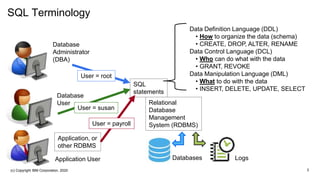
SQL Terminology
Database
Administrator
(DBA)
Database
User
Application User
SQL
statements
Application, or
other RDBMS
Relational
Database
Management
System (RDBMS)
Data Definition Language (DDL)
• How to organize the data (schema)
• CREATE, DROP, ALTER, RENAME
Data Control Language (DCL)
• Who can do what with the data
• GRANT, REVOKE
Data Manipulation Language (DML)
• What to do with the data
• INSERT, DELETE, UPDATE, SELECT
Databases Logs
User = root
User = susan
User = payroll
3(c) Copyright IBM Corporation, 2020
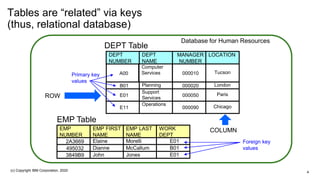
Tables are “related” via keys
(thus, relational database)
DEPT
NUMBER
DEPT
NAME
MANAGER
NUMBER
LOCATION
A00
Computer
Services 000010 Tucson
B01 Planning 000020 London
E01
Support
Services
000050 Paris
E11
Operations
000090 Chicago
EMP
NUMBER
EMP FIRST
NAME
EMP LAST
NAME
WORK
DEPT
2A3669 Elaine Morelli E01
495032 Dianne McCallum B01
3849B9 John Jones E01
DEPT Table
EMP Table
Primary key
values
Foreign key
values
Database for Human Resources
ROW
COLUMN
4(c) Copyright IBM Corporation, 2020
Agenda
What is Structured Query
Language (SQL)?
History of MariaDB
Getting Started with MariaDB
Practical Examples
5(c) Copyright IBM Corporation, 2020
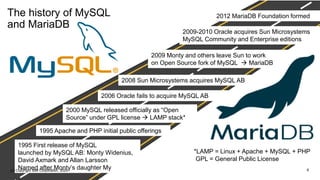
The history of MySQL
and MariaDB
1995 First release of MySQL
launched by MySQL AB: Monty Widenius,
David Axmark and Allan Larsson
Named after Monty’s daughter My
2008 Sun Microsystems acquires MySQL AB
2009 Monty and others leave Sun to work
on Open Source fork of MySQL → MariaDB
2000 MySQL released officially as “Open
Source” under GPL license → LAMP stack*
2009-2010 Oracle acquires Sun Microsystems
MySQL Community and Enterprise editions
2012 MariaDB Foundation formed
2006 Oracle fails to acquire MySQL AB
1995 Apache and PHP initial public offerings
*LAMP = Linux + Apache + MySQL + PHP
GPL = General Public License
6(c) Copyright IBM Corporation, 2020
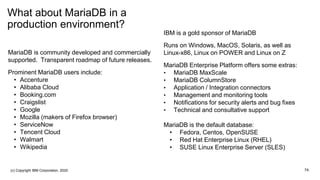
What about MariaDB in a
production environment?
MariaDB is community developed and commercially
supported. Transparent roadmap of future releases.
Prominent MariaDB users include:
• Accenture
• Alibaba Cloud
• Booking.com
• Craigslist
• Google
• Mozilla (makers of Firefox browser)
• ServiceNow
• Tencent Cloud
• Walmart
• Wikipedia
IBM is a gold sponsor of MariaDB
Runs on Windows, MacOS, Solaris, as well as
Linux-x86, Linux on POWER and Linux on Z
MariaDB Enterprise Platform offers some extras:
• MariaDB MaxScale
• MariaDB ColumnStore
• Application / Integration connectors
• Management and monitoring tools
• Notifications for security alerts and bug fixes
• Technical and consultative support
MariaDB is the default database:
• Fedora, Centos, OpenSUSE
• Red Hat Enterprise Linux (RHEL)
• SUSE Linux Enterprise Server (SLES)
7A(c) Copyright IBM Corporation, 2020
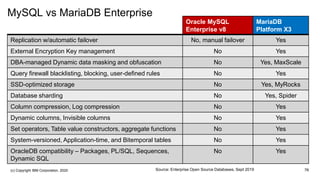
MySQL vs MariaDB Enterprise
Oracle MySQL
Enterprise v8
MariaDB
Platform X3
Replication w/automatic failover No, manual failover Yes
External Encryption Key management No Yes
DBA-managed Dynamic data masking and obfuscation No Yes, MaxScale
Query firewall blacklisting, blocking, user-defined rules No Yes
SSD-optimized storage No Yes, MyRocks
Database sharding No Yes, Spider
Column compression, Log compression No Yes
Dynamic columns, Invisible columns No Yes
Set operators, Table value constructors, aggregate functions No Yes
System-versioned, Application-time, and Bitemporal tables No Yes
OracleDB compatibility – Packages, PL/SQL, Sequences,
Dynamic SQL
No Yes
7BSource: Enterprise Open Source Databases, Sept 2019(c) Copyright IBM Corporation, 2020
Agenda
What is Structured Query
Language (SQL)?
History of MariaDB
Getting Started with MariaDB
Practical Examples
8(c) Copyright IBM Corporation, 2020
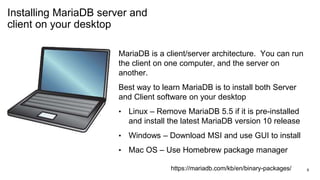
Installing MariaDB server and
client on your desktop
MariaDB is a client/server architecture. You can run
the client on one computer, and the server on
another.
Best way to learn MariaDB is to install both Server
and Client software on your desktop
• Linux – Remove MariaDB 5.5 if it is pre-installed
and install the latest MariaDB version 10 release
• Windows – Download MSI and use GUI to install
• Mac OS – Use Homebrew package manager
https://mariadb.com/kb/en/binary-packages/ 9
Launch the MariaDB server as
a background service
[tony ~]# systemctl start mariadb.service
[tony ~]# systemctl enable mariadb.service
[tony ~]$ systemctl status mariadb.service
● mariadb.service - MariaDB 10.2.33 database server
Drop-In: /etc/systemd/system/mariadb.service.d
└─migrated-from-my.cnf-settings.conf
Active: active (running) since
Wed 2020-09-30 03:45:30 MST
All of the examples will use Red Hat
Enterprise Linux (RHEL)
Systemctl is used to start and stop
background services
• start – run MariaDB server now
• enable – run MariaDB every
time you boot your system
• status – check if MariaDB is
running or stopped
10
Login as “root” user until we
create other users
[tony ~]$ mysql -u root -p -h localhost
Enter password:
Welcome to the MariaDB monitor. Commands
end with ; or g.
Copyright (c) 2000, 2018, Oracle, MariaDB
Corporation Ab and others.
Type 'help;' or 'h' for help. Type 'c' to clear
the current input statement.
MariaDB [(none)]> quit
Bye
[tony ~]$
The mysql client will
connect to the MariaDB background
service on port 3306
-u <user> -p (Log in as root, and
prompt for the password)
-h <ip address> (we will use localhost)
Once you are in, you will see new prompt
MariaDB [(database)]>
h show commands available
c cancel the current statement
W show warning messages
q get out, “quit” or “exit” also work
11
Explore the system databases
MariaDB [(none)]> show databases;
+--------------------+
| Database |
+--------------------+
| information_schema |
| mysql |
| performance_schema |
+--------------------+
3 rows in set (0.02 sec)
MariaDB [(none)]> use mysql;
Database changed
MariaDB [mysql]>
MariaDB Relational Database
Management System (RDBMS) uses
system databases
You can see these databases already
exist with show databases statement
The use command changes the prompt to
that database, and allows commands on
tables within that database
12
Explore the system databases
MariaDB [(mysql)]> show tables;
| Tables_in_mysql |
+---------------------------+
| . . . |
| user |
| . . . |
MariaDB [mysql]> select user, host from user;
+---------+-----------+
| user | host |
+---------+-----------+
| root | % |
| root | 127.0.0.1 |
| root | ::1 |
| root | localhost |
+---------+-----------+
The show tables command is a
quick way to list all of the tables in
a database
The mysql database has about 30
tables including one called user
The select statement can display
information in the user and host
columns of the user table
While I only have one root user,
you can see I have four entries in
the table
13(c) Copyright IBM Corporation, 2020
Agenda
What is Structured Query
Language (SQL)?
History of MariaDB
Getting Started with MariaDB
Practical Examples
14
Create a new database and
administrator user privileges
MariaDB [mysql]> create database hrdb
character set utf8;
Query OK, 1 row affected (0.04 sec)
MariaDB [mysql]> create user hradmin
identified by ‘SafeW0rd’;
Query OK, 0 rows affected (0.03 sec)
MariaDB [mysql]> grant all privileges
on hrdb.* to 'hradmin'@'localhost';
Query OK, 0 rows affected (0.00 sec)
MariaDB [mysql]> grant file on *.* to
'hradmin'@'localhost';
Query OK, 0 rows affected (0.01 sec)
Create a new database called hrdb for
Human Resources team
Create user hradmin as the database
administrator and sets the password
Grant privileges so that the administrator
can create tables in this database and
perform maintenance activities
• ‘hradmin’@’%’ allows remote access
Grant FILE allows hradmin to read and
write CSV files to/from database data
15
Create tables for the
departments and employees
[tony ~]$ mysql -u hradmin -pSafeW0rd
hrdb
MariaDB [hrdb]> create table dept (
-> deptnum char(3) primary key,
-> deptname varchar(50),
-> manager integer,
-> location varchar(50));
Query OK, 0 rows affected (0.08 sec)
MariaDB [hrdb]> create table emp (
-> empnum char(6) primary key,
-> empfirst varchar(50),
-> emplast varchar(50),
-> workdept char(3));
Switching to the newly created hrdb
database with new user hradmin
We will create two tables:
• Dept – a list of all of the departments
• Emp – a list of all of the employees
For long commands, if it does not see the
semicolon (;) it will prompt you to continue
with an arrow →
Make a mistake? Just enter c to cancel
16
Display table schema for the
departments and employees
MariaDB [hrdb]> describe dept; describe emp;
+----------+-------------+------+-----+---------+-------+
| Field | Type | Null | Key | Default | Extra |
+----------+-------------+------+-----+---------+-------+
| deptnum | char(3) | NO | PRI | NULL | |
| deptname | varchar(50) | YES | | NULL | |
| manager | int(11) | YES | | NULL | |
| location | varchar(50) | YES | | NULL | |
+----------+-------------+------+-----+---------+-------+
| empnum | char(6) | NO | PRI | NULL | |
| empfirst | varchar(50) | YES | | NULL | |
| emplast | varchar(50) | YES | | NULL | |
| workdept | char(3) | YES | | NULL | |
+----------+-------------+------+-----+---------+-------+
The describe command will
display the table definitions
The deptnum and empnum
columns are primary keys, so
they must contain a unique
value in every row
Columns that can have NULL
as value are considered
optional
You can specify a default for
any field if you like
17
Create tables for the
departments and employees
MariaDB [hrdb]> insert into dept values
-> ('A00', 'Computer Services', 000010, 'Tucson’),
-> ('B01', 'Planning', 000020, 'London’),
-> ('E01', 'Support Services', 000050, 'Paris’),
-> ('E11', 'Operations', 000090, 'Chicago');
Query OK, 4 rows affected (0.02 sec)
Records: 4 Duplicates: 0 Warnings: 0
MariaDB [hrdb]> insert into emp values
-> ('2A3669', 'Elaine', 'Morelli', 'E01’),
-> ('495032', 'Diane', 'McCallum', 'B01’),
-> ('3849B9', 'John', 'Jones', 'E01');
Query OK, 3 rows affected (0.00 sec)
Records: 3 Duplicates: 0 Warnings: 0
We can now enter data into
these tables using INSERT
Note that CHAR and
VARCHAR require
quotation marks, but
INTEGER columns do not
18
Scenarios that require
changes to the data in tables
MariaDB [hrdb]> update emp set
emplast='Franklin' where empnum='495032';
Query OK, 1 row affected (0.13 sec)
Rows matched: 1 Changed: 1 Warnings: 0
MariaDB [hrdb]> delete from emp where
workdept='E01';
Query OK, 2 rows affected (0.07 sec)
MariaDB [hrdb]> delete from dept where
deptnum='E01';
Query OK, 1 row affected (0.01 sec)
Here are two typical examples of database
operations that the Human Resources
department might encounter
1. Diane McCallum changes her last name
2. Dept E01 is terminated
The UDPATE command can change one or
more columns
The DELETE command can remove one or
more rows, including the entire table!
The WHERE determines which rows are to be
processed for this request
19(c) Copyright IBM Corporation, 2020
Display table schema for the
departments and employees
MariaDB [hrdb]> select * from dept;
+---------+-------------------+---------+----------+
| deptnum | deptname | manager | location |
+---------+-------------------+---------+----------+
| A00 | Computer Services | 10 | Tucson |
| B01 | Planning | 20 | London |
| E01 | Support Services | 50 | Paris |
| E11 | Operations | 90 | Chicago |
+---------+-------------------+---------+----------+
4 rows in set (0.00 sec)
MariaDB [hrdb]> select * from emp limit 1;
+--------+----------+---------+----------+
| empnum | empfirst | emplast | workdept |
+--------+----------+---------+----------+
| 2A3669 | Elaine | Morelli | E01 |
+--------+----------+---------+----------+
1 row in set (0.00 sec)
The SELECT command will
display the table values
The asterisk (*) indicates all
columns, we have only four
columns in each table so they
can fit on the screen
If you just want to see the first
few rows, just use LIMIT
keyword
20(c) Copyright IBM Corporation, 2020
Sorting by a different column
MariaDB [hrdb]> select * from dept order by
location;
+---------+-------------------+---------+----------+
| deptnum | deptname | manager | location |
+---------+-------------------+---------+----------+
| E11 | Operations | 90 | Chicago |
| B01 | Planning | 20 | London |
| A00 | Computer Services | 10 | Tucson |
+---------+-------------------+---------+----------+
MariaDB [hrdb]> select * from dept order by
deptname DESC;
+---------+-------------------+---------+----------+
| deptnum | deptname | manager | location |
+---------+-------------------+---------+----------+
| B01 | Planning | 20 | London |
| E11 | Operations | 90 | Chicago |
| A00 | Computer Services | 10 | Tucson |
+---------+-------------------+---------+----------+
By default, rows are displayed in
ascending primary key order
The ORDER BY command can
specify one or more columns to
use for sorting in different order
The ASC and DESC keywords
can determine which direction to
sort by
Combine with LIMIT 10 to
generate a “Top 10” list
21(c) Copyright IBM Corporation, 2020
Joining data from two tables,
the INNER join
MariaDB [hrdb]> select dept.deptnum,
emp.empnum from dept inner join emp on
dept.deptnum=emp.workdept;
MariaDB [hrdb]> select d.deptnum, e.empnum
from dept d inner join emp e on
d.deptnum=e.workdept;
MariaDB [hrdb]> select d.deptnum, e.empnum
from dept d, emp e where
d.deptnum=e.workdept;
+---------+--------+
| deptnum | empnum |
+---------+--------+
| B01 | 495032 |
+---------+--------+
1 row in set (0.00 sec)
The most common is an INNER join
The first statement is standard SQL
Abbreviations with “dept d” / “emp e”
MariaDB also supports this using
SELECT / WHERE clause
B01
495032
A01
E11
519832
22(c) Copyright IBM Corporation, 2020
Grouping into categories and
counting the number in each
COUNT(*) – number of rows in this
category
GROUP BY – use workdept as the
category
Note that you can change the heading
using
• count(*) AS headcount
HAVING – similar to WHERE but for
calculated values
MariaDB [hrdb]> select workdept, count(*) from
emp group by workdept;
+----------+----------+
| workdept | count(*) |
+----------+----------+
| A00 | 3 |
| B01 | 2 |
| C01 | 4 |
| D41 | 2 |
+----------+----------+
MariaDB [hrdb]> select workdept, count(*) as
headcount from emp group by workdept having
headcount>2;
+----------+-----------+
| workdept | headcount |
+----------+-----------+
| A00 | 3 |
| C01 | 4 |
+----------+-----------+
23(c) Copyright IBM Corporation, 2020
Tables versus Views
Key differences?
A copy of the table is independent,
any changes to the table are not
reflected back to the original table
** GOOD FOR TESTING **
Any changes to the view are applied
to the original table
** SINGLE POINT OF TRUTH**
The mysqldump utility can backup
individual tables, but not individual
views. Backup entire database will
re-define the view for you.
MariaDB [hrdb]> create table teamC01 select *
from emp where workdept='C01';
MariaDB [hrdb]> create view showC01 as select
* from emp where workdept='C01';
MariaDB [hrdb]> select * from teamC01;
MariaDB [hrdb]> select * from showC01;
+--------+----------+----------+----------+
| empnum | empfirst | emplast | workdept |
+--------+----------+----------+----------+
| 098765 | Karen | Eastern | C01 |
| 456789 | Ulrich | Trenton | C01 |
| 519823 | Frank | Smith | C01 |
| 987654 | Lisa | Franklin | C01 |
+--------+----------+----------+----------+
4 rows in set (0.01 sec)
24(c) Copyright IBM Corporation, 2020
Exporting database data to
CSV files
Comma-Separated Variables (CSV)
You can choose your delimiter:
• 0x2c – ASCII code for comma
• 0x09 – ASCII code for tab (→)
• 0x7c – ASCII code for pipe (|)
For character strings, surround them
with quotation marks
• 0x22 – code for double quote
• 0x27 – code for single quote
MariaDB [hrdb]> select * from dept INTO OUTFILE
‘/tmp/dept.csv' fields terminated by 0x2c
optionally enclosed by 0x22;
Query OK, 3 rows affected (0.04 sec)
MariaDB [hrdb]> quit
Bye
[tony ~]$ cat /tmp/dept.csv
"A00","Computer Services",10,"Tucson"
"B01","Planning",20,"London"
"E11","Operations",90,"Chicago"
25(c) Copyright IBM Corporation, 2020
Importing CSV files into
databases
You can add data to databases
by importing from CSV files
Specify the delimiter and
quotation marks to expect
Add “IGNORE 1 LINES” if the
incoming CSV file has a
header line
MariaDB [hrdb]> LOAD DATA INFILE ‘/tmp/dept2.csv'
into table dept fields terminated by 0x2c
optionally enclosed by 0x22;
Query OK, 3 rows affected (0.08 sec)
Records: 3 Deleted: 0 Skipped: 0 Warnings: 0
MariaDB [hrdb]> select * from dept;
+---------+-------------------+---------+-------------+
| deptnum | deptname | manager | location |
+---------+-------------------+---------+-------------+
| A00 | Computer Services | 10 | Tucson |
| B01 | Planning | 20 | London |
| C01 | Manufacturing | 30 | Los Angeles |
| D41 | Engineering | 40 | New York |
| E11 | Operations | 90 | Chicago |
| F21 | Marketing | 50 | Atlanta |
+---------+-------------------+---------+-------------+
26(c) Copyright IBM Corporation, 2020
Backing up and recovering
databases
[tony ~]$ mysqldump -u hradmin -pSafeW0rd hrdb > hrdb_dump.sql
[tony ~]$ mysqldump -u hradmin -pSafeW0rd hrdb dept > dept_table.sql
[tony ~]$ mysql -u hradmin -pSafeW0rd
MariaDB [(none)]> use hrdb;
Database changed
MariaDB [hrdb]> source hrdb_dump.sql
Query OK, 0 rows affected (0.00 sec)
Query OK, 6 rows affected (0.00 sec)
Query OK, 0 rows affected (0.00 sec)
Query OK, 14 rows affected (0.00 sec)
27
The mysqldump utility is able to backup an
entire database, or selected tables
The output is an SQL file, all the statements
you need to re-generate the tables
Can be used to export database to another
RDBMS like IBM Db2 or to a test database
The SOURCE command can read the SQL
statements to create tables and insert data
(c) Copyright IBM Corporation, 2020
Summary MariaDB is popular, robust, open source
RDBMS that supports standard SQL
statements
Used by major corporations, popular
web sites and social media
Runs on Mac, Windows, Linux-x86,
Linux on POWER, and Linux on Z
Default database for Red Hat Enterprise
Linux (RHEL) and SUSE Enterprise
Linux Server (SLES)
Supported by most programming
languages and application frameworks
28(c) Copyright IBM Corporation, 2020
Thank you!
Tony Pearson
IBM, Master Inventor and Senior Technical Advisor
tpearson@us.ibm.com
+1-520-965-3146
ibm.com
Special Thanks to Scott Forstie, Robert Catterall,
Mark Rader, and Kirby MacQuarrie
Please complete the
session evaluation!
(c) Copyright IBM Corporation, 2020 30
Notices and disclaimers
— © 2020 International Business Machines Corporation. No part of this
document may be reproduced or transmitted in any form without
written permission from IBM.
— U.S. Government Users Restricted Rights — use, duplication or
disclosure restricted by GSA ADP Schedule Contract with IBM.
— Information in these presentations (including information relating to
products that have not yet been announced by IBM) has been reviewed
for accuracy as of the date of initial publication and could include
unintentional technical or typographical errors. IBM shall have no
responsibility to update this information. This document is distributed
“as is” without any warranty, either express or implied. In no
event, shall IBM be liable for any damage arising from the use of
this information, including but not limited to, loss of data,
business interruption, loss of profit or loss of opportunity.
IBM products and services are warranted per the terms and conditions
of the agreements under which they are provided.
— IBM products are manufactured from new parts or new and used parts.
In some cases, a product may not be new and may have been
previously installed. Regardless, our warranty terms apply.”
— Any statements regarding IBM's future direction, intent or product
plans are subject to change or withdrawal without notice.
— Performance data contained herein was generally obtained in a
controlled, isolated environments. Customer examples are presented
as illustrations of how those
— customers have used IBM products and the results they may have
achieved. Actual performance, cost, savings or other results in other
operating environments may vary.
— References in this document to IBM products, programs, or
services does not imply that IBM intends to make such products,
programs or services available in all countries in which
IBM operates or does business.
— Workshops, sessions and associated materials may have been
prepared by independent session speakers, and do not necessarily
reflect the views of IBM. All materials and discussions are provided
for informational purposes only, and are neither intended to, nor shall
constitute legal or other guidance or advice to any individual
participant or their specific situation.
— It is the customer’s responsibility to insure its own compliance
with legal requirements and to obtain advice of competent legal
counsel as to the identification and interpretation of any relevant laws
and regulatory requirements that may affect the customer’s business
and any actions the customer may need to take to comply with such
laws. IBM does not provide legal advice or represent or warrant that
its services or products will ensure that the customer follows any law.
(c) Copyright IBM Corporation, 2020 31
Notices and disclaimers
— Information concerning non-IBM products was obtained from the
suppliers of those products, their published announcements or other
publicly available sources. IBM has not tested those products about this
publication and cannot confirm the accuracy of performance,
compatibility or any other claims related to non-IBM products. Questions
on the capabilities of non-IBM products should be addressed to the
suppliers of those products. IBM does not warrant the quality of any
third-party products, or the ability of any such third-party products to
interoperate with IBM’s products. IBM expressly disclaims all
warranties, expressed or implied, including but not limited to, the
implied warranties of merchantability and fitness for a purpose.
— The provision of the information contained herein is not intended to, and
does not, grant any right or license under any IBM patents, copyrights,
trademarks or other intellectual property right.
— IBM, the IBM logo, ibm.com and [names of other referenced IBM
products and services used in the presentation] are trademarks of
International Business Machines Corporation, registered in many
jurisdictions worldwide. Other product and service names might
be trademarks of IBM or other companies. A current list of IBM
trademarks is available on the Web at "Copyright and trademark
information" at: www.ibm.com/legal/copytrade.shtml
(c) Copyright IBM Corporation, 2020 32
L203326 intro-maria db-techu2020-v9

L203326 intro-maria db-techu2020-v9

  • 1.
    Introduction to MariaDB TonyPearson IBM Master Inventor and Senior Technical Advisor tpearson@us.ibm.com IBM TechU October 26-29, 2020 | Virtual Event
  • 2.
    Agenda What is StructuredQuery Language (SQL)? History of MariaDB Getting started with MariaDB Practical examples 2(c) Copyright IBM Corporation, 2020
  • 3.
    SQL Terminology Database Administrator (DBA) Database User Application User SQL statements Application,or other RDBMS Relational Database Management System (RDBMS) Data Definition Language (DDL) • How to organize the data (schema) • CREATE, DROP, ALTER, RENAME Data Control Language (DCL) • Who can do what with the data • GRANT, REVOKE Data Manipulation Language (DML) • What to do with the data • INSERT, DELETE, UPDATE, SELECT Databases Logs User = root User = susan User = payroll 3(c) Copyright IBM Corporation, 2020
  • 4.
    Tables are “related”via keys (thus, relational database) DEPT NUMBER DEPT NAME MANAGER NUMBER LOCATION A00 Computer Services 000010 Tucson B01 Planning 000020 London E01 Support Services 000050 Paris E11 Operations 000090 Chicago EMP NUMBER EMP FIRST NAME EMP LAST NAME WORK DEPT 2A3669 Elaine Morelli E01 495032 Dianne McCallum B01 3849B9 John Jones E01 DEPT Table EMP Table Primary key values Foreign key values Database for Human Resources ROW COLUMN 4(c) Copyright IBM Corporation, 2020
  • 5.
    Agenda What is StructuredQuery Language (SQL)? History of MariaDB Getting Started with MariaDB Practical Examples 5(c) Copyright IBM Corporation, 2020
  • 6.
    The history ofMySQL and MariaDB 1995 First release of MySQL launched by MySQL AB: Monty Widenius, David Axmark and Allan Larsson Named after Monty’s daughter My 2008 Sun Microsystems acquires MySQL AB 2009 Monty and others leave Sun to work on Open Source fork of MySQL → MariaDB 2000 MySQL released officially as “Open Source” under GPL license → LAMP stack* 2009-2010 Oracle acquires Sun Microsystems MySQL Community and Enterprise editions 2012 MariaDB Foundation formed 2006 Oracle fails to acquire MySQL AB 1995 Apache and PHP initial public offerings *LAMP = Linux + Apache + MySQL + PHP GPL = General Public License 6(c) Copyright IBM Corporation, 2020
  • 7.
    What about MariaDBin a production environment? MariaDB is community developed and commercially supported. Transparent roadmap of future releases. Prominent MariaDB users include: • Accenture • Alibaba Cloud • Booking.com • Craigslist • Google • Mozilla (makers of Firefox browser) • ServiceNow • Tencent Cloud • Walmart • Wikipedia IBM is a gold sponsor of MariaDB Runs on Windows, MacOS, Solaris, as well as Linux-x86, Linux on POWER and Linux on Z MariaDB Enterprise Platform offers some extras: • MariaDB MaxScale • MariaDB ColumnStore • Application / Integration connectors • Management and monitoring tools • Notifications for security alerts and bug fixes • Technical and consultative support MariaDB is the default database: • Fedora, Centos, OpenSUSE • Red Hat Enterprise Linux (RHEL) • SUSE Linux Enterprise Server (SLES) 7A(c) Copyright IBM Corporation, 2020
  • 8.
    MySQL vs MariaDBEnterprise Oracle MySQL Enterprise v8 MariaDB Platform X3 Replication w/automatic failover No, manual failover Yes External Encryption Key management No Yes DBA-managed Dynamic data masking and obfuscation No Yes, MaxScale Query firewall blacklisting, blocking, user-defined rules No Yes SSD-optimized storage No Yes, MyRocks Database sharding No Yes, Spider Column compression, Log compression No Yes Dynamic columns, Invisible columns No Yes Set operators, Table value constructors, aggregate functions No Yes System-versioned, Application-time, and Bitemporal tables No Yes OracleDB compatibility – Packages, PL/SQL, Sequences, Dynamic SQL No Yes 7BSource: Enterprise Open Source Databases, Sept 2019(c) Copyright IBM Corporation, 2020
  • 9.
    Agenda What is StructuredQuery Language (SQL)? History of MariaDB Getting Started with MariaDB Practical Examples 8(c) Copyright IBM Corporation, 2020
  • 10.
    Installing MariaDB serverand client on your desktop MariaDB is a client/server architecture. You can run the client on one computer, and the server on another. Best way to learn MariaDB is to install both Server and Client software on your desktop • Linux – Remove MariaDB 5.5 if it is pre-installed and install the latest MariaDB version 10 release • Windows – Download MSI and use GUI to install • Mac OS – Use Homebrew package manager https://mariadb.com/kb/en/binary-packages/ 9
  • 11.
    Launch the MariaDBserver as a background service [tony ~]# systemctl start mariadb.service [tony ~]# systemctl enable mariadb.service [tony ~]$ systemctl status mariadb.service ● mariadb.service - MariaDB 10.2.33 database server Drop-In: /etc/systemd/system/mariadb.service.d └─migrated-from-my.cnf-settings.conf Active: active (running) since Wed 2020-09-30 03:45:30 MST All of the examples will use Red Hat Enterprise Linux (RHEL) Systemctl is used to start and stop background services • start – run MariaDB server now • enable – run MariaDB every time you boot your system • status – check if MariaDB is running or stopped 10
  • 12.
    Login as “root”user until we create other users [tony ~]$ mysql -u root -p -h localhost Enter password: Welcome to the MariaDB monitor. Commands end with ; or g. Copyright (c) 2000, 2018, Oracle, MariaDB Corporation Ab and others. Type 'help;' or 'h' for help. Type 'c' to clear the current input statement. MariaDB [(none)]> quit Bye [tony ~]$ The mysql client will connect to the MariaDB background service on port 3306 -u <user> -p (Log in as root, and prompt for the password) -h <ip address> (we will use localhost) Once you are in, you will see new prompt MariaDB [(database)]> h show commands available c cancel the current statement W show warning messages q get out, “quit” or “exit” also work 11
  • 13.
    Explore the systemdatabases MariaDB [(none)]> show databases; +--------------------+ | Database | +--------------------+ | information_schema | | mysql | | performance_schema | +--------------------+ 3 rows in set (0.02 sec) MariaDB [(none)]> use mysql; Database changed MariaDB [mysql]> MariaDB Relational Database Management System (RDBMS) uses system databases You can see these databases already exist with show databases statement The use command changes the prompt to that database, and allows commands on tables within that database 12
  • 14.
    Explore the systemdatabases MariaDB [(mysql)]> show tables; | Tables_in_mysql | +---------------------------+ | . . . | | user | | . . . | MariaDB [mysql]> select user, host from user; +---------+-----------+ | user | host | +---------+-----------+ | root | % | | root | 127.0.0.1 | | root | ::1 | | root | localhost | +---------+-----------+ The show tables command is a quick way to list all of the tables in a database The mysql database has about 30 tables including one called user The select statement can display information in the user and host columns of the user table While I only have one root user, you can see I have four entries in the table 13(c) Copyright IBM Corporation, 2020
  • 15.
    Agenda What is StructuredQuery Language (SQL)? History of MariaDB Getting Started with MariaDB Practical Examples 14
  • 16.
    Create a newdatabase and administrator user privileges MariaDB [mysql]> create database hrdb character set utf8; Query OK, 1 row affected (0.04 sec) MariaDB [mysql]> create user hradmin identified by ‘SafeW0rd’; Query OK, 0 rows affected (0.03 sec) MariaDB [mysql]> grant all privileges on hrdb.* to 'hradmin'@'localhost'; Query OK, 0 rows affected (0.00 sec) MariaDB [mysql]> grant file on *.* to 'hradmin'@'localhost'; Query OK, 0 rows affected (0.01 sec) Create a new database called hrdb for Human Resources team Create user hradmin as the database administrator and sets the password Grant privileges so that the administrator can create tables in this database and perform maintenance activities • ‘hradmin’@’%’ allows remote access Grant FILE allows hradmin to read and write CSV files to/from database data 15
  • 17.
    Create tables forthe departments and employees [tony ~]$ mysql -u hradmin -pSafeW0rd hrdb MariaDB [hrdb]> create table dept ( -> deptnum char(3) primary key, -> deptname varchar(50), -> manager integer, -> location varchar(50)); Query OK, 0 rows affected (0.08 sec) MariaDB [hrdb]> create table emp ( -> empnum char(6) primary key, -> empfirst varchar(50), -> emplast varchar(50), -> workdept char(3)); Switching to the newly created hrdb database with new user hradmin We will create two tables: • Dept – a list of all of the departments • Emp – a list of all of the employees For long commands, if it does not see the semicolon (;) it will prompt you to continue with an arrow → Make a mistake? Just enter c to cancel 16
  • 18.
    Display table schemafor the departments and employees MariaDB [hrdb]> describe dept; describe emp; +----------+-------------+------+-----+---------+-------+ | Field | Type | Null | Key | Default | Extra | +----------+-------------+------+-----+---------+-------+ | deptnum | char(3) | NO | PRI | NULL | | | deptname | varchar(50) | YES | | NULL | | | manager | int(11) | YES | | NULL | | | location | varchar(50) | YES | | NULL | | +----------+-------------+------+-----+---------+-------+ | empnum | char(6) | NO | PRI | NULL | | | empfirst | varchar(50) | YES | | NULL | | | emplast | varchar(50) | YES | | NULL | | | workdept | char(3) | YES | | NULL | | +----------+-------------+------+-----+---------+-------+ The describe command will display the table definitions The deptnum and empnum columns are primary keys, so they must contain a unique value in every row Columns that can have NULL as value are considered optional You can specify a default for any field if you like 17
  • 19.
    Create tables forthe departments and employees MariaDB [hrdb]> insert into dept values -> ('A00', 'Computer Services', 000010, 'Tucson’), -> ('B01', 'Planning', 000020, 'London’), -> ('E01', 'Support Services', 000050, 'Paris’), -> ('E11', 'Operations', 000090, 'Chicago'); Query OK, 4 rows affected (0.02 sec) Records: 4 Duplicates: 0 Warnings: 0 MariaDB [hrdb]> insert into emp values -> ('2A3669', 'Elaine', 'Morelli', 'E01’), -> ('495032', 'Diane', 'McCallum', 'B01’), -> ('3849B9', 'John', 'Jones', 'E01'); Query OK, 3 rows affected (0.00 sec) Records: 3 Duplicates: 0 Warnings: 0 We can now enter data into these tables using INSERT Note that CHAR and VARCHAR require quotation marks, but INTEGER columns do not 18
  • 20.
    Scenarios that require changesto the data in tables MariaDB [hrdb]> update emp set emplast='Franklin' where empnum='495032'; Query OK, 1 row affected (0.13 sec) Rows matched: 1 Changed: 1 Warnings: 0 MariaDB [hrdb]> delete from emp where workdept='E01'; Query OK, 2 rows affected (0.07 sec) MariaDB [hrdb]> delete from dept where deptnum='E01'; Query OK, 1 row affected (0.01 sec) Here are two typical examples of database operations that the Human Resources department might encounter 1. Diane McCallum changes her last name 2. Dept E01 is terminated The UDPATE command can change one or more columns The DELETE command can remove one or more rows, including the entire table! The WHERE determines which rows are to be processed for this request 19(c) Copyright IBM Corporation, 2020
  • 21.
    Display table schemafor the departments and employees MariaDB [hrdb]> select * from dept; +---------+-------------------+---------+----------+ | deptnum | deptname | manager | location | +---------+-------------------+---------+----------+ | A00 | Computer Services | 10 | Tucson | | B01 | Planning | 20 | London | | E01 | Support Services | 50 | Paris | | E11 | Operations | 90 | Chicago | +---------+-------------------+---------+----------+ 4 rows in set (0.00 sec) MariaDB [hrdb]> select * from emp limit 1; +--------+----------+---------+----------+ | empnum | empfirst | emplast | workdept | +--------+----------+---------+----------+ | 2A3669 | Elaine | Morelli | E01 | +--------+----------+---------+----------+ 1 row in set (0.00 sec) The SELECT command will display the table values The asterisk (*) indicates all columns, we have only four columns in each table so they can fit on the screen If you just want to see the first few rows, just use LIMIT keyword 20(c) Copyright IBM Corporation, 2020
  • 22.
    Sorting by adifferent column MariaDB [hrdb]> select * from dept order by location; +---------+-------------------+---------+----------+ | deptnum | deptname | manager | location | +---------+-------------------+---------+----------+ | E11 | Operations | 90 | Chicago | | B01 | Planning | 20 | London | | A00 | Computer Services | 10 | Tucson | +---------+-------------------+---------+----------+ MariaDB [hrdb]> select * from dept order by deptname DESC; +---------+-------------------+---------+----------+ | deptnum | deptname | manager | location | +---------+-------------------+---------+----------+ | B01 | Planning | 20 | London | | E11 | Operations | 90 | Chicago | | A00 | Computer Services | 10 | Tucson | +---------+-------------------+---------+----------+ By default, rows are displayed in ascending primary key order The ORDER BY command can specify one or more columns to use for sorting in different order The ASC and DESC keywords can determine which direction to sort by Combine with LIMIT 10 to generate a “Top 10” list 21(c) Copyright IBM Corporation, 2020
  • 23.
    Joining data fromtwo tables, the INNER join MariaDB [hrdb]> select dept.deptnum, emp.empnum from dept inner join emp on dept.deptnum=emp.workdept; MariaDB [hrdb]> select d.deptnum, e.empnum from dept d inner join emp e on d.deptnum=e.workdept; MariaDB [hrdb]> select d.deptnum, e.empnum from dept d, emp e where d.deptnum=e.workdept; +---------+--------+ | deptnum | empnum | +---------+--------+ | B01 | 495032 | +---------+--------+ 1 row in set (0.00 sec) The most common is an INNER join The first statement is standard SQL Abbreviations with “dept d” / “emp e” MariaDB also supports this using SELECT / WHERE clause B01 495032 A01 E11 519832 22(c) Copyright IBM Corporation, 2020
  • 24.
    Grouping into categoriesand counting the number in each COUNT(*) – number of rows in this category GROUP BY – use workdept as the category Note that you can change the heading using • count(*) AS headcount HAVING – similar to WHERE but for calculated values MariaDB [hrdb]> select workdept, count(*) from emp group by workdept; +----------+----------+ | workdept | count(*) | +----------+----------+ | A00 | 3 | | B01 | 2 | | C01 | 4 | | D41 | 2 | +----------+----------+ MariaDB [hrdb]> select workdept, count(*) as headcount from emp group by workdept having headcount>2; +----------+-----------+ | workdept | headcount | +----------+-----------+ | A00 | 3 | | C01 | 4 | +----------+-----------+ 23(c) Copyright IBM Corporation, 2020
  • 25.
    Tables versus Views Keydifferences? A copy of the table is independent, any changes to the table are not reflected back to the original table ** GOOD FOR TESTING ** Any changes to the view are applied to the original table ** SINGLE POINT OF TRUTH** The mysqldump utility can backup individual tables, but not individual views. Backup entire database will re-define the view for you. MariaDB [hrdb]> create table teamC01 select * from emp where workdept='C01'; MariaDB [hrdb]> create view showC01 as select * from emp where workdept='C01'; MariaDB [hrdb]> select * from teamC01; MariaDB [hrdb]> select * from showC01; +--------+----------+----------+----------+ | empnum | empfirst | emplast | workdept | +--------+----------+----------+----------+ | 098765 | Karen | Eastern | C01 | | 456789 | Ulrich | Trenton | C01 | | 519823 | Frank | Smith | C01 | | 987654 | Lisa | Franklin | C01 | +--------+----------+----------+----------+ 4 rows in set (0.01 sec) 24(c) Copyright IBM Corporation, 2020
  • 26.
    Exporting database datato CSV files Comma-Separated Variables (CSV) You can choose your delimiter: • 0x2c – ASCII code for comma • 0x09 – ASCII code for tab (→) • 0x7c – ASCII code for pipe (|) For character strings, surround them with quotation marks • 0x22 – code for double quote • 0x27 – code for single quote MariaDB [hrdb]> select * from dept INTO OUTFILE ‘/tmp/dept.csv' fields terminated by 0x2c optionally enclosed by 0x22; Query OK, 3 rows affected (0.04 sec) MariaDB [hrdb]> quit Bye [tony ~]$ cat /tmp/dept.csv "A00","Computer Services",10,"Tucson" "B01","Planning",20,"London" "E11","Operations",90,"Chicago" 25(c) Copyright IBM Corporation, 2020
  • 27.
    Importing CSV filesinto databases You can add data to databases by importing from CSV files Specify the delimiter and quotation marks to expect Add “IGNORE 1 LINES” if the incoming CSV file has a header line MariaDB [hrdb]> LOAD DATA INFILE ‘/tmp/dept2.csv' into table dept fields terminated by 0x2c optionally enclosed by 0x22; Query OK, 3 rows affected (0.08 sec) Records: 3 Deleted: 0 Skipped: 0 Warnings: 0 MariaDB [hrdb]> select * from dept; +---------+-------------------+---------+-------------+ | deptnum | deptname | manager | location | +---------+-------------------+---------+-------------+ | A00 | Computer Services | 10 | Tucson | | B01 | Planning | 20 | London | | C01 | Manufacturing | 30 | Los Angeles | | D41 | Engineering | 40 | New York | | E11 | Operations | 90 | Chicago | | F21 | Marketing | 50 | Atlanta | +---------+-------------------+---------+-------------+ 26(c) Copyright IBM Corporation, 2020
  • 28.
    Backing up andrecovering databases [tony ~]$ mysqldump -u hradmin -pSafeW0rd hrdb > hrdb_dump.sql [tony ~]$ mysqldump -u hradmin -pSafeW0rd hrdb dept > dept_table.sql [tony ~]$ mysql -u hradmin -pSafeW0rd MariaDB [(none)]> use hrdb; Database changed MariaDB [hrdb]> source hrdb_dump.sql Query OK, 0 rows affected (0.00 sec) Query OK, 6 rows affected (0.00 sec) Query OK, 0 rows affected (0.00 sec) Query OK, 14 rows affected (0.00 sec) 27 The mysqldump utility is able to backup an entire database, or selected tables The output is an SQL file, all the statements you need to re-generate the tables Can be used to export database to another RDBMS like IBM Db2 or to a test database The SOURCE command can read the SQL statements to create tables and insert data (c) Copyright IBM Corporation, 2020
  • 29.
    Summary MariaDB ispopular, robust, open source RDBMS that supports standard SQL statements Used by major corporations, popular web sites and social media Runs on Mac, Windows, Linux-x86, Linux on POWER, and Linux on Z Default database for Red Hat Enterprise Linux (RHEL) and SUSE Enterprise Linux Server (SLES) Supported by most programming languages and application frameworks 28(c) Copyright IBM Corporation, 2020
  • 30.
    Thank you! Tony Pearson IBM,Master Inventor and Senior Technical Advisor tpearson@us.ibm.com +1-520-965-3146 ibm.com Special Thanks to Scott Forstie, Robert Catterall, Mark Rader, and Kirby MacQuarrie Please complete the session evaluation! (c) Copyright IBM Corporation, 2020 30
  • 31.
    Notices and disclaimers —© 2020 International Business Machines Corporation. No part of this document may be reproduced or transmitted in any form without written permission from IBM. — U.S. Government Users Restricted Rights — use, duplication or disclosure restricted by GSA ADP Schedule Contract with IBM. — Information in these presentations (including information relating to products that have not yet been announced by IBM) has been reviewed for accuracy as of the date of initial publication and could include unintentional technical or typographical errors. IBM shall have no responsibility to update this information. This document is distributed “as is” without any warranty, either express or implied. In no event, shall IBM be liable for any damage arising from the use of this information, including but not limited to, loss of data, business interruption, loss of profit or loss of opportunity. IBM products and services are warranted per the terms and conditions of the agreements under which they are provided. — IBM products are manufactured from new parts or new and used parts. In some cases, a product may not be new and may have been previously installed. Regardless, our warranty terms apply.” — Any statements regarding IBM's future direction, intent or product plans are subject to change or withdrawal without notice. — Performance data contained herein was generally obtained in a controlled, isolated environments. Customer examples are presented as illustrations of how those — customers have used IBM products and the results they may have achieved. Actual performance, cost, savings or other results in other operating environments may vary. — References in this document to IBM products, programs, or services does not imply that IBM intends to make such products, programs or services available in all countries in which IBM operates or does business. — Workshops, sessions and associated materials may have been prepared by independent session speakers, and do not necessarily reflect the views of IBM. All materials and discussions are provided for informational purposes only, and are neither intended to, nor shall constitute legal or other guidance or advice to any individual participant or their specific situation. — It is the customer’s responsibility to insure its own compliance with legal requirements and to obtain advice of competent legal counsel as to the identification and interpretation of any relevant laws and regulatory requirements that may affect the customer’s business and any actions the customer may need to take to comply with such laws. IBM does not provide legal advice or represent or warrant that its services or products will ensure that the customer follows any law. (c) Copyright IBM Corporation, 2020 31
  • 32.
    Notices and disclaimers —Information concerning non-IBM products was obtained from the suppliers of those products, their published announcements or other publicly available sources. IBM has not tested those products about this publication and cannot confirm the accuracy of performance, compatibility or any other claims related to non-IBM products. Questions on the capabilities of non-IBM products should be addressed to the suppliers of those products. IBM does not warrant the quality of any third-party products, or the ability of any such third-party products to interoperate with IBM’s products. IBM expressly disclaims all warranties, expressed or implied, including but not limited to, the implied warranties of merchantability and fitness for a purpose. — The provision of the information contained herein is not intended to, and does not, grant any right or license under any IBM patents, copyrights, trademarks or other intellectual property right. — IBM, the IBM logo, ibm.com and [names of other referenced IBM products and services used in the presentation] are trademarks of International Business Machines Corporation, registered in many jurisdictions worldwide. Other product and service names might be trademarks of IBM or other companies. A current list of IBM trademarks is available on the Web at "Copyright and trademark information" at: www.ibm.com/legal/copytrade.shtml (c) Copyright IBM Corporation, 2020 32