Unit 17: Preparing material for editing
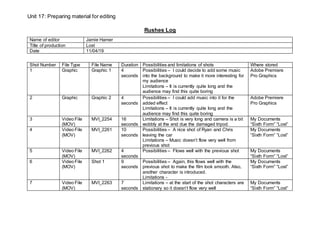
Rushes Log
Name of editor Jamie Hamer
Title of production Lost
Date 11/04/19
Shot Number File Type File Name Duration Possibilities and limitations of shots Where stored
1 Graphic Graphic 1 4
seconds
Possibilities – I could decide to add some music
into the background to make it more interesting for
my audience
Limitations – It is currently quite long and the
audience may find this quite boring
Adobe Premiere
Pro Graphics
2 Graphic Graphic 2 4
seconds
Possibilities – I could add music into it for the
added effect
Limitations – It is currently quite long and the
audience may find this quite boring
Adobe Premiere
Pro Graphics
3 Video File
(MOV)
MVI_2254 16
seconds
Limitations – Shot is very long and camera is a bit
wobbly at the end due the damaged tripod.
My Documents
“Sixth Form” “Lost”
4 Video File
(MOV)
MVI_2261 10
seconds
Possibilities – A nice shot of Ryan and Chris
leaving the car
Limitations – Music doesn’t flow very well from
previous shot
My Documents
“Sixth Form” “Lost”
5 Video File
(MOV)
MVI_2262 4
seconds
Possibilities – Flows well with the previous shot My Documents
“Sixth Form” “Lost”
6 Video File
(MOV)
Shot 1 9
seconds
Possibilities – Again, this flows well with the
previous shot to make the film look smooth. Also,
another character is introduced.
Limitations -
My Documents
“Sixth Form” “Lost”
7 Video File
(MOV)
MVI_2263 7
seconds
Limitations – at the start of the shot characters are
stationary so it doesn’t flow very well
My Documents
“Sixth Form” “Lost”
Unit 17: Preparing material for editing
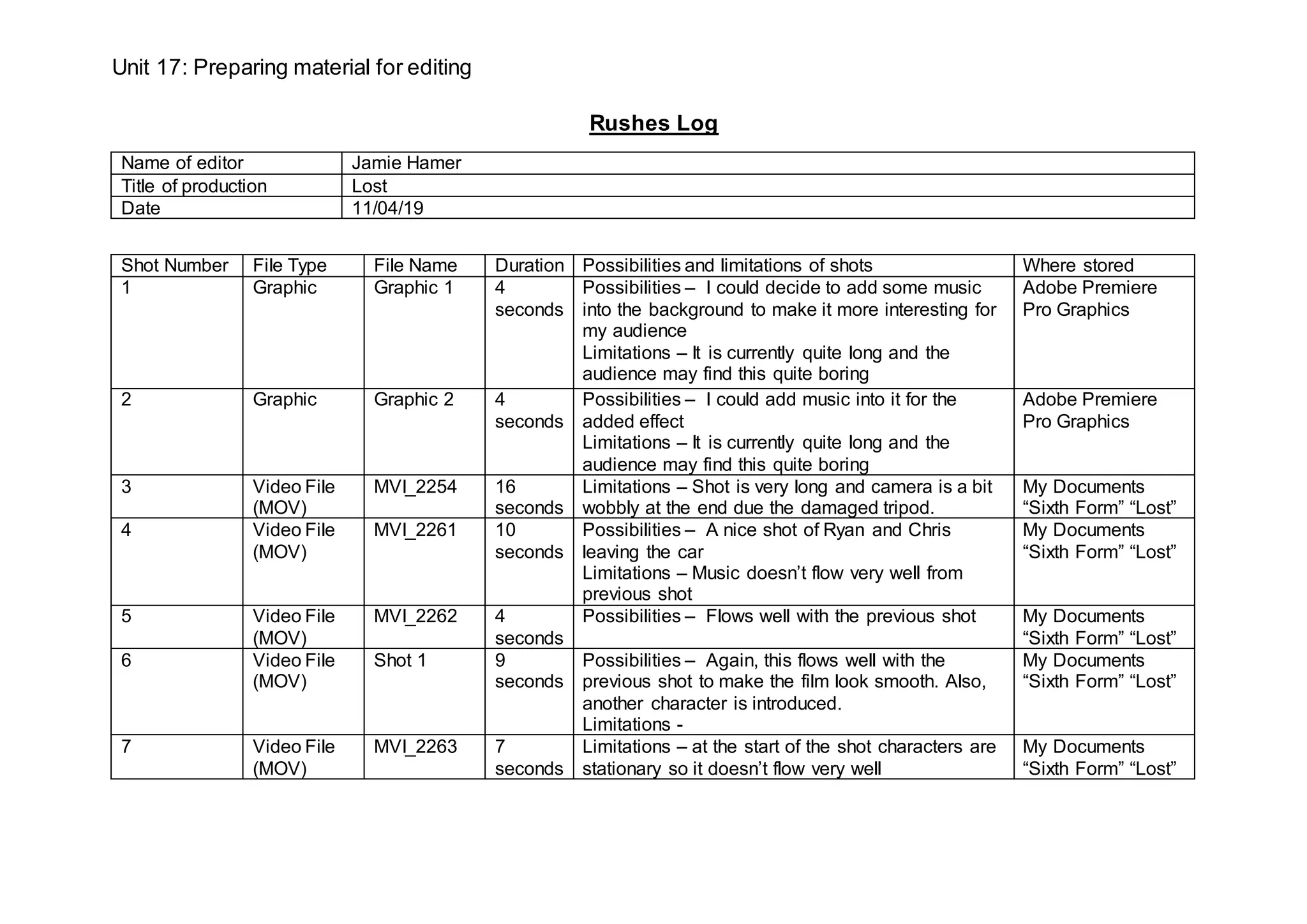
8 Video File
(MOV)
MVI_2266 10
seconds
Possibilities – some music could be added to make
the scene more interesting
My Documents
“Sixth Form” “Lost”
9 Video File
(MOV)
Shot 3 11
seconds
Possibilities – nice shot to show the conversation
and all 3 characters’ camera proportion distributed
evenly
My Documents
“Sixth Form” “Lost”
10 Video File
(MOV)
Shot 4 6
seconds
Possibilities – A nice angle to show the
conversation between the 3 characters
Limitations – end of shot needs editing as
character loses focus
My Documents
“Sixth Form” “Lost”
11 Video File
(MOV)
Shot 5 6
seconds
Possibilities – Another shot the opposite side this
time to show conversation, also shows cards very
well.
Limitations – end of shot the character starts
smiling so needs editing
My Documents
“Sixth Form” “Lost”
12 Video File
(MOV)
Shot 6 9
seconds
Possibilities – Good clear close up to show
characters’ facial expressions well
My Documents
“Sixth Form” “Lost”
13 Video File
(MOV)
Shot 7 7
seconds
Limitations – Ryan’s acting skills let him down in
this shot as he tries to be serious but starts smiling
too early, so needs editing well.
My Documents
“Sixth Form” “Lost”
14 Video File
(MOV)
Shot 8 6
seconds
Limitations – On reflection the angle of the shot
was a poor choice and it should have been lower
down as it is too high up
My Documents
“Sixth Form” “Lost”
15 Video File
(MOV)
Shot 9 11
seconds
Possibilities – great low angle shot from the table
showing the 3 characters which adds variety to the
conversation
My Documents
“Sixth Form” “Lost”
16 Video File
(MOV)
Shot 10 5
seconds
Possibilities – can use a transition at the end of the
shot to show the conversation has finished and
time has passed to the next shot
My Documents
“Sixth Form” “Lost”
17 Video File
(MOV)
MVI_2270 6
seconds
Possibilities – some sort of conversation could
have been added as it is quite boring
Limitations – the scene of them walking out is quite
long
My Documents
“Sixth Form” “Lost”
Unit 17: Preparing material for editing
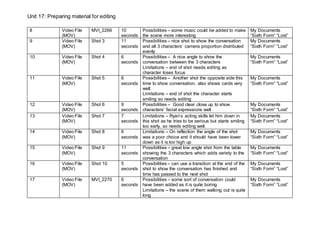
18 Video File
(MOV)
Shot 11 7
seconds
Possibilities – First main occasion we see the
tension building between Chris and James
Limitations – scene is very dark and lighting could
have been adjusted
My Documents
“Sixth Form” “Lost”
19 Video File
(MOV)
Drive in
2.30
5
seconds
Limitations – Start of the shot needs editing to
make sure that it doesn’t look staged, will need to
shorten the clip.
My Documents
“Sixth Form” “Lost”
20 Video File
(MOV)
Car convo 3
seconds
Limitations – Background noise of cars passing
makes audio harder to hear.
My Documents
“Sixth Form” “Lost”
21 Video File
(MOV)
Convo 2 4
seconds
Possibilities – medium shot of James and Ryan
allows the audience to see clearer facial
expressions
My Documents
“Sixth Form” “Lost”
22 Video File
(MOV)
Convo 3 5
seconds
Possibilities – first time we see Chris trying to
charge of the situation, much to James’s
disapproval
My Documents
“Sixth Form” “Lost”
23 Video File
(MOV)
Walk 4 5
seconds
Limitations – characters don’t talk at the correct
time when in view of camera so makes hard to
capture whole shot.
My Documents
“Sixth Form” “Lost”
24 Video File
(MOV)
Convo 6 4
seconds
Possibilities – shot makes all the conversation look
very natural
My Documents
“Sixth Form” “Lost”
25 Video File
(MOV)
Shot 5
convo
7
seconds
Possibilities – First time we see the location of the
campsite and learn that Chris is going off on his
own
My Documents
“Sixth Form” “Lost”
26 Video File
(MOV)
Chris
walking 1
6
seconds
Possibilities – No dialogue so it allows for
background music to take effect.
My Documents
“Sixth Form” “Lost”
27 Video File
(MOV)
Chris
walking 2
3
seconds
Possibilities – Great low angle shot which adds
variety
Limitations -
My Documents
“Sixth Form” “Lost”
28 Video File
(MOV)
Chris
walking 3
5
seconds
Possibilities – high angle shot makes it look like
he’s being watched
My Documents
“Sixth Form” “Lost”
29 Video File
(MOV)
Chris
walking 4
3
seconds
Possibilities – another shot which makes it look like
he’s being watched
My Documents
“Sixth Form” “Lost”
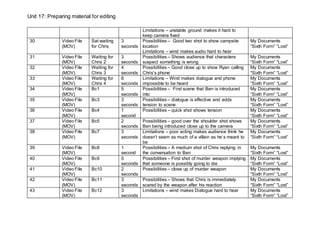
Unit 17: Preparing material for editing
Limitations – unstable ground makes it hard to
keep camera fixed
30 Video File
(MOV)
Sat waiting
for Chris
3
seconds
Possibilities – Good two shot to show campsite
location
Limitations – wind makes audio hard to hear
My Documents
“Sixth Form” “Lost”
31 Video File
(MOV)
Waiting for
Chris 2
3
seconds
Possibilities – Shows audience that characters
suspect something is wrong
My Documents
“Sixth Form” “Lost”
32 Video File
(MOV)
Waiting for
Chris 3
4
seconds
Possibilities – Good close up to show Ryan calling
Chris’s phone
My Documents
“Sixth Form” “Lost”
33 Video File
(MOV)
Waiting for
Chris 4
8
seconds
Limitations – Wind makes dialogue and phone
impossible to be heard
My Documents
“Sixth Form” “Lost”
34 Video File
(MOV)
Bc1 5
seconds
Possibilities – First scene that Ben is introduced
into
My Documents
“Sixth Form” “Lost”
35 Video File
(MOV)
Bc3 3
seconds
Possibilities – dialogue is effective and adds
tension to scene
My Documents
“Sixth Form” “Lost”
36 Video File
(MOV)
Bc4 1
second
Possibilities – quick shot shows tension My Documents
“Sixth Form” “Lost”
37 Video File
(MOV)
Bc5 2
seconds
Possibilities – good over the shoulder shot shows
Ben being introduced close up to the camera
My Documents
“Sixth Form” “Lost”
38 Video File
(MOV)
Bc7 3
seconds
Limitations – poor acting makes audience think he
doesn’t seem as much of a villain as he’s meant to
be
My Documents
“Sixth Form” “Lost”
39 Video File
(MOV)
Bc8 1
second
Possibilities – A medium shot of Chris replying in
the conversation to Ben
My Documents
“Sixth Form” “Lost”
40 Video File
(MOV)
Bc9 5
seconds
Possibilities – First shot of murder weapon implying
that someone is possibly going to die
My Documents
“Sixth Form” “Lost”
41 Video File
(MOV)
Bc10 2
seconds
Possibilities – close up of murder weapon My Documents
“Sixth Form” “Lost”
42 Video File
(MOV)
Bc11 3
seconds
Possibilities – Shows that Chris is immediately
scared by the weapon after his reaction
My Documents
“Sixth Form” “Lost”
43 Video File
(MOV)
Bc12 3
seconds
Limitations – wind makes Dialogue hard to hear My Documents
“Sixth Form” “Lost”
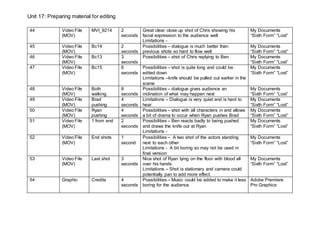
Unit 17: Preparing material for editing
44 Video File
(MOV)
MVI_9214 2
seconds
Great clear close up shot of Chris showing his
facial expression to the audience well
Limitations -
My Documents
“Sixth Form” “Lost”
45 Video File
(MOV)
Bc14 2
seconds
Possibilities – dialogue is much better than
previous shots so hard to flow well
My Documents
“Sixth Form” “Lost”
46 Video File
(MOV)
Bc13 3
seconds
Possibilities – shot of Chris replying to Ben My Documents
“Sixth Form” “Lost”
47 Video File
(MOV)
Bc15 6
seconds
Possibilities – shot is quite long and could be
edited down
Limitations –knife should be pulled out earlier in the
scene
My Documents
“Sixth Form” “Lost”
48 Video File
(MOV)
Both
walking
8
seconds
Possibilities – dialogue gives audience an
inclination of what may happen next
My Documents
“Sixth Form” “Lost”
49 Video File
(MOV)
Brad
pushing
4
seconds
Limitations – Dialogue is very quiet and is hard to
hear
My Documents
“Sixth Form” “Lost”
50 Video File
(MOV)
Ryan
pushing
4
seconds
Possibilities – shot with all characters in and allows
a bit of drama to occur when Ryan pushes Brad
My Documents
“Sixth Form” “Lost”
51 Video File
(MOV)
1 from end 2
seconds
Possibilities – Ben reacts badly to being pushed
and draws the knife out at Ryan
Limitations -
My Documents
“Sixth Form” “Lost”
52 Video File
(MOV)
End shots 1
second
Possibilities – A two shot of the actors standing
next to each other
Limitations - A bit boring so may not be used in
final version
My Documents
“Sixth Form” “Lost”
53 Video File
(MOV)
Last shot 3
seconds
Nice shot of Ryan lying on the floor with blood all
over his hands
Limitations – Shot is stationary and camera could
potentially pan to add more effect.
My Documents
“Sixth Form” “Lost”
54 Graphic Credits 4
seconds
Possibilities – Music could be added to make it less
boring for the audience
Adobe Premiere
Pro Graphics

Rushes log unit 17

  • 1.
    Unit 17: Preparingmaterial for editing Rushes Log Name of editor Jamie Hamer Title of production Lost Date 11/04/19 Shot Number File Type File Name Duration Possibilities and limitations of shots Where stored 1 Graphic Graphic 1 4 seconds Possibilities – I could decide to add some music into the background to make it more interesting for my audience Limitations – It is currently quite long and the audience may find this quite boring Adobe Premiere Pro Graphics 2 Graphic Graphic 2 4 seconds Possibilities – I could add music into it for the added effect Limitations – It is currently quite long and the audience may find this quite boring Adobe Premiere Pro Graphics 3 Video File (MOV) MVI_2254 16 seconds Limitations – Shot is very long and camera is a bit wobbly at the end due the damaged tripod. My Documents “Sixth Form” “Lost” 4 Video File (MOV) MVI_2261 10 seconds Possibilities – A nice shot of Ryan and Chris leaving the car Limitations – Music doesn’t flow very well from previous shot My Documents “Sixth Form” “Lost” 5 Video File (MOV) MVI_2262 4 seconds Possibilities – Flows well with the previous shot My Documents “Sixth Form” “Lost” 6 Video File (MOV) Shot 1 9 seconds Possibilities – Again, this flows well with the previous shot to make the film look smooth. Also, another character is introduced. Limitations - My Documents “Sixth Form” “Lost” 7 Video File (MOV) MVI_2263 7 seconds Limitations – at the start of the shot characters are stationary so it doesn’t flow very well My Documents “Sixth Form” “Lost”
  • 2.
    Unit 17: Preparingmaterial for editing 8 Video File (MOV) MVI_2266 10 seconds Possibilities – some music could be added to make the scene more interesting My Documents “Sixth Form” “Lost” 9 Video File (MOV) Shot 3 11 seconds Possibilities – nice shot to show the conversation and all 3 characters’ camera proportion distributed evenly My Documents “Sixth Form” “Lost” 10 Video File (MOV) Shot 4 6 seconds Possibilities – A nice angle to show the conversation between the 3 characters Limitations – end of shot needs editing as character loses focus My Documents “Sixth Form” “Lost” 11 Video File (MOV) Shot 5 6 seconds Possibilities – Another shot the opposite side this time to show conversation, also shows cards very well. Limitations – end of shot the character starts smiling so needs editing My Documents “Sixth Form” “Lost” 12 Video File (MOV) Shot 6 9 seconds Possibilities – Good clear close up to show characters’ facial expressions well My Documents “Sixth Form” “Lost” 13 Video File (MOV) Shot 7 7 seconds Limitations – Ryan’s acting skills let him down in this shot as he tries to be serious but starts smiling too early, so needs editing well. My Documents “Sixth Form” “Lost” 14 Video File (MOV) Shot 8 6 seconds Limitations – On reflection the angle of the shot was a poor choice and it should have been lower down as it is too high up My Documents “Sixth Form” “Lost” 15 Video File (MOV) Shot 9 11 seconds Possibilities – great low angle shot from the table showing the 3 characters which adds variety to the conversation My Documents “Sixth Form” “Lost” 16 Video File (MOV) Shot 10 5 seconds Possibilities – can use a transition at the end of the shot to show the conversation has finished and time has passed to the next shot My Documents “Sixth Form” “Lost” 17 Video File (MOV) MVI_2270 6 seconds Possibilities – some sort of conversation could have been added as it is quite boring Limitations – the scene of them walking out is quite long My Documents “Sixth Form” “Lost”
  • 3.
    Unit 17: Preparingmaterial for editing 18 Video File (MOV) Shot 11 7 seconds Possibilities – First main occasion we see the tension building between Chris and James Limitations – scene is very dark and lighting could have been adjusted My Documents “Sixth Form” “Lost” 19 Video File (MOV) Drive in 2.30 5 seconds Limitations – Start of the shot needs editing to make sure that it doesn’t look staged, will need to shorten the clip. My Documents “Sixth Form” “Lost” 20 Video File (MOV) Car convo 3 seconds Limitations – Background noise of cars passing makes audio harder to hear. My Documents “Sixth Form” “Lost” 21 Video File (MOV) Convo 2 4 seconds Possibilities – medium shot of James and Ryan allows the audience to see clearer facial expressions My Documents “Sixth Form” “Lost” 22 Video File (MOV) Convo 3 5 seconds Possibilities – first time we see Chris trying to charge of the situation, much to James’s disapproval My Documents “Sixth Form” “Lost” 23 Video File (MOV) Walk 4 5 seconds Limitations – characters don’t talk at the correct time when in view of camera so makes hard to capture whole shot. My Documents “Sixth Form” “Lost” 24 Video File (MOV) Convo 6 4 seconds Possibilities – shot makes all the conversation look very natural My Documents “Sixth Form” “Lost” 25 Video File (MOV) Shot 5 convo 7 seconds Possibilities – First time we see the location of the campsite and learn that Chris is going off on his own My Documents “Sixth Form” “Lost” 26 Video File (MOV) Chris walking 1 6 seconds Possibilities – No dialogue so it allows for background music to take effect. My Documents “Sixth Form” “Lost” 27 Video File (MOV) Chris walking 2 3 seconds Possibilities – Great low angle shot which adds variety Limitations - My Documents “Sixth Form” “Lost” 28 Video File (MOV) Chris walking 3 5 seconds Possibilities – high angle shot makes it look like he’s being watched My Documents “Sixth Form” “Lost” 29 Video File (MOV) Chris walking 4 3 seconds Possibilities – another shot which makes it look like he’s being watched My Documents “Sixth Form” “Lost”
  • 4.
    Unit 17: Preparingmaterial for editing Limitations – unstable ground makes it hard to keep camera fixed 30 Video File (MOV) Sat waiting for Chris 3 seconds Possibilities – Good two shot to show campsite location Limitations – wind makes audio hard to hear My Documents “Sixth Form” “Lost” 31 Video File (MOV) Waiting for Chris 2 3 seconds Possibilities – Shows audience that characters suspect something is wrong My Documents “Sixth Form” “Lost” 32 Video File (MOV) Waiting for Chris 3 4 seconds Possibilities – Good close up to show Ryan calling Chris’s phone My Documents “Sixth Form” “Lost” 33 Video File (MOV) Waiting for Chris 4 8 seconds Limitations – Wind makes dialogue and phone impossible to be heard My Documents “Sixth Form” “Lost” 34 Video File (MOV) Bc1 5 seconds Possibilities – First scene that Ben is introduced into My Documents “Sixth Form” “Lost” 35 Video File (MOV) Bc3 3 seconds Possibilities – dialogue is effective and adds tension to scene My Documents “Sixth Form” “Lost” 36 Video File (MOV) Bc4 1 second Possibilities – quick shot shows tension My Documents “Sixth Form” “Lost” 37 Video File (MOV) Bc5 2 seconds Possibilities – good over the shoulder shot shows Ben being introduced close up to the camera My Documents “Sixth Form” “Lost” 38 Video File (MOV) Bc7 3 seconds Limitations – poor acting makes audience think he doesn’t seem as much of a villain as he’s meant to be My Documents “Sixth Form” “Lost” 39 Video File (MOV) Bc8 1 second Possibilities – A medium shot of Chris replying in the conversation to Ben My Documents “Sixth Form” “Lost” 40 Video File (MOV) Bc9 5 seconds Possibilities – First shot of murder weapon implying that someone is possibly going to die My Documents “Sixth Form” “Lost” 41 Video File (MOV) Bc10 2 seconds Possibilities – close up of murder weapon My Documents “Sixth Form” “Lost” 42 Video File (MOV) Bc11 3 seconds Possibilities – Shows that Chris is immediately scared by the weapon after his reaction My Documents “Sixth Form” “Lost” 43 Video File (MOV) Bc12 3 seconds Limitations – wind makes Dialogue hard to hear My Documents “Sixth Form” “Lost”
  • 5.
    Unit 17: Preparingmaterial for editing 44 Video File (MOV) MVI_9214 2 seconds Great clear close up shot of Chris showing his facial expression to the audience well Limitations - My Documents “Sixth Form” “Lost” 45 Video File (MOV) Bc14 2 seconds Possibilities – dialogue is much better than previous shots so hard to flow well My Documents “Sixth Form” “Lost” 46 Video File (MOV) Bc13 3 seconds Possibilities – shot of Chris replying to Ben My Documents “Sixth Form” “Lost” 47 Video File (MOV) Bc15 6 seconds Possibilities – shot is quite long and could be edited down Limitations –knife should be pulled out earlier in the scene My Documents “Sixth Form” “Lost” 48 Video File (MOV) Both walking 8 seconds Possibilities – dialogue gives audience an inclination of what may happen next My Documents “Sixth Form” “Lost” 49 Video File (MOV) Brad pushing 4 seconds Limitations – Dialogue is very quiet and is hard to hear My Documents “Sixth Form” “Lost” 50 Video File (MOV) Ryan pushing 4 seconds Possibilities – shot with all characters in and allows a bit of drama to occur when Ryan pushes Brad My Documents “Sixth Form” “Lost” 51 Video File (MOV) 1 from end 2 seconds Possibilities – Ben reacts badly to being pushed and draws the knife out at Ryan Limitations - My Documents “Sixth Form” “Lost” 52 Video File (MOV) End shots 1 second Possibilities – A two shot of the actors standing next to each other Limitations - A bit boring so may not be used in final version My Documents “Sixth Form” “Lost” 53 Video File (MOV) Last shot 3 seconds Nice shot of Ryan lying on the floor with blood all over his hands Limitations – Shot is stationary and camera could potentially pan to add more effect. My Documents “Sixth Form” “Lost” 54 Graphic Credits 4 seconds Possibilities – Music could be added to make it less boring for the audience Adobe Premiere Pro Graphics