Run more VMs and get better performance
with VMware vSphere 8
Compared to Red Hat OpenShift Virtualization
4.16.2, the VMware virtualization platform
supported 62% more database transactions
and sustained consistent database performance
while scaling up VMs due to efficient memory
management methods
Peak workloads can strain physical data center resources, potentially causing
performance loss without proper configuration. In virtual environments, the
memory management strategies of memory oversubscription and memory
overcommitment can help maximize the use of physical resources, increase
VM density, and meet workload demand. Different virtualization solutions
manage memory in various ways, and VMware®
vSphere®
8 Update 3 offers
a dedicated memory overcommitment feature for helping balance VM
performance with density. But how does the memory management of a
vSphere solution stack up against its competitors?
We compared the performance and VM density of a VMware vSphere 8
Update 3 solution to that of a Red Hat®
OpenShift Virtualization 4.16.2
solution. After measuring online transaction processing (OLTP) performance
at a baseline level using memory oversubscription but without using memory
overcommitment, we began overcommitting memory on both solutions
and increased the VM density until we saw significant (10 percent or more)
performance degradation.
At every level of VM density, including the baseline, the vSphere solution
supported more database transactions in NOPM than the OpenShift
solution. Additionally, the OpenShift solution supported fewer VMs before
experiencing significant degradation whereas the vSphere solution ran double
the number of VMs over baseline before crossing the performance threshold.
By supporting more VMs and better OLTP performance, organizations with a
vSphere environment can meet more transactional database demand without
adding more servers and licenses.
Better
total OLTP
performance
Up to 62% more SQL
Server new orders per
minute (NOPM)
No configuration
vSphere
enables memory
overcommitment
by default
Higher VM density
with consistent
performance
Support 1.5x the VMs
and maintain consistent
performance for longer
under load
Run more VMs and get better performance with VMware vSphere 8 October 2024
A Principled Technologies report: Hands-on testing. Real-world results.
Benefits of memory oversubscription
In virtualized environments, memory oversubscription allows organizations to allocate more virtual memory to
VMs than the host system physically has. The memory management technique assumes that all VMs will not
use their full allocated memory simultaneously, which allows the virtual environment to better use physical
memory resources. Memory overcommitment can also help with peak workloads but can incur a serious
performance penalty. Organizations can consider memory operationally overcommitted if the combined working
memory footprint of all VMs exceeds the host memory sizes. This approach to memory management offers a
number of benefits:
• Cost savings – Running more workloads without
additional hardware could translate to lower
first- and second-order equipment, operational,
and staff costs. Organizations could do more with
existing infrastructure.
• Increased VM density – Supporting more VMs
on a physical host can mean fewer necessary
physical servers to meet workload demand,
thus potentially saving on operating costs, such
as power, cooling, and server management
and monitoring. Our baseline testing scenario
demonstrates this potential; we offered the 10
VMs more memory than the server physically
had, but the VMs did not fully use the allocated
memory. We oversubscribed memory, but we did
not overcommit it.
• Improved resource utilization – Memory
overcommitment enables better utilization of
physical memory resources. The system can run
more processes when all VMs are not using all
their allocated memory.
• Flexibility in resource management – Memory
overcommitment provides flexibility to scale
virtual environments quickly and efficiently. It
allows administrators to allocate and adjust
memory resources based on the dynamic
needs of workloads.
• Enhanced performance – When managed
properly, memory overcommitment can lead
to enhanced performance by ensuring critical
workloads have access to the memory they need
when they need it, while less critical workloads
share available resources.
While memory oversubscription and overcommitment offer significant advantages, organizations must
ensure proper VM configuration, management, and monitoring to prevent potential performance issues or
system instability.
About VMware vSphere 8 Update 3
VMware vSphere is an enterprise compute virtualization program that aims to bring “the benefits of
cloud to on-premises workloads” by combining “industry-leading cloud infrastructure technology with
data processing unit (DPU)- and GPU-based acceleration to boost workload performance.”1
According
to Broadcom, the latest version, VMware vSphere 8 Update 3, has a number of new features that offer
improvements in operational efficiency, workload performance, and security. These include:2
• Faster upgrades and no downtime with ESXi Live Patching
• Dual data processing unit (DPU) support with vSphere Distributed Services Engine
• Infrastructure as a service (IaaS) control plane self-service
• New independent Tanzu Kubernetes®
Grid (TKG) service
• Local consumption interface
Run more VMs and get better performance with VMware vSphere 8 October 2024 | 2
What’s paging?
Paging is a memory management scheme involving primary storage, or RAM, and secondary storage,
or disk. It is a process that we saw each solution perform that indicated memory overcommitment. The
process divides the physical memory in the secondary storage into same-sized blocks called page frames
and divides the logical memory into blocks called pages. When the OS retrieves data, it brings a page
of data into RAM. The system uses a page table to maintain the relationship between logical pages
and physical page frames, and the memory management unit uses the page table to translate logical
addresses into physical addresses.3
The advantage of this approach is that contiguous allocation of physical memory in the disk is unnecessary,
and it allows the system to break up the physical address space of a process. In modern operating systems,
paging is an important part of virtual memory implementations; secondary storage lets programs exceed
the size of available physical memory.4
How we tested
Data center and infrastructure admins commonly aim to maximize the number of VMs that can run well, and
they must balance performance with VM density. Efficiently using a server’s resources helps achieve necessary
performance levels while making data centers more efficient overall, but when demand overburdens resources,
such as memory, performance can degrade.
We started with 10 SQL Server VMs and used the TPROC-C workload to measure the level of OLTP performance
(in NOPM) each solution achieved while oversubscribed with memory but without overcommitting it or stressing
other server resources. This created a baseline scenario against which we could compare results from our
overcommitment scenarios.
We then increased the VM density using overcommitment to learn how the two virtualization solutions would
behave when the total virtual memory for the VMs exceeded the physical memory available on the server. We
increased the number of VMs to 12 to serve as a “slightly overcommitted” scenario. We then tested the two
solutions with an increasing number of VMs per physical host to see when the two solutions could no longer
sustain acceptable performance. We considered a reduction of 10 percent or more to be significant performance
degradation. When a solution experienced significant degradation, we ceased scaling up the VM density for
that solution.
Both solutions used the same Dell™
PowerEdge™
R650 server in the same hardware configuration, differing only
in the virtualization platform.
About HammerDB
HammerDB is an open-source benchmarking tool that tests the performance of many leading databases.
The benchmark tool includes two built-in workloads derived from industry standards: a transactional
(TPROC-C) workload and an analytics (TPROC-H) workload. We chose the TPROC-C (TPC-C-like) workload
to demonstrate the online transaction processing performance capabilities of each instance, which benefit
from high core counts and fast memory. TPROC-C runs a transaction processing workload that simulates
an ecommerce business with five types of transactions: receiving a customer order, recording a payment,
delivering an order, checking an order’s status, and checking stock in inventory.5
Note that our test results
do not represent official TPC results and are not comparable to official TPC-audited results. To learn more
about HammerDB, visit https://www.hammerdb.com/.
Run more VMs and get better performance with VMware vSphere 8 October 2024 | 3
What we found
Achieve better OLTP performance and scale out to more VMs without
sacrificing performance
We configured each virtualized environment with 10 VMs. We oversubscribed memory for both solutions, but
this baseline level of testing did not require memory overcommitment. We assigned 28 GB of vRAM to each
guest (or workload) VM, but the VMs did not use all of the fully assigned memory. So while the workload VMs of
both solutions had 280 GB of subscribed memory, the hosts still had 5 to 10 GB of free physical memory during
the baseline scenario. Rather than trying to maximize VM density on each platform, as we do in the next phase of
testing, we selected HammerDB workload levels that would not stress any server resources and deliver roughly
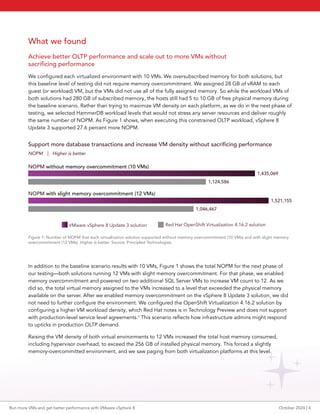
the same number of NOPM. As Figure 1 shows, when executing this constrained OLTP workload, vSphere 8
Update 3 supported 27.6 percent more NOPM.
VMware vSphere 8 Update 3 solution Red Hat OpenShift Virtualization 4.16.2 solution
1,521,155
1,046,467
Support more database transactions and increase VM density without sacrificing performance
NOPM without memory overcommitment (10 VMs)
NOPM with slight memory overcommitment (12 VMs)
NOPM | Higher is better
1,435,069
1,124,586
Figure 1: Number of NOPM that each virtualization solution supported without memory overcommitment (10 VMs) and with slight memory
overcommitment (12 VMs). Higher is better. Source: Principled Technologies.
In addition to the baseline scenario results with 10 VMs, Figure 1 shows the total NOPM for the next phase of
our testing—both solutions running 12 VMs with slight memory overcommitment. For that phase, we enabled
memory overcommitment and powered on two additional SQL Server VMs to increase VM count to 12. As we
did so, the total virtual memory assigned to the VMs increased to a level that exceeded the physical memory
available on the server. After we enabled memory overcommitment on the vSphere 8 Update 3 solution, we did
not need to further configure the environment. We configured the OpenShift Virtualization 4.16.2 solution by
configuring a higher VM workload density, which Red Hat notes is in Technology Preview and does not support
with production-level service level agreements.6
This scenario reflects how infrastructure admins might respond
to upticks in production OLTP demand.
Raising the VM density of both virtual environments to 12 VMs increased the total host memory consumed,
including hypervisor overhead, to exceed the 256 GB of installed physical memory. This forced a slightly
memory-overcommitted environment, and we saw paging from both virtualization platforms at this level.
Run more VMs and get better performance with VMware vSphere 8 October 2024 | 4
VMware vSphere 8 Update 3 did not require any changes to its default settings. Using memory overcommitment
and running 12 VMs, the overall number of NOPM supported by the vSphere environment increased by 6.0
percent over the baseline environment that was not overcommitted. VMware states that “ESXi [the hypervisor
in vSphere] implements various mechanisms such as ballooning, memory sharing, memory compression and
swapping to provide reasonable performance even if the host is not heavily memory overcommitted.”7
Overcommitting memory for the OpenShift Virtualization
4.16.2 environment required manual configuration. After
configuring a higher workload density, the total NOPM
of the OpenShift Virtualization 4.16.2 environment
decreased by 6.9 percent from the baseline non-memory
overcommitted environment.
As our results demonstrate, vSphere 8 Update 3 supports
memory overcommitment at production levels and makes it
easier to do so, and enabling memory overcommitment allows
you to increase VM density without sacrificing transactional
database performance.
Reach higher thresholds in VM density with
minimal performance degradation
For the last phase of our testing, we wanted to push the performance of the solutions until we saw significant
degradation—a decrease in total NOPM of more than 10 percent. Organizations would likely seek to maintain
specific performance levels due to service level agreements (SLAs), so while this scenario might not reflect
everyday real-world usage, it could help organizations establish VM density thresholds.
For our vSphere 8 Update 3 solution, we saw significant performance degradation with 20 VMs running OLTP
workloads, doubling VM density from the non-memory overcommitted baseline. At 20 VMs, the vSphere solution
had a 14.31 percent decrease in NOPM from the slight memory overcommitted performance of 12 VMs.
We saw significant performance degradation for our OpenShift Virtualization 4.16.2 solution enabled with
memory overcommitment at 13 VMs running OLTP workloads. That’s three VMs over the non-memory
overcommitted baseline and just one VM more than the slight memory overcommitted scenario of 12 VMs.
Performance dropped by 23.19 percent for the 13-VM OpenShift solution compared to the 12-VM OpenShift
solution. Figure 2 shows the VM counts and NOPM when both virtualization solutions experienced significant
performance degradation.
Reach higher thresholds in VM density with minimal performance degradation
VM count | NOPM | Higher is better
VMware vSphere 8 Update 3 solution
Red Hat OpenShift Virtualization 4.16.2 solution
1,303,432
20 VMs
13 VMs
803,748
Figure 2: Number of VMs and NOPM that each virtualization solution supported when experiencing significant performance degradation.
Higher is better. Source: Principled Technologies.
”
”
ESXi implements various
mechanisms such as
ballooning, memory
sharing, memory
compression and swapping
to provide reasonable
performance even if
the host is not heavily
memory overcommitted.
Run more VMs and get better performance with VMware vSphere 8 October 2024 | 5
CPU utilization during testing
At 20 VMs, the vSphere 8 Update 3 solution reached its highest level of CPU utilization at 94.4 percent. CPU
utilization for the vSphere reached 91.7 percent while running 12 VMs and 80.1 percent while running 10 VMs.
At 13 VMs, CPU utilization for our OpenShift Virtualization 4.16.2 solution was 58.3 percent. While supporting 12
VMs and 10 VMs, CPU utilization levels for the Red Hat solution were 61.5 and 52.1 percent, respectively. These
levels indicate that CPU usage was not a limiting factor for the Red Hat solution and that memory usage likely
affected performance of the solution.
Conclusion
Memory oversubscription allows organizations to maximize their existing physical infrastructure by allocating
more memory for peak usage than hypervisors typically assign by default. Because hypervisors handle memory
management in different ways, we compared VMware vSphere 8 Update 3 to Red Hat OpenShift Virtualization
4.16.2 to see how each handled the memory management techniques of oversubscription and overcommitment.
In our tests, vSphere outperformed OpenShift across the board, delivering 62 percent more NOPM at the
maximum supported VM density of each solution. The vSphere solution supported 1.5 times more VMs than
the OpenShift solution and doubled the VM count before experiencing significant performance degradation. In
addition to the better OLTP performance, we found vSphere easier to configure, requiring no additional tuning
for memory overcommitment. Our results indicate that VMware vSphere 8 Update 3 helps boost VM density to
meet OLTP demand while maximizing server memory utilization.
1. VMware, “VMware vSphere,” accessed September 13, 2024,
https://www.vmware.com/content/dam/digitalmarketing/vmware/en/pdf/vsphere/vmw-vsphere-datasheet.pdf.
2. VMware, “Announcing VMware vSphere 8 Update 3, with ESXi Live Patching and Integrated Kubernetes Cluster Manage-
ment,” accessed September 13, 2024,
https://blogs.vmware.com/cloud-foundation/2024/06/25/vmware-vsphere-8-u3-initial-availability-announcement/.
3. GeeksforGeeks, “Paging in Operating System,” accessed September 13, 2024,
https://www.geeksforgeeks.org/paging-in-operating-system/.
4. Wikipedia, “Memory paging,” accessed September 13, 2024, https://en.wikipedia.org/wiki/Memory_paging.
5. HammerDB, “Understanding the TPROC-C workload derived from TPC-C,” accessed September 13, 2024,
https://www.hammerdb.com/docs/ch03s05.html.
6. Red Hat, “Configuring higher VM workload density,” accessed September 13, 2024,
https://docs.openshift.com/container-platform/4.16/virt/post_installation_configuration/virt-configuring-higher-vm-work-
load-density.html.
7. VMware vSphere, “Memory Virtualization with vSphere,” accessed September 17, 2024,
https://docs.vmware.com/en/VMware-vSphere/8.0/vsphere-resource-management/GUID-9D2D0E45-D741-476F-8DB1-
F737839C2108.html.
Principled Technologies is a registered trademark of Principled Technologies, Inc.
All other product names are the trademarks of their respective owners.
For additional information, review the science behind this report.
Principled
Technologies®
Facts matter.®
Principled
Technologies®
Facts matter.®
This project was commissioned by Broadcom.
Read the science behind this report at https://facts.pt/MzeQzxv
Run more VMs and get better performance with VMware vSphere 8 October 2024 | 6

Run more VMs and get better performance with VMware vSphere 8

  • 1.
    Run more VMsand get better performance with VMware vSphere 8 Compared to Red Hat OpenShift Virtualization 4.16.2, the VMware virtualization platform supported 62% more database transactions and sustained consistent database performance while scaling up VMs due to efficient memory management methods Peak workloads can strain physical data center resources, potentially causing performance loss without proper configuration. In virtual environments, the memory management strategies of memory oversubscription and memory overcommitment can help maximize the use of physical resources, increase VM density, and meet workload demand. Different virtualization solutions manage memory in various ways, and VMware® vSphere® 8 Update 3 offers a dedicated memory overcommitment feature for helping balance VM performance with density. But how does the memory management of a vSphere solution stack up against its competitors? We compared the performance and VM density of a VMware vSphere 8 Update 3 solution to that of a Red Hat® OpenShift Virtualization 4.16.2 solution. After measuring online transaction processing (OLTP) performance at a baseline level using memory oversubscription but without using memory overcommitment, we began overcommitting memory on both solutions and increased the VM density until we saw significant (10 percent or more) performance degradation. At every level of VM density, including the baseline, the vSphere solution supported more database transactions in NOPM than the OpenShift solution. Additionally, the OpenShift solution supported fewer VMs before experiencing significant degradation whereas the vSphere solution ran double the number of VMs over baseline before crossing the performance threshold. By supporting more VMs and better OLTP performance, organizations with a vSphere environment can meet more transactional database demand without adding more servers and licenses. Better total OLTP performance Up to 62% more SQL Server new orders per minute (NOPM) No configuration vSphere enables memory overcommitment by default Higher VM density with consistent performance Support 1.5x the VMs and maintain consistent performance for longer under load Run more VMs and get better performance with VMware vSphere 8 October 2024 A Principled Technologies report: Hands-on testing. Real-world results.
  • 2.
    Benefits of memoryoversubscription In virtualized environments, memory oversubscription allows organizations to allocate more virtual memory to VMs than the host system physically has. The memory management technique assumes that all VMs will not use their full allocated memory simultaneously, which allows the virtual environment to better use physical memory resources. Memory overcommitment can also help with peak workloads but can incur a serious performance penalty. Organizations can consider memory operationally overcommitted if the combined working memory footprint of all VMs exceeds the host memory sizes. This approach to memory management offers a number of benefits: • Cost savings – Running more workloads without additional hardware could translate to lower first- and second-order equipment, operational, and staff costs. Organizations could do more with existing infrastructure. • Increased VM density – Supporting more VMs on a physical host can mean fewer necessary physical servers to meet workload demand, thus potentially saving on operating costs, such as power, cooling, and server management and monitoring. Our baseline testing scenario demonstrates this potential; we offered the 10 VMs more memory than the server physically had, but the VMs did not fully use the allocated memory. We oversubscribed memory, but we did not overcommit it. • Improved resource utilization – Memory overcommitment enables better utilization of physical memory resources. The system can run more processes when all VMs are not using all their allocated memory. • Flexibility in resource management – Memory overcommitment provides flexibility to scale virtual environments quickly and efficiently. It allows administrators to allocate and adjust memory resources based on the dynamic needs of workloads. • Enhanced performance – When managed properly, memory overcommitment can lead to enhanced performance by ensuring critical workloads have access to the memory they need when they need it, while less critical workloads share available resources. While memory oversubscription and overcommitment offer significant advantages, organizations must ensure proper VM configuration, management, and monitoring to prevent potential performance issues or system instability. About VMware vSphere 8 Update 3 VMware vSphere is an enterprise compute virtualization program that aims to bring “the benefits of cloud to on-premises workloads” by combining “industry-leading cloud infrastructure technology with data processing unit (DPU)- and GPU-based acceleration to boost workload performance.”1 According to Broadcom, the latest version, VMware vSphere 8 Update 3, has a number of new features that offer improvements in operational efficiency, workload performance, and security. These include:2 • Faster upgrades and no downtime with ESXi Live Patching • Dual data processing unit (DPU) support with vSphere Distributed Services Engine • Infrastructure as a service (IaaS) control plane self-service • New independent Tanzu Kubernetes® Grid (TKG) service • Local consumption interface Run more VMs and get better performance with VMware vSphere 8 October 2024 | 2
  • 3.
    What’s paging? Paging isa memory management scheme involving primary storage, or RAM, and secondary storage, or disk. It is a process that we saw each solution perform that indicated memory overcommitment. The process divides the physical memory in the secondary storage into same-sized blocks called page frames and divides the logical memory into blocks called pages. When the OS retrieves data, it brings a page of data into RAM. The system uses a page table to maintain the relationship between logical pages and physical page frames, and the memory management unit uses the page table to translate logical addresses into physical addresses.3 The advantage of this approach is that contiguous allocation of physical memory in the disk is unnecessary, and it allows the system to break up the physical address space of a process. In modern operating systems, paging is an important part of virtual memory implementations; secondary storage lets programs exceed the size of available physical memory.4 How we tested Data center and infrastructure admins commonly aim to maximize the number of VMs that can run well, and they must balance performance with VM density. Efficiently using a server’s resources helps achieve necessary performance levels while making data centers more efficient overall, but when demand overburdens resources, such as memory, performance can degrade. We started with 10 SQL Server VMs and used the TPROC-C workload to measure the level of OLTP performance (in NOPM) each solution achieved while oversubscribed with memory but without overcommitting it or stressing other server resources. This created a baseline scenario against which we could compare results from our overcommitment scenarios. We then increased the VM density using overcommitment to learn how the two virtualization solutions would behave when the total virtual memory for the VMs exceeded the physical memory available on the server. We increased the number of VMs to 12 to serve as a “slightly overcommitted” scenario. We then tested the two solutions with an increasing number of VMs per physical host to see when the two solutions could no longer sustain acceptable performance. We considered a reduction of 10 percent or more to be significant performance degradation. When a solution experienced significant degradation, we ceased scaling up the VM density for that solution. Both solutions used the same Dell™ PowerEdge™ R650 server in the same hardware configuration, differing only in the virtualization platform. About HammerDB HammerDB is an open-source benchmarking tool that tests the performance of many leading databases. The benchmark tool includes two built-in workloads derived from industry standards: a transactional (TPROC-C) workload and an analytics (TPROC-H) workload. We chose the TPROC-C (TPC-C-like) workload to demonstrate the online transaction processing performance capabilities of each instance, which benefit from high core counts and fast memory. TPROC-C runs a transaction processing workload that simulates an ecommerce business with five types of transactions: receiving a customer order, recording a payment, delivering an order, checking an order’s status, and checking stock in inventory.5 Note that our test results do not represent official TPC results and are not comparable to official TPC-audited results. To learn more about HammerDB, visit https://www.hammerdb.com/. Run more VMs and get better performance with VMware vSphere 8 October 2024 | 3
  • 4.
    What we found Achievebetter OLTP performance and scale out to more VMs without sacrificing performance We configured each virtualized environment with 10 VMs. We oversubscribed memory for both solutions, but this baseline level of testing did not require memory overcommitment. We assigned 28 GB of vRAM to each guest (or workload) VM, but the VMs did not use all of the fully assigned memory. So while the workload VMs of both solutions had 280 GB of subscribed memory, the hosts still had 5 to 10 GB of free physical memory during the baseline scenario. Rather than trying to maximize VM density on each platform, as we do in the next phase of testing, we selected HammerDB workload levels that would not stress any server resources and deliver roughly the same number of NOPM. As Figure 1 shows, when executing this constrained OLTP workload, vSphere 8 Update 3 supported 27.6 percent more NOPM. VMware vSphere 8 Update 3 solution Red Hat OpenShift Virtualization 4.16.2 solution 1,521,155 1,046,467 Support more database transactions and increase VM density without sacrificing performance NOPM without memory overcommitment (10 VMs) NOPM with slight memory overcommitment (12 VMs) NOPM | Higher is better 1,435,069 1,124,586 Figure 1: Number of NOPM that each virtualization solution supported without memory overcommitment (10 VMs) and with slight memory overcommitment (12 VMs). Higher is better. Source: Principled Technologies. In addition to the baseline scenario results with 10 VMs, Figure 1 shows the total NOPM for the next phase of our testing—both solutions running 12 VMs with slight memory overcommitment. For that phase, we enabled memory overcommitment and powered on two additional SQL Server VMs to increase VM count to 12. As we did so, the total virtual memory assigned to the VMs increased to a level that exceeded the physical memory available on the server. After we enabled memory overcommitment on the vSphere 8 Update 3 solution, we did not need to further configure the environment. We configured the OpenShift Virtualization 4.16.2 solution by configuring a higher VM workload density, which Red Hat notes is in Technology Preview and does not support with production-level service level agreements.6 This scenario reflects how infrastructure admins might respond to upticks in production OLTP demand. Raising the VM density of both virtual environments to 12 VMs increased the total host memory consumed, including hypervisor overhead, to exceed the 256 GB of installed physical memory. This forced a slightly memory-overcommitted environment, and we saw paging from both virtualization platforms at this level. Run more VMs and get better performance with VMware vSphere 8 October 2024 | 4
  • 5.
    VMware vSphere 8Update 3 did not require any changes to its default settings. Using memory overcommitment and running 12 VMs, the overall number of NOPM supported by the vSphere environment increased by 6.0 percent over the baseline environment that was not overcommitted. VMware states that “ESXi [the hypervisor in vSphere] implements various mechanisms such as ballooning, memory sharing, memory compression and swapping to provide reasonable performance even if the host is not heavily memory overcommitted.”7 Overcommitting memory for the OpenShift Virtualization 4.16.2 environment required manual configuration. After configuring a higher workload density, the total NOPM of the OpenShift Virtualization 4.16.2 environment decreased by 6.9 percent from the baseline non-memory overcommitted environment. As our results demonstrate, vSphere 8 Update 3 supports memory overcommitment at production levels and makes it easier to do so, and enabling memory overcommitment allows you to increase VM density without sacrificing transactional database performance. Reach higher thresholds in VM density with minimal performance degradation For the last phase of our testing, we wanted to push the performance of the solutions until we saw significant degradation—a decrease in total NOPM of more than 10 percent. Organizations would likely seek to maintain specific performance levels due to service level agreements (SLAs), so while this scenario might not reflect everyday real-world usage, it could help organizations establish VM density thresholds. For our vSphere 8 Update 3 solution, we saw significant performance degradation with 20 VMs running OLTP workloads, doubling VM density from the non-memory overcommitted baseline. At 20 VMs, the vSphere solution had a 14.31 percent decrease in NOPM from the slight memory overcommitted performance of 12 VMs. We saw significant performance degradation for our OpenShift Virtualization 4.16.2 solution enabled with memory overcommitment at 13 VMs running OLTP workloads. That’s three VMs over the non-memory overcommitted baseline and just one VM more than the slight memory overcommitted scenario of 12 VMs. Performance dropped by 23.19 percent for the 13-VM OpenShift solution compared to the 12-VM OpenShift solution. Figure 2 shows the VM counts and NOPM when both virtualization solutions experienced significant performance degradation. Reach higher thresholds in VM density with minimal performance degradation VM count | NOPM | Higher is better VMware vSphere 8 Update 3 solution Red Hat OpenShift Virtualization 4.16.2 solution 1,303,432 20 VMs 13 VMs 803,748 Figure 2: Number of VMs and NOPM that each virtualization solution supported when experiencing significant performance degradation. Higher is better. Source: Principled Technologies. ” ” ESXi implements various mechanisms such as ballooning, memory sharing, memory compression and swapping to provide reasonable performance even if the host is not heavily memory overcommitted. Run more VMs and get better performance with VMware vSphere 8 October 2024 | 5
  • 6.
    CPU utilization duringtesting At 20 VMs, the vSphere 8 Update 3 solution reached its highest level of CPU utilization at 94.4 percent. CPU utilization for the vSphere reached 91.7 percent while running 12 VMs and 80.1 percent while running 10 VMs. At 13 VMs, CPU utilization for our OpenShift Virtualization 4.16.2 solution was 58.3 percent. While supporting 12 VMs and 10 VMs, CPU utilization levels for the Red Hat solution were 61.5 and 52.1 percent, respectively. These levels indicate that CPU usage was not a limiting factor for the Red Hat solution and that memory usage likely affected performance of the solution. Conclusion Memory oversubscription allows organizations to maximize their existing physical infrastructure by allocating more memory for peak usage than hypervisors typically assign by default. Because hypervisors handle memory management in different ways, we compared VMware vSphere 8 Update 3 to Red Hat OpenShift Virtualization 4.16.2 to see how each handled the memory management techniques of oversubscription and overcommitment. In our tests, vSphere outperformed OpenShift across the board, delivering 62 percent more NOPM at the maximum supported VM density of each solution. The vSphere solution supported 1.5 times more VMs than the OpenShift solution and doubled the VM count before experiencing significant performance degradation. In addition to the better OLTP performance, we found vSphere easier to configure, requiring no additional tuning for memory overcommitment. Our results indicate that VMware vSphere 8 Update 3 helps boost VM density to meet OLTP demand while maximizing server memory utilization. 1. VMware, “VMware vSphere,” accessed September 13, 2024, https://www.vmware.com/content/dam/digitalmarketing/vmware/en/pdf/vsphere/vmw-vsphere-datasheet.pdf. 2. VMware, “Announcing VMware vSphere 8 Update 3, with ESXi Live Patching and Integrated Kubernetes Cluster Manage- ment,” accessed September 13, 2024, https://blogs.vmware.com/cloud-foundation/2024/06/25/vmware-vsphere-8-u3-initial-availability-announcement/. 3. GeeksforGeeks, “Paging in Operating System,” accessed September 13, 2024, https://www.geeksforgeeks.org/paging-in-operating-system/. 4. Wikipedia, “Memory paging,” accessed September 13, 2024, https://en.wikipedia.org/wiki/Memory_paging. 5. HammerDB, “Understanding the TPROC-C workload derived from TPC-C,” accessed September 13, 2024, https://www.hammerdb.com/docs/ch03s05.html. 6. Red Hat, “Configuring higher VM workload density,” accessed September 13, 2024, https://docs.openshift.com/container-platform/4.16/virt/post_installation_configuration/virt-configuring-higher-vm-work- load-density.html. 7. VMware vSphere, “Memory Virtualization with vSphere,” accessed September 17, 2024, https://docs.vmware.com/en/VMware-vSphere/8.0/vsphere-resource-management/GUID-9D2D0E45-D741-476F-8DB1- F737839C2108.html. Principled Technologies is a registered trademark of Principled Technologies, Inc. All other product names are the trademarks of their respective owners. For additional information, review the science behind this report. Principled Technologies® Facts matter.® Principled Technologies® Facts matter.® This project was commissioned by Broadcom. Read the science behind this report at https://facts.pt/MzeQzxv Run more VMs and get better performance with VMware vSphere 8 October 2024 | 6