What visually impaired
programmers are thinking
about Ruby?
Takuya Nishimoto @nishimotz
RubyKaigi 2017
2
self
• Hiroshima → Tokyo → Kyoto → Tokyo → Hiroshima
• PhD Eng. (17 years)
• speech, audio, natural language, machine learning
• experimental psychology / applications / accessibility
• Freelance jobs: Objective-C++ / Python
• NonVisual Desktop Access (NVDA)
• Japanese Team Director www.nvda.jp
• Localizations / Enhancements
• Insert key → Escape key (makes Mac users happy)
• OpenJTalk / ATOK / Excel cell border / Japanese Braille
Takuya Nishimoto (RubyKaigi 2017) 3
Takuya Nishimoto (RubyKaigi 2017) 4
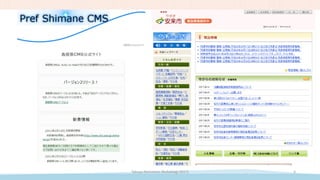
Pref Shimane CMS
Takuya Nishimoto (RubyKaigi 2017) 5
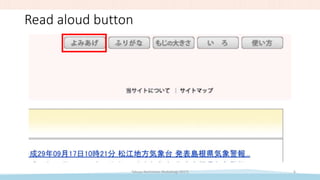
Read aloud button
Takuya Nishimoto (RubyKaigi 2017) 6
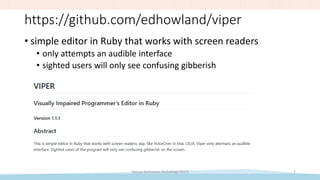
https://github.com/edhowland/viper
• simple editor in Ruby that works with screen readers
• only attempts an audible interface
• sighted users will only see confusing gibberish
Takuya Nishimoto (RubyKaigi 2017) 7
Takuya Nishimoto (RubyKaigi 2017) 8
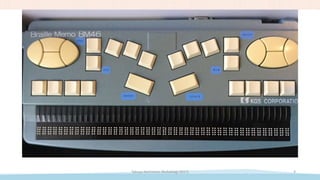
Braille display
Takuya Nishimoto (RubyKaigi 2017) 9
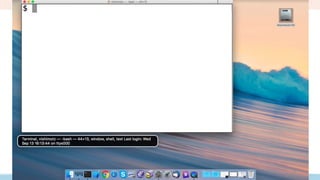
Console (Terminal) applications
• only displays text
• text is accessible
• use can use speech synthesizers and braille displays
• engineers prefer terminal + screen reader
• remote access
• demo
• Windows Subsystem for Linux (WSL)
• Emacs 24.3.1 + sshd
• TeraTerm + NVDA (NonVisual Desktop Access)
Takuya Nishimoto (RubyKaigi 2017) 10
Text + Assistive Technology
• Screen reader
• VoiceOver (iOS/macOS) / TalkBack (Android) / Orca (Linux)
• Narrator, JAWS, NVDA, etc. (Windows)
• Tactile (refreshable Braille display)
• good for verify spelling (type errors)
• device is expensive
• difficult to learn
• Listening (speech synthesizer)
• takes time, difficult to locate information
Takuya Nishimoto (RubyKaigi 2017) 11
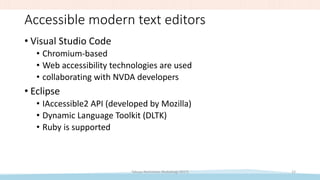
Accessible modern text editors
• Visual Studio Code
• Chromium-based
• Web accessibility technologies are used
• collaborating with NVDA developers
• Eclipse
• IAccessible2 API (developed by Mozilla)
• Dynamic Language Toolkit (DLTK)
• Ruby is supported
Takuya Nishimoto (RubyKaigi 2017) 12
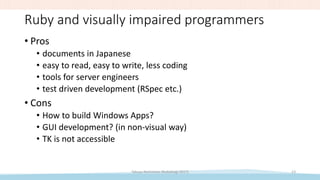
Ruby and visually impaired programmers
• Pros
• documents in Japanese
• easy to read, easy to write, less coding
• tools for server engineers
• test driven development (RSpec etc.)
• Cons
• How to build Windows Apps?
• GUI development? (in non-visual way)
• TK is not accessible
Takuya Nishimoto (RubyKaigi 2017) 13
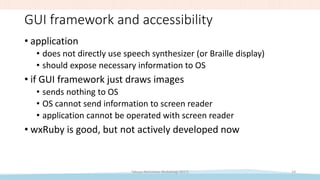
GUI framework and accessibility
• application
• does not directly use speech synthesizer (or Braille display)
• should expose necessary information to OS
• if GUI framework just draws images
• sends nothing to OS
• OS cannot send information to screen reader
• application cannot be operated with screen reader
• wxRuby is good, but not actively developed now
Takuya Nishimoto (RubyKaigi 2017) 14
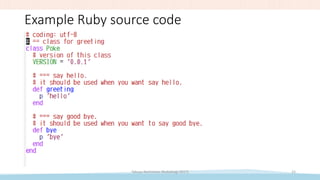
Example Ruby source code
Takuya Nishimoto (RubyKaigi 2017) 15
Documentation tools
• Ruby source code to HTML
• rdoc
• yard
• demo
• Ruby 2.4.1 (Windows Subsystem for Linux)
• Windows 10 + NVDA + Firefox
Takuya Nishimoto (RubyKaigi 2017) 16
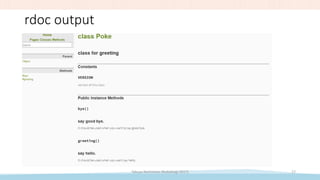
rdoc output
Takuya Nishimoto (RubyKaigi 2017) 17
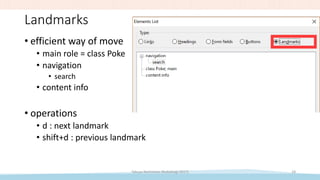
Landmarks
• efficient way of move
• main role = class Poke
• navigation
• search
• content info
• operations
• d : next landmark
• shift+d : previous landmark
Takuya Nishimoto (RubyKaigi 2017) 18
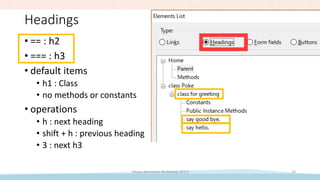
Headings
• == : h2
• === : h3
• default items
• h1 : Class
• no methods or constants
• operations
• h : next heading
• shift + h : previous heading
• 3 : next h3
Takuya Nishimoto (RubyKaigi 2017) 19
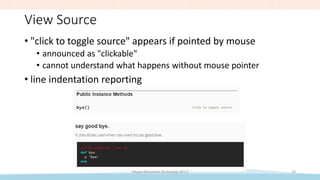
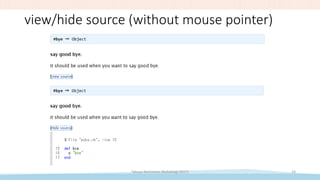
View Source
• "click to toggle source" appears if pointed by mouse
• announced as "clickable"
• cannot understand what happens without mouse pointer
• line indentation reporting
Takuya Nishimoto (RubyKaigi 2017) 20
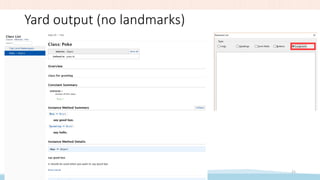
Yard output (no landmarks)
Takuya Nishimoto (RubyKaigi 2017) 21
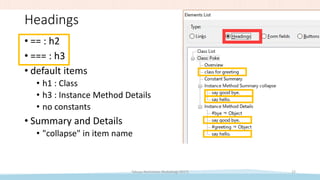
Headings
Takuya Nishimoto (RubyKaigi 2017) 22
• == : h2
• === : h3
• default items
• h1 : Class
• h3 : Instance Method Details
• no constants
• Summary and Details
• "collapse" in item name
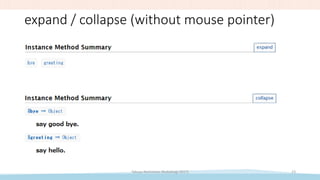
expand / collapse (without mouse pointer)
Takuya Nishimoto (RubyKaigi 2017) 23
view/hide source (without mouse pointer)
Takuya Nishimoto (RubyKaigi 2017) 24
Why important?
• Comply with standards
• Robustness / quality
• Prepared to new technologies
• Voice agents
• Human rights of every person
• guidelines and regulations
• W3C WCAG / JIS X8341 / US Section 508 Law
• Technology is removing barriers
Takuya Nishimoto (RubyKaigi 2017) 25
Conclusions
• accessibility of Ruby
• pretty good
• we can make it better
• inclusive design
• handicapped people = lead users
Takuya Nishimoto (RubyKaigi 2017) 26

Rubykaigi 2017-nishimotz-v6

  • 1.
    What visually impaired programmersare thinking about Ruby? Takuya Nishimoto @nishimotz RubyKaigi 2017
  • 2.
  • 3.
    self • Hiroshima →Tokyo → Kyoto → Tokyo → Hiroshima • PhD Eng. (17 years) • speech, audio, natural language, machine learning • experimental psychology / applications / accessibility • Freelance jobs: Objective-C++ / Python • NonVisual Desktop Access (NVDA) • Japanese Team Director www.nvda.jp • Localizations / Enhancements • Insert key → Escape key (makes Mac users happy) • OpenJTalk / ATOK / Excel cell border / Japanese Braille Takuya Nishimoto (RubyKaigi 2017) 3
  • 4.
  • 5.
    Pref Shimane CMS TakuyaNishimoto (RubyKaigi 2017) 5
  • 6.
    Read aloud button TakuyaNishimoto (RubyKaigi 2017) 6
  • 7.
    https://github.com/edhowland/viper • simple editorin Ruby that works with screen readers • only attempts an audible interface • sighted users will only see confusing gibberish Takuya Nishimoto (RubyKaigi 2017) 7
  • 8.
  • 9.
  • 10.
    Console (Terminal) applications •only displays text • text is accessible • use can use speech synthesizers and braille displays • engineers prefer terminal + screen reader • remote access • demo • Windows Subsystem for Linux (WSL) • Emacs 24.3.1 + sshd • TeraTerm + NVDA (NonVisual Desktop Access) Takuya Nishimoto (RubyKaigi 2017) 10
  • 11.
    Text + AssistiveTechnology • Screen reader • VoiceOver (iOS/macOS) / TalkBack (Android) / Orca (Linux) • Narrator, JAWS, NVDA, etc. (Windows) • Tactile (refreshable Braille display) • good for verify spelling (type errors) • device is expensive • difficult to learn • Listening (speech synthesizer) • takes time, difficult to locate information Takuya Nishimoto (RubyKaigi 2017) 11
  • 12.
    Accessible modern texteditors • Visual Studio Code • Chromium-based • Web accessibility technologies are used • collaborating with NVDA developers • Eclipse • IAccessible2 API (developed by Mozilla) • Dynamic Language Toolkit (DLTK) • Ruby is supported Takuya Nishimoto (RubyKaigi 2017) 12
  • 13.
    Ruby and visuallyimpaired programmers • Pros • documents in Japanese • easy to read, easy to write, less coding • tools for server engineers • test driven development (RSpec etc.) • Cons • How to build Windows Apps? • GUI development? (in non-visual way) • TK is not accessible Takuya Nishimoto (RubyKaigi 2017) 13
  • 14.
    GUI framework andaccessibility • application • does not directly use speech synthesizer (or Braille display) • should expose necessary information to OS • if GUI framework just draws images • sends nothing to OS • OS cannot send information to screen reader • application cannot be operated with screen reader • wxRuby is good, but not actively developed now Takuya Nishimoto (RubyKaigi 2017) 14
  • 15.
    Example Ruby sourcecode Takuya Nishimoto (RubyKaigi 2017) 15
  • 16.
    Documentation tools • Rubysource code to HTML • rdoc • yard • demo • Ruby 2.4.1 (Windows Subsystem for Linux) • Windows 10 + NVDA + Firefox Takuya Nishimoto (RubyKaigi 2017) 16
  • 17.
    rdoc output Takuya Nishimoto(RubyKaigi 2017) 17
  • 18.
    Landmarks • efficient wayof move • main role = class Poke • navigation • search • content info • operations • d : next landmark • shift+d : previous landmark Takuya Nishimoto (RubyKaigi 2017) 18
  • 19.
    Headings • == :h2 • === : h3 • default items • h1 : Class • no methods or constants • operations • h : next heading • shift + h : previous heading • 3 : next h3 Takuya Nishimoto (RubyKaigi 2017) 19
  • 20.
    View Source • "clickto toggle source" appears if pointed by mouse • announced as "clickable" • cannot understand what happens without mouse pointer • line indentation reporting Takuya Nishimoto (RubyKaigi 2017) 20
  • 21.
    Yard output (nolandmarks) Takuya Nishimoto (RubyKaigi 2017) 21
  • 22.
    Headings Takuya Nishimoto (RubyKaigi2017) 22 • == : h2 • === : h3 • default items • h1 : Class • h3 : Instance Method Details • no constants • Summary and Details • "collapse" in item name
  • 23.
    expand / collapse(without mouse pointer) Takuya Nishimoto (RubyKaigi 2017) 23
  • 24.
    view/hide source (withoutmouse pointer) Takuya Nishimoto (RubyKaigi 2017) 24
  • 25.
    Why important? • Complywith standards • Robustness / quality • Prepared to new technologies • Voice agents • Human rights of every person • guidelines and regulations • W3C WCAG / JIS X8341 / US Section 508 Law • Technology is removing barriers Takuya Nishimoto (RubyKaigi 2017) 25
  • 26.
    Conclusions • accessibility ofRuby • pretty good • we can make it better • inclusive design • handicapped people = lead users Takuya Nishimoto (RubyKaigi 2017) 26