RSS (Really Simple Syndication or Rich Site
Summery):
Figure: A graphical Representation of RSS
A few words that is customary to start a topic,
nothing but a routine work:
Well, in a brief I can say RSS, an acronym for Rich Site Summery or “Really
Simple Syndication” that allows you to syndicate your website contents.
We want to stay updated always, it is our habit:
Every day, we use to serf internet and this is a common habits of all of us
and it is quite relevant in our daily life as through internet we can have
access all sorts of information like current News Headlines, entertainment,
travel news, health info, education information, job vacancies, social news
and trends and so many things. Many of us want to track all of these lists of
information and believe me I am one of them. But what is the easiest way to
track news and information? Because news always keeps changing and
everyone wants to get updated always; quite natural habit as nobody wants
to stay behind.
So, what will you do? Always keep surfing to stay updated. Well that is not
at all possible as we are all busy doing something for our livelihood and
hypothetically (for the sake of argument), say one has enough time to do all
these stuff (a fortunate one!!), even for him/her it is a cumbersome and
time consuming process to check all the updates daily in numerous websites
and portals.
RSS is the solution:
So what if the websites and web portals automatically tell you about the
updates that you like? Well, is it possible? Yes, through RSS (Really Simple
Syndication) it is possible. Let’s dig a bit into the matter. RSS is nothing
but a simple XML file that contains the lists of hyperlinks along with
the brief description.
How does this RSS work?
Consider the following steps that form the total procedure:
First, you have to prepare the RSS file, the updates that you want to
show the word, that is called technically the RSS feed what contains
all the current updates regarding your website in the form of links
along with the description and even you can attach image if you
think.
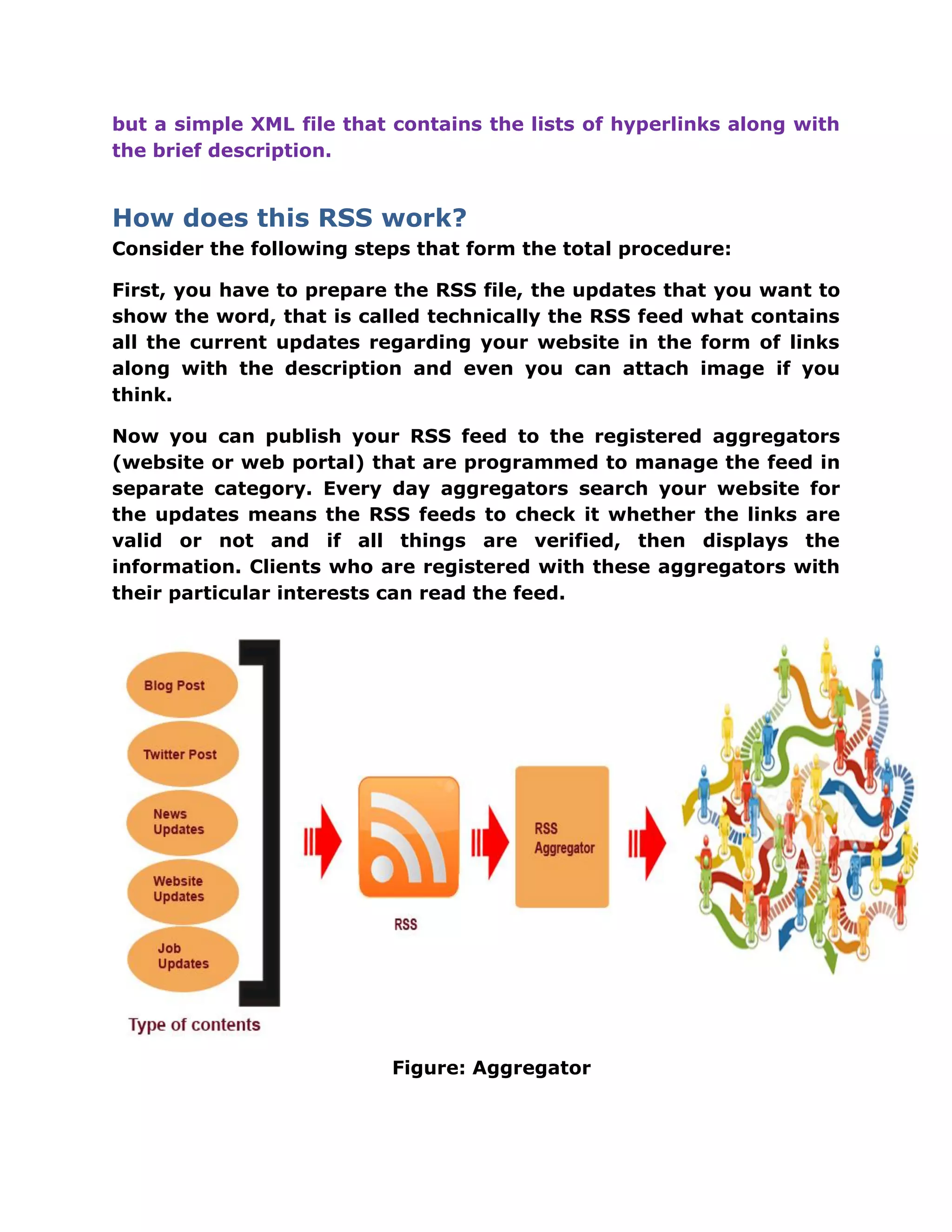
Now you can publish your RSS feed to the registered aggregators
(website or web portal) that are programmed to manage the feed in
separate category. Every day aggregators search your website for
the updates means the RSS feeds to check it whether the links are
valid or not and if all things are verified, then displays the
information. Clients who are registered with these aggregators with
their particular interests can read the feed.
Figure: Aggregator
A pretty girl with so many nick names!!!!
Often confused with so many names like Feed aggregator, News aggregator,
RSS aggregator, feed reader, RSS Reader
So, let’s look into the matter in a simplified way:
Feed aggregator, News aggregator, RSS aggregator, feed reader, RSS
Reader all are basically same and nothing but web application or client
software (desktop application, often called desktop feed reader) which
collects syndicated web contents for easy viewing and finding.
Who can make use of RSS?
Better say anyone can use RSS for the promotion of his/her website as there
is no hard and fast rules for this. But if we look into the technical
characteristic then we use it for the following sort of websites to get the best
from this technique.
 Website dealing with auction item: easily distribute the news of the
newly items added to the action list so that subscriber can get the
updates easily
 News agency: can use to distribute their news updates
 Entertainment Sites: easily subscriber can have the updates
 Shopping sites: perfect technique to let the subscriber know about new
items and offers
 Job sites : easily distribute the latest job updates and news
The History of RSS:
Well, though everyone is not fond of “history”, but it is a customary to
attach a glimpse of past efforts.
 1997: Dave Winer at UserLand first forms the RSS as scripting News
 1999: Netscape proposed RSS 0.90
 2000: UserLand releases the official RSS 0.91 specification
 2000: O'Reilly published RSS 1.0 that contains RDF and namespaces.
 2001 : Dave Winer developed RSS 2.0 after quitting UserLand
 2003 : The official RSS 2.0 specification is released
RSS Syntax:
Well, let’s have a look into the syntax details; a bit technical stuff and that
cannot be avoided completely. RSS uses very simple syntax and this is self
describing. One can construct RSS very easily and for that very basic xml
knowledge is required. Though, many free RSS generator also available
online and one can use this online generator to construct the RSS for their
website without having any technological knowledge and believe me all you
have to do is just to put your website address. The RSS file will be generated
and ready to use. The next page reveals a basic RSS file that I have used for
my website. Please, look into the files closely and do not worry for the
technical jargons as these are not much tough as it looks.
Figure: RSS Syntax
Now, if we examine closely the file, we will see the first line telling us that it
is an xml file whose version is 1.0 and uses “UTF-8” character set.
The very next line reveals that it is a RSS document and the version is 2.0.
The third line has the “channel” element that tells u about the RSS Feed.
There are three child elements that are mandatory to construct a “Channel”
element are described as follows:
Mandatory child elements for channel element:
 <Title>: reveals the tile i.e. “digitechpedia”
 <Link>: contains the hyperlink of the channel i.e.
http://www.digitechpedia.com
 <Description>: very important as it explains the purpose of the
channel.
 <Item>: defines the feed or the article. A channel item can have more
than one item child element.
Except the mandatory elements there are few more additional child elements
are there, under the channel element, which one can use for better
readability and explanation. I would like to enlist few of them.
Optional elements:
 Language: Language used.
 copyright: Let you specify the copyright information
 Image : specify the image
 Category : is used to specify the category of the feed
Let’s have a look into these optional elements.
<language> Element: let you specify the language that you have used.
Syntax:
<language>en-us</language>
< copyright > Element :
Syntax:
<copyright>Copyright www.digitechpedia.com</copyright>
< image > Element :
Let you specify the image that you can place in the same directory where
RSS file belongs.
<image>
<url>http://www.digitechpedia.com/img_name.gif</url>
<link> http://www.digitechpedia.com/index.htm</link>
</image>
Here, <url> is the address of the image and <link> is the address of the
page where a user will be taken after clicking.
< category > Element :
Syntax:
<category>SEO</category>
<item> Element:
Defines the feed or the article that you want to share wilt every one. A
channel item can contain more than one item element.
<item> element has three mandatory elements like the <channel> element
and they are <title>,<link> and <description>. All these are same like
<channel> element.
There are few optional child elements are there under the <item> element.
Few of them are listed as follows.
 pubDate: Last publication date for the item.
 Category: is used to specify the category of the feed
 Author: let you define the name of the author.
Let’s have a look into these optional elements.
< pubDate> Element:
Syntax:
<pubDate>Mon, 12 Oct 2015 00:00:00 EST</pubDate>
<category> element is same just like before.
< author > Element :
Syntax:
<author>
<name>name of the author </name>
</author>
So, These are all about the syntax and these are not much tough; we need
to be a bit careful while constructing the RSS file as syntax must be 100%
right.
Sometimes, confusion may arises that what version to follow to
construct RSS as too many versions (0.9, 0.91, 0.92, 1.0, 2.0) are
available. Any version you can choose it does not matter; the only
thing that does matter is the syntax that needs to be 100% correct.
Notifying everyone that you have RSS:
Well, now you have constructed the RSS. So please let me congratulate you.
Now you have to notify everyone that you have got RSS file uploaded and
anyone if needed can subscribe. For this, general approach, to put a small
button with a image like this and associate the feed link to make the
task easier. You can put it either <head> section of your website or at the
footer as there is no such rules. I put it at the footer with just a simple code
as follows:
<a href="http://feeds.feedburner.com/Digitechpedia" title="Subscribe to my
feed" rel="alternate" type="application/rss+xml"><img
src="//feedburner.google.com/fb/images/pub/feed-icon32x32.png" alt=""
style="border: 0"></a>
One thing I would like to share that the “href” contains the link to the RSS
file as you can see from the above example. Here, I used “feedburner” to
generate my RSS feed but it is not mandatory to use “feedburner”; I did it
for different purpose as the link is from the updates of my blog that I shared
in my webpage. You will put your link of the RSS file uploaded at the root
directory like http://www.abc.com/rss.xml
At my next post I will be sharing details about “feedburner”.
RSS Generator makes your task easy:
Well, some free online RSS generator tools are available and you just need
to Google a bit to find those websites. This may save doing the task
manually.
RSS validation:
After, generating the RSS File it is a good practice that you must check
whether the syntax are 100% correct or not. So again you need to Google a
bit to fine free RSS validate tool. I can suggest one tool like this
http://www.feedvalidator.org/; it worked fine for me and still use it to
validate my client’s RSS files.
Uploading RSS, few important points:
So, RSS is nothing but an xml file that keeps the recent changes of your site
or the changes you would like to show the others as advertisement.
After preparing the RSS files you have to upload the file to the root
directory.
Means: http://www.abc.com/rss.xml
Practical example:
1> http://www.digitechpedia.com/rss.xml
Follow the links and you will be able to see how it looks like.
***URLs in RSS/Atom feeds should maintain to the following guidelines:
 Only include URLs that can be fetched by Googlebot. A common
mistake is including URLs disallowed by robots.txt — which cannot be
fetched by Googlebot, or including URLs of pages that don't exist.
 Only include canonical URLs. A common mistake is to include URLs of
duplicate pages. This increases the load on your server without
improving indexing.
***SO, closely examine the rss.xml before uploading whether each
urls are opening the different pages or not. If more than one urls
pointing to same page then only canonical url for those urls must be
put in rss.xml file and duplicate urls must be deleted.
Some Directories Name:
I personally used all these and hope this are still functioning well.
 feedgy.com
 feedlisting.com
 feedage.com
 feedcat.net
 plazoo.com
 blogdigger.com
 rss6.com
 http://www.blogrollcenter.com/
 http://fuelmyblog.com
 http://blogdigger.com
 http://swoogle.umbc.edu
 http://www.rssmicro.com/
 http://feedshark.brainbliss.com/
 http://www.wilsdomain.com
 http://ngoid.sourceforge.net/
 http://allfeeds.org
 http://rssroot.com
Except these one can find plenty of sites, if they search in the Google.
All you have to do just look into the site first whether it is still alive or not.
A Humble Request:
My friends, I am a freelancer and newcomer in the field of digital marketing.
I shared with you what I have learned during my sort tenure in this field so
that you, friends who got more experience in this field can add and share
your knowledge with novices like me; as it is very much needed to rectify
the error. So, guys please leave comment with rectification that is needed
and help me to rectify if there is any mistake.
Please, have a look into my website: http://www.digitechpedia.com/
Somnath

Rss feed complete guide

  • 1.
    RSS (Really SimpleSyndication or Rich Site Summery): Figure: A graphical Representation of RSS A few words that is customary to start a topic, nothing but a routine work: Well, in a brief I can say RSS, an acronym for Rich Site Summery or “Really Simple Syndication” that allows you to syndicate your website contents.
  • 2.
    We want tostay updated always, it is our habit: Every day, we use to serf internet and this is a common habits of all of us and it is quite relevant in our daily life as through internet we can have access all sorts of information like current News Headlines, entertainment, travel news, health info, education information, job vacancies, social news and trends and so many things. Many of us want to track all of these lists of information and believe me I am one of them. But what is the easiest way to track news and information? Because news always keeps changing and everyone wants to get updated always; quite natural habit as nobody wants to stay behind. So, what will you do? Always keep surfing to stay updated. Well that is not at all possible as we are all busy doing something for our livelihood and hypothetically (for the sake of argument), say one has enough time to do all these stuff (a fortunate one!!), even for him/her it is a cumbersome and time consuming process to check all the updates daily in numerous websites and portals. RSS is the solution: So what if the websites and web portals automatically tell you about the updates that you like? Well, is it possible? Yes, through RSS (Really Simple Syndication) it is possible. Let’s dig a bit into the matter. RSS is nothing
  • 3.
    but a simpleXML file that contains the lists of hyperlinks along with the brief description. How does this RSS work? Consider the following steps that form the total procedure: First, you have to prepare the RSS file, the updates that you want to show the word, that is called technically the RSS feed what contains all the current updates regarding your website in the form of links along with the description and even you can attach image if you think. Now you can publish your RSS feed to the registered aggregators (website or web portal) that are programmed to manage the feed in separate category. Every day aggregators search your website for the updates means the RSS feeds to check it whether the links are valid or not and if all things are verified, then displays the information. Clients who are registered with these aggregators with their particular interests can read the feed. Figure: Aggregator
  • 4.
    A pretty girlwith so many nick names!!!! Often confused with so many names like Feed aggregator, News aggregator, RSS aggregator, feed reader, RSS Reader So, let’s look into the matter in a simplified way: Feed aggregator, News aggregator, RSS aggregator, feed reader, RSS Reader all are basically same and nothing but web application or client software (desktop application, often called desktop feed reader) which collects syndicated web contents for easy viewing and finding. Who can make use of RSS? Better say anyone can use RSS for the promotion of his/her website as there is no hard and fast rules for this. But if we look into the technical characteristic then we use it for the following sort of websites to get the best from this technique.  Website dealing with auction item: easily distribute the news of the newly items added to the action list so that subscriber can get the updates easily  News agency: can use to distribute their news updates  Entertainment Sites: easily subscriber can have the updates  Shopping sites: perfect technique to let the subscriber know about new items and offers  Job sites : easily distribute the latest job updates and news The History of RSS: Well, though everyone is not fond of “history”, but it is a customary to attach a glimpse of past efforts.  1997: Dave Winer at UserLand first forms the RSS as scripting News  1999: Netscape proposed RSS 0.90  2000: UserLand releases the official RSS 0.91 specification  2000: O'Reilly published RSS 1.0 that contains RDF and namespaces.  2001 : Dave Winer developed RSS 2.0 after quitting UserLand  2003 : The official RSS 2.0 specification is released
  • 5.
    RSS Syntax: Well, let’shave a look into the syntax details; a bit technical stuff and that cannot be avoided completely. RSS uses very simple syntax and this is self describing. One can construct RSS very easily and for that very basic xml knowledge is required. Though, many free RSS generator also available online and one can use this online generator to construct the RSS for their website without having any technological knowledge and believe me all you have to do is just to put your website address. The RSS file will be generated and ready to use. The next page reveals a basic RSS file that I have used for my website. Please, look into the files closely and do not worry for the technical jargons as these are not much tough as it looks. Figure: RSS Syntax
  • 6.
    Now, if weexamine closely the file, we will see the first line telling us that it is an xml file whose version is 1.0 and uses “UTF-8” character set. The very next line reveals that it is a RSS document and the version is 2.0. The third line has the “channel” element that tells u about the RSS Feed. There are three child elements that are mandatory to construct a “Channel” element are described as follows: Mandatory child elements for channel element:  <Title>: reveals the tile i.e. “digitechpedia”  <Link>: contains the hyperlink of the channel i.e. http://www.digitechpedia.com  <Description>: very important as it explains the purpose of the channel.  <Item>: defines the feed or the article. A channel item can have more than one item child element. Except the mandatory elements there are few more additional child elements are there, under the channel element, which one can use for better readability and explanation. I would like to enlist few of them. Optional elements:  Language: Language used.  copyright: Let you specify the copyright information  Image : specify the image  Category : is used to specify the category of the feed Let’s have a look into these optional elements. <language> Element: let you specify the language that you have used. Syntax:
  • 7.
    <language>en-us</language> < copyright >Element : Syntax: <copyright>Copyright www.digitechpedia.com</copyright> < image > Element : Let you specify the image that you can place in the same directory where RSS file belongs. <image> <url>http://www.digitechpedia.com/img_name.gif</url> <link> http://www.digitechpedia.com/index.htm</link> </image> Here, <url> is the address of the image and <link> is the address of the page where a user will be taken after clicking. < category > Element : Syntax: <category>SEO</category> <item> Element: Defines the feed or the article that you want to share wilt every one. A channel item can contain more than one item element. <item> element has three mandatory elements like the <channel> element and they are <title>,<link> and <description>. All these are same like <channel> element.
  • 8.
    There are fewoptional child elements are there under the <item> element. Few of them are listed as follows.  pubDate: Last publication date for the item.  Category: is used to specify the category of the feed  Author: let you define the name of the author. Let’s have a look into these optional elements. < pubDate> Element: Syntax: <pubDate>Mon, 12 Oct 2015 00:00:00 EST</pubDate> <category> element is same just like before. < author > Element : Syntax: <author> <name>name of the author </name> </author> So, These are all about the syntax and these are not much tough; we need to be a bit careful while constructing the RSS file as syntax must be 100% right. Sometimes, confusion may arises that what version to follow to construct RSS as too many versions (0.9, 0.91, 0.92, 1.0, 2.0) are available. Any version you can choose it does not matter; the only thing that does matter is the syntax that needs to be 100% correct.
  • 9.
    Notifying everyone thatyou have RSS: Well, now you have constructed the RSS. So please let me congratulate you. Now you have to notify everyone that you have got RSS file uploaded and anyone if needed can subscribe. For this, general approach, to put a small button with a image like this and associate the feed link to make the task easier. You can put it either <head> section of your website or at the footer as there is no such rules. I put it at the footer with just a simple code as follows: <a href="http://feeds.feedburner.com/Digitechpedia" title="Subscribe to my feed" rel="alternate" type="application/rss+xml"><img src="//feedburner.google.com/fb/images/pub/feed-icon32x32.png" alt="" style="border: 0"></a> One thing I would like to share that the “href” contains the link to the RSS file as you can see from the above example. Here, I used “feedburner” to generate my RSS feed but it is not mandatory to use “feedburner”; I did it for different purpose as the link is from the updates of my blog that I shared in my webpage. You will put your link of the RSS file uploaded at the root directory like http://www.abc.com/rss.xml At my next post I will be sharing details about “feedburner”. RSS Generator makes your task easy: Well, some free online RSS generator tools are available and you just need to Google a bit to find those websites. This may save doing the task manually. RSS validation: After, generating the RSS File it is a good practice that you must check whether the syntax are 100% correct or not. So again you need to Google a bit to fine free RSS validate tool. I can suggest one tool like this http://www.feedvalidator.org/; it worked fine for me and still use it to validate my client’s RSS files.
  • 10.
    Uploading RSS, fewimportant points: So, RSS is nothing but an xml file that keeps the recent changes of your site or the changes you would like to show the others as advertisement. After preparing the RSS files you have to upload the file to the root directory. Means: http://www.abc.com/rss.xml Practical example: 1> http://www.digitechpedia.com/rss.xml Follow the links and you will be able to see how it looks like. ***URLs in RSS/Atom feeds should maintain to the following guidelines:  Only include URLs that can be fetched by Googlebot. A common mistake is including URLs disallowed by robots.txt — which cannot be fetched by Googlebot, or including URLs of pages that don't exist.  Only include canonical URLs. A common mistake is to include URLs of duplicate pages. This increases the load on your server without improving indexing. ***SO, closely examine the rss.xml before uploading whether each urls are opening the different pages or not. If more than one urls pointing to same page then only canonical url for those urls must be put in rss.xml file and duplicate urls must be deleted. Some Directories Name: I personally used all these and hope this are still functioning well.  feedgy.com  feedlisting.com  feedage.com
  • 11.
     feedcat.net  plazoo.com blogdigger.com  rss6.com  http://www.blogrollcenter.com/  http://fuelmyblog.com  http://blogdigger.com  http://swoogle.umbc.edu  http://www.rssmicro.com/  http://feedshark.brainbliss.com/  http://www.wilsdomain.com  http://ngoid.sourceforge.net/  http://allfeeds.org  http://rssroot.com Except these one can find plenty of sites, if they search in the Google. All you have to do just look into the site first whether it is still alive or not. A Humble Request: My friends, I am a freelancer and newcomer in the field of digital marketing. I shared with you what I have learned during my sort tenure in this field so that you, friends who got more experience in this field can add and share your knowledge with novices like me; as it is very much needed to rectify the error. So, guys please leave comment with rectification that is needed and help me to rectify if there is any mistake. Please, have a look into my website: http://www.digitechpedia.com/ Somnath